
The question a developer asks before committing to a B2B data API is not whether the platform is good, but whether the API exposes enough of that platform to justify the dependency.
6sense's API is a set of six REST endpoints covering company identification, firmographic enrichment, people enrichment, people search, and predictive lead scoring. The developer docs are public, a Postman collection covers all endpoints, and code examples ship in four languages. For a platform that processes over one trillion buying signals daily, the API is narrow by design: it exposes enrichment and scoring, not the intent data, advertising, or orchestration that define the product.
That scope is the central question this review addresses.
The 6sense API is likely the right choice if:
You need to identify companies visiting your website in real time by matching IP addresses to accounts with firmographic data and predictive scores.
You are building a Marketo or marketing automation integration that needs lead scoring and firmographic enrichment in a single webhook-triggered call.
You want to enrich contacts from email addresses or LinkedIn URLs with verified business data, in batches of up to 25 per request.
You need predictive buying-stage scores at the API layer to prioritize leads programmatically without consuming credits.
You are already a 6sense platform customer and want to extend its identification and enrichment capabilities into a custom pipeline.
It might not fit if:
You need a search-first workflow where you discover contacts and companies by firmographic and intent filters before enriching them, rather than starting with an IP, email, or domain you already have.
You need webhook-driven automation on enrichment or scoring events, since the core APIs have no outbound webhook system.
You need API coverage beyond enrichment and identification: audience management, intent topic search, AI-powered account research, or compliance endpoints.
You need OAuth 2.0 with scoped delegated access, token rotation, and credential management for multi-tenant integrations.
Your pipeline requires more than 100 API requests per minute without negotiating a limit increase with your CSM.
You want a free developer tier or sandbox to evaluate the API before buying a platform subscription.
In this case, consider ZoomInfo's API. ZoomInfo is a B2B data and intelligence platform whose Enterprise API is a REST suite at api.zoominfo.com/gtm covering search, enrichment, AI intelligence, and audience management across 500M contacts and 100M companies, with OAuth 2.0 authentication, tiered rate limits up to 35 req/sec, webhooks via the Agent Teams API, and an MCP server for AI-agent workflows. Search and lookup operations are free; enrichment consumes credits only on new records.
This article reviews both: the 6sense API in full technical depth first, then ZoomInfo's API where your build needs a wider data surface.
6sense API at a Glance
Attribute | Detail |
|---|---|
API type | REST over HTTPS, JSON responses |
Authentication | API token (40-character alphanumeric key) passed via Authorization: Token {key} header |
Base URL | Multiple: epsilon.6sense.com (Company Identification), api.6sense.com (People Enrichment, Company Firmographics v3), scribe.6sense.com (Lead Scoring, Company Firmographics v2) |
Rate limits | 100 requests per minute (global); People Enrichment: up to 20 queries per second |
Pricing / access | Credit-based with two separate credit pools (Company Identification and Enrichment); requires active 6sense Platform or Sales Intelligence subscription |
SDKs | No official SDKs; code examples in cURL, XHR, Node.js, and Python |
Webhooks | Not supported on core APIs; the AI Email module has separate webhook endpoints |
Documentation | api.6sense.com/docs with Postman collection |
6sense API: What Works Well & What to Plan Around
What works well | What to plan around |
|---|---|
Predictive buying-stage scores at the API layer, and the Lead Scoring API consumes no credits | Scope is enrichment and identification only: no contact/company search by filters, no audience management, no intent topic browsing |
Company Identification API matches IPs to accounts in real time with firmographics, segments, and predictive scores | 100 requests per minute global rate limit is low for high-volume pipelines |
People Enrichment supports batch calls of up to 25 queries at 20 queries per second | Three separate base URLs across six APIs; no unified API root |
People Search and Lead Scoring endpoints do not consume credits | No outbound webhooks on core APIs: all enrichment and scoring is request-response only |
Postman collection covers all endpoints; code examples in four languages | No official SDKs in any language; you own the HTTP client, retry logic, and error handling |
Re-enrichment within 12 months is free on Enrichment credits | API access requires an active platform subscription; no free developer tier or sandbox |
6sense API: Authentication & Getting Started
API access is not self-serve. You need an active 6sense Platform or Sales Intelligence subscription, and you must purchase API credits separately from the platform's standard credit pools. There is no developer signup, no free API tier, and no sandbox. Organizations without platform access are directed to book a demo.
Once you have platform access, you generate tokens inside 6sense at Settings > Integrations > All Integrations > API Token. Each token is a randomly generated 40-character alphanumeric key scoped to a specific API group (Company Identification, Enrichment APIs, or both). For the Company Identification API, an allowed-domain list can restrict which domains may use a given token. 6sense recommends creating one unique token per integration for usage tracking and troubleshooting, and rotating tokens every 90 days.
One exception: the Segments API requires contacting 6sense support to generate a token rather than self-service.
Authentication is straightforward. Pass the token in the Authorization header on every request:
curl -H "Authorization: Token YOUR_API_TOKEN" \
"https://epsilon.6sense.com/v3/company/details?ip=203.0.113.42"
An optional partner header is available for resellers and technology partners:
X-6s-CustomID: {partner_name}-{customer_name}-{customer_api_token}
The authentication model is static key-based. There is no OAuth flow, no token exchange, no rotating credentials, and no scoped permissions beyond the API-group assignment. For teams that require credential rotation or applications that need delegated access (multi-tenant integrations where each customer authenticates independently), this model is limiting. 6sense states that the API token must not be exposed on any public domain, and all enrichment APIs are designed for server-to-server communication only.
6sense API: Core Endpoints & Capabilities
The API is organized into six APIs across three base URLs. The split reflects the platform's evolution: Company Identification runs on its own infrastructure at epsilon.6sense.com, newer enrichment endpoints live at api.6sense.com, and legacy scoring endpoints remain at scribe.6sense.com. Each API has its own versioning, and the versions table in the docs tracks the current stable version per API.
Company Identification
Endpoint: GET https://epsilon.6sense.com/v3/company/details
This is the real-time visitor identification endpoint. You send an IP address and get back the matched company's firmographic data, 6sense segment memberships, and predictive scores. 6sense designed it for client-side implementation: website personalization, dynamic content, and visitor de-anonymization. The company recommends against server-side implementation due to latency. If you already use the 6sense WebTag, you can activate this endpoint without generating a separate API token.
Each matched response consumes one Company Identification credit. Re-identifying the same IP counts against credits within a contract year.
What you would build with this: a website personalization layer that identifies the visiting company and adjusts content, CTAs, or pricing based on the visitor's firmographic profile and 6sense buying stage, before the visitor fills out a form.
Company Firmographics & Lead Scoring
Three APIs serve overlapping enrichment and scoring use cases:
Company Firmographics API (v3): Takes an email address as input and returns company firmographic data and segment memberships. Available to 6sense Platform or Sales Intelligence customers. Consumes Enrichment API credits.
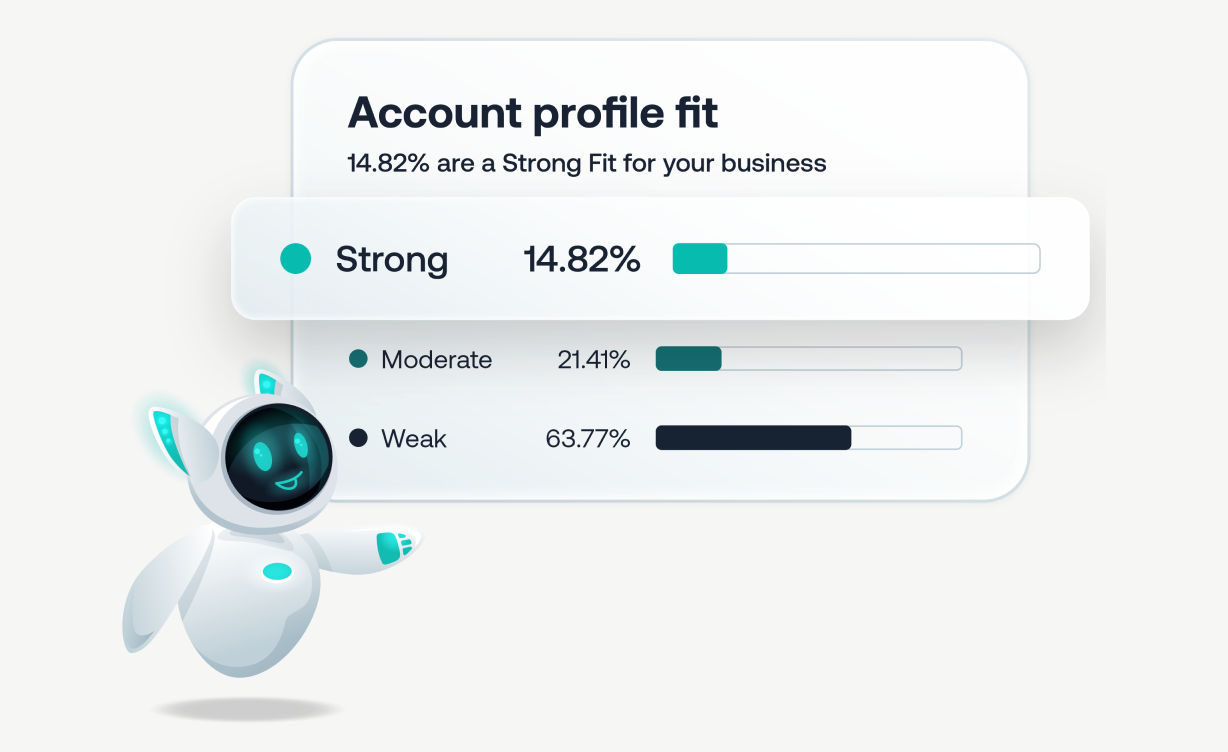
Lead Scoring API (v2): Returns predictive scores at the product level for a lead identified by email. Requires the Advanced package tier. This endpoint does not deduct API credits, making it a free signal you can call on every inbound lead without cost.
Lead Scoring & Firmographics API (v2): Combines both into a single call. Primarily designed for Marketo customers using the webhook pattern: a Marketo Smart Campaign fires a webhook to 6sense, and 6sense returns enrichment and scoring data in the response, which Marketo maps to lead fields. Requires the Advanced package for scoring data. Consumes Enrichment API credits for the firmographic portion.
Source: 6sense
What you would build with these: a lead scoring enrichment flow inside your marketing automation platform. When a new lead enters the system, the combined API returns firmographics and a predictive buying-stage score in one call, and your automation rules route the lead based on the score.
People Search & Enrichment
People Search API (v2): POST https://api.6sense.com/v2/people/search
This endpoint searches for contacts within an organization for a given domain, filterable by location, industry, and job title. It returns whether contact details (email, phone, mobile) exist for each match, but does not return the actual contact data. To get emails and phone numbers, you pass the returned peopleId values to the People Enrichment API. This endpoint does not consume credits.
A People Search Dictionary API is also available for retrieving valid filter values.
One constraint: People Search is domain-scoped. You search for contacts at a company you already know (by domain), not across the entire database by firmographic or intent filters. If you need to discover companies first, the API does not offer that workflow.
People Enrichment API (v2): POST https://api.6sense.com/v2/enrichment/people
This is the contact data endpoint. Input accepts email, linkedinUrl, or peopleId, plus optional referenceKeys for custom metadata. It returns email, phone, mobile number, title, seniority, job function, and company firmographics. It supports up to 25 queries in a single batch call, with a throughput limit of 20 queries per second. Available as a paid add-on to any qualifying 6sense package. Consumes Enrichment API credits.
A basic enrichment request:
curl -X POST "https://api.6sense.com/v2/enrichment/people" \
-H "Authorization: Token YOUR_API_TOKEN" \
-H "Content-Type: application/json" \
-d '{"email": "jane.doe@example.com"}'
What you would build with these: a pipeline that takes a target domain from your CRM, searches for contacts matching specific roles via People Search (free), then enriches only the relevant contacts via People Enrichment (credits). The two-step pattern keeps credit costs proportional to the contacts you actually need.
AI Email API
A separate AI Email API exists for the AI Email module (formerly Conversational Email), documented independently at docs.saleswhale.com. It covers lead lifecycle management (create, enroll, retrieve, delete) and conversation management for non-Salesforce CRM integrations and custom workflows. This API is distinct from the core enrichment APIs, and its v2 has gaps: it cannot update a lead, and it cannot bulk create, enroll, or cancel. The AI Email API is the only 6sense API with webhook endpoints for lead and conversation lifecycle events.
6sense API: Webhooks & Events
The core enrichment and identification APIs have no outbound webhook system. 6sense does not push event notifications to external URLs when account scores, segments, or buying stages change. All enrichment and scoring operations are synchronous request-response calls.
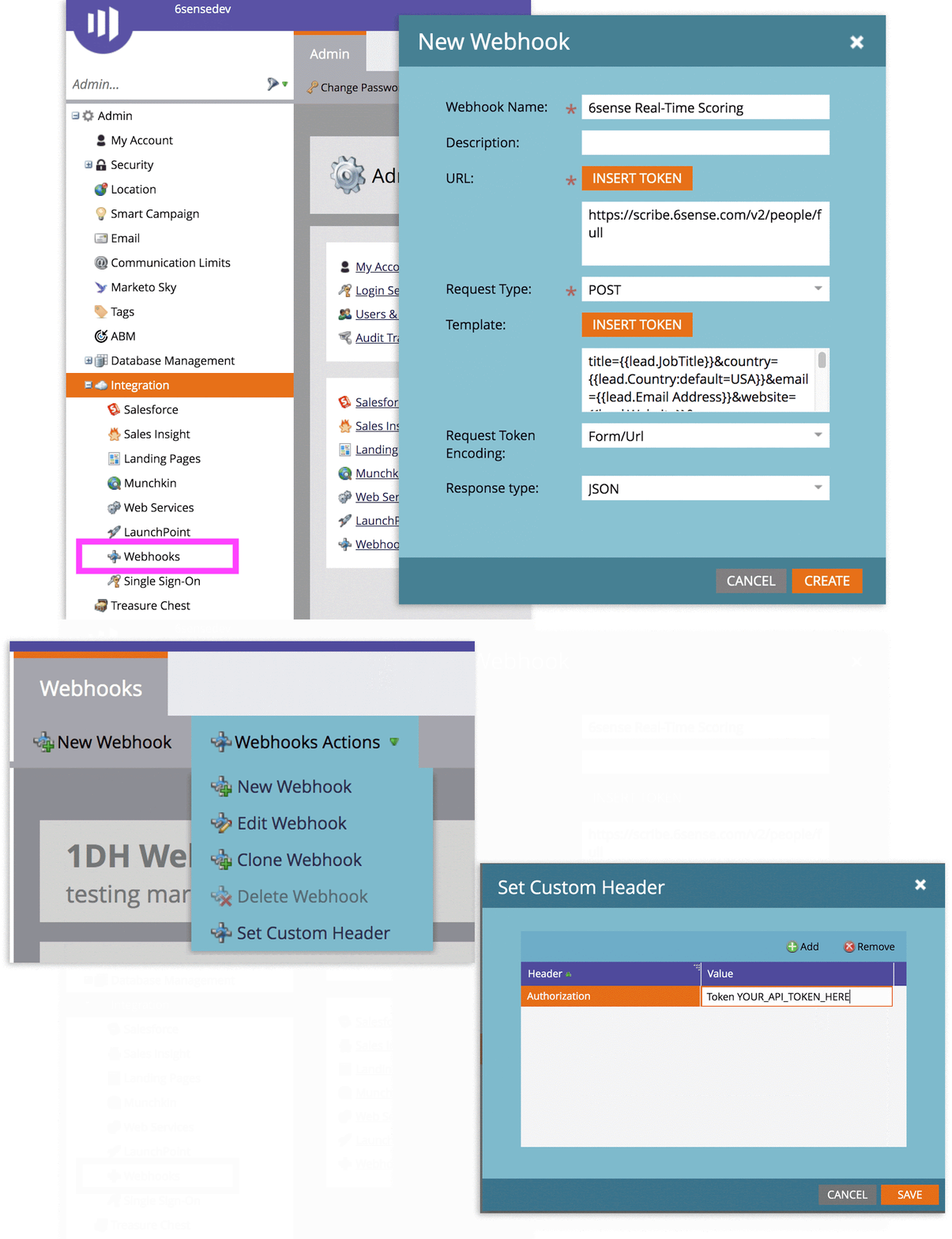
The documented integration pattern works in reverse: marketing automation platforms call 6sense's APIs via their own webhook mechanisms. The Marketo integration, for example, uses a Marketo Smart Campaign to fire a webhook POST to 6sense's Lead Scoring and Firmographics endpoint. 6sense returns enrichment data in the webhook response. The trigger logic lives in Marketo, not in 6sense.
Source: 6sense
The one exception is the AI Email module. Its webhook endpoints (documented at docs.saleswhale.com) notify external systems as conversations move through statuses: Pending, Qualified, Human Review, Bounced, and others. These webhooks cover only the AI Email workflow; they do not cover enrichment, scoring, or company identification events.
For a developer building an event-driven pipeline (react when an account enters a new buying stage, fire an enrichment job when a score changes, trigger a workflow when a new contact appears), the absence of webhooks on the core APIs means you must build your own polling layer or rely on a marketing automation platform to bridge the gap.
6sense API: SDKs, Docs & Rate Limits
SDKs & Libraries
6sense does not publish official SDKs in any language. The API documentation provides code examples in four formats:
cURL
XHR (browser-side JavaScript)
Node.js (via the request library)
Python
A Postman collection is available from the docs navigation, covering all documented endpoints. No community-maintained libraries are officially referenced.
The absence of an official SDK is worth noting. You build and maintain the HTTP client, the authentication wrapper, the rate-limit backoff logic, the error handling, and the retry strategy yourself. For a single-endpoint integration (Company Identification for website personalization), that overhead is small. For a pipeline that calls People Search, People Enrichment, and Lead Scoring in sequence with batching and error recovery, the engineering work adds up.
Documentation & Developer Experience
The primary developer reference lives at api.6sense.com/docs and covers all data enrichment APIs with structured navigation, a versioning table showing current stable versions per API, HTTP response codes, and multi-language code examples. A Best Practices section covers token management and security hygiene. API versioning is documented; customers receive deprecation notices before 6sense retires older versions.
The AI Email API is documented separately at docs.saleswhale.com and covers v1 and v2 endpoints for lead and conversation management. The two documentation sites are disconnected, with no cross-linking.
Two things the docs lack: an interactive API explorer (no Swagger UI, no Redoc, no inline testing) and a downloadable OpenAPI specification file. The Postman collection is the closest alternative, but it requires importing into Postman rather than testing inline. 6sense routes developer support through the RevCity community and support portal rather than a dedicated developer channel.
The documentation is organized well but lacks the interactive tooling that lets a developer confirm a response shape without writing code.
Rate Limits & Constraints
The global rate limit is 100 requests per minute across all APIs. Requests exceeding this limit receive a 429 Too Many Requests response. You can increase the limit by contacting your CSM.
The People Enrichment API has a separate, higher throughput ceiling: up to 20 queries per second per customer, with a single batch call supporting up to 25 queries. A well-batched enrichment pipeline can process up to 500 records per second (20 requests x 25 records), as long as the total request count across all APIs stays within the 100/minute global ceiling.
The practical tension: 100 requests per minute is roughly 1.67 requests per second across all API calls combined. If your pipeline calls People Search, then People Enrichment, then Lead Scoring for the same batch, each step counts against the same global quota. For high-volume pipelines, the global limit (not the per-endpoint throughput) is the binding constraint.
When you exhaust your API credit quota, the API returns a 402 Quota Exhausted response. You can top up quota by contacting your CSM, but there is no self-serve credit purchase path.
6sense API Pricing & Access Costs
6sense's API uses a credit-based model with two separate credit pools, distinct from the platform's standard user-facing credits:
Company Identification Credits: One credit per matched IP response. Re-identifying the same IP counts against credits within a contract year.
Enrichment Credits: Apply to People Enrichment, Company Firmographics, and Lead Scoring & Firmographics APIs. Customers can re-enrich the same record for up to one year from initial enrichment at no additional cost.
Two API endpoints are free to call:
People Search API: no credits consumed
Lead Scoring API: no credits consumed
The separation matters. You must purchase API credits separately from the platform's user-facing credits, and each credit type applies only to its designated API group. You cannot use Company Identification credits for People Enrichment, or vice versa. Usage beyond your purchased quota is billable.
No per-call rates or credit pack prices appear in the documentation or on the pricing page. All API credit purchasing goes through a CSM, and the pricing page directs visitors to book a demo.
The platform requirement matters. API access requires an active 6sense Platform or Sales Intelligence subscription. The People Enrichment API is a paid add-on to any qualifying package. Lead Scoring requires the Advanced package tier. A free Sales Intelligence tier exists with 50 credits per month, but those are platform credits for the UI, not API credits.
For a developer sizing costs: the total investment is the platform subscription plus API credit packs, both custom-quoted. The re-enrichment-within-12-months policy helps control costs for records you revisit, and the free People Search and Lead Scoring endpoints let you build discovery and scoring workflows without credit impact. Watch for the credit pool separation: budgeting for enrichment credits does not cover identification credits, and running out of either pool triggers a 402 that halts your pipeline until you contact your CSM.
Where the 6sense API Falls Short
These are practical limits a developer should plan around. Several are scope decisions that reflect what the 6sense API is (an enrichment and scoring surface) and what it is not.
The API does not support discovery-first workflows. No endpoint lets you search for companies or contacts by firmographic, technographic, or intent filters the way you would in the 6sense platform. People Search is domain-scoped: you must already know the company's domain to search for contacts within it. If your pipeline starts with "find companies matching my ICP," you need a different API or the 6sense UI.
No outbound webhooks on the core APIs. Company Identification, enrichment, and scoring are all synchronous request-response calls. When an account's buying stage changes, when a new contact appears, or when a score crosses a threshold, the API has no mechanism to push that event to your system. The only webhooks in the 6sense ecosystem belong to the AI Email module, a separate product with its own documentation.
The global rate limit is 100 requests per minute. For a B2B data API, this is restrictive. A pipeline that calls People Search, People Enrichment, and Lead Scoring in sequence for a batch of accounts can exhaust the quota in under a minute. You can increase the limit by contacting your CSM, but the default ceiling constrains any high-throughput integration.
Three separate base URLs with no unified API root. Company Identification lives at epsilon.6sense.com, People Enrichment and Company Firmographics v3 at api.6sense.com, and Lead Scoring at scribe.6sense.com. Each has its own versioning. This is not one REST API but three independently hosted services, and your integration code must route requests across all three.
No OAuth, no token rotation, no scoped permissions. Authentication is a static API token with no credential lifecycle management. You cannot grant a token read-only access to one API group while granting another token write access to a different group. Multi-tenant integrations and environments with mandatory credential rotation require workarounds.
No interactive API explorer or OpenAPI specification. The docs are text-based with code examples, and the Postman collection requires a separate tool. There is no inline testing tool, no Swagger UI, and no downloadable OpenAPI spec for code generators to consume.
API credits are a separate purchase from platform credits, with no published pricing. The two credit pools (Company Identification and Enrichment) must each be purchased through a CSM, with no published prices, no self-serve top-up, and no way to reallocate credits between pools. A 402 Quota Exhausted response halts your pipeline until you reach your account team.
Intent signals, advertising, audience management, and orchestration are not on the API. The capabilities that differentiate 6sense as a platform (Signalverse intent data, dynamic buying stages, advertising, Intelligent Workflows) are not accessible through the API. The API exposes the enrichment layer beneath those features, not the features themselves.
ZoomInfo API: The Wider Data and Intelligence Surface
6sense's API exposes enrichment and scoring from a known starting point: an IP, an email, or a domain you already have. ZoomInfo's API, built on its B2B data and intelligence platform, starts a step earlier. Search endpoints let you discover contacts and companies by firmographic, technographic, and intent filters before you commit enrichment credits. Its GTM Context Graph processes 1.5B+ data points daily and fuses ZoomInfo's B2B data with your first-party data so the API returns not just records but the context behind them. Teams access this intelligence through the GTM Workspace for sellers, GTM Studio for marketers and RevOps, or the API and MCP in any front-end. For a developer whose pipeline needs to find targets first and enrich second, the search-then-enrich pattern changes the architecture. Agent Teams build on that same data layer to run complete plays end to end, in GTM Studio and headless through GTM.AI, with specialist agents that share account context and act within the approvals and limits you set.
What the API Covers
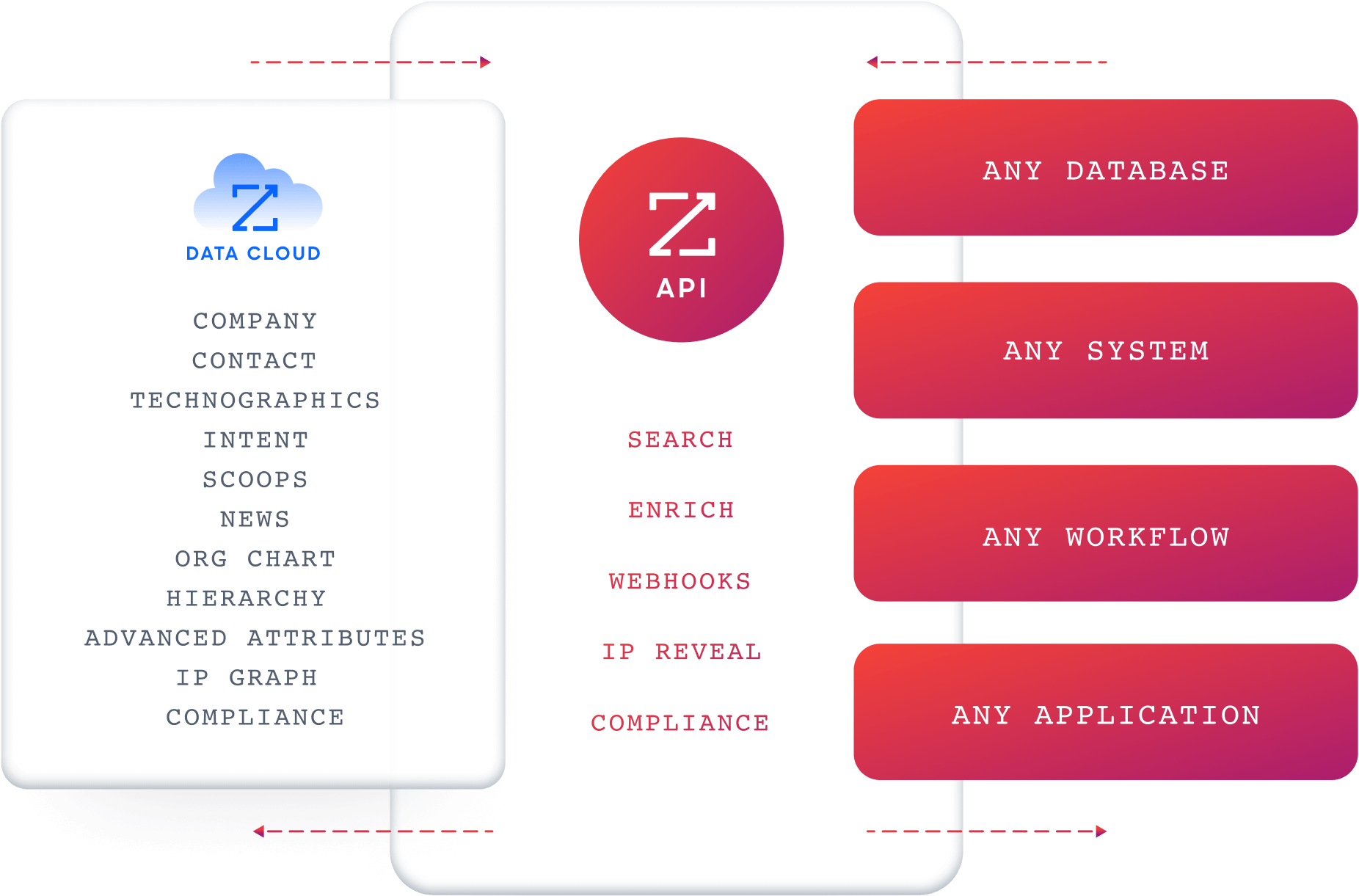
ZoomInfo's Enterprise API is a REST suite served from https://api.zoominfo.com/gtm (one base URL), organized into four groups documented in the interactive API reference:
Data API (Search & Enrich): Search endpoints cover Contacts, Companies, Intent, News, and Scoops, returning matched records without consuming credits. Enrich endpoints unlock the full payload: business emails, direct dials, employment history, corporate hierarchy, org charts, technographics, and hashtag signals, up to 25 records per call. The dataset spans 500M contacts and 100M companies, 135M+ verified phone numbers, and 200M+ verified business email addresses. The search-then-enrich pattern means you filter freely and pay only for the records you commit to.
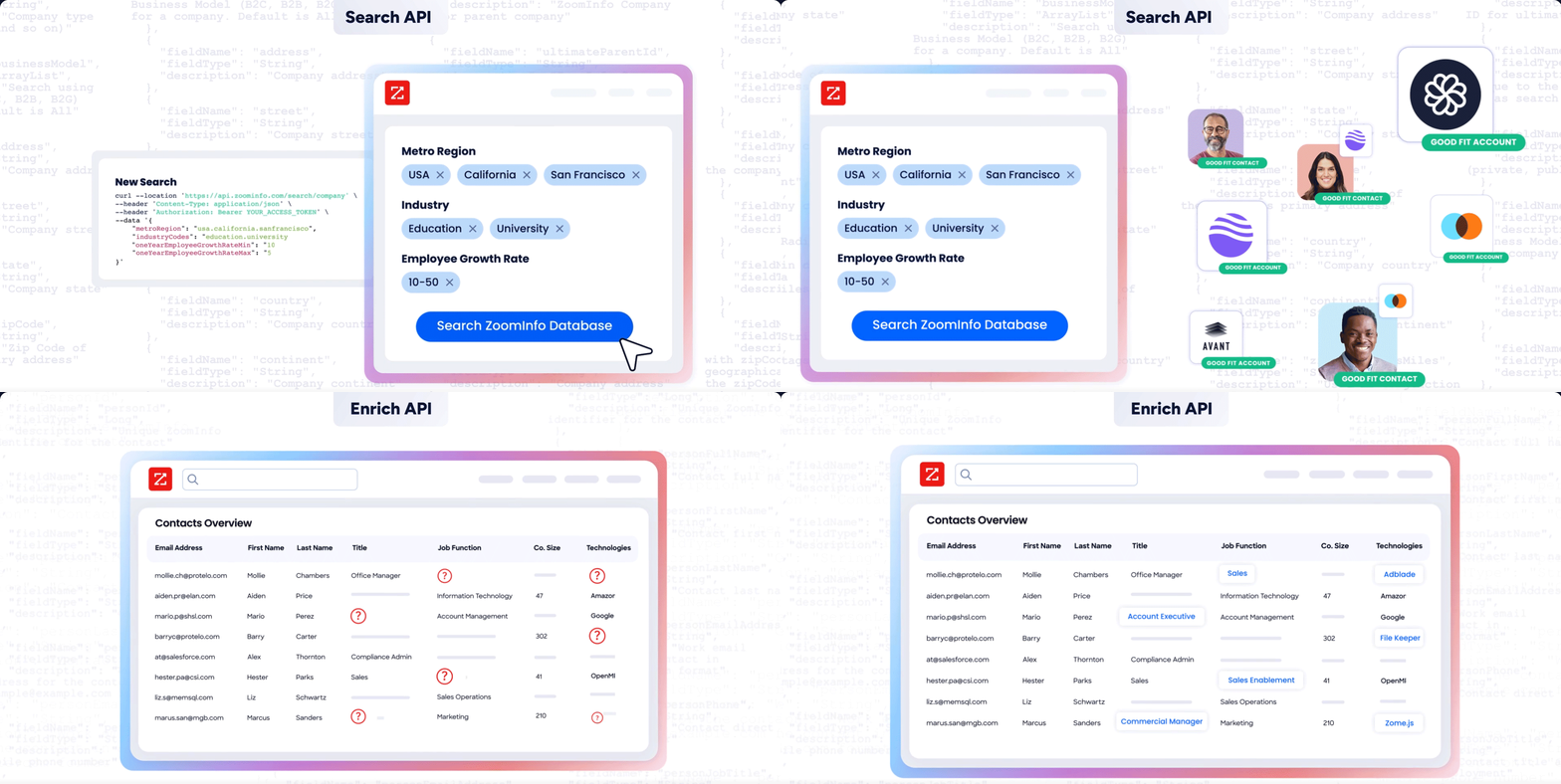
Copilot API (AI Intelligence): Powered by the AI engine inside GTM Workspace, the Copilot API exposes AI intelligence programmatically. Account Summary returns structured account intelligence with a free-form Q&A endpoint. Find Similar Companies performs lookalike expansion. Contact Recommendations returns AI-ranked buying-committee suggestions by motion (prospecting, deal acceleration, renewals). Requires an Enterprise API or Copilot package subscription.
Marketing API: CRUD endpoints for programmatic audience management.
Platform API (Engagements, Beta): Bidirectional engagement data for feeding first-party signals back into ZoomInfo's intelligence layer.
What you would build with these that 6sense's API cannot support: a prospecting pipeline that searches for companies matching your ICP by industry, employee count, and technology stack (free), enriches the matches with verified direct dials and org charts (credits), then runs AI-powered account research to generate briefing docs, all through one API.
Authentication, Rate Limits & Credits
ZoomInfo uses OAuth 2.0 with PKCE via Okta, issuing 24-hour access tokens with rotating refresh tokens. Three flows are supported: Authorization Code with PKCE (web applications), Client Credentials (server-to-server), and Refresh Token. Teams register applications through the ZoomInfo Developer Portal, where they generate credentials, define scopes, and test endpoints.
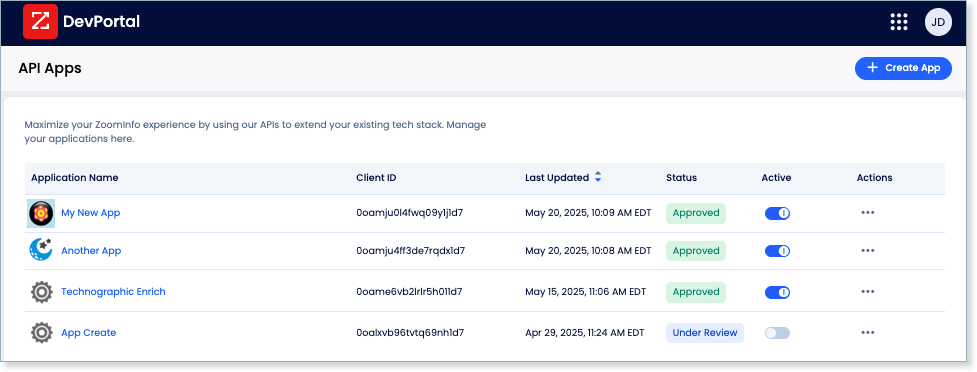
This is a different authentication model from 6sense's static token. OAuth 2.0 supports delegated access, credential rotation, and scoped permissions, which matters for multi-tenant integrations and enterprise security requirements.
Rate limits are published by tier: Builder (5 req/sec), Standard (25 req/sec), and Scaling (35 req/sec), with per-hour and per-day sliding-window limits enforced simultaneously. Every response includes quota headers with remaining capacity, and 429 responses include a Retry-After header with exact backoff timing and a X-RateLimit-Rejected-Bucket header identifying which window was exhausted.
Credits follow a rolling 12-month window: a record enriched for the first time consumes one credit; re-enriching the same record within the year is free. Search, Lookup, Find Similar, and Find Recommended operations are free.
Webhooks, MCP & Developer Experience
Webhooks are available via the Agents API, tied to ZoomInfo's Agent Teams system. Event types cover bulk enrichment jobs completing, records changing, credit usage crossing thresholds, and new signals (scoops, funding events, intent spikes) becoming available. Retry behavior and throttling are configurable per event type.
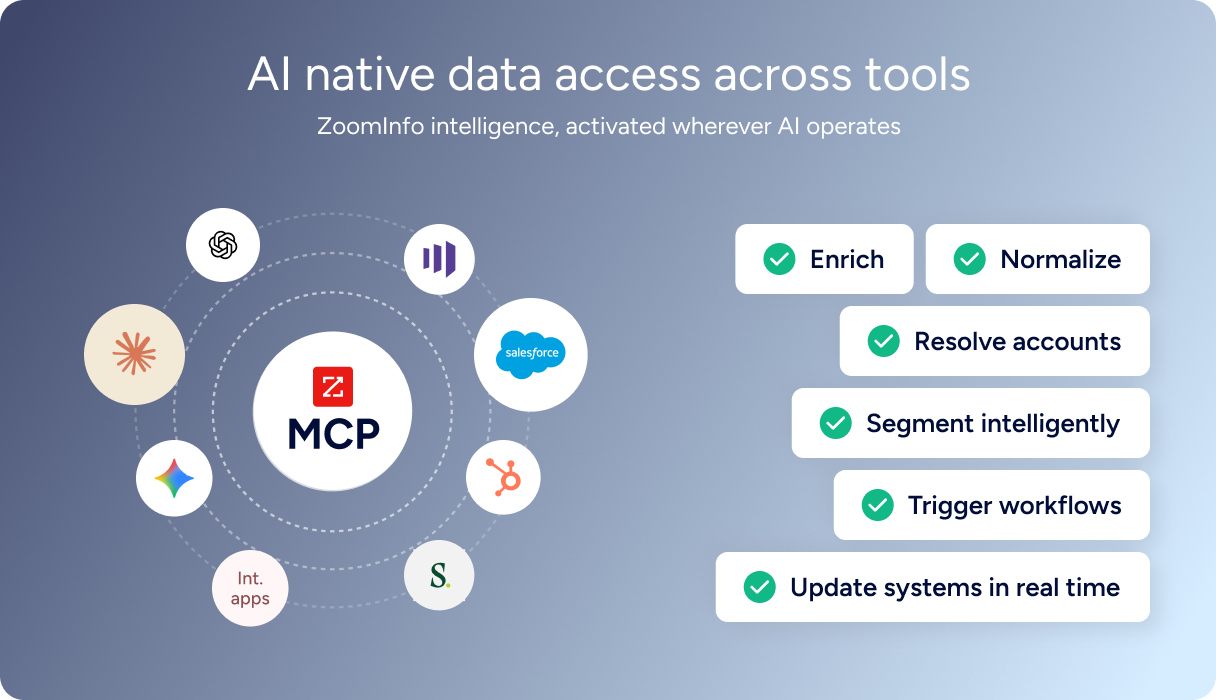
For developers building AI agents, ZoomInfo's MCP server at https://mcp.zoominfo.com/mcp exposes search, enrich, and account research as native tools for MCP-compatible assistants, currently supporting Claude and ChatGPT. A separate Docs MCP server lets AI development tools generate integration code against the API spec.
ZoomInfo does not publish official SDKs either, so both platforms require direct HTTP integration. Documentation lives at docs.zoominfo.com with an interactive API reference supporting live "Try It!" testing, code generation in five languages, and an llms.txt index for AI development tools. ZoomInfo has added API access to all relevant plans under consumption-based pricing.
BDO Canada reported an 87% reduction in time spent on updates to internal data dashboards using the ZoomInfo API, with one analyst describing the integration as plug-and-play across any process. (ZoomInfo)
6sense API vs. ZoomInfo API
Dimension | 6sense API | ZoomInfo API |
|---|---|---|
API type | REST, JSON (three separate base URLs) | REST, JSON:API format (single base URL) |
Authentication | Static API token (40-character key in header) | OAuth 2.0 with PKCE (24-hour tokens, rotating refresh) |
Primary scope | Enrichment, identification, and predictive scoring from known inputs (IP, email, domain) | Search, enrichment, AI intelligence, audience management, and compliance |
Contact/company discovery | Domain-scoped People Search only (no broad ICP-based search) | Full search by firmographic, technographic, and intent filters (free, no credits) |
Data scale | 500M contacts, 100M companies, 135M+ verified phones, 200M+ verified emails | |
Predictive scoring | Buying-stage scores and profile fit via Lead Scoring API (no credits consumed) | Account Fit Score, AI-ranked contact recommendations, lookalike expansion via Copilot API |
Webhooks | Not supported on core APIs (AI Email module only) | Agent Teams-based webhooks (enrichment jobs, signal alerts, credit thresholds) |
SDKs | None (code examples in cURL, XHR, Node.js, Python) | None (recipes in Shell, Node, Ruby, PHP, Python) |
Rate limits | 100 req/min global; People Enrichment: 20 queries/sec | 5-35 req/sec by tier, with per-hour and per-day sliding windows |
Pricing model | Two separate credit pools (Company ID + Enrichment), custom-quoted | Consumption-based pricing; single credit pool (search free, enrich by record) |
AI endpoints | Not available on core APIs | Account Summary, Find Similar Companies, Contact Recommendations |
MCP server | Not available | Available at mcp.zoominfo.com (Claude, ChatGPT) |
Interactive docs | Postman collection only; no inline explorer | Interactive "Try It!" explorer, llms.txt index, Docs MCP server |
Final Verdict
6sense's API is a focused enrichment and scoring surface: it identifies companies from IP addresses, enriches contacts from emails and LinkedIn URLs, and returns predictive buying-stage scores that no other API in the category offers the same way. The Lead Scoring API's zero-credit model makes it efficient for pipelines that need intent-driven prioritization without per-call charges. Its limits are limits of scope, not of execution: the endpoints it exposes work as documented.
Choose the 6sense API if your build starts with identifiers you already have (IPs from web traffic, emails from form fills, domains from your CRM) and needs to enrich and score them within a pipeline that 6sense's platform already powers. The Company Identification API is the strongest endpoint for real-time website visitor de-anonymization with predictive context, and the free Lead Scoring endpoint adds a signal layer at no credit cost.
Choose the ZoomInfo API if your build needs to start upstream of enrichment: discovering contacts and companies by ICP filters, searching intent topics, running AI-powered account research, or managing advertising audiences programmatically. The search-then-enrich pattern (search is free, enrich consumes credits only on new records), combined with OAuth 2.0 authentication, Agent Teams webhooks, and the MCP server for AI-agent workflows, covers a wider surface than enrichment alone.
Explore the ZoomInfo Enterprise API or start with the developer docs to see the endpoint surface for yourself.
A developer who needs neither should consider: 6sense's API does not support contact or company discovery by ICP filters, and ZoomInfo's API does not expose the predictive buying-stage model that 6sense trains for each customer. If your pipeline requires both discovery and customer-specific predictive scoring, the two can serve complementary roles.
FAQ
Is the 6sense API free?
No. API access requires an active 6sense Platform or Sales Intelligence subscription, and you must purchase API credits separately through a CSM. A free Sales Intelligence tier exists with 50 platform credits per month, but those are UI credits, not API credits. Two endpoints (People Search and Lead Scoring) do not consume credits when called, but you still need a qualifying subscription and purchased API credits to authenticate. No prices are published.
Does 6sense have a GraphQL API?
No. 6sense exposes REST APIs over HTTPS that return JSON responses. There is no GraphQL endpoint. The six APIs are distributed across three separate base URLs, each with its own versioning. If you need a GraphQL interface for 6sense data, you would need to build a wrapper on top of the REST endpoints.
What is the 6sense API rate limit?
The global rate limit is 100 requests per minute across all APIs. Exceeding it triggers a 429 response. The People Enrichment API has a separate, higher throughput ceiling of up to 20 queries per second per customer, with batch calls supporting up to 25 records each. The global 100/minute limit is the binding constraint for most multi-endpoint pipelines. You can increase the limit by contacting your CSM.
Are there official 6sense SDKs?
No. 6sense does not publish official SDKs in any language. The developer documentation provides code examples in cURL, XHR (browser JavaScript), Node.js, and Python. A Postman collection covers all endpoints. Developers integrate directly over HTTP and own the client library, authentication wrapper, and error handling.
Does the 6sense API support webhooks?
Not on the core enrichment and identification APIs. Company Identification, Company Firmographics, Lead Scoring, People Search, and People Enrichment are all synchronous request-response endpoints with no push notification capability. The only webhook support in the 6sense ecosystem belongs to the AI Email module (formerly Conversational Email), which has webhook endpoints for lead and conversation lifecycle events documented at a separate site. For event-driven architectures on the core APIs, you need to build a polling layer or use a marketing automation platform to bridge the gap.
What does ZoomInfo's API add that 6sense's does not cover?
ZoomInfo's API adds the discovery and intelligence layer that 6sense's API does not expose. Where 6sense requires a known IP, email, or domain as input, ZoomInfo's search endpoints let you find contacts and companies by firmographic, technographic, and intent filters without consuming credits. The Copilot API adds AI-powered account research, lookalike expansion, and buying-committee recommendations. Webhooks via the Agent Teams API support event-driven workflows (enrichment jobs completing, intent signals firing, credit thresholds crossing). The MCP server extends the same data to AI-agent workflows in Claude and ChatGPT. The two APIs use different authentication models (static token vs. OAuth 2.0) and different credit structures (two separate pools vs. one pool with free search), so plan the integration layer accordingly.
