
The question behind any marketing automation API is whether the surface covers enough of your workflow to justify the dependency, or whether you hit a wall before the pipeline is complete.
ActiveCampaign's API is a v3 REST surface with an account-specific base URL, API key authentication, and endpoints spanning contacts, campaigns, deals, automations, lists, segments, SMS broadcasts, WhatsApp templates, and webhooks. A GraphQL endpoint scoped to eCommerce operations sits alongside it. The developer portal is public, free sandbox accounts are available for testing, and API access ships on every paid plan with no separate developer tier.
But coverage of marketing operations and coverage of the data that feeds them are different questions.
ActiveCampaign's API controls the marketing execution layer: creating and managing contacts, triggering automations, building campaigns, tracking deals, sending SMS and WhatsApp messages, and listening for events via webhooks. What it does not do is tell you who those contacts should be. Verified business emails, direct-dial phone numbers, company attributes, org charts, technographics, buyer intent signals, and AI-powered account research all sit outside the API's scope. That is a different layer of the stack.
This is where ZoomInfo enters the picture. An AI-powered go-to-market platform built on 500M contacts and 100M companies, ZoomInfo's Enterprise API covers search, enrichment, AI intelligence, and audience management, with an MCP server for AI-agent workflows. The two APIs sit at different layers of the same pipeline (intelligence feeds automation, not the reverse), and the practical question is whether your build needs one or both.
This review covers the ActiveCampaign API in technical detail first, then reviews ZoomInfo's API as the data intelligence layer that picks up where marketing automation stops.
ActiveCampaign API at a Glance
Attribute | Detail |
|---|---|
API type | REST (v3) over HTTPS, JSON responses; GraphQL for eCommerce operations |
Authentication | API key passed as Api-Token HTTP header |
Base URL | Account-specific: https://<your-account>.api-us1.com/api/3/ |
Rate limits | |
SDKs | No official SDKs |
Webhooks | Yes, event system with at-least-once delivery |
Documentation | developers.activecampaign.com (Readme.io-hosted, interactive reference) |
Pricing / access | Included on all paid plans (Starter through Enterprise); free developer sandbox accounts available |
ActiveCampaign API: What Works Well & What to Plan Around
The short version, before the deep dive:
What works well | What to plan around |
|---|---|
Public developer portal with interactive API reference, no login wall | 5 requests per second rate limit, applied account-wide regardless of plan tier |
API access included on all paid plans, no enterprise gate | Static API key auth only: no OAuth 2.0, no token rotation, no scoped delegated access |
Free developer sandbox accounts for building and testing without a paid subscription | No official SDKs in any language: you own the HTTP client layer |
Both REST and GraphQL surfaces available | GraphQL scope limited to eCommerce operations (orders, products, browse sessions) |
Webhook system covering contacts, campaigns, deals, SMS, and accounts | Webhooks are never retried on failure: build your receiver to handle missed events |
MCP server for AI agent integration (Claude, ChatGPT, Cursor) | Pagination ceiling of 100 records per request, defaulting to 20 |
ActiveCampaign API: Authentication & Getting Started
API access starts with any paid ActiveCampaign plan.
The pricing page lists "API & webhooks" as a feature across all tiers (Starter through Enterprise), and there is no separate developer signup or approval gate. Developers without a paid account can use free sandbox accounts to build and test integrations.
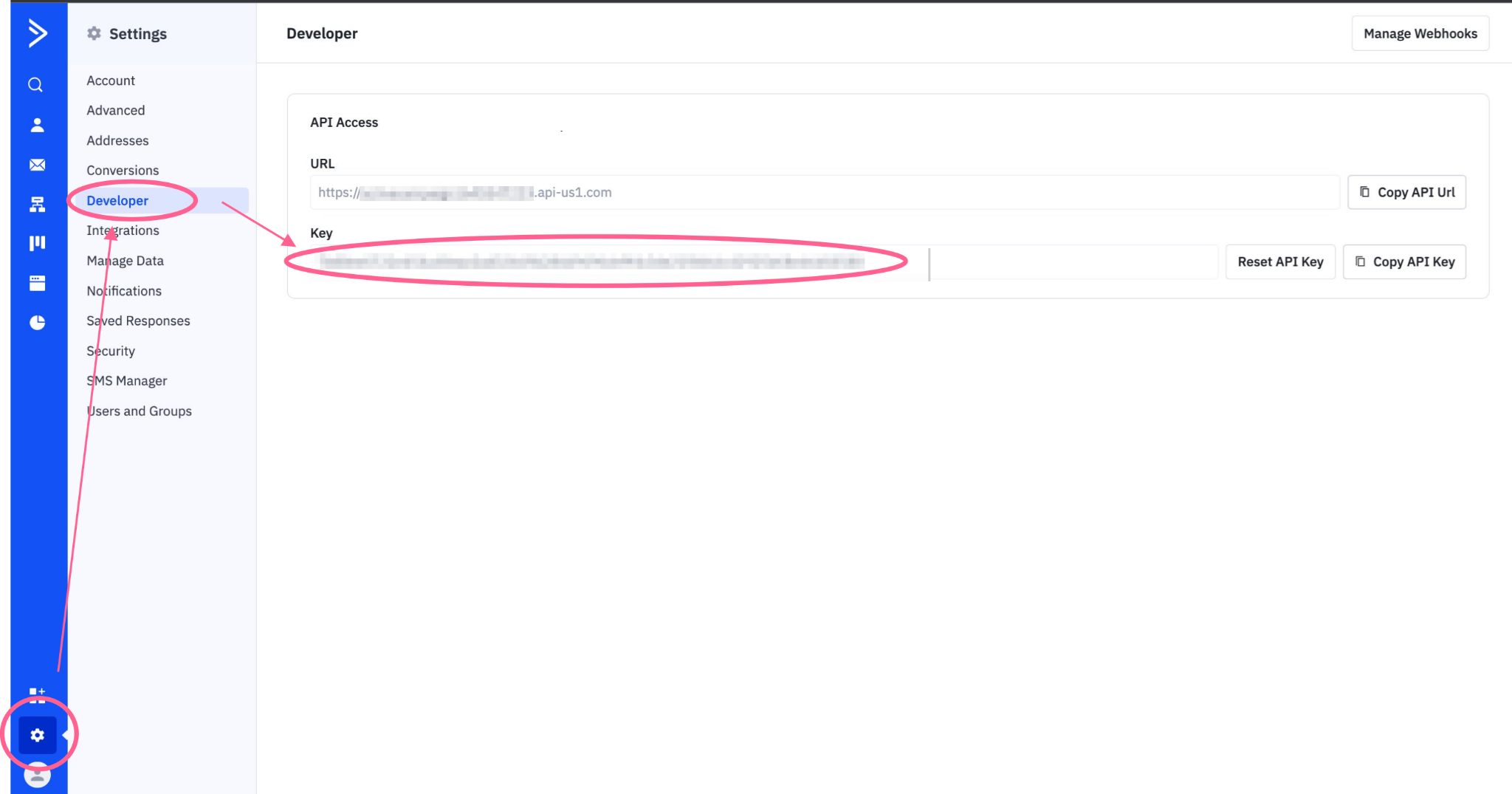
The API key lives in your ActiveCampaign account under Settings > Developer. Each user in an ActiveCampaign account has their own unique API key, so there is no single account-level credential. The same key authenticates both the REST v3 API and the eCommerce GraphQL API.
Source: ActiveCampaign API
One detail to plan for: the base URL is account-specific, taking the form https://<your-account>.api-us1.com/api/3/. ActiveCampaign warns against assuming api-us1.com is the domain for all accounts, especially those provisioned outside the United States. Your exact base URL is shown in the same Settings > Developer tab where you find your API key.
Authentication is straightforward. Every request includes the key as an Api-Token HTTP header:
curl -H "Api-Token: YOUR_API_KEY" \
"https://youraccountname.api-us1.com/api/3/contacts?limit=5"
There is no OAuth flow, no token exchange, and no credential rotation mechanism. The simplicity is a tradeoff: API key auth is quick to implement and impossible to scope. ActiveCampaign does not document delegated access or multi-tenant authentication patterns for the public API, so if you are building a SaaS product that connects to many ActiveCampaign accounts, each customer must generate and share their API key manually.
ActiveCampaign API: Core Endpoints & Capabilities
The v3 REST API is organized by resource, with endpoints following a /api/3/{resource} pattern. All requests and responses use JSON.
Filtering uses the filters[field]=value query parameter convention, ordering uses orders[field]=ASC|DESC, and total record counts appear in the meta.total property of collection responses. The resource catalogue is broad for a marketing automation platform.
Contacts
Contacts are the broadest resource set in the API and the foundation of everything ActiveCampaign does.
Operations: List, search, and filter contacts by email, list membership, account association, custom field values, and more. Sync (upsert by email) a contact to create or update in one call. Bulk import contacts asynchronously with status polling. Retrieve contact activity history. Manage geo-IP data per contact. CRUD on contact custom fields (create, list, retrieve, update values).
Pagination: Collection endpoints return a maximum of 100 records per request, defaulting to 20. For large contact databases, ActiveCampaign recommends id_greater cursor-style pagination rather than offset for better performance.
What you would build with this: a CRM sync that upserts contacts into ActiveCampaign as deals close in your sales pipeline, a lead-capture service that bulk-imports form submissions nightly, or a data-quality tool that polls contact records and flags stale entries for cleanup.
Deals & Pipeline
Programmatic control over ActiveCampaign's CRM layer.
Operations: Create, retrieve, and update deals with custom fields, notes, and tasks. Manage pipelines and stages. Create and list deal task reminders.
What you would build with this: an automated pipeline where a webhook fires when a contact reaches a lead score threshold, your service creates a deal in the right pipeline via the API, and assigns it to a rep based on territory rules in your routing logic.
Campaigns
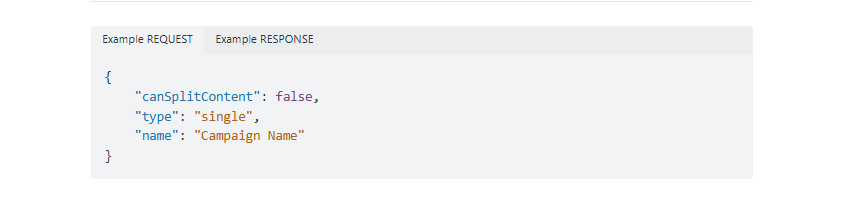
Operations: Create, duplicate, and edit campaigns, including updating campaign messages. Personalization variables used in campaigns can be created, edited, locked, unlocked, and bulk-deleted via API.
Campaign creation through the API gives you programmatic control over email sends without touching the dashboard. This is useful for teams managing campaign templates across multiple clients or generating campaigns from an external content management system.
Source: ActiveCampaign API
Automations
Operations: Create flow executions to trigger automations programmatically. List and retrieve execution status. Retrieve individual contact records within a flow.
This is how you wire external events into ActiveCampaign's automation engine. A purchase event in your eCommerce backend, a support ticket resolution in your helpdesk, or a score change in your lead-scoring model can each trigger a flow execution that enrolls the contact in the right automation without manual intervention.
SMS & WhatsApp
ActiveCampaign's messaging channels are API-accessible alongside email.
SMS Broadcasts: Managed via API: create, update, delete, list, and retrieve broadcast messages. Metrics endpoints cover broadcast performance, failure details, and recipient export. An AI-assisted broadcast creation endpoint is also documented.
WhatsApp Templates: Create, update, delete, list, and send WhatsApp templates directly via the API.
What you would build with this: a cross-channel notification system that selects the right channel (email, SMS, or WhatsApp) per contact based on preference data, then dispatches the message through the corresponding API endpoint without channel-switching logic in the dashboard.
Lists, Segments & Supporting Resources
Lists: Create lists programmatically.
Segments: CRUD on contact segments, including create, retrieve, update, delete, and historic version retrieval. Match operations (match-all, match-one) check contact membership asynchronously, which is useful for validating segment criteria before triggering downstream actions.
Accounts: Bulk delete and manage accounts linked to contacts.
Conversations: List and update conversations (chat and inbox threads).
Connections (Deep Data): Create, retrieve, list, and update connection resources that link external services (typically eCommerce platforms) to ActiveCampaign. Deep Data connections surface richer contact activity data (order history, purchase behavior) inside the platform for segmentation and automation triggers.
eCommerce GraphQL API
Alongside the REST surface, ActiveCampaign exposes a GraphQL API scoped to eCommerce operations. The endpoint sits at /api/3/ecom/graphql on the same account-specific base URL, supports introspection, and covers Orders, Products, Recurring Payments, Browse Abandonment, and Browse Sessions. Authentication and rate limits are shared with the REST API.
A Postman collection for the GraphQL API is available through the ActiveCampaign Developer Relations workspace on Postman. For developers already using GraphQL in their stack, this endpoint avoids translating between REST and GraphQL for eCommerce data syncs, though the scope does not extend to contacts, campaigns, or automation resources.
ActiveCampaign API: Webhooks & Events
ActiveCampaign offers webhook support that delivers real-time POST data to a URL of your choice when specified events occur. You manage webhooks programmatically through the /api/3/webhooks endpoints (create, update, delete).
The supported event types cover the core platform activities:
Category | Events |
|---|---|
Contacts | subscribe, unsubscribe, update, subscriber_note, contact_tag_added, contact_tag_removed |
Campaigns | open, click, bounce, reply, forward, share, sent |
Deals | deal_add, deal_update, deal_note_add, deal_pipeline_add, deal_stage_add, deal_task_add, deal_task_complete, deal_tasktype_add |
Lists | list_add |
SMS | sms_sent, sms_reply, sms_unsub |
Accounts | account_add, account_update, account_contact_add, account_contact_update |
Tasks | contact_task_add |
You can scope each webhook by initiation source: public (contact-triggered), admin (user-triggered), api (API-triggered), or system (automated processes). Multiple sources can be combined on a single webhook, giving you control over which events your receiver processes.
Three things to plan around:
ActiveCampaign guarantees at-least-once delivery, meaning duplicate events are possible. Design your receiver to be idempotent.
Webhooks are never retried on failure. If your endpoint is down when an event fires, that event is lost. There is no dead-letter queue, no retry backoff, and no delivery log you can replay.
A webhook that returns HTTP 410 is automatically set to inactive. Reactivation requires deleting and recreating it.
The combination of at-least-once semantics with no retry on failure is unusual. You must handle duplicates but cannot rely on delivery. For critical event flows, supplement webhooks with periodic API polling as a safety net.
ActiveCampaign API: SDKs, Docs & Rate Limits
SDKs & Libraries
ActiveCampaign does not publish official SDKs in any language. No maintained libraries for Python, Node.js, PHP, Ruby, or other languages appear in the developer portal or the llms.txt index. Community-maintained libraries may exist, but none are catalogued in the official docs.
The absence of an official SDK is a real signal for a developer evaluating this API. It means you own the request layer, the error handling, the rate-limit backoff logic, and the response deserialization.
For a simple webhook listener or a contact sync, that is manageable. For a production pipeline making dozens of endpoint calls with retry logic and pagination management, it adds engineering overhead.
ActiveCampaign does publish two developer-facing tools that narrow this gap:
An llms.txt index listing all documentation pages and endpoints in OpenAPI format, usable by AI-assisted code generation tools.
A remote MCP server that lets AI agents (Claude, ChatGPT, Cursor) interact with ActiveCampaign data through natural language. Setup requires no coding: a Remote MCP URL from ActiveCampaign's Developer settings handles authentication.
These are not SDK replacements, but they lower the barrier for AI-assisted integration development.
Documentation & Developer Experience
The developer documentation lives at developers.activecampaign.com, hosted on Readme.io. It is organized into four sections:
API Reference: endpoint-level documentation for all v3 REST resources and the eComm GraphQL API, with interactive try-it functionality.
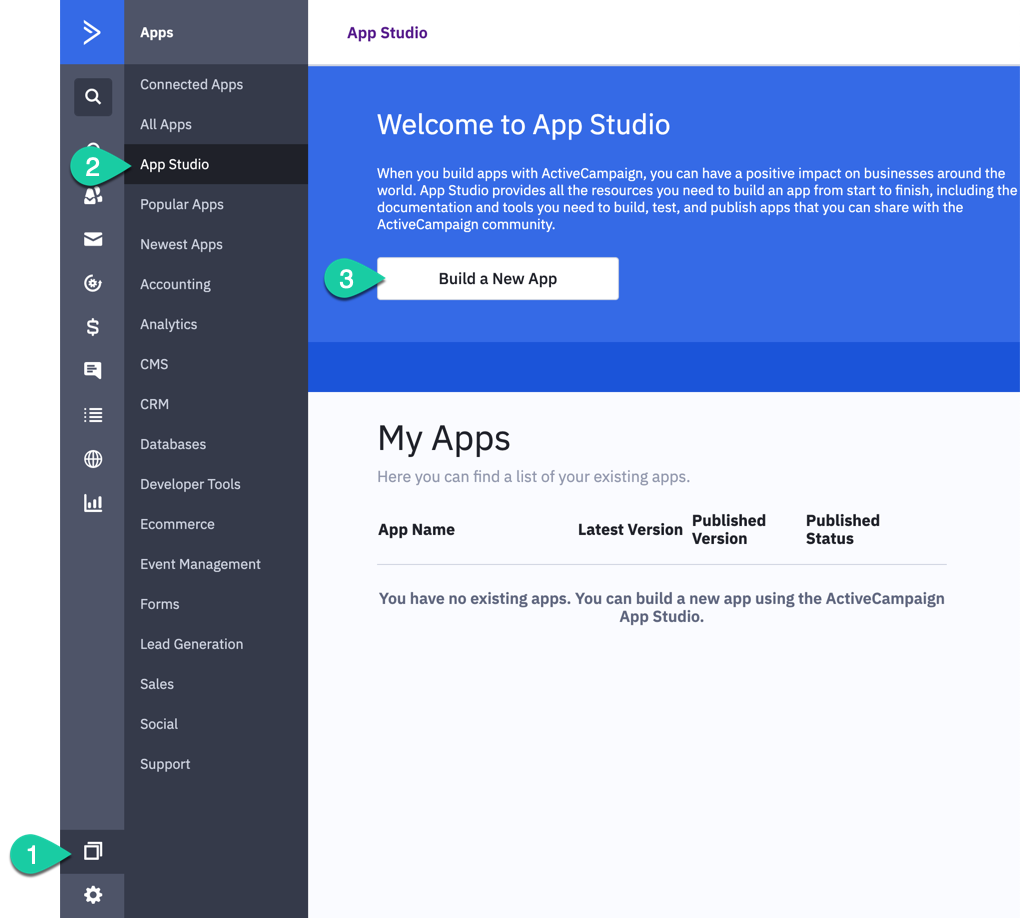
App Studio: a self-serve developer portal for building CX Apps that integrate with ActiveCampaign and can be listed in the marketplace. Supports OAuth2, Basic Auth, Custom Objects, and bidirectional workflow triggers. Example implementations for Twilio, Calendly, and Slack are documented.
Webhooks: event type reference and configuration guides.
Changelog: developer-facing release notes covering new endpoints, schema changes, and App Studio updates.
Source: ActiveCampaign API
A Postman collection is available for the eCommerce GraphQL API through the ActiveCampaign Developer Relations workspace on Postman. No equivalent collection is documented for the REST API.
Developer support is available through the ActiveCampaign Community (180,000+ members). No dedicated developer Slack channel or forum is referenced in the docs.
Rate Limits & Constraints
The documented rate limit is 5 req/sec per account, shared across the REST API and the GraphQL API. This limit applies account-wide (not per user or per API key) and is not differentiated by plan tier in the available documentation. The developer portal includes a Rate Limits reference page, though the page does not render publicly accessible detail beyond the 5 req/sec figure confirmed in the eComm GraphQL documentation.
For pagination, collection endpoints return a maximum of 100 records per request, defaulting to 20. On large contact databases, the recommended approach is id_greater cursor-style pagination rather than offset-based paging, which degrades at scale.
Bulk import is available for contacts using asynchronous processing with a status-polling model, which is the right path for loading large datasets without bumping against the per-second ceiling.
At 5 req/sec, a developer synchronizing 10,000 contacts individually would need over 33 minutes of continuous API calls (assuming no errors, retries, or pagination overhead). This is the primary throughput constraint to plan around, and it makes bulk endpoints and batch strategies essential for any integration operating at scale.
ActiveCampaign API Pricing & Access Costs
ActiveCampaign bundles API access into all paid plans rather than charging per call or per credit. The pricing page lists "API & webhooks" as a feature across Starter, Plus, Professional, and Enterprise tiers.
Plan entry point: ActiveCampaign Starter is $149/month for 10,000 contacts. Plus, Professional, and Enterprise pricing is contact-count-based and requires the dynamic pricing calculator at activecampaign.com/pricing. Enterprise pricing is custom-quoted.
No per-call charges. There are no published API rate charges, credit deductions, or consumption-based API pricing. Your API usage is bounded by the 5 req/sec rate limit and your plan's feature set, not by a metering system. API calls carry no marginal cost, but email sends dispatched through campaign endpoints are subject to the plan's monthly send limit (10x to 15x the contact limit, depending on tier), with overage charged at $0.005 per email.
Feature gating by tier. While API access is available on all plans, advanced developer-facing features are gated:
Custom objects (for data models beyond standard contacts and deals): Pro or Enterprise required.
Premium CRM integrations (Salesforce, Microsoft Dynamics 365): Pro or Enterprise required.
Custom user permissions and dedicated account team: Enterprise only.
Free development path. Free developer sandbox accounts are available for building and testing integrations without a paid plan. ActiveCampaign also offers a 14-day free trial with no credit card required (email sends capped at 100 during the trial).
For a developer sizing costs: the API is free if you are already paying for ActiveCampaign. The real cost driver is the plan tier, which determines your contact limit, feature access, and email send capacity. Those limits apply equally whether you use the dashboard or the API.
Where the ActiveCampaign API Falls Short
These are the practical limits a developer should plan around when building on this API. Several are scope decisions that reflect what ActiveCampaign's API covers (marketing automation execution) and what it does not.
No B2B data intelligence.
The API manages contacts you already have. It does not help you find new ones. There are no enrichment endpoints, no company attribute lookup, no technographic data, no org chart traversal, no buyer intent signals, and no AI-powered account research. If your pipeline needs to identify which accounts are worth pursuing before enrolling them in automations, that intelligence comes from a different API.
This is not a gap in the product; it is the boundary of the product, and it is the biggest constraint for developers building pipelines where contact acquisition and marketing execution need to live on the same programmatic surface.
5 requests per second, account-wide, with no documented upgrade path.
The rate limit is low by API standards, and the available documentation does not indicate that higher plan tiers unlock faster throughput. For pipelines doing real-time contact syncs, campaign management, and webhook administration against the same account, five requests per second is a shared ceiling that requires careful orchestration. Bulk endpoints mitigate this for contact imports, but not every operation has a bulk equivalent.
Static API key auth, no OAuth 2.0.
Authentication is a single API key per user, passed in a header. There is no OAuth flow for delegated access, no token rotation, and no scoped permissions at the API level.
For teams with credential-rotation policies or developers building multi-tenant integrations where each customer authenticates independently, this is limiting. ActiveCampaign's App Studio supports OAuth2 for CX Apps listed in the marketplace, but the public API does not.
Webhooks never retry.
ActiveCampaign guarantees at-least-once delivery semantics but does not retry failed deliveries. If your endpoint is unreachable when an event fires, the event is lost. There is no replay mechanism, no delivery log, and no dead-letter queue. For event-driven pipelines where missed events cascade into data inconsistency, this requires a supplementary polling strategy.
No official SDKs.
Every integration is raw HTTP. The MCP server and llms.txt index help with AI-assisted code generation, but there are no maintained client libraries to absorb the request construction, error handling, rate-limit backoff, and pagination logic that production integrations require.
GraphQL limited to eCommerce.
The GraphQL endpoint covers Orders, Products, Recurring Payments, Browse Abandonment, and Browse Sessions. Contacts, campaigns, deals, automations, and everything else run through the REST API only. If your stack is GraphQL-native, you will write two integration patterns against the same platform.
ZoomInfo API: The Data Intelligence Layer Beyond Marketing Automation
ActiveCampaign's API tells your system what to do with contacts: enroll them in automations, send them campaigns, move deals through pipelines.
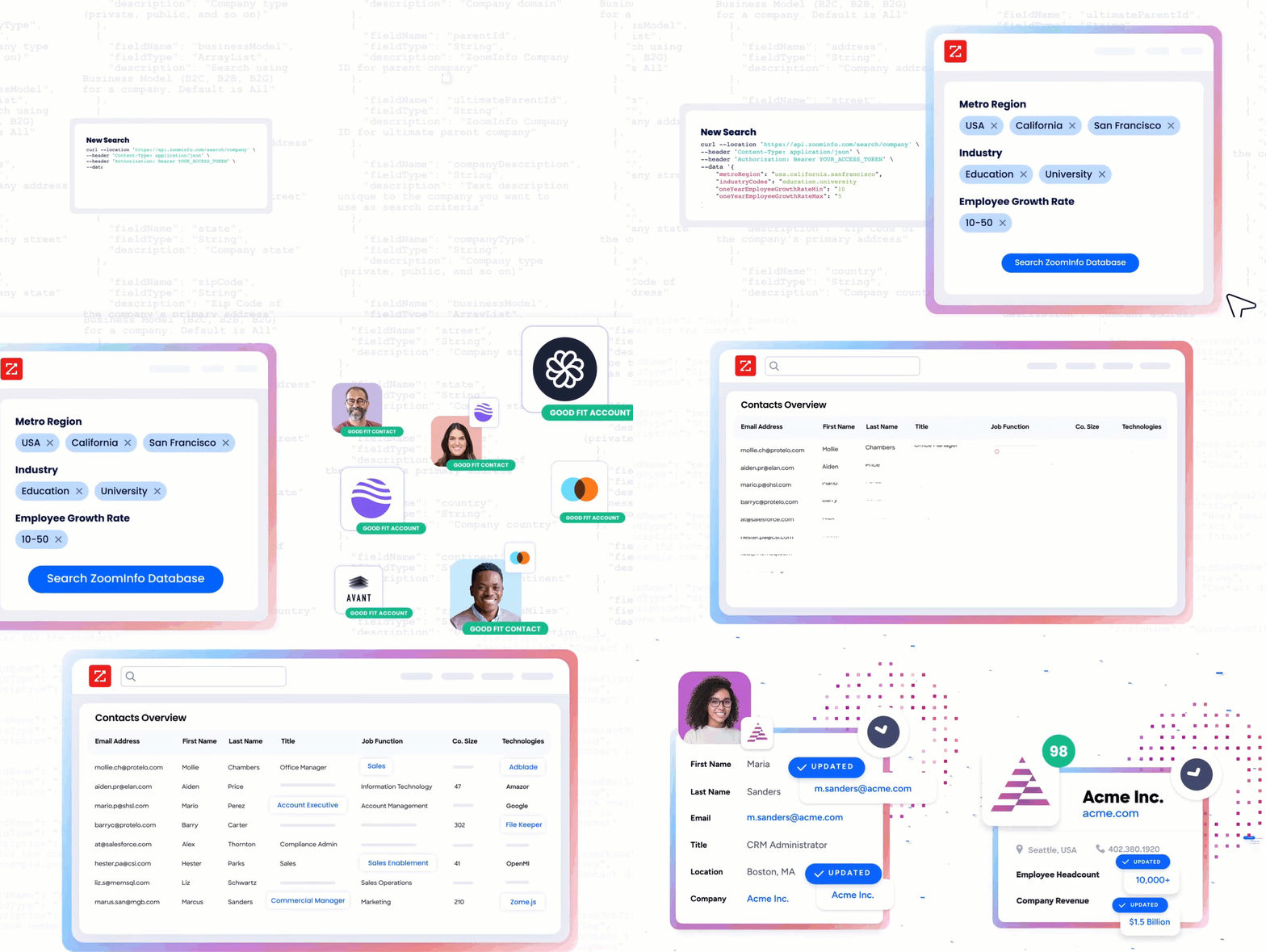
ZoomInfo is an AI-powered go-to-market platform whose API tells your system who those contacts should be, what companies they work for, what technology those companies use, and whether they are actively researching your category. Its GTM Context Graph processes 1.5B+ data points daily, combining ZoomInfo's B2B data with your first-party data to show not just what happened, but why.
Source: ZoomInfo
The two APIs operate at different layers of a pipeline. A developer building marketing automation that targets the right accounts at the right time would use ActiveCampaign's API to execute the automation and ZoomInfo's API to decide who belongs in it.
What the API Covers: Search, Enrichment & AI Intelligence
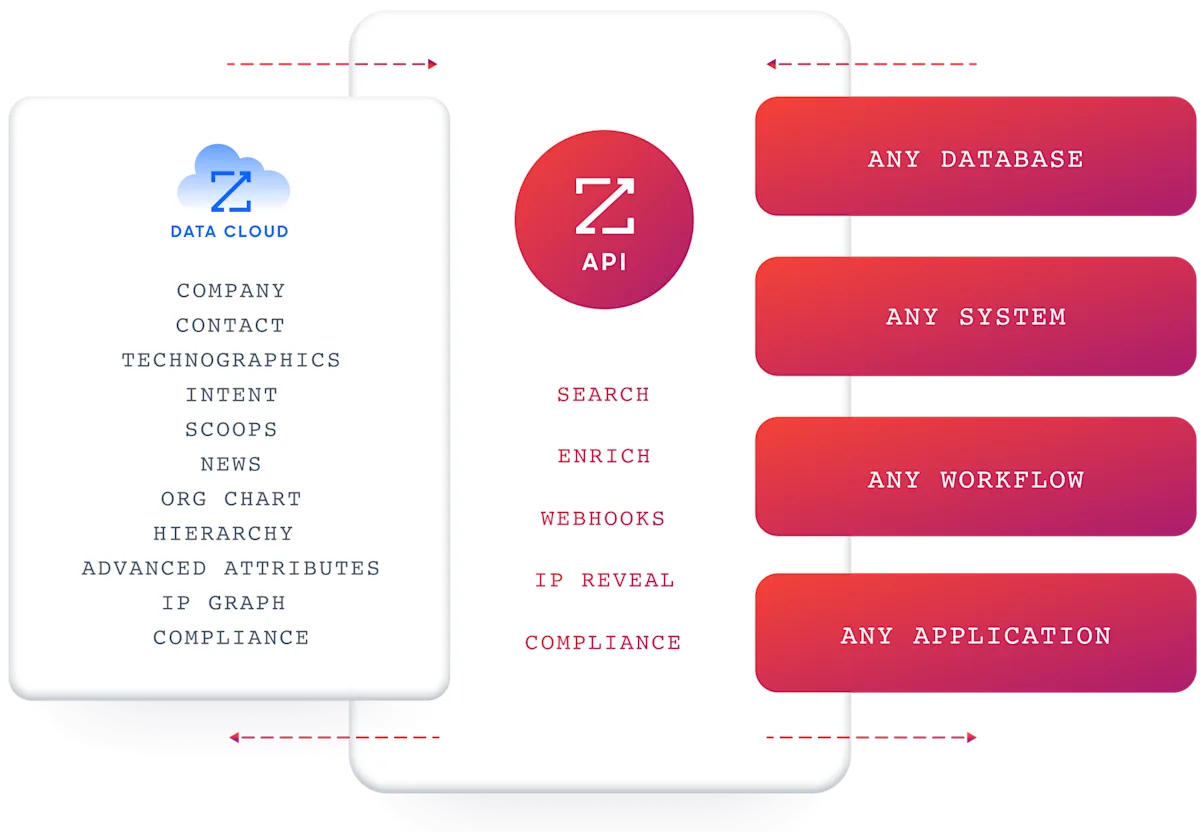
ZoomInfo's Enterprise API is a REST suite served from https://api.zoominfo.com/gtm, organized into four surface areas documented in the interactive API reference:
Data API (Search & Enrich): Search endpoints cover Contacts, Companies, Intent, News, and Scoops, returning matched records without consuming credits. Enrich endpoints unlock full payloads: business emails, direct dials, employment history, corporate hierarchy, org charts, technographics, and hashtag signals, up to 25 records per call. The search-then-enrich pattern means you filter freely and pay only for the records you commit to. The underlying dataset spans 500M contacts, 100M companies, 135M+ verified phone numbers, and 200M+ verified business email addresses.
AI Intelligence API: Account Summary returns structured account intelligence with a free-form Q&A endpoint. Find Similar Companies performs lookalike expansion. Contact Recommendations returns AI-ranked buying-committee suggestions by motion (prospecting, deal acceleration, renewals).
Marketing API: CRUD endpoints for programmatic audience management.
Platform API (Engagements, Beta): Bidirectional engagement data via the Engagements API.
Source: ZoomInfo
The pairing with a marketing automation API is direct: use ZoomInfo's search endpoints to find contacts matching your ICP (free, no credits consumed), enrich the ones worth pursuing with verified business emails and company attribute data, then push them into ActiveCampaign's contact and automation endpoints. The search-then-enrich pattern means you build the contact list with intelligence before spending ActiveCampaign's execution capacity on it.
Authentication, Rate Limits & Credits
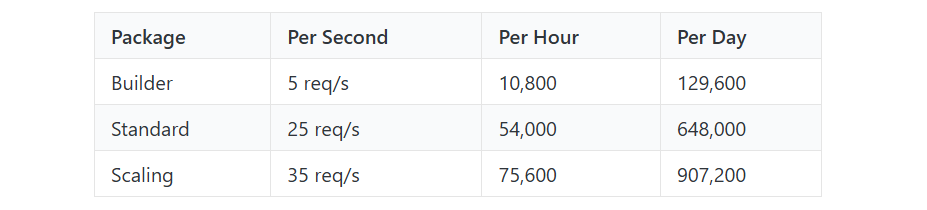
Authentication uses OAuth 2.0 with PKCE via Okta, issuing 24-hour access tokens with rotating refresh tokens. Three flows are supported: Authorization Code with PKCE (web applications), Client Credentials (server-to-server), and Refresh Token. Teams register applications through the ZoomInfo Developer Portal, where they generate credentials, define scopes, and test endpoints.
This is a different authentication model from ActiveCampaign's static API key: it supports delegated access, credential rotation, and scoped permissions out of the box.
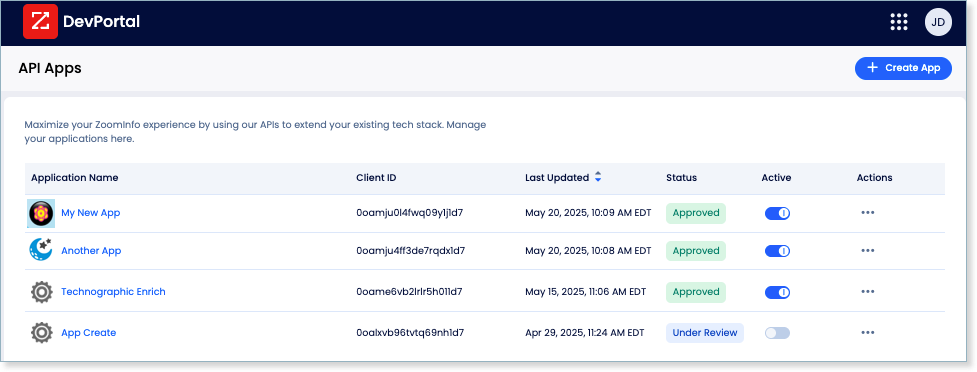
Rate limits are published by tier: Builder (5 req/sec), Standard (25 req/sec), and Scaling (35 req/sec), with per-hour and per-day sliding-window limits enforced simultaneously. Every response includes quota headers with remaining capacity, and 429 responses include a Retry-After header with exact backoff timing.
Credits follow a rolling 12-month window: a record enriched for the first time consumes one credit; re-enriching the same record within the year is free. Search and lookup operations are free and do not consume credits.
Source: ZoomInfo
Webhooks, MCP & Developer Experience
Webhooks are available via the Agents API, tied to ZoomInfo's Agent Teams system. Event types cover bulk enrichment jobs completing, records changing, credit usage crossing thresholds, and new GTM signals (scoops, funding events, intent spikes) becoming available. Retry behavior and throttling are configurable per event type, a contrast to ActiveCampaign's no-retry model.
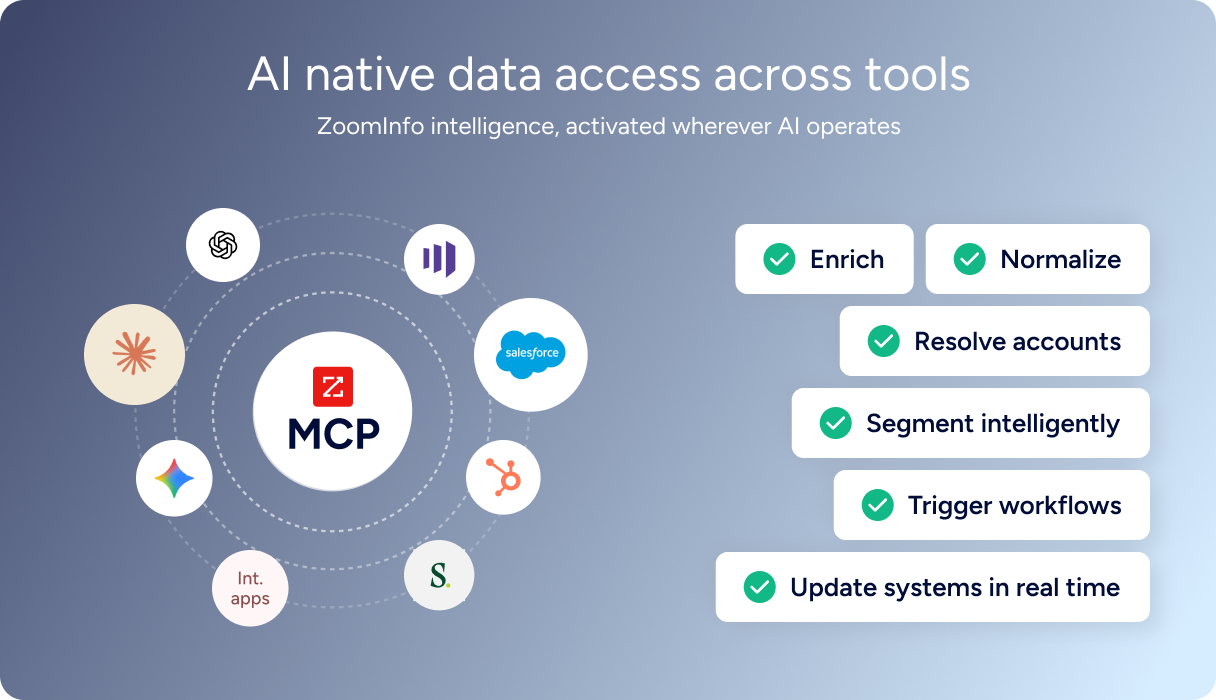
For developers building AI agents, ZoomInfo's MCP server at https://mcp.zoominfo.com/mcp exposes search, enrich, and account research as native tools for MCP-compatible assistants, currently supporting Claude and ChatGPT.
Since ActiveCampaign also publishes an MCP server, a developer can connect both to the same AI assistant and orchestrate intelligence-to-automation workflows through natural language. The credit model carries over from the REST API.
Source: ZoomInfo
ZoomInfo does not publish official SDKs either, so both platforms require direct HTTP integration. Documentation lives at docs.zoominfo.com with an interactive API reference, OAuth recipes in five languages, and an llms.txt index for AI development tools. A separate Docs MCP server lets AI development tools generate integration code against the API spec. ZoomInfo uses consumption-based pricing; the company has extended API access to all relevant plans.
BDO Canada reported an 87% reduction in time spent updating internal data dashboards using the ZoomInfo API, with one analyst describing the integration as plug-and-play across any process. (ZoomInfo)
Final Verdict
ActiveCampaign's API covers the marketing execution layer with enough depth to replace dashboard-driven workflows: contacts, campaigns, deals, automations, SMS, WhatsApp, and webhooks are all programmatically accessible on every paid plan.
The constraints (5 req/sec, no OAuth, no SDKs) are workable with the right architecture, and the free sandbox accounts make evaluation cost-free.
Choose the ActiveCampaign API alone if your build starts and ends with marketing automation execution: syncing contacts from external systems, triggering automations based on business events, managing campaigns and deal pipelines programmatically, or coordinating cross-channel messaging across email, SMS, and WhatsApp. The $149/month entry point with API access included, combined with a public developer portal, makes it a low-barrier surface for marketing automation builds.
Add the ZoomInfo API when the build needs the intelligence layer upstream of execution: deciding which contacts belong in those automations, what companies they represent, whether they are actively researching your category, and where they sit in the buying committee. The search-then-enrich pattern (search is free, enrich consumes credits) and the AI intelligence endpoints cover the data and reasoning that marketing automation APIs are not built to provide.
Explore the ZoomInfo Enterprise API or start with the developer docs to see the endpoint surface directly.
A developer who needs neither API should consider that ActiveCampaign's API does not cover B2B data intelligence, and ZoomInfo's API does not run marketing automations. If your pipeline requires both, the two are complementary layers, not competing surfaces.
FAQ
Is the ActiveCampaign API free?
API access is included on all paid ActiveCampaign plans starting at $149/month for 10,000 contacts on the Starter tier. There are no published per-call charges or API-specific credit costs.
Free developer sandbox accounts are available for building and testing without a paid subscription, and a 14-day free trial (no credit card required) lets you test the API with a live account. The real cost driver is the plan tier, which determines your contact limit, email send capacity, and access to features like custom objects and premium CRM integrations.
Does ActiveCampaign have a GraphQL API?
Yes, but it is limited in scope. ActiveCampaign exposes a GraphQL endpoint at /api/3/ecom/graphql on the same account-specific base URL as the REST API.
It covers eCommerce operations only: Orders, Products, Recurring Payments, Browse Abandonment, and Browse Sessions. Contacts, campaigns, deals, automations, segments, and all other resources are accessible only through the REST v3 API. The GraphQL endpoint shares the same API key authentication and 5 req/sec rate limit as the REST surface.
What is the ActiveCampaign API rate limit?
The documented limit is 5 requests per second per account, shared across the REST v3 API and the eCommerce GraphQL API. This is an account-wide ceiling, not a per-user or per-key limit, and the available documentation does not indicate that higher plan tiers unlock faster throughput.
Bulk import endpoints for contacts use asynchronous processing with status polling, which is the recommended path for high-volume operations. Pagination is capped at 100 records per request, with cursor-style pagination via id_greater recommended for large datasets.
Are there official ActiveCampaign SDKs?
No. ActiveCampaign does not publish official SDKs in any language. The developer portal does not list maintained libraries for Python, Node.js, PHP, Ruby, or any other language. Developers integrate directly over HTTP using the REST API.
ActiveCampaign does publish an llms.txt index and a remote MCP server for AI-assisted development, and a Postman collection is available for the eCommerce GraphQL API, but these are not SDK replacements.
Does the ActiveCampaign API support webhooks?
Yes. ActiveCampaign provides a webhook system managed through the /api/3/webhooks endpoints. You can create, update, and delete webhooks programmatically, and scope each one by initiation source (contact-triggered, user-triggered, API-triggered, or system-triggered). Supported events span contacts (subscribe, unsubscribe, tag added/removed), campaigns (open, click, bounce, reply), deals (add, update, task completion), SMS (sent, reply, unsubscribe), and accounts.
ActiveCampaign guarantees at-least-once delivery, but webhooks are never retried on failure, so build receivers that handle both duplicate events and missed deliveries.
Can I use the ActiveCampaign and ZoomInfo APIs together?
Yes, and there is a practical reason to do so.
ActiveCampaign's API handles marketing execution: managing contacts, triggering automations, running campaigns, and tracking deals. ZoomInfo's API provides the B2B intelligence that determines who should be in those campaigns: search across 500M contacts and 100M companies, enrich with verified emails, direct dials, org charts, technographics, and employment history, detect buyer intent signals, and generate AI-powered account research and buying-committee recommendations.
The pattern is intelligence first, execution second: use ZoomInfo's search endpoints to identify contacts matching your ICP, enrich them for verified data, then push them into ActiveCampaign's contact and automation endpoints. The two APIs use different authentication models (API key vs. OAuth 2.0), so plan your integration layer to handle both.
Both platforms publish MCP servers, so an AI agent connected to both can orchestrate the full workflow (find accounts, enrich contacts, create automations) through a single conversational interface.
