
Teams that run Acuity Scheduling for appointment booking and Constant Contact for email marketing usually hit the same problems within a quarter:
new clients book appointments but never appear on the email list, so they miss follow-up campaigns and promotions,
contact details fall out of sync between systems, with updated phone numbers or emails in one tool but not the other,
and someone on the team manually exports client data from Acuity and imports it into Constant Contact every week.
However, the two platforms ended up coexisting (a service business that adopted scheduling first and email marketing second, different team members choosing tools independently, or organic growth where each tool solved a different problem at a different stage), the longer they run without a connection, the more client data fragments and the harder it becomes to market to the people actually booking appointments.
Connecting Acuity Scheduling and Constant Contact eliminates that gap.
New clients who book through Acuity flow into Constant Contact lists automatically, so welcome sequences and nurture campaigns reach them without manual data entry. Contact details stay consistent across both platforms, and appointment activity can inform which marketing lists a client belongs to.
A native integration exists between Acuity Scheduling and Constant Contact, built into Acuity's integrations settings. Beyond the native connector, third-party automation tools like Zapier and Zoho Flow can bridge the two platforms with more flexible workflow logic. Each method differs in setup complexity, sync direction, data coverage, and cost.
One problem no connection method solves: the sync moves client records into your email lists, but it does not tell you whether those records are accurate, complete, or worth marketing to.
That is where ZoomInfo comes in. ZoomInfo is an AI GTM platform built on 500M contacts, 100M companies, 135M+ verified phone numbers, and 200M+ verified business emails. For teams running both Acuity and Constant Contact, ZoomInfo's Enterprise API and MCP access can enrich the contact data flowing between both systems, so the records reaching email campaigns are verified and complete rather than whatever the client typed into a booking form.
This article covers the full landscape of the Acuity Scheduling and Constant Contact integration: which methods are available, what data each one handles, how to set them up, the use cases that justify connecting both platforms, and the limitations to plan for. It also covers how ZoomInfo fits into the picture as a data enrichment layer for the records moving between scheduling and email marketing.
Let's start with an overview of the integration.
Integration Overview
Does a native integration exist?
Yes. Acuity Scheduling includes a native Constant Contact integration in its integrations settings. The connector lets businesses add and update client lists in Constant Contact and optionally subscribe new clients to mailing lists when they book appointments.
What data can sync?
Client contact information (name, email address) and list membership. When a client books an appointment in Acuity, their details can be added to a specified Constant Contact list. The native integration focuses on contact data rather than appointment-specific data like booking dates, service types, or payment history.
Is the sync bidirectional?
No. The native integration flows one direction: Acuity Scheduling to Constant Contact. Client booking data pushes into Constant Contact lists, but Constant Contact subscriber activity (opens, clicks, unsubscribes) does not flow back into Acuity.
Is it real-time or batch?
The native integration adds clients to Constant Contact at the time of booking, operating in near real-time. Third-party automation tools like Zapier trigger within 1 to 15 minutes of a booking event depending on plan tier.
What are the available methods?
Native Acuity-Constant Contact integration, third-party automation (Zapier, Zoho Flow, APIANT), and custom API development.
Method | Setup Difficulty | Data Flow | Real-time? | Cost |
|---|---|---|---|---|
Native Integration | Low | Acuity to Constant Contact | Near real-time (on booking) | Included with both plans |
Zapier | Medium | One-way per Zap | Near real-time (1-15 min) | From $19.99/mo |
Zoho Flow | Medium | Configurable per flow | Near real-time or scheduled | From $10/mo |
Custom API | High | Custom | Depends on implementation | Developer time + hosting |
One distinction worth settling upfront: the native integration handles the most common job (pushing new booking contacts into email lists) with minimal setup and no additional cost.
Zapier and Zoho Flow handle event-triggered automations with finer control over which bookings trigger which actions.
Custom API development is the only method that can sync appointment-level data (types, dates, packages) into Constant Contact for behavioral segmentation, though it requires Acuity's Premium plan for API access.
Integration Methods
Native Acuity Scheduling-Constant Contact Integration
How it works: Acuity Scheduling includes a built-in Constant Contact connector that links the two platforms at the account level. Once connected, Acuity automatically adds new clients to a designated Constant Contact mailing list when they book an appointment.
The integration uses Constant Contact's API behind the scenes to create or update contact records, matching on email address to avoid duplicates.
What it syncs: Client name and email address from the booking form into Constant Contact contact lists. List membership is the primary data object. The integration does not sync appointment types, booking dates, payment details, intake form responses, or other appointment-specific data into Constant Contact.
Fits: ongoing sync of new booking contacts into email marketing lists; not a migration tool for historical client data.
Setup process:
Log into your Acuity Scheduling account and navigate to Integrations in the left-hand menu.
Find Constant Contact in the integrations list (under the Email Marketing category) and click to connect.
Authorize Acuity to access your Constant Contact account via OAuth. You will be redirected to Constant Contact to grant permission.
Select which Constant Contact list new Acuity clients should be added to. You can choose an existing list or create a new one for scheduling contacts.
Configure whether all new bookings add clients to the list automatically, or whether clients see an opt-in checkbox during the booking process.
Test by booking a test appointment and verifying the contact appears in the designated Constant Contact list.
Strengths: No additional cost beyond existing Acuity and Constant Contact subscriptions. No third-party tool to configure or maintain. Setup takes minutes, not hours. Handles the most common use case (new client to email list) without technical knowledge. Duplicate prevention via email matching keeps the Constant Contact list clean.
Limitations: One-directional only (Acuity to Constant Contact). Does not sync appointment-specific data (service type, date, payment status, intake form responses) that would enable behavioral segmentation in Constant Contact. Limited configuration options compared to third-party automation tools. No conditional logic (all bookings go to the same list, or the client opts in via checkbox). Historical clients who booked before the integration was activated are not retroactively added.
Best for: Service businesses that want every new booking client added to their email marketing list with zero ongoing maintenance. Solo practitioners and small teams on any Acuity plan who need the simplest connection between scheduling and email marketing.
Zapier
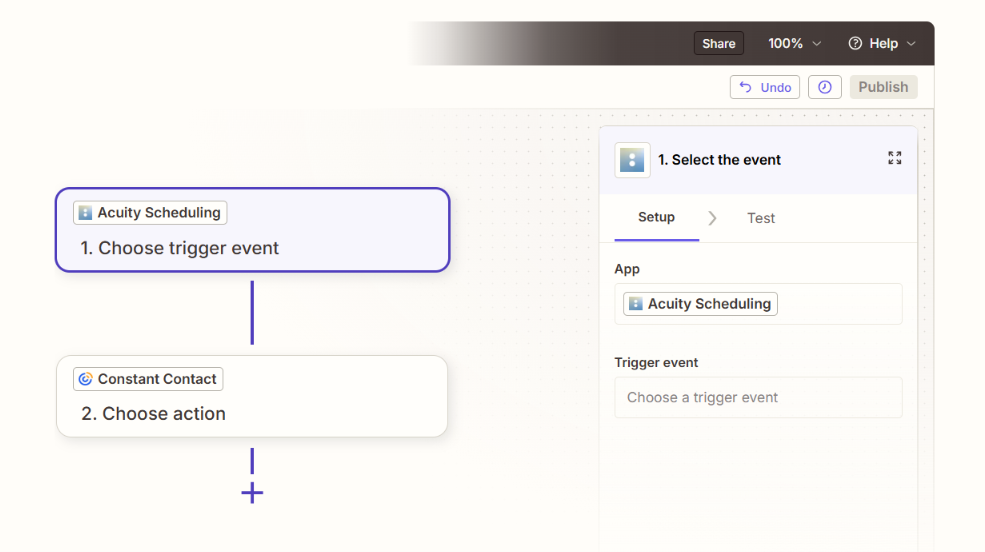
How it works: Zapier connects Acuity Scheduling and Constant Contact through event-driven automations called Zaps. Each Zap pairs a trigger (an event in Acuity) with one or more actions (what happens in Constant Contact).
Source: Acuity Scheduling
Acuity's Zapier integration exposes appointment events as triggers, and Constant Contact's Zapier integration exposes list management and contact actions.
What it syncs: Depending on the trigger and action configuration: client contact details (name, email, phone), appointment type, appointment date and time, and custom intake form responses from Acuity can be mapped into Constant Contact contact fields, list memberships, and tags.
Each data point requires explicit field mapping in the Zap setup. Custom fields in Constant Contact can receive appointment-specific data that the native integration cannot pass.
Fits: ongoing sync with conditional logic; not a migration tool for historical data.
Setup process:
Create a Zapier account and connect both your Acuity Scheduling and Constant Contact accounts using OAuth.
Choose Acuity Scheduling as the trigger app and select the trigger event (e.g., "New Appointment" or "New Appointment by Appointment Type").
Choose Constant Contact as the action app and select the action (e.g., "Create or Update Contact" or "Add Contact to List").
Map fields from the Acuity trigger to Constant Contact contact fields. Zapier displays all available fields from both sides, including Acuity intake form responses and Constant Contact custom fields.
Add filters or formatting steps if needed (e.g., only sync clients who booked a specific service type, or format phone numbers before passing them to Constant Contact).
Test the Zap with a sample booking record to verify the field mapping produces the expected result in Constant Contact, then turn the Zap on.
Strengths: Finer control than the native integration. Can route different appointment types to different Constant Contact lists using filters. Passes appointment-specific data (service type, date, intake form answers) into Constant Contact custom fields, enabling behavioral segmentation. Available on all Acuity plans (Zapier connects to Acuity without requiring API access). Template library includes pre-built Acuity-to-Constant Contact Zaps.
Limitations: Each Zap handles one trigger-action pair, so syncing multiple appointment types to different lists requires separate Zaps (each counting against Zapier's task allocation). No bidirectional sync without a separate Zap running in reverse. Historical appointments created before the Zap was activated do not sync.
Zapier charges by task count, and high-volume booking businesses can accumulate costs. Trigger polling interval depends on Zapier plan tier (1-15 minutes).
Best for: Service businesses that need conditional routing (different appointment types to different email lists), want to pass appointment metadata into Constant Contact for segmentation, or need more control than the native integration provides without writing code.
Zoho Flow and Other Automation Platforms
How it works: Zoho Flow and platforms like APIANT connect Acuity Scheduling and Constant Contact through visual workflow builders.
Zoho Flow uses a drag-and-drop canvas where each step represents an app action, with conditional branching, data transformation, and error handling built in. APIANT takes a connector-based approach for more complex multi-step data pipelines.
What it syncs: Similar to Zapier: client contact details, appointment metadata, and intake form responses from Acuity can be mapped into Constant Contact contact fields and list memberships. Zoho Flow supports data transformation steps between trigger and action, letting you reformat or enrich data before it reaches Constant Contact.
Fits: ongoing sync with conditional logic and data transformation; not a migration tool.
Setup process:
Create an account on your chosen automation platform and connect both Acuity Scheduling and Constant Contact via OAuth.
Build a new flow or workflow. Select Acuity Scheduling as the trigger app and choose the triggering event (new appointment, appointment changed, or appointment cancelled).
Add data transformation steps if needed (e.g., combine first and last name into a single field, or extract a tag from the appointment type name).
Add Constant Contact as the action app and select the action (create contact, update contact, add to list).
Map fields between the two platforms, applying any formatting rules.
Test the flow with a sample record and activate it.
Strengths: Zoho Flow integrates with the Zoho ecosystem, which benefits businesses already using Zoho CRM or Zoho Campaigns alongside Acuity and Constant Contact. APIANT supports complex multi-step data pipelines for businesses with specific routing needs. Both offer competitive pricing.
Limitations: Smaller template libraries for the Acuity-Constant Contact pairing compared to Zapier. Community support and documentation may be thinner for these specific platform combinations. APIANT has a steeper learning curve for non-technical users.
Best for: Teams already invested in the Zoho ecosystem, or businesses with complex multi-step data transformation needs between their scheduling and email marketing platforms.
Custom API Integration
How it works: Both Acuity Scheduling and Constant Contact provide APIs that enable custom integrations.
Acuity's REST API (v1.1) covers appointments, availability, calendars, clients, and webhook events. Constant Contact's V3 RESTful API covers contacts, contact lists, tags, email campaigns, events, and segments.
A custom integration connects these APIs directly, with middleware handling authentication, field mapping, data transformation, and sync logic.
What it syncs: Anything both APIs expose. This is the only method that can sync rich appointment data (appointment types, dates, durations, payment status, package usage, intake form responses) into Constant Contact for advanced segmentation, or pull Constant Contact engagement data (email opens, clicks, list membership changes) back into a system that informs scheduling workflows.
Fits: both one-time migration (bulk syncing historical clients from Acuity into Constant Contact) and ongoing bidirectional sync; the only method with no ceiling on either.
Setup process:
Obtain API credentials for both platforms. In Acuity, retrieve your API key and User ID from the Integrations settings page (requires Premium plan). In Constant Contact, register a developer application at the developer portal to obtain a client ID and client secret for OAuth 2.0.
Design the data model mapping between Acuity client records and Constant Contact contacts, including which appointment fields map to which Constant Contact custom fields or tags.
Build a sync service that listens for Acuity webhooks (scheduled, rescheduled, canceled, order.completed events) and writes changes to Constant Contact via its API.
Implement matching logic using email address as the primary key to prevent duplicate contacts in Constant Contact.
Add error handling and retry logic. Acuity webhooks retry failed deliveries with exponential backoff over 24 hours. Constant Contact enforces rate limits of 10,000 requests per day and 4 requests per second.
Deploy, monitor, and maintain the integration over time.
Strengths: Full control over what syncs, when, and how. Bidirectional sync is possible. Can implement complex business logic (e.g., sync only clients who purchased a package, or tag Constant Contact contacts based on appointment frequency). Can migrate historical client data from Acuity into Constant Contact. No per-operation fees from a third-party automation tool.
Limitations: Requires Acuity's Premium plan ($49/month annual) for API access. Requires development resources to build and maintain. Constant Contact's rate limit of 10,000 requests per day may constrain high-volume sync scenarios. Both platforms evolve their APIs independently, requiring ongoing maintenance.
Best for: Multi-location service businesses with in-house development resources that need appointment-level behavioral data in Constant Contact for advanced email segmentation, or organizations that must migrate historical client records alongside ongoing sync.
Key Use Cases
1. Automatic Welcome Sequence for New Booking Clients
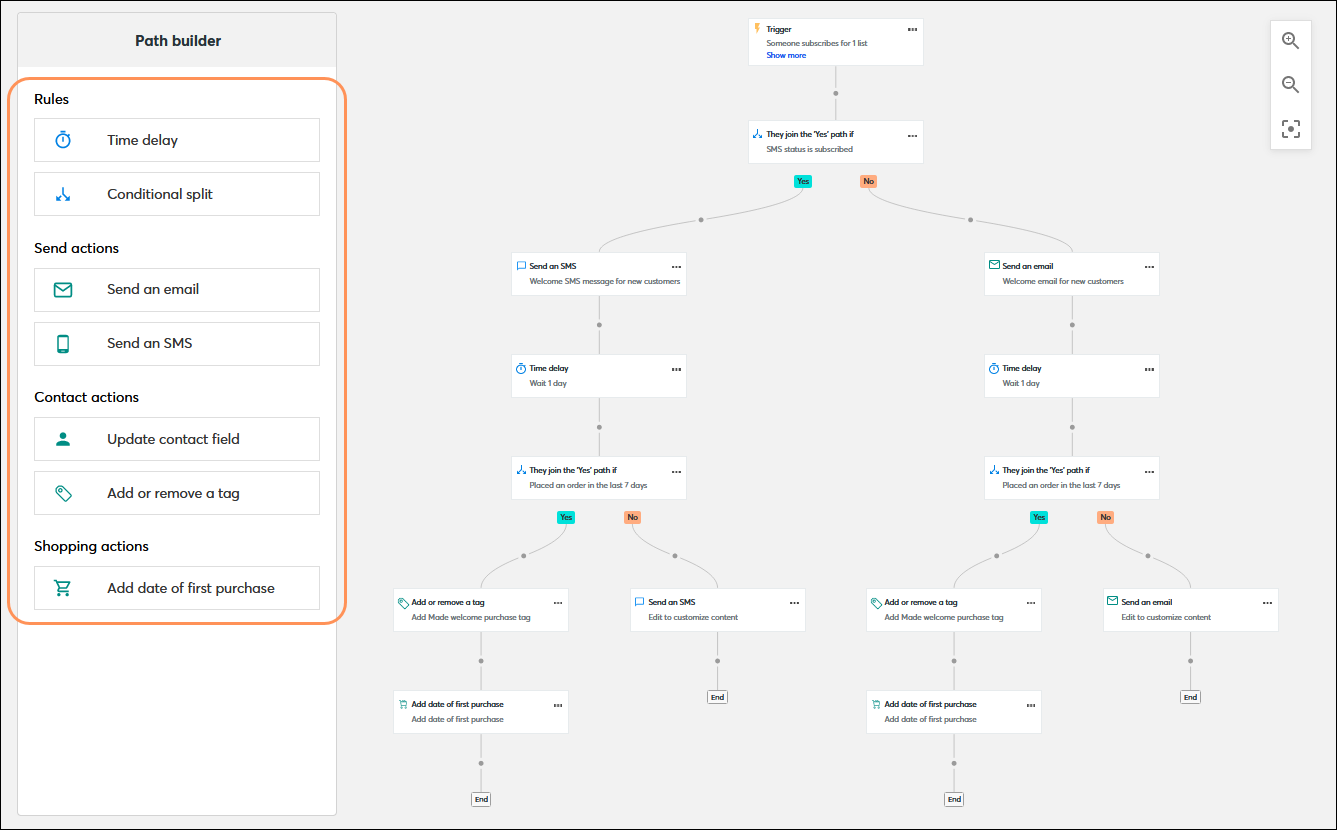
A client books their first appointment through Acuity Scheduling. The integration adds them to a designated Constant Contact list, which triggers a welcome automation path: an introduction to the business, what to expect at the appointment, and a link to the booking page for future visits. No manual list management required.
Source: Constant Contact
Best integration method: Native integration (simplest setup) or Zapier (if the welcome list varies by appointment type).
2. Post-Appointment Follow-Up Campaigns
After a service appointment, the business wants to send a follow-up sequence: a thank-you message, a review request, and a rebooking incentive. A Zapier Zap triggered by a completed appointment adds the client to a "Post-Appointment" list in Constant Contact, which triggers an automation path timed to send the sequence over the following week.
Best integration method: Zapier (supports appointment-type-specific routing and timing logic).
3. Segmented Marketing by Service Type
A wellness studio offering massage, acupuncture, and yoga classes wants to send targeted promotions based on which services clients have booked.
Zapier or Zoho Flow can route clients to different Constant Contact lists or apply different tags based on the Acuity appointment type, enabling segmented email campaigns that match each client's actual interests.
Best integration method: Zapier or Zoho Flow (conditional routing by appointment type).
4. Package and Membership Marketing
A fitness studio sells class packages and monthly memberships through Acuity. When a client's package nears expiration, a custom API integration can tag the contact in Constant Contact with a "renewal-due" tag, triggering an automated renewal reminder sequence. This keeps membership revenue consistent without manual tracking.
Best integration method: Custom API (requires access to Acuity's order and package data via the API).
5. Event and Workshop Promotion to Existing Clients
A business running group classes or workshops through Acuity wants to promote upcoming events to past attendees. The native integration or Zapier ensures all booking clients are on the Constant Contact list, and Constant Contact's event management tools handle the event landing page, RSVP collection, and reminder emails.
Best integration method: Native integration (for list building) combined with Constant Contact's built-in event features.
Limitations and Considerations
Data That Doesn't Sync
The native integration passes client name and email from Acuity to Constant Contact. It does not sync appointment dates, service types, payment history, intake form responses, package balances, or appointment notes.
This limits the segmentation depth available in Constant Contact unless a third-party tool or custom API integration maps those fields explicitly. Attachments, detailed client notes, and private annotations from Acuity do not transfer through any standard method.
One-Directional Flow
All standard integration methods push data from Acuity to Constant Contact, not the reverse. Constant Contact engagement data (email opens, click activity, unsubscribes, bounce status) does not flow back into Acuity.
A client who unsubscribes from the Constant Contact list remains an active client in Acuity, and the business has no automated way to learn about the unsubscribe from within the scheduling platform without checking Constant Contact separately.
Pricing Implications
The native integration is included with both platforms at no additional cost. Zapier charges by task count (each synced booking counts as a task), starting at $19.99/month for 750 tasks. Acuity's API access, required for custom integrations, is restricted to the Premium plan at $49/month (annual).
Constant Contact's API is available on all paid plans, but its rate limits of 10,000 requests per day and 4 requests per second may require careful throttling for high-volume sync scenarios.
Constant Contact's own pricing scales with contact count, so a large influx of booking contacts through the integration will push the account into higher contact tiers.
Permissions and Access
Setting up the native integration requires admin access in Acuity Scheduling and authorization to connect via OAuth in Constant Contact.
Custom API integrations require Acuity Premium plan access (for API credentials) and a Constant Contact developer account with a registered application. Zapier requires account-level authorization on both platforms.
Maintenance
Both platforms update independently. Acuity Scheduling, as a Squarespace product, evolves with Squarespace's broader platform roadmap. Constant Contact ships regular product updates (the AI Assistant v2 and ChatGPT integration launched in June 2026).
Custom fields or appointment types added after initial setup will not sync unless you update the configuration. Zapier Zaps may break if either platform changes its OAuth flow or available trigger/action fields. Review the integration's health periodically.
What No Method Fixes: The Data Itself
Every method above moves client records from Acuity Scheduling into Constant Contact. None of them checks whether those records are accurate, complete, or valuable for marketing.
A client who typed a misspelled email into the booking form syncs as a misspelled email in Constant Contact, where it bounces and damages deliverability.
A contact with no phone number, no company name, and no context beyond a first name travels just as faithfully as a fully detailed record. The integration ensures both systems agree; it does not ensure the data is worth marketing to.
Where ZoomInfo Fits In
Every method in this guide moves client data from Acuity Scheduling into Constant Contact. None of them improves the data being moved.
When the integration is live but email campaigns bounce because booking forms captured bad addresses, or nurture sequences target contacts with no context beyond a first name typed into a scheduling widget, the bottleneck is no longer the connector.
That is the gap ZoomInfo closes.
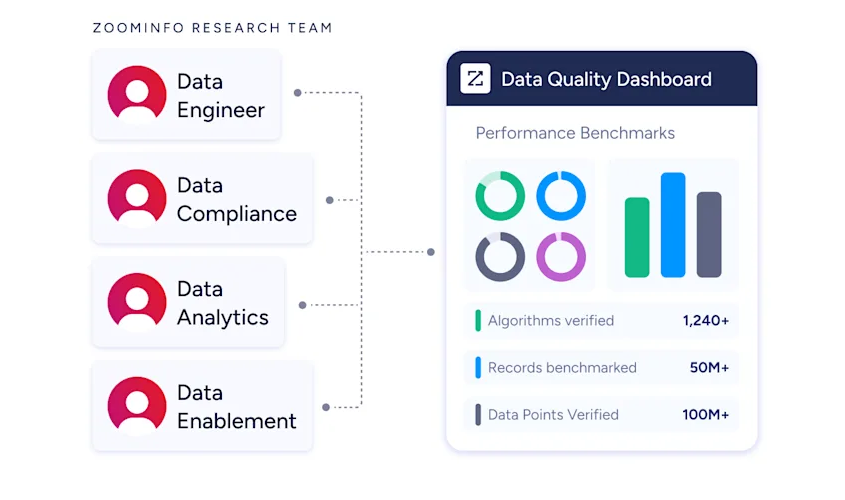
ZoomInfo is an AI GTM platform with B2B data spanning 500M contacts, 100M companies, 135M+ verified phone numbers, and 200M+ verified business emails. A multi-source pipeline backed by 300+ human researchers verifies that data, reaching up to 95% accuracy on first-party records.
Source: ZoomInfo
For service businesses running both Acuity and Constant Contact, ZoomInfo addresses the data quality layer that no scheduling-to-email connector handles.
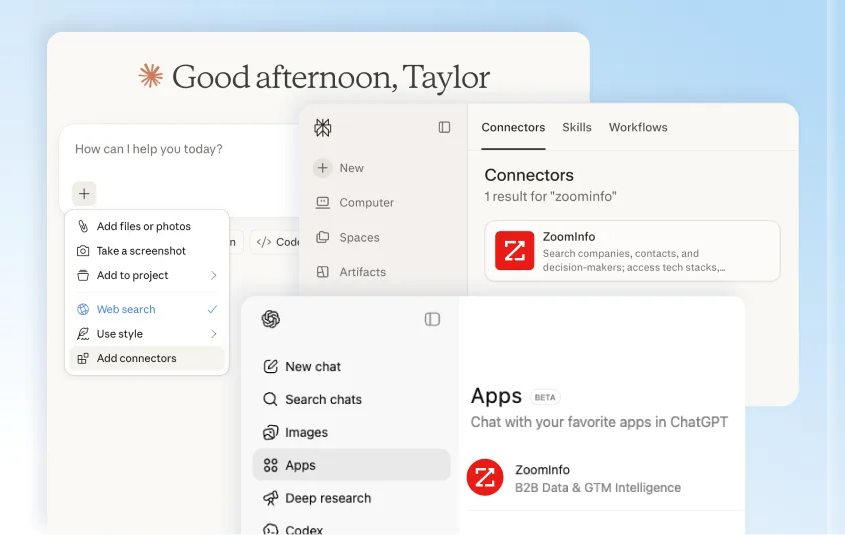
Neither Acuity nor Constant Contact has a native integration with ZoomInfo. The connection runs through ZoomInfo's Enterprise API and MCP access, which can feed verified contact data into any system through workflow automation tools or custom integrations.
Source: ZoomInfo
For B2B service businesses (consultancies, agencies, coaching firms, professional services), ZoomInfo can enrich the thin contact records that arrive from booking forms with verified business emails, direct dials, job titles, company attributes, and technographic profiles.
That enrichment can happen before records reach Constant Contact, so the email list starts clean rather than requiring cleanup after the fact.
Enriched records also make email marketing more effective. A Constant Contact list with accurate job titles and company details enables segmentation that thin booking-form data cannot support.
A consulting firm can segment its email campaigns by client company size or industry rather than treating every booking contact identically.
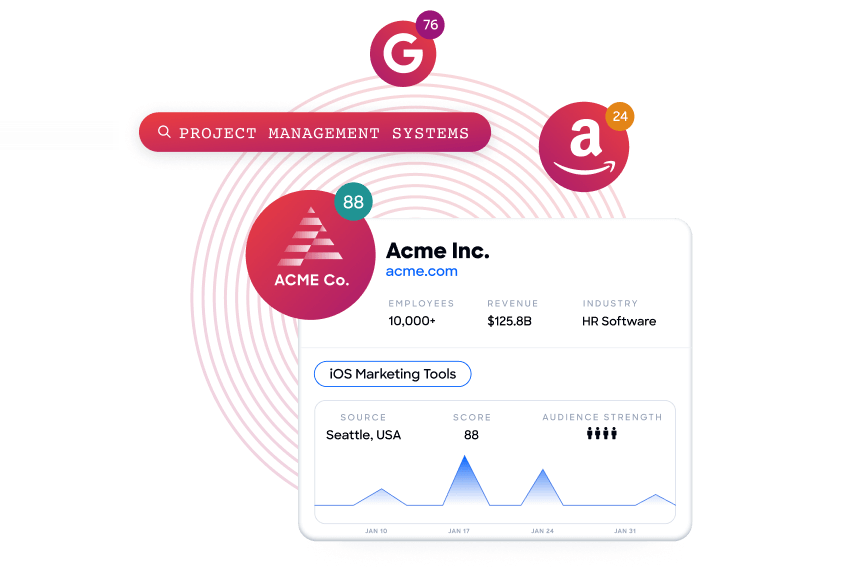
Buyer Intent data from ZoomInfo, tracking signals from 210 million IP-to-Organization pairings, can identify which contacts in the combined Acuity-Constant Contact setup are actively researching relevant services, so outreach aligns with actual buying signals rather than arbitrary scheduling.
The practical value depends on the business type. B2B service businesses (consulting, coaching, professional services, agencies) gain the most from ZoomInfo's enrichment because their clients are companies and professionals whose data ZoomInfo covers well.
B2C service businesses (salons, fitness studios, wellness practitioners) may find less direct value, since ZoomInfo's data focuses on B2B contacts and companies.
Seismic's sales team attributed 39% of active pipeline to opportunities identified or influenced by ZoomInfo signals, while boosting productivity by 54% and saving 11.5 hours per week. (Seismic)
Final Verdict
A native integration between Acuity Scheduling and Constant Contact exists, and it covers the most common use case: getting new booking clients onto an email list automatically.
For most service businesses, the right connection method depends on how much data needs to flow and how specific the marketing segmentation needs to be.
Small service businesses that want every new client on an email list should activate the native integration. It takes minutes to set up, costs nothing beyond existing subscriptions, and requires no ongoing maintenance.
Businesses that need appointment-type-specific routing, custom field mapping, or conditional logic should use Zapier or Zoho Flow. These tools bridge the gap between the native integration's simplicity and a full custom build, at a manageable monthly cost.
Multi-location or B2B service businesses with in-house development resources and advanced segmentation requirements should invest in a custom API integration. It is the only method that syncs appointment-level behavioral data into Constant Contact for targeted email campaigns.
Before choosing a method, clarify what you need from the connection.
If the goal is keeping the email list current with booking activity, the native integration is sufficient and any additional tooling is overhead.
If the goal is using appointment data to drive segmented, behavioral email marketing, the investment in Zapier or a custom build pays for itself in campaign relevance.
Either way, the quality of the contact data in both systems determines whether the integration delivers value or just delivers noise to more inboxes faster.
For B2B service businesses, ZoomInfo's Enterprise API and MCP access can enrich the records flowing between both platforms, so the data reaching Constant Contact is verified and complete before the first campaign sends.
FAQ
Does Acuity Scheduling integrate natively with Constant Contact?
Yes. Acuity Scheduling includes a built-in Constant Contact integration accessible from the Integrations section of the Acuity dashboard.
The integration adds new booking clients to a designated Constant Contact mailing list automatically. It is available on all Acuity plans at no additional cost. Setup requires OAuth authorization between the two platforms and takes a few minutes.
What data does the native integration sync?
The native integration syncs client name and email address from Acuity Scheduling into Constant Contact contact lists. It does not sync appointment-specific data such as service type, booking date, payment status, intake form responses, or package balances.
For those data points, a third-party automation tool like Zapier or a custom API integration is required.
Can I sync historical Acuity clients into Constant Contact?
The native integration and Zapier only process bookings created after the connection is activated. For historical client data, you can export your Acuity client list as a CSV file and import it into Constant Contact using Constant Contact's built-in contact import tool.
A custom API integration can also read existing client records from Acuity's API and create them in Constant Contact programmatically.
Do I need a specific Acuity plan for the integration?
The native Constant Contact integration is available on all Acuity plans (Starter, Standard, Premium, and Enterprise). Zapier connections also work across all plans. However, Acuity's REST API access, required for custom integrations, is restricted to the Premium plan ($49/month annual) and above.
Is the integration bidirectional?
No. All standard integration methods push data from Acuity Scheduling to Constant Contact. Constant Contact engagement data (email opens, clicks, unsubscribes) does not flow back into Acuity.
A custom API build could pull Constant Contact engagement data and write it to an external system, but there is no native path to push that data into Acuity's client records.
What happens if a client updates their email in one platform but not the other?
The native integration does not sync updates retroactively. If a client changes their email address in Acuity after the initial booking, the updated email does not automatically propagate to Constant Contact.
The old email remains on the Constant Contact list, and the new email may create a duplicate contact on the next booking.
Zapier can be configured to use a "Create or Update" action that matches on email, but this only catches changes that trigger a new booking event.
How does ZoomInfo improve an Acuity-Constant Contact workflow?
ZoomInfo solves the data quality problem upstream of email marketing. Booking forms capture whatever the client types, which often means incomplete or inaccurate contact data flowing into Constant Contact.
For B2B service businesses, ZoomInfo's Enterprise API can enrich contact records with verified business emails, direct dials, job titles, company attributes, and technographic profiles before those records reach the email list.
The result is a Constant Contact audience with enough data depth to support meaningful segmentation, and verified email addresses that protect deliverability rather than generating bounces.
Does the integration affect my Constant Contact pricing?
It can. Constant Contact's pricing scales with active contact count, and the contact tier is based on the highest number of active contacts in the account. Every new Acuity client added to a Constant Contact list counts toward that total.
High-volume booking businesses should monitor their contact count and plan for tier increases, since Constant Contact anchors its pricing tier to the peak contact count even if contacts are later deleted.
