

Choosing between Acuity Scheduling and SimplePractice comes down to a question most comparison articles avoid:
Do you need a scheduling tool, or do you need a practice management platform?
That distinction matters more than any feature list, because it determines what you're paying for and what you'll find missing six months from now. The specific questions worth asking:
Are you a health or wellness practitioner who bills insurance, or a service business that collects payment directly from clients?
Do you need clinical documentation (progress notes, treatment plans, diagnosis codes) or just intake forms and appointment records?
Is built-in telehealth essential, or will a Zoom integration work?
How much scheduling flexibility do you need: per-service availability, gap control, multi-location management?
Are you looking to grow through B2B channels like referral partnerships, corporate wellness contracts, or EAP relationships?
In short, here's what we recommend:
Acuity Scheduling is a scheduling tool built for any service business that monetizes appointments. It handles 24/7 online booking, payment collection, automated reminders, and client management across beauty, wellness, fitness, education, and business services. With per-service availability controls, a built-in POS system, and revenue tools like packages, subscriptions, and gift certificates, Acuity covers the booking-to-payment workflow starting at $16/month. Its 2025 customer survey found that 75% of businesses reduced no-shows and 70% grew revenue after adopting the platform. However, Acuity has no clinical documentation, no insurance billing, and no native telehealth. Practitioners who need those capabilities will outgrow it quickly.
SimplePractice is a practice management platform designed for health and wellness practitioners. It combines scheduling with a full EHR system: progress notes, treatment plans, insurance claim filing, HIPAA-compliant telehealth, and a client portal, in a single platform used by over 225,000 practitioners. For therapists, counselors, psychologists, and other clinicians, SimplePractice replaces three or four separate tools. The trade-off is a higher starting price ($49/month), less scheduling customization than Acuity, and a support experience that some users find inconsistent.
Both platforms focus on managing the clients you already have. But for practices ready to grow through B2B channels, neither provides the tools to identify and reach decision-makers at corporations, hospitals, or insurance networks. That's a different problem entirely.
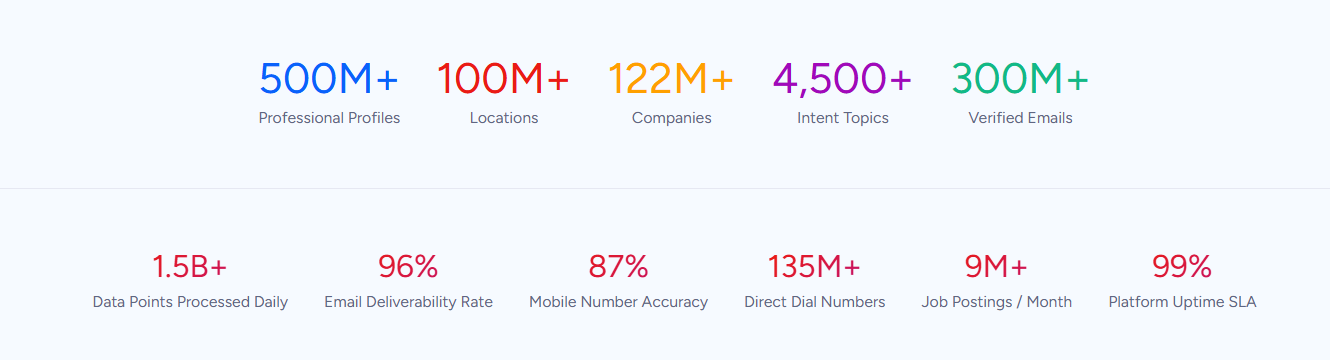
ZoomInfo is a B2B intelligence and go-to-market platform built on a large B2B dataset: 500M contacts, 100M companies, 135M+ verified phone numbers, and 200M+ verified business email addresses. For practices that have outgrown word-of-mouth referrals, ZoomInfo finds the right people at the right organizations. Need to reach HR directors who purchase corporate wellness programs? Hospital administrators who manage referral networks? EAP program managers evaluating new providers? ZoomInfo's GTM Context Graph identifies those contacts and reveals when they're actively evaluating options, so your outreach arrives when it matters. You can act on that intelligence through GTM Workspace for direct outreach, GTM Studio for campaign orchestration, or APIs and MCP in any tool you already use.
If growing your practice through B2B outreach is your next move, see how ZoomInfo works.
Acuity Scheduling vs. SimplePractice at a glance
Acuity Scheduling | SimplePractice | ZoomInfo | |
|---|---|---|---|
Primary function | Appointment scheduling and payments | Practice management and EHR | B2B intelligence and outreach |
Target audience | Any service business | Health and wellness practitioners | B2B growth teams |
Clinical documentation | Intake forms only | Full EHR with AI-powered notes | N/A |
Insurance billing | Not available | Electronic claims, ERA processing, managed billing | N/A |
Telehealth | Zoom / Google Meet integrations | Built-in HIPAA-compliant video | N/A |
HIPAA compliance | Premium plan ($49/mo+) | All plans | N/A |
Scheduling depth | Per-service availability, gap control, POS | Color-coded calendar, waitlist, online requests | N/A |
B2B outreach | Not available | Not available | 500M contacts, buyer intent, AI-powered execution |
Payment processors | Stripe, Square, PayPal | Stripe | N/A |
Free trial | 7-day, no card required | 7-day, no card required | 7-day trial + permanent free tier |
Starting price | $16/month (annual) | $49/month | Consumption-based pricing |
Best for | Service businesses needing flexible scheduling and payments | Health and wellness practitioners needing practice management | Practices growing through B2B outreach, referral networks, and corporate contracts |
The fundamental divide: scheduling tool vs. practice management platform
This comparison is unusual because Acuity Scheduling and SimplePractice are not the same category of software. They overlap on scheduling, but that's where the similarity ends.
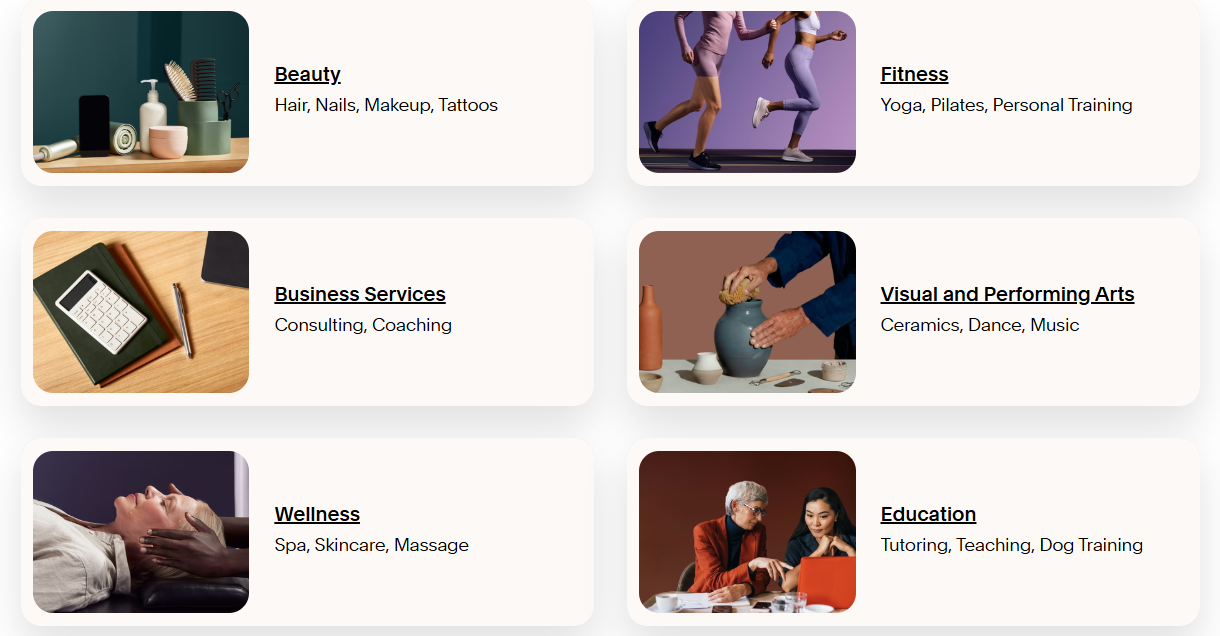
Acuity Scheduling is a dedicated scheduling platform. It's built for any business that books appointments: hair stylists, personal trainers, tutors, consultants, massage therapists, photographers. The value proposition is straightforward: let clients book themselves, collect payment, send reminders, reduce no-shows. Everything in the product serves that workflow. Acuity processes over 15 million appointments per month across 280,000+ businesses, and it operates as a Squarespace company, giving it native integration with the Squarespace website ecosystem.
Source: Acuity
SimplePractice is a practice management platform designed for health and wellness practitioners. Scheduling is one feature among many. It sits alongside clinical documentation, insurance billing, telehealth, and a client portal.
The platform was founded in 2012 by Howard Spector, who was training to become a Marriage and Family Therapist and found existing practice management software clunky and impersonal. That origin shows: the scheduling feature works within the context of clinical care, not as a standalone product.
The practical difference shows up immediately. In Acuity, you create appointment types with prices, configure availability, and share a booking page. In SimplePractice, scheduling an appointment connects to a client record that tracks diagnoses, treatment plans, progress notes, insurance information, and billing history. That depth is necessary for clinicians who need it and unnecessary overhead for businesses that don't.
For a yoga studio, a hair salon, or a consulting firm, Acuity does what's needed without imposing a clinical framework. For a therapist, psychologist, or counselor managing diagnoses and insurance claims, SimplePractice provides the integrated clinical workflow that Acuity cannot.
Acuity delivers deeper scheduling flexibility
Scheduling is Acuity's entire focus, and it shows in the granularity of its controls.
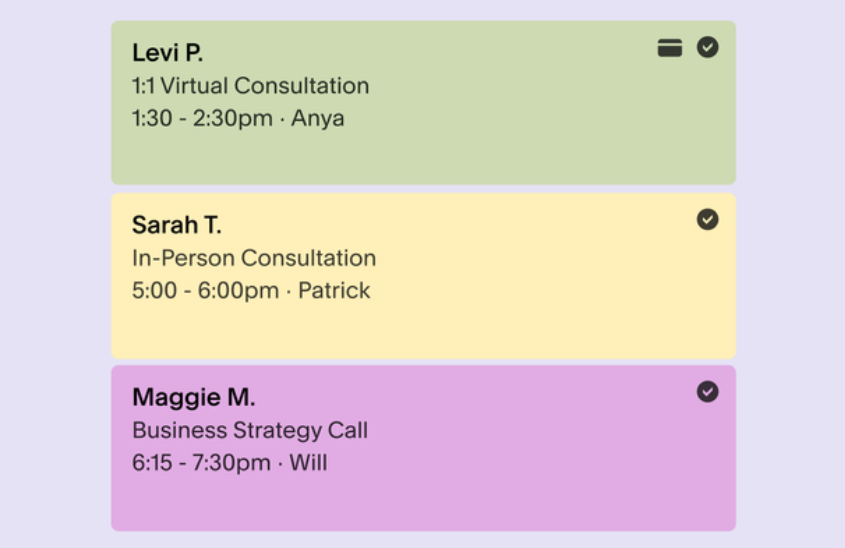
Acuity lets you set separate availability windows for different service types. A massage therapist available for 90-minute sessions only on Mondays can accept 30-minute consultations any day. Buffer times before and after appointments prevent back-to-back burnout. Daily and weekly appointment caps protect against overbooking. The gap minimization setting clusters new bookings next to existing appointments, reducing scattered downtime.
Source: Acuity
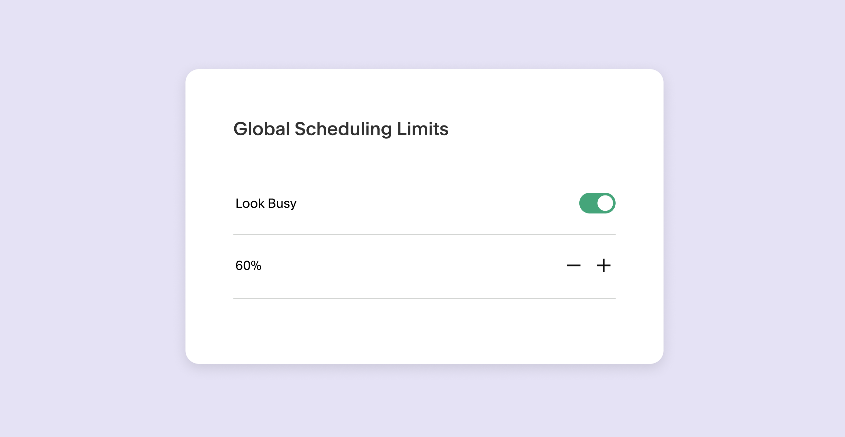
Then there's the "Look Busy" feature, which hides a portion of your open availability from clients to create the perception of higher demand. SimplePractice and most other scheduling tools have no equivalent.
Source: Acuity
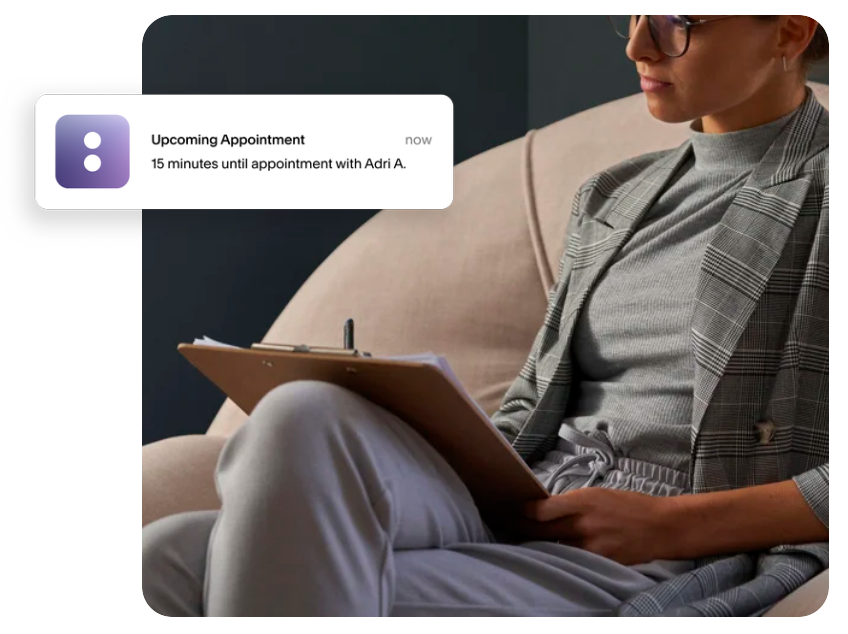
For businesses managing multiple staff, Acuity supports individual booking pages and links per team member, service-specific staff assignments, and role permissions. The Premium plan adds multi-timezone support for different staff or locations, and the Enterprise tier supports unlimited calendars with centralized management across locations, SSO via Okta and MedPlum, and a 99.9% uptime SLA.
Source: Acuity
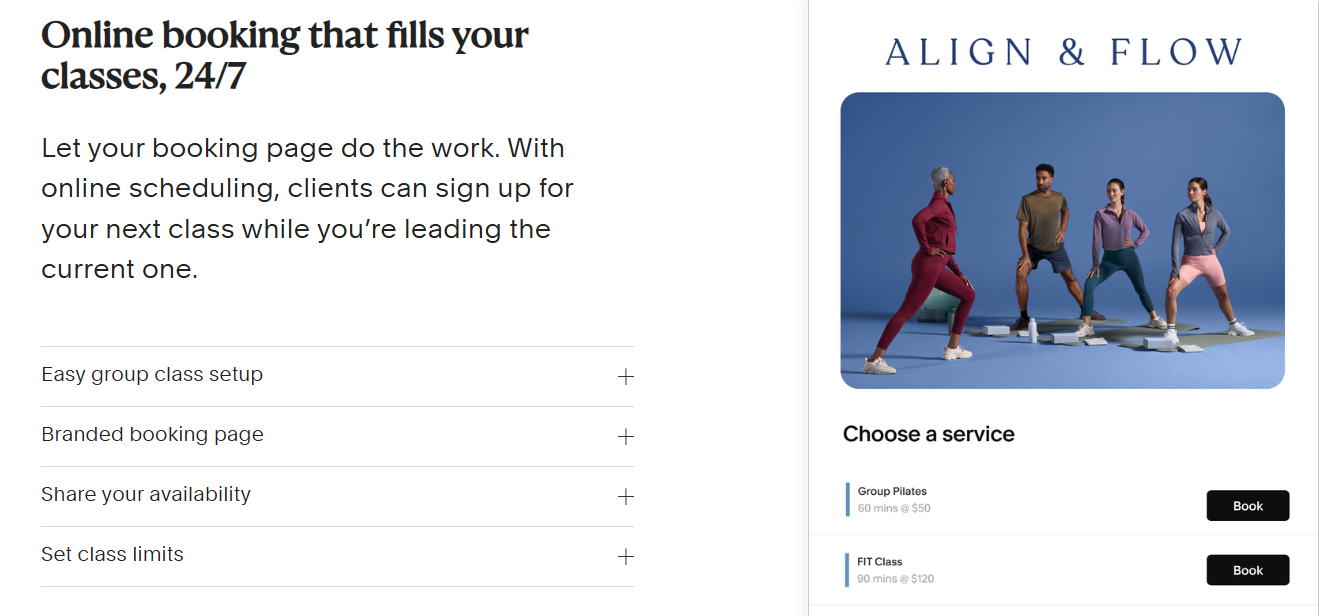
Acuity also runs both individual and group scheduling from the same platform. Businesses that offer a mix of one-on-one appointments and group classes (a personal trainer who also runs boot camp sessions, for example) can manage everything in a single account with capacity limits, resource management for rooms or equipment, and add-on upselling at checkout.
Source: Acuity
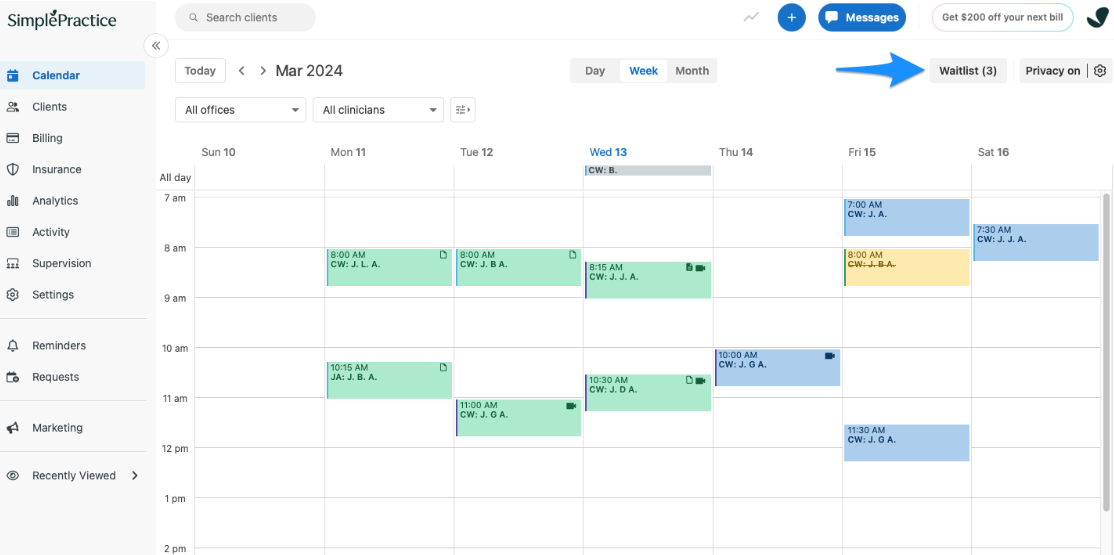
SimplePractice's scheduling is competent but less configurable. It offers a color-coded calendar with daily, weekly, and monthly views, drag-and-drop rescheduling, and recurring appointments. Online appointment requests go through the client portal, where practitioners approve or decline them. This gives clinicians control but adds a manual step that Acuity's automated self-scheduling eliminates.
Where SimplePractice adds something Acuity lacks is waitlist management. Practitioners can add prospective clients to a centralized waitlist with their preferences and availability, then schedule from the list when openings appear. For therapists who regularly maintain full caseloads, this fills a real need.
Source: SimplePractice
Clinical documentation is SimplePractice's territory
This is where the comparison becomes less of a feature shootout and more of a category distinction.
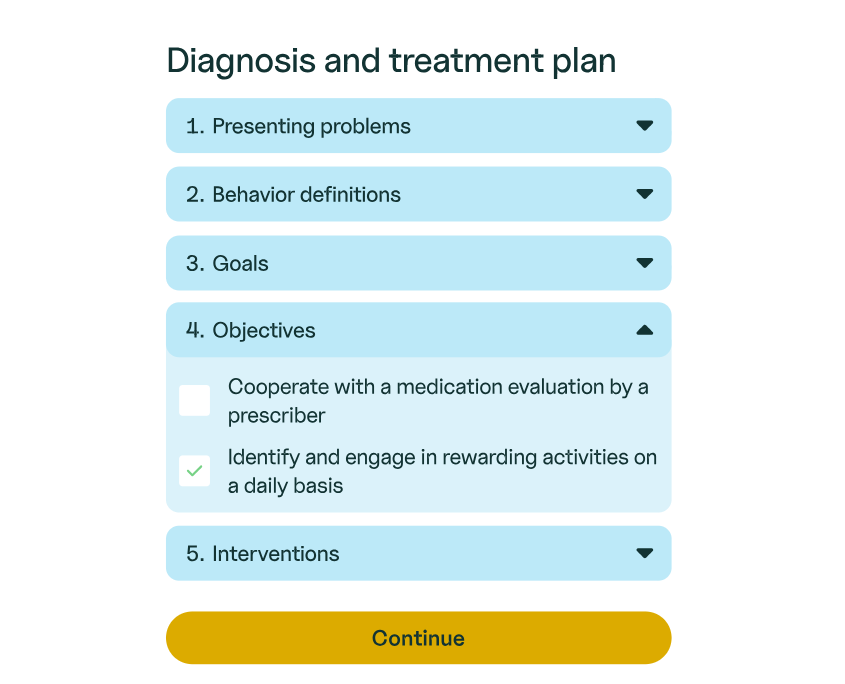
SimplePractice provides a full electronic health record (EHR) system with customizable templates for progress notes, treatment plans, intake assessments, and discharge summaries. SOAP and DAP note formats are available out of the box, and a template builder with drag-and-drop elements lets practitioners create custom forms.
Two features stand out. First, the Wiley Treatment Planners integration gives clinicians access to over 1,000 pre-written treatment goals, objectives, and interventions organized by presenting problem. Instead of writing plans from scratch, a practitioner selects a diagnosis and pulls from an evidence-based library. Second, an AI-powered Note Taker can transcribe telehealth or in-person sessions and draft progress notes, which the clinician then reviews and edits. The audio is deleted after transcription.
Source: SimplePractice
SimplePractice also includes Measurement-Based Care, where standardized assessments like the GAD-7 and PHQ-9 are sent to clients on a recurring schedule. Scores are calculated automatically, graphed over time, and high-risk responses are flagged for the clinician.
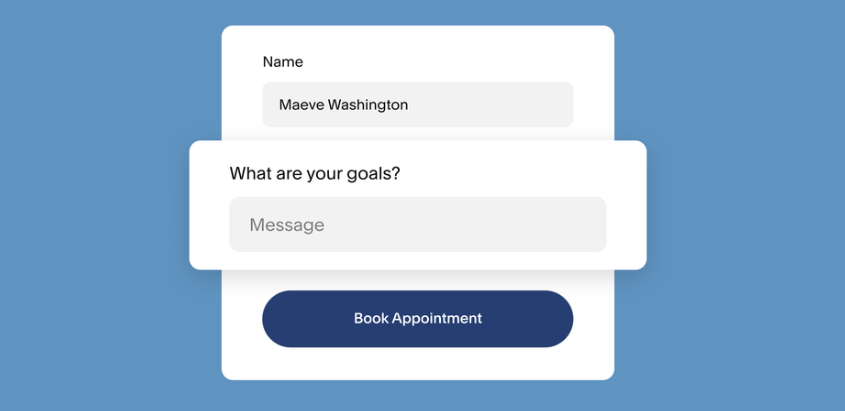
Acuity's documentation capability is limited to custom intake forms that collect information before appointments (text fields, checkboxes, dropdown menus), with responses stored in the client's profile. It also supports private notes that staff can attach to client records. This covers the needs of most non-clinical service businesses, but it is not clinical documentation.
Source: Acuity
For any practitioner required to maintain treatment plans, progress notes, or diagnosis records, this is not a close comparison. SimplePractice handles the clinical workflow; Acuity doesn't attempt it.
Insurance billing draws a hard line
If you bill insurance, SimplePractice handles it. Acuity doesn't.
SimplePractice includes electronic claim filing with a built-in clearinghouse. Claims are auto-populated with client, practitioner, and session information, then submitted electronically. The platform tracks claim status through its full lifecycle (submitted, received, accepted, paid, or denied) and processes Electronic Remittance Advice (ERAs) to record insurance payments and update claim statuses automatically.
For practitioners who prefer not to manage insurance billing themselves, SimplePractice offers a Managed Billing service on the Plus plan. A dedicated team handles claim creation, submission, rejections, denials, and appeals. The practitioner's only responsibility is locking and signing progress notes.
The Essential plan includes 10 free insurance claims per month; the Plus plan includes 35. Automatic insurance eligibility verification on the Plus plan checks whether a client's coverage is active before the appointment, reducing claim rejections from inactive policies.
Acuity has no insurance billing capability at any tier. It's designed around direct payment from clients through Stripe, Square, or PayPal. For service businesses that don't accept insurance, this is fine. For clinicians who do, it's a non-starter.
Source: Acuity
SimplePractice also generates superbills for out-of-network reimbursement, which clients can submit to their insurance company independently. This bridges the gap for practitioners who don't accept insurance directly but want to help clients get reimbursed.
Telehealth: built-in vs. bolt-on
SimplePractice includes HIPAA-compliant telehealth on all plans, with no session-length limits. The platform supports individual, couple, and group sessions with up to 15 clients.
Features include screen sharing, an interactive whiteboard, a client waiting room, and noise suppression. Clients join through a unique, one-time link sent before the session, with no account creation or software download required on desktop. The telehealth service holds HITRUST r2 certification, a higher bar than basic HIPAA compliance.
Acuity takes the integration route. When a virtual appointment is booked, Acuity generates a Zoom, Google Meet, or GoToMeeting link and includes it in the confirmation and reminder emails. The video session happens entirely within the third-party platform. This works for consultations, coaching calls, and non-clinical virtual sessions.
Source: Acuity
But it means your telehealth runs through a separate tool with its own HIPAA considerations, and you lose the connection between video sessions and clinical records that SimplePractice provides.
For clinicians, SimplePractice's approach is stronger. The session connects directly to the client's chart, and the AI Note Taker can transcribe the call and draft documentation. For non-clinical service businesses, Acuity's Zoom integration covers the basics without adding complexity.
Payment tools serve different revenue models
Both platforms handle payments, but they're built for different business models.
Acuity treats payment as a core part of the booking experience. Three processor options (Stripe, Square, and PayPal) give businesses choices, and payment logic is configured per service: require a deposit, demand full prepayment, or store a card on file for charging after the appointment. Acuity charges no platform transaction fees beyond what the processor charges.
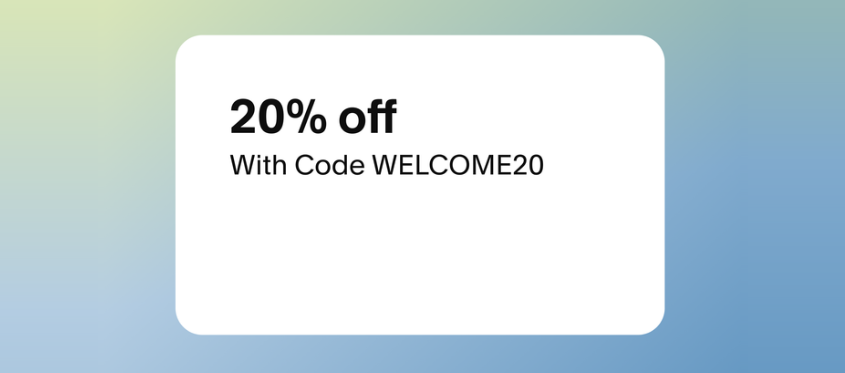
The revenue tools go beyond basic payment collection. Packages let clients buy discounted session bundles upfront, with Acuity tracking remaining sessions automatically. Subscriptions and memberships support recurring billing plans with multiple tiers. Digital gift certificates are sold and redeemed from the booking page. Coupon codes handle seasonal promotions. All of this is purchasable within the same booking flow, with no separate storefront required.
Source: Acuity
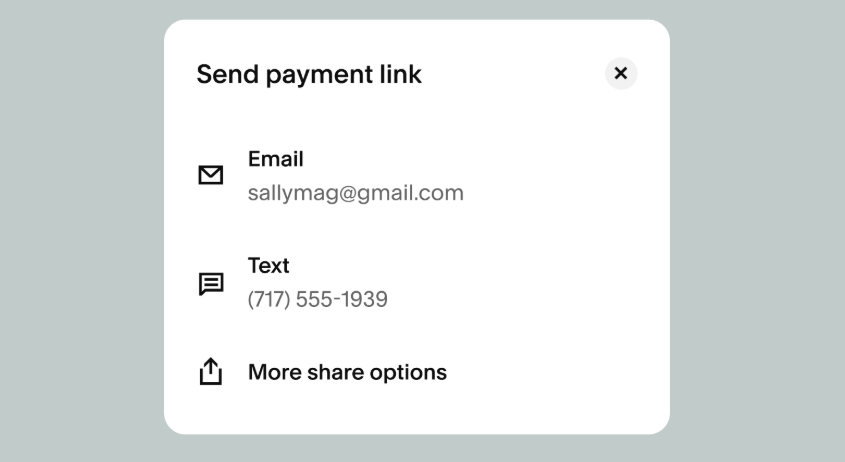
The POS system extends into in-person checkout. Stripe users can accept tap-to-pay from the mobile app without hardware, and Square users can connect card readers. Every in-person transaction links automatically to the corresponding appointment. The POS is currently available only in the United States.
Source: Acuity
SimplePractice's payment approach centers on the clinical billing workflow. It supports credit card processing through Stripe at a flat rate of 3.15% + $0.30 per transaction, with support for FSA and HSA cards. An AutoPay feature charges a client's card on file for their invoiced balance automatically. But the platform's real payment strength is insurance billing: electronic claims, ERA processing, and the Managed Billing service.
SimplePractice lacks the revenue tools that Acuity offers. There are no session packages, gift certificates, or subscription memberships built into the platform. For a therapy practice billing insurance or collecting copays, SimplePractice covers the financial workflow. For a business that wants to sell class bundles, gift cards, and memberships alongside appointments, Acuity provides a more complete set of revenue tools.
Pricing reflects what you're buying
The pricing gap between Acuity and SimplePractice maps directly to their scope.
Acuity Scheduling offers three self-serve tiers plus an Enterprise plan:
Starter: $16/month (annual) / $20/month (monthly), 1 calendar, email reminders, payments, intake forms
Standard: $27/month (annual) / $34/month (monthly), up to 6 calendars, SMS reminders, packages, subscriptions, gift certificates, Zoom/Google Meet
Premium: $49/month (annual) / $61/month (monthly), up to 36 calendars, HIPAA BAA, custom API and CSS, multi-timezone support, branding removal
Acuity charges no setup fees, no cancellation fees, and no support fees. Transaction fees are set entirely by the payment processor, not by Acuity.
SimplePractice also has three tiers:
Starter: $49/month, unlimited clients, scheduling, telehealth, online payments, progress notes, electronic claim filing
Essential: $79/month, adds appointment reminders, calendar sync, customizable treatment plans, Wiley Treatment Planners, 10 free insurance claims/month
Plus: $99/month, adds group appointments, group telehealth, premium phone support, automatic insurance verification, 35 free insurance claims/month, additional clinicians
SimplePractice's Starter plan costs more than Acuity's Premium plan. But it includes telehealth, clinical documentation, insurance claim filing, and HIPAA compliance (features Acuity doesn't offer at any price). The comparison isn't about which is cheaper; it's about whether you need what SimplePractice includes.
One notable gap: SimplePractice's appointment reminders are only available on the Essential plan ($79/month) and above. Acuity includes email reminders on all plans and SMS reminders from Standard ($27/month). For a solo practitioner who needs scheduling with reminders and doesn't bill insurance, Acuity at $27/month covers the core workflow at a fraction of SimplePractice's comparable tier.
SimplePractice also carries add-on costs that are easy to overlook. The AI-powered Note Taker is $35/month after a free trial period. E-prescribing is $49/month plus a one-time $89 setup fee. An annual AMA CPT code access fee of $20 per clinician is mandatory.
Both platforms offer a 7-day free trial with no credit card required.
Growing beyond inbound clients
Both Acuity and SimplePractice manage inbound demand. They assume clients find you through word of mouth, search, or a directory listing, and then help you convert that interest into booked appointments, completed sessions, and collected payments.
But at some point, many practices and service businesses hit a ceiling on organic growth. A group therapy practice wants to build a physician referral network. A corporate wellness provider needs to identify HR directors at companies that purchase employee assistance programs. A multi-location fitness business is looking for commercial partnership opportunities. These are B2B problems, and neither Acuity nor SimplePractice addresses them.
ZoomInfo operates in this space. As a B2B intelligence and go-to-market platform, it gives businesses the data and tools to identify, reach, and engage B2B contacts. Its database spans 500M contacts and 100M companies, verified through a multi-source pipeline backed by 300+ human researchers and achieving up to 95% accuracy on first-party data. In a Fortune 500 competitive RFP analyzing 25 million contacts across vendors, an independent consultant concluded that "no other competitor came even close."
Source: ZoomInfo
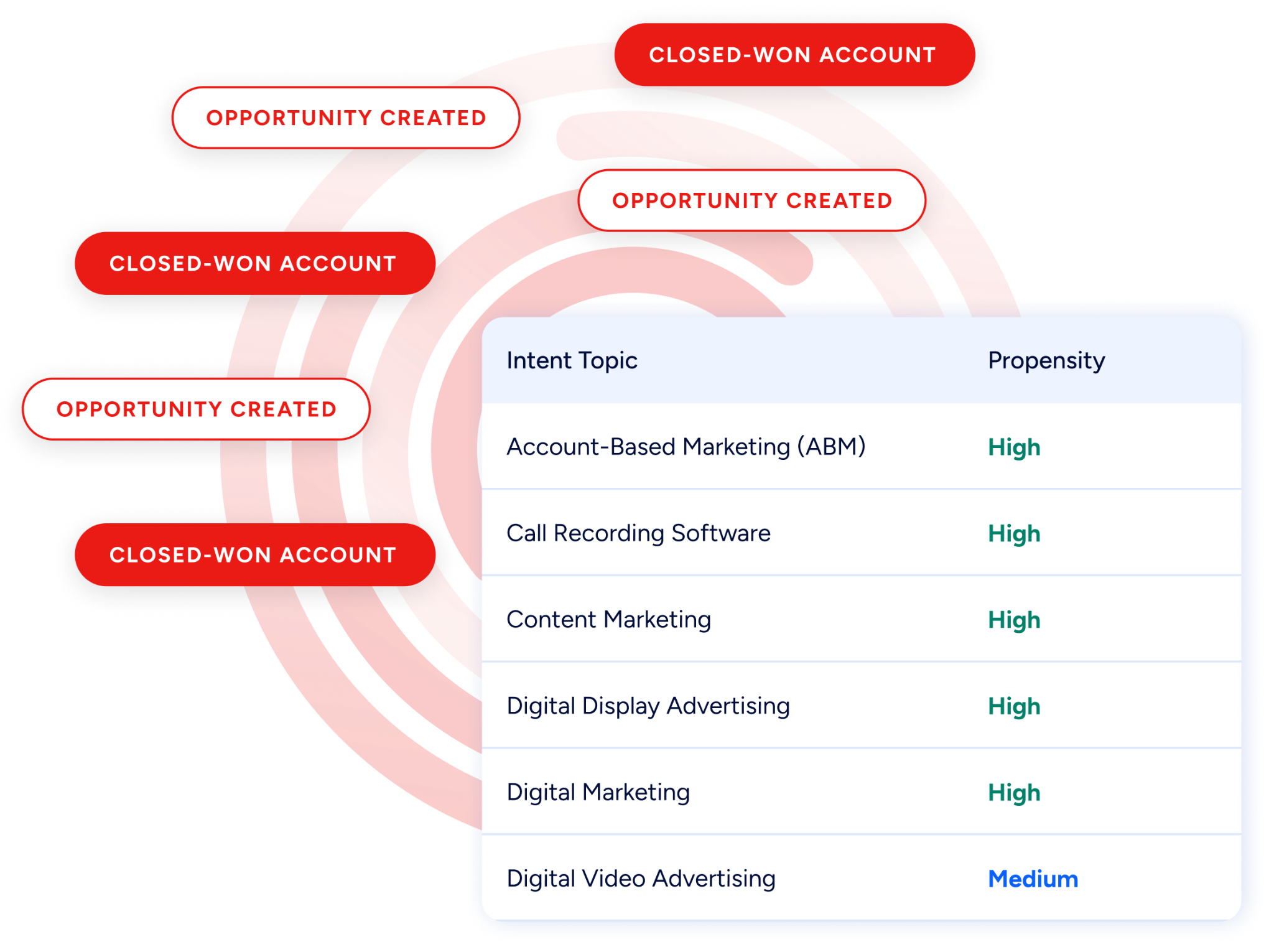
For a practice or service business pursuing B2B growth, this means finding the specific contacts who make purchasing decisions (not just the company name, but the person's verified email and direct phone number, their role, and signals indicating they're actively evaluating options). ZoomInfo's buyer intent data tracks research activity across 210 million IP-to-Organization pairings, identifying when an organization starts researching topics relevant to your services before they reach out to any vendor.
Source: ZoomInfo
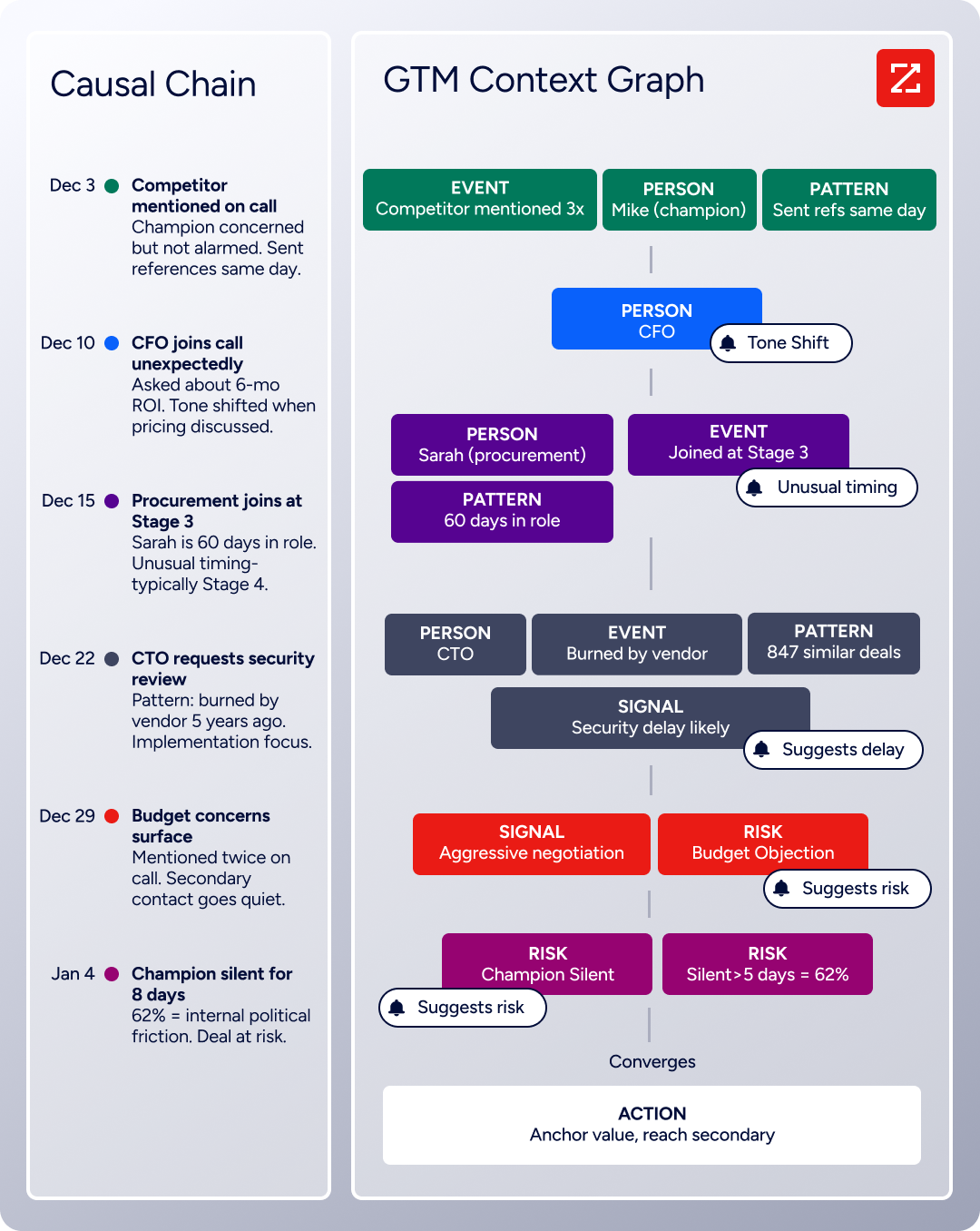
The GTM Context Graph goes further by combining ZoomInfo's B2B data with your CRM records, conversation transcripts, and behavioral signals into a single layer that captures not just what happened in a deal, but why it happened. That reasoning flows into every downstream action: the follow-up email addresses the specific concern the prospect raised, the outreach campaign targets organizations whose signals match your proven win patterns, and the forecast reflects buying evidence rather than guesswork.
Source: ZoomInfo
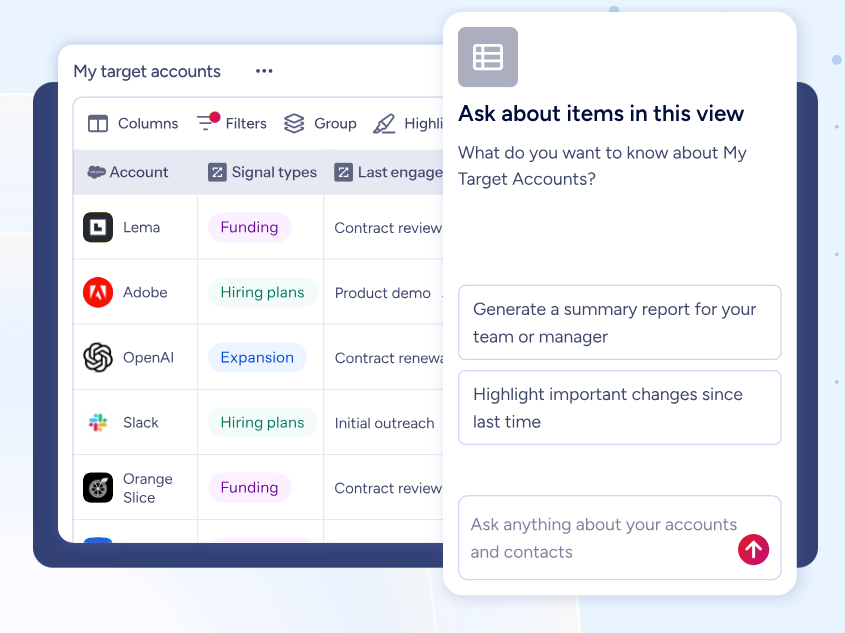
Three paths deliver this intelligence. GTM Workspace gives sellers a single surface with prioritized accounts, AI-drafted outreach, and deal execution.
Source: ZoomInfo
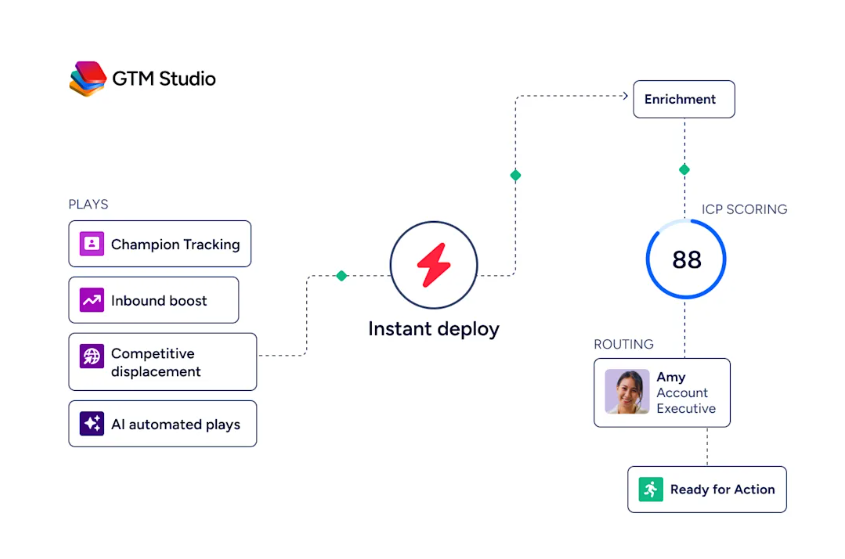
GTM Studio gives marketers and operations teams a builder where audience definition, campaign orchestration, and pipeline measurement happen in natural language. And APIs and MCP expose the same intelligence to any custom tool or AI agent. All three draw from the same GTM Context Graph, so the choice of where to work never limits the intelligence available.
Source: ZoomInfo
"ZoomInfo gives us the information we need to execute. We don't have to spend our time digging. It's already there, so we can be three steps ahead." (Vensure)
Acuity Scheduling vs. SimplePractice vs. ZoomInfo: Which should you choose?
The choice depends on what your business needs today and where you're headed next.
Choose Acuity Scheduling if:
You run a service business that collects payment directly from clients, without insurance billing
Scheduling flexibility is your priority: per-service availability, gap control, multi-staff management
You want revenue tools like packages, subscriptions, gift certificates, and a POS system
You need affordable scheduling starting at $16/month
Clinical documentation and built-in telehealth aren't requirements
Choose SimplePractice if:
You're a health or wellness practitioner who needs clinical documentation (progress notes, treatment plans, diagnoses)
You bill insurance or need electronic claim filing and ERA processing
Built-in, HIPAA-compliant telehealth is important for your practice
You want a single platform that replaces separate scheduling, EHR, billing, and telehealth tools
You're willing to pay more for a complete practice management system
Explore ZoomInfo if:
You've outgrown word-of-mouth referrals and want to grow through B2B channels
You need to find and reach decision-makers at corporations, hospitals, insurance networks, or EAPs
Building referral partnerships or landing corporate wellness contracts is a priority
You want verified contact data with intent signals showing when organizations are actively evaluating
See how ZoomInfo can help you grow.
"ZoomInfo's not just a contact data company anymore. GTM Intelligence works the list, writes the outreach, triggers the play, and helps drive predictable growth." — Ian Brodie, CEO & Co-Founder, Levanta
Acuity and SimplePractice both solve the operational problem of managing client appointments and getting paid, at different levels of depth for different audiences. For most service businesses, Acuity provides the scheduling flexibility and revenue tools they need at a fraction of SimplePractice's cost.
For health and wellness practitioners who require clinical documentation, insurance billing, and telehealth, SimplePractice offers a single platform that eliminates tool sprawl. And for businesses ready to move beyond managing inbound clients and start building B2B relationships, ZoomInfo provides the intelligence that neither scheduling nor practice management tools were designed to deliver.
Acuity Scheduling vs. SimplePractice vs. ZoomInfo FAQ
What is the main difference between Acuity Scheduling and SimplePractice?
Acuity Scheduling is a dedicated scheduling and payment platform built for any service business, including beauty, fitness, education, consulting, and wellness. SimplePractice is a practice management and EHR platform designed for health and wellness practitioners. Acuity focuses on scheduling flexibility, payment collection, and no-show reduction. SimplePractice adds clinical documentation, insurance billing, telehealth, and a client portal to its scheduling capabilities.
Which platform is better for a therapist or counselor?
SimplePractice is the stronger choice for therapists and counselors because it includes features that Acuity lacks entirely: progress notes, treatment plans, diagnosis tracking, insurance claim filing, and built-in HIPAA-compliant telehealth. Acuity can handle scheduling and payments for a cash-pay therapy practice, but it cannot replace the clinical and insurance workflows that most practitioners need.
Which platform is more affordable?
Acuity Scheduling starts at $16/month (billed annually) for a single calendar with email reminders and payment collection. SimplePractice starts at $49/month with unlimited clients, telehealth, progress notes, and electronic claim filing. However, SimplePractice's Starter plan lacks appointment reminders, which require the $79/month Essential plan. For businesses that need only scheduling and payments, Acuity costs less. For practitioners who need practice management, SimplePractice's higher price reflects a broader feature set.
Does Acuity Scheduling support HIPAA compliance?
Yes, but only on its Premium plan at $49/month (annual billing) or the Enterprise tier. On these plans, businesses can sign a Business Associate Agreement (BAA) with Acuity/Squarespace. The Starter and Standard plans do not support HIPAA compliance and should not be used for protected health information. SimplePractice includes HIPAA compliance on all plans and holds HITRUST r2 certification.
Can I use Acuity Scheduling for insurance billing?
No. Acuity Scheduling has no insurance billing capabilities at any tier. It is designed for direct payment from clients via Stripe, Square, or PayPal. If you need to file insurance claims, process ERAs, or generate superbills, you need SimplePractice or another practice management platform with insurance billing support.
How does ZoomInfo relate to Acuity Scheduling and SimplePractice?
ZoomInfo is not a scheduling or practice management tool. It is a B2B intelligence platform that helps businesses find and reach decision-makers at other organizations. While Acuity and SimplePractice manage existing client relationships and daily operations, ZoomInfo serves practices and service businesses that want to grow through B2B outreach (building physician referral networks, landing corporate wellness contracts, or connecting with EAP program managers). Its database covers 500 million contacts and 100 million companies with verified phone numbers and email addresses.
Which platform has better mobile app support?
Both platforms offer mobile apps on iOS and Android. Acuity provides a single admin app with full scheduling, payment, and client management capabilities included on all plans. SimplePractice offers two separate apps (one for clinicians and one for clients), with the clinician app supporting schedule management, note writing, billing, and secure messaging. SimplePractice's client app adds appointment management, online payment, document signing, and direct telehealth access.
Does SimplePractice integrate with external calendar apps?
Yes. SimplePractice syncs with Google Calendar, Microsoft 365 Outlook Calendar, and Apple Calendar. The Google Calendar sync supports an advanced two-way mode where personal calendar events block availability in SimplePractice, preventing double-booking. Acuity Scheduling also supports two-way sync with Google Calendar, Outlook, and iCloud. Both platforms prevent scheduling conflicts across connected calendars.
