
A developer evaluating a telephony API doesn't need to know whether calls can be placed and received. The real question is whether the API surface justifies building on: whether the endpoints cover what your integration needs, whether the authentication model fits your architecture, and whether the docs and tooling hold up once you ship.
Aircall's Public API is a REST surface served from https://api.aircall.io/v1, with a growing v2 layer for select resources. It supports both Basic Auth and OAuth 2.0, covers calls, contacts, users, teams, numbers, messaging, webhooks, conversation intelligence, and AI Voice Agent endpoints, and ships with one official SDK (a front-end CTI library).
The developer portal is public, the tutorial library is large, and Aircall promotes the API as a first-class integration surface.
But a public developer portal and a production-ready API are different things.
The Aircall API is likely the right choice if:
You need programmatic control over a cloud phone system: routing calls, managing users and teams, syncing call activity to your CRM or data warehouse, and automating post-call workflows.
You are building a telephony integration for a sales or support team already on Aircall and want to extend the platform with custom logic (smart routing, Insight Cards, contact sync).
You need event-driven automation on call lifecycle events (ringing, answered, ended, voicemail, recording ready) and messaging events (SMS, WhatsApp) through a documented webhook system.
You are a technology partner building an app for the Aircall App Marketplace and need OAuth-based multi-tenant integration.
You want to pull conversation intelligence data (transcriptions, sentiment, summaries, topics) from calls programmatically.
However, it might not be the right fit if:
You need B2B contact or company data from the API itself: enrichment, firmographics, technographics, org charts, or buyer intent signals. Aircall's API manages your phone system; it does not provide a contact database.
You need published rate-limit numbers to capacity-plan your integration. Aircall documents that rate limiting exists but does not publish the thresholds.
You need official server-side SDKs. Aircall provides one front-end CTI library; there are no maintained Node.js, Python, or Ruby SDK packages for the REST API.
You need API pricing transparency before committing. Aircall does not publicly state which plan tiers include API access or whether API calls are metered.
You need bulk data operations at scale (batch enrichment, mass export) rather than per-record telephony actions.
In this case, consider the API behind ZoomInfo, an AI GTM platform with a REST suite covering search, enrichment, AI intelligence, and audience management across 500M contacts and 100M companies, with OAuth 2.0 authentication, published rate limits up to 35 req/sec, and an MCP server for AI-agent workflows.
This article reviews both: the Aircall API in full technical depth first, then ZoomInfo's API where your build needs B2B data intelligence that a telephony API does not cover.
Aircall API at a Glance
Attribute | Detail |
|---|---|
API type | REST over HTTPS, JSON responses |
Authentication | Basic Auth (API key + token) or OAuth 2.0 (authorization code grant for marketplace apps) |
Base URL | https://api.aircall.io/v1 (v2 endpoints available for select resources) |
Rate limits | Documented as enforced; specific thresholds not publicly published |
SDKs | Aircall Everywhere SDK (front-end CTI/JavaScript only); no official server-side SDKs |
Webhooks | Yes, event system covering calls, users, contacts, messages, conversation intelligence, AI Voice Agent, and analytics |
Documentation | developer.aircall.io with API reference, tutorials, and build guides |
Pricing / access | Bundled with paid Aircall plans (Essentials at $30/user/month); specific API access tiers not publicly documented |
Aircall API: What Works Well & What to Plan Around
What works well | What to plan around |
|---|---|
Public developer portal with tutorials and API reference, no login wall | Rate-limit thresholds are not published; you discover your ceiling in production |
Broad webhook event coverage: 50+ events across calls, users, contacts, messages, AI, and analytics | No official server-side SDKs; all integrations are raw HTTP |
Two auth methods: Basic Auth for internal builds, OAuth 2.0 for marketplace apps | OAuth credentials require contacting marketplace@aircall.io; no self-serve registration |
Conversation Intelligence endpoints expose transcriptions, sentiment, summaries, and call scoring | Telephony scope only: no contact enrichment, company data, or buyer intent |
Webhooks manageable via API or dashboard, with per-event filtering | Webhook auto-disables after 10 consecutive failures; 5-second response timeout |
Aircall Everywhere SDK embeds the phone into third-party web apps | API pricing and plan-tier requirements are not publicly documented |
Aircall API: Authentication & Getting Started
Source: Aircall
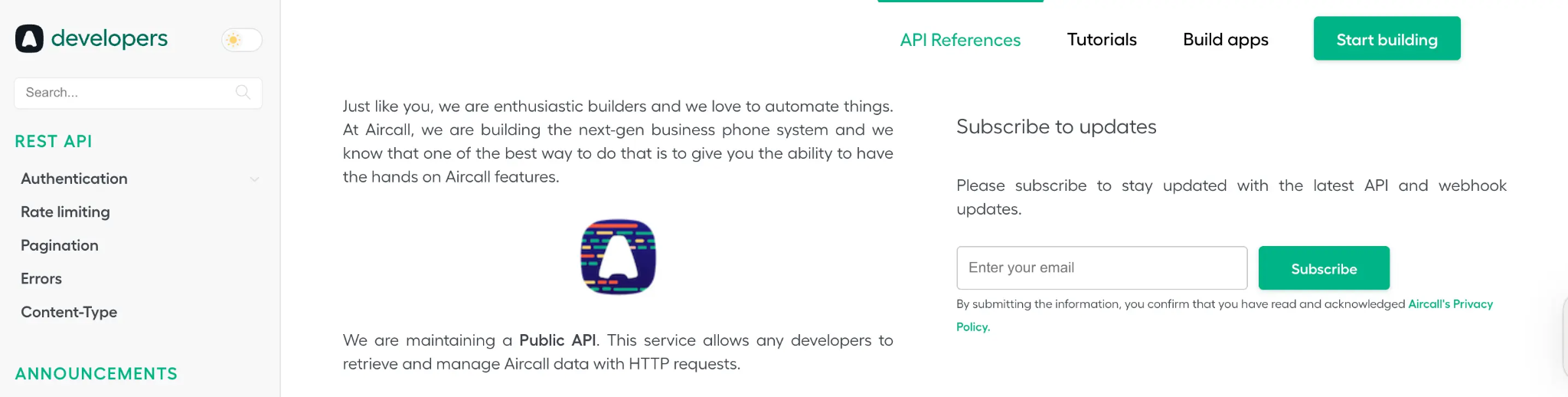
Getting API access starts with a paid Aircall account. You generate API credentials from the Aircall Dashboard under Company Settings, where you create an api_id and api_token. The token appears only once at creation and cannot be recovered.
Aircall supports two authentication methods, depending on what you are building:
Basic Auth is for Aircall customers building integrations against their own account. You Base64-encode api_id:api_token and pass it in the Authorization header. All requests must use HTTPS.
curl "https://api.aircall.io/v1/calls" \
-H "Authorization: Basic $(echo -n 'YOUR_API_ID:YOUR_API_TOKEN' | base64)"
OAuth 2.0 is required for technology partners building apps that serve multiple Aircall customers through the App Marketplace. The flow is an authorization code grant: Aircall redirects the installing admin to https://dashboard.aircall.io/oauth/authorize with client_id, redirect_uri, response_type=code, and scope=public_api.
The authorization code expires after 10 minutes and is exchanged for a permanent access_token. An optional state parameter prevents CSRF.
One thing to know: there is no self-serve OAuth registration. Partners must get client_id and client_secret by contacting Aircall at marketplace@aircall.io and applying through the partner programme. This gates marketplace app development behind manual approval.
Aircall API: Core Endpoints & Capabilities
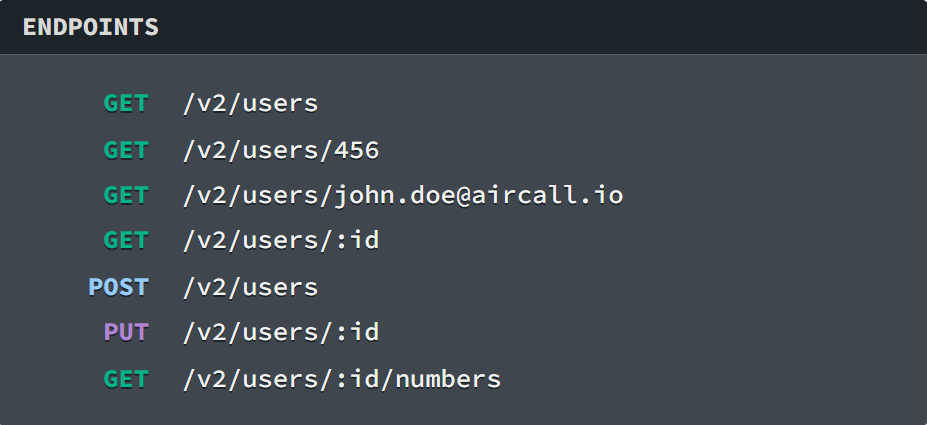
The API is organized by resource, with endpoints following the /v1/{resource} pattern. All requests and responses use JSON. A v2 surface exists for select resources (notably Users), but v1 remains the primary documented version.
Source: Aircall
Users & Teams
Users: List, retrieve, create, update, and delete users. Check agent availability (all users or individual). Start an outbound call for a specific user, or dial a phone number in the agent's phone app. The v2 User endpoints add the ability to list numbers assigned to a user.
Teams: List, retrieve, create, and delete teams. Add and remove users from teams.
What you would build with this: an availability sync that reads agent status from Aircall and mirrors it into your workforce management system, or an admin tool that provisions new hires into the correct teams and assigns phone numbers automatically.
Calls
Source: Aircall
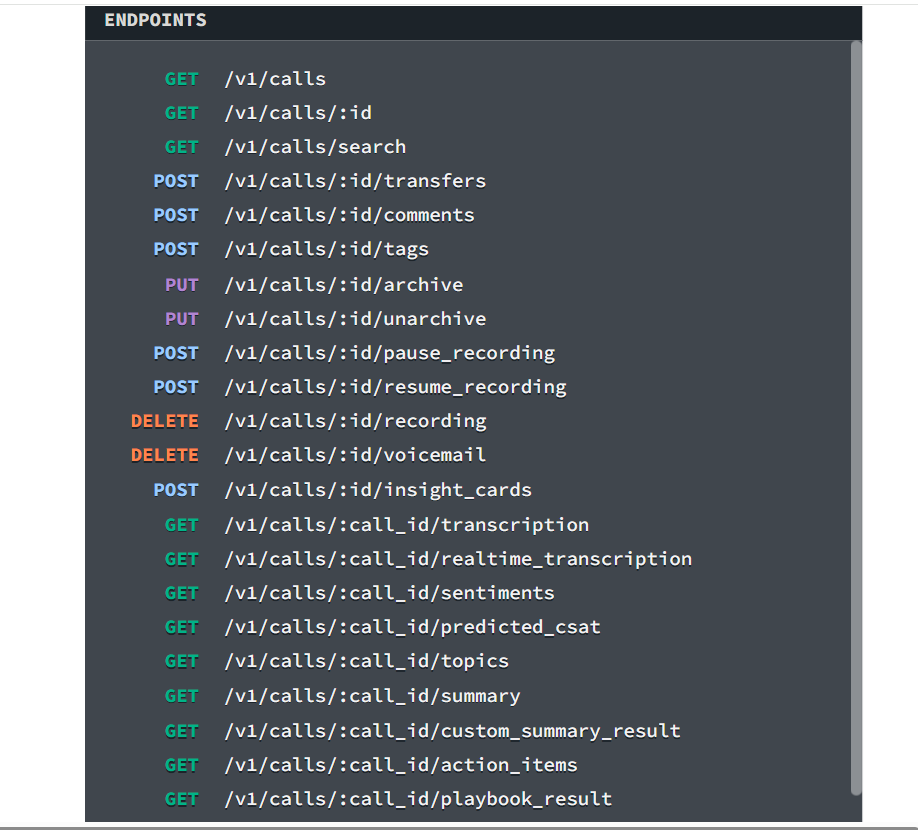
The call resource is the core of the API. Operations include listing all calls, retrieving a single call, and searching calls with filters. Actions on a call include:
Transfer to another user or number
Add a comment or apply tags
Archive and unarchive
Pause and resume recording
Delete a recording or voicemail
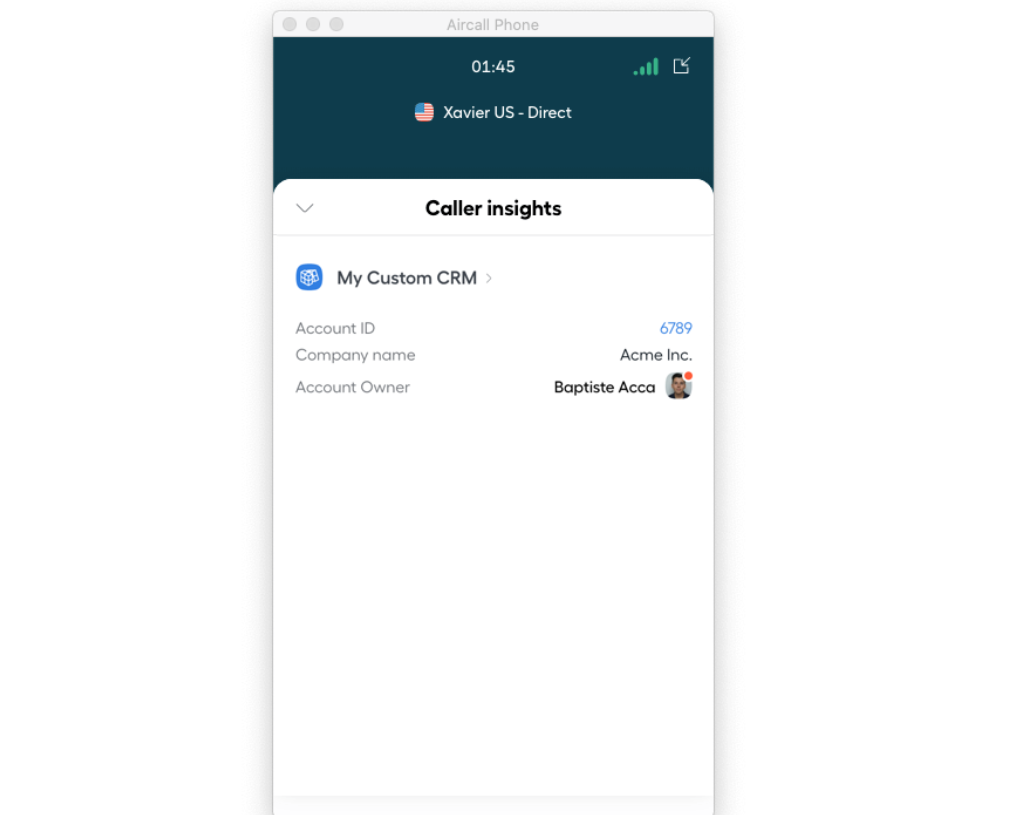
Insight Cards are a notable feature: they push customer context from your systems into the Aircall phone interface during a live call. If an agent picks up and you want them to see the caller's order history, account tier, or open support tickets, Insight Cards deliver that data.
Source: Aircall
What you would build with this: a CRM integration that logs every call with tags and comments, or a custom routing layer that transfers calls based on caller data from your database.
Contacts
Source: Aircall
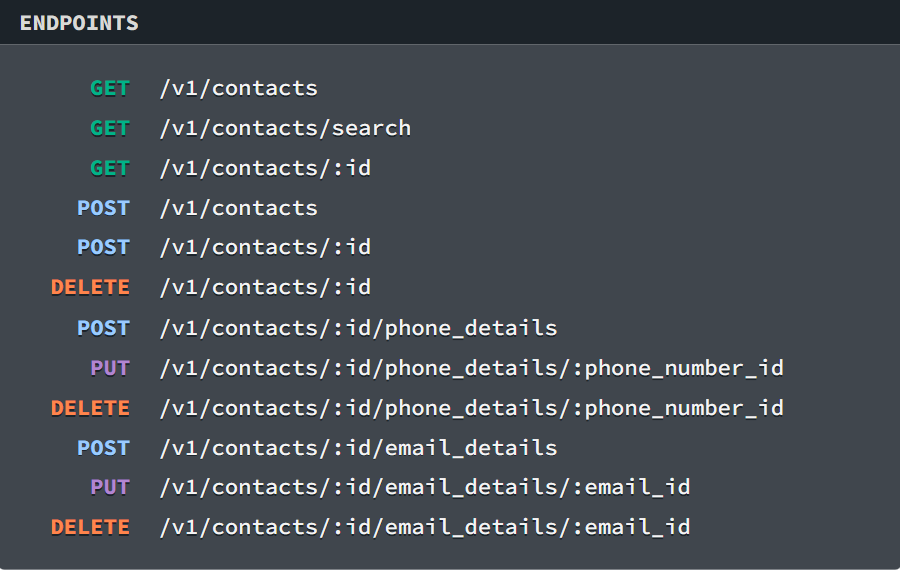
Full CRUD: list, search, retrieve, create, update, and delete contacts. Each contact record supports multiple phone numbers and email addresses. The contact resource is scoped to Aircall's internal contact directory, not an external enrichment database.
Numbers
Source: Aircall
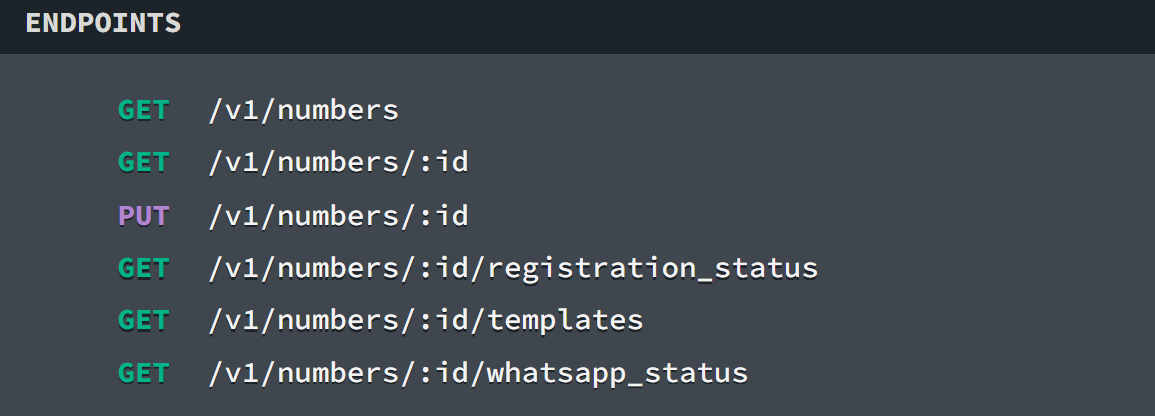
List, retrieve, and update phone numbers on the account. Update hold music and voice messages per number. Check registration status. Aircall provides numbers in 100+ countries, so managing numbers programmatically matters for organizations scaling internationally.
Messages (SMS & WhatsApp)
The messaging surface covers SMS, group SMS, and WhatsApp. Operations include creating and managing number configurations for messaging, sending messages through the agent inbox or bypassing it, listing WhatsApp templates, and checking WhatsApp line status.
Message callbacks (message.received, message.updated) are documented for event-driven messaging workflows.
What you would build with this: an automated follow-up system that sends an SMS or WhatsApp message after a call ends, triggered by a webhook event, with the message content pulled from your CRM.
Conversation Intelligence
This endpoint group exposes Aircall's AI-generated call analysis. Retrieve transcriptions (standard and real-time), sentiment analysis, topic extraction, call summaries, custom summaries, action items, and playbook results. Retrieve and list call evaluations for quality assurance workflows.
What you would build with this: a coaching dashboard that pulls call scores and topic trends across your team, or a pipeline that feeds call summaries and action items into your project management tool.
AI Voice Agent
The API surfaces Aircall's autonomous call-handling agent. Trigger outbound calls via AI Voice Agent, manage template variables, and monitor event statuses. This is one of the newer API surfaces, reflecting Aircall's investment in AI-powered call handling.
Dialer Campaigns
Retrieve, create, and delete campaigns for the Power Dialer. Manage the phone number lists within campaigns. Useful for sales teams running outbound calling sequences programmatically.
Analytics
Create and retrieve analytics report exports asynchronously. Reports are generated on demand and downloaded when ready, rather than queried in real time.
Supporting Resources
The API also covers:
Tags: Full CRUD for call tags used across the account
Company and Integration: Retrieve company-level information; retrieve, enable, and disable native integrations programmatically
Webhooks: Create, list, retrieve, update, and delete webhook subscriptions via the API
SIP trunking: Documented in the Extras section
Mobile URL schemes: iOS and Android deep links for triggering dials from mobile apps
Pagination is documented in the API references under a dedicated section, using JSON as the content type for all request bodies and responses.
Aircall API: Webhooks & Events
Source: Aircall
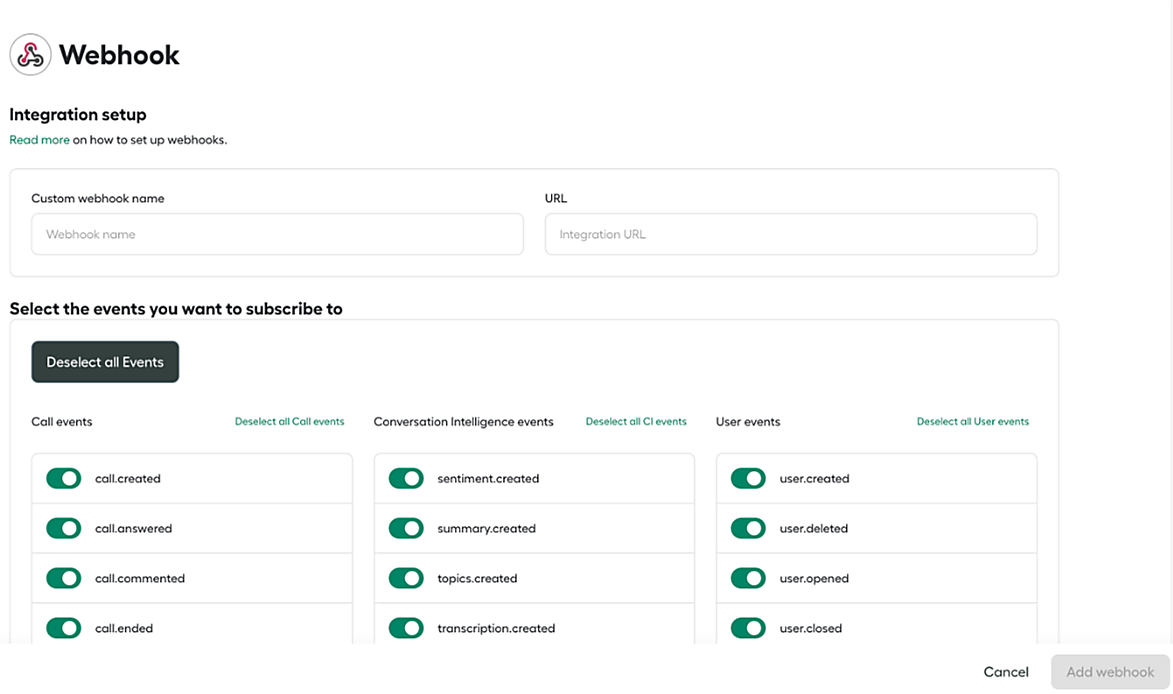
Aircall's webhook system is one of the strongest parts of the API. When an event occurs on an Aircall account, Aircall sends a POST request to your registered HTTPS endpoint. Webhooks must use HTTPS; plain HTTP URLs are not supported.
The event catalogue covers a wide range:
Call events: call.created, call.ringing_on_agent, call.agent_declined, call.answered, call.transferred, call.external_transferred, call.unsuccessful_transfer, call.hungup, call.ended, call.voicemail_left, call.commented, call.tagged, call.untagged, call.assigned, call.archived, call.hold, call.unhold, call.ivr_option_selected, call.comm_assets_generated
User events: user.created, user.deleted, user.connected, user.disconnected, user.opened, user.closed, user.wut_start, user.wut_end (all duplicated as v2 variants with extended data)
Contact events: contact.created, contact.updated, contact.deleted
Message events: message.sent, message.received, message.status_updated, group_message.sent, group_message.received, group_message.status_updated
Number events: number.created, number.deleted, number.opened, number.closed
Conversation Intelligence events: sentiment.created, summary.created, topics.created, transcription.created, action_item.created, playbook_result.created, playbook_result.updated, realtime_transcription.utterances_received, custom_summary.result_created, custom_summary.result_updated, call_evaluation.created, call_evaluation.updated
AI Voice Agent events: ai_voice_agent.started, ai_voice_agent.ended, ai_voice_agent.escalated, ai_voice_agent.summary
Analytics events: analytics.report_created, analytics.report_failed
Integration events: integration.deleted
Two end-of-call events deserve attention. call.hungup fires when the call drops, useful for real-time dashboards. call.ended fires roughly 30 seconds later once recording files, duration, and other metadata are finalized. Choose based on whether you need speed or completeness.
Three things to plan around:
Aircall automatically disables a webhook after 10 consecutive failed requests. A request counts as failed if your server returns anything other than a 2xx HTTP status code.
Aircall's outbound webhook request times out after 5 seconds. Offload heavy processing to a background queue (RabbitMQ, Sidekiq, Python RQ).
Each webhook object includes a unique token you can store and use to verify event authenticity and associate events to a specific account.
Administrators can select specific event types per webhook (all events are on by default). Webhooks can be created through the Aircall Dashboard or via the API, enabling automated provisioning.
Aircall API: SDKs, Docs & Rate Limits
SDKs & Libraries
Aircall provides one official SDK: the Aircall Everywhere SDK, a front-end JavaScript (CTI) library that embeds the Aircall Workspace phone app inside a third-party web application.
Install via npm install -s aircall-everywhere, import as AircallWorkspace, and agents can make and receive calls without leaving your interface.
The SDK supports events (incoming_call, outgoing_call, call_ended, comment_saved, and others) and send-to-workspace actions like dial_number. V2 is the current version; V1 is deprecated.
There are no official server-side SDKs for the REST API. Aircall publishes no maintained Node.js, Python, Ruby, PHP, Go, or Java packages. All tutorial code uses raw HTTPS requests in JavaScript/Node.js. A Ruby OAuth example app exists on GitHub as a reference, but it is a demo, not a packaged SDK.
No official SDK is a real signal. It means you own the auth layer, request serialization, error handling, and retry logic. For a simple webhook listener, that is fine. For a production integration calling a dozen endpoints with pagination and rate-limit backoff, it adds engineering work.
Documentation & Developer Experience
The developer portal at developer.aircall.io is organized across three sections:
API References: Endpoint-level documentation covering all resource areas, with a sidebar table of contents, changelog, versioning strategy, and extras (SIP, URL schemes, timezone reference).
Tutorials: A large library covering OAuth, Basic Auth, webhook setup, Insight Cards, smart call routing, contact synchronization, agent availability sync with Google Calendar, call logging, automatic callback, time-based routing, recording storage, and platform-specific guides for HubSpot (6+ tutorials) and Salesforce (5+ tutorials). Code samples use JavaScript/Node.js throughout.
Build Apps: Guidance for third-party developers building marketplace apps, including co-marketing and listing support.
The Aircall Everywhere SDK has its own interactive demo page and GitHub repository. An open-source sample app ("Weather, by Aircall") is listed on the marketplace as a reference.
What the docs do not include: no interactive OpenAPI/Swagger explorer, no official Postman collection, and no downloadable OpenAPI spec. The API references use hash-based navigation that renders content dynamically, which can make deep-linking to specific endpoints inconsistent.
Developer support for marketplace partners is available at marketplace@aircall.io; no public developer community forum, Slack, or issue tracker was identified.
Rate Limits & Constraints
The API references document a rate limiting section, confirming that rate limiting is enforced. But the actual thresholds (requests per second, per minute, or by plan tier) are not published. Developers should consult the API references directly or contact Aircall for current figures.
This gap matters. Without published limits, you cannot capacity-plan an integration before building it. You discover your ceiling by hitting it, which is poor developer experience for production systems.
The webhooks guide advises handling slow tasks asynchronously and using background job queues to stay within the 5-second webhook response window. Pagination is documented, but batch operation limits (if any) are not specified.
Aircall API Pricing & Access Costs
Aircall does not publish specific API pricing details. The pricing page does not state which plan tier includes API access or whether API calls are metered.
Based on the developer documentation, API key generation is available from the Company Settings page, suggesting API access is bundled with a paid Aircall subscription rather than charged separately. The Essentials plan at $30/user/month (annual, 3-user minimum) lists "100+ integrations and API access" as a feature, indicating API access on all tiers.
OAuth credentials for marketplace partners require a separate onboarding process via marketplace@aircall.io and the partner programme signup. No per-call or consumption-based API pricing is described.
For a developer sizing costs: the API itself does not appear to carry incremental charges, but the platform limits are plan-dependent:
Essentials ($30/user/month): Up to 3 teams, call recordings stored up to 1 year, basic analytics limited to 6 months
Professional ($50/user/month): Unlimited teams, unlimited call recording storage, advanced analytics and live monitoring, Power Dialer, all AI Assist features included
Custom (contact sales, 25-user minimum): API developer support, SLA, SSO, Analytics+ with unlimited history
The minimum commitment is 3 users on Essentials and Professional, or 25 users on Custom. Annual plans provide up to 25% savings compared to monthly pricing. Aircall requires 30 days' written notice before the contract end date to cancel; otherwise, the contract auto-renews.
Where the Aircall API Falls Short
These are the practical limits a developer should plan around when building on this API. Several reflect what Aircall is (a cloud phone system) and what it is not.
The API manages telephony. That is its entire scope. There is no contact enrichment, no company database, no firmographic or technographic lookup, no buyer intent signals, no org-chart traversal, no direct-dial phone number discovery.
If your pipeline needs to handle a call and then look up the caller's company size, technology stack, or decision-making authority, you need a second API. This is a boundary of the product, not a failure of the API, but it is the biggest constraint for developers building data-enriched telephony workflows.
Rate limits are not published. The API references confirm rate limiting exists, but the thresholds are not documented. For a developer building a production integration, this means you cannot model throughput, estimate capacity, or architect retry logic against known numbers. You find the limits by hitting them.
No official server-side SDKs. The Aircall Everywhere SDK covers front-end CTI embedding, but there are no maintained packages for any server-side language. Every backend integration is raw HTTP, and you own the auth, pagination, error handling, and rate-limit backoff.
No self-serve OAuth registration. Partners building marketplace apps must contact marketplace@aircall.io to get OAuth credentials. There is no developer portal workflow for registering an OAuth app and getting credentials on the spot. This gates marketplace development behind a manual process.
No OpenAPI spec or Postman collection. The API reference uses dynamic rendering, and no downloadable spec is available. Developers cannot auto-generate client code or import the API into testing tools without reconstructing the spec by hand.
API pricing and plan-gating are opaque. While Essentials lists "API access" as a feature, Aircall does not state whether any endpoints are gated behind higher tiers, whether there are per-call charges at volume, or what the Custom tier's "API developer support" includes beyond what other tiers offer.
Webhook delivery guarantees are thin. Webhooks auto-disable after 10 consecutive failures, and the 5-second response timeout is strict. The documentation does not describe retry intervals between failures or payload signing for webhook verification (though a token field exists for association). Design your receiver to be idempotent and to handle reactivation.
ZoomInfo API: The B2B Data Layer Aircall Does Not Cover
Aircall's API tells you everything about a call: who dialed, how long it lasted, what was said, and how it was tagged.
ZoomInfo's API tells you who the caller is beyond the phone number: what company they work for, what that company's technology stack looks like, whether the account shows buying intent, and where the caller sits in the org chart. That depth comes from the GTM Context Graph, which processes 1.5B+ data points daily by combining ZoomInfo's B2B dataset with your first-party signals.
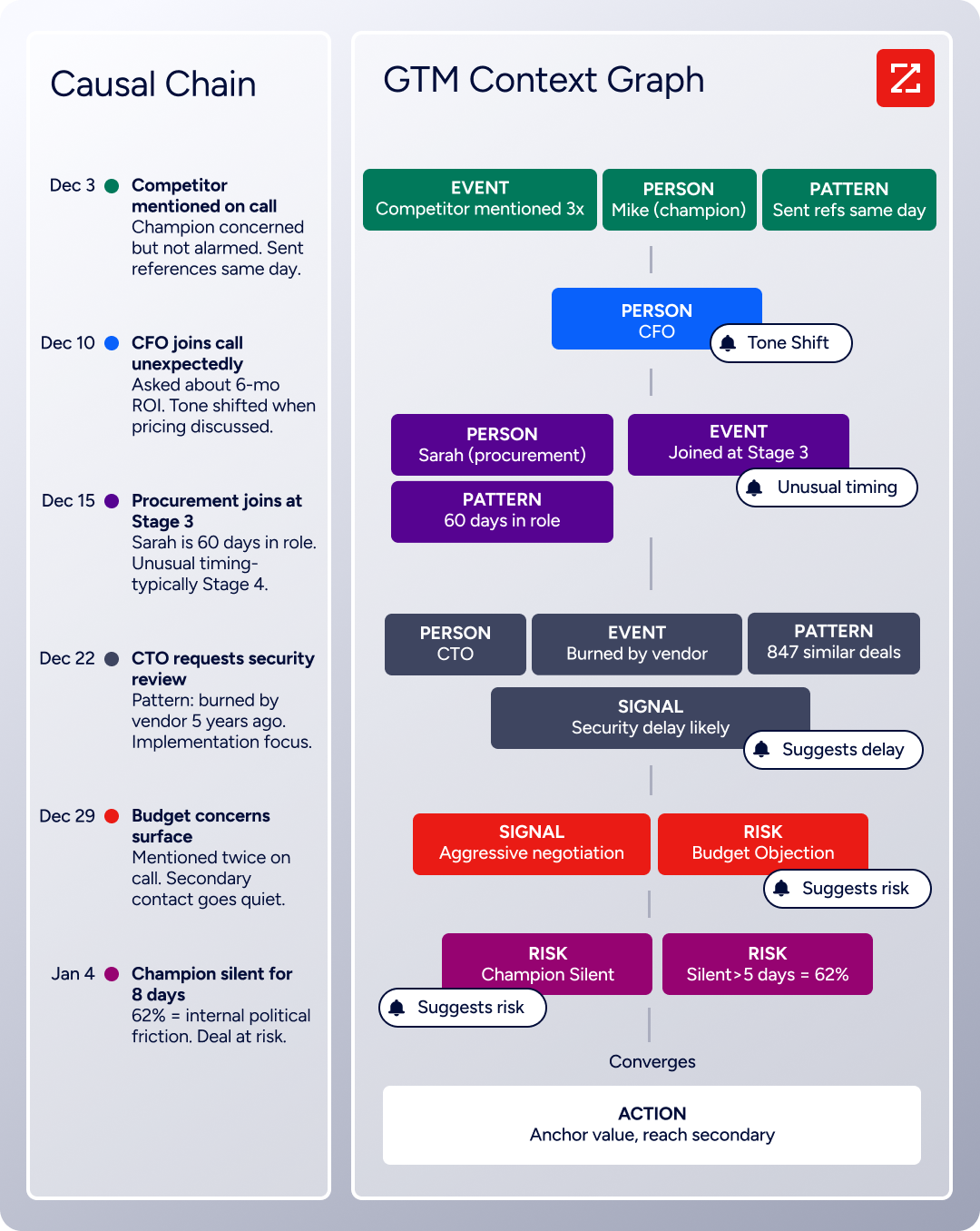
The two APIs operate at different layers. A developer building a telephony-plus-intelligence workflow would use Aircall's API to manage the call and ZoomInfo's API to understand the person on the other end.
What the API Covers
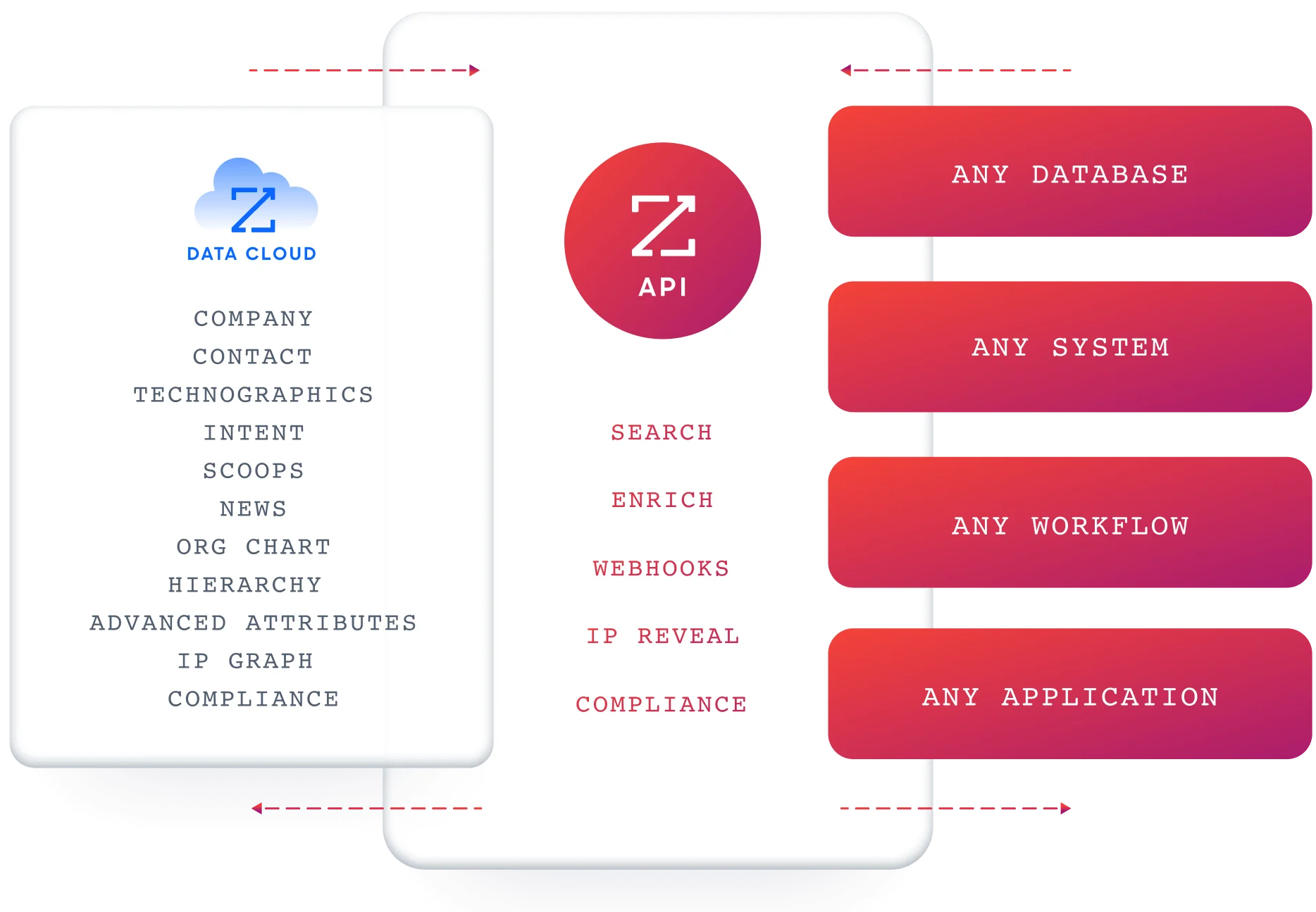
ZoomInfo's Enterprise API is a REST suite served from https://api.zoominfo.com/gtm, organized into four areas documented in the interactive API reference:
Data API (Search & Enrich): Search endpoints cover Contacts, Companies, Intent, News, and Scoops, returning matched records without consuming credits. Enrich endpoints unlock full payloads: business emails, direct dials, employment history, corporate hierarchy, org charts, technographics, and hashtag signals, up to 25 records per call. The underlying dataset spans 500M contacts and 100M companies, 135M+ verified phone numbers, and 200M+ verified business email addresses.
Copilot API (the AI engine behind GTM Workspace): Account Summary returns structured account intelligence with a free-form Q&A endpoint. Find Similar Companies performs lookalike expansion. Contact Recommendations returns AI-ranked buying-committee suggestions by motion (prospecting, deal acceleration, renewals).
Marketing API: CRUD endpoints for programmatic audience management.
Platform API (Engagements, Beta): Bidirectional engagement data via the Engagements API.
The pairing with a telephony API is direct: before a sales rep picks up a call, pull the caller's company profile, intent signals, and org chart from ZoomInfo so the rep has context on screen. After the call, enrich the contact record with verified data before it enters your CRM.
The search-then-enrich pattern means you filter freely (search is free), then pay credits only for records you commit to enriching.
Authentication & Access
ZoomInfo uses OAuth 2.0 with PKCE via Okta, supporting three flows: Authorization Code with PKCE (web applications), Client Credentials (server-to-server), and Refresh Token. Access tokens are 24-hour Bearer tokens with rotating refresh tokens.
Applications are registered through the ZoomInfo Developer Portal, where teams generate credentials, define scopes, and test endpoints.
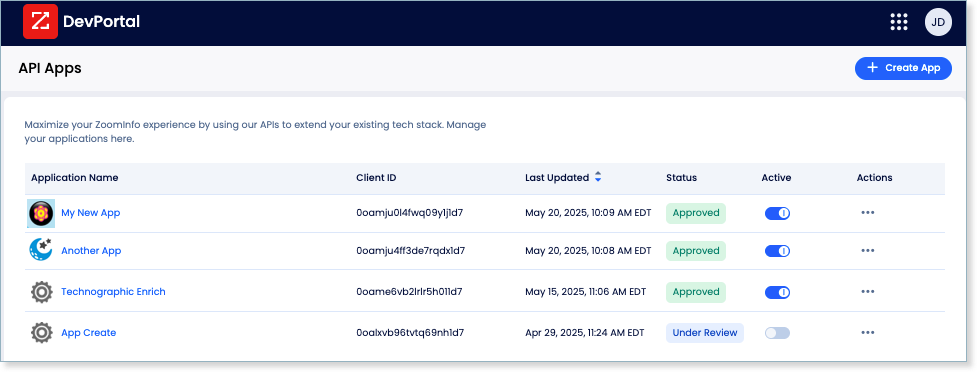
This is a different authentication model from Aircall's static Basic Auth credentials. OAuth 2.0 supports delegated access, credential rotation, and scoped permissions, fitting multi-tenant integrations and enterprise security requirements.
Rate Limits, Credits & Developer Experience
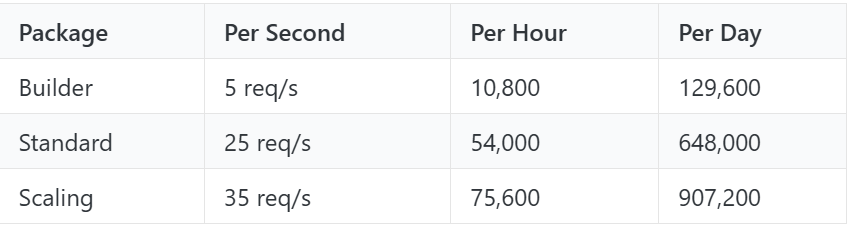
Rate limits are published by tier: Builder (5 req/sec), Standard (25 req/sec), and Scaling (35 req/sec), with per-hour and per-day sliding-window limits enforced simultaneously. Every response includes quota headers with remaining capacity, and 429 responses include a Retry-After header with exact backoff timing.
Credits follow a rolling 12-month window: a record enriched for the first time consumes one credit; re-enriching the same record within the year is free. Search and lookup operations are free and do not consume credits.
For developers building AI agents, ZoomInfo's MCP server at https://mcp.zoominfo.com/mcp exposes search, enrich, and account research as native tools for MCP-compatible assistants, currently supporting Claude and ChatGPT.
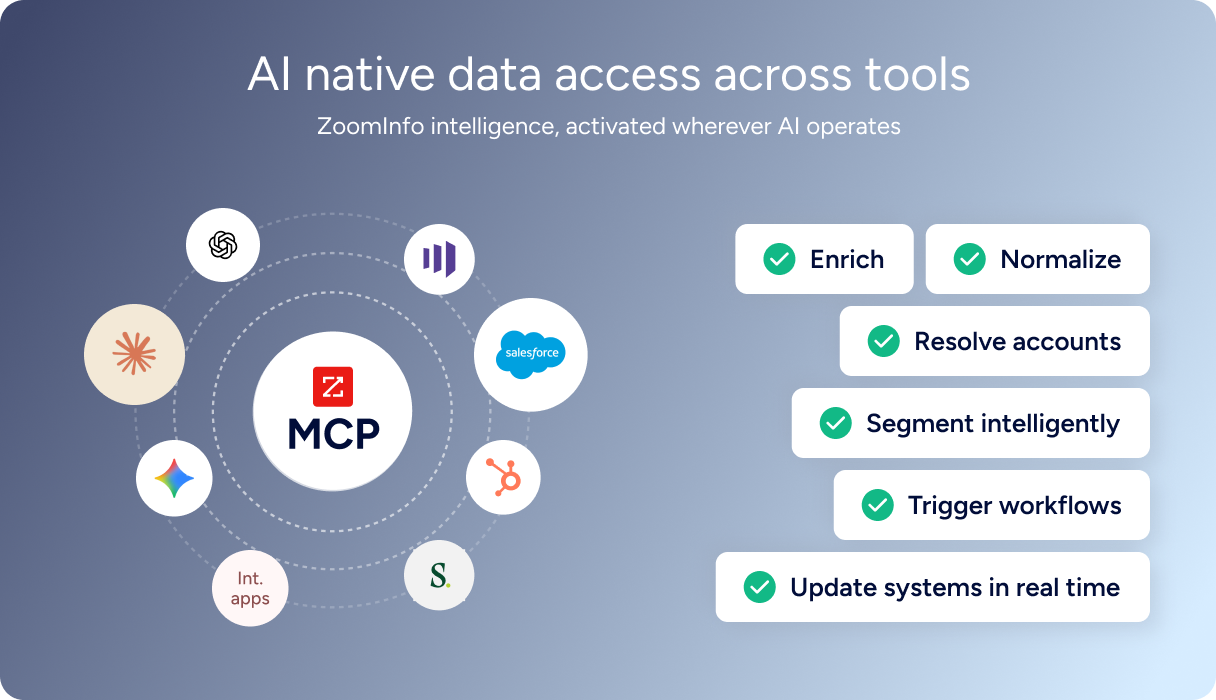
Documentation lives at docs.zoominfo.com with an interactive API reference, OAuth recipes in five languages, and an llms.txt index for AI development tools. A separate Docs MCP Server enables AI-assisted code generation against the API spec.
ZoomInfo does not publish official SDKs either, so both platforms require direct HTTP integration. ZoomInfo uses consumption-based pricing; the platform has added API access to all relevant plans, though the Enterprise API and Copilot endpoints require the corresponding package subscription.
BDO Canada reported an 87% reduction in time spent updating internal data dashboards using the ZoomInfo API, with one analyst describing the integration as plug-and-play across any process. (ZoomInfo)
Final Verdict
Aircall's API is a capable telephony surface with real depth where it matters: a broad webhook event catalogue covering 50+ events, conversation intelligence endpoints that expose transcriptions and sentiment programmatically, and an Insight Cards feature that pushes live context into the agent's phone. The developer portal and tutorial library are strong.
For a developer whose build starts and ends with call management, routing, and telephony automation, the API covers the job.
Choose the Aircall API if your integration is telephony-first: syncing call activity to a CRM, building smart routing logic, embedding the phone in your web app via the Everywhere SDK, or automating post-call workflows with webhooks. The API's scope matches the platform's scope, and for teams already on Aircall, it is the right surface to extend.
Choose the ZoomInfo API if your build needs the data layer behind the call: knowing who is calling before the rep picks up, enriching contact records after the call, identifying which accounts show buying intent, or mapping the org chart around a key contact.
The search-then-enrich pattern (search is free, enrich consumes credits) and the Copilot API's AI endpoints cover the B2B data dimension that telephony APIs do not.
Explore the ZoomInfo Enterprise API or start with the developer docs to see the endpoint surface directly.
A developer who needs neither API should know that Aircall's API does not provide B2B contact or company data, and ZoomInfo's API does not manage phone systems. If your pipeline needs both, the two are complementary layers: verify identity and context with ZoomInfo, then route and manage the call with Aircall.
FAQ
Is the Aircall API free?
API access appears included on all paid Aircall plans, starting with Essentials at $30/user/month (annual billing, 3-user minimum). Aircall does not publish per-call API charges or a separate API pricing tier. The cost driver is the plan tier, which determines feature access (AI Assist, Analytics+, Power Dialer) and platform limits (team count, recording storage, analytics history).
The Custom tier adds dedicated API developer support, suggesting deeper API needs may require a higher plan.
Does Aircall have a GraphQL API?
No. Aircall exposes a REST API (primarily v1, with v2 endpoints for select resources like Users) that communicates over HTTPS and returns JSON responses. There is no GraphQL endpoint. If you need a GraphQL interface for telephony data, you would need to build a wrapper layer on top of the REST API.
What is the Aircall API rate limit?
Aircall confirms that rate limiting is enforced but does not publish the specific thresholds (requests per second, per minute, or by plan tier) in its public documentation. The API references include a rate limiting section, but the content renders dynamically. Developers should contact Aircall for current numbers, or discover limits experimentally during development.
Are there official Aircall SDKs?
Aircall provides one official SDK: the Aircall Everywhere SDK, a front-end JavaScript (CTI) library for embedding the Aircall phone app inside third-party web applications. It installs via npm and supports events like incoming calls, outgoing calls, and call endings.
There are no official server-side SDKs for Node.js, Python, Ruby, PHP, or any other language. All backend integrations use direct HTTP requests to the REST API.
Does the Aircall API support webhooks?
Yes. Aircall has one of the more thorough webhook systems in the telephony API space, with 50+ event types covering call lifecycle events (created, ringing, answered, transferred, ended, voicemail), user status events, contact changes, messaging events (SMS and WhatsApp), conversation intelligence events (transcription, sentiment, summaries, playbook results), AI Voice Agent events, and analytics report events.
Webhooks are managed through the dashboard or the API, support per-event filtering, and require HTTPS endpoints. The main constraint: Aircall auto-disables a webhook after 10 consecutive failures, and your endpoint must respond within 5 seconds.
What does ZoomInfo's API add to an Aircall build?
ZoomInfo's API adds the B2B data intelligence layer that Aircall's API does not cover. Where Aircall tells you a call happened and what was said, ZoomInfo tells you who the caller is, what company they work for, what technologies they use, and whether the account is researching your category.
A practical integration pattern: use ZoomInfo's search endpoint (free, no credits consumed) to match an incoming caller's phone number to a contact record, enrich with the full profile (company, title, org chart, intent signals), and push that context into Aircall's Insight Cards so the agent sees it during the call. Post-call, the same enrichment data feeds your CRM with verified information.
ZoomInfo's MCP server extends the same data to AI-agent workflows, adding a layer Aircall's API does not currently offer.
