
The question a developer asks before committing to a CRM API is not whether it exists, but whether it gives you enough control over the data model, the records, and the automation layer to justify building on it rather than around it.
Attio's API is a public REST surface exchanging JSON over HTTPS, with OAuth 2.0 authentication for multi-workspace apps and API keys for single-workspace use, published rate limits of 100 reads/sec and 25 writes/sec, a webhook system with at-least-once delivery guarantees, and an endpoint catalogue spanning custom objects, records, lists, notes, tasks, files, meetings, and call recordings.
The developer docs are public, an OpenAPI spec is downloadable, and API access ships on every plan, including free.
That openness is not universal in the CRM category. But scope and depth are different questions.
Attio's API covers the CRM layer: creating and querying records across custom objects, managing lists and pipeline entries, subscribing to webhooks on record changes, and orchestrating workflows. Where its scope stops is B2B data intelligence.
The API does not search external contact databases, enrich records with verified phone numbers or technographics, surface buyer intent signals, resolve org charts, or provide AI-powered account research. Attio's built-in enrichment populates basic firmographics automatically, but no API endpoint lets you trigger enrichment on demand or query an external dataset.
This is where ZoomInfo enters the picture.
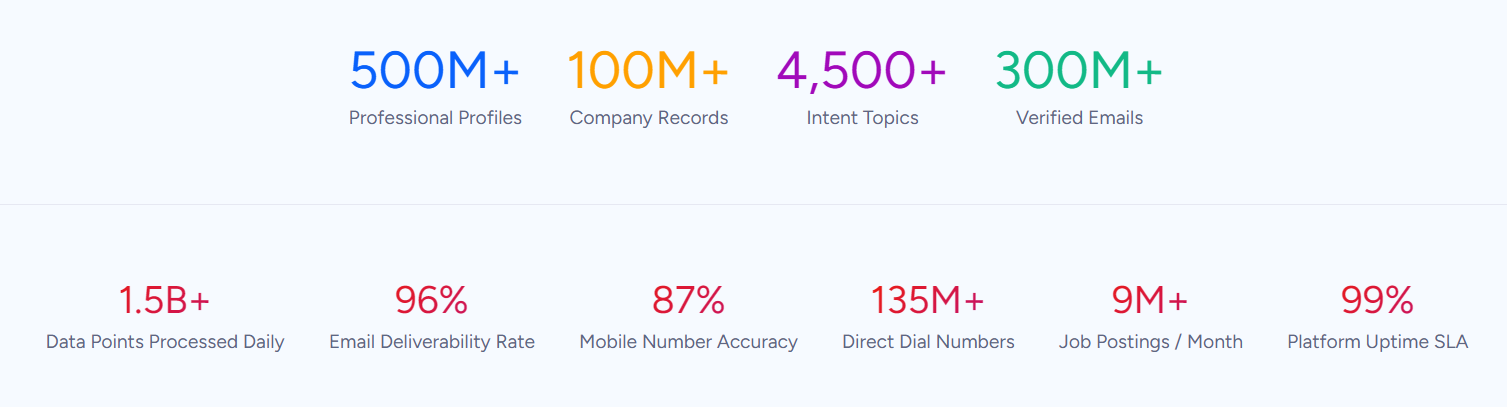
ZoomInfo's Enterprise API is a REST suite covering search, enrichment, AI intelligence, and audience management across 500M contacts and 100M companies, with an MCP server for AI-agent workflows. The two APIs are layers of the same pipeline: Attio manages the CRM records and workflows, ZoomInfo provides the intelligence that decides what goes into those records.
This review covers the Attio API in technical depth first (authentication, endpoints, webhooks, SDKs, rate limits, and pricing), then reviews ZoomInfo's API as the data and intelligence layer that picks up where CRM record management stops.
Attio API at a Glance
Attribute | Detail |
|---|---|
API type | REST over HTTPS, JSON request/response |
Authentication | OAuth 2.0 (multi-workspace) or API key (single-workspace), both as Bearer tokens |
Base URL | https://api.attio.com (endpoints versioned under /v2/) |
Rate limits | |
SDKs | No standalone REST client SDK; App SDK (TypeScript/React) for embedded apps |
Webhooks | Yes, event system with at-least-once delivery and HMAC signing |
MCP server | Yes, hosted at https://mcp.attio.com/mcp |
Documentation | docs.attio.com (Mintlify-hosted, interactive reference, OpenAPI spec) |
Pricing / access | Bundled on all plans including Free ($0); no separate API tier or per-call charges |
Attio API: What Works Well & What to Plan Around
What works well | What to plan around |
|---|---|
API access on every plan, including Free ($0) | CRM scope only: no external contact search, no enrichment endpoints, no intent signals |
OAuth 2.0 with scoped permissions for multi-workspace apps | No official REST client SDK in any language; you build and maintain the HTTP layer yourself |
100 reads/sec and 25 writes/sec are generous for a CRM API | Write rate limit (25/sec) is firm; bulk imports need careful orchestration |
Webhook delivery with HMAC signing and at-least-once guarantees | Score-based rate limits on list/record queries add complexity beyond simple req/sec ceilings |
OpenAPI spec available for code generation and Postman imports | Automatic enrichment has no API trigger; you cannot enrich a record on demand via the API |
Flexible data model: custom objects, 17 attribute types, record references | SQL endpoint is plan-gated; not available on all tiers |
Attio API: Authentication & Getting Started
Getting API access starts with any Attio account, including the free tier.
There is no separate developer signup, no approval gate, and no enterprise-only restriction. API and webhook access is available on all plans.
Attio supports two access token types:
OAuth 2.0: The standard authorization code flow for apps serving multiple workspaces. You register your app and manage client credentials at the developer dashboard (build.attio.com). Attio implements RFC 6749, with reference endpoints for authorize, token exchange, and token introspection. This is the path for building integrations that connect to many Attio workspaces.
API key (single-workspace access token): Generated manually in the developer settings page. You can set scopes at creation and modify them on existing tokens. This is the faster path for internal tools and single-tenant integrations.
Both token types authenticate the same way: a Bearer token in the Authorization header. HTTP Basic Auth also works (token as username, blank password), though Bearer is recommended.
Scopes control which resources a token can read or write. The endpoint reference lists required scopes per operation, so you can create tokens with the minimum privileges your integration needs.
A basic authenticated request:
curl -X GET "https://api.attio.com/v2/objects/people/records/query" \
-H "Authorization: Bearer YOUR_ACCESS_TOKEN" \
-H "Content-Type: application/json" \
-d '{}'
One practical advantage: because API access ships on every plan, you can prototype an integration on the free tier (3 seats, 50,000 records, 3 objects) and upgrade only when you need more capacity.
Attio API: Core Endpoints & Capabilities
The API is organized around Attio's data model: objects, records, lists, and supporting resources, all under the /v2/ base path. Data format is JSON throughout.
People, Companies & Deals (Standard Objects)
Attio ships three standard objects: People, Companies, and Deals. Each has dedicated endpoints following the pattern /v2/objects/{object}/records.
Operations: Create, list (via POST query), get, update, upsert, and delete. The upsert operation is useful for sync integrations: it creates a record if no match exists or updates the existing one, so you avoid duplicate-management logic on your side.
People records accept email addresses as identifiers; company records use domains. You can append to or overwrite multiselect fields, with separate endpoints for each behavior.
Custom Objects & Generic Records
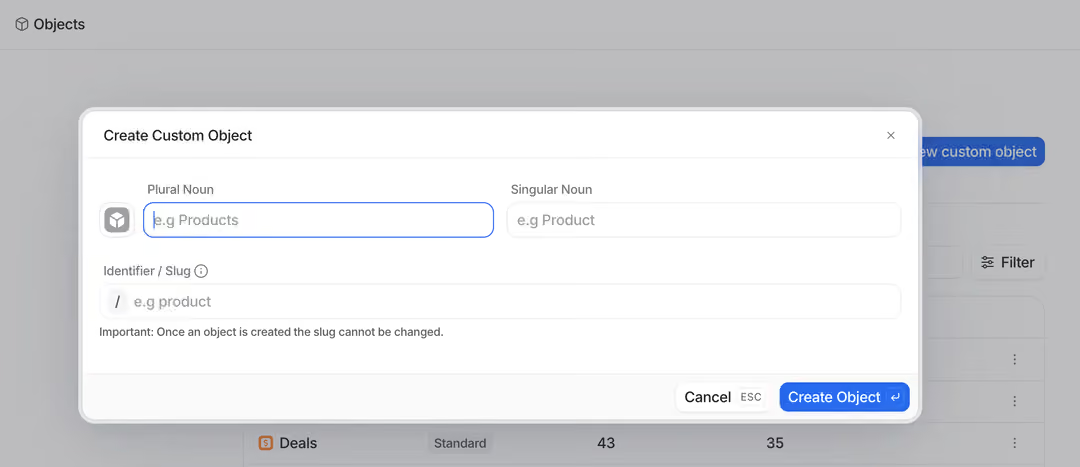
Attio's data model extends to custom objects (subscriptions, invoices, projects, partnerships, or anything else your business tracks). Custom objects use the same record endpoints as standard objects: /v2/objects/:object/records.
Source: Attio
Operations: Create, list, get, update (append or overwrite multiselect values), upsert, delete, and a search endpoint for full-text search across any object type.
The number of custom objects is plan-gated: 3 on Free (including People and Companies), 5 on Plus, 12 on Pro, and unlimited on Enterprise.
What you would build with this: a product-led growth pipeline that syncs workspace usage data from Segment into custom Attio objects via the API, then queries records to surface accounts hitting activation thresholds for sales follow-up.
Lists & Entries
Lists organize records into process-specific views (pipelines, territories, campaign cohorts). Lists can carry their own attributes beyond those on the parent object.
Operations: Create, get, list, and update lists (/v2/lists). Full CRUD plus upsert on list entries (/v2/lists/:list/entries), with separate endpoints for appending vs. overwriting multiselect values.
This is where pipeline management lives at the API level: moving a deal through stages, updating pipeline-specific fields, and querying entries by status.
Attributes
Operations: List, get, create, and update attributes on objects and lists. Manage select options and status options.
Attio supports 17 attribute types: text, number, select, currency, date, location, email address, phone number, domain, checkbox, rating, status, timestamp, personal name, interaction, record reference, and actor reference. The record reference type enables relationship modeling across objects, which is where Attio's graph-based data model becomes accessible through the API.
Notes, Tasks & Comments
Notes (/v2/notes): Create, list, get, and delete notes attached to records.
Tasks (/v2/tasks): Create, list, get, update, and delete tasks.
Comments and Threads: Create, get, and delete comments; list and get comment threads.
These endpoints make Attio a collaborative workspace at the API level. A common integration pattern: automatically create a task when a deal reaches a specific stage, or append a note summarizing a customer interaction from an external system.
Files, Meetings & Call Recordings
Files: Upload, list, download, get, and delete files; create folders.
Meetings (/v2/meetings): List and get meeting records with cursor-based pagination.
Call Recordings and Transcripts: List and get call recordings; retrieve full call transcripts.
The call recording endpoints expose Attio's Call Intelligence data through the API. If your integration needs to pull transcript data into an external analytics tool or feed conversation context into an AI workflow, these endpoints provide the raw material.
Meta & Identity
/v2/self: Identifies the current authenticated token and workspace. Useful for multi-workspace integrations that need to confirm which workspace a token belongs to before making data calls.
Workspace Members: List and get workspace member records.
SCIM 2.0: A separate SCIM endpoint handles enterprise user and group provisioning, enabling automated user lifecycle management through identity providers like Okta.
Filtering, Sorting & Pagination
Pagination works in two styles depending on the endpoint: limit/offset (pass limit and offset parameters; stop when results returned are fewer than limit) and cursor-based (pass limit and cursor; receive pagination.next_cursor in the response body for subsequent pages).
Both GET and POST endpoints support filtering and sorting, documented in a dedicated guide. The filtering system supports compound conditions, so you can build targeted queries without pulling entire datasets.
SQL Endpoint
A read-only SQL endpoint (/v2/sql) allows analytical queries against workspace data.
This is useful for reporting integrations and data warehouse syncs that need to ask questions the REST endpoints were not designed for. This endpoint is plan-gated and not available on every billing tier.
Attio API: Webhooks & Events
Attio has a webhook system documented at docs.attio.com/rest-api/guides/webhooks. You can create webhooks through the REST API (/v2/webhooks) or through the developer settings UI.
The event types cover the CRM lifecycle:
Category | Events |
|---|---|
Records | record.created, record.updated, record.deleted, record.merged |
Lists | list.created, list.updated, list.deleted |
List entries | list-entry.created, list-entry.updated, list-entry.deleted |
Attributes | list-attribute.created, list-attribute.updated, object-attribute.created, object-attribute.updated |
Notes | note.created, note.updated, note.deleted, note-content.updated |
Tasks | task.created, task.updated, task.deleted |
Comments | comment.created, comment.deleted, comment.resolved, comment.unresolved |
Call recordings | call-recording.created |
Workspace members | workspace-member.created |
Delivery behavior: Target URLs must be HTTPS. Attio guarantees at-least-once delivery, so occasional duplicates can occur.
If the server does not respond with HTTP 200-299 within 5 seconds, Attio retries up to 10 times with exponential backoff, totaling about 3 days before it marks the webhook as degraded and sends an alert email. Delivery is rate-limited to 25 requests per second per target URL; contact support to adjust.
Security: Every delivery includes an Attio-Signature header containing a SHA256 HMAC of the request body (hex-encoded, using the webhook secret). An Idempotency-Key header is included for deduplication. Together, these give you a solid foundation for building reliable, tamper-resistant event consumers.
Filtering: Webhook subscriptions support server-side filtering via $and/$or rules targeting payload fields with dot notation. Operators are equals and not_equals. This lets you subscribe to changes on a specific list or object without receiving events for the entire workspace.
What you would build with this: a real-time sync pipeline that listens for record.updated events on your Deals object, pushes stage changes to Slack, updates your data warehouse, and triggers downstream workflows in an external automation tool, all without polling.
Attio API: SDKs, Docs & Rate Limits
SDKs & Libraries
Attio does not publish a standalone REST API client library for any programming language. Developers call the REST API directly over HTTP.
The Attio App SDK exists but serves a different purpose: it is a TypeScript/React framework for building apps that run inside the Attio interface (record widgets, bulk actions, settings panels, custom workflow blocks). It is not a REST API client. You submit apps built with the SDK through the developer dashboard and distribute them via the Attio App Store.
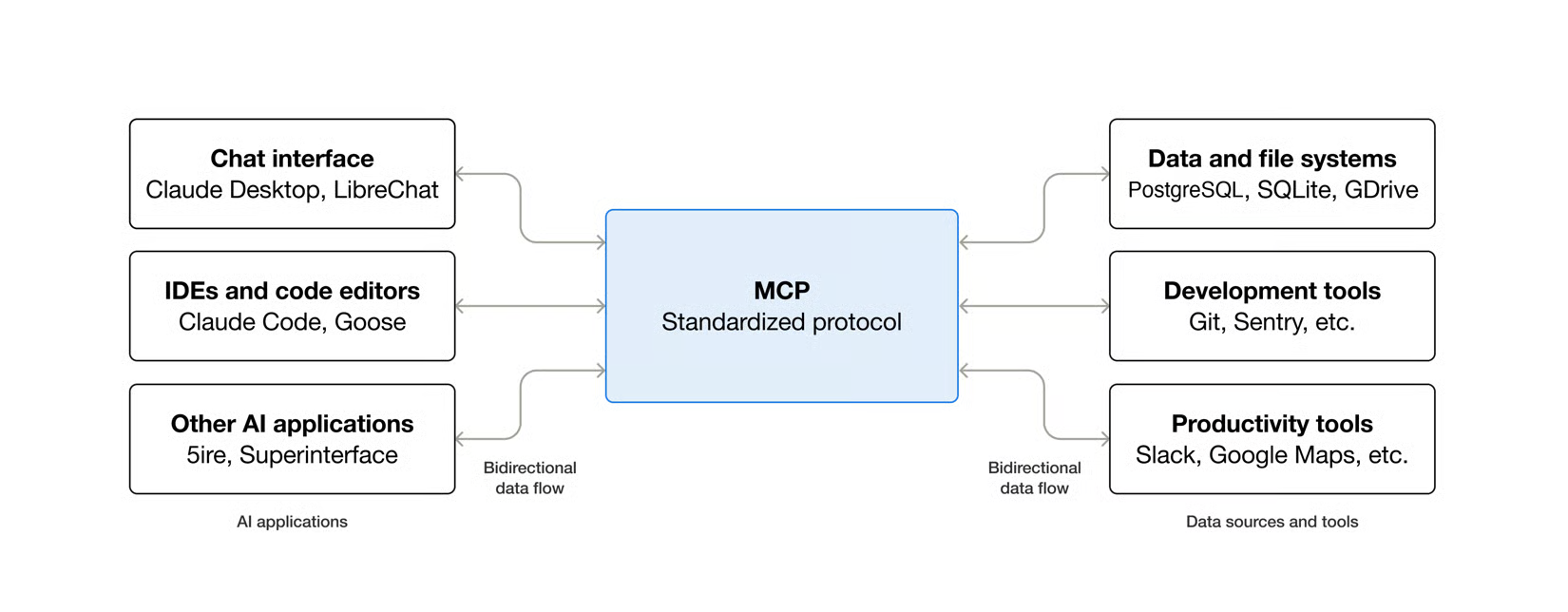
Attio also operates a hosted MCP server at https://mcp.attio.com/mcp, exposing about 30 structured tools covering records, lists, notes, tasks, comments, emails, meetings, call recordings, workspace management, reporting, and SQL.
Source: Attio
Supported MCP clients include Claude Desktop, Claude.ai, ChatGPT, Cursor, and any MCP-compatible AI tool. Authentication is OAuth (no API keys required for MCP).
No standalone REST client means you own the auth layer, request serialization, error handling, and rate-limit backoff logic. The OpenAPI spec helps: you can generate typed clients in your language of choice using standard code-generation tools.
Documentation & Developer Experience
Attio's developer documentation lives at docs.attio.com, built on Mintlify. It is structured into five sections: Docs (overview and OAuth reference), App SDK, REST API, MCP, and SQL.
The REST API documentation includes:
Guides: Authentication, rate limiting, filtering/sorting, and pagination walkthroughs
Attribute type references: 18 detailed pages covering each attribute type's request/response format
Endpoint reference: Individual pages per operation, organized by resource, with request/response examples
OAuth 2.0 and SCIM 2.0: Dedicated endpoint documentation
Webhook event reference: One page per event type with full payload schema
An OpenAPI spec is available for Postman imports, API client imports, and code generation. An interactive API explorer is accessible from the endpoint reference pages. An in-docs AI assistant ("Ask Assistant") is embedded on every documentation page.
The developer dashboard at build.attio.com manages app creation, OAuth client configuration, webhook settings, API key generation, and App Store submission.
A public changelog is maintained at attio.com/changelog, and an engineering blog at attio.com/engineering/blog covers technical deep dives. The API is on v2; v1 webhook endpoints are deprecated.
Developer support runs through the Attio Help Center and contact form. Priority support is available on Pro and Enterprise plans. No dedicated developer Discord or community forum is linked from the developer docs.
The documentation is thorough, well-organized, and usable without signing in. The OpenAPI spec and interactive explorer give you two fast paths to confirming response shapes before writing code. One gap: no downloadable Postman collection ships directly, though the OpenAPI spec can be imported into Postman.
Rate Limits & Constraints
The published rate limits are:
Read requests: 100 requests per second
Write requests: 25 requests per second
Rate-limited responses return HTTP 429 with a Retry-After header (a date/time indicating when the limit resets, typically the next clock second) and a JSON body containing "type": "rate_limit_error" and "code": "rate_limit_exceeded". Attio may also temporarily lower limits on specific endpoints during incident response.
Score-based limits on list and record queries: The List records and List entries endpoints carry additional complexity-based rate limits. Each query gets a score based on its filters, sorts, and the total record/entry count for the queried object/list. Limits fire in two ways:
A single query exceeds the per-query complexity cap (reduce query complexity and retry).
Cumulative scores across multiple queries exceed a sliding-window budget (10-second window, shared across all apps and tokens calling the API).
Both conditions return HTTP 429 with a Retry-After header. This scoring system means simple queries against small datasets are unlikely to hit limits, but complex filtered queries against large objects can exhaust the budget faster than the headline req/sec numbers suggest.
MCP server rate limits are enforced separately per workspace:
Tier | Limit |
|---|---|
Read tools | 100 req/sec |
Write tools | 25 req/sec |
Search tools | 300 req/min |
Semantic search tools | 2 req/sec |
Reporting / SQL tools | 2 req/sec |
Webhook delivery is separately rate-limited to 25 deliveries per second per target URL.
Attio API Pricing & Access Costs
Attio bundles API and webhook access on all plans, including the free tier.
There is no separate API pricing, no per-call metering for standard REST API usage, and no API-specific credit system. The App SDK and MCP server are also available across all plans.
What each plan gives you at the API level:
Free ($0): 3 seats, 50,000 records, 3 objects, API and webhook access
Plus ($29/user/month annual, $36 monthly): No seat limit, 250,000 records, 5 objects
Pro ($69/user/month annual, $86 monthly): 1,000,000 records, 12 objects, priority support
Enterprise (custom pricing): Unlimited objects, custom record limits, SSO, migration service
The SQL endpoint via MCP is an exception: it is not available on every billing plan.
Attio's credit system (workspace credits and seat credits) governs AI features like Ask Attio and workflow automation blocks, not REST API calls. Standard API calls, webhook deliveries, and MCP tool calls are subject to rate limits but not to credit deduction. This distinction matters: your API integration costs depend on your plan tier (which sets record limits, object counts, and support level), not on call volume.
For a developer sizing costs: a team of five on the Plus plan at $29/user/month ($145/month total) gets 250,000 records, 5 custom objects, and unlimited API calls within the rate limits. The practical cost constraint is the record ceiling and object count, not API usage.
Where the Attio API Falls Short
These are practical limits a developer building on the Attio API should plan around. Several are scope decisions that reflect what Attio is (a CRM) and what it is not.
No external data search or enrichment endpoints. The API manages records inside Attio. It does not search external B2B databases, discover new contacts, resolve org charts, detect buyer intent, or enrich records with technographics, funding data, or verified direct-dial phone numbers.
Attio's built-in enrichment populates basic firmographic fields automatically, but no API endpoint triggers enrichment on demand or queries a dataset beyond the workspace. If your pipeline needs to identify who to put into the CRM, not just manage who is already there, you need a second API.
No standalone REST client SDK. The App SDK is a framework for embedded apps, not a REST client. Every integration is raw HTTP. The OpenAPI spec enables code generation, which partially compensates, but you still own the auth layer, retry logic, and error handling.
Write rate limit is firm at 25 req/sec. For bulk imports or migrations, 25 writes per second is a real constraint. A 100,000-record sync at that ceiling takes at minimum 67 minutes of sustained writes, assuming no errors or retries. The upsert endpoint reduces the need for read-before-write patterns, but high-volume write workloads require careful orchestration.
Score-based query limits add unpredictability. The complexity-scoring system on list and record queries means your effective throughput depends on query shape, not just call volume. A production integration running frequent complex queries against large objects may hit rate limits well before the headline 100 reads/sec.
No AI or intelligence endpoints. The REST API exposes no AI capabilities. Ask Attio, AI classification, AI summarization, and the research agent are available in the UI and through workflows, but not as API endpoints. If your integration needs AI-powered data processing, you handle that outside Attio.
Limited native integrations for outbound data. While Attio's App Store lists 100+ integrations, the API itself does not push data to external systems. Event-driven integrations depend on webhooks, which deliver reliably but do not include a documented payload signing rotation policy.
ZoomInfo API: The B2B Intelligence Layer Beyond CRM
Attio's API tells you how to manage the records in your CRM.
ZoomInfo's API tells you what should be in those records, who is worth contacting, and which accounts are actively in-market.
The two APIs sit at different layers of a data pipeline. A developer building a CRM-powered go-to-market workflow would use Attio's API to manage the pipeline and ZoomInfo's API to fuel it with verified contacts, company intelligence, and buying signals. With ZoomInfo Agent Teams, a signal like a job change can kick off the full play, from research to outreach, rather than ending as a task in the CRM.
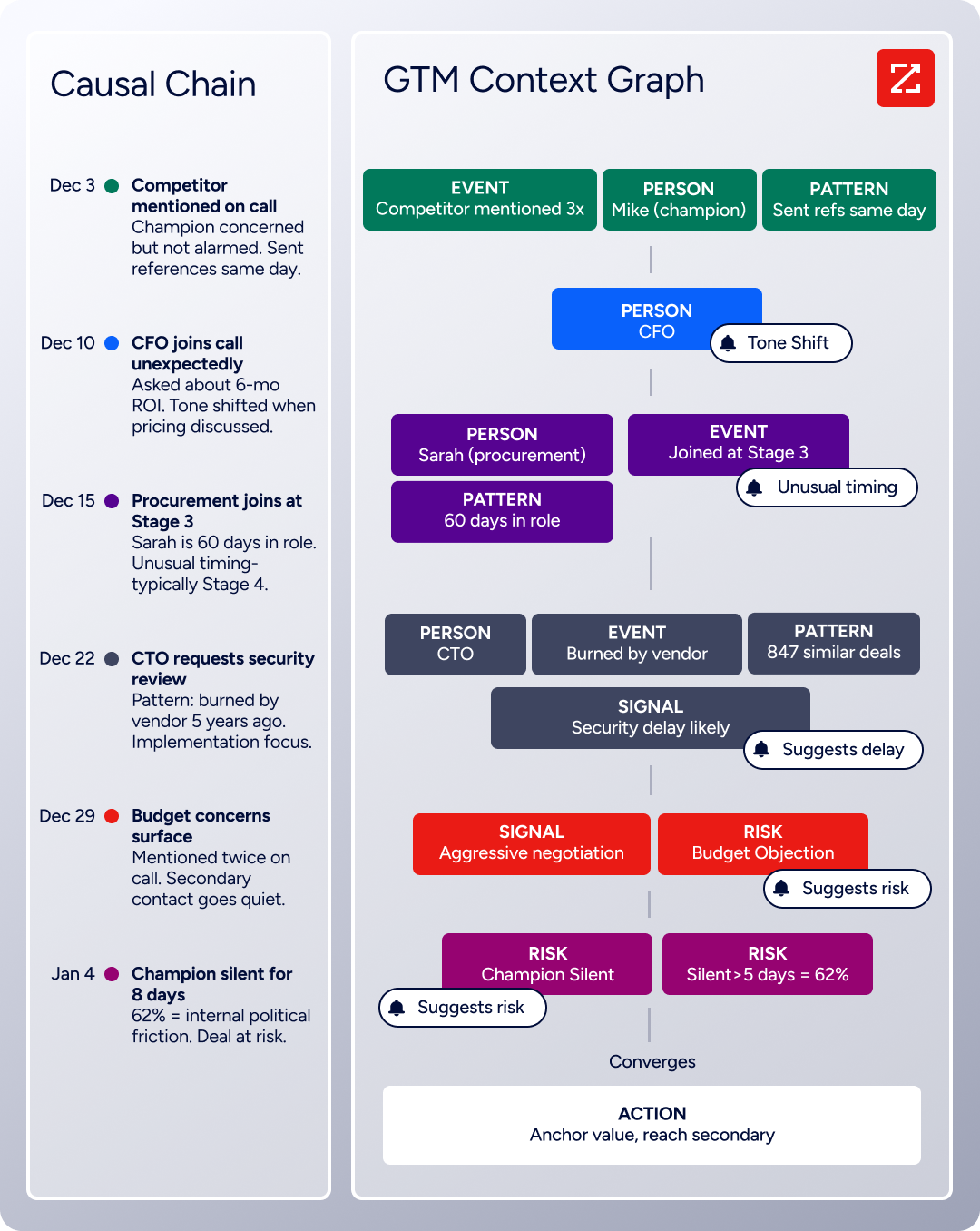
That intelligence runs through ZoomInfo's GTM Context Graph, which processes 1.5B+ data points daily by combining ZoomInfo's B2B data with your first-party data to show why deals move or stall.
What the API Covers
ZoomInfo's Enterprise API is a REST suite served from https://api.zoominfo.com/gtm, organized into four areas documented in the interactive API reference:
Data API (Search & Enrich): Search endpoints cover Contacts, Companies, Intent, News, and Scoops, returning matched records without consuming credits. Enrich endpoints unlock the full payload: business emails, direct dials, employment history, corporate hierarchy, org charts, technographics, and hashtag signals (up to 25 records per call).
The underlying dataset spans 500M contacts, 100M companies, 135M+ verified phone numbers, and 200M+ verified business email addresses.
AI Intelligence API: Account Summary returns structured account intelligence with a free-form Q&A endpoint. Find Similar Companies performs lookalike expansion. Contact Recommendations returns AI-ranked buying-committee suggestions by motion (prospecting, deal acceleration, renewals).
Marketing API: CRUD endpoints for programmatic audience management.
Platform API (Engagements, Beta): Bidirectional engagement data via the Engagements API.
The pairing with a CRM API is direct: use ZoomInfo's search endpoints to find contacts matching your ICP (free, no credits consumed), enrich the ones worth pursuing, then push them into Attio via its record create/upsert endpoints. The search-then-enrich pattern means you filter freely and pay only for the records you commit to.
Authentication & Access
ZoomInfo uses OAuth 2.0 with PKCE via Okta, supporting three flows: Authorization Code with PKCE (web applications), Client Credentials (server-to-server), and Refresh Token.
Access tokens are 24-hour Bearer tokens with rotating refresh tokens. Teams register applications through the ZoomInfo Developer Portal, where they generate credentials, define scopes, and test endpoints.
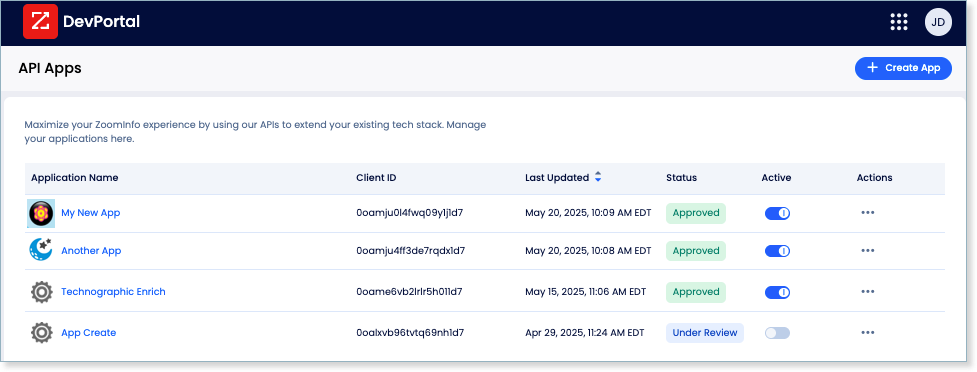
Both Attio and ZoomInfo use OAuth 2.0, which simplifies the integration layer: a developer building a pipeline between the two APIs works with the same authentication model on both sides.
Rate Limits, Credits & Developer Experience
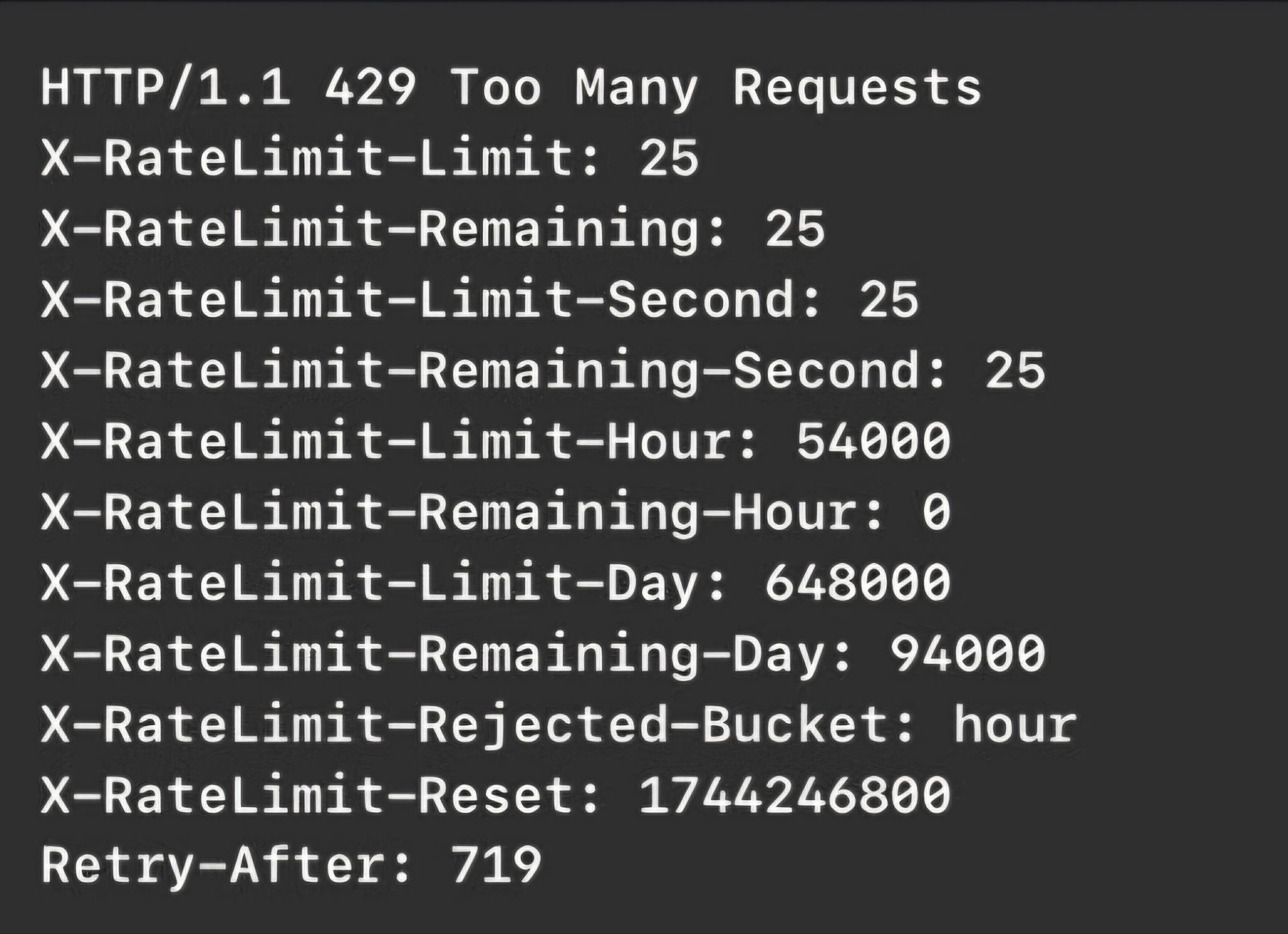
Rate limits are published by tier: Builder (5 req/sec), Standard (25 req/sec), and Scaling (35 req/sec), with per-hour and per-day sliding-window limits enforced simultaneously. Every response includes quota headers with remaining capacity, and 429 responses include a Retry-After header with exact backoff timing.
Source: ZoomInfo
Credits follow a rolling 12-month window: enriching a record for the first time consumes one credit; re-enriching the same record within the year is free. Search and lookup operations are free and do not consume credits.
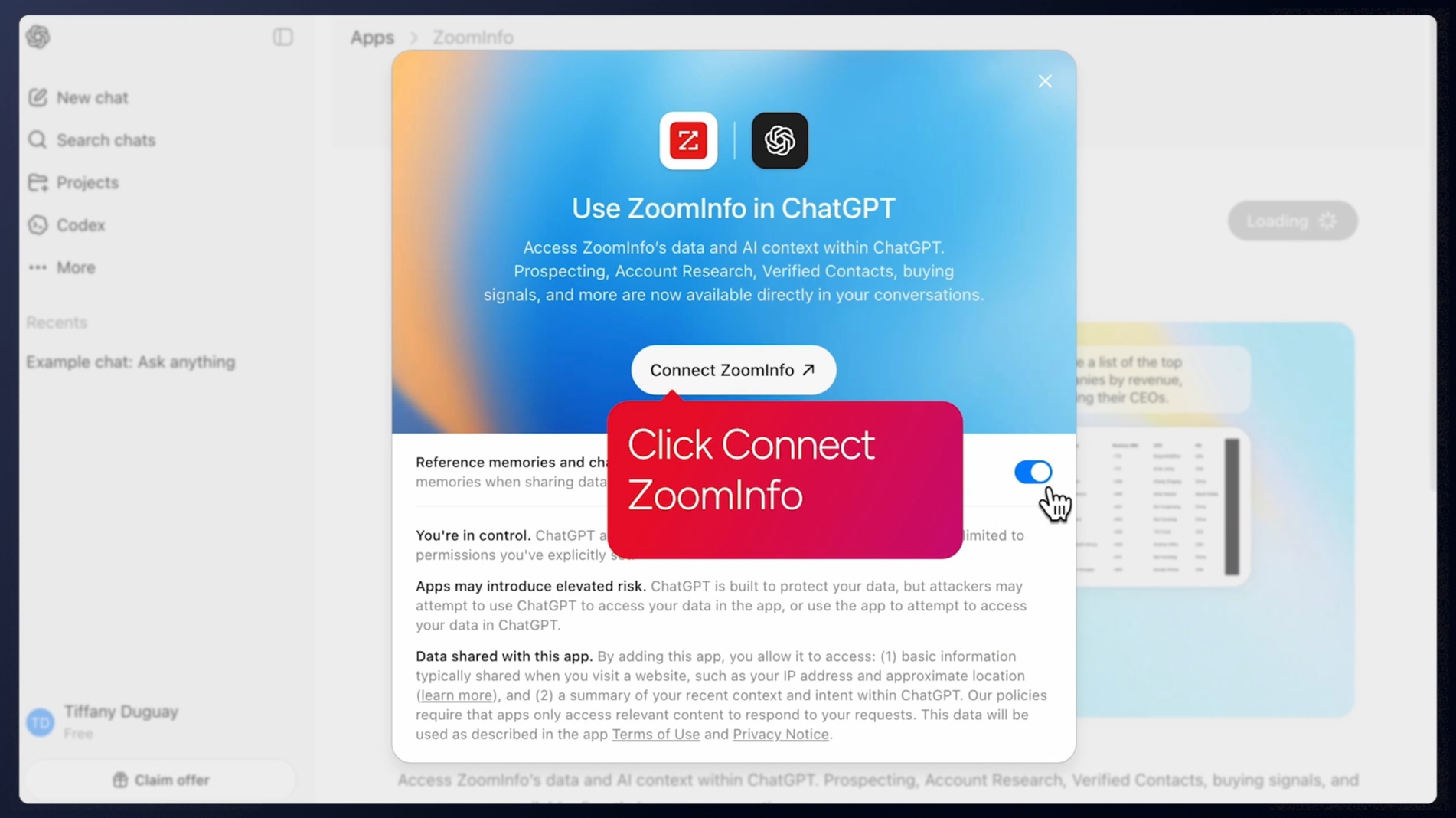
For developers building AI agents, ZoomInfo's MCP server at https://mcp.zoominfo.com/mcp exposes search, enrich, and account research as native tools for MCP-compatible assistants, currently supporting Claude and ChatGPT. Agent Teams builds on that same data layer, running complete GTM plays end to end: coordinated specialist agents share each account's context and act within the approvals and limits you set, rather than stopping at a single enrichment call.
Source: ZoomInfo
Both Attio and ZoomInfo now offer MCP servers, meaning an AI agent can query both CRM data and B2B intelligence through a single protocol.
Documentation lives at docs.zoominfo.com with an interactive API reference, OAuth recipes in five languages, and an llms.txt index for AI development tools. ZoomInfo does not publish official SDKs either, so both platforms require direct HTTP integration. ZoomInfo uses consumption-based pricing (custom-quoted) and has added API access to all relevant plans.
BDO Canada reported an 87% reduction in time spent updating internal data dashboards using the ZoomInfo API, with one analyst calling the integration plug-and-play across any process. (ZoomInfo)
Final Verdict
Attio's API is a well-documented, openly accessible REST surface that gives developers programmatic control over a flexible CRM data model.
OAuth 2.0 with scoped permissions, webhook delivery with HMAC signing, an OpenAPI spec for code generation, and API access on every plan (including free) make it a developer-friendly foundation for CRM integrations. The data model, with custom objects, 17 attribute types, and record references, means you can model your business in Attio rather than forcing your business into a fixed schema.
Choose the Attio API if your build is CRM-first: managing contacts, companies, deals, pipelines, and custom objects programmatically, syncing data from product analytics or billing systems into CRM records, and reacting to record changes via webhooks. For teams building on a modern CRM with a clean API surface, Attio delivers what its UI does, without the UI.
Choose the ZoomInfo API when the build needs to go beyond record management into who those contacts are, which companies are worth pursuing, and whether accounts are actively in-market. The search-then-enrich pattern (search is free, enrich consumes credits) and the AI intelligence endpoints provide the data and reasoning that CRM APIs do not.
Explore the ZoomInfo Enterprise API or start with the developer docs to see the endpoint surface for yourself.
A developer who needs neither API should know that Attio's API does not provide B2B intelligence, and ZoomInfo's API does not manage CRM records or pipelines. If your pipeline needs both, the two are complementary layers: ZoomInfo discovers and enriches, Attio manages and orchestrates.
FAQ
Is the Attio API free?
API access is included on all Attio plans, including the permanent Free plan ($0). There are no per-call charges and no API-specific credit costs.
The Free plan includes 3 seats, 50,000 records, and 3 objects. The practical limits are record counts and object counts, not API usage. Paid plans start at $29/user/month (annual) for Plus, which raises the record ceiling to 250,000 and adds features like Call Intelligence and Ask Attio.
Does Attio have a GraphQL API?
Not as a public REST alternative. Attio exposes a REST API (v2) that communicates over HTTPS with JSON request and response bodies. The App SDK includes a GraphQL interface for querying workspace data from within embedded apps, but that is scoped to the App SDK context, not a general-purpose GraphQL endpoint for external integrations.
What is the Attio API rate limit?
Read requests are limited to 100 per second, and write requests to 25 per second. Rate-limited responses return HTTP 429 with a Retry-After header.
Beyond these headline limits, the List records and List entries endpoints carry additional complexity-based scoring: each query gets a score based on filters, sorts, and dataset size, and cumulative scores are tracked on a 10-second sliding window shared across all tokens. Simple queries are unlikely to hit score limits, but complex filtered queries against large objects can.
Are there official Attio SDKs?
Attio does not publish a standalone REST client SDK in any programming language. The App SDK is a TypeScript/React framework for building embedded apps that run inside the Attio UI, not a REST API client. Developers integrate with the REST API directly over HTTP. The downloadable OpenAPI spec lets you generate typed clients in your language of choice using standard code-generation tools.
Does the Attio API support webhooks?
Yes. Attio has a webhook system manageable through the REST API or the developer settings UI. Event types cover records, lists, list entries, attributes, notes, tasks, comments, call recordings, and workspace members. Delivery guarantees are at-least-once, with retries up to 10 times over about 3 days.
Every payload includes an HMAC signature for verification and an idempotency key for deduplication. Server-side filtering via $and/$or rules lets you subscribe to specific objects or lists without receiving all workspace events.
What does ZoomInfo's API add to an Attio build?
ZoomInfo's API adds the B2B intelligence layer that Attio's API does not cover.
Where Attio's API manages CRM records, ZoomInfo's API provides the data that determines what belongs in those records: search across 500M contacts and 100M companies, enrich with verified emails, direct dials, org charts, technographics, and employment history, detect buyer intent signals, and generate AI-powered account research and buying-committee recommendations.
The integration pattern is straightforward: use ZoomInfo's search endpoints to find contacts matching your ICP (free, no credits consumed), enrich the matches, then use Attio's record create or upsert endpoints to push them into your CRM. Both APIs support OAuth 2.0 and both offer MCP servers, so an AI agent can query both through a single protocol.
