
The question behind every social listening API integration is the same: can you pull the data you need, at the speed you need it, into the systems that run your workflows?
Brandwatch operates two API environments: a Consumer Research API for social listening data and analytics, and a separate set of Social Media Management APIs covering publishing, engagement, and measurement. The Consumer Research docs are public, the endpoints are named, a changelog tracks changes, and an llms.txt index exposes the spec for AI tooling. That openness is uncommon in social intelligence.
But openness and fitness for your build are different questions.
Brandwatch's API covers social listening and social media management programmatically. The Consumer Research API returns mentions, sentiment, topics, charts, and aggregated analytics from an archive of 1.7 trillion historical conversations. The SMM APIs handle publishing, engagement, measurement, and benchmarking across major social platforms. If your build requires B2B contact data, company enrichment, firmographics, org charts, technographics, buyer intent signals, or verified business email addresses, that falls outside what social listening APIs cover.
This is where ZoomInfo enters. ZoomInfo is a B2B intelligence platform whose Enterprise API is a REST suite covering search, enrichment, intelligence, and audience management across 500M contacts and 100M companies, with an MCP server for AI-agent workflows. Where Brandwatch tells you what the market is saying, ZoomInfo tells you who the decision-makers are, how to reach them, and whether they are in-market.
This review covers the Brandwatch API first, then ZoomInfo's API as the B2B intelligence layer that picks up where social listening stops.
Brandwatch API at a Glance
Attribute | Detail |
|---|---|
API type | REST over HTTPS, JSON responses |
Authentication | Consumer Research: OAuth 2.0 password grant (bearer token, 1-year expiry); SMM: API key (max 5 keys per org) |
Base URL | Consumer Research: https://api.brandwatch.com; SMM: documented at falconio.docs.apiary.io |
Rate limits | Consumer Research: 30 requests per 10-minute rolling window; SMM: not publicly documented |
SDKs | No official SDKs; an unofficial Python library (bcr-api) exists on GitHub |
Webhooks | SMM only: 4 Publish-related event topics; Consumer Research: no webhooks |
Documentation | Consumer Research: developers.brandwatch.com; SMM: falconio.docs.apiary.io |
Pricing / access | Enterprise-only, quote-based; no free tier or self-serve API access |
Brandwatch API: What Works Well & What to Plan Around
What works well | What to plan around |
|---|---|
Public developer docs with an actively maintained changelog and llms.txt index | No official SDKs: the Python bcr-api library is explicitly unsupported by Brandwatch |
OAuth 2.0 bearer tokens on the Consumer Research API last a full year, minimizing re-authentication | Consumer Research API rate limit is 30 requests per 10 minutes, not per second |
Two API environments cover both research (listening, analytics, custom data) and social operations (publishing, engagement, measurement) | Two separate API environments with different authentication models and different documentation portals |
Consumer Research API supports custom data upload alongside social listening data | SMM API access is not enabled by default and must be requested through an Account Manager |
SMM APIs span 12 product areas from publishing to team performance | No free tier or developer sandbox: all API access requires a paid enterprise subscription |
Consumer Research data archive dates back to 2010 with firehose access to X/Twitter and Reddit | Webhooks exist only on the SMM side, and only for Publish activities |
Brandwatch API: Authentication & Getting Started
Brandwatch operates two API environments with separate authentication models. Which one you need depends on what you are building.
Consumer Research API
API access requires an active Consumer Research subscription. There is no sandbox, free tier, or self-serve signup. An account administrator provisions credentials, and only users with "Regular" or "Admin" level access can authenticate.
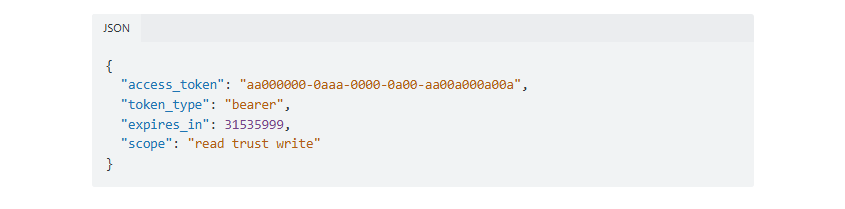
Authentication uses an OAuth 2.0 password grant flow. You send a POST to the token endpoint with your credentials and receive a bearer token with a one-year expiry:
curl -X POST "https://api.brandwatch.com/oauth/token" \
-d "username=YOUR_API_EMAIL" \
-d "password=YOUR_PASSWORD" \
-d "grant_type=api-password" \
-d "client_id=brandwatch-api-client"
Source: Brandwatch API
A successful response returns a bearer token (UUID format) with read trust write scope. Pass it in subsequent requests as an Authorization: Bearer [TOKEN] header or as an access_token URL parameter. Starting with API v4, accounts can hold multiple API keys by creating multiple apps, each with its own usage statistics.
The one-year expiry suits long-running integrations: you authenticate once, and the token stays valid for months without a refresh cycle. The tradeoff is that a compromised token remains valid for a long time unless you revoke it manually.
Social Media Management APIs
The SMM APIs use a different model. Access is not enabled by default and must be requested through an Account Manager, who provides pricing and sends API terms for signature before enablement.
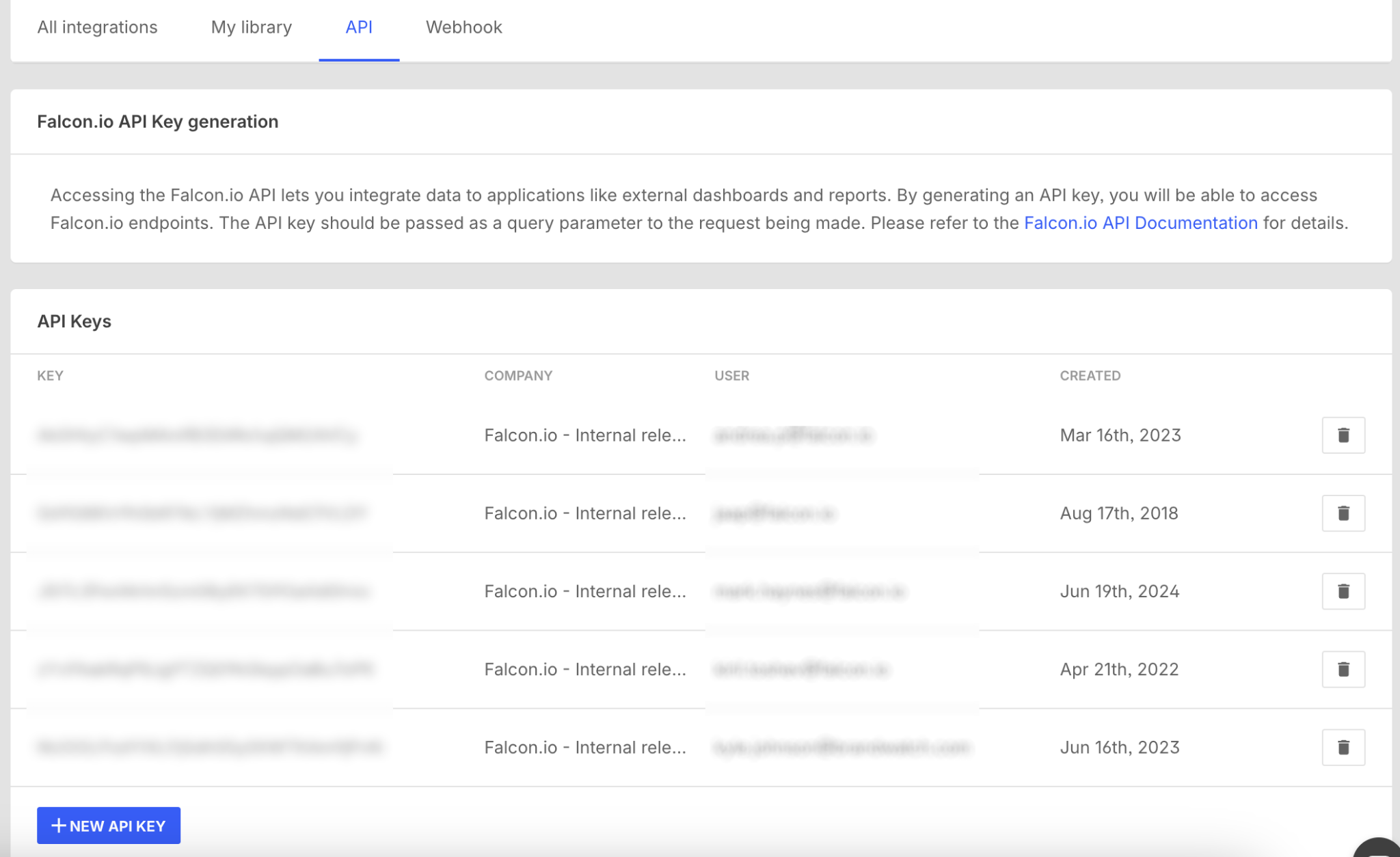
Once enabled, an Admin user generates keys through Organization admin settings, then the Integration marketplace, then the API tab. Organizations can hold up to five active API keys. These keys are simpler than the Consumer Research OAuth flow: a static key passed with each request.
Source: Brandwatch API
Two things to note before you start building:
The two API environments are separate. A Consumer Research bearer token does not work with SMM endpoints, and an SMM API key does not work with Consumer Research endpoints.
Neither environment offers a public developer sandbox. You need a paid subscription and provisioned credentials before you can test a single endpoint.
Brandwatch API: Core Endpoints & Capabilities
The API spans both environments. The Consumer Research API handles social listening data, analytics, and custom data ingestion. The SMM APIs handle social media operations: publishing, engagement, measurement, and benchmarking.
Consumer Research API: Queries, Mentions & Data Retrieval
The Consumer Research API (base: https://api.brandwatch.com) is organized around social listening queries and the data they capture.
Projects and Queries: Projects are the top-level containers. Within each project, you create queries (Boolean search rules that define which conversations to capture). CRUD operations let you create, edit, and delete your monitoring setup programmatically. Query Groups provide organization, and Tags, Categories, and Rules let you annotate and classify mentions after capture.
Mentions: The mentions endpoints return raw social media mentions matching your queries, with filter and sort parameters. Pagination is cursor/offset-based via standard query parameters. You can also edit mention metadata (tags, categories, annotations) programmatically. Since the Consumer Research API has no push-based delivery, Brandwatch provides a tutorial on polling for mentions.
Data Retrieval (Aggregated Analytics): The analytics endpoints go deeper. Dedicated endpoints return:
Total Mentions: volume counts over time
Topics: cluster-based topic discovery
Basic Charts and Multi-aggregate Charts: time-series and dimensional breakdowns
X (Twitter) Insights: platform-specific analytics
Top Sites, Top Authors, Top Shared Sites, Top Shared URLs: ranked data by contributor and content
Filter dimensions include language codes, geographic locations, object and logo detection, and sort order. Brandwatch's Iris AI automatically enriches every mention with sentiment classification in 44 languages, emotion detection, demographic inference, entity extraction, and image analysis.
What you would build with this: a competitive intelligence dashboard that runs queries against your brand and competitor names, polls for new mentions on a schedule, pulls aggregated sentiment and topic charts into your BI tool, and triggers alerts when mention volume spikes.
Consumer Research API: Data Upload & Analysis
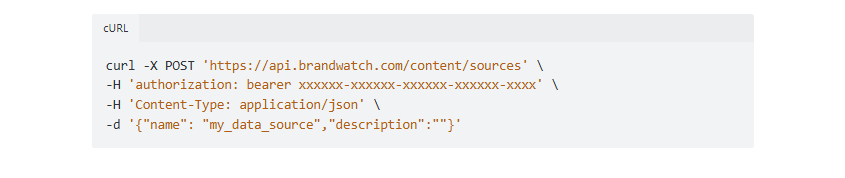
Data Upload API: A separate set of endpoints for creating custom data sources and uploading documents. This lets you ingest proprietary data (support tickets, call transcripts, survey responses, CRM notes) into Brandwatch's analysis engine alongside the social listening corpus. Uploaded documents support fields like reachEstimate and rawMetadata.
Source: Brandwatch API
Analysis API: The Analysis API provides a separate interface for querying the content library with advanced aggregation and NLP analysis. Analysis requests return computed statistics for BI and data visualization tools. Results retrieval endpoints return the completed analysis. Usage is tracked via a separate Analysis Usage endpoint.
What you would build with this: a pipeline that feeds support tickets and survey responses into Brandwatch via the Data Upload API, then runs NLP analysis against the combined dataset (social mentions plus internal data) to surface themes, sentiment patterns, and trends that neither source reveals alone.
Social Media Management APIs
The SMM environment exposes twelve API products documented at falconio.docs.apiary.io:
Publishing API: Schedule and manage social content programmatically
Engage API: Export social inbox conversations and customer interaction data
Measure API: Pull owned social analytics into external reporting tools
Benchmark API: Retrieve competitive benchmarking data
Content API and Content Pool API: Manage content assets
Campaign API: Access campaign-level data
Labels API, Team API, Channel API: Manage organizational metadata
Message Reply API: Automate social message responses
Team Performance API: Export team response-time and service-target metrics
Full parameter definitions and response examples are in the Apiary reference, which includes interactive "Try it!" functionality for documented endpoints.
What you would build with this: an agency reporting system that pulls Measure and Benchmark data across all client accounts nightly, compiles cross-client performance dashboards, and exports team performance metrics for service-level reporting.
Brandwatch API: Webhooks & Events
Brandwatch's webhook support is limited.
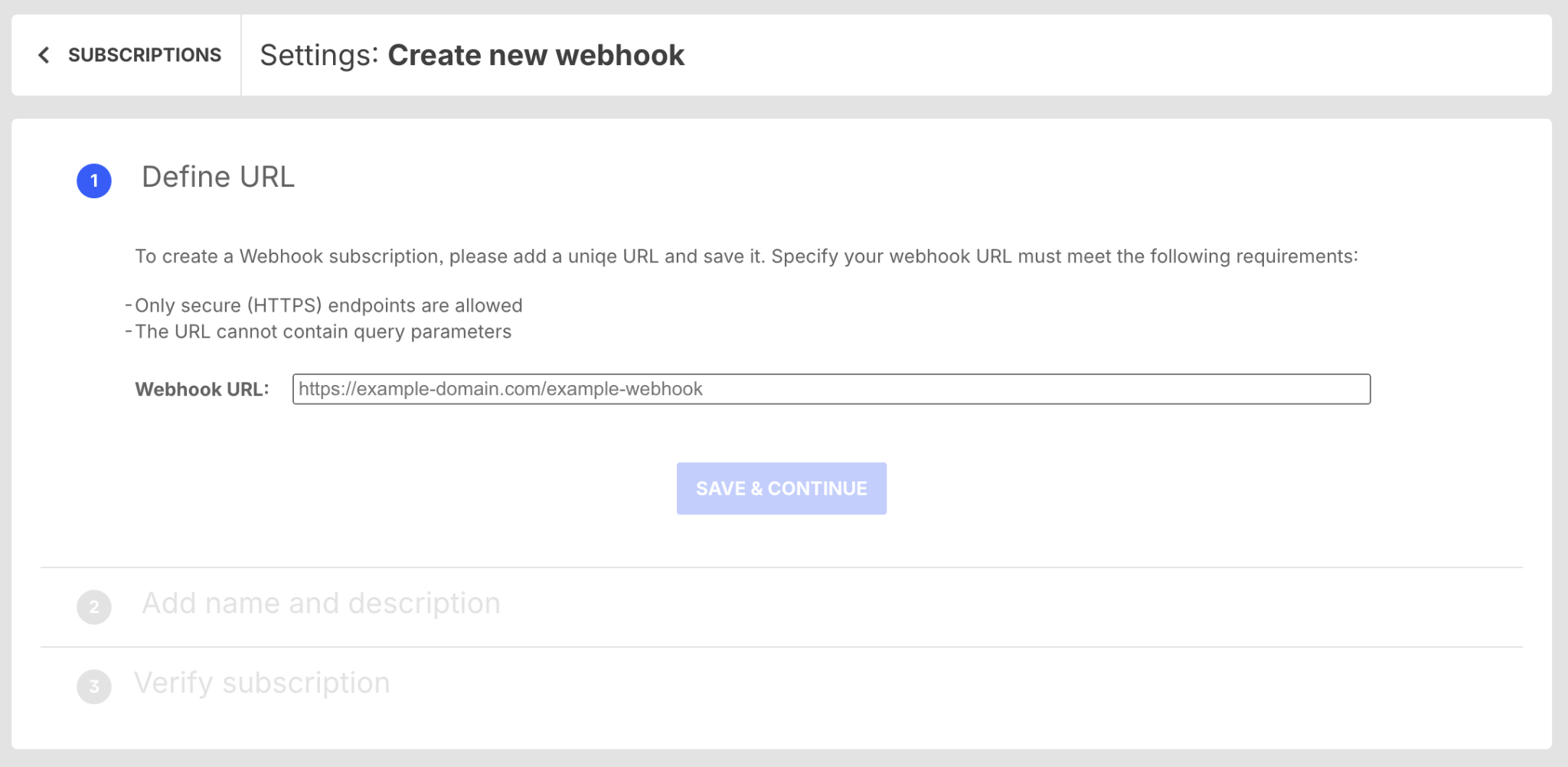
SMM Webhooks: The Social Media Management product offers four webhook topics covering Publish activities: creation of campaigns, posts, drafts, and stock items.
Subscription is configured through Organization admin settings, then the Integration marketplace, then the Webhooks tab. Setup requires a secure destination URL and an automated verification step using a provided secret key. Retry behavior and payload format details are in the Apiary technical reference.
Source: Brandwatch API
Consumer Research API: There is no webhook support. Developers who need new mentions in real time must poll. The docs include a dedicated tutorial on polling for mentions.
Two things to plan around:
Webhook coverage is narrow. Even on the SMM side, webhooks cover only Publish activities. There are no webhooks for engagement events (incoming messages, replies, mentions), measurement changes, or benchmarking updates. If your integration needs real-time notification of social interactions, you must poll the Engage API.
Consumer Research is polling-only. For a platform that monitors millions of conversations, the lack of push-based delivery on the research side constrains real-time workflows. A mention spike will not notify your pipeline; your pipeline must ask for it.
Brandwatch API: SDKs, Docs & Rate Limits
SDKs & Libraries
Brandwatch publishes no official SDKs.
A Python client library (bcr-api) exists on GitHub under the BrandwatchLtd organization. The library mirrors the Consumer Research API's resource hierarchy and simplifies common operations (query management, tag/category CRUD, data retrieval). Install it via pip (pip install bcr-api); it requires Python 3.x and has 344+ commits with a Jupyter notebook demo. Brandwatch labels this library unofficial and unsupported, noting it "should be implemented at the users' own risk."
No SDK or community library exists for the SMM APIs.
Without official SDKs, you own the authentication flow, request serialization, rate-limit handling, and error recovery. For the Consumer Research API, bcr-api can reduce that burden if you build in Python and accept the unsupported status. For the SMM APIs, or any other language, every integration is raw HTTP.
Documentation & Developer Experience
Consumer Research API docs at developers.brandwatch.com are well-structured and public. The portal covers:
Getting Started: Terminology reference, authentication guide, and step-by-step tutorials (paging through historical mentions, polling for mentions, building a filters menu)
Endpoint Reference: Endpoint-by-endpoint documentation with parameter descriptions and response formats
Changelog: Actively maintained, with updates covering Reddit data restrictions, Bluesky and TikTok field additions, multi-aggregate chart endpoints, and org-switching for API users, all within the past 12 months
llms.txt: An index of all pages and endpoints in OpenAPI format, published for AI development tools
No interactive API explorer (Swagger UI or embedded Postman collection) is available in the Consumer Research portal. The OpenAPI index in llms.txt provides machine-readable endpoint definitions, but testing requires building requests manually or using the bcr-api library.
SMM API docs are hosted on Apiary and include an interactive "Try it!" explorer, terms of use, rate limiting guide, and changelog. Onboarding guidance is in the SMM help center, which includes quick-start articles for each API product.
Developer support channels include support.brandwatch.com, the community forum, and Brandwatch Academy for certification and product training. Support runs Monday through Friday, with response times tiered by package at 4 to 24 hours.
Source: Brandwatch API
Rate Limits & Constraints
Consumer Research API: The default rate limit is 30 requests per 10-minute rolling window, applied per client. Exceeding this returns HTTP 429 Too Many Requests. Each response includes two headers:
x-rate-limit: the limit in <limit>/<period>m format (e.g., 30/10m)
x-rate-limit-used: count of calls made in the current window
That is three requests per minute. For an integration that needs to pull mentions, run analytics, and manage queries across multiple projects, this ceiling requires careful request management. Higher limits may be available under enterprise agreements, but the documentation publishes only the default tier.
SMM APIs: Rate limiting details are in the Apiary reference but not in the public help center. Specific numbers are not publicly available.
Data-level constraints: Consumer Research API data access is subject to per-source restrictions (Reddit data, for example, has specific restrictions documented separately). Access to raw historical mentions is subject to per-platform data licensing terms.
Brandwatch API Pricing & Access Costs
Brandwatch does not publish API pricing on its pricing page or developer portal. All API access is enterprise-negotiated, with no self-serve option.
Consumer Research APIs (Consumer Research API, Data Upload API, Analysis API): Access requires an active Consumer Research subscription. API capability is tied to the plan tier and is not sold standalone. The APIs product page lists API access as a separate offering, suggesting it may be licensed separately from the base subscription.
Social Media Management APIs: Access must be requested through an Account Manager, who provides pricing and sends API terms for signature before enablement.
There is no free tier, no pay-per-call pricing, no developer sandbox, and no public rate card.
Brandwatch's platform pricing is opaque. The plans page requires a demo request. Contracts are governed by the Cision Master Subscription Agreement, under which fees are invoiced annually in advance and are non-cancellable and non-refundable. No termination-for-convenience clause exists in the standard agreement.
A developer cannot estimate API costs without talking to Brandwatch's sales team. The pricing model (whether per-seat, per-query-volume, per-mention, or flat annual license) is not disclosed publicly.
Where the Brandwatch API Falls Short
These are practical limits to plan around, not failures. Several are scope decisions that reflect what Brandwatch's API is (a social intelligence platform) and what it is not.
The API covers social and consumer intelligence. B2B data is a different domain.
There are no endpoints for contact enrichment, company firmographics, org charts, technographics, direct-dial phone numbers, verified business emails, or buyer intent signals. If your pipeline needs to identify the decision-makers behind the brand conversations you monitor, or find which companies are researching your category, you need a separate API.
This is not a gap in the product. Brandwatch's API is scoped to social intelligence. But it is the biggest constraint for developers building GTM pipelines where social listening is one input among several.
Rate limits on the Consumer Research API are restrictive.
Three requests per minute is a hard ceiling for integrations that manage multiple projects, pull mentions, run analytics, and update queries. A build that touches more than a few endpoints per cycle will hit the limit quickly. The response headers help you manage it, but the limit constrains what you can build without negotiating a custom arrangement.
No webhooks on the Consumer Research side.
The Consumer Research API is polling-only. For a platform monitoring hundreds of millions of conversations, the inability to push new mentions or alerts to your pipeline constrains real-time workflows. The SMM side has webhooks, but only for Publish activities, covering none of the engagement, measurement, or listening events most useful for automation.
No official SDKs.
The bcr-api Python library is unsupported and carries a "use at your own risk" disclaimer. For every other language, and for the SMM APIs entirely, every integration is raw HTTP. You own the auth flow, retry logic, rate-limit management, and error handling.
Two separate API environments with different auth models.
A developer who needs both social listening data and social management capabilities must work across two API portals, two documentation sites, two authentication mechanisms, and (for the SMM side) a separate access request process. A single API would be simpler.
Enterprise-gated access with no developer sandbox.
There is no way to test endpoints, evaluate response shapes, or prototype an integration without first purchasing a Brandwatch subscription and having administrator provision credentials. The Consumer Research docs are public, but the API itself is not. For a developer evaluating whether to build on this platform, the barrier to entry is higher than platforms offering free tiers or self-serve developer accounts.
ZoomInfo API: The B2B Intelligence Layer Social Listening Does Not Cover
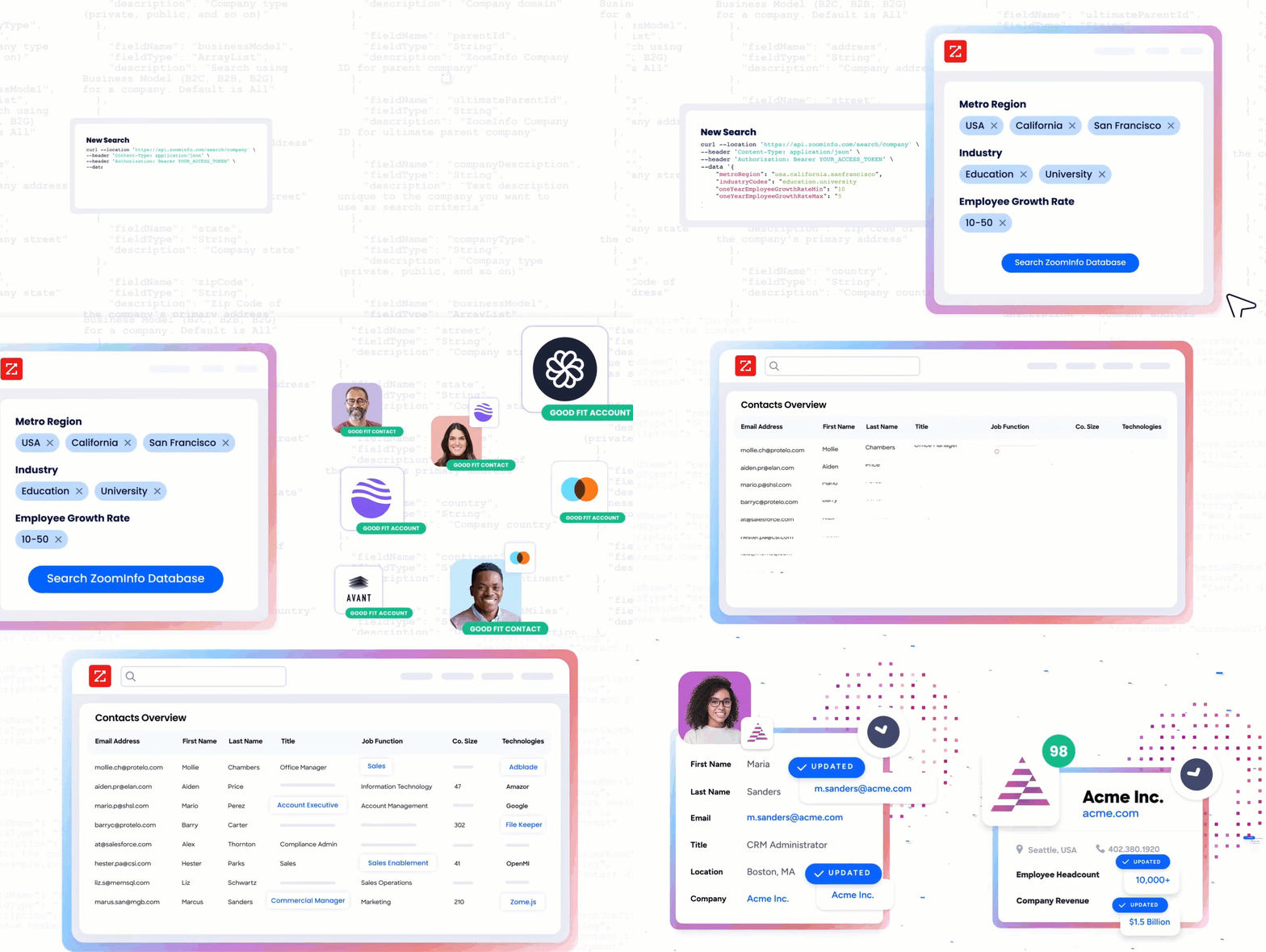
Brandwatch's API tells you what the market is saying: mentions, sentiment, topics, and trends from social and consumer conversations. ZoomInfo's API tells you who the people and companies behind those conversations are: verified contact information, company attributes, org charts, technographics, buyer intent signals, and AI-powered account intelligence.
Source: ZoomInfo
The two APIs operate at different layers of a market intelligence pipeline.
A developer building social listening into a GTM workflow would use Brandwatch to capture what consumers and competitors are saying, then use ZoomInfo to identify and reach the decision-makers at the companies that matter.
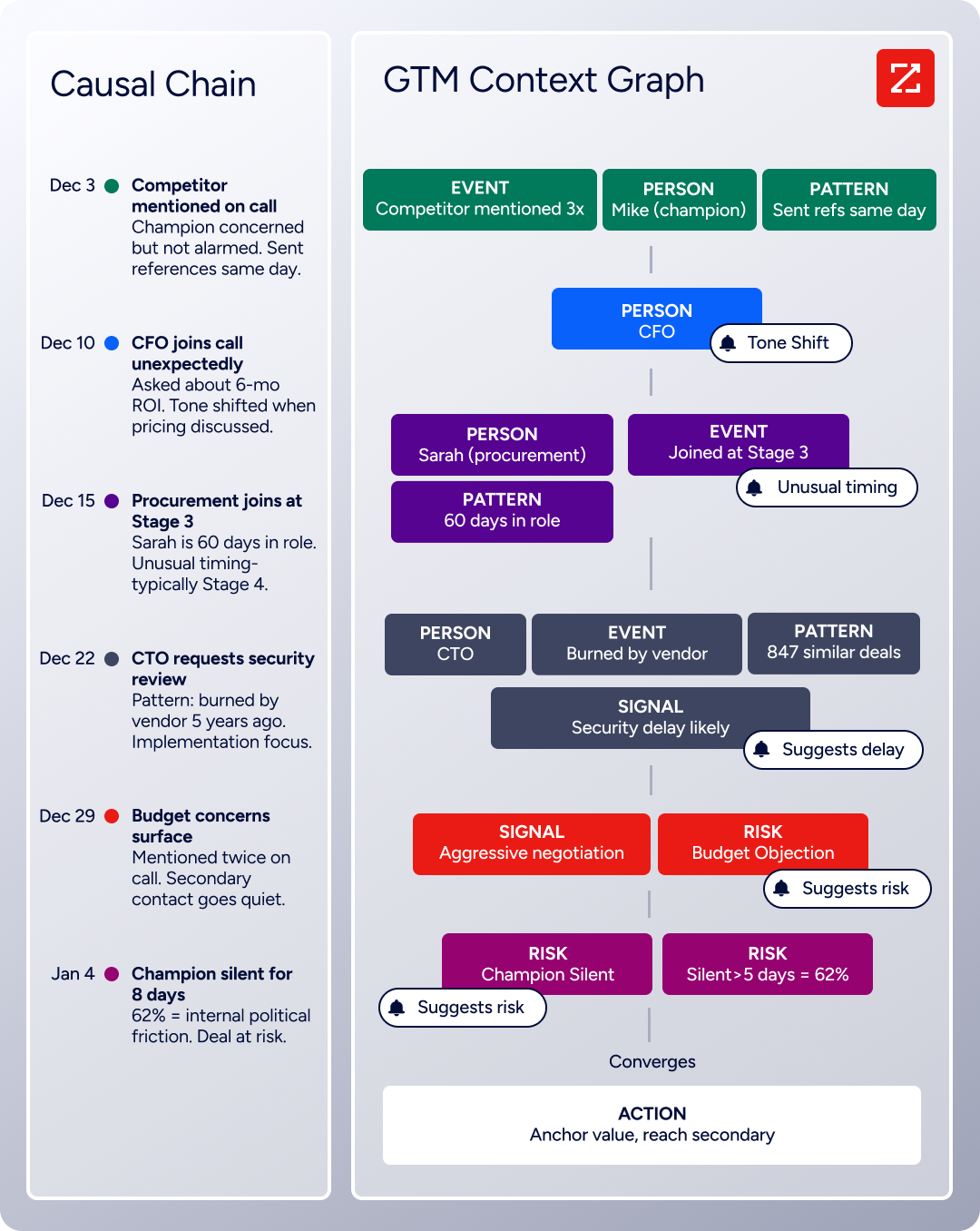
ZoomInfo's GTM Context Graph processes 1.5B+ data points daily, combining B2B data with your CRM records and behavioral signals to show which accounts to prioritize and why. That intelligence is accessible through the Enterprise API, the MCP server, the GTM Workspace for sellers, or GTM Studio for marketers and RevOps.
Source: ZoomInfo
What the API Covers: Search, Enrichment & AI Intelligence
ZoomInfo's Enterprise API is a REST suite served from https://api.zoominfo.com/gtm, organized into four areas documented in the interactive API reference.
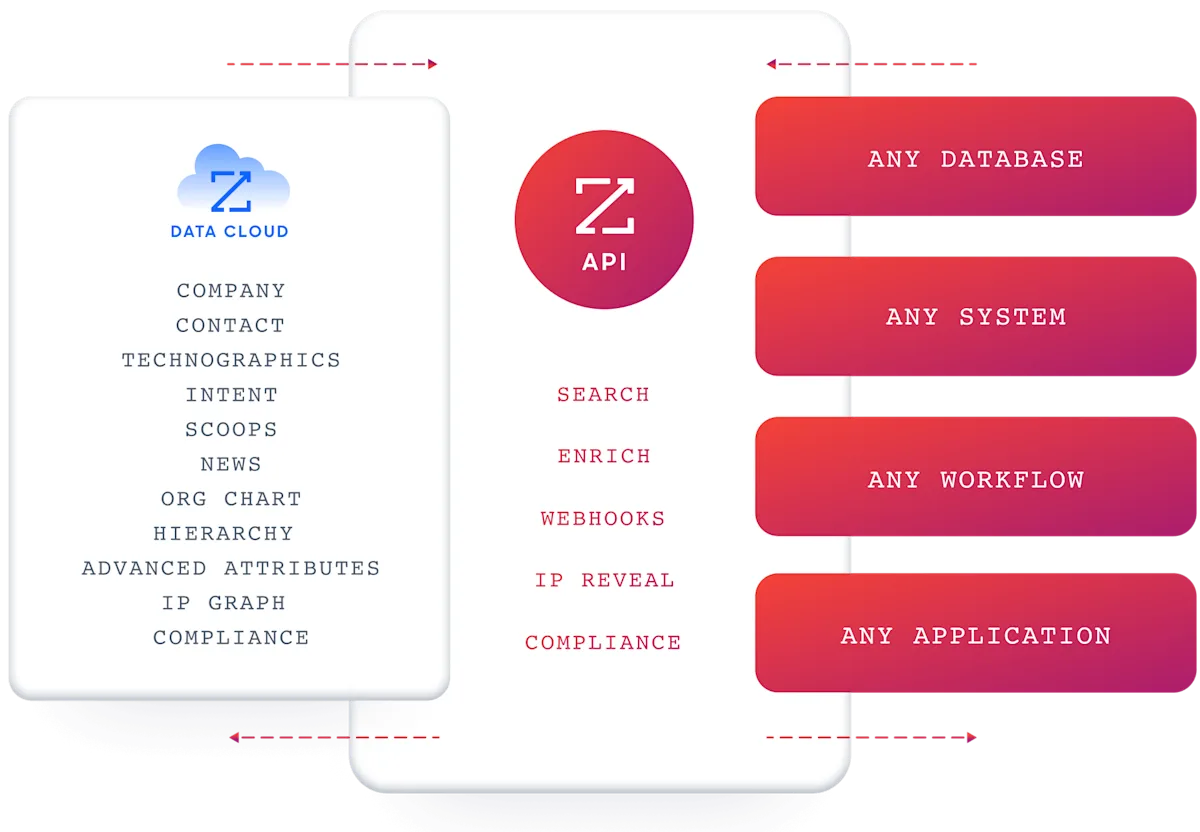
Data API (Search & Enrich): Search endpoints cover Contacts, Companies, Intent, News, and Scoops, returning matched records without consuming credits. Enrich endpoints return the full record: business emails, direct dials, employment history, corporate hierarchy, org charts, technographics, and hashtag signals (up to 25 records per call). The search-then-enrich pattern lets you filter freely and pay only for the records you commit to. The underlying dataset spans 500M contacts, 100M companies, 135M+ verified phone numbers, and 200M+ verified business email addresses.
AI Intelligence API: These endpoints expose the intelligence capabilities behind GTM Workspace's AI agent. Account Summary returns structured account intelligence with a free-form Q&A endpoint. Find Similar Companies performs lookalike expansion. Contact Recommendations returns AI-ranked buying-committee suggestions by motion (prospecting, deal acceleration, renewals).
Marketing and Platform APIs: CRUD endpoints for audience management and bidirectional engagement data via the Engagements API, currently in Beta.
Source: ZoomInfo
The pairing with a social listening API is direct: use Brandwatch to surface which companies and competitors are trending in consumer conversations, then use ZoomInfo's search endpoints to find the decision-makers at those companies, enrich with verified contact data, and activate outreach or advertising programmatically.
Authentication, Rate Limits & Credits
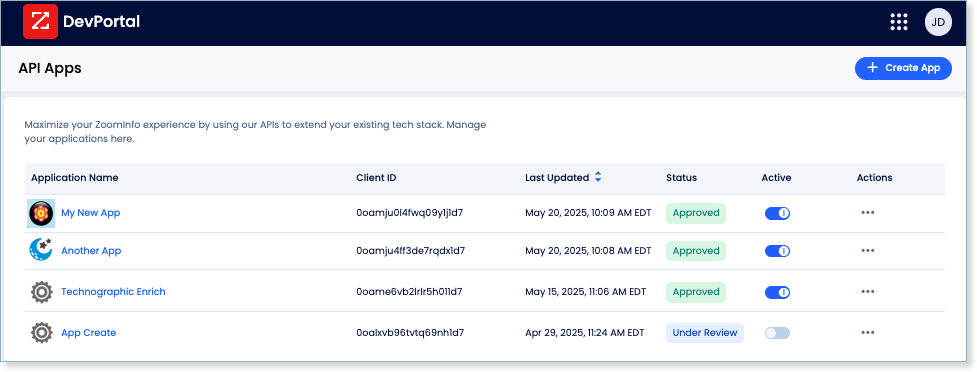
Authentication uses OAuth 2.0 with PKCE via Okta, issuing 24-hour access tokens with rotating refresh tokens. Three flows are supported: Authorization Code with PKCE (web applications), Client Credentials (server-to-server), and Refresh Token. Register applications through the ZoomInfo Developer Portal, where teams generate credentials, define scopes, and test endpoints.
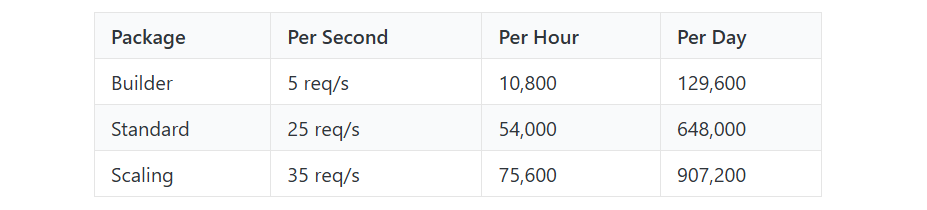
Rate limits are published by tier: Builder (5 req/sec), Standard (25 req/sec), and Scaling (35 req/sec), with per-hour and per-day sliding-window limits enforced simultaneously. Every response includes quota headers with remaining capacity, and 429 responses include a Retry-After header with exact backoff timing.
For comparison, Brandwatch's Consumer Research API allows 30 requests per 10 minutes; ZoomInfo's lowest tier allows 5 requests per second.
Source: ZoomInfo
Credits follow a rolling 12-month window: enriching a record for the first time costs one credit; re-enriching the same record within the year is free. Search and lookup operations cost nothing.
Webhooks, MCP & Developer Experience
Webhooks are available via the Agents API, tied to ZoomInfo's Agent Teams system. Event types cover bulk enrichment jobs completing, records changing, credit usage crossing thresholds, and new GTM signals (scoops, funding events, intent spikes) becoming available.
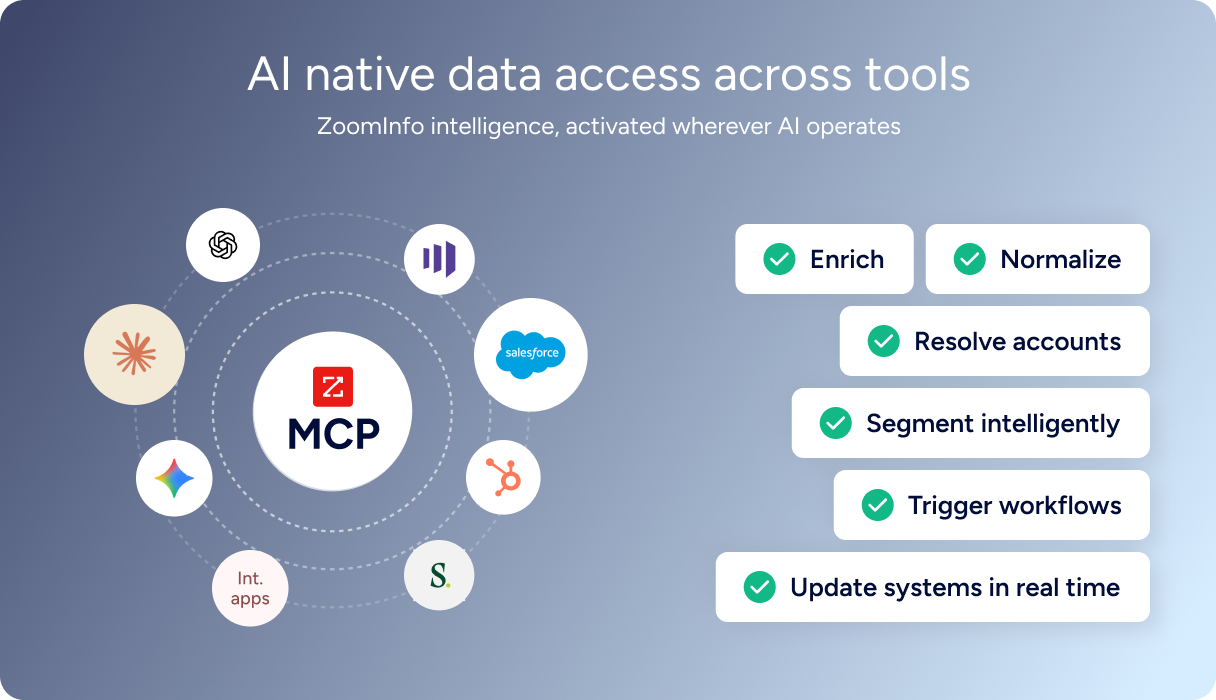
For developers building AI agents, ZoomInfo's MCP server at https://mcp.zoominfo.com/mcp exposes search, enrich, and account research as native tools for MCP-compatible assistants, currently supporting Claude and ChatGPT. The credit model carries over from the REST API.
Source: ZoomInfo
ZoomInfo publishes no official SDKs, so you integrate over HTTP and own the auth and retry logic, same as Brandwatch. The interactive API reference supports live testing, and a Docs MCP server lets AI development tools generate integration code against the API spec. Documentation is at docs.zoominfo.com. ZoomInfo extended API access to all relevant plans in 2025. Pricing is consumption-based and custom-quoted.
BDO Canada reported an 87% reduction in time spent updating internal data dashboards using the ZoomInfo API, with one analyst describing the integration as plug-and-play across any process. (ZoomInfo)
Final Verdict
Brandwatch's API is a capable platform for social listening and social media management, split across two environments that together cover mentions, sentiment analytics, topic discovery, custom data ingestion, content publishing, engagement, and competitive benchmarking. The Consumer Research developer portal is public, actively maintained, and includes an OpenAPI index for AI tooling.
For a developer whose build starts and ends with consumer intelligence, the API delivers what the platform does, programmatically.
Choose the Brandwatch API if your pipeline is consumer-intelligence-first: ingesting social mentions into a BI tool, automating sentiment tracking across brands and competitors, uploading proprietary data for combined analysis, or building reporting on social media management workflows. The 1.7-trillion-conversation archive and 44-language sentiment classification give the API a depth most social listening platforms cannot match.
Add the ZoomInfo API when your build needs to act on what social listening surfaces: identifying the decision-makers at companies showing up in brand conversations, enriching contacts with verified emails and direct dials, detecting buyer intent signals, or powering AI agents with account research. The two APIs are layers of the same pipeline, and the combination lets you move from "what is the market saying" to "who should we talk to about it" without leaving your programmatic workflow.
Explore the ZoomInfo Enterprise API or start with the developer docs to see the endpoints for yourself.
A developer whose build is entirely B2B data (contact enrichment, company firmographics, buyer intent) with no social listening requirement should not build on Brandwatch's API. That data domain is not what this platform covers, regardless of how capable Brandwatch is within its own scope.
FAQ
Is the Brandwatch API free?
No. Brandwatch offers no free tier, developer sandbox, or self-serve API access. All API access requires an active paid subscription: Consumer Research APIs need a Consumer Research plan, and SMM APIs need an Account Manager to enable access under separate terms. Pricing is enterprise-negotiated, and you cannot test endpoints without purchasing a subscription first.
Does Brandwatch have a GraphQL API?
No. Both API environments are REST over HTTPS, returning JSON. The Consumer Research API is based at https://api.brandwatch.com, and the SMM APIs are documented at falconio.docs.apiary.io. If you need a GraphQL interface for social listening data, you would need to build a wrapper on top of the REST API.
What is the Brandwatch API rate limit?
The Consumer Research API enforces a default of 30 requests per 10-minute rolling window, applied per client. Exceeding this triggers a 429 response. Each response includes x-rate-limit and x-rate-limit-used headers so you can track your position in the window. Higher limits may be available under enterprise agreements, but only the default is published. SMM API rate limits are in the Apiary reference but not reproduced in the public help center.
Are there official Brandwatch SDKs?
No. Brandwatch publishes no official SDKs for any language or API environment. A Python client library (bcr-api) exists on GitHub under the BrandwatchLtd organization, with 344+ commits and a demo notebook, but Brandwatch labels it unofficial and unsupported. No SDK exists for the SMM APIs. All integrations require direct HTTP requests.
Does the Brandwatch API support webhooks?
Partially. The SMM APIs support webhooks with four event topics, all scoped to Publish activities (campaign creation, post creation, draft creation, and stock item events). Webhooks are configured through the admin dashboard and require a verification step. The Consumer Research API has no webhook support. Developers who need to detect new mentions must poll the mentions endpoint on a schedule.
Can I use Brandwatch and ZoomInfo APIs together?
Yes, and the combination covers two distinct layers of a market intelligence pipeline.
Brandwatch's API delivers social listening data: mentions, sentiment, topics, and consumer conversation analytics from 1.7 trillion historical conversations. ZoomInfo's API delivers B2B intelligence: verified contacts, company data, org charts, technographics, and buyer intent signals across 500M contacts and 100M companies.
A practical build would use Brandwatch to surface which companies and topics are trending in consumer conversations, then use ZoomInfo to identify and enrich the decision-makers at those companies for outreach or advertising. The two APIs use different authentication models (OAuth 2.0 password grant vs. OAuth 2.0 with PKCE) and different data domains, so plan the integration layer to handle both.
