
The question behind every messaging API evaluation is whether the surface is deep enough to justify the dependency, or whether you will hit a wall three months into the build and wish you had checked sooner.
Brevo's API is a REST surface at https://api.brevo.com/v3/ that covers transactional email, SMS, WhatsApp, contact management, eCommerce data sync, custom events, conversations, loyalty programs, and account administration.
The developer portal is public, the OpenAPI v2 spec is published, official SDKs cover seven languages, and rate limits are documented to the per-second and per-hour level for every endpoint category. For a platform that started as an email marketing tool for SMBs, the API surface is broader than most developers expect.
But breadth and depth for a given build are different questions.
The Brevo API is likely the right choice if:
You need a single API surface for transactional email, SMS, and WhatsApp without managing three vendor relationships.
You are building marketing automation workflows that need programmatic contact management, segmentation, and event tracking alongside campaign sends.
You want transactional email on a free tier (300 emails/day via API, no credit card required) to prototype or run a low-volume production service.
You need eCommerce data sync (products, orders, categories) feeding into automated email sequences like abandoned cart recovery.
You are integrating a loyalty program or live chat and want the data to flow into the same contact records your campaigns use.
However, it might not be the right fit if:
You need B2B intelligence data alongside messaging: contact enrichment with direct dials, org charts, technographics, buyer intent signals, or company attributes.
You need an API that returns data about who your contacts are (employment history, company size, funding status), not just the ability to message them.
You require OAuth 2.0 with scoped delegated access for multi-tenant SaaS integrations where each customer authenticates independently (Brevo's OAuth is available but designed for partner app integrations, not general multi-tenant patterns).
Your pipeline requires AI-powered account research, lookalike expansion, or buying-committee recommendations at the API layer.
You need a compliance API for managing B2B data privacy and opt-out requests programmatically.
In this case, you should consider ZoomInfo, a GTM platform whose API is a REST suite covering search, enrichment, AI intelligence, and audience management across 500M contacts and 100M companies, with OAuth 2.0 authentication, tiered rate limits up to 35 req/sec, and an MCP server for AI-agent workflows.
ZoomInfo's API operates at a different layer: it tells you who your contacts are, what companies they work for, and whether those accounts are in-market, while Brevo's API handles the messaging once you know who to reach.
This article reviews both: the Brevo API in full technical depth first, then ZoomInfo's API where your build needs the data and intelligence layer that messaging alone does not cover.
Brevo API at a Glance
Attribute | Detail |
|---|---|
API type | REST over HTTPS, JSON responses |
Authentication | API key in api-key header (primary); OAuth 2.0 authorization code flow (partner integrations) |
Base URL | https://api.brevo.com/v3/ |
OpenAPI spec | Published at https://api.brevo.com/v3/swagger_definition_v3.yml (OpenAPI v2) |
Rate limits | Tiered by endpoint and plan: up to 6,000 RPS for email sends on Enterprise; contacts at 10-60 RPS by tier |
SDKs | Official SDKs for Node.js, Python, PHP, Java, C#, Go, and Ruby |
Webhooks | Yes, event system covering transactional, marketing, conversations, payments, loyalty, push, CRM, meetings, and phone events |
Documentation | developers.brevo.com with interactive reference, Postman workspace, sandbox mode, and changelog |
Pricing / access | API access included on all plans including Free (300 emails/day); no separate API tier or per-call fee |
Brevo API: What Works Well & What to Plan Around
What works well | What to plan around |
|---|---|
API access on every plan including Free: no paywall to start building | Messaging-only scope: no contact enrichment, company data, intent signals, or org charts |
Official SDKs in seven languages with v4 versions for Node.js, PHP, and Python | Contacts endpoint rate limit starts at 10 RPS on Free/Starter/Standard plans |
Published OpenAPI v2 spec for generating custom clients in any language | Webhook creation capped at 40 total (marketing + transactional combined) |
Transactional email send endpoint handles 1,000 RPS on the base tier | OAuth 2.0 is available but scoped to partner app integrations, not general multi-tenant auth |
Webhook coverage: 12+ transactional email event types plus SMS, marketing, loyalty, CRM, and conversations | Higher rate-limit tiers (2,000+ RPS for email) require Professional or Enterprise plans |
Sandbox mode for testing sends without delivering real messages | SMS and WhatsApp credits billed separately from email volume |
Brevo API: Authentication & Getting Started
Source: Brevo
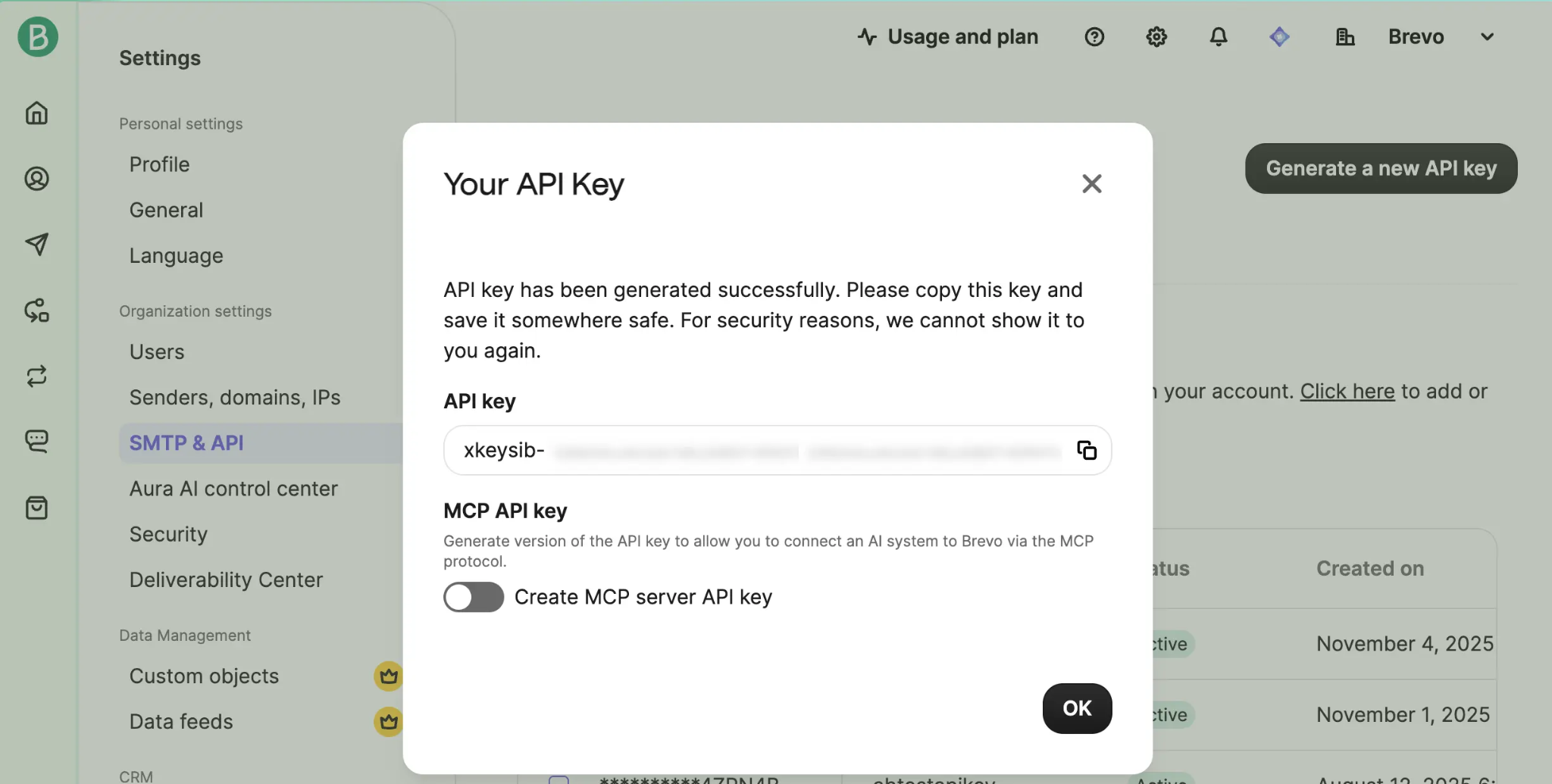
API access starts with a standard Brevo account on any plan, including the Free tier. There is no separate developer signup, no approval gate, and no credit card required. The Free plan allows up to 300 emails per day via the API with full access to the REST endpoints, SMTP relay, outbound webhooks, and unlimited log retention.
Brevo supports two authentication methods:
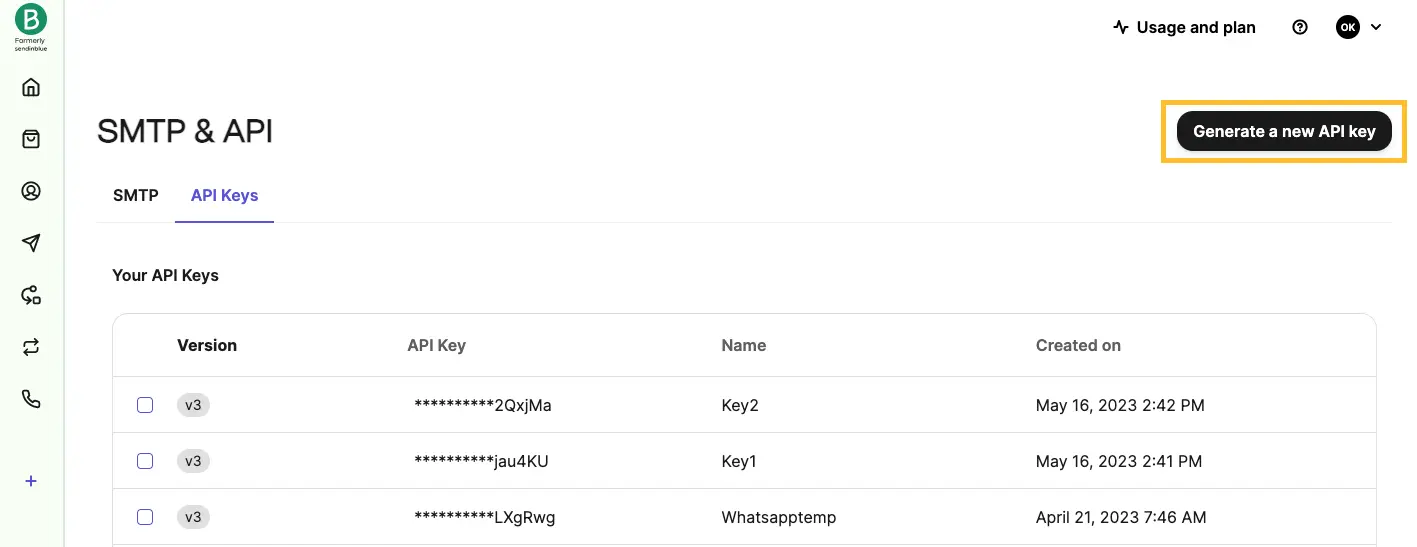
API key authentication is the primary method for server-to-server integrations. Developers generate an API key from Account Settings in the Brevo dashboard.
Source: Brevo
The key appears once and must be stored securely. You pass it in the api-key request header on every call. An optional IP allowlist can restrict key usage to specific addresses.
OAuth 2.0 is available for integrations acting on behalf of users, following a standard authorization code flow with scopes. This is designed for partner integrations and apps connecting a user's Brevo account, not direct server-to-server access.
A basic authenticated request looks like this:
curl https://api.brevo.com/v3/account \
-H "api-key: YOUR_API_KEY"
The response returns account details including plan type, credits remaining, and sender configuration, confirming the key is valid and the account is active. From there, you can begin sending transactional emails, managing contacts, or configuring webhooks.
One detail worth noting: Brevo is explicit that the key must not be exposed in client-side code. For browser-side integrations, Brevo provides a JavaScript tracking library and the Conversations JavaScript API as alternatives.
Brevo API: Core Endpoints & Capabilities
The API is organized by resource. All requests use JSON (content-type: application/json) and standard HTTP methods (GET, POST, PUT, DELETE). The endpoint catalogue spans messaging, contact management, eCommerce, events, conversations, loyalty, and account administration.
Transactional Email
Primary endpoint: POST /v3/smtp/email
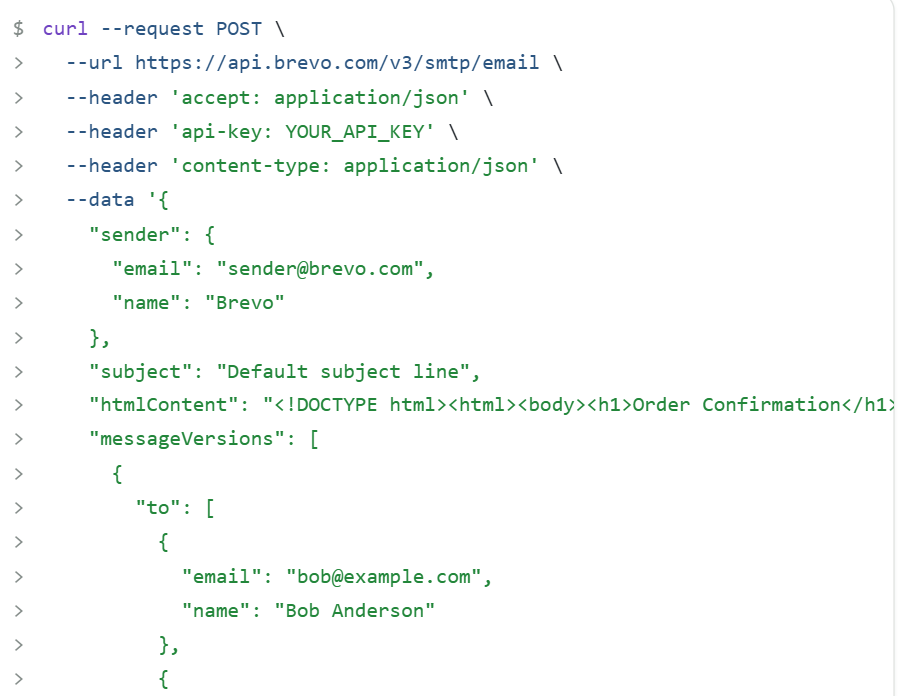
This is the core transactional send endpoint. You pass a JSON payload with the sender, recipient array, subject, and message body (as raw HTML via htmlContent, plain text via textContent, or a template reference via templateId).
Dynamic content is injected through a params object for per-recipient variable substitution.
The endpoint supports batch sending with up to 1,000 personalized message versions per request via the messageVersions array.
Source: Brevo
Each version can carry its own recipients, subject, params, and content. The batch endpoint accepts up to 6,000 calls per hour on the base tier.
Additional transactional email operations:
GET /v3/smtp/emails: retrieve historical email logs with filtering
POST /v3/inbound: inbound email parsing via webhooks, converting incoming replies into structured data
Scheduled delivery and sandbox mode for testing without real delivery
What you would build with this: an eCommerce order confirmation pipeline that sends personalized receipts with product details, tracks delivery status via webhooks, and parses customer replies into a support ticket system.
Transactional SMS and WhatsApp
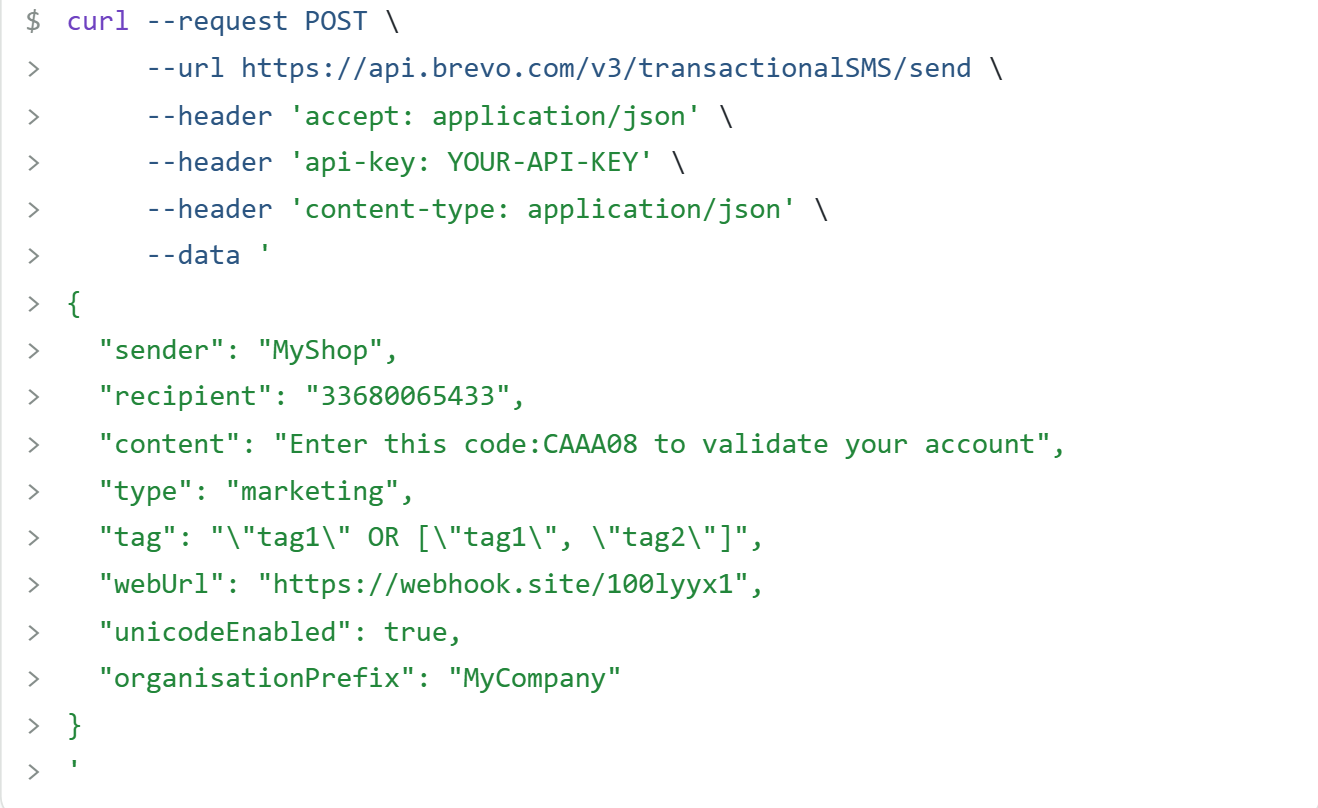
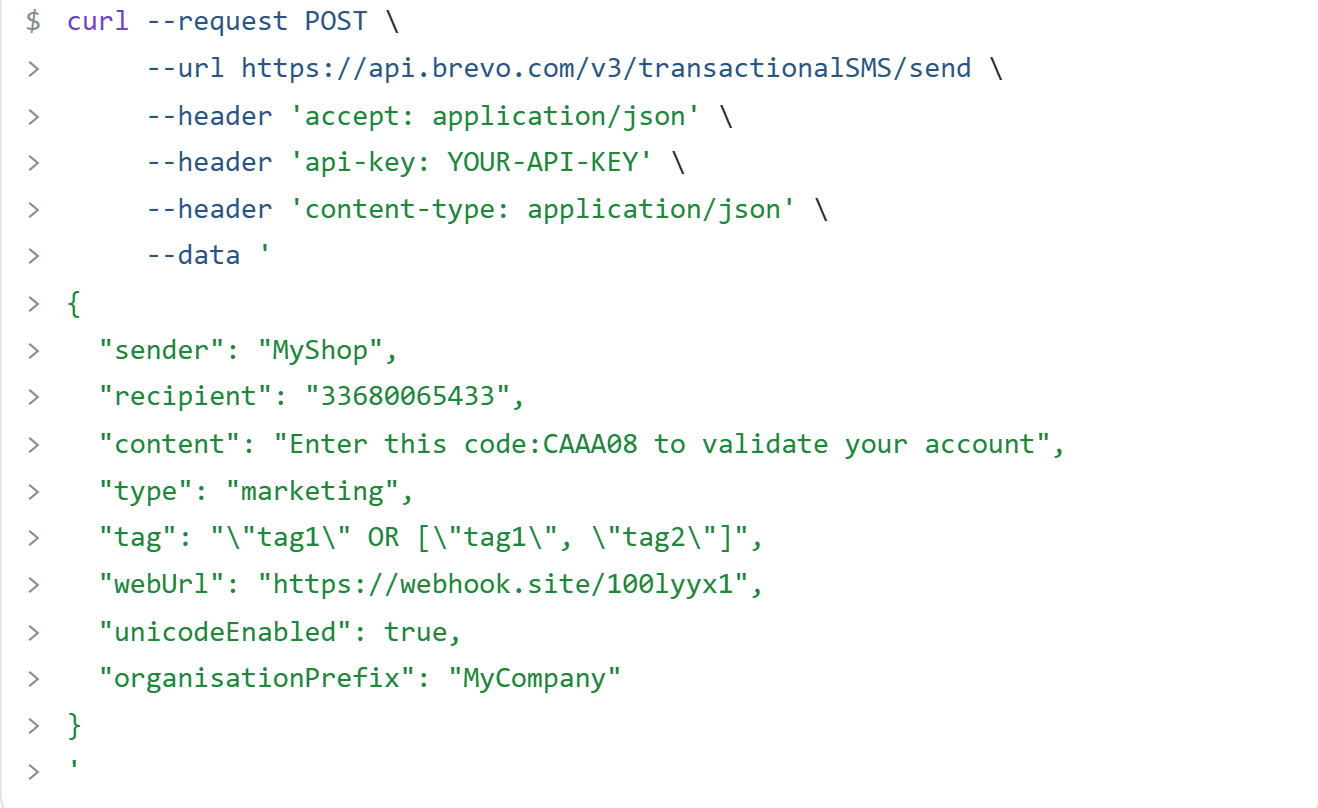
SMS: POST /v3/transactionalSMS/send sends SMS messages with sender name, content, and optional reference tags.
Source: Brevo
WhatsApp: POST /v3/whatsapp/sendMessage handles transactional WhatsApp messages. A separate campaigns API covers marketing WhatsApp sends.
Both channels sit under the same API surface and authentication, so a pipeline that sends an order confirmation via email and a shipping alert via WhatsApp uses one set of credentials and one integration layer.
Contacts
Base path: /v3/contacts/
The contacts surface handles CRUD, search, and import/export operations. You can manage contact attributes, build and update segmented lists, and filter contacts by demographic, behavioral, and custom event data. Segmentation criteria are available for building dynamic audiences programmatically.
Contact imports support bulk operations, and the export endpoints let you pull contact data for external processing. Pagination follows standard offset/limit patterns across list endpoints.
What you would build with this: a CRM sync that pushes new signups into Brevo contact lists, applies lead scoring based on custom event data, and enrolls high-scoring contacts into automated email sequences.
eCommerce
Products: POST /v3/products syncs your product catalogue into Brevo.
Source: Brevo
Orders: POST /v3/orders/status imports and updates order data.
These endpoints feed Brevo's automation engine with the data needed for abandoned cart workflows, purchase-triggered sequences, and revenue attribution. Product categories and order events flow into the same contact profiles used for segmentation.
Custom Events
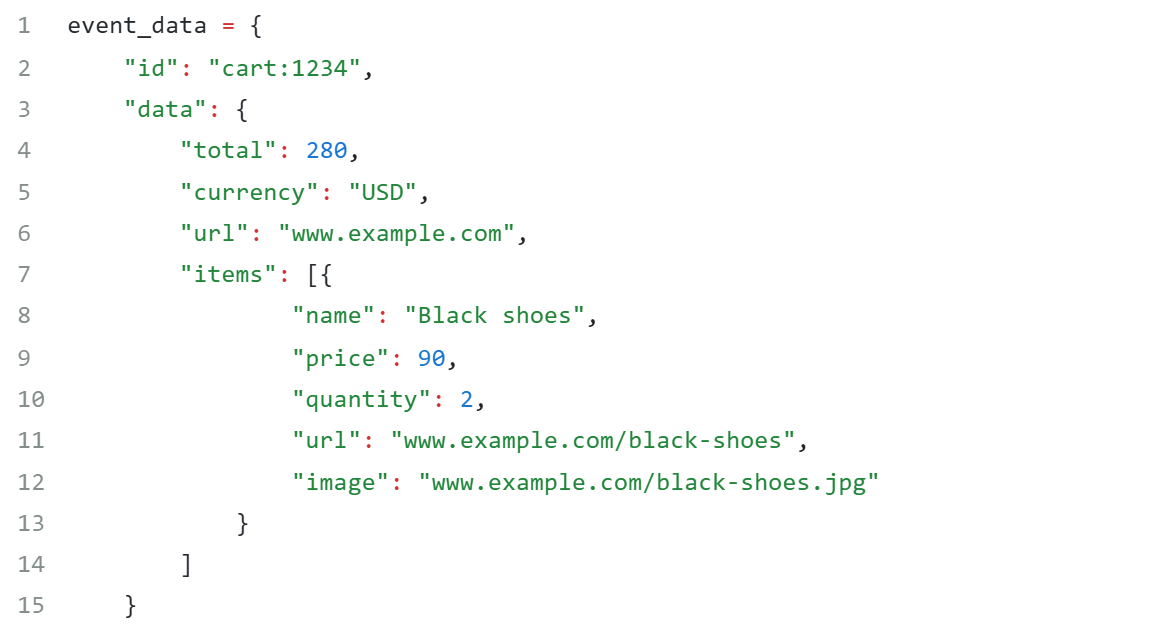
Endpoint: POST /v3/events
Source: Brevo
Track arbitrary user behaviors from server-side or client-side JavaScript. Events become available as segmentation criteria and automation triggers, so you can build workflows that fire on actions specific to your application (feature usage, onboarding milestones, subscription changes) rather than only email interaction events.
Conversations
Base path: /v3/conversations
A REST API for agent messaging plus a JavaScript API for customizing the live chat widget. You can manage conversation threads programmatically, connecting Brevo's chat system with external support tools or CRM records.
Loyalty
Base path: /v3/loyalty/
Create and configure loyalty programs, manage member enrollments via /v3/loyalty/subscriptions, and credit or debit points through /v3/loyalty/transactions. Read member data and tier status programmatically. This is an Enterprise-tier feature.
Account Administration
GET /v3/account validates credentials and retrieves account details. Additional endpoints manage senders, domains (creation, authentication, validation), and invited users.
Brevo API: Webhooks & Events
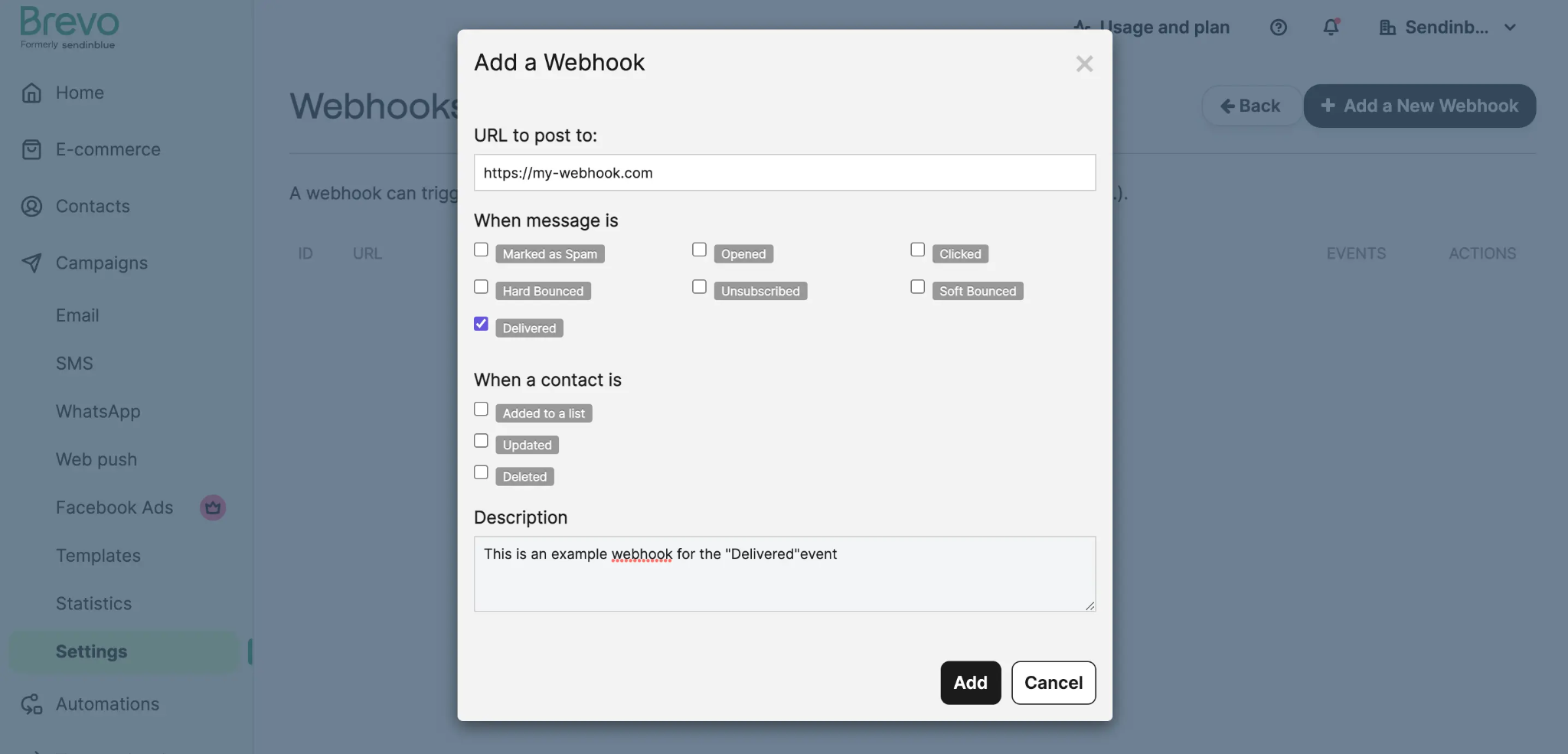
Brevo's webhook system delivers real-time HTTP POST payloads to a developer-supplied URL. Webhooks fall into two main categories (Marketing and Transactional) with additional sub-categories covering the full platform.
Source: Brevo
Transactional Email events (full list): Sent, Clicked, Deferred, Delivered, Soft Bounced, Spam/Complaint, First Opening, Hard Bounced, Opened, Invalid Email, Blocked, Error, Unsubscribed, Proxy Open, Unique Proxy Open.
Transactional SMS events: Sent, Accepted, Delivered, Replied, Soft Bounce, Hard Bounce, Subscribe, Unsubscribe, Skip, Blacklisted, Rejected.
Additional webhook categories:
You create and update webhooks via the API itself (POST /v3/webhooks, PUT /v3/webhooks/{webhookId}). A batched webhooks option handles high-volume event processing. Brevo enforces security through IP-allowlisting its published IP ranges on the receiving server. A retry mechanism handles transient delivery failures.
Three things to plan around:
Webhook creation is capped at 40 total (marketing + transactional combined). If your integration needs fine-grained routing across many event types, you will need to multiplex at the receiver rather than creating separate webhooks per event.
Webhook authentication uses IP allowlisting rather than payload signing (HMAC). Design your receiver to validate the source IP against Brevo's published ranges.
The batched webhooks option reduces HTTP overhead at high volume, but requires your receiver to handle array payloads.
Brevo API: SDKs, Docs & Rate Limits
SDKs & Libraries
Brevo publishes seven official SDKs on GitHub under the getbrevo organization:
Node.js (@getbrevo/brevo): github.com/getbrevo/brevo-node
Python (brevo-python): github.com/getbrevo/brevo-python
Node.js, PHP, and Python carry a "New version" designation on the docs with v4 branches, and each has a dedicated SDK guide with changelog. The remaining four (Java, C#, Go, Ruby) are maintained but lack the same v4 release documentation.
For languages without an official SDK, the published OpenAPI v2 spec can be fed into Swagger Codegen or any OpenAPI toolchain to generate a typed client.
Seven SDKs with three actively versioned is good coverage for a messaging API. Before depending on any SDK in production, check the GitHub repo for recent commit activity against the current v3 API surface.
Documentation & Developer Experience
The developer portal at developers.brevo.com covers the full API surface:
Interactive API Reference with a "try it" in-browser request executor at every endpoint, letting you test calls without writing code or configuring Postman.
Postman workspace: a pre-configured Postman collection for exploring all endpoints.
Changelog: a dedicated changelog section tracking API changes over time.
SDK guides: language-specific guides for Node.js, Python, and PHP with changelogs, installation steps, and usage examples.
Sandbox mode: an email sandbox for testing sending logic without delivering real messages.
AI-first docs: the docs site exposes an LLMs.txt index at /llms.txt and supports the MCP protocol, letting AI coding assistants browse the reference natively.
CLI reference: a CLI tool for command-line API use.
Support channels include the Help Center (support in 6 languages on Starter+), phone support on Professional and above, a community forum, and a platform status page. The docs site also includes an "Ask AI" function for navigating the reference.
Documentation is one of Brevo's API strengths. The interactive reference, Postman workspace, sandbox mode, and published OpenAPI spec give developers multiple paths to validate assumptions before writing production code.
Rate Limits & Constraints
Brevo publishes three rate-limit tiers, expressed in RPS (requests per second) and RPH (requests per hour). Your tier depends on your plan:
General limits (Free, Starter, Standard):
Endpoint | Limit |
|---|---|
POST /v3/smtp/email (transactional send) | 1,000 RPS / 3,600,000 RPH |
POST /v3/transactionalSMS/send | 150 RPS / 540,000 RPH |
/v3/contacts/{...} | 10 RPS / 36,000 RPH |
POST /v3/events | 10 RPS / 36,000 RPH |
POST /v3/orders/status | 5 RPS / 18,000 RPH |
GET /v3/smtp/emails (log retrieval) | 2 RPS / 7,200 RPH |
All other /v3/smtp/{...} | 300 RPH |
All other endpoints | 100 RPH |
Advanced limits (Professional): email send doubles to 2,000 RPS / 7.2M RPH; contacts to 20 RPS / 72K RPH; other endpoints to 200 RPH.
Extended limits (Enterprise): email send reaches 6,000 RPS; SMS 250 RPS; contacts 60 RPS; other endpoints 600 RPH.
Exceeding a limit returns HTTP 429 Too Many Requests. All API responses include rate limit headers for monitoring usage. Separate platform quotas cap total object counts (campaigns, contact lists, and similar resources).
The transactional email send endpoint at 1,000 RPS on the base tier is generous for most builds. The contacts endpoint at 10 RPS on lower tiers is the constraint most likely to affect a CRM sync or bulk import. If your pipeline involves frequent contact updates, plan for the 10 RPS ceiling or upgrade to Professional for 20 RPS.
Brevo API Pricing & Access Costs
API access comes bundled with every Brevo plan, including the Free tier. There is no separate API pricing, no per-call fee, and no developer-specific subscription. The pricing FAQ states: "All Brevo plans give you access to transactional email features, including RESTful APIs, SMTP, outbound webhooks, unlimited log retention."
Here is how the cost breaks down by tier:
Free: 300 emails/day via API (approximately 9,000/month), unlimited contacts, no credit card required. Full API access including REST, SMTP relay, and webhooks.
Starter: from $9/month for 5,000 emails/month. Adds email and SMS channel access.
Standard: from $18/month for 5,000 emails/month. Adds marketing automation, A/B testing, and advanced reporting.
Professional: from $499/month for 150,000 emails/month. Unlocks Advanced rate limits (2,000 RPS for email sends, 20 RPS for contacts), WhatsApp campaigns, push notifications, and phone support.
Enterprise: custom-priced. Unlocks Extended rate limits (6,000 RPS for email sends, 60 RPS for contacts), dedicated IP, SSO/SAML, and a Customer Success Manager.
Pay-as-you-go credits are available as an alternative to monthly subscriptions. One email equals one credit, and credits do not expire.
SMS and WhatsApp credits are sold separately from email volume on all plans, priced by message volume and destination country.
For a developer sizing costs: the API itself is free at every tier. The real cost is the email volume ceiling and the rate-limit tier that determines your throughput. A low-volume transactional use case (order confirmations, password resets) can run on the Free plan indefinitely.
A high-volume pipeline hitting 1,000+ contacts per second needs Professional ($499/month) for the rate-limit upgrade alone.
Where the Brevo API Falls Short
These are scope boundaries and constraints a developer should plan around, not criticisms of the platform. Several reflect what Brevo is (a messaging and marketing automation platform) and what it is not.
The API sends messages and manages contacts. It does not return intelligence about who those contacts are. There is no contact enrichment endpoint, no company data, no org chart traversal, no technographic lookup, no buyer intent signals, and no employment history.
If your pipeline needs to identify a contact's title, company size, technology stack, or whether their company is researching your category, you need a second API. This is the single biggest constraint for developers building data pipelines where messaging is one step in a larger enrichment and intelligence workflow.
The contacts endpoint rate limit starts at 10 RPS on lower tiers. The transactional email endpoint handles 1,000 RPS on the base plan, but the contacts surface is limited to 10 requests per second on Free, Starter, and Standard. For a CRM sync processing thousands of contact updates, this is the bottleneck. Professional (20 RPS) and Enterprise (60 RPS) relieve it, but at $499/month and up.
Webhook creation is capped at 40 total. Marketing and transactional webhooks share a single 40-webhook ceiling. If your integration routes events to different internal systems by type, you need to multiplex at the receiver rather than creating one webhook per event.
No OAuth 2.0 for general multi-tenant SaaS integrations. Brevo's OAuth flow is designed for partner app integrations. For a SaaS product where each customer connects their own Brevo account, the OAuth path exists but is not scoped for general delegated access. Most integrations will use API key auth, which means each customer must generate and share a key manually.
SMS and WhatsApp are billed separately. The email volume included in your plan does not cover SMS or WhatsApp sends. These channels are priced by message count and destination country, adding a variable cost layer that is harder to predict for multi-channel messaging pipelines.
No public changelog cadence or OpenAPI v3 spec. The API specification is published as OpenAPI v2 (Swagger). A changelog exists, but the update frequency is not stated, and there is no OpenAPI v3 spec. For teams using newer code generation tooling that expects v3, this adds a conversion step.
ZoomInfo API: The Data and Intelligence Layer Beyond Messaging
Brevo's API handles the messaging pipeline: send emails, manage contacts, track events, trigger automations.
ZoomInfo's API handles the data layer that feeds that pipeline: who these contacts are, what companies they work for, what technology they use, whether they are researching your category, and where they sit in the org chart.
Powering that data is the GTM Context Graph, which processes 1.5B+ data points daily by combining ZoomInfo's B2B data with your first-party CRM records and behavioral signals to surface not just what happened, but why deals move or stall.
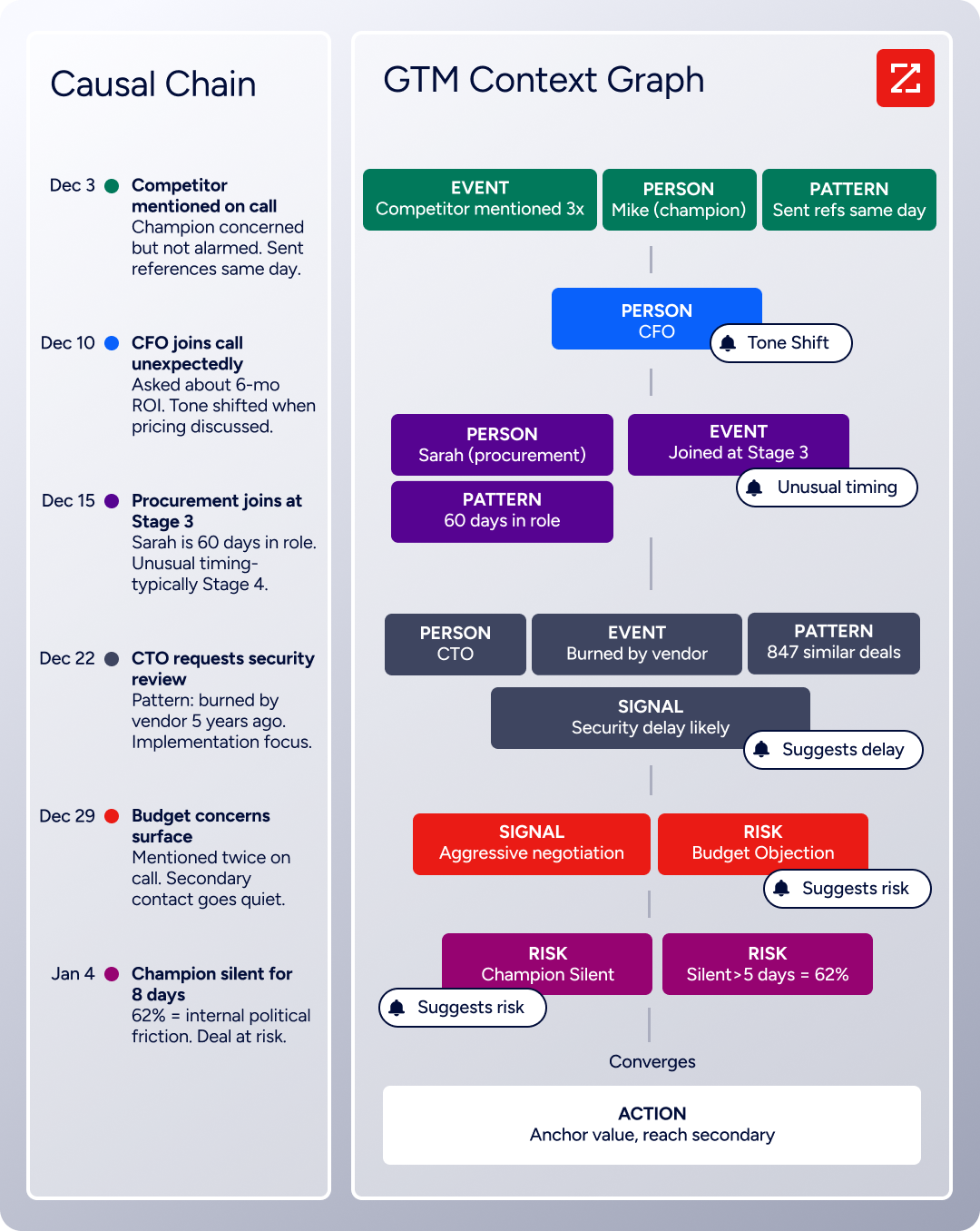
The two APIs operate at different layers. A developer building a complete go-to-market pipeline would use ZoomInfo's API to identify and qualify prospects, then Brevo's API to reach them.
What the API Covers
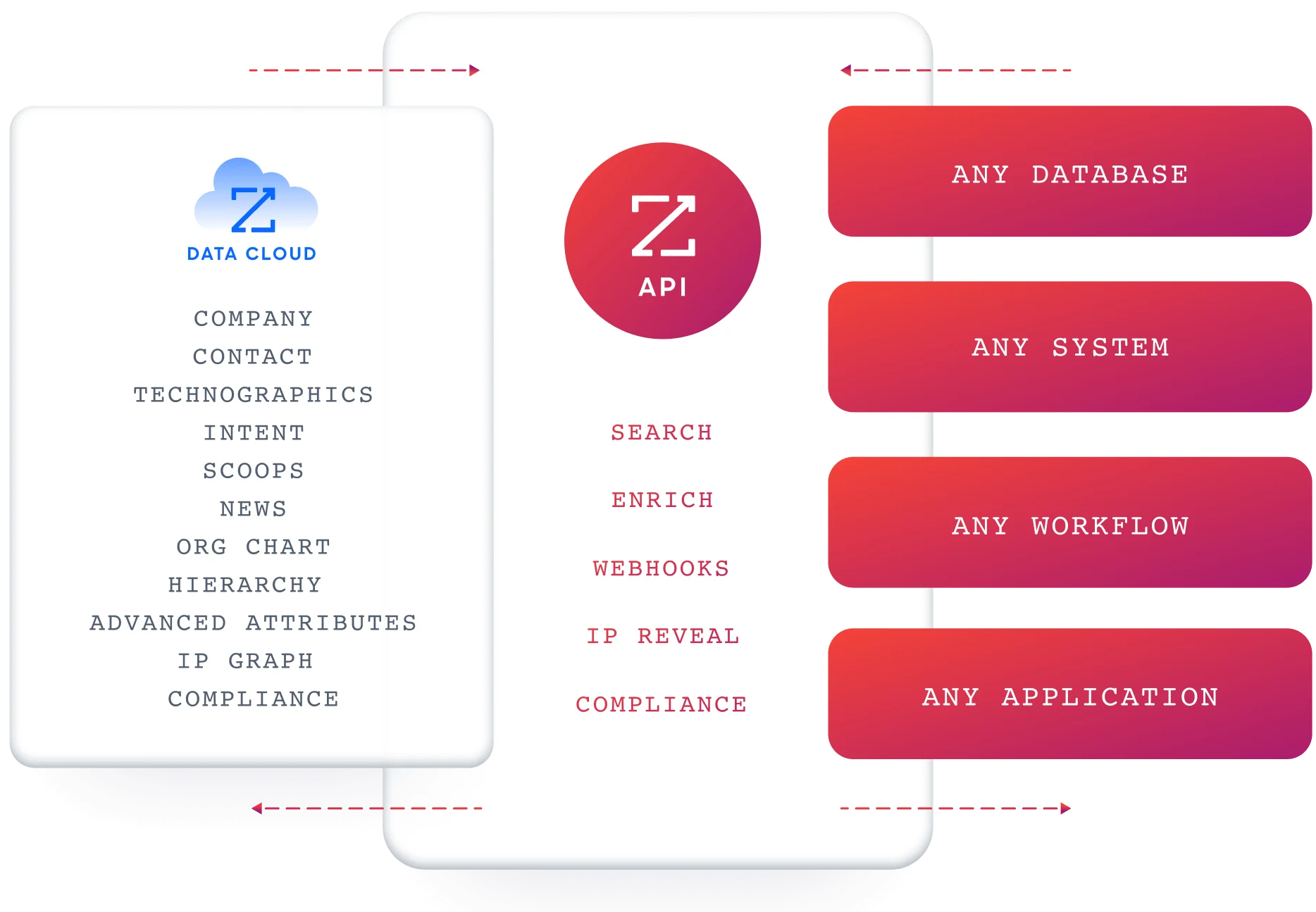
ZoomInfo's Enterprise API is a REST suite served from https://api.zoominfo.com/gtm, organized into four surface areas documented in the interactive API reference:
Data API (Search & Enrich): Search endpoints cover Contacts, Companies, Intent, News, and Scoops, returning matched records without consuming credits. Enrich endpoints unlock the full payload: business emails, direct dials, employment history, corporate hierarchy, org charts, technographics, and hashtag signals (up to 25 records per call). The underlying dataset spans 500M contacts, 100M companies, 135M+ verified phone numbers, and 200M+ verified business email addresses.
AI Intelligence API: Account Summary returns structured account intelligence with a free-form Q&A endpoint. Find Similar Companies performs lookalike expansion. Contact Recommendations returns AI-ranked buying-committee suggestions by motion (prospecting, deal acceleration, renewals).
Marketing API: CRUD endpoints for programmatic audience management.
Platform API (Engagements, Beta): Bidirectional engagement data via the Engagements API.
The pairing with a messaging API is direct: use ZoomInfo's search endpoints to find contacts matching your ICP (free, no credits consumed), enrich the ones worth pursuing, then push them into Brevo's contacts and campaign endpoints. The search-then-enrich pattern means you filter freely and pay only for the records you commit to.
Authentication & Access
ZoomInfo uses OAuth 2.0 with PKCE via Okta, supporting three flows: Authorization Code with PKCE (web applications), Client Credentials (server-to-server), and Refresh Token. Access tokens are 24-hour Bearer tokens with rotating refresh tokens.
Teams register applications through the ZoomInfo Developer Portal, where they generate credentials, define scopes, and test endpoints.
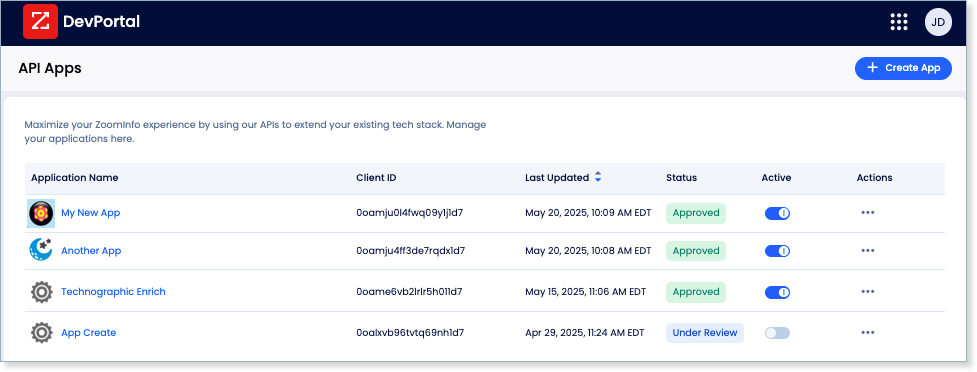
This differs from Brevo's static API key model. OAuth 2.0 supports delegated access, credential rotation, and scoped permissions, making it better suited for multi-tenant integrations and enterprise security requirements.
Rate Limits, Credits & Developer Experience
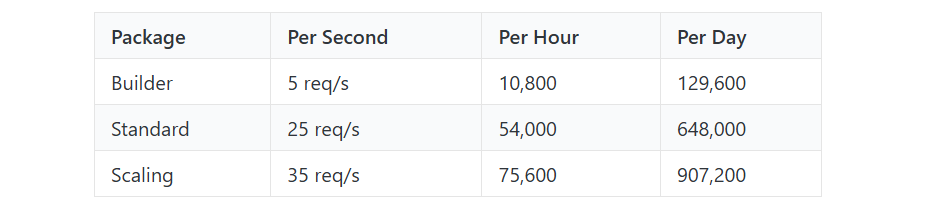
Rate limits are published by tier: Builder (5 req/sec), Standard (25 req/sec), and Scaling (35 req/sec), with per-hour and per-day sliding-window limits enforced simultaneously. Every response includes quota headers with remaining capacity, and 429 responses include a Retry-After header with exact backoff timing.
Credits follow a rolling 12-month window: enriching a record for the first time consumes one credit; re-enriching the same record within the year is free. Search and lookup operations do not consume credits.
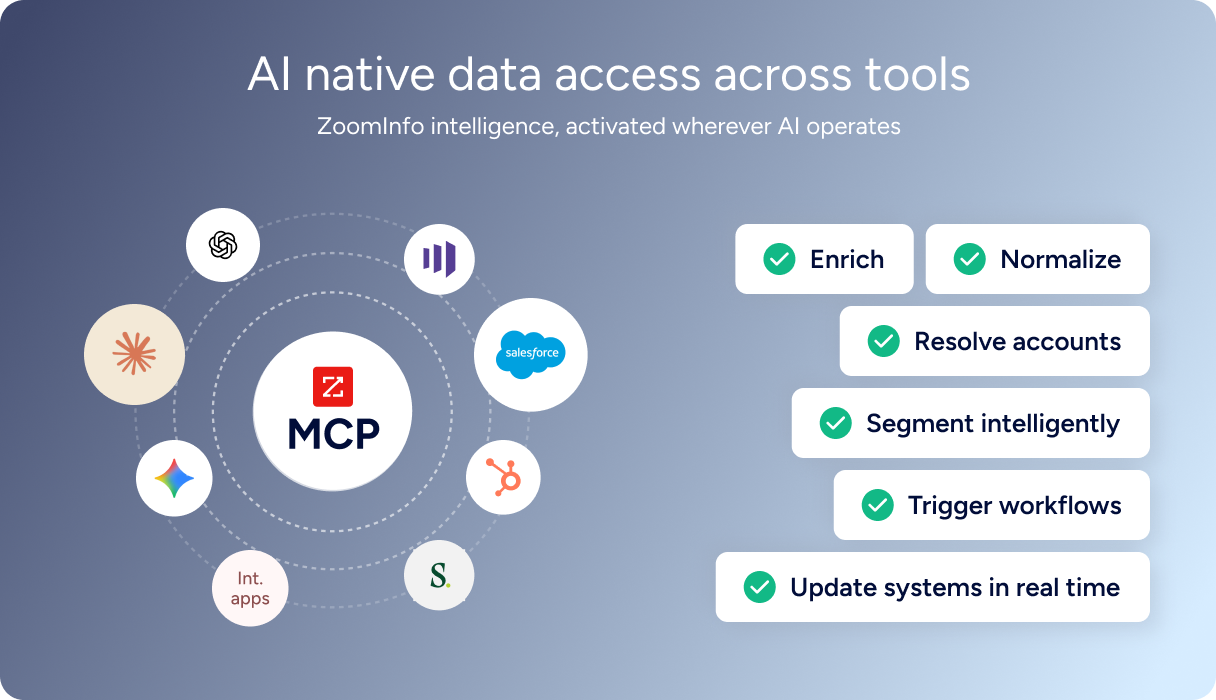
For developers building AI agents, ZoomInfo's MCP server at https://mcp.zoominfo.com/mcp exposes search, enrich, and account research as native tools for MCP-compatible assistants, currently supporting Claude and ChatGPT.
Documentation lives at docs.zoominfo.com with an interactive API reference and an llms.txt index for AI development tools.
ZoomInfo does not publish official SDKs, so you integrate over HTTP and own the auth-and-retry layer yourself. Pricing follows a consumption-based model; API access has been added to all relevant plans.
BDO Canada reported an 87% reduction in time spent updating internal data dashboards using the ZoomInfo API, with one analyst calling the integration plug-and-play across any process. (ZoomInfo)
Brevo API vs. ZoomInfo API
Dimension | Brevo API | ZoomInfo API |
|---|---|---|
API type | REST, JSON | REST, JSON:API format |
Authentication | API key in header (primary); OAuth 2.0 (partner apps) | OAuth 2.0 with PKCE (24-hour tokens, rotating refresh) |
Primary scope | Messaging and marketing automation: transactional email/SMS/WhatsApp, contacts, eCommerce, events, loyalty, conversations | B2B intelligence: contact/company search, enrichment, intent, org charts, technographics, AI research |
Contact data | Stores contacts you create or import; no enrichment | 500M contacts, 100M companies, 135M+ verified phone numbers, 200M+ verified business emails |
Intent / signals | Campaign engagement events (opens, clicks, bounces) | Buyer intent, scoops, news, job changes, funding signals |
Webhooks | 40-webhook cap; covers email, SMS, marketing, loyalty, CRM, conversations, push, payments, meetings, phone | Agent Teams-based webhooks (enrichment jobs, signal alerts, credit thresholds) |
SDKs | Official SDKs in 7 languages (Node.js, Python, PHP, Java, C#, Go, Ruby) | None (code recipes in Shell, Node, Ruby, PHP, Python) |
Rate limits | 1,000-6,000 RPS for email sends by tier; 10-60 RPS for contacts | 5-35 req/sec by tier, with per-hour and per-day sliding windows |
AI endpoints | Not available | Account Summary, Find Similar Companies, Contact Recommendations |
MCP server | Available (Brevo MCP) for AI assistants to manage campaigns and contacts | Available at mcp.zoominfo.com (Claude, ChatGPT) for search, enrichment, and research |
Compliance API | GDPR/CCPA tools in-platform (consent forms, data export) | Data privacy and opt-out management endpoints |
Pricing model | Bundled with all plans ($0 entry on Free; $9/month Starter) | Consumption-based, credit-based (search free, enrich consumes credits) |
Best for | Developers building messaging pipelines: transactional sends, marketing automation, multi-channel campaigns | Developers building data and intelligence pipelines: contact discovery, company enrichment, intent detection, AI-powered account research |
Final Verdict
Brevo's API is a capable, well-documented messaging surface. It covers transactional email, SMS, WhatsApp, contacts, eCommerce, events, loyalty, and conversations from a single REST interface, with seven official SDKs, published rate limits, an OpenAPI spec, sandbox mode, and API access starting at $0.
For a developer whose build starts with "send a message" and extends into "automate a workflow around that message," the API delivers what the dashboard does, without the dashboard.
Choose the Brevo API if your integration is messaging-first: transactional email at scale, multi-channel campaign automation, eCommerce event-triggered sequences, or a loyalty program that needs programmatic contact and points management.
The Free tier with full API access, the 1,000 RPS email send ceiling on the base plan, and seven maintained SDKs make it easy to start building.
Choose the ZoomInfo API if your build needs the intelligence layer upstream of messaging: deciding which accounts to pursue, which contacts to reach, what their companies look like, and whether they are in-market.
The search-then-enrich pattern (search is free, enrich consumes credits) and the AI intelligence endpoints cover the data and reasoning that messaging APIs do not.
Explore the ZoomInfo Enterprise API or start with the developer docs to see the endpoint surface directly.
A developer who needs both should note that the two operate at complementary layers: ZoomInfo identifies and qualifies the audience, Brevo delivers the message. If your pipeline requires both, they integrate through their respective REST surfaces with no architectural conflict.
FAQ
Is the Brevo API free?
Yes, on the Free plan. Brevo includes full API access (REST, SMTP relay, webhooks, unlimited log retention) on every plan, including the permanent Free tier. The Free plan allows up to 300 emails per day via API with unlimited contacts and no credit card required. Beyond that daily cap, paid plans start at $9/month for 5,000 emails/month. There are no per-call API fees on any plan.
Does Brevo have a GraphQL API?
No. Brevo exposes a REST API at /v3/ using HTTPS with JSON request and response bodies. The API specification is published as OpenAPI v2. If you need a GraphQL interface, you would need to build a wrapper layer on top of the REST API.
What is the Brevo API rate limit?
Brevo publishes tiered rate limits by endpoint and plan. On the base tier (Free, Starter, Standard), the transactional email send endpoint handles 1,000 requests per second, the contacts endpoint allows 10 requests per second, and most other endpoints are limited to 100 requests per hour.
Professional plans double the email send limit to 2,000 RPS and contacts to 20 RPS. Enterprise plans push email sends to 6,000 RPS and contacts to 60 RPS. Exceeding any limit returns a 429 response with rate-limit headers.
Are there official Brevo SDKs?
Yes. Brevo publishes official SDKs for seven languages: Node.js, Python, PHP, Java, C#, Go, and Ruby, all hosted on GitHub under the getbrevo organization. Node.js, PHP, and Python have updated v4 versions with dedicated SDK guides and changelogs.
For unsupported languages, the published OpenAPI v2 specification can generate typed clients via Swagger Codegen.
Does the Brevo API support webhooks?
Yes. Brevo's webhook system covers transactional email events (15 types including delivered, opened, clicked, bounced, and complained), transactional SMS events (11 types), marketing events, conversations, payments, loyalty, push notifications, Sales CRM, meetings, and phone.
You create and manage webhooks via the API itself, with a batched option for high-volume processing and a retry mechanism for transient failures. The total webhook count is capped at 40 across all categories.
What does ZoomInfo's API add to a Brevo build?
ZoomInfo's API adds the data and intelligence layer that Brevo's API does not cover.
Where Brevo manages messaging and contacts, ZoomInfo provides the contact and company intelligence that determines who should receive those messages: search across 500M contacts and 100M companies, enrich with direct dials, org charts, technographics, and employment history, detect buyer intent signals, and generate AI-powered account research and buying-committee recommendations.
The practical integration pattern is to use ZoomInfo's search endpoints (free, no credits) to identify contacts matching your ICP, enrich the qualified ones (one credit per new record), then push those contacts into Brevo's API for campaign enrollment.
The two APIs use different authentication models (API key vs. OAuth 2.0) and different pricing structures (volume-based vs. credit-based), so plan the integration layer to handle both.
