
If you are building a pipeline that needs to know what technology a website runs, the question is not whether BuiltWith has the data. It is whether the API gives you what you need to get that data into your system reliably, at the right cost, and at the throughput your pipeline requires.
BuiltWith's API suite is one of the oldest and broadest technographic data sources available: sixteen-plus REST endpoints covering domain lookups, technology lists, relationships, trust scoring, keyword search, eCommerce products, trends, and a real-time WebSocket feed.
The documentation is public, Postman collections exist for most endpoints, and code examples cover eight languages. For a bootstrapped company with roughly 11 employees, the API surface is wide.
But breadth and developer experience are different questions.
BuiltWith's API tells you what technologies a website uses, when it started and stopped using them, how sites relate to each other through shared infrastructure, and what eCommerce products a domain sells.
That is its scope: technographic intelligence, historical technology tracking, and web infrastructure analysis. It does not cover B2B contact data, company firmographics beyond what you can infer from a domain, buyer intent signals, org charts, or verified phone numbers. Those are different layers of the data stack entirely.
This is where ZoomInfo's API enters the picture. ZoomInfo is a B2B data and intelligence platform whose Enterprise API is a REST suite covering contact search, company enrichment, AI intelligence, intent signals, and audience management across 500M contacts and 100M companies, with an MCP server for AI-agent workflows.
BuiltWith tells you what a company's website runs; ZoomInfo tells you who works there, how to reach them, and whether they are in-market.
This review covers the BuiltWith API in full technical depth first (authentication, endpoints, real-time feeds, SDKs, rate limits, and pricing), then reviews ZoomInfo's API as the B2B intelligence layer that picks up where technographic data stops.
BuiltWith API at a Glance
Attribute | Detail |
|---|---|
API type | REST over HTTPS; JSON, XML, CSV, TSV, XLSX output depending on endpoint |
Authentication | API key (UUID) via query string or Authorization: API <key> header |
Base URL | https://api.builtwith.com/ |
Rate limits | 8 concurrent requests, 10 requests per second (Domain API rate limits; other endpoints not publicly documented) |
Pricing / access | Included with paid plans ($295/month entry); Free API and Trends API available at no cost |
SDKs | No traditional SDK packages; CLI tool, AI SDK, MCP server, and code examples in 8 languages |
Webhooks | No traditional HTTP webhooks; real-time data via WebSocket Live Feed API |
Documentation | api.builtwith.com (single-page per endpoint, with Postman collections) |
BuiltWith API: What Works Well & What to Plan Around
What works well | What to plan around |
|---|---|
Sixteen-plus endpoints covering domain lookups, lists, relationships, trust, trends, keywords, products, and more | Technographic data only: no contacts, no firmographics, no intent signals, no org charts |
Domain API batches up to 16 domains per call (64 in high-throughput mode) | Rate limits published only for the Domain API; other endpoint ceilings are undocumented |
Free API and Trends API require no credits at all | Credit costs per call are not published on public pages; login required to see allocations |
Public Postman collections for most endpoints | No OAuth, no token rotation: static API key auth only |
WebSocket Live Feed for real-time technology detection events | No traditional HTTP webhooks for push-based event delivery |
Code examples in 8 languages plus a CLI and MCP server | No maintained SDK packages (npm, pip, etc.); you own the HTTP integration layer |
BuiltWith API: Authentication & Getting Started
API access requires a paid BuiltWith plan. The Free API and Trends API are exceptions: both work without consuming credits, including on free accounts.
For the full API suite, the entry point is the Basic plan at $295/month, with the Team plan at $995/month including 100,000 API credits per month.
Authentication is simple. Every request uses a UUID-format API key that you generate from your BuiltWith account. You can pass the key in two ways:
Query string: ?KEY=<uuid>
HTTP header: Authorization: API <uuid>
There is no OAuth flow, no token exchange, no rotating credentials. Every request is stateless and key-authenticated. BuiltWith tells developers never to expose the key in client-side code. All endpoints are HTTPS-only.
A basic authenticated request looks like this:
curl "https://api.builtwith.com/v22/api.json?KEY=YOUR_API_KEY&LOOKUP=example.com"
The response returns detected technologies organized by category (analytics, CDN, CMS, advertising, etc.), detection timestamps, historical usage windows, and optional metadata including contact names, emails, addresses, and social profiles.
The format modifier in the URL path (api.json, api.xml, api.csv) controls the output format.
The simplicity is a tradeoff. Key-based auth is easy to implement and easy to leak. For teams with strict credential-rotation policies, or applications that need delegated, scoped access (multi-tenant integrations where each customer authenticates independently), BuiltWith's static-key model is limiting.
BuiltWith API: Core Endpoints & Capabilities
The API suite is organized by use case rather than by a single resource model. Each endpoint serves a distinct query pattern, from single-domain lookups to natural-language audience queries. The breadth is unusual for a company of BuiltWith's size.
Domain Lookup
Endpoint: GET https://api.builtwith.com/v22/api.json
This is the primary endpoint. A single LOOKUP parameter accepts one domain or a comma-separated list of up to 16 domains in a single credit-efficient call. The response includes:
Detected technologies organized by category
Detection and removal timestamps for each technology
Optional metadata: contact names, emails, addresses, social profiles
Technology spend estimates and traffic rankings
A high-throughput mode accepts up to 64 domains per request by stripping text, meta, attributes, and contact data (HIDETEXT=yes&NOMETA=yes&NOPII=yes). This skips live lookups for uncached domains and maximizes throughput for bulk enrichment pipelines.
What you would build with this: a CRM enrichment job that takes a list of prospect domains, batches them 64 at a time, and writes the detected technology stack back into account records for segmentation.
Bulk Domain API
Endpoint: POST https://api.builtwith.com/v22/domain/bulk
Accepts a JSON array of domains. Small batches return synchronously in the standard Domain API format.
Large batches return a job_id for asynchronous processing; you retrieve results via a separate GET endpoint, and the system deletes them after first download. This is the endpoint for pipelines processing thousands of domains that exceed the 64-domain batch ceiling.
Lists API
Endpoint: GET https://api.builtwith.com/lists12/api.json
Returns all websites using a named technology. The TECH parameter accepts a technology name (e.g., Shopify), and filtering parameters narrow results by:
Co-occurring technologies (OTHERTECHS, up to 16)
Country (COUNTRY)
Detection recency (SINCE)
Spend level (SPEND)
Revenue (REVENUE)
All-time historical inclusion (ALL=yes)
Pagination uses an opaque OFFSET cursor token; when NextOffset equals END, no more pages exist. A meta mode (META=yes) enriches each result with names, titles, social links, addresses, emails, and traffic ranks.
What you would build with this: a competitive intelligence system that tracks every website running a specific technology (say, a competitor's analytics tool) in a target geography, then monitors the list weekly for new adopters and churners.
Change API
Endpoint: GET https://api.builtwith.com/change1/api.json
Returns a diff view of technology changes for a domain. An optional SINCE parameter (accepts relative strings like "last month") scopes the lookback. Results include AI-generated business context for each change event, making it useful for sales triggers: a domain dropping one analytics tool and adding another is a signal.
Ask API
Endpoint: GET https://api.builtwith.com/ask1/api.json
Accepts a natural-language audience description (e.g., QUERY=Magento+websites+in+Spain) and returns a sample or committed paginated list. Adding COMMIT=true locks the query into a full result set for programmatic iteration. This is the most accessible endpoint for non-technical users building integrations, though the natural-language interface trades precision for convenience.
Relationships API
Endpoint: GET https://api.builtwith.com/rv4/api.json
Returns cross-domain linkage data: which sites share infrastructure, tracking IDs, analytics tags, and similar signals. Output formats include JSON, XML, CSV, and TSV. Use cases include fraud detection (finding hidden connections between domains) and account mapping (identifying related properties under a single parent company).
Company to URL API
Endpoint: GET https://api.builtwith.com/ctu3/api.json
Resolves a company name string to its primary domain. This is the bridge endpoint for enrichment pipelines that start from a CRM company record rather than a known URL.
Supporting Endpoints
The remaining endpoints round out the surface:
Tags API: domains associated with an IP address or site attribute, useful for mapping hosting clusters
Recommendations API: technology suggestions for a domain based on peer-site profiles
Vector Search API: semantic search over technologies and categories (accepts a text query, returns matches by meaning rather than exact name)
Keywords API / Keyword Search API: keywords found on a domain's homepage, and websites matching a keyword
Product API: eCommerce websites selling a specific product
Trust API: fraud-detection trust score for a domain
Financial API: public-company financial data tied to technology usage
Social API: social profile data linked to domains
MCP API: Model Context Protocol endpoint for AI agent tool-calling
Agent Payment API: lets AI agents check credit balance and purchase API credits
Data formats across the suite are consistent: JSON for most endpoints (primary), XML as a secondary option, with CSV/TSV/TXT on higher-volume list endpoints. Pagination where applicable uses cursor tokens (NextOffset), not page numbers.
BuiltWith API: Real-Time Feed & Event Streaming
BuiltWith does not offer traditional HTTP webhooks. The Live Feed API handles real-time event streaming through a persistent WebSocket connection.
Two connection patterns are available:
General feed: wss://sync.builtwith.com/wss/new?KEY=<key> streams all new technology detections across the entire indexed web.
Technology-scoped channel: wss://sync.builtwith.com/wss/channel/Shopify?KEY=<key> streams detection events limited to a single named technology.
What you would build with this: a monitoring service that watches the Shopify channel for new store detections in real time, enriches each new domain with the Domain API, and pushes qualified leads into a CRM.
The WebSocket approach differs from HTTP webhooks. You maintain the connection; BuiltWith streams events. You need a long-lived WebSocket client running somewhere, rather than a simple HTTP endpoint that receives POST requests. For teams already running event-driven infrastructure, this is natural.
For teams expecting a "give us a URL and we'll POST events to it" model, it requires a different integration pattern.
BuiltWith also offers a Slack integration that delivers "Net New" lead alerts to a Slack channel for technology-based reports, serving as a push notification channel for non-developer users.
BuiltWith API: SDKs, Docs & Rate Limits
SDKs & Developer Tools
BuiltWith does not publish traditional SDK packages (no npm install builtwith or pip install builtwith). Instead, the official GitHub organization hosts several developer tools:
BuiltWith CLI: a scriptable command-line tool for automation and CI/CD pipelines
BuiltWith TUI: a terminal-based interface for exploring the API interactively
BuiltWith MCP Server: the official Model Context Protocol server, letting AI agents (Claude and other MCP-compatible LLMs) call BuiltWith API tools directly
BuiltWith AI SDK: an AI-ready client wrapper referenced in the domain API docs
Code Examples: reference implementations in Node.js, Python, C#, PHP, Java, Ruby, Go, and cURL, including integrations like Live Feed to Salesforce
The Domain API documentation page provides inline code examples in eight languages. Community packages exist on NPM and NuGet, though their maintenance status is unclear.
The lack of maintained SDK packages means you own the HTTP integration layer: request serialization, error handling, rate-limit backoff, and retry logic. For a simple domain lookup, that is trivial. For a production pipeline making thousands of calls across multiple endpoints, it adds engineering overhead.
Documentation & Developer Experience
The developer documentation lives at api.builtwith.com and is structured as a set of dedicated pages, one per API endpoint. Each page includes an introduction, authentication section, code examples, parameter reference, and error codes.
Strengths of the documentation:
Postman collections are published for most endpoints: Domain API, Relationships API, Lists API, Free API, Tags API, Trends API, and others.
An LLMS.TXT file is published at the API root for AI agent consumption.
The API is also accessible via RapidAPI for the Domain API, Free API, Company to URL API, and Trust API.
Lookup tables for verticals and technology categories are exposed as machine-readable JSON endpoints.
A centralized error codes page lists all potential error responses.
What the documentation does not include: no public changelog, no versioning page, and no interactive "Try It!" explorer comparable to what platforms like ReadMe or Mintlify provide. Support is available via telephone (AU: +61 2 7242 2020, US: +1 347 514 7140) and email (support@builtwith.com), offered 7 days a week.
Rate Limits & Constraints
The Domain API rate limit is published:
8 concurrent requests
10 requests per second
Exceeding either limit returns HTTP 429 with a structured error response that includes a retryAfterSeconds field specifying the backoff window:
{
"error": "Rate limit exceeded",
"maxConcurrentRequests": 8,
"maxRequestsPerSecond": 10,
"retryAfterSeconds": 1
}
The multi-domain batch path (up to 64 domains per request in high-throughput mode) multiplies per-second throughput versus single-domain calls. For requirements beyond the published limits, BuiltWith offers dedicated endpoint solutions with higher throughput, discussed on request.
One important gap: rate limit documentation covers only the Domain API. Whether the Lists, Change, Ask, Relationships, and other endpoints carry different ceilings is not publicly documented. If your pipeline depends on multiple endpoints at volume, confirm the limits with BuiltWith directly before building.
BuiltWith API Pricing & Access Costs
BuiltWith bundles API access into its paid subscription plans rather than charging per call. The pricing page lists three paid tiers, all of which include API access:
Basic: $295/month ($2,950/year). Limited to 2 technologies for list-based reports, 2 keyword searches, and 2,000 upload analysis credits per month.
Pro: $495/month ($4,950/year). Unlimited technologies, keywords, and retail reports. 20,000 upload analysis credits.
Team: $995/month ($9,950/year). Unlimited everything, unlimited system logins, and 100,000 API credits per month or 1.2 million per year.
Two endpoints are free for everyone, including unpaid accounts:
The Free API returns technology group/category counts for a domain at no credit cost.
The Trends API returns historical technology adoption data, also free.
For a developer sizing costs, the Team plan at $995/month with 100,000 API credits is the practical entry point for pipeline-scale usage. However, the per-call credit cost is not published on public pages. The documentation gates the credit usage display behind login.
You cannot calculate the true per-lookup cost without an account, which makes pre-build cost modeling harder than it should be.
The Agent Payment API lets AI agents purchase API credits via a saved payment method, which implies metered top-up purchasing exists. But published per-credit pricing does not appear in the public documentation.
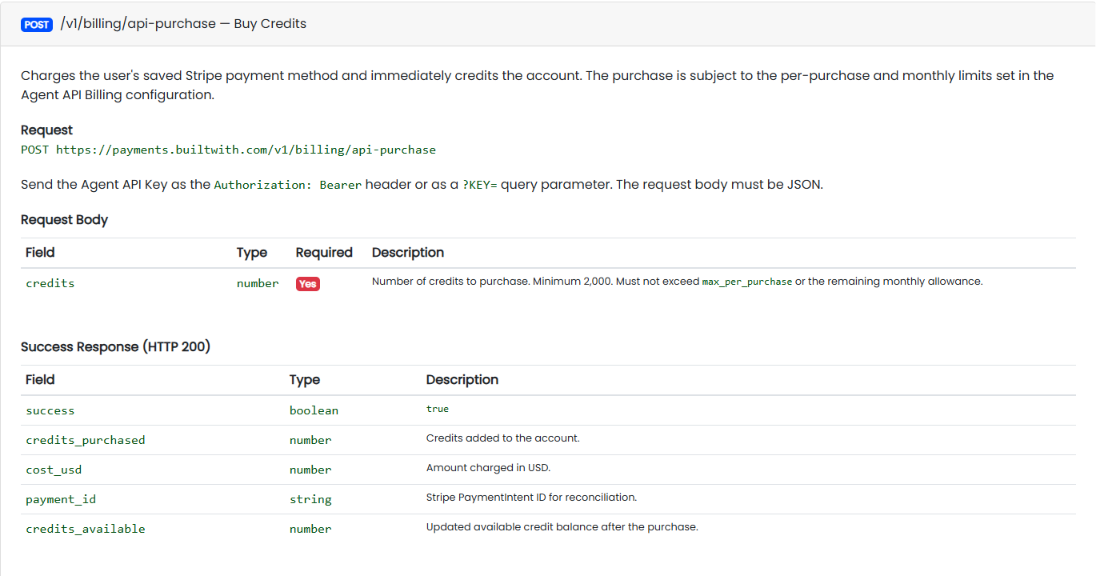
Source: BuiltWith
All plans include anytime cancellation with a 1-month minimum for monthly plans and 1-year minimum for annual plans. All data is exportable as CSV and Excel files with no data locked into the interface.
Where the BuiltWith API Falls Short
These are limits a developer building on this API should plan around, not criticisms of the platform. Several are scope decisions that reflect what BuiltWith is (a technographic intelligence platform) and what it is not.
The API covers technographic data only. There are no endpoints for B2B contact data, company firmographics (revenue, headcount, funding, org structure), buyer intent signals, or verified phone numbers.
If your pipeline needs to look up a domain's technology stack and then find the VP of Engineering's email at that company, you need a second API. This is BuiltWith's scope boundary, not a gap.
No OAuth, no token rotation. Authentication is a static UUID API key passed in every request. There is no delegated access model, no scoped permissions, no credential rotation flow.
For multi-tenant integrations or teams with security policies requiring periodic credential rotation, this is a constraint.
Rate limits are published only for the Domain API. The 8-concurrent, 10-per-second ceiling is clear for domain lookups. But the Lists API, Change API, Ask API, Relationships API, and other endpoints do not have publicly documented rate limits. Discovering them in production is not a developer experience anyone wants.
Credit costs are not publicly documented. The credit system exists, and plan tiers include credit allocations, but the per-call credit cost for each endpoint sits behind a login wall. You cannot model the cost of your pipeline without signing up first.
For a developer evaluating this API against alternatives, that is a friction point.
No traditional HTTP webhooks. The WebSocket Live Feed handles real-time streaming, but it is not a webhook. If your architecture expects to register a callback URL and receive POST requests on events, BuiltWith's model requires you to build and maintain a persistent WebSocket client instead.
No maintained SDK packages. The CLI, TUI, MCP server, and code examples are useful, but there are no installable client libraries for any language. Every integration is raw HTTP. For a production system making thousands of calls with retry logic and rate-limit handling, that adds engineering time.
No public changelog or versioning page. When the API surface changes, you discover it by testing, not by reading a diff. For teams maintaining long-lived integrations, this makes upgrade planning harder.
ZoomInfo API: The B2B Intelligence Layer Beyond Technographics
BuiltWith tells you what technology a website runs. ZoomInfo tells you who works at that company, how to reach them, what their org chart looks like, whether they are researching solutions in your category, and what their technology stack looks like across 30,000+ technologies.
Its GTM Context Graph processes 1.5B+ data points daily, combining ZoomInfo's B2B data with your first-party data to surface not just what happened but why, giving the API's intelligence endpoints the context to power account research, lookalike modeling, and buying-committee recommendations.
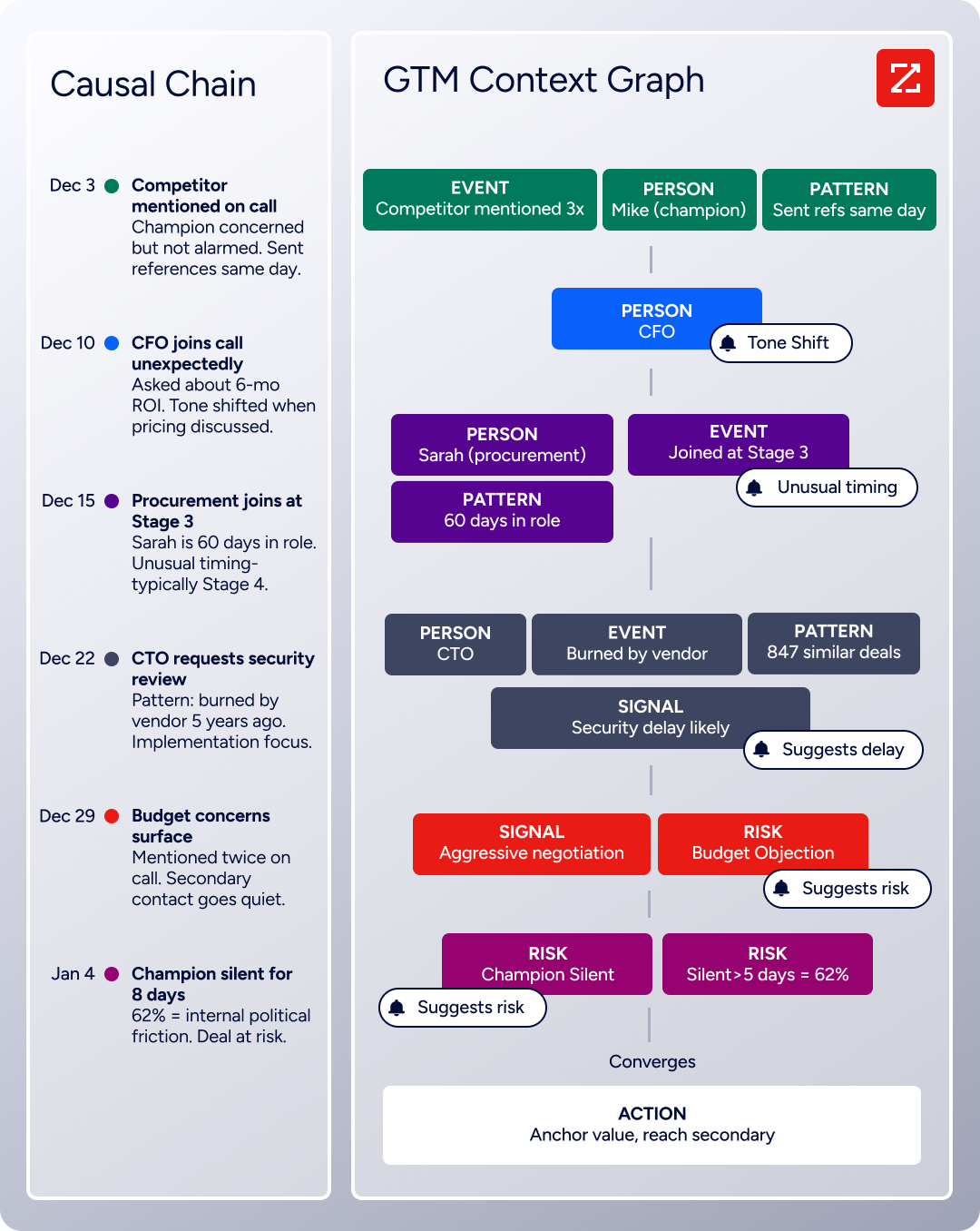
The two APIs operate at different layers of a data pipeline. A developer building a complete prospecting or enrichment workflow would use BuiltWith's API to understand technology adoption patterns and ZoomInfo's API to act on that intelligence with verified contact data and buyer signals.
What the API Covers: Search, Enrichment, and AI Intelligence
ZoomInfo's Enterprise API is a REST suite served from https://api.zoominfo.com/gtm, organized into four areas documented in the interactive API reference.
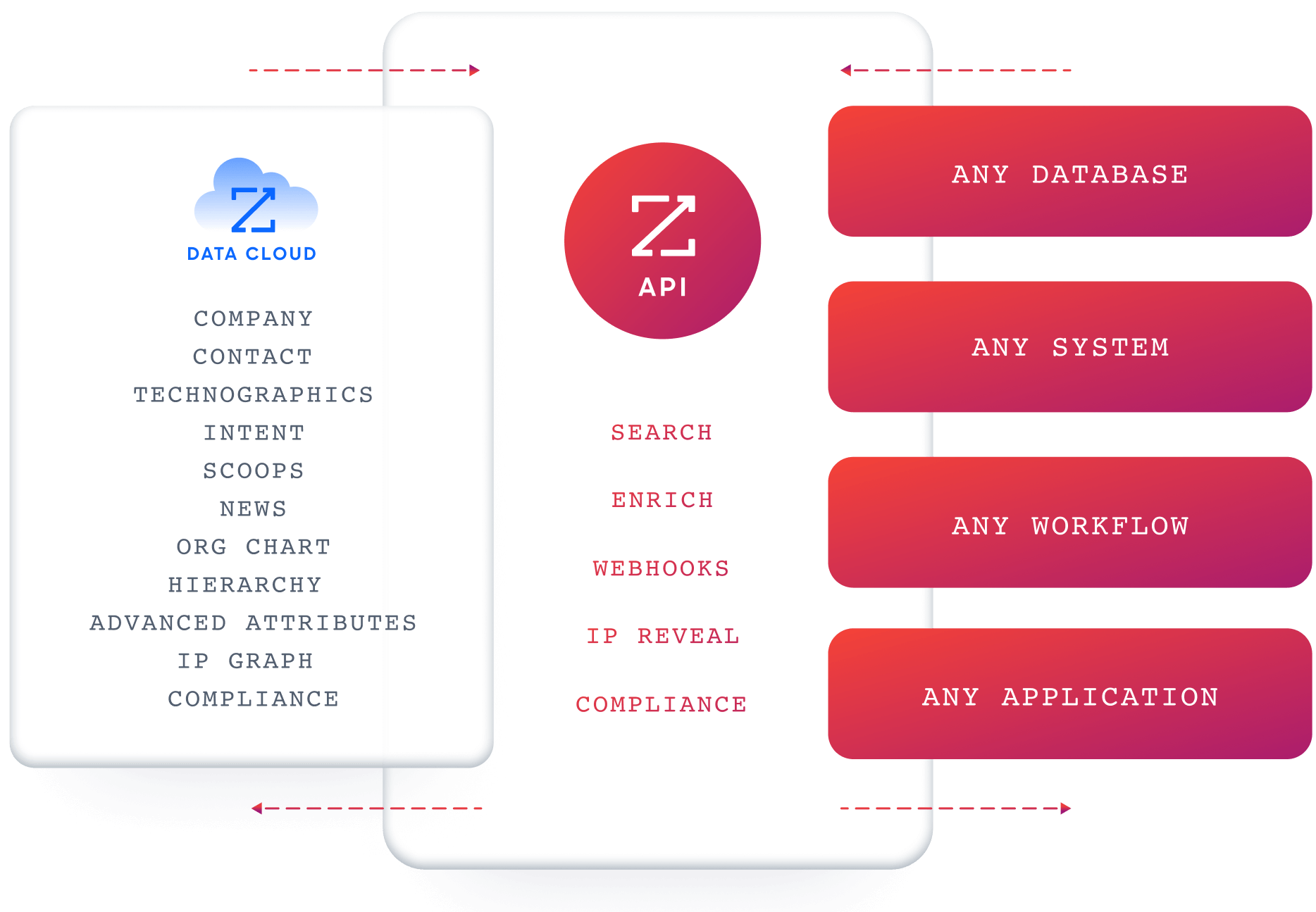
Data API (Search & Enrich): Search endpoints cover Contacts, Companies, Intent, News, and Scoops, returning matched records without consuming credits.
Enrich endpoints unlock the full payload: business emails, direct dials, employment history, corporate hierarchy, org charts, technographics, and hashtag signals, up to 25 records per call.
The underlying dataset spans 500M contacts and 100M companies, 135M+ verified phone numbers, and 200M+ verified business email addresses. The search-then-enrich pattern means you filter freely, then pay only for the records you commit to.
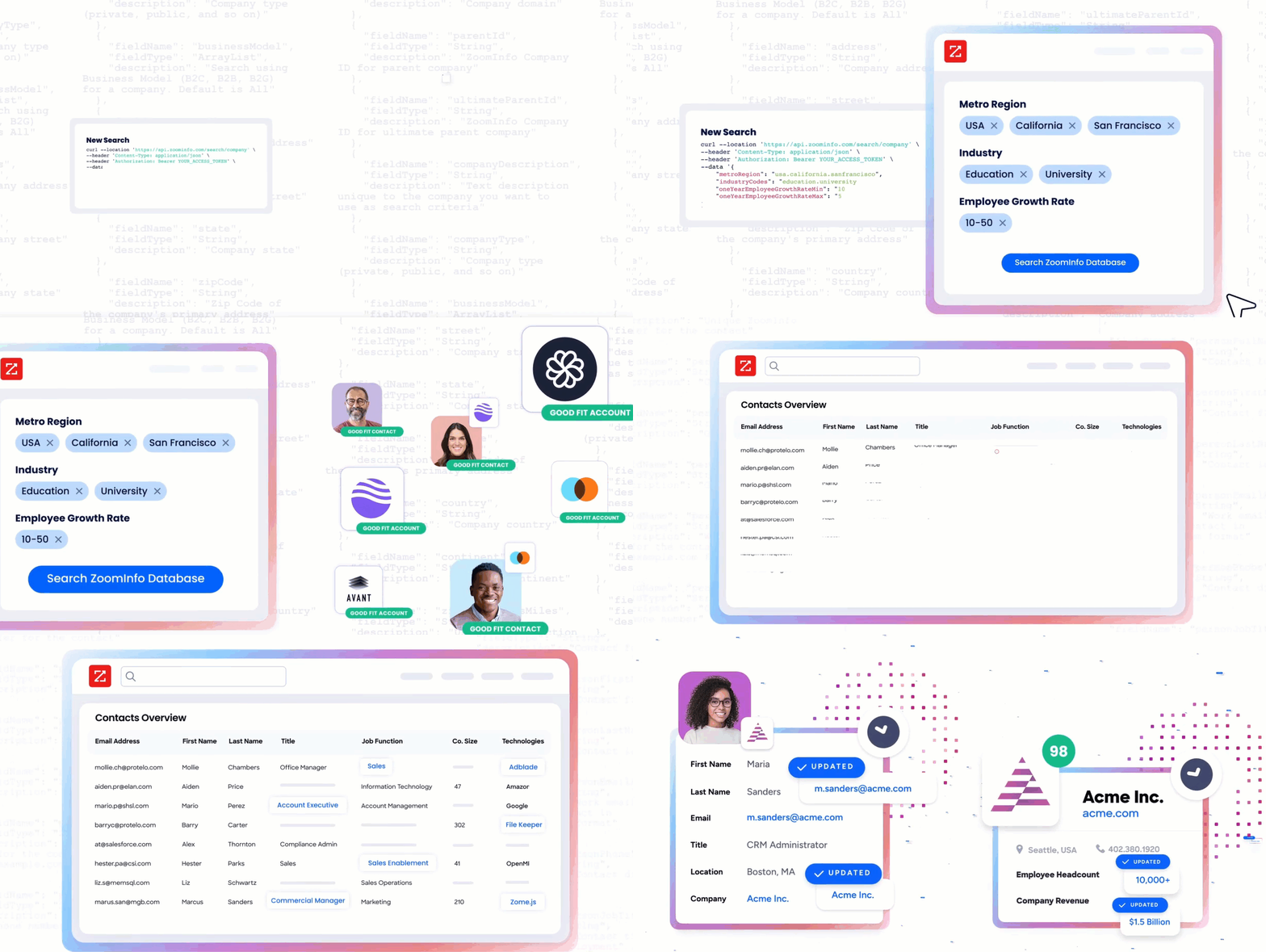
AI Intelligence API: Account Summary returns structured account intelligence with a free-form Q&A endpoint. Find Similar Companies performs lookalike expansion.
Contact Recommendations returns AI-ranked buying-committee suggestions by motion (prospecting, deal acceleration, renewals). These endpoints expose the same AI capabilities that power the GTM Workspace.
Marketing and Platform APIs cover audience management (CRUD for advertising audiences) and bidirectional engagement data via the Engagements API, currently in Beta.
The pairing with a technographic API is direct: use BuiltWith to identify companies running a specific technology stack, then use ZoomInfo to find the decision-makers at those companies, verify their contact information, and check whether the account shows buyer intent.
Authentication & Access
ZoomInfo uses OAuth 2.0 with PKCE via Okta, issuing 24-hour access tokens with rotating refresh tokens. Three flows are supported: Authorization Code with PKCE (web applications), Client Credentials (server-to-server), and Refresh Token.
Teams register applications through the ZoomInfo Developer Portal, where they generate credentials, define scopes, and test endpoints.
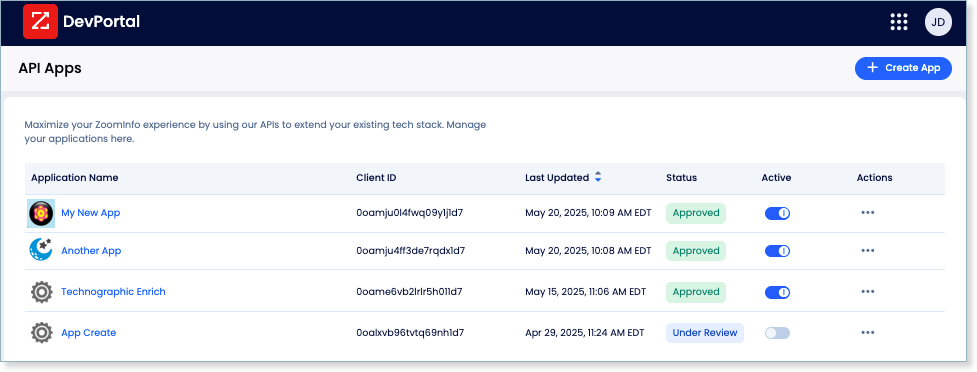
This is a different authentication model from BuiltWith's static API key. OAuth 2.0 supports delegated access, credential rotation, and scoped permissions out of the box, making it the right choice for multi-tenant integrations and enterprise security requirements.
Rate Limits, Credits & Developer Experience
Rate limits are published by tier: Builder (5 req/sec), Standard (25 req/sec), and Scaling (35 req/sec), with per-hour and per-day sliding-window limits enforced simultaneously. Every response includes quota headers with remaining capacity, and 429 responses include a Retry-After header with exact backoff timing.
Credits follow a rolling 12-month window: enriching a record for the first time consumes one credit; re-enriching the same record within the year is free. Search and lookup operations do not consume credits.
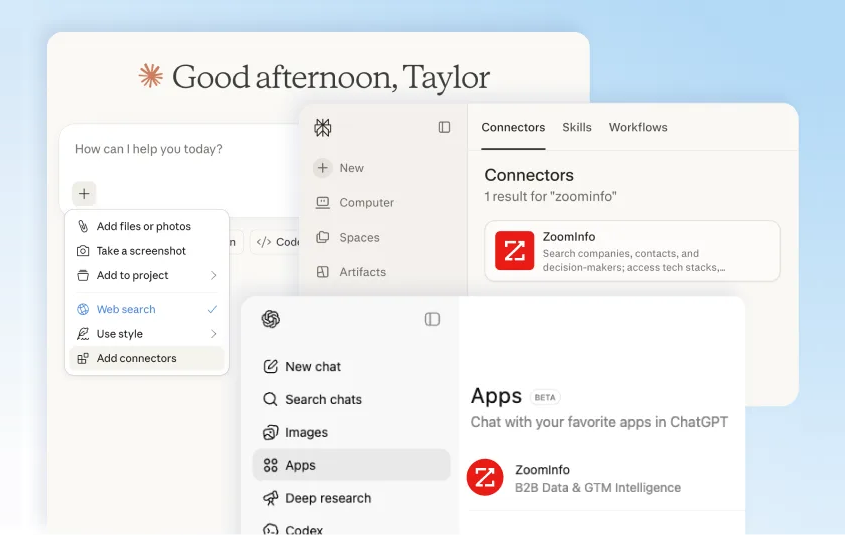
For developers building AI agents, ZoomInfo's MCP server at https://mcp.zoominfo.com/mcp exposes search, enrich, and account research as native tools for MCP-compatible assistants, currently supporting Claude and ChatGPT.
Source: ZoomInfo
Documentation lives at docs.zoominfo.com with an interactive API reference and an llms.txt index for AI development tools.
ZoomInfo does not publish official SDKs either, so both platforms require direct HTTP integration. ZoomInfo uses consumption-based pricing and has added API access to all relevant plans.
BDO Canada reported an 87% reduction in time spent updating internal data dashboards using the ZoomInfo API, with one analyst describing the integration as plug-and-play across any process. (ZoomInfo)
Final Verdict
BuiltWith's API is a broad, well-established technographic source that gives developers programmatic access to technology adoption data across 113,000+ technologies, 478 million root domains, and 41 years of historical depth.
The sixteen-plus endpoints cover use cases from single-domain lookups to real-time WebSocket feeds, and the free-tier APIs (Free and Trends) lower the barrier to experimentation.
For the specific job of "what technologies does this website use, and how has that changed over time?", it is the deepest data source available.
Choose the BuiltWith API if your build needs technographic intelligence: enriching CRM records with technology stack data, monitoring competitor adoption patterns, identifying prospects by the tools they use, scoring domains by technology spend, or feeding real-time technology change events into a sales trigger pipeline.
The data depth is strong, and the Domain API's batch mode (up to 64 domains per request) makes bulk enrichment practical.
Choose the ZoomInfo API if your pipeline needs the layer beyond technographics: verified contact data for the people at those companies, org charts to map buying committees, buyer intent signals to prioritize accounts, and AI-powered account research to brief a rep before a call.
ZoomInfo's search-then-enrich pattern (search is free, enrich consumes credits) and the AI intelligence endpoints cover the data and reasoning that technographic APIs do not.
Explore the ZoomInfo Enterprise API or start with the developer docs to see the endpoint surface for yourself.
A developer who needs neither API should consider that BuiltWith's API does not cover B2B contact intelligence, and ZoomInfo's API does not specialize in deep historical technology adoption tracking. If your pipeline requires both, the two are complementary layers, not competing surfaces.
FAQ
Is the BuiltWith API free?
Partially. Two endpoints are free for everyone, including unpaid accounts: the Free API (technology group/category counts for a domain) and the Trends API (historical technology adoption data).
The full API suite requires a paid plan starting at $295/month for Basic. The Team plan at $995/month includes 100,000 API credits per month. Per-call credit costs for individual endpoints are not published on public pages.
Does BuiltWith have a GraphQL API?
No. BuiltWith exposes a REST API suite over HTTPS, returning data in JSON, XML, CSV, TSV, and XLSX formats depending on the endpoint. There is no GraphQL endpoint. If you need GraphQL for technographic data, you would need to build a wrapper layer on top of the REST API.
What is the BuiltWith API rate limit?
The Domain API allows 8 concurrent requests and 10 requests per second. Exceeding either returns a 429 response with a retryAfterSeconds field. The high-throughput batch mode (up to 64 domains per request) multiplies throughput. Rate limits for other endpoints (Lists, Change, Ask, Relationships) are not publicly documented.
Are there official BuiltWith SDKs?
Not in the traditional sense. BuiltWith does not publish installable client library packages for any language. The official GitHub organization hosts a CLI tool, a TUI (terminal user interface), an MCP server for AI agents, an AI SDK, and code examples in eight languages (Node.js, Python, C#, PHP, Java, Ruby, Go, cURL). Developers integrate directly over HTTP.
Does the BuiltWith API support webhooks?
Not traditional HTTP webhooks. BuiltWith uses a WebSocket-based Live Feed API for real-time technology detection events. You connect to a persistent WebSocket endpoint (either a general feed for all detections or a technology-scoped channel) and receive streaming events. This requires maintaining a long-lived WebSocket client, which differs from registering a callback URL for HTTP POST delivery.
What does ZoomInfo's API add to a BuiltWith build?
ZoomInfo's API adds the B2B contact and company intelligence layer that BuiltWith's technographic data does not cover.
Where BuiltWith identifies what technologies a website uses, ZoomInfo provides the people behind those companies: verified business emails, direct-dial phone numbers, employment history, org charts, company attributes, and buyer intent signals across 500M contacts and 100M companies.
The practical workflow is to use BuiltWith to identify target companies by their technology stack, then use ZoomInfo to find and reach the decision-makers at those companies.
Both platforms offer MCP servers for AI-agent workflows, and both use different authentication models (API key vs. OAuth 2.0) and credit systems, so plan the integration layer accordingly.
