
The question a developer asks before wiring a staffing platform's API into a pipeline is whether the surface covers enough of the recruiting lifecycle to justify the dependency, or whether you will spend more time working around its constraints than building on its strengths.
Bullhorn's REST API is the programmatic interface to what is arguably the dominant platform in staffing and recruitment software, serving 10,000+ agencies globally. The API supports full CRUD operations across candidates, jobs, placements, contacts, companies, and the pay-and-bill entity model. Authentication runs through OAuth 2.0, the entity reference is published and maintained, and open-source libraries on GitHub cover Java, JavaScript, and bulk data loading. For a staffing-vertical platform, the API surface is broad.
But breadth within a vertical and depth across the developer experience are different questions.
The Bullhorn API manages staffing operations: candidate records, job orders, placements, client contacts, submissions, timesheets, invoicing, and the associations between them. If your integration needs to create, update, query, and sync these entities, the API handles that job. Where its scope stops is at the data layer underneath: Bullhorn does not provide B2B contact enrichment, company attributes, technographic profiles, org chart traversal, buyer intent signals, or verified direct-dial phone numbers through its API. The records it manages are only as complete as the data your team enters or imports.
This is where ZoomInfo, an AI GTM platform, enters the picture. Its Enterprise API is a REST suite covering search, enrichment, AI intelligence, and audience management across 500M contacts and 100M companies, with an MCP server for AI-agent workflows. ZoomInfo lists Bullhorn as a Marketplace integration partner, and the two APIs sit at different layers of the same pipeline: Bullhorn manages the staffing workflow, ZoomInfo fills the records with verified intelligence.
This review covers the Bullhorn API in technical depth first (authentication, endpoints, event subscriptions, SDKs, rate limits, and pricing), then reviews ZoomInfo's API as the data and enrichment layer that picks up where staffing operations leave off.
Bullhorn API at a Glance
Attribute | Detail |
|---|---|
API type | REST over HTTPS, JSON responses (JSONP also supported); legacy SOAP API available but not recommended for new development |
Authentication | OAuth 2.0 authorization code flow, exchanged for a session key (BhRestToken) |
Base URL | Discovered at runtime via https://rest.bullhornstaffing.com/rest-services/loginInfo; data-center-specific swimlane URLs across multiple regions (US East, US West, APAC, UK, Germany, France) |
Rate limits | Not publicly documented; governed by an API Fair Use Policy |
SDKs | Java SDK, BullhornJS, Passport (Node.js OAuth), Data Loader, and others on GitHub |
Webhooks | No push-based webhooks; polling-based event subscriptions with a 7-day event expiry |
Documentation | bullhorn.github.io (REST API reference, guides, entity reference, libraries) |
Pricing / access | Bundled with Bullhorn subscriptions; no standalone API tier or published per-call pricing. OAuth credentials obtained via support ticket; partners require a Developer Partner Agreement |
Bullhorn API: What Works Well & What to Plan Around
What works well | What to plan around |
|---|---|
Entity model covering the full staffing lifecycle: candidates, jobs, placements, pay/bill, and 50+ entity types | No published rate limits; "reasonable request limits" governed by a fair use policy, not documented thresholds |
OAuth 2.0 with refresh tokens that never expire (until rotated) | Three-stage auth flow (authorization code, access token, then session key exchange) adds integration complexity |
Full-text Lucene search and structured JPQL queries on all entities | Event subscriptions are polling-based with a 7-day expiry; no push-based webhooks for real-time sync |
Open-source Java SDK, JavaScript library, and Data Loader on GitHub | No official SDKs for Python, Ruby, PHP, Go, or .NET |
Resume parsing endpoints built into the API | AI and LLM connections to the API require written permission from Bullhorn |
Multi-region data centers (US, APAC, UK, Germany, France) with automatic 307 redirects | API access requires a support ticket (customers) or a Developer Partner Agreement (third parties); no self-serve signup |
Bullhorn API: Authentication & Getting Started
Getting API access begins with a support ticket. Existing Bullhorn customers request OAuth credentials through the Bullhorn Resource Center. Third-party developers and partners must execute a Developer Partner Agreement before commercializing or distributing an integration. There is no free-tier developer portal, no self-serve API key generation, and no public sandbox environment.
The authentication flow is OAuth 2.0, but with an extra step unique to Bullhorn. The process has three stages:
Get an authorization code. Redirect the user to https://auth-{datacenter}.bullhornstaffing.com/oauth/authorize with your client_id, response_type=code, and redirect_uri. For programmatic (non-browser) flows, username and password can be passed directly.
Exchange the code for an access token. POST to https://auth-{datacenter}.bullhornstaffing.com/oauth/token with grant_type=authorization_code, the code, client_id, client_secret, and redirect_uri. The access token returned is valid for 10 minutes.
Exchange the access token for a session key. POST to the REST login endpoint: https://rest-{datacenter}.bullhornstaffing.com/rest-services/login?version=*&access_token={token}. This returns a BhRestToken (session key) and a swimlane-specific restUrl that you use for all subsequent API calls.
The BhRestToken must accompany every request, either as a URL query parameter, an HTTP header, or a cookie. Bullhorn warns explicitly against calling the login endpoint before every API request: reuse the session key until you receive a 401, then use the refresh token to obtain a new access token silently. Refresh tokens have no expiration date but are invalidated when a new token pair is generated.
Before you authenticate, you need the correct base URL. Bullhorn operates data centers in US East, US West, APAC (Singapore, Sydney), UK, Germany, and France, each with distinct subdomains. You discover your correct data center by querying:
curl "https://rest.bullhornstaffing.com/rest-services/loginInfo?username=YOUR_API_USERNAME"
This returns data-center-specific URLs for auth, REST, and API subdomains. If you hit the wrong data center, Bullhorn issues a 307 redirect, so your HTTP client must follow redirects.
A basic authenticated request to fetch a candidate record:
curl "https://rest{swimlane}.bullhornstaffing.com/rest-services/{corpToken}/entity/Candidate/12345?fields=firstName,lastName,email&BhRestToken=YOUR_SESSION_KEY"
Bullhorn API: Core Endpoints & Capabilities
The REST API is organized around entity operations, search, and a set of specialized service endpoints. All responses are JSON. The Entity Reference documents 50+ entity types spanning front-office recruiting, CRM, and back-office pay-and-bill.
Candidates, Contacts & Companies
The core of any staffing integration. The API supports full CRUD on Candidate, ClientContact, and ClientCorporation entities.
Operations:
GET /entity/Candidate/{id} with a fields= parameter to select specific fields
GET /entity/Candidate/{id1},{id2} for batch fetch by ID
PUT /entity/Candidate to create a new record
POST /entity/Candidate/{id} to update
DELETE /entity/Candidate/{id} for soft or hard delete (depending on entity type)
Related entities include CandidateWorkHistory, CandidateEducation, CandidateCertification, CandidateAvailability, and CandidateReference, each with the same CRUD pattern. The POST /association endpoint manages to-many relationships between entities (for example, linking a Candidate to a Tearsheet or a JobOrder to a ClientContact).
What you would build with this: a CRM sync that pushes new contacts from your sales tool into Bullhorn as ClientContact records, or an enrichment pipeline that updates Candidate records with verified email addresses and employment history from an external data source.
Job Orders & Submissions
JobOrder, JobSubmission, JobBoardPost, JobShift, and JobShiftAssignment cover the full job lifecycle.
Operations: Standard CRUD on each entity, plus the ability to query open jobs by status, search submissions by candidate or job, and manage shift assignments for temporary staffing. JobSubmission tracks the state of a candidate's application against a specific job order, the central workflow object in staffing.
What you would build with this: a job-board integration that publishes open positions from Bullhorn to external sites and ingests applications back as JobSubmissions, or a VMS connector that syncs job orders and submission statuses with a client's vendor management system.
Placements & Pay/Bill
The Placement entity is where recruiting meets back-office. The API covers Placement, PlacementChangeRequest, and a set of pay-and-bill entities: AccountingPeriod, BillMaster, BillableCharge, InvoiceStatement, InvoicePayment, GeneralLedgerAccount, EarnCode, and dozens of related payroll/billing records.
PlacementChangeRequest supports an approval workflow via POST /services/PlacementChangeRequest/approve/. Revenue recognition and billing batch processing have dedicated service endpoints.
What you would build with this: a payroll integration that reads approved timesheets and placement rates from Bullhorn, calculates gross pay, and writes back billable charges and invoice records.
Search & Query
The API provides two search modes, each suited to different use cases:
Full-text search via GET /search/{EntityType} or POST /search/{EntityType}: queries a Lucene index. Good for keyword searches across text fields (names, notes, resume content).
Structured query via GET /query/{EntityType} or POST /query/{EntityType}: uses Java Persistence Query Language (JPQL) with a where= parameter. Good for filtering by specific field values, date ranges, and relational conditions.
Pagination uses count= and start= parameters. One constraint to know: the fields=* wildcard is deprecated and blocked on entity/search/query calls for performance reasons. You must specify the fields you need.
Resume Parsing
The API includes built-in resume parsing:
POST /resume/parseToCandidate converts a resume file into a structured Candidate entity
POST /resume/parseToCandidateViaJson accepts JSON input for the same operation
These endpoints also support HR-XML output and text/HTML conversion. For staffing integrations that ingest resumes from job boards or email, this avoids a third-party parsing dependency.
Specialized Endpoints
Several service endpoints handle operations outside the standard CRUD pattern:
GET /massUpdate / POST /massUpdate/{entityType} for bulk status updates across multiple records
GET /meta/{EntityType} for entity field metadata (schema introspection, useful for dynamic integrations)
GET /find for universal cross-entity search
GET /settings and GET /entitlements for account configuration and user permission lookup
GET /file, PUT /file, POST /file, DELETE /file for file attachment management
GET /savedSearch, PUT /savedSearch, POST /savedSearch for persisting and managing saved searches
Bullhorn API: Event Subscriptions (Polling-Based)
Bullhorn does not offer push-based webhooks. Instead, it provides a polling-based event subscription system built into the REST API.
Creating a subscription: A PUT request to /event/subscription/{subscriptionID} with type=entity, names= (comma-separated entity types like Candidate,Placement), and eventTypes= (comma-separated: INSERTED, UPDATED, DELETED). You can combine multiple entity types in one subscription.
Consuming events: A GET request to /event/subscription/{subscriptionID}?maxEvents=100 returns queued events and simultaneously purges them from the queue. Your integration must poll at a regular cadence.
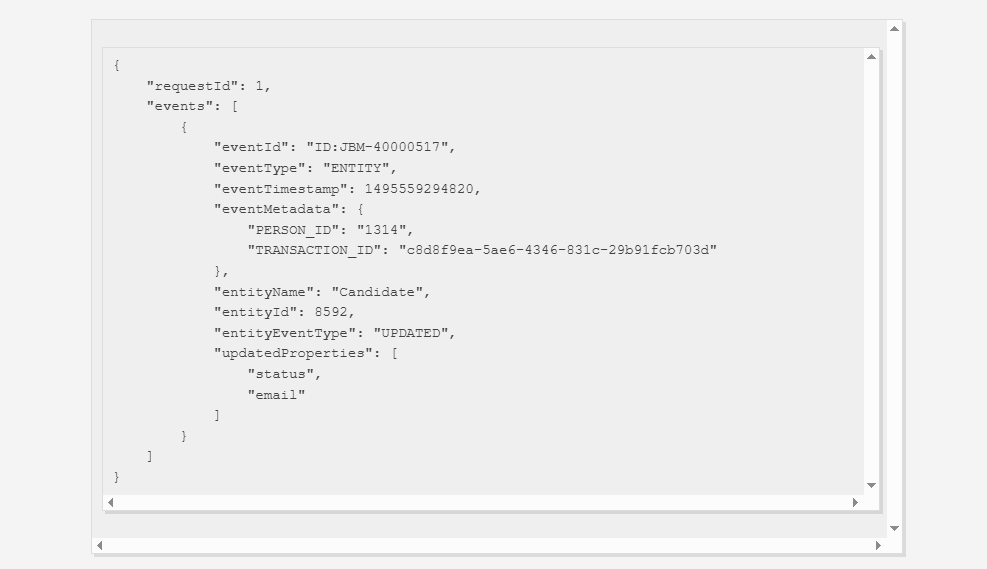
Event payload: Each event includes the entityName, entityId, entityEventType, eventTimestamp, updatedProperties (a list of field names that changed), and a PERSON_ID identifying who made the change. Events contain field names only, not new values. You must make a follow-up entity GET call to retrieve the current data.
Source: Bullhorn API
Three hard limits to plan around:
Maximum 15 subscriptions per database
Maximum 100 events per request
Events expire after 7 days if not consumed
The pull model means integrations cannot rely on real-time push notifications. If your pipeline needs near-real-time data sync, you must poll frequently within these constraints. For reference, Bullhorn Automation does include a Webhook Step that pushes data to external URLs when records pass through an automation flow, but that is a product feature, not a general-purpose API webhook system.
Bullhorn API: SDKs, Docs & Rate Limits
SDKs & Libraries
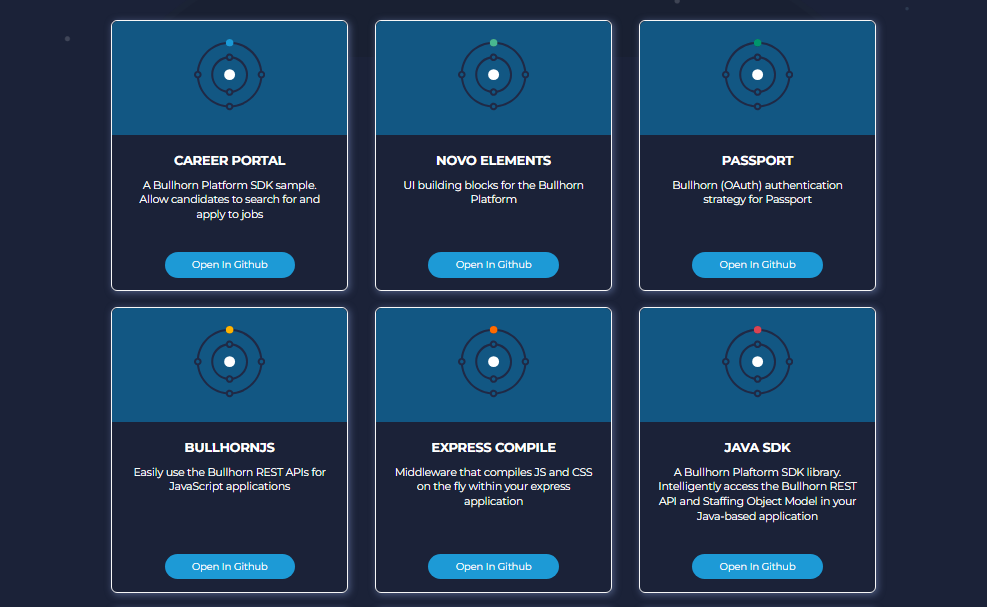
Bullhorn publishes several open-source libraries on GitHub under the github.com/bullhorn organization:
Java SDK (sdk-rest): The official Java REST client
BullhornJS: JavaScript library for REST API access
Passport: Passport.js OAuth 2.0 strategy for Node.js applications
Data Loader: Bulk data import tool using the REST API
Career Portal: Open-source Angular-based job board connecting to the REST API
Novo Elements: UI component library for building Bullhorn-consistent custom applications
Form Trigger Server: Server for handling form-based REST triggers
Coverage is limited to Java and JavaScript. There are no official SDKs for Python, Ruby, PHP, Go, or .NET. If you build in those languages, you integrate over HTTP and own the auth, retry, and session-management layer yourself. The three-stage auth flow (authorization code, access token, session key) makes that layer more involved than a simple API-key integration.
All libraries are open source with varying levels of activity. Check each repo's commit history before depending on it in production.
Documentation & Developer Experience
The developer documentation lives at bullhorn.github.io, organized into three resources:
REST API Reference: Coverage of all API operations, the Entity Reference (listing all entities and their fields), and a Data Hub Reference. Includes a REST API Change Log.
Guides: Practitioner-written articles covering OAuth authorization, event subscriptions, payroll integration, resume parsing, rate card calculations, custom objects, application extensibility, and more. Tagged by category (REST, OAuth, ATS, Extensibility).
Libraries: Index of open-source SDKs and tools.
Source: Bullhorn API
The documentation does not include an interactive API explorer (no Swagger UI or OpenAPI playground). Bullhorn's Getting Started guide recommends using Postman for testing PUT, POST, and DELETE requests during development. No official Postman collection is linked.
Some guides date back to 2016 and 2018, while others (the event subscriptions guide, the API Fair Use Policy) were updated in 2025. The entity reference and API reference appear to be actively maintained.
Developer support routes through the Bullhorn Resource Center support ticket system. No dedicated developer forum, Slack community, or public GitHub issues tracker is advertised for API questions.
Rate Limits & Constraints
Bullhorn does not publicly document specific numeric rate limits. There is no published requests-per-second, requests-per-minute, or requests-per-hour ceiling. The API Fair Use Policy governs access, prohibiting "reasonable request limits" violations and "attempting to get around rate limits."
What the docs do specify:
Bullhorn applies strict login rate limits and may block requests that occur too frequently. Reuse your session key.
fields=* is blocked on entity, search, and query calls.
To-many association fields only appear at the top level (no nesting).
API usage by validated Marketplace Partners does not count toward the customer's usage limit.
AI, LLM tools, and MCP connections to the API require written permission from Bullhorn.
The absence of published rate-limit numbers is itself a signal. You cannot capacity-plan a pipeline against thresholds you cannot see, and you will not discover the actual limits until your integration hits them in production. If your build requires predictable throughput at scale, confirm the rate-limit contract directly with Bullhorn before committing to the integration.
Bullhorn API Pricing & Access Costs
Bullhorn does not publish API pricing on its pricing page or in its developer documentation. API access is not sold as a standalone product or as a metered add-on with a published per-call fee.
Based on the API Fair Use Policy, API access is bundled with Bullhorn subscriptions. Existing customers obtain OAuth credentials by creating a support ticket. Partners and third-party developers who want to commercialize or distribute an integration must execute a Developer Partner Agreement with Bullhorn.
For context, Bullhorn's platform pricing is mostly quote-based. The publicly priced small agency plans start at $99/user/month (Starter, limited to 1 to 2 users) and $165/user/month (Core). The Recruitment Cloud tiers (Front Office, Middle Office, 360) are all quote-only. Whether API access is included at every tier or gated behind a specific plan level is not documented publicly. Confirm API access availability for your specific plan with Bullhorn sales.
Where the Bullhorn API Falls Short
These are practical limits a developer should plan around, not criticisms. Several are scope decisions that reflect what Bullhorn is (a staffing operations platform) and what it is not.
No published rate limits.
The API Fair Use Policy governs access with "reasonable request limits," but no numeric thresholds are documented. For a developer building a high-volume integration (bulk syncing candidates nightly, processing event subscriptions across multiple entity types), this means you cannot capacity-plan without a direct conversation with Bullhorn. Every other API reviewed in this series publishes its rate limits.
No push-based webhooks.
The event subscription system is polling-only, with events expiring after 7 days and a ceiling of 100 events per request. Near-real-time sync requires frequent polling within these constraints. The Bullhorn Automation Webhook Step pushes data to external URLs, but only for records that pass through a configured automation flow, not as a general-purpose event delivery mechanism.
No contact enrichment, company intelligence, or intent signals.
The API manages staffing records; it does not enrich them. A Candidate record contains whatever data was entered or parsed from a resume. There are no endpoints for verified business email lookup, direct-dial phone numbers, company attributes, org chart traversal, technographic profiles, or buyer intent signals.
For integrations where data completeness drives the value (candidate outreach, account prioritization, market mapping), the records are only as good as the manual data entry behind them.
Three-stage authentication adds friction.
The OAuth 2.0 flow requires an authorization code, then an access token (10-minute TTL), then a session-key exchange that returns the BhRestToken and a swimlane-specific base URL. This is more complex than a standard OAuth 2.0 Bearer token flow and adds overhead, especially for developers new to the API.
SDK coverage is limited to Java and JavaScript.
No official SDKs for Python, Ruby, PHP, Go, or .NET. For teams building in those languages, the three-stage auth flow and session management become a manual implementation task.
AI and LLM access requires written permission.
The Fair Use Policy states that connecting AI tools, LLMs, or MCP servers to the API requires written permission from Bullhorn. For developers building AI-powered staffing workflows, this adds a gating step that most modern APIs do not impose.
Event payloads contain field names, not values.
When a Candidate record is updated, the event tells you which fields changed but not what they changed to. Every event requires a follow-up GET call to retrieve the current state, doubling the API calls for any sync integration.
ZoomInfo API: The Data and Enrichment Layer Bullhorn Does Not Cover
Bullhorn's API manages the staffing workflow: candidates, jobs, placements, and billing. ZoomInfo's API provides the data that makes those records actionable: who these contacts are, what companies they work for, whether those accounts are hiring or showing buying intent, and how to reach the decision-makers directly.
The two APIs operate at different layers. A developer building on Bullhorn would use ZoomInfo's API to fill the data gaps that the staffing platform does not cover.
Source: ZoomInfo
What the API Covers: Search, Enrichment & AI Intelligence
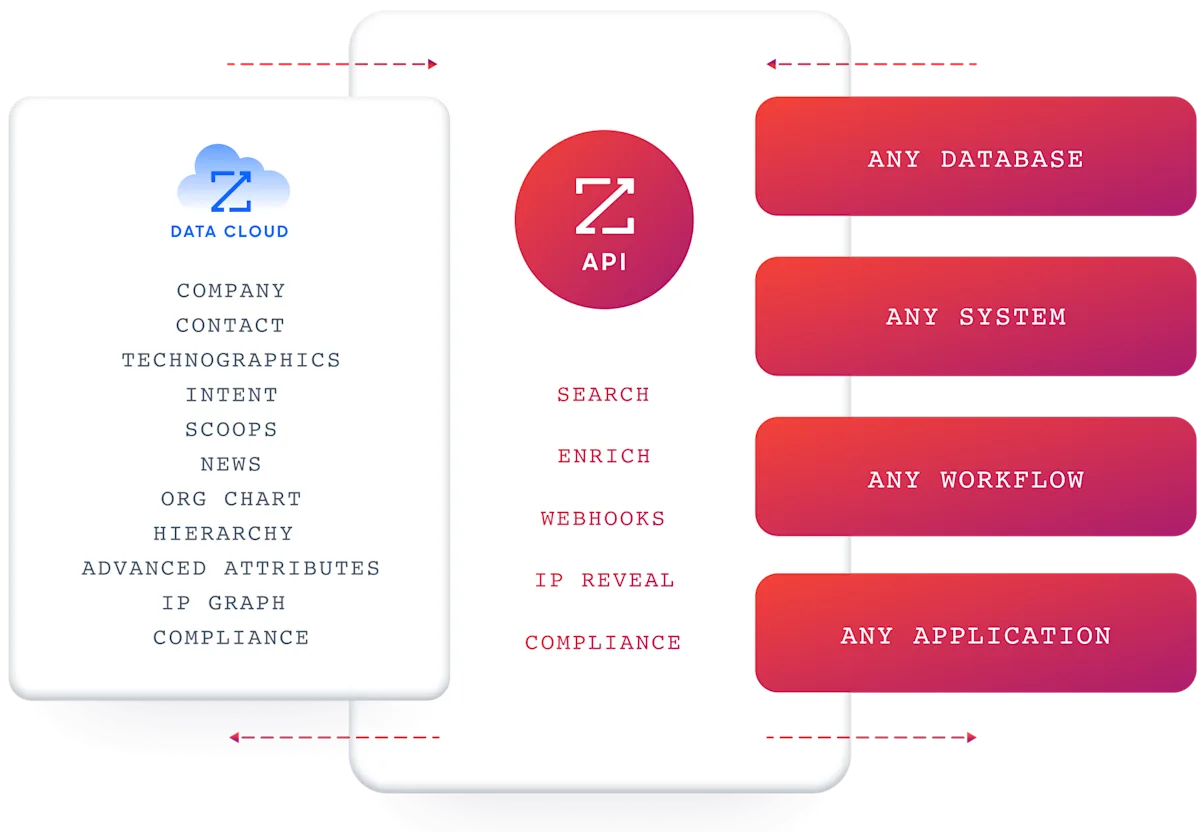
ZoomInfo's Enterprise API is a REST suite served from https://api.zoominfo.com/gtm, organized into four surface areas documented in the interactive API reference.
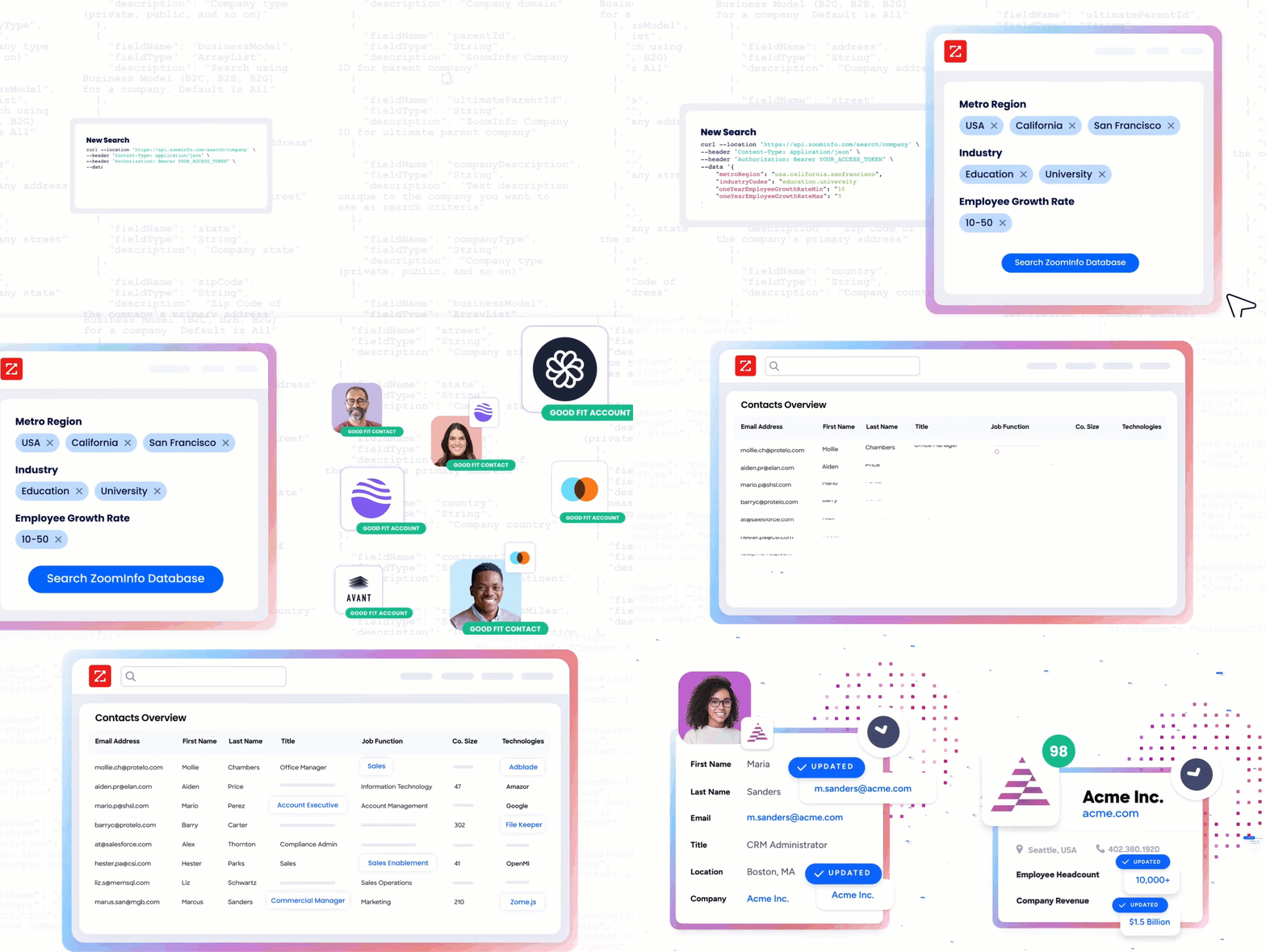
Data API (Search & Enrich) is the core surface. Search endpoints cover Contacts, Companies, Intent, News, and Scoops, returning matched records without consuming credits. Enrich endpoints unlock the full payload: business emails, direct dials, employment history, corporate hierarchy, org charts, technographics, and hashtag signals, up to 25 records per call. The search-then-enrich pattern means you filter freely, then pay only for the records you commit to. The underlying dataset spans 500M contacts, 100M companies, 135M+ verified phone numbers, and 200M+ verified business email addresses.
AI Intelligence API exposes the capabilities of ZoomInfo's GTM Context Graph, an intelligence layer that processes 1.5B+ data points daily by fusing ZoomInfo's B2B data with first-party signals. Account Summary returns structured account intelligence with a free-form Q&A endpoint. Find Similar Companies performs lookalike expansion from a seed account. Contact Recommendations returns AI-ranked buying-committee suggestions by motion (prospecting, deal acceleration, renewals). Building on this same intelligence, ZoomInfo Agent Teams run complete GTM plays end to end: coordinated specialist agents share context, work from each account's current state, and act within the approvals and limits you set.
Marketing and Platform APIs round out the suite with audience management (CRUD for advertising audiences) and bidirectional engagement data via the Engagements API, currently in Beta.
Source: ZoomInfo
The pairing with a staffing API is direct: when your Bullhorn integration creates or updates a ClientContact or ClientCorporation record, a ZoomInfo enrichment call can fill in verified email addresses, direct dials, org chart positions, and company attributes that the staffing workflow did not capture. For business development teams prospecting new client accounts through Bullhorn's CRM, ZoomInfo's search endpoints identify decision-makers and intent signals before a recruiter picks up the phone.
Authentication, Rate Limits & Credits
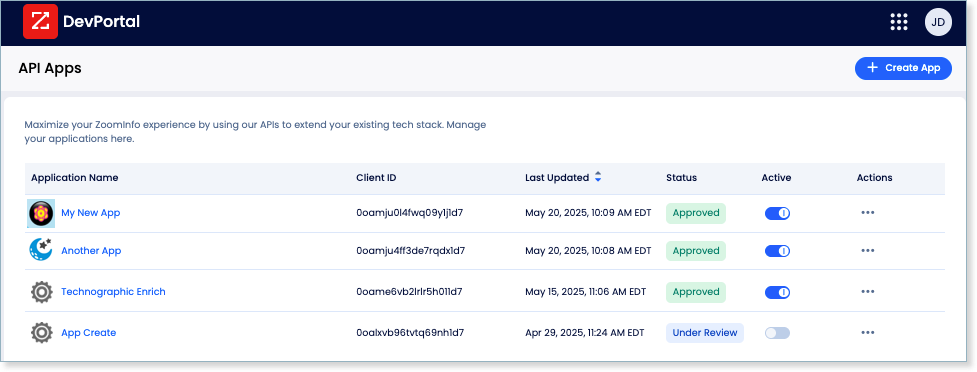
Authentication uses OAuth 2.0 with PKCE via Okta, issuing 24-hour access tokens with rotating refresh tokens. Three flows are supported: Authorization Code with PKCE (for web applications), Client Credentials (for server-to-server), and Refresh Token. Teams register applications through the ZoomInfo Developer Portal, where they generate credentials, define scopes, and test endpoints.
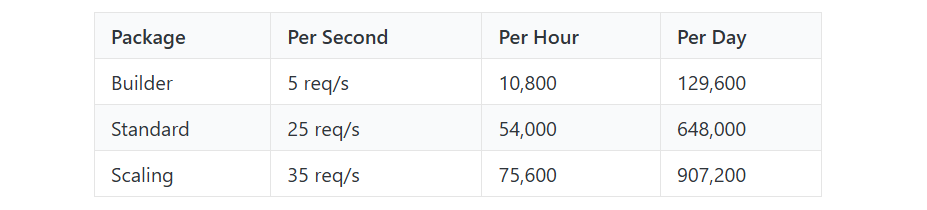
Rate limits are published by tier: Builder (5 req/sec), Standard (25 req/sec), and Scaling (35 req/sec), with per-hour and per-day sliding-window limits enforced simultaneously. Every response includes quota headers with remaining capacity, and 429 responses include a Retry-After header with exact backoff timing. The contrast with Bullhorn's unpublished limits is notable: ZoomInfo tells you exactly how much capacity you have, in every response.
Source: ZoomInfo
Credits follow a rolling 12-month window: a record enriched for the first time consumes one credit; re-enriching the same record within the year is free. Search and lookup operations do not consume credits.
Webhooks, MCP & Developer Experience
Webhooks are available via the Agents API, tied to ZoomInfo's Agent Teams system. Event types cover bulk enrichment jobs completing, records changing, credit usage crossing thresholds, and new GTM signals (scoops, funding events, intent spikes) becoming available. Retry behavior and throttling are configurable per event type.
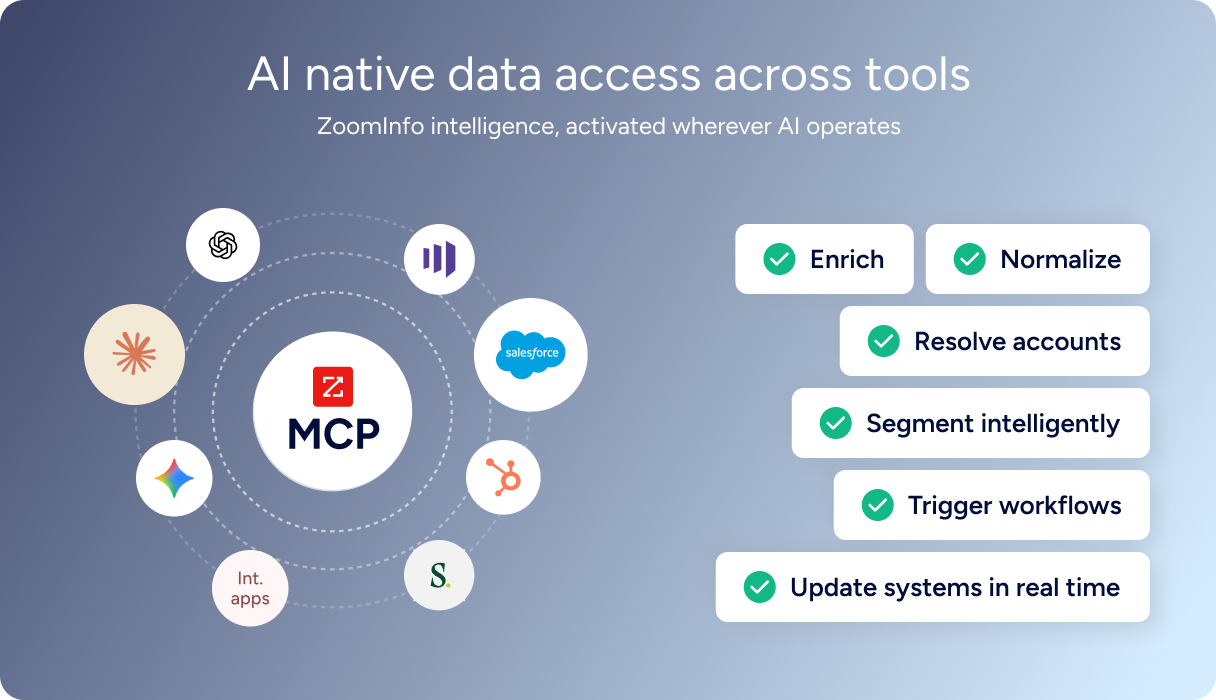
For developers building AI agents, ZoomInfo's MCP server at https://mcp.zoominfo.com/mcp exposes search, enrich, and account research as native tools for MCP-compatible assistants, currently supporting Claude and ChatGPT. Where Bullhorn's API Fair Use Policy requires written permission for AI and MCP connections, ZoomInfo's MCP server is a supported, documented access method.
Source: ZoomInfo
ZoomInfo does not publish official SDKs either, so both platforms require direct HTTP integration. Documentation lives at docs.zoominfo.com with an interactive API reference, OAuth recipes in five languages, and an llms.txt index for AI development tools. ZoomInfo added API access to all relevant plans in 2025, removing the prior enterprise-only gate, though consumption-based pricing remains custom-quoted.
BDO Canada reported an 87% reduction in time spent updating internal data dashboards using the ZoomInfo API, with one analyst describing the integration as plug-and-play across any process. (ZoomInfo)
Final Verdict
Bullhorn's API is a staffing-specific REST surface that gives developers programmatic access to the full recruiting lifecycle: candidates, jobs, placements, contacts, pay-and-bill entities, resume parsing, and search across all of them.
The entity model is thorough, the OAuth flow is functional (if more involved than most), and the open-source Java SDK and Data Loader provide a starting point for common integration patterns. For a developer whose build starts and ends with managing staffing operations, the API covers the workflow.
Choose the Bullhorn API if your integration manages the staffing pipeline: syncing candidates and job orders with external systems, automating placement workflows, building custom job boards against the Career Portal, or connecting payroll and billing systems to Bullhorn's Middle Office entities. The entity model's depth and the staffing-specific data architecture (placements, submissions, shift assignments, rate cards) make Bullhorn's API the right foundation for operations-layer builds.
Add the ZoomInfo API when the build needs to go beyond staffing operations into who these contacts and companies actually are. Enriching Candidate and ClientContact records with verified direct dials, business emails, employment history, and company attributes turns a CRM of manually entered data into a verified database. For staffing firms prospecting new client accounts, ZoomInfo's search and intent endpoints surface decision-makers and in-market signals that Bullhorn's API does not track.
Explore the ZoomInfo Enterprise API or start with the developer docs to see the endpoint surface directly.
A developer who needs neither API should consider that Bullhorn's API does not enrich or verify data, and ZoomInfo's API does not manage staffing workflows. If your pipeline requires both, the two are complementary layers with an existing Marketplace integration between them.
FAQ
Is the Bullhorn API free?
API access is bundled with Bullhorn subscriptions rather than sold as a standalone product or metered per call. There is no free developer tier, no public sandbox, and no self-serve API signup. Existing customers obtain OAuth credentials by creating a support ticket through the Bullhorn Resource Center.
Third-party developers must execute a Developer Partner Agreement. Bullhorn's platform pricing starts at $99/user/month for the Starter plan (limited to 1 to 2 users), with mid-market and enterprise tiers quoted individually.
Does Bullhorn have a GraphQL API?
No. Bullhorn exposes a REST API that returns JSON responses. A legacy SOAP API exists but is not recommended for new development. There is no GraphQL endpoint. If you need a GraphQL interface, you would need to build a wrapper layer on top of the REST API.
What is the Bullhorn API rate limit?
Bullhorn does not publicly document specific rate-limit numbers. An API Fair Use Policy governs access, prohibiting "reasonable request limits" violations. The docs warn that Bullhorn blocks login requests made too frequently, and recommend reusing the session key until a 401 is received.
Event subscription limits are documented: 15 subscriptions per database, 100 events per request, and a 7-day event expiry. For exact rate-limit thresholds, contact Bullhorn directly.
Are there official Bullhorn SDKs?
Yes, but with limited language coverage. Bullhorn publishes open-source libraries on GitHub: a Java SDK (sdk-rest), a JavaScript library (BullhornJS), a Passport.js OAuth strategy for Node.js, a Data Loader for bulk operations, and several other tools.
There are no official SDKs for Python, Ruby, PHP, Go, or .NET. All libraries are community-maintained with varying levels of activity; check each repository's commit history before depending on it in production.
Does the Bullhorn API support webhooks?
Not in the traditional push-based sense. Bullhorn uses a polling-based event subscription system where you create a subscription for entity events (inserted, updated, deleted), then poll a GET endpoint to retrieve queued events. Events expire after 7 days if not consumed, and each poll returns a maximum of 100 events.
Bullhorn Automation includes a separate Webhook Step that can push data to external URLs, but only for records that pass through a configured automation workflow.
What does ZoomInfo's API add to a Bullhorn build?
ZoomInfo's API adds the data intelligence layer that Bullhorn's API does not cover.
Where Bullhorn manages candidates, jobs, placements, and billing, ZoomInfo enriches those records with verified business emails, direct-dial phone numbers, employment history, company attributes, org charts, technographics, and buyer intent signals across 500M contacts and 100M companies. The search-then-enrich pattern (search is free, enrich consumes credits) lets you filter the ZoomInfo database for contacts matching your target profile, then spend credits only on records you commit to.
ZoomInfo lists Bullhorn as a Marketplace integration partner, and the two APIs use different authentication models (Bullhorn's three-stage OAuth with session key vs. ZoomInfo's standard OAuth 2.0 with PKCE), so plan the integration layer to handle both.
