

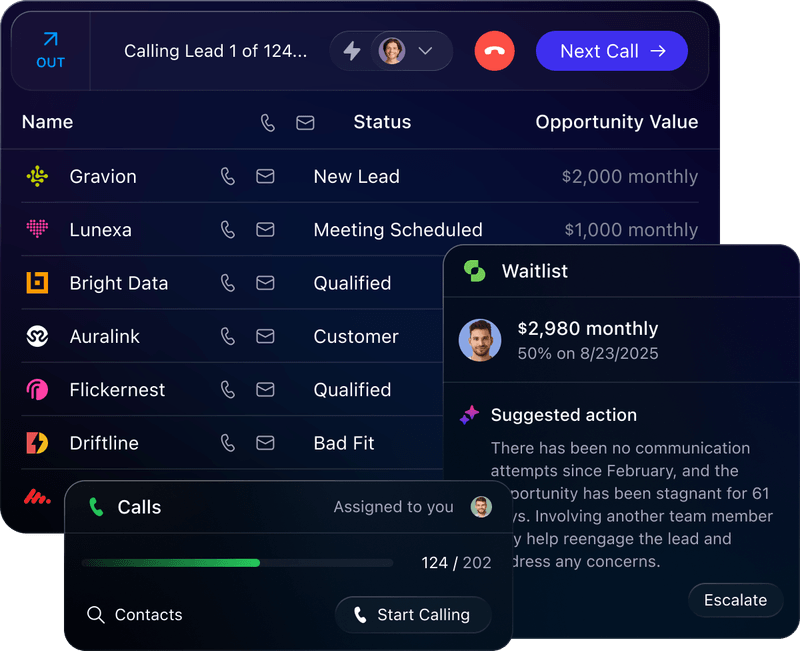
Close has built a loyal following among small sales teams by doing something most CRMs avoid: putting the phone, the inbox, and the pipeline in the same window. Instead of toggling between a dialer, an email client, and a CRM, reps work from one screen where every call is logged, every email is tracked, and every deal moves forward without manual data entry. For teams that sell by phone and email, it removes real friction.
To write this Close CRM review, we analyzed the platform in depth. We believe it fits best if:
You run a small-to-mid sales team (under 100 reps) focused on inside sales
You want built-in calling, email, and SMS without third-party add-ons
You prioritize speed-to-lead and high-volume outbound calling
You need fast onboarding without a dedicated CRM administrator
You prefer published, all-inclusive pricing over enterprise negotiations
Close excels at executing outreach, but it doesn't solve the problem that comes before the first call: finding the right people to contact and knowing when they're ready to buy. Close assumes you already have your lead list. It won't tell you which accounts are researching solutions, who the decision-makers are, or what's happening in the market around your prospects.
This is where ZoomInfo enters the picture: a B2B intelligence platform with 500M contacts, buyer intent signals, and a GTM Context Graph that captures not just what happened in a deal, but why. ZoomInfo provides the intelligence that makes every call in Close better informed and every sequence better targeted.
We've included a detailed look at ZoomInfo later in this review as the natural complement for teams that want to pair execution with intelligence. If you're ready to see how data-driven prospecting can sharpen your outreach, start with ZoomInfo's free plan here.
What is Close?
Close is a sales CRM founded in 2013 by Steli Efti, Anthony Nemitz, and Thomas Steinacher.
The three entered Y Combinator with a micro-donation product called SwipeGood. When that stalled, they pivoted to ElasticSales, an outsourced B2B sales service that served over 200 venture-backed startups. Running sales campaigns 8 to 10 hours a day across those clients, they built an internal CRM because every existing tool fell short.
In January 2013, they launched Close.io as a standalone product after clients started requesting access to the internal tool. As TechCrunch reported: "Elastic actually developed Close.io in-house to increase the performance of their salespeople."
The company is bootstrapped and profitable, operating as a fully remote team of 100 employees. Efti confirmed in a 2025 interview that Close had crossed $40 million in revenue. The company raised one small seed round from SV Angel and Spark Capital in 2013 and has not taken outside capital since.
Close calls itself "The CRM built for action", targeting sales teams under 100 people, particularly B2B SaaS companies, coaching businesses, financial services firms, and high-velocity outbound environments. The platform claims 10,000+ sales teams as customers and a 4.7 G2 rating.
Source: Close
Close Pros & Cons
Pros | Cons |
|---|---|
- Built-in email, calling, SMS, and WhatsApp in one platform | - Reporting lacks depth for advanced analytics |
- Power Dialer and Predictive Dialer for high-volume calling | - No custom objects; fixed data model (leads, contacts, opportunities) |
- Chloe AI agent for autonomous lead qualification (beta) | - Not designed for enterprise or field sales teams |
- Fast onboarding; full adoption reported in as little as 2 weeks | - No built-in lead database or prospecting data |
- Transparent, all-inclusive pricing with no contracts required | - Steep plan jump from Essentials ($35/seat) to Growth ($99/seat) |
- Free migrations and support included on all plans | - No native proposal/quoting or marketing automation |
- Listen, Whisper, and Barge for live call coaching | - Calling reliability flagged by some users |
Close Review: How it Works & Key Features
Built-In Sales Communication: Close puts email, calling, SMS, and WhatsApp inside the CRM so reps never leave the platform.
Close's defining feature is that all sales communication channels are built natively into the CRM rather than bolted on through integrations.
Email connects to a rep's existing account via SMTP, IMAP, or OAuth for Gmail and Microsoft 365. Once connected, Close auto-syncs every sent email (whether sent from Close or from Gmail/Outlook) and logs it to the matching contact.
SMS runs on Twilio's infrastructure, with messages sent and received inside the lead record. WhatsApp integration via TimelinesAI surfaces WhatsApp conversations on the lead page and in the Close Inbox. For high-volume sending, Close supports dedicated email servers such as Mailgun or SendGrid to route large campaign volumes without risking the primary domain's reputation.
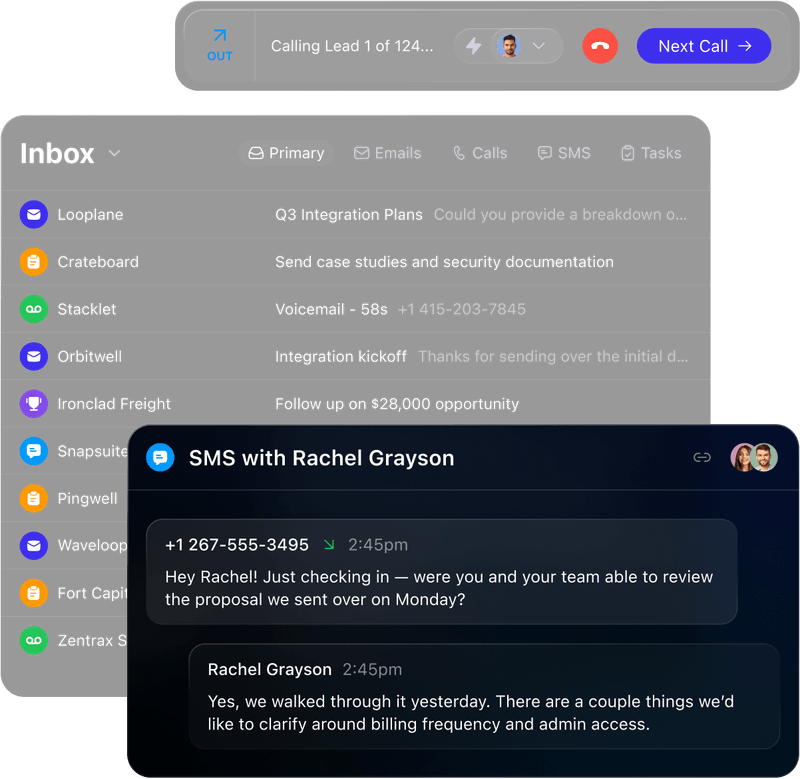
Everything converges in the unified inbox, where email threads, SMS conversations, WhatsApp messages, call logs, and tasks appear in a single view tied to the lead record. This eliminates the context-switching that happens when reps toggle between a phone app, an email client, and a CRM.
Source: Close
The platform also supports email sequences with timed follow-ups, templates and snippets for common messages, and an AI Email Assistant (on the Growth plan and above) that rewrites or generates message content. Reps can send bulk email campaigns to lead segments defined by Smart Views, with real-time open and click tracking.
Chloe AI Agent: Close's AI teammate calls inbound leads, qualifies them, and books meetings without human involvement.
Chloe is Close's built-in AI voice agent.
She makes and receives calls, runs qualification conversations, books meetings, and logs everything in the CRM. Because she's native to Close, she has full access to leads, contacts, conversation history, and business context without any third-party connection to configure.
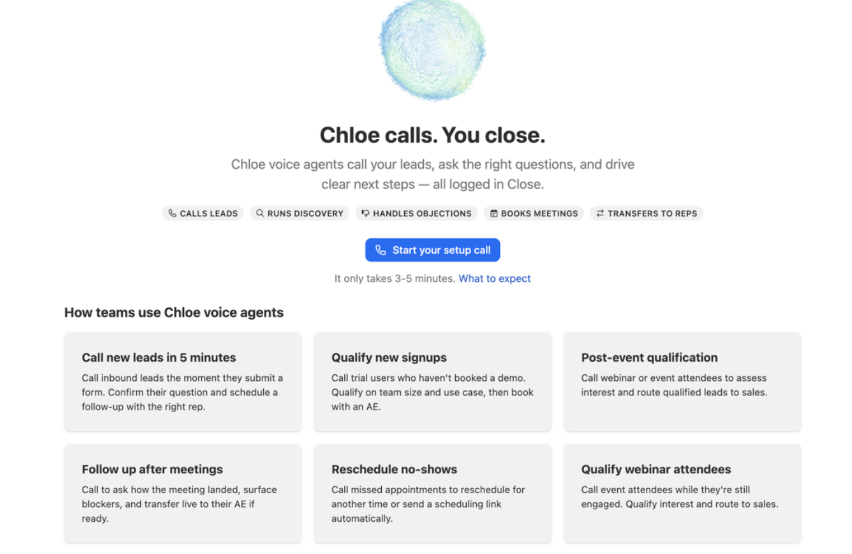
The core problem Chloe solves is speed-to-lead. Most sales teams cannot respond to every inbound lead instantly. Chloe calls new leads within minutes of creation, 24/7, via Workflow configuration.
Source: Close
Chloe is configured through Agents, where each Agent defines a role (inbound qualification, outbound reactivation), the instructions she follows, the Skills she can use, and the leads she contacts. Organizations can create multiple Agents for different use cases. Setup happens through a voice-based onboarding conversation with Chloe herself, where she interviews the admin to build the initial configuration.
She can be deployed three ways: via Workflow (automatic calling when leads meet defined criteria), Batch calling (up to 1,000 contacts in sequence), or one-off call tasks.
After each call, post-call processing generates a transcript, AI summary, and applied Outcome, all written back to the lead record. Chloe must disclose at the start of every call that she is a virtual AI assistant and that the call is being recorded. This disclosure cannot be overridden.
Chloe is in limited beta and is free during beta on Growth and Scale plans. She supports up to 3 concurrent calls and is English-only.
Calling & Dialer: Close offers three calling modes for different outbound volumes.
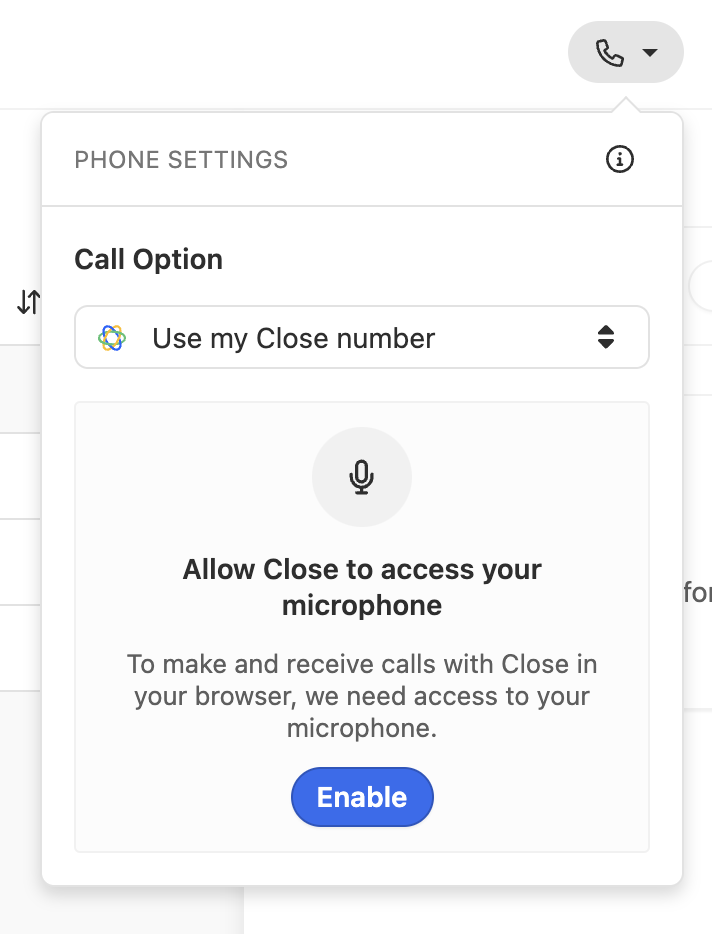
Close's calling system runs on Twilio's telephony infrastructure and works through the browser, a desktop app (Mac and Windows), or mobile apps (iOS and Android). No configuration is needed beyond browser microphone permission. Calling is available on all plans, with usage billed per minute at Twilio's pay-as-you-go rates.
Source: Close
Click-to-call is the basic mode. Clicking the call icon on any lead record opens a call bar immediately. Mid-call controls include mute, a DTMF dialpad, call transfer to any user, group number, or external number, and one-click voicemail drop.
Power Dialer (Growth plan and above) queues the next lead the moment a call ends, with no manual clicking required. Reps start a session by selecting a Smart View, and the dialer begins automatically. It deduplicates within shared Smart Views so multiple reps don't call the same lead. The Reduced Ring Time option cuts the default 32-second ring to 20 seconds to increase call volume.
Predictive Dialer (Scale plan only) dials multiple numbers at once and routes a connected call to the next available rep. The system adjusts the dial rate in real time based on available reps, average dials before answer, call abandonment rate, and average conversation length. When a lead answers but no rep is free, it plays a pre-recorded abandonment message. Abandoned leads are excluded from re-dialing for 72 hours.
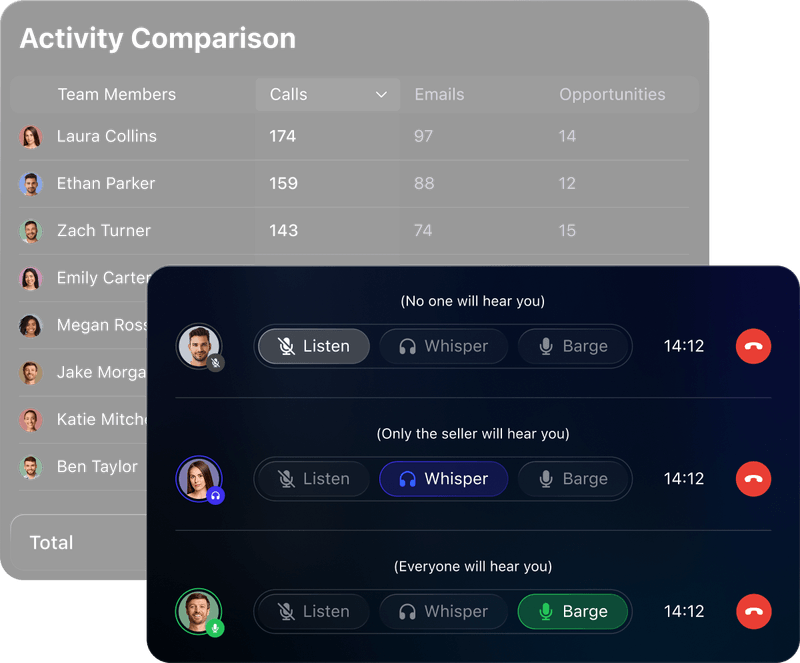
Managers can monitor calls with Listen, Whisper, and Barge.
Listen lets a manager silently observe a call. Whisper lets the manager speak to the rep without the prospect hearing (Whisper audio is not recorded). Barge adds the manager audibly to both parties. These coaching features live in the same platform as call recordings, transcripts, and performance data.
Source: Close
Call recordings are stored for 30 days on Solo and Essentials, 90 days on Growth, and unlimited on Scale. An optional AI Call Assistant add-on ($50/month plus $0.02/min) provides speaker-labeled transcripts and post-call summaries in 20 languages.
Workflows & Sales Automation: Close automates multi-channel sequences mixing email, SMS, and call tasks.
Close's Workflows are a multi-step automation engine built into the CRM. They eliminate repetitive coordination: following up with leads, updating deal fields, assigning contacts, and routing new leads through structured outreach sequences.
Workflows are only available on Growth and Scale plans.
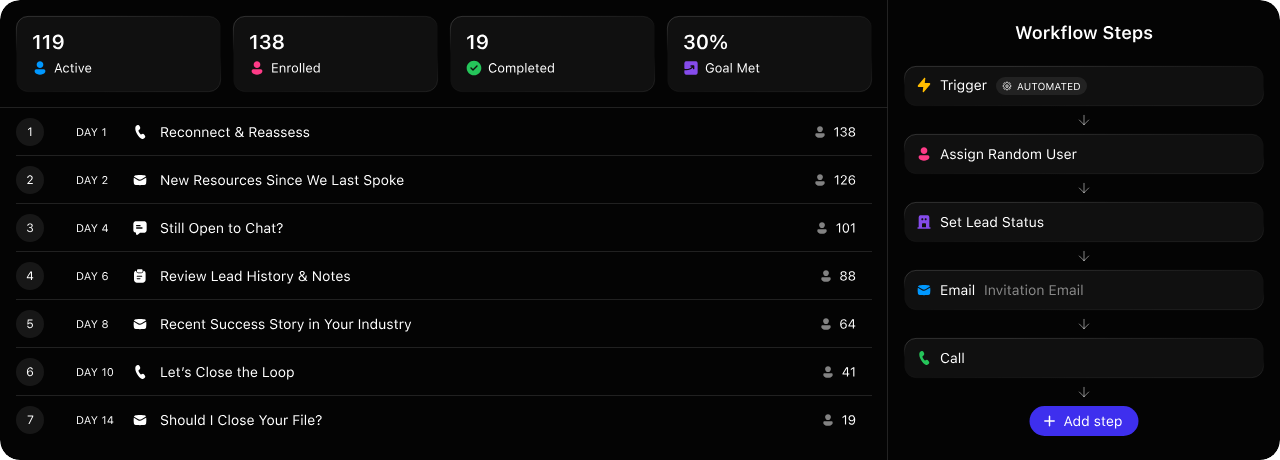
Each workflow starts with a trigger (manual or automatic), then executes steps sequentially with configurable delays. Automatic triggers fire on Lead events, Custom Activity events, Opportunity events, Contact events, Call events, Meeting Activity events, and Form submissions. Each trigger can be filtered with conditions.
Source: Close
Available step types include Email, Call (creates a Call Task), SMS, Assign User (with round-robin support), Task, Create Opportunity, Update Lead (including AI Enrich to auto-populate fields), Update Opportunity, and a Filter step in beta.
Two features set Close's automation apart from basic email sequencing.
First, Communication Windows stagger sends across a configured time range in the recipient's local timezone (defaulting to Monday through Friday, 9AM to 4PM), keeping automated emails from looking automated. Second, Workflow Goals automatically pause a run when a desired outcome occurs (an incoming email, incoming SMS, incoming call, meeting booked, or Lead Status change). Goal Met reporting shows which step in a sequence converted a contact, so teams can optimize based on data.
Lead & Pipeline Management: Smart Views and pipeline tools keep reps focused on what needs attention.
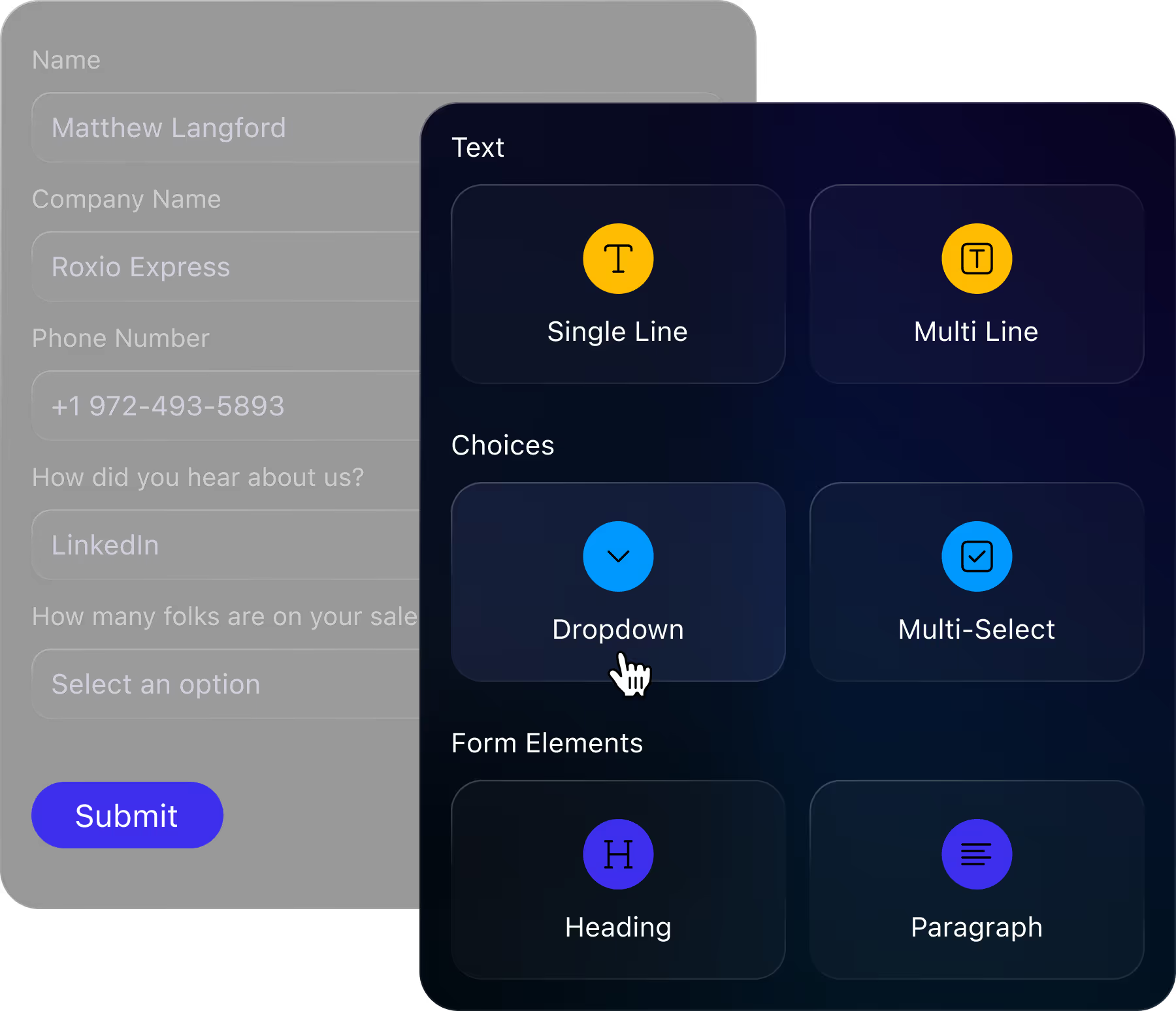
Every account in Close is a Lead. B2B teams attach one or more Contacts to each Lead. Leads can be created manually, imported via CSV or Excel (with drag-and-drop, copy-paste, or file upload up to 15MB), or captured automatically through Close Forms (no-code branded forms that embed on websites via HTML).
Source: Close
Within each Lead, reps create Opportunities to track individual deals. Each Opportunity carries a Status (pipeline stage), Value, Confidence percentage, Estimated Close date, assigned Contact, and assigned User. Expected Value (Value multiplied by Confidence) is tracked separately from Total Value for weighted pipeline forecasting. Opportunities appear in a Kanban-style Pipeline View where reps drag and drop between stages.
Smart Views are saved, dynamic lead filters that update in real time as leads move in and out of defined criteria. Instead of maintaining manual task lists, reps build views like "new leads with no activity in the past 7 days" and work through them as a daily queue. Smart Views also drive the Power and Predictive dialers, with the queue refreshing every five minutes.
Pipeline Guidance (Growth plan and above) highlights Opportunities with passed close dates, stalled stages, or unanswered prospect messages, surfacing them as daily Inbox reminders with suggested actions. AI Lead Summaries (Growth plan and above) generate on-demand summaries of the last 90 days of activity.

Source: Close
Pricing Structure: Close uses per-seat pricing with four tiers and no contracts.
Close offers four standard plans, all self-serve with no contracts:
Solo — $9/month (annual) / $19/month (monthly) Capped at 1 seat and up to 10,000 leads. Includes built-in email, calling, and SMS, centralized inbox, and opportunity management. No automated workflows or Chloe.
Essentials — $35/seat/month (annual) / $49/seat/month (monthly) Unlimited contacts and leads, multiple pipelines, Smart Views, and follow-up reminders. No automated workflows, Power Dialer, or AI features.
Growth — $99/seat/month (annual) / $109/seat/month (monthly) Adds automated workflows, Power Dialer, AI Email Assistant, Custom Activities, Pipeline Guidance, and Chloe AI agent (free during beta).
Scale — $139/seat/month (annual) / $149/seat/month (monthly) Adds role-based access and permissions, lead visibility rules, Predictive Dialer, and unlimited call recording.
All plans include a 14-day free trial with no credit card required. SOC2 Type 2, 2FA, and Google SSO come standard on every tier. Close also includes free migrations and support on all plans, a contrast with platforms that charge for both.
Usage-based telephony charges apply on top of the subscription: calling is charged per minute at Twilio's rates, SMS per unit, and phone number rentals carry monthly fees. The AI Call Assistant add-on costs $50/month plus $0.02 per minute transcribed. AI Enrich costs $0.05 per field.
Where Close Falls Short
Close gives small sales teams one place to call, email, text, and manage deals. But several limitations reveal a platform built for executing outreach, not informing it.
No Built-In Prospecting Data.
Close is a CRM, not a database. It doesn't provide contact information, company intelligence, or lead lists. Reps bring their own data through CSV imports, form submissions, or third-party enrichment tools. AI Enrich can auto-fill some Lead and Contact fields from public web data, but at $0.05 per field it's limited compared to dedicated data platforms.
Teams doing outbound prospecting need a separate source of verified contacts, direct dials, and business emails before Close becomes useful.
No Buyer Intent Signals.
Close tells you what's happening inside your pipeline but not what's happening outside it. There's no way to know which companies are researching solutions like yours, which prospects just changed jobs, or which accounts show buying behavior. Reps work their lists sequentially rather than prioritizing accounts that are in-market.
This blind spot means outreach often reaches prospects at the wrong time.
Limited Reporting Depth.
The most consistent complaint across G2 and Capterra reviews is that reporting is "extremely limited" for teams needing advanced analytics. Pipeline opportunity reports are not fully customizable, and pipelines that skip stages or move backwards don't report properly. Lower-tier plans offer limited analytics, pushing teams toward external BI tools.
Rigid Data Model.
Close uses a fixed structure of leads, contacts, and opportunities. Users can create custom fields but not custom objects. As one G2 reviewer put it: "Close can sometimes feel rigid, when you want deeper customization or very detailed reports, you may hit some limits."
For companies with complex relational data needs, this constrains how the CRM can model their business.
No Market Intelligence.
Close doesn't track technographics, org charts, funding events, or competitive signals. A rep calling into an account has no automated way to learn what technology the prospect uses, how the company is structured, or what competitors they're evaluating. Reps spend time on manual research or go into calls without the background that would make conversations productive.
These limitations aren't failures. They reflect Close's deliberate focus on being a fast, simple execution tool for inside sales.
But they create a clear need for a complementary intelligence layer that can answer the questions Close doesn't: who to call, when to call them, and what to say when they pick up.
The Perfect Complement to Close: ZoomInfo
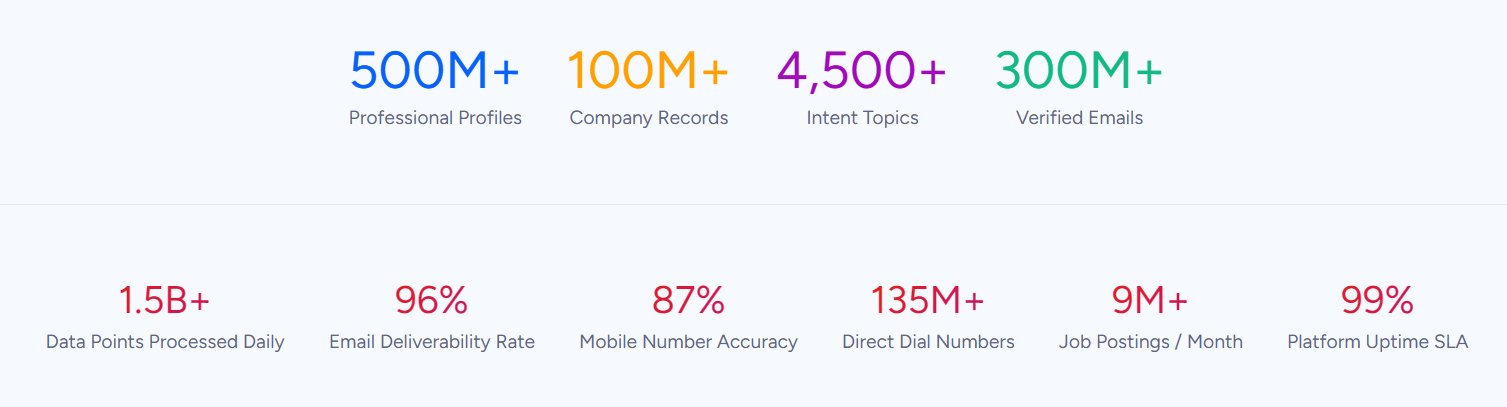
ZoomInfo is a B2B intelligence platform built on a large and continuously updated dataset: 500M contacts, 100M companies, 135M+ verified phone numbers, and 200M+ verified business emails.
Where Close handles the execution of sales outreach, ZoomInfo handles the intelligence that makes that outreach effective. It fuses third-party data with your CRM records, conversation transcripts, and behavioral signals through a GTM Context Graph (processing 1.5B+ data points daily) to reveal not just what happened in a deal, but why.
Comprehensive B2B Data: ZoomInfo provides the contacts and company intelligence that Close doesn't have.
Close needs data to be useful. ZoomInfo provides that data. The platform covers 120M direct-dial phone numbers, 200M+ verified business email addresses, and 300+ company attributes for segmentation, including department org charts with decision-makers' verified contact information.
Source: ZoomInfo
The data comes from multiple sources: automated ML scanning of 28 million site domains daily, third-party partner data covering 95 million businesses, a community of 200,000+ ZoomInfo Lite users who share data back, and an in-house Data Training Lab of 300+ human researchers. First-party data reaches up to 95% accuracy.
This isn't a self-assessed claim.
In a Fortune 500 competitive RFP analyzing 25 million contacts across vendors, the independent consultant concluded that "no other competitor came even close." ZoomInfo holds 133 No. 1 rankings on G2 across Sales Intelligence, Buyer Intent, Data Quality, and related categories, and was named a Leader in the Forrester Wave for Intent Data Providers.
For a team using Close, this solves the cold-start problem.
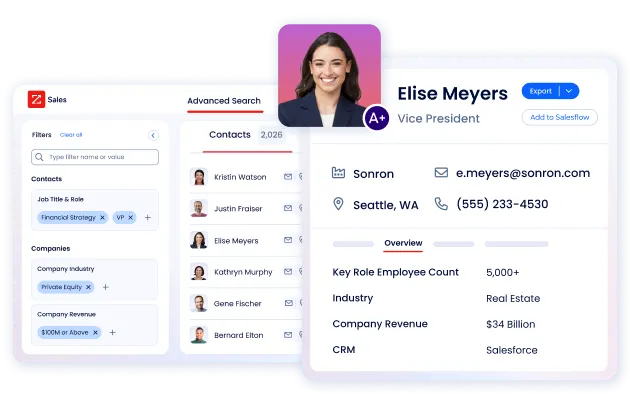
Instead of importing purchased lists of questionable quality, reps search ZoomInfo's database by job title, company size, industry, location, technographics, and dozens of other filters, then export verified contacts into Close. The direct dials ring and the emails land, which is the difference between a productive calling session and a day of voicemails and bounces.
Source: ZoomInfo
"ZoomInfo gives us the information we need to execute. We don't have to go through and spend our time digging. It's already there, so we can be three steps ahead." (Vensure)
Buyer Intent & Signals: ZoomInfo reveals when prospects are ready to buy, so reps prioritize the right accounts.
Close's Smart Views help reps organize their existing pipeline.
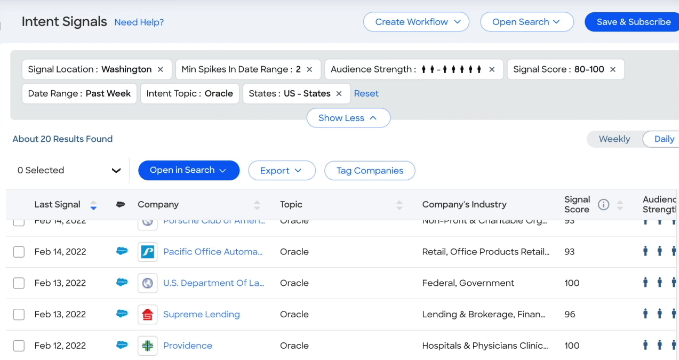
ZoomInfo's intent data tells them which companies outside their pipeline are in-market. ZoomInfo Intent tracks signals from 210 million IP-to-Organization pairings and 6 trillion+ new keyword-to-device pairings sourced monthly, identifying companies that are researching topics related to your product before they fill out a form.
Guided Intent, exclusive to ZoomInfo, goes further by identifying topics historically correlated with deal success rather than requiring manual topic selection. The system learns from your actual wins, not keyword guesses.
Source: ZoomInfo
ZoomInfo also provides WebSights, which resolves anonymous website traffic to companies, including buying team identification and direct contact info. It separates Company Traffic (real people) from Automated Traffic (bots), so what you see is genuine buying interest.
For a Close user running outbound sequences, these signals change how reps spend their time. Instead of calling through a static list from top to bottom, they can prioritize accounts showing active research behavior, recent funding, hiring patterns, or technology changes. The difference is calling someone who is evaluating solutions versus someone who has no budget and no project.
"That combination of our internal CRM data, external signals, and AI that's given all that context has helped us craft very specific account- and persona-based messages. And people have responded to them right away." (Seismic)
GTM Context Graph: ZoomInfo captures why deals move, not just that they moved.
CRMs like Close record that a deal's stage changed or that a call was made. They don't record why the deal accelerated or stalled.
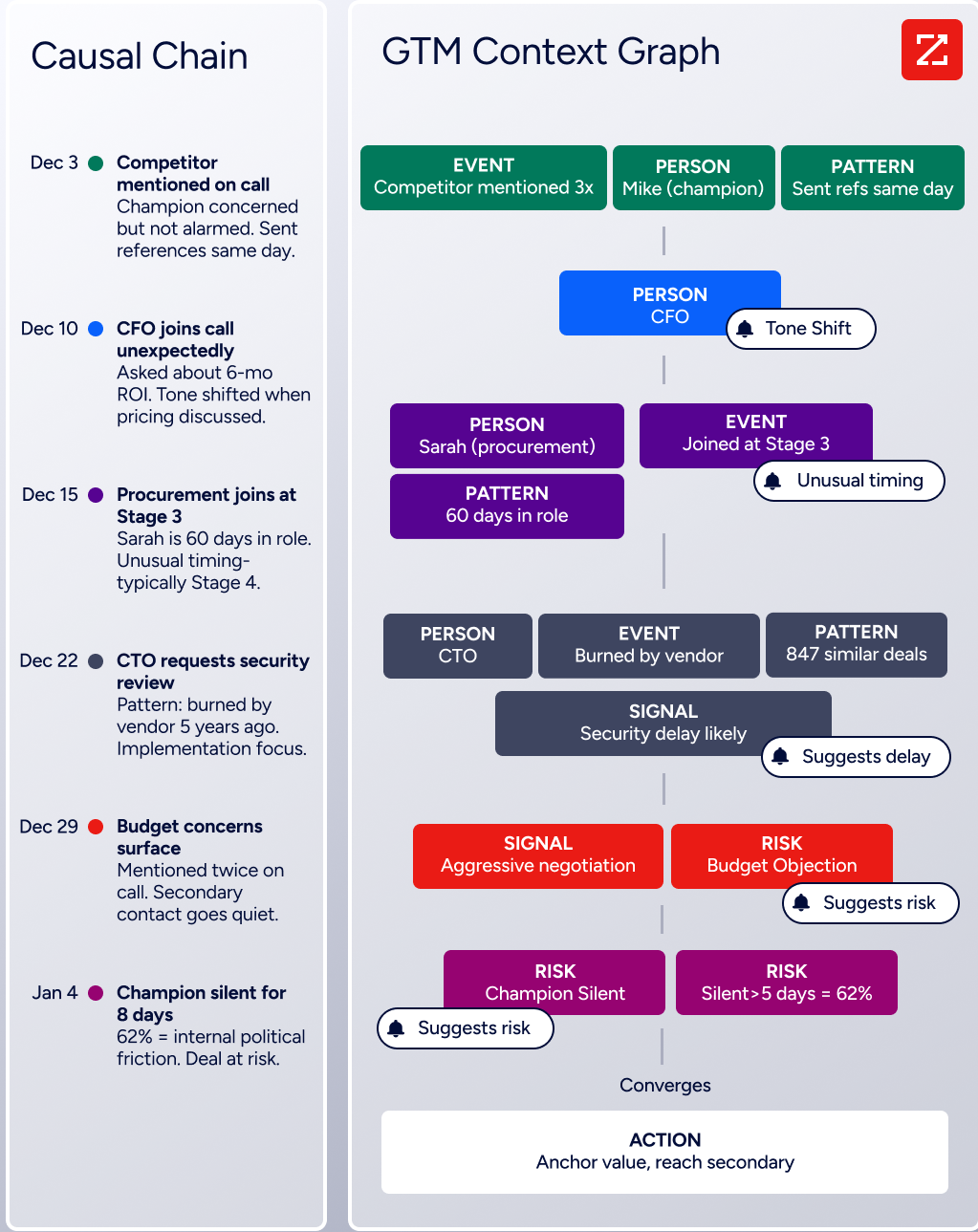
ZoomInfo's GTM Context Graph bridges this gap by combining ZoomInfo's third-party data with a customer's CRM records, conversation transcripts, email interactions, and behavioral signals into a single intelligence layer.
As ZoomInfo's Chief Product Officer Dominik Facher writes: "The CRM recorded the state change. It has no record of why it happened." The GTM Context Graph makes this decision context machine-readable. It captures who influences whom, what each action responded to, what patterns across thousands of similar deals suggest happens next, and why things slipped.
Source: ZoomInfo
This matters for Close users because it fills the intelligence gap the CRM can't.
A rep preparing for a call can see not just the prospect's name and company, but the competitive landscape, the buying committee structure, and the signals that suggest this account is ready (or not ready) for a conversation. ZoomInfo's GTM Workspace surfaces this intelligence in a workspace for sellers, while GTM Studio lets marketers and RevOps teams design plays that route the right accounts to the right reps.
"It's not just the data itself. It's more about the right data at the right time to help us reach out with the right message across that full buyer journey." (Redwood Logistics)
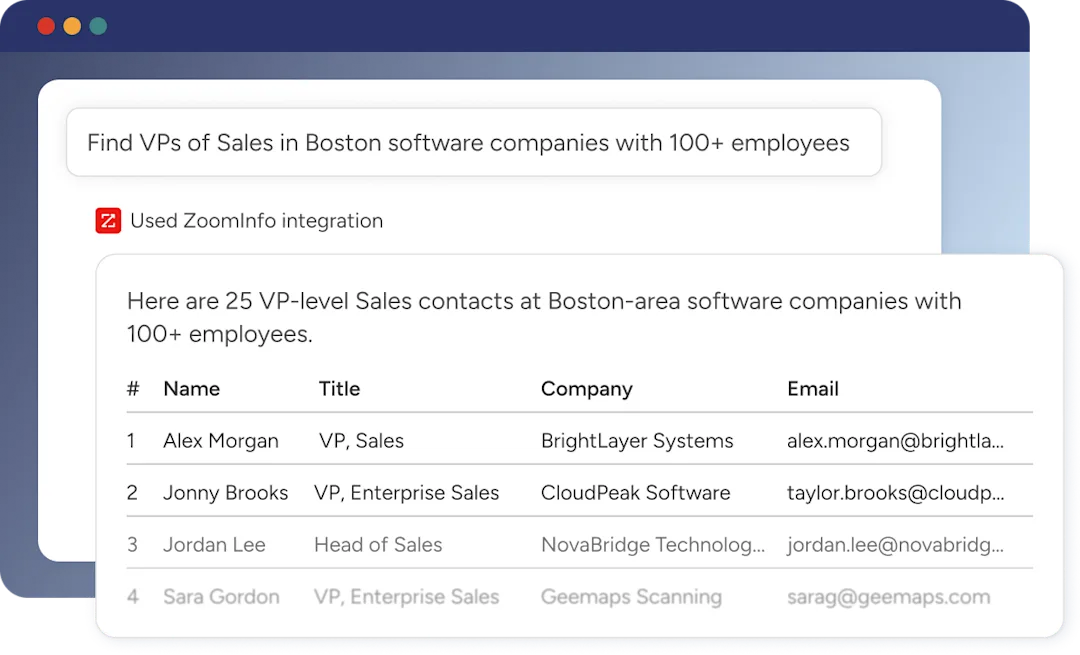
Universal Access: ZoomInfo's intelligence flows into any tool through APIs and MCP.
Data and signals mean nothing if they're locked inside one application. ZoomInfo delivers its intelligence three ways: APIs and MCP for any third-party tool or AI agent, GTM Workspace for sellers, and GTM Studio for marketers and RevOps.
ZoomInfo's MCP server connects AI models directly to ZoomInfo's B2B data as a native tool, with no custom coding required. The MCP tool set covers company and contact search, enrichment, lookalike expansion, and strategic account research. API access is included in all relevant plans, so the intelligence works everywhere, not just inside ZoomInfo's own products.
Source: ZoomInfo
For Close users, this means ZoomInfo data can flow into their workflow through multiple channels: exporting enriched contact lists into Close, using Zapier to trigger workflows when intent signals fire, or building custom automations through the API. All three channels draw from one GTM Context Graph (the same data, the same intelligence, the same continuously learning model).
"The plug-and-play aspect of the API means I can integrate it very easily into any process and get information at a moment's notice." (BDO Canada)
Close and ZoomInfo: How They Work Together
Aspect | Close | ZoomInfo |
|---|---|---|
Primary purpose | Sales execution: calling, emailing, and managing pipeline | Sales intelligence: finding prospects, signals, and account context |
Core strength | Built-in multi-channel communication | Verified B2B data at scale |
Data source | Requires user-imported leads | 500M contacts, 100M companies, 135M+ verified phones |
Intent signals | None | 210M IP-to-Org pairings, 6T+ keyword signals monthly |
AI capabilities | Chloe (autonomous calling), AI Email Assistant | GTM Context Graph, AI agents, Guided Intent |
Best for | Executing outreach at speed | Deciding who to reach and when |
Target user | Sales reps making calls and sending sequences | Sales, marketing, RevOps, and GTM engineers |
Workflow position | Execution phase | Intelligence and discovery phase |
Pricing model | Per-seat, publicly listed | Consumption-based pricing |
Free tier | 14-day trial (no permanent free plan) | ZoomInfo Lite (permanent free plan) |
Team size focus | Under 100 reps | Enterprise and upper mid-market |
Final Verdict
Close and ZoomInfo serve different purposes in the sales workflow. The strongest results come from using both.
Close is a focused sales CRM for small-to-mid teams that sell by phone and email.
By building calling, email, SMS, and WhatsApp natively into the platform, it removes the tool-switching that slows reps down. The Power Dialer and Predictive Dialer let even small teams work through large lead lists efficiently. Chloe adds an AI layer that handles inbound qualification without human involvement.
For teams that already know who to call and want a fast system to execute outreach, Close delivers.
ZoomInfo is where the intelligence comes from.
It answers the questions Close can't: which companies are in your addressable market, who the decision-makers are, how to reach them with verified contact data, and when they're researching solutions. The GTM Context Graph connects signals, conversations, and outcomes across thousands of deals to surface patterns your reps wouldn't see on their own. Through GTM Workspace, GTM Studio, and APIs/MCP, that intelligence reaches whatever tool your team works in.
Get started with ZoomInfo here.
The ideal workflow uses both: ZoomInfo identifies and prioritizes the right accounts, then Close executes the outreach. ZoomInfo tells you who to call and when. Close makes the call. Together, they close the gap between intelligence and action, turning data into conversations and conversations into pipeline.
Close CRM FAQ
Is Close CRM good for small teams?
Yes. Close is designed for sales teams under 100 people. The platform requires no dedicated administrator, includes free migrations and support on all plans, and customer case studies report full adoption in as little as two weeks. The Solo plan at $9/month supports a single user with up to 10,000 leads, making it accessible for individual salespeople and founders.
Does Close have a built-in dialer?
Close includes three calling modes. Click-to-call is available on all plans. The Power Dialer (Growth plan, $99/seat/month) auto-advances through lead lists with no manual clicking. The Predictive Dialer (Scale plan, $139/seat/month) dials multiple numbers at once and routes live answers to available reps. All calling runs on Twilio's infrastructure with per-minute usage charges on top of the subscription.
What is Chloe AI in Close?
Chloe is Close's AI voice agent. She autonomously calls inbound leads, runs qualification conversations, books meetings, and logs everything in the CRM. She is in limited beta and available free on Growth and Scale plans during the beta period. Chloe supports up to three concurrent calls and is English-only at launch. She must disclose at the start of every call that she is a virtual AI assistant.
Does Close include a lead database or prospecting data?
No. Close is a CRM, not a data provider. Users import their own leads via CSV, forms, or third-party tools. AI Enrich can auto-fill some fields from public web data at $0.05 per field, but it is not a substitute for a prospecting database. Teams doing outbound sales typically pair Close with a data platform like ZoomInfo to source verified contacts and direct dials.
How much does Close cost?
Close offers four plans: Solo ($9/seat/month annual), Essentials ($35/seat/month), Growth ($99/seat/month), and Scale ($139/seat/month). All plans are self-serve with no contracts. Monthly billing is available at slightly higher rates. Telephony usage (calling, SMS, phone number rentals) is billed separately at Twilio's rates. The AI Call Assistant add-on costs $50/month plus $0.02 per minute transcribed.
What integrations does Close support?
Close lists 100+ integrations including Gmail, Microsoft 365, Google Calendar, Calendly, Zoom, ChatGPT, Claude, Zapier, and Clay. The platform provides a documented REST API with OAuth 2.0 support and has launched an MCP server for AI assistant connections. Close does not offer native integrations with LMS platforms, marketing automation suites, or enterprise-grade data enrichment tools.
Can Close handle enterprise sales teams?
Close positions itself for teams under 100 salespeople and acknowledges on its compare page that it is not designed for complex enterprise needs, including outside sales team mapping and routing, proposal generators, or product and inventory management.
Organizations requiring role-based access need the Scale plan ($139/seat/month), and even then, the fixed data model (no custom objects) and limited reporting depth may constrain complex enterprise workflows.
Does Close offer a free plan?
No. Close offers a 14-day free trial with no credit card required but does not have a permanent free plan.
ZoomInfo, by comparison, offers ZoomInfo Lite as a permanent free tier with access to its B2B database, 10 monthly export credits, and website visitor identification at no cost and with no time limit.
Related breakdowns to help you choose:
