
The question behind any demo automation API is not whether the platform has one, but whether it exposes enough to build on.
Consensus ranks #1 in demo automation on G2, Capterra, and Gartner. It serves 15 of the top 30 software companies with interactive video demos, product tours, and its Demolytics engagement analytics engine. The platform exposes an Open API for custom integrations, three webhook event types for demo lifecycle automation, and an MCP server for AI-agent access.
But leading the demo automation category and offering a deep API are different things.
Consensus's API covers the demo automation domain: DemoBoard management, demo library operations, lead capture data, and Demolytics engagement analytics. If your integration needs to push demo viewer signals into a CRM, trigger workflows when a prospect watches or shares a demo, or connect AI agents to the demo library via MCP, the API handles it. Its scope stops at the platform boundary: no contact enrichment, no company intelligence, no intent signals, no org charts, and no B2B data beyond what demo interactions generate.
This is where ZoomInfo enters. A B2B intelligence platform built on 500M contacts and 100M companies, ZoomInfo's REST API suite covers search, enrichment, AI intelligence, and audience management, with OAuth 2.0 authentication and an MCP server for AI-agent workflows. The two APIs serve different layers of the same pipeline: Consensus tells you which prospects engage with demos, and ZoomInfo tells you who those prospects are and whether their companies are worth pursuing.
This review covers the Consensus API in technical depth first (authentication, endpoints, webhooks, documentation, and access costs), then reviews ZoomInfo's API as the intelligence layer that picks up where demo engagement data stops.
Consensus API at a Glance
Attribute | Detail |
|---|---|
API type | REST over HTTP, JSON responses (based on documented integration patterns; not explicitly labeled in Consensus's public docs) |
Authentication | Account-level API key/secret pair; OAuth 2.0 with PKCE for the MCP server |
Base URL | Not publicly documented; interactive explorer at app.goconsensus.com/api-documentation/ (login required) |
Rate limits | Not publicly documented |
Pricing / access | Enterprise plan only; custom-quoted pricing |
SDKs | None |
Webhooks | Yes, 3 event types: demo_watched, new_lead, demo_utm |
MCP server | mcp.goconsensus.com/mcp; supports Claude Desktop, ChatGPT, Microsoft Copilot Studio |
Documentation | Interactive API explorer (login required); public knowledge base covers integration setup but not endpoint references |
Consensus API: What Works Well & What to Plan Around
What works well | What to plan around |
|---|---|
Interactive API explorer with live request testing inside the platform | Explorer and endpoint reference require a paid Enterprise account to access |
MCP server provides AI-agent access to demos and DemoBoards via OAuth 2.0 with PKCE | API access is gated to the Enterprise plan; no self-serve developer tier |
Webhooks cover the three core demo lifecycle events a pipeline needs | Only 3 webhook event types; no retry policy, payload signing, or delivery guarantees documented |
Multiple API keys possible via separate Custom Integration Apps | Account-level auth only: no user-level tokens, no OAuth for third-party multi-tenant apps |
Zapier integration extends automation to 500+ apps without direct API code | No official SDKs in any language; all custom integrations are raw HTTP |
Webhook payloads available in both JSON and XML | Rate limits, quotas, and throughput constraints are not published |
Consensus API: Authentication & Getting Started
API access requires an active Consensus account on the Enterprise plan. There is no developer tier, no public developer portal, and no self-serve key provisioning for free or lower-tier users.
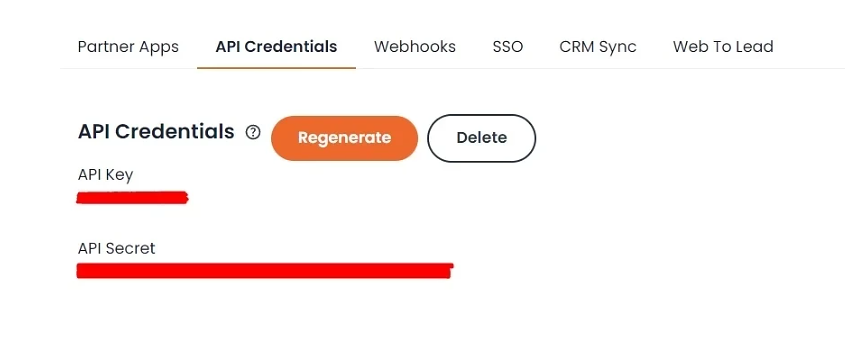
Once on Enterprise, you generate API credentials under Integrations > API Credentials. The credentials are an account-level key/secret pair that authenticates the entire account, not individual users. This simplifies setup but limits access control: you cannot scope a key to read-only access or restrict it to a single integration without creating separate accounts.
Source: Consensus
Consensus warns that regenerating API credentials breaks any existing integration using the old pair. There is no rotation mechanism beyond full regeneration, so plan key management accordingly.
The interactive API explorer at app.goconsensus.com/api-documentation/ requires both API credentials and user credentials. You select a call, provide parameters, and view the response, but the explorer is not accessible without a paid account.
Two additional authentication paths exist for specific surfaces:
OAuth 2.0 for native integrations: Some platform integrations use OAuth 2.0 rather than the key/secret pair. The Gong integration, for example, connects via OAuth requesting api:integration-settings:write and api:digital-interactions:write scopes.
OAuth 2.0 with PKCE for the MCP server: The Consensus AI Connect MCP server at mcp.goconsensus.com/mcp uses OAuth 2.0 with PKCE (RFC 6749 compliant, with Resource Indicators per RFC 8707). The MCP server runs stateless with no data caching and enforces existing Consensus RBAC permissions at the token level. Setup documentation covers Claude Desktop, ChatGPT (Business/Enterprise/Edu, requires Developer Mode beta), and Microsoft Copilot Studio.
The MCP path matters for developers building AI-agent workflows: it provides an OAuth-secured channel to Consensus demo data without requiring the REST API key/secret pair.
Consensus API: Core Endpoints & Capabilities
Consensus does not publicly list its API endpoints outside the authenticated explorer. The public knowledge base describes what the API enables but does not list endpoint paths, request schemas, or response formats. What follows is drawn from integration documentation, webhook specifications, and the MCP tool surface.
DemoBoards
DemoBoards are the core shareable demo object in Consensus: branded landing pages that hold personalized demo experiences for specific prospects or accounts.
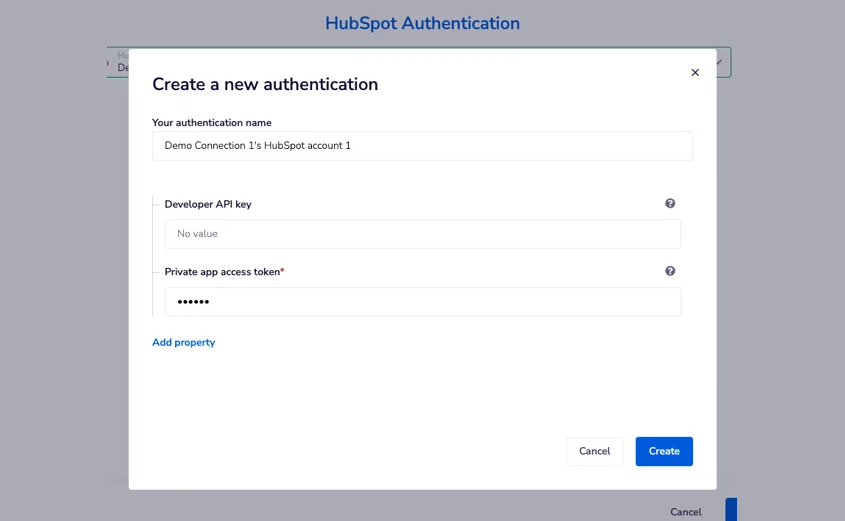
The API supports creating and updating DemoBoards programmatically, confirmed by two independent integration surfaces: the HubSpot Data Sync integration references creating DemoBoards tied to HubSpot deals, and the MCP server exposes DemoBoard creation and update as native tools for AI assistants.
Source: Consensus
The Marketo integration goes further, including a workflow for sending demos from Marketo through the API. This confirms the API supports triggering demo sends programmatically.
What you would build with this: a CRM workflow that creates and sends a personalized DemoBoard to a prospect when a deal reaches a specific stage, without a rep touching the Consensus dashboard.
Demos & Demo Library
The demo library is the content layer underneath DemoBoards. The MCP server exposes a search_demos tool for finding demos by criteria, and the Zapier integration surfaces demo metadata including UUID, title, and viewer engagement data (watch duration, feature ratings, UTM parameters).
Combining search with metadata retrieval, you can build an integration that selects the right demo based on prospect attributes, then packages it into a DemoBoard for delivery.
Leads & Contacts
Lead data enters the API primarily through the new_lead webhook (covered in the Webhooks section below). When a viewer submits the lead capture form inside a public demo, the webhook payload includes full contact fields (email, first name, last name, organization, title, country, state, phone), feature preference rankings (very important, somewhat important, not important), UTM parameters, and a session object.
The Zapier integration also exposes the New Lead trigger with the same data schema, including DemoBoard creator info, recipient info, feature rankings, and heatmap URLs.
Demolytics (Analytics & Engagement)
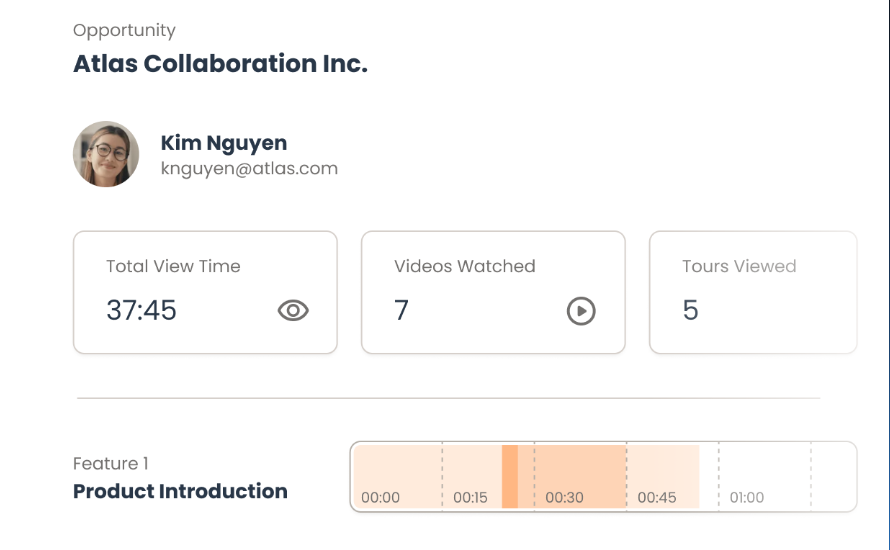
Demolytics data flows out of Consensus through native CRM integrations and webhooks. Engagement signals include view duration, heatmap URLs, individual feature ratings per viewer, stakeholder discovery data (who forwarded to whom), and the engagement score.
Source: Consensus
This data passes into connected systems through native integrations (Salesforce, HubSpot, Marketo, Salesloft, Outreach, Gong, Pardot, Eloqua) or through the API.
Demolytics data is exportable as CSV and filterable by group, user, demo, and time frame.
What you would build with this: a layer that pulls Demolytics engagement signals into a data warehouse, correlating demo viewer behavior with CRM deal stages to measure which demo content patterns predict closed-won outcomes.
Consensus API: Webhooks & Events
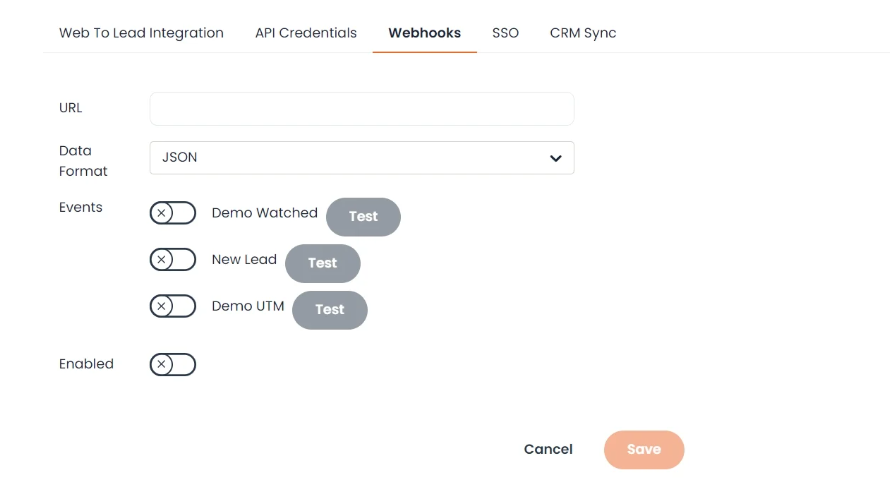
Consensus offers three webhook event types, configured inside the platform under Integrations > Webhooks > Add Webhook.
Source: Consensus
demo_watched
Fires when a recipient watches a DemoBoard sent to them, or when an invited contact views a forwarded demo. The payload includes:
Demo UUID and title
Recipient info (email, name, title, organization)
Sender info
Message metadata (subject, body, date sent)
date_watched timestamp
This event captures the core engagement signal: someone viewed the demo. Because it also fires on forwarded views, it tracks stakeholder expansion beyond the original recipient.
new_lead
Fires when a viewer submits the lead capture form inside a public demo. The payload includes:
Full lead contact fields (email, first name, last name, organization, title, country, state, phone)
Demo UUID and title
Feature preference rankings (very important, somewhat important, not important per feature)
UTM parameters
Session object
This is the richer event: it carries both contact identity and the buyer's stated feature priorities, making it useful for lead routing and qualification workflows.
demo_utm
Fires on every demo view regardless of whether the viewer is a known recipient. Returns only the demo UUID and UTM parameters. Consensus's own documentation notes this webhook is not recommended unless UTM tracking is always used for attribution, since it triggers on all views indiscriminately.
Delivery and Configuration
You configure webhook destinations as a URL endpoint and choose whether the payload arrives as JSON or XML. All payloads arrive via HTTP POST. The same three event types are available as triggers in the Zapier integration.
Three things to plan around:
No retry policy documented: The public documentation does not describe what happens if your endpoint returns a non-200 response. Design your receiver to be idempotent and confirm the delivery contract with Consensus if your pipeline depends on guaranteed delivery.
No payload signing: There is no documented mechanism for verifying that a webhook payload came from Consensus. Without signature verification, your endpoint should validate payloads independently.
Three events only: There are no webhook events for DemoBoard creation, demo library changes, account-level activity, or Demolytics milestone triggers (such as a new stakeholder being discovered). If your workflow needs to react to something other than "someone watched" or "someone filled out a form," you will need to poll or use the Zapier integration as a proxy.
Consensus API: SDKs, Docs, Rate Limits & Pricing
SDKs & Libraries
Consensus does not publish official SDKs in any language. The knowledge base and integration documentation reference no client libraries, code samples, or packages on npm, PyPI, or any other registry. Developers building custom integrations work directly against the REST API using HTTP requests with the key/secret credentials.
The closest alternatives to an SDK:
The MCP server at mcp.goconsensus.com/mcp provides access for AI agents via the Model Context Protocol.
The Zapier integration (listed as beta in the Zapier marketplace) connects Consensus to 500+ applications using the same API credentials and exposes Demo Watched and New Lead triggers without requiring custom code.
Documentation & Developer Experience
The primary developer resource is the interactive API documentation explorer inside the Consensus application. Developers select an API call, enter credentials, and send a live request to see the response. It works as a built-in Swagger equivalent, but requires a paid Enterprise account to access.
The public-facing knowledge base covers integration setup, webhook configuration, and how to locate API credentials. It does not include endpoint references, request/response schemas, or code samples. Specifically, there is:
No public OpenAPI or Swagger specification
No Postman collection
No dedicated developer portal separate from the product
No public API changelog or versioning scheme
A developer evaluating the API cannot inspect endpoints, review response schemas, or test calls without first purchasing an Enterprise subscription and generating credentials. For a platform serving 15 of the top 30 software companies, the documentation is opaque compared to category norms.
Developer support routes through the Consensus Customer Success team and the support portal. There is no public developer forum, community Slack, or developer-specific support channel.
Rate Limits & Constraints
Consensus does not publish rate limits, request quotas, or throughput constraints in any public documentation. The knowledge base makes no reference to per-minute or per-day limits, burst caps, or plan-tiered rate-limiting.
This is a real gap for anyone sizing an integration. Without published rate limits, you cannot determine in advance whether your request volume will work within the platform's constraints, and you cannot build backoff logic against documented thresholds. Confirm operational constraints directly with Consensus before committing to a production integration.
Pricing & Access Costs
API access is an Enterprise plan feature on the Consensus pricing page. It does not appear on the Starter ($600/month) or Pro ($1,250/month) tiers. Enterprise pricing is quote-based.
No per-call, per-credit, or consumption-based API pricing is documented. The minimum path to API access is a negotiated Enterprise contract, and the cost is not published.
For a developer doing early-stage evaluation, the gated pricing creates friction: you cannot determine API cost, test endpoints, or review documentation without first engaging the Consensus sales process.
Where the Consensus API Falls Short
These are the practical limits a developer should plan around when building on this API. Several are scope decisions that reflect what Consensus is (a demo automation platform) and what it was not designed to be.
The endpoint surface is not publicly documented. You cannot review available endpoints, request schemas, or response formats without a paid Enterprise account. For a developer evaluating whether to build on this API, the lack of public documentation means the evaluation itself requires purchasing a subscription. Most API-first platforms publish their reference docs publicly for this reason.
Enterprise gate on API access. API access requires Consensus's highest tier, with custom-quoted pricing. There is no self-serve developer plan, no API sandbox, and no free trial that includes API access.
The Starter ($600/month) and Pro ($1,250/month) plans do not include it. For teams that need a lightweight integration alongside a non-Enterprise Consensus subscription, the only programmatic paths are the Zapier integration and the MCP server (both of which still require Enterprise access for API credentials).
No published rate limits. Without documented throughput constraints, you cannot size your integration in advance. Whether your pipeline hits a ceiling at 100 requests per minute or 10,000, you will not know until you test against a production account or ask Consensus directly.
No official SDKs. Every custom integration is raw HTTP. For a simple webhook receiver, that is fine. For a production system managing DemoBoard creation, demo selection, and analytics ingestion, you build and maintain the client library yourself.
Three webhook events and no delivery guarantees. The webhook surface covers watching and lead capture, but there are no events for DemoBoard creation, stakeholder discovery milestones, demo library changes, or analytics thresholds. Retry policy and payload signing are undocumented.
Account-level authentication only. The key/secret pair authenticates the entire account, not individual users or integrations. There is no scoped-access model, no token rotation, and no OAuth flow for third-party multi-tenant applications. Teams with strict credential management policies will find this limiting. The MCP server's OAuth 2.0 with PKCE is the exception, but it applies only to AI-agent access, not general API consumption.
No B2B data beyond demo engagement. Consensus's API surfaces demo engagement data: who watched, what they rated, how long they viewed. It does not tell you who these people are beyond what they entered in a lead form. There is no contact enrichment, no company context or technographic data, no intent signals, and no org chart data behind the engagement signals. If your pipeline needs to act on both "this person watched the demo" and "this person's company has 500 employees, uses Salesforce, and is actively researching your category," you need a second API for the data layer.
ZoomInfo API: The B2B Intelligence Layer Beyond Demo Analytics
Source: ZoomInfo
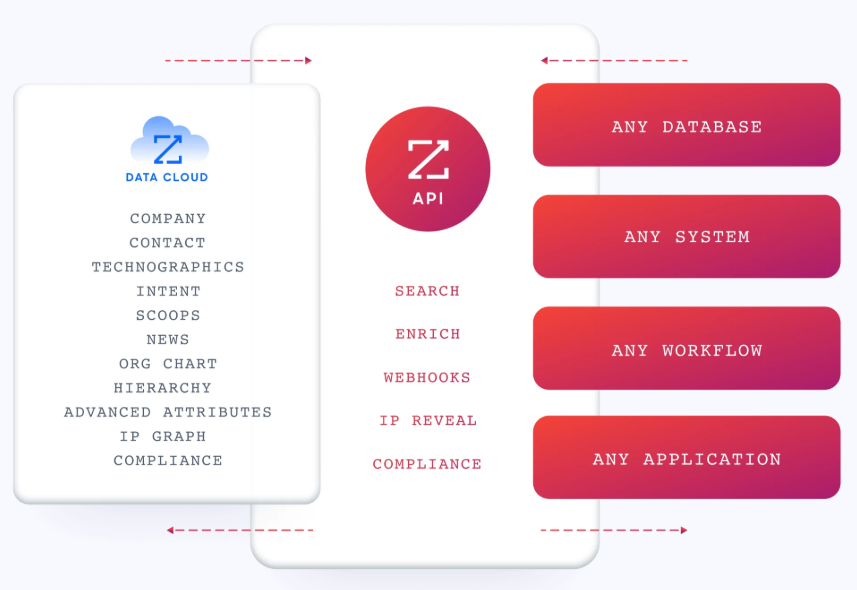
Consensus's API tells you that a prospect watched a demo, which features they rated as important, and who else in their organization received the link. ZoomInfo's API tells you who that prospect is, what company they work for, what technology stack that company runs, whether the account is actively researching your category, and where the prospect sits in the org chart.
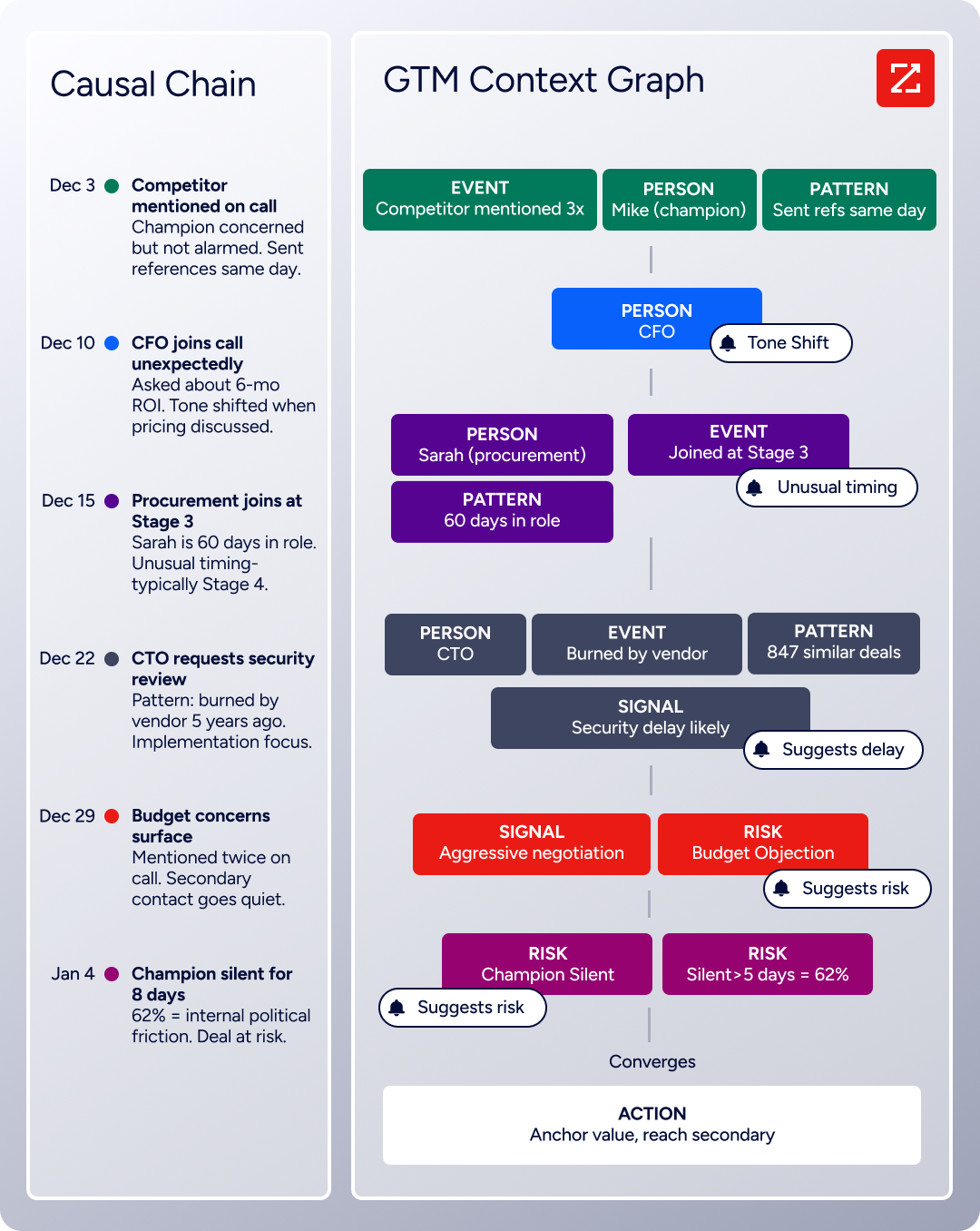
The two APIs operate at different layers of a GTM pipeline. ZoomInfo's GTM Context Graph (a data layer that processes 1.5B+ data points daily by combining ZoomInfo's B2B data with your first-party signals) bridges the gap between "this person engaged with a demo" and "this person is a VP of Engineering at a 2,000-person company that just raised Series C and is evaluating your competitor."
Source: ZoomInfo
What the API Covers
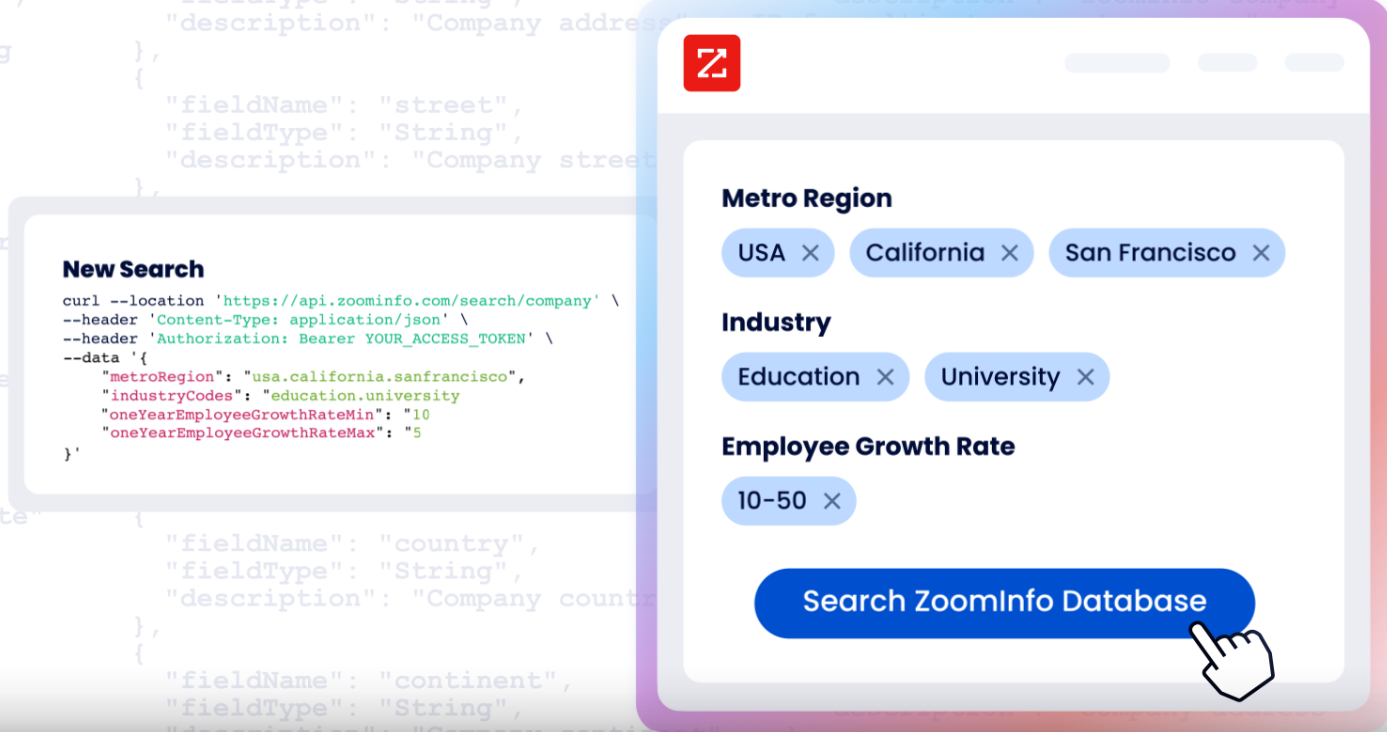
ZoomInfo's Enterprise API is a REST suite served from https://api.zoominfo.com/gtm, organized into four categories documented in the interactive API reference:
Source: ZoomInfo
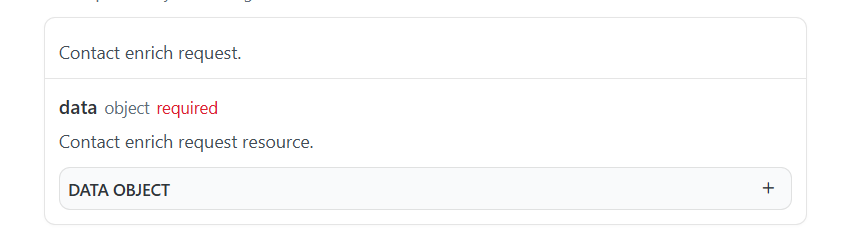
Data API (Search & Enrich): Search endpoints cover Contacts, Companies, Intent, News, and Scoops, returning matched records without consuming credits. Enrich endpoints return the full payload: business emails, direct dials, employment history, corporate hierarchy, org charts, technographics, and hashtag signals, up to 25 records per call.
Source: ZoomInfo
The underlying dataset spans 500M contacts and 100M companies, 135M+ verified phone numbers, and 200M+ verified business email addresses. The search-then-enrich pattern means you filter freely, then pay only for the records you commit to.

Source: ZoomInfo
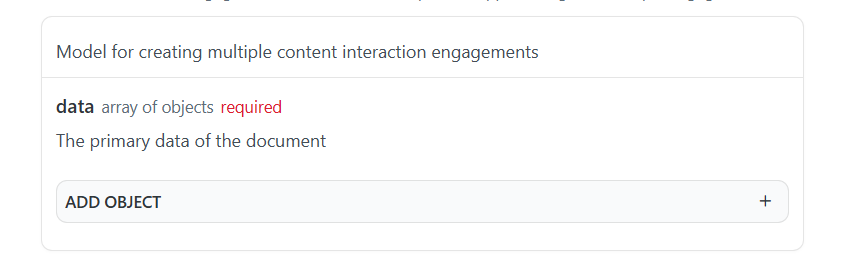
Copilot API (AI Intelligence): Account Summary returns structured account intelligence with a free-form Q&A endpoint. Find Similar Companies performs lookalike expansion. Contact Recommendations returns AI-ranked buying-committee suggestions by motion (prospecting, deal acceleration, renewals).
Marketing and Platform APIs complete the suite with audience management (CRUD for advertising audiences) and bidirectional engagement data via the Engagements API, currently in Beta.
Source: ZoomInfo
The pairing with a demo automation API is direct: when Consensus surfaces a new stakeholder through Demolytics, ZoomInfo enriches that contact with verified email, direct dial, title, company context, and intent signals, turning an anonymous demo viewer into a qualified lead with full context.
Authentication, Rate Limits & Credits
Authentication uses OAuth 2.0 with PKCE via Okta, issuing 24-hour access tokens with rotating refresh tokens.
Source: ZoomInfo
Three flows are supported: Authorization Code with PKCE (for web applications), Client Credentials (for server-to-server), and Refresh Token. You register applications through the ZoomInfo Developer Portal, where you generate credentials, define scopes, and test endpoints.
Rate limits are published by tier: Builder (5 req/sec), Standard (25 req/sec), and Scaling (35 req/sec), with per-hour and per-day sliding-window limits enforced simultaneously. Every response includes quota headers with remaining capacity, and 429 responses include a Retry-After header with exact backoff timing. Credits follow a rolling 12-month window: enriching a record for the first time consumes one credit; re-enriching the same record within the year is free.
MCP, Webhooks & Developer Experience
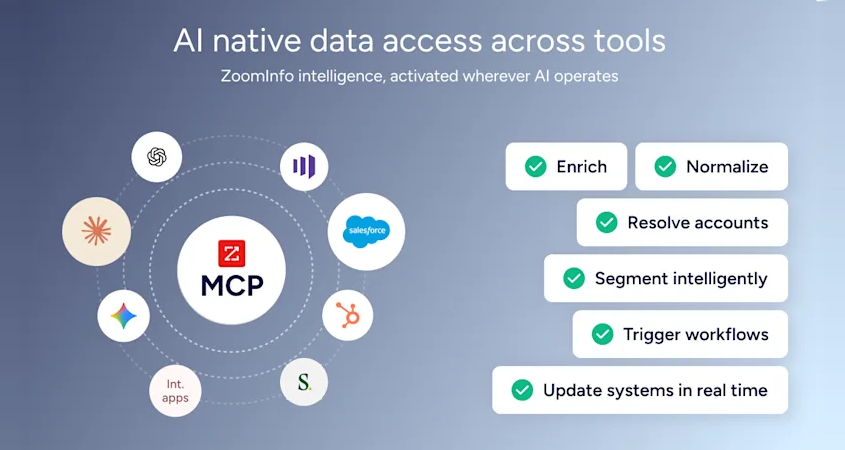
For developers building AI agents, ZoomInfo's MCP server at https://mcp.zoominfo.com/mcp exposes search, enrich, and account research as native tools for MCP-compatible assistants, currently supporting Claude and ChatGPT. The credit model carries over from the REST API.
Source: ZoomInfo
Webhooks are available via the Agents API, tied to ZoomInfo's Agent Teams system: event types cover bulk enrichment jobs completing, records changing, credit usage crossing thresholds, and new GTM signals (scoops, funding events, intent spikes) becoming available. Retry behavior and throttling are configurable per event type.
Documentation lives at docs.zoominfo.com with an interactive API reference, OAuth recipes in five languages, and an llms.txt index for AI development tools. ZoomInfo does not publish official SDKs, so you integrate over HTTP and manage the auth-and-retry layer yourself. ZoomInfo added API access to all relevant plans in 2025; API usage follows consumption-based pricing.
BDO Canada reported an 87% reduction in time spent on updates to internal data dashboards using the ZoomInfo API, with one analyst describing the integration as plug-and-play across any process. (ZoomInfo)
Final Verdict
Consensus's API delivers programmatic demo automation for teams on the Enterprise plan: DemoBoard management, demo library search, Demolytics analytics, three webhook events, and an OAuth-secured MCP server for AI agents. The MCP path is a useful access point for agent-based workflows, and the webhook payloads carry engagement data that most demo platforms only surface in a dashboard.
Where the API falls short is at the developer evaluation layer. Unpublished endpoint documentation, no public rate limits, Enterprise-only access, and no official SDKs mean a developer cannot inspect, size, or prototype against the API without first committing to a subscription. The API itself may be capable. The challenge is determining what it can do before you pay.
Choose the Consensus API if your build centers on demo automation: embedding DemoBoard workflows into your CRM, automating demo delivery based on deal stage, feeding Demolytics engagement signals into a pipeline system, or connecting AI agents to your demo library via MCP. For teams already on Consensus Enterprise, the API turns dashboard work into automated work.
Choose the ZoomInfo API if your pipeline needs the intelligence layer upstream of demo engagement: identifying who demo viewers are, what their companies look like, whether those accounts are in-market, and which stakeholders to reach before the next live demo.
The search-then-enrich pattern (search is free, enrich consumes credits) and the Copilot API's AI endpoints cover the data and reasoning that demo analytics alone cannot provide. Start with the ZoomInfo Enterprise API or explore the developer docs to see the endpoint surface directly.
A developer whose build needs neither demo automation nor B2B intelligence should look elsewhere. But a developer whose pipeline operates at both layers will find that combining Consensus's engagement signals with ZoomInfo's enrichment data creates a workflow stronger than either API alone: verify the interest through demo engagement, then invest enrichment credits only on the contacts who have already shown buying intent.
FAQ
Is the Consensus API free?
No. API access is an Enterprise plan feature and does not appear on the Starter ($600/month) or Pro ($1,250/month) tiers. Enterprise pricing is custom-quoted. There is no free trial that includes API access, no self-serve developer tier, and no published per-call pricing. The MCP server and Zapier integration use the same API credentials and require Enterprise-level access.
Does Consensus have a REST API?
Consensus describes its programmable surface as an "Open API" for custom integrations. The underlying type is not explicitly labeled in the public documentation, but all documented integration patterns (webhook payloads, Zapier triggers, MCP operations) use JSON over HTTP, consistent with REST. No GraphQL, SOAP, or gRPC endpoint is documented. ZoomInfo's API, by comparison, is explicitly documented as REST with JSON:API format responses and a versioned endpoint structure.
What events do Consensus webhooks support?
Three event types: demo_watched (fires when a DemoBoard is viewed, including forwarded shares), new_lead (fires when a viewer submits a lead capture form inside a public demo, including feature preference rankings), and demo_utm (fires on every demo view, returning only UTM parameters). Webhooks are configured per URL endpoint and deliver payloads via HTTP POST in JSON or XML. There are no webhook events for DemoBoard creation, demo library changes, or Demolytics milestone triggers.
Are there official Consensus SDKs?
No. Consensus does not publish official SDKs in any language. The knowledge base and integration documentation reference no client libraries, code samples, or packages on any registry. Developers build integrations directly over HTTP. The MCP server at mcp.goconsensus.com/mcp provides access for AI agents, and the Zapier integration (in beta) offers a no-code path to automation, but neither replaces a developer SDK.
Does Consensus publish API rate limits?
No. Consensus does not document rate limits, request quotas, or throughput constraints in any public source. Developers should confirm operational constraints directly with Consensus before committing to a production integration. ZoomInfo publishes rate limits by tier (5 to 35 requests per second, with per-hour and per-day sliding windows), includes quota headers in every API response, and provides exact backoff timing in 429 responses.
Can I use the Consensus and ZoomInfo APIs together?
Yes, and there is a practical reason to. Consensus's API and webhooks surface demo engagement signals: who watched, what they rated, how long they viewed, and which stakeholders emerged through forwarding.
ZoomInfo's API enriches those signals with verified B2B data: business email, direct dial, job title, company attributes, technographics, org chart position, and buyer intent. The pipeline pattern is straightforward: Consensus's demo_watched or new_lead webhook fires, your middleware captures the viewer's email or company name, and a ZoomInfo Enrich call returns the full contact and account profile.
The result is a demo engagement event paired with the data needed to decide what to do about it. Both platforms also offer MCP servers, so AI agents can access demo data and B2B intelligence as native tools in a single workflow. ZoomInfo Agent Teams can carry that further, running the full play from the demo signal through enrichment and outreach, with specialist agents sharing account context and acting within the approvals you set.
