
The tension behind every communications API evaluation is the same: the platform handles your calls and messages, but can you program against it enough to justify the dependency?
Dialpad's API is a REST surface at v2, with both API key and OAuth 2.0 authentication, a sandbox environment for development, and endpoints spanning voice, SMS, contacts, analytics, contact center operations, and AI agent capabilities. The developer portal is public, an interactive API reference supports live testing, and a changelog has entries through July 2025. For a unified communications platform, that is a solid developer surface.
But a communications API and a data API serve different builds.
Dialpad's API controls a communications stack: initiating calls, sending SMS, managing users and call centers, subscribing to call and agent events, and pulling AI-generated transcripts and analytics. If your build needs programmatic control over voice, messaging, and contact center workflows, those endpoints exist. But if your build needs B2B contact data, company intelligence, intent signals, org charts, or enrichment capabilities, that is an entirely different layer of the stack.
This is where ZoomInfo fits. A go-to-market platform built on 500M contacts and 100M companies, ZoomInfo's GTM Context Graph, which processes 1.5B+ data points daily, unifies that dataset with your first-party data. The Enterprise API is a REST suite covering search, enrichment, AI intelligence, and audience management, with an MCP server for AI-agent workflows. The two APIs are layers of the same pipeline, not rivals: Dialpad handles communication, ZoomInfo provides intelligence about who you are communicating with and why.
This review covers the Dialpad API first (authentication, endpoints, webhooks, SDKs, rate limits, and pricing), then covers ZoomInfo's API as the data layer that picks up where communication control stops.
Dialpad API at a Glance
Attribute | Detail |
|---|---|
API type | REST over HTTPS, JSON responses |
Authentication | API key or OAuth 2.0 (internal and third-party apps) |
Base URL | https://dialpad.com/api/v2/ |
Sandbox URL | https://sandbox.dialpad.com/api/v2/ |
Current version | v2 |
Rate limits | 20 requests/second per company (global); per-endpoint limits for calls, SMS, and contacts |
SDKs | Official Python SDK (python-dialpad); no other official SDKs |
Webhooks | Yes, Event Subscriptions with HTTP and WebSocket delivery |
Documentation | developers.dialpad.com (readme.com-hosted, interactive reference) |
Pricing / access | Bundled with Dialpad accounts; no separate API pricing tier |
Dialpad API: What Works Well & What to Plan Around
What works well | What to plan around |
|---|---|
Both API key and OAuth 2.0 auth paths cover internal and third-party use cases | Global rate limit of 20 req/sec per company is modest for high-volume integrations |
Sandbox environment for testing without affecting production data | Only one official SDK (Python); other languages require raw HTTP |
Event Subscriptions support both HTTP webhooks and WebSocket streaming | OAuth access for third-party apps requires a separate approval request |
Active changelog with entries through July 2025 signals ongoing development | Per-endpoint limits are tight: 5 calls/min per user, 100 SMS/min, 100 contacts/min |
Interactive API reference with multi-language code examples | Scope is communications control only: no contact enrichment, company data, or intelligence |
JWT-signed webhook payloads with developer-provided secrets | Webhook retry and delivery-guarantee policies are not documented |
Dialpad API: Authentication & Getting Started
API access starts with a Dialpad account. The developers page notes that developers can sign up for a free or paid version of Dialpad to build and test. Dialpad supports two authentication paths, each suited to a different integration pattern.
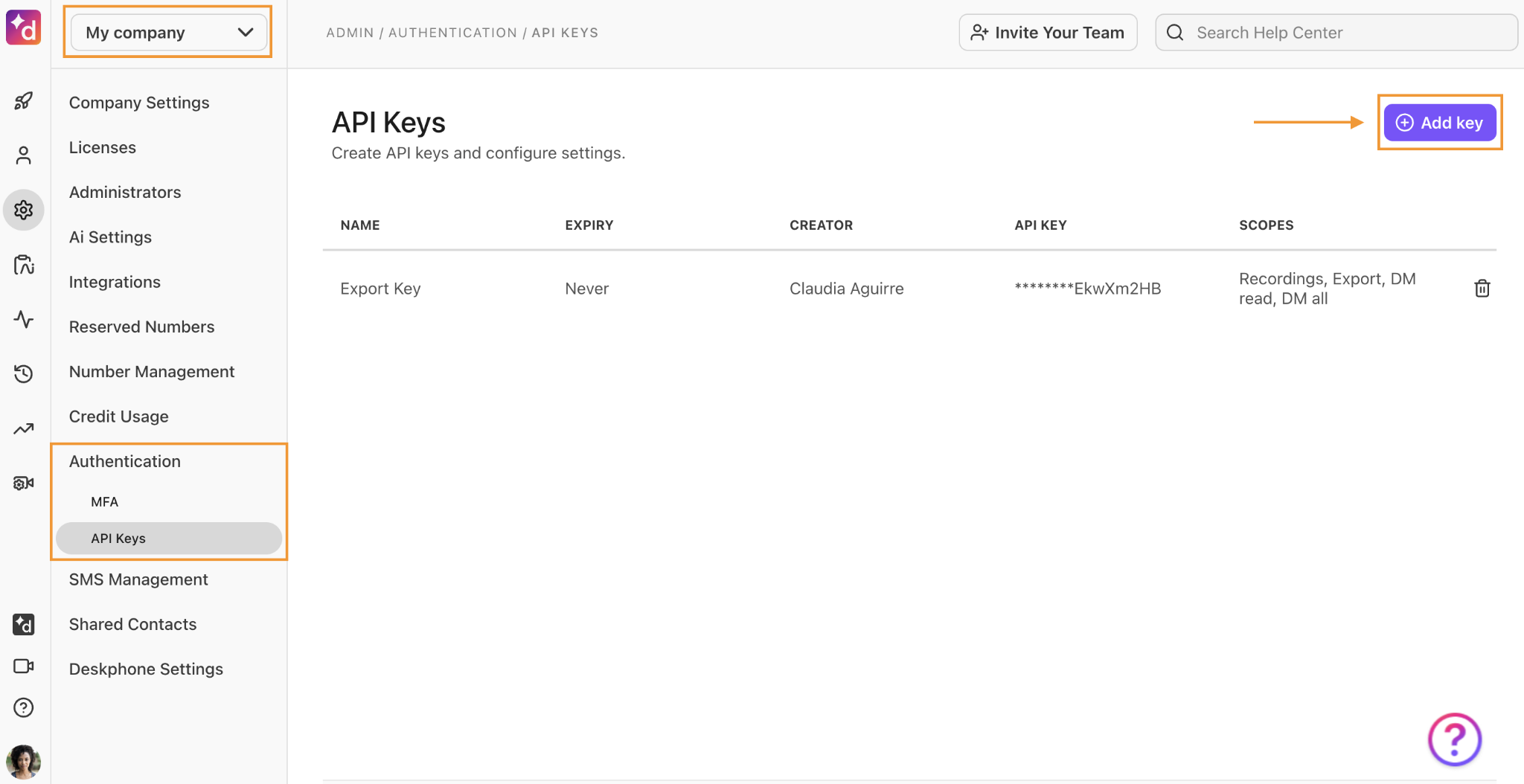
API key (internal apps): Administrators generate API keys from the Dialpad admin portal via manual API key generation. This path suits internal tooling, single-company integrations, and quick prototyping. The key is sent either as a Bearer token in the Authorization header (recommended) or as a URL query parameter, though Dialpad advises against the query parameter approach because the key can appear in server logs.
Source: Dialpad API
OAuth 2.0 (third-party apps): For apps that need to connect multiple Dialpad companies, OAuth token generation is the recommended route. OAuth access must be requested separately through a sign-up form linked from the developers page, and apps intended for the Dialpad App Marketplace require a marketplace submission after development is complete.
A basic authenticated request looks like this:
curl -X GET "https://dialpad.com/api/v2/app/settings" \
-H "Authorization: Bearer YOUR_API_KEY"
The sandbox environment at https://sandbox.dialpad.com/api/v2/ mirrors the production API surface, letting you develop and test without affecting live data. This is an advantage for teams building integrations that touch call routing or contact center operations.
One constraint to know before you start: while any Dialpad account can generate an internal API key, the minimum plan tier required for full API access versus a free trial is not stated in the documentation. If your build depends on contact center endpoints or advanced analytics, confirm your plan includes API access to those resources.
Dialpad API: Core Endpoints & Capabilities
The API is organized by resource area, covering voice/phone, SMS, user and office management, contact center operations, contacts, analytics, and AI capabilities. All endpoints return JSON and follow a /api/v2/{resource} pattern.
Phone and Voice
The phone surface gives programmatic control over Dialpad's core function: making and managing calls.
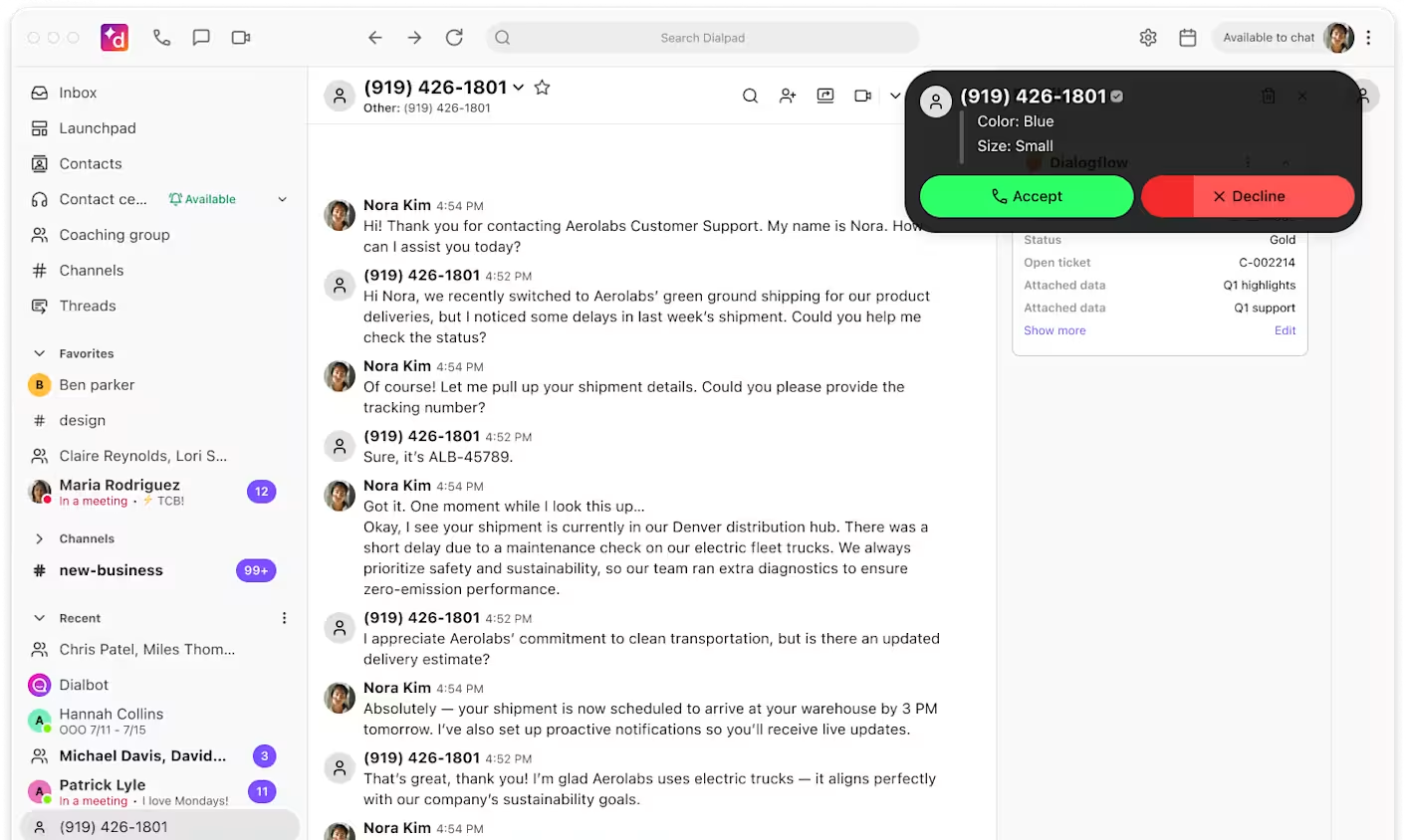
Operations: Initiate outbound calls, get call status, and embed a dialer via the Dialpad Mini Dialer (CTI), a Chrome-app dialer you can integrate in minutes. Call routing via APIs supports custom IVR configuration.

Source: Dialpad API
Per-endpoint rate limits apply: initiating calls is capped at 5 per minute per user target, callbacks to a specific call center at 100 per minute, and callbacks to a specific company at 1,000 per minute. The call router configuration endpoint has a hard limit of 1 per 5 minutes.
What you would build with this: a CRM-triggered click-to-call integration that initiates outbound calls from a deal record, or a custom IVR that routes callers based on data pulled from your internal systems.
SMS
The SMS API lets you send SMS messages from Dialpad numbers. The endpoint is rate-limited to 100 messages per minute.
What you would build with this: automated appointment reminders, follow-up sequences triggered by call outcomes, or two-way SMS workflows integrated with your support ticket system.
Office and User Management
The office management APIs handle user provisioning, number management, and plan operations. The GET /api/v2/app/settings endpoint retrieves app settings for the authenticated OAuth app or company, supporting target scoping via target_id and target_type parameters.
What you would build with this: an automated onboarding flow that provisions new hires with Dialpad numbers and assigns them to the correct department and call routing rules.
Contact Center (Dialpad Support)
The call center APIs control operator availability status, agent add/remove operations, agent listing, call center listing, and queue management. These endpoints let you manage contact center operations programmatically without touching the Dialpad dashboard.
What you would build with this: a workforce management integration that adjusts agent availability based on shift schedules, or a custom dashboard that surfaces real-time queue metrics alongside data from your other systems.
Contacts
Contact creation, management, and event tracking. Creating contacts is rate-limited to 100 per minute. Contact event subscriptions support real-time sync with external systems.
Analytics and Stats
The Stats APIs generate analytic reports programmatically, retrieving call logs, SMS logs, call recordings, and AI-generated transcriptions. This is the surface for building custom reporting, feeding call data into a BI tool, or extracting conversation intelligence for analysis outside Dialpad.
AI and Digital
Two specialized surfaces round out the API:
AI Virtual Agent API: integrates with Dialpad's AI agent for conversational automation.
Digital Engagement API: manages digital (non-voice) interactions.
Source: Dialpad
The API also exposes access control policies and custom IVR types for advanced routing configurations.
Dialpad API: Webhooks & Events
Dialpad calls its webhook system Event Subscriptions. Developers or admins create subscriptions via the API, providing a URL to an HTTP service on the public internet. Two delivery modes are available:
HTTP webhooks: Events POSTed to the subscriber's endpoint.
WebSocket subscriptions: Real-time streaming as an alternative to polling.
The WebSocket option stands out. For integrations that need sub-second event delivery (live dashboards, real-time coaching triggers, instant CRM updates), WebSocket avoids the latency and complexity of HTTP webhook infrastructure.
Supported event types:
Event Type | Use Case |
|---|---|
Track call lifecycle: started, answered, ended, transferred | |
Monitor inbound/outbound message activity | |
Sync contact changes to external systems | |
Monitor contact center agent availability in real time | |
Track administrative changes with typed action types |
Security: Dialpad delivers events in JWT format, signed with a shared secret the developer provides at subscription creation time. This lets receivers verify each payload's origin. Dialpad recommends a unique secret per subscription.
Subscription limits: Up to 100 subscriptions per subscription type across all targets under a company, and 10 per type for the company-level target itself.
Two things to plan around:
The public documentation does not describe retry policy or delivery guarantees for HTTP webhook events. Design your receiver to be idempotent regardless, and confirm the delivery contract with Dialpad if your pipeline depends on guaranteed delivery.
The subscription cap (100 per type across all targets) could become a constraint for large enterprises with many offices or departments, each needing independent event handling.
Dialpad API: SDKs, Docs & Rate Limits
SDKs & Libraries
Dialpad publishes one official SDK: a Python client library (python-dialpad), referenced from the developer welcome page. No other official SDKs (Node.js, Ruby, Java, Go, .NET) are documented.
A single-language SDK is a signal. If your stack is Python, the official library handles authentication, request formatting, and the basics. If you build in anything else, you make raw HTTP calls and own the retry logic, rate-limit backoff, and error handling yourself. The interactive API reference generates code examples in Shell, Node, Ruby, PHP, and Python, but these are documentation-level snippets, not maintained client libraries.
Documentation & Developer Experience
The developer documentation at developers.dialpad.com is hosted on the readme.com platform and organized into several areas:
Getting started guides: Authentication (API key and OAuth), rate limits, event subscriptions, call routing, SMS, CTI integration, and AI agent APIs each have dedicated pages.
Interactive API reference: Each endpoint has a "Try It!" console with multi-language code examples (Shell, Node, Ruby, PHP, Python) and live request/response testing when logged in.
Changelog: The "New Releases" changelog is maintained with entries dating back to July 2022 and through July 2025, signaling active development.
Sandbox environment: A sandbox at sandbox.dialpad.com/api/v2/ is available for testing without production impact.
An llms.txt file is published, providing an AI-readable index of all pages and endpoints in OpenAPI format. Terms of Service for API use are separately published.
Developer support is available through:
A developer discussion forum
Direct email at api@dialpad.com for platform team questions
The documentation is solid for a communications platform API. The sandbox, interactive reference, and active changelog are the signals a developer looks for. One gap: no Postman collection or downloadable OpenAPI spec is mentioned, though the llms.txt index partially fills that role.
Rate Limits & Constraints
From the rate limits page:
Global limit: 20 requests per second per company, applied across all endpoints.
Per-endpoint limits:
Endpoint | Limit |
|---|---|
Create contacts | 100/min |
Initiate calls | 5/min per user target |
Send SMS | 100/min |
Callback to specific number | 5/min |
Callback to specific call center | 100/min |
Callback to specific company | 1,000/min |
Update call router configuration | 1 per 5 minutes |
The 20 req/sec global ceiling is the primary constraint to plan around. For comparison, outreach-focused APIs like Instantly.ai offer 100 req/sec. At 20 req/sec, a high-volume integration pulling analytics across hundreds of users or syncing thousands of contacts will need careful throttling.
The call-initiation limit (5/min per user target) is tight but appropriate for a telephony API where each call consumes real-time infrastructure. The 1-per-5-minutes call router update limit is the most restrictive single endpoint: if your integration adjusts IVR routing based on external signals, those adjustments must be batched rather than applied in real time.
Dialpad reserves the right to change rate limits without notice. No Retry-After header behavior is documented for 429 responses, so build exponential backoff into your client regardless.
Dialpad API Pricing & Access Costs
Dialpad bundles API access with its platform plans rather than charging per call or per credit for API usage. The developers page indicates that developers can sign up for a free or paid version of Dialpad to build and test.
What is clear from the documentation:
There is no published per-request pricing, no API credit system, and no separate API subscription tier.
API access is included with Dialpad accounts, making the platform subscription the cost of API access.
OAuth access for third-party marketplace apps requires a separate approval request (via a form linked from the developers page).
Dialpad Connect plans start at $15 per user per month (billed annually) for the Standard plan and $25 per user per month for the Pro plan. Enterprise pricing is custom-quoted.
The practical cost consideration is not the API itself but the platform tier that determines what the API can access. Dialpad Support (contact center) and Dialpad Sell (sales) carry per-minute call rates: inbound calls start at $0.01/min and outbound at $0.02/min within the United States. International calls are charged at country-specific rates, and toll-free inbound calls to US and Canada numbers cost $0.02 per minute.
The minimum plan tier required for full API access (versus what a trial account can reach) is not stated in the developer documentation. If your build depends on contact center or AI agent endpoints, confirm your plan includes access before coding against those surfaces.
Where the Dialpad API Falls Short
These are the practical limits a developer should plan around, not criticisms of the platform. Several are scope decisions that reflect what Dialpad is (a communications platform) and what it is not.
The API controls communications. That is its scope.
There are no contact enrichment endpoints, no company or technographic data, no intent signals, no org charts, and no buyer intelligence. If your pipeline needs to know who is on the other end of a call (their title, company size, technology stack, buying signals), you need a second API. This is not a gap so much as a boundary: Dialpad's API manages how you communicate, not who you should be communicating with.
The 20 req/sec global limit is modest.
For a small team running a single integration, 20 req/sec is adequate. For an enterprise with multiple integrations sharing the same company-level quota (analytics pulls, CRM syncs, contact imports, real-time event processing), 20 req/sec requires careful orchestration. There is no documented way to request a higher limit.
One official SDK.
The Python SDK covers one language. Node.js, Java, Go, Ruby, and .NET developers build and maintain their own HTTP layer. For a platform with a public developer portal and an app marketplace, the single-SDK coverage is thin.
OAuth access requires a separate approval process.
Internal API keys are straightforward, but third-party apps that need to connect multiple Dialpad companies must request OAuth access through a form. This gating adds friction for developers building multi-tenant SaaS integrations.
Webhook delivery guarantees are undocumented.
Event Subscriptions support HTTP and WebSocket delivery with JWT-signed payloads, but the docs do not describe retry policy, failure handling, or delivery guarantees. The WebSocket option mitigates this for real-time use cases, but for HTTP webhook integrations in production pipelines, the lack of documented guarantees is a gap.
Call router updates are limited to 1 per 5 minutes.
If your integration adjusts IVR routing based on external signals (staffing changes, time-of-day rules from an external scheduler, queue-depth thresholds), the 5-minute update ceiling constrains how responsive those adjustments can be.
ZoomInfo API: The Data Layer Dialpad Does Not Cover
Dialpad's API tells your system how to place a call, route it to the right agent, and pull the transcript afterward. ZoomInfo's API tells your system who is worth calling, what company they work for, what that company's technology stack looks like, whether the account is showing buying intent, and where the contact sits in the org chart.
The two APIs operate at different layers of a go-to-market pipeline, and the gap between "control the call" and "know who to call and why" is where ZoomInfo's API fits.
Source: ZoomInfo
What It Covers: Search, Enrichment, and AI Intelligence
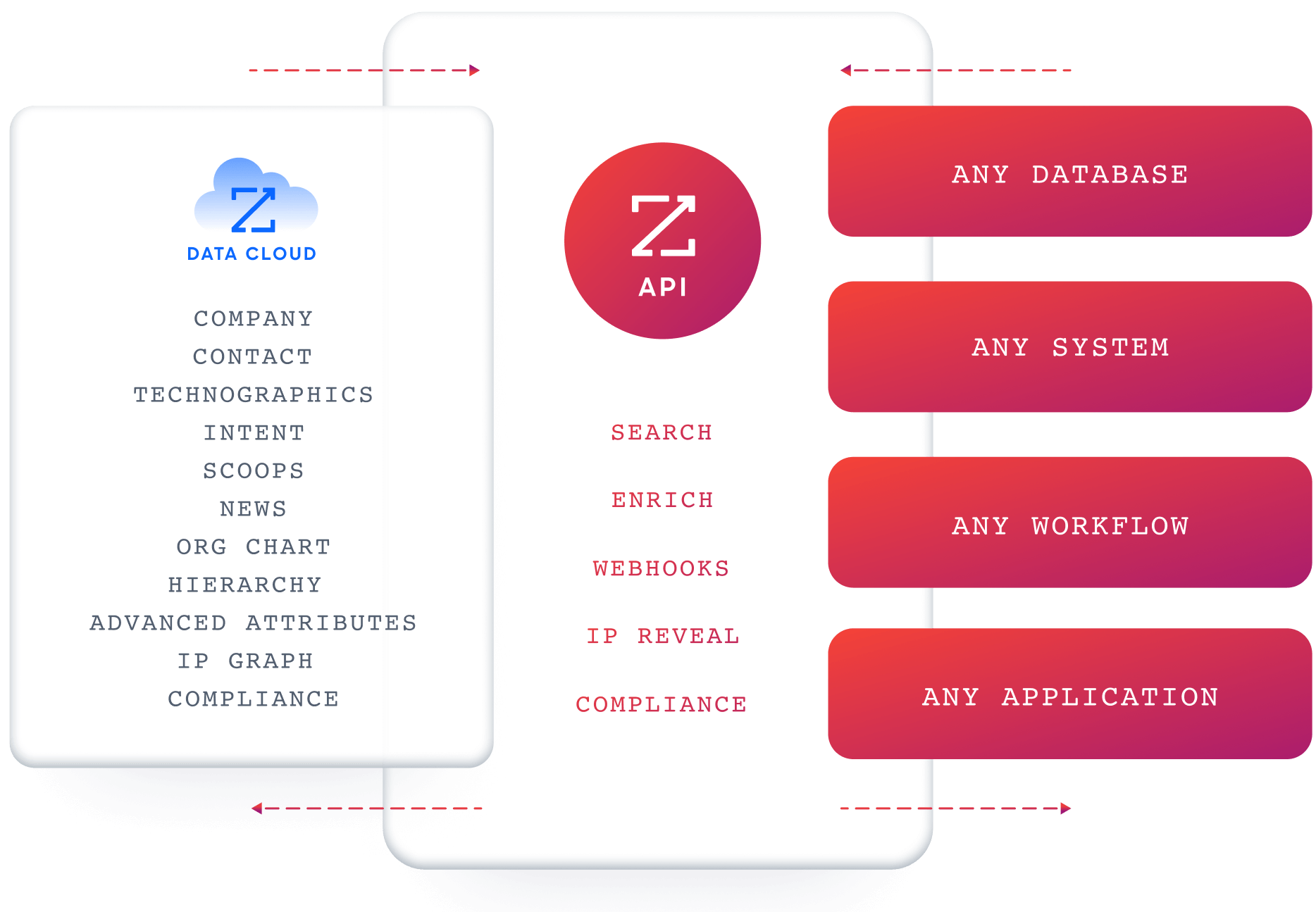
ZoomInfo's Enterprise API is a REST suite served from https://api.zoominfo.com/gtm, organized into four surface areas documented in the interactive API reference.
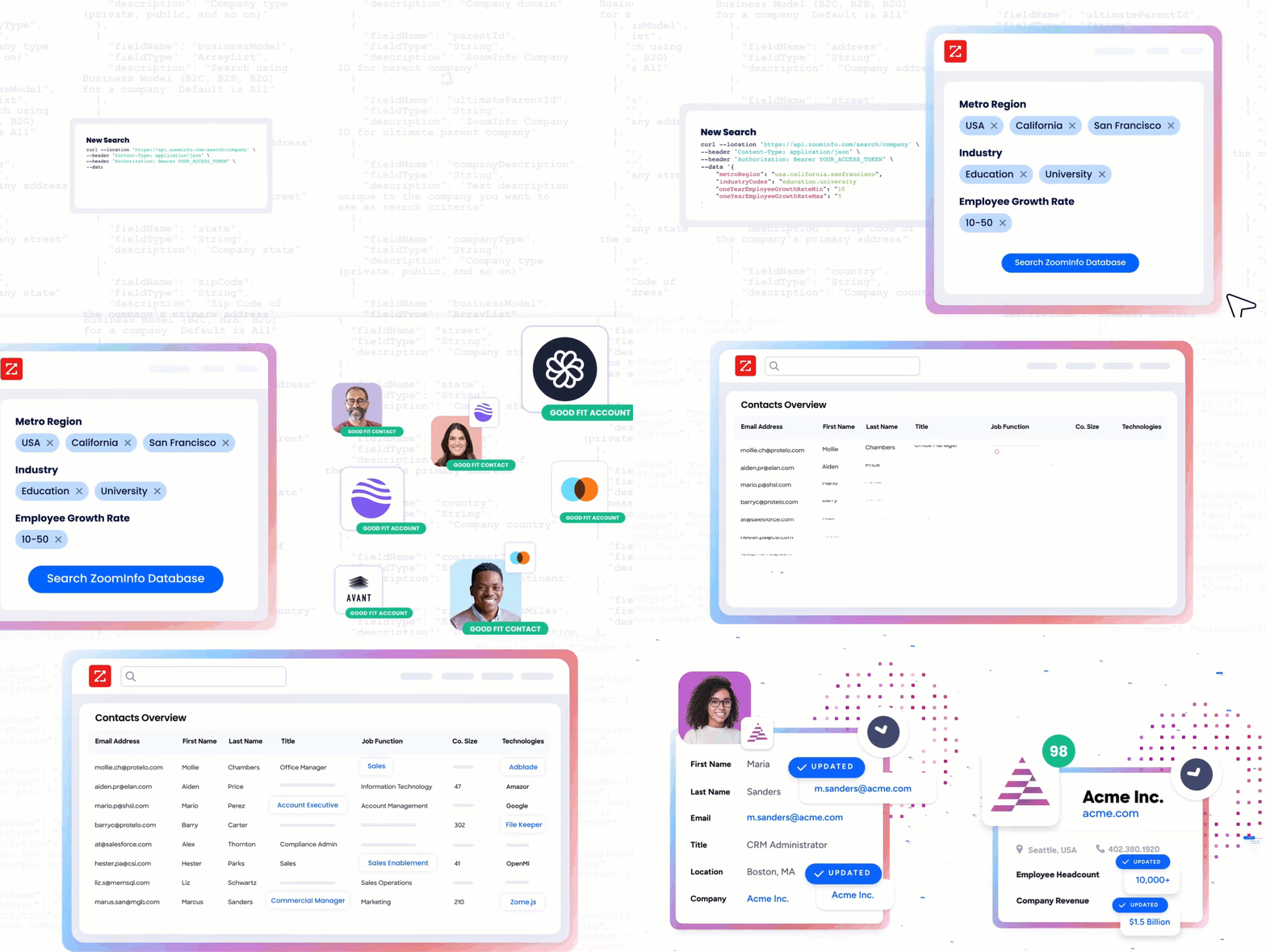
Data API (Search and Enrich) is the core surface. Search endpoints cover Contacts, Companies, Intent, News, and Scoops, returning matched records without consuming credits. Enrich endpoints unlock the full payload: business emails, direct dials, employment history, corporate hierarchy, org charts, technographics, and hashtag signals, accepting up to 25 records per call.
The search-then-enrich pattern means you filter freely, then pay only for the records you commit to. The underlying dataset spans 500M contacts, 100M companies, 135M+ verified phone numbers, and 200M+ verified business email addresses.
Copilot API provides programmatic access to the AI engine that powers GTM Workspace. Account Summary returns structured account intelligence with a free-form Q&A endpoint. Find Similar Companies identifies similar companies. Contact Recommendations returns AI-ranked buying-committee suggestions by use case (prospecting, deal acceleration, renewals). This surface requires an Enterprise API subscription.
Marketing and Platform APIs round out the suite with audience management (CRUD for advertising audiences) and two-way engagement data via the Engagements API, currently in Beta.
Source: ZoomInfo
The pairing with a communications API is direct: use ZoomInfo's search endpoints to identify contacts matching your ICP, enrich with verified direct dials and business emails, then feed those contacts into Dialpad for outbound calling with full context on who you are reaching and why.
Authentication, Rate Limits & Credits
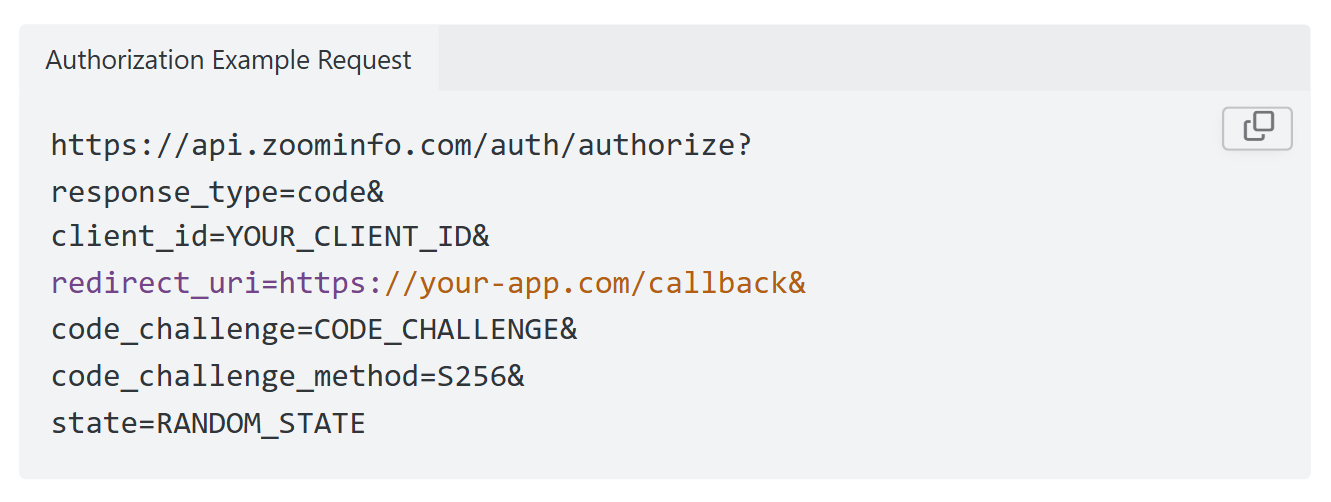
Authentication uses OAuth 2.0 with PKCE via Okta, issuing 24-hour access tokens with rotating refresh tokens. Three flows are supported: Authorization Code with PKCE (for web applications), Client Credentials (for server-to-server), and Refresh Token.
Source: ZoomInfo
Applications are registered through the ZoomInfo Developer Portal, where teams generate credentials, define scopes, and test endpoints. This model goes beyond a static API key: it supports delegated access, credential rotation, and scoped permissions.
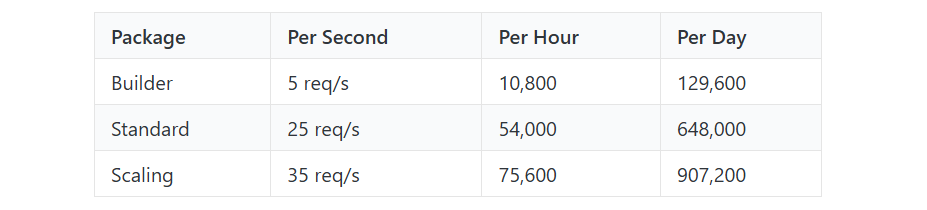
ZoomInfo publishes rate limits by tier: Builder (5 req/sec), Standard (25 req/sec), and Scaling (35 req/sec), with per-hour and per-day sliding-window limits enforced simultaneously.
Every response includes quota headers with remaining capacity, and 429 responses include a Retry-After header with exact backoff timing. Credits follow a rolling 12-month window: a record enriched for the first time consumes one credit; re-enriching the same record within the year is free.
Source: ZoomInfo
Webhooks, MCP & Developer Experience
Webhooks are available via the Agents API, tied to ZoomInfo's Agent Teams system: event types cover bulk enrichment jobs completing, records changing, credit usage crossing thresholds, and new GTM signals (scoops, funding events, intent spikes) becoming available, with retry behavior and throttling configurable per event type.
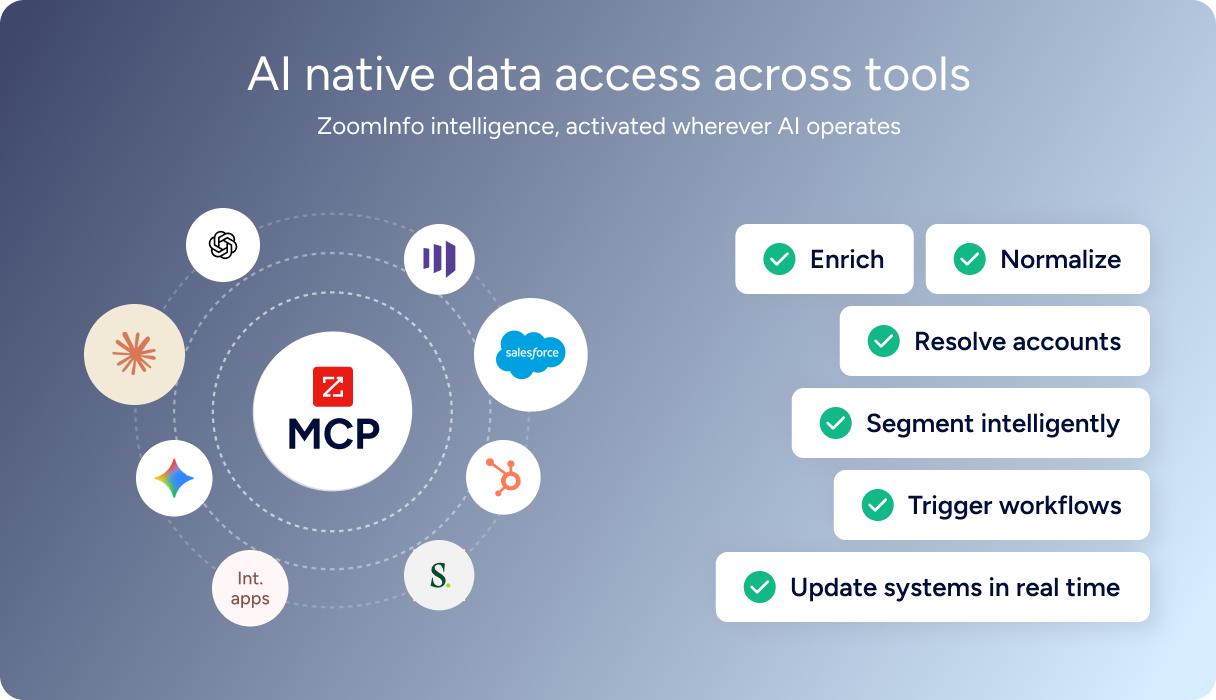
For developers building AI agents, ZoomInfo's MCP server at https://mcp.zoominfo.com/mcp exposes search, enrich, and account research as native tools for MCP-compatible assistants, currently supporting Claude and ChatGPT. The credit model carries over from the REST API.
Source: ZoomInfo
ZoomInfo does not publish official SDKs, so you integrate over HTTP and own the auth-and-retry layer yourself. The interactive API reference supports live testing, and a Docs MCP server lets AI development tools generate integration code against the API spec. Documentation is at docs.zoominfo.com.
ZoomInfo extended API access to all relevant plans in 2025, removing the prior enterprise-only gate, though consumption-based pricing remains custom-quoted. The API is one of several ways to access ZoomInfo: sellers use GTM Workspace, marketers and RevOps use GTM Studio, and developers integrate via the REST API or MCP.
BDO Canada reported an 87% reduction in time spent updating internal data dashboards using the ZoomInfo API, with one analyst describing the integration as plug-and-play across any process. (ZoomInfo)
Final Verdict
Dialpad's API is a well-documented, actively maintained surface that gives developers programmatic control over a full communications stack: voice calls, SMS, contact center operations, call routing, analytics, and AI agent capabilities.
The sandbox environment, JWT-signed webhooks with WebSocket delivery, and an active changelog dating to 2022 give a developer the signals that matter when evaluating a platform dependency. Its limits are limits of scope (communications control, not data intelligence) and scale (20 req/sec global ceiling), not of quality.
Choose the Dialpad API if your build is communications-first: automating call routing, embedding a dialer in your CRM, syncing call events and transcripts to external systems, managing contact center agent availability, or building IVR workflows that pull from your own data sources. The bundled pricing (no per-call API charges) and sandbox environment make it straightforward to prototype and ship.
Add the ZoomInfo API when the build needs to go beyond controlling calls into knowing who to call and why. Enrich contacts with verified direct dials and business emails before routing them to Dialpad for outbound, layer intent signals on top of call analytics to prioritize follow-ups, or use AI account research to prepare agents before they pick up the phone. Explore the ZoomInfo Enterprise API or start with the developer docs to see the endpoint surface for yourself.
A developer who needs neither API should know that Dialpad's API does not provide B2B data, and ZoomInfo's API does not place phone calls. If your pipeline requires both communication control and contact intelligence, the two are complementary layers.
FAQ
Is the Dialpad API free?
API access is bundled with Dialpad accounts rather than sold as a separate product. The developers page indicates you can sign up for a free or paid version of Dialpad to build and test.
However, Dialpad Support and Dialpad Sell endpoints incur per-minute call charges (starting at $0.01/min inbound and $0.02/min outbound in the US), and the minimum plan tier required for full API access is not documented. There is no published per-request pricing or API credit system.
Does Dialpad have a GraphQL API?
No. Dialpad exposes a REST API (currently at v2) that communicates over HTTPS and returns JSON responses. There is no GraphQL endpoint documented. If you need a GraphQL interface for your communications integration, you would need to wrap the REST API in your own GraphQL layer.
What is the Dialpad API rate limit?
The global rate limit is 20 requests per second per company, applied across all endpoints. Individual endpoints have additional limits: initiating calls is capped at 5 per minute per user target, sending SMS at 100 per minute, creating contacts at 100 per minute, and updating call router configuration at 1 per 5 minutes. Dialpad reserves the right to change rate limits without notice. There is no documented way to request a higher limit.
Are there official Dialpad SDKs?
Dialpad publishes one official SDK: a Python client library called python-dialpad, available on PyPI. No other official SDKs are documented. The interactive API reference generates code examples in Shell, Node, Ruby, PHP, and Python, but these are documentation-level snippets, not maintained client libraries.
Does the Dialpad API support webhooks?
Yes. Dialpad's Event Subscriptions system supports both HTTP webhooks and WebSocket streaming. Supported event types include call events, SMS events, contact events, agent status events, and change log events. Dialpad delivers payloads in JWT format, signed with a shared secret you provide at subscription creation. Subscriptions are capped at 100 per type across all targets under a company. The documentation does not describe retry policy or delivery guarantees for HTTP webhook events.
What does ZoomInfo's API add to a Dialpad build?
ZoomInfo's API adds the contact and company data layer that Dialpad's API does not cover.
Where Dialpad's API controls calls, messages, and contact center operations, ZoomInfo's API provides the data that determines who belongs in those conversations: search across 500M contacts and 100M companies, enrich with direct dials, org charts, technographics, and employment history, detect buyer intent signals, and generate AI account research and buying-committee recommendations.
The practical pairing is to use ZoomInfo's search and enrichment to identify and verify contacts, then route verified direct dials into Dialpad for outbound calling with full account context. ZoomInfo's MCP server extends the same data to AI-agent workflows, adding intelligence to any automated calling or outreach pipeline built on Dialpad.
