
Fathom's API went public recently, and for a platform that 290,000+ companies already use to record, transcribe, and summarize meetings, the question is simple: what can you actually build on it?
The Fathom Developer Hub documents a REST surface at https://api.fathom.ai/external/v1/, with TypeScript and Python SDKs, OAuth 2.0 for public integrations, webhook support, and an MCP server for AI assistants. API access is available on all plan tiers including the free plan, which is uncommon for a meeting intelligence platform. The developer docs are public, the OpenAPI spec is downloadable, and you can generate an API key and start making calls without upgrading.
But "available" and "sufficient for your build" are different questions.
Fathom's API does one thing: give you programmatic access to meeting data (recordings, transcripts, summaries, action items) captured by the Fathom platform. If you need to pull meeting intelligence into a CRM, a customer success tool, or an AI agent, the API handles that job. But if your build needs B2B intelligence beyond what happened in a meeting (who these contacts are, what companies they represent, what technology they use, whether they are researching your category), that requires a different data layer.
This is where ZoomInfo enters the picture. Its Enterprise API is a REST suite covering search, enrichment, AI intelligence, and audience management across 500M contacts and 100M companies, with an MCP server for AI-agent workflows. The two APIs are layers of the same pipeline, not rivals: Fathom captures what was said in a meeting, and ZoomInfo tells you who said it, what company they represent, and whether that account is worth pursuing.
This review covers the Fathom API in full technical depth first (authentication, endpoints, webhooks, SDKs, rate limits, and pricing), then reviews ZoomInfo's API as the intelligence layer that picks up where meeting data stops.
Fathom API at a Glance
Attribute | Detail |
|---|---|
API type | REST over HTTPS, JSON responses |
Authentication | API key via X-Api-Key header (user-scoped); OAuth 2.0 for public integrations |
Base URL | https://api.fathom.ai/external/v1/ |
Rate limits | 60 requests per 60-second window (global); 30 per 60 seconds for heavy endpoints |
SDKs | Official TypeScript and Python SDKs (both beta) |
Webhooks | Yes, new-meeting-content-ready event with HMAC SHA-256 signature verification |
MCP server | Yes, at https://api.fathom.ai/mcp for Claude and ChatGPT |
Documentation | developers.fathom.ai (Mintlify-hosted, OpenAPI spec available) |
Pricing / access | Included on all plans including free; no per-call or per-credit charges |
Fathom API: What Works Well & What to Plan Around
What works well | What to plan around |
|---|---|
API access on all plans including free, no enterprise gate | Meeting data only: no contact enrichment, company data, or intent signals |
Official TypeScript and Python SDKs with automatic pagination | 60 req/min global ceiling; heavy endpoints drop to 30 req/min |
OAuth 2.0 available for public integrations and marketplace listing | SDKs are explicitly beta; breaking changes between releases are expected |
HMAC SHA-256 webhook verification with replay-attack protection | Single webhook event type: only fires when meeting content is ready |
MCP server for AI assistants (Claude, ChatGPT) on all plans | CRM match data in API responses requires a Business plan ($25-34/user/month) |
OpenAPI spec published for Postman import and tooling | Read-only surface: no endpoints for creating, updating, or deleting meetings |
Fathom API: Authentication & Getting Started
API access starts immediately on any Fathom plan, including the free tier. There is no developer approval process, no separate API subscription, and no enterprise gate. You generate an API key from the API Access section of your Settings page and start making calls.
API keys are user-scoped: a key can only access meetings recorded by the key-holder or shared with their team. Admins can broaden access to all team members' shared meetings by configuring View permissions in the account settings.
Every request includes the API key in the X-Api-Key header:
curl "https://api.fathom.ai/external/v1/meetings" \
-H "X-Api-Key: YOUR_API_KEY"
For developers building public integrations (apps used by other Fathom users), Fathom offers OAuth 2.0 authentication. You register an OAuth app via the Developer Hub to receive client credentials, then implement the authorization flow using the SDK's OAuth helpers. OAuth apps require Fathom review before public listing and become eligible for the integration marketplace once they reach 20+ users.
The distinction matters for the type of integration you are building:
Internal tool or single-workspace integration: API key authentication is sufficient. Generate a key, pass it in the header, and you are authenticated.
Multi-tenant app or marketplace integration: OAuth 2.0 is required so each Fathom user can authorize your app against their own account without sharing API keys.
Fathom API: Core Endpoints & Capabilities
The API is organized around five resource areas, all documented at developers.fathom.ai/api-overview. The surface is read-only: you retrieve meeting data that Fathom has already captured and processed, rather than creating or managing meetings through the API.
Meetings
Endpoint: GET /external/v1/meetings
This is the primary endpoint. It returns meetings recorded by the authenticated user or shared with their team, with meeting objects containing:
Title, meeting type, URL, scheduled and recording timestamps
Transcript language and calendar invitees
recorded_by user information
Full speaker-attributed transcript (when include_transcript=true)
AI-generated summary (when include_summary=true)
Action items with assignees and playback timestamps
CRM-matched contacts, companies, and deals (Business plan required)

Source: Fathom API
You can filter by invitee email, date range, and meeting type. Pagination uses an opaque cursor (next_cursor) returned in each response; the SDKs handle cursor iteration automatically.
A separate GET /meetings/list-meeting-types endpoint returns all meeting type names configured in the organization, which you can use as filter values on the main meetings endpoint.
What you would build with this: a nightly sync that pulls new meetings into your data warehouse, a customer success tool that tracks meeting frequency and action item completion by account, or an AI agent that queries recent meetings for competitive mentions and deal risk signals.
Recordings
The recordings resource provides two endpoints for retrieving processed content:
GET /recordings/get-summary: retrieves an AI-generated meeting summary. Sending a destination_url in the request body switches to async delivery (the result is POSTed to the URL when ready); omitting it returns the data synchronously.
GET /recordings/get-transcript: retrieves the full speaker-attributed transcript, with the same sync/async behavior.

Source: Fathom API
The async delivery option is useful for pipelines where you do not want to hold a connection open, or when processing large volumes of recordings in batch.
Teams & Team Members
GET /teams/list-teams: returns teams within the account.
GET /team-members/list-team-members: returns members of a team.
These endpoints let integrations scope data access by team or route meeting data to internal systems based on team membership.
Webhooks (API-Managed)
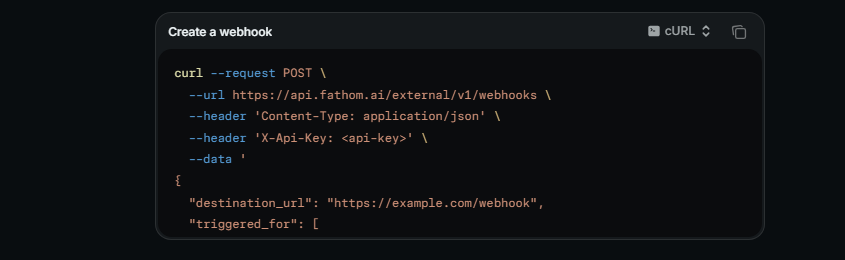
POST /webhooks: creates a webhook subscription.
DELETE /webhooks: removes a webhook subscription.

Source: Fathom API
Webhooks can also be created through the Settings UI; webhooks created via API appear there as well.
What the API Does Not Cover
The surface is scoped to meeting data retrieval. There are no endpoints for:
Creating, scheduling, or managing meetings
Uploading audio or video files for transcription
Managing user accounts or billing
Writing data back into Fathom (updating summaries, editing transcripts)
Accessing coaching scorecards, Deal View, or AI Search/Trackers
This is a read-only data extraction API, not a platform management API. If your integration needs to trigger recordings or modify meeting data inside Fathom, the API does not support that.
Fathom API: Webhooks & Events
Fathom webhooks fire after meetings finish processing and deliver the meeting payload to a registered destination URL. The sole event type is new-meeting-content-ready.
The payload can include any combination of transcript, CRM matches, summary, and action items (at least one must be enabled per webhook). Webhooks can fire for the authenticated user's own meetings, meetings shared with them, or both.
Webhooks can be created via the Settings UI or via the API.
Source: Fathom API
Signature Verification
Signature verification uses HMAC SHA-256. Fathom sends three headers with each webhook delivery:
webhook-id
webhook-timestamp
webhook-signature
The signed content is constructed as ${webhook-id}.${webhook-timestamp}.${raw-body}, HMAC'd with the Base64-decoded portion of the whsec_-prefixed webhook secret, then Base64-encoded. The timestamp must fall within 5 minutes to guard against replay attacks. The TypeScript and Python SDKs expose a verifyWebhook() helper that handles this automatically.
What to Plan Around
Two constraints matter:
One event type. The webhook system fires only on new-meeting-content-ready. There is no event for meeting started, meeting deleted, team changes, or other lifecycle events. If you need notification when a meeting begins recording, webhooks cannot provide it.
No documented retry policy. The public documentation does not describe delivery guarantees, retry behavior, or failure handling. Design your receiver to be idempotent, and consider a polling fallback for mission-critical pipelines.
What you would build with this: an integration that pushes meeting summaries and action items into your CRM, Slack, or project management tool the moment a meeting finishes processing, without polling the meetings endpoint.
Fathom API: SDKs, Docs & Rate Limits
SDKs & Libraries
Fathom publishes two official SDKs:
TypeScript SDK: installed as npm install fathom-typescript. Supports CommonJS and ES Modules. Provides type safety, async/await, tree-shakable standalone functions, and handles authentication, pagination, and error handling automatically.
Python SDK: installed as pip install fathom-python. Requires Python 3.9+. Built on Pydantic for model validation and supports both synchronous and async operations. Also installable via poetry and uv.

Source: Fathom API
Both SDKs are explicitly beta. Fathom recommends pinning to a specific version to avoid breaking changes between releases. A breaking changes log is maintained for both SDKs.
Two official SDKs covering TypeScript and Python is solid for a recently launched API. The beta status is the signal to watch: if your production system depends on the SDK, pin your version and check the breaking changes log before upgrading.
Documentation & Developer Experience
The Developer Hub is a Mintlify-hosted site with sections covering guides, API reference, SDK docs, MCP setup, and a gallery of integrations built by partners (including Pylon and Twine).
Key documentation features:
API reference: endpoint-level pages with request/response examples in cURL, Python, and TypeScript
OpenAPI specification: published at /api-reference/openapi.yaml, enabling Postman import and interactive tooling
SDK docs: dedicated pages for authentication, filtering, pagination, error handling, advanced configuration, and OAuth
llms.txt index: available at developers.fathom.ai/llms.txt for AI development tools
MCP server documentation: setup guides for connecting Fathom to Claude and ChatGPT
Developer support is available via help@fathom.video. No public changelog, community forum, or developer Slack channel is linked from the developer hub. The missing changelog is the most notable gap: when the API surface changes, you discover it by testing or checking the SDK breaking changes log, not by reading a centralized version history.
Rate Limits & Constraints
Two rate-limiting tiers apply:
Global limit: 60 requests per 60-second window, across all endpoints.
Heavy requests limit: 30 requests per 60-second window. During high-traffic periods, this may drop to 5 per 60 seconds. Heavy requests include all endpoints under /recordings and any /meetings request that sets include_summary or include_transcript to true.
Rate-limited responses return HTTP 429. Every such response includes three headers: RateLimit-Limit (maximum requests in the current window), RateLimit-Remaining (requests left), and RateLimit-Reset (time remaining in the window).
These limits are modest. At 60 requests per minute globally (and 30 for the endpoints you will call most often), a pipeline syncing hundreds of meetings needs careful throttling. Higher rate limits are not offered.
For perspective: an integration syncing 500 meetings with full transcripts and summaries (two heavy requests per meeting) would take roughly 33 minutes at the 30 req/min heavy limit, assuming no other API calls. For large teams, this makes the webhook approach (let Fathom push data to you as it becomes ready) far more practical than batch polling.
Fathom API Pricing & Access Costs
Fathom takes the simplest approach to API pricing: access is included on all plan tiers, including the free plan, with no per-call charges, no credit system, and no metered pricing.
What each plan tier means for API access:
Free ($0): API key generation and full endpoint access. Basic summaries in API responses. CRM match data (contacts, companies, deals) is not available.
Team ($15/user/month annual, $19/month monthly, 2-user minimum): Unlimited AI features, public API access, and SSO. CRM syncs are still limited to 3 users per domain.
Business ($25/user/month annual, $34/month monthly, 2-user minimum): CRM field sync with unlimited users, which means CRM match data (contacts, deals, companies in crm_matches) appears in API responses. Custom data retention policies.
The practical cost constraint is not the API but the features behind the data. If your integration needs CRM-matched contact and deal information in the meeting payload, you need a Business plan. If you only need transcripts, summaries, and action items, the free plan or Team plan covers it.
No enterprise or custom API pricing tier is published. No overage charges, rate-limit upgrades, or premium API tiers are documented.
Where the Fathom API Falls Short
These are practical limits a developer should plan around, not criticisms of a recently launched API. Several reflect scope decisions about what Fathom is (a meeting intelligence platform) and what its API exposes.
The API surfaces meeting data. That is all it does.
There is no contact enrichment, no company data, no technographic lookup, no intent signals, no org-chart traversal. If your pipeline needs to take a meeting attendee's email and pull their title, company size, technology stack, and buying intent, you need a second API.
This is the biggest constraint for developers building data pipelines where meeting intelligence is one input in a larger enrichment or scoring workflow.
Read-only surface.
You can retrieve meetings, transcripts, summaries, and action items. You cannot create meetings, trigger recordings, update summaries, or write data back into Fathom. If your workflow requires bidirectional sync, the API does not support that.
Rate limits are tight.
The 60 req/min global ceiling and 30 req/min heavy-endpoint ceiling are low for high-volume integrations. Higher limits are not available, even on paid plans. For teams with large meeting volumes, webhook-driven architectures become essential rather than optional.
One webhook event type.
The new-meeting-content-ready event covers the most common use case, but there is no event for meeting started, meeting deleted, team membership changes, or recording failures. Event-driven architectures beyond "meeting finished processing" require polling.
SDKs are beta.
Both the TypeScript and Python SDKs carry a beta label, with breaking changes expected between releases. This is honest (better than unstated instability), but it means production integrations must pin versions and monitor the breaking changes log.
No public changelog for the API itself.
The SDK breaking changes are documented, but the API surface has no centralized changelog or versioning page. When endpoints change behavior, the discovery path is unclear.
CRM data is gated behind the Business plan.
The crm_matches field in meeting responses (contacts, companies, deals matched from your CRM) requires a Business plan at $25-34/user/month. For integrations that need to connect meeting data to CRM records programmatically, this is the tier that matters.
ZoomInfo API: The Intelligence Layer Beyond Meeting Data
Fathom's API tells you what happened in a meeting: who was on the call, what was said, what actions were agreed to. ZoomInfo answers the next set of questions through its API: who those people are, what companies they work for, what technology those companies use, whether they are researching your category, and where they sit in the org chart.
The two APIs operate at different layers. A developer building a customer intelligence pipeline would use Fathom's API to capture meeting context and ZoomInfo's API to enrich every participant with the data that turns a name and email into a complete account picture.
Source: ZoomInfo
What the API Covers
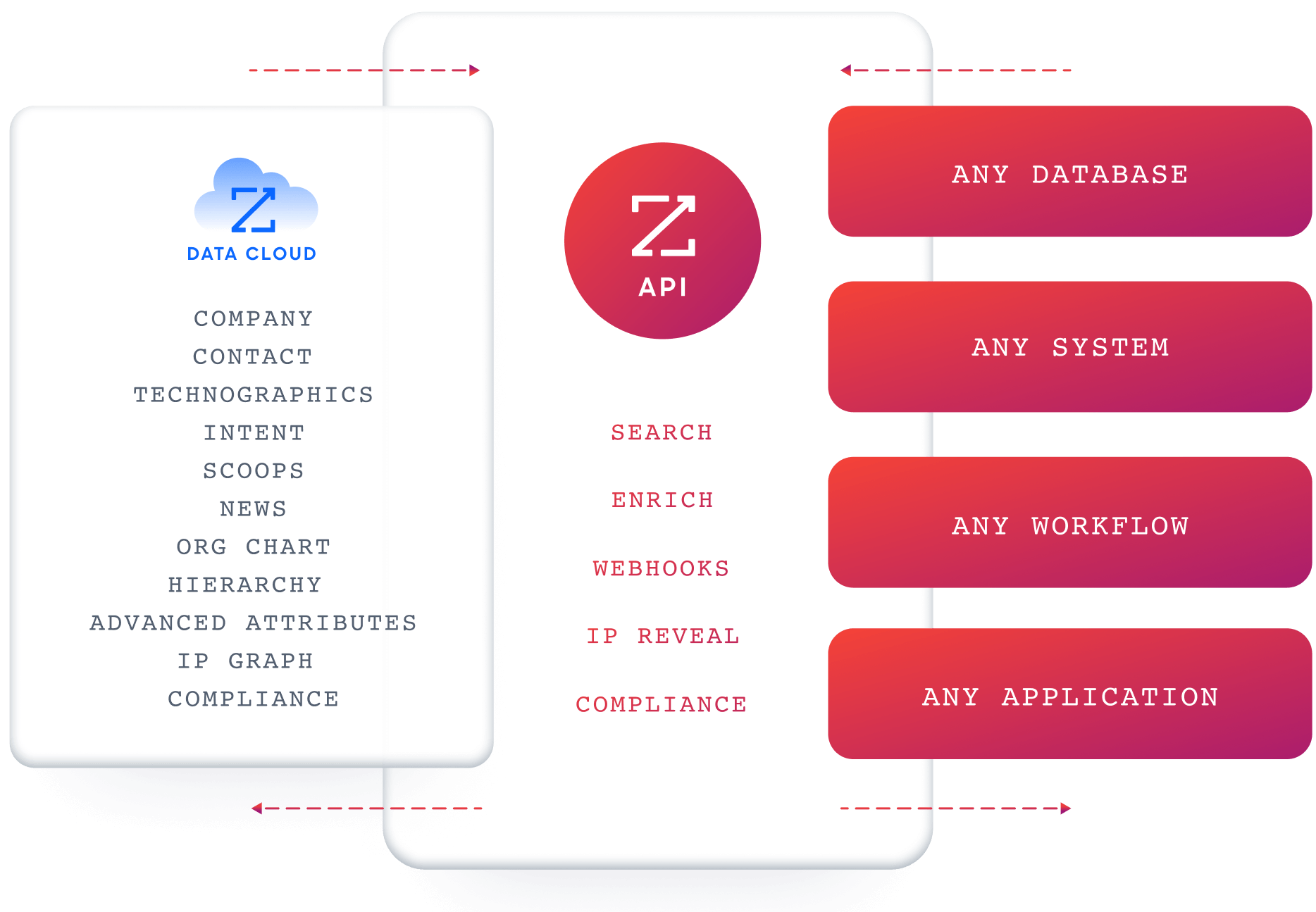
ZoomInfo's Enterprise API is a REST suite served from https://api.zoominfo.com/gtm, organized into four areas documented in the interactive API reference:
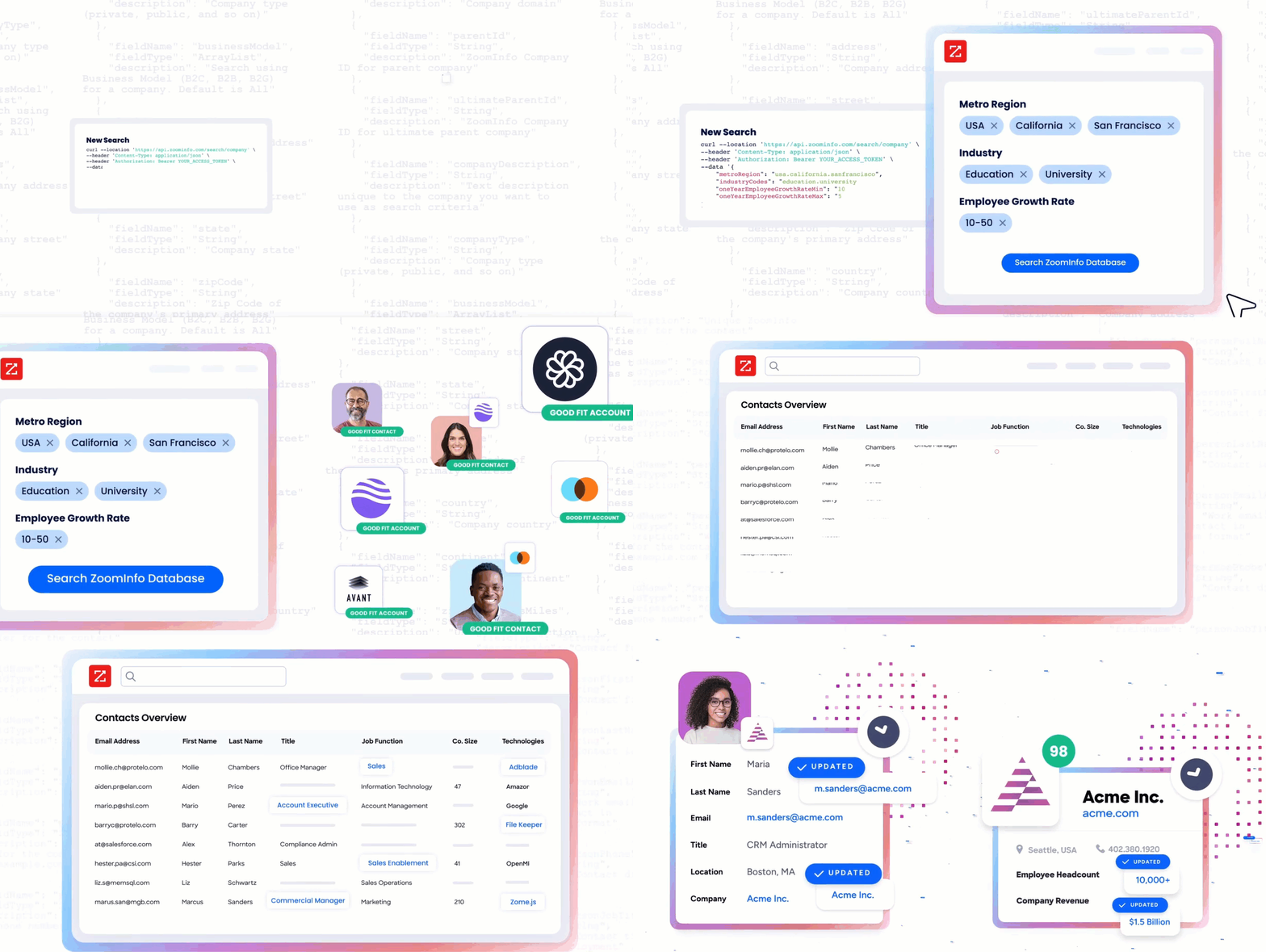
Data API (Search & Enrich): Search endpoints cover Contacts, Companies, Intent, News, and Scoops, returning matched records without consuming credits. Enrich endpoints unlock the full payload: business emails, direct dials, employment history, corporate hierarchy, org charts, technographics, and hashtag signals, up to 25 records per call. The underlying dataset spans 500M contacts, 100M companies, 135M+ verified phone numbers, and 200M+ verified business email addresses.
Copilot API (AI Intelligence): Part of GTM Workspace, these endpoints are powered by the GTM Context Graph, an intelligence layer that processes 1.5B+ data points daily by combining ZoomInfo's B2B data with your first-party signals. Account Summary returns structured account intelligence with a free-form Q&A endpoint. Find Similar Companies performs lookalike expansion. Contact Recommendations returns AI-ranked buying-committee suggestions by motion (prospecting, deal acceleration, renewals).
Marketing API: CRUD endpoints for programmatic audience management.
Platform API (Engagements, Beta): Bidirectional engagement data via the Engagements API.
Source: ZoomInfo
The pairing with a meeting intelligence API is direct: capture meeting transcripts and action items with Fathom, extract participant emails, then use ZoomInfo's search and enrich endpoints to build full profiles of every meeting attendee. Search is free (no credits consumed); enrichment costs one credit per new record within a rolling 12-month window.
Authentication & Access
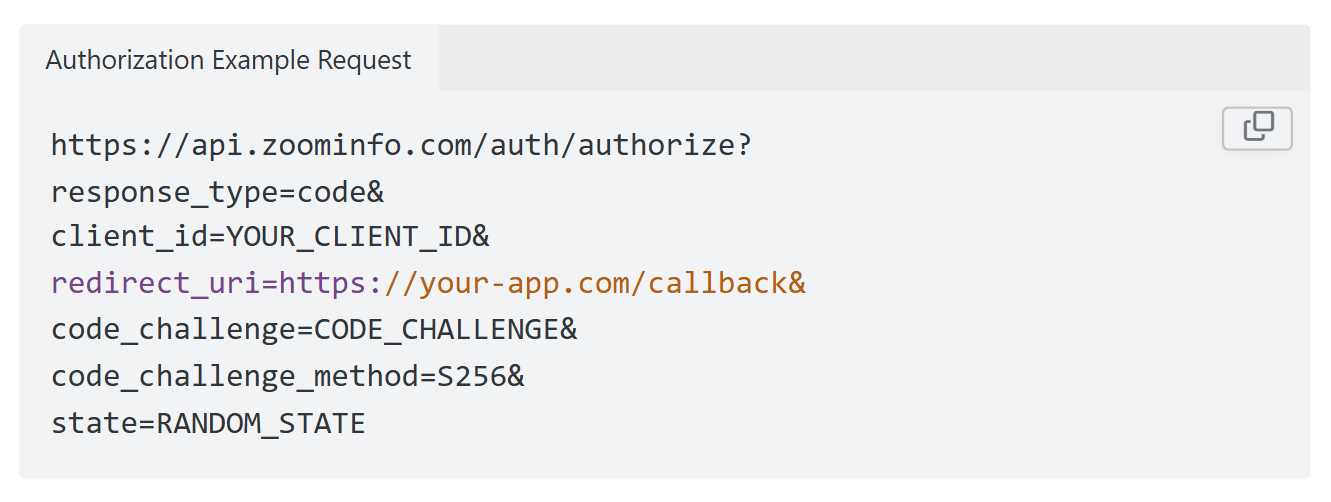
ZoomInfo uses OAuth 2.0 with PKCE via Okta, supporting three flows: Authorization Code with PKCE (web applications), Client Credentials (server-to-server), and Refresh Token. Access tokens are 24-hour Bearer tokens with rotating refresh tokens. Applications are registered through the ZoomInfo Developer Portal, where teams generate credentials, define scopes, and test endpoints.
This is a more mature authentication model than static API keys. OAuth 2.0 supports delegated access, credential rotation, and scoped permissions, which matters for enterprise integrations and multi-tenant applications.
Source: ZoomInfo
Rate Limits, Credits & Developer Experience
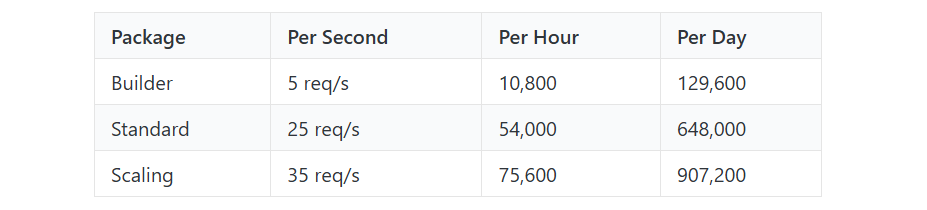
Rate limits are published by tier: Builder (5 req/sec), Standard (25 req/sec), and Scaling (35 req/sec), with per-hour and per-day sliding-window limits enforced simultaneously. Every response includes quota headers with remaining capacity, and 429 responses include a Retry-After header with exact backoff timing. At 25 req/sec on the Standard tier, ZoomInfo's throughput ceiling is roughly 25x Fathom's per-second capacity.
Source: ZoomInfo
Credits follow a rolling 12-month window: a record enriched for the first time consumes one credit; re-enriching the same record within the year is free. Search and lookup operations do not consume credits.
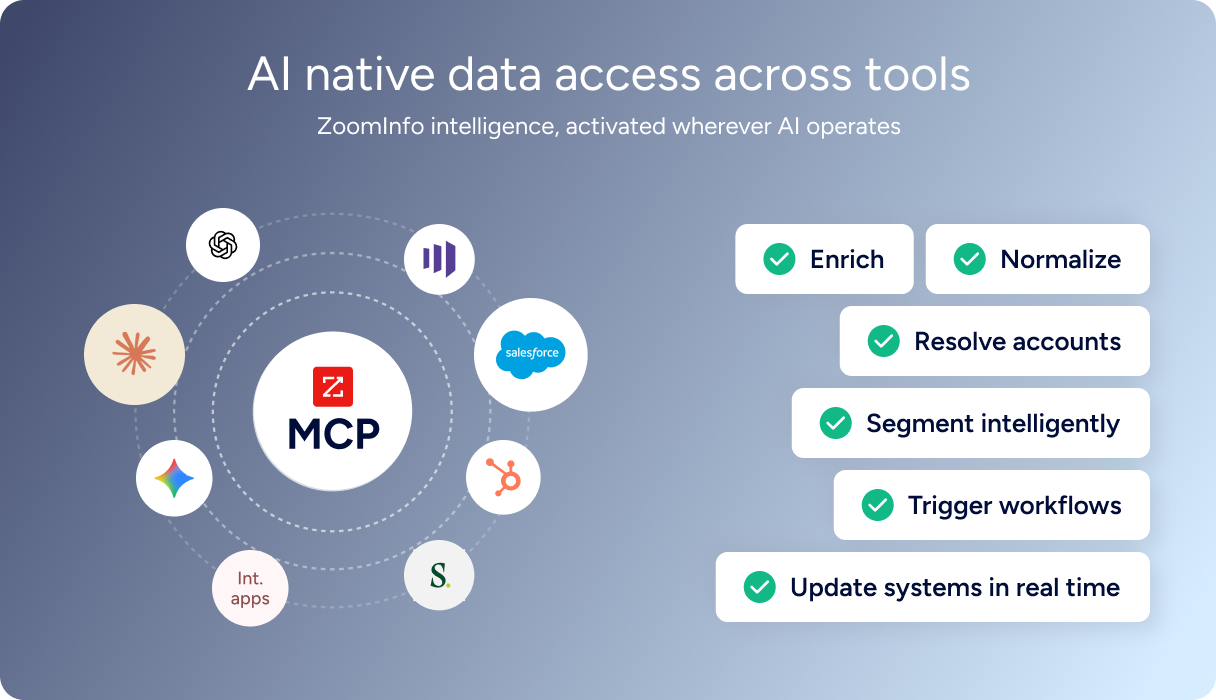
For developers building AI agents, ZoomInfo's MCP server at https://mcp.zoominfo.com/mcp exposes search, enrich, and account research as native tools for MCP-compatible assistants, currently supporting Claude and ChatGPT. Documentation lives at docs.zoominfo.com with an interactive API reference and an llms.txt index for AI development tools.
Source: ZoomInfo
ZoomInfo does not publish official SDKs either, so both platforms require direct HTTP integration for REST access. ZoomInfo uses consumption-based pricing with API access included on all relevant plans.
BDO Canada reported an 87% reduction in time spent updating internal data dashboards using the ZoomInfo API, with one analyst describing the integration as plug-and-play across any process. (ZoomInfo)
Final Verdict
Fathom's API is a focused, well-documented surface that gives developers programmatic access to meeting intelligence: transcripts, summaries, action items, and CRM-matched data. Free-tier access, official TypeScript and Python SDKs, HMAC-signed webhooks, an MCP server, and a published OpenAPI spec make it straightforward to evaluate and integrate.
For a recently launched API, the developer experience is strong. Its limits are limits of scope and maturity (tight rate limits, one webhook event, beta SDKs), not of quality.
Choose the Fathom API if your integration is meeting-data-first: syncing transcripts and summaries into a data warehouse, pushing action items into a project management tool, feeding meeting context into an AI agent, or building a customer success dashboard that tracks conversation history across accounts. Free-tier access and webhook-driven architecture make it a low-cost entry point for any pipeline that starts with "what happened in the meeting."
Choose the ZoomInfo API when the build needs to go beyond what was said in a meeting into who these people are, what companies they represent, and whether those accounts are worth pursuing. Capture meeting context with Fathom, then enrich every participant with ZoomInfo's contact, company, and intent data. The pattern turns meeting notes into actionable intelligence.
Ready to add the intelligence layer? Start with the ZoomInfo Enterprise API or explore the developer docs to see the endpoint surface for yourself.
FAQ
Is the Fathom API free?
API access is included on all Fathom plans, including the free plan, with no per-call charges or credit system. You generate an API key from your Settings page and begin making calls immediately. The distinction between plans is feature access in the responses: CRM match data (contacts, companies, deals) requires a Business plan at $25-34/user/month, while transcripts, summaries, and action items are available on all tiers.
Does Fathom have a GraphQL API?
No. Fathom exposes a REST API (versioned at v1) that communicates over HTTPS and returns JSON responses. There is no GraphQL endpoint. If you need a GraphQL interface for meeting data, you would need to build a wrapper layer on top of the REST API.
What is the Fathom API rate limit?
The global limit is 60 requests per 60-second window across all endpoints. A stricter "heavy requests" limit of 30 requests per 60 seconds applies to all /recordings endpoints and any /meetings request with include_summary or include_transcript set to true. During high-traffic periods, the heavy limit may drop to 5 per 60 seconds. Higher rate limits are not available on any plan.
Are there official Fathom SDKs?
Yes. Fathom publishes official SDKs for TypeScript (installed via npm install fathom-typescript) and Python (installed via pip install fathom-python). Both are beta, with breaking changes expected between releases. Fathom recommends pinning to a specific version for production use and monitoring the breaking changes log before upgrading.
Does the Fathom API support webhooks?
Yes, with one event type: new-meeting-content-ready, which fires after a meeting finishes processing. The payload can include any combination of transcript, CRM matches, summary, and action items. Webhooks use HMAC SHA-256 signature verification with replay-attack protection (5-minute timestamp window). Webhooks can fire for your own meetings, meetings shared with you, or both. There are no webhook events for meeting started, deleted, or other lifecycle changes.
Can I use the Fathom and ZoomInfo APIs together?
Yes, and there is a practical architecture for doing so.
Fathom's webhook fires when a meeting finishes processing, delivering participant emails, the full transcript, and AI-generated action items. Use ZoomInfo's search endpoints (free, no credits consumed) to match those participant emails to contact and company records, then enrich the matches to pull direct dials, org charts, technographics, and intent signals.
The result is a pipeline where every meeting automatically produces enriched contact profiles, account intelligence, and deal context, not just a transcript. The two APIs use different authentication models (API key vs. OAuth 2.0) and different pricing structures (free-tier access vs. consumption-based pricing), so plan the integration layer to handle both.
