

Folderly occupies a specific niche in B2B outreach: it sits between your sending infrastructure and your recipients' inboxes, working to make sure your emails arrive. Founded by the team behind Belkins (a lead generation agency that managed over 1,000 client mailboxes), Folderly was built from direct experience with deliverability problems at scale.
To write this Folderly review, we analyzed it extensively. We believe it's the right choice if:
You're running cold email outreach and emails are landing in spam
You need to diagnose specific deliverability problems across Gmail and Outlook
You want continuous monitoring with alerts when placement drops
You manage multiple sending mailboxes and need centralized visibility
You require SOC 2 and ISO 27001 compliance for handing over mailbox credentials
Folderly might not be the best choice if:
You're a solo operator who can't justify the per-mailbox pricing
Your recipient lists skew heavily toward Yahoo, Zoho, or iCloud (outside Folderly's current seed list)
You need a native outreach sequencer, not just deliverability infrastructure
You want a public API to integrate deliverability checks into custom workflows (planned but not yet available)
You're looking for a single platform that handles both finding prospects and ensuring your emails reach them
On that last point: Folderly solves the delivery problem, but it doesn't help you find who to contact or what to say. That's a different layer of the outreach stack, one where ZoomInfo operates.
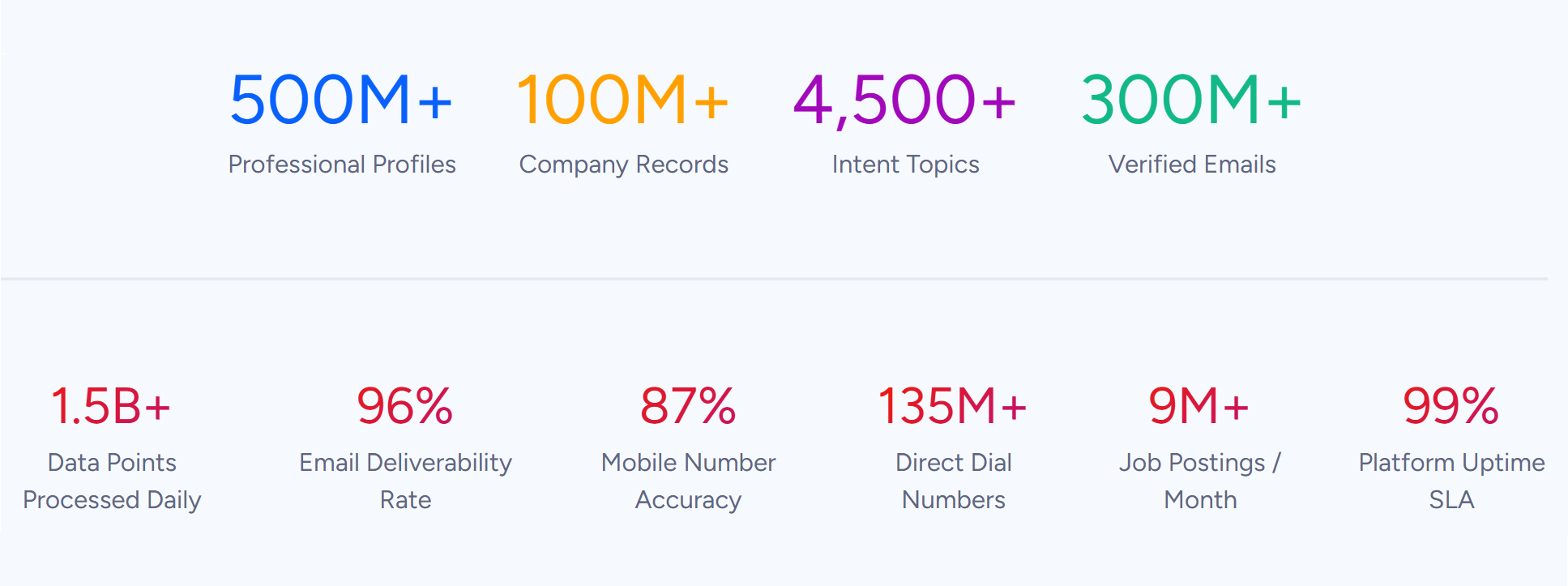
As a B2B intelligence platform built on 500M contacts, 100M companies, 135M+ verified phone numbers, and 200M+ verified business email addresses, ZoomInfo provides the data and targeting that determine whether your outreach is worth delivering at all. Folderly makes sure emails land; ZoomInfo makes sure they go to the right people with the right message.
We've included a look at how ZoomInfo fits into the outreach workflow later in this review. If you're already confident in your deliverability and need better prospecting intelligence, you can explore ZoomInfo's free trial here.
What is Folderly?
Folderly is an email deliverability platform founded in 2019 by Vladislav Podoliako and Michael Maximoff, who had co-founded Belkins (a B2B lead generation agency) in 2017. While running Belkins, they managed over 1,000 mailboxes for clients and saw firsthand what happens when deliverability degrades: open rates collapse, reply rates crater, and pipeline dries up.
Source: Folderly
Their diagnosis: content quality and DNS settings are the two primary factors governing email deliverability, and no existing tool addressed both at once. Folderly launched in November 2020 and hit $1.56M ARR within nine months, bootstrapped with under $10,000 in initial capital. By 18 months post-launch, the company had crossed $3M in revenue.
In December 2022, Folderly was selected as one of 25 recipients of Google's Ukraine Support Fund, which provided equity-free grants to Ukrainian-founded tech startups.
The platform now includes four products: Folderly Boost for daily sender reputation maintenance, Inbox Insights for pre-send placement testing, Pulse for real-time spam monitoring, and EmailGen AI for cold email sequence generation. The target buyer is B2B: sales teams doing cold outreach, agencies managing deliverability across client mailboxes, and marketing ops teams protecting domain reputation.
Folderly Pros & Cons
Pros | Cons |
|---|---|
Complete deliverability suite (warmup, testing, monitoring, content) | Per-mailbox pricing adds up at scale ($96/mailbox/month annual) |
Surfaces specific Gmail and Outlook spam reasons, not just placement data | Inbox placement testing limited to Gmail, Google Workspace, Outlook, and Microsoft 365 |
Free Pulse monitoring tool with real-time alerts | No public API for the core platform (planned) |
SOC 2 and ISO 27001 certified | Template sync with outreach tools is manual (automated sync planned) |
Strong review scores: 4.8/5 on G2, 4.9/5 on Capterra | No warm-up send-time controls (can't restrict to business hours) |
Expert consulting service for complex deliverability problems | Monthly pricing not publicly listed; requires demo request |
EmailGen AI included as a companion tool with a free tier | No native integrations with cold outreach sequencers like Instantly or Smartlead |
Folderly Review: How It Works & Key Features
Folderly Boost: Daily sender reputation maintenance with cause-and-effect diagnostics.
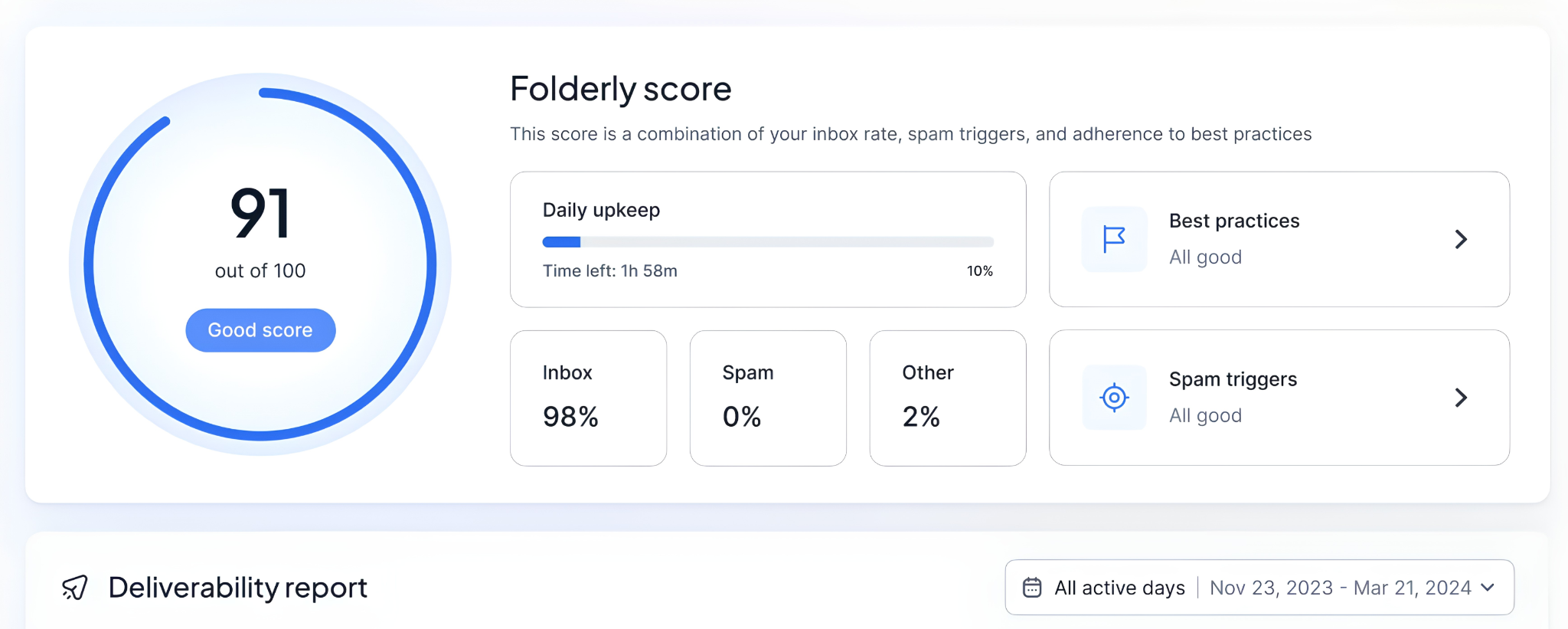
Folderly Boost is the core product. It runs daily automated monitoring of inbox placement, identifies the technical and content triggers that caused spam flags, and provides step-by-step resolution guidance.
Setup starts with a single-click OAuth connection for Google Workspace and Outlook. Users select their ESP, authenticate, attach an email template (the same one used in live campaigns), and click "Launch Folderly." The platform then runs daily, with the first Folderly Score visible within a few hours.
From that point, Boost runs three processes continuously:
Placement testing sends the connected template through major email providers and reports where emails land: primary inbox, spam, or promotions folder.
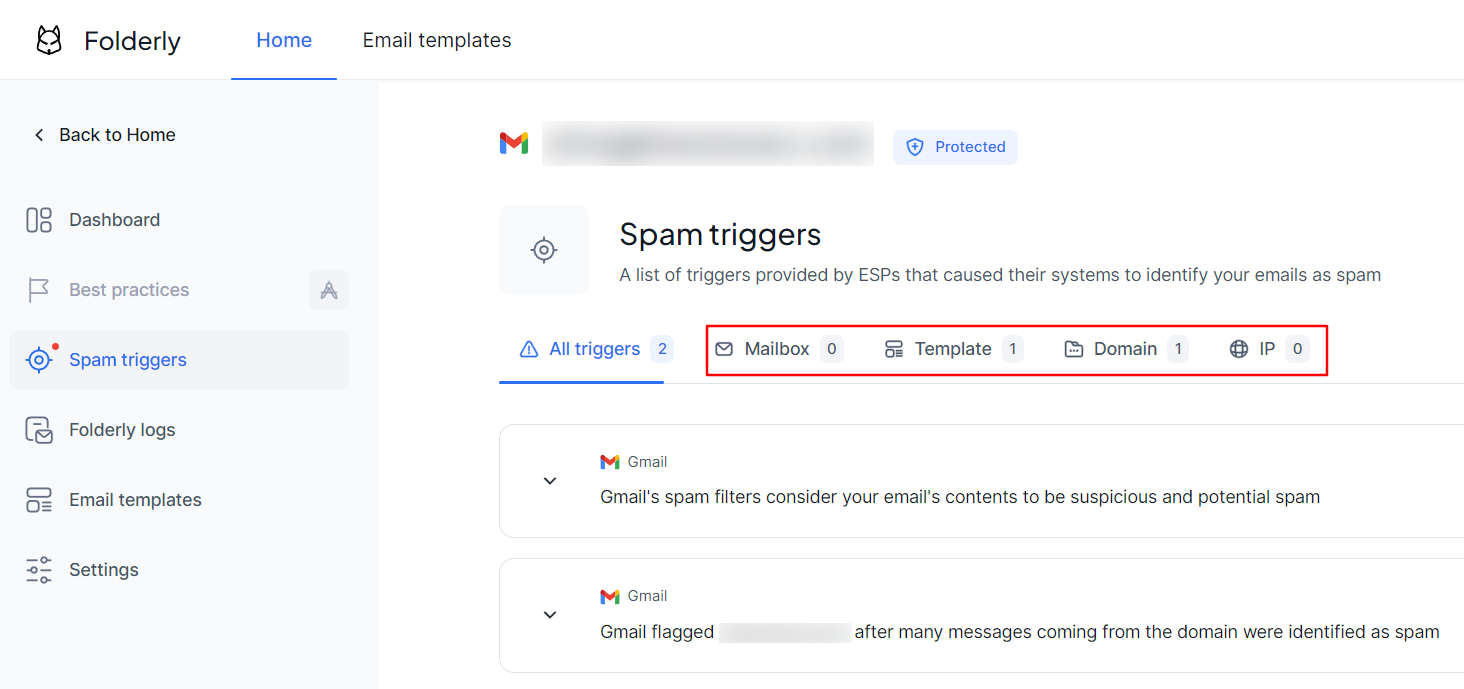
Spam trigger detection captures the actual message from the ESP when an email is flagged. Instead of inferring why an email went to spam from general rules, Folderly surfaces the verbatim reason Gmail or Outlook gave, along with the affected templates and a resolution checklist. Triggers fall into four types: Mailbox, Template, Domain, and IP.
Source: Folderly
Best practices auditing checks the account against a library of deliverability rules covering DNS configuration, content guidelines, and sending behavior. Issues surface as prioritized tasks, labeled "due" or "critical," with estimated completion times and step-by-step fix instructions on the Tasks page.
The Folderly Score aggregates these three pillars (Best Practices compliance at 50%, Gmail Spam Triggers at 25%, Outlook Spam Triggers at 25%) into a single 0-100 index. The dashboard displays this score as a timeline, with per-mailbox breakdowns and inbox rate trends.
One detail worth noting: Folderly's automated testing uses the same template the sender uses in real campaigns, not generic warmup emails. The logic is that spam filters learn to trust the actual content being sent, making the warmup signals more transferable to live sending.
Inbox Insights: Pre-send placement testing across major ESPs.
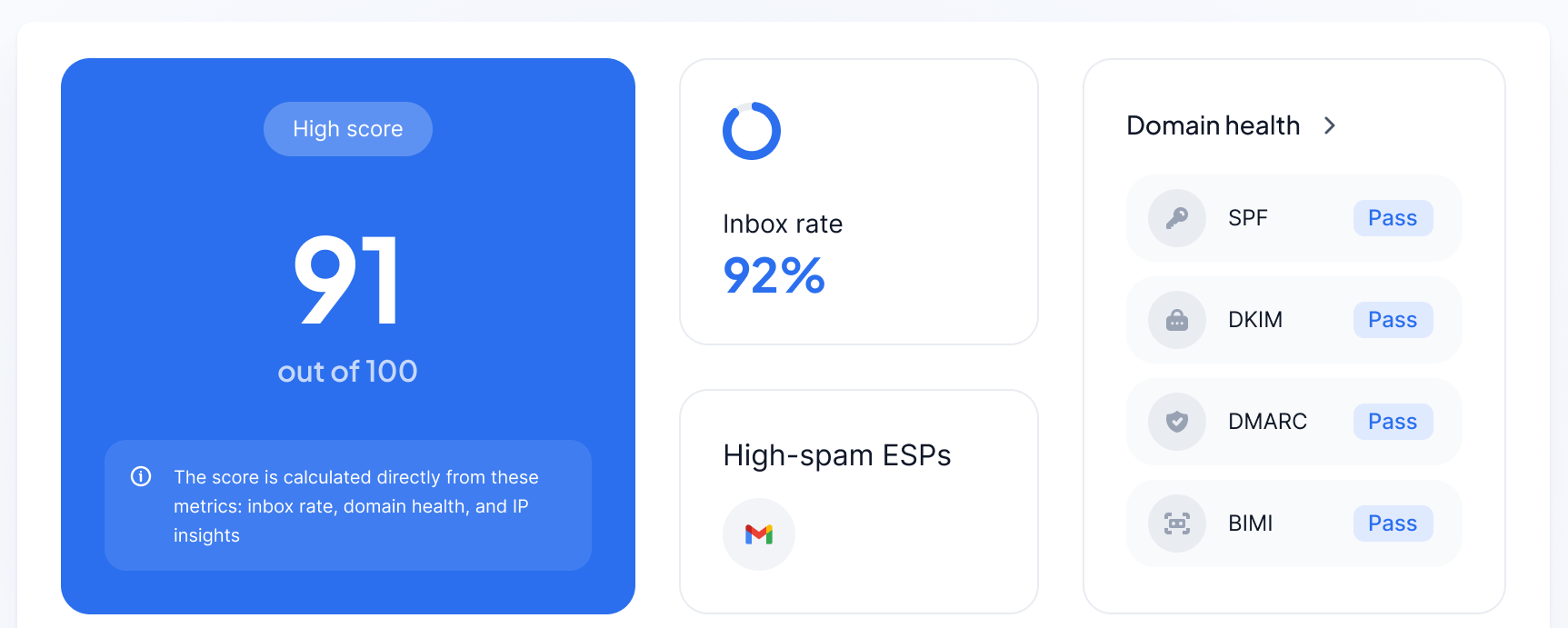
Inbox Insights is Folderly's tool for checking deliverability before a campaign launches. It sends your template from your connected mailbox to seed mailboxes across Gmail, Google Workspace, Outlook, and Microsoft 365, then generates a structured report.
The results include four diagnostic layers in a single view:
Email placement report showing the exact folder where emails landed at each provider, with inbox rate and spam folder rate at a glance
Domain Health block validating SPF, DKIM, and DMARC records with expanded views and resolution guides for configuration issues
IP Insights showing sending IPs, their Sender Score, and blacklist status with delisting instructions
Spam words checker scanning email content for spam-triggering language across 9 languages
Source: Folderly
Tests can run manually for one-off checks or as recurring tests on a daily or weekly schedule. Each recurring run consumes one test credit per mailbox. Results are shareable, which helps agencies report deliverability health to clients.
Pricing includes a free tier with 2 tests per month, with paid plans scaling to 100 tests per month.
Pulse: Free real-time spam placement monitoring with alerts.
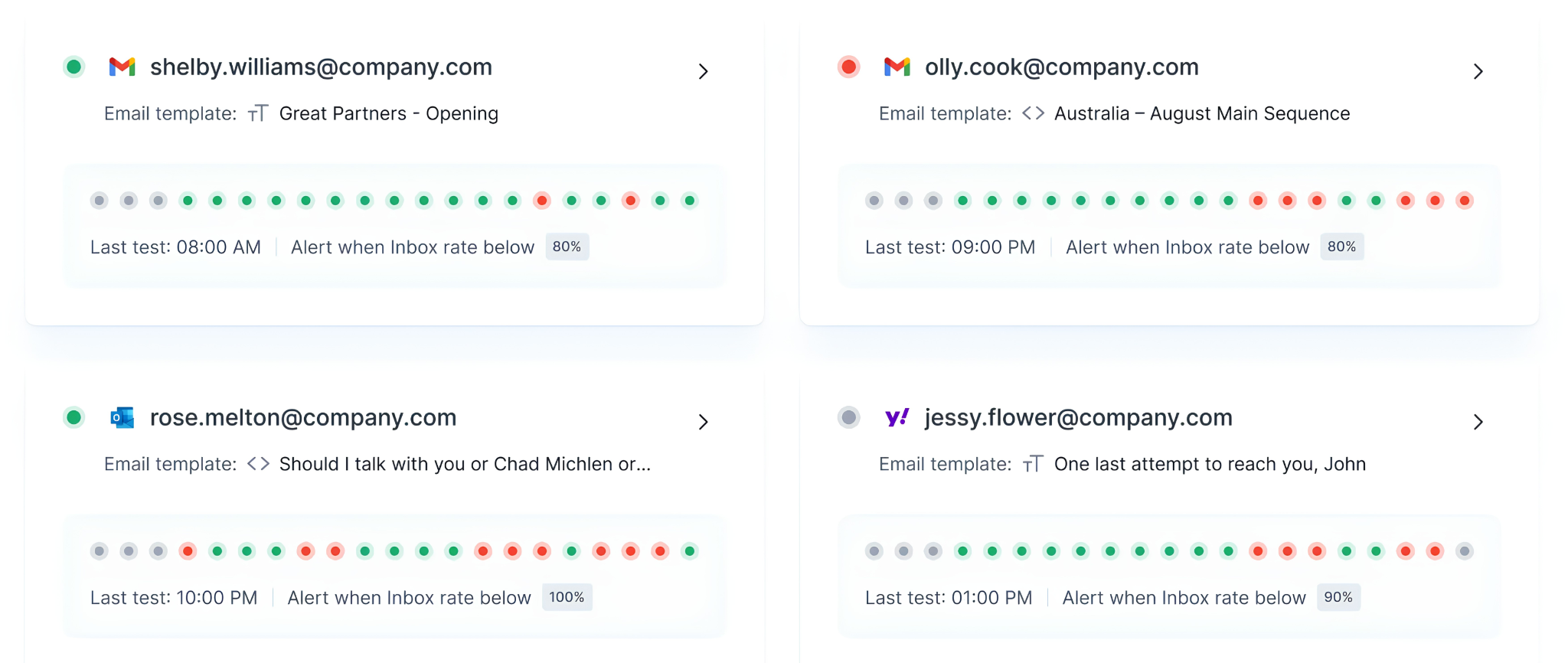
Folderly’s Pulse monitors whether emails from connected mailboxes land in the inbox or get routed to spam, and fires alerts the moment something changes.
Source: Folderly
Setup follows a guided flow: connect a mailbox, create a test template, select target email providers and time zone, set a notification threshold (the percentage at which an alert triggers), configure who receives alerts and through which channels, and launch the monitor.
When inbox rate drops below the threshold, Pulse sends alerts via Email and Slack (SMS noted as coming soon). Alerts include remediation tips, not just notifications that something went wrong.
The most notable thing about Pulse is the price: it's free with no paid tier listed and no Folderly subscription required. Users can sign up directly and start monitoring without committing to the broader Folderly suite. For teams already using Folderly Boost, Pulse connects to the same system, so acting on an alert means moving into deeper diagnostics within the same platform.
EmailGen AI: Deliverability-aware cold email sequence generation.
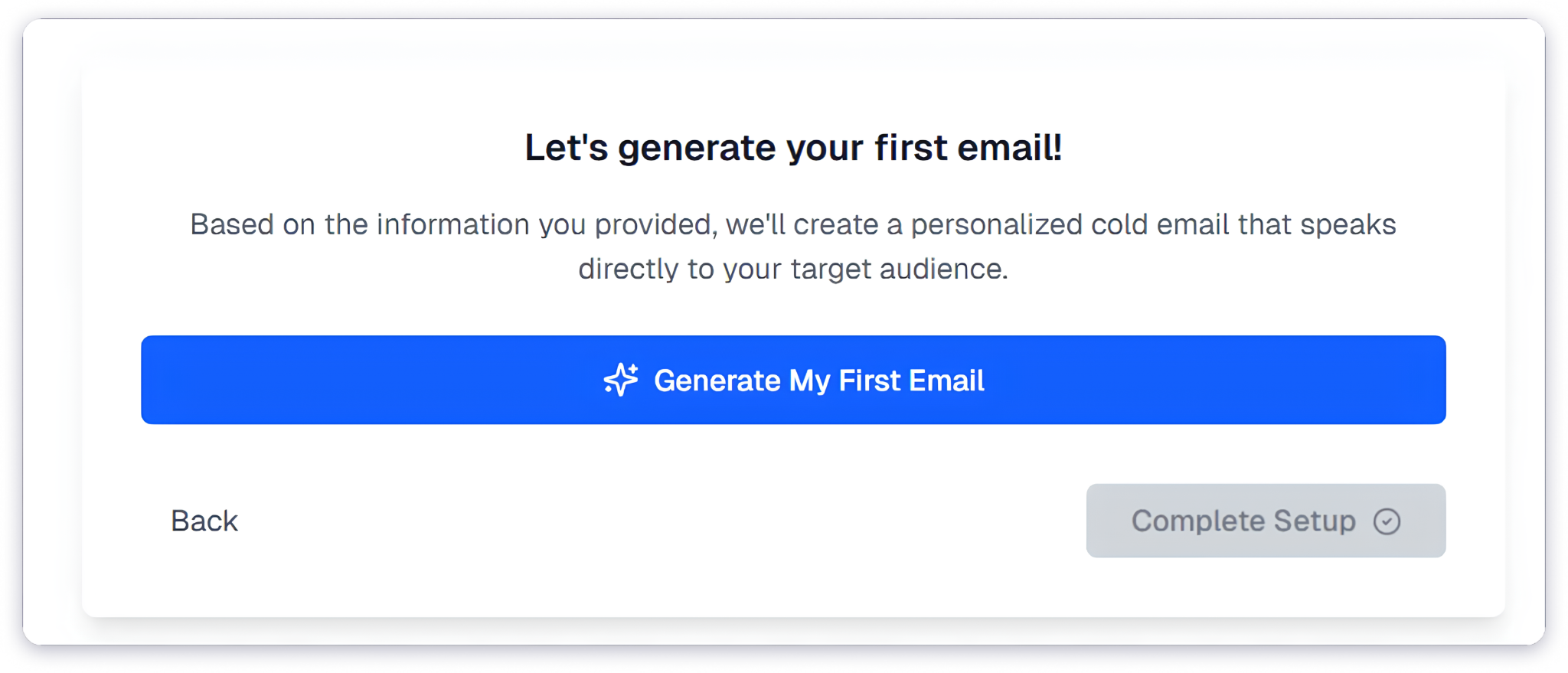
EmailGen AI generates cold email sequences from three inputs: what you offer, who you're targeting, and what outcome you want. It works as a standalone tool, positioned as a companion to the deliverability stack rather than a core product.
Source: Folderly
The generator is trained on over one million analyzed email campaigns and produces drafts built on three layers: a Hook (problem identification), a Solution (connecting the offer to the prospect's context), and a low-commitment call-to-action. Copy targets 75-125 words, the range the training data associates with highest engagement.
Each run produces three stylistic variants for testing. The tool flags risky claims and spam-trigger language inline before drafts move to a sending tool. For multi-email campaigns, it creates full cadences with distinct follow-up angles (proof, pain, timing, objection-handling) spaced at 2-4 day intervals.
EmailGen AI offers 60 monthly credits at no cost, with paid plans starting at $49/month. API access is available from the Growth plan ($199/month).
Pricing Structure: Per-mailbox model with free tiers for testing and monitoring tools.
Folderly prices each product separately on its pricing page:
Folderly Boost (the core deliverability product):
$96 per mailbox/month on an annual plan (advertised as 20% savings over monthly)
Monthly pricing is not displayed publicly and requires a demo request
No public volume discounts, though the pricing page routes larger deployments to sales
Inbox Insights (pre-send placement testing):
Free: $0/month with 2 tests per month
Monthly: $79/month for 100 tests per month
Annual: $799/year (about $66.58/month) for 100 tests per month
Pulse (real-time monitoring):
Free: $0/month with no paid tier listed
EmailGen AI (cold email generation, priced separately):
Free: $0/month with 60 credits
Starter: $49/month with 150 credits
Growth: $199/month with 1,000 credits (includes API access)
Pro: $499/month with 2,500 credits (includes webhooks)
There is no bundled package. A team running 10 mailboxes on Folderly Boost alone pays $960/month on the annual plan. Add Inbox Insights at the monthly rate ($79) and an EmailGen Starter plan ($49), and total costs approach $1,100/month before any consulting engagement.
Contract terms from the Terms & Conditions: subscriptions auto-renew, cancellation requires at least 1 month's prior written notice, all fees are non-refundable, and users can cancel directly in the app without a call.
Where Folderly Falls Short
Folderly does several things well within its niche, but limitations show up with regular use. These reflect a platform still growing from a focused deliverability tool into broader infrastructure.
Per-Mailbox Pricing Adds Up Fast. At $96/mailbox/month on an annual plan, Folderly costs 2-8x more than focused warm-up competitors at the entry level. For teams running multi-domain cold outreach across 20, 50, or 100 mailboxes, costs compound quickly. The pricing makes sense given the depth of diagnostics Folderly provides, but it's a real barrier for teams scaling their sending infrastructure.
Limited Inbox Placement Coverage. Inbox Insights tests placement across Gmail, Google Workspace, Outlook, and Microsoft 365. Yahoo, Zoho, iCloud, and custom enterprise mail servers are absent from the seed list. For teams whose recipient lists include a meaningful share of non-Google/Microsoft domains, this leaves a gap in pre-send testing.
No Warm-Up Send-Time Controls. Users cannot restrict warm-up emails to business hours or specific time windows. Weekend sends have caused unmonitored deliverability changes that teams only discovered on Monday mornings. This is an open item on the public roadmap.
Manual Template Sync with Outreach Tools. If the template tested in Folderly doesn't match what's actually sent through Instantly, Smartlead, or Lemlist, users may be optimizing for the wrong content. The roadmap acknowledges this gap and automated template sync is in development, but it isn't live yet.
No Public API for the Core Platform. Teams wanting to integrate Folderly's deliverability checks into automated workflows can't do so programmatically. A public API is listed as "Planned" on the roadmap, but for now, all core deliverability functions live in the web app only.
Reporting Accuracy Questions. Some users have reported SPF record mismatches where the summary shows "pass" but the detail view shows "fail," while external tools like MXToolbox confirm the records are fine. These false-positive diagnostic flags can undermine confidence for technical users who cross-check.
These aren't failures. They reflect a platform expanding from email warmup into broader deliverability infrastructure. But they matter for teams evaluating Folderly against alternatives or deciding how it fits into a larger outreach stack.
Where Folderly Fits in the Outreach Stack: The Intelligence Gap
Folderly solves a specific problem: making sure emails reach the inbox. But deliverability is only one piece of a larger outreach workflow. Before an email can land in someone's inbox, you need to know who to send it to, whether they're the right person, and whether their company is even in-market for what you're selling.
This is where deliverability-focused tools hit their natural boundary. Folderly can tell you that your emails are landing in spam and help you fix the problem. It cannot tell you whether you're emailing the right people, whether those contacts have accurate data, or whether the company shows buying signals that suggest receptiveness right now.
That intelligence layer (finding the right prospects with verified contact data and understanding when they're ready to buy) is what ZoomInfo provides.
ZoomInfo: The Intelligence Layer That Powers What Gets Sent
ZoomInfo is a B2B intelligence platform built on 500M contacts, 100M companies, 135M+ verified phone numbers, and 200M+ verified business email addresses. A multi-source pipeline backed by 300+ human researchers verifies that data and achieves up to 95% accuracy on first-party records.
Source: ZoomInfo
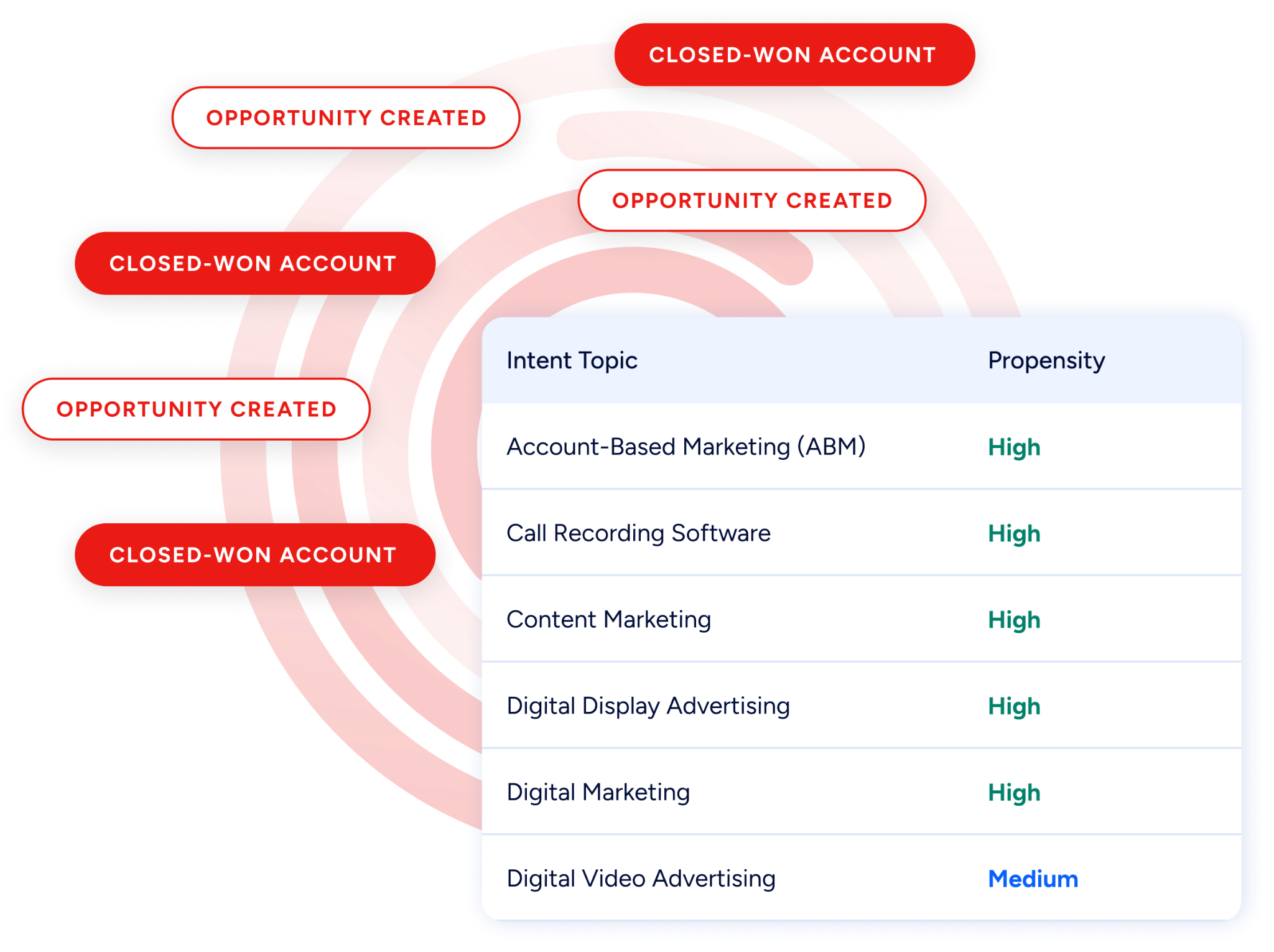
For outreach teams, this matters practically. Verified email addresses mean fewer bounces, which protects sender reputation. Accurate contact data means emails go to actual decision-makers, not generic addresses or people who left the company six months ago. Buyer intent data, drawn from 210 million IP-to-organization pairings, lets teams prioritize companies already researching relevant solutions.
Source: ZoomInfo
Seismic's sales team attributed 39% of active pipeline to opportunities identified or influenced by ZoomInfo signals, while boosting productivity by 54% and saving 11.5 hours per week. (Seismic case study)
Better Data In, Better Deliverability Out
The connection between data quality and email deliverability is direct. When a cold email sequence targets contacts with outdated or incorrect addresses, bounce rates climb.
High bounce rates damage sender reputation. Damaged reputation sends future emails to spam, even when the addresses are correct. It's a compounding problem that no amount of warmup can offset if the underlying contact data is bad.
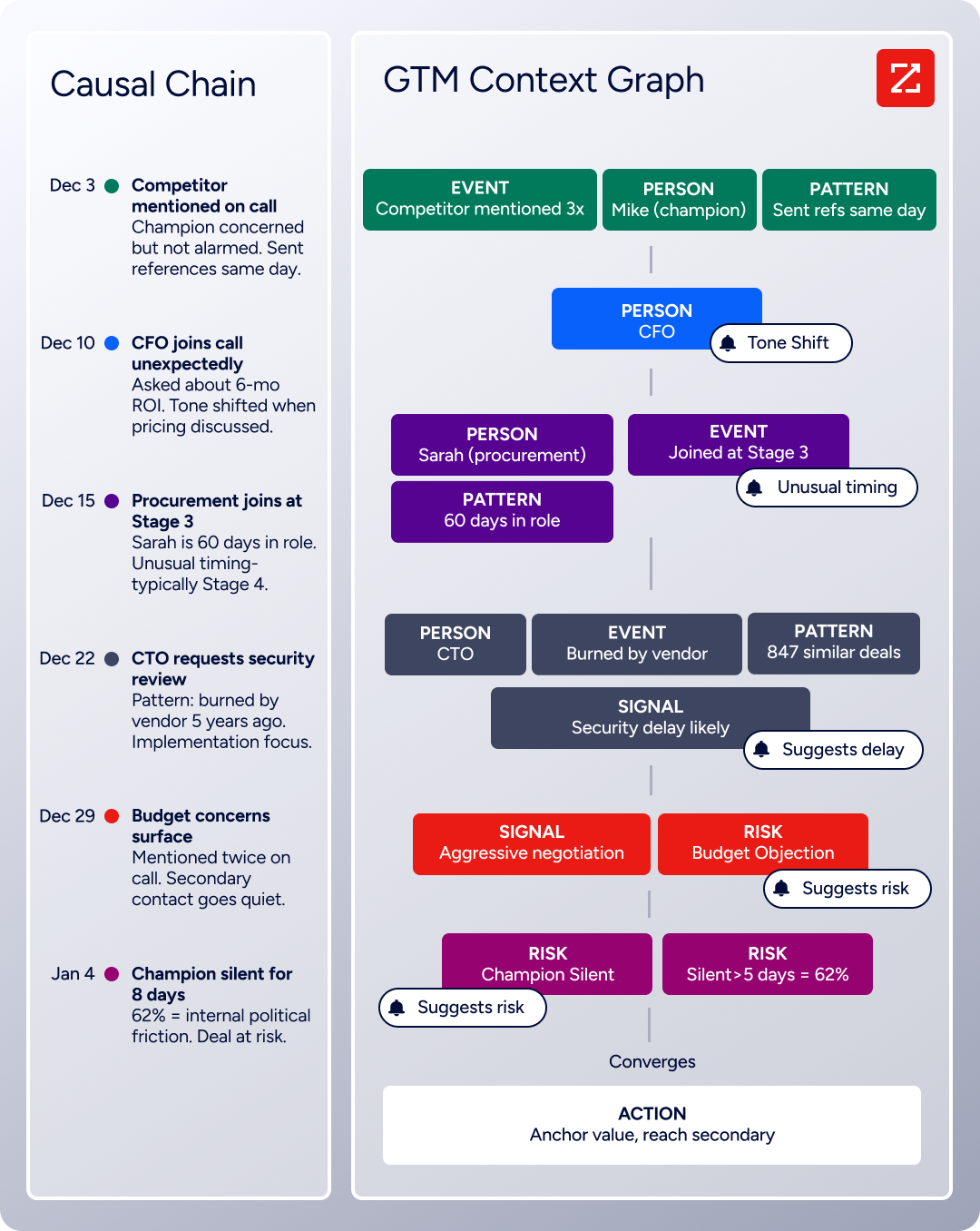
ZoomInfo's GTM Context Graph processes 1.5B + data points daily, combining its own B2B intelligence with a customer's CRM records, conversation transcripts, and behavioral signals. The goal: capture not just what happened in a deal, but why. That understanding shapes what comes next, from which accounts to target, to what to say, to when to engage.
Source: ZoomInfo
Vensure scaled prospecting with ZoomInfo's data: "It brings time back to our day, something we're all begging for. And it helps us reach the company's goals and get more clients faster." William Kenimer, Vice President of Revenue Operations. (Vensure case study)
How It All Works Together
A complete outbound workflow has two halves: intelligence (who to contact, why now, and what to say) and infrastructure (making sure those emails land). ZoomInfo handles the first half. Folderly handles the second.
In practice, the workflow looks like this:
ZoomInfo identifies target accounts showing buying signals, surfaces verified contacts with direct emails and phone numbers, and provides context for personalized outreach
Your outreach tool (Instantly, Smartlead, Lemlist, or similar) sends the sequences
Folderly monitors inbox placement, diagnoses deliverability issues, and maintains sender reputation across your sending infrastructure
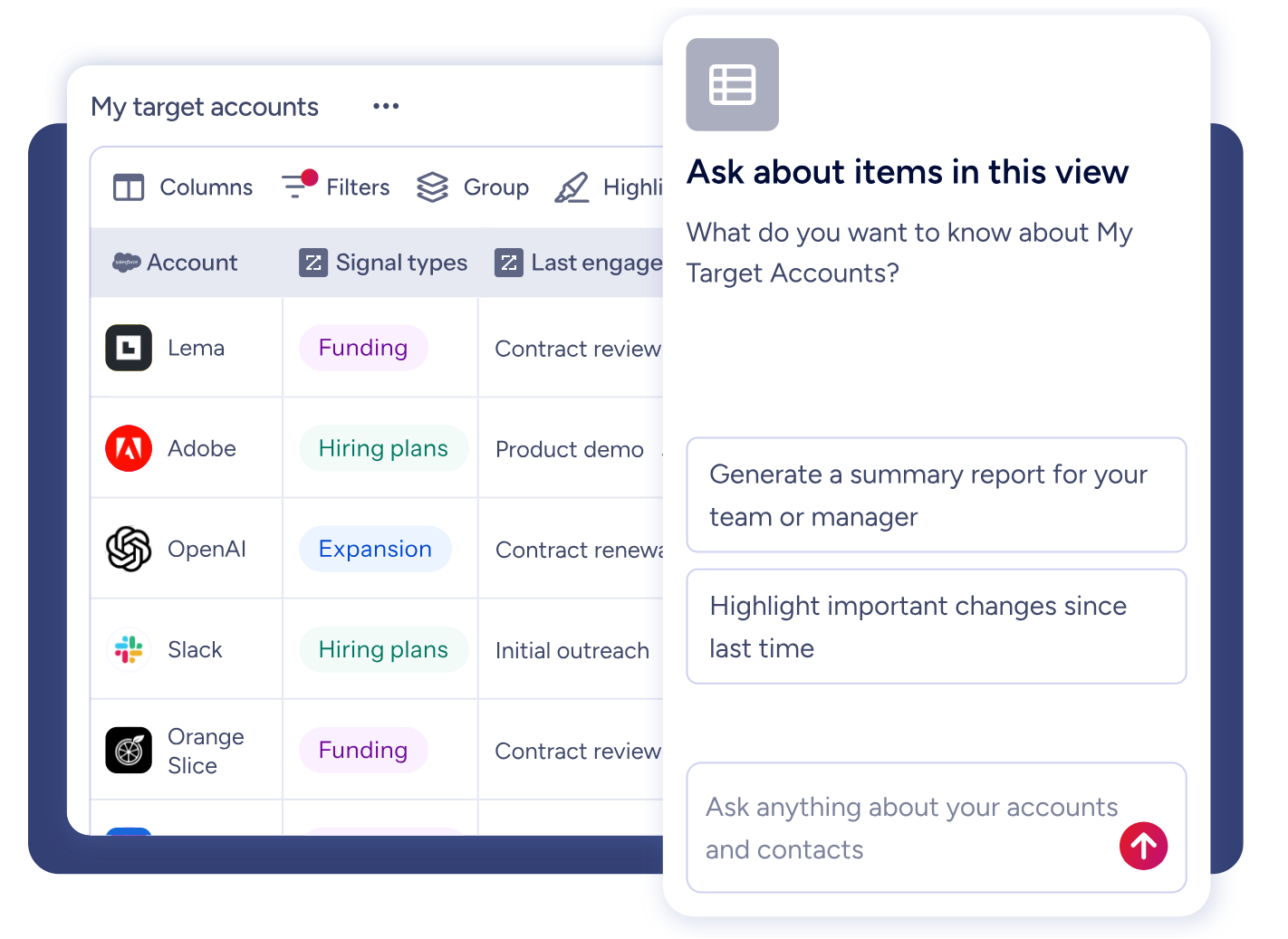
ZoomInfo's intelligence is accessible three ways: GTM Workspace for sellers who need one place for prioritized accounts and AI-drafted outreach, GTM Studio for marketers and RevOps teams building audiences and running campaigns, and API and MCP for teams that want to feed their own tools with ZoomInfo's data.
Source: ZoomInfo
"It's not just the data itself. It's more about the right data at the right time to help us reach out with the right message across that full buyer journey." Chelsea Kenyon, Senior Director of Digital Strategy, Redwood Logistics. (Redwood Logistics case study)
Folderly and ZoomInfo: Where Each Fits
Aspect | Folderly | ZoomInfo |
|---|---|---|
Primary purpose | Email deliverability infrastructure | B2B intelligence and GTM execution |
Core problem solved | Ensuring emails reach the inbox | Finding the right prospects and knowing when to engage |
Data focus | Sender reputation, DNS health, spam triggers | 500M contacts, 100M companies, intent signals, technographics |
When used in the workflow | After emails are sent (monitoring and repair) | Before emails are sent (targeting and personalization) |
Impact on deliverability | Direct: fixes spam placement, maintains reputation | Indirect: verified emails reduce bounces, which protects reputation |
AI capabilities | Cold email copy generation, spam trigger detection | GTM Context Graph, AI-drafted outreach, account intelligence |
Free entry point | Pulse (free monitoring), Inbox Insights (2 free tests/month) | ZoomInfo Lite (permanent free tier), 7-day free trial |
Integration approach | Connects to ESPs via API/SMTP | 172+ marketplace integrations, APIs, MCP for any AI agent |
Security certifications | SOC 2, ISO 27001 | SOC 2 Type II, ISO 27001, ISO 27701, TRUSTe GDPR/CCPA |
Best for | Teams with deliverability problems or scaling sending infrastructure | Teams that need accurate prospect data, buying signals, and outreach intelligence |
Final Verdict
Folderly and ZoomInfo address different parts of the same challenge: reaching the right people with the right message at the right time, and making sure that message arrives.
Choose Folderly if your outreach has a deliverability problem. If emails are landing in spam, open rates have dropped, or you're scaling to new sending domains and need to build reputation before going live, Folderly provides the diagnostics and monitoring to find what's wrong and fix it.
Its strength is specificity: it surfaces the exact spam triggers Gmail and Outlook flag, gives you a daily health score, and watches your placement around the clock with free Pulse monitoring. For B2B teams running cold outreach at volume, deliverability infrastructure is not optional, and Folderly is one of the more thorough options available.
Choose ZoomInfo if your outreach challenge isn't delivery but targeting. If you need verified contact data that won't bounce, buying signals that show which accounts are in-market now, and intelligence that helps reps engage with context instead of guesswork, ZoomInfo provides the data layer that makes outreach worth sending.
The GTM Context Graph captures not just what happened in your deals but why, turning that understanding into prioritized accounts, AI-drafted outreach, and recommended next actions. Because the same intelligence is accessible through GTM Workspace, GTM Studio, or API and MCP, it works wherever your team already operates.
Get started with ZoomInfo here.
The strongest outreach operations use both layers: intelligence to find and prioritize the right prospects, and deliverability infrastructure to make sure those prospects see the message. Getting one right without the other leaves money on the table.
Folderly FAQ
What does Folderly actually do?
Folderly is an email deliverability platform that monitors where your emails land (inbox, spam, or promotions), identifies the specific reasons Gmail and Outlook flag them, and provides step-by-step guidance to fix the problems.
It includes four products: Folderly Boost for daily reputation maintenance, Inbox Insights for pre-send placement testing, Pulse for real-time monitoring, and EmailGen AI for cold email generation.
How much does Folderly cost?
Folderly Boost, the core product, costs $96 per mailbox per month on an annual plan. Monthly pricing is not publicly listed and requires a demo request. Inbox Insights has a free tier with 2 tests per month, with paid plans at $79/month for 100 tests. Pulse is free. EmailGen AI starts free with 60 credits per month, with paid plans from $49/month. There is no bundled pricing; each product is purchased separately.
Is Folderly just an email warmup tool?
No. While it includes sender reputation building, the platform also provides spam trigger diagnostics with verbatim ESP reasons, DNS record auditing, content analysis, Promotions-folder removal guidance, pre-send placement testing, and monitoring with alerts. Warmup tools typically just send and receive emails to build reputation. Folderly diagnoses and fixes the underlying causes of deliverability problems.
What email providers does Folderly test against?
Inbox Insights tests placement across Gmail, Google Workspace, Outlook, and Microsoft 365. Yahoo, Zoho, iCloud, and custom enterprise mail servers are not included in the seed list. This is a known limitation for teams whose recipient lists include a significant share of non-Google and non-Microsoft domains.
Does Folderly integrate with cold outreach tools like Instantly or Smartlead?
Not natively. Folderly connects to email service providers via API and SMTP for mailbox-level monitoring, but it has no direct integrations with cold outreach sequencers. If you test a template in Folderly but send a different version through your outreach tool, the diagnostics may not reflect what recipients actually receive. Automated template sync with outreach tools is on the public roadmap but not yet live.
Is Folderly secure enough for enterprise use?
Folderly holds SOC 2 and ISO 27001 certifications, documented through a public Trust Center. The platform connects to mailboxes via OAuth for Google and Outlook, so no manual password entry is required for those providers. For enterprise buyers in regulated industries, these certifications address the primary trust concern of handing over mailbox credentials to a third-party service.
Can Folderly help if my emails are already going to spam?
Yes, this is one of Folderly's primary use cases. The platform diagnoses the specific triggers causing spam placement, including DNS misconfigurations, content-level spam flags, IP reputation issues, and mailbox-level problems. It then provides step-by-step remediation guidance to resolve each issue.
What's the difference between Folderly and a tool like ZoomInfo?
They solve different problems in the same workflow. Folderly ensures emails reach the inbox by monitoring and fixing deliverability issues. ZoomInfo provides B2B intelligence: verified contact data, company information, buying signals, and AI-powered targeting that determines who to email and when.
Teams running cold outreach at scale typically need both: accurate prospect data to minimize bounces and protect reputation, plus deliverability infrastructure to maintain inbox placement across their sending domains.
