

Choosing between Help Scout and HubSpot for customer service comes down to a few questions:
Do you want a focused support tool your team can learn in an hour, or a customer platform that connects service to sales and marketing?
Is keeping support conversations personal more important than tying every interaction to a CRM record?
Does your team handle email and chat, or do you need phone support, customer portals, and health scoring built in?
Are you comfortable managing separate tools for support, sales, and marketing, or do you want everything on one platform?
How well does your team understand who's reaching out when a customer contacts support?
In short, here's what we recommend:
Help Scout is built for support teams that want customer service to feel like a conversation, not a transaction. Its shared inbox strips away ticket numbers and queue jargon, giving agents a clean email-like interface they can learn in under an hour.
With 12,000+ companies on the platform, AI that resolves 73% of interactions, and pricing starting at $25/user/month, Help Scout delivers support capability without the overhead of a full CRM. But it stays in its lane: no native phone support, no sales pipeline, no marketing automation. If your team needs more than customer service, you'll be adding other tools.
HubSpot treats customer service as one piece of a larger customer relationship. Service Hub connects to HubSpot's Smart CRM, Marketing Hub, and Sales Hub, so every support ticket carries the full history of how that customer found you, what they bought, and what your sales team discussed.
The Breeze Customer Agent resolves over 50% of conversations autonomously. HubSpot's pricing is complex, though, with mandatory onboarding fees at Professional and Enterprise tiers and a per-seat model that escalates quickly as teams grow.
Both platforms handle customer service well. But for B2B companies, there's a gap neither addresses: understanding who your customers are, what's happening at their companies, and where the revenue opportunities sit in your support queue.
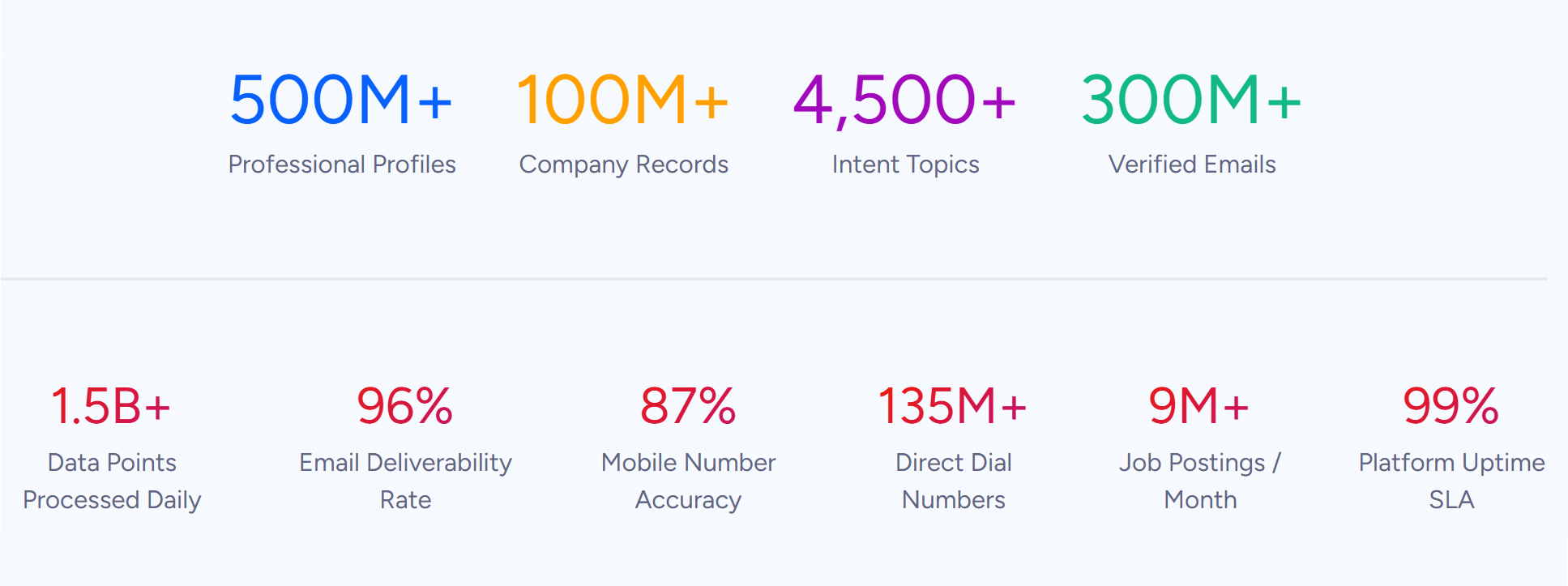
ZoomInfo is a B2B data and intelligence platform that gives your support, sales, and success teams the customer context that service platforms lack. With 500M contacts, 100M companies, 135M+ verified phone numbers, and 200M+ verified business email addresses, ZoomInfo enriches every customer record in your support tool with company data, org charts, buying signals, and technographic profiles.
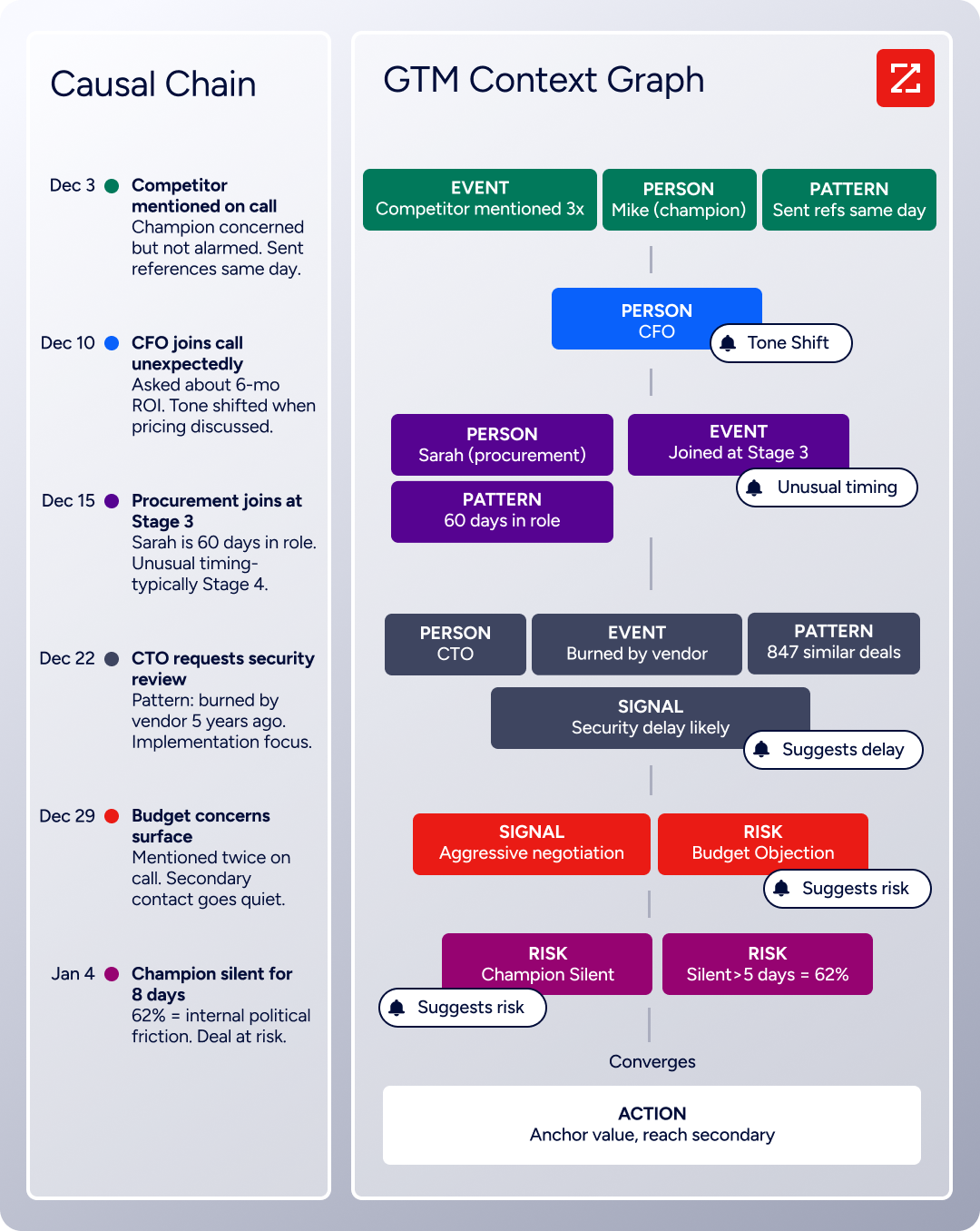
Its GTM Context Graph combines this data with your CRM records and conversation history to show not just what's happening in an account, but why. Whether your team accesses this through the GTM Workspace, GTM Studio, or through APIs and MCP feeding into HubSpot or any other tool, ZoomInfo turns support interactions into a source of account intelligence.
If turning support interactions into account intelligence sounds valuable, see how ZoomInfo works.
Help Scout vs. HubSpot vs. ZoomInfo at a glance
Help Scout | HubSpot Service Hub | ZoomInfo | |
|---|---|---|---|
Core approach | Focused customer service platform | Full CRM with integrated service | B2B data intelligence platform |
AI capabilities | AI Answers (73% resolution rate) | Breeze Customer Agent (50%+ resolution) | GTM Context Graph + AI agents |
Native phone support | No (third-party integrations) | Yes (Professional and above) | N/A (powers other platforms) |
Knowledge base | Included on all plans | Professional and above | N/A |
CRM integration | Integrates with external CRMs | Built-in Smart CRM | Enriches CRMs with B2B data |
HubSpot integration | Available on Plus plan | Native | |
Customer data depth | Conversation history + basic profiles | CRM records + marketing/sales history | 500M contacts, 100M companies, intent signals |
Starting price | $25/user/month | $20/seat/month (Starter) | Consumption-based pricing |
Free plan | Yes (5 users, 100 contacts/month) | Yes (2 users, limited features) | ZoomInfo Lite (permanent free tier) |
Best for | Support teams wanting simplicity | Teams needing sales + marketing + service | B2B teams needing customer context |
The philosophy divide: conversations vs. connected platform
Help Scout and HubSpot approach customer service from opposite directions.
Help Scout starts with the support agent's experience. The founding team built the product because every existing help desk "turned customers into numbers, added a ton of friction to the process, and made it difficult to build long-term relationships."
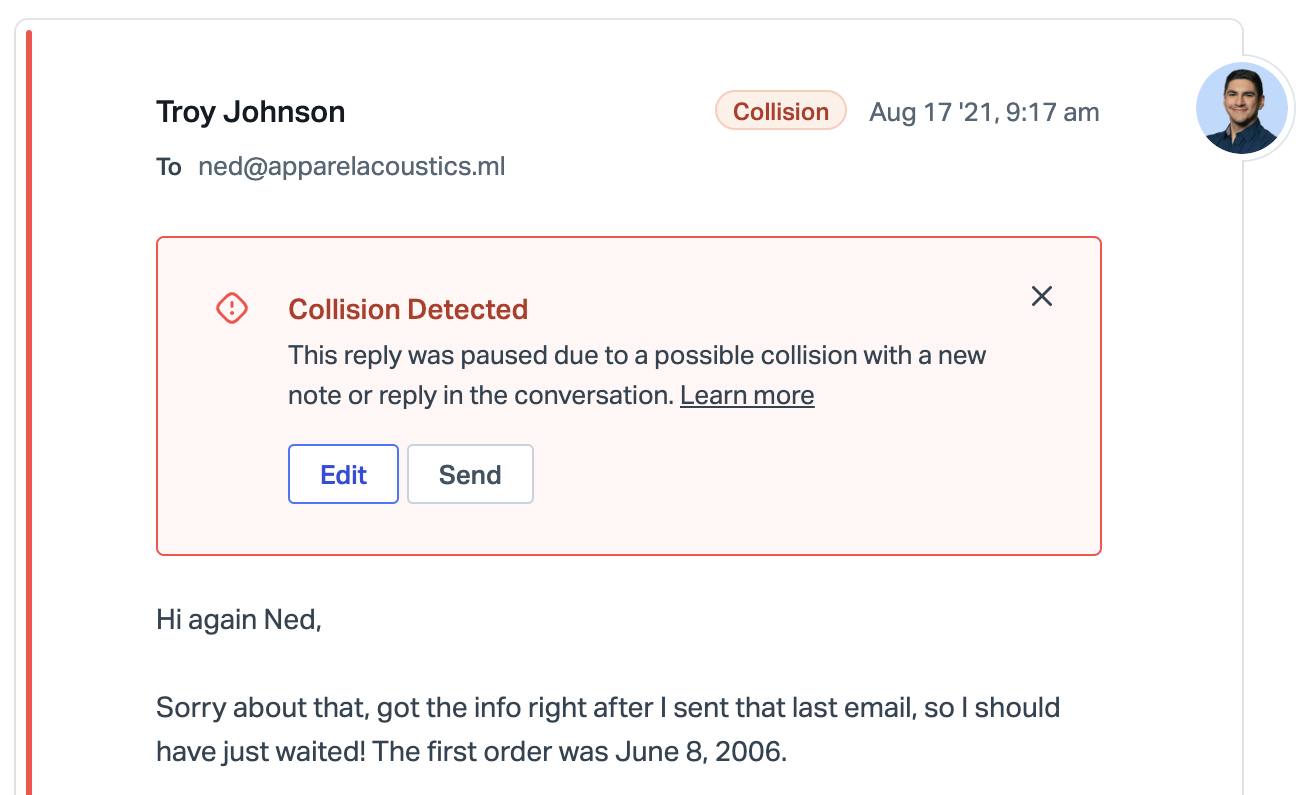
The result is a shared inbox where conversations look and feel like regular email. No ticket numbers. No queue jargon. Agents see a message thread on the left and a customer history sidebar on the right. Collision detection shows when another agent is viewing or typing in the same conversation, including a live preview of their draft reply.
Source: Help Scout
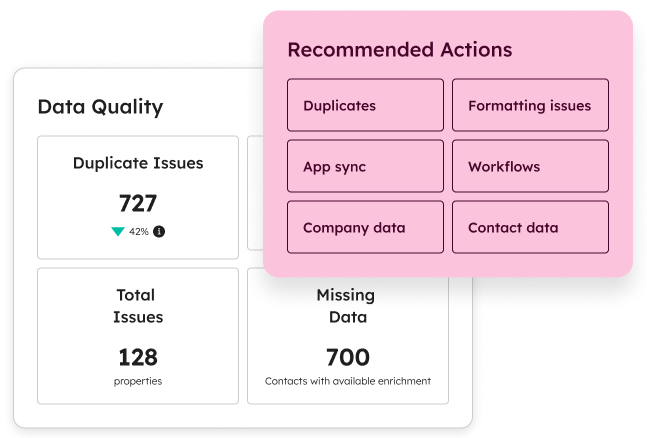
HubSpot starts with the customer record. Service Hub sits on the same Smart CRM that powers Marketing Hub and Sales Hub, so when a customer contacts support, the agent sees every marketing email they opened, every sales call they had, every deal in the pipeline.
Source: HubSpot
The trade-off is complexity. A tool that connects everything requires learning everything.
For small support teams that want to resolve issues fast, Help Scout's focused design wins. For organizations where a support ticket might signal a churn risk, an upsell opportunity, or a product bug affecting the sales pipeline, HubSpot's connected model makes more sense.
But neither platform tells you what's happening at your customer's company. That's the gap ZoomInfo fills.
Help Scout wins on ease of use, HubSpot wins on platform breadth
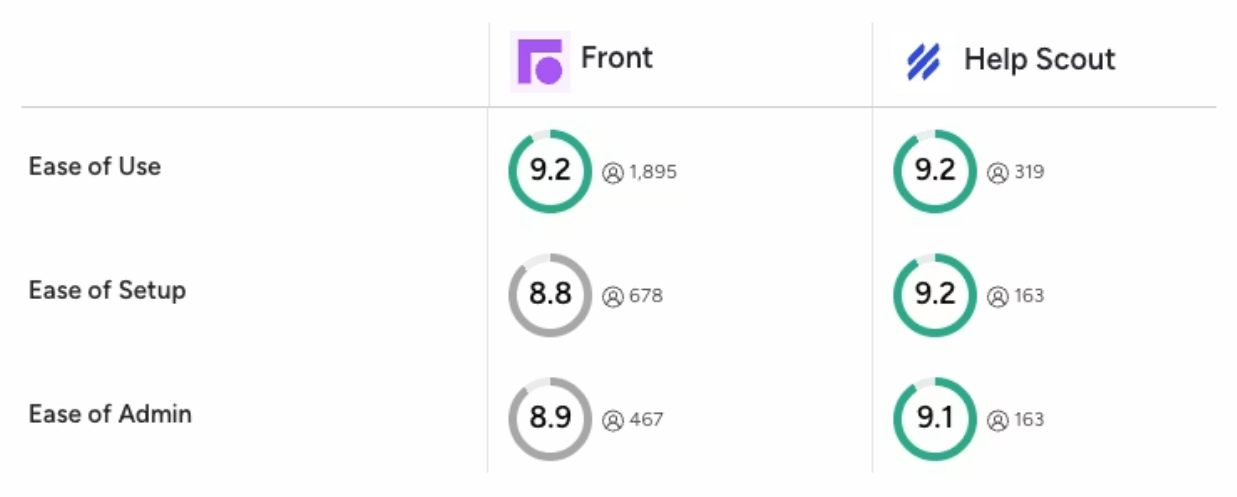
Help Scout's biggest advantage is how quickly teams start using it. The platform claims new users become power users in under a day, and G2 rates its ease of use at 9.2, higher than competing platforms. The interface is simple: shared inbox, knowledge base, Beacon widget, and analytics. That's it.
Source: Help Scout
HubSpot's advantage is what happens beyond the support ticket. A customer contacts support about a billing issue. The agent sees the customer's deal history, active subscription, marketing engagement, and health score, all in one record.
Need to notify the account manager? Tag them in the CRM. Want to trigger a follow-up survey? It's built in. Need to check if this customer's company just raised funding or hired a new VP? That's where you need external intelligence.
Help Scout deliberately avoids this scope.
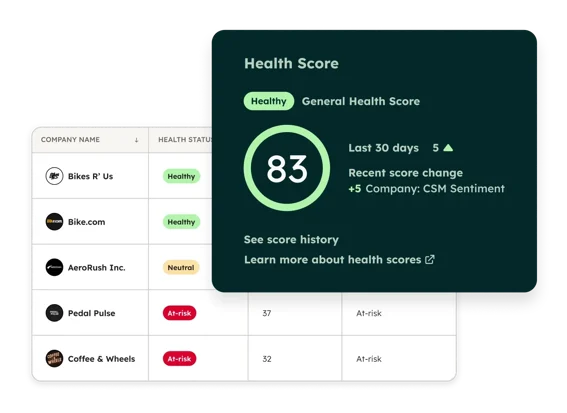
HubSpot builds it all in. Service Hub includes a help desk workspace, knowledge base, customer portal, NPS/CSAT/CES surveys, customer health scoring, and a Customer Success Workspace for tracking renewals and expansion. It's a customer service and success operation in one platform.
Source: HubSpot
The question isn't which approach is better. It's which one matches your team's reality.
Customer context is the gap both platforms leave open
Help Scout's customer sidebar shows conversation history and data from connected apps. HubSpot's Smart CRM shows marketing touches, deal history, and engagement signals. Both give agents useful context.
Neither tells you that the customer's company just raised a Series B, hired three new VPs, is evaluating a competitor, or that the person emailing support sits two levels below the economic buyer.
For B2B companies, that context changes how you respond. A support ticket from a 500-person company evaluating your competitor isn't just a ticket. It's a retention event. A billing question from a company that just doubled its headcount isn't just a billing question. It's an expansion signal.
ZoomInfo fills this gap. Its data spans 500M contacts and 100M companies, including company profiles, org charts, technographic data on 30,000+ technologies across 30M+ companies, and buyer intent signals from 210 million IP-to-Organization pairings.
Source: ZoomInfo
For teams using HubSpot, ZoomInfo's native integration enriches the Smart CRM automatically. Support agents see company data, org charts, and buying signals inside the customer record. For teams using Help Scout, ZoomInfo enriches the connected CRM (Salesforce, HubSpot, Pipedrive) that feeds Help Scout's customer sidebar.
The result: support agents stop treating every ticket the same and start responding with the business context each ticket deserves.
"ZoomInfo gives us the information we need to execute. We don't have to go through and spend our time digging. It's already there, so we can be three steps ahead." (William Kenimer, VP of Revenue Operations, Vensure)
For a closer look at how HubSpot and ZoomInfo compare across the broader sales and marketing use case, see our HubSpot vs. ZoomInfo comparison.
AI capabilities reflect each platform's scope
Both platforms have invested in AI, but their implementations reflect different ambitions.
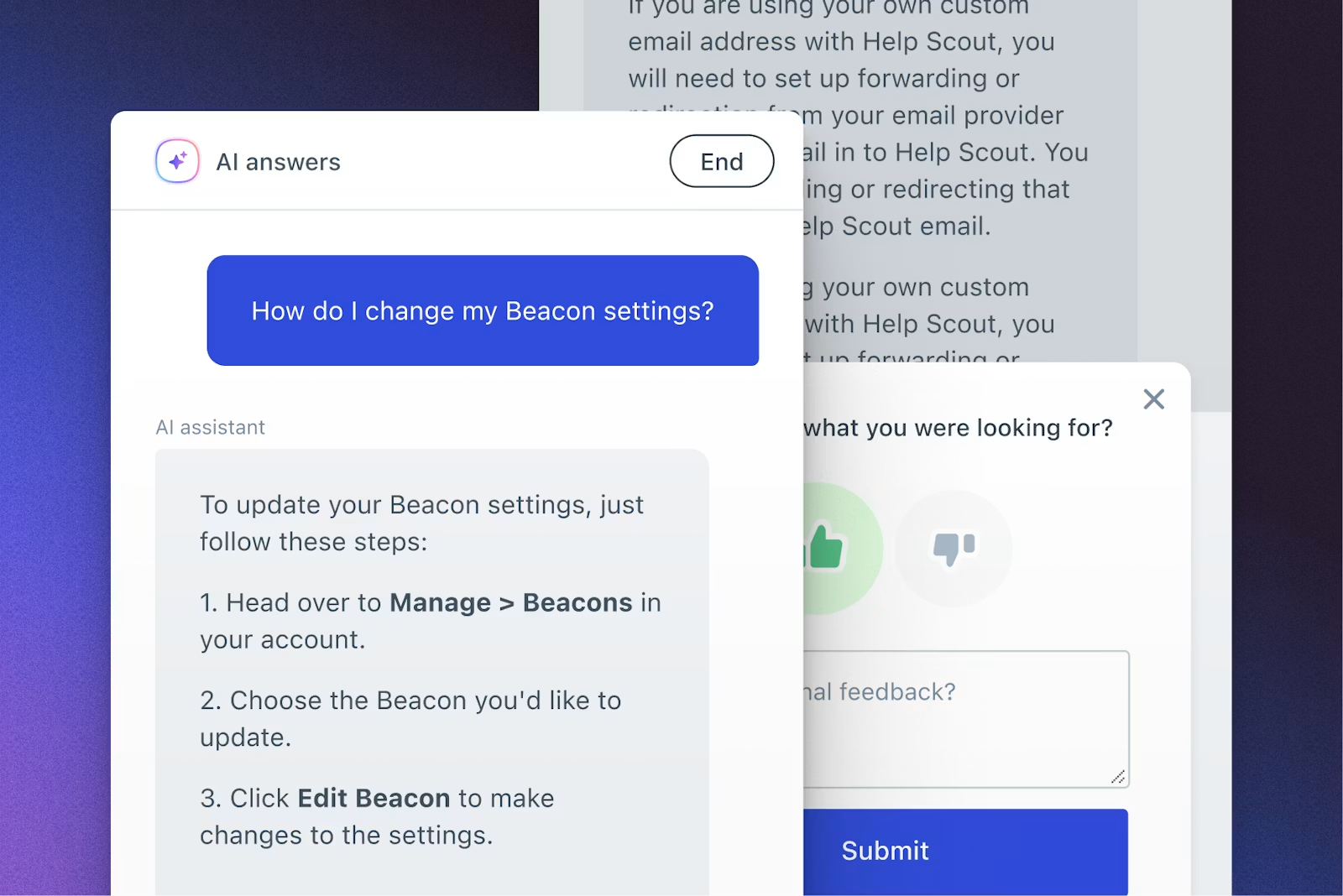
Help Scout offers two AI layers. The customer-facing layer, AI Answers, resolves questions on its own through the Beacon widget, drawing from the team's knowledge base, public URLs, and manually added corrections. Help Scout reports an average 73% resolution rate that improves month over month.
Source: Help Scout
The agent-facing layer includes AI Drafts (generates reply suggestions from past conversations), AI Summarize (condenses long threads into bullet points), and AI Assist (six inline text transformations including translation). Pricing is straightforward: AI Answers costs $0.75 per resolution, charged only when the AI resolves without escalation, with a 3-month free trial included on all paid plans.
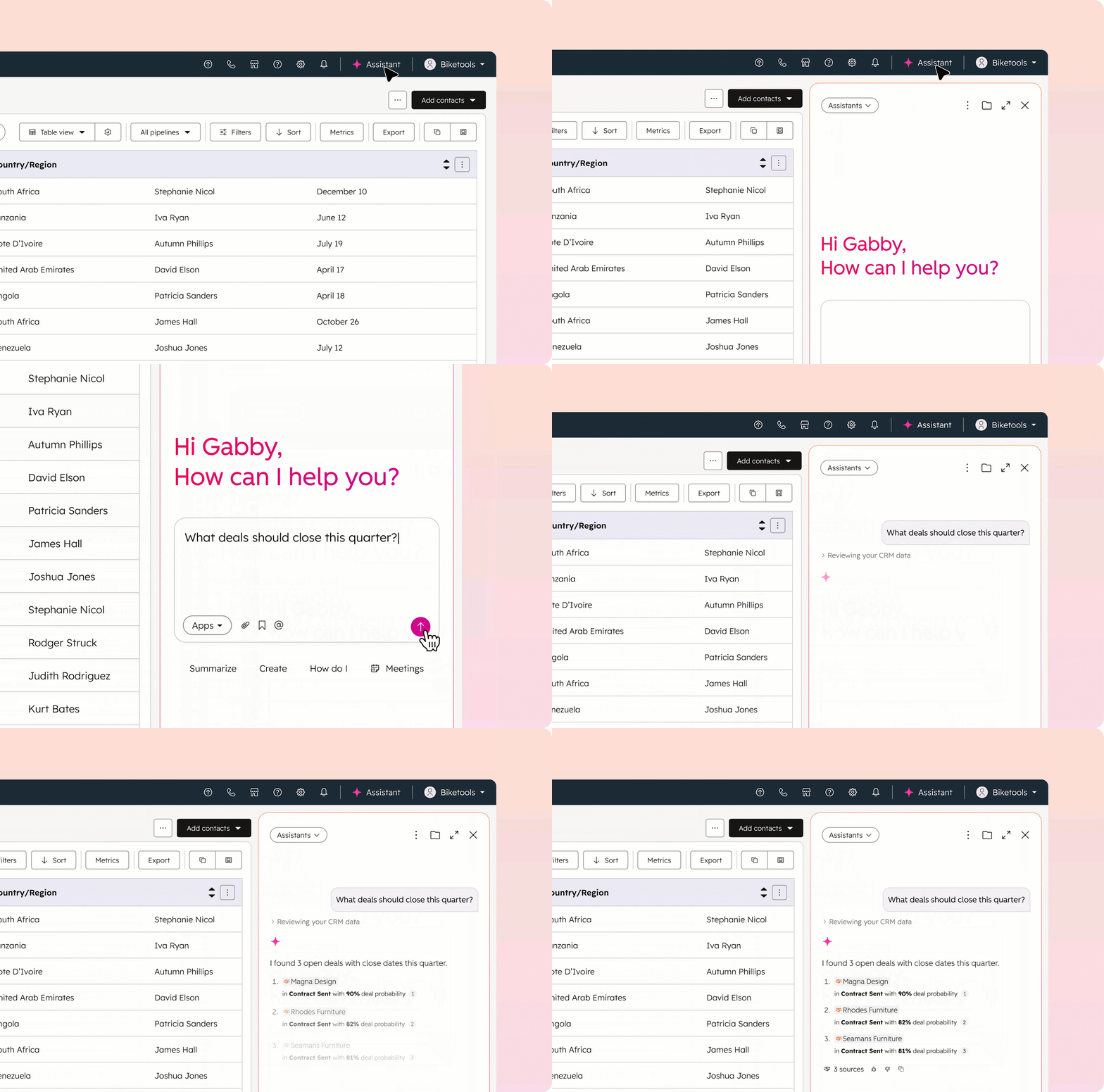
HubSpot weaves AI across the platform through Breeze. The Breeze Customer Agent handles conversations across chat, email, WhatsApp, and Facebook Messenger, resolving over 50% of inquiries on its own.
Source: Hubspot
A Knowledge Base Agent (in beta) drafts help articles from resolved ticket conversations. Reply recommendations surface AI-generated responses in the help desk workspace. Breeze runs on HubSpot Credits, a consumption-based system where subscriptions include a monthly allotment.
ZoomInfo adds a different kind of AI. While Help Scout and HubSpot focus on resolving support conversations, ZoomInfo's GTM Context Graph processes 1.5B + data points daily to build the business context behind every account. Its AI doesn't draft support replies.
Source: ZoomInfo
It tells you that the company contacting support just went through a leadership change, is evaluating your competitor's product, and has three other stakeholders who should be looped in. That context makes every response, human or AI-generated, more informed.
"That combination of our internal CRM data, external signals, and AI that's given all that context has helped us craft very specific account- and persona-based messages. And people have responded to them right away." (Toby Carrington, CBO, Seismic)
Knowledge base and self-service comparison
Self-service is where both platforms work to deflect support volume before it reaches an agent.
Help Scout Docs is included on all plans, even the free tier. The knowledge base supports rich content editing, embedded video from YouTube and Vimeo, custom CSS/JavaScript, and multiple Docs sites. The Docs Report tracks failed searches (queries that returned no results), making it easy to spot gaps.
Source: Help Scout
Articles surface through the Beacon widget based on the page a visitor is viewing.
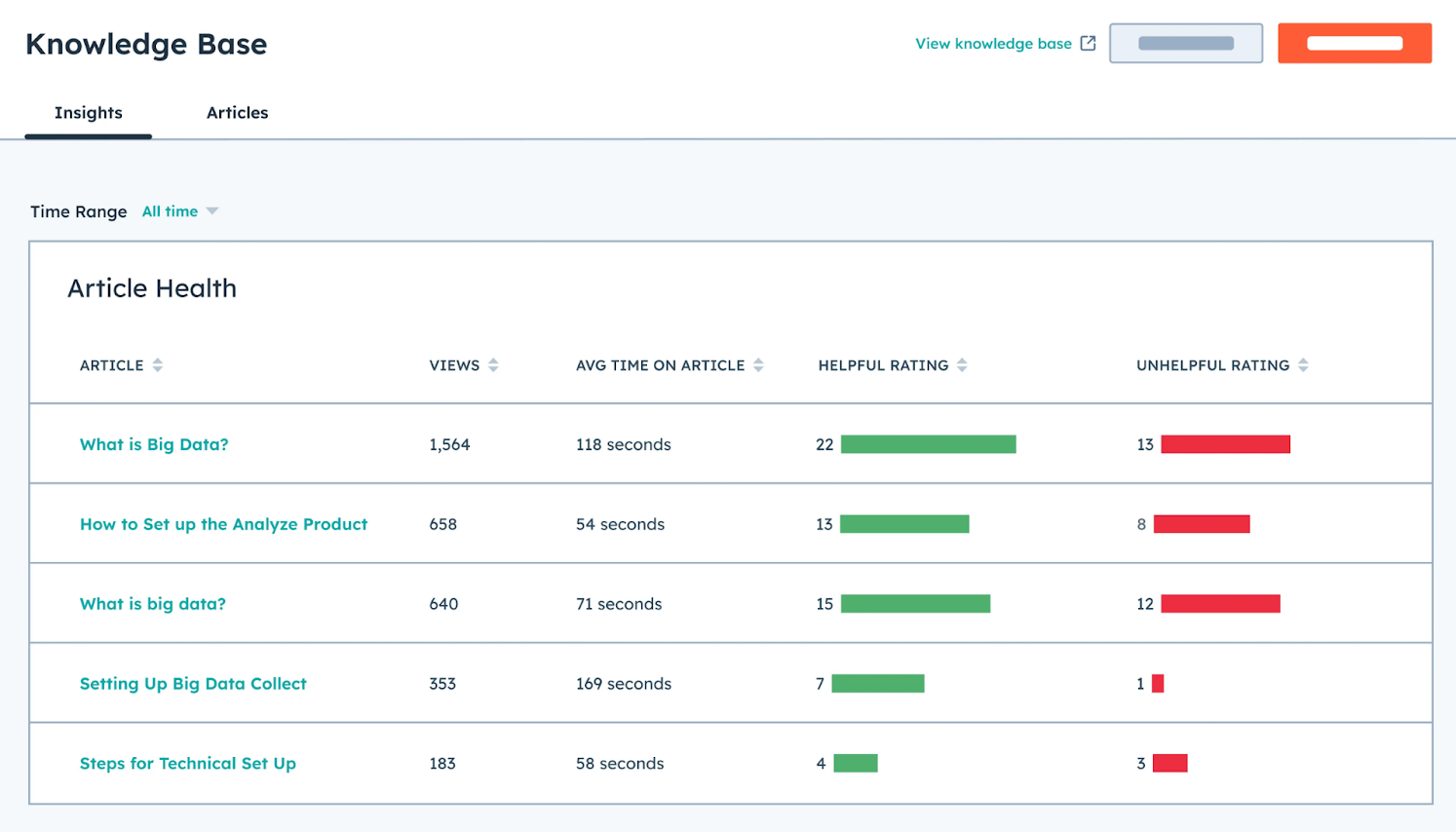
HubSpot's Knowledge Base is available on Professional and Enterprise tiers of Service Hub. It connects to the Smart CRM, so article performance data ties back to customer records and ticket reduction metrics.
Source: HubSpot
The Breeze Knowledge Base Agent (beta) can draft help articles from resolved ticket conversations, turning support interactions into self-service content. HubSpot also offers a customer portal where customers can track open tickets without contacting support.
Help Scout's advantage: the knowledge base is included at every price point, even free. HubSpot's advantage: CRM-tied analytics, plus a customer portal that Help Scout doesn't offer.
Channels and omnichannel coverage
Both platforms consolidate channels into a single view, but the channel lineup differs.
Help Scout covers email, live chat (via Beacon), Facebook Messenger, Instagram, and WhatsApp (on Plus and above). Phone and SMS are available only through third-party integrations like Aircall and Talkdesk.
Help Scout's own comparison page acknowledges this: "If true omnichannel support is a must-have for your business, Zendesk will be the better option." X/Twitter DMs are not supported on any plan.
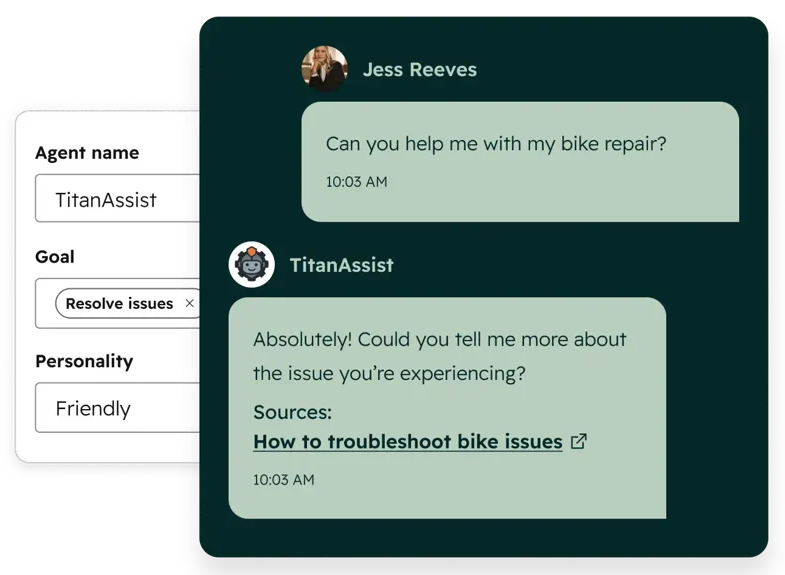
HubSpot Service Hub connects email, live chat, forms, calling, WhatsApp, Facebook Messenger, and custom channels from a single help desk. Phone support is built in at Professional and Enterprise tiers, with skill-based routing and IVR at Enterprise. HubSpot also integrates with Slack, Microsoft Teams, and Google Chat for internal communication.
Source: HubSpot
For B2B teams where phone support matters, this is a real gap. Help Scout requires a separate subscription and integration for voice. HubSpot includes it natively.
The pricing math tells different stories
Help Scout's pricing is per-user and predictable. HubSpot's pricing is layered and escalates.
Help Scout charges a flat rate per user:
Plan | Price | Key limits |
|---|---|---|
Free | $0 | 5 users, 100 contacts/month, 1 inbox |
Standard | $25/user/month | Up to 25 users |
Plus | $45/user/month | Up to 50 users, WhatsApp, light users |
Pro | $75/user/month | 10-user minimum, unlimited users |
No mandatory onboarding fees. No contact-based billing surprises on paid plans (a three-month rolling average smooths seasonal spikes). A 15-day free trial for Standard and Plus, no credit card required.
HubSpot Service Hub pricing gets complex fast:
Plan | Price | Onboarding fee |
|---|---|---|
Free | $0 | None |
Starter | $20/seat/month (monthly) | None |
Professional | $100/seat/month (monthly) | $1,500 one-time |
Enterprise | $150/seat/month (annual only) | $3,500 one-time |
The sticker prices are only part of the story. HubSpot's knowledge base requires Professional tier. The customer portal requires Professional. Conditional SLAs require Enterprise. And if you subscribe to multiple Hubs at different tiers, all Core Seats are billed at the rate of the highest tier, a rule that can inflate costs for teams mixing Service Hub Starter with Marketing Hub Professional.
HubSpot doesn't refund mid-contract cancellations. Subscriptions can only be canceled at the end of the commitment term, and all payment obligations are non-cancelable.
For a 15-person support team, Help Scout's Plus plan costs $675/month. HubSpot's Service Hub Professional costs $1,500/month plus a $1,500 onboarding fee. The question is whether the connected CRM data and additional features justify the premium.
Scaling from support to customer success
At some point, growing B2B companies need more than ticket resolution. They need customer health monitoring, renewal forecasting, and proactive account management. Here's how each platform handles that transition.
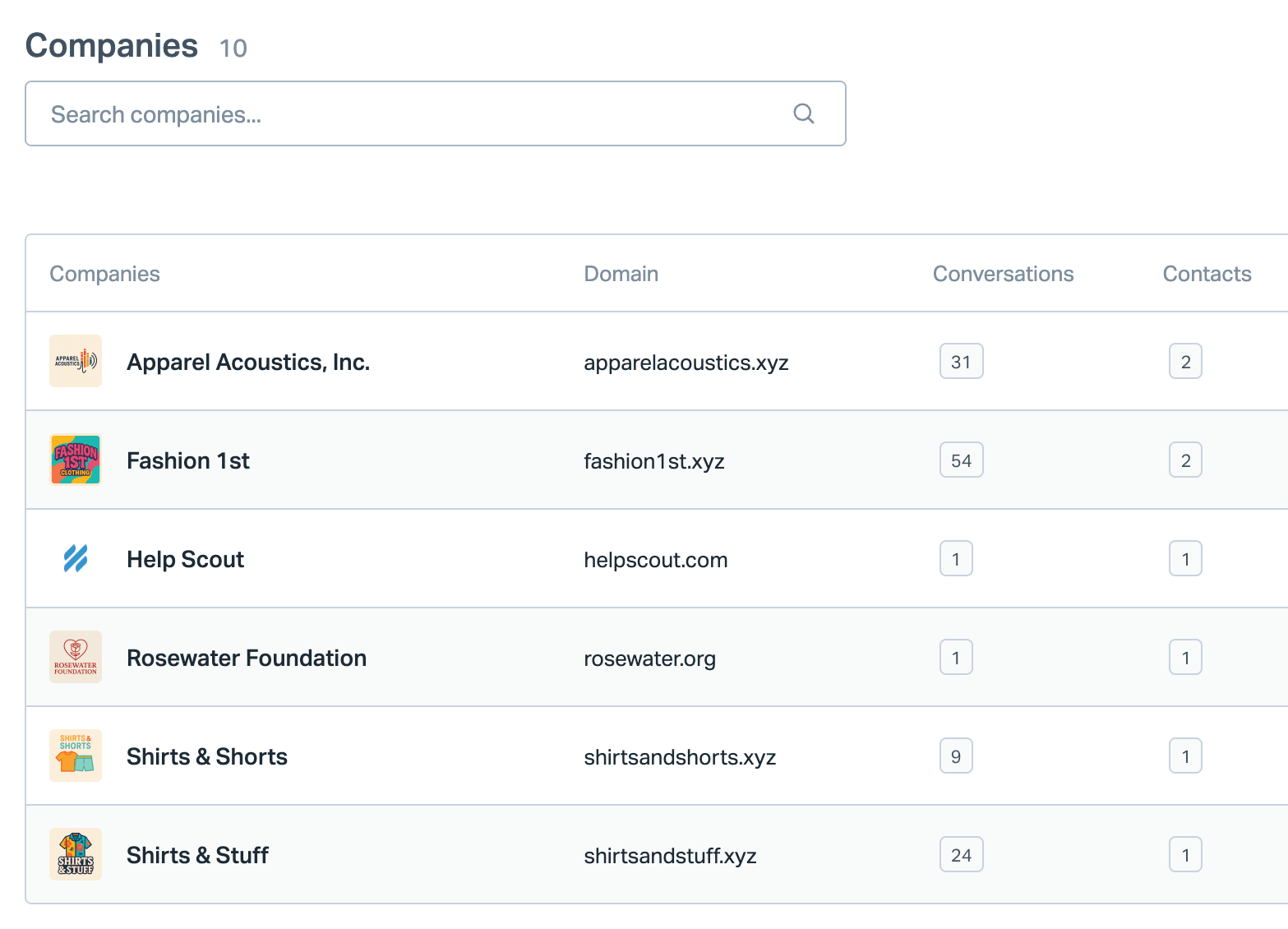
Help Scout recently launched Company Profiles, which group all contacts and conversations from the same organization into one view. SLA tracking was introduced in early 2026.
Source: Help Scout
These are useful steps, but Help Scout remains a support tool. It has no customer health scores, no renewal pipeline, and no customer success workspace. Teams that need those capabilities will add a dedicated CSP like Gainsight or ChurnZero.
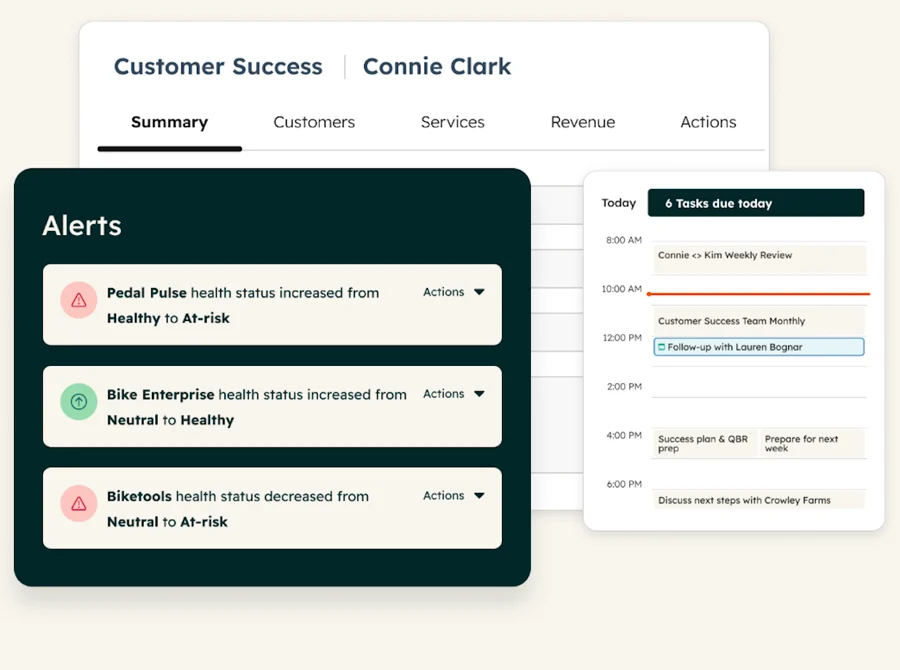
HubSpot offers a dedicated Customer Success Workspace with customer health scores, renewal pipeline visibility, and playbooks. Professional supports one health score; Enterprise supports up to ten. HubSpot positions this against dedicated CSP platforms, arguing that keeping customer success inside the CRM avoids data fragmentation from separate tools.
Source: HubSpot
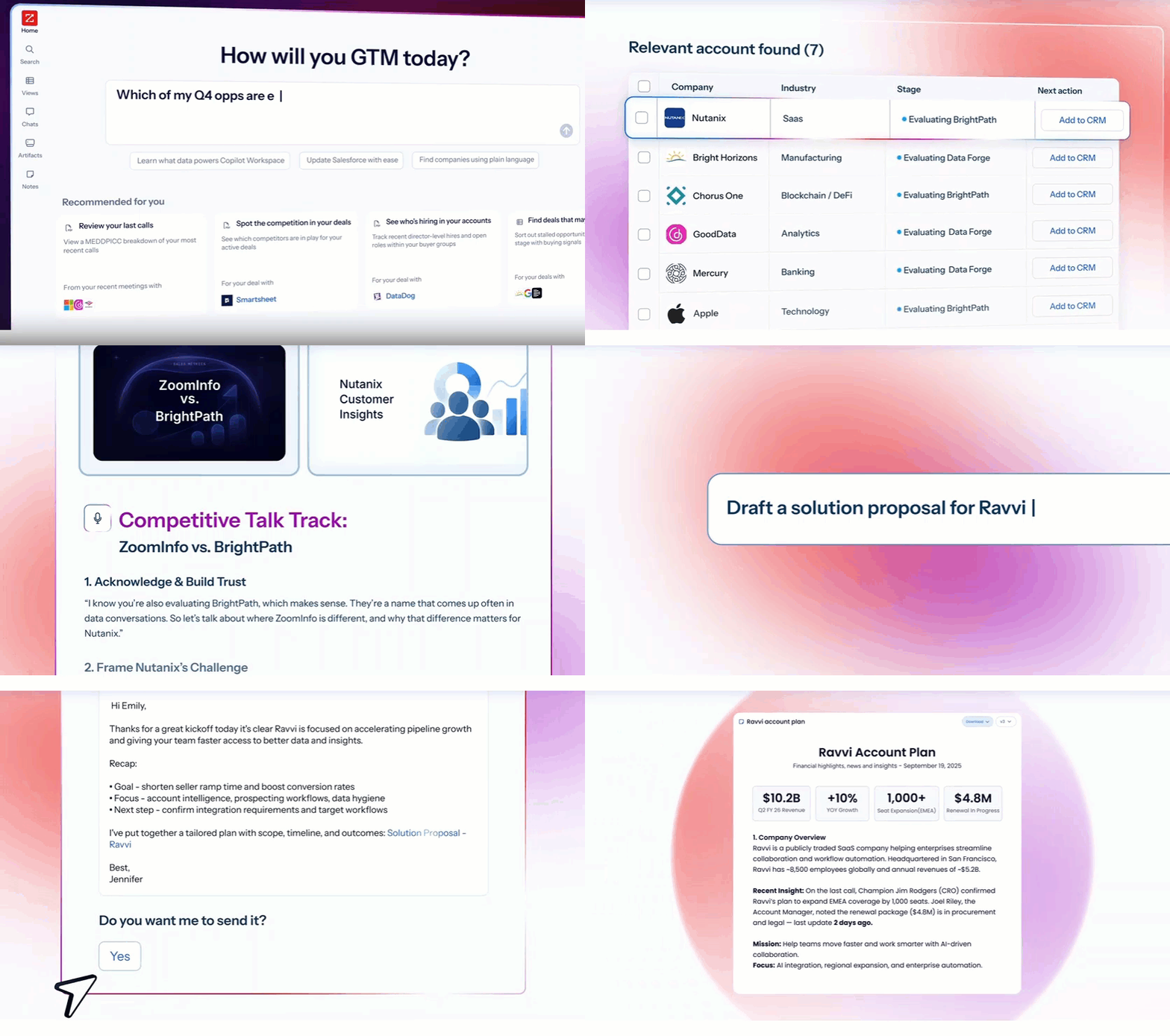
ZoomInfo adds a layer that makes both approaches more effective. Its GTM Context Graph connects support interactions with external signals (intent spikes, competitive research, leadership changes, hiring patterns) to surface churn risks and expansion signals that internal ticket data alone wouldn't reveal.
In GTM Workspace, account managers can monitor customer health using internal CRM data and external market signals together. Seismic's sales team attributed 39% of active pipeline to opportunities identified or influenced by ZoomInfo signals.
Source: ZoomInfo
"It's not just the data itself. It's more about the right data at the right time to help us reach out with the right message across that full buyer journey." (Chelsea Kenyon, Senior Director of Digital Strategy, Redwood Logistics)
Integrations reflect different ecosystem strategies
Help Scout lists 100+ integrations across CRM, ecommerce, communication, and analytics categories. Key native integrations include Salesforce (Plus tier), HubSpot (Plus tier), Jira (Plus tier), Shopify, Slack, and Mailchimp. Many connections route through Zapier rather than direct API integration. Help Scout's API supports 200 calls/minute on Standard, 400 on Plus, and 800 on Pro.
HubSpot operates at a larger scale. The App Marketplace has passed 2,000 integrations with over 2.5 million active installs. The developer platform includes REST APIs, a GraphQL API, official SDKs in six languages, a CLI, and a remote MCP server for AI agent access. The ecosystem is mature and well-documented.
Source: Hubspot
ZoomInfo integrates natively with both ecosystems. The ZoomInfo HubSpot integration enriches CRM records with B2B data. ZoomInfo's Enterprise API and MCP server let any tool (including Help Scout via connected CRMs or Zapier) consume the same data.
The ZoomInfo Marketplace lists 172+ integration partners across CRM, marketing, sales, data warehouse, and AI categories, including Salesforce, Snowflake, and Claude.
Source: ZoomInfo
"The plug-and-play aspect of the API means I can integrate it very easily into any process and get information at a moment's notice." (Jerry Wilson, Senior Marketing Intelligence Analyst, BDO Canada)
Help Scout vs. HubSpot vs. ZoomInfo: Which should you choose?
The right choice depends on what your team needs and where you are in your growth.
Choose Help Scout if:
Your primary need is email and chat-based customer support
You want a tool your team can learn in under an hour
Simplicity and a personal support experience matter most
You're a team of 5-150 agents that doesn't need a full CRM
Predictable per-user pricing with no onboarding fees is important
You're comfortable using separate tools for sales, marketing, and customer success
Choose HubSpot Service Hub if:
You need customer service connected to sales, marketing, and CRM data
Phone support, customer portals, and health scoring are requirements
You want visibility across marketing, sales, and service on every customer record
Your organization is ready to invest in a platform that covers all three
You need built-in customer success tools alongside support
You plan to use HubSpot across multiple departments
Add ZoomInfo to either platform if:
You're a B2B company that needs intelligence on who your customers are
Your support team should identify expansion signals and churn risks, not just resolve tickets
You want company data, org charts, and buying signals enriching every customer record
You need to connect service interactions to revenue outcomes
You want the same data layer powering sales, marketing, and service
You're building AI-powered GTM workflows that need verified data
See how ZoomInfo works across your customer operation.
Help Scout and HubSpot each solve customer service well, from different angles. Help Scout keeps it simple and personal. HubSpot keeps it connected and comprehensive.
But for B2B teams, the competitive advantage comes from understanding your customers well enough to turn every support interaction into a revenue opportunity. That's what ZoomInfo provides, and it works regardless of which service platform you choose.
Help Scout vs. HubSpot vs. ZoomInfo FAQ
What is the fundamental difference between Help Scout and HubSpot for customer service?
Help Scout is a customer service platform built around a shared inbox that makes support feel like a personal conversation. HubSpot Service Hub is one piece of a customer platform that connects support to sales, marketing, and CRM data. Help Scout prioritizes simplicity and fast onboarding. HubSpot prioritizes cross-team visibility and a single customer record.
Which platform is cheaper for a small support team?
Help Scout is more affordable for small teams. A 10-person team on Help Scout's Standard plan costs $250/month with no onboarding fee. The same team on HubSpot Service Hub Professional costs $1,000/month plus a $1,500 one-time onboarding fee. Help Scout also includes a knowledge base on all plans, while HubSpot requires the Professional tier.
Does Help Scout have a CRM?
No. Help Scout is a customer service platform, not a CRM. It integrates with external CRMs (HubSpot, Salesforce, Pipedrive) on Plus and Pro plans. Customer data appears in a sidebar within conversations, but Help Scout does not manage deals, pipelines, or sales processes.
How does ZoomInfo work with Help Scout or HubSpot?
ZoomInfo enriches customer records with B2B data: company profiles, org charts, technographic profiles, and buying signals. For HubSpot users, ZoomInfo's native integration pushes enriched data into the Smart CRM, where it surfaces in Service Hub. For Help Scout users, ZoomInfo enriches the connected CRM (Salesforce or HubSpot) that feeds Help Scout's customer sidebar.
Which platform has better AI for customer service?
Both have strong AI for different purposes. Help Scout's AI Answers resolves 73% of interactions on average at $0.75 per resolution. HubSpot's Breeze Customer Agent resolves over 50% of conversations and works across chat, email, WhatsApp, and Facebook Messenger.
HubSpot's AI covers more ground (sales, marketing, and data alongside service), while Help Scout's AI is more focused and simpler to set up.
Does HubSpot Service Hub include phone support?
Yes. HubSpot includes native calling on Professional and Enterprise tiers, with skill-based routing and IVR at Enterprise. Help Scout does not offer native phone support; teams must integrate with third-party providers like Aircall or Talkdesk.
Can I use ZoomInfo without HubSpot or Help Scout?
Yes. ZoomInfo works independently as a B2B intelligence platform. Teams access its data through GTM Workspace (for sellers), GTM Studio (for marketers and RevOps), or APIs and MCP for any third-party application. ZoomInfo Lite is a permanent free tier with access to the B2B database and 10 monthly export credits.
Which platform is best for scaling from customer support to customer success?
HubSpot has the strongest built-in path from support to success, with a Customer Success Workspace, customer health scoring, and renewal pipeline tracking. Help Scout has added Company Profiles and SLA tracking but does not include customer success features. ZoomInfo enhances either approach by surfacing churn signals, expansion opportunities, and account-level context from external market data.
More HubSpot comparisons:
