
Every customer service API evaluation comes down to the same question: does this platform expose enough of itself programmatically to build the support experience your product needs, without hitting a wall when the integration gets complex?
Intercom's REST API, currently at version 2.15, covers more ground than most APIs in the customer service category. The docs are public at developers.intercom.com, official SDKs cover six server-side languages, rate limits are published at 10,000 calls per minute per app, and the endpoint catalogue spans contacts, conversations, tickets, help center articles, workflows, and the Fin AI Agent.
But breadth of endpoints and depth of data are different questions.
Intercom's API gives you programmatic control over the customer service layer: managing contacts and companies, handling conversations and tickets, publishing help center content, triggering workflows, and embedding the Fin AI Agent into third-party platforms. What it does not expose is the B2B intelligence underneath: who these contacts are beyond what they told you, what companies they represent, what technologies those companies run, whether those accounts show buying intent, or where contacts sit in an org chart. That intelligence lives in a different part of the stack.
This is where ZoomInfo enters. ZoomInfo is a GTM platform whose Enterprise API is a REST suite covering B2B search, enrichment, AI intelligence, and audience management across 500M contacts and 100M companies, with an MCP server for AI-agent workflows. The two APIs are complementary layers, not rivals. The right question is whether your build needs one or both.
This review covers the Intercom API in full technical depth first (authentication, endpoints, webhooks, SDKs, rate limits, and pricing), then reviews ZoomInfo's API as the data intelligence layer that sits beneath the conversations Intercom manages.
Intercom API at a Glance
Attribute | Detail |
|---|---|
API type | REST over HTTPS, JSON responses |
Authentication | Access Token (private apps) or OAuth 2.0 (public apps) |
Base URL | https://api.intercom.io/ (US), api.eu.intercom.io (EU), api.au.intercom.io (AU) |
Current version | v2.15 with version history back to v1.0; Preview channel for upcoming changes |
Rate limits | 10,000 calls/min per app; 25,000 calls/min per workspace |
SDKs | Official server-side wrappers for PHP, Node.js, Ruby, Go, Java, and .NET |
Messenger SDKs | Web (JavaScript), iOS, Android, React Native |
Webhooks | Yes, topic-based subscription model with 75+ event types |
Documentation | developers.intercom.com (interactive reference, versioned changelog, public OpenAPI spec) |
Pricing / access | Included on all paid plans; $29/seat/mo entry (Essential, billed annually) |
Intercom API: What Works Well & What to Plan Around
What works well | What to plan around |
|---|---|
Public docs with interactive API reference and no login wall | Customer service scope only: no contact enrichment, B2B intelligence, intent signals, or org charts |
Official SDKs in six server-side languages, plus Messenger SDKs for four client platforms | Private-app tokens are static with no rotation or scoping; OAuth 2.0 requires Developer Hub approval for public apps |
10,000 calls/min per app and 25,000/min per workspace, with rate-limit headers on every response | Webhook retry is a single attempt after 1 minute; if the second delivery fails, the notification is dropped |
75+ webhook event types covering conversations, contacts, tickets, articles, and Fin AI agent actions | Fin Agent API is scoped to embedding Fin on third-party platforms, not to general-purpose AI access |
Three regional base URLs (US, EU, AU) for data residency compliance | No permanent free API tier; the 14-day trial ends and access stops without a paid plan |
OpenAPI spec public on GitHub for client generation; MCP server available for Cursor and VS Code | Contact and company data is limited to what customers and integrations provide; no built-in enrichment |
Intercom API: Authentication & Getting Started
API access starts with any paid Intercom plan.
The pricing page lists API access across Essential ($29/seat/month), Advanced ($85/seat/month), and Expert ($132/seat/month), with no separate developer signup or API-specific fee. A 14-day cardless free trial gives access to the full API during the trial period.
Intercom supports two authentication mechanisms depending on app type:
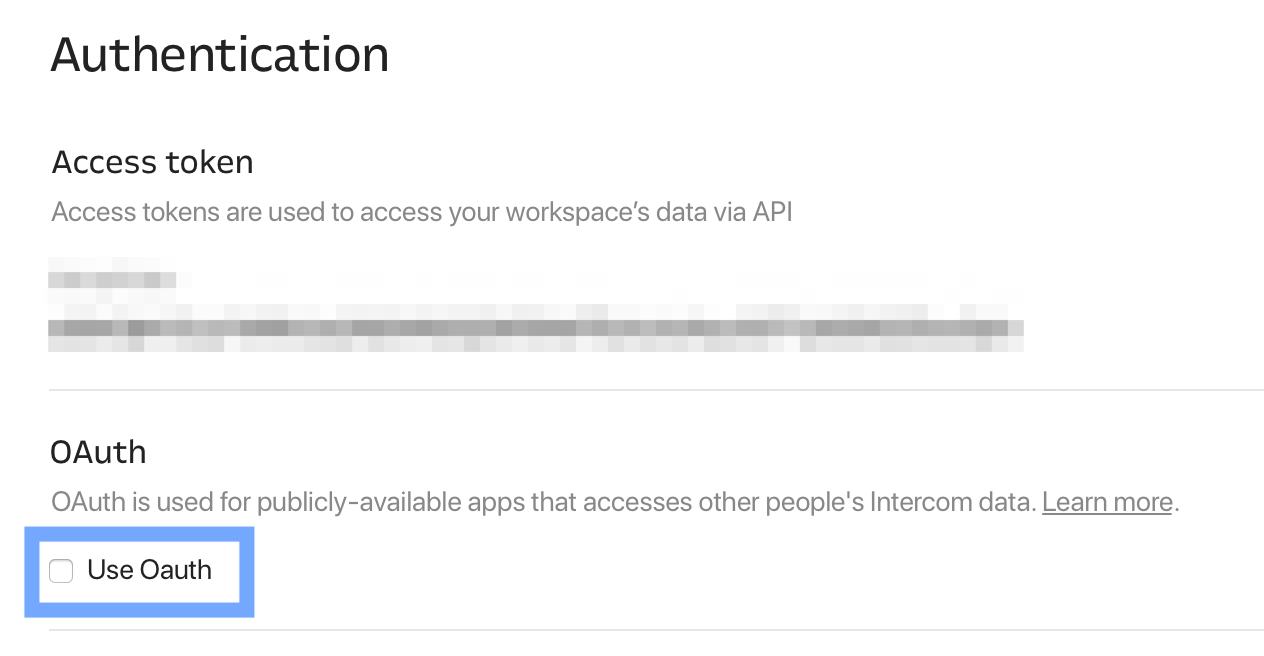
Access Tokens (private apps): for integrations that access only the builder's own workspace. The Developer Hub generates tokens automatically when you create an app, under Configure > Authentication. Each workspace can hold multiple private apps, each with its own token.
OAuth 2.0 (public apps): for apps that access other organizations' Intercom workspaces (marketplace integrations, multi-tenant SaaS products). Developers set up OAuth through the Developer Hub and must complete a review process before listing. Intercom's terms prohibit public apps from asking end-users for their Access Tokens; OAuth is mandatory for any app that accesses third-party data.
Source: Intercom
In both cases, the token is passed as a Bearer header:
curl -X GET "https://api.intercom.io/contacts" \
-H "Authorization: Bearer YOUR_ACCESS_TOKEN" \
-H "Accept: application/json" \
-H "Intercom-Version: 2.15"
The Intercom-Version header is worth noting. Developers can pin their API version per request, so you can test a newer version alongside your production integration without a global switch. The version history goes back to v1.0, with a Preview channel for upcoming changes.
One constraint for private apps: Access Tokens are static credentials with no built-in rotation, expiry, or scope control. If you need delegated access, credential rotation, or per-integration permissions, you need the OAuth path, which requires Developer Hub registration and review for public apps.
Intercom API: Core Endpoints & Capabilities
The API is organized by resource, with endpoints following REST conventions. All requests and responses use JSON-encoded UTF-8. The primary HTTP methods are GET, POST, and DELETE, with cursor-based pagination for list resources and search with sorting on Contact and Conversation endpoints.
Contacts & Companies
Contacts are the core CRM primitive in Intercom's API.
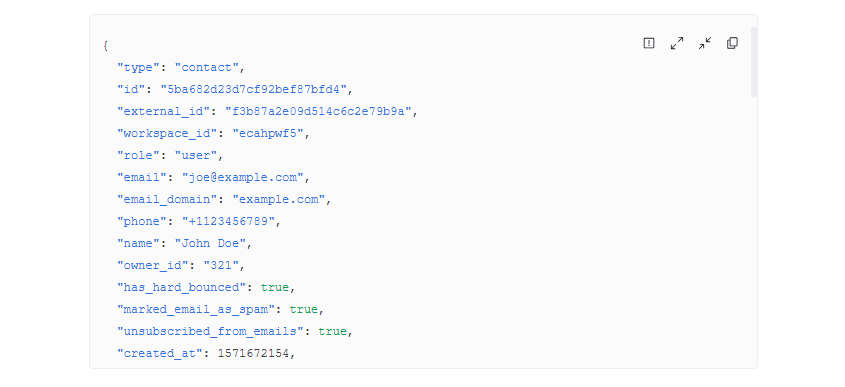
Contacts: Create, read, update, delete, search, archive/unarchive, merge, and list. Contacts can be associated with companies and tags. The search endpoint supports filtering by custom attributes, so you can run targeted queries against your contact database.
Source: Intercom
Companies: Create, read, update, delete, and list. You attach and detach contacts from companies, establishing the organizational relationships that drive routing and segmentation.
Data Attributes: Create and manage custom data attributes on contacts and companies, extending the data model beyond Intercom's defaults. Custom Object Instances: Full CRUD on custom data models for use cases that don't fit the standard contact/company schema.
What you would build with this: a bidirectional CRM sync that keeps contact records, company associations, and custom attributes current between Intercom and your primary database, with merge logic to prevent duplicate contacts as users sign up across channels.
Conversations
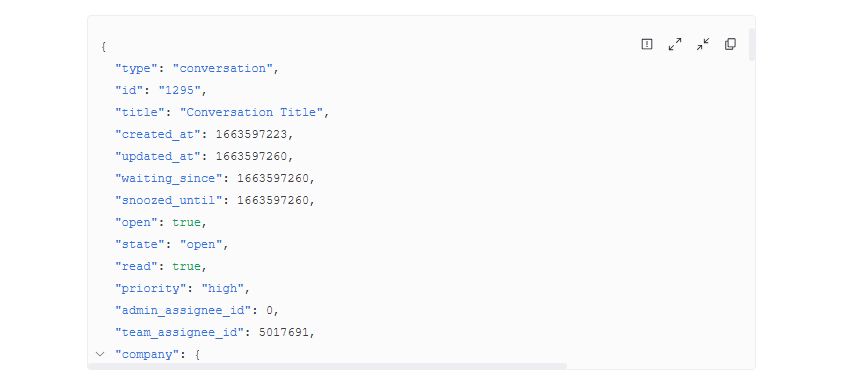
Conversations: Create, read, update, reply, assign, open, close, snooze, search, and redact parts of a conversation. The search endpoint supports sorting, so you can query conversations by custom criteria and build reporting pipelines outside the Intercom dashboard.
The reply endpoint accepts both admin and contact replies, so you can build integrations that inject messages into a conversation thread from external systems (a Slack bot routing replies back to Intercom, for instance). Redaction lets you remove sensitive content from conversation records programmatically, which matters for compliance workflows.
Source: Intercom
What you would build with this: an escalation workflow that monitors conversations via webhook, applies custom routing logic based on contact attributes or message content, assigns to specialized teams, and syncs resolution data back to an internal ticketing system.
Tickets
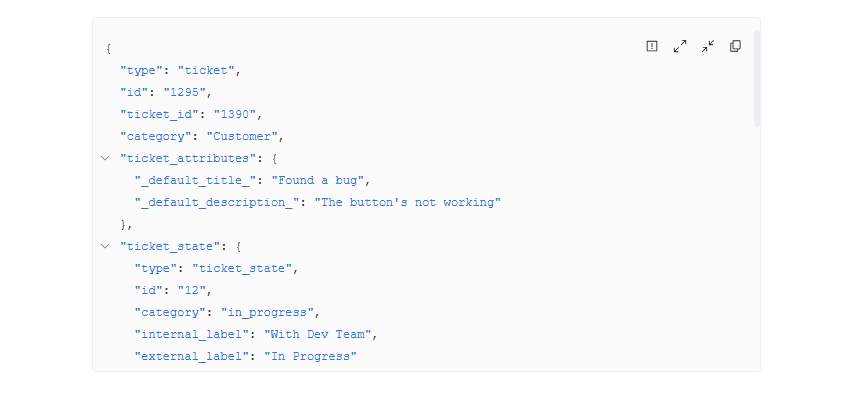
Tickets: Create, read, and update ticket state. The API also covers ticket type and attribute management, plus attaching and detaching contacts from tickets.
Intercom distinguishes three ticket types: Customer Tickets (standard support requests), Back-office Tickets (linked to a parent conversation for internal escalation), and Tracker Tickets (one ticket linked to many affected customers). The ticket API gives you programmatic control over state transitions and custom attributes, though the ticket lifecycle is simpler than what dedicated issue-tracking platforms expose.
Source: Intercom
Fin Agent (AI)
Fin Agent: The Fin Agent API lets third-party platforms interact with Intercom's Fin AI Agent programmatically. This is the surface that lets platforms outside Intercom's own Messenger embed Fin as a support layer, routing customer queries through Fin's resolution engine and receiving structured responses.
This is a newer part of the API, and its scope is specific: it embeds Fin on external platforms. It does not provide general-purpose AI access or custom model interaction.
Help Center & Articles
Articles: Create, read, update, delete, publish, and unpublish help center articles and collections.
AI Content: Manage the AI knowledge sources that feed Fin's resolution engine.
What you would build with this: a content pipeline that publishes help center articles from a headless CMS, manages collections programmatically, and updates Fin's knowledge sources whenever documentation changes, keeping the AI agent current without manual work.
Messages, Events & Outbound
Messages: Send outbound messages to contacts or users programmatically.
Data Events: Create custom behavioral events and list events, letting you feed product usage data into Intercom for targeting, segmentation, and Fin context.
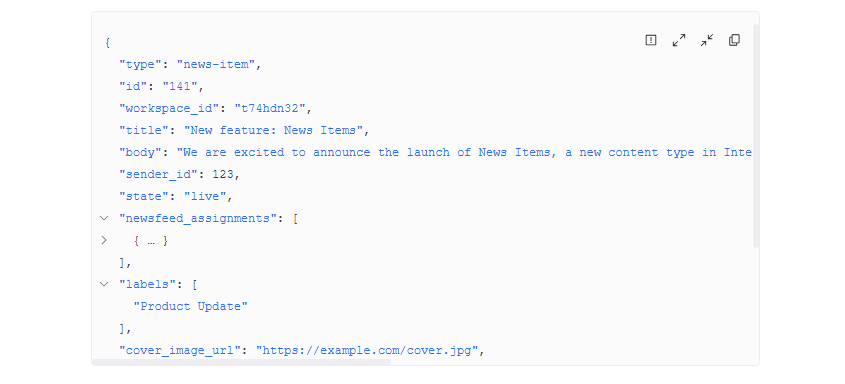
News: Manage News Items for outbound content distribution.
Source: Intercom
The Data Events endpoint is useful for product-led support builds: tracking user actions (feature usage, error encounters, onboarding milestones) and using those events to drive proactive messaging, Workflow triggers, and Fin context.
Administration & Export
Teams / Admins: List teams and admins, set away status.
Tags: Create, list, delete; apply to contacts, companies, and conversations.
Segments: List segments.
Notes: Create notes on conversations.
Data Export: Create bulk data export jobs.
Reporting Data Export: Export reporting data.
Calls: Access call records from Intercom Phone.
Workflows: Read and trigger automation workflows.
Data Export and Reporting Data Export enable bulk extraction for analytics pipelines, data warehousing, and compliance archiving. The Workflows endpoint lets external systems trigger Intercom automations, useful when an event in your product or CRM should kick off a support workflow.
Intercom API: Webhooks & Events
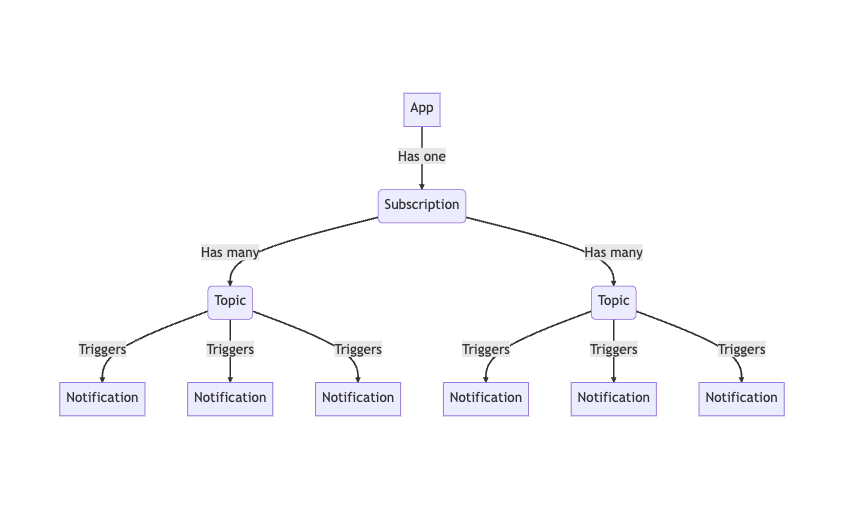
Intercom offers a webhook subscription system organized by topic. Developers subscribe to specific event types tied to OAuth permission scopes, and webhook notifications do not count against the API rate limit.
Source: Intercom
The published event topics span the full platform:
Conversation topics: admin replied, assigned, closed, opened, snoozed; contact replied; priority updated; rating added; Fin (operator) replied; contact attached/detached
Contact topics: created (lead or user), updated, archived, deleted, email updated, tag added/removed, lead converted, merged, subscribed/unsubscribed
Ticket topics: created, state updated, note created, admin/team assigned, contact attached/detached, attribute updated, replied, closed, resolved, rated
Company topics: created, updated, deleted; contact attached/detached
Article topics: created, updated, published, unpublished, deleted
Call topics: started, ended, transcription available, recording available (Intercom Phone only)
Content Stat topics: engagement events for banners, carousels, chats, checklists, custom bots, emails (including bounce, spam, and unsubscribe failures), news items, posts, push messages, SMS, surveys, tooltips, product tours, and series campaigns
Admin topics: added/removed from workspace, away mode updated, activity log created, login/logout
Additional topics: custom events created, API activity completed, bulk jobs completed, subscription changes, visitor conversion, data connector execution completed
That is 75+ event types across 14 topic groups, covering support conversations, content engagement, admin activity, ticket lifecycle, and infrastructure events like bulk job completion.
Delivery, Retry & Security
Intercom sends a JSON POST to the subscriber's endpoint and requires a response within 5 seconds. Two things to plan around:
One retry only. A failed notification retries once after 1 minute. If the second attempt also fails, the delivery is marked failed. No further retries, no dead-letter queue, no manual replay. Design your receiver to be idempotent, and build your own reliability layer if your pipeline depends on guaranteed delivery.
Throttling behavior. A 429 response from your endpoint throttles delivery for 1 minute to 2 hours. Notifications delayed beyond 2 hours are dropped. A 410 response disables the subscription permanently.
Every notification is signed with an X-Hub-Signature header containing an SHA-1 HMAC (hex, sha1= prefix) computed from the request body and the app's client_secret. Deletion events (*.deleted topics) send minimal identification payloads rather than full resource objects.
What you would build with this: a real-time integration that pushes conversation events to a data warehouse, routes ticket state changes to an ops dashboard, triggers Slack alerts on Fin escalations, and logs content engagement metrics for product teams, all without polling.
Intercom API: SDKs, Docs & Rate Limits
SDKs & Libraries
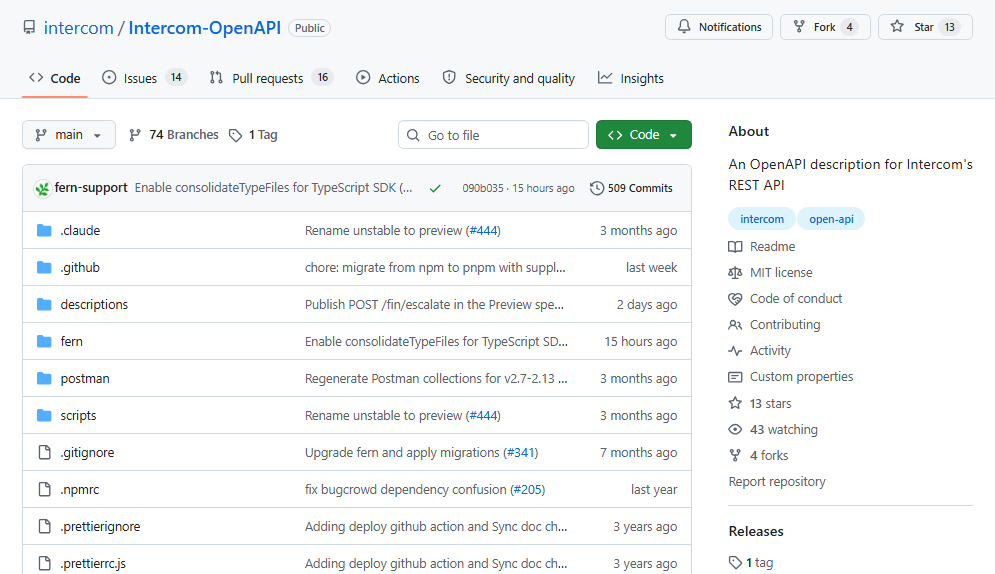
Intercom publishes six official server-side SDKs on GitHub under the Intercom organization:
Intercom also maintains a Rails plugin for Ruby on Rails applications. The SDKs handle Bearer token authentication automatically via a token: parameter.
Messenger SDKs for embedding the Intercom Messenger are available for Web (JavaScript snippet), iOS, Android, and React Native, with identity verification and push notification setup guides for each platform.
The OpenAPI specification is public on GitHub and serves as the source of truth for the interactive API reference. You can use it to generate additional client libraries, though Intercom notes this path is unsupported and may require significant development time. Intercom also exposes an MCP server for Cursor and VS Code, letting developers query Intercom's developer docs from within their IDE.
Source: Github
Six server-side SDKs, four client-side Messenger SDKs, a Rails plugin, a public OpenAPI spec, and an MCP server for IDE integration: that is broad developer tooling for a customer service platform. Check maintenance status across all repos before depending on a specific SDK in production.
Documentation & Developer Experience
The developer documentation lives at developers.intercom.com and is organized into five areas:
Installation guides: Messenger embed instructions for Web, iOS, Android, and React Native, including identity verification and push notification setup
Developer Guides: tutorials covering Messenger apps, Inbox apps, Contacts, Tickets, Help Center content, Reporting, webhooks, and the Fin Agent API
REST API Reference: interactive (live API calls from the browser), auto-generated from the public OpenAPI spec, versioned at v2.15 with a full version history and Preview channel
Canvas Kit Reference: documentation for the framework used to build custom Messenger and Inbox apps
Changelog: a dedicated changelog for v2.15 plus an Unversioned Changes section for cross-version updates
The API reference supports "Copy for LLM" (exports a page as Markdown) and includes "Open in Claude" and "Open in ChatGPT" links on each page, making AI-assisted development a first-class path. The Intercom Community is the primary developer support channel, with sections for API/webhooks, apps and integrations, and workflows. Support is also available through the in-product Messenger.
No Postman collection is published, though you can import the OpenAPI spec manually. The documentation is versioned, usable without signing in, and covers the API thoroughly, which is the standard a developer evaluating an API expects.
Rate Limits & Constraints
Intercom publishes rate-limit tiers by app type:
App type | Per-app limit | Per-workspace limit |
|---|---|---|
Private app | 10,000 calls/minute | 25,000 calls/minute |
Public app | 10,000 calls/minute (independent per app) | N/A (does not contribute to workspace ceiling) |
For private apps, all apps on a workspace share the 25,000/minute workspace ceiling. For public apps, each app has its own 10,000/minute budget.
The limit is distributed across 10-second sub-windows: 10,000/minute translates to roughly 1,666 operations per 10-second period. Rate-limit state comes via three response headers: X-RateLimit-Limit, X-RateLimit-Remaining, and X-RateLimit-Reset (UNIX timestamp). Exhaustion returns 429 Too Many Requests. Higher limits are available on request through Intercom support. Rate limits apply only to the REST API, not to Canvas Kit webhook callbacks.
These limits are high by customer service API standards. A private app at 10,000 calls per minute can sustain continuous high-throughput sync operations without careful throttling. The workspace ceiling of 25,000/minute gives multiple private apps running simultaneously enough room to operate.
Intercom API Pricing & Access Costs
Intercom bundles API access into its paid plans rather than charging per call or per credit. The pricing page lists API access across all three tiers:
Plan | Seat price (billed annually) | API access |
|---|---|---|
Essential | $29/seat/month | Included |
Advanced | $85/seat/month | Included |
Expert | $132/seat/month | Included |
There are no per-call charges, no API-specific credit costs, and no metered pricing. Private app development workspaces are free to create but limited in functionality and restricted to the US region.
The real cost for a developer building on this API is not the API itself but the platform features the API operates within:
Fin AI Agent: $0.99 per resolved outcome on top of the seat subscription, charged only when Fin resolves a conversation. Unresolved handoffs to humans are not charged.
Copilot (unlimited usage add-on): $29/agent/month on annual prepay beyond the 10 free conversations per agent per month included in all plans.
Usage-based channels: Email campaigns ($0.045/email at the first tier), SMS ($0.06/segment), WhatsApp (tiered), and Phone are billed per message in arrears.
Pro add-on (AI Insights): $99/month for up to 1,000 conversations, with tiered overages for conversation quality scoring and AI insights.
For a developer sizing costs: the API is free if you already pay for Intercom. The entry point is $29/seat/month for Essential, which gives you full REST API access, webhooks, and SDK support.
The real cost drivers are Fin's per-outcome charges and channel-specific usage fees, which apply whether you use the dashboard or the API. Startups can access Intercom at up to 93% off through the Early Stage program, and a 14-day cardless free trial is available on all plans.
Where the Intercom API Falls Short
These are practical limits a developer should plan around, not criticisms of the platform. Several are scope decisions that reflect what Intercom is (a customer service platform) and what it is not.
Contact and company data is limited to what flows in.
Intercom's API can create, read, update, and search contacts and companies, but the data is only as complete as what your integration, your users, or your team has put into the system.
There are no enrichment endpoints that fill in missing fields (job title, department, company size, industry, technology stack) from external sources. If a contact signs up with just an email address, that is all Intercom knows until someone or something adds more.
No B2B intelligence layer.
The API exposes no intent signals, no technographic data, no org charts, no corporate hierarchy, and no buyer behavior detection. For a developer building a support integration where the team also needs account context (is this a target account? is the company in-market for our category? who else should we be talking to?), the API does not carry that data.
No AI-powered account or contact research.
The Fin Agent API is scoped to embedding Fin for customer-facing resolution. There is no endpoint for AI-synthesized account intelligence, lookalike expansion, or buying-committee recommendations. The AI surface is support-facing, not intelligence-facing.
Static token authentication for private apps.
Private-app Access Tokens do not expire, cannot be scoped to specific endpoints or resources, and have no built-in rotation mechanism. For teams with strict credential-rotation policies or multi-service architectures where different services need different API permissions, this is a constraint. OAuth 2.0 is available, but only for public apps that go through Developer Hub registration and review.
Webhook delivery has minimal retry guarantees.
One retry after one minute, then the notification is dropped. Notifications throttled by a 429 are delayed up to two hours, after which they are also dropped. For pipelines where a missed webhook means missed data (compliance logging, real-time analytics), you need your own reliability layer.
No bulk enrichment or batch processing endpoints.
Data Export provides bulk extraction, but there is no bulk enrichment endpoint that processes a batch of contacts against external data sources. Each contact update is an individual API call, which matters at scale.
ZoomInfo API: The B2B Intelligence Layer Intercom Does Not Cover
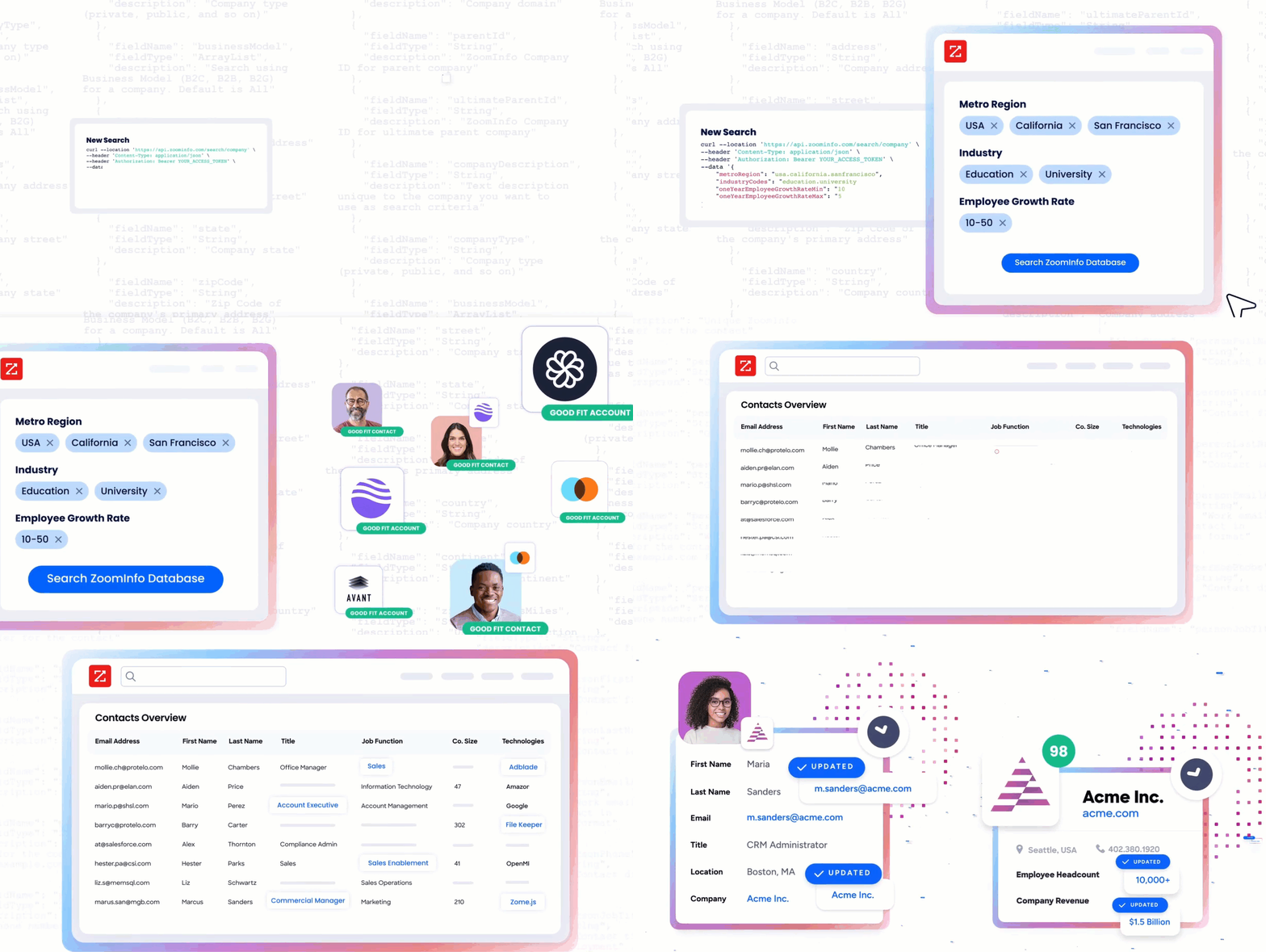
Intercom's API tells you what your customers say and do inside your support channels. ZoomInfo's API tells you who they are, what companies they work for, what technology those companies run, whether they are researching your category, and how the org chart is structured around the people you are already talking to.
Source: ZoomInfo
The two APIs operate at different layers of a customer intelligence stack.
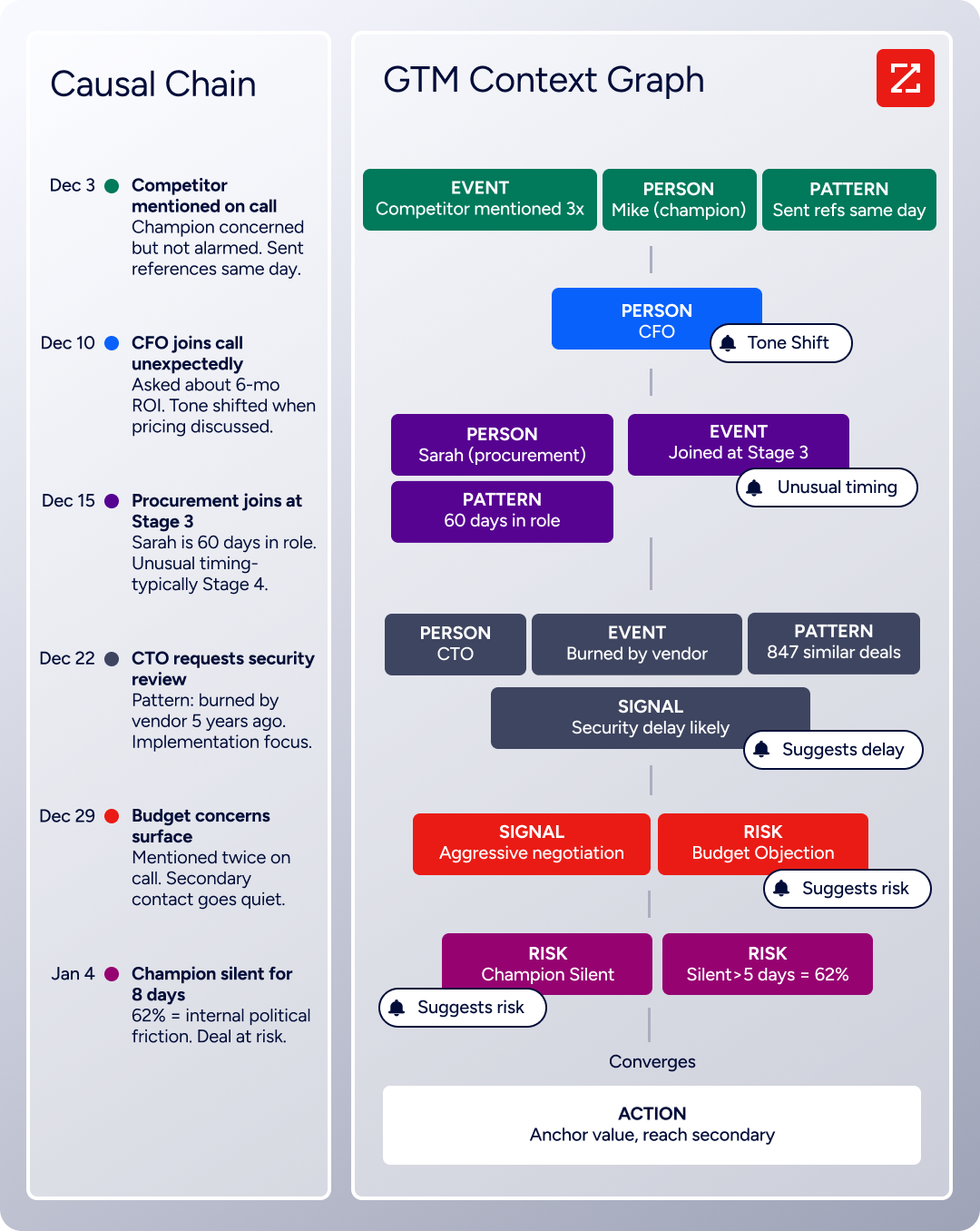
ZoomInfo's GTM Context Graph processes 1.5B+ data points daily, combining its B2B data with your first-party signals to capture not just what happened but why. The gap between "this contact submitted a ticket" and "this contact is a VP of Engineering at a company that just raised Series C, runs your competitor's stack, and is showing high intent for your category" is where ZoomInfo's API fits.
Source: ZoomInfo
What It Covers: Search, Enrichment, and AI Intelligence
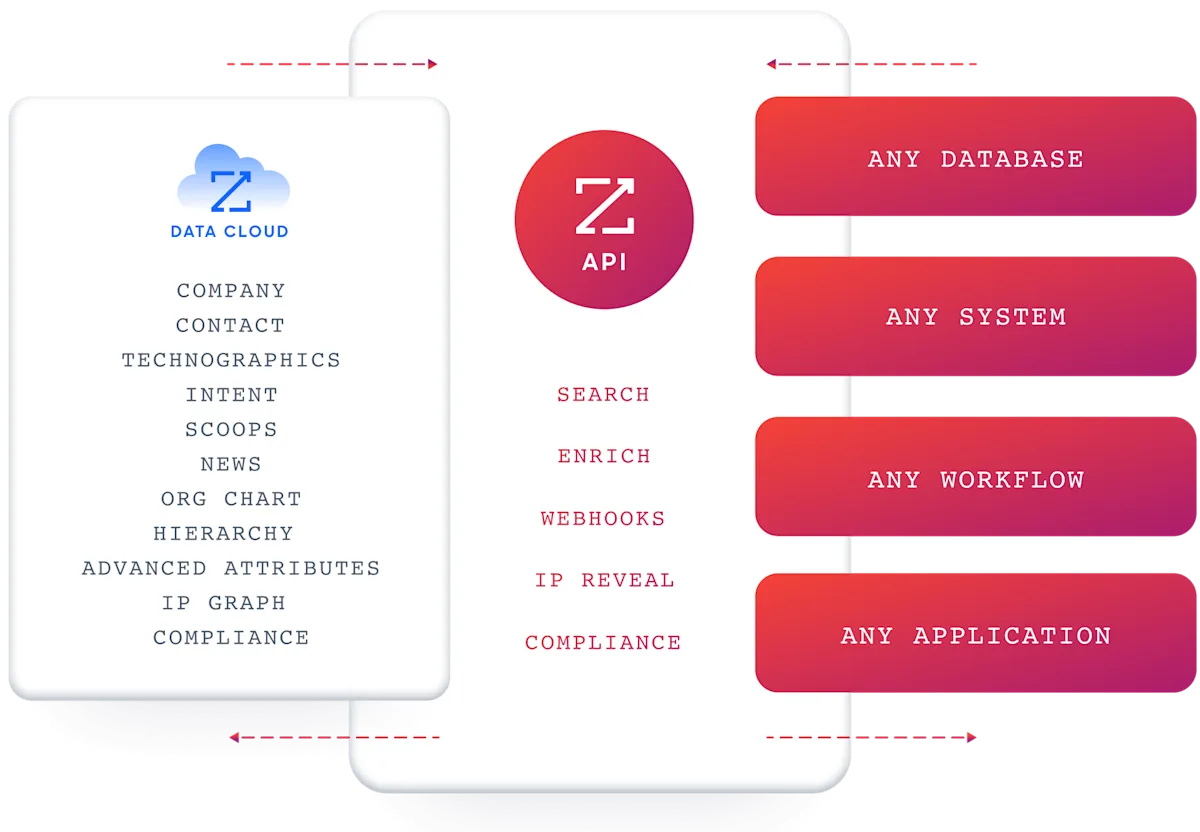
ZoomInfo's Enterprise API is a REST suite served from https://api.zoominfo.com/gtm, organized into four areas documented in the interactive API reference:
Data API (Search & Enrich): Search endpoints cover Contacts, Companies, Intent, News, and Scoops, returning matched records without consuming credits. Enrich endpoints unlock full payloads: business emails, direct dials, employment history, corporate hierarchy, org charts, technographics, and hashtag signals, accepting up to 25 records per call.
The dataset spans 500M contacts and 100M companies, 135M+ verified phone numbers, and 200M+ verified business email addresses. The search-then-enrich pattern means you filter freely, then pay only for the records you commit to.
AI Intelligence API (Copilot, part of GTM Workspace): Account Summary returns structured account intelligence with a free-form Q&A endpoint. Find Similar Companies performs lookalike expansion. Contact Recommendations returns AI-ranked buying-committee suggestions by motion (prospecting, deal acceleration, renewals).
Marketing API: CRUD endpoints for audience management. Platform API (Engagements, Beta): Bidirectional engagement data via the Engagements API.
The API and MCP server sit alongside GTM Workspace for sellers and GTM Studio for marketers and RevOps, so teams can use the same intelligence through whichever interface fits their workflow.
Source: ZoomInfo
The pairing with a customer service API is direct: when a contact opens a ticket in Intercom, use ZoomInfo's search and enrich endpoints to pull the full profile (title, seniority, department, company revenue, tech stack, intent signals) and push those attributes back into Intercom's contact record via Data Attributes. Your support team sees the full picture without leaving the inbox.
Authentication, Rate Limits & Credits
Authentication uses OAuth 2.0 with PKCE via Okta, issuing 24-hour access tokens with rotating refresh tokens. Three flows are supported: Authorization Code with PKCE (web applications), Client Credentials (server-to-server), and Refresh Token.
You register applications through the ZoomInfo Developer Portal, where you generate credentials, define scopes, and test endpoints.
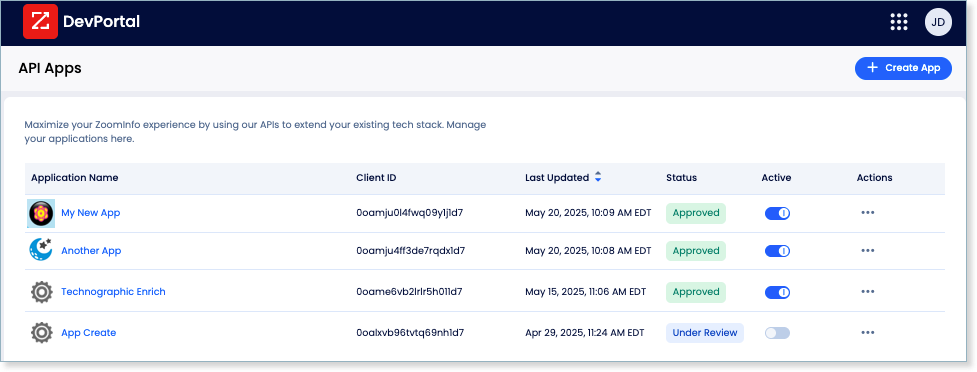
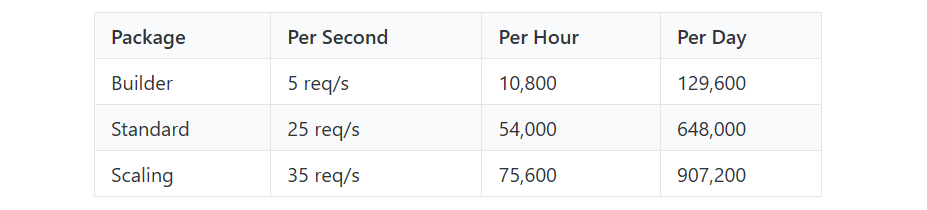
Rate limits are published by tier: Builder (5 req/sec), Standard (25 req/sec), and Scaling (35 req/sec), with per-hour and per-day sliding-window limits enforced simultaneously. Every response includes quota headers with remaining capacity, and 429 responses include a Retry-After header with exact backoff timing.
Source: ZoomInfo
Credits follow a rolling 12-month window: enriching a record for the first time consumes one credit; re-enriching the same record within the year is free. Search and lookup operations consume no credits. ZoomInfo uses consumption-based pricing with custom quoting; API access is included on all relevant plans, though specific dollar figures are not publicly listed.
MCP, Webhooks & Developer Experience
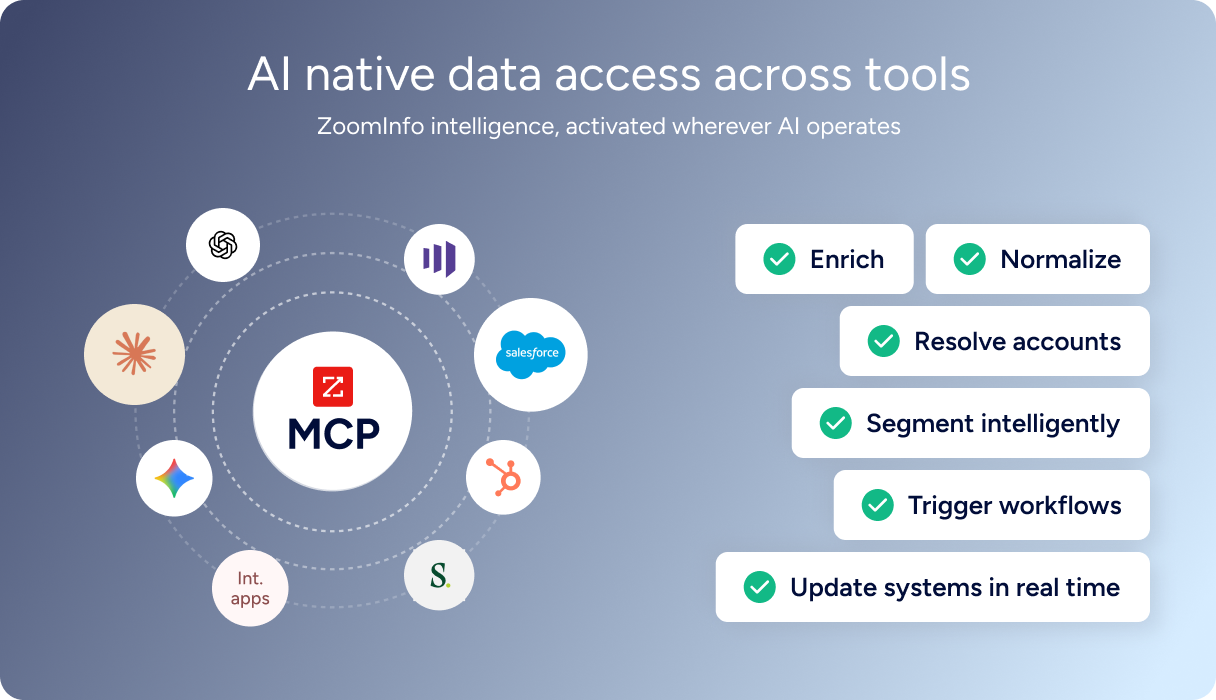
For developers building AI agents, ZoomInfo's MCP server at https://mcp.zoominfo.com/mcp exposes search, enrich, and account research as native tools for MCP-compatible assistants, currently supporting Claude and ChatGPT. The credit model carries over from the REST API.
Source: ZoomInfo
Webhooks are available via the Agents API, tied to ZoomInfo's Agent Teams system. Event types cover bulk enrichment jobs completing, records changing, credit usage crossing thresholds, and new GTM signals (scoops, funding events, intent spikes) becoming available, with retry behavior and throttling configurable per event type.
ZoomInfo does not publish official SDKs, so you integrate over HTTP and own the auth-and-retry layer. The interactive API reference supports live testing with OAuth2 Bearer token authentication, and a Docs MCP server lets AI development tools generate integration code against the API spec. Documentation lives at docs.zoominfo.com with recipes in Shell, Node, Ruby, PHP, and Python.
BDO Canada reported an 87% reduction in time spent updating internal data dashboards using the ZoomInfo API, with one analyst describing the integration as plug-and-play across any process. (ZoomInfo)
Final Verdict
Intercom's API gives developers full programmatic control over a modern customer service platform: contacts, conversations, tickets, help center content, workflows, webhooks, and AI agent embedding. The 10,000 calls per minute rate limit, six official SDKs, public OpenAPI spec, and regional base URLs for data residency make it production-ready for any customer service integration.
Its limits are limits of scope, not quality: the API manages the support layer, and it manages it well.
Choose the Intercom API if your build starts and ends with customer service operations: automating ticket routing, syncing conversations to external systems, managing help center content programmatically, embedding Fin on third-party platforms, or building real-time reporting on support interactions. The $29/seat/month entry with API access included and no per-call charges makes it straightforward to build against.
Choose the ZoomInfo API when your build needs the intelligence layer underneath those support conversations: understanding who the contacts in your inbox are, what companies they represent, whether those accounts are in-market for your category, and where they sit in the org chart. Enriching Intercom contacts with ZoomInfo data means your support team sees account context they would otherwise research manually, and your routing logic can factor in signals that Intercom's data model does not carry.
Start with the ZoomInfo Enterprise API or explore the developer docs to see the endpoint surface directly.
If your build needs neither, remember that Intercom's API does not carry B2B intelligence, and ZoomInfo's API does not manage support conversations. If your build requires both, they connect through Intercom's contact and company data model.
FAQ
Is the Intercom API free?
Not as a standalone offering. API access is included on all paid Intercom plans starting at $29/seat/month (Essential, billed annually). There are no per-call charges or API-specific credit costs on top of the plan subscription.
A 14-day cardless free trial gives access to the full API during the trial, but there is no permanent free tier. Private development workspaces are free to create but limited in functionality. Fin AI Agent charges ($0.99 per resolved outcome) and usage-based channel fees (email, SMS, WhatsApp) apply separately.
Does Intercom have a GraphQL API?
No. Intercom exposes a REST API (currently at v2.15) over HTTPS with JSON request and response bodies. There is no GraphQL endpoint. The REST API supports cursor-based pagination and search with sorting on Contact and Conversation endpoints.
If you need a GraphQL interface, you would build a wrapper layer on top of the REST API. The public OpenAPI spec on GitHub can help generate the schema.
What is the Intercom API rate limit?
Intercom allows 10,000 API calls per minute per app and 25,000 per minute per workspace. For private apps, all apps on a workspace share the 25,000/minute ceiling. For public apps, each app has its own 10,000/minute budget and does not contribute to other apps' workspace ceiling.
The limit is distributed across 10-second sub-windows (roughly 1,666 operations per 10 seconds). Every response includes rate-limit headers showing remaining capacity, and higher limits are available on request through Intercom support.
Are there official Intercom SDKs?
Yes. Intercom publishes official server-side SDKs for six languages: PHP, Node.js, Ruby, Go, Java, and .NET, all on GitHub under the Intercom organization. A Rails plugin is also maintained. For client-side use, Messenger SDKs are available for Web (JavaScript), iOS, Android, and React Native.
The public OpenAPI spec on GitHub can generate additional client libraries, though Intercom notes this path is unsupported. An MCP server is also available for Cursor and VS Code for AI-assisted development against the API docs.
Does the Intercom API support webhooks?
Yes. Intercom offers a webhook subscription system with 75+ event types organized into 14 topic groups.
Events cover conversations (replies, assignments, closures), contacts (created, updated, merged), tickets (state changes, assignments), articles (published, updated), calls (started, ended, transcription available), content engagement metrics, admin activity, and infrastructure events like bulk job completion. Notifications are signed with an HMAC SHA-1 signature for security.
The main constraint is delivery: a failed notification retries once after one minute, and if the second attempt fails, the delivery is dropped with no further retries.
Can I use the Intercom and ZoomInfo APIs together?
Yes, and the combination addresses a specific gap.
Intercom's API manages customer service operations but carries only the contact and company data that has been explicitly provided. ZoomInfo's API provides the B2B intelligence that fills in the rest: verified emails and direct dials, job titles and seniority, company attributes, technology stack, org charts, and buyer intent signals across 500M contacts and 100M companies.
A practical pattern is to enrich Intercom contacts via ZoomInfo's API when they enter the system, pushing attributes like company size, industry, technology stack, and intent scores into Intercom's custom data attributes so support teams see the full account picture without leaving the inbox. The two APIs use different authentication models (Bearer token vs. OAuth 2.0) and different data models, so plan your integration layer to handle both. ZoomInfo's MCP server extends the same intelligence to AI-agent workflows for teams building automated support triage that factors in account context.
