
The question behind any ATS API integration is the same: does the surface cover enough of the hiring lifecycle to justify the dependency, or will you hit a wall two sprints in?
Lever's API is a REST surface serving JSON over HTTPS, with two authentication paths (API key and OAuth 2.0), HMAC-signed webhooks, a sandbox environment for partner development, and an actively maintained changelog with entries through April 2026. The developer portal is public, the endpoint documentation covers CRUD operations across the recruiting lifecycle, and the rate-limit rules are published.
But openness and fitness for your build are different questions.
Lever's API manages the recruiting pipeline (candidates, applications, job postings, interviews, feedback, offers, and audit events) through a REST surface at https://api.lever.co/v1 with a rate limit of 10 requests per second. If you need an integration that reads, writes, or automates any part of the hiring workflow inside an ATS, the API covers that scope. Where it stops is the intelligence layer upstream of recruiting: who to recruit, what companies they work for, what technology those companies run, whether those accounts are growing or contracting, and how to find verified contact data for passive candidates you have not sourced yet. That is a different layer of the stack.
This is where ZoomInfo enters the picture. As a GTM platform, ZoomInfo's Enterprise API is a REST suite covering search, enrichment, AI intelligence, and audience management across 500M contacts and 100M companies, with an MCP server for AI-agent workflows. The two APIs are layers of a talent acquisition stack, not rivals, and the right question is whether your build needs one or both.
This review covers the Lever API in full technical depth first (authentication, endpoints, webhooks, SDKs, rate limits, and pricing), then reviews ZoomInfo's API as the intelligence layer that picks up where recruiting pipeline management stops.
Lever API at a Glance
Attribute | Detail |
|---|---|
API type | REST over HTTPS, JSON responses (UTF-8) |
Authentication | Basic Auth (API key as username) or OAuth 2.0 Authorization Code (for partner integrations) |
Base URL | https://api.lever.co/v1 (production); https://api.sandbox.lever.co/v1 (sandbox) |
Current version | v1 (path-based versioning); separate Postings API at v0 |
Rate limits | 10 requests per second per API key, burst to 20 req/sec (token bucket); Postings API: 2 req/sec for application submissions |
SDKs | No official SDKs; Postman collection provided via Integrator Resources repo |
Webhooks | Yes, HMAC-SHA256 signed HTTP POST with JSON payloads; 5 retries on failure |
Documentation | hire.lever.co/developer (public, no login required) |
Pricing / access | Bundled with Lever platform subscription (custom-quoted); no separate API tier |
Lever API: What Works Well & What to Plan Around
What works well | What to plan around |
|---|---|
Public developer docs with no login wall | Recruiting-only scope: no enrichment, search, or B2B intelligence |
Both API key (self-service) and OAuth 2.0 (partner) auth paths | 10 req/sec rate limit per key; Postings API capped at 2 req/sec |
HMAC-SHA256 signed webhooks with 5 automatic retries | No official SDKs in any language |
Full sandbox environment for partner development | OAuth 2.0 requires partner program approval; not self-service |
Active changelog with entries through April 2026 | Custom-quoted pricing with no free trial or free tier |
Granular OAuth scopes (up to 20 per integration) | Pagination capped at 100 results per page; no bulk endpoints |
Lever API: Authentication & Getting Started
Lever supports two authentication paths, each designed for a different integration pattern.
Basic Auth (API key): The simpler path, built for internal integrations. You create an API key in the Lever application at Settings > Integrations and API > API Credentials, then pass it as the HTTP Basic Auth username with a blank password. No approval process, no OAuth flow. Works well for backend jobs that sync data between Lever and your own systems.
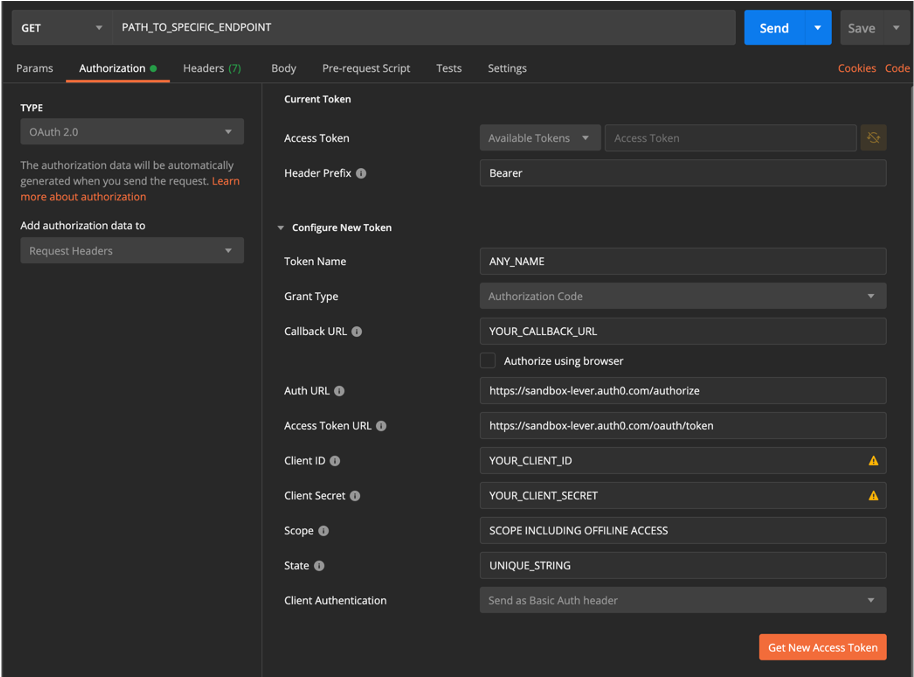
OAuth 2.0 (Authorization Code flow): Required for all partner integrations since 2020. The flow:
Redirect the user to https://auth.lever.co/authorize with your client ID, redirect URI, requested scopes, and a state parameter.
Lever returns an authorization code to the redirect URI.
Exchange the code for tokens at https://auth.lever.co/oauth/token.
Use the resulting Bearer token in the Authorization header.
Access tokens expire after 1 hour. Refresh tokens last 1 year or 90 days of inactivity, whichever comes first. You get OAuth credentials (Client ID and Client Secret) by registering through the partner program and completing a sandbox registration form, which includes a QA review meeting with Lever's team.
Source: Lever API
Scopes are granular: opportunities:read:admin, webhooks:write:admin, offline_access, and others. Most integrations use 5 to 8 scopes, with a hard maximum of 20. Write scopes include read access for the same resource automatically.
A basic authenticated request using an API key:
curl "https://api.lever.co/v1/opportunities" \
-u YOUR_API_KEY:
The trailing colon after the API key signals an empty password to curl. Responses return JSON with a data array and pagination cursors.
One constraint to know before you start: if you are building a product that connects to multiple Lever customers (a third-party integration, a marketplace app), you must go through the partner program and use OAuth. API key auth is scoped to a single Lever account and is not built for multi-tenant distribution.
Lever API: Core Endpoints & Capabilities
The v1 API is organized around the objects that make up a recruiting pipeline. Lever's versioning policy states that existing fields will not be renamed or removed without a version bump, though new fields may appear in responses at any time.
Across all endpoints, two parameters shape the response: expand converts referenced object IDs into full nested objects inline, and include restricts which fields are returned. Pagination uses offset tokens: responses include a next cursor and a hasNext boolean. Default page size is 100 results; the limit parameter accepts values from 1 to 100.
Pipeline Management: Opportunities, Applications & Candidates
Opportunities are the core object in Lever's data model. An Opportunity represents a candidate's journey through a specific role's pipeline, carrying the stage, status, and the full history of interactions.
Operations documented: read, list, create, update, delete, and update stage. The stage update endpoint is the primary mechanism for advancing candidates through a pipeline programmatically. You can filter Opportunities by stage, posting, and creation date range.
Applications tie a candidate to a specific posting. Operations: retrieve single, list all, list deleted (keyset pagination added April 2026), and create. The keyset pagination on deleted applications is a recent addition, signaling active API development.
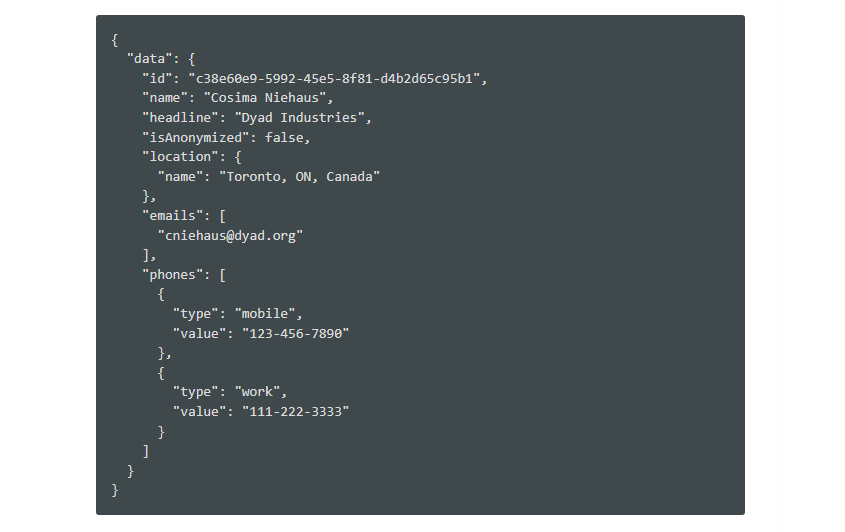
Candidates / Contacts represent the person behind one or more Opportunities. Operations: retrieve single and update. The Candidate object holds the profile data (name, email, phone, links, resume), while Opportunities track progress per role.
Source: Lever API
What you would build with this: a bidirectional CRM sync that creates Opportunities in Lever when a prospect converts in your pipeline, or a reporting tool that tracks candidate progression and time-in-stage across all open roles.
Job Postings & Career Sites
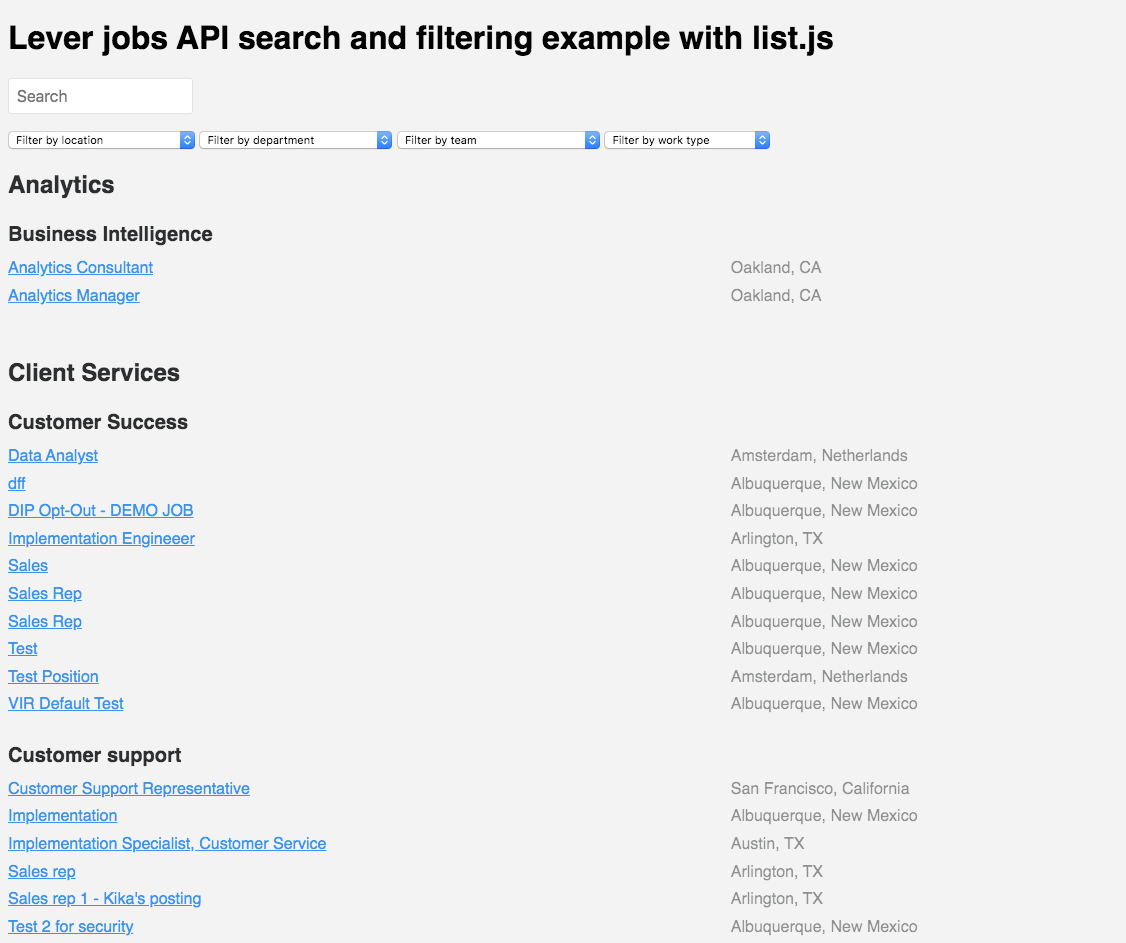
Postings represent job listings. The v1 API supports read, list, and management operations for Postings, while the separate Postings API (v0) at https://api.lever.co/v0/postings/ is designed for powering custom career sites with public, unauthenticated read access and application submission.
The v0 Postings API returns job listing data in JSON or an iframe-embeddable HTML format, making it the intended path for developers building career pages without exposing internal API credentials. Application submissions through v0 accept .docx, .doc, .pdf, .txt, and image file uploads.
Source: Lever API
What you would build with this: a custom career site that pulls active listings from Lever, renders them in your brand, and submits applications back into the pipeline without your candidates ever seeing the Lever UI.
Interview & Feedback
Interviews: Create, update, and delete interview records attached to an Opportunity. Interviews carry the panel, time, location, and connection to feedback records.
Feedback: The core evaluation artifact. Operations: retrieve, list all, create, update, and delete. Feedback is structured through Feedback Templates (also full CRUD), which support scores, yes/no fields, multiple choice, ratings, and free-form text. Templates are reusable across postings and teams.
What you would build with this: an interview intelligence integration that ingests structured feedback from Lever, aggregates scores across interviewers, and surfaces hiring committee recommendations in a custom dashboard.
Administrative & Compliance Resources
The remaining resources round out the API surface:
Users: List all users, filterable by accessRole. Useful for building role-based routing or assigning Opportunities programmatically.
Archive Reasons: Retrieve and list the configurable reasons candidates are declined at each stage. Powers disposition analytics.
Audit Events: List all system actions with tracked actions and event details. This is the compliance surface: every change to an Opportunity, Posting, or user permission is logged.
EEO Questions: Retrieve anonymous or PII-included equal employment opportunity responses. Supports DEI reporting integrations.
Files: Upload (.docx, .doc, .js, .jpg, .png, .pdf, .txt), retrieve, list, download, and delete. Resumes and supporting documents attach to candidate records.
Notes: Read and create notes on candidates. An annotation layer for collaboration data.
Disposition Stages: List the configured pipeline stages.
Requisitions: Read and manage headcount requisitions. Requires the LeverTRM Enterprise or Advanced HR package.
Lever API: Webhooks & Events
Lever supports webhooks configured through Settings > Integrations > Webhooks in the Lever application. Webhooks arrive as HTTP POST requests with JSON payloads to a developer-supplied HTTPS endpoint. Self-signed certificates are not accepted.
Security: Lever signs payloads using HMAC-SHA256. To verify, concatenate the signing token with the triggeredAt timestamp and compare against the request signature header. This confirms that the payload came from Lever and was not altered in transit.
Supported event types:
Event | Trigger |
|---|---|
applicationCreated | New application submitted |
candidateHired | Candidate marked as hired |
candidateStageChange | Candidate moves between pipeline stages |
candidateArchiveChange | Candidate archived or unarchived |
candidateDeleted | Candidate record removed |
interviewCreated | Interview scheduled |
interviewUpdated | Interview modified |
interviewDeleted | Interview cancelled |
contactCreated | New contact record created |
contactUpdated | Contact record modified |
Delivery and retry: Lever retries failed webhook deliveries 5 times with increasing delays. Endpoints must return a 2xx HTTP status to acknowledge receipt. A delivery history view is available in the dashboard for debugging.
Programmatic management: You can create and manage webhooks via the API itself using the webhooks:write:admin OAuth scope, enabling automated integration setups without manual dashboard configuration.
What you would build with this: an event-driven pipeline that pushes candidateHired events to your HRIS for onboarding, triggers a Slack notification on candidateStageChange events, and logs all candidateArchiveChange events to an analytics warehouse for disposition tracking.
Two things to plan around:
The event catalogue covers the core recruiting lifecycle but is not exhaustive. There are no webhook events for posting changes (new jobs published or closed), feedback submission, or offer creation. If your integration depends on those triggers, you will need to poll.
Retry policy is published (5 retries with backoff), but payload signing is the only delivery-guarantee mechanism documented. Design your receiver to be idempotent.
Lever API: SDKs, Docs & Rate Limits
SDKs & Libraries
Lever does not publish official SDKs for any language. The partner documentation references an "Integrator Resources repository on GitHub" containing example applications and a Postman collection, but no maintained SDK packages exist.
The lever/postings-api GitHub repository is the only official Lever-maintained open-source resource, covering only the public Postings API (v0). That repository documents third-party community clients for PHP and Gatsby. A community client (mjacobus/lever-api-client) exists on GitHub but is not officially supported.
No official SDK is a real signal. It means you own the HTTP layer, the authentication flow, the retry logic, and the rate-limit backoff. For a simple webhook listener or a single-endpoint sync, that is manageable. For a production integration touching eight resource types with OAuth token refresh and pagination, the engineering overhead adds up.
Documentation & Developer Experience
The Lever Developer Portal is organized into seven sections:
Documentation: API reference with CRUD operations, field definitions, request/response examples, and error codes for every resource
OAuth: Detailed guide for the Authorization Code flow with scope definitions
Partner: Registration process, sandbox access, and the QA review workflow
Use Cases: Scenario-based documentation covering assessments, background checks, HRIS, job boards, scheduling, and sourcing integrations, each with required OAuth scopes
FAQ/Support: Developer support page
Updates: Actively maintained changelog with entries dated into April 2026
Deprecated: Sunset endpoint tracker
The Use Cases section is a practical addition: if you are building a background check integration, it tells you which scopes you need and which endpoints to call, saving discovery time.
No public OpenAPI/Swagger spec or built-in interactive API explorer was found in the developer portal. The partner onboarding process references a Postman collection, which is the closest equivalent. No llms.txt index is published for AI development tools.
The documentation is clear, well-scoped, and accessible without signing in. The changelog confirms active development, and the Deprecated section means you will not be surprised by a silent endpoint removal. Developer support routes through a FAQ/support page, and partner applicants receive guided support including a QA meeting during the integration review process.
Rate Limits & Constraints
The main REST API (v1) enforces a rate limit of 10 requests per second per API key, with burst capacity up to 20 requests per second using a token bucket algorithm. Exceeding the limit returns HTTP 429. Lever recommends exponential backoff for retry logic.
The Postings API (v0) has a separate, lower rate limit: application POST submissions are capped at 2 requests per second. Lever notes this limit may be adjusted without notice.
The 10 req/sec ceiling is modest. If your integration needs to sync thousands of candidate records or run bulk operations, 10 req/sec with a 100-record pagination cap means you will need to plan your sync windows carefully.
Two practical constraints:
No bulk endpoints. Every operation is single-record. Syncing 5,000 candidates means 5,000+ API calls (at minimum one to list, then individual requests to expand details), which takes several minutes at full rate.
No documented tier differentiation. The published rate limits do not describe higher tiers for enterprise or high-volume customers. Whether Lever offers increased limits by request is not publicly stated.
Lever API Pricing & Access Costs
Lever bundles API access into its platform subscription rather than pricing the API separately. The platform uses a custom, quote-based pricing model with no published tiers, no self-serve signup, and no online checkout. Every purchase starts with a demo request.
What this means for a developer evaluating the API:
No free trial or free tier. There is no way to test the API without a Lever platform subscription. The sandbox environment is available only to approved partners, not to developers evaluating whether to build on the API.
No published price floor. Lever's pricing FAQ states that pricing varies by "company size, hiring volume, feature needs, and implementation requirements." No named tiers are listed publicly.
API key access is self-service once you have a Lever account. Creating keys requires no additional approval.
OAuth access requires the partner program. If you are building a product for multiple Lever customers, you must apply, be reviewed, and go through a QA process before receiving credentials.
Billing is annual with fees invoiced upfront. Contracts auto-renew for one-year periods unless terminated with 30 days' written notice. Fees are non-cancellable and non-refundable.
For a developer sizing the cost: the API is free if you are already a Lever customer. The real cost is the Lever platform subscription, and without published pricing, you cannot estimate that cost without a sales conversation.
Where the Lever API Falls Short
These are practical limits a developer should plan around, not failures. Several are scope decisions that reflect what Lever is (a recruiting platform) and what it is not.
The API manages the recruiting pipeline. That is all it does.
There is no contact enrichment, no company data, no org chart traversal, no technographic lookup, no intent signals, no candidate sourcing from an external database. If your pipeline needs to find passive candidates, enrich their profiles with company intelligence, or prioritize outreach based on which accounts are hiring, you need a second API.
This is the boundary of the product, not a gap in it, but it is the single biggest constraint for developers building talent acquisition workflows where pipeline management is one step in a larger sourcing and enrichment flow.
No official SDKs.
Every integration is raw HTTP. You build and maintain the auth layer, the pagination logic, the rate-limit backoff, and the error handling. For a platform with an active partner ecosystem of 200+ integrations, the absence of maintained SDK packages is notable.
10 req/sec is a firm ceiling with no bulk alternative.
The rate limit is modest for data-heavy operations, and every call is single-record. Syncing large candidate databases or running analytics across all Opportunities requires careful orchestration at this throughput.
The webhook event catalogue has gaps.
Webhooks cover candidate lifecycle events (stage changes, hires, archives, deletes) and interview events, but there are no events for posting changes, feedback submissions, or offer creation. Integrations that depend on those triggers must poll.
OAuth requires partner program approval.
Developers building multi-tenant integrations cannot self-serve OAuth credentials. The partner program includes an application, a sandbox registration, and a QA review meeting, adding weeks of lead time before you can ship.
No free tier, no self-serve trial, and no published pricing.
A developer cannot evaluate the API without first engaging Lever's sales team, requesting a demo, and negotiating a custom contract. The sandbox is partner-only. This creates a discovery-stage disadvantage against platforms that let developers start building before committing.
No interactive API explorer or OpenAPI spec.
The developer portal provides static documentation and a Postman collection (via the partner program), but no built-in try-it functionality and no downloadable OpenAPI specification. To confirm a response shape, you must write code or obtain the Postman collection first.
ZoomInfo API: The B2B Intelligence Layer Beyond Recruiting
Lever's API tells you where a candidate is in your pipeline. ZoomInfo's API tells you who is worth recruiting in the first place: what companies they work for, what technology those companies use, whether those accounts are growing, and how to find verified contact data for passive candidates you have not sourced yet.
That intelligence comes from the GTM Context Graph, which processes 1.5B+ data points daily by fusing ZoomInfo's B2B data with your first-party signals to reveal why accounts are moving, not just that they are.
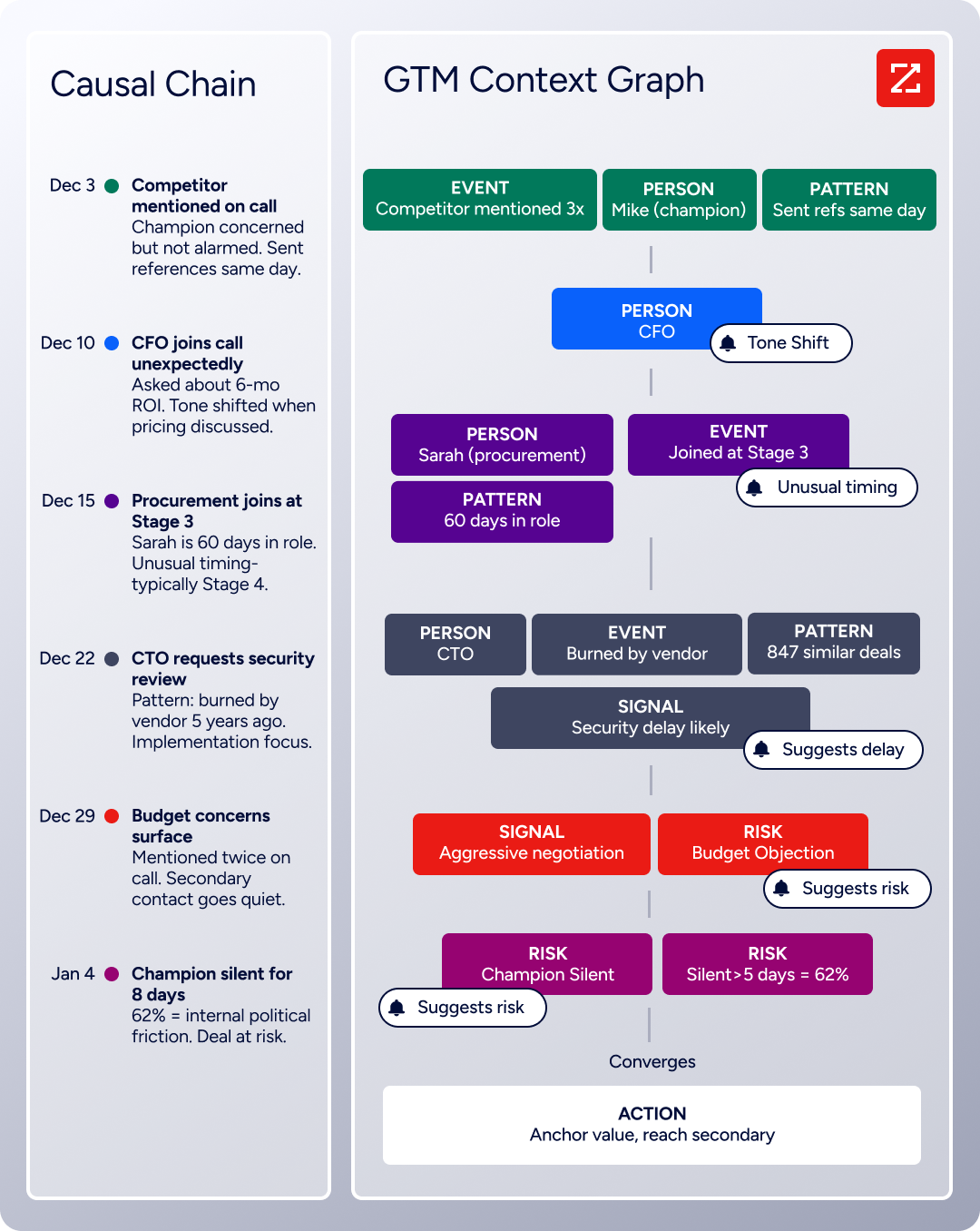
Source: ZoomInfo
The two APIs operate at different layers of a talent acquisition stack, and the gap between "manage this candidate's journey" and "find the right candidates to recruit" is where ZoomInfo's API fits.
What It Covers: Search, Enrichment, and AI Intelligence
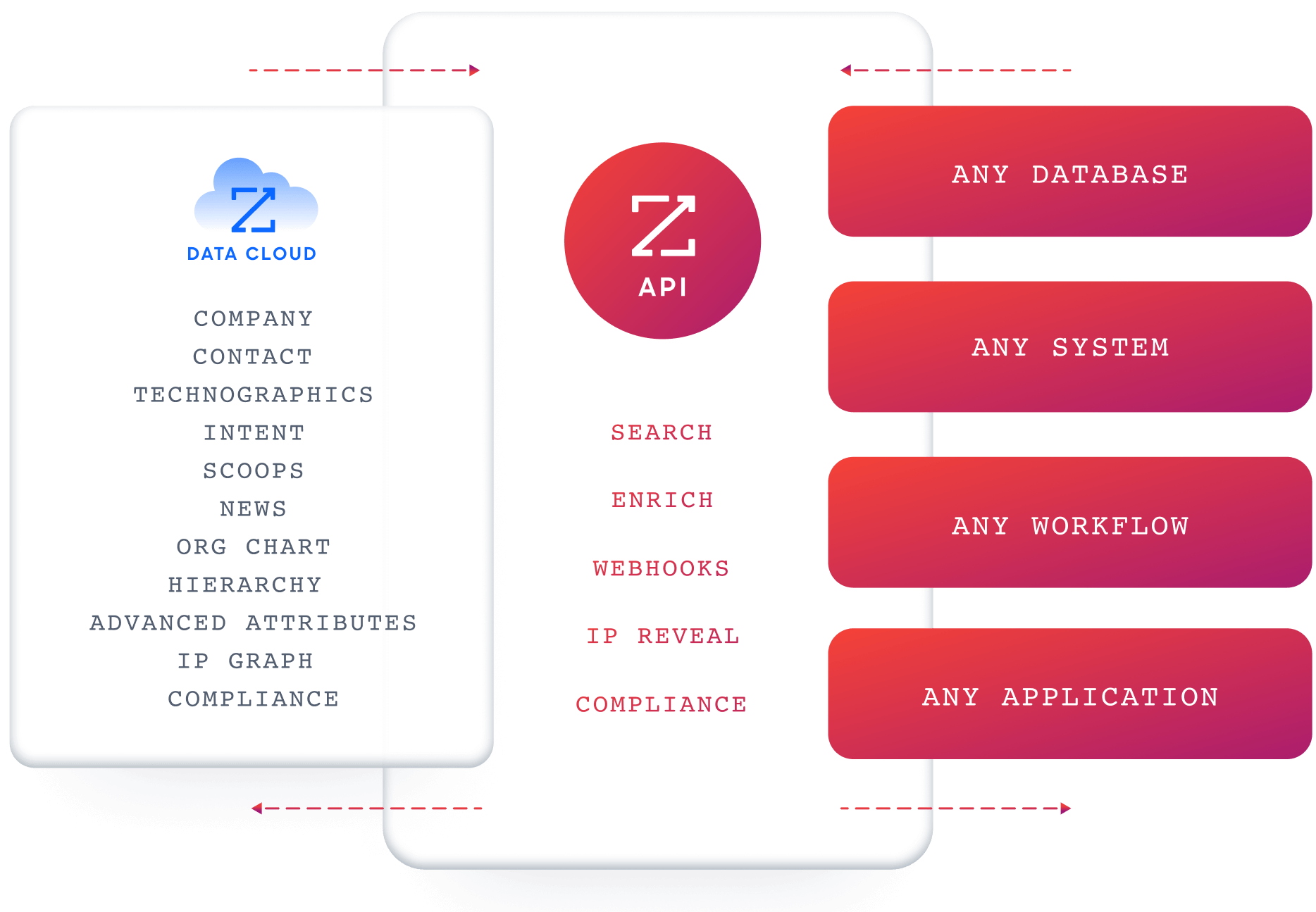
ZoomInfo's Enterprise API is a REST suite served from https://api.zoominfo.com/gtm, organized into four surface areas documented in the interactive API reference.
Data API (Search and Enrich) is the core surface. Search endpoints cover Contacts, Companies, Intent, News, and Scoops, returning matched records without consuming credits. Enrich endpoints unlock full payloads: business emails, direct dials, employment history, corporate hierarchy, org charts, technographics, and hashtag signals, accepting up to 25 records per call. The underlying dataset spans 500M contacts and 100M companies, 135M+ verified phone numbers, and 200M+ verified business email addresses.
Copilot API (the AI engine within GTM Workspace) exposes ZoomInfo's intelligence layer programmatically. Account Summary returns structured account intelligence with a free-form Q&A endpoint. Find Similar Companies performs lookalike expansion from a seed account. Contact Recommendations returns AI-ranked buying-committee suggestions by motion (prospecting, deal acceleration, renewals).
Marketing and Platform APIs round out the suite with audience management (CRUD for advertising audiences) and bidirectional engagement data via the Engagements API, currently in Beta.
Source: ZoomInfo
The pairing with a recruiting API is direct: use ZoomInfo's search endpoints to find candidates matching specific criteria (title, seniority, company, tech stack), enrich them with verified contact data, then push qualified prospects into Lever's pipeline via the Opportunities API. The search-then-enrich pattern means you filter freely and pay only for the records you commit to.
Authentication, Rate Limits & Credits
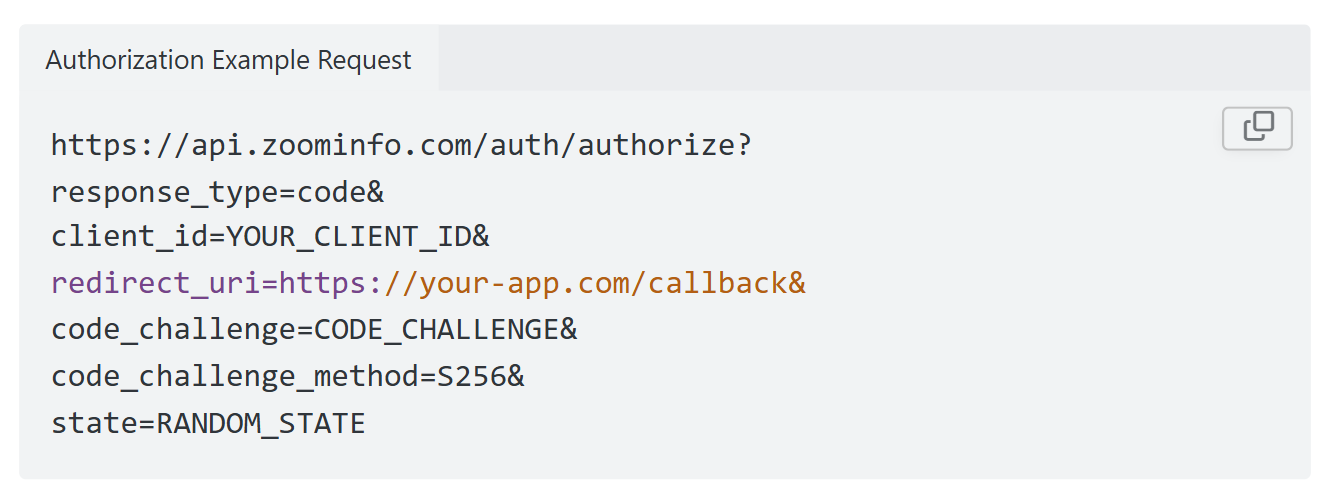
Authentication uses OAuth 2.0 with PKCE via Okta, issuing 24-hour access tokens with rotating refresh tokens. Three flows are supported: Authorization Code with PKCE (for web applications), Client Credentials (for server-to-server), and Refresh Token. Teams register applications through the ZoomInfo Developer Portal, where they generate credentials, define scopes, and test endpoints.
This is a different authentication model from Lever's static API key: it supports delegated access, credential rotation, and scoped permissions out of the box.
Source: ZoomInfo
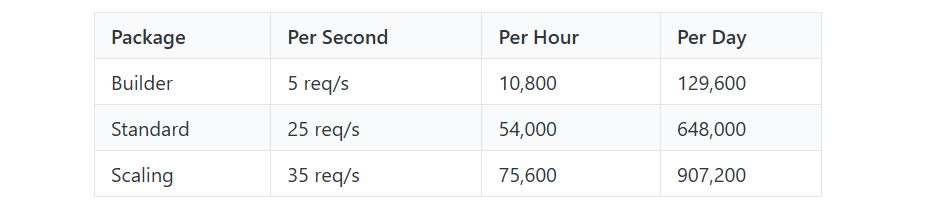
Rate limits are published by tier: Builder (5 req/sec), Standard (25 req/sec), and Scaling (35 req/sec), with per-hour and per-day sliding-window limits enforced simultaneously. Every response includes quota headers with remaining capacity, and 429 responses include a Retry-After header with exact backoff timing.
Credits follow a rolling 12-month window: a record enriched for the first time consumes one credit; re-enriching the same record within the year is free.
Source: ZoomInfo
Webhooks, MCP & Developer Experience
Webhooks are available via the Agents API, tied to ZoomInfo's Agent Teams system: event types cover bulk enrichment jobs completing, records changing, credit usage crossing thresholds, and new GTM signals (scoops, funding events, intent spikes) becoming available, with retry behavior and throttling configurable per event type.
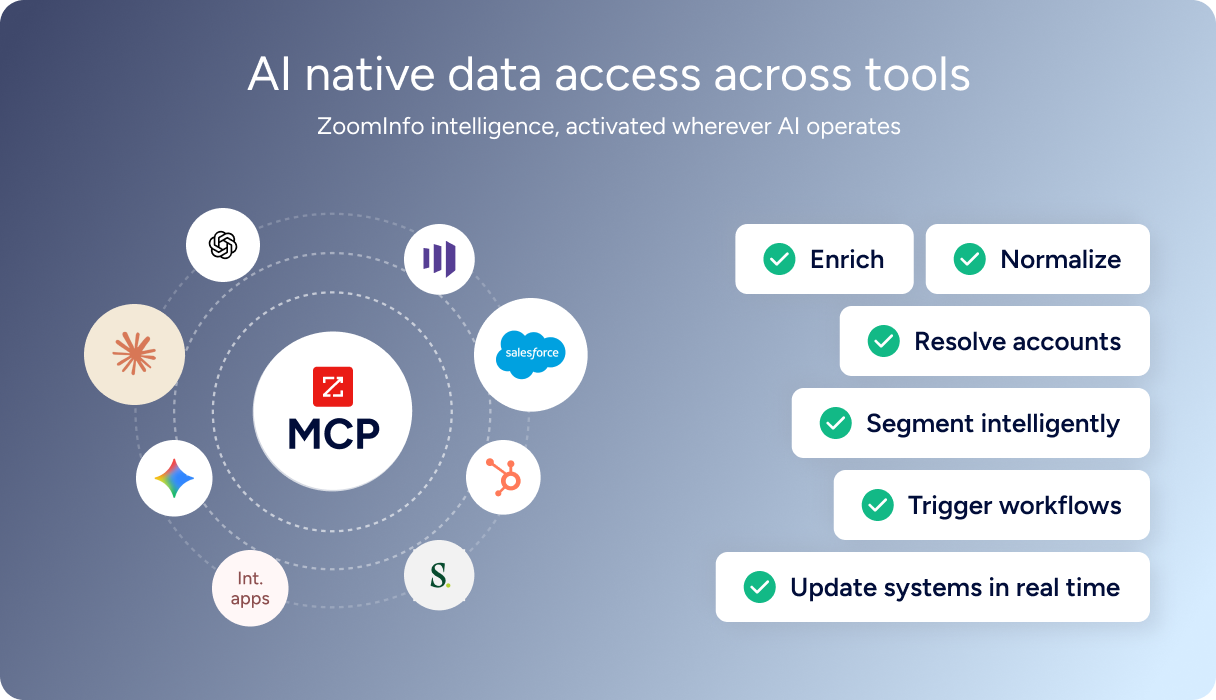
For developers building AI agents, ZoomInfo's MCP server at https://mcp.zoominfo.com/mcp exposes search, enrich, and account research as native tools for MCP-compatible assistants, currently supporting Claude and ChatGPT.
The API and MCP are two of ZoomInfo's developer-facing access paths; the same intelligence is available through GTM Workspace for sellers and GTM Studio for marketers and RevOps. What you would build with this: an AI sourcing agent that queries ZoomInfo for engineering leaders at companies matching your hiring profile, enriches them with verified contact data, and creates Opportunities in Lever's pipeline automatically.
Source: ZoomInfo
ZoomInfo does not publish official SDKs, so you integrate over HTTP and own the auth-and-retry layer yourself. The interactive API reference supports live testing, and a Docs MCP server lets AI development tools generate integration code against the API spec. Documentation is at docs.zoominfo.com. ZoomInfo opened API access to all relevant plans in 2025, removing the prior enterprise-only gate, with consumption-based pricing.
BDO Canada reported an 87% reduction in time spent on updates to internal data dashboards using the ZoomInfo API, with one analyst describing the integration as plug-and-play across any process. (ZoomInfo)
Final Verdict
Lever's API is a focused, well-documented surface that covers the full recruiting lifecycle: candidates, applications, postings, interviews, feedback, webhooks, and audit events.
The developer portal is public, the changelog is active, the webhook payloads are cryptographically signed, and the sandbox gives partners a safe development environment. Its limits are limits of scope, not of quality.
Choose the Lever API if your integration starts and ends with recruiting pipeline management: syncing candidates with an HRIS, powering a custom career site, automating interview workflows, or building analytics on hiring data. For the job of "manage recruiting programmatically," the API is production-ready and well-structured.
Add the ZoomInfo API when the build needs the intelligence layer upstream of your pipeline: finding candidates worth recruiting, enriching their profiles with company and contact data, identifying which accounts are growing or showing hiring signals, and sourcing verified contact information for passive talent. Source first, recruit second: the pattern puts stronger candidates into Lever and saves recruiter time on the other side.
Ready to add the intelligence layer? Start with the ZoomInfo Enterprise API or explore the developer docs to see the endpoint surface for yourself.
A developer who needs B2B contact discovery and company intelligence before the recruiting pipeline starts should look to ZoomInfo's surface first; Lever's API begins where candidates already exist.
FAQ
Is the Lever API free?
Not independently. API access is bundled with Lever's platform subscription, which is custom-quoted with no published pricing tiers. There is no free API tier, no self-serve trial, and no sandbox access outside the partner program. Once you have a Lever account, creating API keys is self-service with no additional cost.
Does Lever have a GraphQL API?
No. Lever exposes a REST API (currently v1) that communicates over HTTPS and returns JSON responses. A separate Postings API (v0) handles public job listing data and application submission. There is no GraphQL endpoint. If you need a GraphQL interface for recruiting data, you would need to build a wrapper layer on top of the REST API.
What is the Lever API rate limit?
The main REST API (v1) allows 10 requests per second per API key, with burst capacity up to 20 requests per second using a token bucket algorithm. Exceeding the limit returns a 429 response. The Postings API (v0) has a stricter limit of 2 requests per second for application submissions. Lever recommends exponential backoff for retry logic. Higher-tier rate limits for enterprise customers are not publicly documented.
Are there official Lever SDKs?
No. Lever does not publish official SDKs in any language. The partner program provides an Integrator Resources repository on GitHub with example applications and a Postman collection, but no maintained SDK packages exist. A community PHP client exists but is not officially supported. Developers integrate directly over HTTP.
Does the Lever API support webhooks?
Yes. Lever delivers webhooks as HTTP POST requests with JSON payloads, signed using HMAC-SHA256 for payload verification. Supported events cover the candidate lifecycle (stage changes, hires, archives, deletes), interview events (created, updated, deleted), and contact events (created, updated).
Failed deliveries are retried 5 times with increasing delays. Webhooks can be managed programmatically via the API using the webhooks:write:admin OAuth scope. There are no webhook events for posting changes, feedback submissions, or offer creation.
Can I use the Lever and ZoomInfo APIs together?
Yes, and there is a practical reason to do so.
Lever's API manages the recruiting pipeline: candidates, applications, interviews, and offers. ZoomInfo's API provides the intelligence that determines who should enter that pipeline: search across 500M contacts and 100M companies, enrich with verified emails, direct dials, employment history, org charts, and technographics, and detect signals (funding events, hiring activity, intent) that indicate sourcing opportunities.
The two APIs use different authentication models (API key/OAuth for Lever, OAuth 2.0 with PKCE for ZoomInfo) and different data models, so plan the integration layer to bridge both. ZoomInfo's MCP server extends the same data to AI-agent workflows, enabling automated sourcing that feeds directly into Lever's candidate pipeline.
