

The question a developer asks before wiring an event management API into a pipeline is not whether the platform hosts good events, but whether the API gives enough programmatic control to justify the dependency.
Luma's API is a REST surface with a public OpenAPI 3.1 spec, per-route versioning, and endpoints covering events, guests, ticket types, coupons, calendars, contacts, tags, hosts, memberships, webhooks, and organization-level management.
The developer docs sit on readme.io, the changelog gets monthly updates, and an llms.txt index is published for AI agent consumption. For a six-person company, that is a mature developer surface.
But scope and depth are different questions.
Luma's API manages the event lifecycle: creating events, registering guests, selling tickets, sending invites, managing memberships, and receiving webhook notifications when things change. If your build needs to orchestrate event workflows programmatically, the API covers that job.
But if your pipeline needs B2B intelligence on the people attending those events (who they are, what companies they represent, what those companies' tech stacks look like, whether those accounts show buying intent), that is a different layer the event API was never designed to provide.
This is where ZoomInfo enters the picture.
A GTM platform built on 500M contacts and 100M companies, ZoomInfo exposes a REST API suite covering search, enrichment, AI intelligence, and audience management, with OAuth 2.0 authentication, tiered rate limits, and an MCP server for AI-agent workflows.
The two APIs are layers, not rivals: Luma handles event operations, ZoomInfo handles the contact and company intelligence that turns those events into pipeline.
This review covers the Luma API in technical depth first (authentication, endpoints, webhooks, SDKs, rate limits, and pricing), then covers ZoomInfo's API as the intelligence layer that picks up where event management stops.
Luma API at a Glance
Attribute | Detail |
|---|---|
API type | REST over HTTPS, JSON responses |
Authentication | API key passed in x-luma-api-key request header |
Base URL | |
Versioning | Per-route versioning (endpoints carry /v1/ or /v2/ independently) |
Rate limits | 200 requests/minute per calendar (API key/OAuth); 500 req/min per organization (Enterprise) |
SDKs | No official SDKs; OpenAPI 3.1 spec available for client generation |
Webhooks | Yes, 8 event types with signature verification |
Documentation | docs.luma.com (readme.io), llms.txt index, OpenAPI spec at public-api.luma.com/openapi.json |
Pricing / access | Bundled with Luma Plus ($59/month billed annually); no API access on the free plan |
Luma API: What Works Well & What to Plan Around
What works well | What to plan around |
|---|---|
Public OpenAPI 3.1 spec available without authentication for client generation and Postman import | API access requires Luma Plus ($59/month); no free-tier API access |
Per-route versioning lets individual endpoints evolve without breaking others | No official SDKs in any language; you build the HTTP layer yourself |
Actively maintained changelog with monthly updates (December 2025 through June 2026) | API keys are calendar-scoped: each calendar needs its own key |
8 webhook event types with signature verification secrets | Rate limit of 200 req/min per calendar; no published burst allowance |
Full event lifecycle coverage: create, update, cancel, guest management, ticketing, coupons | Scope is event management only: no contact enrichment, company data, or intelligence |
llms.txt index and flat Markdown docs accessible without login | Enterprise "Additional APIs" are not publicly documented |
Luma API: Authentication & Getting Started
API access requires an active Luma Plus subscription ($59/month billed annually).
There is no separate developer tier, no API-specific pricing, and no free-tier API access. The Enterprise plan includes "Additional APIs" beyond Plus, but Luma does not publicly document them.
You generate API keys at luma.com/calendar/manage/api-keys. Each key is calendar-scoped: it grants full access to a single calendar's events, guests, tickets, and settings, but nothing outside that calendar. If you manage multiple calendars, you need multiple keys. Organization-level API keys (Enterprise) span multiple calendars under a single organization.
Authentication is straightforward. Every request includes the key in an x-luma-api-key header:
curl "https://public-api.luma.com/v1/events/get?event_id=evt-abc123" \
-H "x-luma-api-key: YOUR_API_KEY"
The docs also reference OAuth token support, used by the Zapier integration's "Sign in to Luma" flow. Full OAuth documentation is not publicly detailed beyond these references. For most direct API integrations, the API key approach is the documented path.
One operational detail: all requests use GET for reads and POST for all writes (including deletes), keeping request body support consistent across the surface. Dates follow ISO 8601, and locations use Google Maps Place IDs.
Luma API: Core Endpoints & Capabilities
Luma organizes the API around resource groups covering the event lifecycle. All endpoints return JSON, with paginated list endpoints returning results under an entries key.
Events
Full CRUD and lifecycle management for events on a calendar.
GET /v1/events/get: retrieve event details including hosts and guest counts by status
POST /v1/events/create / POST /v1/events/update: create and update events; update supports suppress_notifications to avoid emailing guests on backend changes
POST /v1/events/cancel/request + POST /v1/events/cancel: two-step irreversible cancellation with optional refund; the cancellation token expires after 15 minutes
What you would build with this: an internal tool that creates recurring workshop events, updates logistics without notifying early registrants, and cancels events with automatic refunds when attendance drops below a threshold.
Guests
Registration and attendance management across the guest lifecycle.
GET /v1/events/guests/list / GET /v1/events/guests/get: list all registered/invited guests; get individual guest with ticket order detail including coupon info
POST /v1/events/guests/add: add guests with status (approved, pending, waitlist), ticket type assignment, and registration question answers
POST /v1/events/guests/update-status: set status to approved, declined, pending_approval, or waitlist; supports optional refund for paid guests
POST /v1/events/guests/send-invites: send email (and SMS if phone linked) invitations
What you would build with this: a CRM sync that pushes qualified leads into a Luma event as approved guests, assigns them to the correct ticket type, and manages the waitlist based on external scoring criteria.
Ticket Types & Coupons
Ticket Types: list, get, create, update, delete for managing free and paid ticket types. Delete is soft and blocked if tickets have been sold or it is the last visible type.
Coupons: create, update, and list coupons at both calendar level (apply to any managed event) and event level. Event-level coupons restricted to a ticket type can serve as unlock codes for hidden tickets.
Calendars & Contacts
GET /v1/calendars/get / POST /v1/calendars/update: retrieve and update calendar settings
GET /v1/calendars/events/list: supports access=manage&access=view to include events the calendar lists but does not manage
GET /v1/calendars/contacts/list / POST /v1/calendars/contacts/import: manage calendar contact list; bulk import for audience building
Tags
Full CRUD for both contact tags and event tags: create, update, delete, apply to entities, and unapply. Useful for segmenting audiences and categorizing events programmatically.
Hosts & Event Submissions
POST /v1/events/hosts/add, update, remove: manage event hosts with manager vs. check-in access levels; the event creator cannot be removed
POST /v1/calendars/events/add, approve, reject: submit external events to a calendar with an optional pending approval flow
Memberships (Subscription Management)
GET /v1/memberships/tiers/list: list membership tiers
POST /v1/memberships/members/add, update-status: manage members; a skip_payment flag handles externally processed payments
Organizations (Enterprise)
GET /v1/organizations/events/list, calendars/list: multi-calendar organization management with event deduplication across calendars
POST /v1/organizations/events/transfer-calendar: move events between calendars
POST /v2/organizations/calendars/create: create calendars under an organization
Utility Endpoints
GET /v1/users/get-self: retrieve the authenticated user
GET /v1/entities/lookup: look up entities by slug
POST /v1/images/create-upload-url: generate a signed upload URL for event images
Luma API: Webhooks & Events
Luma offers a webhook system with eight event types covering the event and guest lifecycle:
Event type | Trigger |
|---|---|
calendar.event.added | Any event added to the calendar (including linked/syndicated events) |
calendar.person.subscribed | Someone follows the calendar |
event.created | New event created on the calendar |
event.updated | Event details modified (name, time, location, etc.) |
event.canceled | Event canceled |
guest.registered | Guest registers (including re-registration after cancellation) |
guest.updated | Guest registration updated (approval status, check-in, profile) |
ticket.registered | Individual ticket purchased; fires once per ticket for multi-ticket orders |
You manage webhooks through the API. POST /v2/webhooks/create accepts a target URL and an array of event_types (use "*" for all types). The response includes a secret field for payload signature verification, useful for production integrations. You can set webhooks to active or paused status via POST /v2/webhooks/update. List, get, and delete operations are also available.
Two things to plan around:
Most webhook triggers only fire for events the calendar manages (created on, transferred to, or granted manage access). The calendar.event.added event is the exception: it fires for all events, including linked external ones.
The public documentation does not describe retry behavior for failed webhook deliveries. Design your receiver to be idempotent, and confirm the delivery contract with Luma if your pipeline depends on guaranteed delivery.
What you would build with this: a real-time sync that pushes new registrations into your CRM, triggers a Slack notification when events are canceled, and updates attendance records when guests check in.
Luma API: SDKs, Docs & Rate Limits
SDKs & Libraries
Luma does not publish official SDKs in any language.
The primary developer affordance is the publicly available OpenAPI 3.1 specification at https://public-api.luma.com/openapi.json, accessible without authentication. You can use this spec with OpenAPI code generators (openapi-generator, Kiota, Stainless) to produce typed client libraries in any supported language, or import it directly into Postman for interactive testing.
No official SDK is a real signal. It means you either generate a client from the OpenAPI spec (the intended path) or build and maintain your own HTTP layer, including error handling, pagination, and rate-limit backoff. The spec being publicly accessible and actively maintained mitigates this more than in most no-SDK situations, but it still adds engineering overhead compared to a maintained client library.
Documentation & Developer Experience
Luma hosts the API documentation at docs.luma.com on readme.io.
The interactive reference requires a login to browse in the UI, but all documentation pages are available as flat Markdown files (e.g., https://docs.luma.com/reference/getting-started-with-your-api.md) and as a complete index at https://docs.luma.com/llms.txt, designed for AI agent consumption.
The changelog is actively maintained with monthly entries from December 2025 through June 2026, including a significant endpoint restructuring in June 2026 that introduced flat-response endpoints to replace nested-object predecessors. Per-route versioning means older endpoint versions remain functional during migrations, so developers can upgrade at their own pace.
For the Zapier integration, Luma publishes a versioned changelog in the help center alongside a built-in debugging tool (Settings > Developer > API Keys > "Debug Zapier").
Support channels include help.luma.com (help center), support@luma.com, and priority support for Plus subscribers.
Rate Limits & Constraints
The OpenAPI specification documents the following rate limits:
Calendar API keys and OAuth tokens: 200 requests per minute per calendar
Organization API keys (Enterprise): 500 requests per minute per organization
Exceeding either limit returns 429 Too Many Requests. The docs note a separate rate limits reference page documenting an older model (500 GET / 100 POST per 5 minutes per calendar with a 1-minute block), which may reflect a prior version; the OpenAPI spec is the more recently updated source.
For higher limits, Luma tells developers to contact support via email. No bulk-operation-specific limits are published beyond the per-minute caps, and limits are subject to change.
At 200 requests per minute per calendar, the ceiling works for most event management integrations: syncing guest lists, creating events, and processing registrations. It becomes a constraint with multi-calendar operations.
If you manage 10 calendars, each has its own 200 req/min cap and its own API key. An organization-level key on Enterprise raises the cap to 500 req/min across all calendars under that organization, but this is not available on Plus.
Luma API Pricing & Access Costs
Luma bundles API access into the Plus plan at $59/month billed annually ($69/month if billed monthly). There is no metered or per-call API pricing. The free tier has no API access.
The cost structure is simple:
Luma Plus ($59/month annual): full API access, webhook support, Zapier integration, 0% platform fee on paid events, up to 5,000 invites/newsletters per week, custom event URLs, and priority support
Enterprise (custom pricing): additional APIs beyond Plus, native HubSpot and Salesforce integrations, SSO, and organization-level API keys
There are no published per-call charges, no API-specific credit deductions, and no metered pricing. For a developer sizing costs: API access costs $59/month (annual) or $69/month (monthly), regardless of call volume (within the rate limits).
The practical cost question is not the API itself but the Luma Plus subscription as the gate. If your team already uses Luma Plus for the 0% platform fee on paid events, API access comes bundled. If you are building a pure API integration with no dashboard usage, $59/month is the minimum commitment.
Zapier access follows the same gate: only available on Luma Plus.
Where the Luma API Falls Short
These are practical limits a developer should plan around, not criticisms. Several are scope decisions that reflect what Luma is (an event management platform) and what it is not.
The API manages events. That is all it does.
There is no contact enrichment, no company data or attributes, no buyer intent signals, no org-chart traversal. If your pipeline needs to register a guest and then look up their title, company size, technology stack, and purchase intent, you need a second API. The guest record gives you a name and email; the intelligence behind that email is outside Luma's scope.
No official SDKs.
The OpenAPI 3.1 spec is publicly available and well-maintained, which enables client generation, but there are no pre-built, tested SDK packages. You own the HTTP layer, the error handling, and the rate-limit backoff logic.
Calendar-scoped API keys.
Each key grants access to one calendar. Multi-calendar integrations require managing multiple keys, one per calendar. Organization-level keys are Enterprise-only. This is a reasonable isolation model for security, but it adds complexity for agencies or teams managing events across many calendars.
200 requests per minute per calendar.
Adequate for standard event management workflows, but if your integration needs to synchronize large guest lists across multiple events in tight windows, the per-calendar cap requires careful orchestration. No burst allowance or higher tiers are documented for Plus; Enterprise raises the cap to 500 req/min per organization.
Webhook retry behavior is undocumented.
The webhook system includes signature verification secrets and eight event types, but the public docs do not describe retry policy, delivery guarantees, or payload structure beyond the listed endpoints. If your pipeline depends on guaranteed webhook delivery, you need to build your own reliability layer or confirm the contract with Luma.
OAuth documentation is incomplete.
The OpenAPI spec references OAuth token support, and the Zapier integration uses an OAuth-based flow, but full OAuth documentation for custom integrations is not publicly detailed. For most use cases, the API key approach works. For multi-tenant integrations where each customer authenticates independently, the lack of documented OAuth is a real gap.
API access is gated behind a paid plan.
The free tier, which includes unlimited events and guests in the dashboard, has no API access. The $59/month Luma Plus subscription is the minimum entry point for any programmatic integration.
ZoomInfo API: The Intelligence Layer Beyond Event Management
Luma tells you who registered for an event, what ticket they bought, and whether they checked in.
ZoomInfo tells you who that person is professionally, what company they work for, what that company's technology stack looks like, whether the account shows buying intent, and where the contact sits in the org chart.
The two APIs operate at different layers of a data pipeline. ZoomInfo's GTM Context Graph, a data system that processes 1.5B+ data points daily, combines its B2B dataset with your CRM records and behavioral signals to show not just who attended but why they matter to your pipeline.
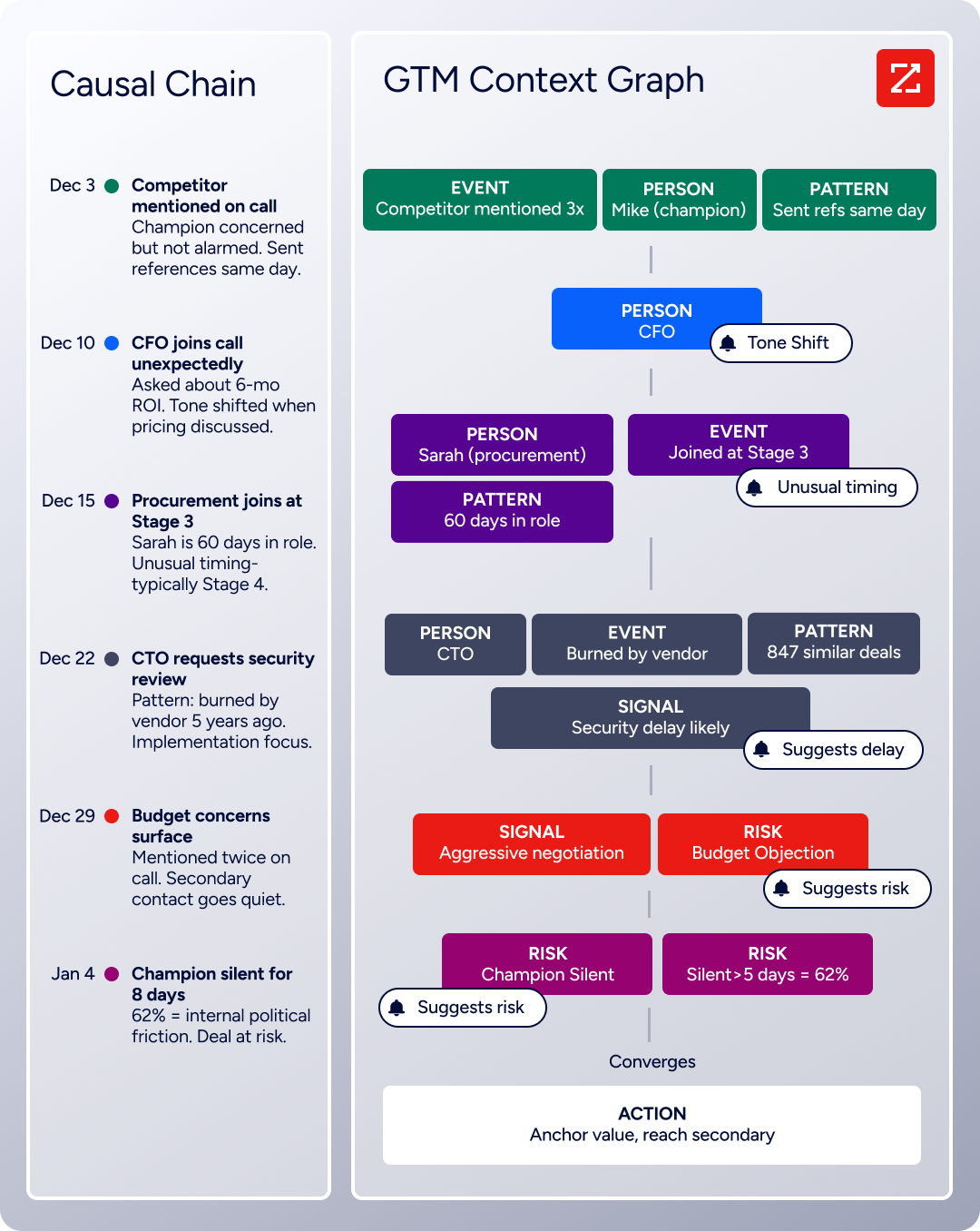
Teams access this data through the API and MCP server (the focus of this review), the GTM Workspace for sellers, or GTM Studio for marketers and RevOps. A developer building a complete event-to-pipeline workflow would use Luma's API to manage the event and ZoomInfo's API to decide which attendees are worth pursuing.
What the API Covers
ZoomInfo's Enterprise API is a REST suite served from https://api.zoominfo.com/gtm, organized into four areas documented in the interactive API reference:
Data API (Search & Enrich): Search endpoints cover Contacts, Companies, Intent, News, and Scoops, returning matched records without consuming credits. Enrich endpoints unlock the full payload: business emails, direct dials, employment history, corporate hierarchy, org charts, technographics, and hashtag signals, up to 25 records per call.
The underlying dataset spans 500M contacts, 100M companies, 135M+ verified phone numbers, and 200M+ verified business email addresses.
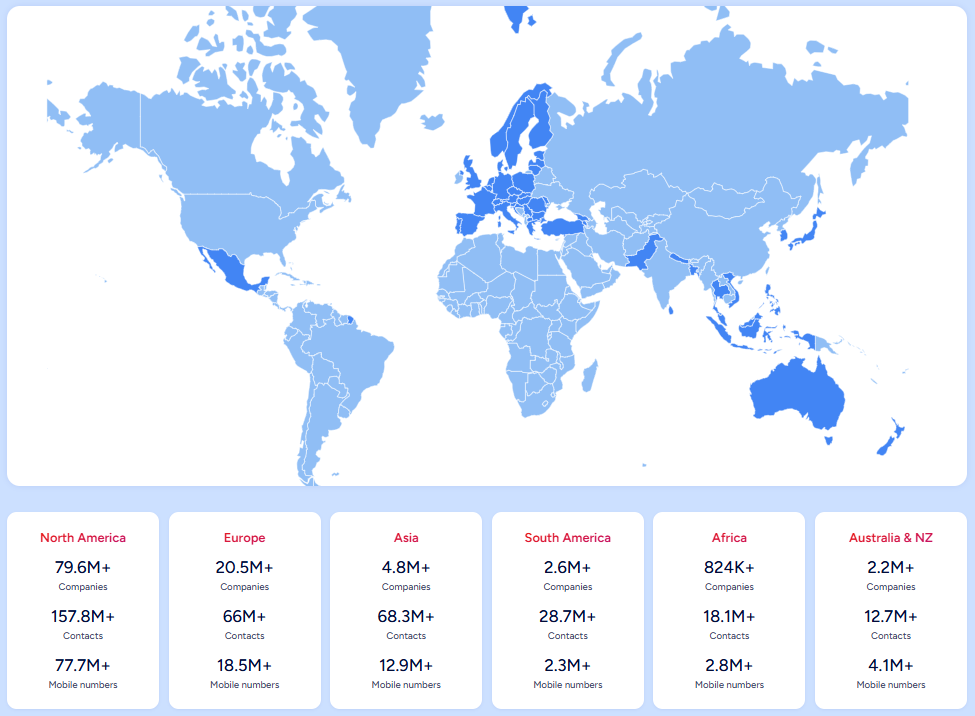
Source: ZoomInfo
Copilot API (AI Intelligence): Programmatic access to the AI engine within GTM Workspace. Account Summary returns structured account intelligence with a free-form Q&A endpoint. Find Similar Companies performs lookalike expansion. Contact Recommendations returns AI-ranked buying-committee suggestions by motion (prospecting, deal acceleration, renewals).
Marketing API: CRUD endpoints for programmatic audience management.
Platform API (Engagements, Beta): Bidirectional engagement data via the Engagements API.
The pairing with an event management API is direct: export your Luma guest list via the API, then use ZoomInfo's search-then-enrich pattern to identify which attendees represent high-value accounts. Search is free (no credits consumed); you only pay for the records you enrich.
Authentication & Access
ZoomInfo uses OAuth 2.0 with PKCE via Okta, supporting three flows: Authorization Code with PKCE (web applications), Client Credentials (server-to-server), and Refresh Token.
Access tokens are 24-hour Bearer tokens with rotating refresh tokens. Teams register applications through the ZoomInfo Developer Portal, where they generate credentials, define scopes, and test endpoints.
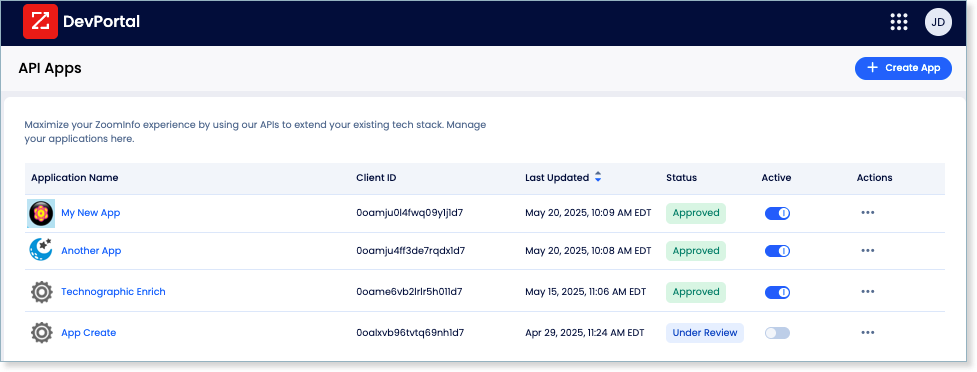
This is a different auth model from Luma's static, calendar-scoped API key. OAuth 2.0 supports delegated access, credential rotation, and scoped permissions, making it better suited for multi-tenant integrations and enterprise security requirements.
Rate Limits, Credits & Developer Experience
ZoomInfo publishes rate limits by tier: Builder (5 req/sec), Standard (25 req/sec), and Scaling (35 req/sec), with per-hour and per-day sliding-window limits enforced simultaneously.
Every response includes quota headers with remaining capacity, and 429 responses include a Retry-After header with exact backoff timing.
Credits follow a rolling 12-month window: enriching a record for the first time consumes one credit; re-enriching the same record within the year is free. Search and lookup operations do not consume credits.
For developers building AI agents, ZoomInfo's MCP server at https://mcp.zoominfo.com/mcp exposes search, enrich, and account research as native tools for MCP-compatible assistants, currently supporting Claude and ChatGPT. Documentation lives at docs.zoominfo.com with an interactive API reference, OAuth recipes in five languages, and an llms.txt index for AI development tools.
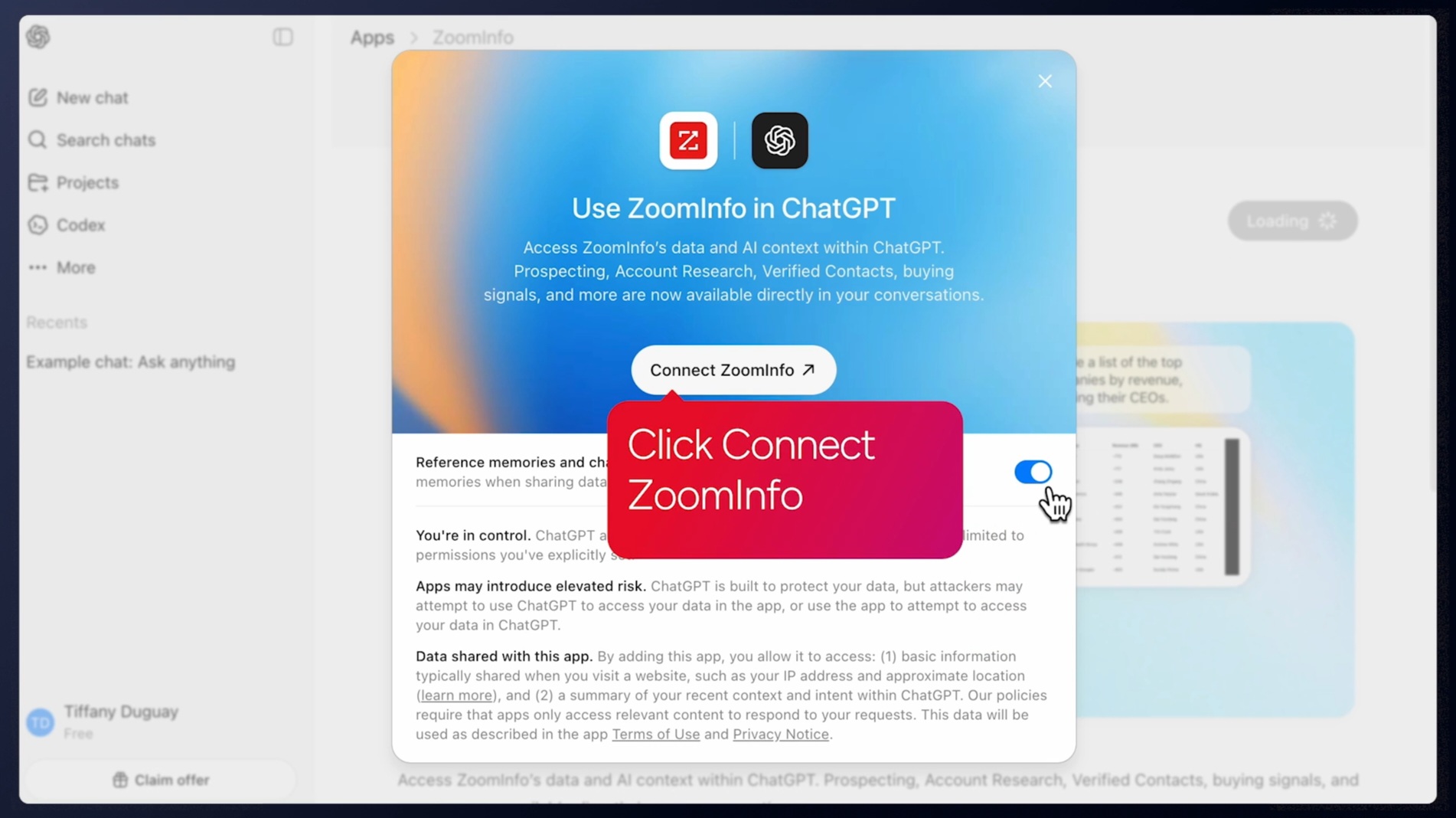
Source: ZoomInfo
ZoomInfo does not publish official SDKs either, so both platforms require direct HTTP integration. ZoomInfo uses consumption-based pricing; API access requires an Enterprise API or Copilot package, and ZoomInfo has extended API access to all relevant plans.
BDO Canada reported an 87% reduction in time spent updating internal data dashboards using the ZoomInfo API, with one analyst describing the integration as plug-and-play across any process. (ZoomInfo)
Final Verdict
Luma's API is a focused, well-documented surface that covers the event lifecycle: creating events, managing registrations, selling tickets, handling memberships, and receiving webhook notifications on guest and event changes.
The public OpenAPI 3.1 spec, per-route versioning, and actively maintained monthly changelog give a developer a solid foundation to build on. For an event management API from a six-person company, the surface is complete.
Its limits are limits of scope, not quality. The API manages events; it does not enrich the people attending them.
Choose the Luma API if your integration is event-operations-first: automating event creation, syncing guest lists with a CRM, processing ticket sales, managing community memberships, or building custom registration workflows. At $59/month for full API access with no per-call charges, it is cost-effective for teams already invested in Luma's event platform.
Choose the ZoomInfo API when the build needs to go beyond event logistics into who these attendees are, what companies they represent, and whether those accounts are actively in-market.
Export your Luma guest list, enrich through ZoomInfo's search-then-enrich pattern (search is free, enrich consumes credits), and the event becomes a pipeline source with B2B intelligence behind every registration. Explore the ZoomInfo Enterprise API or start with the developer docs to see the endpoint surface directly.
A developer who needs neither API should know that Luma's API does not provide B2B intelligence, and ZoomInfo's API does not manage events. If your pipeline requires both, the two are complementary layers, not competing surfaces.
FAQ
Is the Luma API free?
No. API access requires a Luma Plus subscription at $59/month (billed annually) or $69/month (billed monthly). The free Luma plan, which includes unlimited events and guests in the dashboard, does not include API access. There are no per-call API charges on top of the subscription; once you have Plus, API usage is included within the published rate limits.
Does Luma have a GraphQL API?
No. Luma exposes a REST API over HTTPS that returns JSON responses. There is no GraphQL endpoint. The API uses per-route versioning (each endpoint carries its own version independently) rather than a global version number. If you need a GraphQL interface for event management, you would need to build a wrapper on top of the REST API.
What is the Luma API rate limit?
The documented rate limits are 200 requests per minute per calendar for API keys and OAuth tokens, and 500 requests per minute per organization for Enterprise-level API keys. Exceeding either triggers a 429 response. These limits are per-calendar, not per-key.
For higher limits, Luma tells developers to contact support. An older rate-limits reference page documents a different model (500 GET / 100 POST per 5 minutes), but the OpenAPI spec is the more recently updated source.
Are there official Luma SDKs?
No. Luma does not publish official SDKs in any language. The primary developer affordance is a publicly available OpenAPI 3.1 specification at https://public-api.luma.com/openapi.json, accessible without authentication. You can import this spec into Postman or use it with OpenAPI code generators to produce typed client libraries. No official community libraries are documented.
Does the Luma API support webhooks?
Yes. Luma supports eight webhook event types covering the event and guest lifecycle: events being created, updated, or canceled; guests registering or updating; tickets being purchased; people subscribing to a calendar; and events being added to a calendar.
You manage webhooks through the API. They include a secret for payload signature verification and can be paused and resumed. The public documentation does not describe retry behavior for failed deliveries.
What does ZoomInfo's API add to a Luma build?
ZoomInfo's API adds the B2B intelligence layer that Luma's API does not cover.
Where Luma's API manages event registrations and guest lists, ZoomInfo's API identifies who those guests are professionally: search across 500M contacts and 100M companies, enrich with business emails, direct dials, org charts, technographics, employment history, and buyer intent signals, and generate AI-powered account research and buying-committee recommendations.
The practical workflow is to export Luma's guest list via its API, match attendees against ZoomInfo's database, and enrich the high-value contacts, turning event registrations into qualified pipeline. ZoomInfo's MCP server extends the same intelligence to AI-agent workflows, and the search-then-enrich pattern (search is free, enrich consumes credits) means you only pay for the records you commit to.
