
Maximizer CRM has been around since 1987, making it one of the oldest names in customer relationship management. Rather than competing head-on with Salesforce or HubSpot, Maximizer made a deliberate choice in late 2022: it stopped trying to serve everyone. The company committed its "largest-ever investment" to refocus on two audiences: sales leaders who need coaching visibility into their teams, and financial advisors who need compliance-ready client management. That bet has shaped every product decision since.
To write this Maximizer CRM review, we analyzed it closely. We believe it's the right choice if:
You manage a financial advisory practice or wealth management firm, particularly in Canada
You need a CRM that handles KYC reviews, AUM tracking, and compliance workflows out of the box
Your team works inside Microsoft 365 and wants CRM embedded in Outlook and Teams
You need on-premise deployment for data sovereignty requirements
You value fast implementation and responsive customer support over feature breadth
However, Maximizer CRM might not be sufficient if:
You need verified B2B contact data for prospecting new accounts at scale
You want intent signals that reveal which companies are actively researching solutions
Your go-to-market strategy requires marketing automation, conversation intelligence, and sales execution in one platform
You need AI that reasons across deal context, conversation history, and market signals, not just AI that summarizes CRM records
You're building a data-driven GTM operation that extends beyond contact and pipeline management
In this case, you should consider ZoomInfo: an all-in-one AI GTM platform built on the largest B2B dataset in the industry (500M contacts, 100M companies, 135M+ verified phone numbers, and 200M+ verified business emails), with a GTM Context Graph that captures why deals move and access that delivers intelligence into any tool through APIs, MCP, or ZoomInfo's own seller and marketing workspaces.
We've included a detailed look at ZoomInfo later in this Maximizer CRM review, as it represents the broader GTM platform for teams whose needs extend beyond contact management. If you're ready to explore intelligence-driven go-to-market execution, you can learn more about ZoomInfo here.
What is Maximizer CRM?
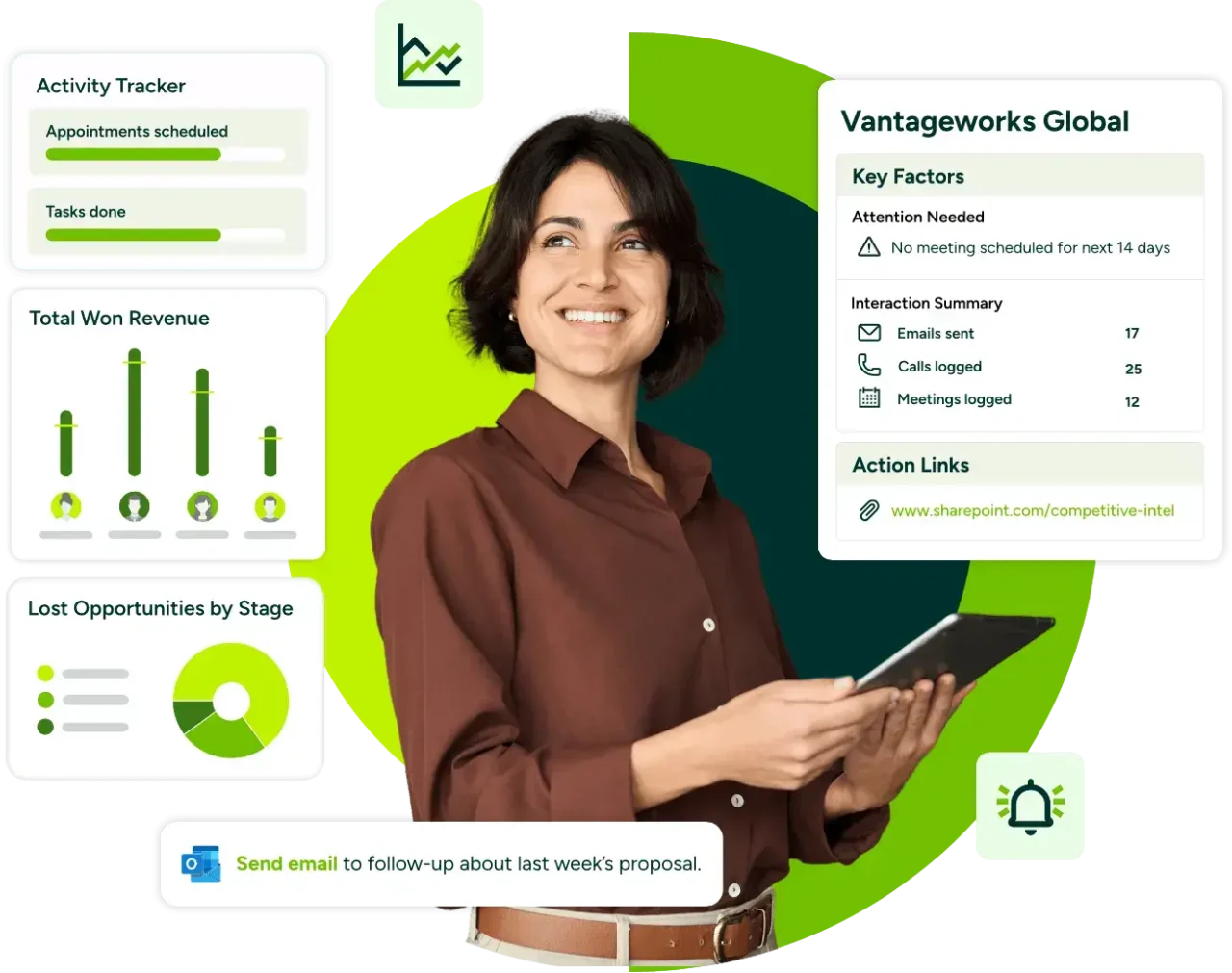
Maximizer CRM is a cloud-based (and optionally on-premise) CRM platform founded in 1987 in Vancouver, Canada, predating the term "CRM" itself. What began as a contact management system has grown into a vertically focused platform that now serves 120,000+ teams and over 1 million users worldwide.
The company is privately held as part of the Concord Group of Companies and maintains operations in Canada, the UK, Australia, Hong Kong, India, Brazil, Argentina, and Mexico. Notable clients include iA Wealth, BNP Paribas, Raymond James, and the Legislative Assembly of Ontario.
Source: Maximizer
Today, Maximizer is packaged into distinct editions by buyer type: a Financial Services Edition for wealth managers and insurance advisors, a Sales Leader Edition for B2B sales teams, a CRM for Microsoft 365 with native Outlook and Teams integration, and an On-Premise CRM for organizations that need data sovereignty.
This vertical packaging is how Maximizer sets itself apart from generalist CRM platforms: it's designed for specific roles, not for everyone.
Maximizer CRM Pros & Cons
Pros | Cons |
|---|---|
- Financial services features built in (KYC tracking, AUM analytics, compliance dashboards) | - Dated visual design compared to modern CRM platforms |
- G2 Fastest Implementation badge, setup in roughly two weeks | - Weak mobile experience (limited ability to save contacts or emails from mobile) |
- Strong customer support reputation | - Cumbersome report building with limited ad hoc filtering |
- Native Microsoft 365 integration (Outlook, Teams, Power Automate) | - Mass email formatting inconsistencies |
- Flexible cloud and on-premise deployment | - No native marketing automation |
- No-code customization without consultants | - No B2B prospecting database or intent signals |
- Canadian data residency and SOC 2 compliance | - Premium pricing for SMB segment ($65–$89 USD/user/month) |
- AI-powered meeting prep with IQ Boost | - No free plan or self-serve trial |
Maximizer CRM Review: How it Works & Key Features
Financial Services Edition: Maximizer offers tools built for wealth managers, financial advisors, and insurance professionals.
The Financial Services Edition is where Maximizer's vertical strategy is most visible.
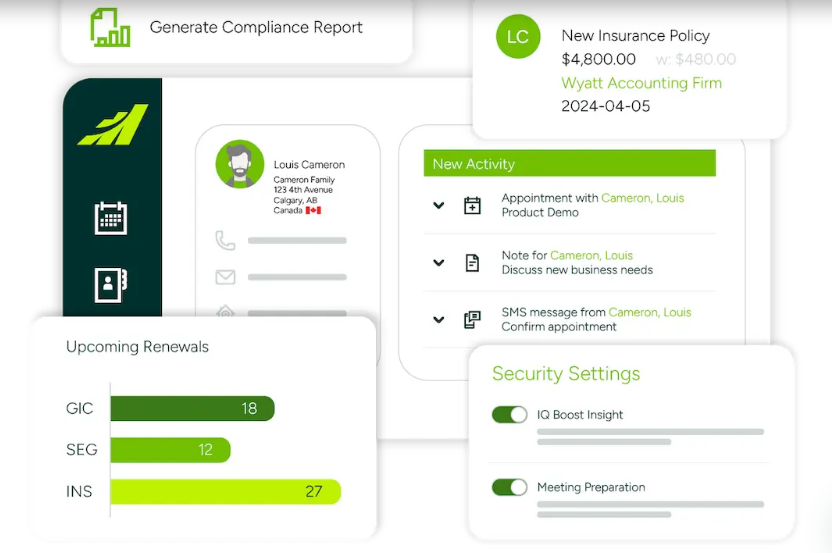
Rather than forcing financial advisors to configure a generic CRM, this edition ships with pre-built workflows for the advisory business: FA Intelligence dashboards, KYC review tracking, AUM analytics by household and advisor, intergenerational wealth management tools, and compliance audit logs.
Source: Maximizer
The Insurance Advisor Suite, launched in early 2026, extends this with policy data import from 11+ Canadian carriers and insurance-specific workflows for policy renewals and annual reviews.
For Canadian firms, Maximizer's positioning carries extra weight. The platform is built in Canada with Canadian data residency and SOC 2-compliant data handling, a real consideration for wealth management firms subject to provincial and federal privacy regulations.
DocuSign integration handles electronic signatures within the advisory workflow, and role-based access control with audit logs supports compliance procedures.
This out-of-the-box relevance is what sets Maximizer apart in the financial services CRM category. Generalist platforms can be configured to do much of this, but configuration takes months and often requires consultants. Maximizer delivers it on day one.
AI-Powered Insights: IQ Boost turns existing CRM data into meeting-ready summaries and compliance alerts.
IQ Boost, launched in October 2025, is Maximizer's embedded AI capability.
It solves a specific problem: advisors spend too much time on administrative preparation before client meetings. According to J.D. Power data cited by Maximizer, advisors who feel they lack client time spend roughly 40% more time on compliance and admin tasks than their peers.
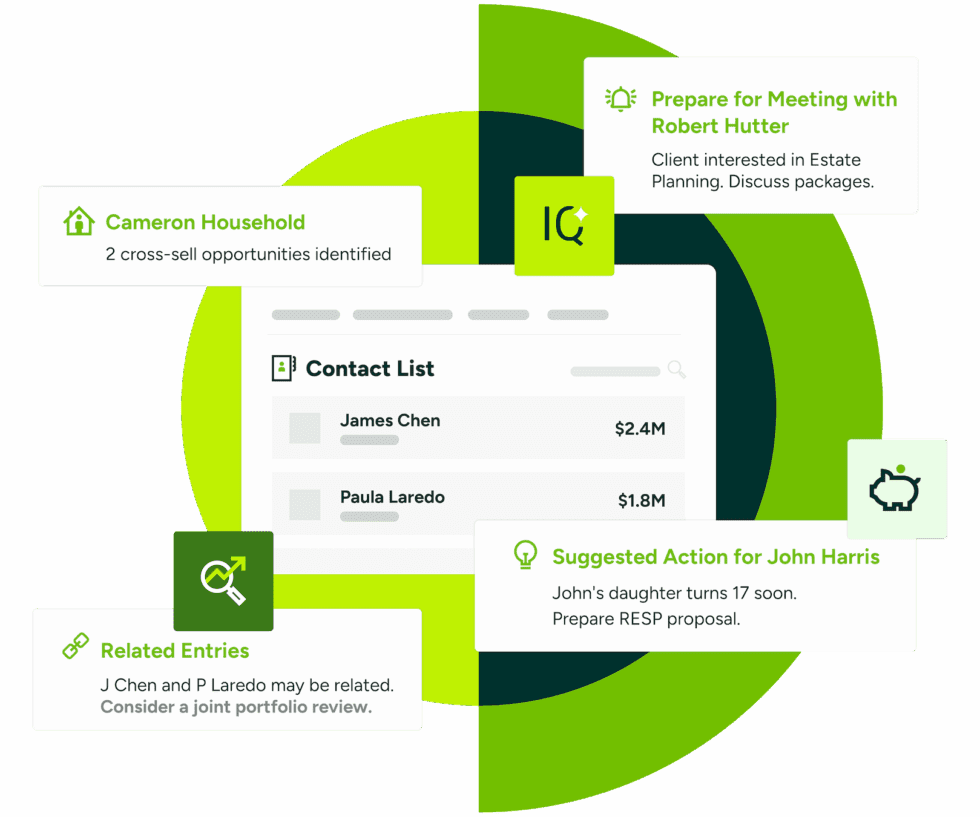
IQ Boost works within the CRM (no separate tool to switch to). When a user opens a client record, the system generates client summaries from the contact's interaction history, surfaces KYC review details and compliance-relevant data, and flags time-sensitive planning events like RESP planning windows or RRSP-to-RRIF conversion moments.
Source: Maximizer
Early adoption data is encouraging: 85% of early users reported faster meeting preparation, with one user noting prep time dropped from an hour to 30 seconds. 70% found it intuitive and easy to use, and 65% reported stronger client interactions and follow-ups.
The AI also includes built-in anonymization for compliance (a practical detail for regulated industries) and extends to the Sales Intelligence side, where it gives sales leaders coaching signals based on real-time performance data.
IQ Boost is a solid addition for its intended audience, though its scope is limited to summarizing and surfacing existing CRM data. It doesn't ingest external market signals, analyze conversation transcripts, or reason across deal patterns, capabilities that require a different kind of intelligence infrastructure.
Pipeline and Lead Management: Maximizer separates unqualified leads from active deals and tracks opportunities through customizable sales processes.
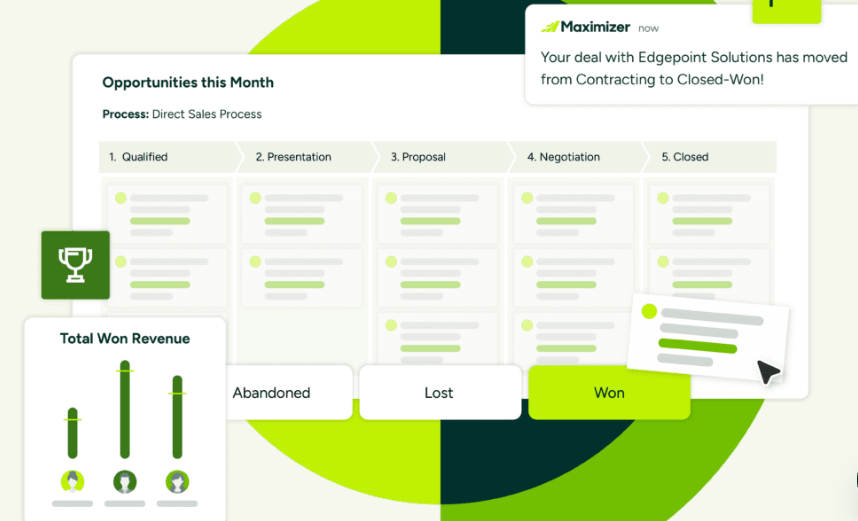
Maximizer's pipeline management gives sales leaders a centralized view of all open deals.
The system is built on an Opportunities module where administrators define named sales processes with custom stages, or choose from predefined sales methodologies. Deals move through stages with tracked close dates, probability scores, and deal values. Kanban boards and sales funnel visualizations provide visual deal management, and real-time notifications alert reps and managers to deal progress and critical actions.
Source: Maximizer
A useful feature is the AI-driven playbook, which surfaces tailored discovery questions and training materials tied to specific pipeline stages, putting coaching in the flow of work rather than in a separate enablement tool.
The lead management module enforces a hard separation between unqualified leads and active customer records.
Leads enter through web forms, email, social media, LinkedIn, and third-party integrations such as SurveyMonkey, Unbounce, Jotform, and Typeform. AI-driven lead scoring evaluates engagement patterns and buying signals to help reps prioritize, and automatic routing assigns leads by region, industry, or deal size.
When a lead qualifies, a single Convert action moves it into the Address Book and can simultaneously generate an Opportunity record, collapsing a multi-step process into one click.
Microsoft 365 Integration: Maximizer embeds CRM functionality directly into Outlook, Teams, and Power Automate.
For teams that live inside Microsoft's ecosystem, this is arguably Maximizer's strongest everyday feature.
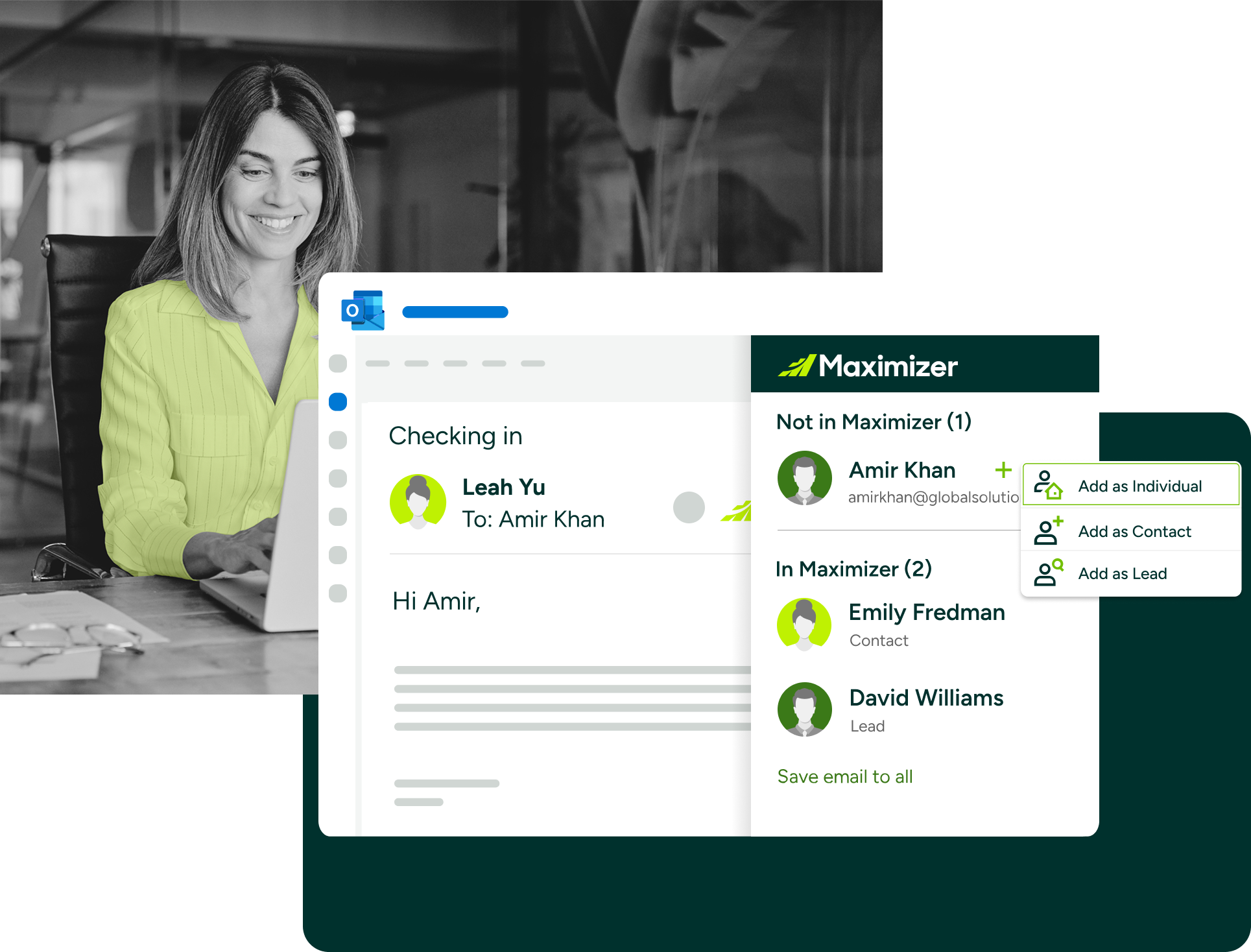
The CRM for Microsoft 365 solution lets users log emails, create contacts, sync calendar appointments, and share pipeline data without leaving Outlook. The integration is native (not a third-party connector), which means lower configuration overhead and more reliable data sync.
Source: Maximizer
In January 2025, Maximizer added Microsoft Teams and Power Automate integrations, extending CRM collaboration into video calls and enabling workflow automation across Microsoft and Maximizer. Reps can coordinate team activities and share pipeline updates through Teams, while Power Automate handles lead assignment, follow-up sequences, and deal-stage progression.
The broader integration ecosystem includes connections to DocuSign, QuickBooks, Mailchimp, SendGrid, Twilio, Google Workspace, Google Drive, and partner-built connectors for Shopify, Slack, Calendly, Zoom, and others. Zapier connectivity provides no-code connections to the broader app ecosystem. Developers can access a REST API with interactive documentation, Postman collections, and webhook support.
Where Maximizer Falls Short
Maximizer CRM performs well within its chosen focus areas, but several limitations reveal the trade-offs of a platform built for relationship management over broader go-to-market execution.
No Prospecting Data or Intent Signals.
Maximizer helps you manage contacts you already have. It does not provide a B2B database for finding new prospects, verified phone numbers for cold outreach, or intent signals showing which companies are researching solutions.
Teams that need to source new accounts must build lists manually or buy a separate data tool, creating extra cost and workflow fragmentation.
No Native Marketing Automation.
Maximizer integrates with Mailchimp and ActiveCampaign but lacks its own marketing automation. Firms wanting tighter CRM-to-campaign feedback loops, account-based marketing, or multi-channel campaign orchestration need a separate platform.
For sales-led organizations that also run marketing, this gap means managing two disconnected systems.
Dated Visual Design.
A recurring theme in user reviews is that the interface looks old-fashioned compared to newer CRM platforms. Some screens are described as overwhelming, which can slow adoption among less tech-savvy users.
For a platform that serves financial advisors (many of whom did not grow up with SaaS tools), interface clarity matters more than usual.
Limited Mobile Capabilities.
Reviewers flag the mobile app as a weak point, citing the inability to save contacts or email communications from mobile. For advisors meeting clients in the field or reps who work primarily from a phone, this creates real friction in an otherwise capable platform.
Reporting Requires Patience.
Multiple reviewers describe report-building as non-intuitive and time-consuming. Pulling customized reports takes more effort than expected, and the absence of multi-condition search logic limits ad hoc data exploration.
The nine pre-built Sales Intelligence dashboards help for common use cases, but teams needing flexible self-serve analytics may find themselves exporting to Excel more often than they'd like.
No Conversation Intelligence.
Maximizer records interaction histories (emails, notes, appointments) but doesn't capture or analyze the content of sales calls, detect sentiment, or identify patterns across conversations. Sales leaders who want to understand why deals are stalling (not just that they stalled) need a separate conversation intelligence tool, adding another system to manage.
These limitations aren't failures. They reflect a CRM designed for specific roles (financial advisors, sales managers) rather than a full go-to-market platform.
But for teams whose needs extend beyond managing existing relationships into finding, engaging, and converting new business at scale, they point toward a different class of tool.
Top Maximizer CRM Alternative for Broader GTM Needs: ZoomInfo
ZoomInfo addresses Maximizer's scope limitations by providing the intelligence and execution layer that sits above and beyond traditional CRM.
Where Maximizer manages existing contacts and pipelines, ZoomInfo helps teams find the right prospects, understand when they're ready to buy, and execute outreach with context, all from a single platform.
ZoomInfo is an all-in-one AI GTM platform serving 35,000+ companies worldwide, including Adobe, Snowflake, Thomson Reuters, and Databricks. It has been recognized as a Leader in the Gartner Magic Quadrant for ABM Platforms two years running and a Leader in the Forrester Wave for Intent Data Providers.

Comprehensive B2B Data: ZoomInfo maintains the industry's largest B2B database.
The foundational difference between Maximizer and ZoomInfo starts with data.
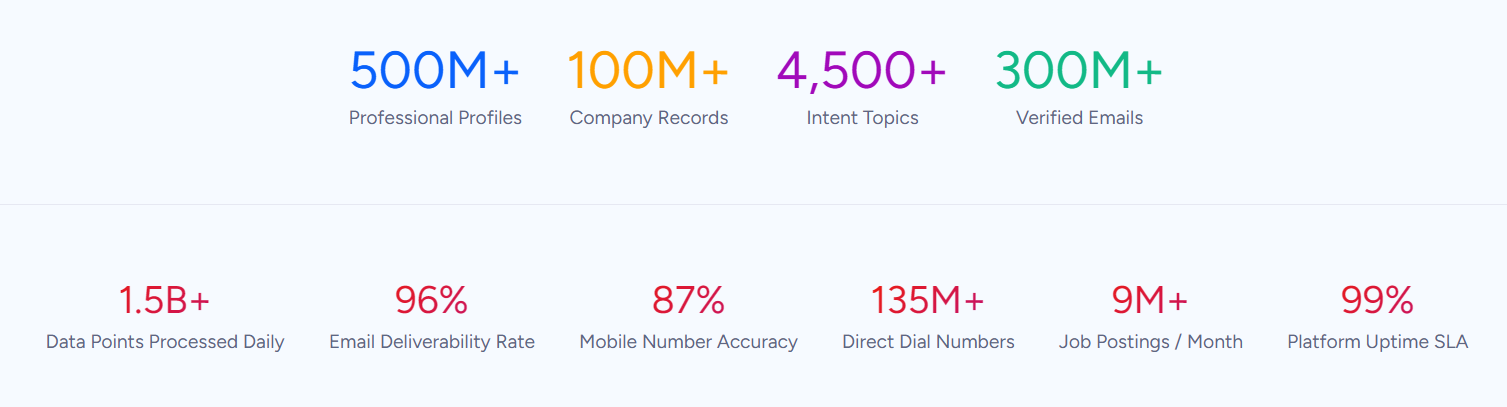
Maximizer stores the contacts your team enters. ZoomInfo provides 500M contacts, 100M companies, 135M+ verified phone numbers, 120M direct-dial phone numbers, and 200M+ verified business email addresses, a dataset your team can search, filter, and export to find prospects you didn't know existed.
Source: ZoomInfo
This data covers three dimensions: identity data (who buyers are and how to reach them), company context (industry, size, revenue, org charts, technographics covering 30,000+ technologies across 30M+ companies), and dynamic signals that reveal when accounts are in the market.
The dataset is maintained through a multi-source verification pipeline backed by 300+ human researchers, achieving up to 95% accuracy on first-party data.
This isn't a self-reported claim.
In a Fortune 500 competitive RFP analyzing 25 million contacts across vendors, the independent consultant concluded that "no other competitor came even close." ZoomInfo earned 133 G2 No. 1 rankings across Sales Intelligence, Buyer Intent, Data Quality, and Account Data Management categories.
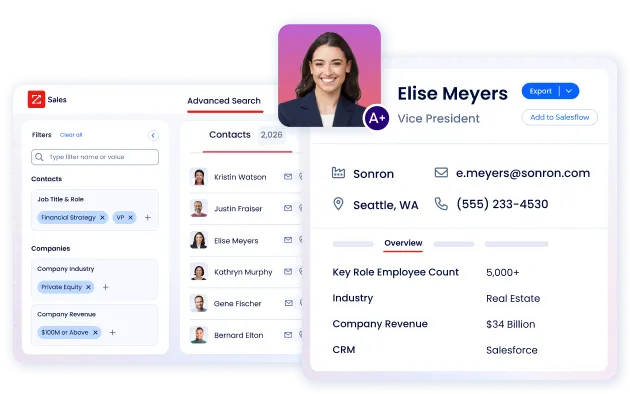
For teams using Maximizer CRM today, the practical difference is clear. Instead of manually sourcing and entering prospect data, reps can search ZoomInfo's database by 300+ company attributes, find decision-makers with direct dials and verified emails, and export them into a CRM in one click.
Source: ZoomInfo
"ZoomInfo gives us the information we need to execute. We don't have to go through and spend our time digging. It's already there, so we can be three steps ahead." (Vensure)
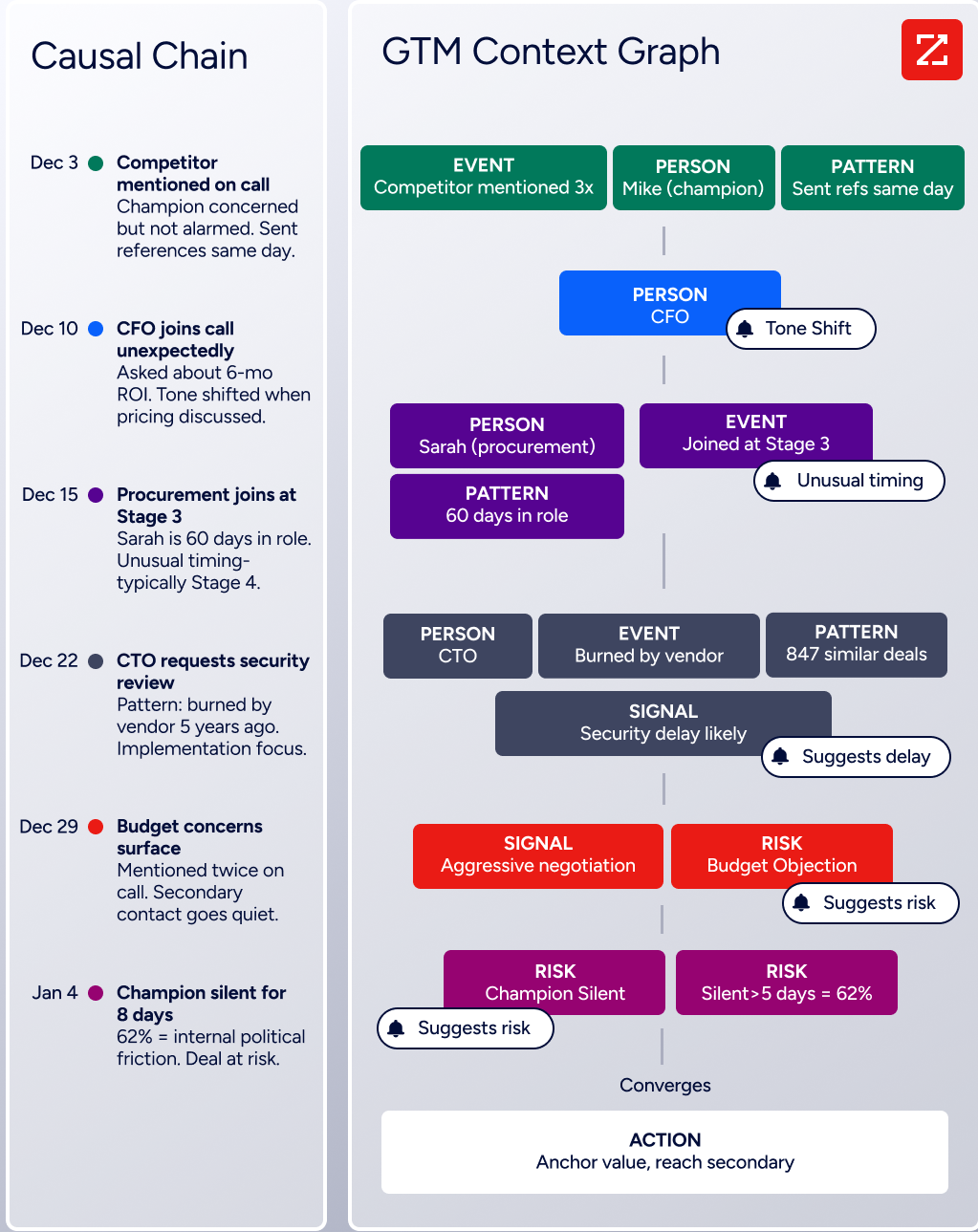
GTM Context Graph: ZoomInfo's intelligence layer captures why deals move, not just that they moved.
Maximizer's IQ Boost summarizes existing CRM records.
ZoomInfo's GTM Context Graph does something different: it fuses ZoomInfo's third-party data with a customer's CRM records, conversation transcripts, email interactions, and behavioral signals into a single intelligence layer that processes 1.5B+ data points daily.
The distinction matters.
A CRM records that a deal moved from Stage 3 to Stage 4. Conversation intelligence transcribes what the VP of Finance said on the last call. Intent data logs a spike in research activity. The GTM Context Graph reasons across all three to show why the deal accelerated, and what signal combinations predict similar outcomes across your pipeline.
Source: ZoomInfo
This intelligence shows up in practical ways.
Buyer Intent data tracks signals from 210 million IP-to-Organization pairings and 6 trillion+ new keyword-to-device pairings monthly. Guided Intent, exclusive to ZoomInfo, identifies topics historically correlated with closed deals rather than requiring manual topic selection.
Website visitor tracking resolves anonymous traffic to specific companies, including buying team identification and direct contact info.
None of this intelligence exists inside a traditional CRM. It requires a different kind of data infrastructure, one built over nearly two decades and extended through acquisitions of conversation intelligence and behavioral signal engines.
"That combination of our internal CRM data, external signals, and AI that's given all that context has helped us craft very specific account- and persona-based messages. And people have responded to them right away." (Seismic)
GTM Workspace: An AI-powered execution environment where sellers research, prioritize, and engage from one surface.
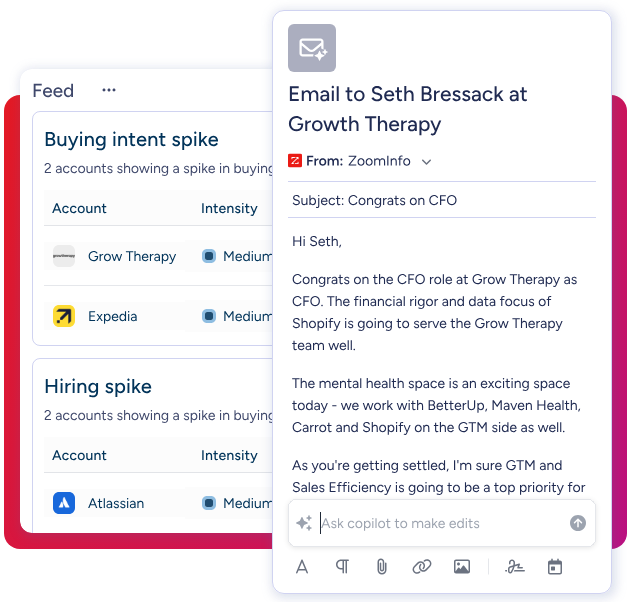
GTM Workspace is ZoomInfo's native front-end for sellers (AEs, SDRs, account managers, and customer success reps). It consolidates a seller's full book of business in one view, pulling data from CRM, ZoomInfo's database, conversation history, and market intelligence without toggling between tools.
AI agents handle the work that typically consumes a rep's day: researching accounts, monitoring signals, drafting outreach that addresses specific concerns from the deal context, updating CRM fields, and surfacing recommended next actions.
A 1-click AI Assistant generates account briefs in seconds by pulling together CRM history, company news, buying signals, and stakeholder context. The Action Feed delivers a live stream of in-market buyers matched to target criteria, with pre-drafted actions on every signal.
Source: ZoomInfo
Documented results include Seismic's sales team attributing 39% of active pipeline to opportunities identified or influenced by ZoomInfo signals while reporting 54% productivity gains. Thomson Reuters increased closed-won deals by 40% and achieved 115% average monthly quota attainment. Databricks reached prospects 50% faster.
GTM Workspace integrates natively with Salesforce, HubSpot, and Microsoft Dynamics, so the intelligence flows directly into whichever CRM a team already uses.
"Anything that minimizes our team's need to switch contexts is beneficial. ZoomInfo offers a unified view, eliminating the need to navigate between systems." (Spekit)
Universal Access: The same intelligence, available in any tool through APIs and MCP.
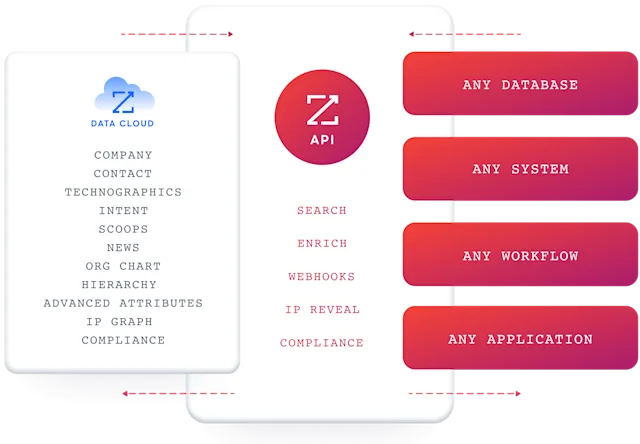
ZoomInfo's intelligence isn't locked inside its own interface.
The Enterprise API provides programmatic access to contact search and enrichment, AI-powered account intelligence, audience management, and engagement data. The ZoomInfo MCP server connects AI models directly to ZoomInfo's data with no custom coding required, enabling natural-language access through compatible assistants.
Source: ZoomInfo
For marketers and RevOps teams, GTM Studio offers a builder environment where audience definition, campaign orchestration, and pipeline measurement happen in natural language.
Pre-built GTM plays cover inbound acceleration, champion tracking, competitive displacement, and ICP targeting, launchable in one click. Multi-channel orchestration triggers email, calls, ads, and direct mail based on buyer behavior.
API access is included in all relevant plans, so whether a team uses ZoomInfo's own products, Salesforce, HubSpot, a custom internal tool, or an AI agent, the same data and intelligence are available everywhere.
Maximizer CRM or ZoomInfo: Comparison Summary
Aspect | Maximizer CRM | ZoomInfo |
|---|---|---|
Primary focus | CRM for financial advisors and sales leaders | All-in-one AI GTM platform |
Target audience | Financial advisory firms, SMB sales teams | Enterprise and mid-market B2B sales, marketing, and RevOps |
B2B prospect database | None (manages contacts you enter) | 500M contacts, 100M companies, 135M+ verified phone numbers |
Buyer intent signals | Not available | 210M IP-to-Org pairings, 6T+ keyword-to-device pairings monthly |
Conversation intelligence | Activity timeline with AI summaries | Chorus: call recording, transcription, deal intelligence, coaching |
AI capabilities | IQ Boost: meeting prep, KYC surfacing, opportunity flags | GTM Context Graph: reasons across deals, signals, and conversations |
Marketing automation | Third-party integrations only (Mailchimp, ActiveCampaign) | Native ABM, display advertising, multi-channel orchestration |
CRM integration | Is the CRM | Integrates with Salesforce, HubSpot, Microsoft Dynamics |
Microsoft 365 integration | Native integration (Outlook, Teams, Power Automate) | Chrome extension, CRM-based integration |
Financial services features | KYC tracking, AUM analytics, compliance dashboards, insurance suite | Not vertically specialized for financial services |
On-premise deployment | Available | Cloud only |
Free tier | No free plan or self-serve trial | ZoomInfo Lite (permanent free) + 7-day free trial |
Pricing | $65–$89 USD/user/month (published) | Consumption-based pricing (not published) |
Implementation speed | G2 Fastest Implementation badge; roughly two weeks | Deploys in weeks, not months |
Analyst recognition | G2 Leader for Financial Services CRM (Small-Business) | Gartner MQ Leader (ABM), Forrester Wave Leader (Intent Data), 133 G2 No. 1 rankings |
Best for | Managing existing client relationships with compliance focus | Finding, engaging, and converting new business at scale |
Final Verdict
The choice between Maximizer CRM and ZoomInfo depends on what problem you're solving and where your team spends most of its time.
Choose Maximizer CRM if your primary need is managing existing client relationships within a focused vertical.
It's the right tool for Canadian financial advisory practices that need KYC tracking, AUM analytics, and compliance workflows built in from day one, without configuring a generic platform for months. It also fits SMB sales teams embedded in Microsoft 365 who want CRM that lives inside Outlook and Teams, and organizations with data sovereignty requirements that need on-premise deployment.
Maximizer's fast implementation, responsive support, and no-code customization make it practical for teams without dedicated IT resources.
Choose ZoomInfo if your go-to-market strategy demands more than managing contacts you already have.
It's built for teams that need to find new prospects with verified data, identify when companies are in-market, understand the full context behind deal movement, and execute personalized outreach at scale, all from one platform.
The combination of the industry's largest B2B dataset, the GTM Context Graph's intelligence layer, and access through APIs, MCP, GTM Workspace, and GTM Studio gives revenue teams the infrastructure to operate across the entire go-to-market motion, not just the CRM layer.
Get started with ZoomInfo here.
Maximizer CRM and ZoomInfo serve different layers of the revenue operation. Maximizer excels at relationship management: keeping track of who your clients are, what they need, and when to follow up.
ZoomInfo operates at the intelligence and execution layer: revealing who to target, why they're ready, and what to say. For many teams, the question isn't which one to choose, but whether their current tool covers enough of the go-to-market workflow to meet their growth targets.
Maximizer CRM FAQ
Is there a free version of Maximizer CRM?
No. Maximizer does not offer a free plan or a self-serve free trial. All entry points on the pricing page lead to a "Book a Demo" call-to-action. Paid plans start at $65 USD per user per month for the Core tier.
ZoomInfo offers ZoomInfo Lite as a permanent free tier with access to its B2B database, 10 monthly export credits, and website visitor identification, plus a separate 7-day free trial of paid features with no credit card required.
How much does Maximizer CRM cost?
Maximizer publishes pricing in six currencies. In USD, the Core plan is $65/user/month. The Financial Services and Business tiers are $79/user/month. The Financial Services+ and Business+ tiers (which include AI-powered insights and workflow automation) are $89/user/month. Enterprise plans are custom-priced.
Additional costs for implementation, sandbox environments, integration solutions, and customization assurance are listed as add-ons with no published prices. Cancellation and downgrading require contacting an Account Manager; self-service changes through the billing portal are not available.
What is Maximizer CRM best used for?
Maximizer is best suited for Canadian financial advisory practices managing client portfolios, KYC reviews, and compliance workflows, and for SMB sales teams in the Microsoft 365 ecosystem that need pipeline visibility and coaching tools.
It is not designed for prospecting, marketing automation, or account-based marketing. Teams needing those capabilities would need to add separate tools or consider a broader platform like ZoomInfo.
Does Maximizer CRM have AI features?
Yes. IQ Boost, launched in October 2025, provides AI-powered meeting preparation summaries, KYC compliance surfacing, and opportunity identification within CRM records. Early users reported 85% faster meeting preparation. The AI also powers sales coaching signals in the Sales Leader Edition.
However, IQ Boost works only on existing CRM data; it does not incorporate external market signals, intent data, or conversation analysis.
ZoomInfo's GTM Context Graph processes 1.5 billion data points daily by fusing CRM records with third-party intelligence, conversation transcripts, and behavioral signals to reason across deal context.
Does Maximizer CRM integrate with Microsoft 365?
Yes, this is one of Maximizer's strongest features. The CRM embeds directly into Outlook for email logging, contact creation, and calendar sync. Microsoft Teams integration enables pipeline sharing and team coordination, and Power Automate connectors support workflow automation.
This native integration is a genuine differentiator for teams that work primarily inside the Microsoft ecosystem.
Can Maximizer CRM be deployed on-premise?
Yes. Maximizer maintains a fully featured on-premise deployment option for organizations with data sovereignty requirements, air-gapped environments, or regulatory mandates.
This is increasingly rare among modern CRM vendors and is a genuine differentiator for government agencies, regulated industries, and organizations in low-connectivity environments. The mobile app also supports on-premise installations.
Does Maximizer CRM have a mobile app?
Yes, Maximizer offers native mobile apps for Android and iOS, included in all plans. The app features a "Today's Business" dashboard with calendar, alerts, tasks, and recent entries. It supports voice-to-text note dictation and AI-powered Smart Capture for converting photos of handwritten notes and business cards into CRM records.
However, reviewers note limitations including the inability to save contacts or email communications from the mobile version, which can create friction for field-based teams.
Who should NOT choose Maximizer CRM?
Maximizer is not a fit for large enterprises needing Salesforce-grade customization, mobile-first field sales organizations, teams outside the Microsoft ecosystem who prefer Google Workspace or Slack-native workflows, startups seeking free or near-free CRM, or US-based financial advisors where competing US-specific compliant CRMs may offer better local regulatory alignment.
It is also not built for teams that need B2B prospecting data, buyer intent signals, marketing automation, or conversation intelligence, capabilities that require a go-to-market platform like ZoomInfo.
More Maximizer CRM comparisons and alternatives:
