

The question developers ask when evaluating a work-management API is not whether it can read boards and update items. It is how much of the integration you can build on the API alone, before you need something outside it.
monday.com's API is a GraphQL surface that covers the full platform through a single endpoint, with quarterly versioning, official SDKs in JavaScript/TypeScript and Python, and API access on every plan, including the free tier.
The developer docs are public, the API playground is interactive, and a dedicated MCP server exposes 50+ tools for AI agent workflows. For a work-management platform, that is a mature developer surface.
But platform depth and data depth are different things.
monday.com's API gives you programmatic control over the platform's data layer: boards, items, columns, groups, users, automations, webhooks, and docs, across work management, CRM, dev, service, and campaigns. Where its scope stops is external intelligence.
There are no endpoints for contact enrichment, company attributes, technographic profiles, buyer intent signals, or org chart data. If your integration needs to push enriched B2B data into monday.com boards, or reason about the contacts and companies stored in them, that intelligence has to come from a second API.
This is where ZoomInfo enters the picture. ZoomInfo is a B2B data and go-to-market platform built on 500M contacts and 100M companies, 135M+ verified phone numbers, and 200M+ verified business emails.
Its GTM Context Graph processes 1.5B+ data points daily, combining this dataset with your first-party data to reveal which accounts matter and why.
ZoomInfo's Enterprise API exposes that intelligence as a REST suite covering search, enrichment, AI intelligence, and audience management, with an MCP server for AI-agent workflows. ZoomInfo provides the B2B intelligence layer that monday.com's platform API does not deliver.
This review covers the monday.com API in full technical depth first (authentication, endpoints, webhooks, SDKs, rate limits, and pricing), then reviews ZoomInfo's API as the data layer that picks up where platform management stops.
monday.com API at a Glance
Attribute | Detail |
|---|---|
API type | GraphQL (queries and mutations via a single endpoint) |
Authentication | Personal API token (Authorization header) / OAuth 2.0 for marketplace apps |
Base URL | https://api.monday.com/v2 |
Current version | 2026-04 (versioned quarterly; 2026-07 Release Candidate available) |
Rate limits | Complexity-based (5M-10M points/minute by token type) plus daily call limits (1,000-25,000 by plan) |
SDKs | Official JavaScript/TypeScript and Python |
Webhooks | Yes, board-level event subscriptions via GraphQL mutation |
MCP server | Yes, 50+ tools for AI agent workflows |
Documentation | developer.monday.com (API reference, playground, guides, changelog) |
Pricing / access | Included on all plans (Free through Enterprise); daily call limits scale by tier |
monday.com API: What Works Well & What to Plan Around
What works well | What to plan around |
|---|---|
GraphQL lets you request exactly the fields you need, avoiding over-fetching | Daily call limits are tight on lower tiers: 1,000/day for Free, Basic, and Standard |
API access included on all plans, including the free tier | Complexity scoring adds a second rate-limit dimension beyond raw call counts |
Official JS/TS SDK with TypeScript types generated from the live API schema | GraphQL only: no REST alternative for teams that prefer it |
Quarterly versioning with six months' deprecation notice before removal | Scope is platform management only: no contact enrichment, B2B intelligence, or external data |
Interactive API playground, Postman collection, and in-docs AI assistant | File uploads require a multi-step mutation flow (get upload URL, upload to S3, finalize) |
MCP server with 50+ tools for AI agent workflows |
monday.com API: Authentication & Getting Started
API access is available to Admin, Member, and Guest users on any paid or free plan, though daily call limits vary by tier. Viewers, deactivated users, and student-account users cannot access the API.
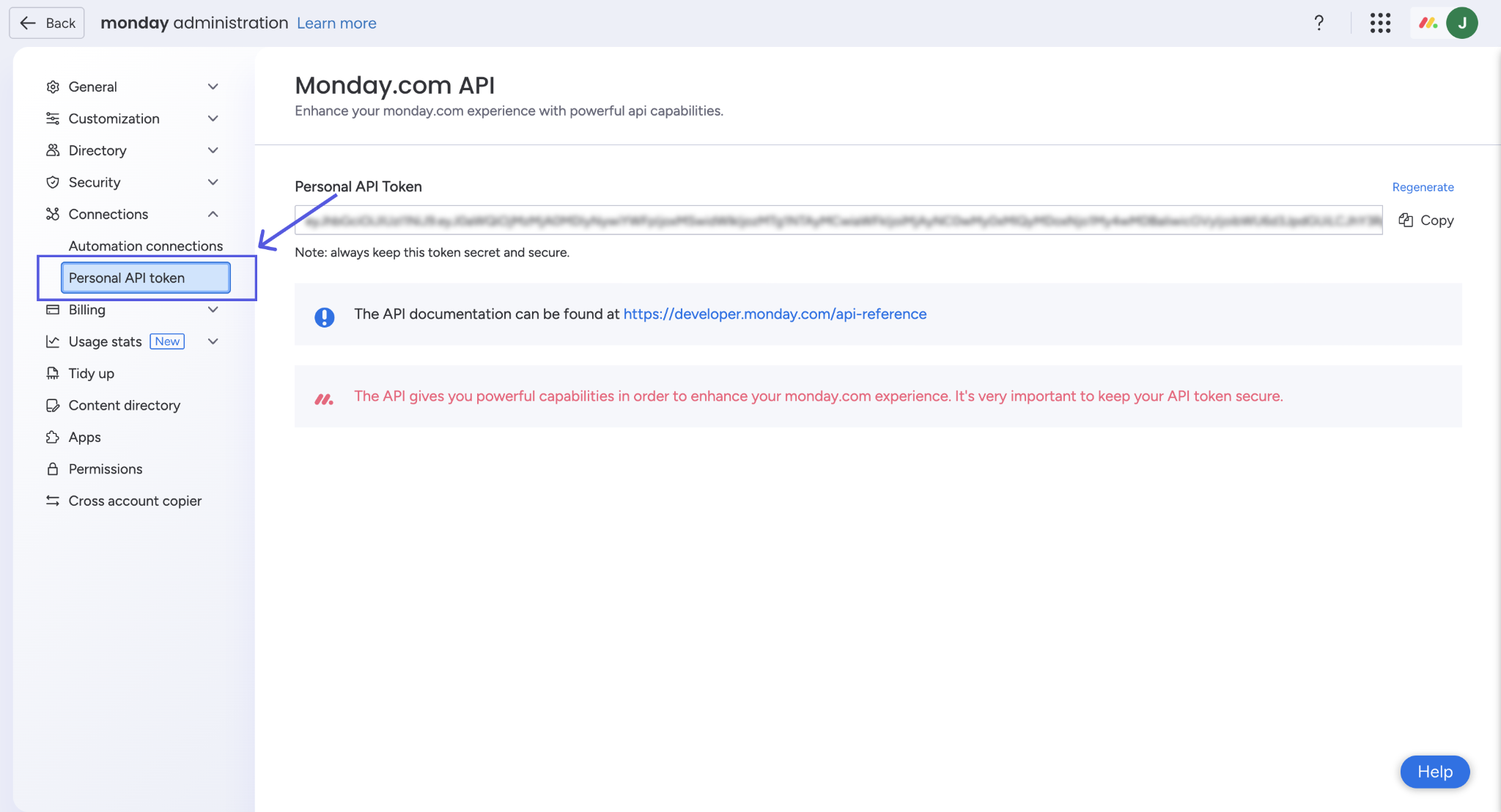
The primary authentication method is a personal V2 API token, unique per user. Each token carries the same permissions as that user in the UI: if a user cannot view a workspace in the interface, their token cannot read it through the API. You find tokens under your profile picture, then Developers, then API token. Account admins can also retrieve tokens from the Administration tab.
Source: monday.com
You pass the token as the Authorization header in every request. A basic authenticated query:
curl -X POST "https://api.monday.com/v2" \
-H "Authorization: YOUR_API_TOKEN" \
-H "Content-Type: application/json" \
-d '{"query": "{ boards (limit: 5) { id name } }"}'
Because the API is GraphQL, every request is a POST to the single endpoint. You specify which fields you want returned, avoiding the over-fetching that comes with fixed REST response shapes. You can also batch multiple queries or mutations in a single request.
OAuth for apps: Apps built on the monday apps framework use OAuth 2.0 with configurable permission scopes. Unlike personal tokens (which inherit all scopes), OAuth app tokens carry only the scopes declared at registration. This is the path for marketplace apps and multi-tenant integrations where each customer authenticates independently.
Short-lived tokens: Guest users who cannot hold personal API keys can authenticate via OAuth or a shortLivedToken, a scoped, time-limited credential issued for specific operations.
One detail worth knowing before you build: the full API schema is publicly available at https://api.monday.com/v2/get_schema in introspection JSON or SDL format, requestable for any specific version via query parameter. This makes it straightforward to generate types, validate queries offline, or build tooling against the live schema.
monday.com API: Core Endpoints & Capabilities
Because the API is GraphQL, there are no discrete endpoints in the REST sense.
Every request goes to https://api.monday.com/v2, and you specify the resource type (boards, items, columns, users, etc.) inside the query or mutation body. The API supports two operation types: queries (read-only) and mutations (create, update, delete). Data moves as JSON, with GraphQL variables enabling dynamic parameterization without string interpolation.
The API reference documents the full schema. Here is what you can build against, organized by resource domain.
Boards, Items & Groups
Boards are the primary containers in monday.com. Items are the rows. Groups organize items within a board.
Boards: query (list, filter, search by workspace), create, update, duplicate, archive, delete. You can filter boards by workspace and build multi-level structures including subitems.
Items: create, read, update, delete, search, and bulk import via the import_items mutation. Items are the primary data rows across all boards, whether those boards represent tasks, CRM leads, dev sprints, or service tickets. Pagination uses a limit and cursor-based approach, which handles large boards without loading everything at once.
Groups: create, update, duplicate, delete, and move between boards.
What you would build with this: a CRM integration that creates items on a monday.com CRM board whenever deals close in Salesforce, grouping them by quarter and populating columns with deal value, stage, and owner.
Columns & Data Types
Columns define the schema of each board.
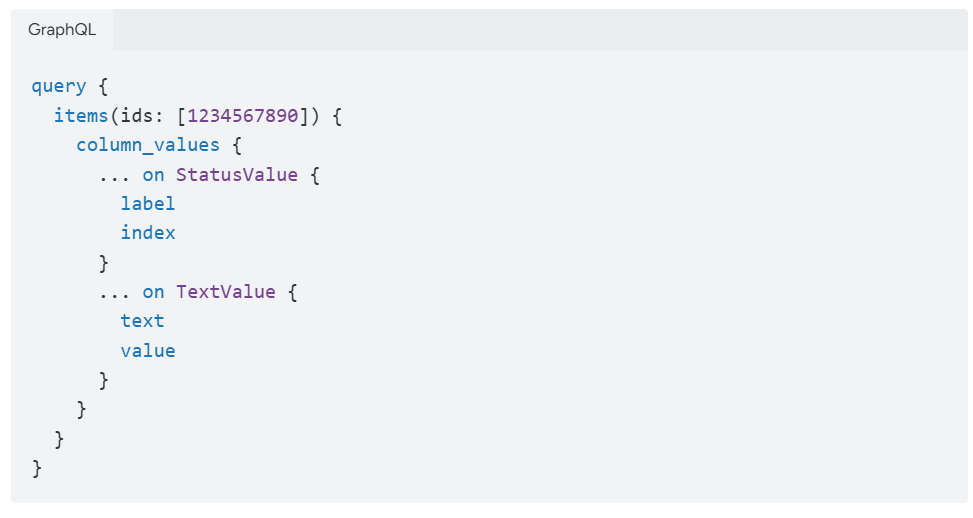
The API supports 30+ column types including text, numbers, status, date, people, formula, dependency, timeline, and more. Operations include create, update, delete, read column definitions and types, and change column values for items.
Source: monday.com
The ability to create columns and set their values programmatically is what makes monday.com's API useful for data-pipeline integrations: you can define a board's structure in code, then populate it from an external source, rather than setting it up manually in the UI.
Workspaces, Users & Teams
Workspaces: list, create, update, with folder support. Workspaces are the top-level organizational unit.
Users & Teams: query user profiles and team memberships, assign users to items. Useful for provisioning and access management integrations.
What you would build with this: an onboarding automation that creates a workspace for each department, sets up standard board templates, and assigns team members based on an HR system feed.
Docs, Dashboards, Forms & Assets
Docs (WorkDocs): create, update, and read collaborative documents that live inside the workspace and connect directly to board data.
Dashboards: create dashboards and add widgets programmatically, aggregating data across boards.
Forms: create, update, read, and submit forms for structured data intake.
Assets: query file assets attached to items and upload files via a two-step mutation flow: call get_asset_upload_url to get a presigned URL, upload the file to S3, then call finalize_asset_upload. This adds implementation overhead but gives you direct control over file handling.
Automations & Workflows
The API lets you list, create, update, and publish automations programmatically. You can define trigger-condition-action workflows through the API rather than configuring them in the UI.
What you would build with this: a deployment tool that sets up standardized automation recipes across client workspaces, so every new board gets the same notification rules, status-change triggers, and handoff automations without manual setup.
monday.com API: Webhooks & Events
monday.com supports two webhook systems, each serving a different audience.
Platform API Webhooks (Board & Item Events)
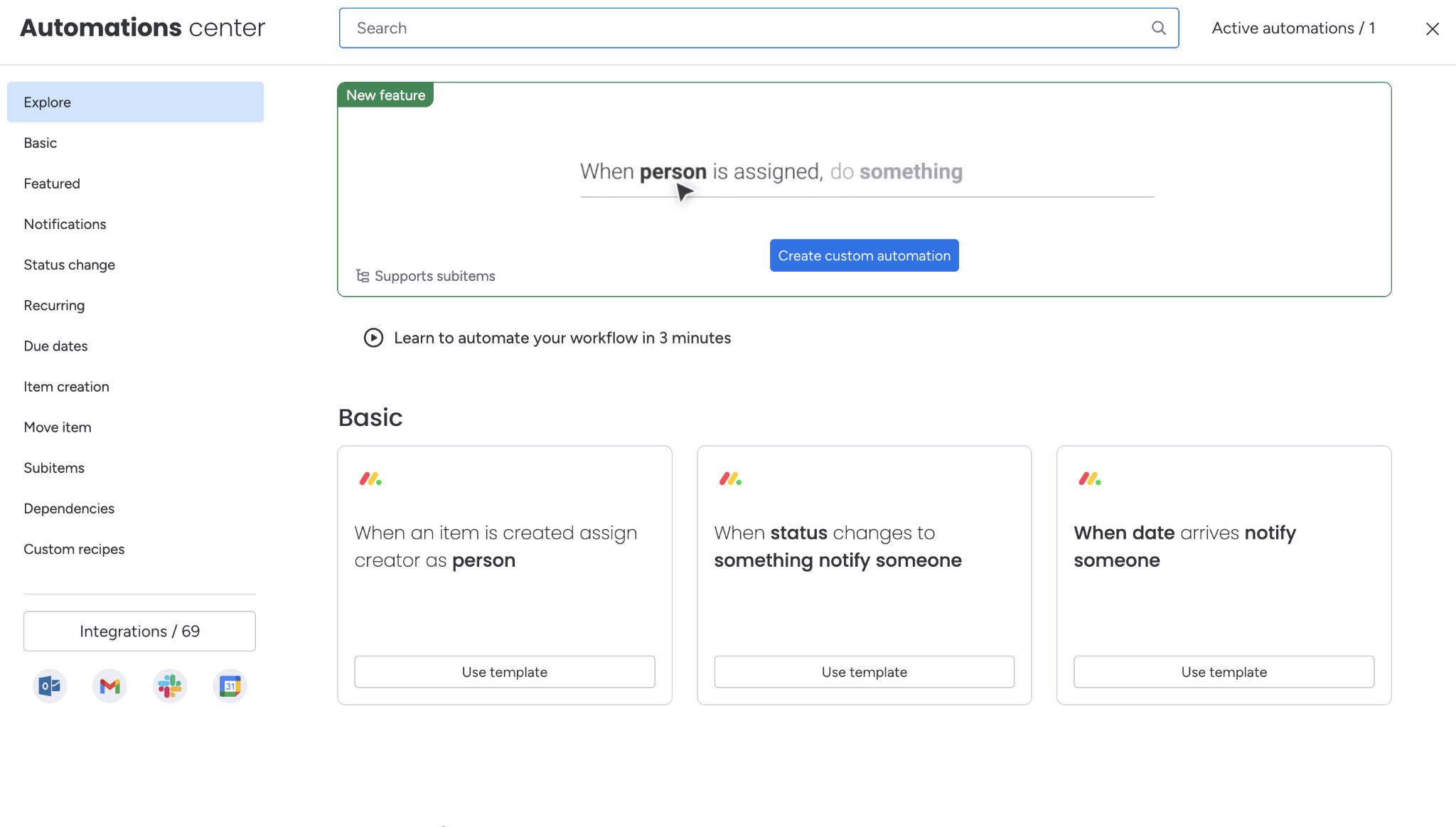
Developers subscribe to board-level events via the create_webhook mutation, pointing to any HTTPS endpoint. monday.com delivers a POST payload to that URL when the subscribed event fires.
Source: monday.com
You manage webhook subscriptions entirely through GraphQL: create_webhook to subscribe, delete_webhook to unsubscribe, and the webhooks query to list active subscriptions.
The platform webhook system covers events across boards, items, columns, groups, and updates. Most API developers will use this system: it lets your application react to changes in monday.com in real time rather than polling.
What you would build with this: a Slack integration that posts a message to a channel whenever a CRM deal's status changes to "Closed Won," triggered by a webhook on the deals board.
App Lifecycle Webhooks (Marketplace Apps)
Apps published to the monday marketplace can subscribe to 13 lifecycle events covering installation and subscription state changes:
install, uninstall
app_subscription_created, app_subscription_changed, app_subscription_renewed
app_subscription_cancelled_by_user, app_subscription_cancelled
app_subscription_cancellation_revoked_by_user
app_subscription_renewal_attempt_failed, app_subscription_renewal_failed
app_trial_subscription_started, app_trial_subscription_ended
app_subscription_pricing_version_change_scheduled
Each webhook request includes a JWT in the Authorization header, signed with the app's Client Secret, for verification. Payloads carry event metadata, user data, account details (ID, name, tier, max users), version info, and subscription details. You configure webhooks through the Developer Center. No historical backfill is provided.
Two things to plan around:
App lifecycle webhooks matter only if you are building a marketplace app. For internal integrations, the platform API webhooks are what you need.
The platform webhook documentation covers URL verification, but confirm retry behavior and delivery guarantees before depending on webhooks in a critical pipeline.
monday.com API: SDKs, Docs & Rate Limits
SDKs & Libraries
monday.com provides two official SDKs:
JavaScript / TypeScript SDK (@mondaydotcomorg/api): available via npm, works in Node.js (v18+) and browser environments. Ships pre-built GraphQL operations, TypeScript types generated from the live API schema, and automatic API versioning.
The SDK reads rate-limit response headers and retries throttled requests after the indicated delay. A companion CLI package (@mondaydotcomorg/setup-api) scaffolds a custom GraphQL codegen pipeline for type-safe custom queries.
Python SDK: documented at developer.monday.com/api-reference/docs/python-sdk, covered in the official documentation alongside the JS SDK.
CLI tool: a command-line interface for scaffolding, deploying, and managing apps built on the monday apps framework.
Apps framework client-side SDK: a separate JavaScript SDK (monday.api, monday.listen, monday.get, monday.execute, monday.storage, monday.set) for apps rendered inside the monday.com UI as iframes or board views. It handles context, storage, and cross-frame communication within the platform.
The TypeScript SDK's auto-retry on rate-limit responses is a useful feature. Many API SDKs leave backoff logic to the developer; monday.com handles it at the SDK layer.
Documentation & Developer Experience
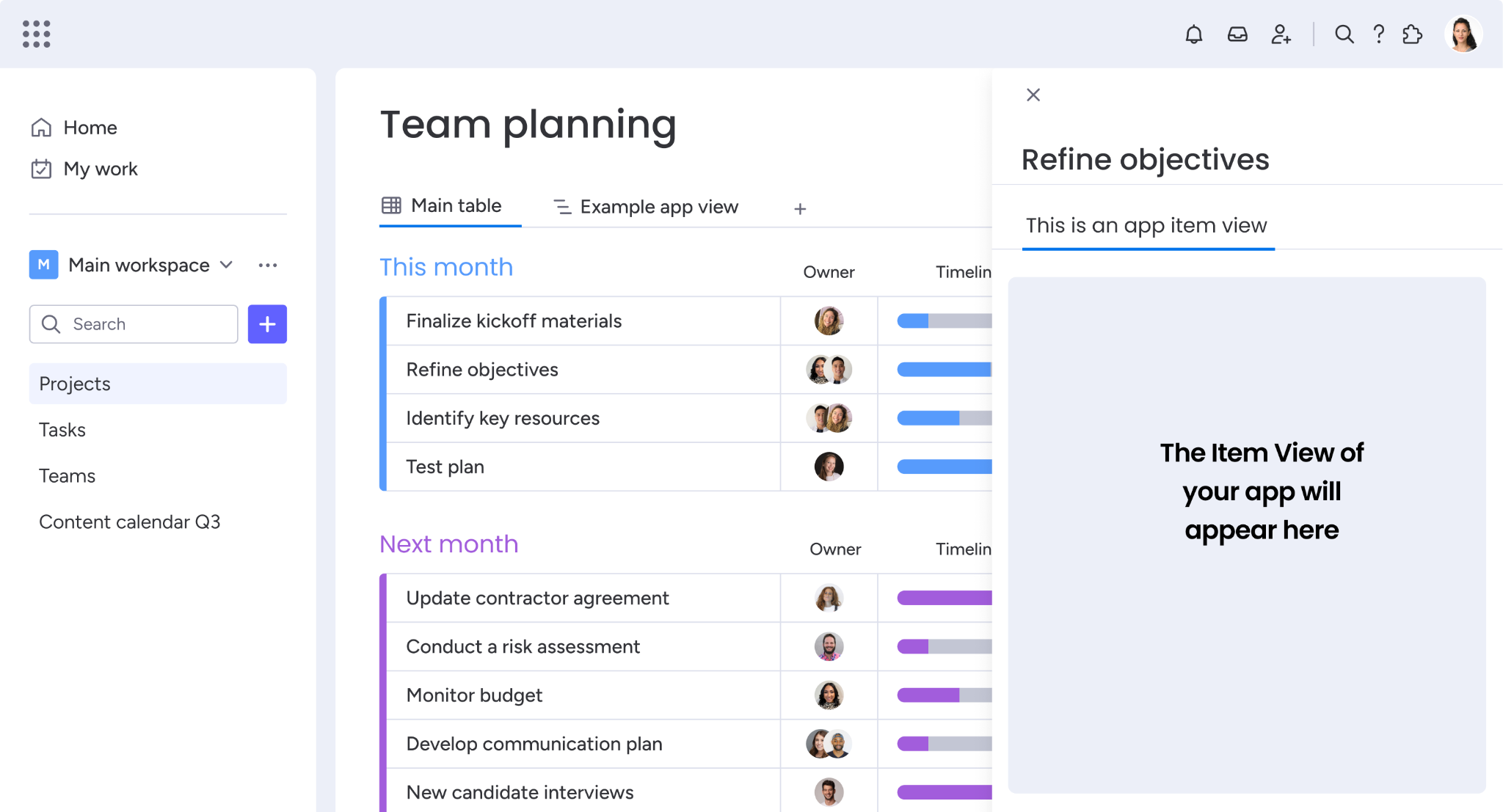
The developer portal at developer.monday.com splits into two areas:
Platform API reference (developer.monday.com/api-reference): covers the GraphQL schema, authentication, versioning, rate limits, guides for common operations, and a complete reference for all types and fields.
Apps & Agents framework (developer.monday.com/apps/docs): covers building, hosting, submitting, and monetizing apps on the monday marketplace, including OAuth, MCP integration, and the Developer Center.
Source: monday.com
Interactive tooling is strong:
API playground: in-browser GraphQL explorer for testing queries against your own account.
Postman collection: pre-built queries and mutations.
Developer AI assistant: AI chat embedded in the docs for API questions.
developer.monday.com/llms.txt: an AI-agent-readable index of all docs in Markdown format with OpenAPI endpoint listings.
A public API changelog and release notes ship with every quarterly version release. Developer support runs through the developer community forum, a dedicated YouTube channel, and an API analytics dashboard for monitoring usage. Enterprise plans include 24/7 priority support.
The documentation is well-organized. The API playground is the fastest way to confirm a query shape, and the AI assistant is a useful shortcut for GraphQL syntax questions. The quarterly changelog with six months' deprecation notice gives integrators a predictable migration cadence.
Rate Limits & Constraints
monday.com's API enforces multiple rate-limit dimensions at once. Response headers (RateLimit-Policy and RateLimit) expose current quota, remaining quota, and reset timing in real time.
Complexity limit: each GraphQL query is scored by its load on the API. A single query cannot exceed 5,000,000 (5M) complexity points. Per-minute complexity budgets vary by token type:
App tokens: 5M complexity points per minute (reads and writes tracked separately)
Personal tokens: 10M combined points per minute
Free/trial accounts: 1M per minute
Complexity budgets follow a sliding window that resets 60 seconds after the first call. The API returns a ComplexityException error when the budget is exceeded. You can pre-check any query's cost by including the complexity field in the request.
Daily call limit: caps API calls per account per day, resetting at midnight UTC:
Plan | Daily call limit |
|---|---|
Free / Basic / Standard | 1,000 |
Pro | 10,000 (soft limit) |
Enterprise | 25,000 (soft limit) |
Minute limit: per-minute request caps by plan:
Plan | Requests per minute |
|---|---|
Pro | 2,500 |
Enterprise | 5,000 |
monday.com does not publish minute limits for Free, Basic, or Standard plans.
Concurrency limit: published in the RateLimit-Policy header. The documentation shows a quota of 40 concurrent requests for a higher-tier account; actual quotas vary by tier.
MCP calls: each MCP tool call counts as one GraphQL API request against the daily limit. If you run AI agents via the monday MCP server alongside a custom API integration, both compete for the same quota.
Source: monday.com
Resource protection limits: certain heavy mutations (create/duplicate board, duplicate group, connect project to portfolio) are throttled independently.
Rate-limit errors count as 0.1 calls rather than 1, and high-complexity queries may count as more than 1. All limits apply per account, per app.
monday.com API Pricing & Access Costs
API access is bundled into all monday.com plans, including the Free tier. There are no per-call charges, no API-specific credit system, and no separate developer add-on. The cost of building on the API is the cost of the plan that gives you the daily call limits your integration needs.
Plan | Price (annual, per seat) | API calls / day |
|---|---|---|
Free | $0 (up to 2 seats) | 1,000 |
Basic | $9/seat/month | 1,000 |
Standard | $12/seat/month | 1,000 |
Pro | $19/seat/month | 10,000 |
Enterprise | Custom / contact sales | 25,000 |
The pricing page notes for Pro and Enterprise tiers: "Enable agents, integrations, and custom apps to read and update monday data. Buy more as needed." Additional API call capacity can be purchased, though specific overage pricing is not published.
For a developer sizing costs: the real constraint is the daily call limit, not the per-seat price. A team of 10 on the Standard plan ($120/month total) gets only 1,000 API calls per day, so a sync that updates 500 items twice daily exhausts the quota.
Moving to Pro ($190/month for 10 seats) multiplies the limit tenfold to 10,000/day. Enterprise customers who need more than 25,000 calls/day can request an increase through the API analytics dashboard.
No separate API pricing tier exists. The decision is which monday.com plan to subscribe to, driven by the daily call limit and the plan features you need. The Free tier's 1,000/day limit works for testing and light integrations, but any production workflow with real volume will need at least the Pro plan.
Where the monday.com API Falls Short
These are practical limits a developer should plan around, not criticisms of the platform. Several are scope decisions that define what monday.com's API is (a platform management surface) and what it is not.
The API manages the platform, not the intelligence behind the data. monday.com's API can create a CRM board, add lead records as items, and update their status columns. It cannot tell you anything about those leads beyond what a user or automation already put into the board.
There are no endpoints for contact enrichment (verifying an email, appending a phone number or job title), no company attribute lookups (revenue, headcount, industry, technology stack), no org chart traversal, and no technographic data. If your integration needs to go from "a name in a column" to "a verified contact at a company researching your category," the API does not cover that path.
No buyer intent signals. A developer building a lead-scoring or account-prioritization workflow on monday.com's CRM has no API access to intent data: which companies are researching relevant topics, which accounts are spiking in buying activity, or which competitors are being evaluated. Intent-driven automation requires a second data source.
Daily call limits constrain real integrations on lower tiers. 1,000 API calls per day on Free, Basic, and Standard plans is a firm ceiling. Even a modest bidirectional sync (reading items, checking for changes, pushing updates) can consume this quota within hours. The jump to 10,000/day requires the Pro plan at $19/seat/month, and the jump to 25,000/day requires a custom Enterprise contract.
For teams evaluating monday.com as a platform to build on, the API cost is not the API itself (it is free) but the plan tier needed to unlock usable limits.
Complexity scoring adds a second rate-limit layer. Beyond daily call counts, each GraphQL query is scored for complexity, and the budget varies by token type and plan. A query with nested relationships (boards to items to column values to subitems) can consume a large share of the complexity budget.
The scoring system is documented, and the complexity field lets you pre-check costs, but it is an extra dimension that REST APIs do not impose. New integrators are more likely to hit complexity limits than daily call limits on their first build.
MCP calls and API calls share the same daily quota. If you run AI agents via the monday MCP server alongside a custom integration, both draw from the same daily call pool. An AI agent that makes 50 MCP tool calls per run consumes 50 of your 1,000 or 10,000 daily calls. For teams building AI-agent workflows on monday.com, this shared quota is the first constraint to plan around.
ZoomInfo API: The B2B Intelligence Layer monday.com Does Not Cover
monday.com's API tells you what is on a board.
ZoomInfo's API tells you who the contacts on that board are, what companies they represent, what technology those companies run, whether they are researching your category, and where each person sits in the org chart.
The intelligence comes from ZoomInfo's GTM Context Graph, which processes 1.5B+ data points daily and combines them with your first-party data to show not just what happened, but why.
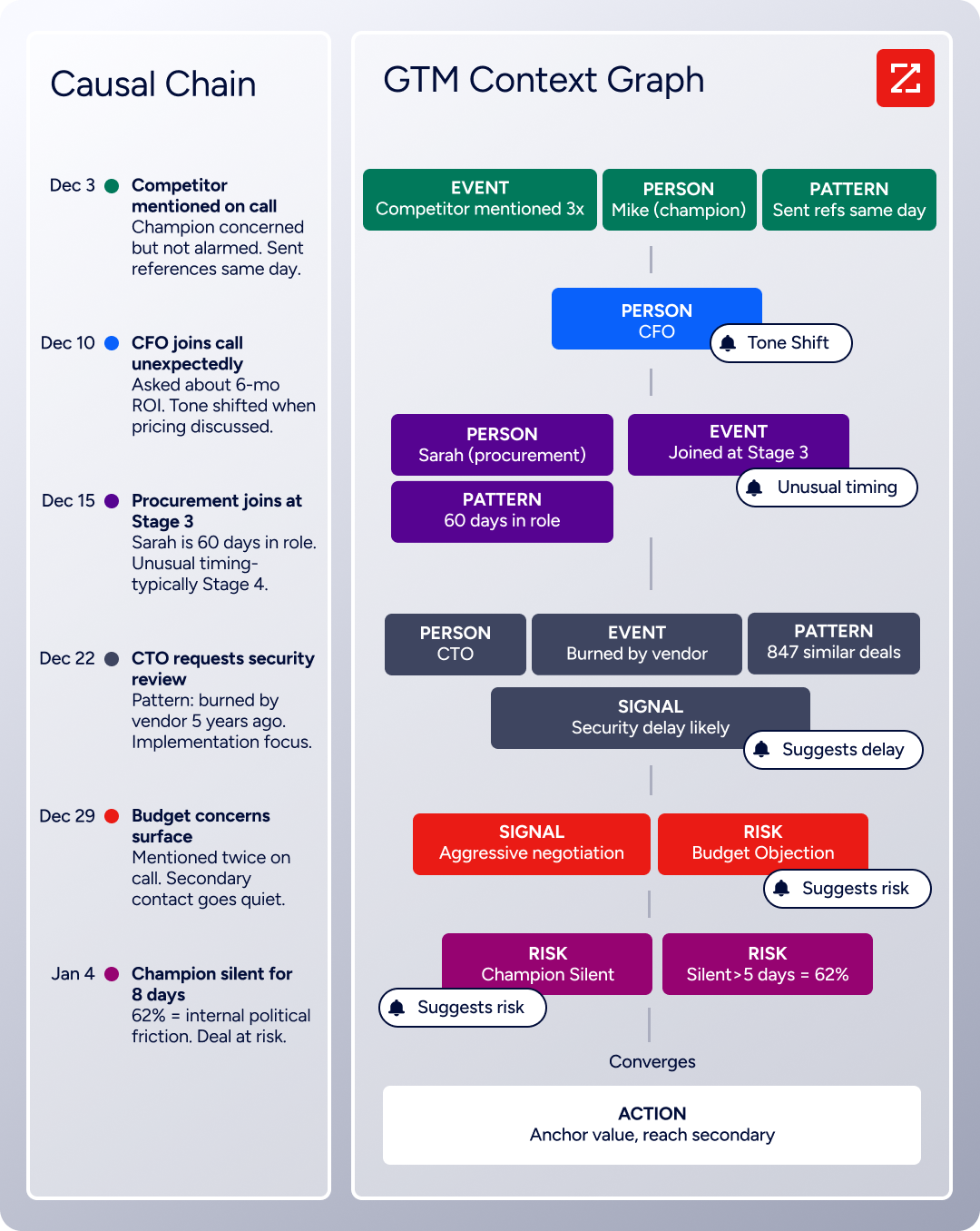
The two APIs operate at different layers. A developer building a CRM or sales workflow on monday.com would use monday.com's API to manage the workflow and ZoomInfo's API to feed it verified, enriched B2B data.
What the API Covers: Search, Enrichment & AI Intelligence
ZoomInfo's Enterprise API is a REST suite served from https://api.zoominfo.com/gtm, organized into four areas documented in the interactive API reference:
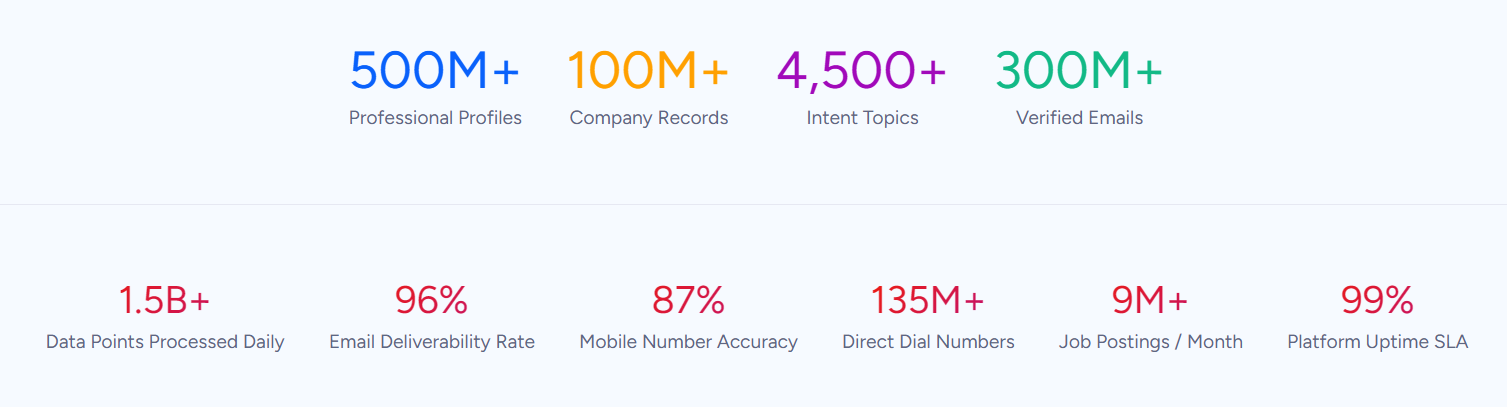
Data API (Search & Enrich): Search endpoints cover Contacts, Companies, Intent, News, and Scoops, returning matched records without consuming credits. Enrich endpoints unlock full payloads: business emails, direct dials, employment history, corporate hierarchy, org charts, technographics, and hashtag signals, accepting up to 25 records per call.
The underlying dataset spans 500M contacts and 100M companies, 135M+ verified phone numbers, and 200M+ verified business email addresses.
AI Intelligence API: Account Summary returns structured account intelligence with a free-form Q&A endpoint. Find Similar Companies performs lookalike expansion. Contact Recommendations returns AI-ranked buying-committee suggestions by motion (prospecting, deal acceleration, renewals).
Marketing API: CRUD endpoints for programmatic audience management.
Platform API (Engagements, Beta): Bidirectional engagement data via the Engagements API.
The pairing with monday.com's API is direct: use ZoomInfo's search endpoints to find contacts matching your target profile (free, no credits consumed), enrich the records worth pursuing, then push the enriched data into monday.com CRM boards via the GraphQL API. The search-then-enrich pattern means you filter freely and pay only for the records you commit to.
What you would build with this: an automated pipeline that watches a monday.com CRM board for new lead items, queries ZoomInfo to enrich each lead with verified email, phone, company size, industry, and technology stack, then writes the enriched fields back to the board's columns.
Authentication, Rate Limits & Credits
Authentication uses OAuth 2.0 with PKCE via Okta, issuing 24-hour access tokens with rotating refresh tokens.
Three flows are supported: Authorization Code with PKCE (web applications), Client Credentials (server-to-server), and Refresh Token. You register applications through the ZoomInfo Developer Portal, where teams generate credentials, define scopes, and test endpoints.
This is a different authentication model from monday.com's static personal token: it supports delegated access, credential rotation, and scoped permissions out of the box.
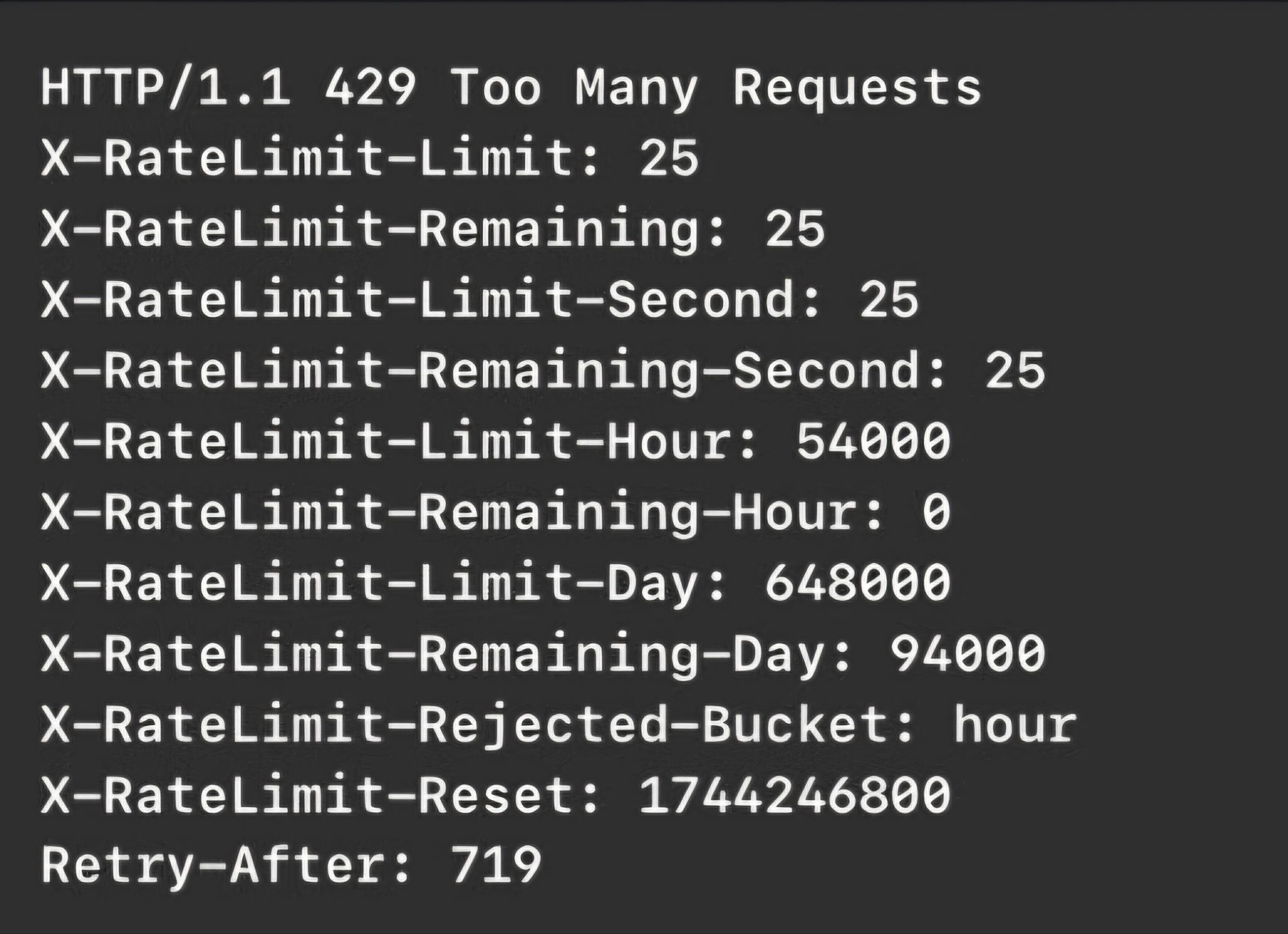
Rate limits are published by tier: Builder (5 req/sec), Standard (25 req/sec), and Scaling (35 req/sec), with per-hour and per-day sliding-window limits enforced at the same time.
Source: ZoomInfo
Every response includes quota headers with remaining capacity, and 429 responses include a Retry-After header with exact backoff timing. Credits follow a rolling 12-month window: enriching a record for the first time consumes one credit; re-enriching the same record within the year is free.
MCP, Webhooks & Developer Experience
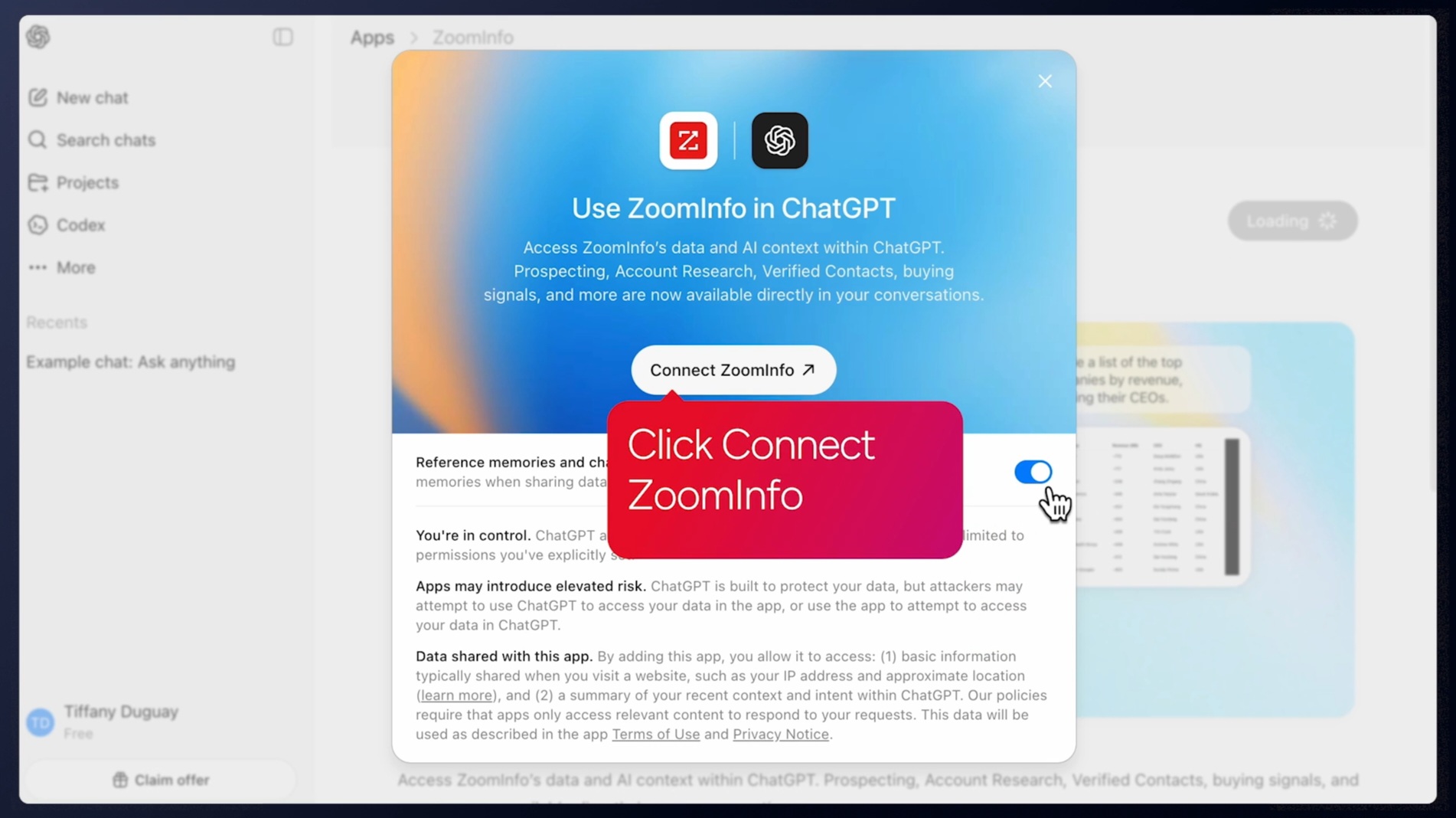
ZoomInfo's MCP server at https://mcp.zoominfo.com/mcp exposes search, enrich, and account research as native tools for MCP-compatible assistants, currently supporting Claude and ChatGPT.
Source: ZoomInfo
For developers building AI agents across both platforms, an agent can read monday.com board data via monday.com's MCP server and enrich it with ZoomInfo's MCP server in the same workflow, without writing custom integration code.
Webhooks are available via the Agents API, tied to ZoomInfo's Agent Teams system: event types cover bulk enrichment jobs completing, records changing, credit usage crossing thresholds, and new signals (scoops, funding events, intent spikes) becoming available.
Documentation lives at docs.zoominfo.com with an interactive API reference, OAuth recipes in five languages, and an llms.txt index for AI development tools. A separate Docs MCP server lets AI development tools generate integration code against the API spec.
ZoomInfo does not publish official SDKs, so you integrate over HTTP and own the auth-and-retry layer yourself. ZoomInfo has expanded API access across its plans, with consumption-based pricing.
BDO Canada reported an 87% reduction in time spent updating internal data dashboards using the ZoomInfo API, with one analyst describing the integration as plug-and-play across any process. (ZoomInfo)
Final Verdict
monday.com's API is a well-documented GraphQL surface that gives developers programmatic control over a multi-product work platform.
The quarterly versioning, the TypeScript SDK with schema-generated types, the interactive playground, and the MCP server with 50+ tools add up to a developer experience that takes integration seriously. For automating board management, item workflows, and platform operations, the API delivers what the UI does, without the UI.
Choose the monday.com API if you need to automate workflows inside the platform: syncing items with external systems, provisioning workspaces and boards programmatically, building marketplace apps, or running AI agents that manage monday.com data.
The free-tier API access and the GraphQL model (request what you need, batch operations in a single call) make it a practical choice for internal tools and integrations.
Choose the ZoomInfo API when your build needs B2B intelligence that monday.com does not store: verified contact data, company attributes, technographic profiles, buyer intent signals, org charts, and AI-powered account research. The search-then-enrich pattern (search is free, enrich consumes credits) and the AI intelligence endpoints cover the data layer that no work-management API provides.
Explore the ZoomInfo Enterprise API or start with the developer docs to see the endpoint surface directly.
A developer whose integration needs only platform management (board automation, item sync, dashboard generation) does not need ZoomInfo's API. monday.com's GraphQL API handles that scope well. The question becomes relevant when the contacts and companies on those boards need to be more than names in columns.
FAQ
Is the monday.com API free?
API access is included on all monday.com plans, including the permanent free tier. There are no per-call charges and no separate developer add-on.
The practical cost is the plan subscription that sets your daily call limit: Free, Basic, and Standard plans allow 1,000 API calls per day, Pro allows 10,000, and Enterprise allows 25,000. Additional capacity can be purchased on Pro and Enterprise tiers. The free tier's 1,000/day limit works for testing and light integrations but will not support a production sync with real volume.
Does monday.com use GraphQL or REST?
GraphQL only. All API operations go through a single endpoint (https://api.monday.com/v2) using queries for reads and mutations for writes. There is no REST alternative. GraphQL lets you specify which fields to return in each request, avoiding over-fetching, and batch multiple operations in a single call.
The tradeoff is that teams used to REST conventions (resource-based URLs, standard HTTP verbs) need to learn GraphQL query construction and complexity management.
What is the monday.com API rate limit?
monday.com enforces multiple rate-limit dimensions at once. Each query is scored for complexity, with budgets of 5M to 10M points per minute depending on token type (1M for free and trial accounts). Daily call limits are 1,000 for Free, Basic, and Standard plans, 10,000 for Pro, and 25,000 for Enterprise. Pro plans also cap at 2,500 requests per minute; Enterprise allows 5,000 per minute.
A concurrency limit (roughly 40 concurrent requests on higher tiers) applies as well. MCP tool calls count against the daily limit. Response headers expose remaining quota in real time.
Are there official monday.com SDKs?
Yes. monday.com publishes an official JavaScript/TypeScript SDK (@mondaydotcomorg/api) via npm, supporting Node.js v18+ and browser environments. It includes pre-built GraphQL operations, TypeScript types generated from the live API schema, and automatic retry on rate-limit responses.
A Python SDK is also documented. A CLI tool handles scaffolding and deployment for the monday apps framework, and a separate client-side SDK manages context and storage for apps rendered inside the monday.com UI.
Does the monday.com API support webhooks?
Yes, through two systems. Platform API webhooks let you subscribe to board-level events (item changes, column updates, group modifications) via the create_webhook GraphQL mutation, delivering POST payloads to any HTTPS endpoint.
Apps published to the monday marketplace can also subscribe to 13 lifecycle events covering installation and subscription state changes, with JWT-signed payloads for verification. Platform webhooks are the system most API developers will use for event-driven integrations.
What does ZoomInfo's API add to a monday.com build?
ZoomInfo's API adds the B2B intelligence layer that monday.com's API does not cover.
Where monday.com's API manages boards, items, and workflows, ZoomInfo's API provides the data that makes those workflows valuable: search across 500M contacts and 100M companies, enrich with verified emails, direct dials, employment history, org charts, technographics, and company attributes, detect buyer intent signals, and generate AI-powered account research and buying-committee recommendations.
Both platforms offer MCP servers, so an AI agent can manage monday.com board data and enrich it with ZoomInfo intelligence in the same workflow. ZoomInfo uses OAuth 2.0 authentication and consumption-based pricing (search is free, enrichment consumes credits), so plan the integration layer to handle both auth models.
