

The gap between a productivity platform's feature set and its API surface tells you everything about what the vendor expects developers to do with it.
Motion's API is a REST surface at v1, covering tasks, projects, recurring tasks, custom fields, comments, users, workspaces, schedules, and statuses. Authentication uses a static API key in an X-API-Key header, the developer docs are public, and rate limits sit at 12 requests per minute for individual accounts and 120 for teams. All subscribers get access, with no enterprise gate.
But the API exposes the task and project layer only. Motion's headline capabilities (AI auto-scheduling, calendar intelligence, capacity planning, meeting notetaking, AI Chat, booking links) have no API surface at all.
Motion's API gives you programmatic CRUD over tasks, projects, and a handful of supporting resources. It does not expose the scheduling engine, the calendar, the AI layer, or any event-driven mechanism. If your integration needs to create and manage tasks inside Motion from an external system, the API covers that. If your build depends on reading or writing to Motion's calendar, triggering workflows on scheduling events, or accessing AI-driven output, the API stops well short of what the product does.
This is where ZoomInfo enters the picture: an AI go-to-market platform whose API is a REST suite covering search, enrichment, AI intelligence, and audience management across a B2B dataset of 500M contacts and 100M companies, with OAuth 2.0 authentication, tiered rate limits up to 35 req/sec, and an MCP server for AI-agent workflows.
The two APIs sit at different layers: Motion manages internal work execution, ZoomInfo provides the external B2B intelligence that informs who you work on and why.
This review covers the Motion API in technical depth first, then reviews ZoomInfo's API as the layer that covers what Motion's API does not.
Motion API at a Glance
Attribute | Detail |
|---|---|
API type | REST over HTTPS, JSON responses |
Authentication | API key via X-API-Key header |
Base URL | https://api.usemotion.com/v1 |
Current version | v1 |
Rate limits | 12 req/min (Individual), 120 req/min (Team); Enterprise limits available on request |
Pricing / access | Included on all paid plans ($19/seat/month entry); no separate API tier |
SDKs | No official SDKs |
Webhooks | Not available |
Documentation |
Motion API: What Works Well & What to Plan Around
What works well | What to plan around |
|---|---|
API included on all paid plans, no enterprise gate or separate signup | 12 req/min on Individual tier is restrictive for any production integration |
Multiple API keys supported, each named and individually revocable | No OAuth 2.0: static API keys only, no delegated access or scoped permissions |
Task CRUD covers create, read, update, delete, move, and unassign | No calendar, scheduling, or AI endpoints: the API exposes tasks and projects, not the product's core intelligence |
Custom Fields API allows structured metadata on tasks and projects | No webhooks or event-driven callbacks; polling is the only option |
No enterprise approval gate: generate a key in Settings and start building | No official SDKs in any language |
Projects and recurring tasks are first-class API resources | Zapier integration is one-way only: external events create Motion tasks, but Motion does not push events back |
Motion API: Authentication & Getting Started
Any Motion subscriber can access the API. The integrations page confirms "the API is available for all users," meaning both the $19/month Pro AI and $29/month Business AI plans include it. No separate developer signup, no approval workflow, and no enterprise-only gate.
You create keys inside the Motion app at Settings > API (under Integrations). Click "+ Create API Key," name it, and copy the key immediately. Motion shows it only once and will not recover it after dismissal. You can create multiple keys, each with its own name, and disable or delete them individually.
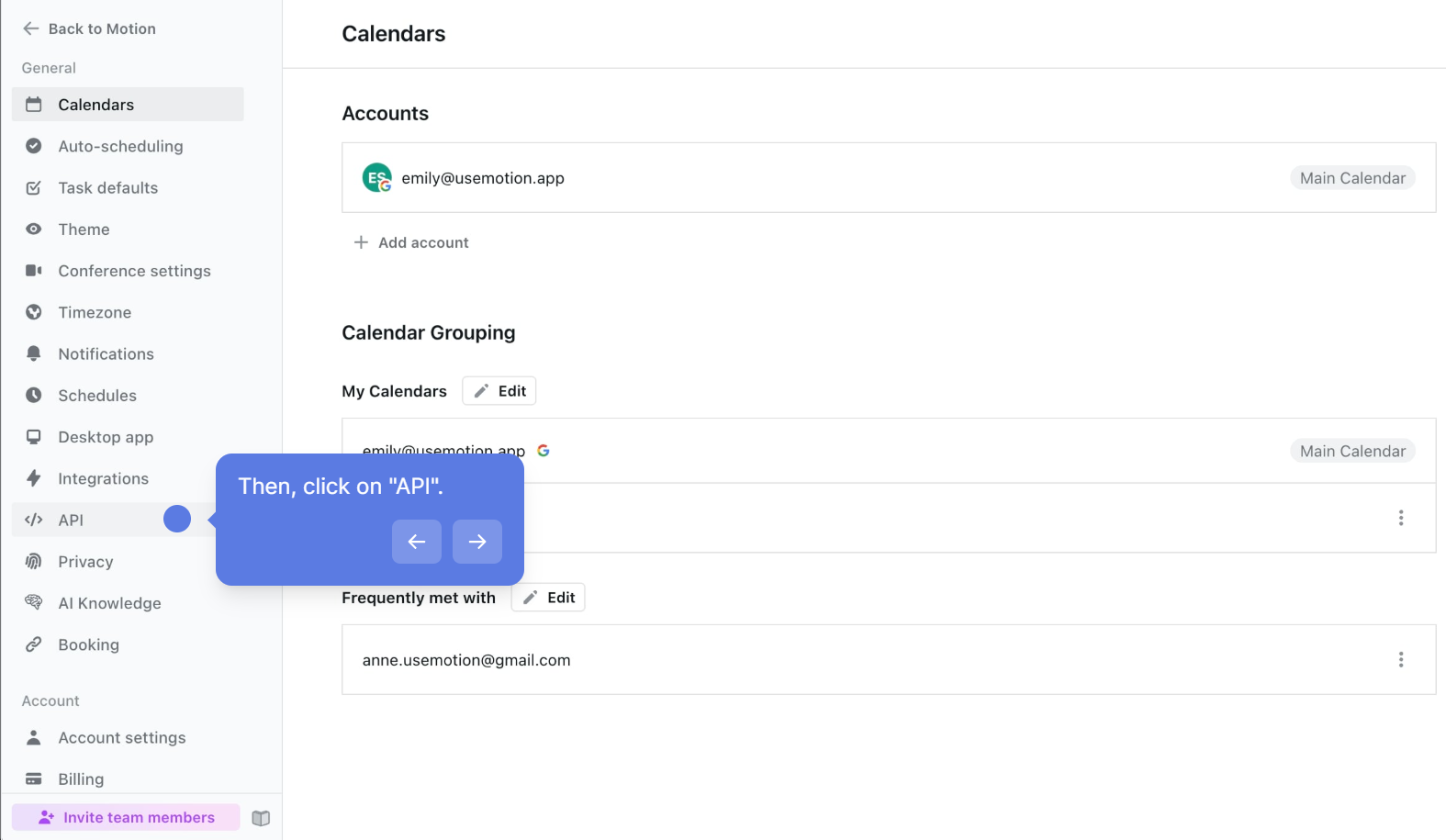
Source: Motion
This supports basic rotation and audit practices: name keys by integration, revoke a compromised key without disrupting others.
Authentication uses a custom header on every request:
curl -X GET "https://api.usemotion.com/v1/tasks" \
-H "X-API-Key: YOUR_API_KEY"
There is no OAuth 2.0 flow, no token exchange, no refresh tokens, and no scoped permissions. Every key has full access to every API operation in the workspace.
For teams building multi-tenant integrations (where each customer authenticates with their own Motion workspace), each customer must generate and share a static API key manually.
One note before building: Motion's help center frames the API as intended for "advanced users" who need custom workflows beyond what native integrations or Zapier provide. The API is supported, but it is not the integration path Motion invests in most.
Motion API: Core Endpoints & Capabilities
The API reference documents ten resource areas. The endpoint catalog covers the task and project management layer of the product; it does not extend to calendars, scheduling automation, AI features, meeting notes, or booking links.
Tasks
The most developed surface in the API, covering the full task lifecycle.
Operations: List, get, create, update, delete, move (between projects), and unassign.
Key parameters on task creation include name, description, project ID, assignee, priority (ASAP, High, Medium, Low), duration, deadline, start date, and custom field values. The list endpoint supports filtering and returns tasks with their current scheduling state.
What you would build with this: a CRM-to-Motion sync that creates tasks in specific projects when deals reach a stage, or a ticketing system integration that pushes support tickets into Motion as prioritized tasks for the team's auto-scheduler to place.
Projects
Operations: List, get, create.
Projects are containers for tasks. The API lets you list all projects in a workspace, retrieve a specific project by ID, and create new ones. Update and delete are not available through the API; modifying or removing a project requires the Motion UI.
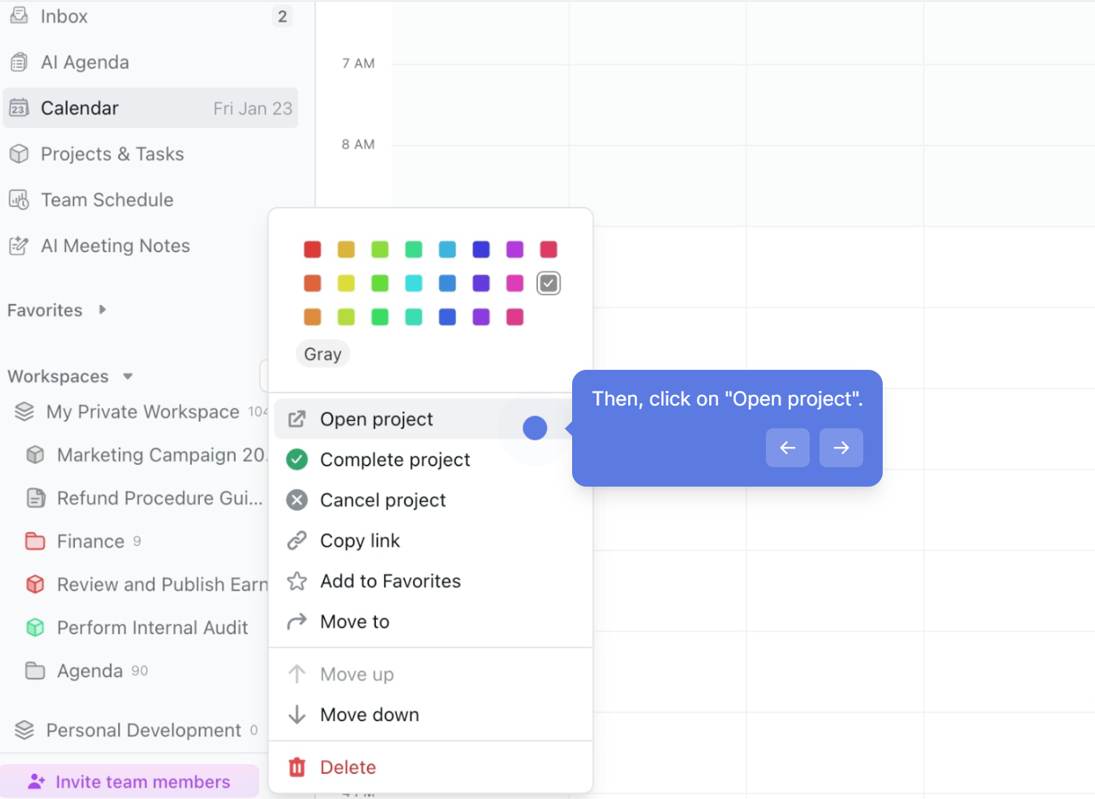
Source: Motion
Recurring Tasks
Operations: List, create, delete.
The API manages recurring tasks as a separate resource. You can create recurring task definitions with recurrence rules, list existing ones, and delete them. The API handles the definition; Motion's scheduling engine handles placement of recurring instances on calendars.
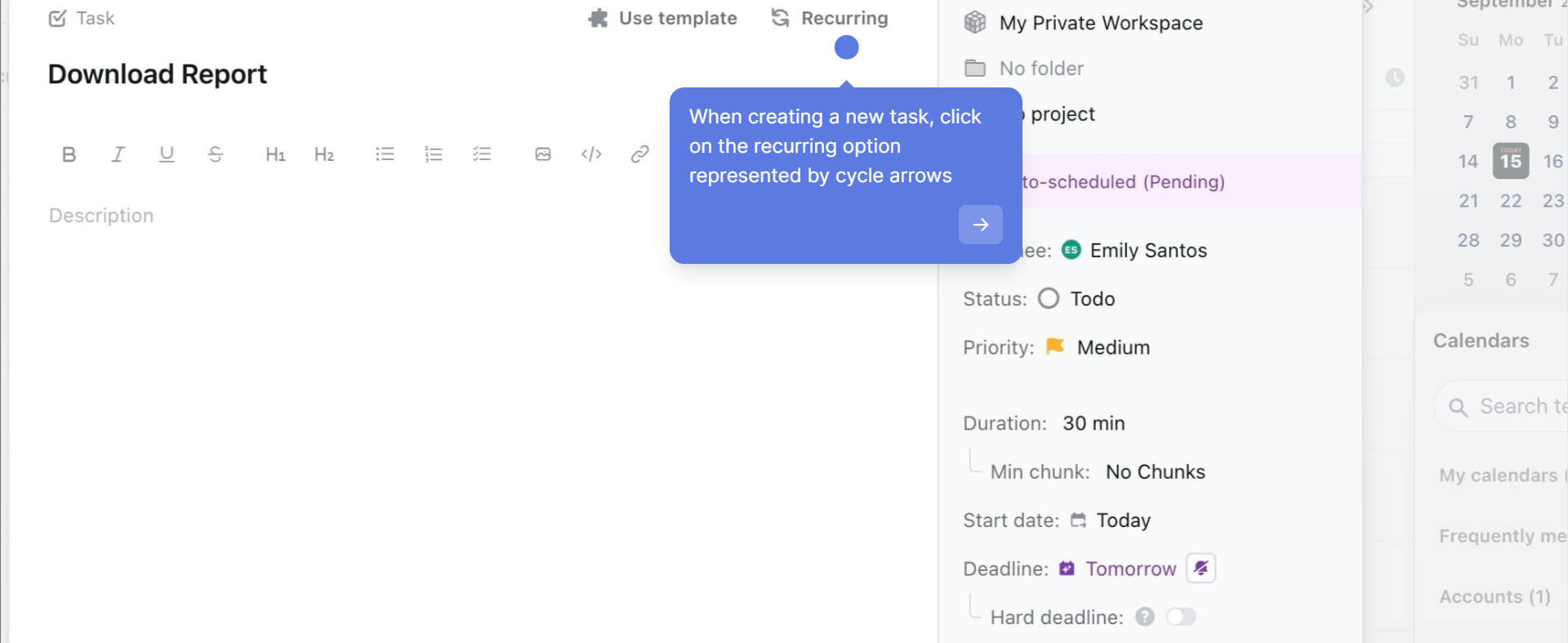
Source: Motion
Custom Fields
Operations: Create, get, delete; add to projects and tasks, remove from projects and tasks.
Custom fields let you attach structured metadata (text, number, dropdown, date) to tasks and projects. The API supports the full lifecycle: define a field, associate it with specific projects, set values on individual tasks, and remove associations. This is useful for integrations that need to tag Motion tasks with external identifiers (a CRM deal ID, a support ticket number, a sprint label).
Comments
Operations: Get, create.
Read and write comments on tasks. The API does not document update or delete operations.
Users
Operations: List all users in the workspace, get the current authenticated user via GET /v1/users/me.
Use the users/me endpoint to confirm which workspace and identity your API key belongs to.
Supporting Resources
Three read-only resources round out the API:
Workspaces: List all workspaces accessible to the authenticated key.
Schedules: Get schedule definitions (working hours, availability windows).
Statuses: Get the status definitions configured for tasks in the workspace.
These are reference endpoints: they return configuration data that other API calls reference by ID.
Motion API: Webhooks & Events
Motion does not offer webhooks. The public developer documentation, help center, and API reference document no webhook capability. There are no event-driven callbacks, no push notifications on task state changes, and no subscription mechanism.
For integrations that need to react to changes in Motion (a task completing, a project status shifting, an assignment changing), polling is the only option. At 12 requests per minute on the Individual tier, polling is both the only path and a constrained one.
The Zapier integration is one-way only: external app events can trigger task creation in Motion, but Motion task changes do not push back to connected apps via Zapier. This confirms that Motion has no outbound event mechanism, through its API or its iPaaS connector.
This is a real gap for any developer building an integration that depends on Motion as a source of events. Without webhooks, you cannot build real-time sync, cannot trigger downstream workflows on task completion, and cannot keep an external system in step with Motion without continuous polling.
Motion API: SDKs, Docs & Rate Limits
SDKs & Libraries
Motion does not publish official SDKs in any language. The developer documentation references no client libraries, GitHub repositories, or community wrappers. Developers call the REST API directly using standard HTTP clients in whatever language they prefer.
No official SDK is a signal, not a dealbreaker. For an API with ten resource areas and straightforward REST conventions, a thin HTTP wrapper is manageable. But it means you own the retry logic, the rate-limit backoff, the error handling, and the request serialization from day one.
Documentation & Developer Experience
Motion's developer documentation lives at docs.usemotion.com and has an API reference section (endpoint-by-endpoint documentation) and a cookbooks section with practical guides covering Getting Started and Rate Limits.
The API reference provides endpoint paths, request parameters, and response schemas. Each resource has its own detailed reference, with thorough coverage for the endpoints that exist. The documentation does not include an interactive OpenAPI/Swagger explorer, a Postman collection, or a public API changelog.
Developers reach support through Motion's standard support email rather than a dedicated developer forum, Slack workspace, or community channel. Motion publishes no changelog for API changes and states no versioning policy. The API sits at v1 with no indication of when or whether Motion would version breaking changes.
For a developer evaluating this API, the docs are adequate for understanding what the endpoints do. What they do not provide is the interactive testing, machine-readable spec, or change-tracking that production integrations benefit from.
Rate Limits & Constraints
Motion publishes tiered rate limits:
Individual tier: 12 requests per minute
Team tier: 120 requests per minute
Enterprise: higher limits available on request
Motion documents no per-day caps, burst allowances, or rate-limit response headers, and does not specify whether 429 responses include a Retry-After header or backoff guidance.
The Individual tier at 12 requests per minute is the constraint most likely to shape your integration architecture. That is one request every five seconds.
For a simple integration that creates a handful of tasks per hour, it is workable. For an integration that needs to sync a meaningful volume of data (pulling all tasks for a dashboard, polling for changes across projects, bulk-creating tasks from an import), 12 req/min creates real throttling pressure.
The Team tier at 120 req/min (two requests per second) is more practical for production use but still conservative compared to most modern APIs. Plan your integration around batching and caching from the start.
Motion API Pricing & Access Costs
Motion bundles API access into its paid plans rather than charging separately. Both the Pro AI plan at $19/seat/month and the Business AI plan at $29/seat/month include API access. No per-call charges, no API-specific credit costs, and no metered pricing.
The practical cost considerations:
Plan tier determines rate limits. Individual accounts get 12 req/min; team accounts get 120 req/min. Moving from Individual to Team pricing is the primary way to increase API throughput.
AI credit overages apply to AI features, not the API. Pro AI includes 7,500 AI credits/seat/month; Business AI includes 15,000. These credits cover AI Chat, AI-generated content, and other AI features within the Motion product. The REST API (which does not expose AI features) does not consume AI credits.
No free tier for API exploration. Motion has no permanently free plan. The trial requires a payment method upfront (a $1 card hold). If you want to test the API before committing, you need to start a trial.
Enterprise API pricing is not published. For teams needing higher rate limits, pricing requires contacting Motion's sales team directly.
For a developer sizing costs: the API adds no marginal cost beyond the per-seat subscription. At $19/seat/month, a single seat gives you API access at 12 req/min. Whether that throughput ceiling is sufficient depends on your integration's call volume.
Where the Motion API Falls Short
These are practical limits a developer should plan around, not criticisms of the product. Most reflect what Motion chose to expose programmatically and what it kept inside the product.
The API covers tasks and projects. The product's core intelligence has no API surface. Motion's main features are AI-powered auto-scheduling, calendar management, capacity planning, meeting notetaking, AI Chat, and booking links. None of these are accessible through the API.
You can create a task via the API and Motion's scheduler will place it on someone's calendar, but you cannot read, write, or query the calendar itself, the scheduling decisions, the capacity data, or the AI outputs. The API is a task CRUD layer sitting in front of a much deeper product.
No webhooks, no event-driven architecture. Without any push mechanism, every integration that needs to react to Motion state changes must poll. At 12 req/min on the Individual tier, polling is both necessary and constrained. There is no way to know a task was completed, reassigned, or rescheduled without asking.
Rate limits are restrictive. 12 requests per minute on the Individual tier is among the lowest published rate limits for any SaaS API. Even the Team tier at 120 req/min is conservative. For comparison, most modern APIs offer hundreds or thousands of requests per second. Motion documents no rate-limit response headers, making adaptive backoff harder to build.
No OAuth 2.0, no scoped access. Static API keys with no scope restrictions mean every key has full access to every API operation. For multi-tenant integrations, delegated access, or environments with credential-rotation policies, this is a real constraint.
No official SDKs. Every integration is raw HTTP from scratch. For a small API surface this is manageable, but combined with the absence of an OpenAPI spec and no interactive explorer, the developer experience requires more manual work than comparable platforms.
No iPaaS support beyond Zapier. Zapier is the only documented middleware platform, and the connection is one-directional. No Make, Workato, or Tray.io support is documented. The integrations FAQ states there are no current plans for native integrations with tools like Notion, ClickUp, or Google Sheets.
Projects cannot be updated or deleted via API. You can create and list projects, but modifying or removing one requires the UI. For integrations that need to manage the full project lifecycle programmatically, this is an incomplete surface.
ZoomInfo API: The B2B Intelligence Layer
Motion's API manages tasks and projects inside a team's workspace.
ZoomInfo's API provides the external B2B intelligence that determines what those tasks should be about: which accounts to pursue, which contacts to reach, what companies look like, and whether they are actively in-market. That intelligence comes from ZoomInfo's GTM Context Graph, which processes 1.5B+ data points daily by combining B2B data with your first-party signals.
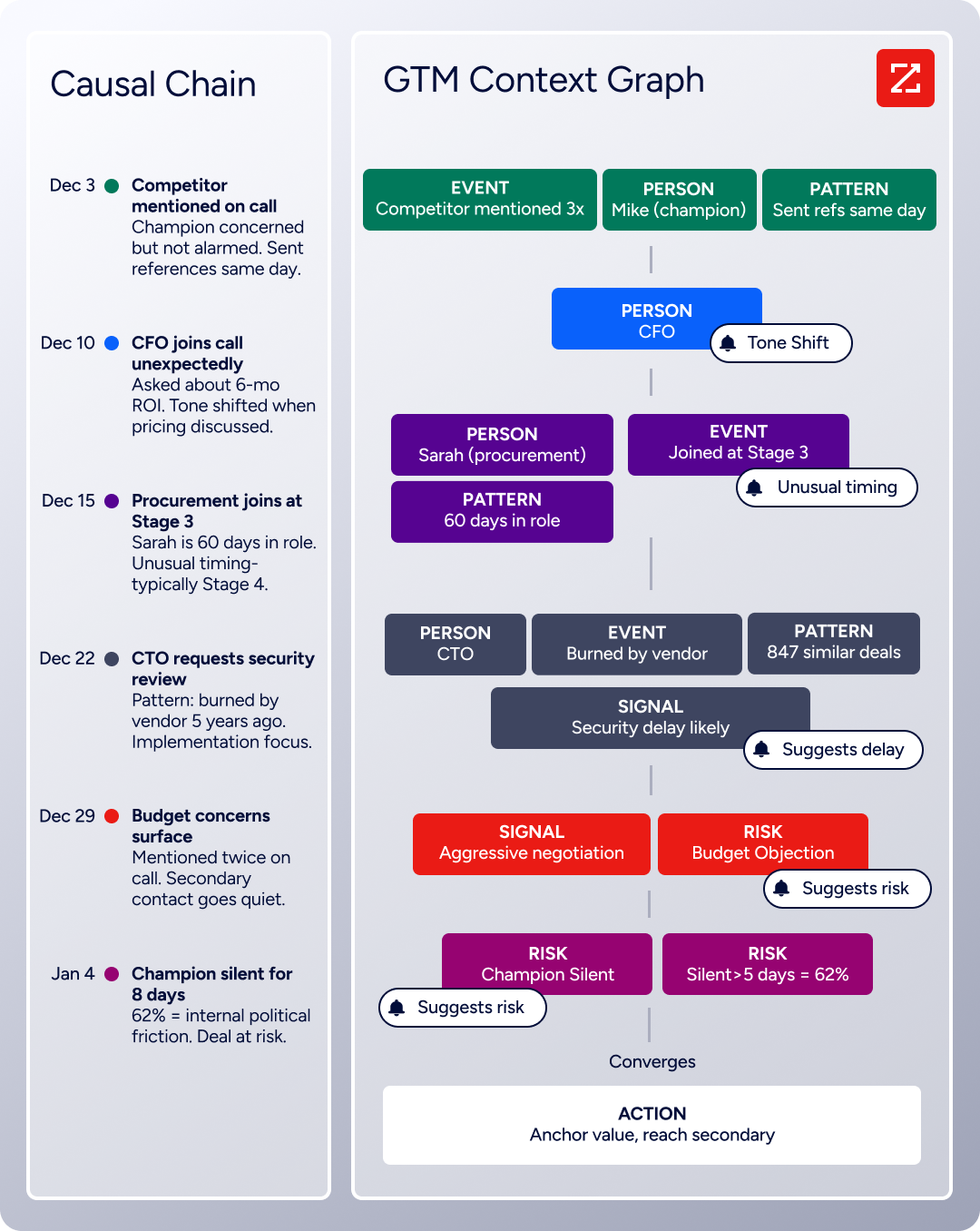
The two APIs sit at different layers of a go-to-market workflow. A developer building a pipeline that creates Motion tasks based on buying signals, account changes, or contact data would use ZoomInfo's API as the upstream intelligence source and Motion's API as the downstream execution target.
What the API Covers
ZoomInfo's Enterprise API is a REST suite served from https://api.zoominfo.com/gtm, organized into four areas documented in the interactive API reference:
Data API (Search & Enrich): Search endpoints cover Contacts, Companies, Intent, News, and Scoops, returning matched records without consuming credits. Enrich endpoints return the full payload: business emails, direct dials, employment history, corporate hierarchy, org charts, technographics, and hashtag signals, up to 25 records per call. The underlying dataset spans 500M contacts, 100M companies, 135M+ verified phone numbers, and 200M+ verified business email addresses.
Copilot API (GTM Workspace AI): Account Summary returns structured account intelligence with a free-form Q&A endpoint. Find Similar Companies performs lookalike expansion. Contact Recommendations returns AI-ranked buying-committee suggestions by use case (prospecting, deal acceleration, renewals).
Marketing API: CRUD endpoints for programmatic audience management.
Platform API (Engagements, Beta): Bidirectional engagement data via the Engagements API.
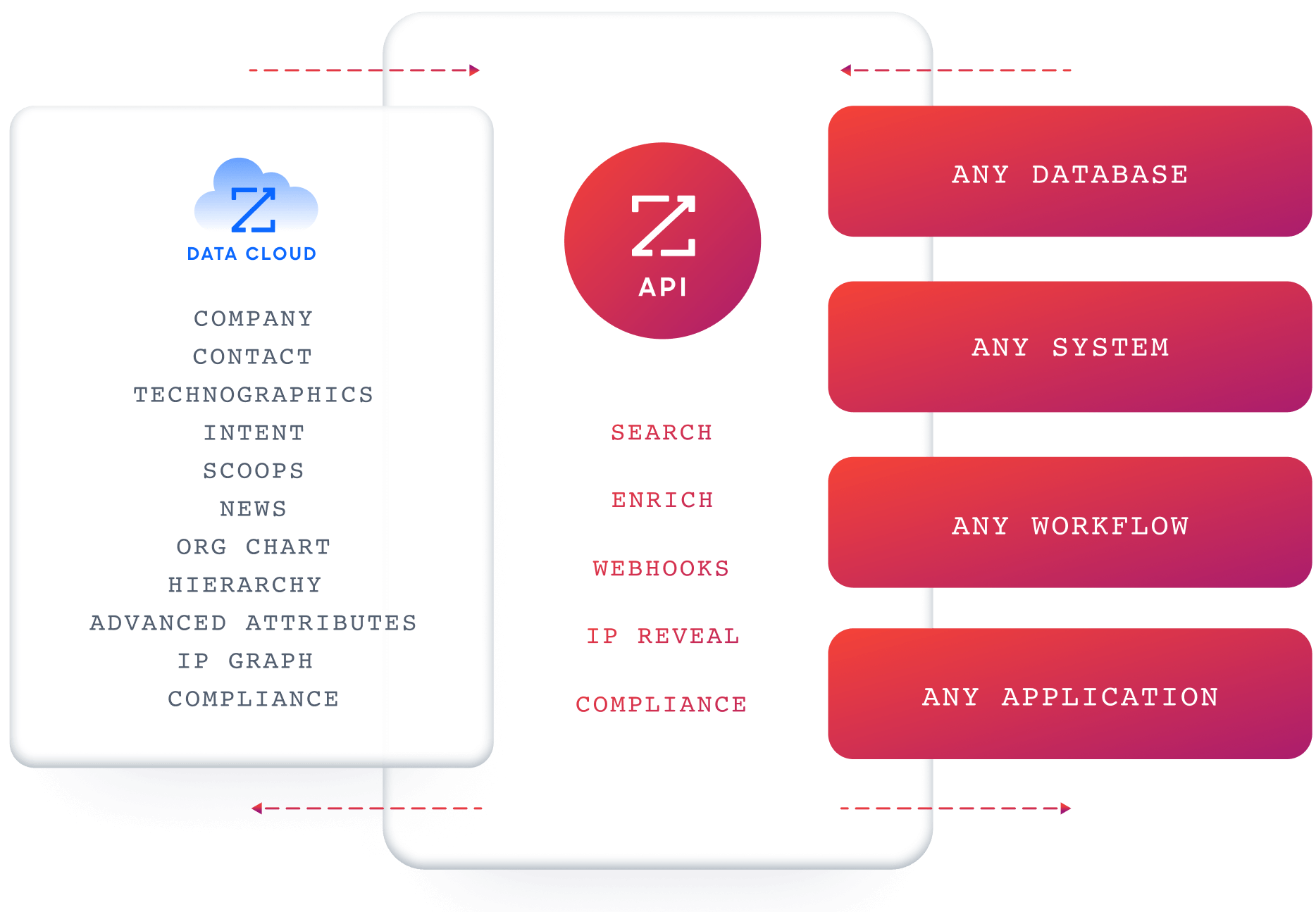
What you would build with this alongside Motion: a workflow that queries ZoomInfo's search endpoints for companies matching your ICP with active buying intent, enriches the contacts worth pursuing, then uses Motion's task API to create follow-up tasks assigned to the right rep, with deadlines and priorities set for Motion's auto-scheduler to place on their calendar.
Authentication & Access
ZoomInfo uses OAuth 2.0 with PKCE via Okta, supporting three flows: Authorization Code with PKCE (web applications), Client Credentials (server-to-server), and Refresh Token. Access tokens are 24-hour Bearer tokens with rotating refresh tokens.
Teams register applications through the ZoomInfo Developer Portal, where they generate credentials, define scopes, and test endpoints.
This is a different authentication model from Motion's static API key. OAuth 2.0 supports delegated access, credential rotation, and scoped permissions, making it the right choice for multi-tenant integrations and environments with strict security requirements.
Rate Limits, Credits & Developer Experience
Rate limits are published by tier: Builder (5 req/sec), Standard (25 req/sec), and Scaling (35 req/sec), with per-hour and per-day sliding-window limits enforced simultaneously. Every response includes quota headers with remaining capacity, and 429 responses include a Retry-After header with exact backoff timing.

Even the lowest ZoomInfo tier (5 req/sec, or 300 req/min) delivers 25x the throughput of Motion's Team tier.
Credits follow a rolling 12-month window: a record enriched for the first time consumes one credit; re-enriching the same record within the year is free. Search and lookup operations are free and do not consume credits.
Webhooks are available via the Agents API, tied to ZoomInfo's Agent Teams system. Event types cover bulk enrichment jobs completing, records changing, credit usage crossing thresholds, and new GTM signals (scoops, funding events, intent spikes) becoming available, with retry behavior and throttling configurable per event type.
For developers building AI agents, ZoomInfo's MCP server at https://mcp.zoominfo.com/mcp exposes search, enrich, and account research as native tools for MCP-compatible assistants, currently supporting Claude and ChatGPT.
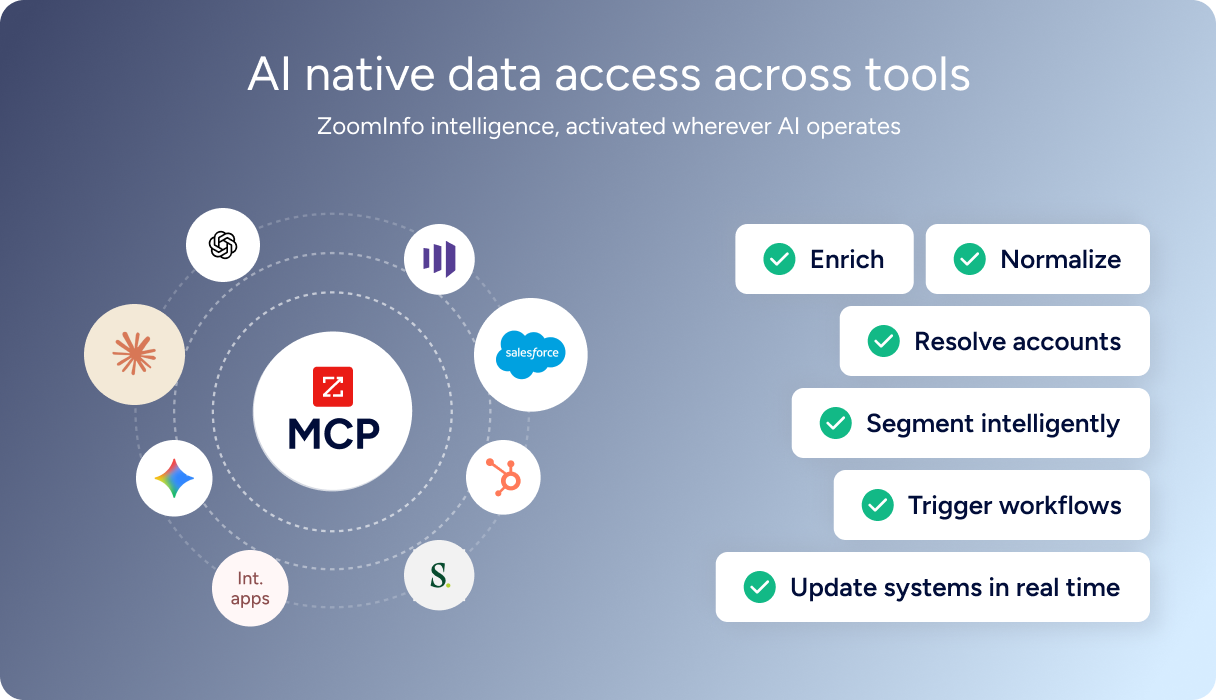
Documentation lives at docs.zoominfo.com with an interactive API reference and an llms.txt index for AI development tools. ZoomInfo does not publish official SDKs, so both platforms require direct HTTP integration. Pricing follows a consumption-based model; ZoomInfo has extended API access to all relevant plans.
BDO Canada reported an 87% reduction in time spent on updates to internal data dashboards using the ZoomInfo API, with one analyst describing the integration as plug-and-play across any process. (ZoomInfo)
Final Verdict
Motion's API is a narrow, stable surface that does one job: programmatic CRUD over tasks, projects, and a handful of supporting resources.
For an integration that needs to push work items into Motion from an external system and let the product's auto-scheduler handle the rest, the API works and follows standard REST conventions. Entry is easy (any paid plan, no approval gate).
Choose the Motion API if your integration is task-in, hands-off: creating tasks, assigning them to projects, attaching custom fields, and letting Motion's scheduling engine decide when and where they land. The $19/month entry point with API access included makes it accessible for lightweight integrations, and the Team tier at 120 req/min is workable for moderate-volume sync workflows.
Choose the ZoomInfo API if your build needs the intelligence upstream of task creation: deciding which accounts are worth pursuing, which contacts to reach, what their companies look like, and whether they are actively in-market.
The search-then-enrich pattern (search is free, enrich consumes credits), the Copilot API's AI endpoints, and the MCP server for AI-agent workflows cover the data and reasoning that a task management API was never designed to provide.
Explore the ZoomInfo Enterprise API or start with the developer docs to see the endpoint surface directly.
A developer whose pipeline needs neither should know this: Motion's API does not expose the product's AI, calendar, or scheduling capabilities, and ZoomInfo's API does not manage tasks or projects. If your build needs both task execution and B2B intelligence, the two are complementary, each feeding a different part of the workflow.
FAQ
Is the Motion API free?
API access is included on all paid Motion plans, starting at $19/seat/month for Pro AI. There are no per-call charges or API-specific fees. Motion does not offer a permanently free plan; the trial requires a payment method upfront. The real cost constraint is the plan tier: Individual plans include API access at 12 req/min, Team plans at 120 req/min, and Enterprise limits require contacting sales.
Does Motion have a GraphQL API?
No. Motion exposes a REST API (currently at v1) that communicates over HTTPS and returns JSON responses. Motion does not document a GraphQL endpoint. If you need GraphQL for task management, you would need to build a wrapper on top of the REST API.
What is the Motion API rate limit?
Motion publishes tiered rate limits: 12 requests per minute on Individual plans, 120 requests per minute on Team plans, and higher limits available on request for Enterprise. No per-day caps, burst allowances, or rate-limit response headers are documented. The Individual tier at 12 req/min is notably restrictive for production integrations.
Are there official Motion SDKs?
No. Motion does not publish official SDKs in any language. The developer documentation references no client libraries, GitHub repositories, or community wrappers. Developers integrate directly over HTTP using standard libraries. The documentation provides endpoint-level reference but no language-specific code examples or interactive testing tools.
Does the Motion API support webhooks?
No. Motion documents no webhook capability in its public developer documentation or help center. There are no event-driven callbacks, no push notifications on task state changes, and no subscription mechanism. Integrations that need to react to changes in Motion must poll the API. The Zapier integration is also one-directional: external events can create Motion tasks, but Motion does not push events back.
What does ZoomInfo's API add to a Motion build?
ZoomInfo's API provides the B2B intelligence that Motion's API does not cover: search across 500M contacts and 100M companies, enrichment with direct dials, org charts, technographics, and employment history, buyer intent signals, and AI-powered account research and buying-committee recommendations.
A practical pattern uses ZoomInfo's search and intent endpoints to identify accounts worth pursuing, enriches the right contacts, then uses Motion's task API to create follow-up tasks assigned to reps with deadlines for Motion's auto-scheduler to place. ZoomInfo's MCP server extends the same data to AI-agent workflows, adding a programmatic intelligence source that a task management API does not cover.
