
The first thing a developer should know about the n8n API is what it is not.
n8n is a workflow automation platform. Its REST API does not expose automation connectors, AI agent endpoints, or integration logic. It exposes n8n itself: the ability to create, update, activate, and delete workflows, manage credentials and executions, and administer the instance programmatically.
If you are evaluating the n8n API, you are asking whether you can manage your automation infrastructure as code, not whether you can automate business processes through it.
That distinction shapes everything that follows.
The n8n API is a management layer for the platform. It lets you create and deploy workflows, trigger and monitor executions, manage credentials and users, and integrate n8n into CI/CD pipelines. It does not provide B2B data, contact enrichment, company intelligence, or any business data endpoints. Those capabilities live inside n8n's 1,385+ integration nodes, not in the REST API itself.
This is where ZoomInfo enters the picture: its Enterprise API is a REST suite covering search, enrichment, AI intelligence, and audience management across 500M contacts and 100M companies, with OAuth 2.0 authentication, tiered rate limits up to 35 req/sec, and an MCP server for AI-agent workflows.
Where n8n's API manages workflow infrastructure, ZoomInfo's API delivers the B2B data those workflows act on.
This review covers the n8n API first (authentication, endpoints, webhooks, SDKs, rate limits, and pricing), then reviews ZoomInfo's API as the data layer that sits at a different level of the stack.
n8n API at a Glance
Attribute | Detail |
|---|---|
API type | REST over HTTPS, JSON responses |
Authentication | API key passed via X-N8N-API-KEY header |
Base URL | https://<instance>.app.n8n.cloud/api/v1 (Cloud) or https://<domain>/api/v1 (self-hosted) |
Rate limits | Not publicly documented |
Pricing / access | Bundled with all paid plans; minimum Starter at $20/month. Not available during free trial |
SDKs | No official language SDKs; n8n CLI (beta, npm) wraps the REST API |
Webhooks | n8n receives webhooks (Webhook trigger node), does not push API-level webhooks. MCP server available for AI agent integration |
OpenAPI spec | Downloadable from n8n Cloud |
Documentation | docs.n8n.io (GitBook-hosted) |
n8n API: What Works Well & What to Plan Around
What works well | What to plan around |
|---|---|
OpenAPI spec downloadable for Postman/Insomnia import | API manages n8n only: no business data, enrichment, or integration endpoints |
Cursor-based pagination with configurable page size (up to 250) | No official SDKs in Python, JavaScript, Go, or any standard language |
Built-in API playground on self-hosted instances | Rate limits are not published: no per-plan figures documented |
API key scoping by resource and action on Enterprise | API key scoping is Enterprise-only; lower tiers get unrestricted full-access keys |
n8n CLI wraps the API for CI/CD and AI agent integration | CLI is beta and the only official tooling beyond raw HTTP |
API access included on all paid plans ($20/month entry) | API access excluded from the free trial entirely |
n8n API: Authentication & Getting Started
API access comes with all paid n8n Cloud plans, starting at the Starter tier at $20/month. The self-hosted Community Edition (free, unlimited executions) also exposes the REST API. One constraint: API access is not available during the free trial period. You need an active paid subscription or a self-hosted instance.
To create an API key, navigate to Settings > n8n API inside your instance and select Create an API key. Each key requires a label and an expiration date.
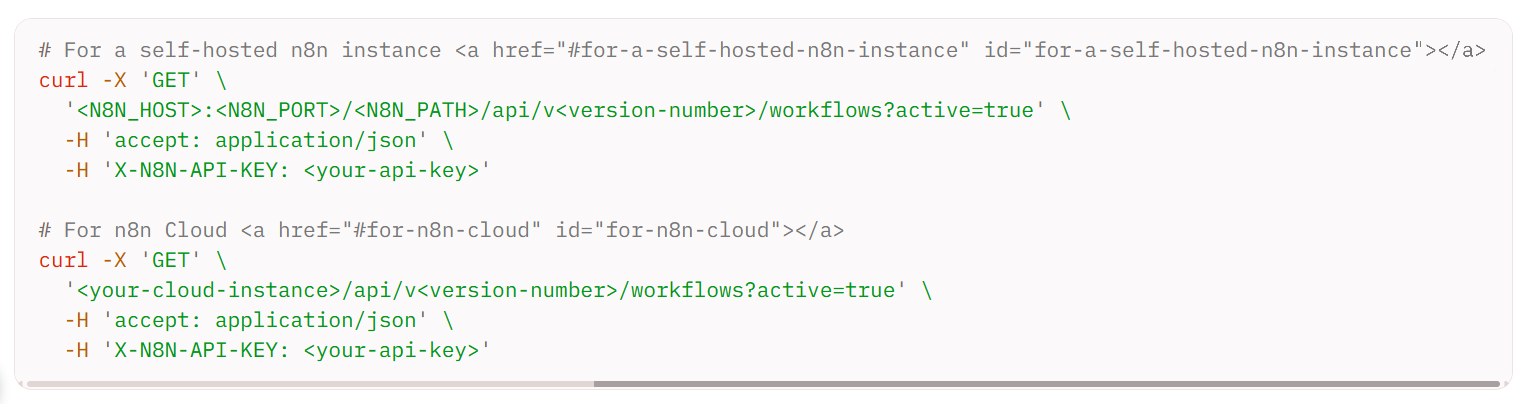
Authentication is straightforward. Every request includes the key in the X-N8N-API-KEY header:
curl -X 'GET' \
'https://<your-instance>.app.n8n.cloud/api/v1/workflows?active=true' \
-H 'accept: application/json' \
-H 'X-N8N-API-KEY: YOUR_API_KEY'
Source: n8n
On Enterprise plans, API keys can be scoped to specific resources and actions. Available scopes cover community packages, credentials, data tables (including column and row-level operations), executions, folders, insights, projects, security audit, source control, tags, users, variables, and workflows. On Starter and Pro plans, API keys have unrestricted access to all resources, with no scoping available.
n8n also supports MCP authentication (for its MCP server interface) via either OAuth2 or an Access Token, distinct from the REST API key.
n8n API: Core Endpoints & Capabilities
Every endpoint manages n8n's internal resources (workflows, executions, credentials, users) rather than interacting with external business data. The endpoint reference is organized by resource.
Workflows
The primary resource. Endpoints cover the full lifecycle: list, get, create, update, delete, activate, deactivate, transfer between projects, and manage tags. This is what you use to deploy workflows programmatically, toggle them from a CI/CD pipeline, or build a custom management dashboard.
What you would build with this: a deployment pipeline that pulls workflow definitions from a Git repository, creates or updates them via the API, and activates them in sequence, treating n8n workflows like versioned infrastructure artifacts.
Executions
Monitor and manage workflow runs: list, get details, stop running executions, delete completed ones, and retry failed ones. The list endpoint supports filtering by workflow ID and status, which is what you need for a monitoring dashboard or alerting integration.
Credentials
Manage the credentials n8n uses to authenticate with third-party services: list, get, create, delete, transfer between projects, and retrieve schemas. This lets you provision credentials programmatically when onboarding a new integration, rather than configuring each one through the UI.
Users & Projects
List and retrieve users on the instance. Create, update, delete, and manage membership for projects (n8n's organizational unit for grouping workflows and credentials with access control).
Source Control
Push and pull workflows to and from a Git repository. This is an Enterprise-only feature that enables Git-based promotion between environments (development, staging, production).
Data Tables
CRUD operations for n8n's built-in structured data tables, with row-level and column-level endpoints. Useful for workflows that store and retrieve structured state.
Additional Resources
The API also covers tags (organizational labels), variables (global key-value pairs), community packages (install, list, update, uninstall npm-based community nodes), insights (workflow execution analytics), folders (organize workflows), models (AI model integrations), security audit (instance audit reports), and discover (explore available integrations).
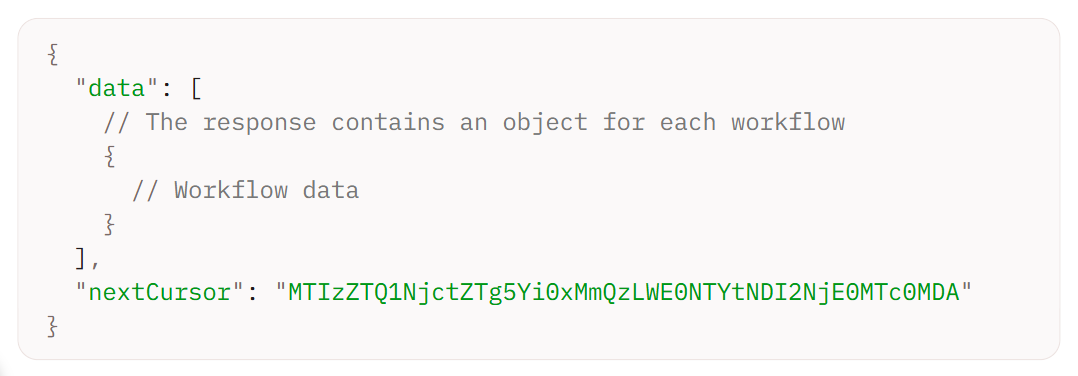
All responses return JSON. Pagination is cursor-based: the default page size is 100 results, with a maximum of 250. Responses that span multiple pages include a nextCursor value, passed as the cursor query parameter on subsequent requests.
Source: n8n
n8n API: Webhooks & Events
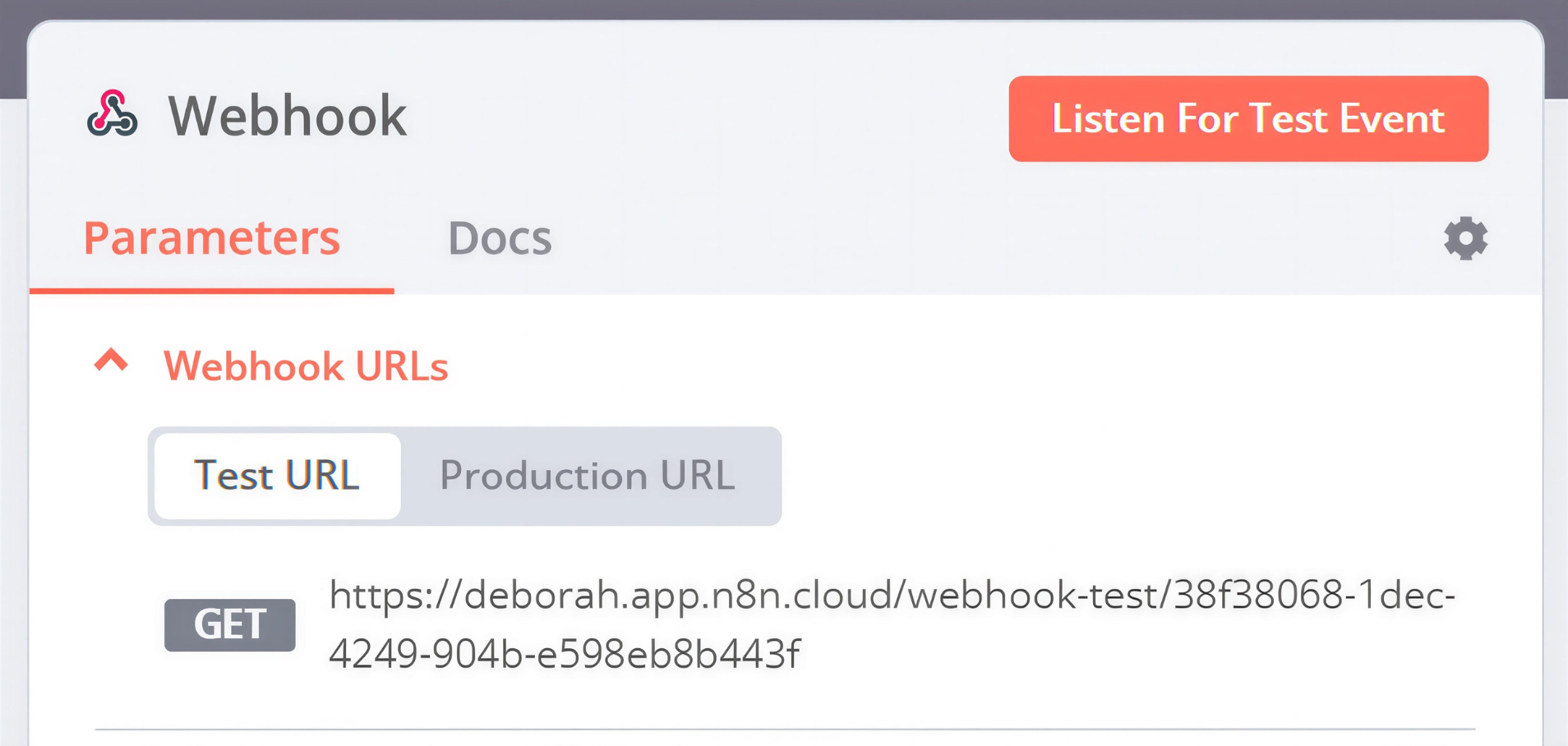
n8n's relationship to webhooks inverts the typical SaaS pattern. The API does not push events outward when workflows change or executions complete. Instead, n8n receives webhooks from external systems through its Webhook trigger node, which turns any workflow into an HTTP endpoint that external services can call.
Source: n8n
Each Webhook node generates a test URL and a production URL. Supported HTTP methods include GET, POST, PUT, PATCH, DELETE, and HEAD. The maximum inbound payload is 16MB (configurable on self-hosted instances via the N8N_PAYLOAD_SIZE_MAX environment variable). Security options include Basic auth, Header auth, JWT auth, IP whitelisting, and CORS configuration.
Response behavior is configurable: n8n can respond immediately, after the last node finishes (returning workflow output), via a dedicated Respond to Webhook node, or with streaming output for AI agent workflows.
For AI-agent integration, n8n exposes an instance-level MCP server that MCP-compatible clients (Claude Desktop, Lovable, Cursor) can connect to for searching, triggering, creating, and editing workflows. Separately, the MCP Server Trigger node lets individual workflows expose themselves as callable tools for external AI platforms.
The absence of outbound webhooks means you cannot subscribe to "workflow updated" or "execution failed" events at the API level. If you need event-driven monitoring of n8n itself, you build it with n8n's own tooling: an Error Trigger workflow that fires on execution failures, or a scheduled workflow that polls the Executions API for status changes.
n8n API: SDKs, Docs & Rate Limits
SDKs & Libraries
n8n does not publish official SDKs for the REST API in Python, JavaScript/TypeScript, Go, Ruby, Java, or any other language. The primary developer tooling is:
n8n CLI (@n8n/cli on npm): an official command-line client that wraps the REST API. Install with npx @n8n/cli (zero-install) or npm install -g @n8n/cli. Currently in beta. It supports commands for workflows, executions, credentials, projects, and tags. n8n recommends it for CI/CD integration and AI agent tooling (Claude Code and Cursor are named as supported clients).
Community nodes: npm packages that add new integration nodes to n8n. These extend n8n's integration catalog, not its REST API client surface.

Source: n8n
No official SDKs means every integration with the n8n API is raw HTTP. For a quick script that deploys a workflow, that is fine. For a production system managing hundreds of workflows with retry logic and error handling, you are building and maintaining a client layer that most comparable platforms ship out of the box.
Documentation & Developer Experience
The API documentation lives at docs.n8n.io, hosted on GitBook. It covers authentication, pagination, and an endpoint reference generated from the OpenAPI specification, which you can download for import into Postman or Insomnia.
Self-hosted instances include a built-in API playground for interactive exploration. A full-text llms.txt index is available for LLM-based developer tooling.
Developer support channels include:
Community forum with n8n employees staffing responses
Discord server for community discussion
Release notes / changelog for platform updates
Email and dedicated support on Enterprise plans only
The documentation is clear and appropriately scoped. The OpenAPI spec and built-in playground are practical assets. One gap: unlike Mintlify or ReadMe-hosted docs at other platforms, the n8n docs do not include inline "Try It" functionality for Cloud users, though the self-hosted playground fills this role.
Rate Limits & Constraints
n8n does not publish rate limits for its REST API. The documentation notes that 429 errors ("too many requests") indicate rate limiting, but no per-plan figures appear anywhere in the docs.
What is documented are plan-level execution concurrency limits for workflow runs:
Starter: 5 concurrent executions
Pro: 20 concurrent executions
Business: configurable scaling
Enterprise: 200+ concurrent executions
The Webhook node enforces a 16MB inbound payload limit. API pagination caps at 250 results per page. For managing rate limits imposed by third-party APIs that n8n workflows call, n8n provides the Retry on Fail setting, the HTTP Request node's Batching option, and the Loop Over Items + Wait node pattern.
The absence of published API rate limits is itself a finding. A developer building a deployment pipeline or monitoring system against the n8n API has no documented ceiling to design around, which means discovering limits in production rather than planning for them.
n8n API Pricing & Access Costs
n8n bundles API access into its paid plans. There is no separate per-call or metered pricing for the REST API. The minimum plan for API access is Starter at $20/month (billed annually), which includes 2,500 workflow executions per month. API access is excluded from the free trial.
Plan | Price | Executions/mo | API Key Scoping |
|---|---|---|---|
Starter | 2,500 | No (full access) | |
Pro | 10,000 | No (full access) | |
Business (self-hosted only) | 40,000 | No | |
Enterprise | Custom | Custom | Yes (scoped keys) |
n8n prices on workflow executions (full start-to-finish runs), not API calls or step counts. A 50-step workflow counts as one execution. The Community Edition (self-hosted, free) has no execution limits and includes API access. Scoped API keys are Enterprise-only.
The real cost constraint is not the API itself but the execution ceiling on each plan. The Business plan overage rate is €4,000 per additional 300,000 executions, and workflows continue running (no hard cutoff). A startup plan offers 50% off Business for companies with under 20 employees and under €5M in funding.
Where the n8n API Falls Short
These are the practical limits a developer should plan around.
The API manages n8n. That is all it does. There are no endpoints for business data, contact enrichment, company search, intent signals, or any external data retrieval. The API creates, reads, updates, and deletes n8n's own resources. If your build needs programmatic access to contact databases or enrichment services, you need a separate data API.
No official SDKs. Every integration is raw HTTP. The n8n CLI (beta, npm-only) is the only official tooling. For developers working in Python, Go, Ruby, or Java, there is no maintained client library.
Rate limits are not documented. No per-second, per-minute, or per-plan figures exist for the REST API. The 429 error code is acknowledged, but the thresholds are not specified. Building a high-frequency integration means discovering limits in production rather than planning for them.
API key scoping is Enterprise-only. On Starter, Pro, and Business plans, every API key has unrestricted access to all resources. You cannot create a key that can only read workflows but not delete credentials. For teams with multiple integrations or developers on the same instance, this is a security gap.
No outbound webhooks from the API. The API does not push events (execution completed, workflow failed, credential changed). Monitoring n8n programmatically requires polling the Executions endpoint or building internal n8n workflows to detect and forward events.
API access excluded from the free trial. A developer evaluating the API cannot test it during the trial period. The self-hosted Community Edition is the workaround, but it requires standing up infrastructure.
ZoomInfo API: The B2B Intelligence Layer
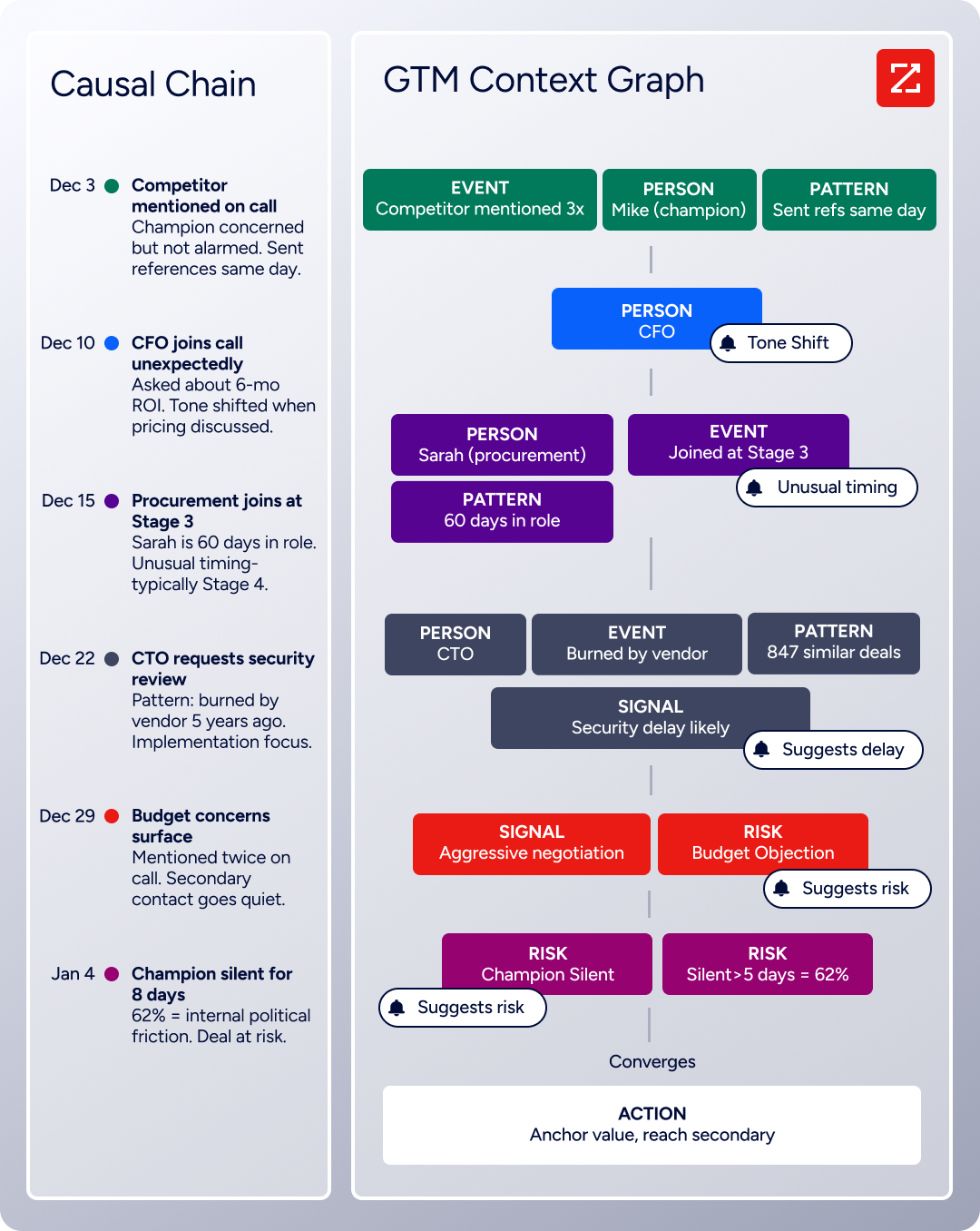
n8n's API manages workflow infrastructure. ZoomInfo's API delivers the business data those workflows act on: who the contacts are, what companies they work for, what technologies they use, and whether they are researching your category. Behind this is the GTM Context Graph, which processes 1.5B + data points daily by combining ZoomInfo's B2B data with your first-party signals.
Source: ZoomInfo
The two APIs sit at different layers of the stack. A developer building a lead enrichment pipeline in n8n would use n8n's Webhook node to receive inbound data, n8n's workflow engine to process it, and ZoomInfo's API (called via n8n's HTTP Request node) to enrich, search, and score the contacts passing through.
What the API Covers
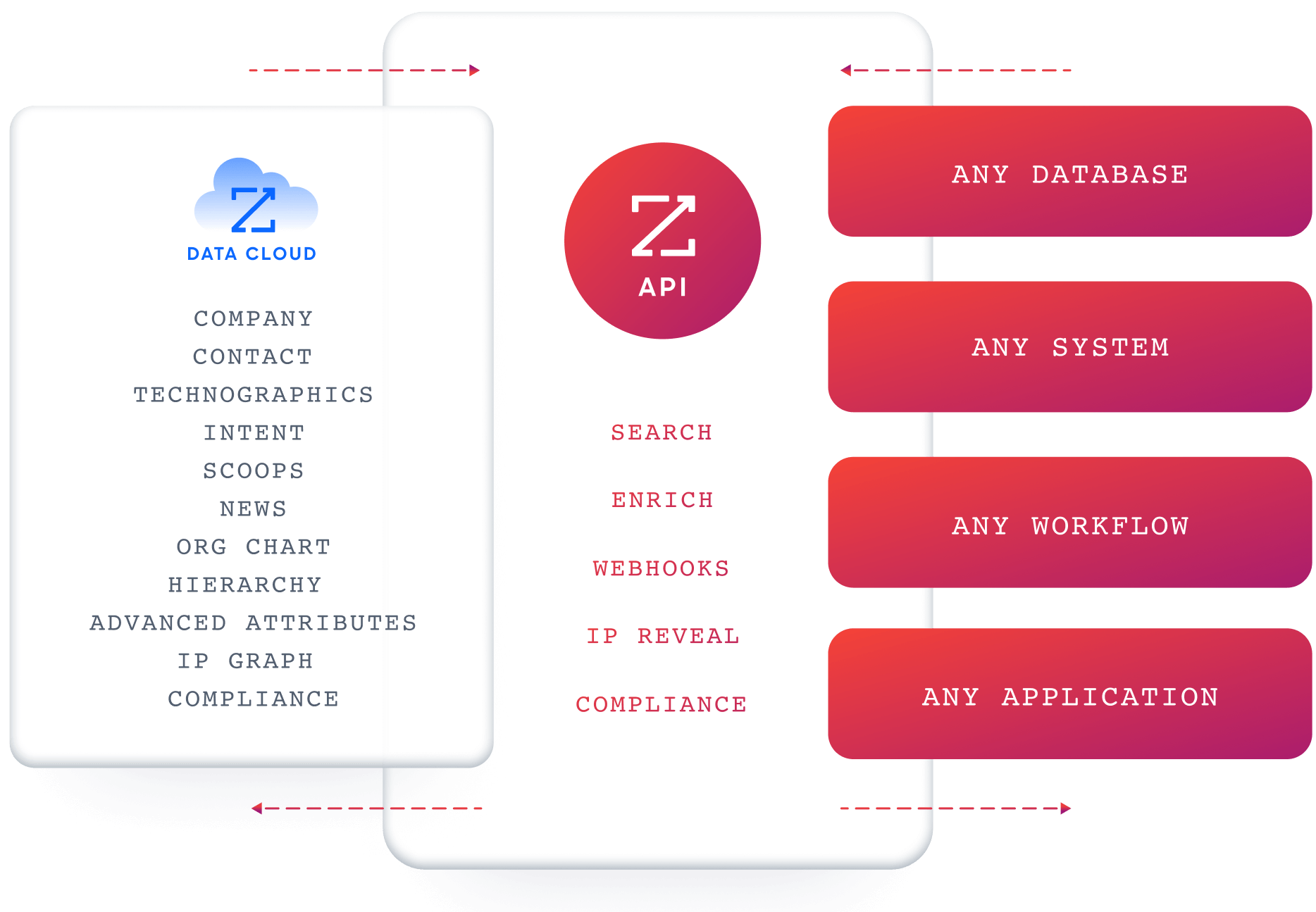
ZoomInfo's Enterprise API is a REST suite served from https://api.zoominfo.com/gtm, organized into four areas documented in the interactive API reference:
Data API (Search & Enrich): Search endpoints cover Contacts, Companies, Intent, News, and Scoops, returning matched records without consuming credits. Enrich endpoints return full payloads: business emails, direct dials, employment history, corporate hierarchy, org charts, technographics, and hashtag signals, up to 25 records per call. The underlying dataset spans 500M contacts, 100M companies, 135M+ verified phone numbers, and 200M+ verified business email addresses.
AI Intelligence API: Account Summary returns structured account intelligence with a free-form Q&A endpoint. Find Similar Companies performs lookalike expansion. Contact Recommendations returns AI-ranked buying-committee suggestions by motion (prospecting, deal acceleration, renewals).
Marketing API: CRUD endpoints for programmatic audience management.
Platform API (Engagements, Beta): Bidirectional engagement data via the Engagements API.
Source: ZoomInfo
The recommended workflow is search-then-enrich: search freely (no credits consumed), then enrich only the records you commit to (1 credit per new record within a rolling 12-month window, re-enrichment free).
Authentication & Access
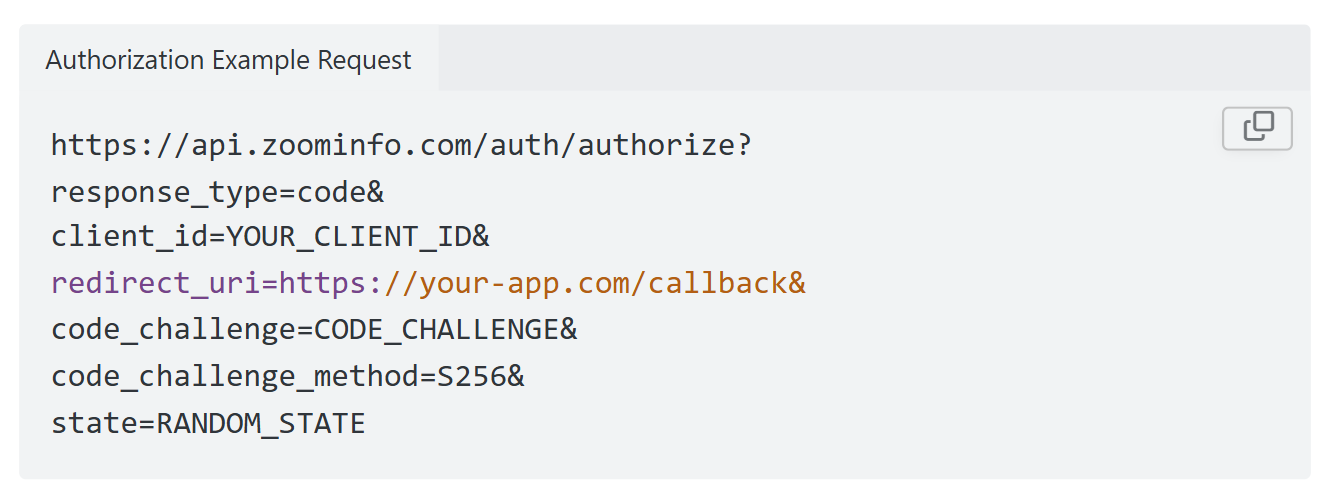
ZoomInfo uses OAuth 2.0 with PKCE via Okta, supporting three flows: Authorization Code with PKCE (web applications), Client Credentials (server-to-server), and Refresh Token. Access tokens are 24-hour Bearer tokens with rotating refresh tokens. Teams register applications through the ZoomInfo Developer Portal, where they generate credentials, define scopes, and test endpoints.
Source: ZoomInfo
This is a different authentication model from n8n's static API key. OAuth 2.0 supports delegated access, credential rotation, and scoped permissions, which suits multi-tenant integrations and enterprise security requirements.
Rate Limits, Credits & Developer Experience
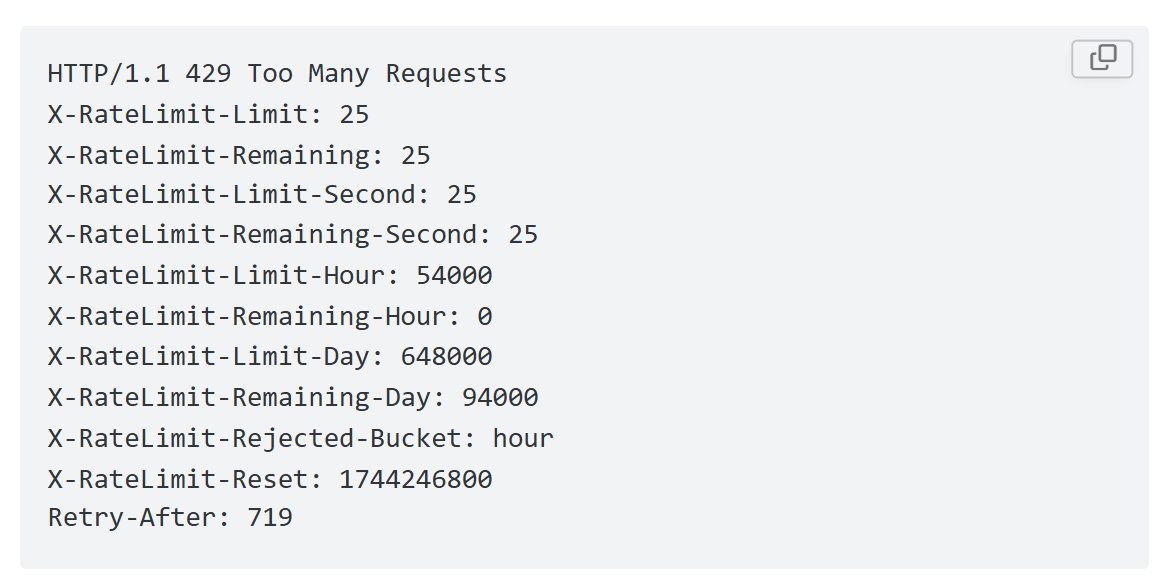
Rate limits are published by tier: Builder (5 req/sec), Standard (25 req/sec), and Scaling (35 req/sec), with per-hour and per-day sliding-window limits enforced simultaneously. Every response includes quota headers with remaining capacity, and 429 responses include a Retry-After header with exact backoff timing.
Source: ZoomInfo
Credits follow a rolling 12-month window: enriching a record for the first time consumes one credit; re-enriching the same record within the year is free. Search and lookup operations are free.
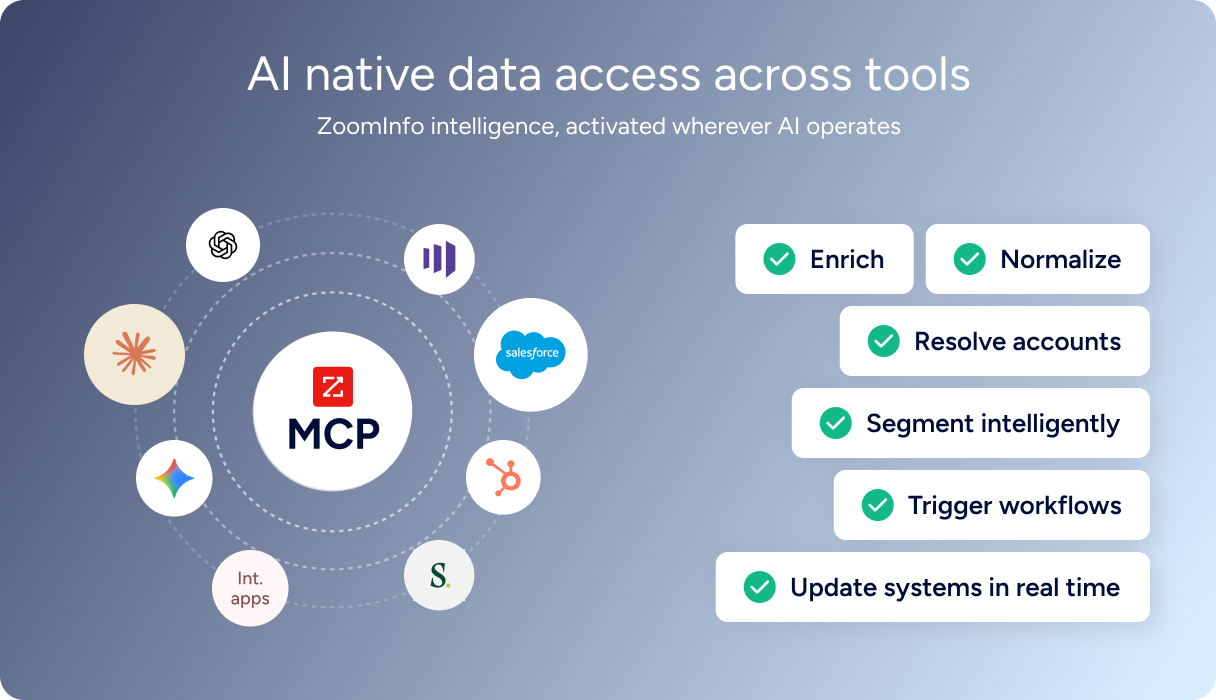
For developers building AI agents, ZoomInfo's MCP server at https://mcp.zoominfo.com/mcp exposes search, enrich, and account research as native tools for MCP-compatible assistants, currently supporting Claude and ChatGPT. Documentation lives at docs.zoominfo.com with an interactive API reference, OAuth recipes in five languages, and an llms.txt index for AI development tools.
Source: ZoomInfo
ZoomInfo does not publish official SDKs either, so both platforms require direct HTTP integration. ZoomInfo uses consumption-based pricing (custom-quoted) and has added API access to all relevant plans.
BDO Canada reported an 87% reduction in time spent updating internal data dashboards using the ZoomInfo API, with one analyst describing the integration as plug-and-play across any process. (ZoomInfo)
Final Verdict
The n8n API is a well-organized management layer for n8n's automation platform. It gives you programmatic control over workflows, executions, credentials, and users, with a downloadable OpenAPI spec, cursor-based pagination, and bundled access starting at $20/month. The CLI (beta) adds a usable layer for CI/CD and AI-agent integration.
For infrastructure management of an automation platform, the API is appropriately scoped and clearly documented.
Choose the n8n API if your build is about managing automation infrastructure: deploying workflows from CI/CD pipelines, monitoring execution health, provisioning credentials programmatically, or integrating n8n's workflow engine into a larger platform.
The free self-hosted Community Edition makes it cheap to start, and the Enterprise tier adds the API key scoping and source control endpoints that production deployments need.
Choose the ZoomInfo API if your build needs B2B data at the API layer: searching contacts and companies, enriching records with direct dials and technographics, detecting buyer intent signals, or powering AI agents with account research.
ZoomInfo's search-then-enrich pattern (search is free, enrich consumes credits), OAuth 2.0 authentication, published rate limits, and AI intelligence endpoints deliver the data layer that a workflow management API does not and should not attempt. Explore the ZoomInfo Enterprise API or start with the developer docs to see the endpoint surface directly.
A developer who needs both is not choosing between them. n8n's workflow engine can call ZoomInfo's API through its HTTP Request node, and ZoomInfo's MCP server can interact with n8n's MCP Server Trigger. The two sit at different layers: one manages automation, the other provides the data that automation acts on.
FAQ
Is the n8n API free?
On the self-hosted Community Edition, yes. The REST API is available on the free, open-source Community Edition with no execution limits. On n8n Cloud, API access requires a paid plan starting at $20/month (Starter tier). API access is excluded from the free trial. There are no per-call API charges on any plan; usage is metered by workflow executions, not API requests.
Does n8n have a GraphQL API?
No. n8n exposes a REST API (currently at v1) that returns JSON responses. There is no GraphQL endpoint. The API is generated from an OpenAPI spec, which you can download for tooling import.
What is the n8n API rate limit?
n8n does not publish rate-limit figures for its REST API. The documentation acknowledges 429 (Too Many Requests) responses but provides no per-plan request ceilings. Plan-level limits apply to workflow execution concurrency (5 on Starter, 20 on Pro, 200+ on Enterprise), but these govern workflow runs, not API call volume.
Are there official n8n SDKs?
No official SDKs in Python, JavaScript, Go, or any other language. The n8n CLI (@n8n/cli on npm) is the only official tooling, currently in beta. It wraps the REST API and supports workflow, execution, credential, project, and tag operations. Developers building integrations beyond what the CLI covers work directly over HTTP.
Does the n8n API support webhooks?
Not outbound. The n8n REST API does not push events when workflows change or executions complete. Instead, n8n's Webhook trigger node lets external systems call into n8n workflows via HTTP, turning workflows into webhook endpoints.
For AI-agent integration, the MCP server provides a separate interface. If you need to react to n8n events externally, you would build an n8n workflow (using the Error Trigger or Schedule Trigger) that forwards events to your system.
How does ZoomInfo's API complement the n8n API?
The two APIs operate at different layers. n8n's API manages workflow infrastructure (creating, deploying, and monitoring automations).
ZoomInfo's API provides the B2B data those automations consume: contact and company search across 500M contacts and 100M companies, enrichment with direct dials, org charts, and technographics, buyer intent detection, and AI-powered account research.
A practical pattern: use n8n's Webhook node or Schedule Trigger to start a workflow, call ZoomInfo's Search endpoint to find matching contacts (free, no credits), enrich the results worth pursuing, and route the enriched data into a CRM or outreach tool, all orchestrated within n8n's visual canvas.
ZoomInfo's MCP server adds a parallel path: AI agents using n8n's MCP Server Trigger can access ZoomInfo data through natural language tool calls.
