

The PandaDoc API is a REST surface built on a document automation platform serving 68,000+ companies, with endpoints covering the document lifecycle from programmatic creation through e-signature and payment collection.
PandaDoc's developer portal is public, the API reference is interactive, official SDKs cover four languages, and a free sandbox lets you test without a credit card. For a platform rooted in sales proposals and e-signatures, that developer investment stands out.
But the question a developer asks before committing to a document API is not whether it exists. It is whether the endpoints, the rate limits, the pricing model, and the documentation will hold up when your integration needs to generate thousands of documents a month, embed signing flows into your own product, or trigger contract workflows from business events in your CRM.
The PandaDoc API covers the document lifecycle: creating documents from templates, sending them for signature, tracking engagement, collecting payments, and managing the content library that feeds those workflows. If your build needs programmatic document generation, embedded signing, or webhook-driven contract automation, that scope fits. But if your pipeline also needs B2B contact enrichment, company intelligence, buyer intent signals, or org-chart data to decide who receives those documents and when, that is a different layer of the stack.
This is where ZoomInfo enters the picture. A go-to-market platform built on 500M contacts and 100M companies, ZoomInfo's Enterprise API is a REST suite covering search, enrichment, AI intelligence, and audience management, with an MCP server for AI-agent workflows. PandaDoc handles what happens after you know who to send a document to; ZoomInfo's API determines who that should be.
This review covers the PandaDoc API in technical depth first (authentication, endpoints, webhooks, SDKs, rate limits, and pricing), then reviews ZoomInfo's API as the data and intelligence layer that picks up where document automation stops.
PandaDoc API at a Glance
Attribute | Detail |
|---|---|
API type | REST over HTTPS, JSON request/response |
Authentication | API key or OAuth; keys scoped per workspace |
Base URL | https://api.pandadoc.com |
Rate limits | Per-endpoint sliding window (60-second window); 50 to 2,000 RPM depending on endpoint |
Pricing / access | Free tier (60 docs/year, sandbox included); API Developer Plan at $40/month; Enterprise custom-quoted |
SDKs | Official clients for Python, Node.js, Java, and PHP; plus a JavaScript embed SDK |
Webhooks | Yes, event system covering document lifecycle events |
MCP server | Yes, PandaDoc MCP server for Claude and ChatGPT |
Documentation | developers.pandadoc.com (readme.io-hosted, interactive reference, Postman collection, changelog) |
PandaDoc API: What Works Well & What to Plan Around
What works well | What to plan around |
|---|---|
Public developer portal with interactive API reference and Postman collection | CRM integrations (Salesforce, HubSpot) require Enterprise tier |
Free sandbox with no credit card required for testing | Sandbox caps all endpoints at 10 RPM |
Four official server-side SDKs (Python, Node.js, Java, PHP) | Document creation is asynchronous: requires polling or webhooks to detect readiness |
JavaScript embed SDK for white-label signing and editing flows | Maximum request body size of 2 MB; PDF uploads capped at 50 MB |
Webhook system with HMAC-based payload verification | Rate limits are per user, not per key: multiple keys share the same limit pool |
MCP server access included on the free tier | Free tier limited to 60 documents per year and 2 recipients per document |
PandaDoc API: Authentication & Getting Started
Getting API access starts with a free PandaDoc account. No credit card is required, and the free tier includes a sandbox for unlimited testing. From the Developer Dashboard, you generate API keys and configure webhook subscriptions.
PandaDoc supports two credential types: a Production API Key and an OAuth Key. A Sandbox API Key is also available for development and testing.
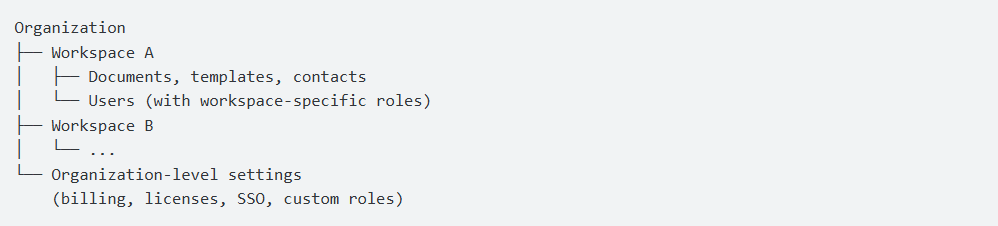
API keys are scoped to workspaces. When you sign up, you belong to an Organization (the top-level billing entity), which contains one or more Workspaces that isolate data.
Source: PandaDoc
Each key belongs to the workspace where you created it, so multi-workspace integrations require separate keys per workspace. One constraint to note early: PandaDoc calculates rate limits per user, not per key, so a single user with multiple keys shares the same limit pool.
A basic authenticated request:
curl -X GET "https://api.pandadoc.com/public/v1/documents" \
-H "Authorization: API-Key YOUR_API_KEY" \
-H "Content-Type: application/json"
The sandbox mirrors production but restricts document sending to the developer's own domain and caps all endpoints at 10 RPM. Upgrading to the API Developer Plan at $40/month raises those to production-level rate limits and 40 documents per month.
PandaDoc API: Core Endpoints & Capabilities
The API groups endpoints into twelve functional areas, with Documents as the primary resource. All requests and responses use JSON. One architectural detail shapes every integration: document creation is asynchronous. The API returns immediately on creation and processes the document in the background. You must poll for status or use webhooks to know when a document is ready.
Documents
The document endpoints cover the lifecycle. Operations include: create a document from a PandaDoc template (POST /documents), create from a PDF upload, create from a public URL, list and filter documents (by status, date, name, tag), get document details, send by email or SMS, share via session link, embed a document view, download as PDF, delete, change status, and transfer ownership.
Documents support pre-filling fields, content placeholders, dynamic tables, pricing tables, text blocks, images, variables in titles, and signing order configuration.
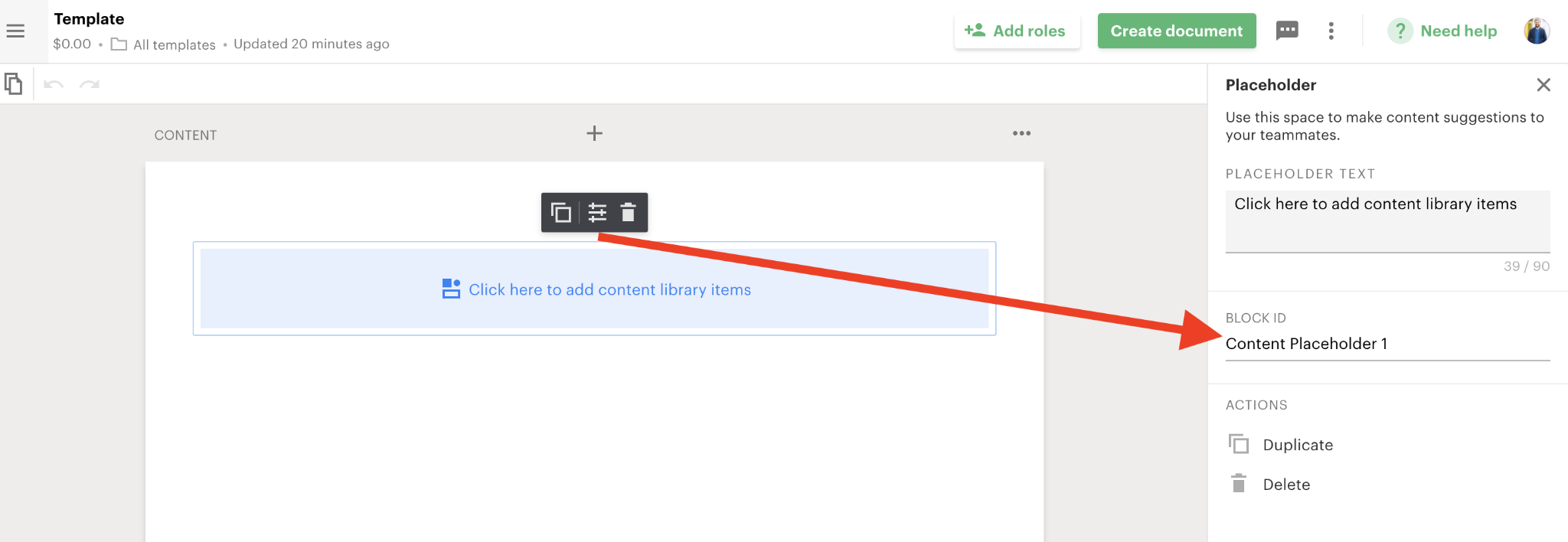
The content placeholder system turns templates into shells populated at creation time. This is the pattern most production integrations use: maintain a set of approved templates in PandaDoc, then create documents programmatically with deal-specific data injected via the API.
Source: PandaDoc
What you would build with this: a CRM integration that triggers document creation when a deal reaches a specific stage, populates the template with customer and pricing data from the CRM, sends it for signature, and tracks completion via webhooks.
Templates and Content Library
The API lets you create, list, filter, and delete templates. You can also list and retrieve Content Library Items (reusable blocks stored in PandaDoc's content library). These endpoints support building a template library that your integration draws from.
Embedded Experiences
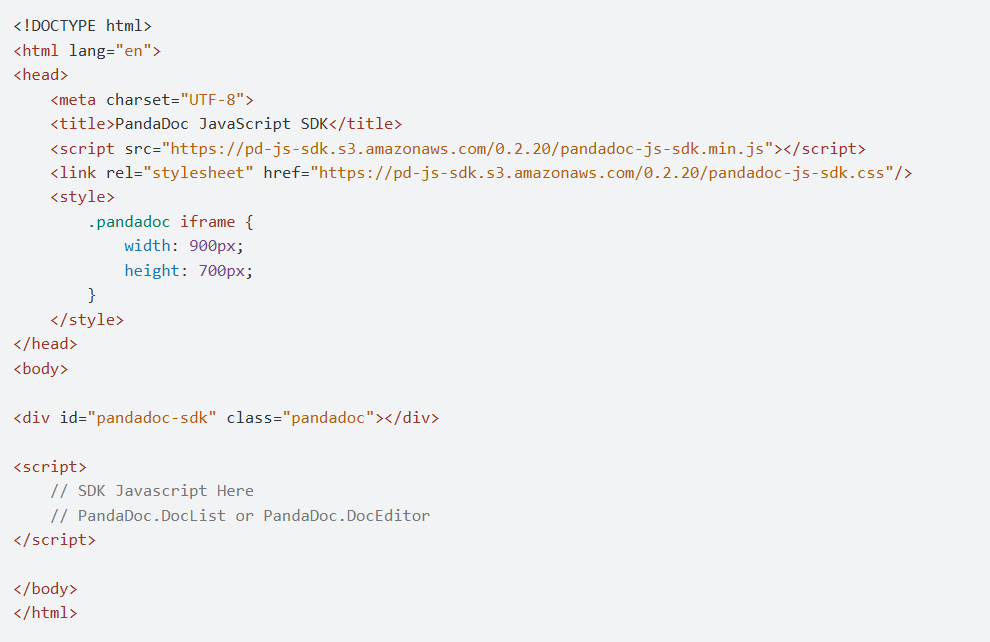
PandaDoc publishes a JavaScript SDK (pandadoc.js) for embedding document experiences into your application. The SDK supports three embed modes:
Editor Embed: let users create and edit documents without leaving your app.
Form Embed: embed a PandaDoc form into your web interface.
Signing Session Embed: embed the signing flow so recipients sign within your product, not on PandaDoc's domain.
For SaaS companies building document workflows into their own products, embedded editing and signing is the most distinctive part of PandaDoc's API. It turns PandaDoc into white-label infrastructure rather than a separate application.
Source: PandaDoc
Folders, Members, and API Logs
Supporting resources round out the surface: Folders (create, list, rename for both documents and templates), Members (list workspace members, get current member details), and API Logs (list and retrieve call logs for debugging). The API Logs endpoint lets you audit your own API usage programmatically rather than relying on dashboard views.
Linked Objects and CRM Integration
The Linked Objects resource handles CRM record associations: create, list, and delete links between PandaDoc documents and CRM records. This bridges Salesforce and HubSpot integrations, though CRM integrations are gated behind the Enterprise API tier.
Forms and Notarization
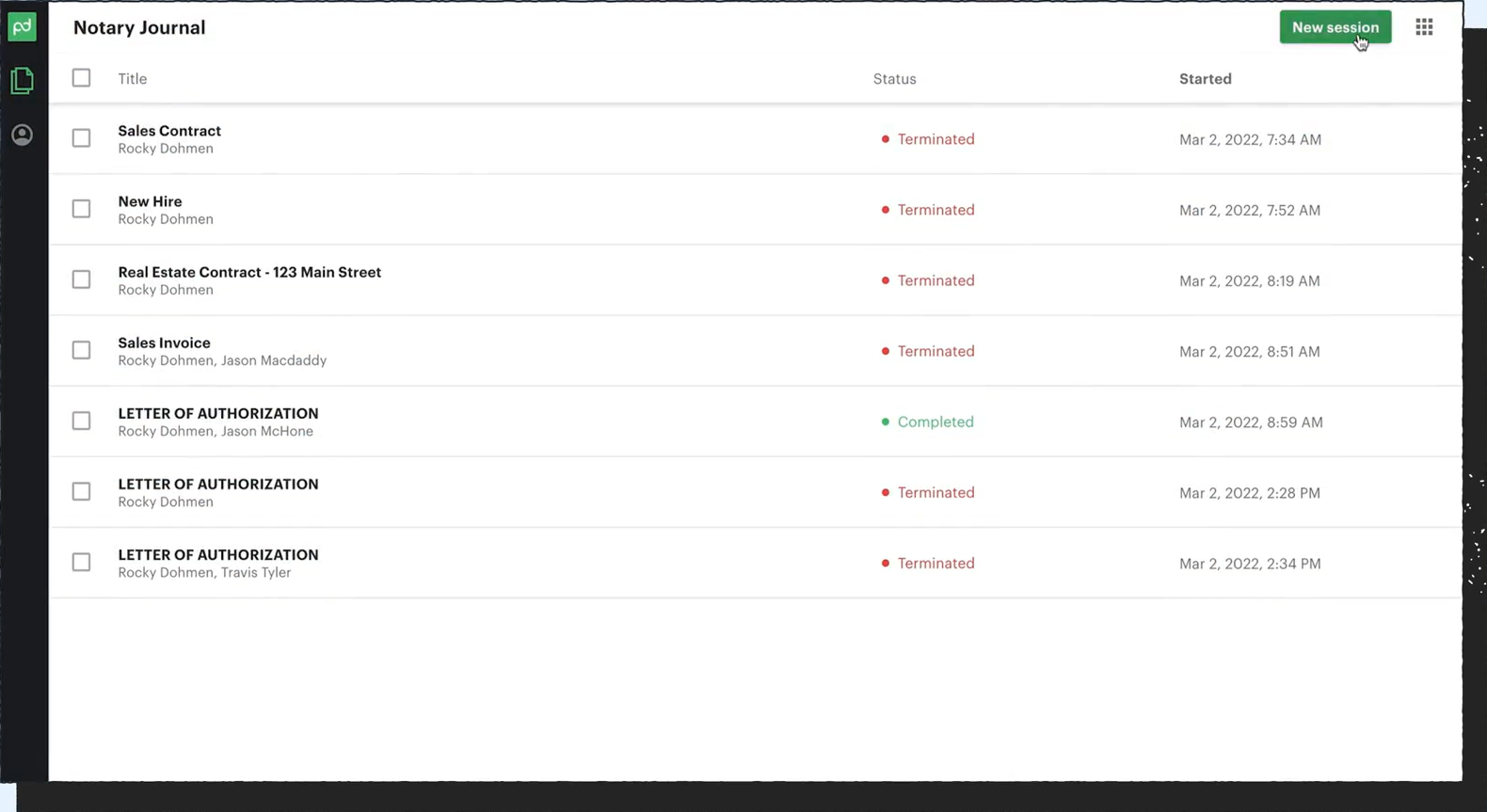
You can list and filter forms via the API. You can also create notarization requests (for PandaDoc Notary) programmatically, though this requires an Enterprise plan.
Source: PandaDoc
PandaDoc API: Webhooks & Events
PandaDoc provides a webhook system for real-time notifications. You create webhook subscriptions through the Developer Dashboard or the API (POST /webhooks/subscriptions). PandaDoc sends HTTP POST requests with JSON payloads to your registered HTTPS endpoint when subscribed events occur.
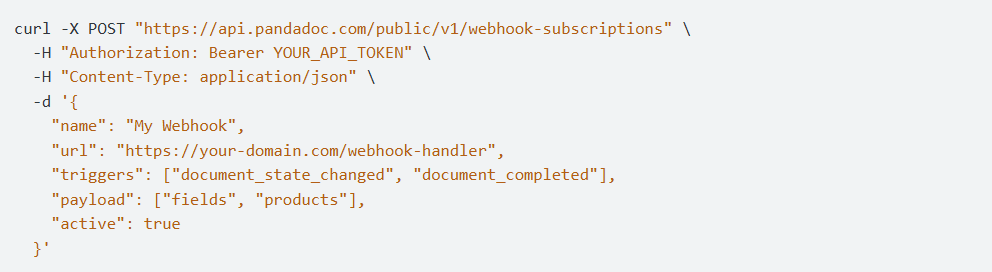
Source: PandaDoc
Key delivery requirements:
Endpoints must be HTTPS only; local development requires a tunnel (ngrok, localtunnel, or Cloudflare Tunnel).
The receiving endpoint must return HTTP 200 within 20 seconds.
Payloads may contain multiple events in a single array.
Webhooks operate at the workspace level: each subscription covers one workspace, so multi-workspace setups require separate subscriptions. Event categories cover document lifecycle changes (sent, viewed, completed, signed, declined, expired) and template updates. A webhook events reference lists all event types and payload schemas.
PandaDoc supports webhook authenticity verification via an HMAC-based shared signing key, updatable through the API. A webhook debugging guide is also published.
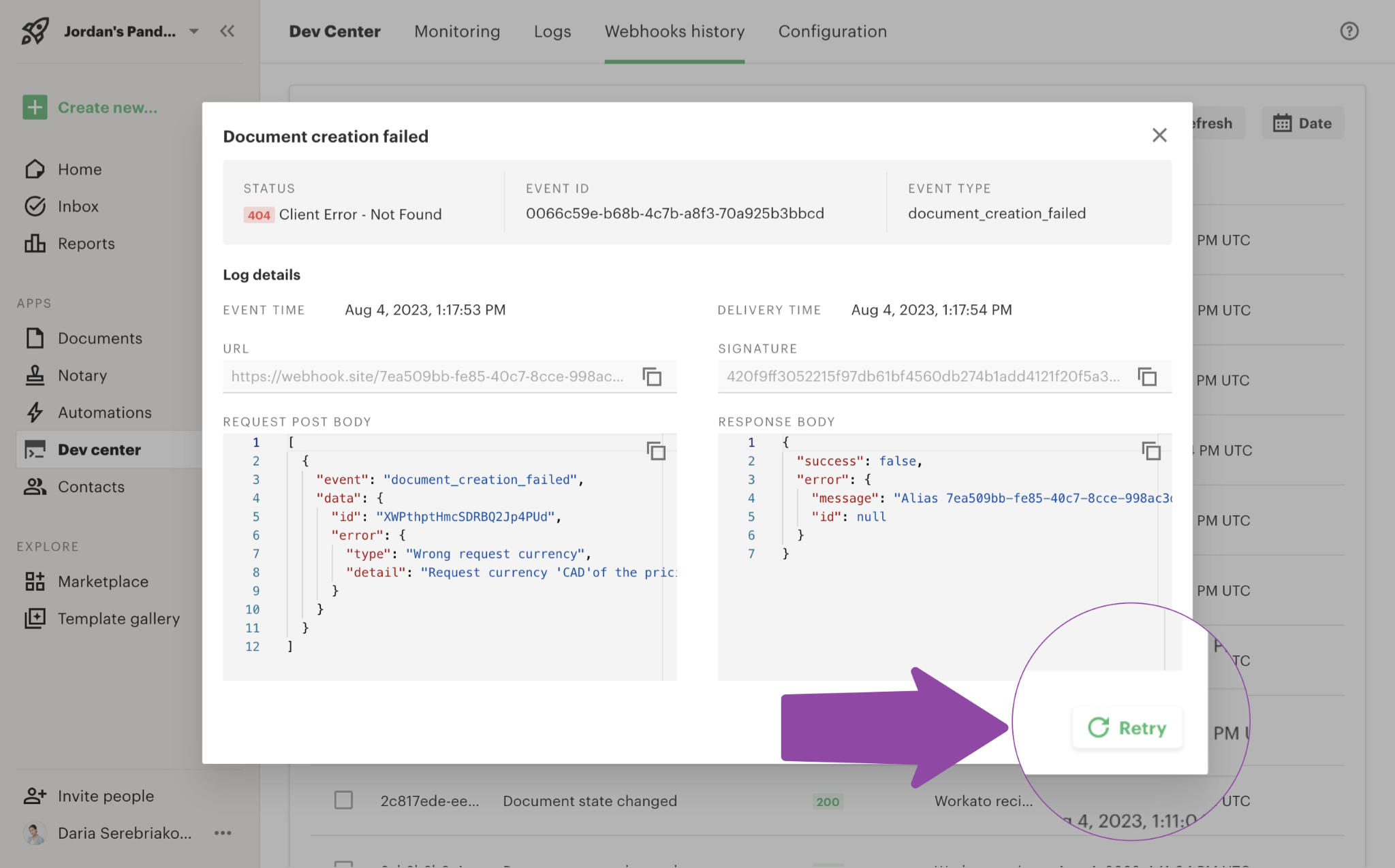
Source: PandaDoc
What you would build with this: a post-signature automation that fires when a document reaches "completed" status, triggering your backend to update CRM records, start onboarding workflows, or begin payment processing, all without polling.
Two things to plan around:
Webhooks deliver structured JSON payloads with signer data, merge field data, and pricing table information, useful for downstream processing. But the public documentation does not describe retry policy or delivery guarantees beyond the 20-second timeout requirement.
Multi-workspace deployments need a subscription per workspace. If you are building a multi-tenant integration, plan for managing subscriptions across each customer's workspace.
PandaDoc API: SDKs, Docs & Rate Limits
SDKs & Libraries
PandaDoc publishes four official API client SDKs for server-side integration:
Python: pandadoc-api-python-client
Node.js: pandadoc-api-node-client
Java: pandadoc-api-java-client
Four languages is reasonable coverage for a document automation API. The SDKs are hosted on GitHub under the PandaDoc organization. The developer docs do not state maintenance status or release cadence for each package, so check the GitHub repositories before depending on one in production.
Beyond the API clients, the JavaScript SDK (pandadoc.js) handles embedded document experiences (editor, form, and signing session embedding). This is a separate library from the REST API clients, scoped to browser-side integration.
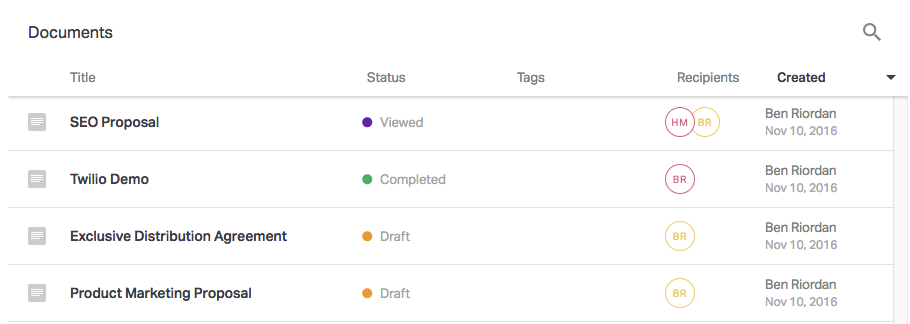
Source: PandaDoc
PandaDoc also publishes a Model Context Protocol (MCP) server for AI agent integration. The MCP server supports Claude and ChatGPT, enabling document creation and signature workflows through natural language prompts. MCP access is available on the free tier.
Documentation & Developer Experience
The developer portal at developers.pandadoc.com is hosted on readme.io and organized into several sections:
Full API Reference: interactive endpoint explorer with parameter documentation and request/response schemas.
Postman Collection: downloadable v2 collection for testing without writing code.
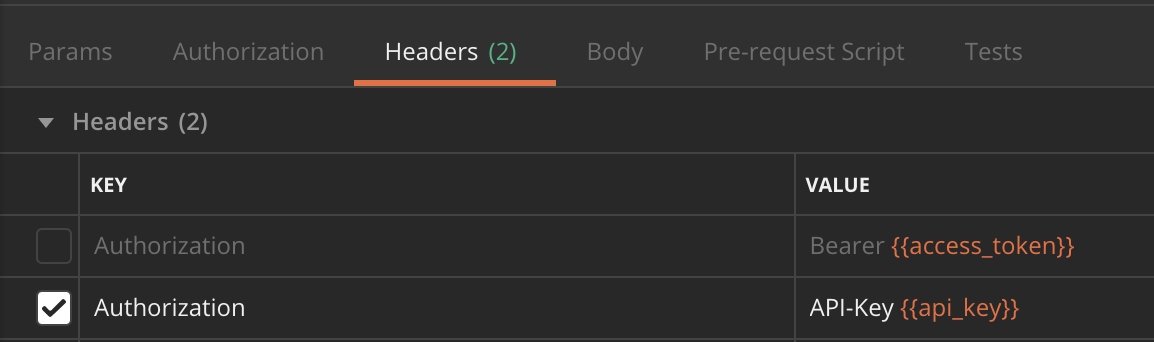
Source: PandaDoc
Developer Dashboard: in-app UI for key management, webhook configuration, and API log review.
Changelog: tracks API updates and releases.
Tutorials: step-by-step guides including a no-code Postman walkthrough and a code-based document creation tutorial.
Embedded Playground: live interactive demo for testing embedded editing and signing without an account.
llms.txt index: AI-agent-optimized index of all documentation pages and OpenAPI endpoint definitions.
PandaDoc offers developer support through a help center ticket form. A public Idea Portal accepts feature requests. The documentation is clear, organized, and usable without signing in. The interactive reference with try-it functionality is the fastest path to understanding a response shape, and the Postman collection helps non-developers evaluate the API.
Rate Limits & Constraints
PandaDoc publishes detailed per-endpoint rate limits calculated on a 60-second sliding window (requests per minute):
API action | Limit (RPM) |
|---|---|
Document Details | 600 |
Create from Template | 500 |
Send Document | 400 |
Download Protected Document | 300 |
Create from PDF | 300 |
Template/Content Library Details | 300 |
List, Status, Delete | 2,000 |
Download Document | 100 |
Create Notarization Request | 100 |
Create from PDF (Section) | 50 |
Sandbox (any endpoint) | 10 |
When you exceed a limit, the API returns HTTP 429. Limits for the same user do not stack across endpoint types: 50 Create Document calls and 50 Download calls can both run within the same minute without one counting against the other.
Three constraints worth planning around:
Limits are per user, not per key. Multiple API keys held by the same user share a single limit pool. Creating additional keys does not increase capacity.
Maximum request body size is 2 MB. PDF uploads are capped at 50 MB (returns HTTP 413 if exceeded).
Sandbox is capped at 10 RPM for all endpoints. Production-level testing requires upgrading to a paid plan.
For high-volume needs, PandaDoc says you can discuss custom rate limits with their solutions team.
PandaDoc API Pricing & Access Costs
PandaDoc structures API pricing into three tiers, separate from its product pricing:
Free ($0, no credit card required):
60 documents per year
2 recipients per document
5 templates
Sandbox for unlimited testing
All four language SDKs
MCP server access (Claude and ChatGPT)
Legally binding e-signatures
SOC 2, GDPR, and eIDAS compliant
API Developer Plan ($40/month, after a 14-day free trial):
40 documents per month baseline, with volume scaling available
Everything in Free
Enterprise (custom pricing, contact sales):
Custom document volume
Everything in API Developer Plan
CRM integrations (Salesforce, HubSpot)
Notary
Custom user management
SSO and advanced security
Extended compliance
The pricing model is document-based: you pay for documents you create and send, not for individual API requests. A workflow that makes 50 API calls to create, configure, send, and track a single document consumes one document from your allocation, not 50.
The practical cost question: at $40/month for 40 documents, the baseline cost is $1 per document. Volume pricing beyond 40 documents per month is not published; scaling details require contacting sales.
Two access gates worth noting:
CRM integrations (Salesforce, HubSpot) are Enterprise-only. If your integration needs to link documents to CRM records via the Linked Objects API, you need the Enterprise tier.
The free tier's 60-documents-per-year cap works for prototyping and testing, but any production integration needs the $40/month plan at minimum.
Where the PandaDoc API Falls Short
These are practical limits a developer should plan around, not criticisms of the platform. Several reflect deliberate scope decisions about what a document automation API covers.
The API is document-scoped. There is no contact, company, or intelligence data. PandaDoc's API creates, sends, tracks, and manages documents. It does not tell you who to send them to, whether a company is in-market, what their org chart looks like, or whether a contact's email is deliverable. If your pipeline needs to identify the right recipient before generating a document, you need a separate data layer.
CRM integrations are gated behind Enterprise pricing. The Linked Objects API (which connects documents to Salesforce or HubSpot records) requires the Enterprise tier. For a developer building a CRM-integrated document workflow, this means custom-quoted pricing rather than the self-serve $40/month plan.
Document creation is asynchronous with no push notification for readiness. When you create a document via the API, processing happens in the background. You must poll for status or wait for a webhook event to know when the document is ready to send. This adds complexity to any synchronous workflow where the user expects immediate results.
Rate limits on creation endpoints are moderate for high-volume use cases. The 500 RPM cap on template-based document creation and 400 RPM on sends work for most integrations, but pipelines generating thousands of documents per hour (bulk contract generation, high-volume onboarding) will need to design around these limits or negotiate custom arrangements.
OAuth flow details are thin in the public documentation. The API lists OAuth keys alongside API keys, but the public developer portal does not document the specific OAuth flow type or implementation details. Developers needing OAuth-based authentication may need to contact PandaDoc directly.
PandaDoc does not publicly document its webhook retry policy. The webhook system supports HMAC verification and a 20-second timeout requirement, but the documentation does not describe retry behavior or delivery guarantees. If your pipeline depends on guaranteed webhook delivery, build your receiver to be idempotent and confirm the delivery contract with PandaDoc.
PandaDoc does not publish volume pricing beyond the baseline. The API Developer Plan includes 40 documents per month, but scaling costs beyond that are opaque. Developers sizing a production integration cannot calculate unit economics without a sales conversation.
ZoomInfo API: The Data and Intelligence Layer That Feeds Your Documents
PandaDoc's API handles the document: creating it, sending it, getting it signed, and collecting payment. ZoomInfo's API handles the intelligence upstream of that document: who should receive it, what company they work for, whether they are evaluating solutions in your category, and where they sit in the buying committee.
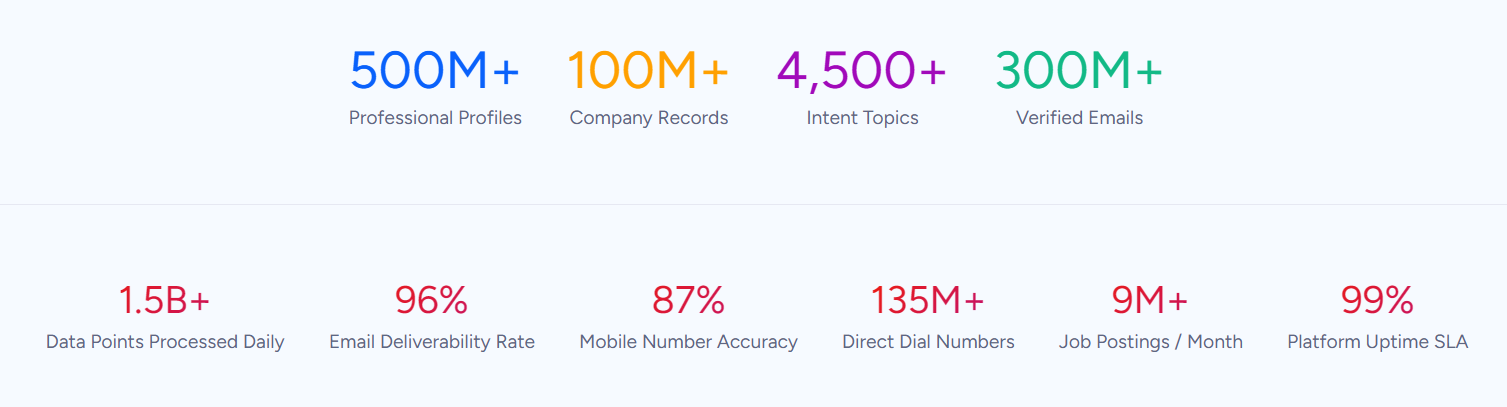
That intelligence comes from ZoomInfo's GTM Context Graph, which processes 1.5B+ data points daily by combining ZoomInfo's B2B data with your CRM records and behavioral signals.
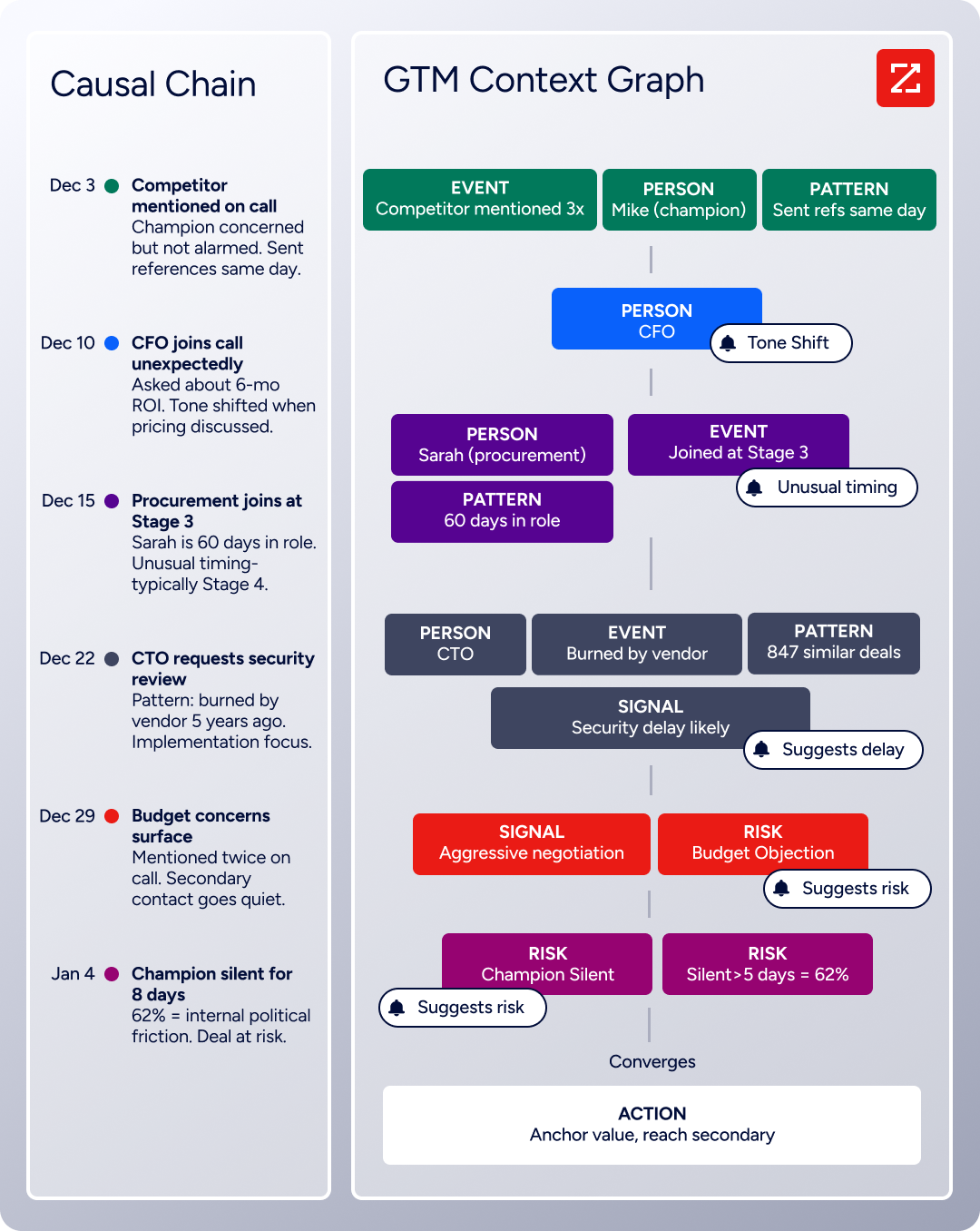
The two APIs operate at different layers of a pipeline. A developer building an automated proposal workflow needs both: intelligence to identify the right recipient, and document automation to deliver the proposal.
What the API Covers
ZoomInfo's Enterprise API is a REST suite served from https://api.zoominfo.com/gtm, organized into four endpoint groups documented in the interactive API reference:
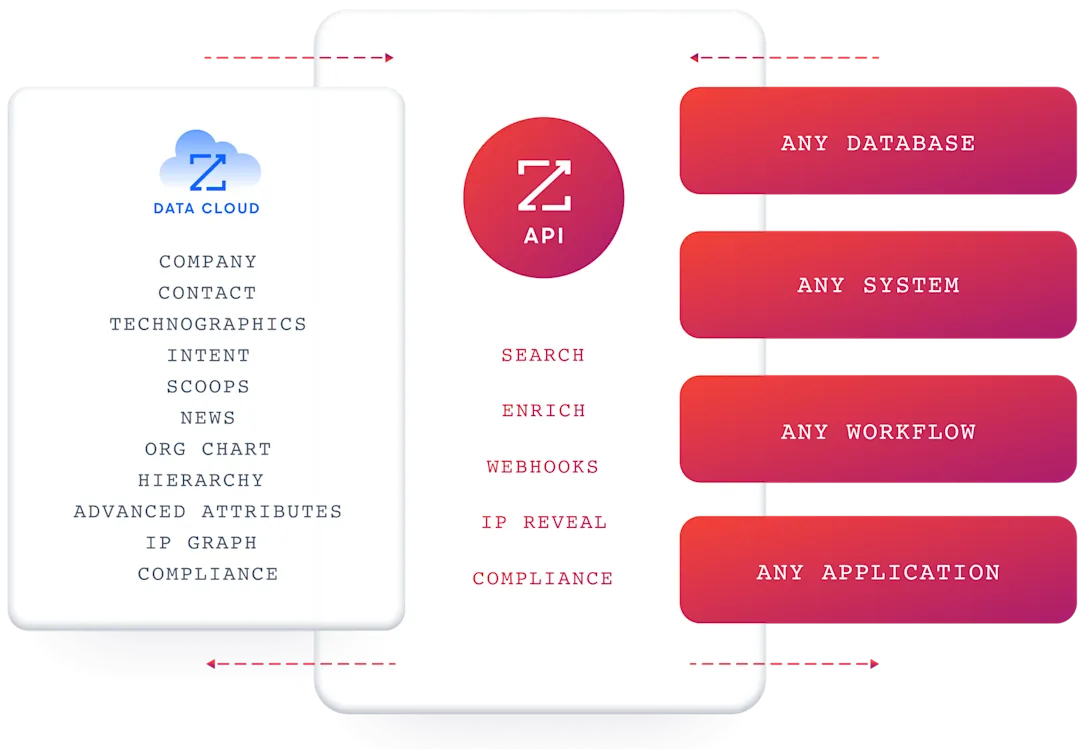
Data API (Search and Enrich): Search endpoints cover Contacts, Companies, Intent, News, and Scoops, returning matched records without consuming credits. Enrich endpoints return complete records: business emails, direct dials, employment history, corporate hierarchy, org charts, technographics, and hashtag signals, up to 25 records per call.
The underlying dataset spans 500M contacts and 100M companies, 135M+ verified phone numbers, and 200M+ verified business email addresses. The search-then-enrich pattern means you filter first, then pay only for the records you enrich.
AI Intelligence API: Account Summary returns structured account intelligence with a free-form Q&A endpoint. Find Similar Companies returns companies resembling a given input. Contact Recommendations returns AI-ranked buying-committee suggestions by motion (prospecting, deal acceleration, renewals).
What you would build with the two APIs together: a pipeline that uses ZoomInfo's search to find contacts matching your ICP, enriches them with verified emails and org-chart position, then uses PandaDoc's API to generate a personalized proposal from a template (pre-populated with the enriched company and contact data) and sends it for signature. The ZoomInfo layer decides who gets the document; the PandaDoc layer creates and delivers it.
Authentication and Access
ZoomInfo uses OAuth 2.0 with PKCE via Okta, supporting three flows: Authorization Code with PKCE (web applications), Client Credentials (server-to-server), and Refresh Token. Access tokens are 24-hour Bearer tokens with rotating refresh tokens.
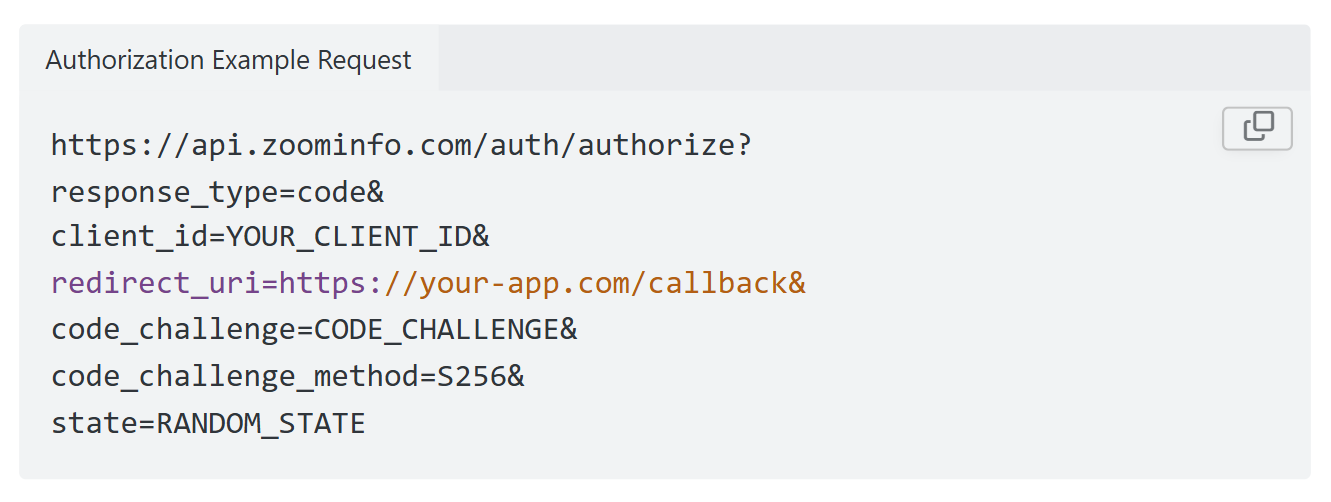
You register applications through the ZoomInfo Developer Portal, where teams generate credentials, define scopes, and test endpoints.
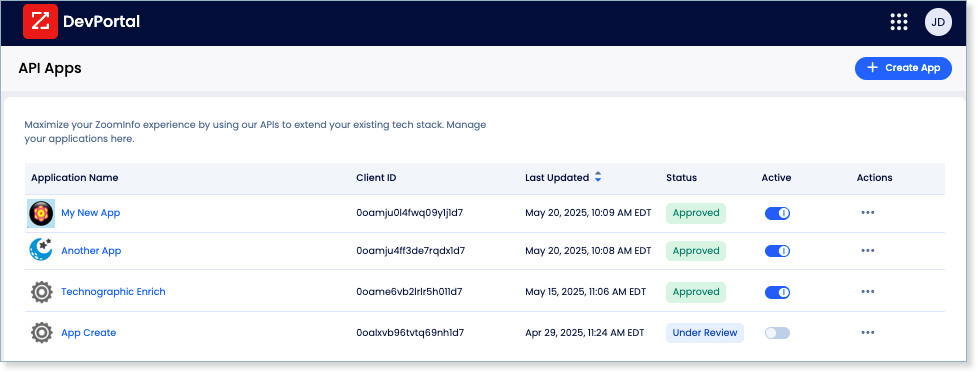
This is a different authentication model from PandaDoc's static API key. OAuth 2.0 supports delegated access, credential rotation, and scoped permissions, making it the right choice for multi-tenant integrations and environments with strict credential-management policies.
Rate Limits, Credits & Developer Experience
ZoomInfo publishes rate limits by tier: Builder (5 req/sec), Standard (25 req/sec), and Scaling (35 req/sec), with per-hour and per-day sliding-window limits enforced simultaneously. Every response includes quota headers with remaining capacity, and 429 responses include a Retry-After header with exact backoff timing.
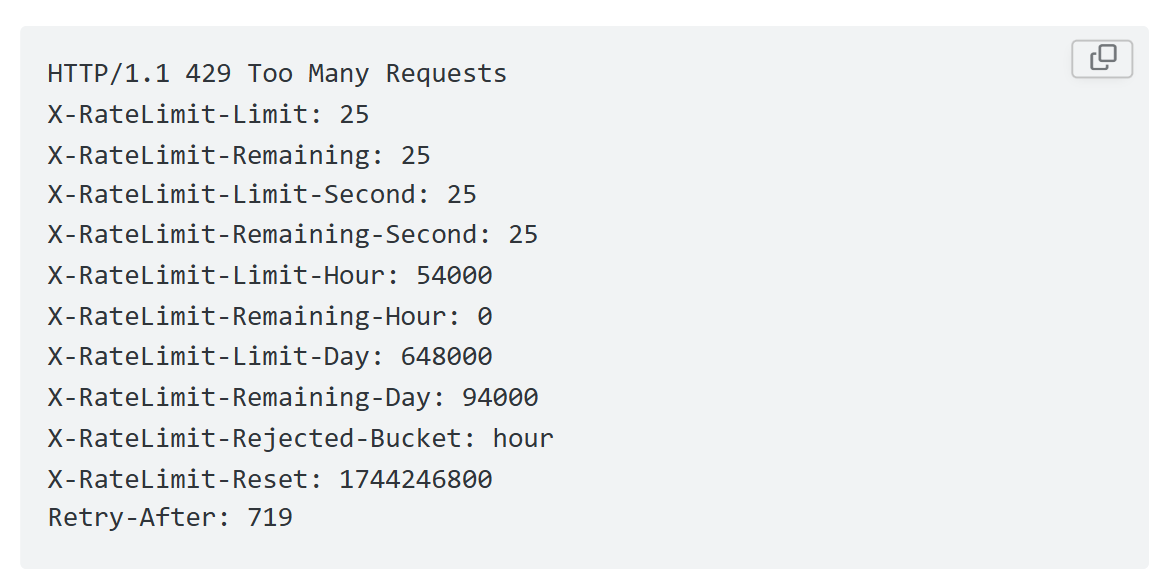
Credits follow a rolling 12-month window: a record enriched for the first time consumes one credit; re-enriching the same record within the year is free. Search and lookup operations do not consume credits.
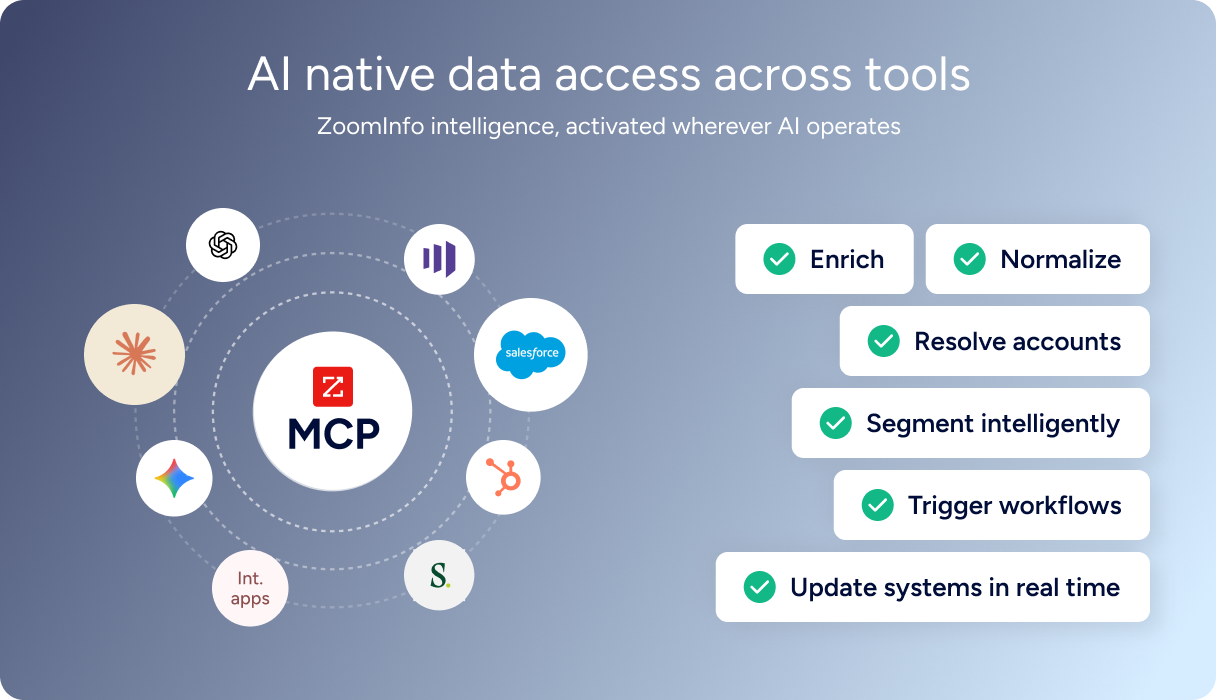
For developers building AI agents, ZoomInfo's MCP server at https://mcp.zoominfo.com/mcp exposes search, enrich, and account research as tools for MCP-compatible assistants, currently supporting Claude and ChatGPT. Documentation lives at docs.zoominfo.com with an interactive API reference, OAuth recipes in five languages, and an llms.txt index for AI development tools.
ZoomInfo does not publish official SDKs, so you integrate over HTTP and own the auth-and-retry layer yourself. ZoomInfo uses consumption-based pricing; API access requires an Enterprise package, and ZoomInfo has extended API access to all relevant plans.
BDO Canada reported an 87% reduction in time spent updating internal data dashboards using the ZoomInfo API, with one analyst describing the integration as plug-and-play across any process. (ZoomInfo)
Final Verdict
PandaDoc's API is a well-documented surface for programmatic document automation: template-based creation, embedded editing and signing, webhook-driven lifecycle tracking, and payment collection, all from a single REST interface. The free sandbox, four official SDKs, interactive API reference, and Postman collection give a developer everything needed to evaluate and prototype without a sales conversation. The embedded JavaScript SDK (which lets you white-label document editing and signing inside your own application) is what most distinguishes PandaDoc's API from alternatives in the document automation space.
Choose the PandaDoc API if your build centers on document workflows: generating contracts, proposals, or agreements programmatically from templates, embedding signing flows into your product, or automating post-signature actions via webhooks. The $40/month API Developer Plan with document-based pricing (not per-call) makes it cost-effective for moderate-volume integrations, and the free tier with sandbox access eliminates the evaluation barrier.
Choose the ZoomInfo API if your pipeline needs the intelligence layer upstream of document generation: identifying which contacts and companies should receive those documents, enriching records with verified emails and org-chart data, and detecting buyer intent signals that determine timing. The search-then-enrich pattern (search is free, enrich consumes credits) and the AI intelligence endpoints cover the data and reasoning that document APIs do not. Explore the ZoomInfo Enterprise API or start with the developer docs to see the endpoint surface directly.
PandaDoc's API does not provide contact or company intelligence. ZoomInfo's API does not generate or manage documents. If your pipeline requires both layers, the two are complementary: ZoomInfo identifies and enriches the recipient, PandaDoc creates and delivers the document.
FAQ
Is the PandaDoc API free?
PandaDoc offers a free tier that includes 60 documents per year, 2 recipients per document, 5 templates, a sandbox for unlimited testing, all four SDKs, and MCP server access. No credit card is required. Beyond that, the API Developer Plan at $40/month provides 40 documents per month with volume scaling available. CRM integrations (Salesforce, HubSpot) require the Enterprise tier at custom pricing.
Does PandaDoc have a GraphQL API?
No. PandaDoc exposes a REST API with JSON request and response bodies. No GraphQL endpoint exists. If you need a GraphQL interface for document operations, you would need to build a wrapper on top of the REST API.
What is the PandaDoc API rate limit?
PandaDoc uses per-endpoint rate limits calculated on a 60-second sliding window. The limits range from 2,000 RPM for list and status operations down to 50 RPM for section-level PDF creation. Document creation from templates is capped at 500 RPM, and document sends at 400 RPM. Limits are per user, not per key, so multiple keys held by the same user share a single limit pool. The sandbox caps all endpoints at 10 RPM.
Are there official PandaDoc SDKs?
Yes. PandaDoc publishes four official API client SDKs: Python, Node.js, Java, and PHP. All are hosted on GitHub under the PandaDoc organization. A separate JavaScript SDK covers embedded document experiences (editor, form, and signing session embedding). The developer docs do not state maintenance status for individual SDK packages; check each GitHub repository before depending on one in production.
Does the PandaDoc API support webhooks?
Yes. PandaDoc runs a webhook system that delivers HTTP POST requests with JSON payloads when document lifecycle events occur (sent, viewed, completed, signed, declined, expired). You configure webhooks through the Developer Dashboard or the API; each subscription is scoped to one workspace. PandaDoc supports HMAC-based payload verification through a shared signing key. The public documentation does not describe retry policy or delivery guarantees beyond a 20-second timeout requirement.
What does ZoomInfo's API add to a PandaDoc build?
ZoomInfo's API adds the data and intelligence layer that PandaDoc's API does not cover. Where PandaDoc's API creates, sends, and tracks documents, ZoomInfo's API identifies the right recipients: search across 500M contacts and 100M companies, enrich with verified emails, direct dials, org charts, technographics, and employment history, and detect buyer intent signals that tell you when a prospect is evaluating. The pairing is direct: use ZoomInfo's search-then-enrich pattern to build a qualified recipient list, then use PandaDoc's template-based document creation to generate and send personalized proposals or contracts to those recipients. Both platforms offer MCP servers, so the same pipeline pattern extends to AI-agent workflows where the agent identifies prospects via ZoomInfo and generates documents via PandaDoc.
