
PandaDoc is a document automation platform that covers creation, signature, and payment. With over 68,000 customers and a G2 #1 rating in proposals, eSignature, and contract management, it aims to replace the scattered mix of word processors, PDF tools, and signing services most sales teams still piece together.
But as deals grow more complex and buyers expect personalized, timely outreach, creating a good proposal is only half the work. Knowing who to send it to, and when, matters just as much.
To write this PandaDoc review, we analyzed the platform in detail. We believe it's the right choice if:
You need one platform for proposals, contracts, eSignatures, and payments
You want CRM integration with Salesforce, HubSpot, or Pipedrive
You value drag-and-drop simplicity over heavy customization
Your team needs CPQ functionality without hiring consultants
You require compliance across HIPAA, GDPR, SOC 2, or eIDAS
However, while PandaDoc handles the document-to-close workflow well, it doesn't help you identify the right prospects, prioritize accounts showing buying signals, or understand your buyers before the proposal gets created.
This is where ZoomInfo enters the picture: an AI GTM platform that picks up where prospecting begins. While PandaDoc handles documents, ZoomInfo provides the buyer intelligence, backed by B2B data (500M contacts, 100M companies, 135M+ verified phone numbers, and 200M+ verified business emails) that helps those documents reach the right person at the right time.
We've included a detailed look at ZoomInfo later in this PandaDoc review because it represents the natural complement for sales teams that want their document workflows informed by buyer intelligence. If you're ready to explore how data-driven prospecting strengthens every proposal you send, learn more about ZoomInfo here.
What is PandaDoc?
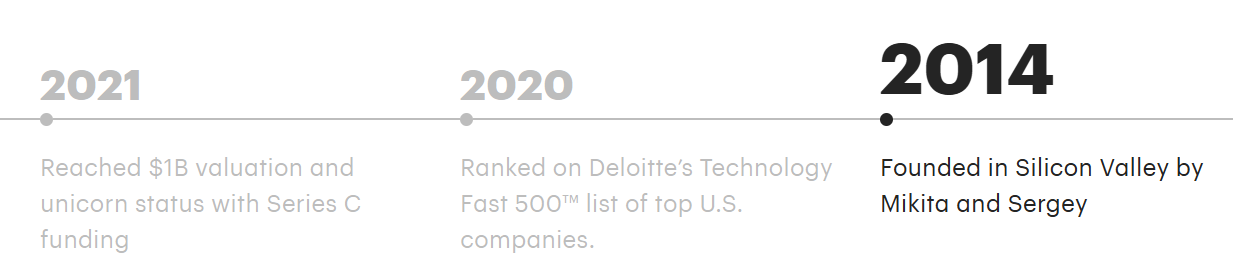
PandaDoc is a document management platform founded in 2014 in Silicon Valley by Mikita Mikado and Sergey Barysiuk, two college friends who built the product to escape the inefficient document processes they experienced firsthand. The company is headquartered in San Francisco and operates as a remote-first organization with 700+ employees across the US and Europe.
Source: PandaDoc
What started as a proposal tool with eSignature capabilities has grown into what PandaDoc calls "360-degree document management software". The platform now covers document generation, CPQ, Deal Rooms, workflow automations, approval routing, tracking and analytics, and integrated payment collection.
In January 2026, PandaDoc transitioned leadership, with Keith Rabkin becoming CEO and co-founder Mikado moving to Chief Product Officer to focus on product strategy.
The company reached $100 million in annual recurring revenue in August 2024 and achieved unicorn status with a $1 billion-plus valuation following its Series C round in 2021. Strategic investors include Microsoft's M12 and HubSpot, both of which double as integration partners.
PandaDoc's primary audience is sales teams at SMB and mid-market companies using CRM tools like HubSpot, Salesforce, and Pipedrive. Secondary buyers include HR, legal, marketing, and customer success teams that need document workflows without the overhead of enterprise contract lifecycle management systems.
PandaDoc Pros & Cons
Pros | Cons |
|---|---|
All-in-one document lifecycle (create, sign, pay) | Limited post-send editing requires re-sending documents |
G2 Leader across proposals, eSignature, and contract management | Block-based editor can be imprecise with alignment and formatting |
Bidirectional CRM integration with Salesforce and HubSpot | Documents sent via PandaDoc email frequently land in spam folders |
Free plan with unlimited seats for basic eSignatures | Per-seat pricing at Business tier ($49/seat/month) scales quickly |
CPQ with guided selling for Salesforce, HubSpot, and Pipedrive | Formatting degrades when importing Word documents |
Integrated Stripe, Square, and PayPal payment collection | No native redlining for contract negotiation |
Broad compliance (HIPAA, GDPR, SOC 2, eIDAS, 21 CFR Part 11) | Mobile app trails desktop experience in functionality |
PandaDoc Review: How It Works & Key Features
Document Generation: PandaDoc consolidates document creation, templating, and CRM data pull into one drag-and-drop workspace.
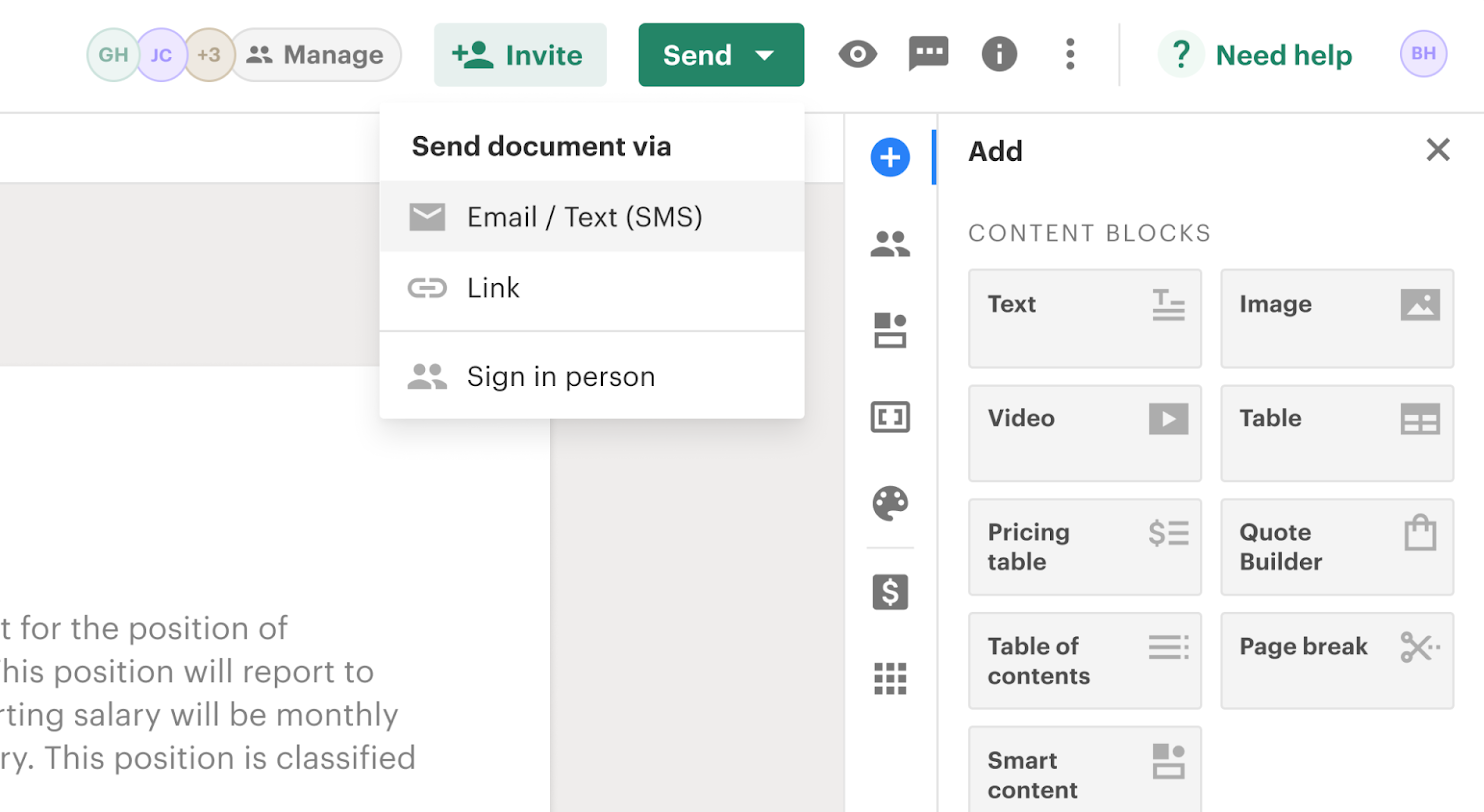
PandaDoc's document generation runs in a browser-based, block-based editor. Users start from a blank canvas, an imported Word file, or one of 1,000+ pre-built templates. Content blocks (text, images, videos, pricing tables, eSignature fields) snap into position and render in real time.
Source: PandaDoc
Templates support roles as generic signer placeholders and variables as dynamic data fields. When creating a new document from a template, variables can be filled manually or pulled from a connected CRM. PandaDoc offers two-way sync with Salesforce and HubSpot, writing document status back into the CRM pipeline so deal records stay current without manual updates.
The Content Library stores reusable templates, text snippets, legal clauses, images, and media in a central repository. Content locking lets admins prevent reps from modifying pre-approved language, giving legal and marketing teams direct enforcement of brand guidelines.
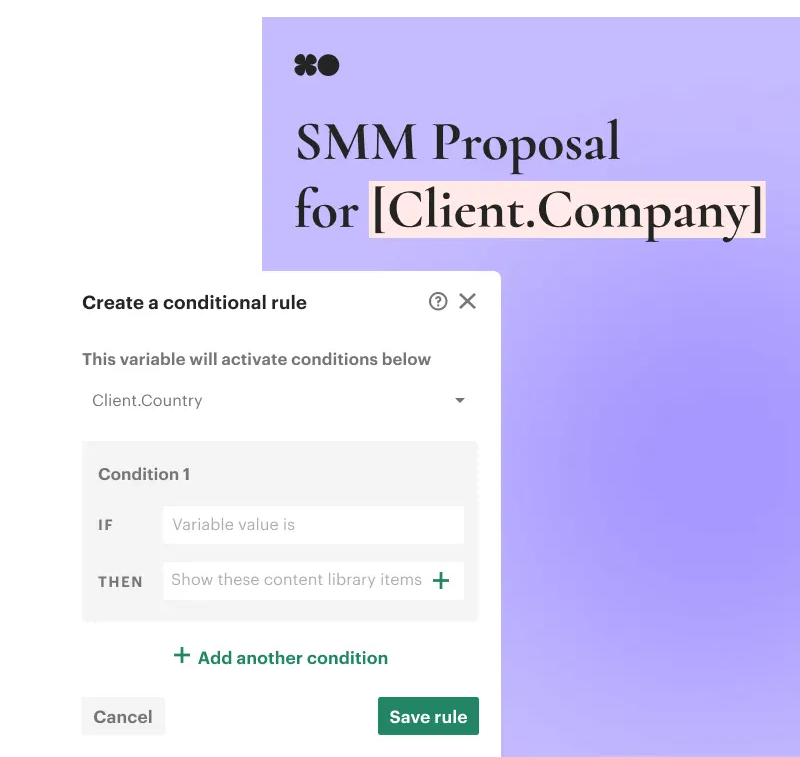
For conditional document assembly, Smart Content shows or hides sections based on variables like geography, company size, or industry. Enterprise users can define rules that insert jurisdiction-specific clauses or adjust pricing by region without manual work.
Source: PandaDoc
For teams generating documents at scale, PandaDoc's API supports programmatic creation triggered by business events, batch generation, and embedded editing inside third-party applications.
eSignature: PandaDoc supports three tiers of electronic signature, from basic typed signatures to EU-compliant Qualified Electronic Signatures.
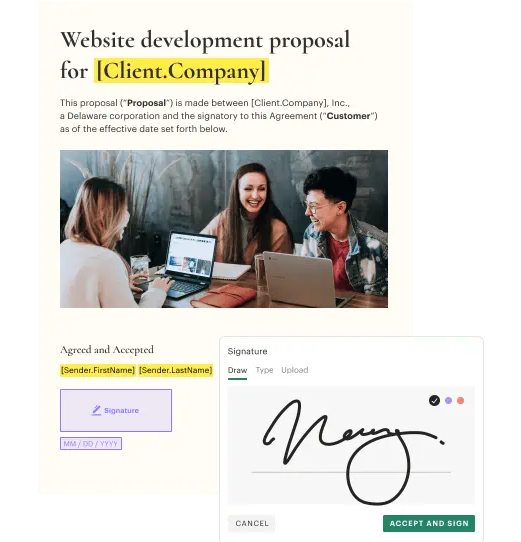
PandaDoc's eSignature is built into the document creation platform, so the same tool used to build a proposal also handles signing. Recipients receive an email or SMS link, open the document on any device, and sign without creating a PandaDoc account or installing an app.
Source: PandaDoc
The platform supports three signature tiers under the eIDAS framework: Basic (typed, drawn, or scanned), Advanced Electronic Signature (AES), and Qualified Electronic Signature (QES), which is legally equivalent to a handwritten signature across all 27 EU member states.
Identity verification offers five methods: passcode, SMS one-time code, email one-time code, Knowledge-Based Authentication (KBA, US only), and government ID check with biometric facial scanning across 200+ countries. PandaDoc does not store identity documents or biometric data.
Upon completion, PandaDoc generates a digital signature certificate using Public Key Infrastructure via Entrust, appended to the final PDF with signer names, verified emails, IP addresses, geographic location, and timestamps. An audit trail records all document interactions with timestamps and IP logging.
Paid plans include unlimited signature requests with no per-transaction caps, unlike envelope-based billing models used by competitors like DocuSign.
CPQ: PandaDoc embeds configure-price-quote automation inside CRM workflows for Salesforce, HubSpot, and Pipedrive.
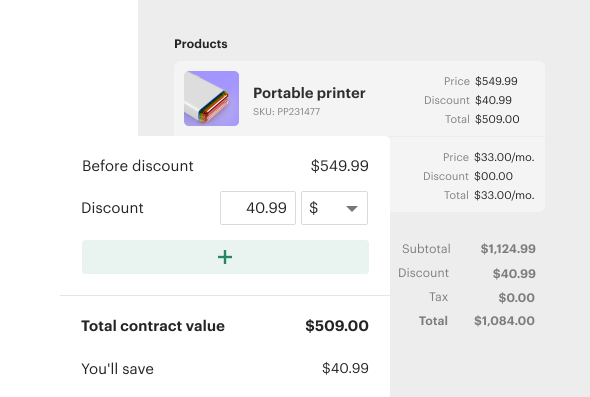
PandaDoc's CPQ automates the configure-price-quote workflow without requiring coding or consultants. Available on the Enterprise plan only, it offers CRM-specific variants for Salesforce, HubSpot, and Pipedrive.
Source: PandaDoc
The system uses a guided selling questionnaire that walks reps through product selection with structured playbooks, reducing catalog confusion and configuration errors. A rules engine with WHEN/THEN conditional logic applies discounts, enforces bundle requirements, and adjusts quantities based on inputs.
The Quote Builder block supports up to 500 products, with customizable columns, optional items, and role-based column locking. The Product Catalog supports fixed, volume-based, and recurring pricing models. Conditional approval workflows trigger when conditions are met (for instance, when discount thresholds are exceeded), keeping deals moving without manual bottlenecks.
Deal Rooms: PandaDoc gives buying committees a single shared space for proposals, contracts, action plans, and signatures.
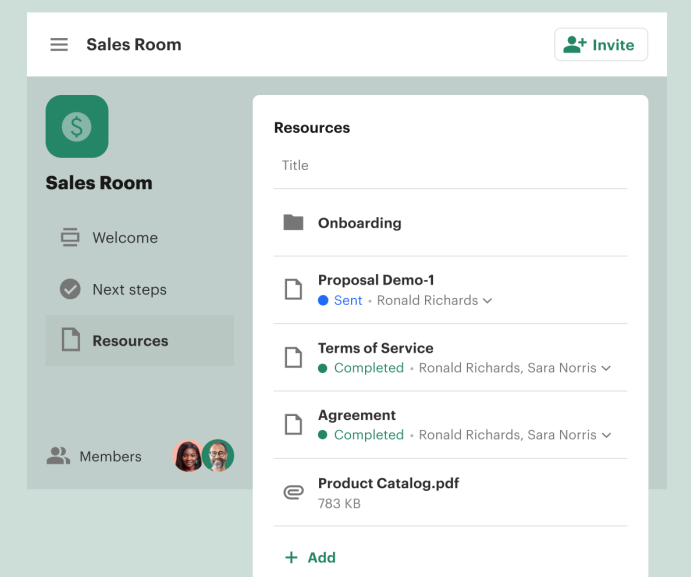
Deal Rooms consolidates document sharing, stakeholder communication, and task management into a branded collaboration hub. Instead of forwarding proposals through email threads where assets get lost, sellers publish a persistent room that both sides of a deal can access from first touch through signed contract.
Source: PandaDoc
Each room has three sections: a customizable Home page (the branded welcome landing), an Action Plan (a mutual task checklist with progress tracking), and Documents and Files (a repository supporting PandaDoc documents, uploaded files up to 2GB, and embedded links).
The Insights dashboard tracks room views, open rates per user, task completion, and per-item content engagement, giving sales managers visibility into buyer behavior beyond open notifications. Inline comments support both private (internal) and public (buyer-visible) notes, and collaborators can suggest edits on draft documents using a guest profile without a paid PandaDoc license.
Room structures can be saved as templates, so winning deal-room formats can be reused across the team. HubSpot integration allows rooms to be created directly within HubSpot deals, contacts, or companies.
Workflow Automations: PandaDoc automates post-send actions, approval routing, reminders, and contract renewals.
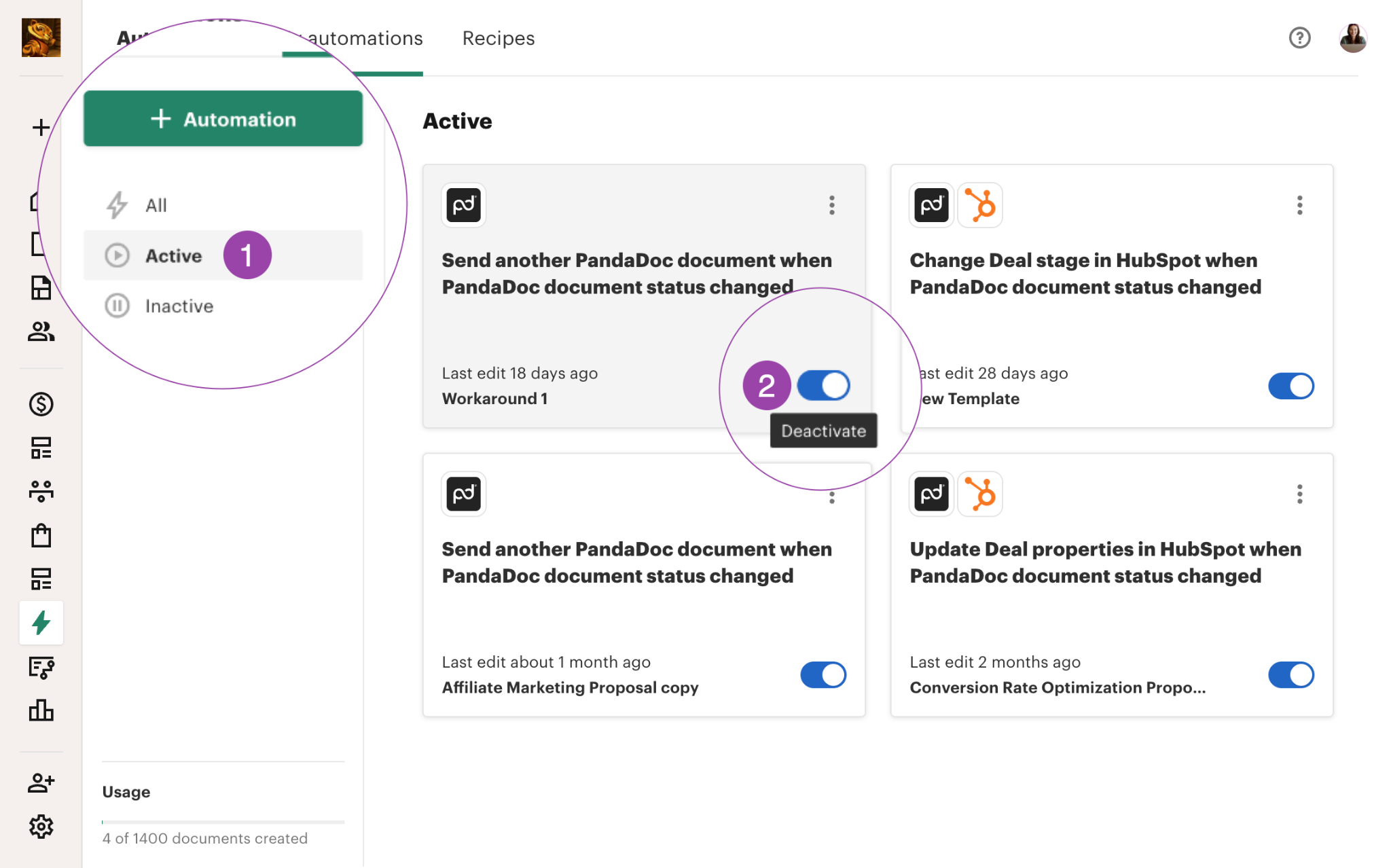
PandaDoc's automations use a trigger-action model: when a document's status changes to "Sent" or "Completed," pre-configured actions fire. Automations are set at the template level, so every document created from that template inherits them without additional setup.
Source: PandaDoc
Available actions include updating deal stages in HubSpot, Salesforce, Pipedrive, Microsoft Dynamics, Zoho, or Zendesk Sell; saving completed PDFs to Google Drive, OneDrive, Dropbox, Box, or SharePoint; sending a follow-up document from a selected template; and creating or updating records in BambooHR and Greenhouse.
Approval Workflows route documents to designated stakeholders in sequence. Approvals can be conditional, triggered only when specific deal conditions are met (discount thresholds, document value). Auto Reminders chase unsigned documents via email or SMS on a configurable schedule. Contract renewal notifications use AI to capture renewal dates and set reminders.
PandaDoc supports up to 300 active automations per workspace.
Where PandaDoc Falls Short
PandaDoc handles the document-to-close workflow well, but several limitations show up with regular use. These reflect a platform built for document creation and signing, not the full sales cycle.
Limited Post-Send Editing. The most common complaint on G2 and Capterra is that once a document is sent, making changes typically requires recreating or re-sending it. For negotiation-heavy deals where terms change after the first send, this friction slows closings.
Editor Precision Issues. The drag-and-drop editor is praised for ease of use, but reviewers on G2 note that blocks don't always snap to desired positions, text alignment behaves unpredictably, and undo is unreliable in complex documents. PandaDoc has acknowledged this, announcing a full editor rebuild "from the ground up" in March 2026.
Email Deliverability Problems. Multiple reviewers on G2 and Capterra report that documents sent through PandaDoc's email system frequently land in spam folders. For a sales team that depends on timely document delivery, missed signatures and delayed closings are direct revenue risks.
No Native Redlining. Customers who need back-and-forth contract markup cannot do it natively. They must export to Word, negotiate externally, and reimport, a disjointed experience that limits PandaDoc's viability as a full contract lifecycle management tool.
Formatting Loss on Word Import. G2 reviewers report formatting degradation when uploading .docx files. Legal and compliance teams that maintain master templates in Microsoft Word face manual cleanup each time they bring those templates into PandaDoc.
No Prospecting or Buyer Intelligence. PandaDoc's strength is the document phase, but it provides no tools for identifying the right buyers, prioritizing accounts showing purchase intent, or understanding a prospect's org structure before the proposal is created. A proposal is only as good as the targeting behind it, and that's a gap PandaDoc was never designed to fill.
These limitations reflect PandaDoc's focus as a document-centric platform. They also point to a clear need for complementary tools that handle the prospecting and intelligence work preceding every document PandaDoc sends.
The Perfect Complement to PandaDoc: ZoomInfo
PandaDoc turns proposals into signed contracts. But every proposal begins with a question the document itself can't answer: is this the right buyer, at the right company, at the right time? ZoomInfo addresses that gap.
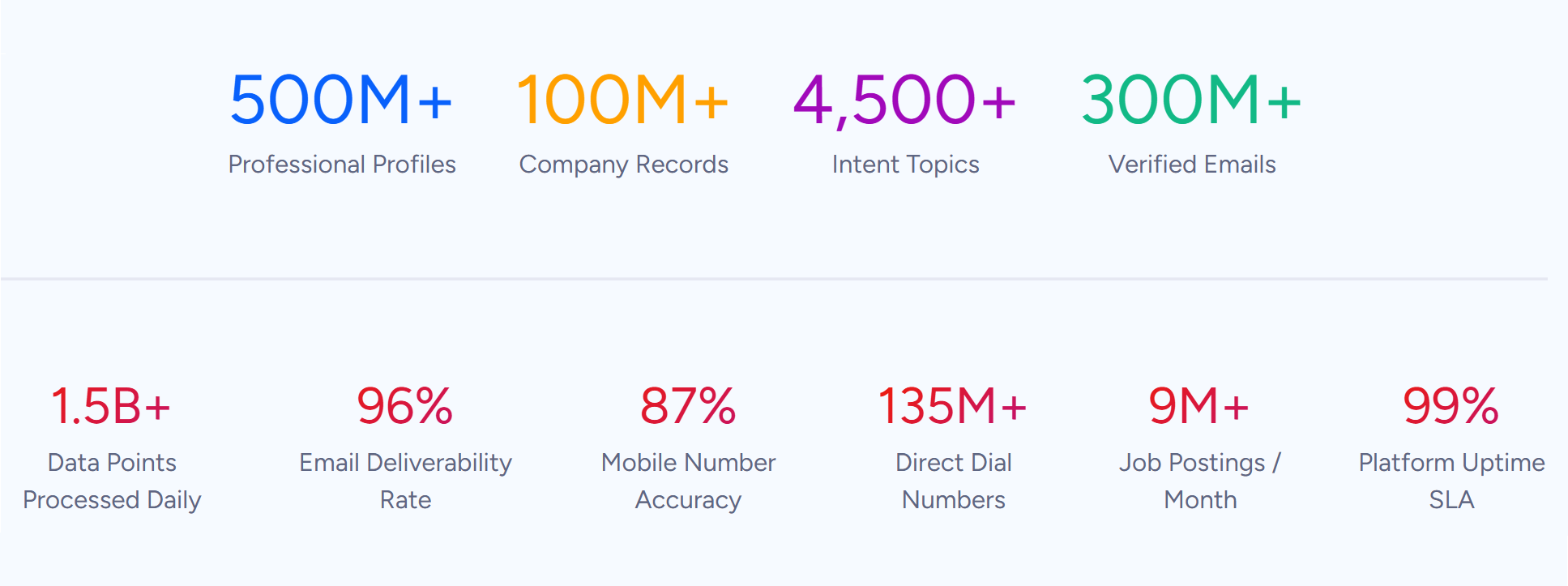
ZoomInfo is an AI GTM platform built on a large B2B data foundation: 500M contacts, 100M companies, 135M+ verified phone numbers, and 200M+ verified business emails.
Source: ZoomInfo
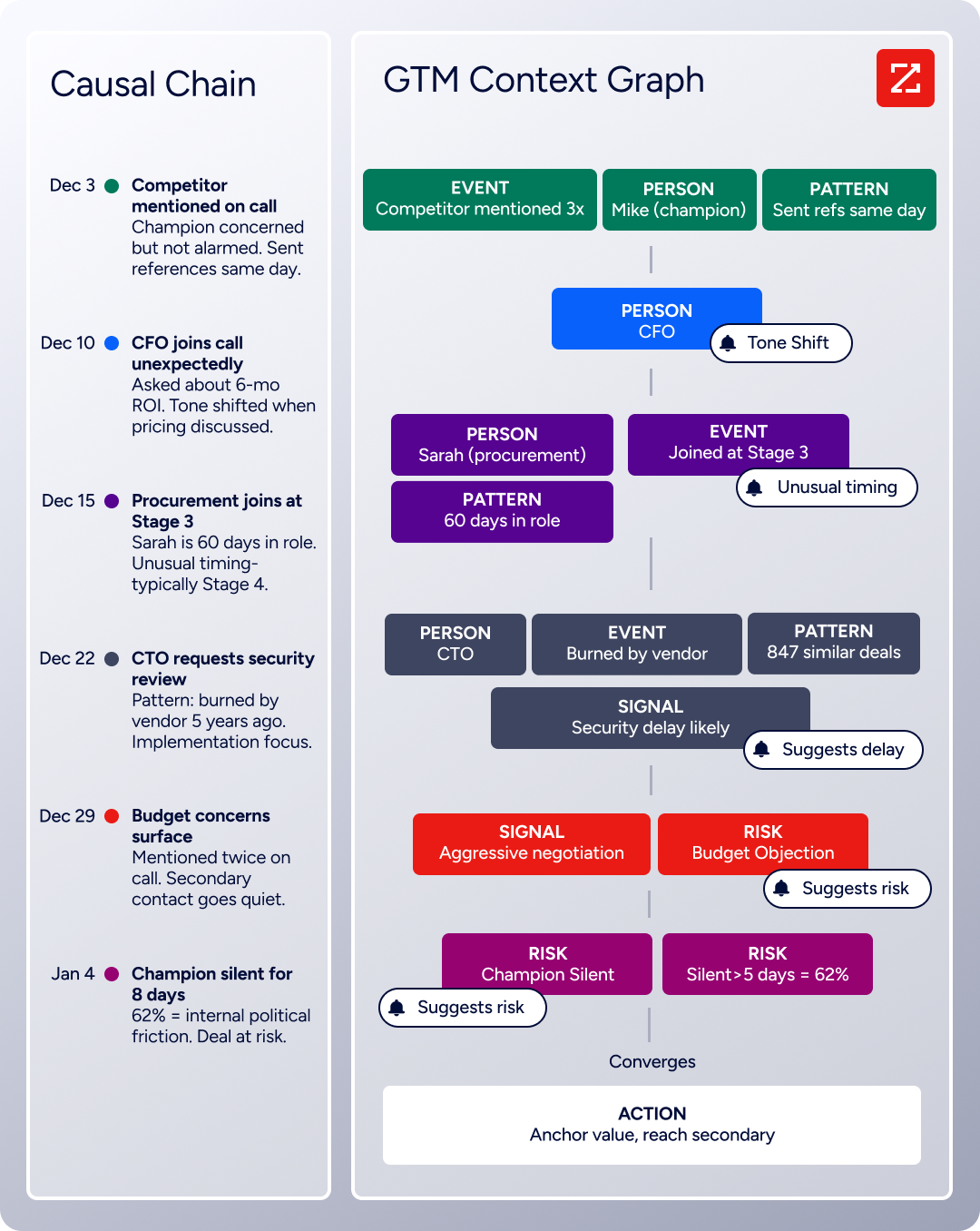
Its GTM Context Graph, an intelligence layer that processes 1.5B + data points daily, unifies this data with your CRM records, conversation transcripts, and behavioral signals to reveal the full context of your accounts (not just what happened in a deal, but why).
Source: ZoomInfo
Teams access that intelligence through GTM Workspace for sellers, GTM Studio for marketers and RevOps, or APIs and MCP in any front-end, so that when a PandaDoc proposal lands, it reaches the right person at the right moment.
B2B Data That Reaches the Right Buyer: ZoomInfo provides the verified contact and company data that accurate prospecting requires.
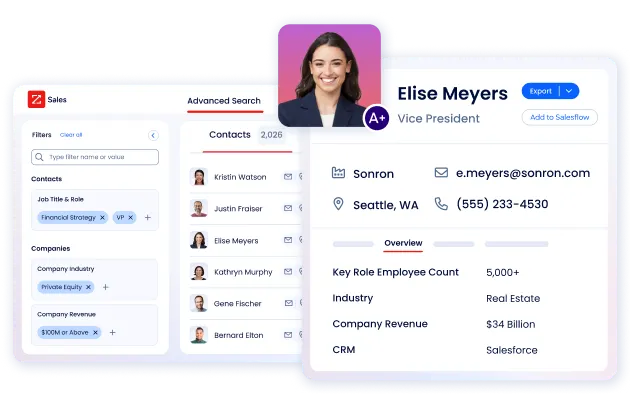
PandaDoc can create a polished proposal in minutes, but that proposal is wasted if it goes to a generic info@ address or the wrong stakeholder. ZoomInfo solves this with 120M direct-dial phone numbers and 200M+ verified business email addresses, reaching up to 95% accuracy on first-party data.
Source: ZoomInfo
Beyond contact information, ZoomInfo provides 300+ company attributes for market segmentation: firmographics, technographics, department org charts, and decision-maker hierarchies. Sales teams can identify the full buying committee before sending a proposal, then send PandaDoc documents to the right stakeholders knowing the contact data is current and verified.
The data is maintained through a multi-source pipeline backed by 300+ human researchers and continuous automated verification. In a Fortune 500 competitive RFP analyzing 25 million contacts across vendors, the independent consultant concluded that "no other competitor came even close."
"ZoomInfo gives us the information we need to execute. It's already there, so we can be three steps ahead." (Vensure)
Buyer Intent and Signal Intelligence: ZoomInfo surfaces when accounts are actively in-market, so proposals arrive when buyers are most receptive.
Sending a proposal to the right person is necessary. Sending it at the right time closes deals. ZoomInfo Intent tracks buying signals from 210 million IP-to-Organization pairings and 6 trillion+ new keyword-to-device pairings sourced monthly, identifying companies actively researching solutions in your category.

Source: ZoomInfo
Guided Intent, exclusive to ZoomInfo, identifies topics historically correlated with deal success rather than requiring manual topic selection. WebSights resolves anonymous website traffic to companies, including buying team identification, with Automatic Traffic Filtering that distinguishes real visitors from bots.

Source: ZoomInfo
For PandaDoc users, this shifts the document workflow from reactive to proactive. Instead of waiting for a prospect to request a proposal, sales teams can prepare and send personalized documents the moment ZoomInfo's signals indicate buying readiness.
Seismic attributed 39% of active pipeline to opportunities identified or influenced by ZoomInfo signals, with their sales team reporting 54% productivity gains. (Seismic)
GTM Workspace: ZoomInfo gives sellers a single workspace where account intelligence, AI-drafted outreach, and deal execution converge.
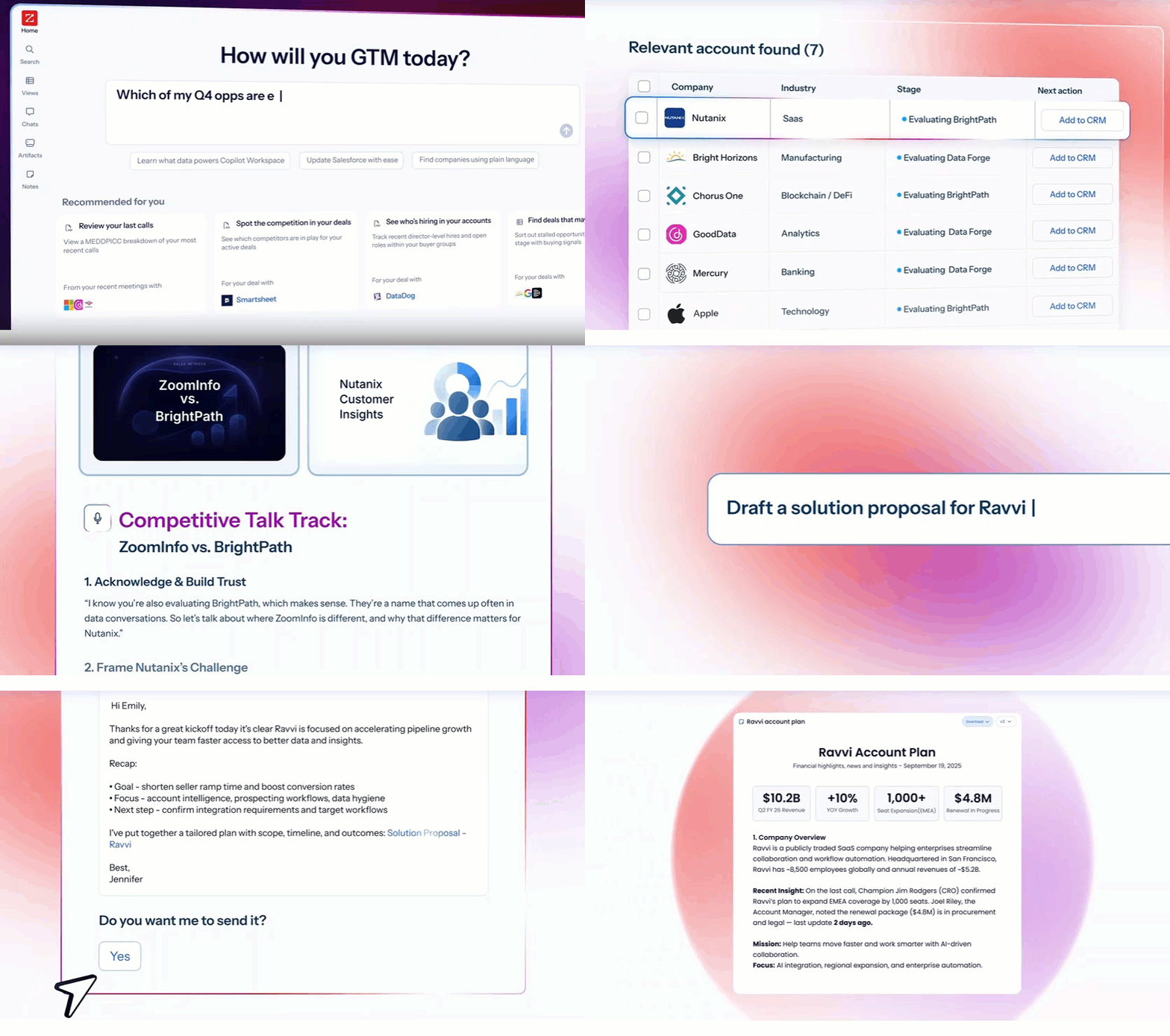
GTM Workspace is the seller's front-end to ZoomInfo's GTM Context Graph, which processes 1.5B + data points daily. The Context Graph fuses ZoomInfo's third-party intelligence with a customer's CRM records, conversation transcripts, and behavioral signals, capturing not just what happened in a deal, but why it happened.
Source: ZoomInfo
For sales teams already using PandaDoc for proposals, GTM Workspace adds the intelligence layer that precedes document creation. AI agents handle account research, generate follow-up messaging, monitor buying signals, and surface next-best actions, all within a single view that integrates with Salesforce, HubSpot, and Microsoft Dynamics.
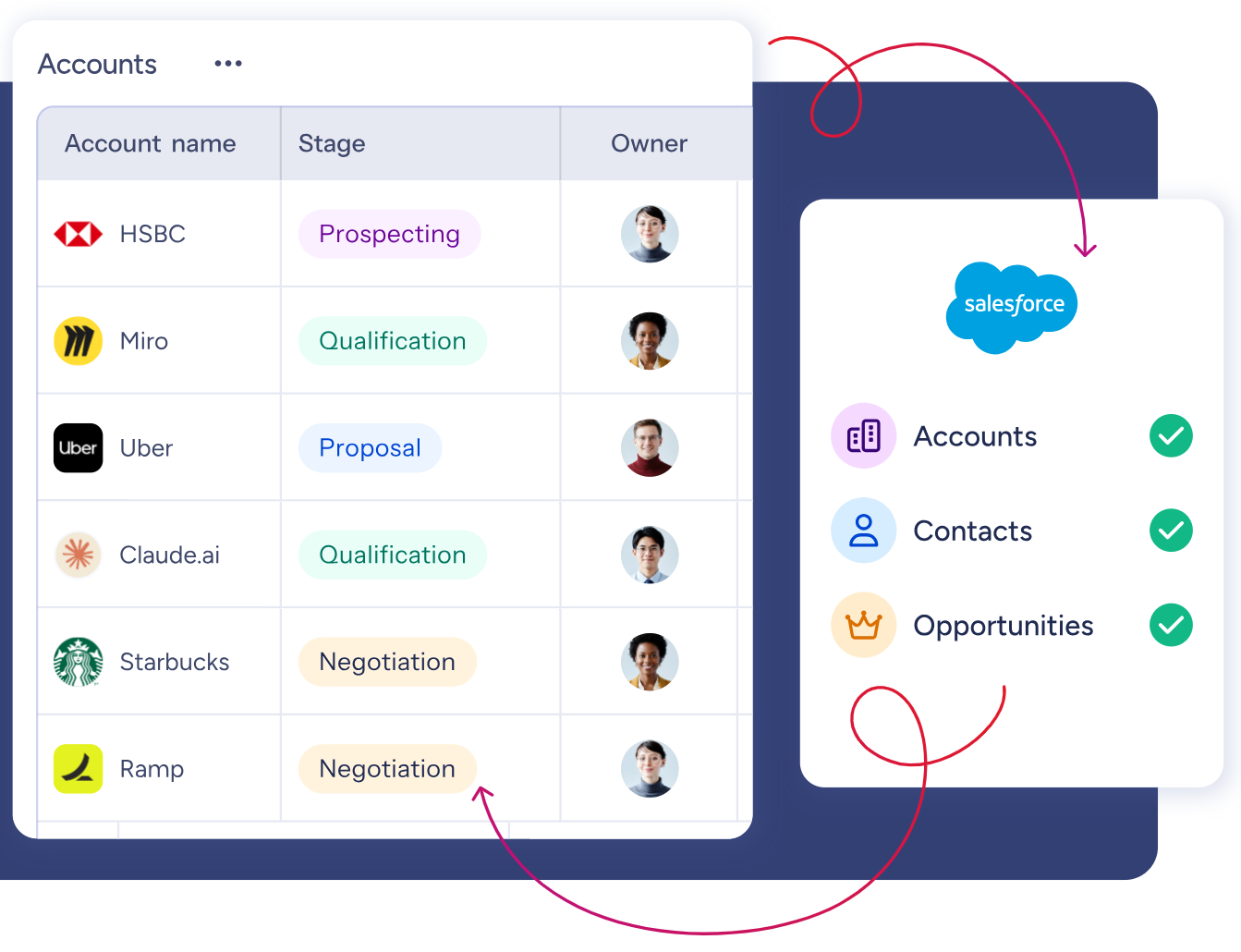
Source: ZoomInfo
The practical workflow: a seller opens GTM Workspace to a prioritized account feed where AI-drafted outreach already addresses the specific concern the AI identified as the deal-moving moment. Once the prospect is engaged and ready, the seller moves to PandaDoc to generate the proposal, quote, or contract, now informed by the full buying context ZoomInfo surfaced.
Spekit found that opportunities at higher-scoring accounts were 43% more likely to turn into qualified pipeline, moving 58% faster through qualification. (Spekit)
Universal Access: ZoomInfo's intelligence flows into any tool through APIs and MCP.
For teams that build beyond ZoomInfo's own products, APIs and MCP expose the same intelligence to any custom agent, internal tool, or partner platform. API access is included in all plans.
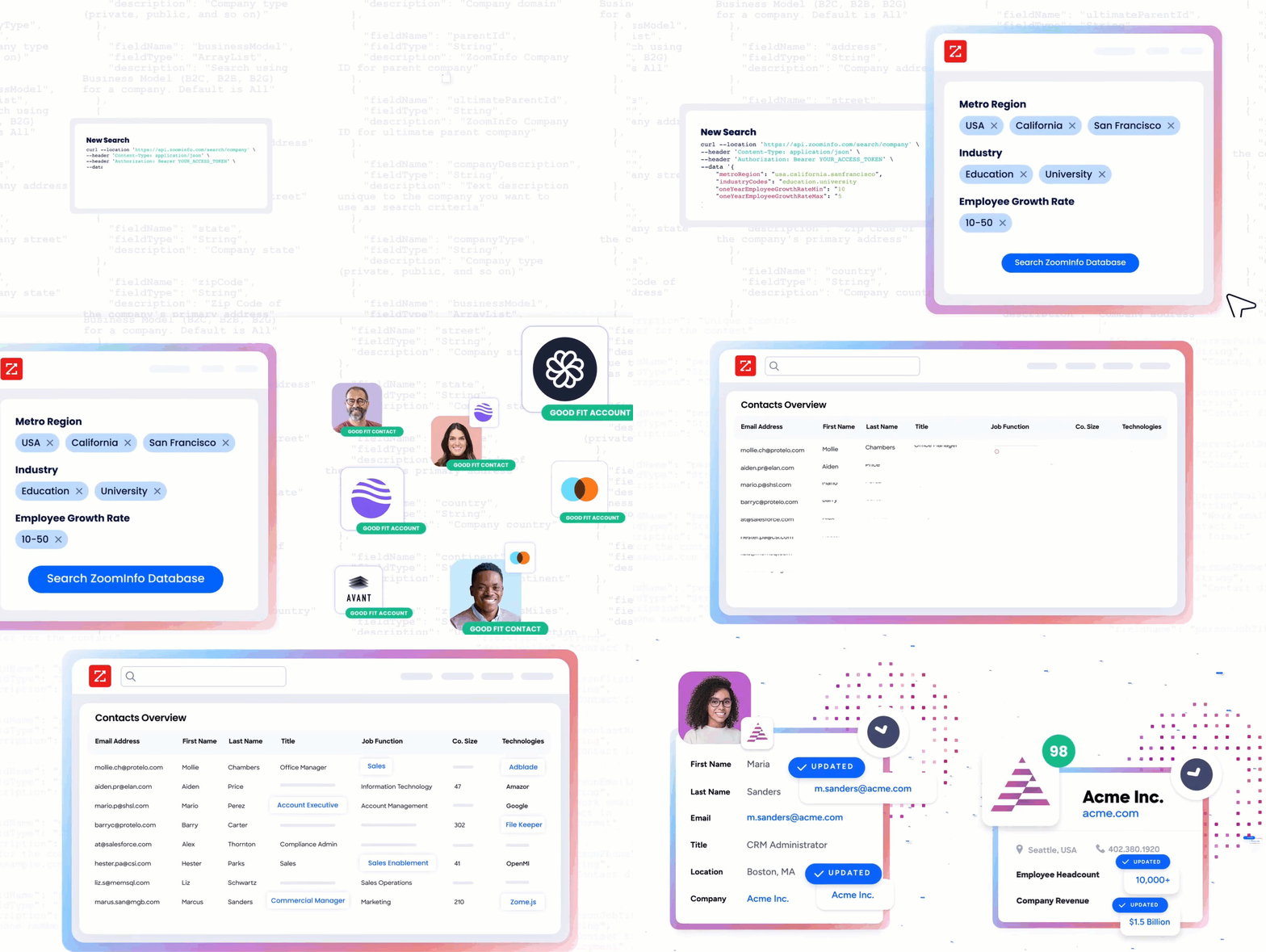
Source: ZoomInfo
The MCP server connects AI models directly to ZoomInfo's B2B data as a native tool, with no custom coding required beyond one-time server configuration. It currently supports Claude and ChatGPT, enabling natural-language access to company and contact intelligence.
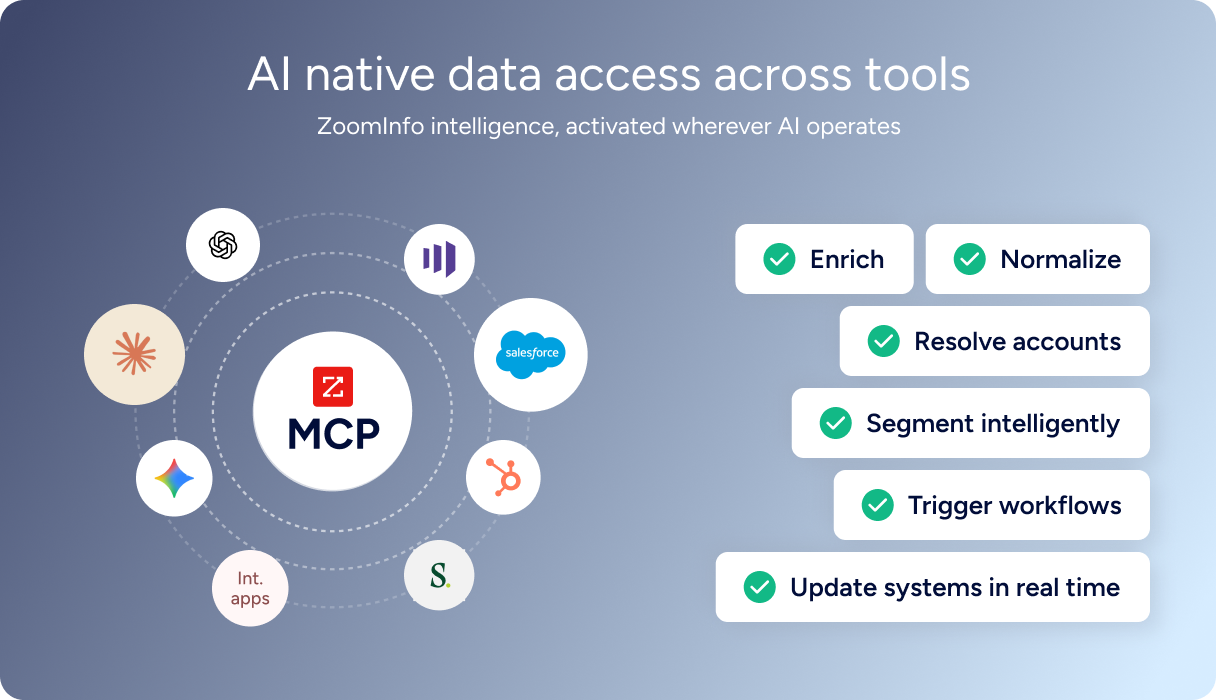
Source: ZoomInfo
GTM Studio serves marketers, RevOps, and GTM engineers with an AI-powered orchestration canvas where audience definition, campaign orchestration, and pipeline measurement happen in natural language rather than engineering tickets. Expansion plays that once took three weeks now launch in 30 minutes.
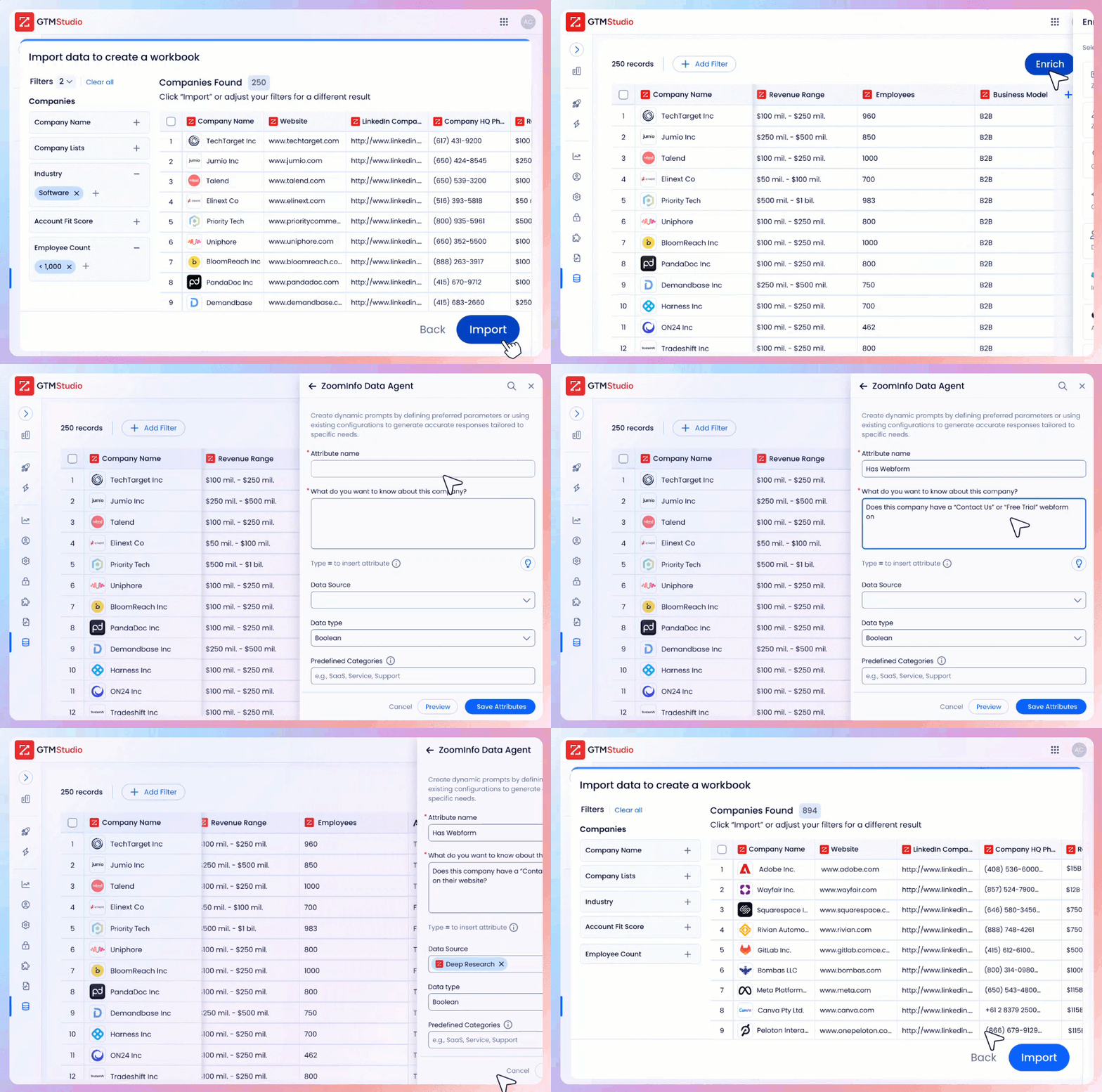
Source: ZoomInfo
"The plug-and-play aspect of the API means I can integrate it very easily into any process and get information at a moment's notice," resulting in an 87% reduction in data dashboard update time. (BDO Canada)
PandaDoc and ZoomInfo: How They Work Together
Aspect | PandaDoc | ZoomInfo |
|---|---|---|
Primary Focus | Document creation, signing, and payment | B2B data intelligence and GTM execution |
Sales Workflow Stage | Proposal through close (documents, eSignatures, CPQ) | Prospecting through engagement (data, signals, outreach) |
Core Strength | Document lifecycle platform | B2B data and buyer intelligence |
CRM Integration | Salesforce, HubSpot, Pipedrive (document sync) | Salesforce, HubSpot, Dynamics (data enrichment, signals) |
Buyer Intelligence | Document engagement analytics (views, time on page) | Intent signals, org charts, technographics, buying committees |
AI Capabilities | AI document drafting, email suggestions, data extraction | GTM Context Graph, AI agents for research and outreach |
Compliance | HIPAA, GDPR, SOC 2, eIDAS, 21 CFR Part 11 | ISO 27001, ISO 27701, SOC 2 Type II, GDPR, CCPA |
Free Tier | Free eSign plan (60 docs/year, unlimited seats) | ZoomInfo Lite (permanent, 10 monthly exports) |
Best For | Closing deals with professional documents | Finding and qualifying the right deals to close |
Final Verdict
PandaDoc and ZoomInfo cover two distinct phases of the sales cycle. They are not competitors. They are complementary tools that, used together, produce a more effective revenue operation than either delivers alone.
PandaDoc excels at turning a sales conversation into a signed contract. Its combination of document generation, CRM-integrated CPQ, eSignatures across three compliance tiers, and embedded payment collection makes it one of the most complete document automation platforms for sales teams.
The drag-and-drop editor, 1,000+ templates, and Deal Rooms give sales organizations a professional, trackable way to present, negotiate, and close. For any team that needs to move from quote to signed deal without juggling separate tools, PandaDoc delivers.
ZoomInfo ensures those documents reach the right people. Built on a large B2B data foundation, it provides the intelligence that accurate prospecting requires. The GTM Context Graph surfaces buyer intent, maps buying committees, and reveals why deals move or stall. Whether accessed through GTM Workspace, GTM Studio, or APIs and MCP, that intelligence powers every tool in the sales stack.
Get started with ZoomInfo here.
The strongest document workflow starts long before the proposal is created. ZoomInfo identifies and qualifies the buyer. PandaDoc closes the deal. Together, they connect intelligence to execution across the entire sales cycle.
PandaDoc FAQ
Is there a free version of PandaDoc?
Yes. PandaDoc offers a permanent free plan with unlimited seats for basic eSignatures. The free tier caps document sends at 60 per calendar year, limits each document to 2 recipients, and allows up to 5 saved templates. No credit card is required. CRM integrations, approval workflows, and CPQ require paid plans starting at $19/user/month on the Starter tier.
How much does PandaDoc cost?
PandaDoc offers four tiers: Free ($0, unlimited seats, eSign only), Starter ($19/user/month annual), Business ($49/seat/month annual), and Enterprise (custom pricing). All paid plans are available on monthly and annual billing, with annual plans saving up to 46%.
Document overage fees apply on Starter and Business plans ($2.00-$3.50 per additional document depending on plan and billing cadence). Enterprise adds CPQ, advanced automations, SSO, and data residency options.
Does PandaDoc integrate with Salesforce and HubSpot?
Yes. PandaDoc offers bidirectional integrations with Salesforce, HubSpot, and Pipedrive. CRM data auto-populates document fields, and document status writes back into the CRM pipeline. PandaDoc also offers dedicated CPQ solutions for all three CRMs, letting reps generate quotes without leaving their CRM. CRM integrations require the Business plan ($49/seat/month) or higher.
Can PandaDoc collect payments at signing?
Yes. PandaDoc supports embedded payment collection at the time of signature through Stripe, Square, PayPal, Authorize.net, QuickBooks Payments, and FreshBooks. Recurring Stripe billing and Stripe invoicing are also available. As of March 2026, payment functionality has been expanded to Free and Starter plans.
Does PandaDoc support contract negotiation with redlining?
No. PandaDoc does not offer native redlining or track-changes for contract negotiation. Customers who need back-and-forth markup must export to Word, negotiate externally, and reimport the document.
PandaDoc's Smart Content and conditional approval workflows provide some flexibility for standardized document variations, but for heavy negotiation workflows, dedicated CLM platforms may be more appropriate.
What compliance certifications does PandaDoc hold?
PandaDoc supports HIPAA, GDPR, SOC 2 Type II, eIDAS (including Qualified Electronic Signatures across all 27 EU member states), U.S. ESIGN Act and UETA, CCPA/CPRA, FERPA, and 21 CFR Part 11 for FDA-regulated industries. The platform runs on Amazon AWS infrastructure with encrypted storage, and Enterprise customers can select US or EU data residency.
How does PandaDoc compare to DocuSign?
PandaDoc positions itself as a broader platform than DocuSign, covering document generation, CPQ, Deal Rooms, and payment collection alongside eSignatures. PandaDoc offers unlimited document sends on paid plans (no per-envelope fees), a free plan with unlimited seats, and outcome-based pricing on the Enterprise tier.
PandaDoc holds G2's number one ranking in proposals, eSignature, and contract management. The trade-off: DocuSign has deeper enterprise CLM capabilities and a larger market presence in pure eSignature workflows.
Does PandaDoc help with finding prospects or buyer intelligence?
No. PandaDoc focuses on the document side of the sales process. It does not provide prospecting tools, buyer intent data, contact databases, or account intelligence. Sales teams that need to identify the right buyers and understand when accounts are in-market before creating proposals should pair PandaDoc with a dedicated GTM intelligence platform like ZoomInfo.
Related breakdowns to help you choose:
