
Choosing between PandaDoc and Docusign for your document workflows often comes down to five questions:
Do you need a tool that creates proposals and quotes, or one that handles signatures on documents you've already built?
Is per-seat pricing with unlimited sends more predictable for your team than paying per envelope?
How important is it that your reps can generate quotes and collect payment without leaving your CRM?
Do you need basic eSignature or a full contract lifecycle management platform with AI-powered agreement intelligence?
Are you spending more time finding the right prospects to send documents to, or wrestling with the documents themselves?
In short, here's what we recommend:
PandaDoc is built for sales teams that want to create, send, track, and sign documents in one place. Its drag-and-drop editor, 1,000+ templates, and native CPQ integrations with Salesforce, HubSpot, and Pipedrive let reps build personalized proposals and collect signatures without switching tools. PandaDoc includes unlimited document sends on paid plans, embedded payment collection, and engagement analytics that show when a prospect opens your proposal and how long they spend on each page. The trade-off: its editor can feel imprecise with complex layouts, it lacks native redlining for contract negotiation, and features like SSO and CPQ require the top-tier plan.
Docusign is the standard for electronic signatures, used by 1.7 million customers including 95% of Fortune 500 companies. Its strength is executing and managing agreements at scale, with compliance coverage across 180+ countries, advanced identity verification, and a new Intelligent Agreement Management (IAM) platform that uses AI to analyze contract portfolios, flag risks, and automate post-signature obligations. Docusign is the safer choice for regulated industries and complex, multi-party agreements. The trade-off: it cannot create documents from scratch, its envelope-based pricing penalizes high-volume senders, and the full power of IAM and CLM requires enterprise-level investment.
Both platforms handle document execution well. But neither solves a problem that sits upstream of every proposal and contract: knowing which prospects are worth sending documents to in the first place. A perfect proposal sent to the wrong buyer is still a wasted proposal.
ZoomInfo is a B2B GTM platform that helps your team identify the right buyers before a single document gets drafted. Built on a large B2B data set (500M contacts, 100M companies, 135M+ verified phone numbers, 200M+ verified business email addresses), ZoomInfo's GTM Context Graph combines this data with your CRM records, conversation transcripts, and behavioral signals to reveal which accounts are actively in-market and which contacts influence buying decisions. Whether your reps use PandaDoc or Docusign to close deals, ZoomInfo makes sure those deals start with the right audience. Your team can access this intelligence through the GTM Workspace for sellers, GTM Studio for marketers and RevOps, or APIs and MCP in any front-end.
If identifying the right prospects and timing your outreach matters as much as the documents you send, see how ZoomInfo works.
PandaDoc vs. Docusign at a glance
PandaDoc | Docusign | ZoomInfo | |
|---|---|---|---|
Primary strength | Document creation + eSignature + CPQ | eSignature + agreement lifecycle management | B2B prospect intelligence + GTM execution |
Document creation | Full drag-and-drop editor with templates | No native creation; upload existing files | N/A (feeds prospect data into your document tools) |
Pricing model | Per seat, unlimited sends on paid plans | Per seat with envelope caps (100/user/year on Standard) | Custom consumption-based pricing |
Starting price | Free plan; $19/user/month (Starter) | $10/month (Personal, 1 user) | Free tier (ZoomInfo Lite); paid plans custom-quoted |
CRM integration | HubSpot, Salesforce, Pipedrive (with CPQ) | Salesforce, Dynamics 365 (enterprise plans only) | Salesforce, HubSpot, Dynamics 365 (all tiers) |
Payment collection | Stripe, Square, PayPal at signing | Stripe at signing | N/A |
AI capabilities | AI writing assistance, data extraction (beta) | Iris AI: contract review, risk flagging, agentic workflows | GTM Context Graph: buyer intent, account intelligence, AI-drafted outreach |
Compliance | SOC 2, HIPAA, GDPR, eIDAS, 21 CFR Part 11 | ISO 27001, SOC 2, FedRAMP, HIPAA, eIDAS (QES), 21 CFR Part 11 | ISO 27001, ISO 27701, SOC 2, GDPR, CCPA |
Best for | Sales teams creating proposals, quotes, and contracts | Enterprises managing high-stakes agreements at scale | Teams that need to find the right buyers before sending documents |
Document creation separates PandaDoc from Docusign
This is the most important difference between the two platforms, and it shapes everything else.
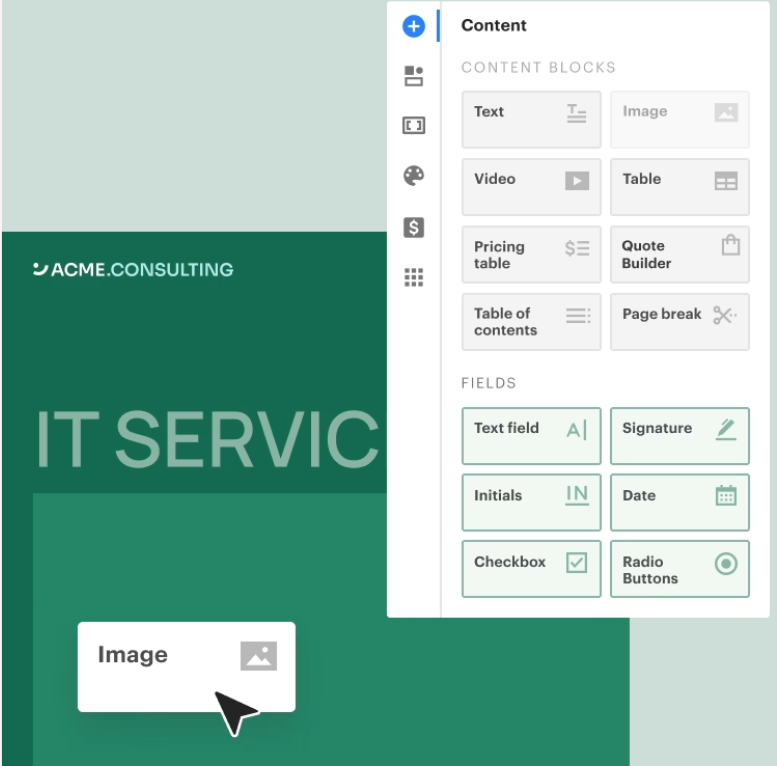
PandaDoc lets you build documents from scratch. Its drag-and-drop editor uses content blocks (text, images, videos, pricing tables, signature fields) that you arrange in a browser-based workspace. You can start from a blank canvas, choose from 1,000+ templates, or import a Word file.
Source: PandaDoc
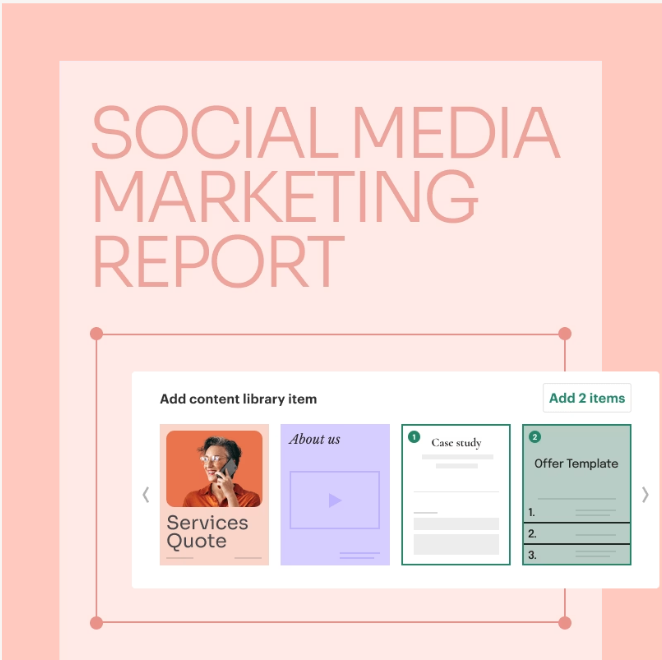
A content library stores reusable sections, legal clauses, case studies, and brand assets so reps assemble proposals from approved components rather than copying from last quarter's deal.
Source: PandaDoc
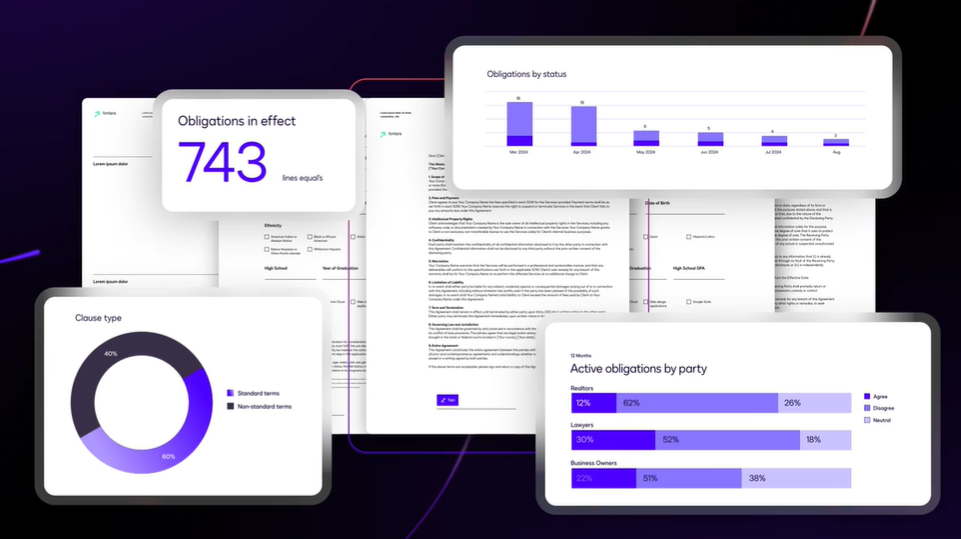
Docusign cannot create documents. You upload a PDF, Word file, or other existing document, then place signature fields and form tags on it. The platform assumes your document already exists and focuses on getting it signed, tracked, and stored.
Source: Docusign
For teams that draft contracts in Microsoft Word or generate documents from their CRM, this works fine. For teams that want to build proposals, quotes, or sales agreements from scratch inside their document tool, it's a gap.
This distinction matters most for sales teams. A rep using PandaDoc can open a deal in HubSpot, generate a branded proposal with pricing tables pulled from the CRM, add a case study from the content library, and send it for signature, all without opening another application. A rep using Docusign needs to create that proposal somewhere else first, then upload it for signing.
Docusign's answer to the creation gap is Agreement Preparation, part of its IAM platform. It handles template management and automated document generation from connected systems, but it's available only on IAM plans starting at $45/user/month, and it's still template-driven rather than a freeform editor.
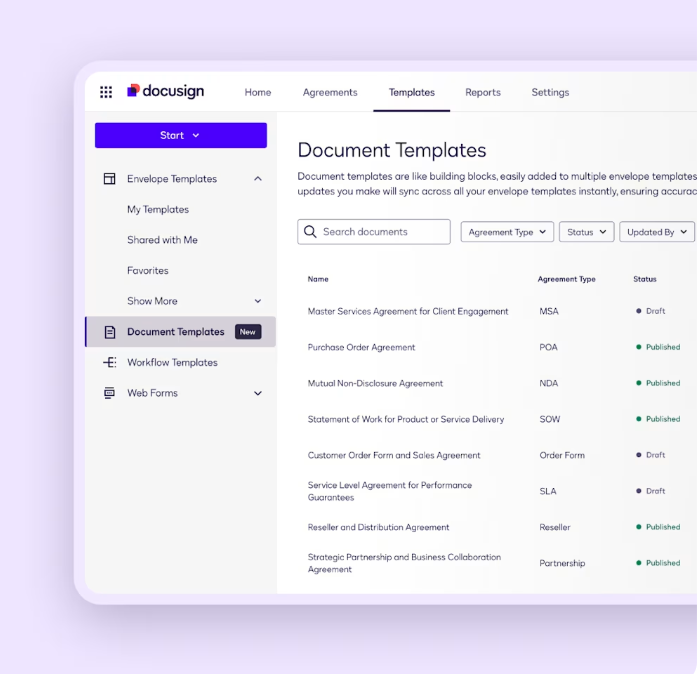
Source: Docusign
Pricing models reward different usage patterns
The pricing structures tell you who each platform was built for.
PandaDoc charges per seat with unlimited document sends on paid plans. The Starter plan at $19/user/month gives you document creation, eSignature, and an audit trail. The Business plan at $49/seat/month adds CRM integrations, approval workflows, and bulk send. Enterprise pricing is custom and includes CPQ, SSO, and advanced automations.
There's also a permanent free plan with unlimited seats for basic eSignature, capped at 60 documents per year.
The unlimited-send model means a sales team of 10 reps sending 50 proposals each per month pays the same as a team sending 5. For high-volume sales organizations, the math favors PandaDoc.
Docusign charges per seat but caps envelope volume. The Standard plan at $25/user/month includes 100 envelopes per user per year. The Business Pro plan at $40/user/month keeps the same 100-envelope cap but adds web forms, payment collection, and bulk send. Exceed those 100 envelopes and you pay overage charges.
Docusign's IAM plans remove the envelope cap for web-app sends. IAM Standard starts at $50/user/month (3-user minimum) with unlimited envelopes through the web app, AI-powered agreement search and analysis, and the Workflow Builder.
IAM Professional at $80/user/month adds the full Business Pro feature set plus expanded workflows. One important footnote: unlimited envelopes on IAM plans apply only to web-app sends. API-sent envelopes are counted separately.
For a 15-person sales team sending moderate volume, PandaDoc Business costs $8,820/year. Docusign Standard costs $4,500/year but limits the team to 1,500 total envelopes. If the team needs 3,000 envelopes, they're either upgrading to IAM Standard ($9,000/year with 3-user minimum) or paying overages.
The hidden cost in Docusign's model is the features gated behind enterprise plans. SSO, Salesforce integration, conditional routing, HIPAA compliance, and 24/7 support all require the Enhanced plan, which is custom-quoted. PandaDoc gates SSO, CPQ, and custom roles at its Enterprise tier, but CRM integrations are available starting at Business.
CRM integration depth matters for sales velocity
Both platforms integrate with major CRMs, but PandaDoc goes deeper into the quoting workflow.
PandaDoc's native integrations with HubSpot, Salesforce, and Pipedrive include bidirectional data sync. When a rep creates a document from a CRM record, PandaDoc pulls in deal data, contact information, and product line items. When the document is signed, PandaDoc writes the status back to the CRM, updating the deal stage automatically.
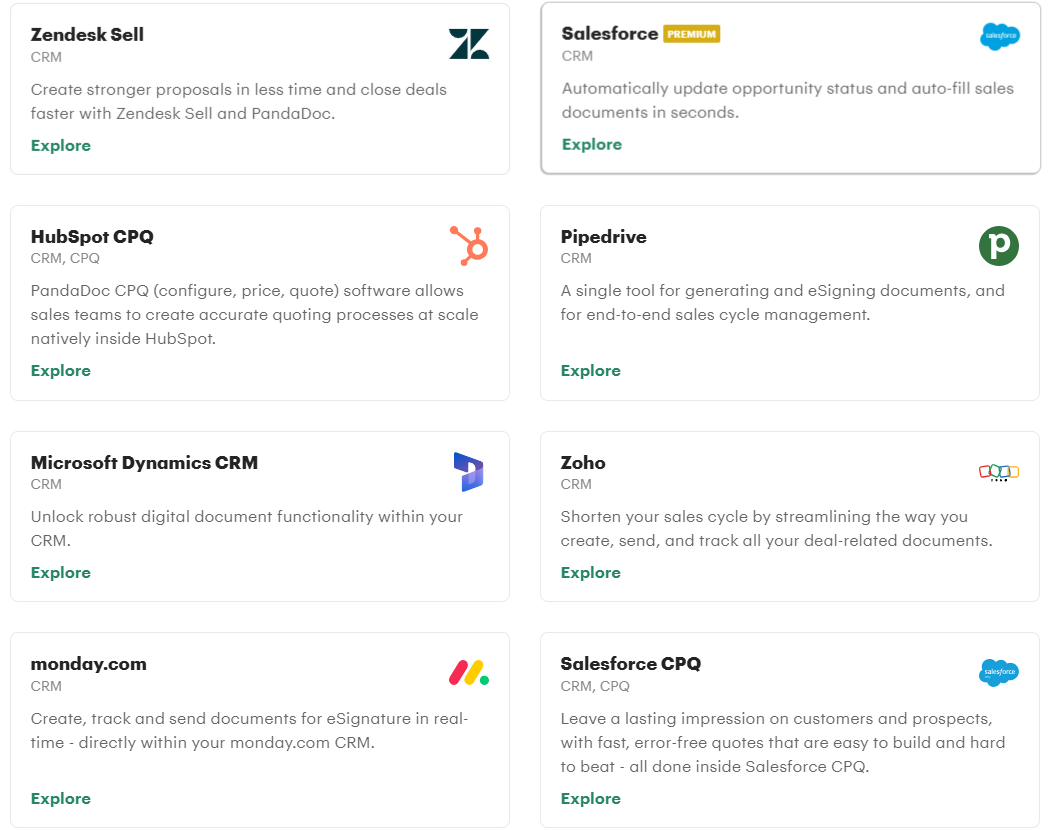
Source: PandaDoc
PandaDoc also offers dedicated CPQ (Configure, Price, Quote) functionality for all three CRMs. Reps select products from a centralized catalog, apply pricing rules and discount guardrails, generate a quote, send it for signature, and collect payment, all within their CRM.
The CPQ includes a rules engine with conditional logic, guided selling questionnaires, and approval workflows that trigger when discount thresholds are exceeded.
Docusign integrates with Salesforce, Microsoft Dynamics 365, and 1,000+ other applications. The Salesforce integration is the deepest, supporting document generation from CRM records, in-Salesforce sending and tracking, and real-time status updates.
But there's an important limitation: Salesforce, Dynamics 365, and NetSuite integrations require the Enhanced plan. Standard and Business Pro users don't get native CRM connectivity.
Docusign's IAM for Sales product goes further by embedding contract generation, approval workflows, and agreement insights inside Salesforce and Dynamics 365. Kindsight shortened its sales cycle by up to one week using IAM for Sales. But this capability sits at the enterprise tier, where pricing is custom-quoted.
For mid-market sales teams on HubSpot or Pipedrive, PandaDoc's CRM integration is available at a lower price point and includes CPQ. For enterprises on Salesforce with the budget for Docusign's Enhanced or IAM plans, Docusign's deeper integration and agreement intelligence may justify the premium.
Contract lifecycle management is Docusign's enterprise advantage
PandaDoc handles the front half of the document lifecycle well: creation, sending, signing, and tracking. Docusign handles the full lifecycle, including what happens after the signature.
Docusign CLM manages contracts from initial request through drafting, negotiation, execution, and post-signature obligation tracking. Legal teams define clause libraries with conditional rules, route contracts through multi-tier approval chains, and use Iris AI to review agreements against custom playbooks, flagging non-compliant language and suggesting approved alternatives.
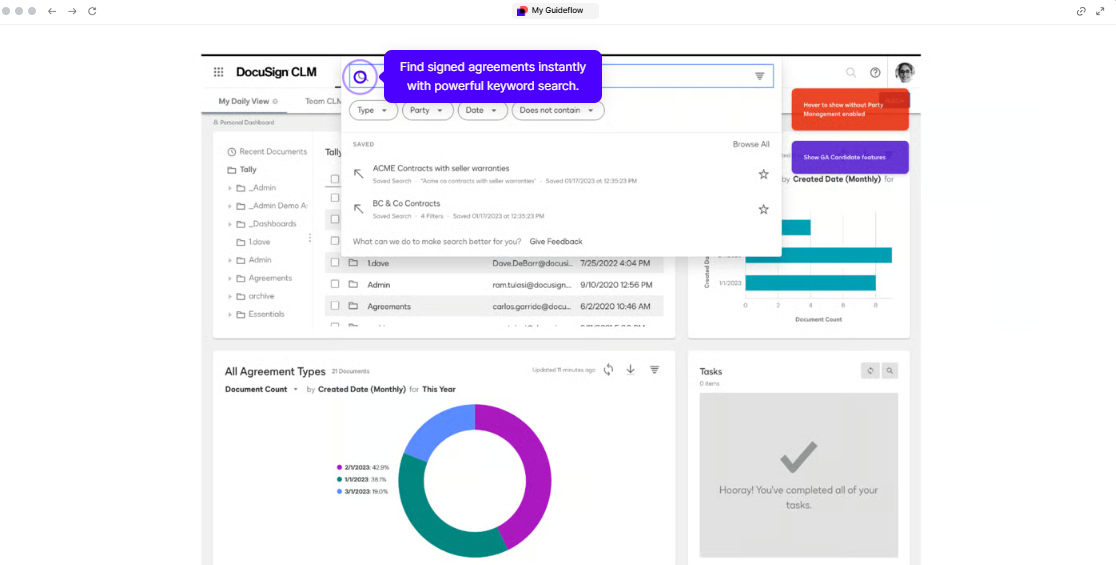
Source: Docusign
After signing, the Agreement Manager ingests contracts into a centralized repository where AI extracts key dates, financial terms, and obligations.
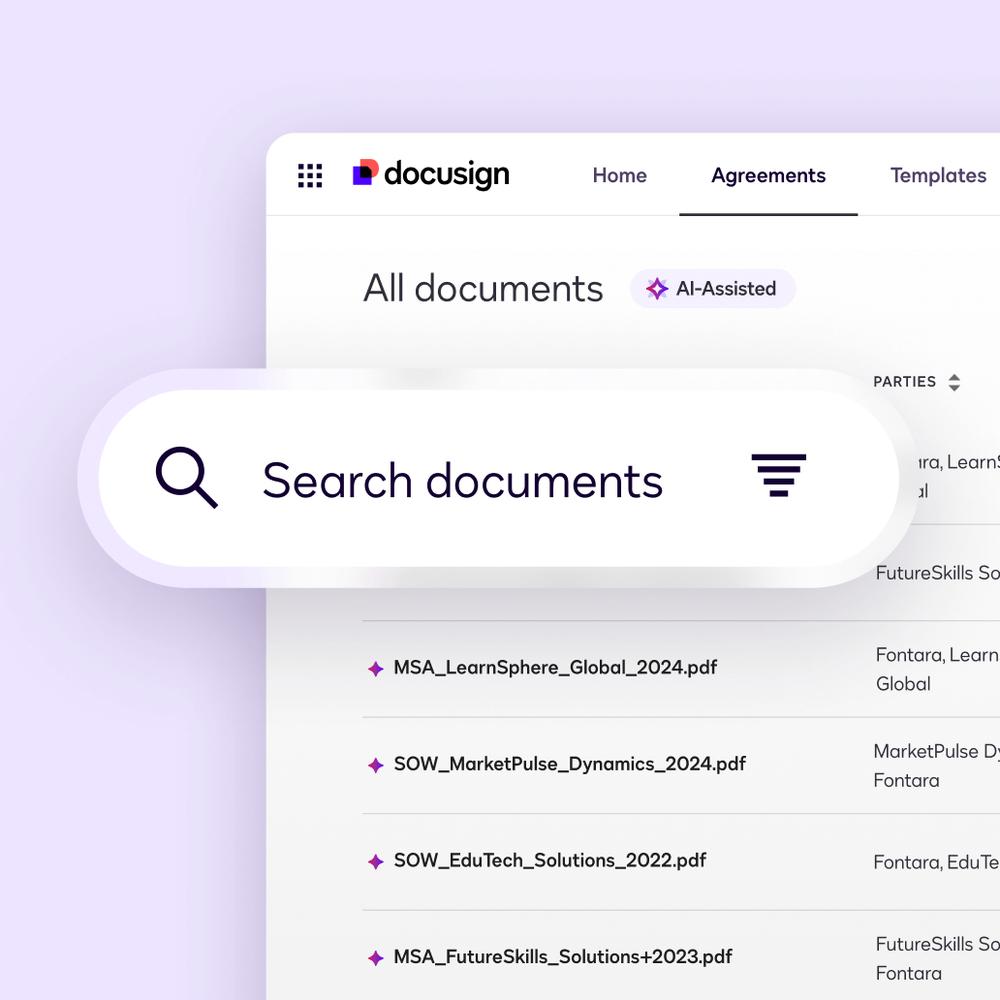
Source: Docusign
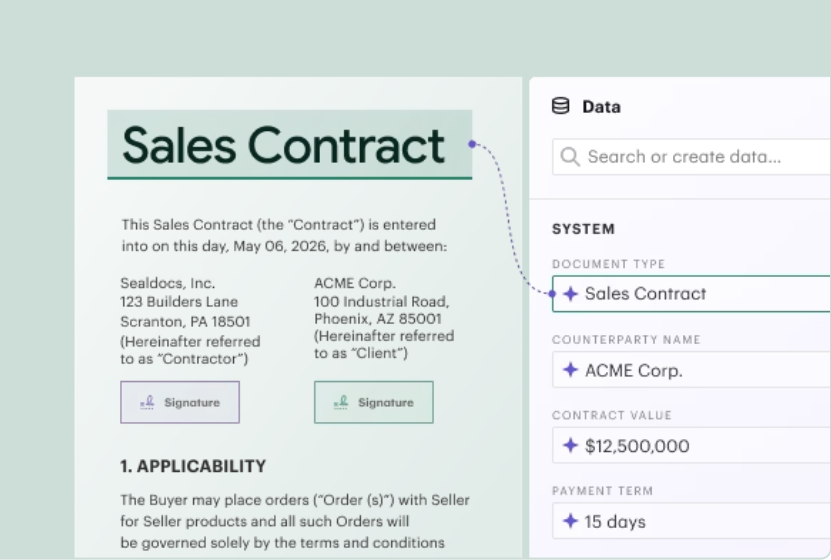
PandaDoc has contract management features (a document repository, approval workflows, and AI-powered renewal date capture), but it lacks the depth legal teams at large organizations need. There's no native redlining or track-changes for contract negotiation, no clause library with conditional governance, and no post-signature obligation tracking beyond renewal reminders.
Source: PandaDoc
Teams needing back-and-forth contract markup must export to Word, negotiate externally, and reimport.
For companies where the legal team manages hundreds of active contracts with compliance obligations, renewal deadlines, and multi-party amendments, Docusign's CLM is the stronger platform. For sales-led organizations where the primary workflow is creating proposals, getting them signed, and moving to the next deal, PandaDoc covers what's needed without the CLM overhead.
AI capabilities serve different stages of the agreement process
Both platforms have invested in AI, but with different goals.
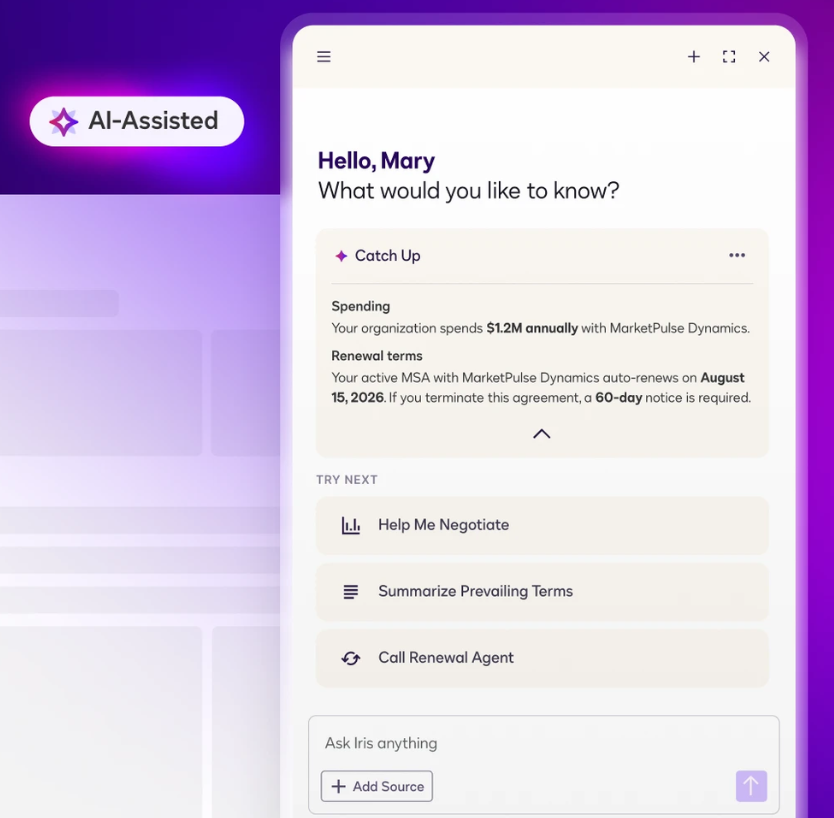
Docusign's Iris AI is trained on agreement data accumulated over two decades. It performs automated contract review, flagging risky clauses and suggesting approved alternatives. It extracts structured data from unstructured contract text (key dates, party names, financial terms) across an organization's entire agreement portfolio.
Source: Docusign
The latest evolution includes agentic capabilities: AI agents that execute agreement tasks on their own, including redlining, intake triage, and vendor renewal management.
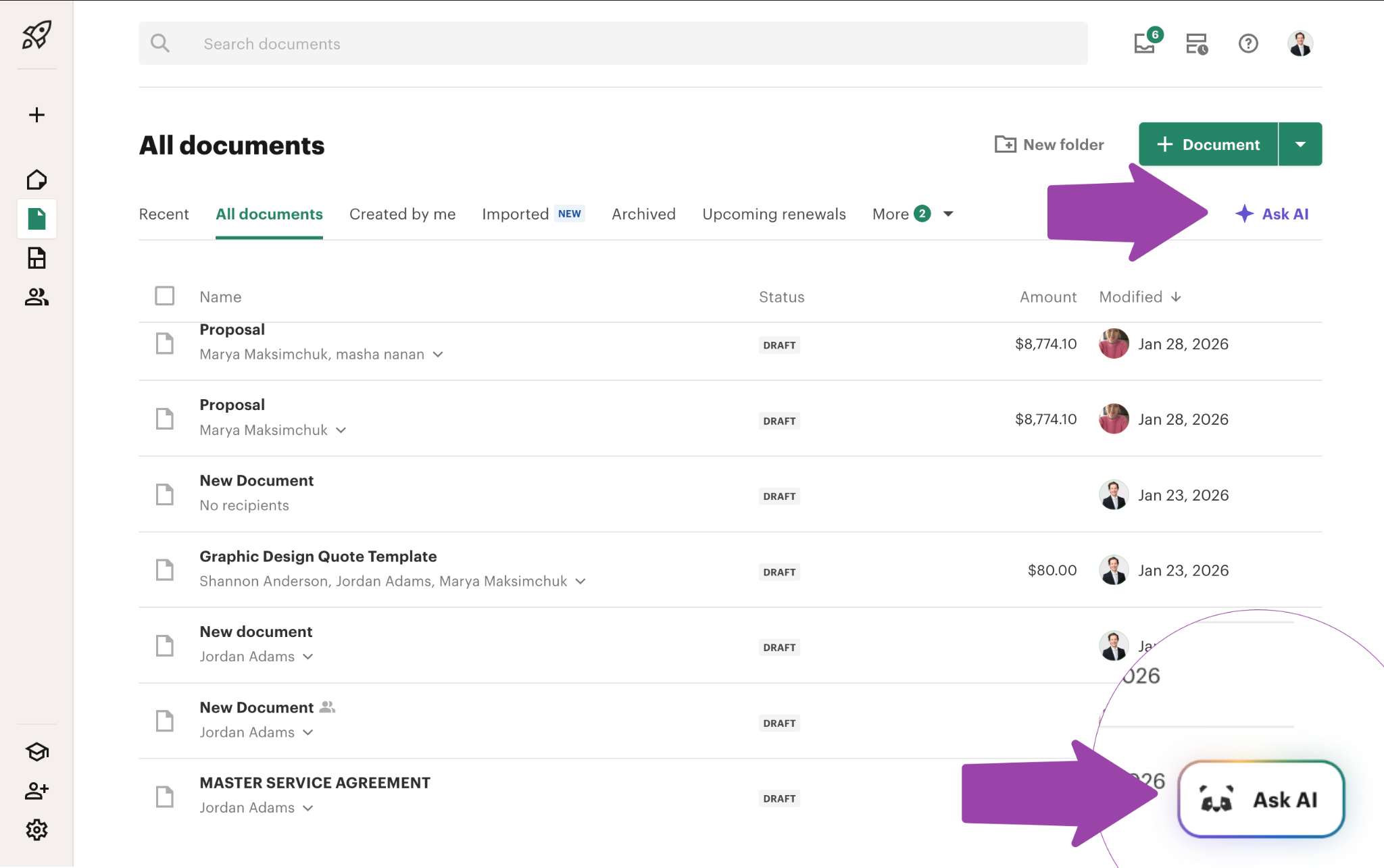
PandaDoc's AI focuses on creation. It offers AI writing assistance for drafting and refining document copy, AI email suggestions at send time, and AI data extraction (beta) that captures contract dates, terms, and values for repository analytics.
Source: PandaDoc
PandaDoc has also launched an MCP server that allows AI agents to create documents and send them for signature via natural language prompts.
Docusign's AI is more mature for post-signature intelligence and legal workflow automation. PandaDoc's AI is more practical at the document creation stage. Neither platform's AI solves a different problem: knowing which accounts are actively in-market and which contacts to target before a document is ever created.
ZoomInfo solves the problem that comes before the first document
PandaDoc and Docusign both assume you know who you're sending documents to. ZoomInfo answers the question that precedes every proposal: who should receive it, and when.
ZoomInfo's GTM Context Graph processes 1.5B+ data points daily, combining its third-party B2B intelligence with your CRM records, conversation transcripts, and engagement signals. The result is a layer that captures not just that a prospect exists, but that they're actively researching solutions, that a new VP just joined their team, and that their company's tech stack signals a fit for your product.
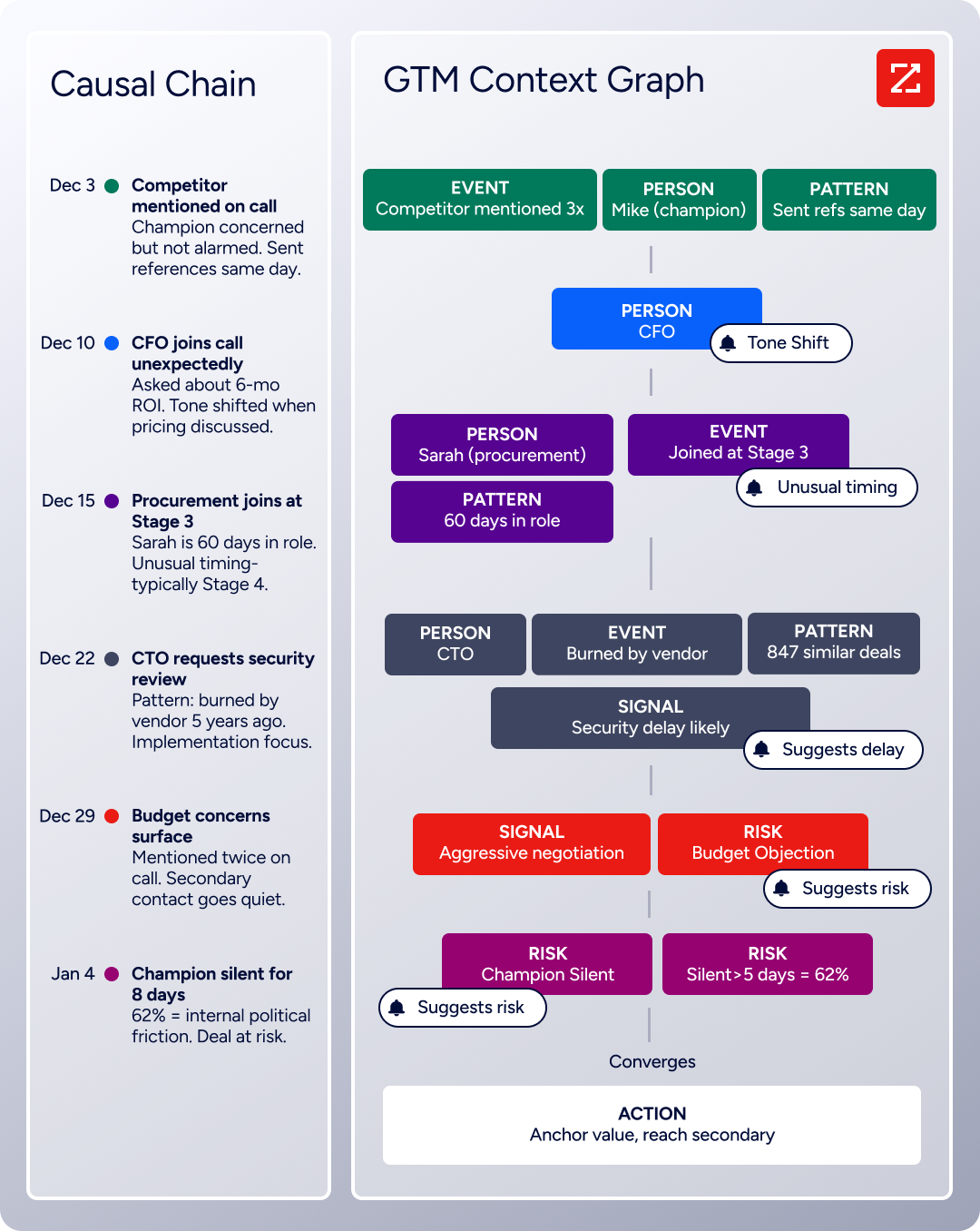
For sales teams using PandaDoc or Docusign, ZoomInfo's value shows up at two moments.
Before the proposal. ZoomInfo identifies which accounts show buying intent and surfaces the right contacts within those accounts. Buyer Intent data tracks signals from 210 million IP-to-Organization pairings, and Guided Intent identifies topics historically correlated with deal success rather than requiring manual topic selection.
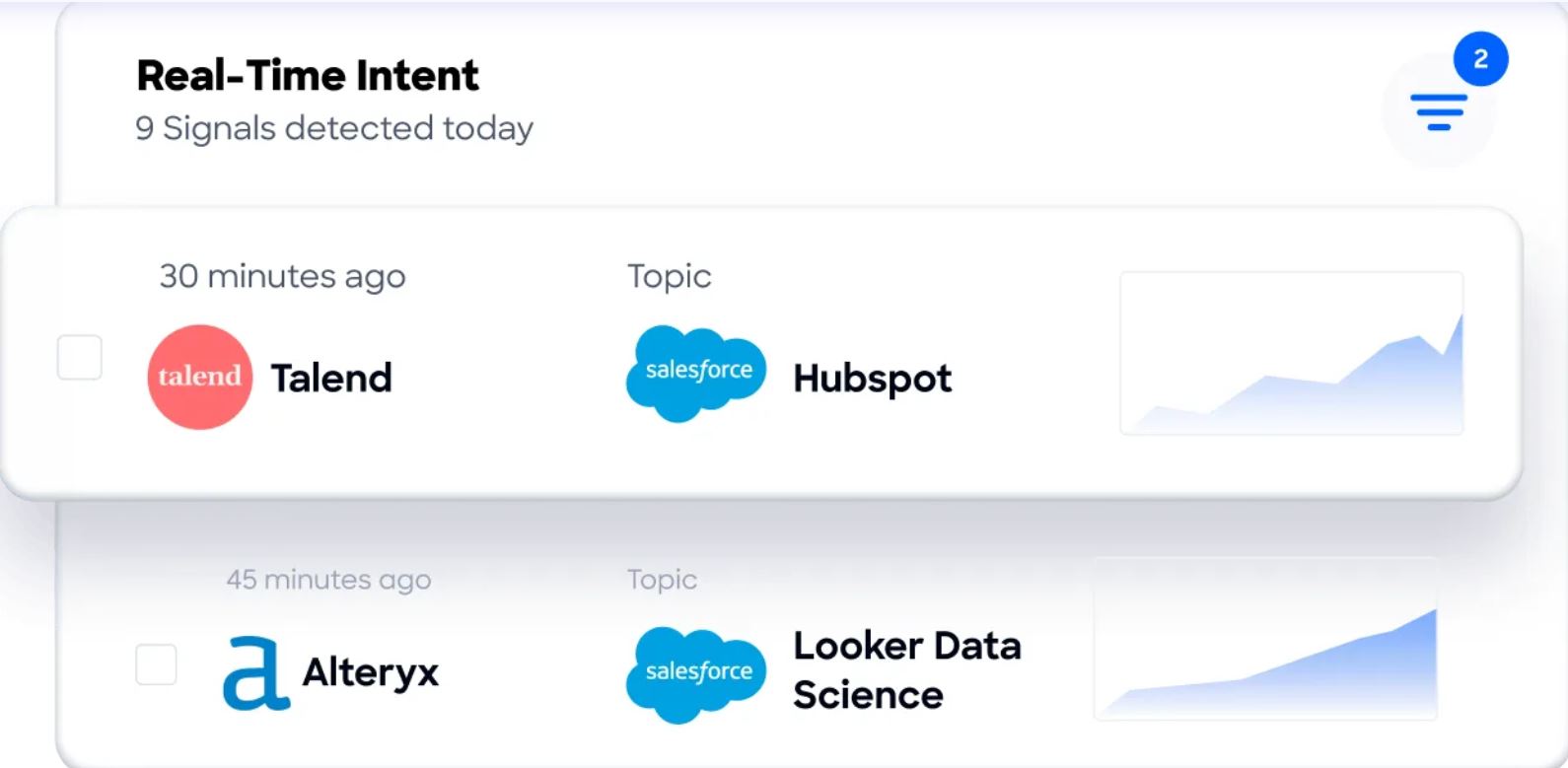
Sellers in GTM Workspace see prioritized accounts with AI-drafted outreach that addresses the specific signals driving engagement. When that outreach converts to a meeting, the rep already has the context to build a targeted proposal in PandaDoc or Docusign.
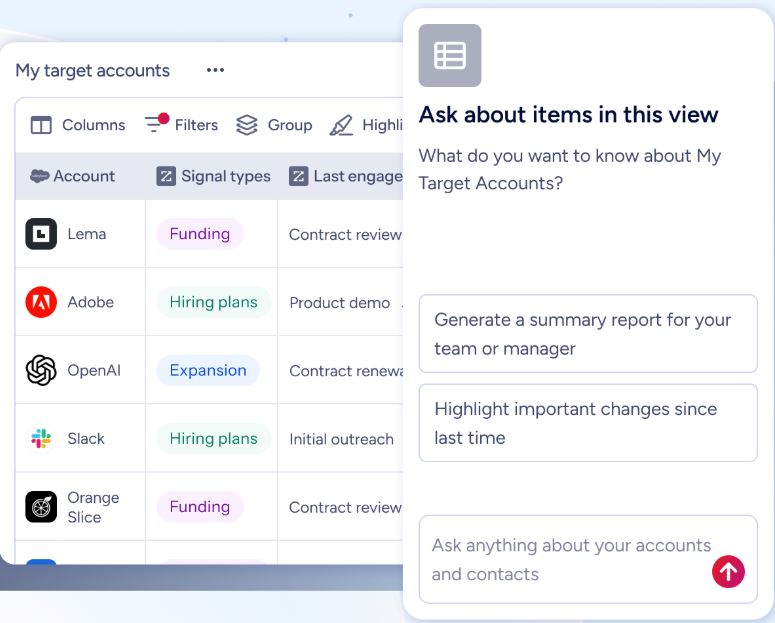
During the deal. ZoomInfo's org chart data and buying group intelligence help sellers identify hidden stakeholders who need to sign off on an agreement. Rather than sending a contract to one champion and hoping it gets forwarded, reps can build a complete stakeholder map and route the right documents to the right people.
Seismic's sales team attributed 39% of active pipeline to opportunities identified or influenced by ZoomInfo signals, boosting productivity by 54% and saving 11.5 hours per week. (Seismic Case Study)
ZoomInfo integrates with the same CRMs that PandaDoc and Docusign connect to (Salesforce, HubSpot, Microsoft Dynamics 365), so prospect intelligence flows into CRM records where your document tools can pull it into proposals and contracts.
"It's not just the data itself. It's more about the right data at the right time to help us reach out with the right message across that full buyer journey." — Chelsea Kenyon, Senior Director of Digital Strategy, Redwood Logistics (Redwood Logistics Case Study)
Compliance and security for regulated industries
Both document platforms offer solid compliance coverage, but Docusign goes wider.
Docusign holds ISO 27001, SOC 1 and SOC 2 Type II, PCI DSS, and FedRAMP Moderate authorization. It supports eIDAS signatures at all three levels (simple, advanced, and qualified) and is an EU Qualified Trust Service Provider. For government agencies, Docusign Federal carries FedRAMP Moderate and DISA IL4 provisional authorization. The platform operates in 180+ countries with a 99.99% uptime SLA.
PandaDoc holds SOC 2 Type II, HIPAA, GDPR, eIDAS (including QES), CCPA, and FERPA certifications. It added 21 CFR Part 11 compliance for FDA-regulated industries in 2025. PandaDoc does not hold FedRAMP authorization or the breadth of government certifications that Docusign carries.
For financial services, government, and healthcare organizations under strict regulatory mandates, Docusign's compliance portfolio is broader and more attested. For most B2B SaaS, professional services, and mid-market companies, PandaDoc's compliance coverage is sufficient.
The signer experience affects completion rates
Getting a document signed quickly depends on how easy the signing experience is for the recipient.
Docusign's signer experience benefits from brand recognition. 84% of signers say they are more likely to continue doing business with a company that uses Docusign. Recipients don't need a Docusign account to sign, the interface works on any device, and Responsive Signing reformats documents for mobile screens.
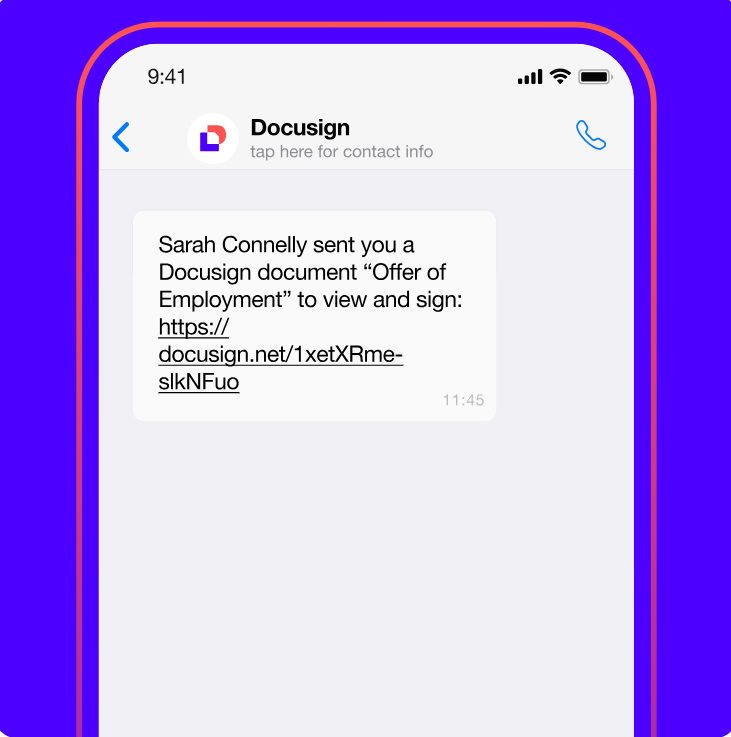
Docusign also offers Multi-channel Delivery via SMS and WhatsApp, with SMS-delivered agreements completing 65% faster than email. Signers can use AI-Assisted Summary and Q&A to understand what they're signing before committing.
Source: Docusign
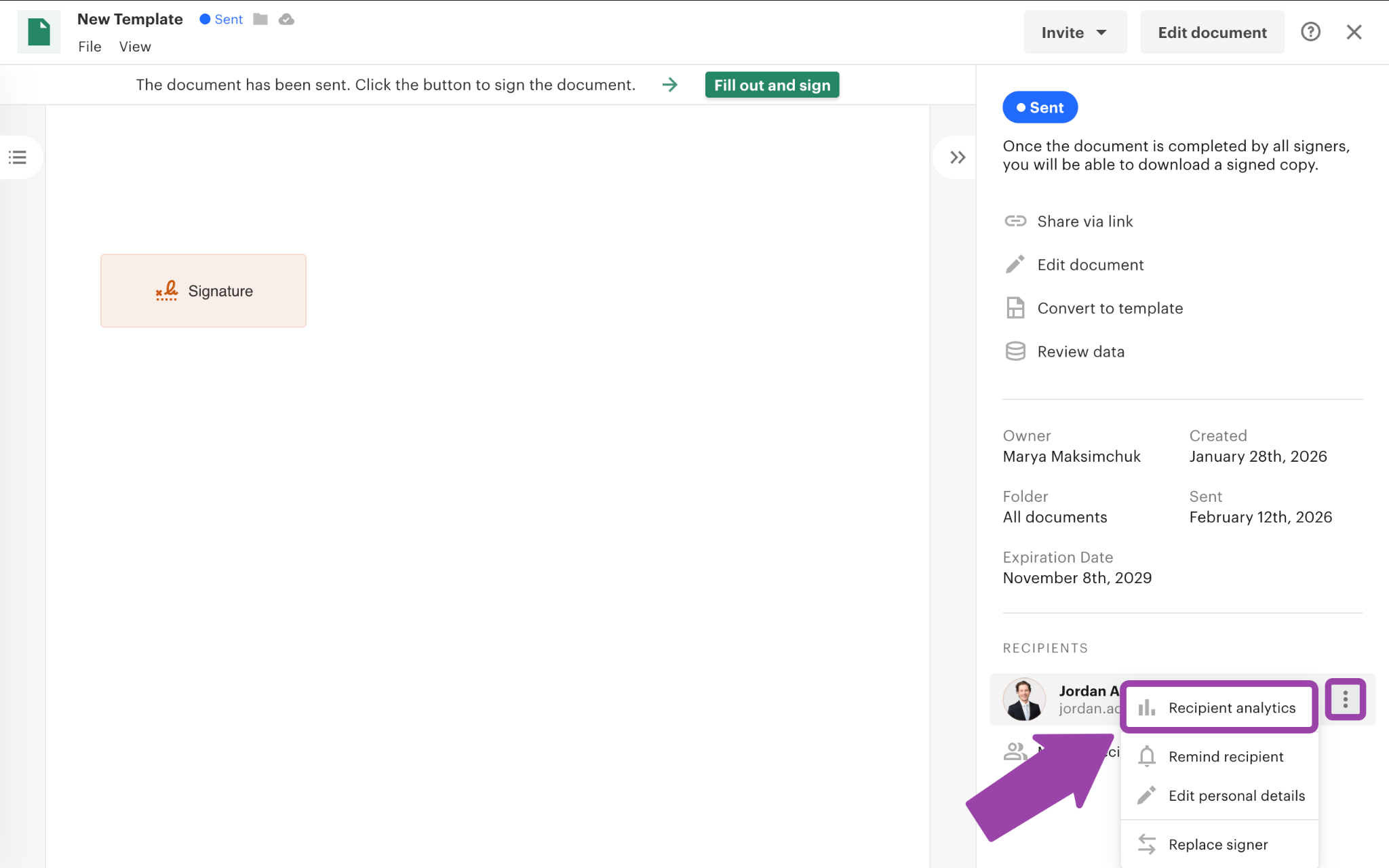
PandaDoc's signer experience is similarly smooth: no account creation required, works on any device, and supports in-person signing on shared devices. PandaDoc goes further with post-send engagement analytics. Document Insights shows page-by-page engagement data, telling sales reps which sections a prospect spent time on and which they skipped. This helps reps tailor their follow-up conversations.
Source: PandaDoc
One area where PandaDoc users report friction: documents sent via PandaDoc's email system can land in spam folders. Multiple reviewers flag email deliverability as an issue. Docusign's established sender reputation reduces this risk.
Payment collection closes the revenue loop
Both platforms can collect payment at the moment of signing, but PandaDoc offers more flexibility.
PandaDoc supports Stripe, Square, PayPal, Authorize.net, QuickBooks Payments, and FreshBooks as payment gateways. Customers sign a contract and pay in the same session. PandaDoc also supports recurring Stripe billing and Stripe invoicing, turning signed contracts into formal invoices. Payments are available on Free and Starter plans.
Docusign supports payment collection through Docusign Payments via Stripe, credit/debit card, Apple Pay, and Android Pay. The feature works but is less extensive than PandaDoc's multi-gateway approach, and it's available only on Business Pro plans and above.
For companies that want to combine signing and payment into a single action, both platforms deliver. PandaDoc's wider gateway selection and lower plan-tier availability give it an edge for teams that need payment flexibility without enterprise pricing.
PandaDoc vs. Docusign vs. ZoomInfo: Which should you choose?
The right choice depends on where your biggest bottleneck sits: creating documents, getting them signed, or finding the right people to send them to.
Choose PandaDoc if:
You need to create proposals, quotes, and contracts from scratch
Your sales team uses HubSpot, Salesforce, or Pipedrive and wants CPQ without a separate tool
Unlimited document sends on a predictable per-seat price matters to your budget
You want to collect payment at the moment of signing
Document engagement analytics would help your reps prioritize follow-ups
Choose Docusign if:
Your primary need is getting existing documents signed securely at scale
You operate in a regulated industry that requires FedRAMP, eIDAS QES, or broad compliance coverage
Your legal team needs full contract lifecycle management with AI-powered review and obligation tracking
Brand trust and signer familiarity with the platform matter to your counterparties
You're managing complex, multi-party agreements across global jurisdictions
Use ZoomInfo alongside either platform if:
You need to identify which accounts are actively in-market before building proposals
Your reps spend too much time researching prospects instead of creating and sending documents
You want account intelligence that feeds into your CRM, where your document tools pull data
Building complete buying committee maps would help you route documents to the right stakeholders
You want one intelligence layer powering outreach, targeting, and deal execution across your GTM stack
See how ZoomInfo's intelligence powers faster deals with a free trial.
"Anything that minimizes our team's need to switch contexts is beneficial. ZoomInfo offers a unified view, eliminating the need to navigate between systems." — Ben Perceval, RevOps Manager, Spekit (Spekit Case Study)
The most effective revenue teams don't choose between these tools. They layer them. ZoomInfo finds the right accounts and contacts. PandaDoc or Docusign turns that intelligence into signed agreements.
The choice between PandaDoc and Docusign comes down to whether your team needs to build documents or just get them signed, and whether your compliance requirements demand Docusign's enterprise coverage or PandaDoc's sales-first workflow is enough.
Either way, the deals that close fastest start with the right prospect. That's the problem ZoomInfo solves.
PandaDoc vs. Docusign vs. ZoomInfo FAQ
What is the core difference between PandaDoc and Docusign?
PandaDoc is a document creation and eSignature platform where teams build proposals, quotes, and contracts from scratch using a drag-and-drop editor, then send them for signature, collect payment, and track engagement. Docusign focuses on executing and managing agreements: you upload existing documents, get them signed, and manage the full contract lifecycle with AI-powered analytics and obligation tracking.
PandaDoc is the better fit when you need to create documents; Docusign is stronger when you need to manage agreements at scale.
Which platform is cheaper for a mid-sized sales team?
PandaDoc is typically more cost-effective for sales teams. Its Business plan at $49/seat/month includes unlimited document sends and CRM integrations. Docusign's Standard plan at $25/user/month is cheaper per seat but caps sends at 100 envelopes per user per year and excludes CRM integrations, which require the custom-quoted Enhanced plan.
For teams sending more than 100 documents per user annually, PandaDoc's unlimited model often costs less overall.
Does Docusign have a free plan?
Docusign does not offer a permanent free plan. Its terms reference the possibility of free trials, but no standard free trial duration or feature scope is listed on public pricing pages. PandaDoc offers a permanent free plan with unlimited seats for basic eSignature, capped at 60 documents per year, plus a 14-day trial of its full Business feature set.
How does ZoomInfo complement PandaDoc or Docusign?
ZoomInfo is not a competitor to either platform. It solves the upstream problem of identifying the right prospects to send documents to. ZoomInfo's B2B intelligence (500M contacts, buyer intent signals, org charts, and technographics) feeds into the same CRMs that PandaDoc and Docusign integrate with, so prospect data flows into your document workflows.
Teams use ZoomInfo to identify in-market buyers, then use PandaDoc or Docusign to create and execute the agreements.
Which platform has better AI capabilities?
Each platform's AI serves a different purpose. Docusign's Iris AI is trained on two decades of agreement data and specializes in contract review, risk flagging, clause analysis, and agentic workflows that automate agreement tasks. PandaDoc's AI focuses on document creation: drafting copy, suggesting email tone, and extracting contract metadata.
ZoomInfo's GTM Context Graph processes 1.5B+ data points daily to surface which accounts are in-market, predict deal outcomes, and draft personalized outreach.
Which platform is better for regulated industries?
Docusign has the broader compliance portfolio. It holds FedRAMP Moderate authorization, DISA IL4 provisional authorization, ISO 27001, SOC 1 and SOC 2 Type II, and supports eIDAS Qualified Electronic Signatures as an EU Qualified Trust Service Provider. PandaDoc holds SOC 2 Type II, HIPAA, GDPR, eIDAS (including QES), and added 21 CFR Part 11 compliance in 2025.
For government agencies, financial services under strict regulatory oversight, or global organizations needing coverage across 180+ countries, Docusign's certification depth is stronger.
Can I use PandaDoc and Docusign together?
Some teams do. PandaDoc handles proposal creation, quoting, and sales document workflows, while Docusign manages high-stakes legal agreements that require deeper CLM and compliance coverage.
However, most organizations choose one platform for simplicity. If your primary workflow is sales proposals and quotes, PandaDoc covers the full cycle. If your primary workflow is legal contracts and enterprise agreements, Docusign covers it more completely.
Which platform offers better document tracking and analytics?
PandaDoc provides more granular engagement analytics for sales teams. Document Insights shows page-by-page viewing data, including how long each recipient spent on specific sections and whether they forwarded the document. Deal Rooms Insights tracks per-user engagement across an entire deal room.
Docusign provides envelope status tracking (sent, viewed, signed) and audit trails, but does not offer page-level engagement analytics comparable to PandaDoc's.
