
Every automation platform eventually faces the API question: can a developer control it programmatically, or is the dashboard the ceiling?
PhantomBuster's API is a REST surface that lets you launch, monitor, and retrieve results from its library of 130+ cloud automations ("Phantoms") without touching the UI. The developer hub is public, the v2 reference is interactive, an MCP server connects AI agents directly, and API access ships with every paid plan at no extra cost. For a platform that started as a browser-automation toolbox, that is a real programmatic surface.
But controlling automations and accessing data directly are different architectures.
The PhantomBuster API is likely the right choice if:
You need to orchestrate LinkedIn scraping, enrichment, and outreach workflows programmatically, launching Phantoms on schedule, polling for results, and feeding outputs into downstream systems.
You are building an agency tool that provisions and manages automation agents across multiple client workspaces via a single API key.
You want to store and query leads inside PhantomBuster's built-in lead database (org-storage) and manage dynamic filtered lists through the API.
You need to chain AI completions, CAPTCHA solving, and proxy management into custom scraping scripts that run on PhantomBuster's cloud infrastructure.
You are already invested in PhantomBuster's Phantom ecosystem and need to move from manual dashboard use to automated, event-driven pipelines.
However, it might not be the right fit if:
You need direct, structured access to a B2B contact and company database rather than orchestrating scrapers that extract data from third-party platforms.
You need verified phone numbers, org charts, technographic data, or buyer intent signals available as API endpoints rather than as scraped output files.
You require OAuth 2.0 with scoped delegated access for multi-tenant integrations where each customer authenticates independently.
You need published, per-second API rate limits you can plan capacity around (PhantomBuster does not document request-level rate limits for its own API).
Your compliance requirements demand working through official platform APIs rather than session-cookie-based browser automation.
You need enrichment data at query time (ask for a contact, get a response) rather than launching an async automation and waiting for it to finish.
In this case, you should consider ZoomInfo, a go-to-market platform whose API is a REST suite at https://api.zoominfo.com/gtm covering search, enrichment, AI intelligence, and audience management across 500M contacts and 100M companies, with OAuth 2.0 authentication, published rate limits up to 35 req/sec, and an MCP server for AI-agent workflows.
This article reviews both: the PhantomBuster API in technical depth first, then ZoomInfo's API as the direct-access alternative for developers who need structured B2B data without the automation layer.
PhantomBuster API at a Glance
Attribute | Detail |
|---|---|
API type | REST over HTTPS, JSON responses |
Authentication | API key via X-Phantombuster-Key-1 header |
Base URL | https://api.phantombuster.com/api/v2/ |
Current version | v2 (v1 legacy still active) |
Rate limits | Not publicly documented for the API itself; capacity governed by plan-level execution slots and hours |
Pricing / access | Included on all paid plans ($56/month entry on annual billing); not available on the free tier |
SDKs | Official npm SDK (phantombuster-sdk) for script development; no Python, Ruby, Go, or other language SDKs |
Webhooks | |
MCP server | Yes, at https://mcp.phantombuster.com (OAuth, Streamable HTTP transport) |
Documentation | hub.phantombuster.com (hosted on readme.com; interactive reference) |
PhantomBuster API: What Works Well & What to Plan Around
What works well | What to plan around |
|---|---|
API access included on all paid plans, no enterprise gate or per-call fees | API rate limits (requests/second) are not published; capacity is plan-level (slots and hours) |
Synchronous launch endpoint (/agents/launch-sync) streams real-time execution status in NDJSON | The API controls automations, not data: there is no "query contacts" endpoint returning structured records on demand |
Built-in lead database (org-storage) with search, save, and dynamic list management via API | Single API key per workspace with no OAuth, no token rotation, no scoped permissions |
MCP server with OAuth and Streamable HTTP transport for AI agent integration | Webhooks fire only on agent execution completion; no mid-run, lead-save, or org-level event subscriptions |
BusterJS runtime library gives custom scripts S3 storage, CAPTCHA solving, and proxy pool access | npm SDK is for script deployment only (file sync to PhantomBuster); no general-purpose API client SDK in any language |
AI inference endpoints (/ai/completions, /ai/advice, /ai/tasks) accessible via the API | Data extraction depends on third-party platform session cookies, which carry account risk |
PhantomBuster API: Authentication & Getting Started
Source: PhantomBuster
API access requires a paid PhantomBuster plan. The Start plan at $56/month (annual) is the minimum. The 14-day free trial does not include API access. There is no separate developer signup, approval gate, or additional fee.
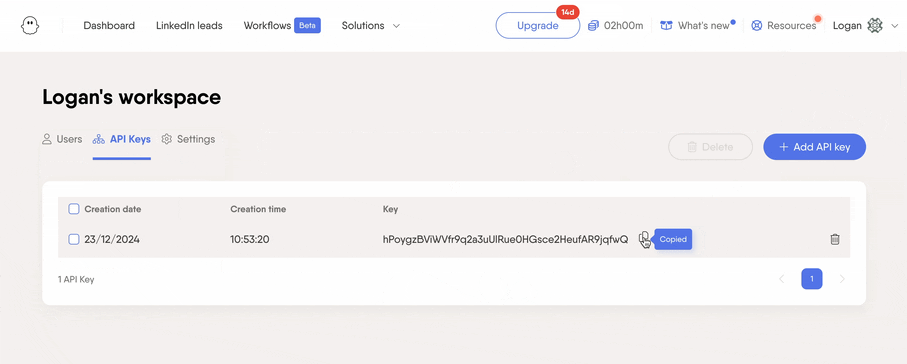
You generate the API key on the Workspace Settings page. Each workspace gets one API key, shown only at creation and not recoverable afterward. The key authenticates every request via the X-Phantombuster-Key-1 HTTP header:
curl -X POST "https://api.phantombuster.com/api/v2/agents/launch" \
-H "X-Phantombuster-Key-1: YOUR_API_KEY" \
-H "Content-Type: application/json" \
-d '{"id": "AGENT_ID"}'
You can also pass the key as a key query string parameter, though the documentation warns against this since it may appear in server logs or caches.
Two things to know before you start:
One key per workspace. There is no multi-key model, no scoped permissions, and no OAuth flow for the core REST API. If you need different access levels for different integrations, you need separate workspaces (each with its own subscription).
Developer mode can be enabled in User Settings, adding API code snippets throughout the PhantomBuster UI. It is a shortcut for discovering agent IDs and endpoint patterns without switching to the docs.
For AI agent integration, PhantomBuster runs an MCP server at https://mcp.phantombuster.com that uses OAuth (not the API key) and supports the Streamable HTTP transport. It exposes a subset of the API as AI-callable tools and works with Claude, ChatGPT, Gemini CLI, and Codex CLI.
PhantomBuster API: Core Endpoints & Capabilities
The v2 API is organized around five resource areas: Agents (the automations you run), Containers (execution records), Scripts (the code behind Phantoms), Org-storage (the built-in lead database), and Orgs (workspace-level operations).
The pattern is consistent: you launch an automation, wait for it to finish, then retrieve the results.
Agents: Launching and Controlling Automations
This is the primary surface. Agents are the API representation of Phantoms.
Key endpoints:
POST /agents/launch: adds an agent to the execution queue. This is asynchronous; the agent enters the queue and runs when a slot opens.
POST /agents/launch-sync: launches an agent and streams real-time execution status in NDJSON format. The stream opens with a start message exposing a containerId (allowing reconnection via /containers/attach on disconnect), followed by heartbeats, an execution summary, and any error messages. An optional includeLogs parameter streams log lines in real time.
POST /agents/launch-soon: schedules an agent to launch before a specified time.
POST /agents/stop: stops a running agent.
GET /agents/fetch-output: retrieves incremental output from the most recent container, designed for polling.
GET /agents/fetch / fetch-all: retrieves one or all agent records for the workspace.
POST /agents/save: creates or updates an agent configuration.
POST /agents/delete: deletes an agent.
What you would build with this: a scheduler service that launches a LinkedIn Search Export Phantom nightly, polls for completion via fetch-output, downloads the result CSV, deduplicates against your CRM, and pushes net-new leads into your pipeline. The launch-sync endpoint is useful for real-time integrations where you need to stream progress to a UI.
Containers: Execution Records
Containers represent individual execution runs of an agent.
GET /containers/fetch / fetch-all: retrieve container metadata.
GET /containers/fetch-output: get the console output for a specific run.
GET /containers/fetch-result-object: get the structured result object (the data payload the agent produced).
GET /containers/attach: attach to a running container and stream output in real time.
The fetch-result-object endpoint is how you extract structured data from a completed run. The result object contains whatever the agent's script set via buster.setResultObject(), which for built-in Phantoms typically includes the output file URL and summary statistics.
Scripts: Managing Automation Code
For developers writing custom Phantoms, the Scripts API manages the code layer.
GET /scripts/fetch / fetch-all: retrieve script records.
GET /scripts/code: retrieve the actual script source.
POST /scripts/save: create or update a script.
POST /scripts/visibility / access-list: control script sharing.
A Branches API (/branches/*) adds version management with staging and release branches, including a diff endpoint for comparing versions before release.
Org-Storage: Built-in Lead Database (Beta)
The org-storage surface is a structured lead and company database accessible via the API.
Lead operations:
POST /org-storage/leads/save / save-many: write individual or batch leads.
POST /org-storage/leads/delete-many: remove leads in bulk.
POST /org-storage/leads/by-list/{listId}: fetch leads by list.
POST /org-storage/leads-objects/save / save-many / search: structured lead object storage with search.
POST /org-storage/companies-objects/save / search: company object storage with search.
List management:
POST /org-storage/lists/save: create dynamic filtered lead lists.
GET /org-storage/lists/fetch-all: retrieve all lists.
What you would build with this: a central lead repository where multiple Phantoms deposit their results, with a downstream service querying the org-storage search endpoint to pull leads matching specific criteria for CRM sync or campaign enrollment. The Beta label is worth noting: the surface may change.
Org and Utility Endpoints
Workspace management:
GET /orgs/fetch-resources: resource and usage data (remaining execution time, slot availability).
GET /orgs/fetch-running-containers: live container status.
GET /orgs/export-agent-usage / export-container-usage: CSV usage exports.
CRM access and contact push endpoints for managing native CRM connections.
Utility endpoints:
GET /brightdata/serp: search via Brightdata.
POST /hcaptcha / /recaptcha: CAPTCHA solving (hCaptcha and reCAPTCHA v2/v3).
POST /ai/completions / /ai/advice / /ai/tasks: AI inference endpoints.
GET /icps/fetch-all / /buyers-personas/fetch-all: retrieve ICP and buyer persona configurations.
The AI endpoints let you call GPT models through PhantomBuster's infrastructure, consuming AI credits from your plan allocation. Combined with the CAPTCHA-solving and proxy endpoints, they give custom script developers infrastructure they would otherwise provision themselves.
PhantomBuster API: Webhooks & Events
PhantomBuster supports custom webhooks that fire when an agent finishes executing. You configure webhooks per agent in the agent's Advanced Notification Settings, not through the API.
When an agent completes, PhantomBuster sends an HTTP POST to the registered URL with a JSON payload containing: agentId, agentName, containerId, script, scriptOrg, branch, launchDuration, runDuration, exitCode, exitMessage, and resultObject. The exitMessage field indicates why the agent ended: "finished", "killed", "global timeout", "org timeout", "agent timeout", or "unknown".
Delivery constraints worth planning around:
Timeout is 11 seconds total: 5 seconds to open the connection, 5 seconds to receive response headers, 1 second to read the response body.
PhantomBuster follows a maximum of 2 redirections; more than 2 causes a delivery failure.
HTTP 4xx responses from your server automatically remove the webhook from the agent's configuration. Network-level errors (5xx, timeouts) do not remove it, but there is no documented retry policy for failed deliveries.
You include secrets by appending them as query string parameters (e.g., ?secret=MY_SECRET_KEY). Custom request headers are not supported. There is no payload signing mechanism.
The scope limitation matters: webhooks fire only on agent execution completion. There are no events for mid-run progress, lead saves to org-storage, list changes, or workspace-level activity. If you need to react to events beyond "this agent finished," you must poll.
PhantomBuster API: SDKs, Docs & Rate Limits
SDKs & Libraries
PhantomBuster publishes one official SDK: the phantombuster-sdk npm package, installed globally via npm install -g phantombuster-sdk.
This SDK is not a general-purpose API client. It watches a local directory for file changes and uploads modified scripts to PhantomBuster's platform. You configure it via a phantombuster.cson file that maps local filenames to their PhantomBuster script names.
For in-script development, the BusterJS agent module is a server-side JavaScript library available inside every PhantomBuster script execution environment via require("phantombuster"). It provides cloud storage (save()), structured output (setResultObject()), CAPTCHA solving, email notifications, push notifications, persistent key-value storage, and execution time management.
Scripts run with Puppeteer for headless browser automation and support TypeScript. PhantomBuster bundles a set of npm modules, and you can bundle external dependencies via Webpack.
There are no official API client SDKs for Python, Ruby, Go, .NET, Java, or any other language. Developers building integrations against the REST API make direct HTTP calls and own the auth, retry, and error-handling layers themselves.
Documentation & Developer Experience
The developer documentation lives at hub.phantombuster.com, hosted on the readme.com platform. It splits into two sections:
Guides & tutorials: developer quick start, API authentication, webhook setup, MCP server configuration, leads list filtering, custom script development (directives, packages, BusterJS, TypeScript), and scraping how-tos.
API reference: interactive endpoint-level documentation for v2 (and the v1 legacy surface) with request/response schemas and a "Recent Requests" log panel for authenticated users.
An llms.txt index at hub.phantombuster.com/llms.txt makes documentation pages and OpenAPI endpoint definitions available in Markdown format for AI development tools. The interactive reference supports try-it mode when logged in.
What the docs do not include: no standalone Postman collection, no downloadable OpenAPI spec file, and no public changelog or versioning page. Without a changelog, you discover surface changes by testing, not by reading a diff. Developer support is available by email at support@phantombuster.com, and a Paid Services portal exists for custom development work.
Rate Limits & Constraints
This is where the PhantomBuster API diverges from most developer APIs. The documented rate-limit model covers automation behavior (the safe daily action rates when Phantoms interact with LinkedIn, Instagram, etc.) rather than hard limits on API calls to PhantomBuster's own endpoints.
PhantomBuster does not publish rate limits on its REST API (requests per second, burst caps, per-minute ceilings). The capacity constraints are plan-level:
Execution slots (concurrent Phantoms): 5 on Start, 15 on Grow, 50 on Scale
Execution time: 20 hours/month (Start), 80 hours/month (Grow), 300 hours/month (Scale)
AI credits: 10,000 (Start), 30,000 (Grow), 90,000 (Scale), consumed by /ai/* endpoints and AI-powered Phantoms
Webhook delivery has its own constraint: the receiving endpoint must respond within 11 seconds.
For a developer building a pipeline, throughput depends on how many Phantoms you can run concurrently (slots) and how long they can run total (hours), not on a request-per-second ceiling on the API itself. A Start plan running 5 concurrent Phantoms for 20 hours/month sets a capacity ceiling that no amount of clever API usage can extend.
PhantomBuster API Pricing & Access Costs
PhantomBuster bundles API access into its paid plans rather than charging per call or per credit for API usage. The three tiers (annual billing):
Start: $56/month: 20 execution hours/month, 5 concurrent slots, 10,000 AI credits, 500 email credits
Grow: $128/month: 80 execution hours/month, 15 concurrent slots, 30,000 AI credits, 2,500 email credits
Scale: $352/month: 300 execution hours/month, 50 concurrent slots, 90,000 AI credits, 10,000 email credits
Monthly billing runs 19-20% higher ($69, $159, and $439 respectively). All plans include up to 100 workspace members and full API access. No features are locked behind higher tiers; the difference is resource capacity.
The 14-day free trial does not include API access. A permanent free plan exists after the trial but is limited to 1 slot, 30 minutes/month, and no API access.
For a developer sizing costs: the API itself is free if you already pay for PhantomBuster. The real cost is execution time and slot capacity. A LinkedIn Search Export Phantom might run for 5-15 minutes per launch. On the Start plan's 20-hour budget, that is roughly 80-240 runs per month before you hit the ceiling. At $56/month, that works out to $0.23-$0.70 per run. The Grow plan at $128/month and 80 hours gives you more room for production pipelines.
Each workspace requires its own subscription. Agencies managing multiple clients under separate workspaces pay per workspace. PhantomBuster does not publish overage pricing for execution hours or AI credits; exceeding plan limits prompts an upgrade.
Where the PhantomBuster API Falls Short
These are the limits a developer should plan around. Several reflect architectural decisions about what PhantomBuster is (an automation orchestration platform) and what it is not.
The API controls automations, not data.
There is no endpoint that accepts a query ("find contacts matching these criteria") and returns structured records. To get B2B data through the API, you launch an automation (which scrapes a third-party platform), wait for it to complete, then download the results. That async, automation-first architecture adds latency and complexity compared to a direct data API.
A contact lookup that takes milliseconds on a database API takes minutes through PhantomBuster because a Phantom must execute, interact with a target platform, and produce output.
No published API rate limits.
The developer documentation does not specify requests-per-second, per-minute, or per-hour limits on the REST API itself. Plan-level execution slots and hours govern capacity indirectly. For a developer designing a pipeline, this means you cannot calculate throughput guarantees with the precision that published rate limits allow.
Single API key per workspace, no OAuth.
Authentication is a static API key in a custom header. There is no multi-key model, no scoped permissions, no token rotation, and no delegated access flow. For teams building multi-tenant integrations or operating under strict credential-rotation policies, this is limiting. The MCP server uses OAuth, but the core REST API does not.
Webhooks are completion-only.
Agent execution webhooks fire when a Phantom finishes. There are no events for mid-run progress, lead database changes, list updates, or workspace-level activity. Combined with the auto-removal of webhooks on 4xx responses (with no retry), the webhook surface requires defensive engineering.
No general-purpose API client SDKs.
The npm SDK is a script deployment tool, not an API client. Developers integrating with the REST API in Python, Ruby, Go, or any language other than JavaScript build and maintain the HTTP layer themselves.
Data extraction depends on session cookies.
PhantomBuster's core functions (LinkedIn scraping, profile enrichment, outreach automation) operate through browser session cookies captured via a browser extension.
The API can launch these automations programmatically, but the underlying data access still relies on simulating a logged-in browser session on the target platform, which carries account risk and is subject to detection by platforms like LinkedIn.
Org-storage is in Beta.
The built-in lead database (the closest thing to a structured data API) is labeled Beta. The surface may change, and production dependencies carry the usual caveats of pre-GA features.
ZoomInfo API: Direct B2B Data Access Without the Automation Layer
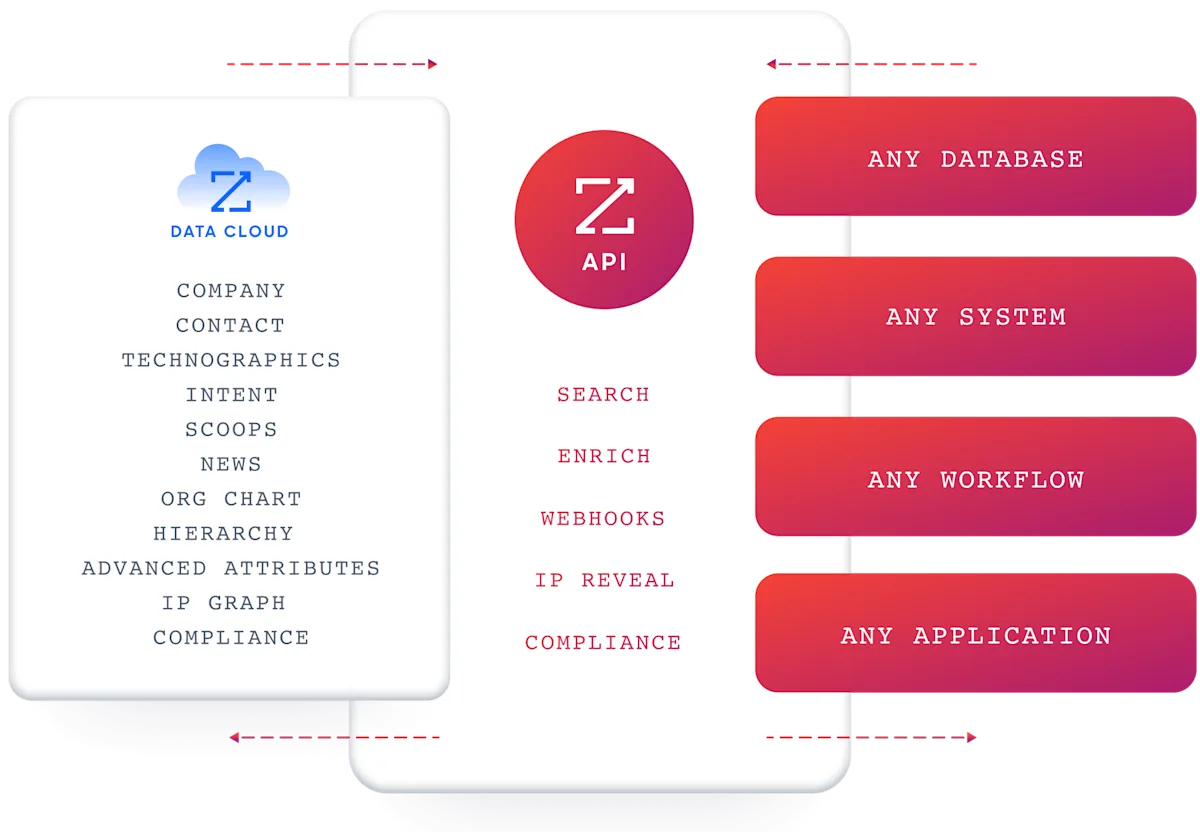
PhantomBuster's API orchestrates automations that extract data from third-party platforms. ZoomInfo's API gives you the data directly: search for contacts, enrich records, detect intent signals, and query org charts through structured REST endpoints that return results in milliseconds, not minutes.
Source: ZoomInfo
The architectural difference matters.
A developer who needs "the VP of Engineering at companies using Kubernetes in the Bay Area" builds a pipeline of Phantoms on PhantomBuster (launch scraper, wait, download, parse, deduplicate) or sends a single search request to ZoomInfo and gets structured records back immediately.
What the API Covers
ZoomInfo's Enterprise API is a REST suite served from https://api.zoominfo.com/gtm, organized into four areas documented in the interactive API reference:
Data API (Search & Enrich): Search endpoints cover Contacts, Companies, Intent, News, and Scoops. Search is free and does not consume credits. Enrich endpoints unlock full payloads: business emails, direct dials, employment history, corporate hierarchy, org charts, technographics, and hashtag signals, up to 25 records per call.
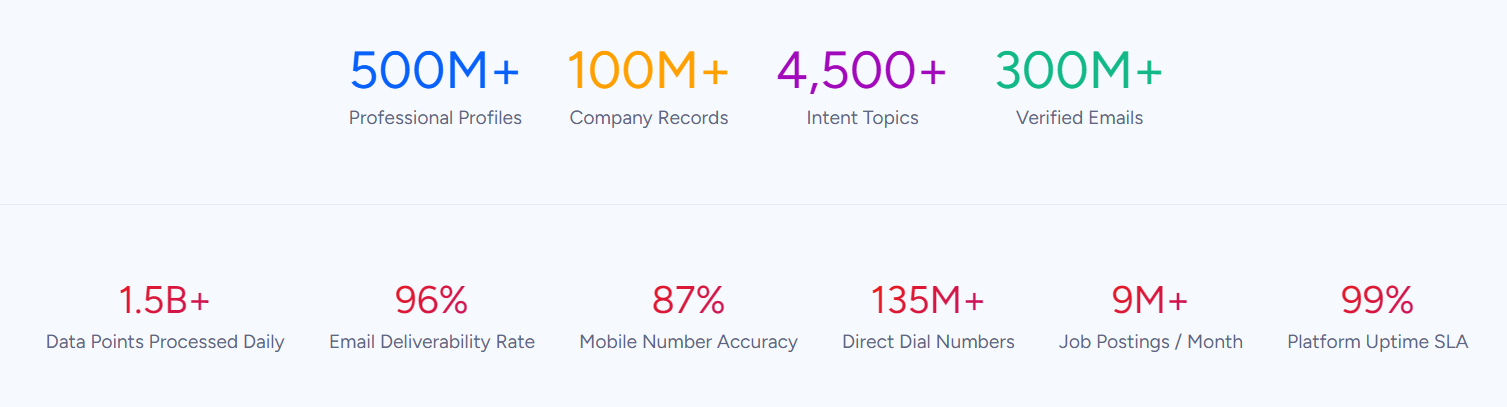
The underlying dataset spans 500M contacts, 100M companies, 135M+ verified phone numbers, and 200M+ verified business email addresses.
Source: ZoomInfo
AI Intelligence API: Account Summary returns structured account intelligence. Find Similar Companies performs lookalike expansion. Contact Recommendations returns AI-ranked buying-committee suggestions by motion (prospecting, deal acceleration, renewals).
Marketing API: CRUD endpoints for programmatic audience management.
Platform API (Engagements, Beta): Bidirectional engagement data via the Engagements API.
The search-then-enrich pattern is the recommended workflow: search freely (no credits consumed), then enrich only the records you commit to (one credit per new record). A record enriched once within a rolling 12-month window is free to re-enrich.
Authentication, Rate Limits & Credits
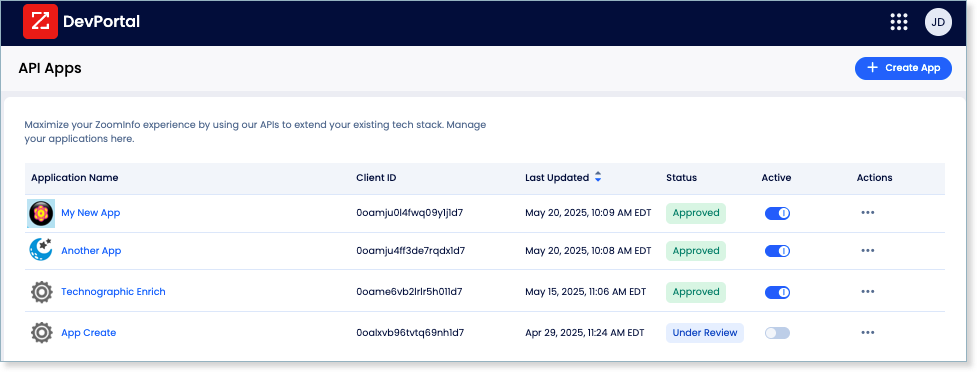
Authentication uses OAuth 2.0 with PKCE via Okta, issuing 24-hour access tokens with rotating refresh tokens. Three flows are supported: Authorization Code with PKCE (web applications), Client Credentials (server-to-server), and Refresh Token. Teams register applications through the ZoomInfo Developer Portal, where they generate credentials, define scopes, and test endpoints.
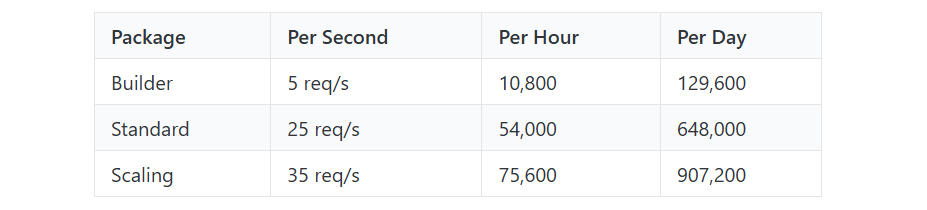
Rate limits are published by tier: Builder (5 req/sec), Standard (25 req/sec), and Scaling (35 req/sec), with per-hour and per-day sliding-window limits enforced simultaneously. Every response includes quota headers with remaining capacity, and 429 responses include a Retry-After header with exact backoff timing.
Source: ZoomInfo
What you would build with this: a real-time enrichment service that intercepts new CRM leads, searches ZoomInfo for a match (free), enriches the match with full contact and company data (one credit), and writes the enriched record back to the CRM, all in a single synchronous API call chain that completes in seconds.
Webhooks, MCP & Developer Experience
Webhooks are available via the Agents API, tied to ZoomInfo's Agent Teams system. Event types cover bulk enrichment jobs completing, records changing, credit usage crossing thresholds, and new GTM signals becoming available, with retry behavior and throttling configurable per event type.
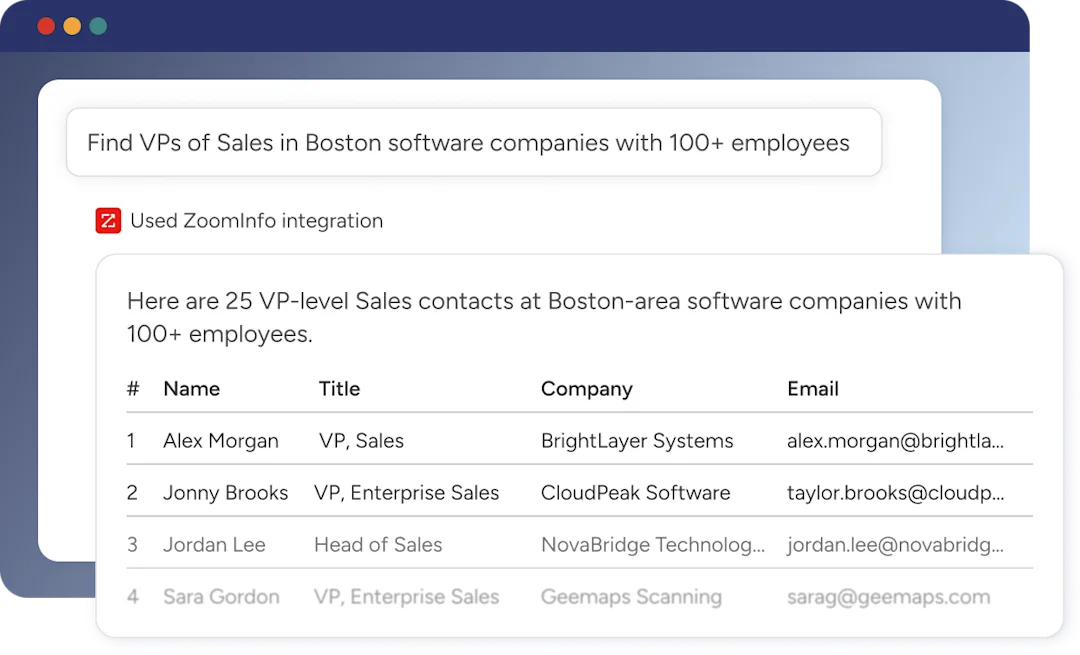
ZoomInfo's MCP server at https://mcp.zoominfo.com/mcp exposes search, enrich, and account research as native tools for MCP-compatible assistants, currently supporting Claude and ChatGPT. A separate Docs MCP server lets AI development tools generate integration code against the API spec.
Source: ZoomInfo
ZoomInfo does not publish official SDKs, so both platforms require direct HTTP integration. Documentation lives at docs.zoominfo.com with an interactive API reference, OAuth recipes in five languages, and an llms.txt index for AI development tools. Pricing follows a consumption-based model; ZoomInfo has added API access to all relevant plans.
BDO Canada reported an 87% reduction in time spent updating internal data dashboards using the ZoomInfo API, with one analyst describing the integration as plug-and-play across any process. (ZoomInfo)
PhantomBuster API vs. ZoomInfo API
Dimension | PhantomBuster API | ZoomInfo API |
|---|---|---|
API type | REST, JSON (v1 uses JSend envelope; v2 uses direct JSON) | REST, JSON:API format |
Authentication | Static API key (X-Phantombuster-Key-1 header), one key per workspace | OAuth 2.0 with PKCE (24-hour tokens, rotating refresh, scoped permissions) |
Primary scope | Automation orchestration: launch, monitor, and retrieve results from cloud-based scrapers and outreach bots | B2B intelligence: contact/company search, enrichment, intent signals, org charts, technographics, AI research |
Data access model | Indirect: launch a Phantom, wait for execution, download output files | Direct: query an endpoint, receive structured records immediately |
Contact database | No proprietary database; extracts from LinkedIn, Sales Navigator, Google Maps, and other platforms via browser automation | 500M contacts, 100M companies, 135M+ verified phone numbers, 200M+ verified business email addresses |
Intent / signals | Not available | Buyer intent, scoops, news, job changes, funding signals |
Webhooks | Execution-completion events only; no mid-run or data-change events | Agent Teams-based webhooks with configurable retry and throttling per event type |
SDKs | npm SDK (script deployment only); no API client SDKs | No official SDKs (recipes in Shell, Node, Ruby, PHP, Python) |
Rate limits | Not published for the API itself; capacity is plan-level (slots and execution hours) | 5-35 req/sec by tier, with per-hour and per-day sliding windows, quota headers on every response |
Pricing model | Bundled with paid plans ($56/month entry); execution time and slots are the real constraints | Consumption-based pricing (search free, enrich consumes credits) |
AI endpoints | /ai/completions, /ai/advice, /ai/tasks (GPT models via PhantomBuster credits) | Account Summary, Find Similar Companies, Contact Recommendations |
MCP server | Yes, at mcp.phantombuster.com (OAuth, Streamable HTTP) | Yes, at mcp.zoominfo.com (Claude, ChatGPT) |
Compliance | No published security certifications; data extraction uses session cookies on target platforms | ISO 27001, ISO 27701, SOC 2 Type II, TRUSTe GDPR/CCPA |
Final Verdict
PhantomBuster's API is an automation orchestration surface for developers already invested in the PhantomBuster ecosystem who need to move from manual dashboard use to programmatic control.
The endpoint catalogue is broad (agents, containers, scripts, org-storage, AI inference, CRM access), the launch-sync streaming endpoint handles real-time integrations well, and the MCP server opens a path for AI agent workflows. For the specific job of "control LinkedIn scraping and outreach automations via code," it delivers.
Choose the PhantomBuster API if your build is automation-first: orchestrating LinkedIn data extraction, managing scraping agents across client workspaces, chaining Phantom results into downstream systems, or extending PhantomBuster's platform with custom scripts that use its cloud execution, CAPTCHA solving, and proxy infrastructure.
The $56/month entry point with API access included makes it accessible for developers already using PhantomBuster's Phantom library.
Choose the ZoomInfo API if your build needs structured B2B data on demand: searching contacts by criteria, enriching records with verified emails and direct dials, querying org charts and technographics, or detecting buyer intent signals, all through synchronous endpoints that return data in milliseconds rather than minutes. The OAuth 2.0 authentication, published rate limits, and search-then-enrich credit model support production data pipelines at scale.
Start with the ZoomInfo Enterprise API or explore the developer docs to see the endpoint surface directly.
A developer who needs real-time access to a verified B2B database should not build that access on top of an automation layer. The PhantomBuster API handles what it handles, but that job is controlling scrapers, not serving data.
FAQ
Is the PhantomBuster API free?
API access is included on all paid PhantomBuster plans starting at $56/month (annual billing) or $69/month (monthly billing) for the Start tier. There are no per-call charges or API-specific credit costs. The 14-day free trial and the permanent free plan do not include API access.
The real cost constraint is the plan tier that determines your execution time (20-300 hours/month) and concurrent Phantom slots (5-50).
Does PhantomBuster have a GraphQL API?
No. PhantomBuster offers a REST API (currently v2, with v1 legacy still active) that communicates over HTTPS and returns JSON responses. There is no GraphQL endpoint. The v1 API wraps responses in a JSend specification envelope; v2 uses direct JSON payloads.
What is the PhantomBuster API rate limit?
PhantomBuster does not publish request-level rate limits (requests per second or per minute) for its REST API. Plan-level capacity constraints govern throughput: execution slots (5 on Start, 15 on Grow, 50 on Scale) and monthly execution time (20-300 hours). The webhook delivery timeout is 11 seconds.
By comparison, ZoomInfo publishes rate limits of 5-35 requests per second depending on tier, with quota headers on every response and a Retry-After header on 429 responses.
Are there official PhantomBuster SDKs?
PhantomBuster publishes one npm package (phantombuster-sdk), but it is a script deployment tool that syncs local files to the platform, not a general-purpose API client.
For in-script development, the BusterJS agent module provides cloud storage, CAPTCHA solving, and proxy access inside the PhantomBuster execution environment. There are no official API client SDKs for Python, Ruby, Go, .NET, Java, or any other language.
Does the PhantomBuster API support webhooks?
Yes, but with limited scope.
Custom webhooks fire at the end of each agent execution, POSTing a JSON payload with agent ID, container ID, exit code, exit message, run duration, and the result object. There are no webhook events for mid-run progress, lead database changes, or workspace-level activity. HTTP 4xx responses from your server automatically remove the webhook with no retry. Delivery timeout is 11 seconds. Custom request headers and payload signing are not supported.
What does ZoomInfo's API offer that PhantomBuster's does not?
ZoomInfo's API provides direct, synchronous access to a verified B2B database of 500M contacts and 100M companies, with search, enrichment, intent signal detection, org chart queries, and AI-powered account research available as standard REST endpoints.
Where PhantomBuster's API requires you to launch a scraping automation, wait for it to complete, and parse the output, ZoomInfo's API returns structured data immediately. It also provides OAuth 2.0 with scoped delegated access, published rate limits with quota headers on every response, a Compliance API for data privacy management, and enterprise security certifications (ISO 27001, SOC 2 Type II).
Both platforms offer MCP servers for AI agent integration, but ZoomInfo's MCP exposes the same direct data access pattern: search, enrich, and research in natural language, with results returned from a verified database rather than scraped from third-party platforms.
