

PhantomBuster has built a following among growth hackers and sales teams who want to automate LinkedIn prospecting without writing code.
The platform offers over 130 pre-built cloud automations that extract leads, enrich contact data, and send outreach messages across LinkedIn, Sales Navigator, and other platforms. For small teams running outbound on a tight budget, it turns hours of manual work into scheduled background tasks.
We've analyzed PhantomBuster thoroughly. It's a good choice if:
You run outbound prospecting primarily through LinkedIn
You want cloud-based automations that run on schedule without keeping your browser open
You need a no-code way to extract leads from LinkedIn searches, groups, and post engagement
Your team is small enough to share a single workspace (up to 100 members)
You're comfortable managing execution time budgets and LinkedIn safety settings
However, PhantomBuster might not be the best choice if:
You need verified contact data at scale, not scraped profile information
You require multi-channel outreach beyond LinkedIn (email sequences, phone, ads)
You want buyer intent signals that reveal when accounts are actively researching solutions
You need a sales intelligence platform with CRM enrichment, org charts, and technographics
Compliance and security certifications matter to your procurement process
In this case, you should consider ZoomInfo: a B2B data and go-to-market platform with 500M contacts, 200M+ verified business email addresses, 135M+ verified phone numbers, buyer intent signals, and AI-powered tools that cover ground no LinkedIn automation tool can.
We've included a detailed look at ZoomInfo later in this review, as the natural next step for teams that have outgrown LinkedIn-only prospecting. If you're ready to explore a full go-to-market platform, you can start with ZoomInfo Lite for free here.
What is PhantomBuster?
PhantomBuster is a sales prospecting platform founded in 2016 by Guillaume Boiret and Martin Tapia, two classmates who met at university in Paris.
Source: PhantomBuster
The company participated in Station F's founding cohort and has grown to serve over 200,000 customers with a team of 65 people across 15 countries.
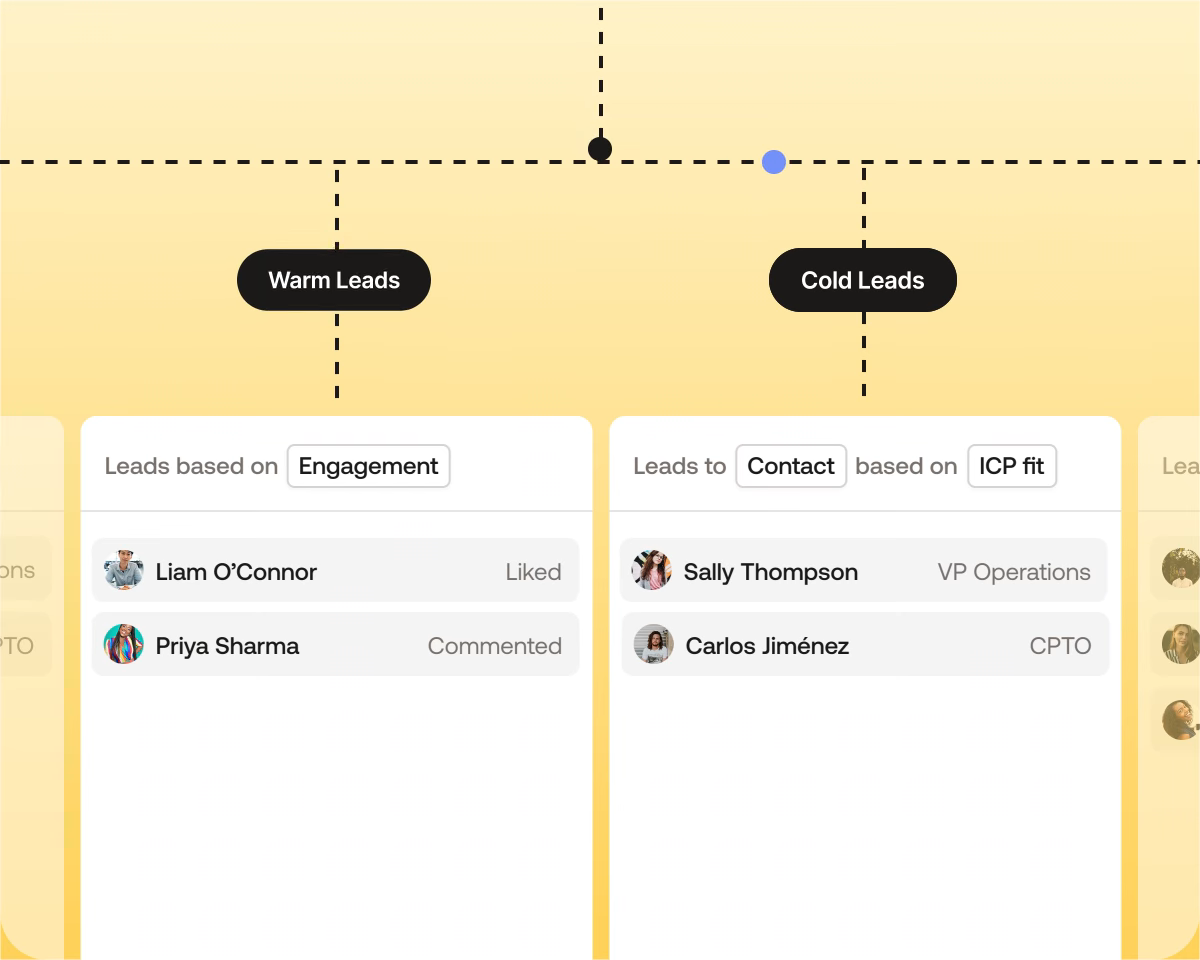
The platform started as a broad growth-hacking automation toolbox but has repositioned around B2B sales teams. Its current homepage highlights four pillars: Outbound Workflows, Real-time Lead Sourcing, Lead Prioritization, and Data Compliance.
The core product is a library of individual automations called "Phantoms," each handling a single task: scraping a LinkedIn search, enriching a profile, sending a connection request. These Phantoms run on PhantomBuster's cloud servers, so they keep working when the user's computer is off. No coding is required, though advanced users can write custom scripts in JavaScript.
PhantomBuster Pros & Cons
Pros | Cons |
|---|---|
- 130+ pre-built automations across multiple platforms | - Execution time limits create friction at scale |
- Cloud-based execution (runs without your computer on) | - Late-2025 pricing restructuring caused user backlash |
- Per-workspace pricing, not per-seat (up to 100 members) | - Moderate learning curve for multi-step workflows |
- Native integrations with HubSpot, Salesforce, Pipedrive | - Inconsistent customer support quality |
- Built-in LinkedIn safety guidance and rate limits | - LinkedIn account disconnection risk is inherent |
- AI-powered message writing and lead enrichment | - Limited CRM integrations beyond the top three |
- 14-day free trial with no credit card required | - Scraped data lacks independent verification |
PhantomBuster Review: How it Works & Key Features
Phantoms: Over 130 individual automations covering extraction, enrichment, and outreach across multiple platforms.
Phantoms are PhantomBuster's building blocks.
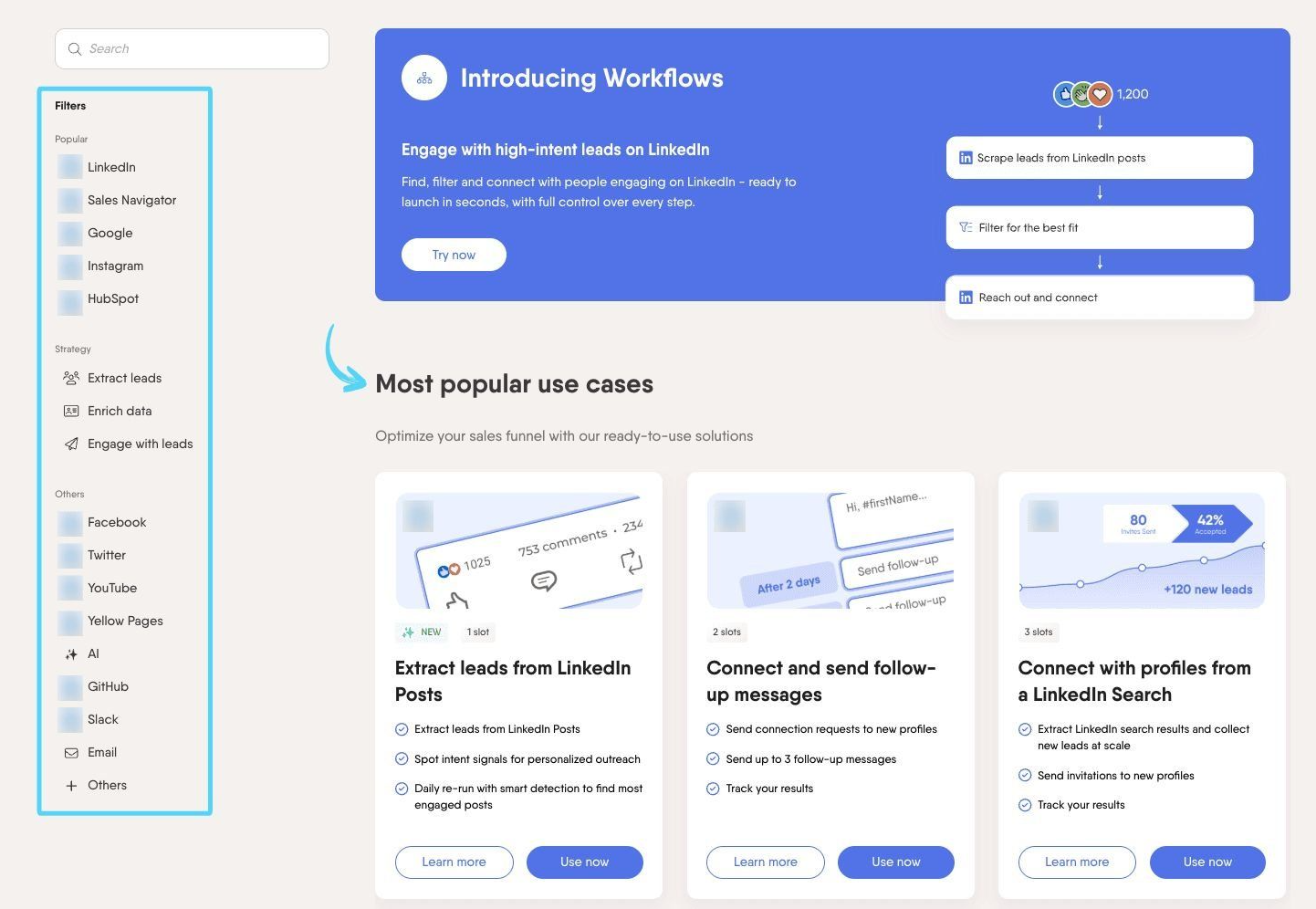
Each one automates a single task: extracting profiles from a LinkedIn search, finding email addresses, or sending personalized connection requests. The library covers three strategies: Extract (find and collect leads), Enrich (add missing contact data), and Engage (automated outreach).
Setting up a Phantom follows a four-step wizard. You provide input data (a URL, spreadsheet, or output from another Phantom), connect your social media account via a browser extension that captures a session cookie, configure behavior settings like results per launch, and set a schedule for manual, automatic, or chained execution.
Source: PhantomBuster
The extraction Phantoms cover substantial ground. LinkedIn Search Export scrapes up to 1,000 to 2,500 profiles per day. LinkedIn Post Likers/Commenters Export pulls 2,500 to 10,000 profiles per day. Other Phantoms cover Sales Navigator, Google Maps, Instagram, Twitter/X, Facebook, Reddit, and GitHub.
On the enrichment side, the LinkedIn Profile Scraper adds job titles, company names, and locations, while a built-in email discovery service finds professional addresses.
For outreach, LinkedIn Auto Connect sends 50 to 150 connection invites per week depending on account type, and LinkedIn Message Sender handles up to 80 to 150 messages per week to existing connections.
One useful feature is Watcher Mode, which re-runs the same input on each launch and surfaces only new results. This turns a one-time LinkedIn search export into a pipeline that refreshes automatically without collecting duplicates.
Each active Phantom uses one slot, and execution time is pooled across all Phantoms in the workspace. Users can chain Phantoms manually by feeding one's output into the next, building custom multi-step sequences without being locked into a rigid template.
Workflows: Predefined multi-step sequences that combine extraction, enrichment, and outreach into a single setup.
While individual Phantoms handle single tasks, Workflows chain several Phantoms into an end-to-end pipeline. A typical Workflow takes a LinkedIn search URL as input, extracts matching profiles, enriches them with contact data, and sends personalized connection requests with follow-up messages, all without manual handoff between steps.
Around 14 Workflows are currently available, including four LinkedIn Prospecting Workflows: LinkedIn Search to Outreach, LinkedIn Group Members to Outreach, LinkedIn Post Engagers to Lead Outreach, and LinkedIn Company Follower Collector to Outreach.
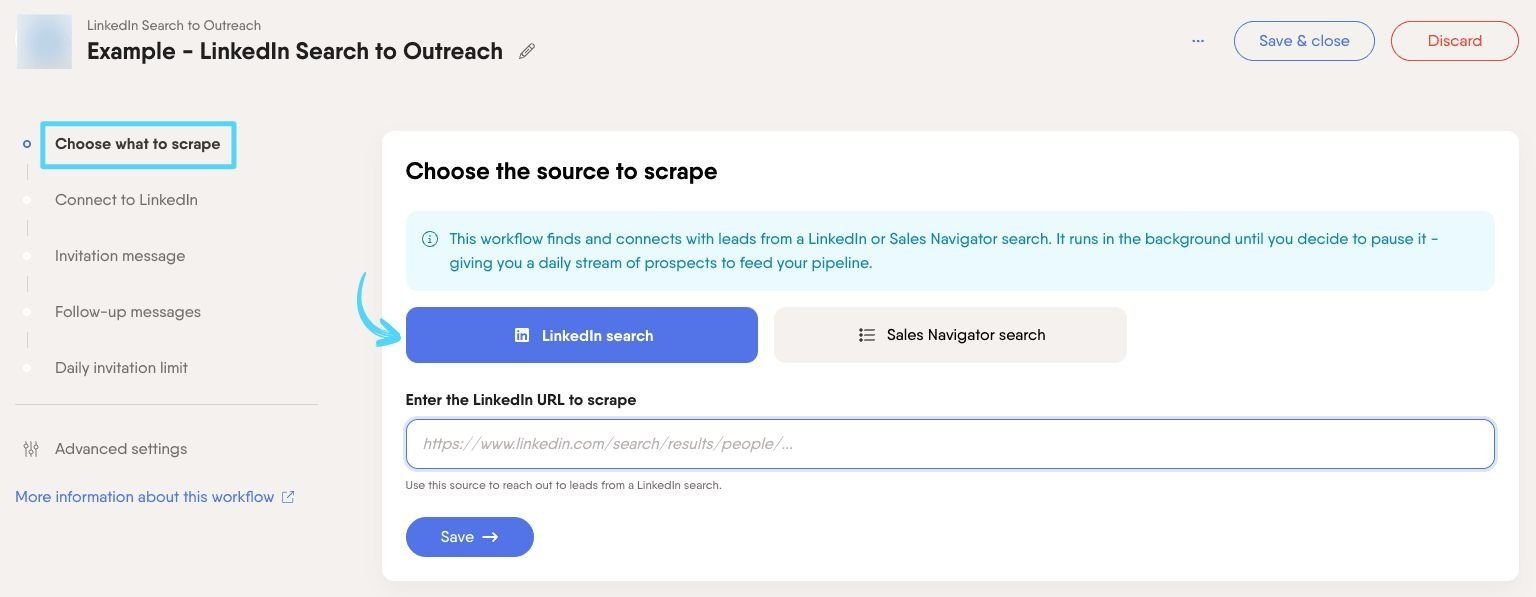
The LinkedIn Search to Outreach Workflow shows how these work in practice.
Source: PhantomBuster
You provide a search URL, connect your LinkedIn account, write a connection request message (up to 300 characters on Premium accounts) plus up to three follow-up messages with configurable delays of 0 to 15 days each, and set a daily invitation limit. Follow-up messages are conditional: they send only if the person accepted the connection request and hasn't replied to an earlier message.
A practical design choice is the review gate between extraction and outreach. After extraction, you can filter leads in the Workflow console by location, title, or company before toggling outreach on. This checkpoint prevents bad leads from entering your outreach sequence.
The Post Engagers to Lead Outreach Workflow targets people who have engaged with posts from competitors or thought leaders, filtering leads on demonstrated interest rather than job title alone. It includes AI filters that analyze job title, location, and industry to narrow the list further.
Each Workflow provides its own dashboard showing invitations sent, accepted, follow-ups sent, replies received, and skipped/failed invites. Built-in rate limiting keeps each Workflow within LinkedIn's platform boundaries.
AI-Powered Features: GPT-based message generation, lead scoring, and enrichment layered onto existing data.
PhantomBuster's AI Phantoms add a text generation layer on top of the platform's scraping and extraction workflows.
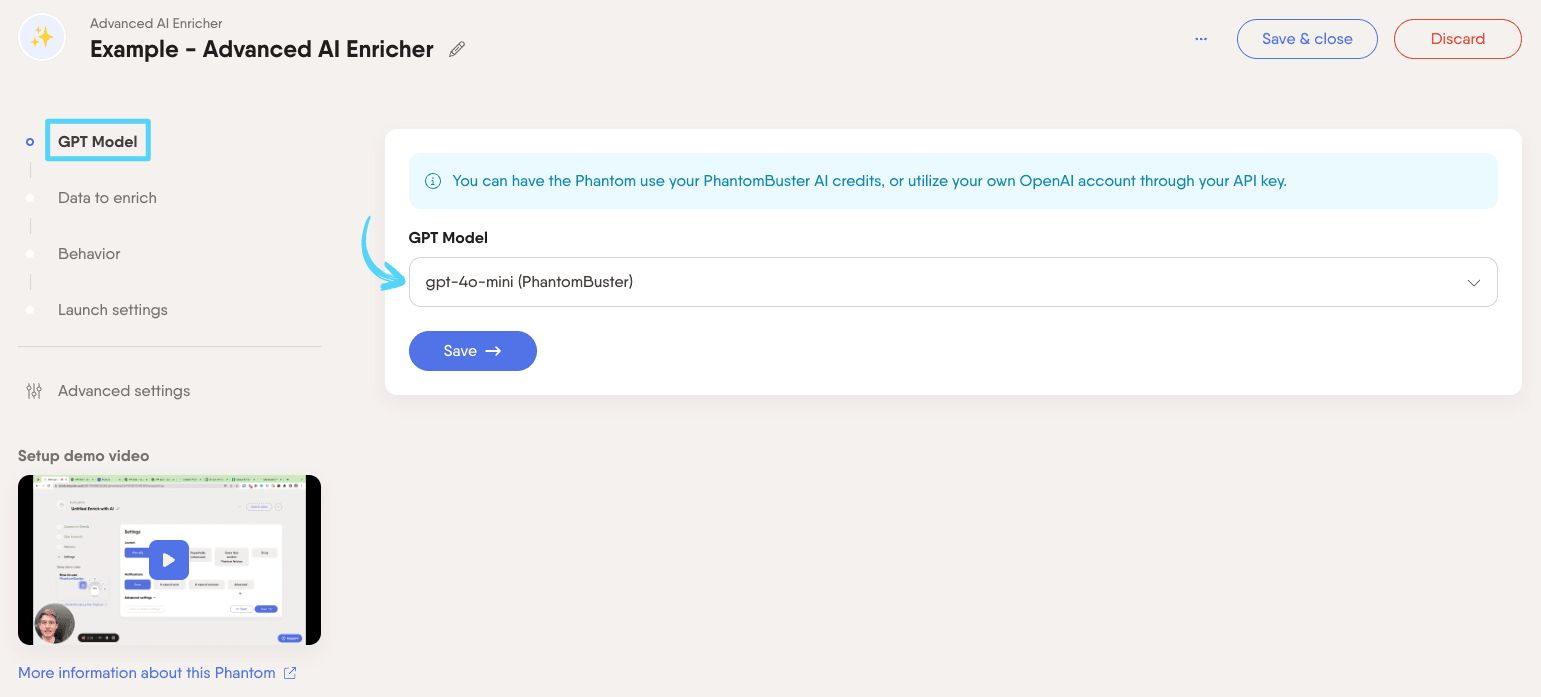
Four tools make up the suite: the Advanced AI Enricher for general-purpose data processing, the AI LinkedIn Message Writer for personalized outreach, the AI LinkedIn Profile Enricher for profile-level insights, and the AI LinkedIn Post Responder for drafting comment responses.
Source: PhantomBuster
The AI LinkedIn Message Writer is the most relevant for sales teams. It generates personalized connection request messages and outreach copy based on scraped profile data.
Pre-built templates cover common scenarios (shared work experience, recruitment outreach, product pitches), and custom prompts are supported. The generated messages feed directly into outreach Phantoms through the {ai_message} placeholder, completing a scrape-to-message pipeline without manual copy-paste.
Users choose from several OpenAI models (gpt-3.5-turbo, gpt-4o-mini, gpt-4, gpt-4o), either consuming PhantomBuster's AI credits or connecting their own OpenAI API key. A test mode limited to 10 leads lets users validate prompts before spending credits at scale.
The AI LinkedIn Profile Enricher generates up to 5 output columns per prompt run, extracting inferences like communication tone, remote/in-office preference, and estimated salary from profile data. The Advanced AI Enricher works on any spreadsheet data (not just LinkedIn), supporting row-by-row processing for personalized outputs or bulk mode for dataset-level analysis.
Pricing: Usage-based tiers with per-workspace billing and both monthly and annual options.
PhantomBuster uses per-workspace pricing rather than per-seat billing. All plans support up to 100 users per workspace, which benefits growing teams that would otherwise pay per head.
Three paid tiers plus a permanent Free plan:
Start | Grow | Scale | |
|---|---|---|---|
Monthly billing | $69/month | $159/month | $439/month |
Annual billing | $56/month | $128/month | $352/month |
Execution time | 20 hours/month | 80 hours/month | 300 hours/month |
Phantom slots | 5 | 15 | 50 |
AI credits/month | 10,000 | 30,000 | 90,000 |
Email credits/month | 500 | 2,500 | 10,000 |
All paid plans include access to every Phantom and Workflow, unlimited CSV/JSON exports, full API access, scheduling, chaining, and native integrations with HubSpot, Salesforce, Pipedrive, lemlist, Zapier, Make, n8n, and Clay. The only difference between plans is resources: execution time, slots, and credit allocations.
PhantomBuster offers a 14-day free trial requiring no credit card that grants access to every feature. Trial allocations include 2 hours execution time, 5 slots, and 1,000 AI credits, though result file downloads are capped at 10 rows per file. After the trial, the workspace drops to a permanent Free plan with 1 slot, 30 minutes execution time per month, and no AI Phantoms or email discovery.
Both monthly and annual billing are available, with annual savings of 19 to 20%. Subscriptions cannot be paused, and each workspace requires its own subscription, which matters for agencies managing multiple client accounts.
Where PhantomBuster Falls Short
PhantomBuster works well for LinkedIn-focused prospecting at modest scale, but several limitations surface as teams grow or need broader sales intelligence.
These reflect a platform built for a specific automation niche rather than full go-to-market execution.
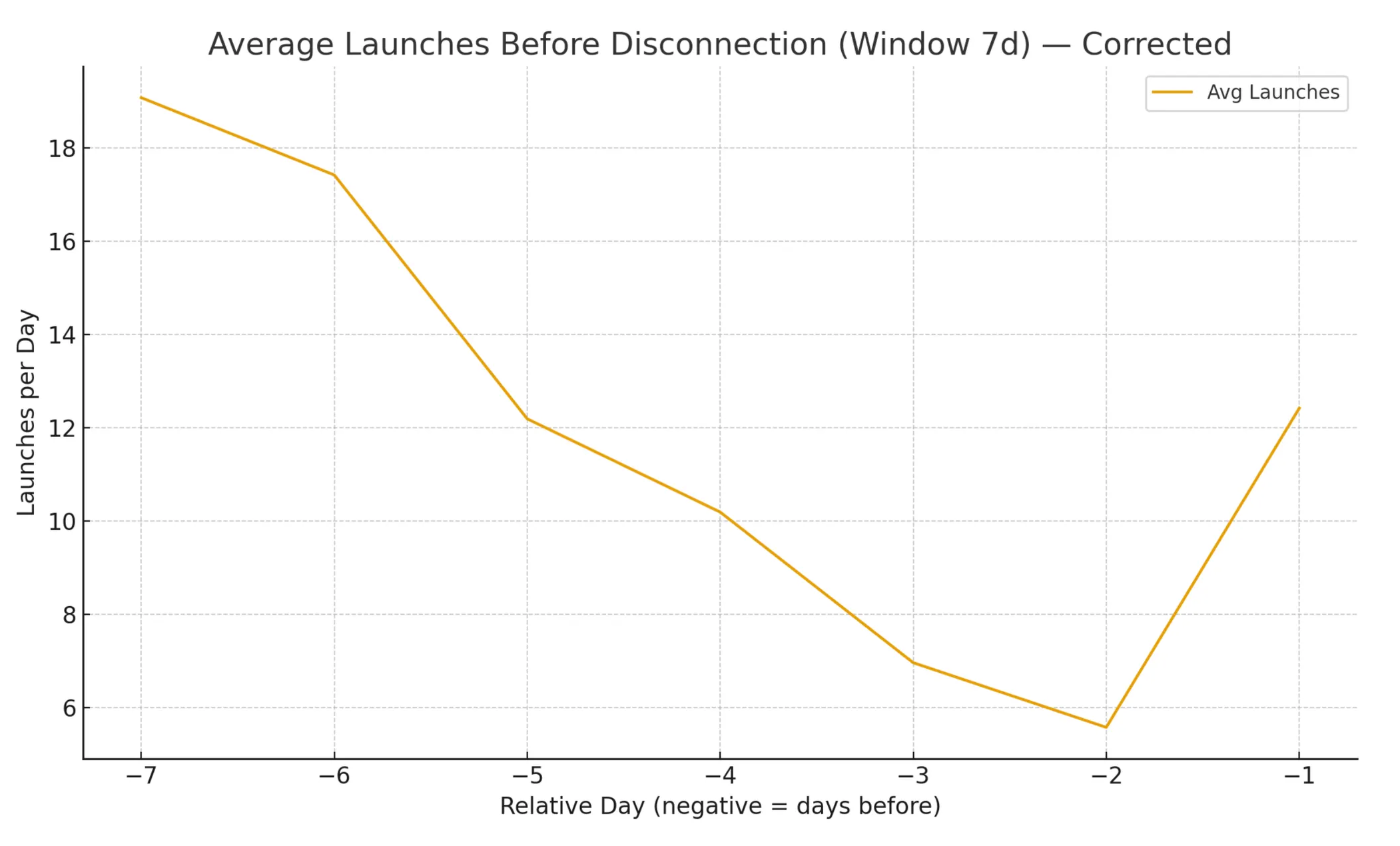
LinkedIn Dependency and Account Risk. PhantomBuster's strength is also its biggest constraint. The platform emulates user browser sessions through captured session cookies, not through official LinkedIn APIs. Every automation carries inherent account risk.
PhantomBuster's own 10-month behavioral analysis confirms that disconnections recur for high-volume users, and the company's January 2026 detection system article warns: "There are no guaranteed safe numbers." For teams with high-value Sales Navigator subscriptions, this risk is real.
Source: PhantomBuster
Execution Time Limits Create Friction at Scale. The Start plan caps at 20 hours per month; Grow at 80 hours. Teams running multi-step enrichment workflows report hitting limits faster than expected.
Reviewers on G2 and Capterra cite pricing relative to execution limits as the most common frustration, describing the platform as "very expensive for continuous automation." The jump from Start ($69/month) to Grow ($159/month) is a 2.3x price increase for four times the execution time.
Scraped Data Lacks Independent Verification. PhantomBuster collects data by scraping public profiles, so the information is only as accurate as what LinkedIn users have entered. There is no multi-source verification, no human research team cross-checking records, and no accuracy guarantee.
Job titles may be outdated, company data may be stale, and email addresses found through the email discovery credits are not validated for deliverability. For teams building outbound campaigns at scale, unverified data translates directly into wasted effort and damaged sender reputation.
Single-Channel Focus. PhantomBuster automates LinkedIn touchpoints well but does not manage multi-channel sequences natively. Teams that need coordinated outreach across LinkedIn, email, phone, and ads must connect PhantomBuster to separate tools like lemlist, HubSpot Sequences, or Salesloft. This adds tool complexity and creates gaps in attribution and reporting.
Inconsistent Customer Support. G2 aggregated data shows poor customer support as a concern with 10 mentions, with users citing slow responses and vague error messages. TrustRadius rates support at 7.7/10, below typical expectations for a paid SaaS product. A late-2025 pricing restructuring that "significantly limited usage" without warning to existing customers compounded trust concerns.
No Buyer Intent or Market Intelligence. PhantomBuster can tell you who matches a LinkedIn search filter or who commented on a post. It cannot tell you which companies are actively researching solutions in your category, which accounts show buying signals across the web, or how your target accounts' tech stacks and org charts are changing.
For teams that want to prioritize outreach based on buying readiness rather than profile attributes alone, this is a fundamental gap.
These limitations aren't failures. They're the natural result of building a specialized LinkedIn automation tool. But they create clear gaps for teams ready to move beyond scraping into verified data, multi-channel intelligence, and AI-powered execution across the full go-to-market motion.
For Teams That Have Outgrown LinkedIn Automation: ZoomInfo
ZoomInfo addresses PhantomBuster's limitations by operating at a different level.
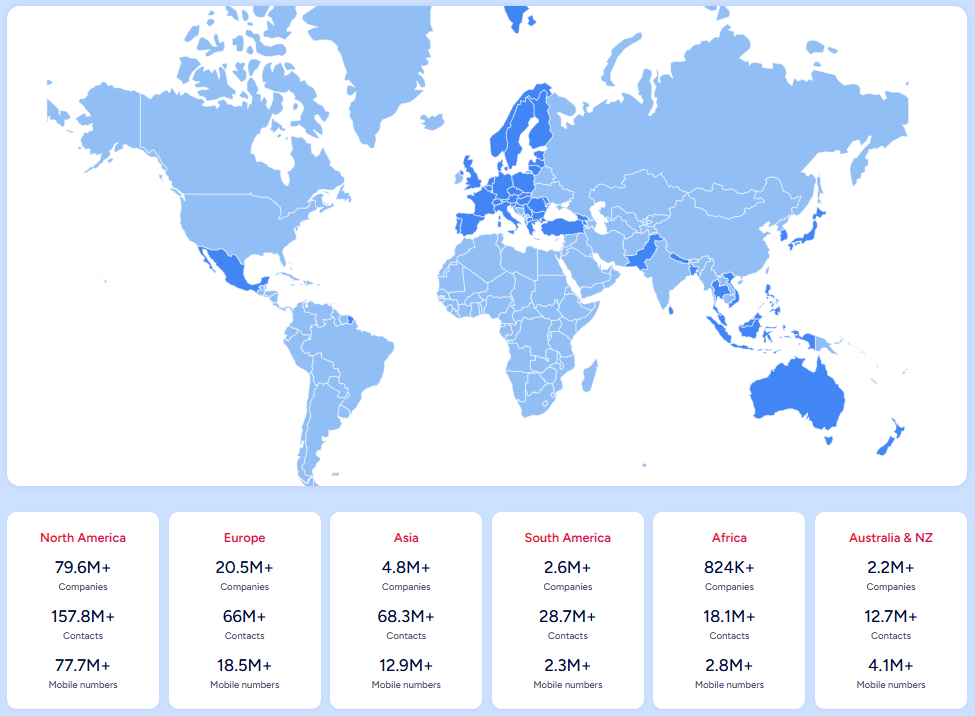
Where PhantomBuster scrapes publicly visible social profiles, ZoomInfo maintains a large B2B data platform: 500M contacts, 100M companies, 135M+ verified phone numbers, 120M direct-dial phone numbers, and 200M+ verified business email addresses. This data flows through a verification pipeline backed by 300+ human researchers, reaching up to 95% accuracy on first-party data.
Source: ZoomInfo
The difference matters most when you act on the data.
A direct dial from ZoomInfo actually rings. A business email actually lands. Teams using scraped LinkedIn data often face bounce rates that damage sender reputation and bury sequences in spam folders. In a Fortune 500 competitive RFP analyzing 25 million contacts across vendors, the independent consultant concluded that "no other competitor came even close."
Verified Data at Scale: ZoomInfo replaces scraped profiles with a multi-source intelligence layer covering contacts, companies, intent, and technographics.
PhantomBuster's data comes from what's visible on LinkedIn profiles.
ZoomInfo's data spans three dimensions: identity data (who buyers are, where they work, how to reach them), company context (firmographics, org charts, technographics across 30,000+ technologies), and signals that reveal when accounts are actively in-market.
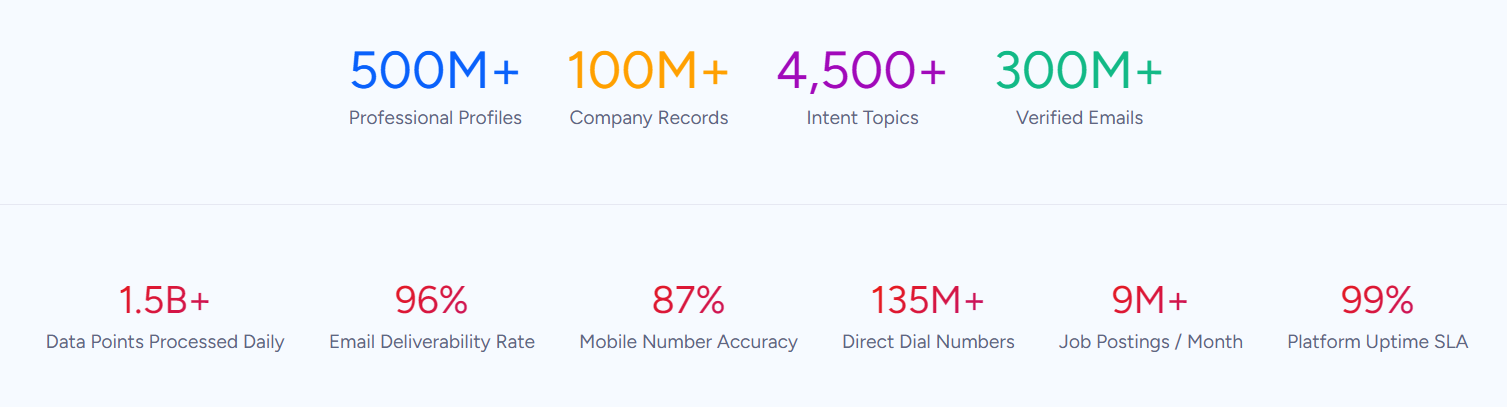
The verification process is continuous. Data flows through automated ML scanning of 28 million site domains daily, third-party partner data covering 95 million businesses, a community of 200,000+ ZoomInfo Lite users who share data back, and the in-house Data Training Lab of 300+ human researchers.
External validation includes a Forrester Wave Leader designation for Intent Data Providers, a Gartner Magic Quadrant Leader designation for ABM Platforms, and Ranked #1 in 142 G2 Reports.
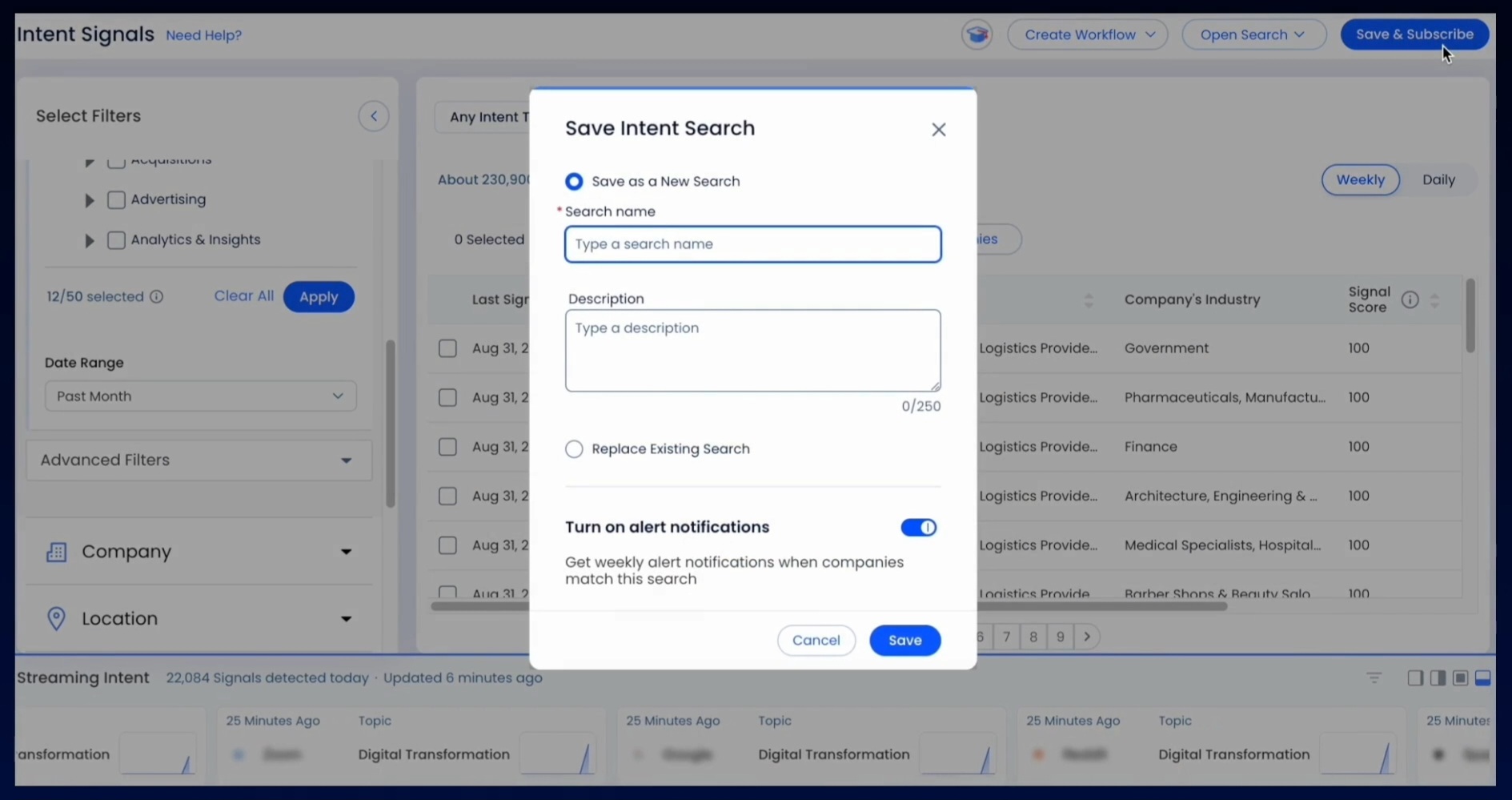
Beyond static contact records, ZoomInfo Intent tracks buying signals from 210 million IP-to-Organization pairings and 6 trillion+ new keyword-to-device pairings sourced monthly. Guided Intent, exclusive to ZoomInfo, identifies topics historically correlated with deal success rather than requiring manual topic selection.
Source: ZoomInfo
SpringDB saw 2x to 3x increases in campaign conversions, a 300% increase in database usability, and 30 to 50% uplift in average deal size using ZoomInfo's enriched data. (SpringDB)
GTM Context Graph: An intelligence layer that captures not just what happened in a deal, but why.
PhantomBuster delivers lead lists.
ZoomInfo's GTM Context Graph, which processes 1.5B+ data points daily, fuses ZoomInfo's B2B data with a customer's CRM records, conversation intelligence from calls and meetings, email interactions, and behavioral signals into a single intelligence layer.
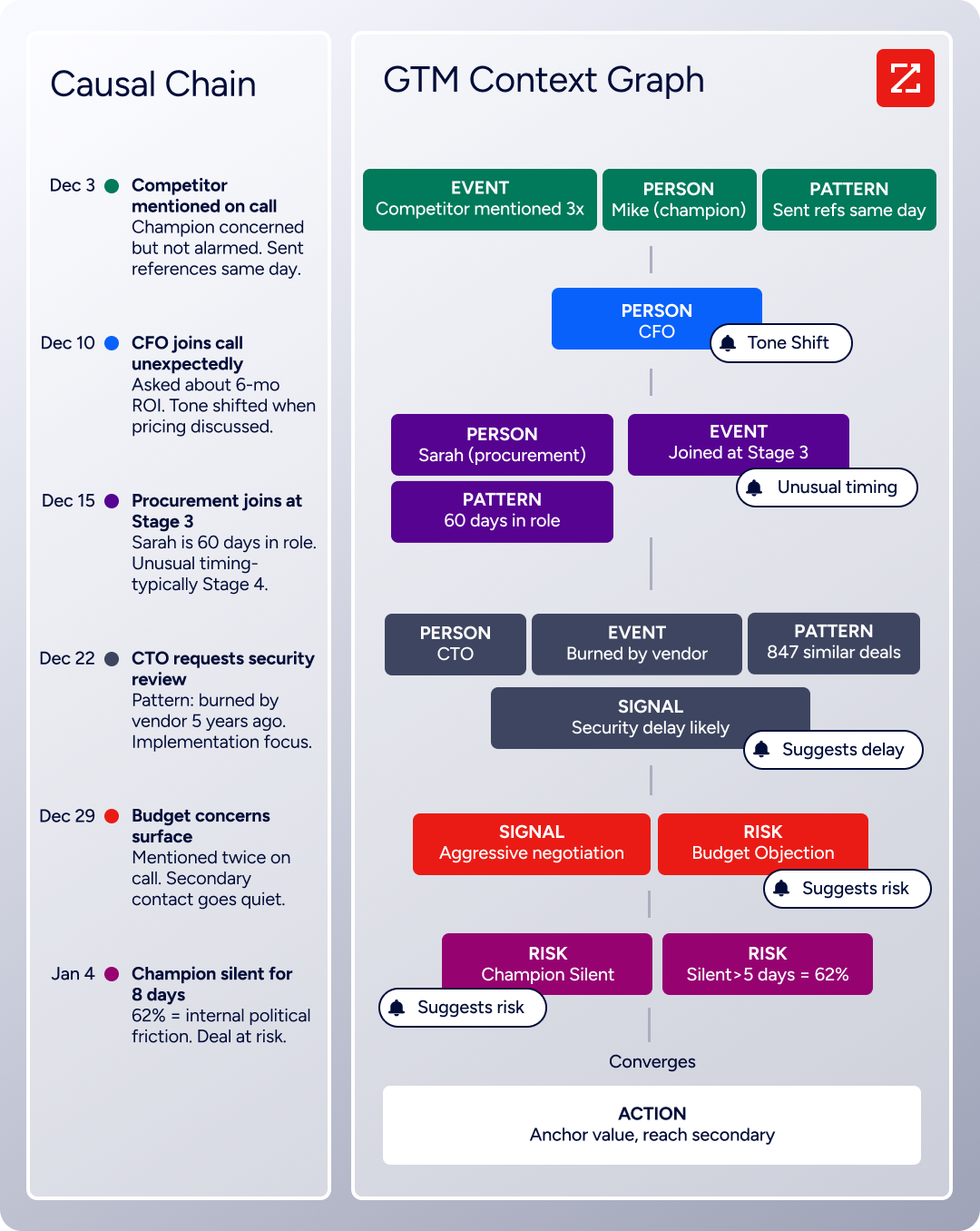
A CRM records that a deal moved stages. The GTM Context Graph analyzes the full picture to understand why: perhaps the CFO joined the last call and asked about ROI, or the VP went quiet due to an internal budget battle.
That intelligence flows into every action: follow-up emails address specific concerns because the system understands their context, plays target accounts whose signal combinations match actual win patterns, and forecasts reflect buying evidence rather than stage labels.
This contextual intelligence separates ZoomInfo from tools that collect only surface-level profile data. As CPO Dominik Facher writes: "The CRM recorded the state change. It has no record of why it happened." The GTM Context Graph makes that decision context machine-readable.
Seismic attributed 39% of active pipeline to opportunities identified or influenced by ZoomInfo signals, reported 54% productivity gains, and saved 11.5 hours per week per seller. (Seismic)
Universal Access: Use ZoomInfo's intelligence in any tool, not just ZoomInfo's own products.
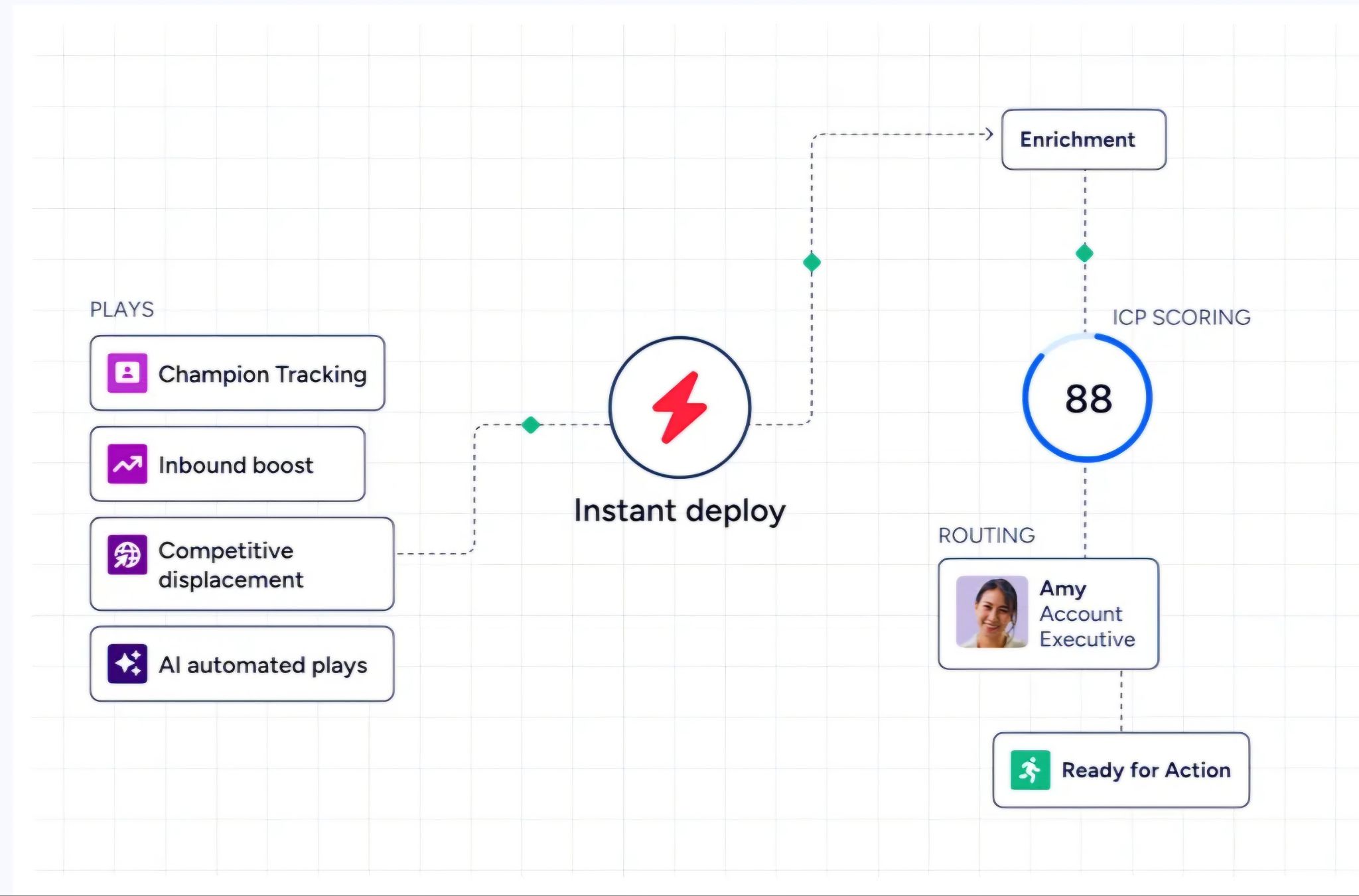
ZoomInfo delivers its intelligence through three channels.
GTM Workspace gives sellers a single workspace where prioritized accounts, AI-drafted outreach, and deal execution come together. GTM Studio gives marketers, RevOps, and GTM engineers a builder environment for audience definition, campaign orchestration, and pipeline measurement in natural language.
Source: ZoomInfo
For teams that build beyond ZoomInfo's own products, APIs and MCP expose the same intelligence to any custom agent, internal tool, or partner platform.
All three draw from one GTM Context Graph: the same data, the same intelligence, the same model updating continuously. Where you choose to work doesn't limit the quality of insight available.
For teams currently using PhantomBuster alongside separate CRM, enrichment, and outreach tools, this consolidation is practical.
ZoomInfo replaces the scraping layer, the enrichment layer, and the intent signal layer with a single platform, while connecting directly to CRM systems through native integrations with Salesforce, HubSpot, and Microsoft Dynamics and an App Marketplace with 120+ partner integrations.
BDO Canada's Senior Marketing Intelligence Analyst reduced time spent on data dashboard updates by 87% using ZoomInfo's API. "The plug-and-play aspect of the API means I can integrate it very easily into any process and get information at a moment's notice." (BDO Canada)
Enterprise-Grade Security and Compliance: Certifications that meet procurement requirements.
PhantomBuster does not publish security certifications.
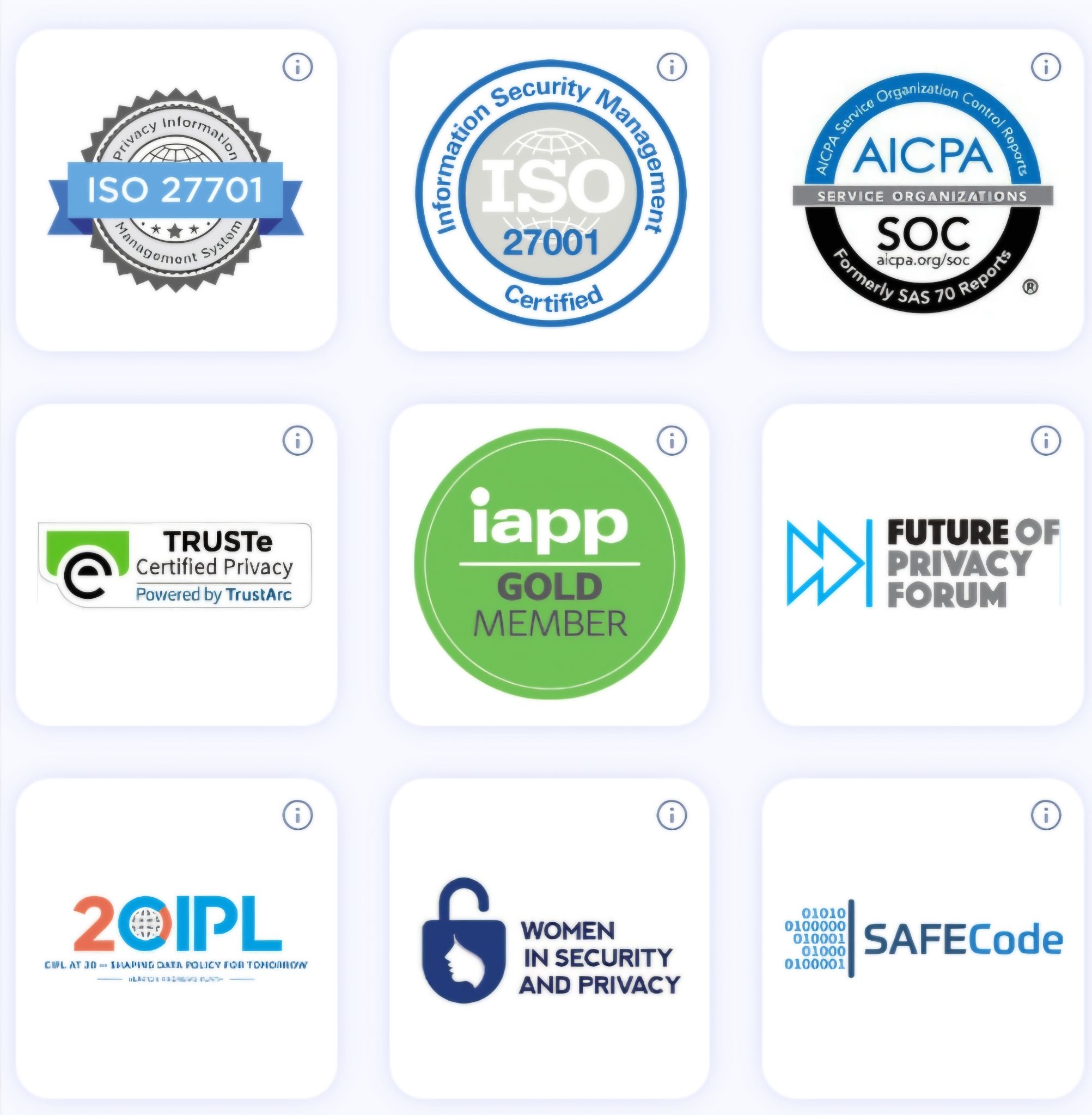
ZoomInfo maintains a certification stack, all renewed annually: ISO 27001 (Information Security Management), SOC 2 Type II (security, confidentiality, availability), ISO 27701 (Privacy Information Management), and TRUSTe GDPR and CCPA validations. ZoomInfo is a registered data broker in California and Vermont, with a dedicated Trust Center.
Source: ZoomInfo
For teams in regulated industries or going through enterprise procurement, this compliance infrastructure is often a requirement, not a differentiator.
PhantomBuster or ZoomInfo: Comparison Summary
Aspect | PhantomBuster | ZoomInfo |
|---|---|---|
Primary focus | LinkedIn automation and scraping | B2B data and go-to-market platform |
Data source | Scraped from public social profiles | 500M contacts, 100M companies, multi-source verified |
Data verification | No independent verification | 300+ human researchers, up to 95% accuracy |
Direct-dial phone numbers | Not available natively | 135M+ verified, 120M direct-dial |
Verified business emails | Limited email credits (500 to 10,000/month) | 200M+ verified business email addresses |
Buyer intent signals | LinkedIn post engagement only | 210M IP-to-Org pairings, 6T+ keyword signals monthly |
Technographics | Not available | 30,000+ technologies across 30M+ companies |
Outreach channels | LinkedIn only (connect to others via integrations) | Multi-channel: email, phone, ads, LinkedIn, direct mail |
AI capabilities | GPT-based message writing and enrichment | GTM Context Graph, AI agents, AI-drafted outreach |
CRM integrations | HubSpot, Salesforce, Pipedrive | Salesforce, HubSpot, Dynamics + 120+ marketplace integrations |
Security certifications | Not published | ISO 27001, ISO 27701, SOC 2 Type II, GDPR, CCPA |
Free entry point | 14-day trial + permanent free plan (1 slot) | ZoomInfo Lite (permanent, no credit card) + 7-day trial |
Pricing | $69 to $439/month (published) | Custom-quoted, consumption-based |
Best for | Solo operators and small teams running LinkedIn-first outbound | Sales, marketing, and RevOps teams needing verified data and full GTM intelligence |
Final Verdict
The choice between PhantomBuster and ZoomInfo depends on where your team is in its go-to-market maturity and what you need from your prospecting tools.
Choose PhantomBuster if your outbound runs primarily through LinkedIn and you need a no-code way to automate the repetitive parts: extracting leads from searches, sending connection requests, and following up with accepted connections.
It works well for solo operators and small teams that can manage execution time budgets, stay within LinkedIn's safety boundaries, and supplement scraped data with other tools for enrichment and multi-channel outreach. The per-workspace pricing keeps costs predictable, and the 130+ Phantom library covers a wide range of LinkedIn tasks.
Choose ZoomInfo if you need verified B2B data, buyer intent signals that tell you when accounts are actively researching, and an intelligence layer that reveals why opportunities move or stall.
ZoomInfo serves teams that have outgrown LinkedIn-only prospecting and need a platform covering the full go-to-market motion: from identifying the right accounts and contacts, through multi-channel engagement, to CRM enrichment and pipeline intelligence.
The data scale, verification infrastructure, and compliance certifications make it the foundation for teams building reliable, scalable outbound operations.
Get started with ZoomInfo Lite for free here.
The distinction between these platforms reflects a broader choice in B2B prospecting: automation versus intelligence. PhantomBuster automates the manual steps of LinkedIn outreach. ZoomInfo provides the verified data, buying signals, and contextual intelligence that determine whether those steps reach the right people, at the right time, with the right message.
PhantomBuster FAQ
Is PhantomBuster safe to use with LinkedIn?
PhantomBuster captures your LinkedIn session cookie through a browser extension, then runs automations on its cloud servers as if they were your browser. This carries inherent account risk. PhantomBuster publishes rate limit guidance and built-in human-pacing presets, and their own 10-month behavioral analysis provides transparency about disconnection patterns.
However, the company's own detection system explainer warns that "there are no guaranteed safe numbers." Users should start with low volumes and increase gradually over two to three weeks.
How much does PhantomBuster cost?
PhantomBuster offers three paid plans: Start at $69/month (20 hours execution, 5 slots), Grow at $159/month (80 hours, 15 slots), and Scale at $439/month (300 hours, 50 slots). Annual billing saves 19 to 20%.
All plans support up to 100 workspace members and include access to every Phantom and Workflow. A 14-day free trial requires no credit card, and a permanent Free plan provides 1 slot with 30 minutes of execution time per month.
What platforms does PhantomBuster work with?
PhantomBuster supports automations across LinkedIn, Sales Navigator, Instagram, Facebook, Twitter/X, Google Maps, YouTube, GitHub, Reddit, Slack, and HubSpot. LinkedIn and Sales Navigator are the most developed, with the widest selection of Phantoms and all 14 Workflows centered on LinkedIn-based prospecting.
Does PhantomBuster verify the data it collects?
No. PhantomBuster scrapes publicly available data from social media profiles and web pages. The information is only as accurate as what users have posted on their profiles. There is no multi-source verification, no human research team cross-checking records, and no accuracy guarantee. Email addresses found through the email discovery feature are not validated for deliverability.
ZoomInfo, by comparison, maintains a multi-source verification pipeline with 300+ human researchers and reports up to 95% accuracy on first-party data.
Can PhantomBuster replace a full sales intelligence platform?
PhantomBuster handles LinkedIn lead extraction, profile enrichment, and automated outreach effectively. It does not provide buyer intent signals, technographic data, org charts, company hierarchies, direct-dial phone numbers, or multi-channel outreach sequencing.
Teams needing these capabilities will need to supplement PhantomBuster with additional tools or move to a platform like ZoomInfo that provides them natively.
What CRM integrations does PhantomBuster offer?
PhantomBuster natively integrates with HubSpot (bidirectional), Salesforce, and Pipedrive. For other CRM systems, users must route data through Zapier, Make, n8n, or the PhantomBuster API. Reviewers on TrustRadius have cited limited CRM integrations as a gap, particularly for teams using Zoho or Microsoft Dynamics.
What is the difference between Phantoms and Workflows?
Phantoms are individual automations that each handle a single task, such as extracting profiles from a LinkedIn search or sending connection requests.
Workflows are predefined multi-step sequences that chain several Phantoms into an end-to-end pipeline, handling extraction, enrichment, and outreach in a single setup without manual handoff between steps. Users can also chain individual Phantoms manually for custom sequences that Workflows don't cover.
Does PhantomBuster offer multi-channel outreach?
Not natively. PhantomBuster automates LinkedIn touchpoints (connection requests, messages, post engagement) but does not manage email sequences, phone calls, or advertising campaigns. Teams needing multi-channel cadences must connect PhantomBuster to external tools like lemlist, HubSpot Sequences, or Salesloft.
ZoomInfo provides multi-channel orchestration natively through GTM Studio, which coordinates outreach across email, calls, ads, and direct mail based on buyer behavior signals.
