
The question a developer asks before committing to a CRM API is not whether the endpoints exist, but whether they cover enough of the data model to justify building against them instead of the dashboard.
Pipedrive's API is a mature REST surface with two active versions (v1 and v2), OAuth 2.0 support, published OpenAPI 3 specs, official SDKs for Node.js and PHP, full webhook support, and API access on every plan, including the entry-level Lite tier.
The developer hub is public, the changelog announces breaking changes with lead time, and a free sandbox account lets you build without touching production data. For a CRM that started in an Estonian garage in 2010, the developer surface is well-equipped.
But coverage of the CRM data model and coverage of the intelligence that feeds it are different questions.
Pipedrive's API gives you programmatic control over everything inside the CRM: deals, contacts, organizations, leads, activities, products, pipelines, stages, notes, files, and the automation engine that connects them. If your build is a CRM integration (syncing data in and out, triggering workflows on deal events, embedding Pipedrive into a larger sales tool), the API is scoped for that job. What it deliberately does not cover is the intelligence layer upstream of the CRM: who these contacts are beyond what a rep has entered, what companies they work for at scale, whether those accounts show buying intent, and what their technology stack looks like.
This is where ZoomInfo enters the picture. ZoomInfo is an AI GTM platform built on 500M contacts, 100M companies, 135M+ verified phone numbers, and 200M+ verified business email addresses. Its Enterprise API is a REST suite covering search, enrichment, AI intelligence, and audience management, with OAuth 2.0 authentication, tiered rate limits, and an MCP server for AI-agent workflows.
The two APIs are layers of the same pipeline, not rivals: Pipedrive manages the sales process, ZoomInfo provides the intelligence that informs it.
This review covers the Pipedrive API in technical depth first (authentication, endpoints, webhooks, SDKs, rate limits, and pricing), then reviews ZoomInfo's API as the intelligence layer that picks up where CRM data stops.
Pipedrive API at a Glance
Attribute | Detail |
|---|---|
API type | REST over HTTPS, JSON responses, CORS-enabled |
Authentication | API token (query parameter or header) and OAuth 2.0 authorization code flow |
Base URL | /api/v1/ (stable) and /api/v2/ (newer, lower token cost) |
Rate limits | Token-based daily budget: 30,000 base tokens x plan multiplier x seat count |
Pricing / access | API access included on all plans, including Lite ($14/month per seat) |
SDKs | |
Webhooks | Yes, Webhooks v2 with event-based subscriptions across all core entities |
App Extensions | Custom UI extensions, JSON modals/panels, video calling and messaging extensions |
Documentation | developers.pipedrive.com (API reference) and pipedrive.readme.io (narrative docs); OpenAPI 3 specs for v1 and v2 |
Pipedrive API: What Works Well & What to Plan Around
What works well | What to plan around |
|---|---|
API access on every plan, including the $14/month Lite tier | Token-based daily budget shared across all users in the company account |
OAuth 2.0 with scoped permissions for Marketplace apps | API token auth is static, no rotation: fine for internal scripts, risky if leaked |
OpenAPI 3 specs for both v1 and v2, importable into Postman/Insomnia | v2 is still expanding; some resources remain v1-only |
Free developer sandbox account, separate from production | CRM scope only: no contact enrichment, intent data, org charts, or technographics |
Webhooks v2 covers all core entities with field-level change events | Max 40 webhook subscriptions per user |
Changelog announces breaking changes with 1-3 months notice | Token budget scales with plan tier and seats; heavy API usage requires higher plans or top-ups |
Pipedrive API: Authentication & Getting Started
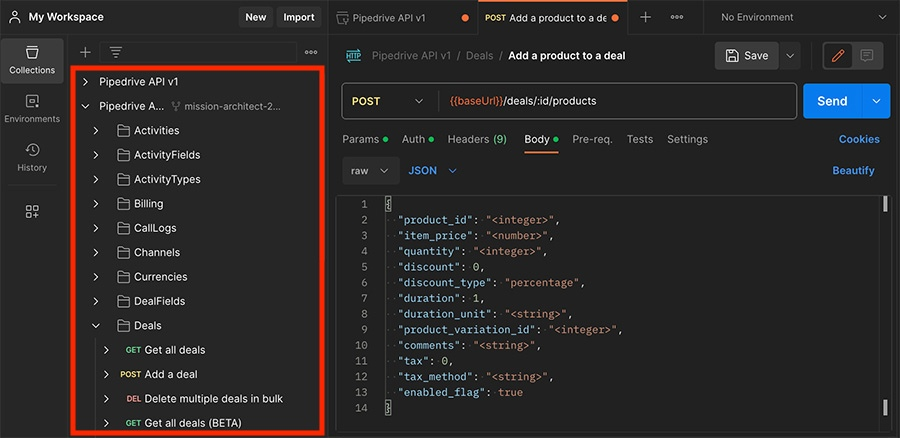
Source: Pipedrive
Getting API access requires a paid Pipedrive account on any plan. The Lite tier at $14/month per seat includes full API access, and a free developer sandbox account lets you build and test integrations without touching production data.
Pipedrive supports two authentication methods: a personal API token and OAuth 2.0.
API token: A static token generated inside the Pipedrive app, passed as a query parameter or header on each request. This method suits internal scripts and private integrations where a single user's credentials are acceptable.
Starting with API v4, accounts can hold multiple API keys, each tied to its own usage statistics, so you can separate traffic from different integrations.
OAuth 2.0: The authorization code flow is required for any app listed in the Pipedrive Marketplace. The flow is standard:
Redirect the user to GET /oauth/authorize with client_id, redirect_uri, and optional state.
Exchange the authorization code for access and refresh tokens via POST /oauth/token using Basic auth (base64(client_id:client_secret)).
Refresh the access token when it expires via POST /oauth/token with grant_type=refresh_token.
OAuth tokens are scoped at app registration (e.g., deals:read, contacts:write, products:full, webhooks:write), and users see the requested permissions on a consent screen before approving. Apps registered in the Developer Hub receive a client_id and client_secret.
Pipedrive has improved security for OAuth access tokens, as announced in the changelog.
A basic authenticated request:
curl "https://api.pipedrive.com/api/v1/deals" \
-H "Authorization: Bearer YOUR_ACCESS_TOKEN"
The response returns a success boolean, the requested data, and pagination metadata on list endpoints.
Pipedrive API: Core Endpoints & Capabilities
The API covers the full breadth of Pipedrive's CRM data model. All resources follow standard REST patterns (GET, POST, PUT/PATCH, DELETE) and return paginated JSON. Both offset-based and cursor-based pagination are supported; Pipedrive introduced cursor pagination for Persons, Organizations, Activities, and Deals endpoints in v2.

Source: Pipedrive
Deals
The deals surface is the heart of the API, matching Pipedrive's pipeline-first design.
Operations: Create, read, update, delete, search, and bulk-operate on deals. Supports product association (Deal Products), installment scheduling (Deal Installments), label management, and deal-to-lead / lead-to-deal conversion. Pipedrive added bulk deal-product operations in v2.
What you would build with this: a bidirectional CRM sync that creates deals from a billing system when a trial starts, attaches products with pricing, and moves the deal through stages based on usage events from your application.
Persons & Organizations
Full CRUD plus merge (deduplicate) operations. Organization relationships (parent/child hierarchies) live on a separate endpoint. Both support custom fields for arbitrary data extensions.
What you would build with this: a contact deduplication service that periodically scans for duplicate person records, merges them programmatically, and maintains clean organization hierarchies across imported data.
Leads
Create, read, update, and delete leads, kept separate from deals. Includes lead labels, lead sources, and cross-conversion endpoints for moving leads into the deal pipeline.
Activities
Log and retrieve calls, emails, tasks, meetings, and custom activity types. v2 endpoints are available in public beta. Activities attach to deals, persons, or organizations, making them the audit trail for every sales interaction.
Products
Manage the product catalog with subscription support, duplication, image management, and custom fields. Products attach to deals with quantity and pricing, enabling revenue calculations at the deal level.
Notes & Files
Notes attach to deals, persons, organizations, leads, or project tasks. Files can be uploaded directly or referenced from external sources (Google Drive, Dropbox). Size limits apply.
Pipelines & Stages
Read and manage pipeline configurations and stage definitions. Since Pipedrive supports multiple custom pipelines, these endpoints let you programmatically create the pipeline structures that match different sales processes.
Item Search
A unified cross-entity search endpoint (/api/v1/itemSearch) spanning Deals, Persons, Organizations, Leads, Products, and Files. This is the fastest path to building a global search feature against Pipedrive data.
Projects & Tasks
Project management endpoints (boards, phases, templates, tasks) are available via the Projects API v2, extending Pipedrive's reach into post-sale project tracking.
Supporting Resources
The API also covers Mailbox (read synced email threads), Call Logs (log CTI events), Users and Roles (manage access), Filters (save custom filter conditions), Goals (create/retrieve sales goals), Recents (time-ordered stream of changed records across entity types), and Billing and Currencies.
All responses include a success boolean. Custom fields appear as hash-keyed fields on each entity; the Fields APIs (DealFields, PersonFields, etc.) expose field definitions so you can map keys to labels at runtime.
Pipedrive API: Webhooks & Events
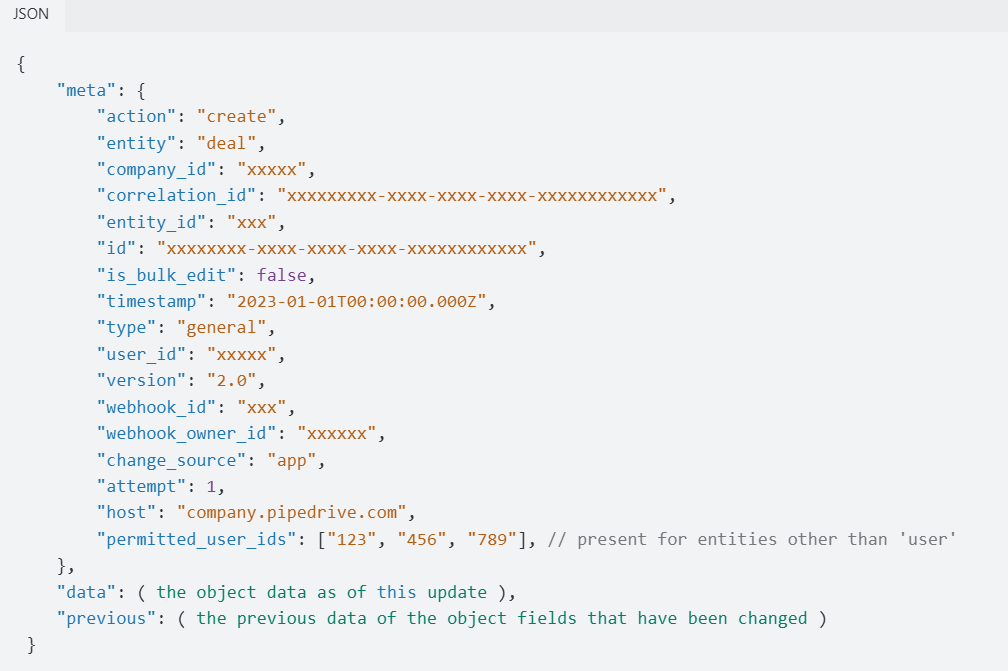
Pipedrive has full webhook support, managed via the REST API. Webhooks v2 is now the default version following a breaking change announcement.
Source: Pipedrive
Event specification: Each webhook subscription takes two parameters, event_action and event_object, that combine into an action.object pattern (e.g., create.deal, delete.persons, *.* for all events).
Supported actions are create, change, delete, and * (wildcard). Supported objects include all core entities: deal, person, organization, activity, note, product, lead, stage, pipeline, project, and task.
Recent expansions (as of May 2026):
Deal product webhooks: fire when products are added, updated, or removed from a deal
Deal installment webhooks: fire on installment schedule create/update/delete
Entity field definition webhooks: fire when custom field schemas change (not just values), covering Deal Fields, Lead Fields, Person Fields, Organization Fields, Product Fields, and Project Fields
Organization webhook payloads now include website, linkedin, industry, annual_revenue, and employee_count
Delivery: Pipedrive delivers webhooks as HTTP POST to a subscription_url that must be publicly accessible. IP allowlisting documentation is available for firewall configurations. OAuth-scoped apps must have the webhooks:write scope. The limit is 40 webhook subscriptions per user.
What you would build with this: a real-time integration that pushes deal-stage changes to your billing system, triggers Slack notifications when new leads arrive, and updates an external analytics dashboard whenever a deal closes, all without polling.
Pipedrive API: SDKs, Docs & Rate Limits
SDKs & Libraries
Pipedrive maintains two official API client libraries:
Node.js: pipedrive/client-nodejs (233 stars on GitHub)
PHP: pipedrive/client-php (60 stars); a major upgrade was noted in the changelog
Several actively maintained community libraries extend coverage:
PHP: IsraelOrtuno/pipedrive (170 stars)
Python: jscott1989/python-pipedrive (102 stars)
.NET: DavidRouyer/pipedrive-dotnet (38 stars)
Ruby: amoniacou/pipedrive.rb (35 stars)
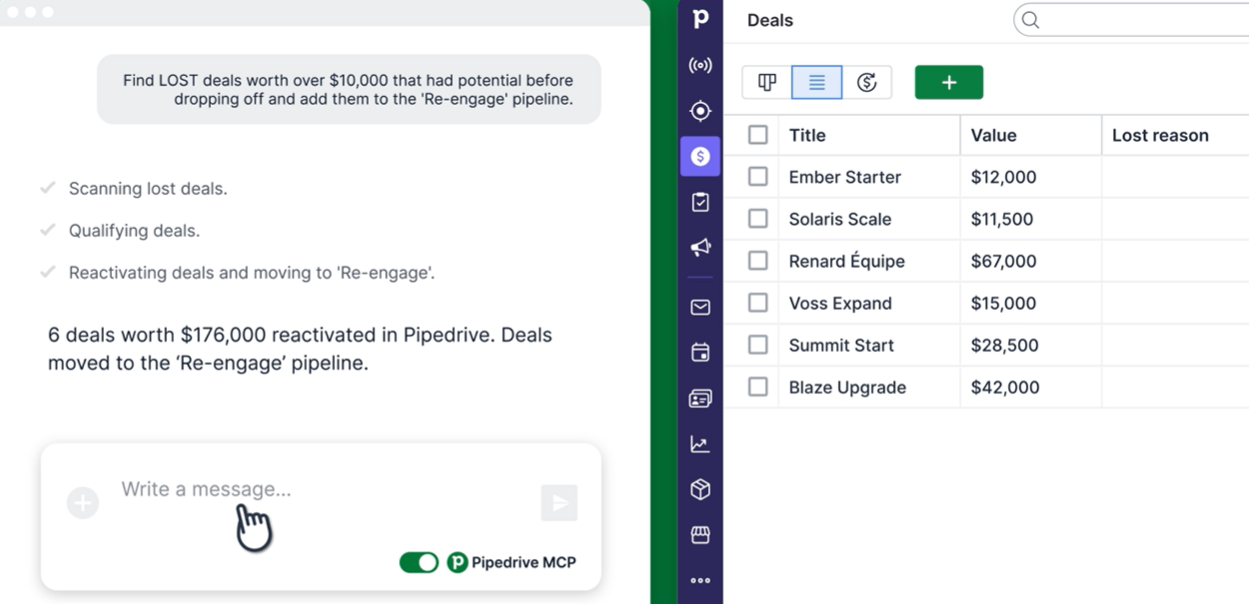
Pipedrive also provides a create-pipedrive-app CLI tool for scaffolding new Marketplace apps. A Pipedrive MCP server is available in beta, letting AI assistants connect directly to Pipedrive via the Model Context Protocol.
Source: Pipedrive
Two official SDKs is limited compared to some platforms, but the OpenAPI 3 spec means you can auto-generate clients in any language. The community libraries fill in Python, .NET, and Ruby, though they are community-maintained, so check each repo's commit history before depending on it in production.
Documentation & Developer Experience
Pipedrive's developer documentation is well-organized across two surfaces:
API Reference at developers.pipedrive.com: every endpoint documented with request/response schemas, parameter descriptions, and inline token cost. OpenAPI 3 spec files are available for both v1 and v2, and a "Run in Postman" button sits on the reference page.
Narrative docs at pipedrive.readme.io: covers authentication flows, core API concepts (pagination, rate limiting, date formatting, HTTP codes), OAuth scopes guide, Marketplace submission process, App Extensions (JSON panels, custom UI iframes, messaging and video calling extensions), and a full guide for Webhooks v2 including migration from v1.
The Changelog is detailed and developer-friendly: the team announces breaking changes with effective dates (typically 1-3 months notice) and flags them with "BREAKING CHANGE" labels, with email subscriptions available.
A free developer sandbox account is available for testing integrations without risk. The Developer Community forum handles developer Q&A, and Pipedrive engineering publishes technical content on Medium.
A tutorial library covers common tasks like creating deals, pagination, working with custom fields, and building CTI integrations.
The documentation is complete, publicly accessible, and well-maintained. The interactive reference, the sandbox account, and the OpenAPI spec give a developer three ways to confirm response shapes before writing production code.
Rate Limits & Constraints
Pipedrive uses a token-based rate limiting system, introduced for new signups December 2, 2024 and rolled out to existing customers through December 31, 2025.
How it works: Each API request consumes tokens from a company-wide daily budget. Lightweight endpoints consume fewer tokens; complex or data-heavy endpoints consume more. Pipedrive publishes token costs per endpoint in the API Reference.
When the daily budget runs out, further requests receive a 429 Too Many Requests response until the budget resets at midnight.
Budget formula:
30,000 base tokens x plan multiplier x number of seats (+ purchased top-ups)
Plan | Multiplier | Example (5 seats) |
|---|---|---|
Lite | 1x | 150,000 tokens/day |
Growth | 2x | 300,000 tokens/day |
Premium | 5x | 750,000 tokens/day |
Ultimate | 7x | 1,050,000 tokens/day |
The budget is shared company-wide across all users and applies only to API traffic, not UI actions. Companies can purchase additional API token top-ups in increments of 250,000 tokens (up to 10 units), available from the Growth plan onward.
One practical consequence: migrating to API v2 reduces token consumption per request, since v2 endpoints are more efficient. If you are approaching your daily budget ceiling, switching v1 calls to their v2 equivalents is the first optimization to try.
Pipedrive API Pricing & Access Costs
Pipedrive includes API access on every paid plan. There are no per-call charges, no separate API tier, and no enterprise-only gating. The effective cost of API access is the plan subscription itself.
The plan tiers (per seat, per month):
Lite: $14/month (the entry point; includes API access, webhooks, and Marketplace integrations)
Growth: Adds email sync, automations, sequences, and 2x API token budget
Premium: Adds Smart Docs, Projects, LeadBooster, and 5x API token budget
Ultimate: Highest limits across the board, 7x API token budget
Pricing uses a per-seat model for the CRM, with add-ons billed per company. Annual billing offers up to 42% discount over monthly.
For a developer sizing costs: the API itself is free on any paid plan. The real cost driver is the token budget, which scales with plan tier and seat count.
A five-seat team on the Lite plan gets 150,000 tokens per day. If your integration hits complex endpoints often (which consume more tokens), you will need either a higher-tier plan or purchased top-ups. API token top-ups are available from Growth onward at 250,000 tokens per unit, up to 10 units.
The 14-day free trial includes full API access with no credit card required, and the free developer sandbox is available indefinitely for building and testing integrations.
Where the Pipedrive API Falls Short
These are practical limits a developer should plan around, not criticisms of the platform. Several reflect the deliberate scope of a CRM API.
The API manages CRM data. It does not source it. There is no contact enrichment endpoint, no company intelligence lookup, no intent signal feed, no technographic data, and no org-chart traversal. If your pipeline needs a contact's verified email, their company's employee count, their technology stack, or whether their account is actively researching your category, you need a second API.
Pipedrive's Prospector feature (part of the LeadBooster add-on) offers some data enrichment in the UI, but that capability is not exposed through the API.
Token budget gates heavy API usage. The daily token budget is shared across all users in the company account. A Lite plan with five seats gives you 150,000 tokens per day, but complex endpoints can consume 10+ tokens per call.
For high-frequency integrations (real-time sync, large data migrations, multiple concurrent integrations), you will need either a higher-tier plan or purchased top-ups. The cost of API access is technically $0, but the cost of sufficient API capacity is not.
40 webhook subscriptions per user. For a simple integration, 40 is plenty. For a platform that needs to subscribe to events across dozens of entity types and actions, you will need to use wildcard subscriptions (*.*) and filter in your receiver rather than subscribing granularly.
Two official SDKs (Node.js and PHP). Python, .NET, Ruby, Go, and Java developers rely on community libraries or raw HTTP calls. The OpenAPI spec mitigates this (you can auto-generate a client in your language), but an auto-generated client is not the same as a maintained SDK with idiomatic patterns and tested edge cases.
v2 is still expanding. Not all resources have v2 endpoints yet, so some integrations must mix v1 and v2 calls. The two versions use different pagination styles (offset vs. cursor) and consume tokens at different rates, adding complexity to integrations that span both.
No native data intelligence. Pipedrive does not expose buyer intent signals, technographic data, funding events, hiring patterns, or competitive intelligence through its API. The CRM records what reps enter and what integrations push in.
For a developer building a system that needs to reason about which accounts are worth pursuing, the CRM data alone is incomplete.
ZoomInfo API: The Intelligence Layer Pipedrive Does Not Cover
Pipedrive's API tells you everything happening inside the CRM: which deals are in which stage, what activities are logged, who the contacts are as reps entered them.
ZoomInfo's API tells you what the CRM cannot: who these contacts actually are at scale, what companies they work for, what technology those companies use, whether they are actively researching your category, and where they sit in the org chart.
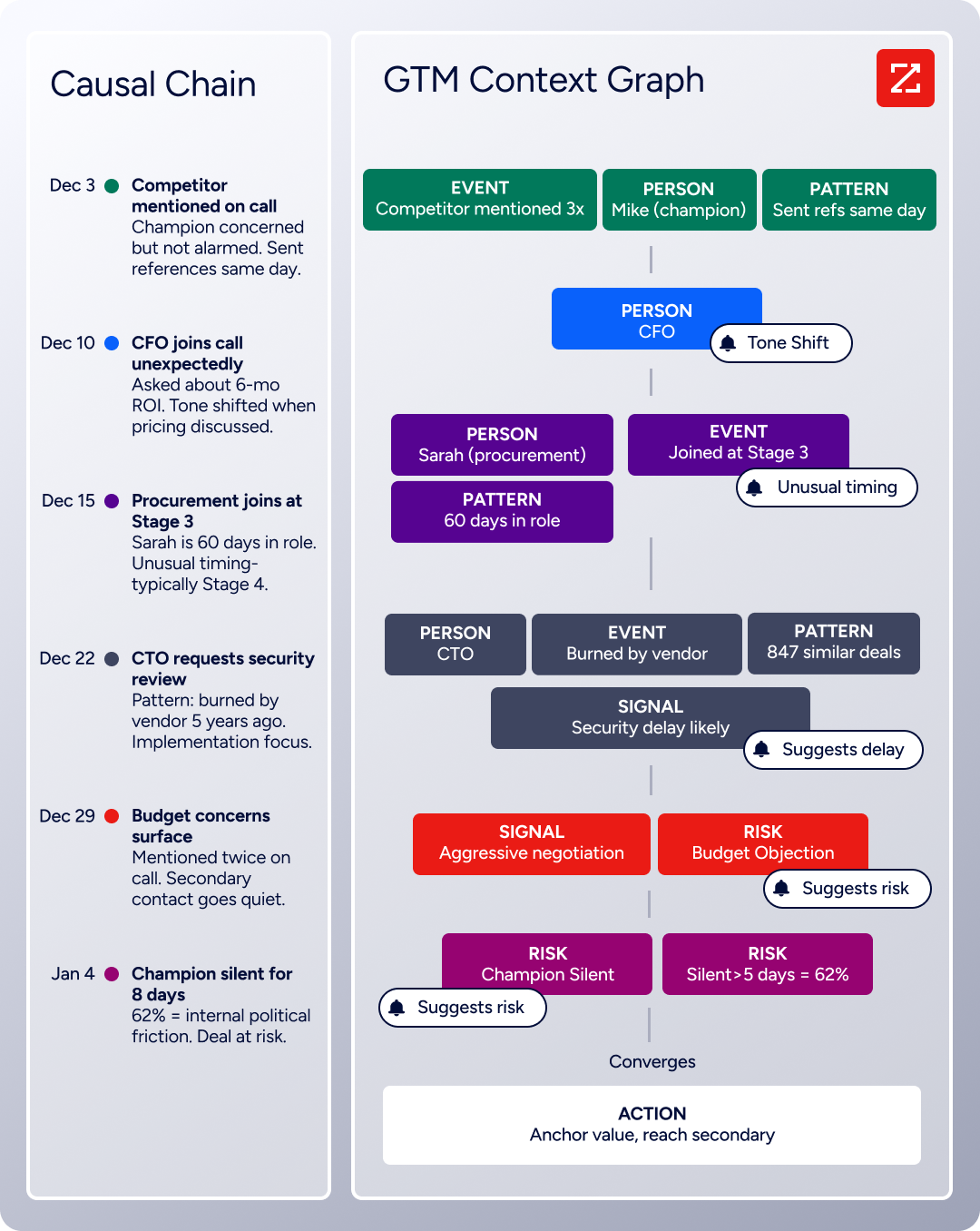
The two APIs operate at different layers of a GTM data pipeline. The gap between "what's in the CRM" and "what should be in the CRM" is exactly where ZoomInfo's API fits. Powering that intelligence is the GTM Context Graph, which processes 1.5B+ data points daily by fusing ZoomInfo's B2B data with your first-party data to reveal not just what happened, but why.
What the API Covers: Search, Enrichment, and AI Intelligence
ZoomInfo's Enterprise API is a REST suite served from https://api.zoominfo.com/gtm, organized into four areas documented in the interactive API reference.
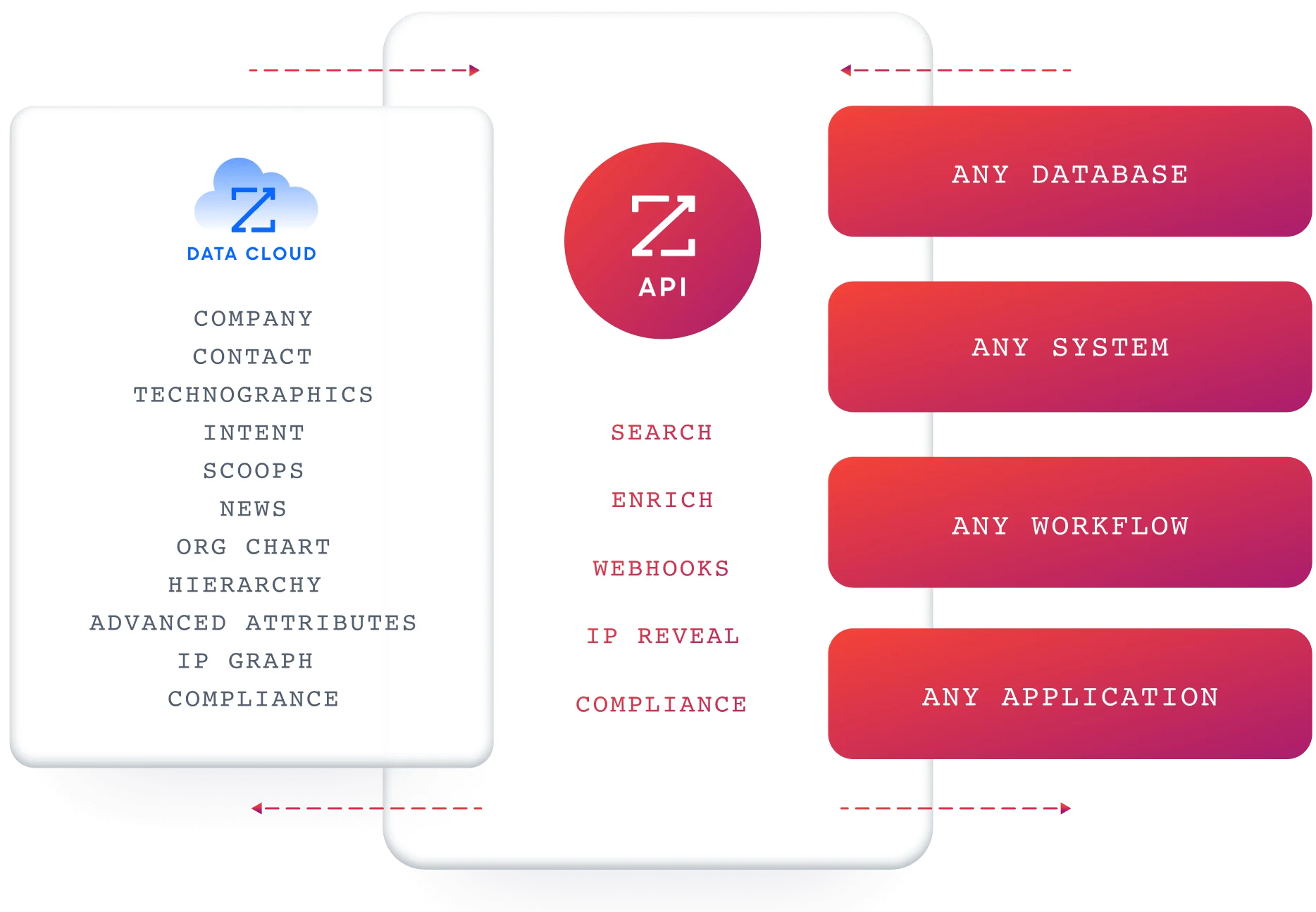
Data API (Search and Enrich) is the core surface. Search endpoints cover Contacts, Companies, Intent, News, and Scoops, returning matched records without consuming credits.
Enrich endpoints unlock full payloads: business emails, direct dials, employment history, corporate hierarchy, org charts, technographics, and hashtag signals, accepting up to 25 records per call.
The underlying dataset spans 500M contacts, 100M companies, 135M+ verified phone numbers, and 200M+ verified business email addresses.
Copilot API exposes the AI engine within GTM Workspace as a programmatic surface.
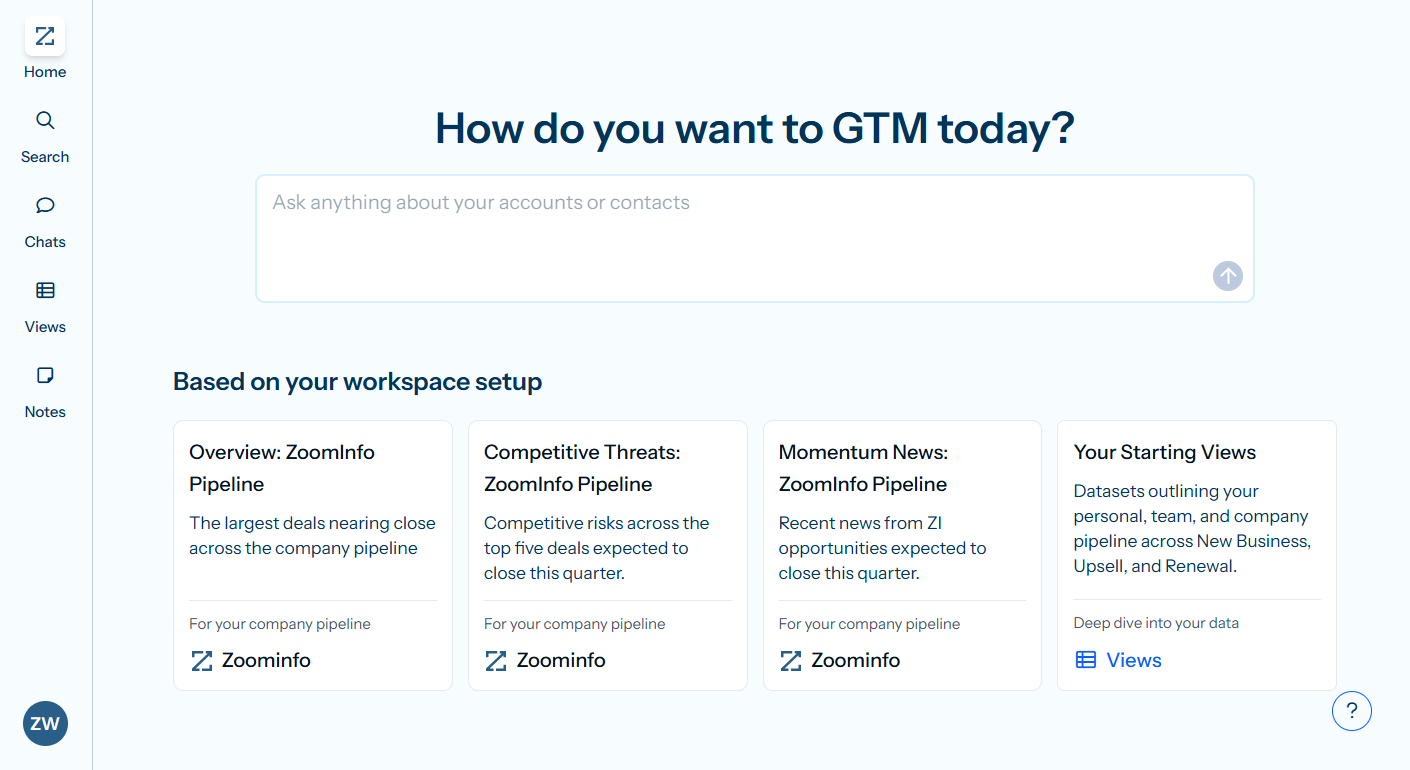
Account Summary returns structured account intelligence with a free-form Q&A endpoint.
Find Similar Companies performs lookalike expansion.
Contact Recommendations returns AI-ranked buying-committee suggestions by motion (prospecting, deal acceleration, renewals).
Marketing and Platform APIs round out the suite with audience management (CRUD for advertising audiences) and bidirectional engagement data via the Engagements API, currently in Beta.
What you would build with this alongside Pipedrive: a nightly enrichment job that pulls contacts from Pipedrive via its API, searches ZoomInfo for matching records (free, no credits consumed), enriches the ones worth pursuing with verified emails, direct dials, and company data (1 credit per new record), then writes the enriched data back to Pipedrive's custom fields.
The search-then-enrich pattern means you filter freely and pay only for the records you commit to.
Authentication and Access
ZoomInfo uses OAuth 2.0 with PKCE via Okta, supporting three flows: Authorization Code with PKCE (web applications), Client Credentials (server-to-server), and Refresh Token. Access tokens are 24-hour Bearer tokens with rotating refresh tokens.
Teams register applications through the ZoomInfo Developer Portal, where they generate credentials, define scopes, and test endpoints.
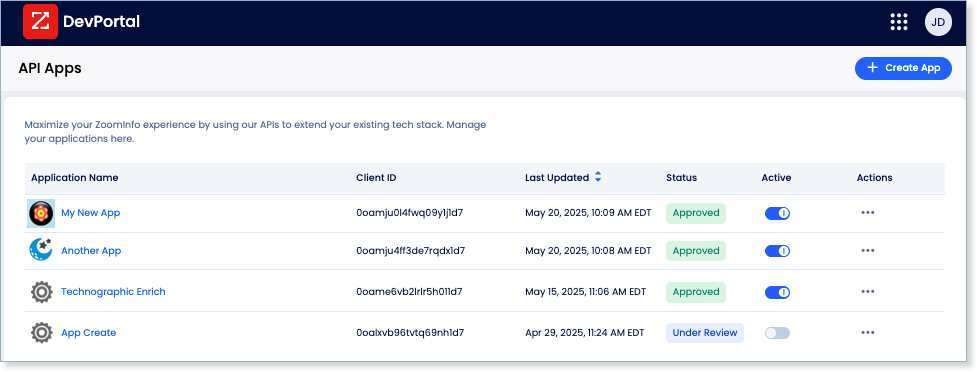
This is a more mature authentication model than Pipedrive's static API token: it supports delegated access, credential rotation, and scoped permissions out of the box, making it suited for multi-tenant integrations and enterprise security requirements.
Both platforms support OAuth 2.0, so a system integrating both can use the same auth pattern.
Rate Limits, Credits & Developer Experience
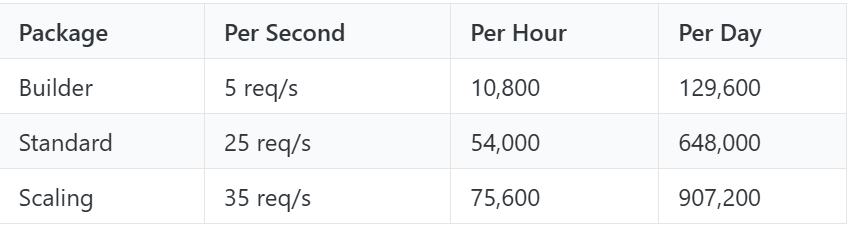
Rate limits are published by tier: Builder (5 req/sec), Standard (25 req/sec), and Scaling (35 req/sec), with per-hour and per-day sliding-window limits enforced simultaneously. Every response includes quota headers with remaining capacity, and 429 responses include a Retry-After header with exact backoff timing.
Credits follow a rolling 12-month window: enriching a record for the first time consumes one credit; re-enriching the same record within the year is free. Search and lookup operations are free and do not consume credits.
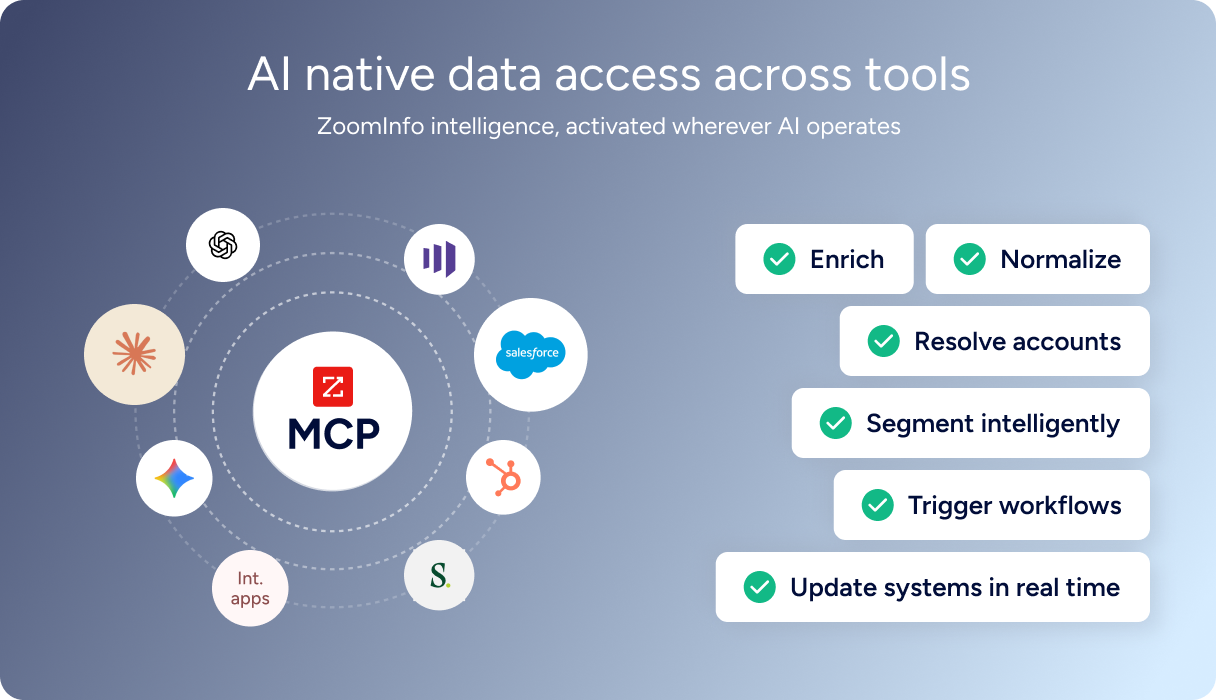
For developers building AI agents, ZoomInfo's MCP server at https://mcp.zoominfo.com/mcp exposes search, enrich, and account research as native tools for MCP-compatible assistants, currently supporting Claude and ChatGPT.
Documentation lives at docs.zoominfo.com with an interactive API reference and an llms.txt index for AI development tools. ZoomInfo does not publish official SDKs, so both platforms require direct HTTP integration for languages beyond their official libraries.
ZoomInfo uses consumption-based pricing and has extended API access to all relevant plans.
BDO Canada reported an 87% reduction in time spent updating internal data dashboards using the ZoomInfo API, with one analyst describing the integration as plug-and-play across any process. (ZoomInfo)
Final Verdict
Pipedrive's API is a well-documented, openly accessible CRM surface that covers the full data model: deals, contacts, organizations, leads, activities, products, pipelines, webhooks, and the automation engine.
The OpenAPI specs, the developer sandbox, the changelog with breaking-change lead time, and API access on every plan (starting at $14/month) make it one of the more developer-friendly CRM APIs in the SMB tier. The token-based rate limiting is transparent and scales with plan and seats.
For what it covers, it covers it well.
Choose the Pipedrive API if your build is CRM-centric: syncing deal data with a billing system, embedding pipeline visibility in an internal tool, automating workflow triggers on deal events, or building a Marketplace app that extends Pipedrive's UI.
The v2 surface is maturing, the webhook system covers every core entity, and the cost of entry is low.
Add the ZoomInfo API when the build needs to go beyond what reps have entered into the CRM: enriching contacts with verified emails and direct dials, pulling company attributes and technographic data for account scoring, detecting buyer intent signals, or generating AI-powered account research and buying-committee recommendations.
The search-then-enrich pattern (search is free, enrich consumes credits) means you only pay for the records you commit to, and the data writes back into Pipedrive through the same API surface you are already using.
Explore the ZoomInfo Enterprise API or start with the developer docs to see the endpoint surface for yourself.
A developer who needs neither API should consider that Pipedrive's API does not source B2B intelligence, and ZoomInfo's API does not manage a sales pipeline. If your pipeline requires both, the two are complementary layers: one manages the process, the other feeds it data.
FAQ
Is the Pipedrive API free?
API access is included on every paid Pipedrive plan, starting at $14/month per seat on the Lite tier. There are no per-call charges or separate API subscriptions. The practical cost constraint is the daily token budget, which scales with plan tier and seat count (30,000 base tokens x plan multiplier x seats).
A free developer sandbox account is available indefinitely for building and testing, and the 14-day free trial includes full API access with no credit card required.
Does Pipedrive have a GraphQL API?
No. Pipedrive exposes a REST API in two active versions (v1 and v2) that communicates over HTTPS and returns JSON. There is no GraphQL endpoint. If you need a GraphQL interface, you would build a wrapper layer on top of the REST API, using the published OpenAPI 3 specs to scaffold it.
What is the Pipedrive API rate limit?
Pipedrive uses a token-based daily budget rather than a requests-per-second ceiling. Each API request consumes tokens from a company-wide daily pool. The budget formula is 30,000 base tokens x plan multiplier x number of seats. On the Lite plan with one seat, that is 30,000 tokens per day; on Ultimate with ten seats, it is 2,100,000. Lightweight endpoints cost fewer tokens; complex endpoints cost more.
When the budget runs out, requests receive a 429 response until midnight reset. Top-ups of 250,000 tokens are purchasable from the Growth plan onward.
Are there official Pipedrive SDKs?
Yes, but only for two languages. Pipedrive maintains official client libraries for Node.js and PHP, both hosted on GitHub. Community-maintained libraries cover Python, .NET, and Ruby. For other languages, the published OpenAPI 3 specs for both v1 and v2 let you auto-generate a client using tools like openapi-generator. A create-pipedrive-app CLI tool is also available for scaffolding Marketplace apps.
Does the Pipedrive API support webhooks?
Yes. Pipedrive runs a full webhook system (Webhooks v2 is the current default) managed through the REST API. Each subscription specifies an event action (create, change, delete, or wildcard) and an event object (deal, person, organization, activity, lead, product, and others). Recent expansions added webhooks for deal products, deal installments, and custom field schema changes.
The limit is 40 webhook subscriptions per user. Pipedrive delivers webhooks as HTTP POST to a publicly accessible URL.
What does ZoomInfo's API add to a Pipedrive build?
ZoomInfo's API adds the B2B intelligence layer that Pipedrive's CRM API does not cover.
Where Pipedrive's API manages deals, contacts, and pipeline data, ZoomInfo's API provides contact and company search across 500M contacts and 100M companies, enrichment with verified emails, direct dials, org charts, and technographics, buyer intent signals showing which accounts are actively researching your category, and AI-powered account research and buying-committee recommendations.
The practical integration pattern is to pull contacts from Pipedrive, search and enrich them through ZoomInfo (search is free; enrichment consumes 1 credit per new record within a 12-month window), and write the enriched data back into Pipedrive's custom fields via its API. Both platforms support OAuth 2.0, and ZoomInfo's MCP server extends the same data to AI-agent workflows.
