
Teams that run Pipedrive as their CRM and Facebook Lead Ads for demand generation usually hit the same friction within a quarter:
leads submitted through Instant Forms sit inside Meta's platform while reps work deals in Pipedrive, creating a blind spot between ad spend and pipeline,
contact details auto-filled by Facebook don't match the field structure in Pipedrive, so records arrive incomplete or malformed,
and by the time someone manually exports a CSV from Ads Manager and imports it into the CRM, the lead's intent has cooled and follow-up timing is lost.
However the two platforms ended up coexisting (a marketing team running paid social while sales lives in Pipedrive, a founder managing both channels solo, or an agency generating leads on behalf of a client who tracks deals in Pipedrive), the longer the handoff stays manual, the wider the gap between lead capture and first contact.
Connecting Pipedrive and Facebook Lead Ads closes that gap.
New lead submissions flow directly into Pipedrive's Leads Inbox or as new deals, so reps see incoming prospects without leaving their CRM. Contact fields (name, email, phone, custom question responses) map to Pipedrive person and deal records, so the data arrives structured and ready to act on.
Automated routing and activity creation mean a rep can follow up within minutes of form submission rather than waiting for a batch export.
Pipedrive offers a native Facebook Lead Ads Sync app in its Marketplace that pushes ad submissions into the CRM in real time. For teams that need conditional logic, multi-step workflows, or connections to additional tools, third-party automation platforms (Zapier, Make) provide more configurability. Each method differs in setup complexity, data coverage, sync direction, and cost.
One problem no connection method solves: the sync delivers lead records from Facebook into Pipedrive, but it does not verify whether those records contain accurate business contact data, real phone numbers, or correct job titles.
That is where ZoomInfo comes in. ZoomInfo integrates natively with Pipedrive through its marketplace and offers API and MCP access that can feed verified, enriched B2B data into any CRM workflow, so the leads flowing from Facebook into Pipedrive are accurate and complete before a rep picks up the phone.
This article covers the full landscape of the Pipedrive-Facebook Lead Ads integration: which methods are available, what data each one handles, how to set them up, the use cases that justify connecting both platforms, and the limitations to plan for. At the end it also covers how ZoomInfo fits into the picture as a data enrichment layer that strengthens the records flowing between Facebook Lead Ads and Pipedrive.
Let's start with an overview of the integration.
Integration Overview
Does a native integration exist?
Yes. Pipedrive offers a Facebook Lead Ads Sync app in its Marketplace that connects Facebook Lead Ads forms to Pipedrive in real time. Leads submitted through Instant Forms on Facebook or Instagram sync directly into Pipedrive as new leads, contacts, or deals.
What data can sync?
Contact information captured through the Instant Form (name, email, phone number, custom question responses) maps to Pipedrive person fields and deal fields. The sync covers the data the submitter provides or Facebook auto-fills from their profile.
Is the sync bidirectional?
No. All methods flow one direction: Facebook Lead Ads to Pipedrive. Lead submissions push into the CRM, but Pipedrive data does not flow back to Meta. This is inherent to the integration's nature (Facebook is a lead source, not a data destination for CRM records).
Is it real-time or batch?
The native Pipedrive sync app pushes leads into Pipedrive as they are submitted. Zapier triggers fire within 1 to 15 minutes depending on plan tier. Make scenarios can run on triggers or scheduled intervals.
What are the available methods?
Native Pipedrive Marketplace app, third-party automation (Zapier, Make), and Meta's webhook-based API paired with Pipedrive's REST API for custom development.
Method | Setup Difficulty | Data Flow | Real-time? | Cost |
|---|---|---|---|---|
Native (Pipedrive Marketplace App) | Low | Facebook to Pipedrive | Yes | Included with Pipedrive plan |
Zapier | Low-Medium | One-way per Zap | Near real-time (1-15 min) | From $19.99/mo |
Make | Medium | Configurable per scenario | Near real-time or scheduled | From $10.59/mo |
Custom API | High | Fully customizable | Real-time via webhooks | Developer time + hosting |
One distinction worth settling upfront: the native app and Zapier sync new lead submissions as they happen. Neither handles historical leads submitted before the connection was activated. Custom API development is the only method that can backfill older leads from Meta's Lead Ads API (where lead data is available for 90 days after submission).
Integration Methods
Native Pipedrive Facebook Lead Ads Sync App
How it works: Pipedrive's Facebook Lead Ads Sync app is a first-party Marketplace integration that connects your Facebook ad account to Pipedrive.
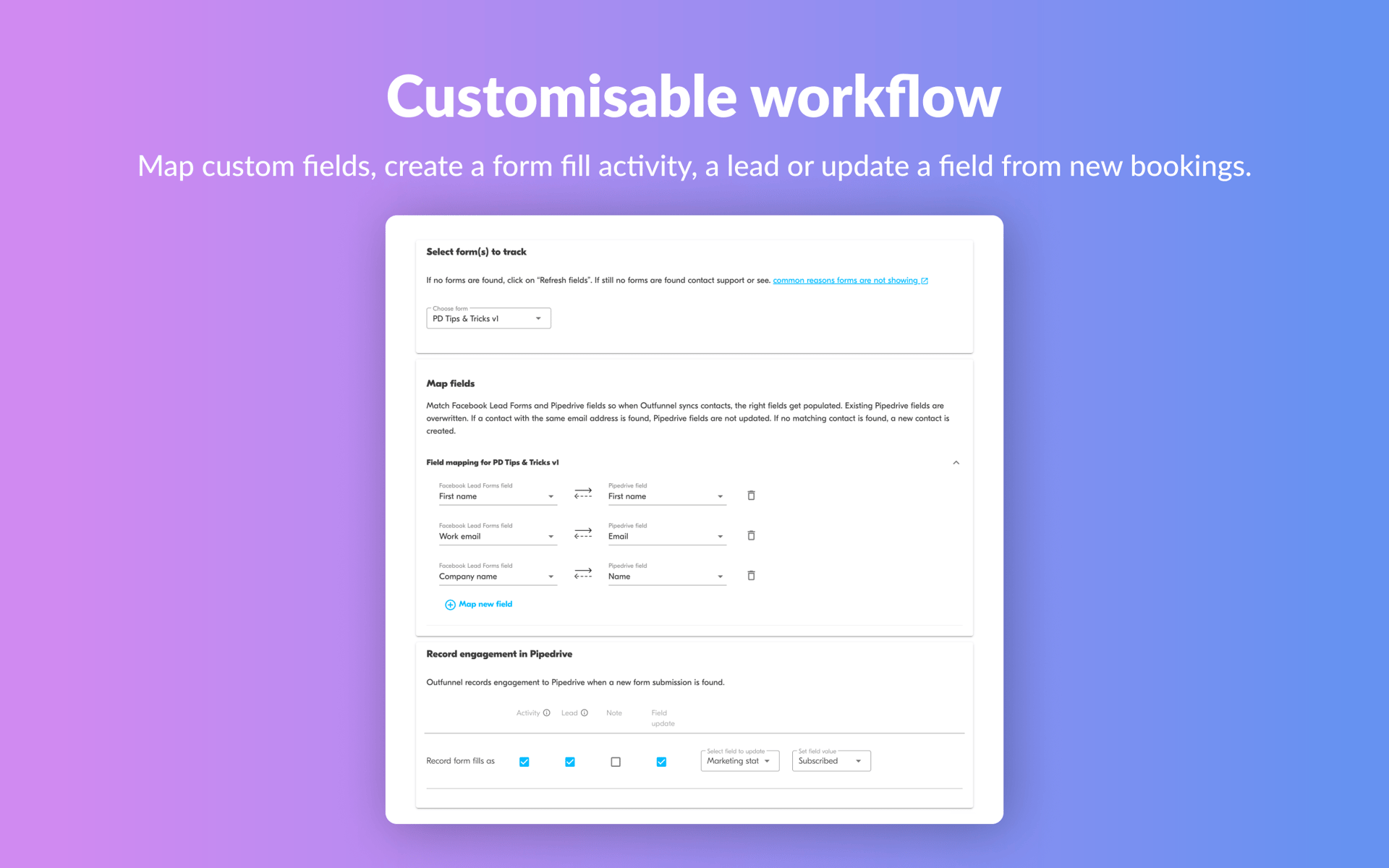
When a prospect submits an Instant Form on Facebook or Instagram, the app pushes the submission into Pipedrive in real time, creating a new lead, person, or deal with the captured contact data mapped to Pipedrive fields.
Source: Pipedrive
What it syncs: Contact information from the Instant Form submission: name, email address, phone number, and responses to any custom questions configured in the form. These map to Pipedrive person fields. The app can also create a deal associated with the new contact and route it to a specific pipeline and stage.
Fits: ongoing sync of new lead submissions; not a migration or backfill tool.
Setup process:
In Pipedrive, go to the Marketplace and search for "Facebook Lead Ads Sync." Install the app and authorize it to access your Pipedrive account.
Connect your Facebook account via OAuth, granting the app permission to read lead data from your Facebook Pages and ad accounts.
Select the Facebook Page and lead form(s) you want to sync. Each form can be mapped individually.
Map the Instant Form fields (name, email, phone, custom questions) to the corresponding Pipedrive fields (person name, email, phone, custom fields on the person or deal).
Configure the destination: choose whether new submissions create a lead in the Leads Inbox, a deal in a specific pipeline and stage, or both. Set the deal owner if using automatic assignment.
Test by submitting a test lead through Facebook's Lead Ads Testing Tool (available in Meta Ads Manager under the form's settings) and verifying the record appears in Pipedrive.
Strengths: First-party integration maintained within Pipedrive's ecosystem. No third-party tool to configure or pay for. Real-time sync with no polling delay. Setup requires no technical knowledge. Included at no additional cost on Pipedrive plans that support Marketplace apps.
Limitations: One-directional only (Facebook to Pipedrive). Limited to the data captured in the Instant Form; engagement metrics (ad impressions, click-through rates) do not sync. Field mapping is less flexible than automation platforms that allow data transformation mid-flow. Historical leads submitted before the app was installed do not sync.
Best for: Small and mid-sized teams that want leads flowing from Facebook ads into Pipedrive with minimal setup and no additional cost. Teams already using Pipedrive as their primary CRM and running Facebook Lead Ads as a top-of-funnel channel.
Zapier
How it works: Zapier connects Facebook Lead Ads and Pipedrive through event-driven automations called Zaps.
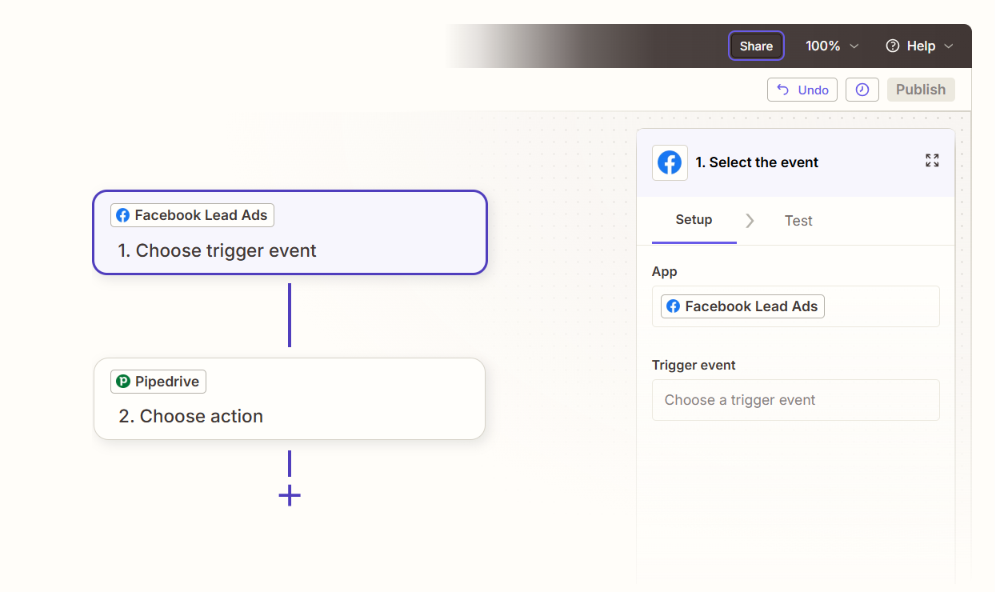
Each Zap pairs a trigger (a new lead submission on Facebook) with one or more actions (create a person, create a deal, send a notification in Pipedrive). Both platforms have well-supported Zapier connectors, and pre-built Zap templates exist for this pairing.
Source: Pipedrive
What it syncs: The same contact data captured in the Instant Form: name, email, phone, and custom question responses. Zapier adds the ability to transform, format, or enrich data between the trigger and the action using intermediate steps (Formatter, Filter, Lookup).
For example, you can split a full name into first and last name fields, format phone numbers to a consistent standard, or filter out leads that don't meet a qualification threshold based on a custom question response before they reach Pipedrive.
Fits: ongoing sync with conditional logic and data transformation; not a migration tool.
Setup process:
Create a Zapier account and connect both your Facebook Lead Ads account (via Meta OAuth) and your Pipedrive account (via API token or OAuth).
Choose "Facebook Lead Ads" as the trigger app and select "New Lead" as the trigger event. Select the Facebook Page and lead form.
Choose "Pipedrive" as the action app and select the action (e.g., "Create Person," "Create Deal," or "Create Lead").
Map the Facebook form fields to the corresponding Pipedrive fields. Add Formatter steps if you need to split names, reformat phone numbers, or transform custom question values.
Test the Zap with a sample lead to verify the data flows correctly into Pipedrive.
Turn the Zap on. Each new lead submission on the connected form will trigger the configured actions in Pipedrive.
Strengths: No engineering resources required. Pre-built templates reduce setup time to minutes. Multi-step Zaps can create a person, create an associated deal, add an activity (e.g., a follow-up call), and send a Slack notification in a single flow. Filter steps can disqualify leads before they reach the CRM, keeping the pipeline clean.
Limitations: Each Zap handles one trigger-action pair (or multi-step chain). Zapier charges by task count, and each lead synced counts as at least one task (multi-step Zaps consume one task per step).
No bidirectional sync. Historical leads created before the Zap was activated do not sync. Near real-time rather than instant: Zapier checks triggers every 1 to 15 minutes depending on plan tier.
Best for: Teams that need data transformation, conditional filtering, or multi-app workflows (e.g., sync to Pipedrive and add the lead to a Mailchimp list or notify a Slack channel at the same time). Teams on Pipedrive plans where the native Marketplace app's field mapping is too rigid.
Make (Formerly Integromat)
How it works: Make uses a visual scenario builder where modules (app actions) connect in a flowchart. A Facebook Lead Ads trigger module watches for new submissions, and a Pipedrive module creates or updates records. Scenarios can branch, filter, loop, and handle errors, giving more control than Zapier's linear structure.
What it syncs: The same form submission data (name, email, phone, custom question responses), with full access to Make's data transformation toolkit: text parsing, JSON manipulation, date formatting, and mathematical operations between modules. Make also supports iterators for batch processing and routers for conditional paths.
Fits: ongoing sync with complex conditional logic; not a migration tool.
Setup process:
Create a Make account and add Facebook Lead Ads and Pipedrive as connections via OAuth.
Build a new scenario. Drag the Facebook Lead Ads module onto the canvas and select "Watch New Leads." Connect to your Facebook Page and select the lead form.
Add a Pipedrive module and select an action (e.g., "Create a Person" or "Create a Deal").
Connect the two modules and map fields. Use Make's built-in functions to transform data between platforms (e.g., parse a full name into first and last, standardize phone number format, or map custom question values to Pipedrive dropdown options).
Add error-handling modules to catch failures (e.g., log to a spreadsheet or send a notification if a record fails to create).
Set the scenario to run on every trigger event or on a time-based schedule.
Strengths: Fine control over data transformation and conditional routing. The visual builder makes complex workflows easier to follow than code. Error handling and retry logic are built in. Per-operation pricing is lower than Zapier at higher volumes.
Routers allow a single lead submission to trigger different Pipedrive actions based on conditions (e.g., route to different pipelines based on a custom question response).
Limitations: Steeper learning curve than Zapier's guided setup. The Facebook Lead Ads module's trigger behavior and available fields depend on Make's connector maintenance. Both platforms' APIs impose rate limits that may affect high-volume scenarios.
Best for: Teams with conditional routing requirements (e.g., send leads from different ad forms to different Pipedrive pipelines, or create a deal only if a lead meets specific qualification criteria). Mid-size teams whose lead volumes make Zapier's per-task pricing expensive.
Custom API Integration
How it works: Facebook Lead Ads exposes lead data through the Meta Marketing API's webhook system, which pushes a notification to a registered endpoint every time a user submits a lead form.
Pipedrive's REST API supports creating persons, deals, leads, activities, and notes via standard POST requests with webhook support for event-driven actions.
A custom integration connects these APIs directly, with middleware handling authentication, field mapping, data transformation, deduplication, and error recovery.
What it syncs: Anything both APIs expose. On the Facebook side: all Instant Form field responses, form metadata (form ID, ad ID, campaign ID, timestamp), and creative context. On the Pipedrive side: persons, organizations, deals, leads, activities, notes, and custom fields.
This is the only method that can implement business logic like lead scoring based on form responses, automatic deduplication against existing Pipedrive contacts, or backfilling historical leads from Meta's lead retrieval endpoints (data available for 90 days).
Fits: either backfill of historical leads or ongoing real-time sync; the only method with no ceiling on either.
Setup process:
Register a Meta App in the Meta for Developers portal and subscribe to the leadgen webhook field on your Facebook Page. Obtain a Page Access Token with leads_retrieval and pages_manage_ads permissions.
Obtain a Pipedrive API token or register an OAuth app for production use.
Build a server-side application that receives webhook payloads from Meta. Each payload includes a leadgen_id; your server calls Meta's Graph API to retrieve the full lead record.
Map the retrieved form fields to Pipedrive's person, deal, and custom field schema. Implement deduplication logic (e.g., check if a person with the same email already exists before creating a new record).
Add logging, error handling, and retry logic. Meta's API has rate limits per ad account, and Pipedrive's token-based rate limiting allocates a daily budget based on plan tier and seat count.
Deploy, monitor, and maintain. Both APIs version independently (Pipedrive released API v2; Meta versions its Marketing API quarterly).
Strengths: Full control over what syncs, when, and how. Real-time sync via webhooks. Can implement lead scoring, deduplication, and conditional routing in code. Can backfill historical leads up to Meta's 90-day retention window. No per-record or per-operation fees from a third-party connector.
Limitations: Requires development resources to build and maintain. You own the infrastructure, monitoring, and error recovery. API changes on either platform require ongoing maintenance. The initial build takes days to weeks, not minutes.
Best for: Teams with high lead volumes, complex routing requirements, or deduplication needs that no off-the-shelf tool can satisfy. Organizations with in-house development resources and a long-term commitment to the Pipedrive-Facebook Lead Ads connection.
Key Use Cases
1. Real-Time Lead-to-Rep Routing from Paid Social
A marketing team runs Facebook Lead Ads for a B2B service company. When a prospect submits an Instant Form requesting a consultation, the native Pipedrive sync app creates a new deal in the "Inbound" pipeline and assigns it to the next available rep via round-robin.
The rep gets a Pipedrive notification and calls the lead within minutes of submission, while the prospect's intent is still fresh.
Best integration method: Native Pipedrive Facebook Lead Ads Sync app (real-time, zero latency).
2. Qualified Lead Filtering Before CRM Entry
An agency running Facebook Lead Ads for multiple clients uses custom questions in Instant Forms to qualify leads (e.g., budget range, company size, timeline).
A Zapier Zap with a filter step only creates Pipedrive deals for leads that meet the qualification threshold, keeping the pipeline clean and preventing reps from chasing unqualified contacts.
Best integration method: Zapier (filter steps enable conditional creation based on form responses).
3. Multi-Pipeline Routing by Ad Campaign
A SaaS company runs separate Facebook Lead Ads campaigns for different products. A Make scenario uses routers to inspect the form_id or campaign name in each lead submission and routes it to the correct Pipedrive pipeline (e.g., "Product A Inbound" vs. "Product B Inbound"), assigning the deal to the team that owns that product line.
Best integration method: Make (routers handle conditional branching by campaign or form).
4. Event Registration with Automated Follow-Up
A company uses Facebook Lead Ads to capture registrations for a webinar. Each submission syncs to Pipedrive as a new person with an associated activity (a scheduled follow-up call two days after the event).
The rep's Pipedrive activity calendar shows the follow-up without any manual entry, so no registrant falls through the cracks.
Best integration method: Zapier or Make (multi-step flow creating a person, a deal, and a scheduled activity in one automation).
5. Historical Lead Backfill During CRM Migration
A company transitioning from spreadsheet-based lead tracking to Pipedrive needs to import the past 60 days of Facebook Lead Ads submissions.
A custom API integration queries Meta's lead retrieval endpoints for historical form submissions (available for 90 days) and bulk-creates Pipedrive person and deal records with accurate timestamps and source attribution.
Best integration method: Custom API (only method that can access historical lead data from Meta).
Limitations and Considerations
One-Directional Data Flow
Every method flows one direction: Facebook Lead Ads to Pipedrive. There is no way to push Pipedrive data back to Meta. CRM updates (deal stage changes, contact corrections, qualification status) do not feed back into Facebook's ad optimization.
To close the loop and let Meta's Advantage+ leads campaigns optimize for downstream conversions, teams need to implement the Conversions API separately, which is a distinct integration from the lead sync and requires either a custom build or a third-party tool that supports CAPI.
Lead Quality from Auto-Filled Forms
Facebook Instant Forms pre-populate contact fields from a user's profile, which reduces friction but also reduces intent. Users can submit a form in two taps without consciously deciding to engage. This produces higher lead volumes but variable downstream conversion.
Meta has introduced SMS phone verification and work email validation as form-level quality controls, but these are configured in Meta Ads Manager, not in the integration layer.
Teams seeing high spam or low-quality leads should address it at the ad configuration level before adjusting the sync.
Data Mapping Limitations
Facebook Instant Forms capture a flat list of fields. Pipedrive's data model is richer: persons, organizations, deals, leads, activities, products, and custom fields with relationships between them.
The native sync app and Zapier handle basic field mapping (name, email, phone to person; form name to deal), but neither can automatically create an organization record from a company-name form field and associate it with the person.
Teams with structured data requirements may need Make's transformation capabilities or a custom build.
Meta's 90-Day Lead Data Retention
Meta makes lead data available for download for 90 days from the time a form is submitted. After 90 days, the data is no longer retrievable through the API.
If the integration goes down for an extended period, leads older than 90 days are lost unless they were already synced or exported. Connect a CRM integration promptly after launching a Lead Ads campaign.
Pricing Implications
The native Pipedrive sync app is included with Pipedrive plans at no additional cost. Third-party tools carry their own fees: Zapier charges by task count (each synced lead is at least one task; multi-step Zaps consume more), and Make charges by operation. For teams generating hundreds of leads per day, these per-lead costs compound.
On the Facebook side, there is no integration fee, but the ad spend follows Meta's auction-based pricing model.
Permissions and Access
Setting up the integration requires admin-level access on both sides. In Pipedrive, account admin rights are needed to install Marketplace apps and generate API tokens. On Facebook, the user authorizing the connection must have admin access to both the Facebook Page running the ads and the ad account.
If your Meta Business Suite uses Leads Access Manager, the integration's access to lead data must be granted explicitly.
Maintenance
Both platforms evolve independently. Pipedrive released Webhooks v2 as a breaking change and is transitioning to API v2. Meta versions its Marketing API quarterly, and changes to Instant Form fields, permissions, or the webhook payload structure can break integrations.
Third-party connectors (Zapier, Make) may update their modules on a different schedule. Plan for periodic reviews of the integration's health, particularly after platform updates on either side.
What No Method Fixes: The Data Itself
Every method above delivers lead submissions from Facebook into Pipedrive. None verifies whether the data in those submissions is accurate, current, or complete.
A phone number auto-filled from a Facebook profile may be a personal mobile the prospect never answers for business calls.
An email address may be a Gmail account rather than a corporate email. A job title field (if the form even captures one) is self-reported and unverified.
The integration ensures Pipedrive receives the lead; it does not ensure the lead is reachable, correctly identified, or worth pursuing.
Where ZoomInfo Fits In
Every method in this guide delivers leads from Facebook Instant Forms into Pipedrive. None improves the data inside those leads.
When a prospect submits a form in two taps using auto-filled Facebook profile data, the resulting record may carry a personal email instead of a business address, a phone number that hasn't been active in years, or no job title at all.
The integration faithfully delivers that incomplete record to Pipedrive, where a rep wastes time calling a dead number or emailing an address that bounces.
That is the gap ZoomInfo closes.
ZoomInfo is an AI GTM platform built on 500M contacts, 100M companies, 135M+ verified phone numbers, and 200M+ verified business emails. That data is verified through a multi-source pipeline backed by 300+ human researchers, reaching up to 95% accuracy on first-party data.
For teams running Facebook Lead Ads into Pipedrive, ZoomInfo addresses the data quality layer that no form-to-CRM sync handles.
ZoomInfo integrates natively with Pipedrive through its marketplace, providing lead enrichment and data import directly into the CRM.
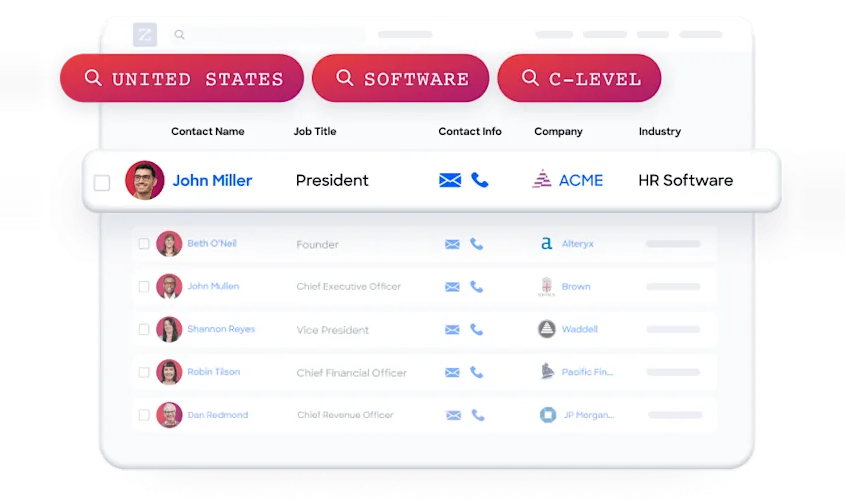
When a Facebook lead lands in Pipedrive, ZoomInfo can enrich the record with a verified business email, a direct-dial phone number, accurate job title and seniority, company attributes (industry, headcount, revenue), and technographic data.
Source: ZoomInfo
The same data feeds ZoomInfo's GTM Context Graph, which processes 1.5B+ data points daily and unifies third-party intelligence with CRM records, conversation transcripts, and behavioral signals to surface not just what happened in a deal, but why.
In practice, a team running Facebook Lead Ads can use ZoomInfo to enrich every new Pipedrive record as it arrives. A lead that came in with just a name and personal Gmail address becomes a record with a verified business email, a direct-dial number, the prospect's current title and department, and their company's profile.
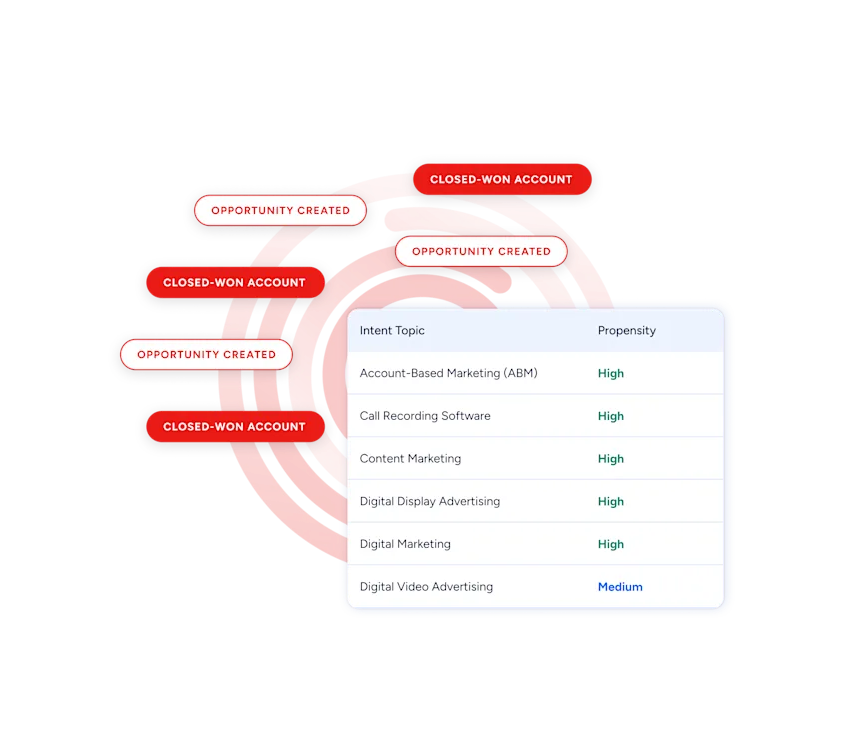
Buyer Intent data from ZoomInfo, tracking signals from 210 million IP-to-Organization pairings, can also layer into Pipedrive to help reps prioritize which Facebook leads to call first based on active buying signals, rather than working the list in submission order.
Source: ZoomInfo
For teams that build beyond native integrations, ZoomInfo's Enterprise API and MCP server expose the same intelligence to any custom workflow or AI agent.
Enriched records also make the Facebook-to-Pipedrive sync more productive. Reps stop wasting dials on dead phone numbers. Email follow-ups land at corporate inboxes instead of personal accounts the prospect never checks for business. And the data flowing through Pipedrive's pipeline views and reports reflects verified information rather than self-reported, auto-filled profile data of unknown age.
Seismic's sales team attributed 39% of active pipeline to opportunities identified or influenced by ZoomInfo signals, while boosting productivity by 54% and saving 11.5 hours per week. (Seismic)
Final Verdict
A native integration between Pipedrive and Facebook Lead Ads exists through Pipedrive's Marketplace, and third-party automation tools add flexibility for teams with conditional routing or data transformation needs.
For most teams, the right choice depends on lead volume, routing complexity, and data quality requirements.
Small teams running a single Facebook Lead Ads form into one Pipedrive pipeline should start with the native Pipedrive sync app. It is free, real-time, and requires no third-party tool.
Teams that need conditional filtering, multi-step workflows, or connections to additional tools (Slack notifications, email marketing platforms) should use Zapier or Make. Zapier is faster to set up; Make offers finer control and lower per-operation costs at higher volumes.
Organizations with complex data models, high lead volumes, deduplication requirements, or a need to backfill historical leads should invest in a custom API integration using Meta's Marketing API and Pipedrive's REST API.
Before investing in the integration, clarify what role Facebook Lead Ads plays in your pipeline.
If Facebook is one lead source among many and volumes are moderate, the native sync app handles the job with no added cost or complexity. If Facebook is a primary demand generation channel producing hundreds or thousands of leads per month, the data quality of those leads determines whether the pipeline they feed is real or inflated.
ZoomInfo, with its native Pipedrive integration and API and MCP access, is the data enrichment layer that turns auto-filled Facebook form submissions into verified, actionable CRM records.
FAQ
Does Pipedrive have a native integration with Facebook Lead Ads?
Yes. Pipedrive offers a Facebook Lead Ads Sync app in its Marketplace that connects Facebook Instant Forms to Pipedrive in real time. When a prospect submits a lead form on Facebook or Instagram, the submission automatically creates a new record in Pipedrive with the captured contact data mapped to person and deal fields. The app is included at no additional cost on Pipedrive plans that support Marketplace integrations.
Can I sync historical Facebook leads into Pipedrive?
Not through the native app or third-party automation tools like Zapier and Make, which only process leads submitted after the integration is activated. To import historical leads, you need a custom API integration that queries Meta's lead retrieval endpoints. Meta retains lead data for 90 days from the time of form submission; after that, the data is no longer accessible through the API.
How do I prevent low-quality Facebook leads from entering Pipedrive?
Address quality at two levels. First, configure your Instant Forms in Meta Ads Manager to use the "Higher intent" form type (which adds a review screen), enable SMS phone verification, and require work email addresses. Second, use a Zapier or Make filter step to screen leads based on custom question responses before creating records in Pipedrive (e.g., disqualify leads below a minimum budget threshold or outside your target geography).
What Pipedrive plan do I need for the Facebook Lead Ads integration?
The native Facebook Lead Ads Sync app is available through the Pipedrive Marketplace. Marketplace app access is available across Pipedrive's plans, though specific capabilities (like workflow automations triggered by new leads) require the Growth plan or higher. Zapier and Make integrations work with any Pipedrive plan that provides API access, which is included on all plans.
Does the integration send Pipedrive data back to Facebook?
No. All integration methods flow one direction: Facebook Lead Ads to Pipedrive. To send downstream conversion data back to Meta for ad optimization (enabling the Conversion leads performance goal in Advantage+ campaigns), you need to implement Meta's Conversions API separately. This is a distinct integration from the lead sync and requires either a custom build or a third-party tool that supports CAPI.
What happens if the integration goes down?
Leads submitted while the integration is inactive are not automatically synced when the connection is restored. For the native app and Zapier/Make, any leads submitted during the outage are missed unless you manually export them from Meta Ads Manager or Leads Centre and import them into Pipedrive. Meta retains lead data for 90 days, so a timely manual recovery is possible. Regular monitoring of the integration's health is the best prevention.
How does ZoomInfo improve a Facebook Lead Ads-to-Pipedrive workflow?
ZoomInfo solves the data quality gap between Facebook's lead capture and Pipedrive's sales execution. Facebook Instant Forms auto-fill contact fields from user profiles, which often means personal email addresses, outdated phone numbers, and no verified job title or company data. ZoomInfo enriches those records with verified business emails, direct-dial phone numbers, accurate titles, and company attributes through its native Pipedrive integration. The result: reps work from accurate, complete records rather than raw form submissions, improving connection rates and reducing wasted effort on unreachable or misidentified leads.
Can I use Pipedrive automations to act on new Facebook leads?
Yes. Once a Facebook lead syncs into Pipedrive (via the native app, Zapier, or Make), Pipedrive's built-in workflow automations can trigger on the new record. For example, you can set up an automation to assign the deal to a rep based on territory, create a follow-up activity, or send a personalized email template. Workflow automations are available on the Growth plan and above.
