

Reclaim.ai is an AI scheduling layer that sits on top of Google Calendar and Outlook. It optimizes how time gets allocated across a knowledge worker's day: defending focus time, auto-scheduling tasks and habits, finding meeting slots across attendees, and tracking where hours go.
If you searched "Reclaim.ai features," you already know the platform exists. What you need is every feature mapped: what it does, how it works, and which plan unlocks it. This breakdown covers all of it.
Reclaim.ai's feature set has you covered if:
You need protected blocks of focus time that reschedule when meetings land on them
You run recurring one-on-ones or team syncs and want the platform to find and defend the best slot across all attendees' calendars
You manage tasks in Asana, Jira, ClickUp, Linear, or Todoist and want them scheduled as calendar blocks without manual effort
You want daily routines (lunch, exercise, email triage) that flex around meetings instead of creating rigid conflicts
You need workforce-level visibility into meeting load, focus time, and work-life balance across a team
You want a natural-language AI assistant that can reorganize your day, flag conflicts, and preview changes before they hit your calendar
You'll reach the edges of its capabilities if:
You need a B2B contact and company database for prospecting or outbound outreach
You want buyer intent signals showing which companies are researching your category
You need conversation intelligence that records, transcribes, and coaches from sales calls
You want account-based marketing orchestration, display advertising, or multi-channel campaign management
You need CRM-native scheduling with HubSpot or Salesforce integration today
For those needs, the reference point is ZoomInfo: a GTM platform built on 500M contacts, 100M companies, 135M+ verified phone numbers, and 200M+ verified business email addresses, a GTM Context Graph that combines B2B data with CRM records, conversation intelligence, and behavioral signals into a single intelligence layer, and access through APIs, MCP, GTM Workspace, and GTM Studio.
After the feature breakdown, this article covers where Reclaim.ai's scheduling capabilities stop and how ZoomInfo fills the go-to-market gaps that a calendar intelligence tool does not reach.
Reclaim.ai Platform Overview
Reclaim.ai calls itself the #1 AI calendar for work and life, now operating as "Reclaim.ai from Dropbox" after being acquired by Dropbox for $40.2M in August 2024.
Source: Reclaim.ai
The platform serves 600,000+ users across 70,000+ companies, including GitHub, Zapier, Indeed, Miro, 1Password, Zendesk, and Instacart, and holds a 4.8/5 rating on G2.
Reclaim quantifies its impact: 7.6 hours more focus time per week, 2.3 fewer meetings per week, and 49% less time wasted.
It targets knowledge workers across Product, Engineering, Sales, Marketing, HR, Finance, and Executive Assistant functions.
The platform is organized around twelve capabilities:
Module | What It Does | Plan |
|---|---|---|
Defends weekly focus time goals by auto-scheduling and rescheduling blocks | All plans (Lite+) | |
Auto-schedules recurring routines with flexible time windows | All plans (Lite+) | |
Schedules task work sessions on the calendar before deadlines | All plans (Lite+) | |
Finds and maintains recurring meeting times across attendees | All plans (Lite+) | |
Priority-aware booking links with team and round-robin support | 1 link on Lite; 3 on Starter; unlimited on Business+ | |
Syncs events across Google and Outlook calendars with privacy controls | 1 sync on Lite; 3 on Starter; unlimited on Business+ | |
Inserts travel, decompression, and task breaks automatically | All plans (Lite+) | |
Central interface for managing all smart events and priorities | All plans (Lite+) | |
Automatic time categorization and productivity analytics | All plans (Lite+) | |
Team-level meeting load, focus time, and work-life balance reports | Business and Enterprise | |
Automatic shared calendar of team members' out-of-office status | Business and Enterprise | |
Natural-language scheduling control with preview mode | All plans (basic on Lite; expanded on paid) |
Reclaim supports both Google Calendar and Microsoft Outlook (Outlook reached general availability in May 2025). Pricing runs from free (Lite) through $10/seat/month (Starter), $15/seat/month (Business), to $22/seat/month (Enterprise), all on annual billing. Every new account starts with a free 14-day Business trial. Here is the full tour.
Reclaim.ai's Focus Time and Time Defense
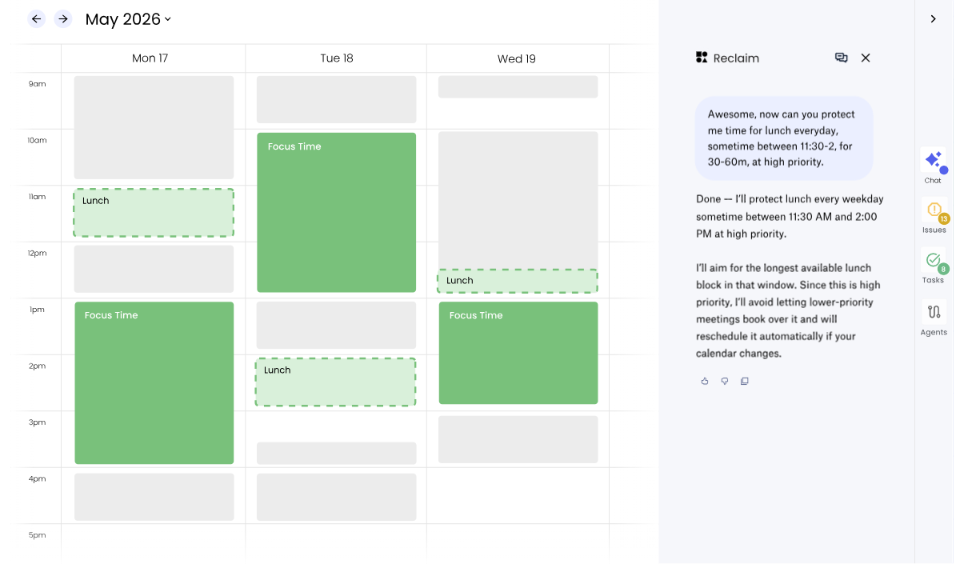
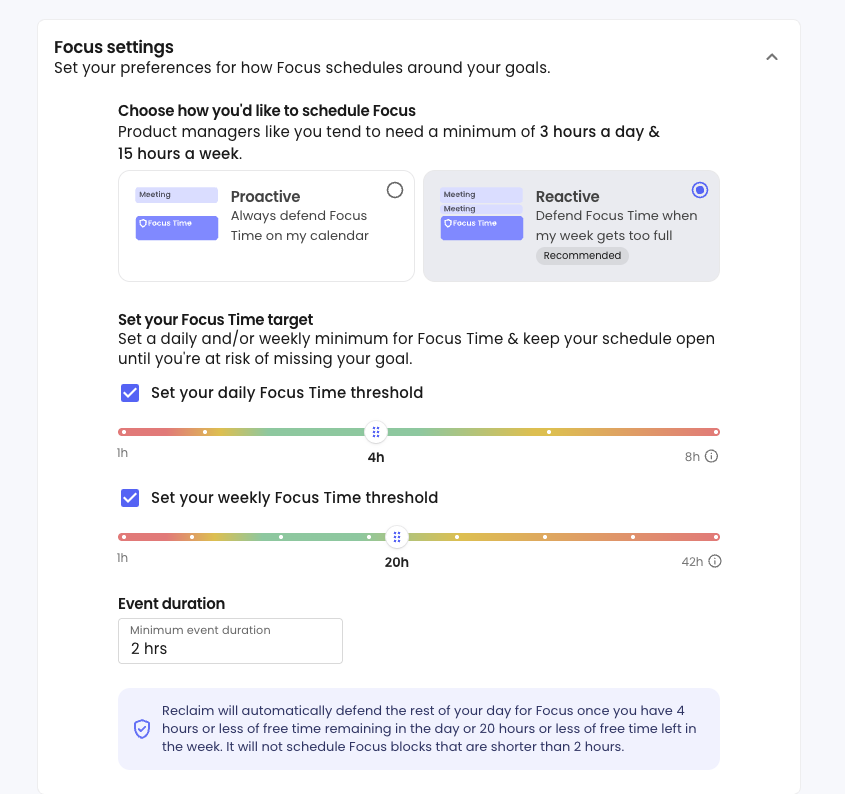
Reclaim.ai's core feature is AI Focus Time: automated time defense that carves out blocks for heads-down work each week. Users set a weekly Focus Time goal, and the AI schedules and defends blocks to hit that target. Focus Time operates in two modes.
Proactive Mode fills the calendar ahead of time, scheduling Focus blocks regardless of how full the week looks. Reactive Mode holds off until the calendar fills to the point where the minimum weekly or daily target is at risk, keeping meeting availability open until protection becomes necessary.
Source: Reclaim.ai
When a higher-priority event takes a Focus block's slot, the block reschedules to the next best open time. If you manually move a Focus block, Reclaim locks it in place and stops rescheduling it. An optional auto-decline setting rejects meeting requests that would interrupt a Focus block and notifies the organizer.
Tasks, Habits, native Google Calendar Focus Time events, and any event tagged with #focus all count toward the weekly Focus goal, so the metric reflects actual focused work, not just Reclaim-created blocks.
AI Buffer Time extends time defense to the gaps around meetings. It works through three mechanisms, all configured from Settings > Buffers.
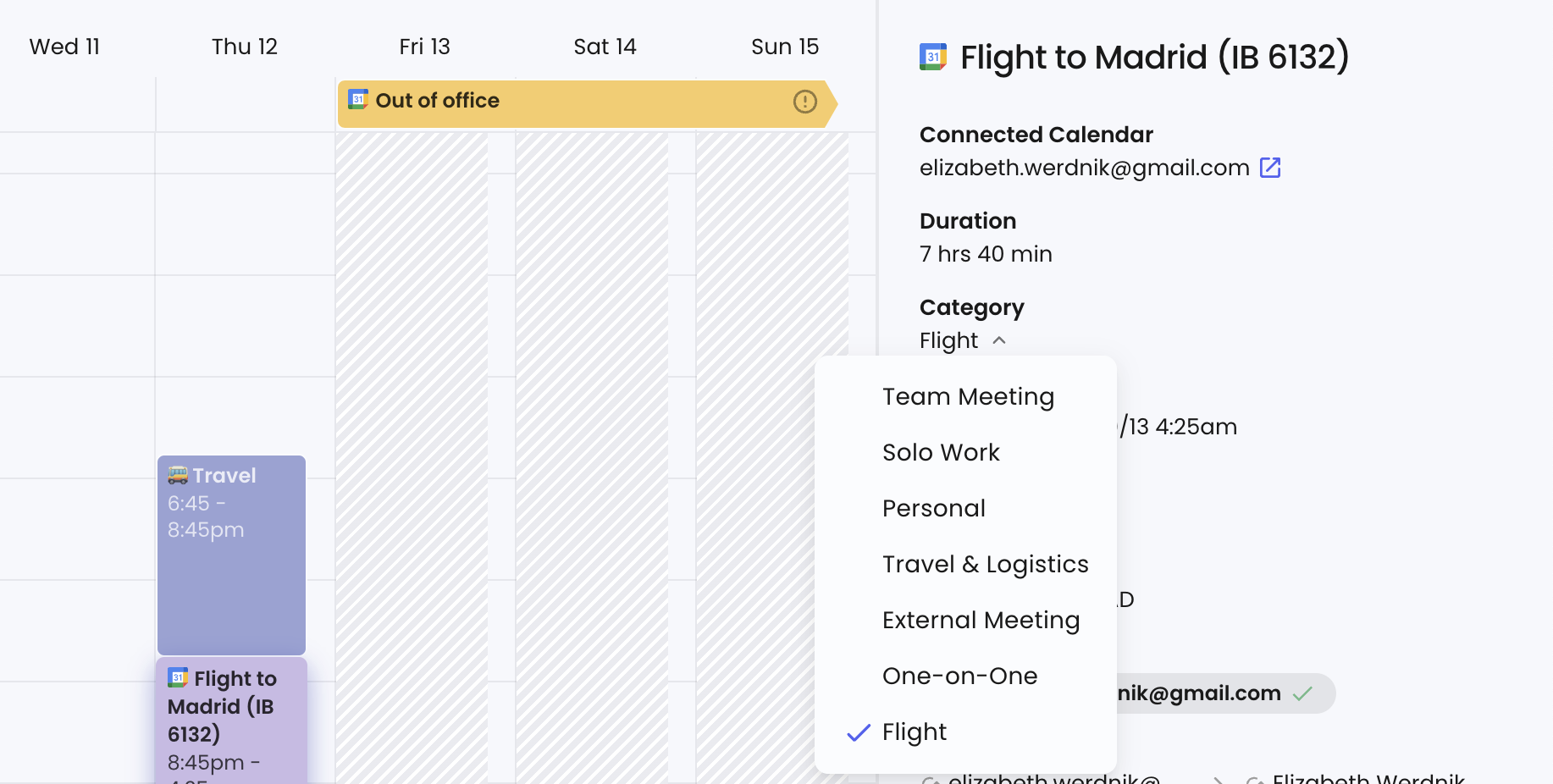
Travel Time monitors the calendar for events with a location and inserts a travel block before and after, staying in sync when events move. For flights, Reclaim applies a 2-hour buffer before and 1-hour buffer after, and users can force travel time on any event using #needs_travel or #flight hashtags.
Source: Reclaim.ai
Decompression Time adds blocks after meetings for note-taking or a breather, configurable to all meetings or videoconference meetings only.
Task and Habit Breaks add free space between consecutive work sessions without creating visible calendar events, preventing back-to-back deep work stacking.
The distinction matters: Travel Time and Decompression Time create actual calendar events that move with their parent event. Task and Habit Breaks are invisible gaps that prevent the scheduler from stacking focused work, reducing visual clutter while still protecting rest time.
Reclaim.ai's Habits and Routine Scheduling
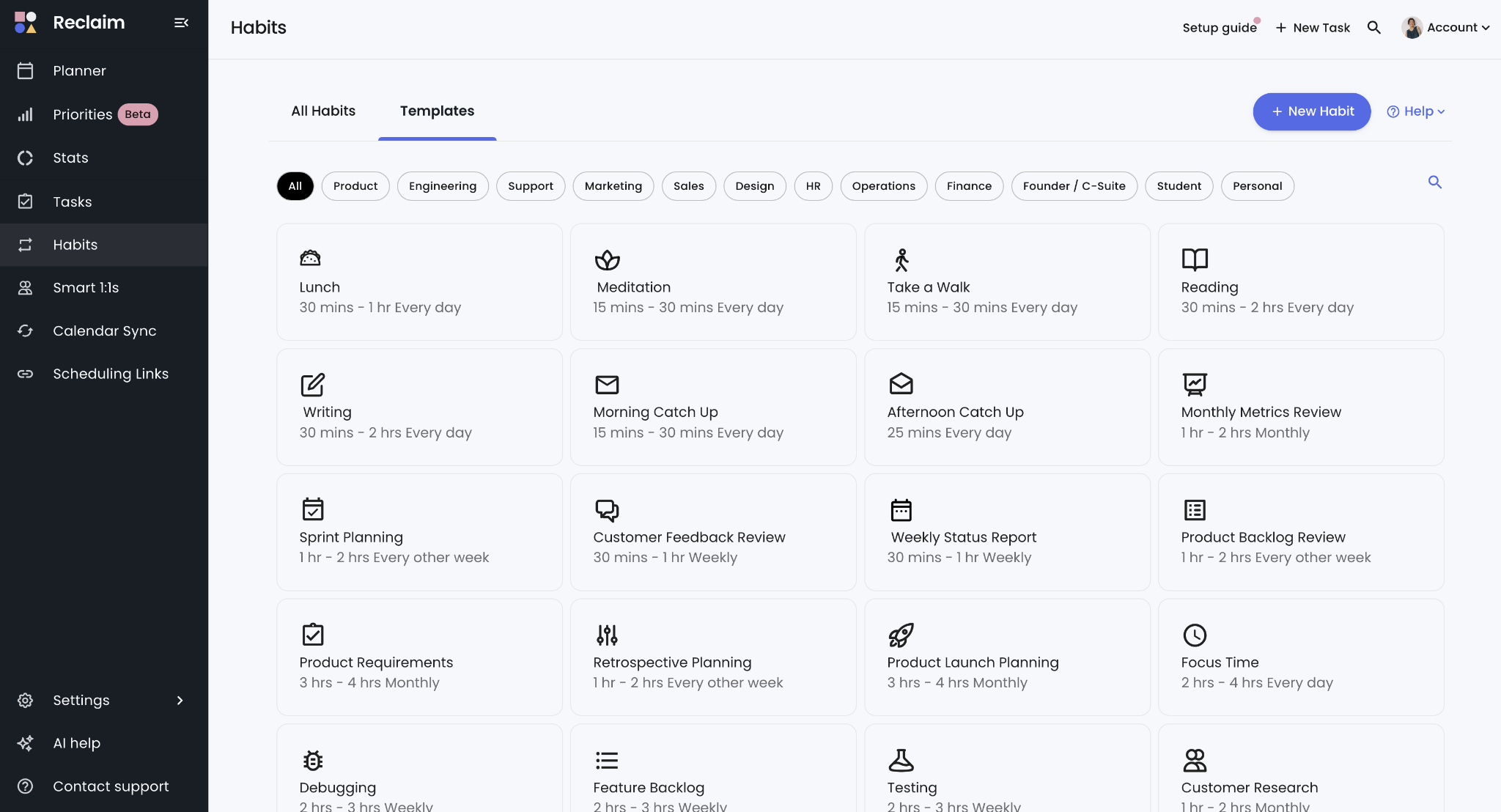
AI Habits replaces static recurring calendar events with rule-based, adaptive scheduling for routines. Rather than blocking "lunch at 12pm every day," you define a rule: schedule lunch Monday through Friday, between 11:30am and 2pm, for 30 minutes to 1 hour, ideally at 12pm. Reclaim finds the best available slot each day within those constraints.
Source: Reclaim.ai
The flexibility comes from two behaviors. First, Reclaim toggles Habit events between Free and Busy depending on calendar pressure. When the schedule has open time, a Habit shows as Free (allowing others to book over it).
As the calendar fills or the event's start time approaches, it flips to Busy. Second, when a higher-priority event takes a Habit's slot, Reclaim reschedules the Habit to the next best time within its allowed window.
Habits support daily, specific weekday, weekly, monthly, or custom frequency options (the 2nd Friday of each month, every 15th). Priority levels from Critical through Low determine which Habits schedule first when time is scarce. An auto-decline option rejects conflicting meeting invitations. Reclaim ships 100+ customizable templates for common routines, and a duplicate detection feature checks for keywords to avoid scheduling a Habit when time for that routine is already on the calendar.
Reclaim.ai's Task Scheduling and Priority Engine
AI Tasks bridges the gap between a to-do list and a calendar by blocking time before due dates, working around everything already scheduled.
When you create a Task, only the name is required. You can optionally set priority level, total duration, due date, earliest start, minimum and maximum session durations, and scheduling hours. The scheduler finds the best open slots.
The priority system uses four levels: Critical (P1), High (P2), Medium (P3), and Low (P4). Critical Tasks schedule before everything else and can overbook lower-priority events.
The algorithm is deadline-aware, not just priority-aware: a High-priority Task with a distant due date may schedule after a Medium-priority Task due in two days.
When a Task exceeds the maximum session duration, Reclaim splits it into multiple sessions spread across available time before the deadline.
The Up Next feature lets you override all priority logic by telling Reclaim to schedule a specific Task as soon as possible, with drag-and-drop stack ranking for manual control. Tasks can be restricted to Working, Personal, or Custom Hours and routed to different target calendars.
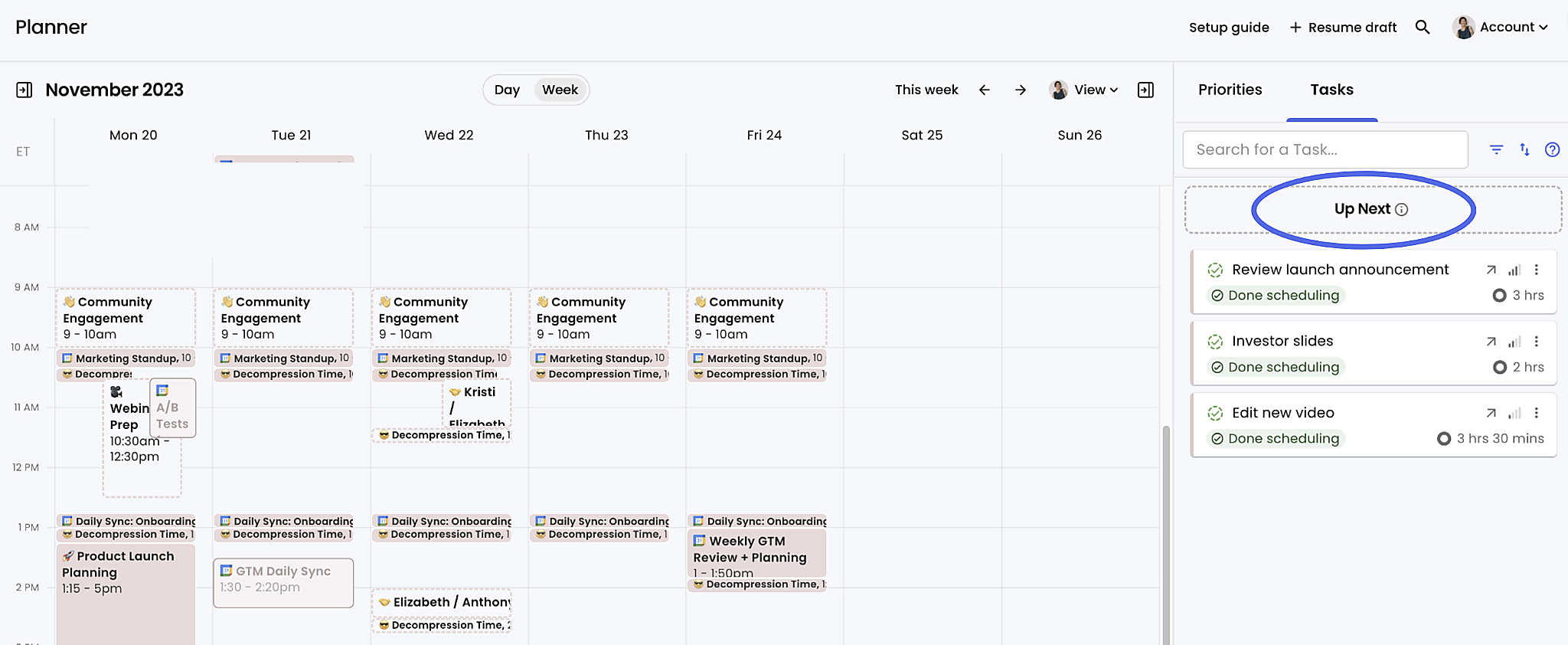
Source: Reclaim.ai
The native integrations make this especially useful. Reclaim syncs bidirectionally with Asana, ClickUp, Todoist, Jira, Linear, and Google Tasks: tasks from those systems pull into Reclaim's scheduler and appear as calendar events without manual effort.
Tasks can also be created from Slack, the Google Calendar add-on, Gmail, and Raycast without opening Reclaim. These task integrations are available on Starter plans and above (Lite is limited to Google Tasks).
Reclaim.ai's Meeting Intelligence
AI Smart Meetings handles recurring meetings differently from a standard calendar invite. Instead of locking a fixed time every week, you define scheduling rules (attendees, available hours, frequency, duration range, ideal time, priority), and Reclaim finds the best recurring time across all calendars.
When a conflict arises, the meeting auto-reschedules to the next best time for the group without anyone sending a message.
Smart Meetings start as Free events, allowing higher-priority items to move them, then flip to Busy when the meeting is less than 12 hours away or when only one viable slot remains.
A priority escalation system addresses a real failure mode: if a lower-priority meeting keeps getting skipped, Reclaim escalates it (Medium missed once becomes High; missed twice becomes Critical).
Timezones are detected automatically, and users can see each attendee's timezone and overlapping available hours to diagnose low-overlap problems. Other attendees do not need a Reclaim account for intra-org meetings. Zoom or Google Meet links are auto-generated and attached to every instance.
AI Scheduling Links is Reclaim's answer to Calendly, with one key difference: availability is priority-aware, not just free/busy aware. When you set a Scheduling Link to a higher priority level, it surfaces lower-priority events as open slots.
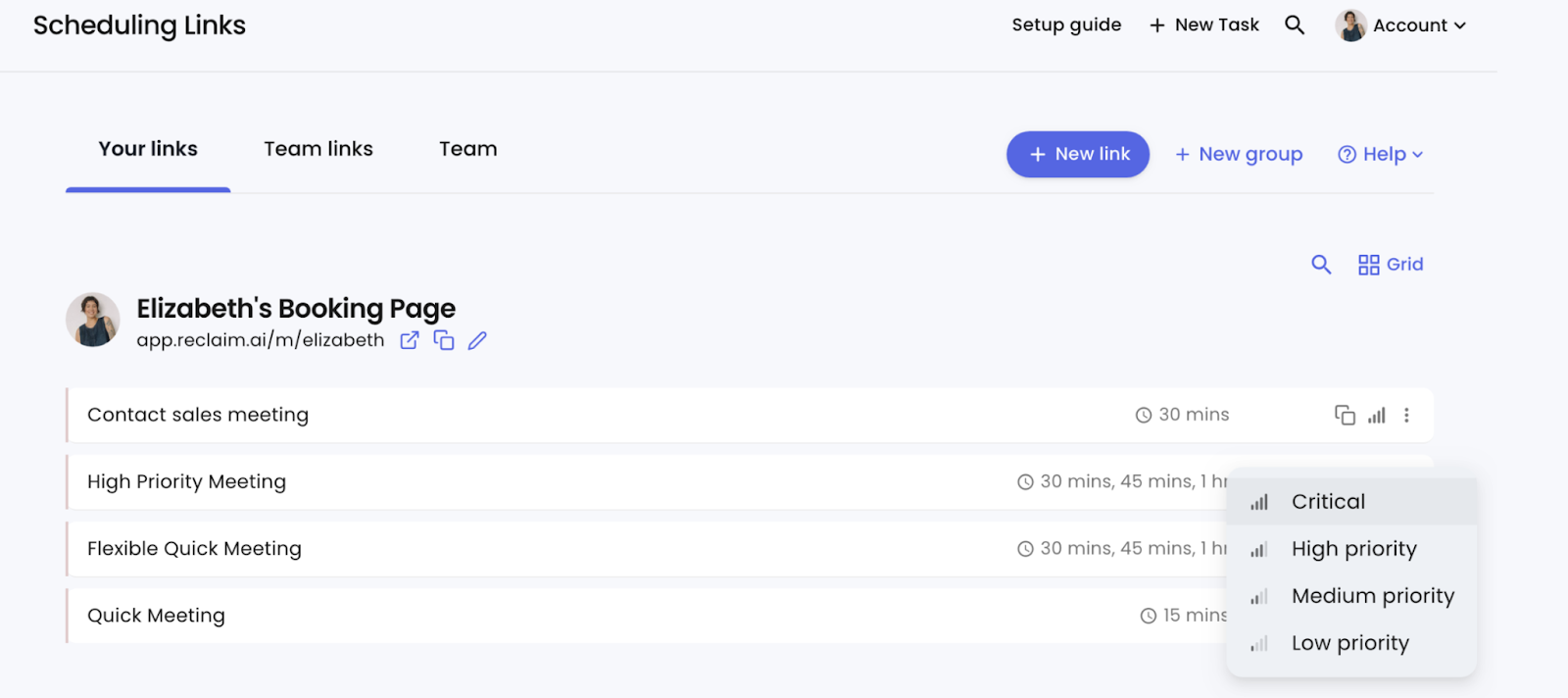
Source: Reclaim.ai
A prospect using your booking link sees times that might show as "busy" in a standard tool, because Reclaim knows those blocks are low-priority Tasks or Habits that can reschedule. When a meeting books over a displaced event, Reclaim reschedules that event to its next best time.
Three link types serve different coordination patterns: individual links for one-on-one meetings, Team Links requiring all organizers to attend, and Round Robin links distributing bookings across a pool of team members, favoring those with fewer existing bookings.
Each link supports up to three selectable durations, meeting caps per day or week, custom screening questions (paid plans), and a post-booking redirect URL. Buffer time settings are enforced at the availability layer: attendees only see times that already account for decompression and travel buffers.
Link Groups let you combine related links into a single booking page for attendee choice. On Lite, you get 1 Scheduling Link; Starter includes 3; Business and Enterprise offer unlimited.
Reclaim.ai's Calendar Sync and Cross-Calendar Management
AI Calendar Sync keeps multiple calendars in sync by creating and maintaining copies of events across them. When someone has a personal and a work calendar (or multiple work accounts), colleagues viewing one calendar cannot see commitments from the other.
Calendar Sync creates synced copies on the destination calendar so colleagues see blocked time. If the source event moves, is renamed, or is deleted, the synced copy updates to match.
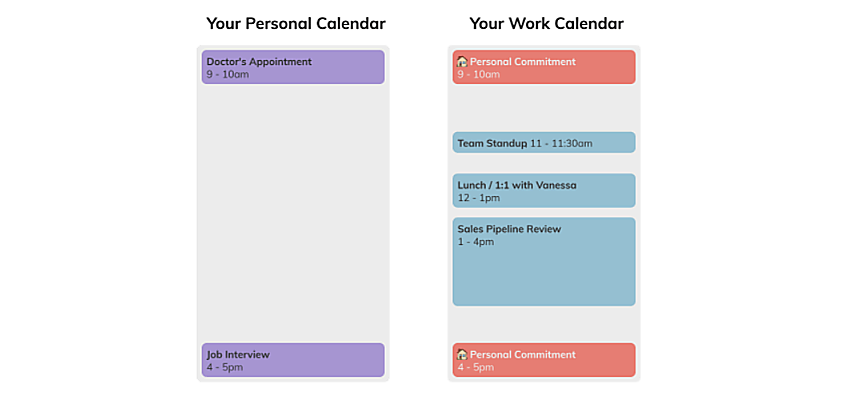
Source: Reclaim.ai
Sync works between Google Calendar accounts, between Outlook accounts, and across Google-to-Outlook or Outlook-to-Google.
Each sync policy offers visibility options: "Busy for all," commitment-type labels ("Personal Commitment," "Work Commitment"), or full event details, so users share just enough context without exposing private information.
A custom color override per source calendar provides visual distinction. Adding #nosync to an event's title or description prevents that event from syncing.
Reclaim draws a distinction between Calendar Sync and Connected Calendars. Connected Calendars only inform Reclaim's AI of existing commitments for scheduling decisions; no visible copies are created. Calendar Sync creates events on the destination calendar. Lite includes 1 sync; Starter includes 3; Business and Enterprise offer unlimited.
The Team OOO Calendar extends cross-calendar visibility to out-of-office tracking. Reclaim detects OOO events on individual team members' calendars and reflects them on a shared team calendar without requiring anyone to update a separate calendar manually.
Admins control whether partial-day events display as exact times or as all-day events. Individuals can belong to more than one OOO Calendar, and sharing with a Google Group or Microsoft group auto-detects all members. Team OOO Calendar is available on Business and Enterprise plans.
Reclaim.ai's Planner, AI Assistant, and Preview Mode
AI Planner is the hub of the Reclaim scheduling system: a central interface for managing all smart events with contextual actions a regular calendar client cannot provide.
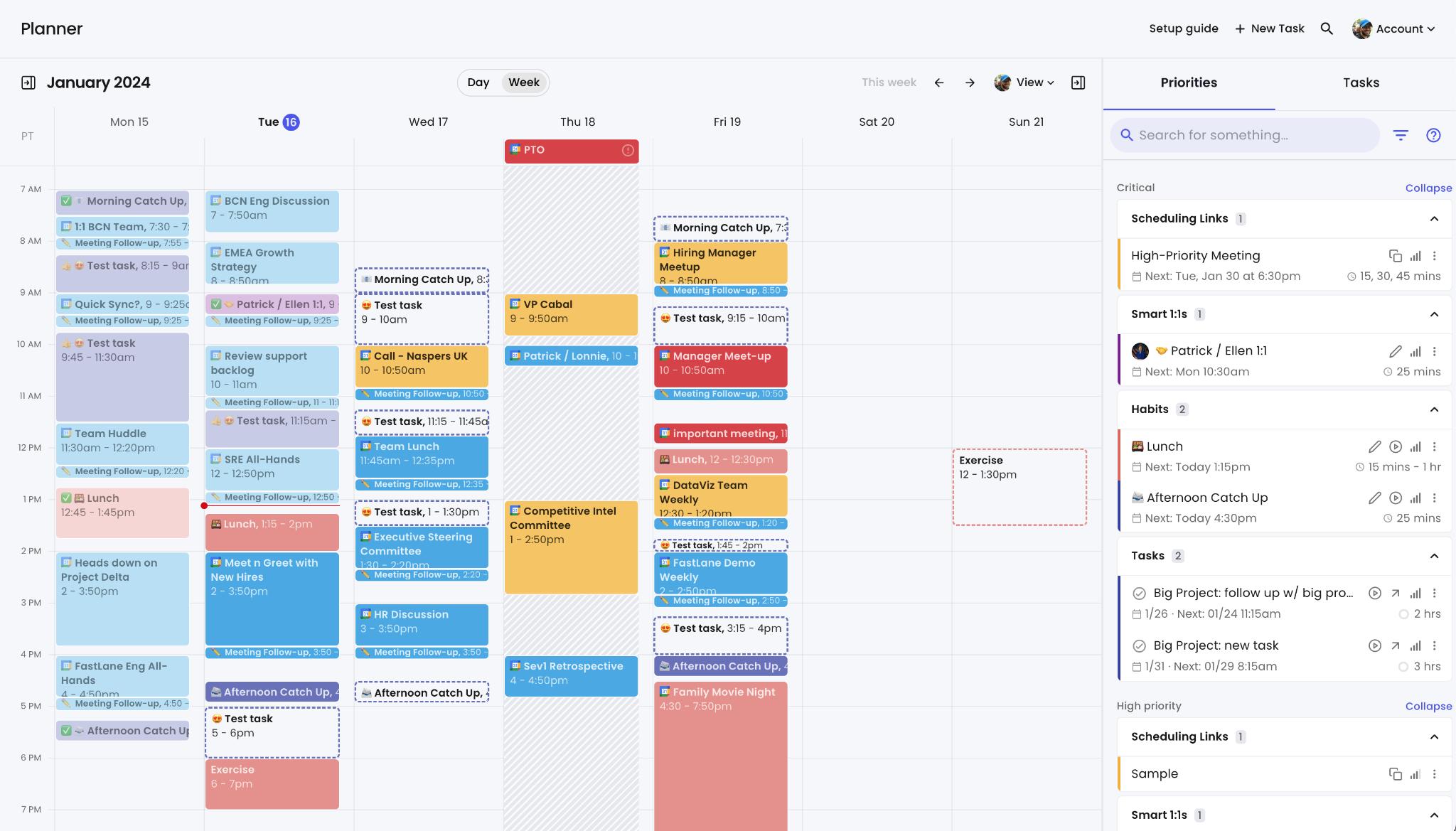
Source: Reclaim.ai
Events from all connected calendars display in a standard day and week view, with dashed outlines for Free events and solid outlines for Busy events.
A collapsible right-hand sidebar offers a Priorities view (all Reclaim-managed events sorted by priority level with drag-and-drop reprioritization), a Tasks tab (full task list including the Up Next queue), and an event details pane for any clicked event.
You can assign priority levels to ordinary Google Calendar or Outlook events from the Planner, letting the AI make scheduling tradeoffs across the entire calendar, not just Reclaim-managed items. A "View as" control lets you preview your calendar as colleagues or external contacts see it.
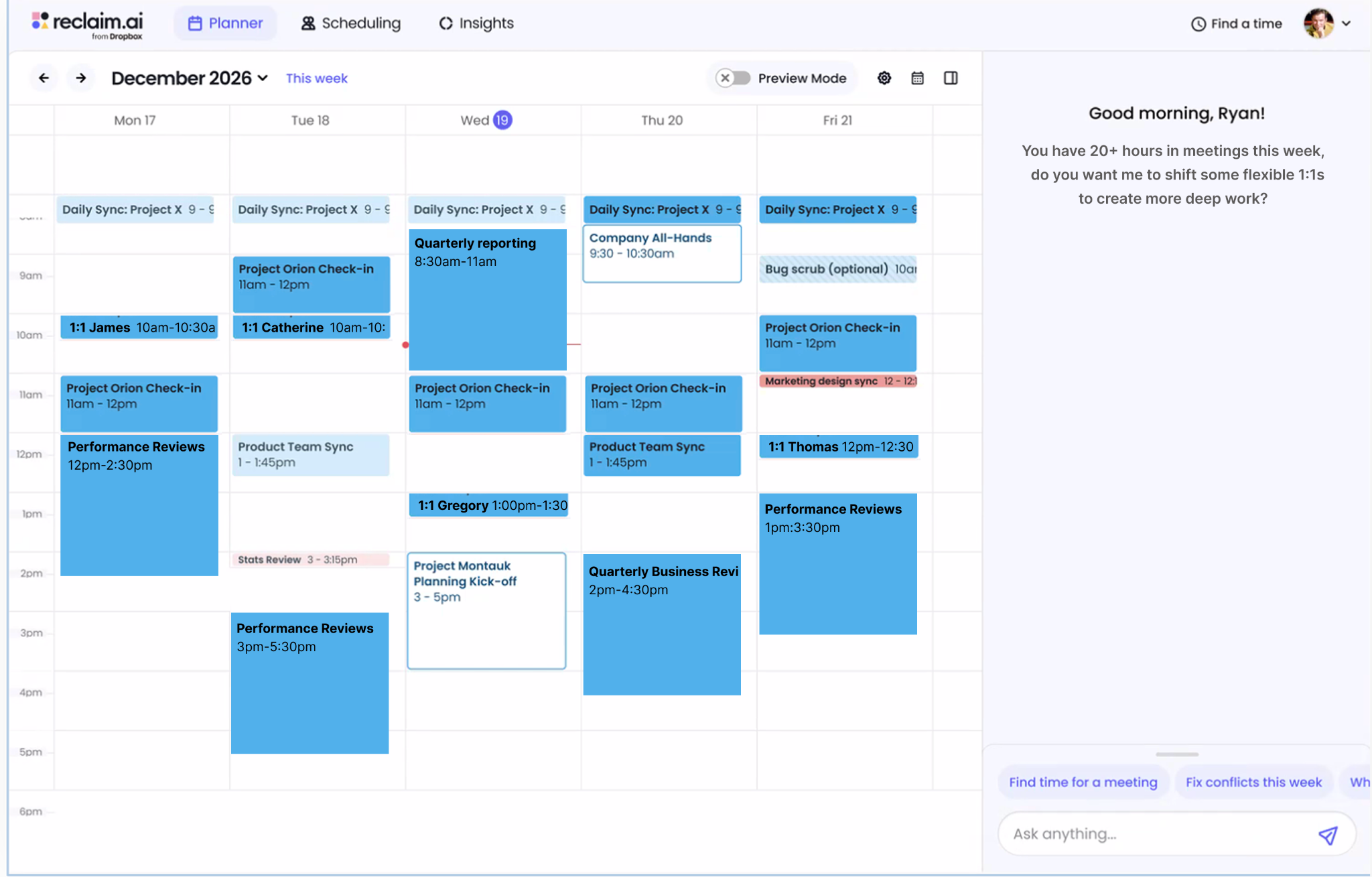
The AI Assistant, introduced with Reclaim 2.0, lives in the Planner's right panel and accepts natural-language scheduling commands: "Help me get my week back on track," "Cancel my meetings today," "What should I work on next?". It has full context over your calendar, connected tasks, AI Agents, and Insights data.
Beyond responding to commands, the assistant flags conflicts, overloaded days, missing focus time, skipped habits, missing agendas, missing video links, and key attendees who are unavailable.
It can recommend what to work on next by drawing from connected task tools based on deadlines, priorities, and current calendar context. An in-session task timer lets you start a timer from chat, and Reclaim logs the time to the calendar.
Preview Mode is the safety layer that separates Reclaim 2.0's AI from full autonomy. When the assistant proposes changes, it stages them in a calendar sandbox where you review what will move before anything is applied. No meeting invites go out, no events are rescheduled, and no colleagues are notified until you approve.
Source: Reclaim.ai
The design protects users from unintended downstream changes while still giving the AI room to propose reorganizations of the day.
The AI Assistant connects via MCP (Model Context Protocol), letting external AI tools like ChatGPT, Claude, Cursor, Copilot, and Gemini trigger scheduling actions inside Reclaim. This makes Reclaim a scheduling layer for the broader AI ecosystem: an AI agent working in another tool can find time, book a meeting, or protect a block by calling Reclaim's MCP server.
Reclaim.ai's Time Tracking and Workforce Analytics
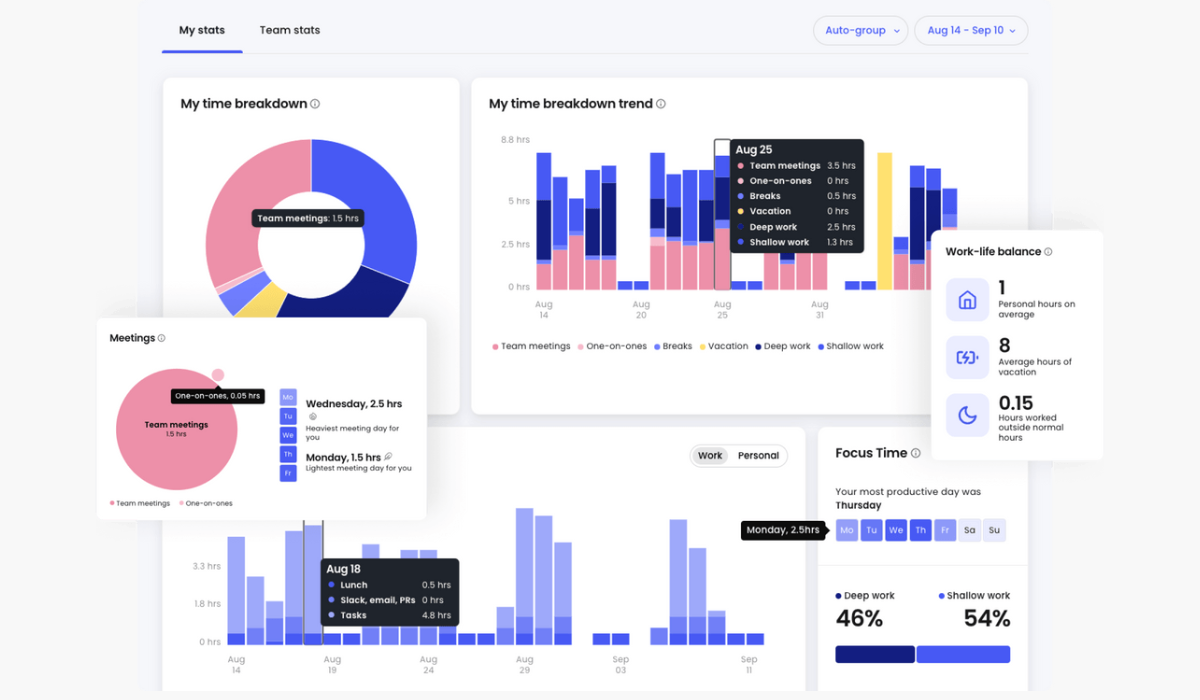
AI Time Tracking derives all tracking data from the calendar without manual timers or timesheets. Reclaim reads every event and categorizes it by type: Team Meetings (multi-attendee, same domain), External Meetings (cross-domain), One-on-Ones (two-person internal), Solo Work (split into Deep Work for sessions over 2 hours and Shallow Work for sessions under 2 hours), Personal, and Travel & Logistics.
These feed the Stats dashboard with daily and weekly averages, trend views over up to 12 weeks of historical data, and the ability to set the time range to future dates for capacity planning. Users can manually override categories on a per-event basis.
Source: Reclaim.ai
The Deep Work versus Shallow Work split reflects a specific productivity framework: not just "meeting vs. non-meeting" but whether solo work sessions run long enough for flow state. Work-life balance metrics track personal habit time defended, meetings scheduled outside working hours, and vacation hours taken.
Workforce Analytics scales this to the team level. Managers see averaged weekly hours across meeting types, travel, breaks, vacation, deep work, and shallow work. The focus time heatmap reveals the team's most and least productive days (useful for informing no-meeting-day policies).
A meetings distribution chart shows what percentage of the team spends above various meeting hour thresholds per week.
The key design choice is privacy-by-design aggregation: Workforce Analytics presents only team-averaged data, not individual-level breakdowns. It is built for improving collective norms, not surveilling employees.
ROI stats surface total hours of focus time reclaimed, decompression breaks defended, scheduling link meetings booked, and travel time protected across the team. Workforce Analytics is available on Business and Enterprise plans.
Reclaim.ai's Integrations, API, and Platform Infrastructure
Reclaim connects to calendars and task tools through native integrations rather than a broad marketplace.
Calendar providers: Google Calendar (primary, with a Google Workspace Marketplace add-on) and Microsoft Outlook (generally available since May 2025).
Task management: Asana, ClickUp, Todoist, Jira, Linear, and Google Tasks. All are bidirectional syncs: tasks created or updated in those tools appear in Reclaim's scheduler, and status changes in Reclaim flow back. No other scheduling platform offers this breadth of task-manager integration.
Communication and video: Slack (status sync, agenda view, task management, scheduling link sharing, slash commands), Zoom and Google Meet (video link auto-insertion for Smart Meetings and Scheduling Links), and Microsoft Teams (conferencing support).
Developer and AI tools: MCP support for ChatGPT, Claude, Cursor, Copilot, and Gemini. A Raycast extension for macOS. Zapier integration authenticated via API key.
Webhooks for Scheduling Links (Business and Enterprise only) fire on meeting creation, update, and cancellation, with signature verification via x-reclaim-signature-256, exponential backoff retries, and a current payload schema version of v2025-09-26.
Reclaim does not publish a standalone REST API reference. API key management is accessible at app.reclaim.ai/settings/developer, and no official SDKs exist. Community libraries include an unofficial Python wrapper on PyPI and an unofficial MCP server on npm, neither endorsed by Reclaim.
Security and compliance: SOC 2 Type II (achieved September 2023, renewed 2024), GDPR compliance with a Data Processing Addendum and Standard Contractual Clauses, CCPA compliance, and Data Privacy Framework certification (US-EU, US-Swiss, UK Extension). All data is hosted on AWS in the USA with AES-256 encryption at rest and TLS/HTTPS in transit.
Reclaim states it does not train AI models on user data. Enterprise plan customers can authenticate via SSO using OIDC through Okta, OneLogin, and Microsoft Entra ID, with SCIM provisioning for automated user management. SAML is not currently supported.
Where Reclaim.ai Stops: The Gaps
Reclaim.ai solves one problem well: how knowledge workers and their teams allocate time. That focus produces a product with few peers in AI-powered scheduling, but it also means the platform ends at the calendar. For go-to-market teams, several adjacent capabilities live outside Reclaim's scope.
No B2B contact or company data. Reclaim schedules time. It does not include a database of contacts, companies, verified emails, direct dials, or company attributes. A sales team using Reclaim's scheduling links and smart meetings still needs a separate source for the prospects those meetings are with.
No buyer intent signals. Reclaim tracks how your team spends time. It does not track which companies are researching your category, showing intent to buy, or engaging with competitors. The scheduling intelligence is inward-facing (how is my time allocated?) rather than market-facing (who is in-market?).
No conversation intelligence. Reclaim can auto-generate a Zoom or Google Meet link for a meeting and insert buffer time after it. It does not record, transcribe, or analyze what was said during the call. There is no objection detection, talk ratio analysis, coaching scorecards, or deal intelligence derived from conversations.
No CRM integration. HubSpot integration is in the roadmap Backlog, and Salesforce integration is not listed. Sales teams cannot connect Reclaim's scheduling data to their CRM for pipeline attribution, contact-level scheduling history, or deal-aware scheduling logic.
No marketing orchestration or ABM. Reclaim has no display advertising, audience management, account-based marketing, or multi-channel campaign capabilities. Marketing teams running demand generation alongside sales execution need separate platforms.
No mobile app. A native iOS app is listed as "In Planning" as of mid-2026. The product remains web-only, which underserves professionals who manage their schedules from a phone.
How ZoomInfo Covers the Gaps
Reclaim.ai optimizes how time gets spent. ZoomInfo determines who that time should be spent on, provides the data to reach them, and captures what happens during the conversation. The two platforms serve the same knowledge worker from different angles, and ZoomInfo covers the go-to-market surface that a scheduling tool does not touch.
ZoomInfo's B2B Data Platform: The contacts and companies Reclaim does not include
ZoomInfo operates a B2B data platform of 500M contacts, 100M companies, 135M+ verified phone numbers, 120M direct-dial phone numbers, and 200M+ verified business email addresses.
The data runs through a verification pipeline backed by 300+ human researchers and automated ML scanning 28 million site domains daily, reaching up to 95% accuracy on first-party data.
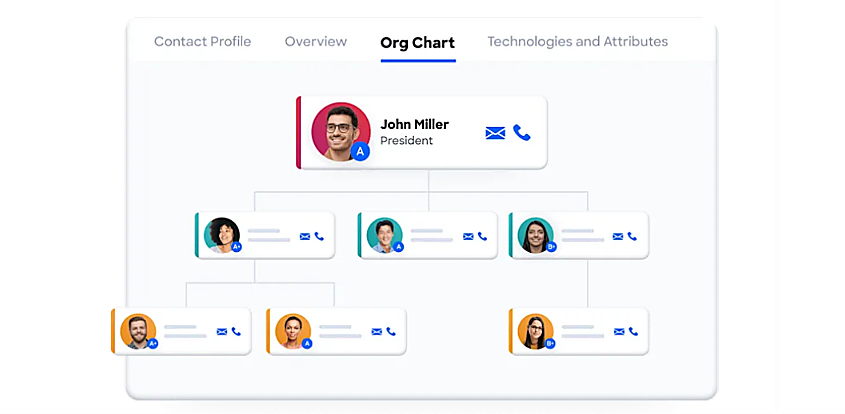
For a sales team using Reclaim to protect prospecting time and schedule meetings, ZoomInfo provides the contacts those links are sent to: department org charts with decision-makers' direct dials and emails, 300+ company attributes for segmentation, and contact tracking with job-change alerts.
Source: ZoomInfo
In a Fortune 500 competitive RFP analyzing 25 million contacts across vendors, an independent consultant concluded that "no other competitor came even close."
ZoomInfo Intent and WebSights: Market-facing signals that scheduling analytics cannot provide
ZoomInfo Intent tracks signals from 210 million IP-to-Organization pairings and 6 trillion+ new keyword-to-device pairings sourced monthly. Where Reclaim's analytics tell you how your team spent time last week, ZoomInfo Intent reveals which companies are researching topics related to your product before you contact them.
Guided Intent, exclusive to ZoomInfo, identifies topics historically correlated with deal success rather than requiring manual topic selection.
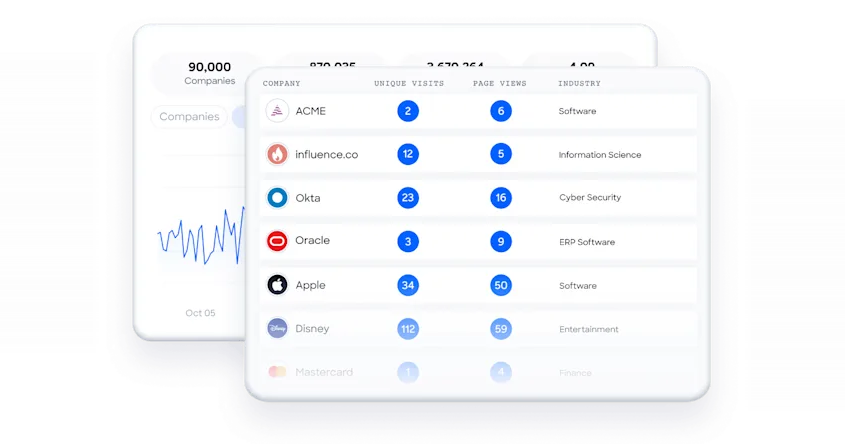
WebSights resolves anonymous website traffic to companies with Automatic Traffic Filtering that distinguishes real visitors from bots. ZoomInfo Marketing extends this with contact-level site visitor identification, identifying the specific person, not just the company.
Source: ZoomInfo
ZoomInfo Chorus: Conversation intelligence for what happens during the meetings Reclaim schedules
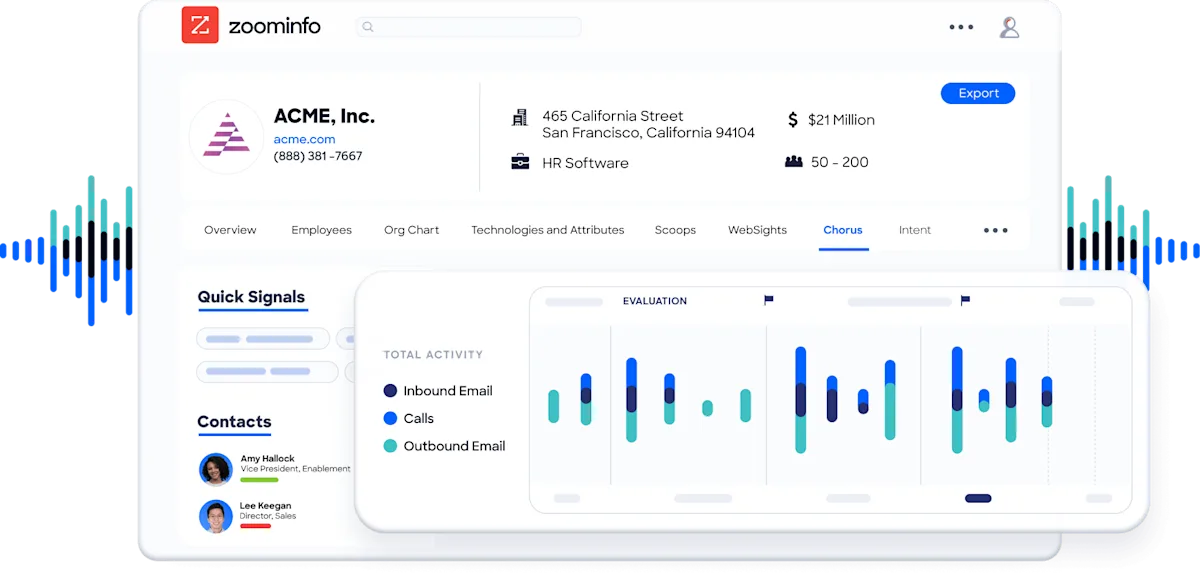
Reclaim ensures meetings happen at the right time. Chorus, ZoomInfo's conversation intelligence engine backed by 14 technology patents, captures what happens inside those meetings.
It records and transcribes sales calls, surfaces AI-generated insights (talk ratios, sentiment, objection detection), auto-syncs deal intelligence to the CRM, and provides coaching scorecards and clip sharing.
Source: ZoomInfo
The context Chorus captures feeds ZoomInfo's GTM Context Graph, which processes 1.5B+ data points daily and reasons across conversation data, CRM records, and behavioral signals to explain why deals move or stall.
ZoomInfo GTM Workspace and GTM Studio: Execution and orchestration
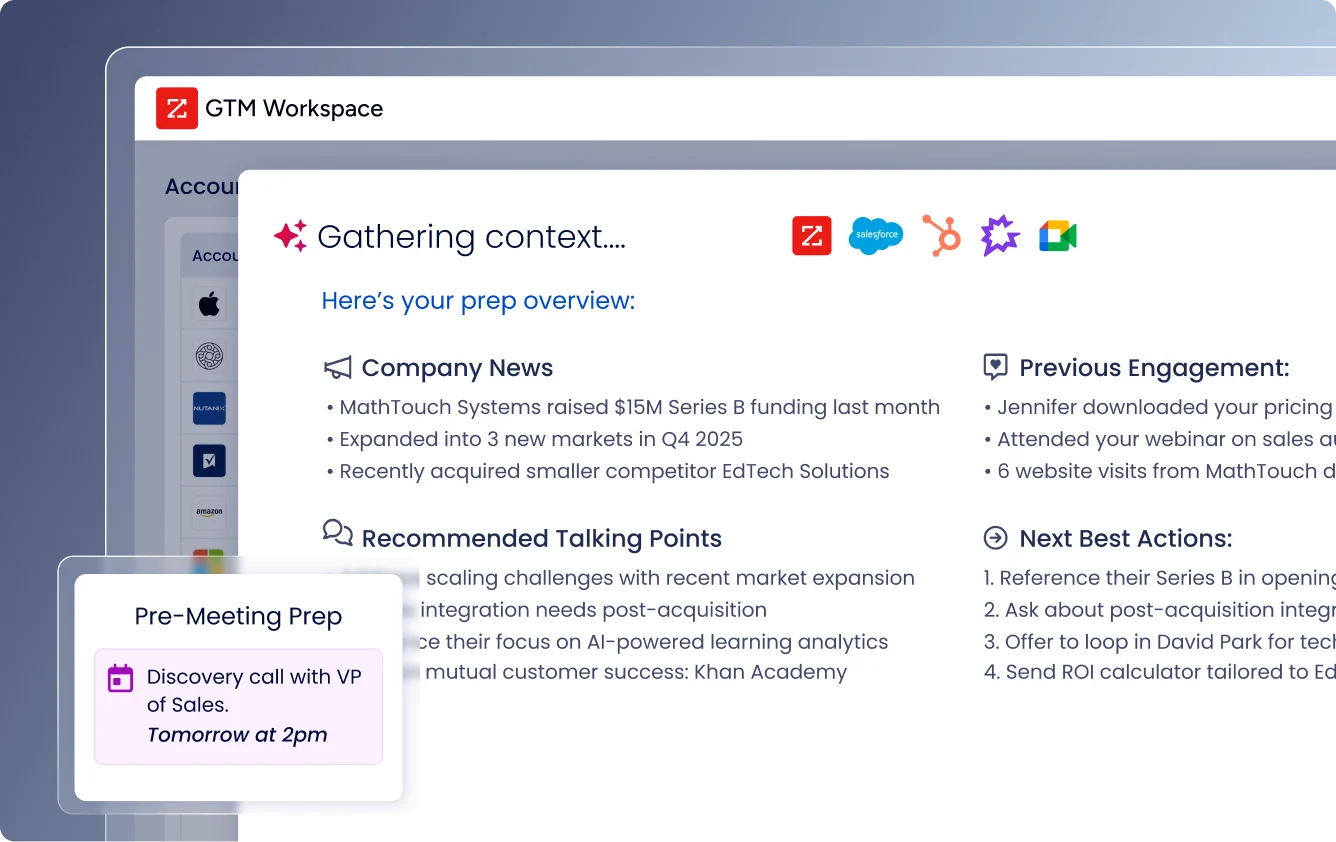
GTM Workspace is ZoomInfo's seller front-end, providing a Book of Business view across CRM, ZoomInfo data, conversation history, and market intelligence. AI agents automate account research, outreach drafting, CRM updates, and signal monitoring.
Source: ZoomInfo
An Action Feed streams in-market buyers matched to target criteria with pre-drafted actions on every signal.
GTM Studio addresses marketing orchestration. Marketers and RevOps teams can build audiences using natural language, enrich with first- and third-party data, define triggers, and activate plays across channels without engineering support.
Pre-built GTM plays cover inbound acceleration, champion tracking, competitive displacement, and ICP targeting. Expansion plays that used to take 3 weeks now launch in 30 minutes.
ZoomInfo APIs and MCP: Data access for any tool, including scheduling workflows
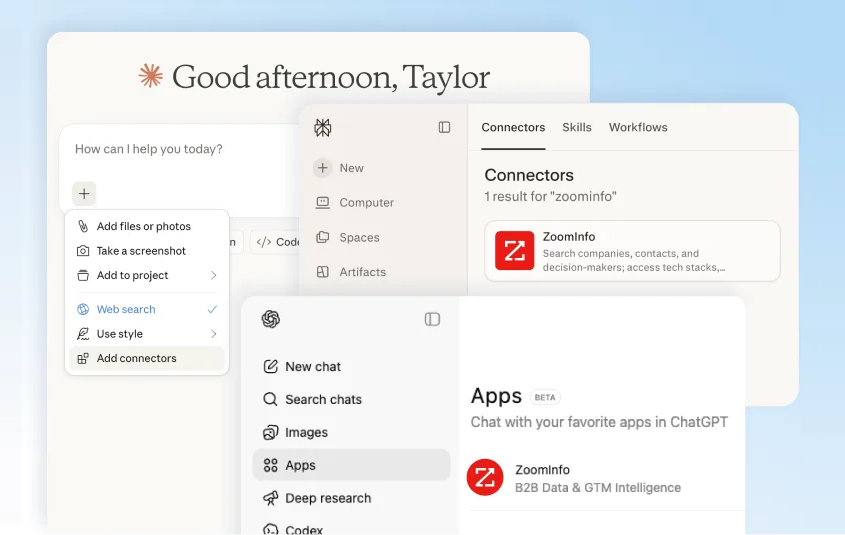
ZoomInfo delivers its intelligence through APIs and MCP, so the same data powering ZoomInfo's own products is accessible inside any third-party tool or custom AI agent.
The MCP server connects AI models to ZoomInfo's B2B data as a native tool, currently supporting Claude and ChatGPT.
Source: ZoomInfo
Both Reclaim.ai and ZoomInfo support MCP, meaning an AI agent could use Reclaim to find time and ZoomInfo to find the right person to meet with in a single workflow. API access is included in all relevant plans.
Seismic's sales team attributed 39% of active pipeline to opportunities identified or influenced by ZoomInfo signals, boosted productivity by 54%, and saved 11.5 hours per week per seller. (Seismic Case Study)
Final Summary
Reclaim.ai is a thorough toolkit for AI-powered calendar management: Focus Time defends blocks for heads-down work, Habits flex routines around meetings, Tasks pull from six project management tools into calendar blocks, Smart Meetings find and reschedule recurring group time, Scheduling Links expose priority-aware availability, and Workforce Analytics gives managers team-level visibility into time allocation.
It fits knowledge workers in meeting-heavy roles who want a scheduling layer that optimizes their calendar without manual effort.
It does not extend into the go-to-market layer: no B2B contact database, no buyer intent signals, no conversation intelligence, no CRM integration, and no marketing orchestration.
If your team's productivity challenge is upstream of the calendar (knowing which prospects to meet with, understanding who is in-market, and capturing what happens during the call), that is the ground ZoomInfo covers.
Its 500M-contact, 100M-company database supplies the verified contacts and direct dials your scheduling links send to. ZoomInfo Intent surfaces accounts researching your category from 6 trillion+ keyword-to-device pairings monthly.
Chorus captures and analyzes every sales conversation. And both platforms support MCP, meaning an AI agent can use Reclaim to find the time and ZoomInfo to find the buyer in a single workflow.
Start with ZoomInfo Lite for free, or request a demo to see verified contacts and intent signals flow into your pipeline.
FAQ
Does Reclaim.ai work with Microsoft Outlook?
Yes. Reclaim added full Outlook Calendar support in May 2025. All core features (Focus Time, Habits, Tasks, Smart Meetings, Scheduling Links, Calendar Sync) work with Outlook, and Calendar Sync supports cross-platform sync between Google Calendar and Outlook accounts.
The Outlook integration is newer than Google Calendar support, so enterprise buyers in Microsoft 365 environments should verify feature parity for their specific use case.
Which plan includes Workforce Analytics?
Workforce Analytics is available on Business ($15/seat/month annual) and Enterprise ($22/seat/month annual) plans only. It presents team-averaged data (not individual-level breakdowns) covering meeting load, focus time, deep work versus shallow work, and work-life balance metrics.
The Enterprise plan adds Focus Time company OKRs, enterprise-wide reports with Slack delivery, and data export.
Can Reclaim.ai integrate with a CRM like HubSpot or Salesforce?
Not yet. HubSpot integration is in the Backlog on Reclaim's public roadmap, acknowledged but not scheduled. Salesforce integration is not listed. Sales teams cannot connect Reclaim's scheduling data to CRM records for pipeline attribution or deal-aware scheduling.
ZoomInfo integrates natively with Salesforce, HubSpot, and Microsoft Dynamics for CRM-connected go-to-market workflows.
Does Reclaim.ai have a mobile app?
No. A native iOS app is listed as "In Planning" on the public roadmap as of mid-2026. The product is web-only, with a Google Calendar add-on, a Raycast extension for macOS, and Slack integration providing some mobile-adjacent access. Android timing has not been announced.
How does Reclaim.ai's pricing compare to Calendly?
Reclaim offers a broader feature set (focus time, habits, tasks, smart meetings, time tracking, and workforce analytics) alongside its scheduling links.
Pricing starts at free (Lite), then $10/seat/month (Starter), $15/seat/month (Business), and $22/seat/month (Enterprise) on annual billing. Multiple G2 reviewers cite Reclaim's pricing as a value advantage over competitors.
Reclaim also offers a switching providers discount of 20% off for users migrating from Calendly, Clockwise, Motion, or similar tools.
What task management tools does Reclaim.ai integrate with?
Reclaim has native bidirectional integrations with Asana, ClickUp, Todoist, Jira, Linear, and Google Tasks. Tasks from those tools pull into Reclaim's scheduler and appear as calendar events before deadlines.
Status changes sync back to the source tool. Google Tasks is available on all plans including Lite; the remaining integrations require Starter or above. Trello, Monday.com, and Notion are not currently supported.
Does Reclaim.ai support recurring tasks?
Not natively. Recurring Tasks is in the Backlog on the public roadmap. Users who need recurring to-do items use Habits as a workaround, scheduling recurring time blocks with flexible windows. Habits are rule-based routines, not task items with completion tracking, so the workaround is imperfect for workflows that need true recurring task management.
Does Reclaim.ai include buyer intent data or sales intelligence?
No. Reclaim.ai is a calendar and time management platform. It does not include B2B contact data, company intelligence, buyer intent signals, or sales prospecting capabilities.
For teams that need to know which companies are in-market and who to reach at those companies, ZoomInfo provides intent signals from 210 million IP-to-Organization pairings and 6 trillion+ keyword-to-device pairings monthly, along with 500M contacts and 120M direct-dial phone numbers.
