
Choosing between Reclaim.ai and OneCal for managing your calendar comes down to five questions:
Do you need a tool that syncs your calendars, or one that actively decides how your time gets spent?
Are you managing multiple calendars across providers, or protecting focus time within a single work calendar?
Is scheduling meetings your main pain point, or is back-to-back meeting culture eating into your productivity?
Do you need analytics on how your team spends time, or just a clean view of your own availability?
Are you looking for a calendar tool for individual productivity, or a system that connects scheduling to your go-to-market workflow?
In short, here's what we recommend:
Reclaim.ai is an AI scheduling platform that manages your calendar. It defends focus time, schedules tasks from tools like Jira and Asana into calendar blocks, and reschedules recurring meetings when conflicts arise. Backed by Dropbox and used by 600,000+ professionals at 70,000+ companies, Reclaim goes beyond syncing. It allocates your time based on priorities you set, then re-optimizes as your week changes. The trade-off: setup requires configuring multiple interacting features, and there is no native mobile app yet.
OneCal is a calendar sync and scheduling tool for people who manage multiple calendars across Google, Outlook, and iCloud. Its strength is real-time, multi-way calendar sync with granular privacy controls, so your work calendar shows you as busy during personal appointments without revealing details. OneCal also offers scheduling links and a unified calendar view. It is simpler, more affordable, and faster to set up than Reclaim, but it does not manage your time for you. It syncs and displays; you decide.
Both tools solve real calendar problems. But for sales, marketing, and revenue teams, calendar management is only one piece of a larger puzzle. Knowing when you're free matters less than knowing who to meet with, why they matter, and what to say when you get there.
ZoomInfo is an AI go-to-market platform that gives go-to-market teams the context they need before, during, and after every meeting. Built on 500M contacts, 100M companies, 135M+ verified phone numbers, and 200M+ verified business emails, the GTM Context Graph combines this data with your CRM records, conversation transcripts, and behavioral signals to show not just what happened in a deal, but why. Sellers access this intelligence through the GTM Workspace, marketers and RevOps through GTM Studio, and developers through APIs and MCP in any front-end. For teams that schedule dozens of prospect and customer calls each week, ZoomInfo turns those meetings from calendar entries into informed conversations.
If turning calendar time into sales intelligence sounds like the missing piece, see how ZoomInfo works.
Reclaim.ai vs. OneCal vs. ZoomInfo at a glance
Reclaim.ai | OneCal | ZoomInfo | |
|---|---|---|---|
Core function | AI calendar management and scheduling | Calendar sync and scheduling links | AI go-to-market intelligence platform |
Calendar support | Google Calendar, Outlook | Google, Outlook, iCloud | Integrates with Google, Outlook via marketplace |
Calendar sync | Bidirectional, cross-platform | Multi-way, cross-platform with iCloud | N/A (complements calendar tools) |
Focus time protection | AI-driven with weekly goals | Not available | N/A |
Task scheduling | Auto-schedules from Jira, Asana, ClickUp, Linear, Todoist | Not available | N/A |
Scheduling links | Priority-aware, team and round-robin | Individual and collective | N/A |
Analytics | Individual and team time tracking | Not available | Workforce Analytics via GTM Context Graph |
Privacy controls | Visibility labels ("Personal Commitment," "Work Commitment") | Granular (title, description, location, participants) | Enterprise-grade (SOC 2 Type II, ISO 27001, GDPR) |
Mobile app | No native app (web only) | No native app (web only) | Mobile app available |
Free plan | Free forever (Lite), 14-day Business trial | 14-day free trial, no free plan | ZoomInfo Lite (free forever) + 7-day trial |
Starting price | $10/seat/month (annual) | $5/user/month (annual) | Consumption-based pricing |
Best for | Meeting-heavy teams needing AI time management | Multi-calendar professionals needing sync and scheduling | Revenue teams needing account intelligence for every meeting |
Calendar sync: OneCal's specialty vs. Reclaim's add-on
Calendar sync is OneCal's reason for existing. Reclaim has it, but it's one feature among many.
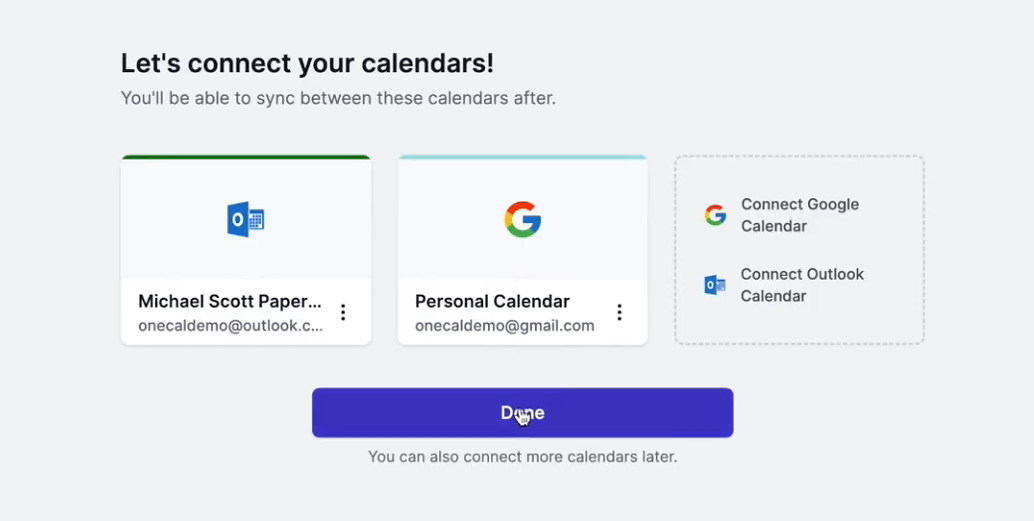
OneCal supports multi-way synchronization across Google Calendar, Outlook, and iCloud. Select three calendars, and events from any one appear on the other two in a single configuration. The system recognizes its own cloned events and prevents duplication loops. Sync speed is near-instant for Google and Outlook; iCloud updates can take up to 10 minutes.
The privacy controls set OneCal apart.
Users choose which event properties sync: title, description, participants, location, and conference links each toggle independently. A personal appointment can appear as "Busy" on a work calendar, or carry a label like "Personal," without revealing details. Users can assign colors to events for quick identification and exclude events by color or RSVP status.
Source: OneCal
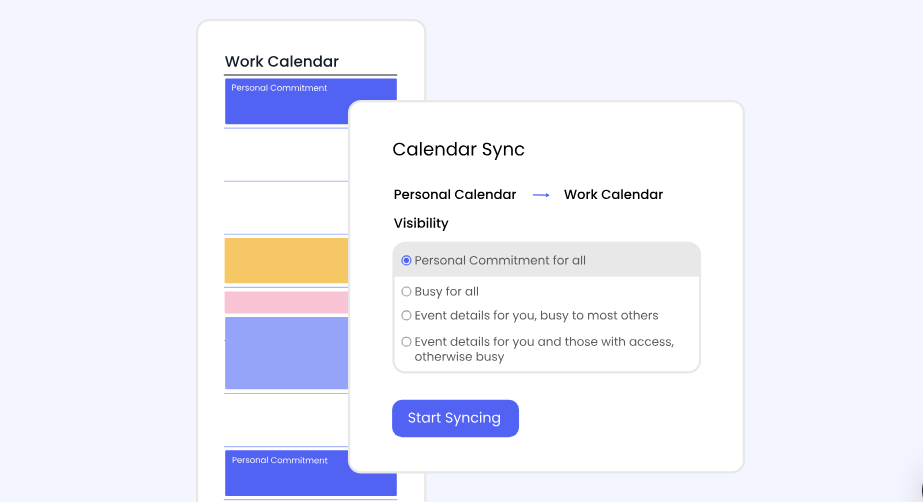
Reclaim's Calendar Sync works similarly in principle.
It creates synced copies of events from a source calendar on a destination calendar, with visibility options like "Personal Commitment" or "Work Commitment." The #nosync tag lets users exclude individual events. Reclaim supports Google-to-Google, Outlook-to-Outlook, and cross-platform sync.
Source: Reclaim
The practical difference: OneCal's multi-way sync handles complex configurations (five calendars all staying in sync) more naturally than Reclaim, which uses one-directional sync policies that must be layered to achieve the same result. OneCal also supports iCloud, which Reclaim does not. For professionals juggling calendars across Apple, Google, and Microsoft ecosystems, that gap matters.
Reclaim, however, draws a distinction between "Calendar Sync" (creating visible copies on destination calendars) and "Connected Calendars" (making Reclaim's AI aware of commitments without creating copies). This separation gives Reclaim's scheduling engine a fuller picture of availability without cluttering calendars with duplicate events.
AI time management: where Reclaim pulls ahead
OneCal syncs your calendars. Reclaim manages them.
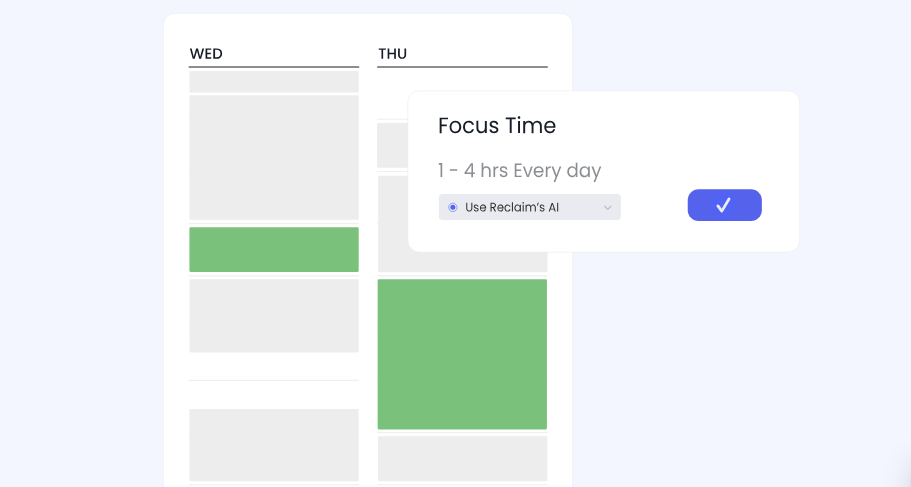
The gap is most visible in AI Focus Time. Users set a weekly goal for focused work, and Reclaim carves out and defends blocks to meet that target. When a meeting takes a focus block's slot, Reclaim moves the block to the next available time. Two scheduling modes accommodate different working styles: Proactive fills the calendar with focus blocks in advance; Reactive waits until meeting density threatens the weekly goal before defending time.
Source: Reclaim
AI Habits extend this logic to recurring routines. Instead of a rigid recurring event at 12pm every day, a lunch Habit is defined as a rule: schedule between 11:30am and 2pm, for 30 to 60 minutes, ideally at noon. Reclaim finds the best available slot daily and moves the event when conflicts arise, toggling between Free and Busy status depending on how much open time remains.
AI Tasks pull items from project management tools (Asana, ClickUp, Jira, Linear, Todoist, Google Tasks) into calendar blocks. Reclaim schedules task time based on priority level, due date, and available gaps, splitting longer tasks into multiple sessions. When a meeting displaces a task block, the task reschedules.
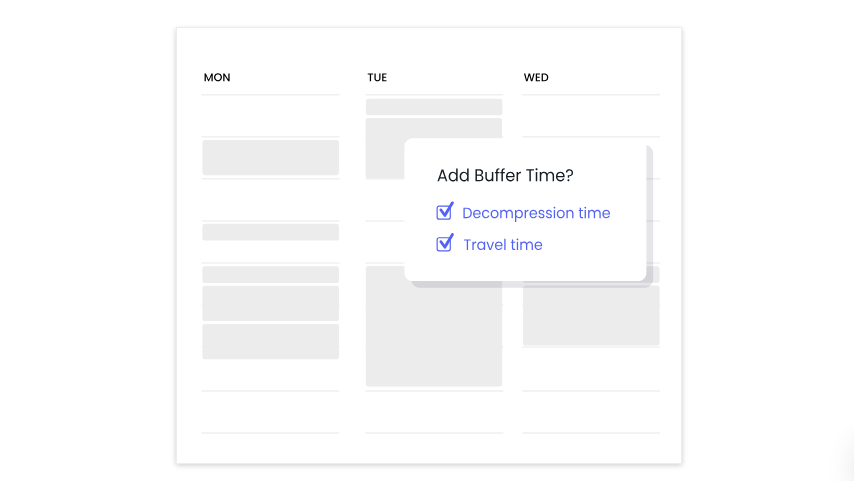
AI Buffer Time inserts gaps around meetings. Travel Time blocks appear before and after location-based events, with automatic flight detection adding 2-hour pre-flight and 1-hour post-flight buffers. Decompression Time adds breathing room after meetings. Task and Habit breaks prevent focused work from stacking back-to-back.
Source: Reclaim
OneCal offers none of this. Its scope stops at synchronization and scheduling links. For users whose problem is "my calendars aren't in sync," OneCal delivers what's needed. For users whose problem is "my calendar runs my life instead of the other way around," Reclaim is the more complete answer.
Scheduling links: similar tools, different depth
Both platforms offer booking links for external scheduling, but they differ in how those links integrate with the rest of the system.
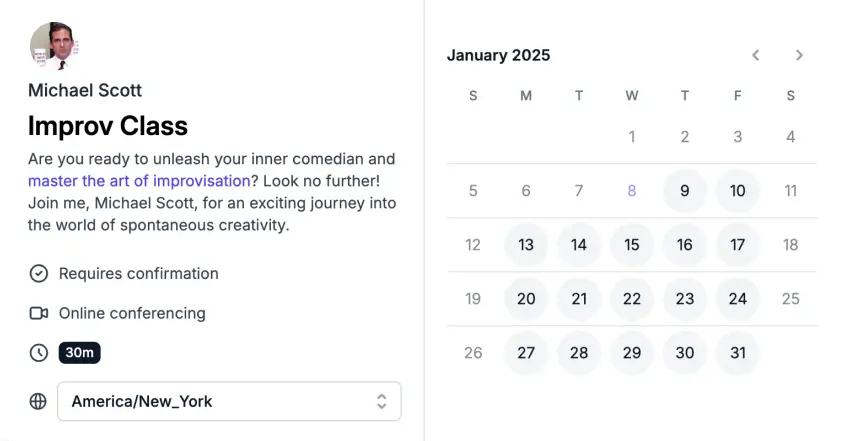
OneCal's Scheduling Links check availability across all connected calendars, including iCloud.
Links support individual and collective scheduling (where multiple team members' availability is considered), custom questions, buffer times, minimum notice periods, and branding customization. Video conferencing integrations include Google Meet, Microsoft Teams, Skype, and Zoom. OneCal also offers translated scheduling links for global audiences.
Source: OneCal
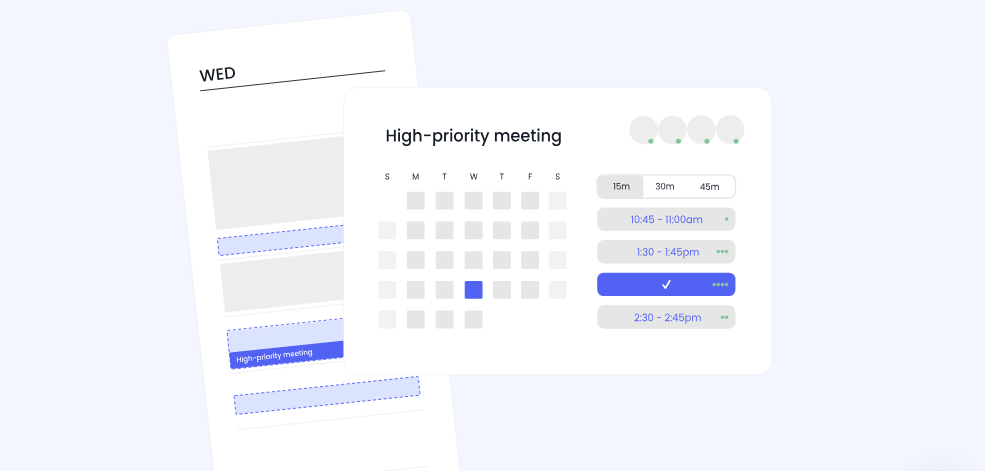
Reclaim's AI Scheduling Links go further by incorporating priority-based availability.
When a scheduling link is set to a high priority, Reclaim surfaces time slots held by lower-priority events (like a flexible focus block or a low-priority habit) as available for booking. If someone books one of those slots, the displaced event reschedules. This means a scheduling link doesn't just show free time; it shows time that could be freed, which matters for busy professionals.
Source: Reclaim
Reclaim also supports round-robin links that distribute bookings across a pool of team members, favoring those with fewer existing bookings. Meeting caps limit how many bookings can land per day or week, preventing any single day from becoming wall-to-wall meetings. Buffer time settings are enforced at the availability layer, so attendees only see times that already account for decompression or travel gaps.
For teams that rely on scheduling links, Reclaim's priority-aware system finds more bookable time. For individuals who need branded scheduling pages with multi-calendar availability and iCloud support, OneCal delivers without the complexity.
Unified calendar view: OneCal's cleaner take
Both platforms provide a way to see all your calendars in one place, but they serve different purposes.
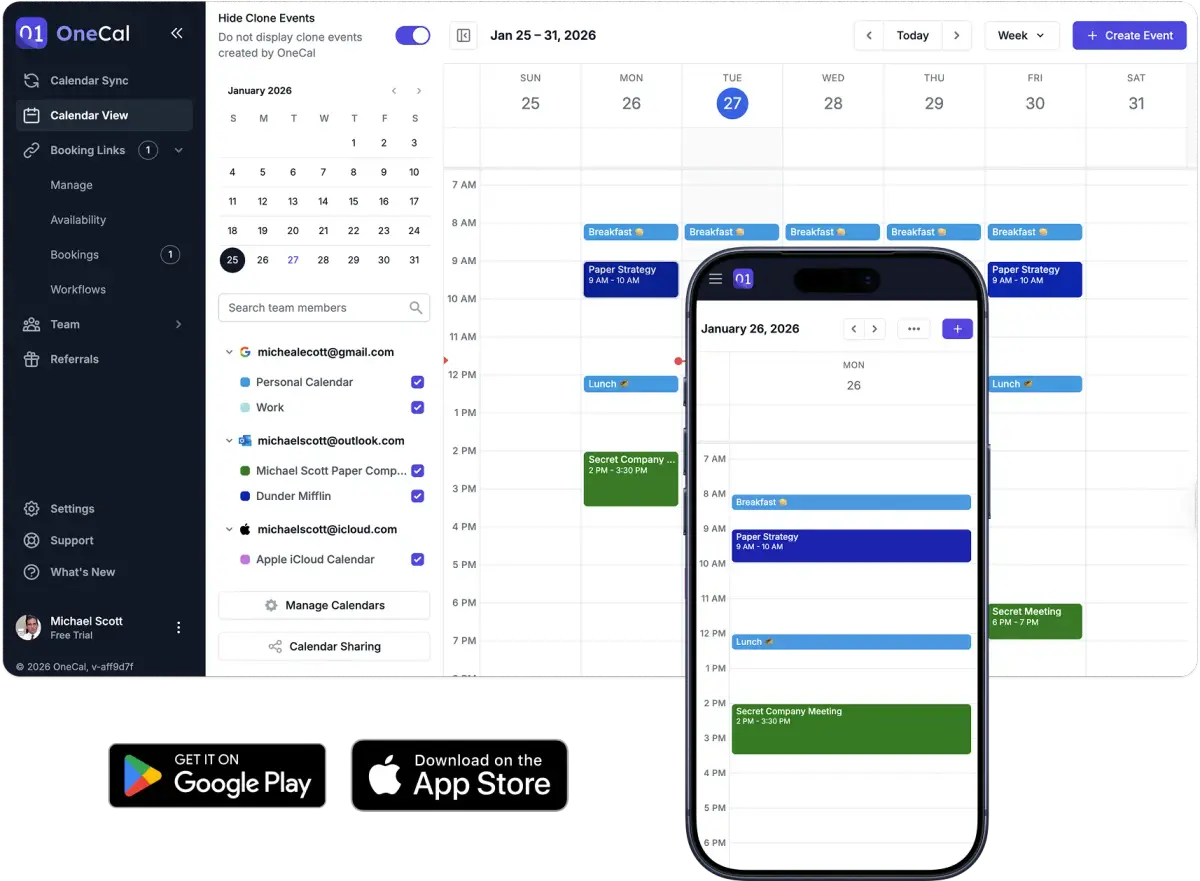
OneCal's Calendar View is a standalone feature: a unified interface for Google, Outlook, and iCloud calendars.
Users can create, update, and delete events, RSVP to invitations, and join meetings from the view. The interface hides clone events created by OneCal's sync feature, keeping the display clean. Team members' availability shows as anonymous busy blocks, protecting privacy while enabling coordination.
Source: OneCal
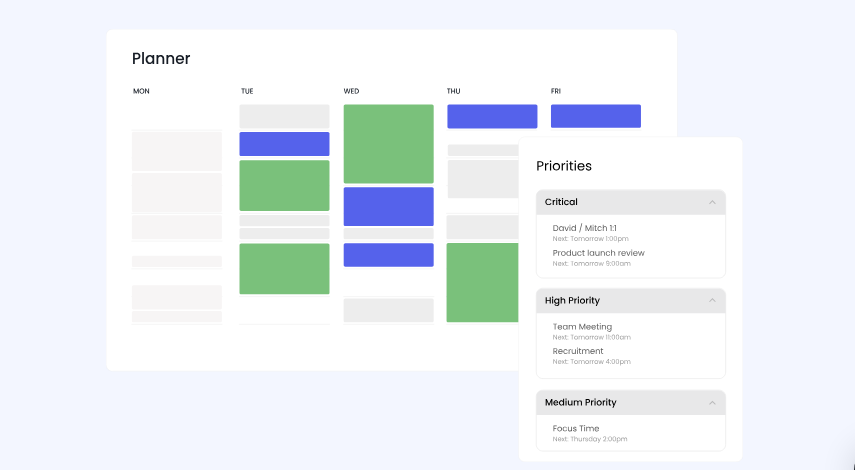
Reclaim's AI Planner is less a calendar view and more a command center for all Reclaim-managed events.
It surfaces tasks, habits, smart meetings, and scheduling link bookings with contextual actions for each type. A priorities sidebar groups events by Critical, High, Medium, and Low levels with drag-and-drop reprioritization. Free events appear with dashed outlines; busy events with solid ones. A "View as" control lets users preview their calendar as colleagues see it, checking for unwanted information exposure.
Source: Reclaim
OneCal's view is simpler and more approachable. Reclaim's Planner does more but assumes you're already invested in the Reclaim ecosystem. For users who want one screen showing everything across providers, OneCal is the lighter option.
Team features and analytics: Reclaim for managers, OneCal for individuals
Reclaim offers team intelligence that OneCal does not attempt.
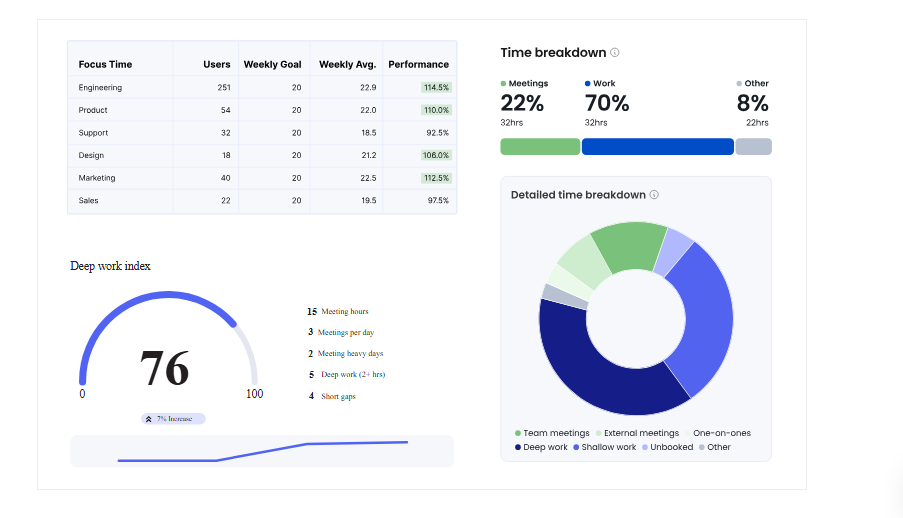
Workforce Analytics gives managers averaged data on team meeting load, focus time, work-life balance, and time allocation. Reports show the team's most and least productive days as a gradient heatmap, informing no-meeting day policies. The data is averaged across team members rather than showing individual breakdowns, protecting privacy while giving leaders useful signals.
Source: Reclaim
AI Time Tracking categorizes calendar events into Team Meetings, External Meetings, One-on-Ones, Deep Work (sessions over 2 hours), Shallow Work (under 2 hours), Personal, and Travel. Users see daily and weekly breakdowns without starting timers or filling timesheets.
Team OOO Calendar detects out-of-office events on team members' calendars and syncs them to a shared calendar. No manual maintenance required.
AI Smart Meetings reschedules recurring meetings across attendees' calendars when conflicts arise, and escalates lower-priority meetings that keep getting displaced.
OneCal's team features are limited to collective scheduling links and the ability to view team members' availability within the calendar view. For individual professionals and small teams that need calendars in sync and scheduling links working, this is sufficient. For managers tracking how their team spends time and wanting to enforce focus time policies across an organization, Reclaim's team features are the differentiator.
When calendar management meets deal intelligence
Reclaim and OneCal both optimize the logistics of scheduling. Neither addresses the substance of what happens during those meetings.
For sales, marketing, and customer success teams, the calendar is a means to an end. The meeting itself is where deals advance or stall. Knowing you have a 30-minute slot at 2pm matters less than knowing that the CFO just joined the account's buying group, the company is researching your competitor, and the last call's ROI question signals they're ready to move forward.
ZoomInfo fills this gap.
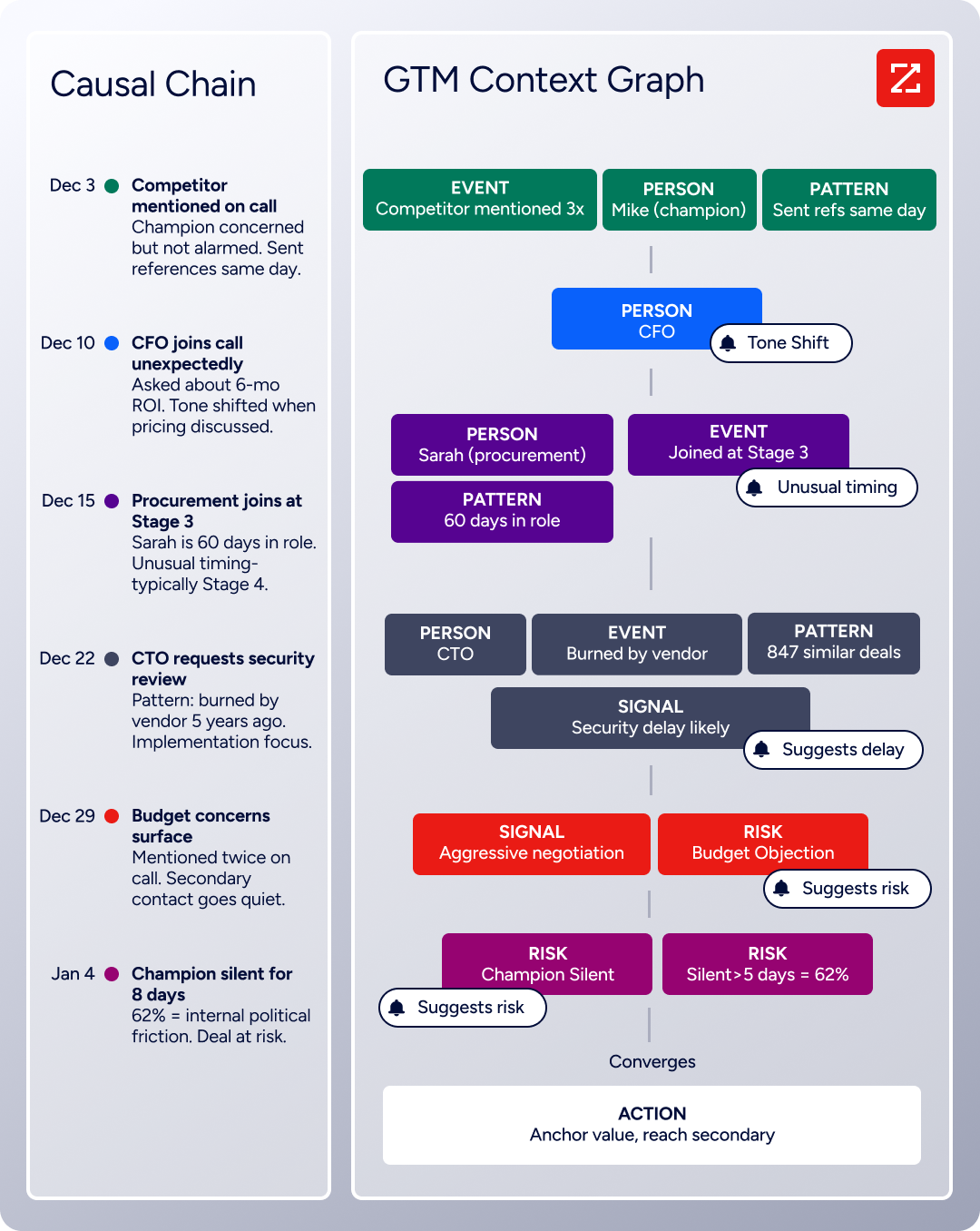
The GTM Context Graph processes 1.5B+ data points daily, combining ZoomInfo's B2B data with CRM records, conversation transcripts, and behavioral signals. Before a meeting, GTM Workspace surfaces an account brief: who's involved, what signals they're showing, what happened on the last call, and what the AI recommends saying next.
After the meeting, GTM Workspace's conversation intelligence captures the conversation and extracts context that CRM fields cannot: why the deal accelerated, what objection surfaced, and which stakeholder went quiet.
Source: ZoomInfo
The combination is practical. Use Reclaim or OneCal to manage when meetings happen. Use ZoomInfo to make sure those meetings count.
"That combination of our internal CRM data, external signals, and AI that's given all that context has helped us craft very specific account- and persona-based messages. And people have responded to them right away." (Seismic)
Pricing comparison
OneCal's pricing is the simplest of the three.
Plans start at $5/user/month (billed annually) for the Starter tier, which supports 2 calendars with unlimited syncs and scheduling links. The Essential plan at $10/user/month adds up to 5 calendars. The Premium plan at $25/user/month supports 50 calendars and includes dedicated support.
All plans include unlimited calendar syncs, scheduling links (individual and collective), the calendar view, admin-managed accounts, and OneCal branding removal. A 14-day free trial is available with no credit card required.
Reclaim offers a permanent free Lite plan with 5 AI Agents, 1 Calendar Sync, 2 connected calendars, and 1 Scheduling Link.
The Starter plan at $10/seat/month (annual) adds 10 AI Agents, 3 Calendar Syncs, unlimited connected calendars, and full task integrations. The Business plan at $15/seat/month (annual) adds unlimited Calendar Syncs and Scheduling Links, Team OOO Calendar, Delegated Access, and webhooks. The Enterprise plan at $22/seat/month (annual, 100-seat minimum) adds SSO, SCIM, and org-chart-aware scheduling. Every new account gets a free 14-day Business trial.
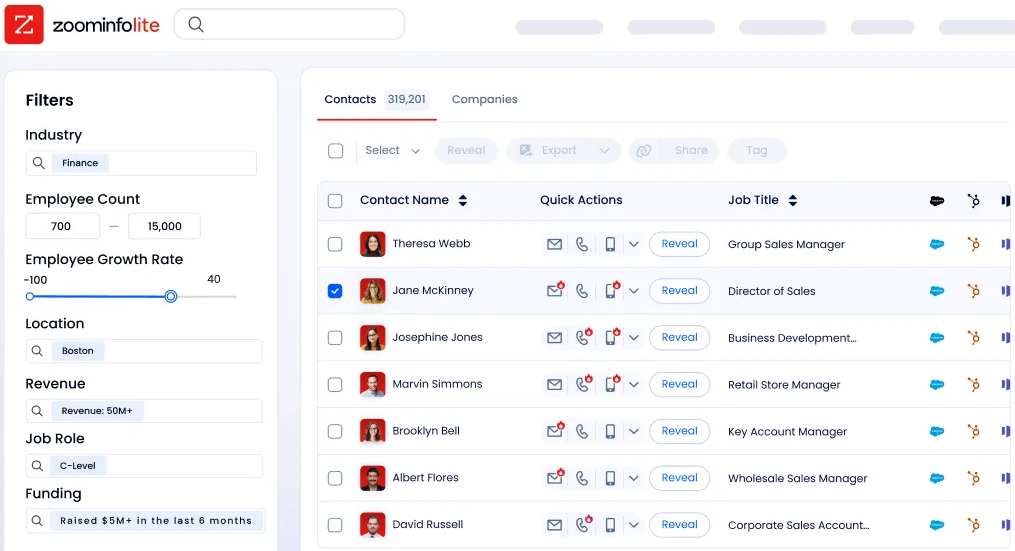
ZoomInfo uses consumption-based pricing that scales based on usage, seats, features, and contract length. A permanent free tier (ZoomInfo Lite) provides access to ZoomInfo's B2B database with 10 monthly export credits, WebSights Lite, the Chrome extension, and HubSpot integration. A 7-day free trial of the full platform is also available.
Source: ZoomInfo
For teams comparing Reclaim and OneCal on calendar management alone, the cost difference is modest. OneCal's Starter plan is half the price of Reclaim's Starter, but Reclaim's free Lite plan offers ongoing access that OneCal does not. The real pricing question is whether the team also needs the intelligence ZoomInfo provides, which operates at a different price point for a different category of problem.
Setup and learning curve
OneCal is the fastest to set up. Connect calendars via OAuth, create a sync, and configure privacy settings. Most users are productive within minutes. The interface has sensible defaults that minimize configuration decisions. Customer support is well-reviewed, with co-founder Eraldo Forgoli responding to users personally.
Reclaim requires more setup time.
The getting started guide organizes setup by goal (productivity, work-life balance, meeting management), which helps, but the interactions between Focus Time, Habits, Tasks, Buffer Time, and Smart Meetings can feel overwhelming at first.
G2 reviewers note a learning curve, particularly around task integrations and habit configurations. Once configured, the system is largely hands-off, but the "set it" part takes longer than OneCal's. Support is available via live chat, email, and a Slack community, with typical response times under one hour during business hours.
ZoomInfo's learning curve reflects its platform breadth.
The company extended its onboarding from 30 to 90 days, structured across planning, implementation, education, and adoption phases, and saw a 25% improvement in customer satisfaction. ZoomInfo University offers role-specific learning paths and certifications. For teams already running CRM and sales engagement tools, ZoomInfo fits into the existing workflow rather than replacing it.
Source: ZoomInfo
Security and compliance
All three platforms take security seriously, but at different scales.
OneCal encrypts data in transit with TLS and at rest with AES-256. Calendar connections use OAuth2, so OneCal never sees user passwords. OneCal states it does not store, analyze, or sell calendar event data. It acts as a proxy for cloning events without retaining details. No security certifications (SOC 2, ISO 27001) are publicly listed.
Reclaim holds SOC 2 Type II certification (first achieved in 2023, renewed in 2024) and complies with GDPR and CCPA. All data is hosted on AWS with AES-256 encryption at rest and TLS in transit. Reclaim states it does not train AI on user data. Enterprise plans include SSO via OIDC (Okta, OneLogin, Microsoft Entra ID) and SCIM provisioning for automated user management.
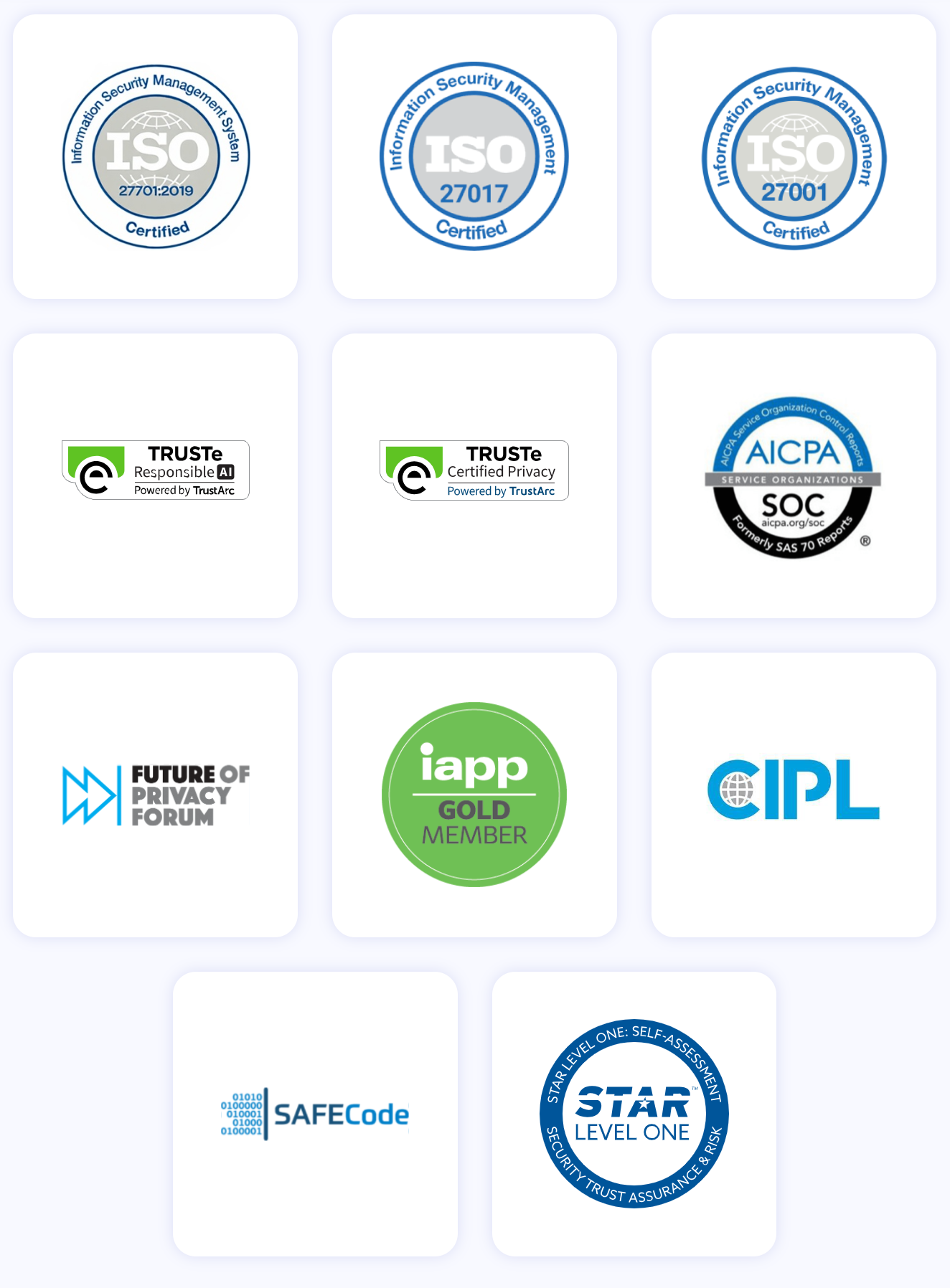
ZoomInfo holds the broadest compliance stack of the three: ISO 27001, ISO 27701, SOC 2 Type II, TRUSTe GDPR, and TRUSTe CCPA certifications, all renewed annually. ZoomInfo is a registered data broker in California and Vermont. The Trust Center provides documentation for enterprise procurement review.
For individuals and small teams, OneCal's security posture is reasonable. For enterprise buyers with compliance requirements, Reclaim's SOC 2 Type II and SSO support clear most procurement hurdles. For regulated industries or organizations with strict data governance, ZoomInfo's certification stack is the broadest.
Reclaim.ai vs. OneCal vs. ZoomInfo: Which should you choose?
The choice depends on what problem you're solving.
Choose OneCal if:
You manage multiple calendars across Google, Outlook, and iCloud
Calendar sync with strong privacy controls is your primary need
You want scheduling links that check availability across all providers
You want a simple, affordable tool with minimal setup
You don't need AI time management or team analytics
Choose Reclaim.ai if:
Back-to-back meetings are consuming your productive hours
You want AI to defend focus time and schedule tasks automatically
You use project management tools (Jira, Asana, ClickUp, Linear, Todoist) and want tasks on your calendar
You need team-level analytics on meeting load and focus time
You're willing to invest setup time for ongoing automation
Choose ZoomInfo if:
Your team schedules meetings with prospects, customers, and partners daily
You need to know who to meet, what to say, and why the meeting matters before it starts
Account intelligence, buyer intent, and conversation context are critical to your workflow
You want your calendar time to drive pipeline, not just fill slots
You need enterprise-level data and compliance for go-to-market work
See ZoomInfo in action with a free trial.
These tools address different parts of the same workflow. OneCal keeps your calendars synchronized. Reclaim manages how your time gets allocated. ZoomInfo makes sure the time you spend in meetings creates business outcomes. The most effective setup for revenue teams may well include more than one.
Reclaim.ai vs. OneCal vs. ZoomInfo FAQ
What is the main difference between Reclaim.ai and OneCal?
Reclaim.ai is an AI calendar management platform that schedules and defends time for focus work, tasks, habits, and meetings. OneCal is a calendar sync tool that keeps multiple calendars from Google, Outlook, and iCloud in sync and provides scheduling links. Reclaim manages your time; OneCal reflects your availability.
Which tool supports iCloud Calendar?
OneCal supports iCloud Calendar alongside Google and Outlook. Reclaim.ai supports Google Calendar and Outlook but does not support iCloud. If you rely on Apple's calendar ecosystem, OneCal is the only option of the two that covers it.
Do either Reclaim.ai or OneCal offer a free plan?
Reclaim.ai offers a permanent free Lite plan with limited features, including 1 Calendar Sync, 2 connected calendars, and 1 Scheduling Link. OneCal does not have a free plan but offers a 14-day free trial with no credit card required. Both platforms also provide trial access to their paid features.
Which platform is better for protecting focus time?
Reclaim.ai is significantly stronger for focus time protection. Its AI Focus Time feature lets users set weekly hour goals, then schedules and defends blocks to meet that target, rescheduling when meetings conflict. OneCal does not offer focus time management. It syncs calendars and provides scheduling links but does not manage how time is allocated.
Can I schedule tasks from project management tools into my calendar?
Only Reclaim.ai offers this. It has native two-way integrations with Asana, ClickUp, Jira, Linear, Todoist, and Google Tasks, pulling tasks into calendar blocks based on priority and due dates. OneCal does not integrate with project management tools.
How does ZoomInfo complement Reclaim.ai or OneCal?
ZoomInfo operates in a different category. It is a B2B intelligence platform, not a calendar tool. It complements both Reclaim.ai and OneCal by providing the account research, buyer intent signals, and conversation intelligence that make scheduled meetings more productive. Revenue teams can use Reclaim or OneCal for scheduling logistics and ZoomInfo for the intelligence behind each meeting.
Which platform has better team analytics?
Reclaim.ai offers Workforce Analytics with averaged team data on meeting load, focus time, and work-life balance, plus automatic time tracking that categorizes events without manual input. OneCal does not offer team analytics. ZoomInfo provides workforce-level insights through its GTM Context Graph, focused on go-to-market performance rather than calendar productivity.
Which tool is easiest to set up?
OneCal has the shortest setup time. Most users are productive within minutes after connecting calendars and configuring sync rules. Reclaim.ai requires more initial configuration across its multiple interacting features (Focus Time, Habits, Tasks, Buffer Time) but runs largely hands-off once set up. ZoomInfo's onboarding is structured as a 30-to-90-day program given the platform's breadth.
