

SalesBlink is an affordable, AI-powered cold email platform for small sales teams and agencies. It combines email sequence automation, inbox warmup, and an AI writing engine into a single tool, with pricing that starts at $25 per month. For teams whose outbound runs entirely through email, it packs real capability at that price.
It's the right choice if:
You run cold email as your primary outreach channel
You want AI to generate complete email sequences from a short business description
You need email warmup and deliverability tools built into your sending platform
You manage multiple sending accounts and want all replies in one inbox
You're an agency handling cold email campaigns for several client accounts
However, SalesBlink might not be the best choice if:
You need a built-in B2B contact database rather than bringing your own lists
You want buying intent signals that show which accounts are actively researching solutions
You need native multi-channel outreach beyond email (LinkedIn automation, calls, SMS)
You require conversation intelligence to understand deal dynamics
Your team has outgrown email-only prospecting and needs a broader sales platform
In this case, you should consider ZoomInfo: a GTM platform with 500M contacts, 100M companies, 135M+ verified phone numbers, and 200M+ verified business emails. Its GTM Context Graph processes 1.5B+ data points daily, combining ZoomInfo's B2B data with your CRM records and behavioral signals to show which accounts are in-market and why deals move. That intelligence powers the GTM Workspace for sellers, GTM Studio for marketers, or your own tools through the API and MCP.
We've included a detailed look at ZoomInfo later in this review for teams that need more than email execution. If you're ready to explore beyond email, you can start with ZoomInfo Lite for free.
What is SalesBlink?
SalesBlink is an AI-powered cold email outreach platform built by FutureBlink, a bootstrapped SaaS company founded in 2017 by Sushant Shekhar.
SalesBlink launched in 2020 as a cold sales outreach tool combining lead finding, email sequencing, and deal tracking. It has since narrowed its focus to cold email execution, with deeper automation and AI capabilities.
The platform gained early traction through AppSumo lifetime deals, accumulating 442 reviews on the marketplace. In early 2024, SalesBlink introduced BlinkGPT, a fine-tuned AI model trained on cold email data, positioning itself as one of the first cold email platforms with native AI sequence generation. In April 2026, the company launched an MCP Server, enabling AI coding agents to control outreach programmatically.
Today, SalesBlink serves 12,000+ businesses and holds a 4.6/5 G2 rating. It targets SMBs, solo sellers, and lead generation agencies that need affordable email outreach automation.
Source: SalesBlink
SalesBlink Pros & Cons
Pros | Cons |
|---|---|
- Email outreach at low pricing ($25/month entry) | - No built-in B2B contact database (bring your own lists) |
- BlinkGPT AI generates full sequences from a short prompt | - AI features gated to higher tiers ($79-$179/month) |
- Unlimited email accounts and warmup on all plans | - No native LinkedIn automation (manual task reminders only) |
- Built-in email verification and deliverability tools | - Email-only automation (SMS, WhatsApp, calls are manual tasks) |
- Unified inbox consolidates replies from all sending accounts | - No enterprise security certifications (SOC 2, ISO 27001) |
- Agency portal for managing multiple client accounts | - No native webhooks without third-party middleware |
- 14-day free trial with no credit card required | - 30-day cancellation notice required; no refunds |
SalesBlink Review: How it Works & Key Features
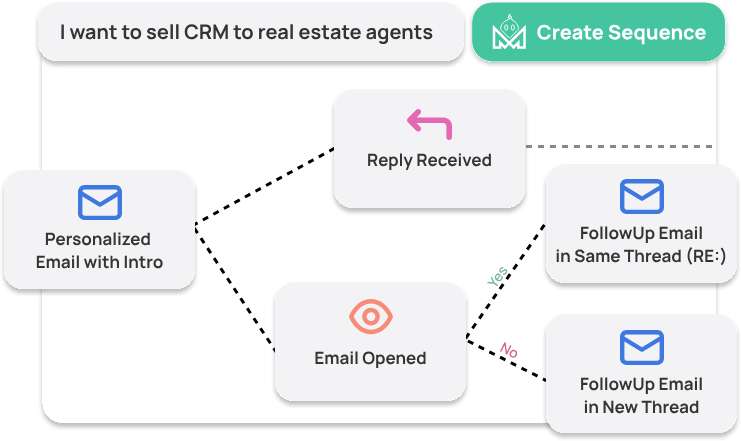
BlinkGPT Sales AI: SalesBlink's fine-tuned model generates complete email sequences from a single business description.
BlinkGPT is SalesBlink's proprietary AI: a fine-tuned version of LLMs trained on millions of emails that received positive replies. Unlike tools that wrap a general-purpose model, BlinkGPT is trained on cold email data, which SalesBlink says produces better output than ChatGPT.
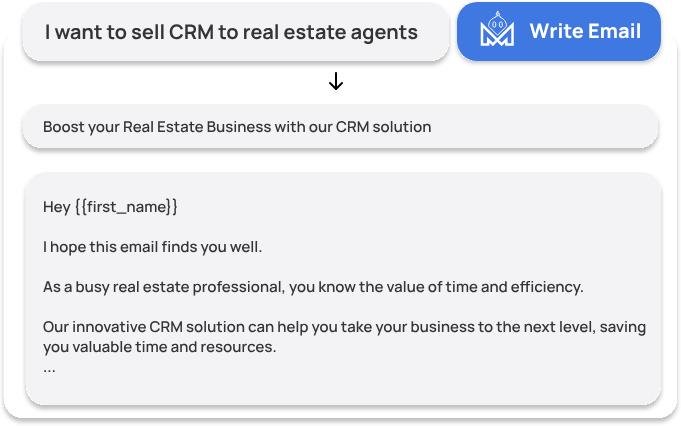
Describe your product or service, and BlinkGPT drafts a multi-step email sequence: subject lines, body copy, follow-up timing, and task steps. It supports 100+ languages and can rewrite, summarize, shorten, or expand existing templates on demand.
Source: SalesBlink
BlinkGPT also powers per-lead personalization beyond static merge tags, AI Spintax that creates copy variations to avoid spam filters, spam keyword detection during composition, and inbox AI agents that classify replies and draft responses.
The catch is plan gating.
The Starter plan ($25/month) includes no AI features at all. AI Spintax requires the Growth plan ($79/month), and full BlinkGPT sequence generation requires the Business plan ($179/month). Solo operators on the entry tier write all emails manually.
Cold Email Sequences: Automated multi-step outreach with A/B testing, provider matching, and unlimited sending accounts.
Cold Email Sequences is SalesBlink's core automation engine.
Users build multi-step email campaigns either manually or through BlinkGPT, then connect their sending accounts and launch. The platform handles the rest: sending emails on schedule, firing follow-ups as same-thread replies to maintain conversation context, and stopping sequences automatically when a lead replies.
SalesBlink supports connecting unlimited email accounts on all plans (Gmail, Outlook, Zoho, or any SMTP/IMAP provider) and rotates sending across them to protect domain reputation. A provider matching feature automatically pairs sending accounts to recipients by email provider (Gmail-to-Gmail, Outlook-to-Outlook) for better inbox placement.
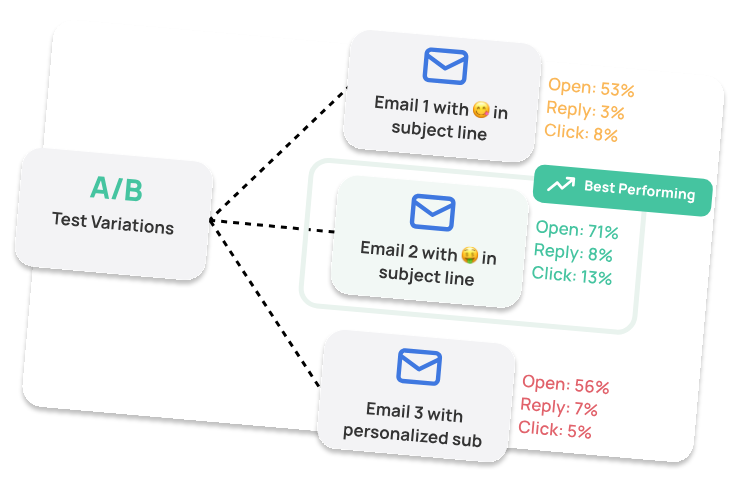
Sequences support A/B testing of email variants, condition-based branching, and image personalization with prospect names, logos, and website screenshots embedded in emails. Users can interleave manual task reminders for LinkedIn, WhatsApp, SMS, and iMessage alongside automated email steps, though these tasks require manual execution. Emails in the outbox queue can be individually edited before sending.
Source: SalesBlink
Each sequence step generates its own performance report (opens, replies, clicks), and the entire sequence can be controlled programmatically through SalesBlink's MCP server or REST API.
Email WarmUp and Deliverability: Automated reputation building with spam rescue, provider matching, and DNS checks.
Email WarmUp addresses the cold start problem: new sending domains have no reputation with email service providers, so emails land in spam more often. SalesBlink recommends at least four weeks of warmup before launching any outreach.
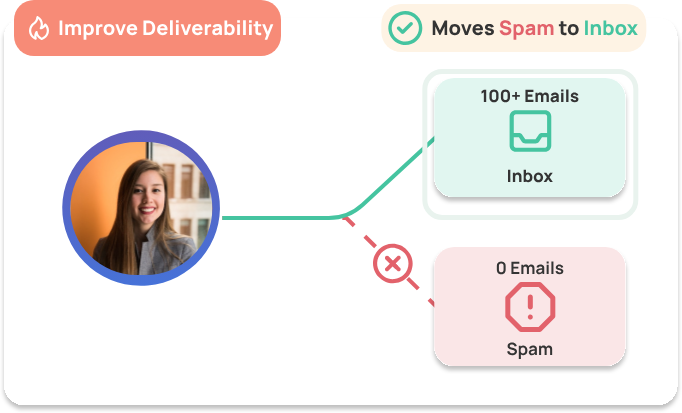
The warmup system sends emails from the user's account to a pool of real active inboxes, generating opens and realistic reply threads. An auto ramp-up mechanism gradually increases daily volume to mimic natural patterns. If any warmup email lands in spam, the system automatically moves it back to the inbox and tags it with priority, counteracting negative signals before they accumulate.
Source: SalesBlink
WarmUp Email Templates lets users warm up the specific content they plan to use in real campaigns, building reputation for actual campaign messaging rather than generic text. Similarly, WarmUp Domains pre-warms the website domains that will appear in campaign links.
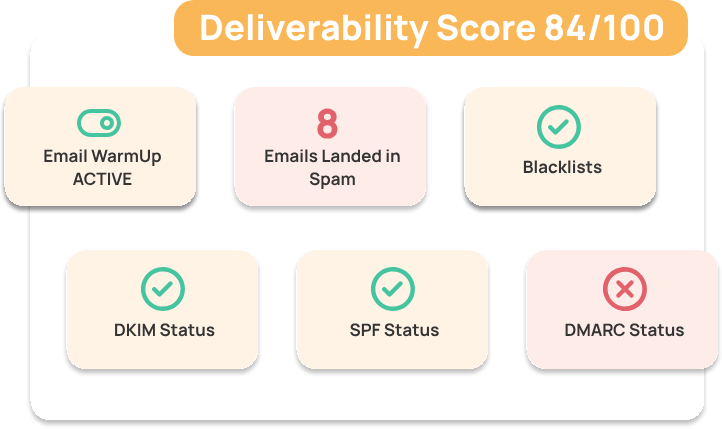
Beyond warmup, SalesBlink's deliverability suite includes DKIM, SPF, and DMARC checks, automatic IP rotation, real-time spam keyword detection during composition, built-in email verification before sending, and support for plain text emails (which SalesBlink recommends over HTML for better inbox rates). Custom tracking domains isolate sender reputation from SalesBlink's shared domain.
Source: SalesBlink
All warmup and deliverability features are included on every plan, including Starter at $25/month. Optional add-ons include inbox placement tests ($9-$99/month) and done-for-you mailbox setup ($4-$15 per domain or inbox).
Unified Inbox: Centralized reply management across all connected sending accounts with AI-powered classification.
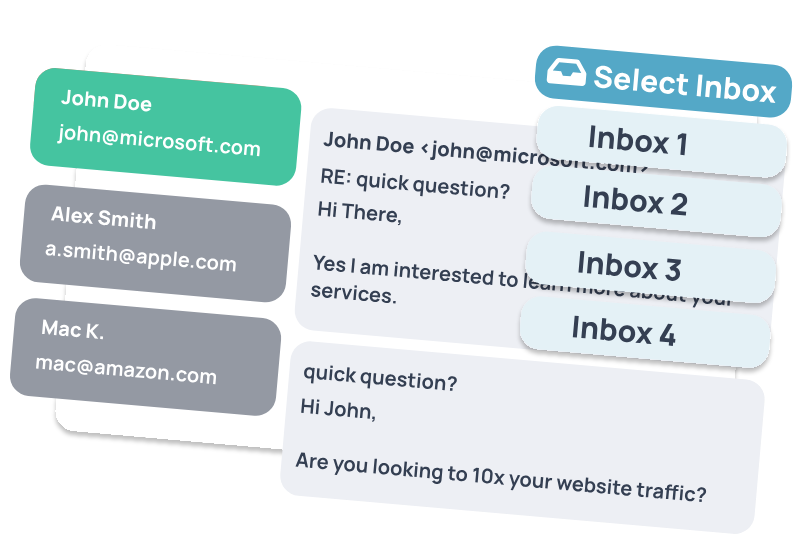
SalesBlink's Unified Inbox consolidates replies from every connected email account into a single interface. When running sender rotation across dozens of accounts, this saves reps from logging into each one separately to check for responses.
The interface displays each conversation with the lead's name, email address, applied labels, the originating sequence name, and the last interaction date. Reps can reply, schedule responses, forward emails, or archive conversations. Four tabs organize the workspace: Inbox, Scheduled, Sent, and Draft. Filters narrow conversations by outcome label, sequence, sender account, or date range.
Source: SalesBlink
AI is built into the inbox. BlinkGPT drafts contextual replies by referencing the existing conversation thread. An AI AutoTag Agent categorizes incoming replies (Interested, Not Interested, Out of Office), so conversations are pre-labeled before a rep opens them. An AI Auto Reply Agent can handle responses automatically. Both AI inbox features require the Business plan.
The inbox is also available on mobile, and all conversations retain context about which sequence triggered the reply.
Pricing Structure: Tiered plans from $25 to $179 per month with feature gating between tiers.
SalesBlink offers three plans on monthly or annual billing, with annual billing saving 14-20%:
Starter ($25/month annually, $29/month monthly):
10,000 emails per month
1 team member
Unlimited contacts, email accounts, and email warmup
Unified inbox, A/B testing, email verification, full personalization
No AI features, no Meeting Scheduler, no integrations or API
Growth ($79/month annually, $99/month monthly):
Unlimited email sends
3 team members
Meeting Scheduler with calendar sync and custom domain
Integrations and API access (HubSpot, Pipedrive, Zoho CRM)
AI Spintax only (no full BlinkGPT sequence generation)
Business ($179/month annually, $199/month monthly):
Everything in Growth
Unlimited team members
Full BlinkGPT Outreach AI (sequence creation, email writing, personalization)
Outreach Tasks (non-email steps with conditions)
Team Reports
Additional costs include email verification credits ($29 for 10,000 to $249 for 500,000), inbox placement tests ($9-$99/month), and done-for-you mailbox setup. SalesBlink's terms require 30 days' written notice for cancellation and state that all charges are non-refundable.
Where SalesBlink Falls Short
SalesBlink works well for email-focused outreach, but several limitations surface as teams grow. The platform is built for email execution, not full-funnel sales intelligence.
No B2B Contact Database: SalesBlink is a sequence execution tool, not a prospecting tool.
There is no built-in database for finding new leads. Users must source their own contact lists from external providers, import them via CSV or Google Sheets, and verify them inside the platform. For teams without an existing data vendor, this means adding another tool and another cost to the stack before sending a single email.
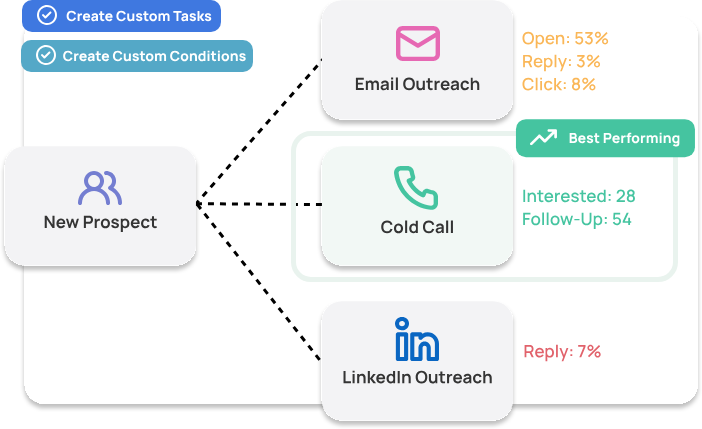
Email-Only Automation: Despite including multichannel touchpoints in its sequence builder, SalesBlink automates only email.
LinkedIn, WhatsApp, SMS, and iMessage appear as manual task reminders that reps must complete themselves. LinkedIn automation was a top-voted feature request on SalesBlink's public roadmap, with users calling it a "deal-breaker." For teams that need automated multichannel outreach, this is a real gap.
Source: SalesBlink
AI Locked Behind Higher Tiers: The Starter plan at $25/month includes no AI capabilities. AI Spintax requires the Growth plan at $79/month, and full BlinkGPT sequence generation requires the Business plan at $179/month. A solo operator evaluating the platform at the entry price will not experience the AI writing that SalesBlink markets most prominently.
No Intent Data or Buying Signals: SalesBlink has no mechanism for identifying which companies are actively researching solutions in your category. Every email goes out equally cold, regardless of whether the prospect is in an active buying cycle or has no current need. Without signals, teams cannot prioritize accounts likely to respond.
No Conversation Intelligence: Once a meeting is booked and a call happens, SalesBlink has no way to capture what was discussed, track deal momentum, or surface coaching insights. The platform's visibility ends at the email reply. Understanding why deals progress or stall requires separate tools.
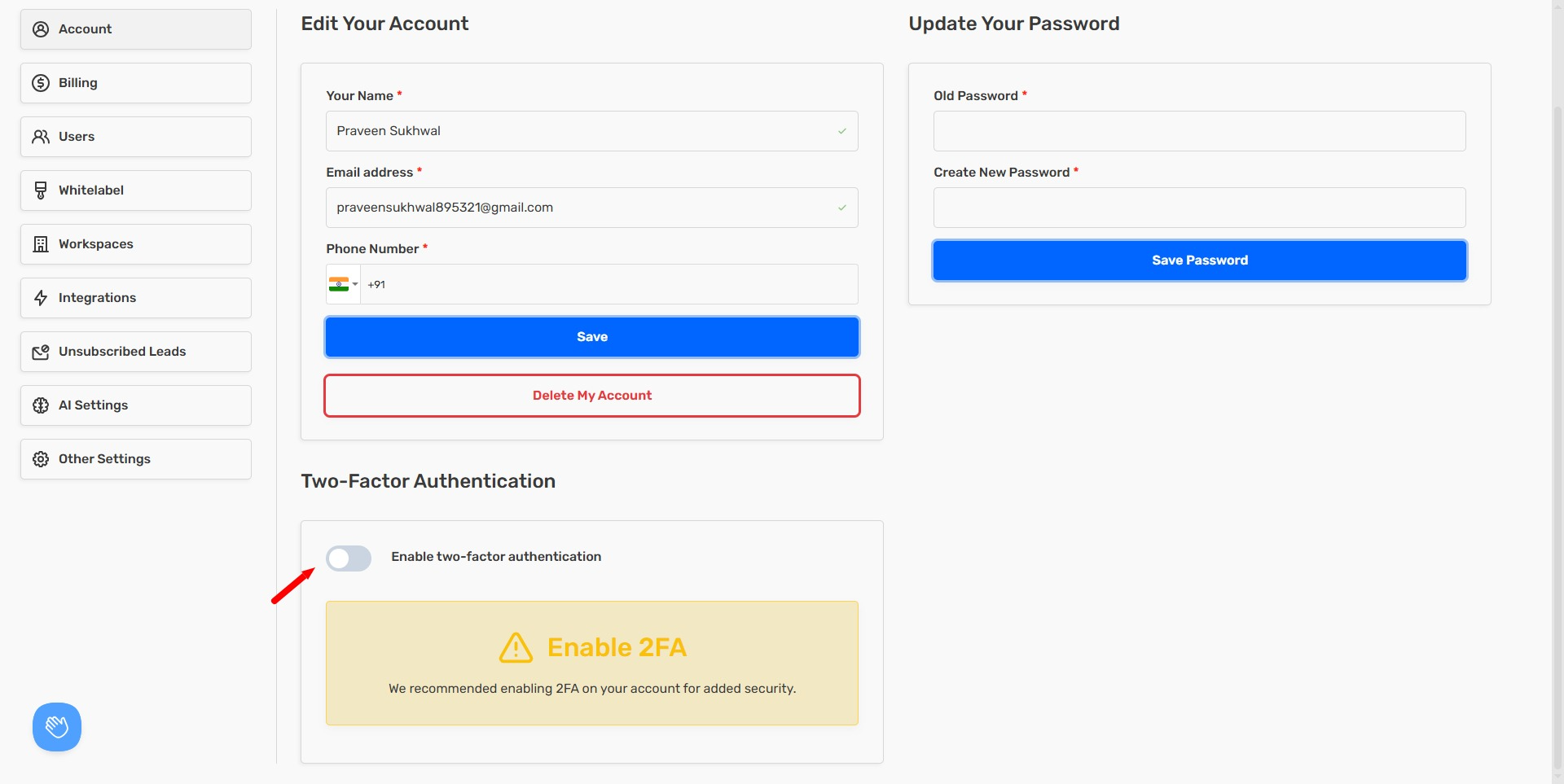
Limited Enterprise Readiness: SalesBlink has GDPR compliance documentation and supports two-factor authentication, but publishes no SOC 2, ISO 27001, or similar certifications. For organizations with strict security requirements, this is a barrier.
Source: SalesBlink
These are not failures. They reflect the trade-offs of building an affordable, email-focused tool for small teams. But for organizations that need to know who to contact, when they're ready to buy, and why they might convert, a broader platform fills those gaps.
Top SalesBlink Alternative for Full GTM Intelligence: ZoomInfo
Where SalesBlink automates email sending, ZoomInfo provides the data, intelligence, and execution that power a full go-to-market motion.
ZoomInfo is a GTM platform with 500M contacts, 100M companies, 135M+ verified phone numbers, and 200M+ verified business emails. Its GTM Context Graph processes 1.5B+ data points daily, unifying this data with your CRM records, conversation transcripts, and behavioral signals to show what's happening in your accounts.
That context lets AI show not just what happened, but why, and what to do next. Your team can run sales motions from GTM Workspace, run GTM plays from GTM Studio, or power their own tools through the API and MCP.
Founded in 2007 by Henry Schuck as DiscoverOrg, ZoomInfo has grown into a publicly traded company (NASDAQ: GTM) serving 35,000+ companies worldwide, with annual revenue of $1.25 billion and enterprise customers including Adobe, Snowflake, and PayPal.
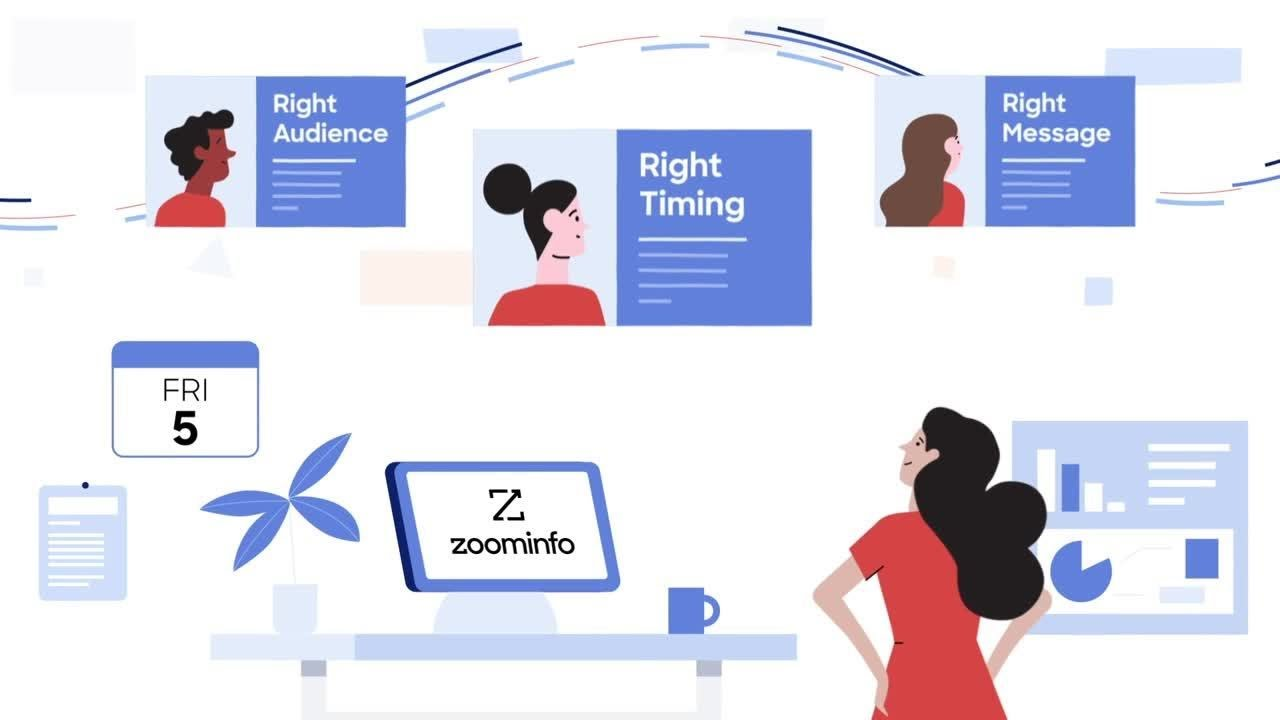
Comprehensive B2B Data: ZoomInfo's database eliminates the "bring your own list" problem.
SalesBlink requires users to import their own contact lists.
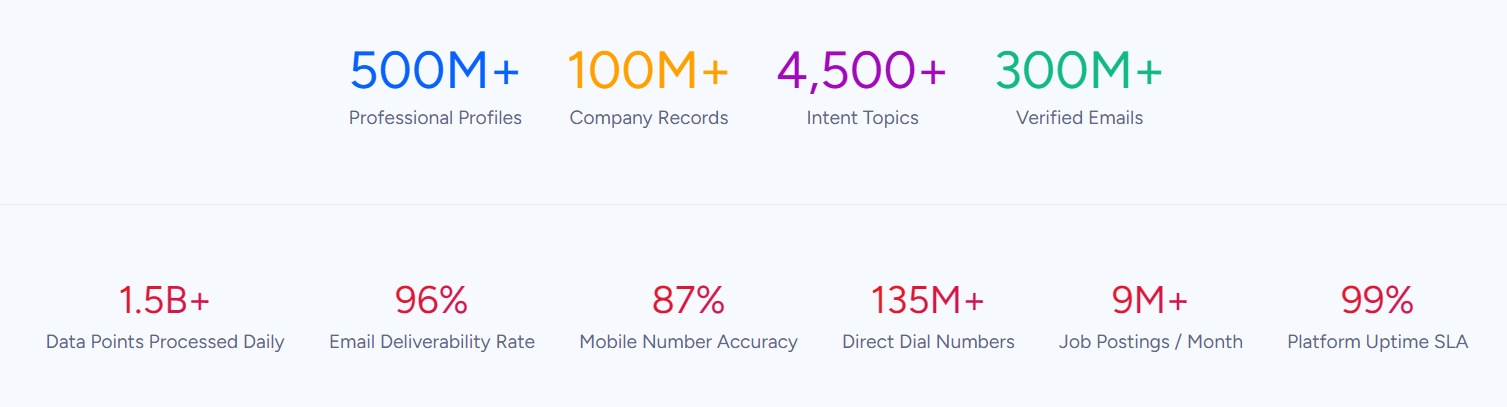
ZoomInfo provides 500M contacts, 100M companies, 135M+ verified phone numbers, 120M direct-dial phone numbers, and 200M+ verified business email addresses. This data covers three areas: identity data (who buyers are and how to reach them), company context (org charts, technographics covering 30,000+ technologies across 30M+ companies), and dynamic signals (buying activity and intent data showing when accounts are in-market).
Source: ZoomInfo
ZoomInfo verifies data through a multi-source pipeline: automated ML scanning 28 million site domains daily, third-party partner data covering 95 million businesses, a contributory community of 200,000+ ZoomInfo Lite users, and 300+ in-house human researchers. First-party data reaches up to 95% accuracy.
Independent testing backs the quality.
In a Fortune 500 competitive RFP analyzing 25 million contacts across vendors, the independent consultant concluded that "no other competitor came even close." ZoomInfo holds 133 No. 1 G2 rankings across Sales Intelligence, Buyer Intent, Data Quality, and related categories, alongside Leader positions in the Gartner MQ and Forrester Wave for ABM Platforms and Intent Data Providers.
For teams currently bringing their own lists to SalesBlink, ZoomInfo replaces the external data vendor entirely. Verified direct dials and emails that reach real inboxes make the difference between wasted sends and productive outreach.
SpringDB used ZoomInfo's enriched data to enable precise targeting for their clients, achieving 2x-3x increases in campaign conversions, a 300% increase in database usability, and 30-50% uplift in average deal size. (SpringDB Case Study)
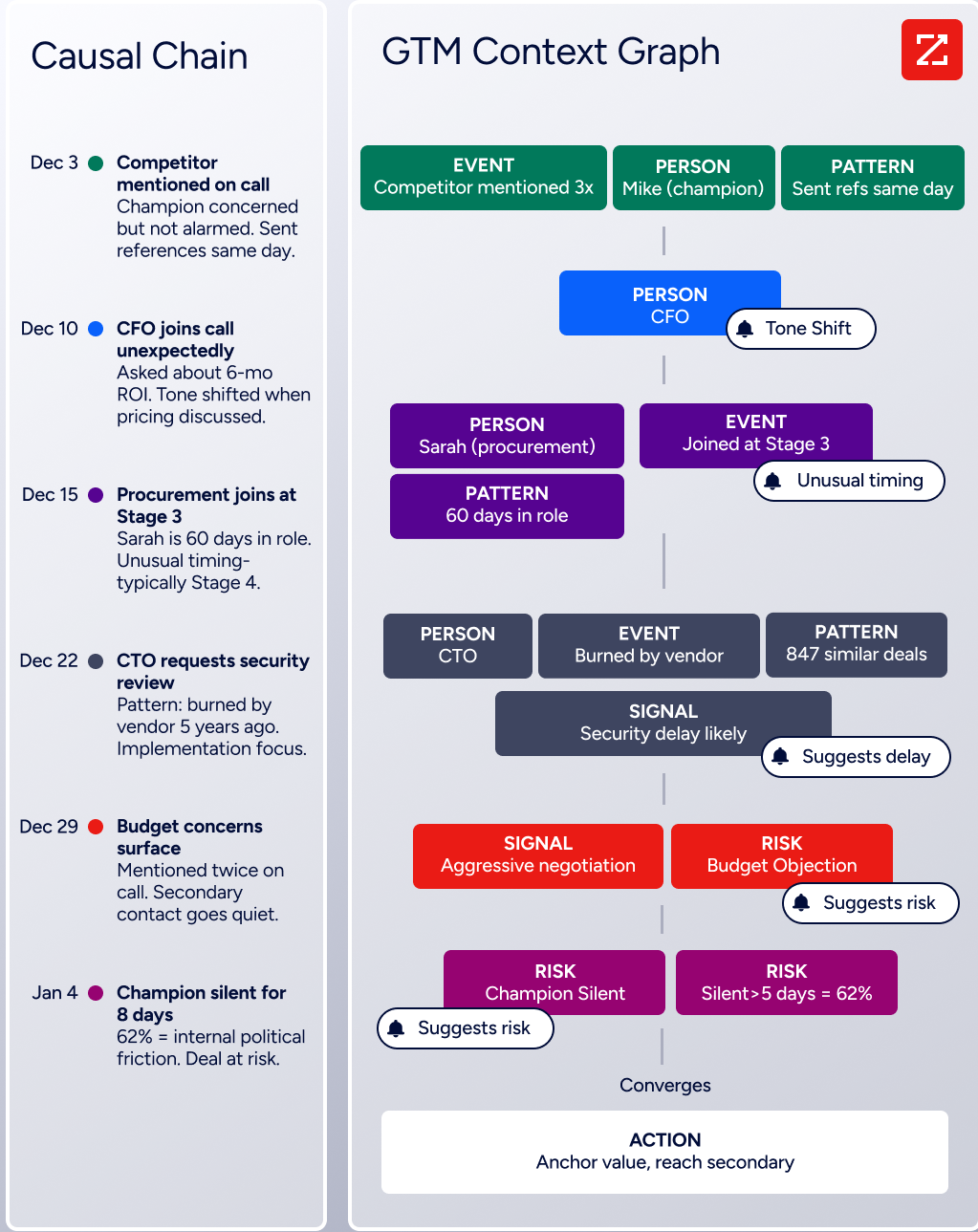
GTM Context Graph: An intelligence layer that captures not just what happened in a deal, but why.
Data alone tells you who to contact. The GTM Context Graph tells you why to contact them now. Processing 1.5B+ data points daily, it combines ZoomInfo's B2B data with a customer's own CRM records, conversation transcripts, email threads, and behavioral signals into one intelligence layer.
A CRM records that a deal moved from Stage 3 to Stage 4. Conversation intelligence captures what the VP of Finance said on the last call. Intent data logs a spike in research activity.
The GTM Context Graph connects all three to capture why the deal moved and what patterns across thousands of similar deals suggest will happen next. As ZoomInfo's Chief Product Officer Dominik Facher writes: "The CRM recorded the state change. It has no record of why it happened."
Source: ZoomInfo
This layer rests on two decades of infrastructure investment.
ZoomInfo acquired Chorus for its conversation intelligence engine (capturing every call, meeting, and email, then extracting the context behind what was said) and applied its data unification platform (originally built to resolve and connect hundreds of millions of companies and contacts) to first-party data. No single point solution has replicated this combination at scale.
For outreach, this changes the equation.
Instead of sending equally cold emails to every contact on a list, teams can prioritize accounts showing active buying signals, time outreach to moments of research activity, and personalize messaging based on dynamics the system has identified.
Seismic attributed 39% of active pipeline to opportunities identified or influenced by ZoomInfo signals, with sales teams reporting 54% productivity gains and saving 11.5 hours per week per seller. (Seismic Case Study)
GTM Workspace: Where data, signals, and outreach come together for sellers.
Where SalesBlink provides a sequence builder and unified inbox, ZoomInfo’s GTM Workspace gives sellers a workspace powered by the GTM Context Graph. Launched in October 2025, it replaces the context-switching that slows sales teams (the average enterprise uses 23 GTM technologies).
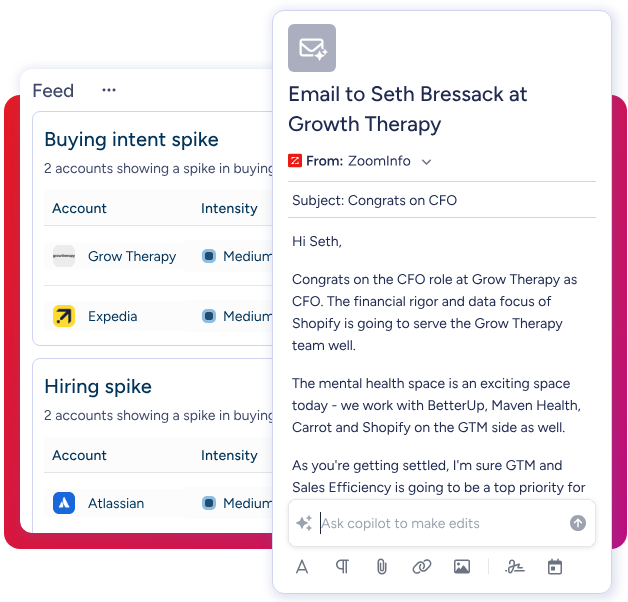
Inside GTM Workspace, sellers see a complete book of business view across CRM data, ZoomInfo intelligence, conversation history, and market signals. An Action Feed surfaces in-market buyers matched to target criteria, with pre-drafted actions on every signal (G2 comparisons, funding events, executive hires). AI agents handle account research, outreach drafting, CRM updates, and signal monitoring automatically.
Source: ZoomInfo
The AI layer (built on Anthropic's Claude) answers three questions for every rep: who to contact, when to engage, and what to say. An AI Assistant generates account briefs pulling CRM history, company news, and stakeholder context into a 10-second summary. AI-generated outreach draws from each account's full context, not just template variables.
GTM Workspace integrates natively with Salesforce, HubSpot, and Microsoft Dynamics, and connects to Salesloft for outreach across phone and email. Results include 23% pipeline increases, nearly 60% more meetings booked per week, and reps reaching accounts first in over half of cases.
Levanta's CEO described ZoomInfo as "a full system of execution" that works the list, writes the outreach, and triggers the play, crediting it with helping drive predictable growth. (Levanta Case Study)
Universal Access: ZoomInfo's intelligence is available in any tool, any workflow, any AI agent.
SalesBlink integrates with HubSpot, Pipedrive, and Zoho CRM, plus automation platforms like Zapier and Make.
ZoomInfo's integration footprint is larger: the App Marketplace lists 120 partner integrations, with native connectors to Salesforce, HubSpot, Microsoft Dynamics 365, Snowflake, and more.
For technical teams, ZoomInfo provides an Enterprise API documented at docs.zoominfo.com with endpoints for contact and company search, enrichment, intent data, corporate hierarchy, org charts, and account intelligence. API access is included in all plans.
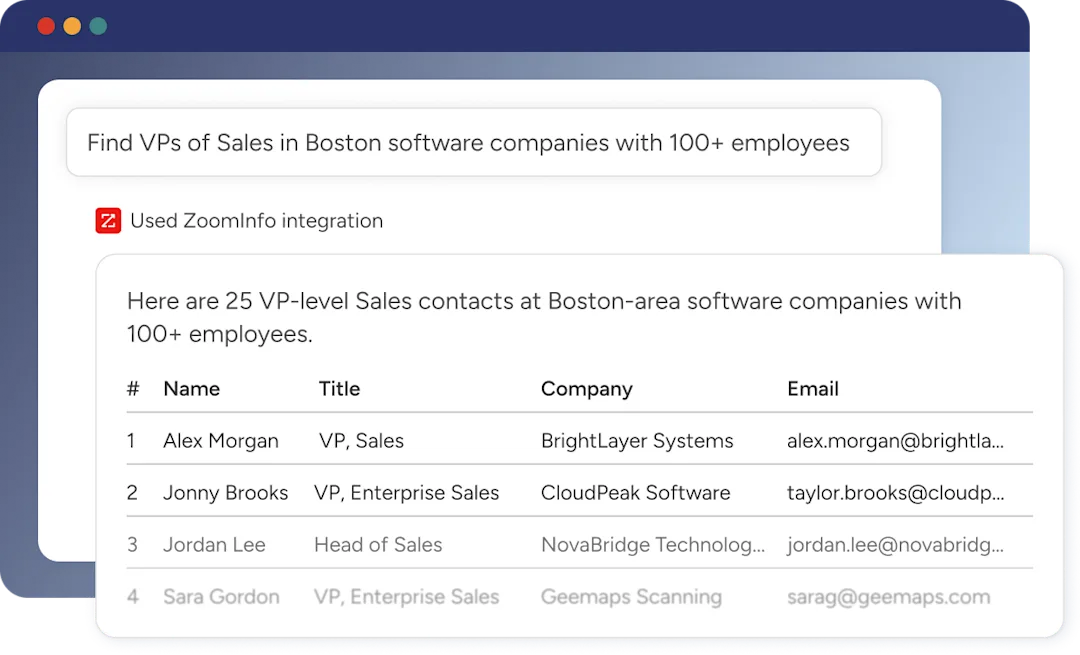
ZoomInfo also operates an MCP server enabling AI agents to access ZoomInfo data through natural language. It currently supports Claude and ChatGPT, with eight tools covering company and contact search, enrichment, lookalike discovery, and account research.
Source: ZoomInfo
For marketers and RevOps, GTM Studio provides an AI-powered canvas for defining audiences, managing campaigns, and measuring pipeline. Teams describe audiences in natural language, launch multi-channel plays, and monitor results without engineering tickets. Waterfall enrichment from 25+ data sources is included at no additional cost.
All three paths (APIs/MCP, GTM Workspace, GTM Studio) draw from the same GTM Context Graph. Same data, same intelligence, same signals, regardless of where you access them.
BDO Canada reduced time spent on internal data dashboard updates by 87% using ZoomInfo's API, which their analyst described as "plug-and-play" for integrating into any process. (BDO Canada Case Study)
SalesBlink or ZoomInfo: Comparison Summary
SalesBlink | ZoomInfo | |
|---|---|---|
Primary focus | Cold email outreach execution | Go-to-market intelligence and execution |
B2B contact database | None (bring your own lists) | 500M contacts, 100M companies, 200M+ verified emails |
Intent data | Not available | Buyer intent signals showing in-market accounts |
Conversation intelligence | Not available | Chorus (call recording, transcription, AI analysis) |
AI capabilities | BlinkGPT email writing and sequences | GTM Context Graph, AI agents, AI-generated outreach |
Email warmup | Included on all plans | Not a core feature (focus is upstream intelligence) |
Outreach channels | Email automated; LinkedIn/SMS/WhatsApp manual only | Multi-channel via GTM Workspace + Salesloft partnership |
Integrations | HubSpot, Pipedrive, Zoho CRM + Zapier/Make | 120+ marketplace integrations + Enterprise API + MCP |
Security certifications | GDPR compliance, 2FA | ISO 27001, ISO 27701, SOC 2 Type II, TRUSTe GDPR/CCPA |
Target customer | SMBs, agencies, solo sellers | Enterprise and upper mid-market |
Pricing | $25-$179/month (published) | Custom-quoted (ZoomInfo Lite free tier available) |
Free entry point | 14-day trial, no credit card | ZoomInfo Lite (permanent free plan) + 7-day trial |
Final Verdict
The choice depends on where your outbound operation stands and what it needs.
Choose SalesBlink if your outbound motion is straightforward cold email and your primary challenge is getting messages into inboxes, not finding who to send them to.
It's well suited for small sales teams and agencies that already have their contact lists, want AI to handle the writing, and need affordable sending infrastructure with built-in warmup. At $25-$179/month, it covers email automation for lean teams.
Choose ZoomInfo if you need more than email execution.
When your team needs to know which companies to target, which contacts to reach, when those accounts are actively researching solutions, and why deals are progressing or stalling, ZoomInfo provides the data foundation, intelligence layer, and execution tools to answer those questions from one platform. Its scope extends beyond what any cold email tool offers, making it the next step for organizations whose go-to-market strategy has outgrown email-only prospecting.
Get started with ZoomInfo here.
SalesBlink solves the problem of sending cold emails effectively. ZoomInfo solves the problem of knowing who deserves those emails, when they're ready to receive them, and what to say when they respond.
SalesBlink FAQ
Does SalesBlink have a free plan?
No, SalesBlink does not offer a permanent free plan. It provides a 14-day free trial with no credit card required. After the trial, the lowest paid tier is the Starter plan at $25/month (billed annually), which includes email sequences, warmup, and a unified inbox but no AI features.
ZoomInfo offers ZoomInfo Lite, a permanent free tier with access to its B2B database, 10 monthly export credits, a Chrome extension, and website visitor identification, with no time limit or credit card required.
What AI features does SalesBlink include?
SalesBlink's AI layer, BlinkGPT, is trained on cold email-specific data and can generate complete multi-step sequences from a short business description. It also powers per-lead personalization, spam keyword detection, and AI reply drafting in the Unified Inbox.
However, AI features are not available on the Starter plan ($25/month). AI Spintax requires the Growth plan ($79/month), and full BlinkGPT sequence generation requires the Business plan ($179/month).
Does SalesBlink have a B2B contact database?
No. SalesBlink is a sequence execution platform, not a prospecting tool. Users must source their own contact lists from external providers and import them via CSV, Google Sheets, or API. The platform includes email verification to validate imported lists before sending.
ZoomInfo provides 500M contacts and 100M companies with verified phone numbers and business emails, eliminating the need for a separate data vendor.
Can SalesBlink automate LinkedIn outreach?
No. SalesBlink supports LinkedIn as a manual task reminder within email sequences but does not automate LinkedIn actions such as connection requests or messages.
LinkedIn automation was a top-voted feature request on SalesBlink's public roadmap, with users calling it a deal-breaker, but no roadmap item currently addresses it. All automated steps in SalesBlink are email-only.
What email providers does SalesBlink support?
SalesBlink connects with Gmail, Google Workspace, Outlook, Office 365, Zoho Mail, and any provider that supports SMTP/IMAP. All plans allow unlimited connected email accounts with no per-inbox fees. The platform rotates sending across connected accounts and matches sending providers to recipient providers for improved inbox placement.
How does SalesBlink's email warmup work?
SalesBlink's warmup system sends emails from connected accounts to a shared pool of real inboxes, generating opens and realistic reply threads. It gradually increases daily volume through an auto ramp-up mechanism and automatically rescues any warmup email that lands in spam.
The system can also warm up the specific email templates and domains planned for live campaigns. Warmup is included on all plans, including the $25/month Starter tier, and SalesBlink recommends running it for at least four weeks before launching outreach.
What CRM integrations does SalesBlink offer?
SalesBlink integrates natively with HubSpot, Pipedrive, and Zoho CRM, plus Google Sheets and Slack. For additional connections, it supports Zapier, Make.com, Pabbly Connect, Integrately, Pipedream, and n8n. Native integrations and API access require the Growth plan ($79/month) or higher.
ZoomInfo offers 120+ marketplace integrations with native connectors to Salesforce, HubSpot, Microsoft Dynamics 365, Snowflake, and others, plus an Enterprise API and MCP server for programmatic access.
Does SalesBlink offer refunds if I cancel?
No. SalesBlink's terms state that all subscription charges are non-refundable, with no refunds for partial use or non-use. Cancellation requires 30 days' written notice, and subscribers remain liable for the full subscription term. Subscriptions auto-renew at current rates unless cancelled before the renewal date.
