
Salesflow occupies a niche in LinkedIn automation, offering cloud-based outreach that combines LinkedIn and email in one campaign workflow. For sales teams and agencies that live on LinkedIn, it provides a direct way to send connection requests, follow-up messages, and InMails at scale without risking account restrictions. But as B2B sales grows more data-driven and multi-channel, a tool built around LinkedIn has natural limits.
To write this Salesflow review, we analyzed the platform in detail. We believe it fits if:
You rely on LinkedIn as your primary prospecting channel
You need cloud-based automation with built-in account safety features
You run an agency managing multiple client LinkedIn accounts
You want to combine LinkedIn and email outreach in a single workflow
Your team is small enough to benefit from volume-based seat pricing
However, Salesflow might not be the best choice if:
You need verified contact data beyond what LinkedIn profiles provide
You want buyer intent signals to know which accounts are in-market
You require CRM intelligence and deal context, not just outreach execution
Your go-to-market strategy spans more channels than LinkedIn and email
You need AI that understands why deals move, not just when to send the next message
In this case, consider ZoomInfo: a go-to-market intelligence platform that starts where Salesflow stops. Where Salesflow automates the act of reaching out, ZoomInfo tells you who to reach, when to engage, and what to say, backed by a B2B data platform covering 500M contacts and 100M companies, buyer intent signals, conversation intelligence, and AI execution through GTM Workspace for sellers and GTM Studio for marketers, RevOps, and GTM engineers.
We've included a detailed look at ZoomInfo later in this review as the next step for teams that need more than outreach automation. If you're ready to explore a go-to-market intelligence platform, you can start with ZoomInfo's free plan here.
What is Salesflow?
Salesflow is a cloud-based social and email outreach platform headquartered in London, England. Besnik Vrellaku founded the company in 2018 (though it originally operated as Growthlead since 2014) to help sales teams generate leads through automated LinkedIn and email campaigns without risking account bans.
Source: Salesflow
The company has remained bootstrapped, growing from Vrellaku's last £1,000 to $3.3M in annual revenue by June 2024. With 22 employees, Salesflow serves over 10,000 users across 120+ countries, with clients including HubSpot, Monday.com, LaunchDarkly, GoCardless, and HiBob.
Salesflow targets sales teams, agencies, startups, and recruiters who need to automate LinkedIn prospecting while maintaining human-like behavior patterns. The platform calls itself "the safest" social and email outreach platform, pointing to cloud-based infrastructure with dedicated IPs, auto-withdrawals, and randomized actions to avoid LinkedIn restrictions.
Salesflow Pros & Cons
Pros | Cons |
|---|---|
Cloud-based automation with dedicated IPs per account | LinkedIn accounts disconnect frequently, requiring manual re-login |
Multi-channel campaigns combining LinkedIn and email | Data accuracy issues with unreliable campaign metrics |
Dynamic Outreach with condition-based branching | $99/month per seat for solo users |
Strong agency features with white-label dashboard | Limited native CRM integrations (HubSpot only) |
Fast customer support (claimed 2-minute average response) | No built-in contact database or buyer intent signals |
Free Smart Warmup for email deliverability | Interface described as clunky with navigation friction |
7-day free trial with no credit card required | No formal security certifications (SOC 2, ISO 27001) publicly documented |
Salesflow Review: How it Works & Key Features
LinkedIn Automation: Salesflow runs cloud-based LinkedIn outreach with safety features designed to prevent account restrictions.
Salesflow's core strength is automating LinkedIn prospecting from the cloud. Unlike browser extensions that run locally and risk detection, Salesflow operates on dedicated servers with dedicated IPs per account, reducing the chance of LinkedIn flagging the activity.
Users import prospects via LinkedIn searches, Sales Navigator, CSV uploads, or LinkedIn groups and events. From there, they configure campaigns with automated connection requests (up to 400 per month), follow-up message sequences, Open InMails (up to 800 per month), and engagement actions like profile visits, post likes, and skill endorsements.
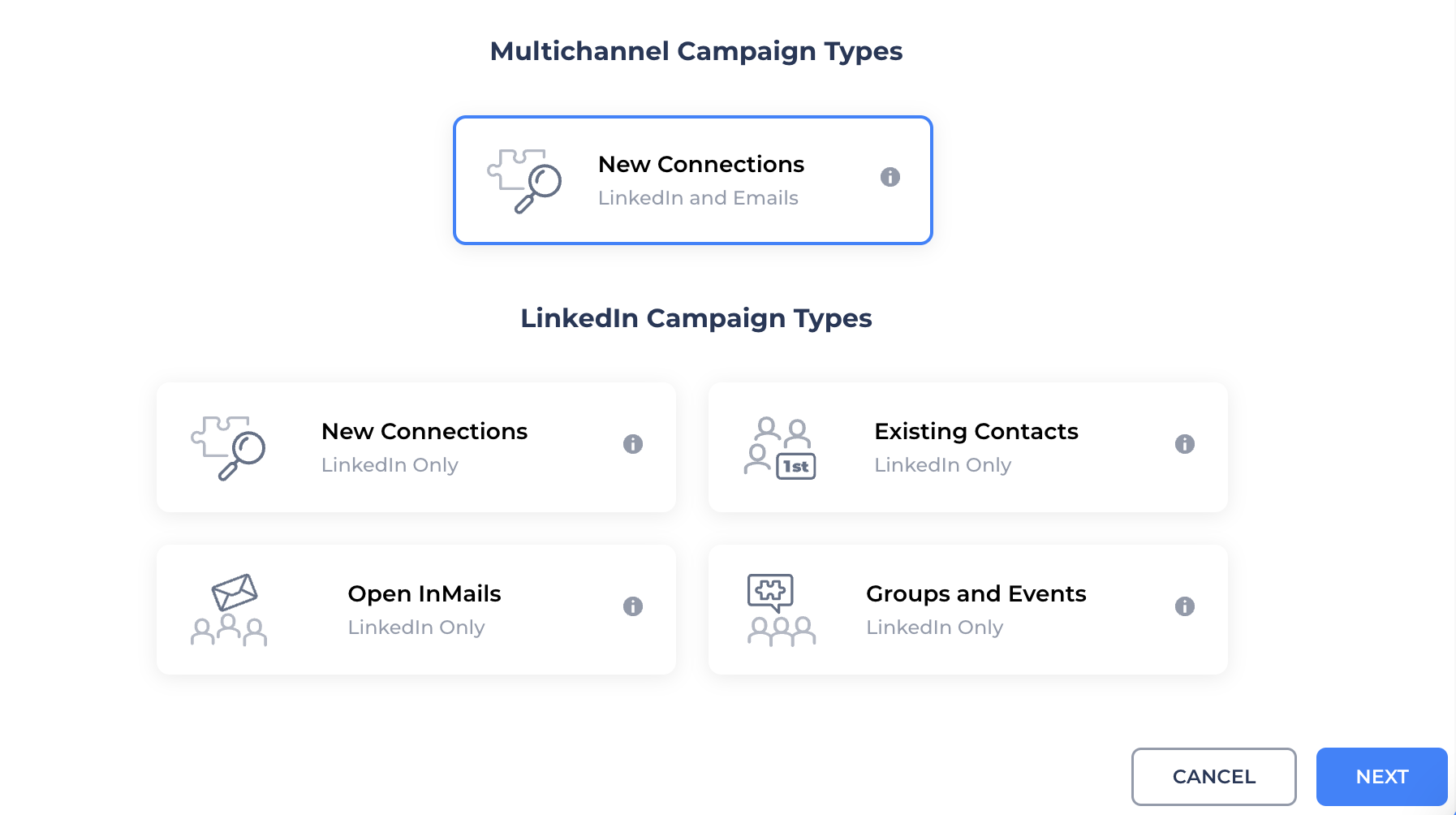
The platform supports four campaign types: New Connections for 2nd and 3rd degree contacts, Existing Contacts for 1st degree connections, Open InMails for prospects with open profiles, and Dynamic Outreach with conditional branching logic.
Source: Salesflow
Safety features include randomized activity timing to mimic human behavior, automatic invite withdrawal to stay below LinkedIn's 1,200 pending invite threshold, and validation rules that prevent invalid actions (like sending follow-ups to non-connected contacts). Salesflow claims "a near 0% ban rate" as a result.
Dynamic Outreach: Condition-based workflows that adapt to each prospect's status in real time.
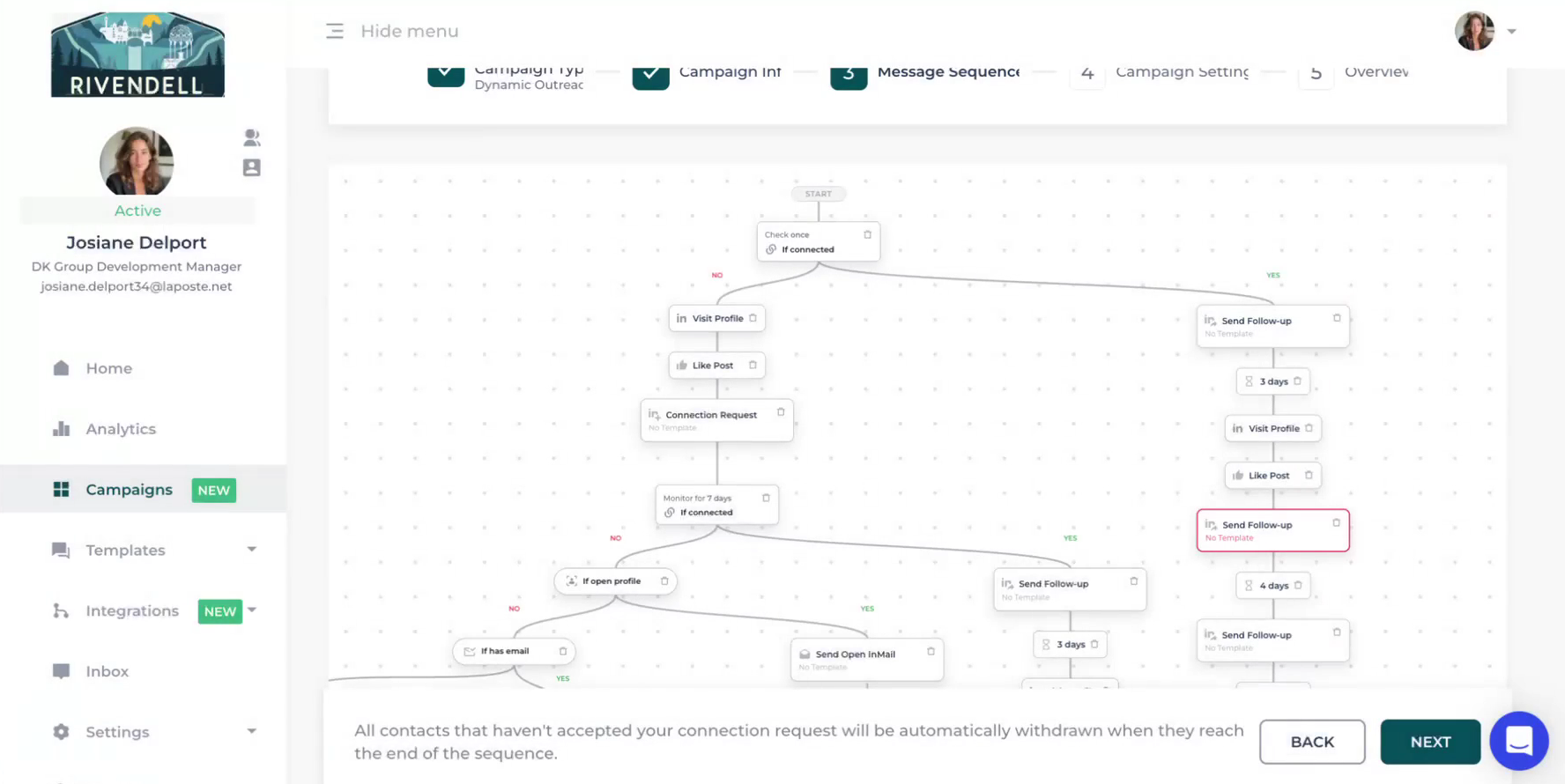
Salesflow's Dynamic Outreach feature, launched in early 2026, moves beyond linear sequences. Instead of pushing every prospect through the same steps, campaigns branch based on four real-time conditions: "If connected," "If open profile," "If email available," and "If email opened."
Source: Salesflow
Each condition creates YES/NO paths. If a prospect accepts a connection request, the system routes them to a follow-up message. If they don't connect but have an open profile, it tries an InMail. If an email address is available, it falls back to email. What previously required three separate campaigns now runs as one adaptive flow.
A notable distinction is between Wait and Monitor actions. Wait creates a time delay. Monitor continuously evaluates contacts during a defined window, routing them the moment conditions are met rather than waiting for a timer to expire. If a prospect accepts a connection request three hours into a seven-day monitoring period, the system reacts immediately instead of waiting the full seven days.
The workflow builder includes safeguards that prevent structural errors at the design stage: no duplicate connection requests in the same branch, no follow-ups to non-connected contacts, and automatic invite withdrawal at the end of each branch.
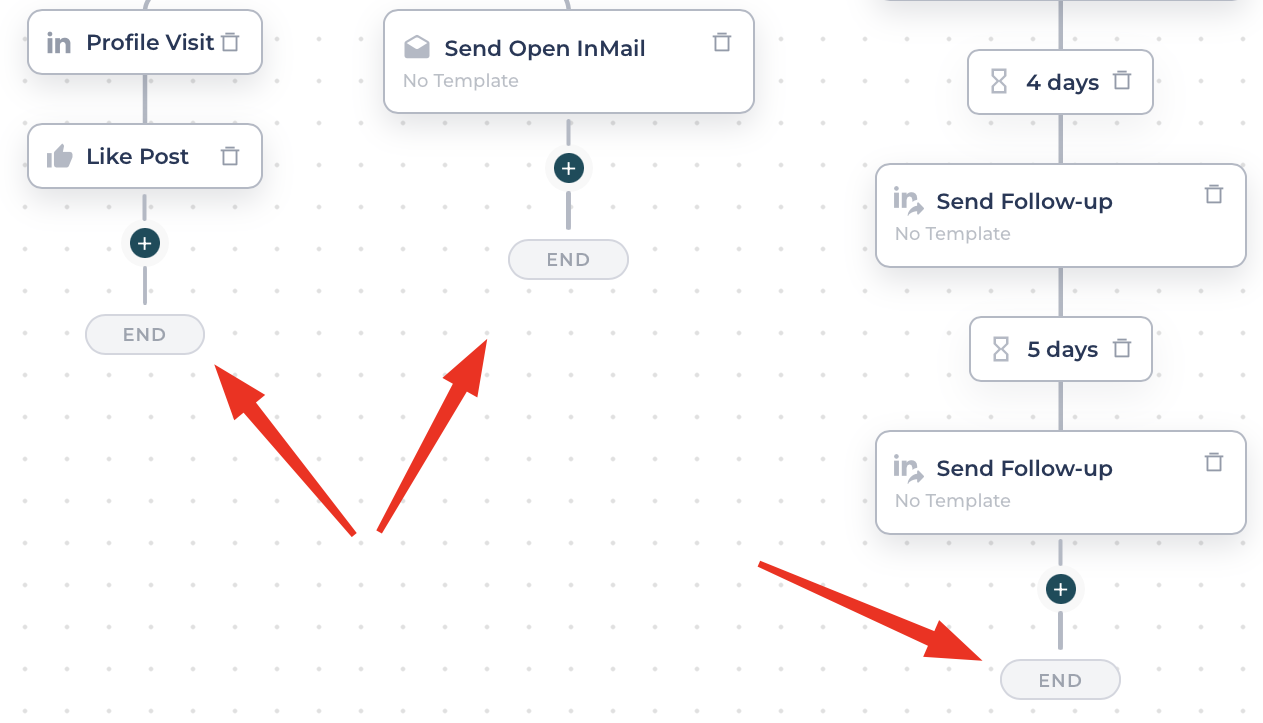
Source: Salesflow
Email Outreach: LinkedIn and email combined in one campaign with built-in warm-up.
Salesflow's email outreach adds email as a channel within the same Dynamic Outreach workflows. Users connect their Gmail, Outlook, or Yahoo account via SMTP/IMAP integration and build sequences that include both LinkedIn and email steps.
The platform provides a free Smart Warmup add-on that builds sender reputation by automatically sending and engaging with dummy emails between users. Campaign-level daily limits, timezone-aware scheduling, and automatic reply detection (which mutes contacts when they respond) prevent over-messaging.
The multi-channel approach is Salesflow's answer to declining email-only response rates. The company cites research showing multi-channel outreach increases reply rates by 30-40% compared to single-channel approaches, and claims email alone typically gets a 2% response rate, while combining it with LinkedIn pushes that to 7-10%.
Unified Inbox and Analytics: Centralized conversation management with campaign performance tracking.
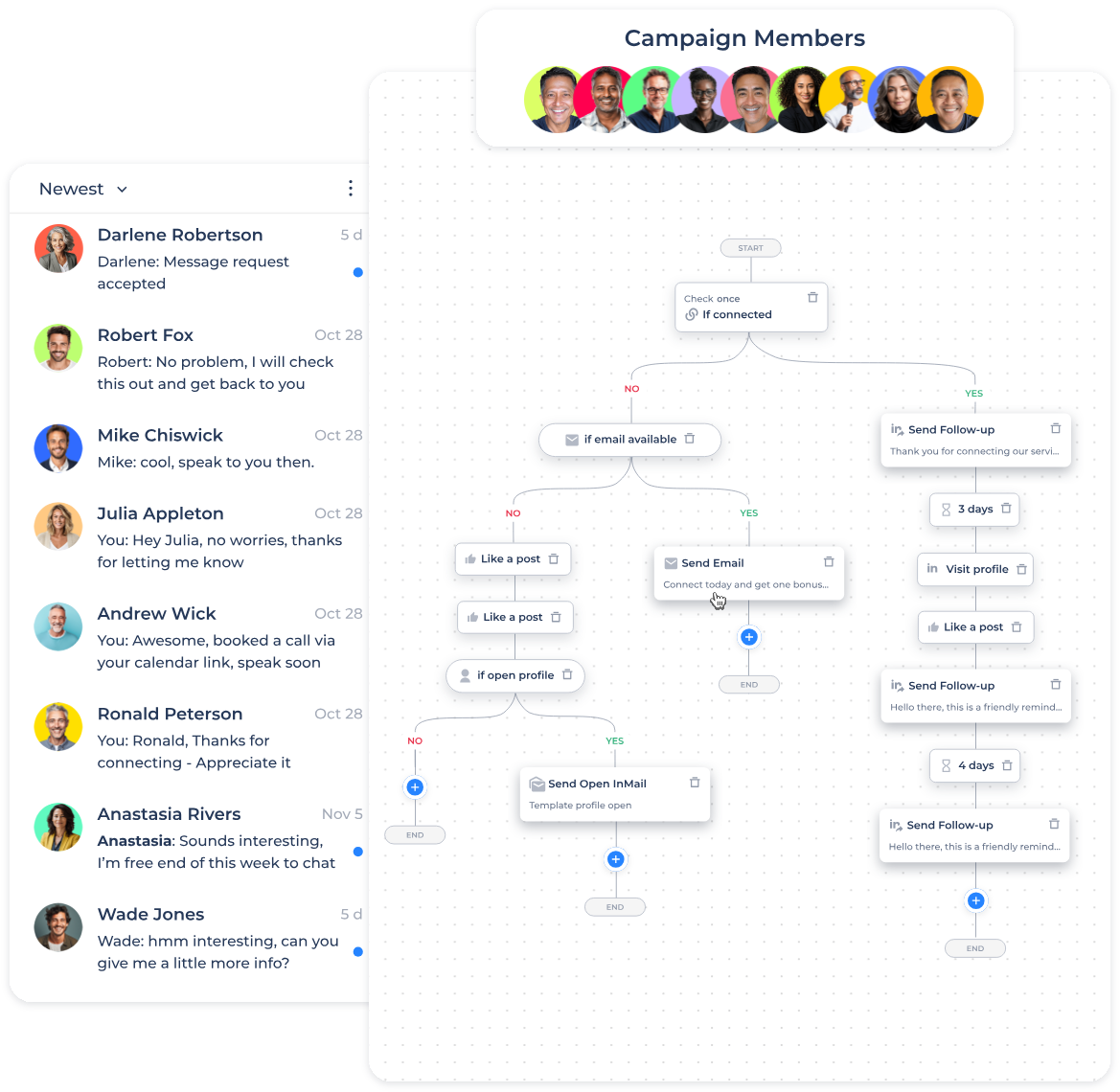
Salesflow’s Unified Inbox consolidates LinkedIn messages, Sales Navigator messages, and Open InMails into one view. Users can filter by campaign, conversation status, or custom tags without switching between LinkedIn interfaces. Features include reminders and snooze, scheduled sends with preset or custom timing, quick response templates, and private notes.
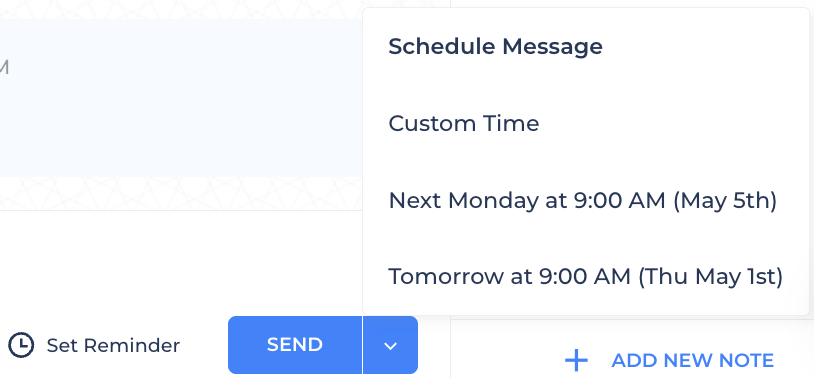
Source: Salesflow
If a prospect replies while a message is scheduled, the system automatically cancels all scheduled messages for that conversation, preventing awkward automated follow-ups after engagement. AI-driven inbox filters flag positive responses, helping prioritize high-intent conversations.
On the analytics side, Salesflow tracks over 45 metrics across campaigns, including invites sent, connection rates, follow-ups, reply rates, and leads generated. The dashboard includes a healthscore for campaign performance, heatmap visualizations showing response patterns by time and day, and funnel analysis from invite to lead. A Google Sheets add-on enables automatic data export for custom reporting.
Pricing: Volume-tiered per-seat model with discounts for larger teams.
Salesflow uses a per-seat subscription model with five tiers based on team size:
Plan | Price/Seat/Month | Minimum Seats |
|---|---|---|
Basic | 1+ | |
Starter | $70 | 5+ |
Pro | $39.95 | 20+ |
Agency | $29.98 | 50+ |
Enterprise | $24.99 | 100+ |
All plans include core features: Multichannel Dynamic Outreach, Unified Inbox, Campaign Intelligence and Analytics, native HubSpot integration, LinkedIn Sales Navigator compatibility, Zapier integration, and API access. Higher tiers add dedicated Customer Success Managers, white-label customization, and early access to new features.
Salesflow offers a 7-day free trial with no credit card required. Subscriptions come in monthly, 6-month (15% discount), and 12-month (30% discount) billing cycles. All amounts exclude VAT and are payable in GBP, which may mean currency conversion costs for international customers. Fees are non-cancellable and non-refundable, and promotional pricing does not carry over to renewal periods.
Where Salesflow Falls Short
Salesflow handles LinkedIn automation well, but several limits show as teams grow and prospecting needs get more complex. These constraints point to a platform built for outreach execution, not go-to-market intelligence.
No Contact Database or Buyer Intent: Salesflow automates the act of reaching out but offers no help identifying who to reach. There's no B2B contact database, no buyer intent signals, no technographic data, and no way to know which companies are researching solutions like yours. Users must source their own prospect lists through LinkedIn searches, Sales Navigator, or CSV imports. The platform starts after the most critical prospecting decision (who deserves your attention) has already been made.
Reliability Concerns: Users report LinkedIn accounts disconnecting frequently, causing errors and campaign pauses that require manual login. For a platform whose core value is automation, these disconnections bring back the manual work it promises to remove. Multiple reviewers also describe data accuracy problems with unreliable metrics, making it hard to trust campaign performance data.
Interface and Usability Issues: Despite positive feedback on setup speed, the platform draws criticism for poor design and a clunky dashboard. Users note that making changes to active campaigns and navigating between features isn't as smooth as competitors, creating friction in daily work.
Limited Integration Depth: Salesflow offers native HubSpot integration and Zapier connections but lacks direct native integrations for other CRM systems, requiring workarounds. For teams using Salesforce, Pipedrive, or other CRMs as their system of record, syncing data takes extra steps.
Channel Constraints: Despite positioning as multi-channel, Salesflow covers only LinkedIn and email. There's no phone dialing, no SMS, no display advertising, no website visitor identification, and no intent-driven targeting. As B2B buying journeys span more touchpoints, a two-channel tool leaves gaps that grow with the complexity of your go-to-market motion.
These limits aren't failures. They reflect the natural boundaries of a tool built to automate LinkedIn prospecting. But they create a clear inflection point where teams need more than outreach execution: intelligence about who to target, why those accounts matter, and how to engage across every channel where deals happen.
Top Salesflow Alternative for Full Go-to-Market Intelligence: ZoomInfo
ZoomInfo addresses Salesflow's limits by providing the intelligence that outreach tools assume you already have. As a go-to-market intelligence platform, ZoomInfo doesn't just automate sending messages. It identifies the right accounts, surfaces buying signals, provides verified contact data, and powers AI execution across every go-to-market channel.
B2B Data: ZoomInfo provides verified contact and company data beyond what any outreach tool offers.
Salesflow relies on whatever prospect data you can find through LinkedIn searches or CSV imports. ZoomInfo removes that dependency with a B2B data platform spanning 500M contacts, 100M companies, 135M+ verified phone numbers, 120M direct-dial phone numbers, and 200M+ verified business email addresses.
ZoomInfo verifies this data through multiple sources: automated ML scanning of 28 million site domains daily, third-party partner data covering 95 million businesses, a community of 200,000+ ZoomInfo Lite users who share data back, and an in-house Data Training Lab of 300+ human researchers. First-party data reaches up to 95% accuracy.
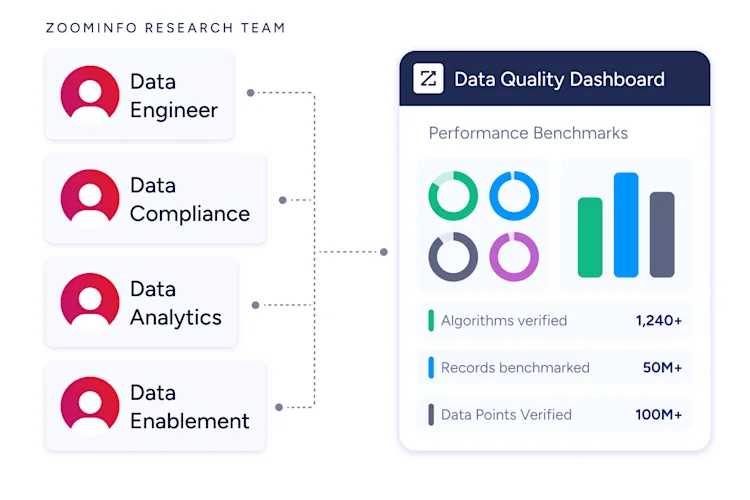
The data goes beyond names and emails. ZoomInfo provides 300+ company attributes for market segmentation, department org charts with decision-makers' direct dials, technographic profiles covering 30,000+ technologies across 30+ million companies, and Buyer Intent data tracking signals from 210 million IP-to-Organization pairings.
Independent sources back this up. In a Fortune 500 competitive RFP analyzing 25 million contacts across vendors, the independent consultant concluded that "no other competitor came even close." ZoomInfo holds 133 No. 1 rankings on G2 across Sales Intelligence, Buyer Intent, Data Quality, and related categories, and was named a Leader in both the Gartner Magic Quadrant for ABM Platforms and the Forrester Wave for Intent Data Providers.
"ZoomInfo gives us the information we need to execute. It's already there, so we can be three steps ahead." — William Kenimer, VP of Revenue Operations (Vensure)
GTM Context Graph: Intelligence that captures why deals move, not just that they moved.
Salesflow tracks campaign metrics like connection rates and reply counts. ZoomInfo's GTM Context Graph works at a different level: it combines ZoomInfo's B2B data with a customer's CRM records, conversation transcripts, email threads, and behavioral signals into a single intelligence layer that processes 1.5B+ data points daily.
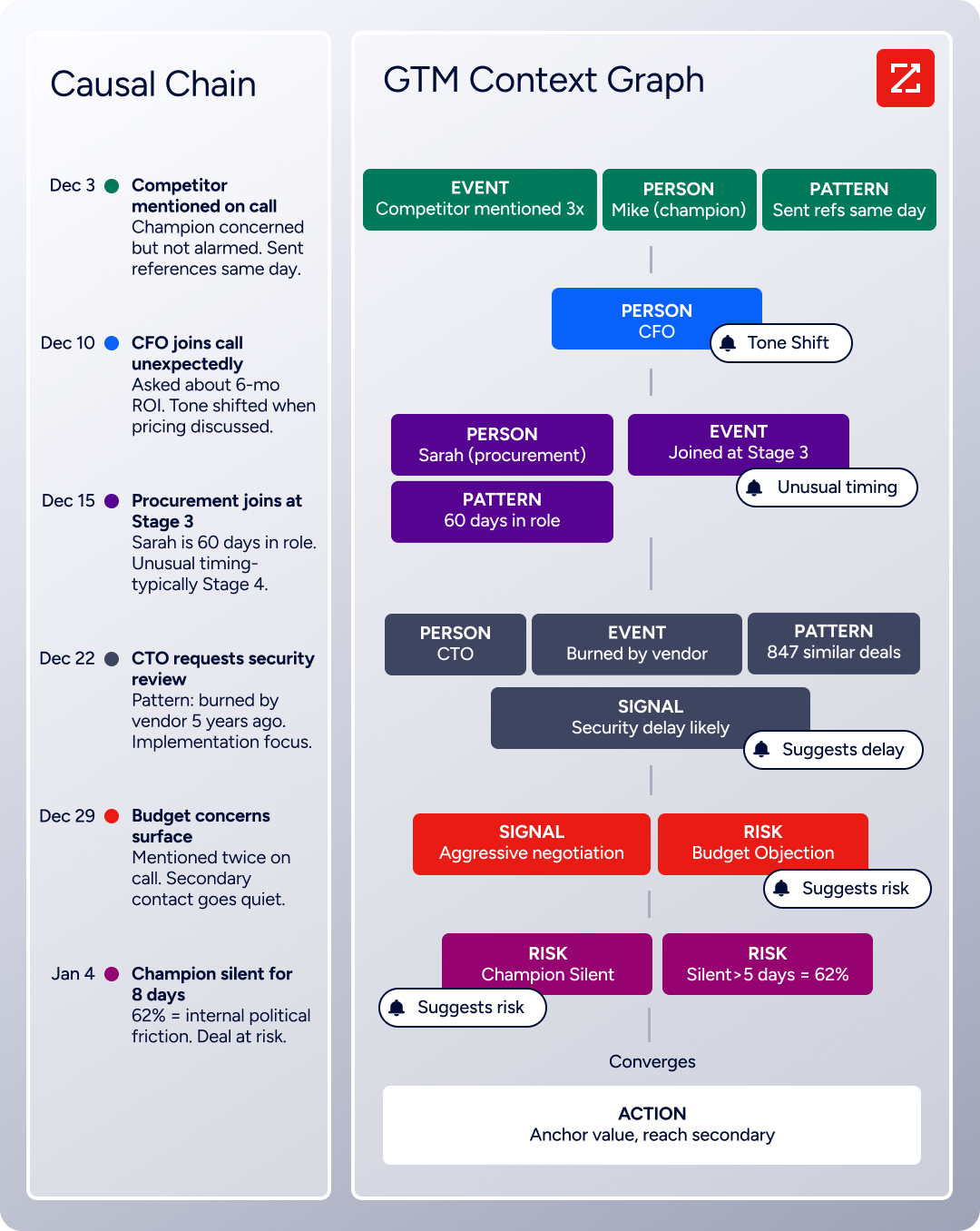
A CRM records that a deal moved from Stage 3 to Stage 4. Salesflow can tell you a prospect replied to your LinkedIn message. Neither captures why. The GTM Context Graph does. It connects people and their relationships (who influences whom, who blocks, who champions), actions and their outcomes (what worked, what didn't), and patterns across thousands of similar deals to predict what happens next.
This intelligence exists because ZoomInfo spent two decades building B2B data unification infrastructure, then acquired Chorus for its conversation intelligence and context capture. The result: AI that understands your deals, not just your data.
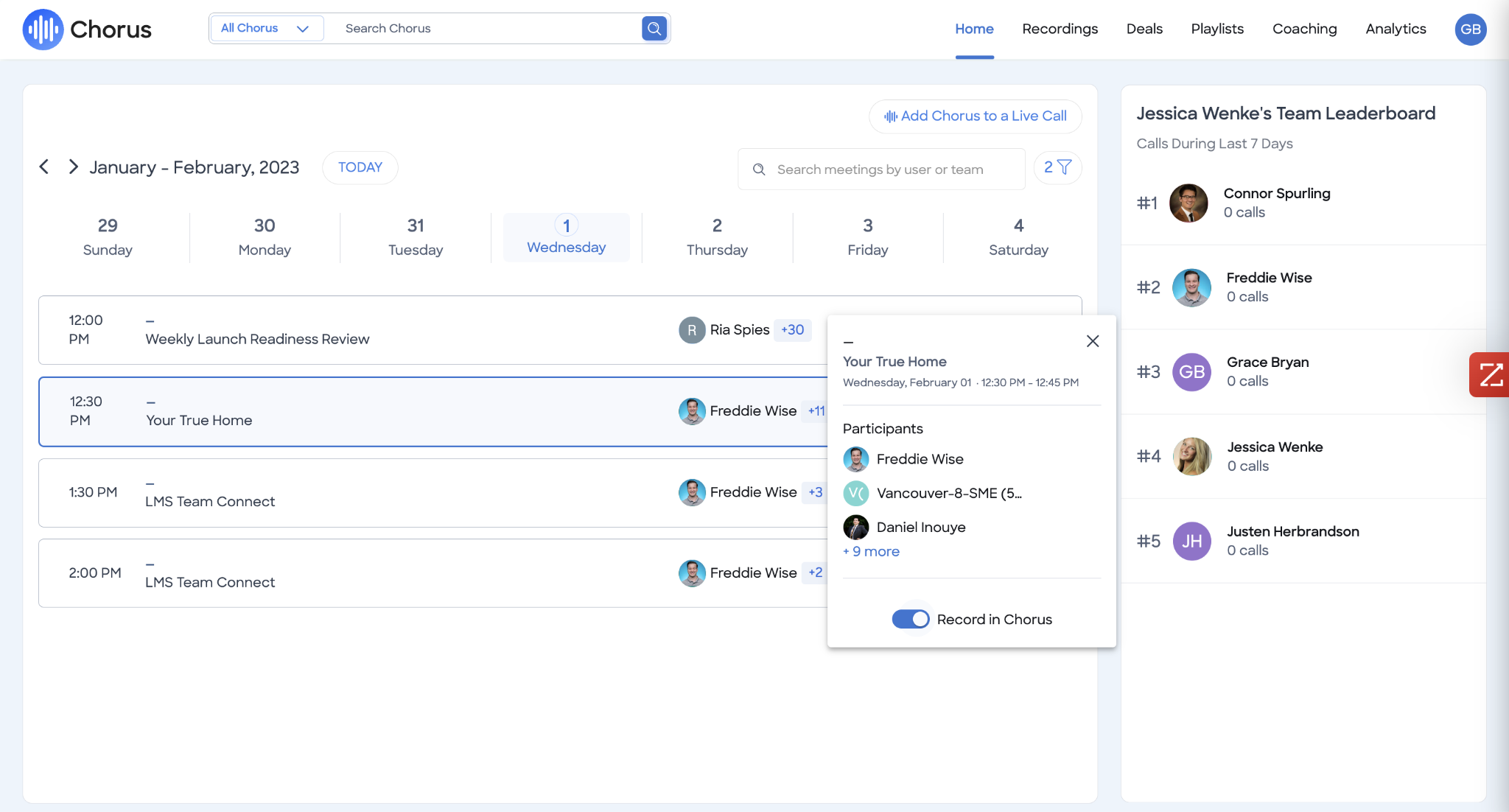
Seismic attributed 39% of active pipeline to ZoomInfo signals and reported sellers became 54% more productive. CBO Toby Carrington noted: "That combination of our internal CRM data, external signals, and AI that's given all that context has helped us craft very specific account- and persona-based messages." (Seismic)
GTM Workspace and GTM Studio: Separate interfaces designed for sellers, marketers, RevOps, and GTM engineers.
Where Salesflow provides one interface for LinkedIn and email campaigns, ZoomInfo delivers intelligence through interfaces designed for different roles.
GTM Workspace is the seller's front end. It consolidates a complete Book of Business view across CRM data, ZoomInfo intelligence, conversation history, and market signals in one place. AI agents handle account research, generate personalized outreach, monitor buying signals, and update CRM fields automatically. The Action Feed streams in-market buyers matched to target criteria with pre-drafted actions on every signal.
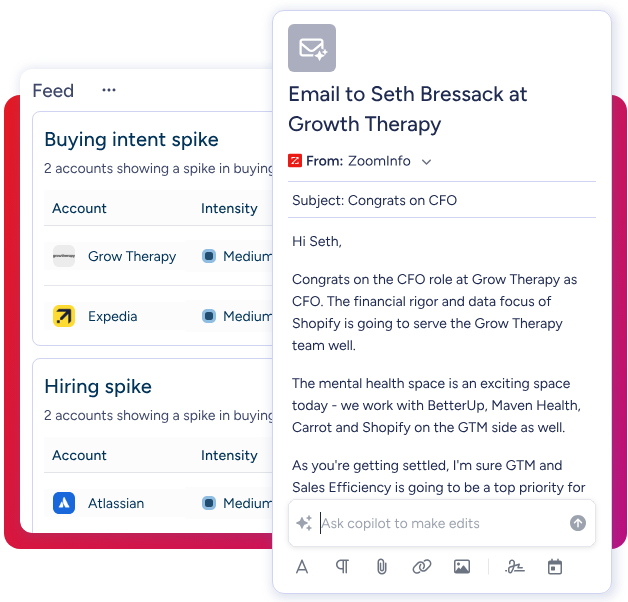
GTM Studio serves marketers, RevOps, and GTM engineers. It's an AI-powered orchestration canvas where teams describe audiences in natural language, launch pre-built plays (inbound acceleration, champion tracking, competitive displacement), and run multi-channel campaigns across email, calls, ads, and direct mail, all triggered by buyer behavior. Expansion plays that used to take three weeks now launch in 30 minutes.
For teams building beyond ZoomInfo's own products, APIs and MCP expose the same intelligence to any custom agent, internal tool, or partner platform. All three access methods draw from one GTM Context Graph: the same data, the same reasoning, the same model.
"Anything that minimizes our team's need to switch contexts is beneficial. ZoomInfo offers a unified view, eliminating the need to navigate between systems." — Ben Perceval, RevOps Manager (Spekit)
Compliance and Integration: Security certifications and 120+ integrations that Salesflow doesn't offer.
Salesflow does not publicly document formal security certifications. ZoomInfo maintains certifications renewed annually: ISO 27001, ISO 27701, SOC 2 Type II, TRUSTe GDPR and CCPA validations, and operates as a registered data broker in California and Vermont. For enterprises in regulated industries, this compliance infrastructure is a requirement, not optional.
The ZoomInfo App Marketplace lists 120+ partner integrations spanning CRM (Salesforce, HubSpot, Microsoft Dynamics 365), marketing automation, sales engagement, revenue intelligence, data warehouses, and communications tools. Cloud Partners enable direct data ingestion into AWS, Google Cloud, Snowflake, and Databricks. Salesflow's integration options are limited to native HubSpot, Zapier, and API access.
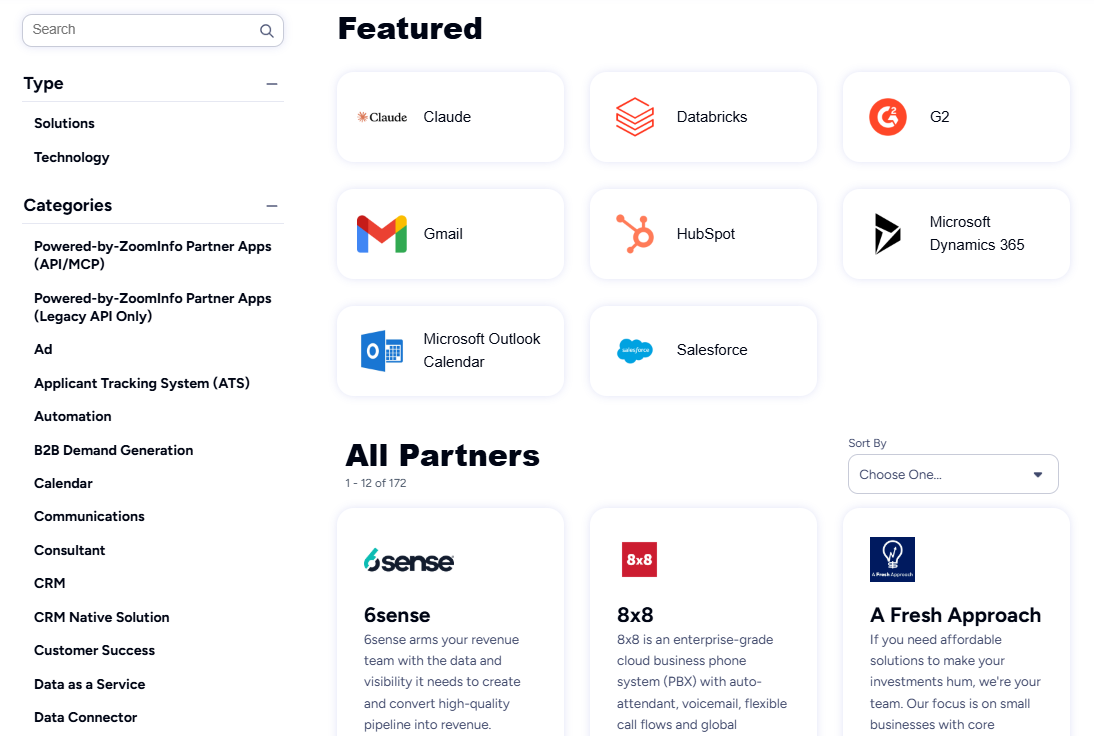
Jerry Wilson, Senior Marketing Intelligence Analyst at BDO Canada, reported an 87% reduction in time spent on dashboard updates: "The plug-and-play aspect of the API means I can integrate it very easily into any process and get information at a moment's notice." (BDO Canada)
Salesflow or ZoomInfo: Comparison Summary
Aspect | Salesflow | ZoomInfo |
|---|---|---|
Primary focus | LinkedIn + email outreach automation | Go-to-market intelligence platform |
B2B contact database | None (relies on LinkedIn/CSV imports) | 500M contacts, 200M+ verified emails, 135M+ verified phones |
Buyer intent signals | Not available | 210M IP-to-Org pairings, Guided Intent |
Outreach channels | LinkedIn and email | Email, phone, ads, display, direct mail, web chat |
AI capabilities | Reply detection, template suggestions | GTM Context Graph, AI agents, account intelligence |
LinkedIn automation | Core strength with safety features | Via Salesloft partnership and workflows |
CRM integrations | Native HubSpot, Zapier for others | Salesforce, HubSpot, Dynamics 365, 120+ integrations |
Agency features | White-label, global dashboard | Not agency-focused |
Security certifications | Not publicly documented | ISO 27001, ISO 27701, SOC 2 Type II, GDPR/CCPA |
Free option | 7-day trial | ZoomInfo Lite (permanent free tier) + 7-day trial |
Pricing | $24.99-$99/seat/month (published) | Custom-quoted (seat + credit based) |
Target audience | SMBs, agencies, recruiters | Enterprise and upper mid-market B2B |
Company size | 22 employees, $3.3M revenue | Public (NASDAQ: GTM), $1.25B revenue |
Final Verdict
The choice between Salesflow and ZoomInfo depends on where you are in your go-to-market maturity and what's limiting your pipeline.
Choose Salesflow if your prospecting starts and ends on LinkedIn and you need a focused tool to automate that workflow. It suits agencies managing multiple client LinkedIn accounts, small sales teams with LinkedIn-focused ICPs, and businesses that already know who to target and need to scale the outreach. Volume pricing makes it cost-effective for larger teams, and Dynamic Outreach lets campaigns adapt to prospect behavior. If LinkedIn is where your deals begin and you need a reliable way to automate that first touch, Salesflow delivers.
Choose ZoomInfo if you've outgrown outreach-only tools and need to know who to target, not just how to reach them. ZoomInfo fits when your pipeline depends on finding in-market accounts before competitors do, when your sales team needs verified direct dials and emails beyond what LinkedIn provides, and when your go-to-market motion spans more than two channels. The combination of B2B data, the GTM Context Graph, and interfaces designed for sellers (GTM Workspace) and marketers (GTM Studio) means you're not just automating messages. You're building a system where every outreach is informed by data, intent signals, and deal context.
Get started with ZoomInfo here.
Salesflow solves the execution problem: how do I send more LinkedIn messages without getting banned? ZoomInfo solves the strategy problem: who should I be talking to, why do they matter now, and what should I say? For teams where the bottleneck is automation, Salesflow is efficient. For teams where the bottleneck is intelligence, ZoomInfo closes the gap.
Salesflow FAQ
Is Salesflow safe to use with LinkedIn?
Salesflow uses cloud-based infrastructure with dedicated IPs per account, randomized activity timing, and automatic invite withdrawal to stay below LinkedIn's 1,200 pending invite threshold. The platform claims a near 0% ban rate. However, some users report LinkedIn accounts disconnecting frequently, requiring manual re-login and causing campaign pauses. Like any LinkedIn automation tool, Salesflow carries risk since automated activity falls outside LinkedIn's terms of service.
How much does Salesflow cost?
Salesflow starts at $99 per seat per month on the Basic plan. Volume discounts reduce the price: $70 per seat for 5+ users, $39.95 for 20+ users, $29.98 for 50+ users, and $24.99 for 100+ users. All prices are in GBP and exclude VAT. A 7-day free trial is available with no credit card required. ZoomInfo offers a permanent free tier (ZoomInfo Lite) with access to its B2B database and 10 monthly export credits, plus a separate 7-day trial of paid features.
Does Salesflow have a built-in contact database?
No. Salesflow does not include a B2B contact database. Users must source prospects through LinkedIn searches, Sales Navigator, CSV imports, or LinkedIn groups and events. The platform automates outreach to those contacts but does not help identify or verify them. ZoomInfo provides 500M contacts with 200M+ verified business email addresses and 135M+ verified phone numbers, along with buyer intent signals that flag which accounts are in-market.
What CRM integrations does Salesflow offer?
Salesflow provides a native HubSpot integration with bi-directional sync of contacts, messages, replies, and activity data. For other CRMs like Salesforce or Pipedrive, users must connect through Zapier or Salesflow's API. ZoomInfo integrates natively with Salesforce, HubSpot, and Microsoft Dynamics 365, plus 120+ additional tools through its App Marketplace, and offers API and MCP access for custom integrations.
Can Salesflow send emails as well as LinkedIn messages?
Yes. Salesflow supports email outreach within its Dynamic Outreach workflows. Users connect their Gmail, Outlook, or Yahoo account and include email steps alongside LinkedIn actions. The platform includes a free Smart Warmup add-on for building email sender reputation. However, email is a secondary channel, integrated into what is primarily a LinkedIn automation platform. ZoomInfo supports multi-channel execution across email, phone, display ads, direct mail, and web chat through GTM Workspace and GTM Studio.
Does Salesflow offer white-label features for agencies?
Yes. Salesflow's Agency and Enterprise tiers include white-label URL customization, branded dashboards, global activity dashboards for reviewing all client campaigns, and centralized account management with custom permission levels. The Agency plan starts at $29.98 per seat for a minimum of 50 seats. ZoomInfo is not designed as a white-label agency tool, though its API and MCP access allow custom implementations.
What kind of analytics does Salesflow provide?
Salesflow tracks over 45 metrics across campaigns, including invites sent, connection rates, follow-ups, reply rates, and leads generated. The analytics dashboard includes campaign healthscores, heatmap visualizations of response patterns, funnel analysis, template performance comparisons, and geographic engagement breakdowns. Data can be exported via CSV or synced to Google Sheets. However, some users report data accuracy issues with unreliable metrics. ZoomInfo's analytics go beyond outreach metrics to include buyer intent tracking, deal intelligence, pipeline attribution, and AI-powered dashboards through GTM Workspace and GTM Studio.
How does Salesflow compare to ZoomInfo for prospecting?
Salesflow automates the delivery of LinkedIn messages and emails to prospects you've already identified. ZoomInfo operates earlier in the prospecting workflow, helping you identify which accounts and contacts to target using verified data, intent signals, and AI-driven prioritization. Salesflow is an outreach execution tool; ZoomInfo is a go-to-market intelligence platform. Teams with mature prospecting lists and a LinkedIn-focused strategy may find Salesflow sufficient. Teams that need to build smarter target lists, track buying signals, and execute across multiple channels will find ZoomInfo covers more ground.
