
The Salesforce API is not one API. It is a portfolio of more than 30+ distinct APIs spanning REST, SOAP, GraphQL, gRPC, and event-streaming protocols, all versioned on a seasonal release cadence (currently Summer '26, API version 67.0).
That breadth is real. A developer can read and write CRM records over REST, bulk-load millions of rows via CSV, subscribe to field-level change events over gRPC, query custom objects with GraphQL, deploy metadata between environments, and invoke AI agents headlessly, all on one platform serving over 150,000 companies worldwide.
But breadth and fitness for your build are different questions.
The Salesforce API is likely the right choice if:
You need programmatic CRUD access to a CRM data model your organization already runs on Salesforce (accounts, contacts, leads, opportunities, cases, and custom objects).
You are building event-driven integrations that react to record changes in near real-time via Platform Events or Change Data Capture over the Pub/Sub API.
You need to bulk-load or extract large datasets (millions of records) through an asynchronous job-based pipeline.
Your integration requires multiple authentication flows, including delegated OAuth 2.0 with scoped permissions.
You are building on the Salesforce Platform itself (Apex, Flows, Lightning Web Components) and need the Metadata API, Tooling API, or Agent API.
You need access to vertical APIs (Healthcare FHIR, CPQ, Commerce) native to the Salesforce ecosystem.
However, it might not be the right fit if:
You need B2B contact enrichment, company intelligence, org charts, technographics, or buyer intent signals: the Salesforce API operates on the data already in your org, not an external intelligence database.
You need high-throughput access without license-count-dependent rate limits: Salesforce API call allocations are tied to edition and the number of user licenses purchased, not a flat ceiling.
You want maintained, language-specific REST client SDKs: Salesforce provides a CLI, IDE extensions, and agent-specific SDKs, but no official Python, Node.js, or Java library for general REST API calls.
You need a single API surface with one authentication method and one base URL: Salesforce uses org-specific instance URLs and supports multiple OAuth flows across multiple API surfaces, each with its own conventions.
Your integration budget is tight: API access comes bundled with Salesforce licenses, but meaningful access starts at the Enterprise tier ($175/user/month), and the rate-limit allocation scales with how many licenses you buy.
You need traditional outbound HTTP webhooks: Salesforce uses event-streaming protocols (gRPC Pub/Sub API and CometD Streaming API) rather than push-based webhook delivery.
In this case, consider ZoomInfo's API: a REST suite covering search, enrichment, AI intelligence, and audience management across 500M contacts and 100M companies, with OAuth 2.0 authentication, tiered rate limits up to 35 req/sec, and an MCP server for AI-agent workflows. ZoomInfo Agent Teams build on that same data to run complete GTM plays end to end, with specialist agents sharing account context and acting within the approvals and limits you set.
This article reviews both: the Salesforce API in full technical depth, and ZoomInfo's API where your build needs B2B data intelligence that CRM record access alone does not cover.
Salesforce API at a Glance
Attribute | Detail |
|---|---|
API type | REST, SOAP, GraphQL, Bulk API 2.0 (REST), Pub/Sub API (gRPC/HTTP2), Streaming API (CometD) |
Authentication | OAuth 2.0 (Web Server, User-Agent, JWT Bearer, Client Credentials, Username-Password flows) |
Base URL | Org-specific: https://yourorg.my.salesforce.com |
Current version | |
Rate limits | Edition and license-count dependent: 15,000/day (Developer Edition) to 100,000+ base (Enterprise/Unlimited) plus per-license allocations |
Pricing / access | Bundled with Salesforce licenses; free Developer Edition (15,000 calls/day); paid editions start at $25/user/month |
SDKs | Salesforce CLI, VS Code Extensions, Agentforce Python SDK, Mobile SDKs; no official general-purpose REST client libraries |
Webhooks | No traditional outbound HTTP webhooks; event-driven via Pub/Sub API (gRPC) and Streaming API (CometD) |
Documentation | developer.salesforce.com with per-API reference guides, Trailhead learning modules |
Salesforce API: What Works Well & What to Plan Around
What works well | What to plan around |
|---|---|
30+ APIs covering CRM records, bulk operations, metadata, events, GraphQL, AI agents, and industry verticals | No single-surface simplicity: multiple API types, each with its own conventions, base paths, and use cases |
OAuth 2.0 with five flows, including JWT Bearer for server-to-server and Client Credentials for integration users | Org-specific instance URLs (not a single global endpoint), requiring per-org configuration in multi-tenant builds |
Pub/Sub API (gRPC) enables real-time event streaming with 72-hour replay for Platform Events and CDC | No outbound HTTP webhooks: external systems must subscribe and consume events, not receive pushes |
Free Developer Edition with 15,000 API calls/day for development and testing | Production rate limits are tied to edition and license count, not a fixed ceiling you can plan around independently |
Seasonal release cadence (three times per year) with versioned APIs and backward compatibility | API call allocations include all API types against the same daily ceiling, so REST, SOAP, and Bulk calls compete |
Bulk API 2.0 handles millions of records via async CSV jobs | 10-minute timeout per REST/SOAP request; composite requests apply the timeout to the entire batch, not per subrequest |
Salesforce API: Authentication & Getting Started
API access starts with a Salesforce org. The free Developer Edition provides 15,000 API calls per rolling 24-hour period, enough for development and testing. On paid editions, API access is included on Professional, Enterprise, Unlimited, and Performance tiers, with allocations scaling by edition and license count.
All API access runs through OAuth 2.0. Developers configure credentials through External Client Apps, which define OAuth scopes, callback URLs, and credentials for each integration. External Client Apps replaced Connected Apps as the standard starting with Spring '26.

Source: Salesforce
Five OAuth 2.0 flows are supported, each suited to a different integration pattern:
Web Server Flow (Authorization Code): For server-side web apps that store a client secret securely.
User-Agent Flow (Implicit): Returns the access token via HTTP redirect; for client-side apps.
JWT Bearer Token Flow: Server-to-server with no user interaction; uses a private key/certificate pair.
Client Credentials Flow: Server-to-server using client ID and secret, recommended for integration users.
Username-Password Flow: Passes credentials directly; discouraged for production use.
A basic authenticated REST API request:
curl https://yourorg.my.salesforce.com/services/data/v67.0/sobjects/Account/001xx000003DGbYAAW \
-H "Authorization: Bearer YOUR_ACCESS_TOKEN"
One important detail: Salesforce uses org-specific instance URLs as the API base (e.g., https://yourorg.my.salesforce.com), not a single global endpoint. If you are building a multi-tenant integration connecting to many Salesforce orgs, you must store and use each customer's instance URL for API calls.
Salesforce API: Core Endpoints & Capabilities
The Salesforce API operates on Salesforce's object model. Every standard or custom object (Account, Contact, Lead, Opportunity, Case, Campaign, Product, and anything custom) is a REST resource. The API portfolio is organized by protocol and use case.
REST API (Core CRM Operations)
The REST API is the standard entry point for reading and writing CRM data. Standard operations across any object:
Create: POST /services/data/v67.0/sobjects/{SObjectName}/
Read: GET /services/data/v67.0/sobjects/{SObjectName}/{id}
Update: PATCH /services/data/v67.0/sobjects/{SObjectName}/{id}
Delete: DELETE /services/data/v67.0/sobjects/{SObjectName}/{id}
Query: GET /services/data/v67.0/query/?q=SELECT+Name,Industry+FROM+Account+WHERE+... (SOQL)
Search: SOSL-based full-text search across multiple objects
Describe: Metadata introspection on any object's fields and relationships

Source: Salesforce
Data is exchanged as JSON (default) or XML. Pagination uses a nextRecordsUrl pattern for query results, with batch sizes configurable up to 2,000 records per call. What you would build with this: a CRM sync that keeps an external system current with Salesforce records, a customer portal that reads and writes Account and Case data, or a reporting pipeline that queries Opportunities by stage and close date.
Bulk API 2.0 (Large-Volume Operations)
Bulk API 2.0 handles asynchronous create, update, upsert, and delete operations on millions of records via CSV. The pattern is job-based: submit a CSV, poll for completion, download results. This is the right tool for data migrations, nightly syncs, and any operation that touches more than a few thousand records.
GraphQL API
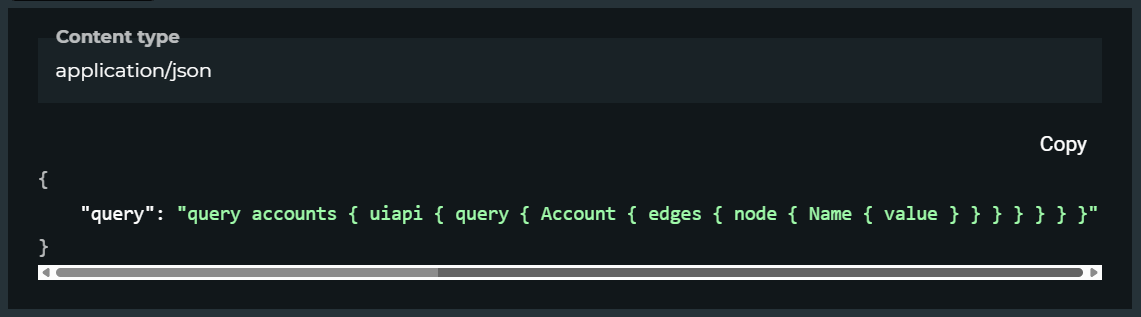
The GraphQL API supports flexible field selection and relationship traversal on any Salesforce object. For integrations that need to fetch nested related records in a single call (an Account with its Contacts, each Contact's open Opportunities, and each Opportunity's line items), GraphQL reduces round trips compared to multiple REST calls.
Source: Salesforce
SOAP API
The SOAP API is WSDL-based and suited for server-side integrations, particularly in Java and .NET environments that already have SOAP tooling. It exposes the same object operations as the REST API but uses XML request/response envelopes.
Specialized APIs
Several APIs cover domains outside core CRM record access:
Metadata API: Deploying, packaging, and upgrading application customizations between environments (fields, objects, layouts, Apex classes, Flows).
Tooling API: Building development tools; exposes metadata and configuration objects for IDE-like functionality.
Connect REST API: Chatter, community, and mobile-specific resources not in the core REST API.
User Interface API: Returns layout metadata alongside data, letting external apps render Salesforce UI patterns correctly.
Agent API: Headless agent invocation for Agentforce.
Models API: Access to LLMs (Anthropic, Google, OpenAI) through the Einstein Trust Layer.
Industry-specific APIs: Healthcare (FHIR-compliant), CPQ, Financial Services, Manufacturing, and more.
Under the Headless 360 initiative, Salesforce is exposing every platform capability as an API, MCP tool, or CLI command, so the surface continues to expand.
Salesforce API: Events & Streaming
Salesforce does not use traditional outbound HTTP webhooks. Instead, it provides two event-streaming mechanisms for push-style integrations.
Pub/Sub API (Current Recommendation)
The Pub/Sub API is a gRPC and HTTP/2 surface that publishes and delivers binary event messages. Salesforce recommends it for all new event-driven integrations. Clients subscribe to a topic channel and consume events as a stream. It supports two key event types:
Platform Events: Structured business event messages published by Salesforce logic (Apex, Flow) or external systems. Use these for custom event-driven architectures.
Change Data Capture (CDC): Field-level change records for any supported Salesforce object. Use these to keep external systems in sync with CRM record changes without polling.
High-volume events (Platform Events, CDC) are retained for 72 hours, letting clients replay missed events within that window.
Streaming API (Legacy)
The Streaming API is based on the Bayeux protocol with CometD long polling. It supports four event types: PushTopic Events (SOQL-defined record change subscriptions), Generic Events (custom payloads), Platform Events, and CDC. Standard-volume events (PushTopic, Generic) are retained for 24 hours. Salesforce recommends the Pub/Sub API over this surface for new projects.
The absence of outbound HTTP webhooks is worth planning around. If your infrastructure expects POST payloads at an HTTPS endpoint (the standard webhook model), you will need to build a subscriber service that connects to the Pub/Sub API and forwards events to your internal systems.
Salesforce API: SDKs, Docs & Rate Limits
SDKs & Libraries
Salesforce's SDK story differs from what most API-first platforms offer. There is no official Python, Node.js, or Java client library for general REST API calls. Instead, Salesforce provides:
Salesforce CLI: A command-line tool for macOS, Windows, and Linux covering org management, source sync, data operations, testing, and package management. The foundation of the Salesforce DX workflow.
Salesforce Extensions for VS Code: Official IDE integration for Apex, Lightning Web Components, Aura, and Visualforce.
Agentforce Python SDK: For programmatic agent creation and management (salesforce/agent-sdk on GitHub).
Agentforce Mobile SDK: TypeScript-based with React Native support for embedding agents in iOS and Android apps.
Mobile SDK: Native iOS and Android SDKs for Salesforce-connected mobile apps.
For general REST API integration, developers typically use HTTP client libraries in their language of choice alongside OAuth token handling. The community maintains unofficial wrappers (simple-salesforce for Python, jsforce for JavaScript), but Salesforce does not maintain them.
The lack of an official SDK is a real signal: you own the auth-and-retry layer, the request serialization, and the rate-limit backoff logic.
Documentation & Developer Experience
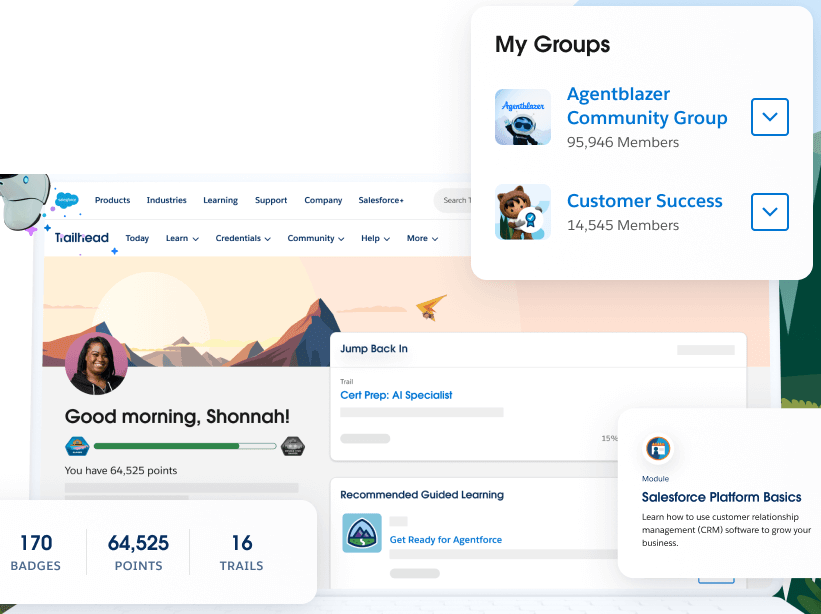
Salesforce maintains a large developer documentation portal with per-API reference guides, conceptual guides, quickstarts, and sample code. Trailhead offers free interactive modules covering every major API and integration pattern, with 6+ million learners and 1,500+ badges. It is one of the most thorough developer education programs in enterprise software.
Source: Salesforce
API documentation is versioned per seasonal release (e.g., "Summer '26, API version 67.0") with dedicated developer release guides. Salesforce publishes developer blog posts with each release, and runs virtual events (AMA sessions, workshops, codeLive sessions) at developer.salesforce.com/events.
There is no Swagger/OpenAPI explorer on the developer portal for the core REST API. Salesforce uses its own describe mechanism (/services/data/vXX.X/sobjects/ and /describe/ endpoints) to introspect the data model. Developer support channels include Trailblazer Community forums, Salesforce Stack Exchange, and official support through org licenses.
The documentation is thorough but spread across multiple subsites and guides. Finding the right page for a specific API detail sometimes means navigating between the REST API guide, the limits cheatsheet, the seasonal release notes, and Trailhead modules.
Rate Limits & Constraints
API limits are tied to edition and license count, resetting every rolling 24-hour period:
Edition | Daily API Request Allocation |
|---|---|
Developer Edition | 15,000 calls |
Professional / Enterprise | 100,000 + per-license allocation |
Unlimited / Performance | 100,000 + per-license allocation |
Full Sandbox | 5,000,000 calls |
Per-license allocations stack on top of the base: Salesforce licenses add 1,000 to 5,000 calls each; Lightning Platform One App licenses add 200 calls each; Customer Community Plus licenses add 200 calls each. A 50-seat Enterprise org, for example, would get 100,000 base plus (50 x 1,000 to 5,000 per license), depending on license type.
Two additional constraints:
Concurrent request limits (for requests lasting 20+ seconds): 5 concurrent for Developer Edition and trial orgs; 25 concurrent for production orgs and sandboxes.
API timeout: 10 minutes for REST and SOAP API calls. Composite resources (batch operations) apply the 10-minute timeout to the entire request, not per subrequest.
The license-dependent model is the single most important rate-limit detail for developers evaluating this API. Unlike platforms that publish a flat per-second or per-minute ceiling, Salesforce's API throughput depends on how many user licenses your organization has purchased.
A small team on a Professional plan has a different API budget than a 500-seat Enterprise deployment, and you cannot close that gap with better retry logic.
Salesforce API Pricing & Access Costs
API access is bundled into Salesforce org licenses rather than sold separately. The Developer Edition is free and includes 15,000 API calls per 24-hour period, enough for development and testing. On paid editions, API call allocations are included on Professional, Enterprise, Unlimited, and Performance tiers.
The commercial plans that include API access:
Starter Suite: $25/user/month
Pro Suite: $100/user/month (annual)
Enterprise: $175/user/month (annual)
Unlimited: $350/user/month (annual)
Agentforce 1: $550/user/month (annual)
Because API call allocations scale with license count, the real per-call cost depends on how many licenses your org has. A 10-seat Enterprise deployment at $175/user/month ($1,750/month) with roughly 110,000 to 150,000 daily API calls pays nothing extra per call on top of existing license costs.
But a team that needs API access for integration purposes, not for CRM users, still must purchase user licenses to get meaningful API allocations.
Salesforce also offers Platform licenses ($25/user/month for Starter, $100/user/month for Plus) for custom app access that includes API calls without full CRM functionality.
The Premier Success Plan adds 30% of net license fees for enhanced support, including 1-hour response times for business-impacting issues.
Where the Salesforce API Falls Short
These are the practical limits a developer building on this API should plan around.
The API operates on your org's data. It does not provide external B2B intelligence. Salesforce's API lets you read, write, and query the records in your CRM. It does not include contact enrichment, company intelligence, technographics, org charts, buyer intent signals, or verified phone numbers.
If your pipeline needs to discover new contacts, enrich existing records with external data, or identify which accounts are researching your product category, the Salesforce API has no endpoint for that. You need a separate data layer.
Rate limits are license-dependent, not published as a flat ceiling. The daily API allocation depends on your Salesforce edition and how many user licenses you have purchased.
A small org can hit the ceiling in a way that a larger org never would, and the only way to raise the allocation is to purchase more licenses or negotiate with Salesforce directly. This makes capacity planning harder than it needs to be for integration-heavy builds.
No outbound HTTP webhooks. External systems must subscribe to event streams via the gRPC Pub/Sub API or the CometD Streaming API. If your architecture expects POST payloads at an HTTPS endpoint, you need to build and run a subscriber service as a bridge.
No official REST client SDKs. Salesforce provides a CLI, IDE extensions, and agent-specific SDKs, but no maintained Python, Node.js, Java, or Go library for general REST API calls. Community wrappers exist but carry no official support. For teams that expect to install a package and start making API calls, this adds upfront engineering work.
Org-specific base URLs complicate multi-tenant integrations. Every Salesforce org has its own instance URL. If you are building a product that connects to many customers' Salesforce orgs, you must store and manage each org's base URL, token, and refresh cycle independently.
The API surface is broad but fragmented. Thirty-plus APIs means there is no single entry point. A developer must determine whether the use case calls for the REST API, the Bulk API, the Composite API, the GraphQL API, the Streaming API, the Pub/Sub API, or a vertical API, and each has its own conventions, limits, and documentation section.
ZoomInfo API: The B2B Data Layer Salesforce Does Not Provide
Salesforce's API gives you programmatic access to the records in your CRM. ZoomInfo is a GTM platform whose API gives you the data that should be in your CRM but isn't: who these contacts are beyond what they entered in a form, what companies they represent, what technology those companies use, whether those accounts are researching your category, and where decision-makers sit in the org chart.
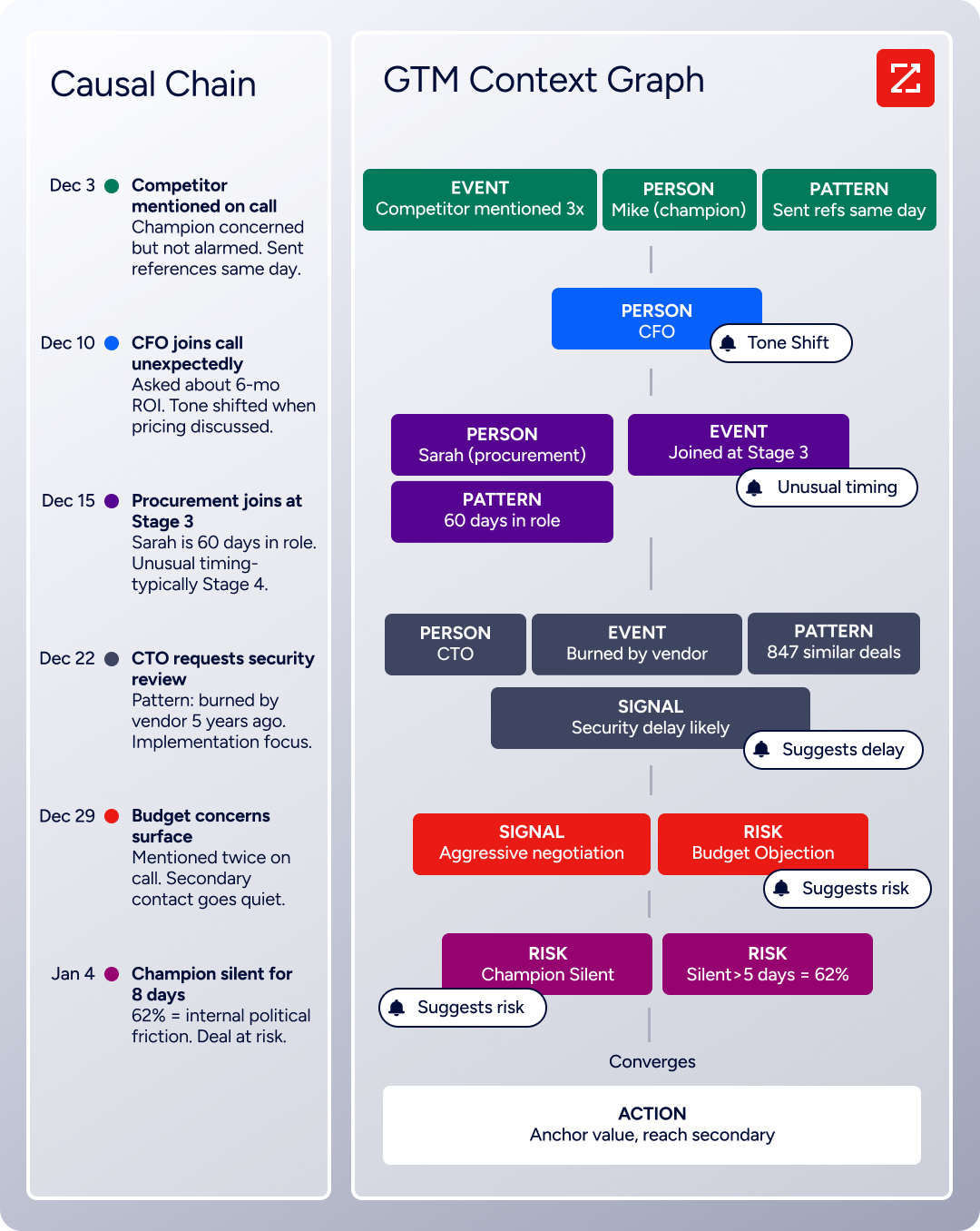
The two APIs operate at different layers. Salesforce is the system of record. ZoomInfo is the intelligence layer that feeds it, powered by the GTM Context Graph, which processes 1.5B + data points daily by combining ZoomInfo's B2B data with your first-party signals.
Source: ZoomInfo
What the API Covers
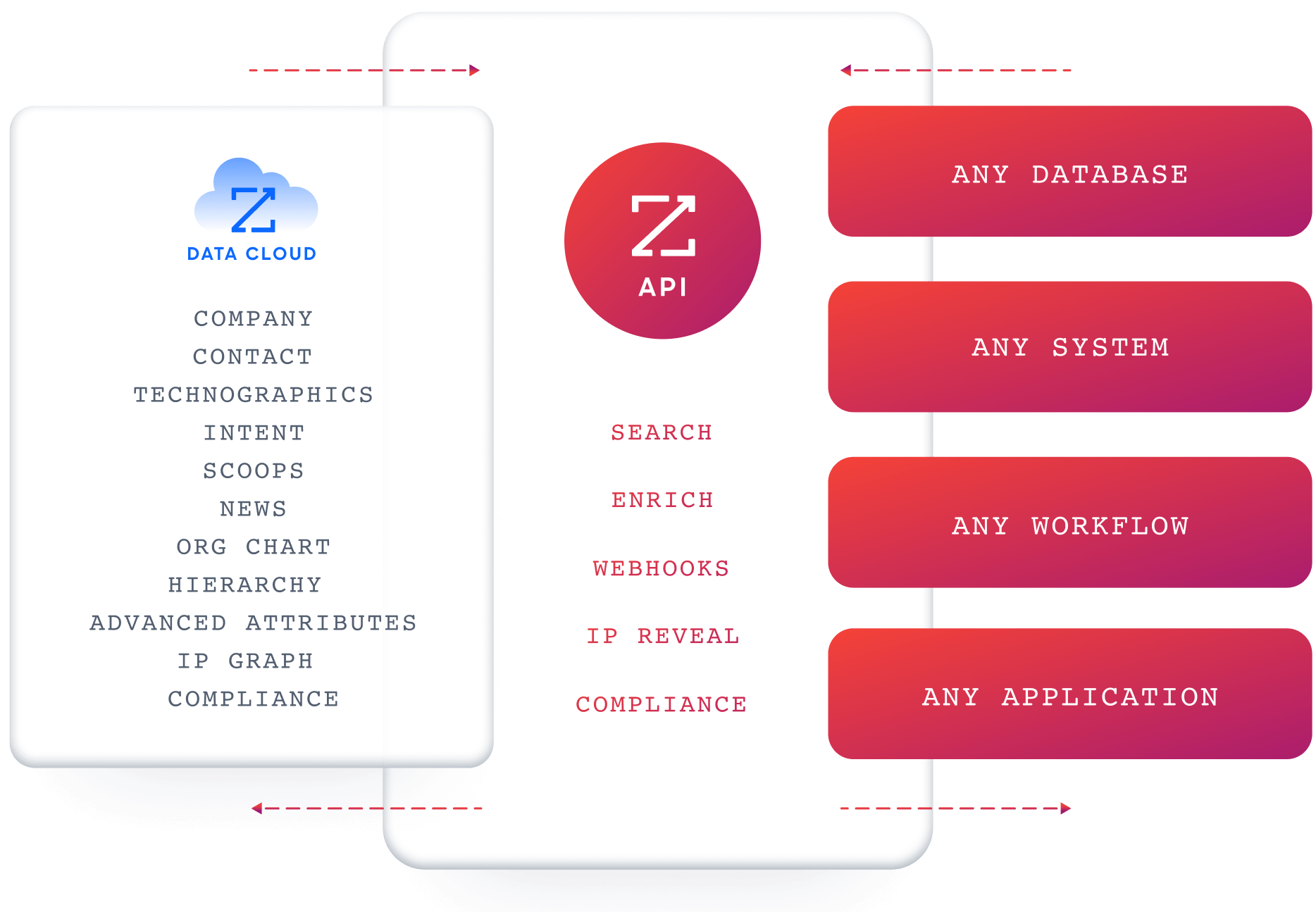
ZoomInfo's Enterprise API is a REST suite served from https://api.zoominfo.com/gtm, organized into four areas documented in the interactive API reference:
Data API (Search & Enrich): Search endpoints cover Contacts, Companies, Intent, News, and Scoops, returning matched records without consuming credits. Enrich endpoints unlock full payloads: business emails, direct dials, employment history, corporate hierarchy, org charts, technographics, and hashtag signals, up to 25 records per call. The search-then-enrich pattern lets you filter freely, then pay only for the records you commit to. The underlying dataset spans 500M contacts, 100M companies, 135M+ verified phone numbers, and 200M+ verified business email addresses.
AI Intelligence API: Account Summary returns structured account intelligence with a free-form Q&A endpoint. Find Similar Companies performs lookalike expansion. Contact Recommendations returns AI-ranked buying-committee suggestions by motion (prospecting, deal acceleration, renewals).
Marketing API: CRUD endpoints for programmatic audience management.
Platform API (Engagements, Beta): Bidirectional engagement data for feeding first-party signals back into ZoomInfo's intelligence layer.
Source: ZoomInfo
The pairing with a CRM API is direct: use ZoomInfo's search endpoints to find contacts matching your ICP (free, no credits consumed), enrich the records worth pursuing, then push them into Salesforce via the REST API. When a new lead enters Salesforce, trigger a ZoomInfo enrichment call to fill in the fields the form did not capture.
Authentication & Access
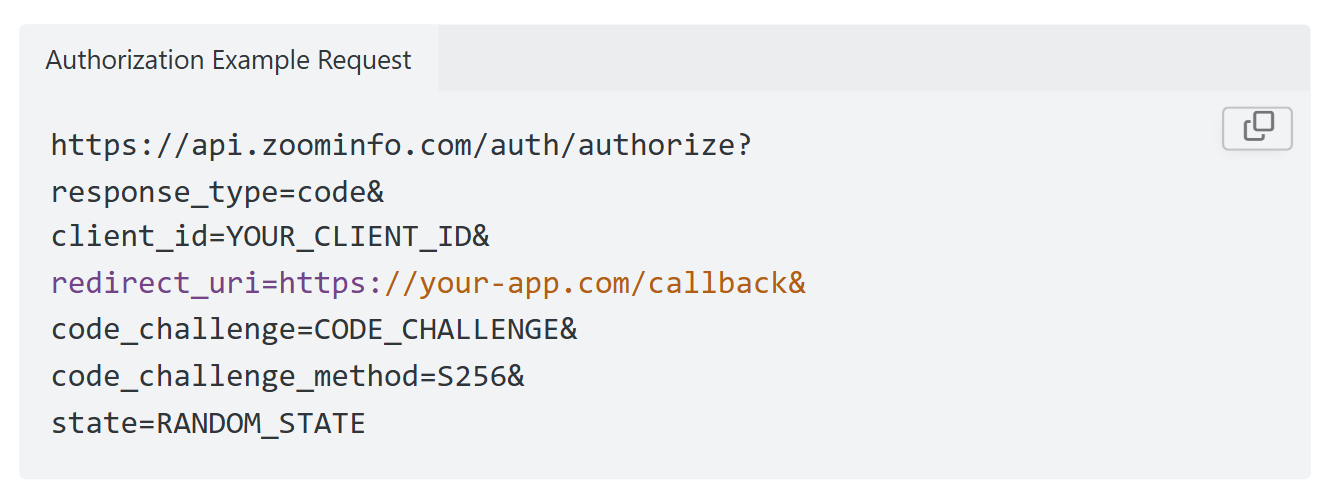
ZoomInfo uses OAuth 2.0 with PKCE via Okta, issuing 24-hour access tokens with rotating refresh tokens. Three flows are supported: Authorization Code with PKCE (web applications), Client Credentials (server-to-server), and Refresh Token. Teams register applications through the ZoomInfo Developer Portal, where they generate credentials, define scopes, and test endpoints.
Source: ZoomInfo
Rate Limits, Credits & Pricing
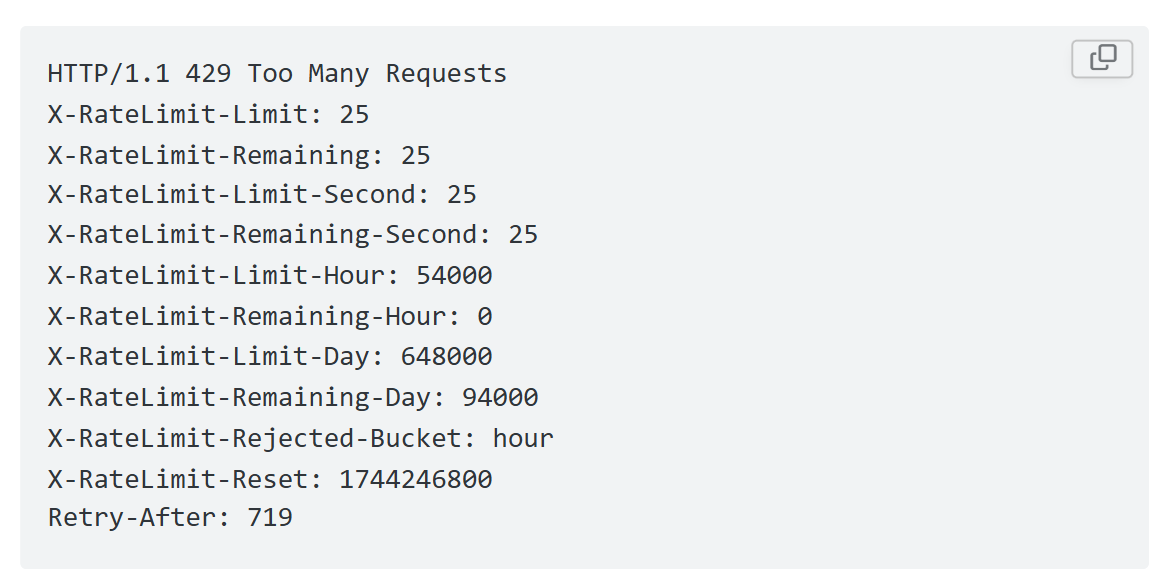
Rate limits are published by tier: Builder (5 req/sec), Standard (25 req/sec), and Scaling (35 req/sec), with per-hour and per-day sliding-window limits enforced simultaneously. Every response includes quota headers with remaining capacity, and 429 responses include a Retry-After header with exact backoff timing. Rejected requests do not consume quota.
Source: ZoomInfo
Credits follow a rolling 12-month window: enriching a record for the first time consumes one credit; re-enriching the same record within the year is free. Search and lookup operations are free. ZoomInfo uses consumption-based pricing, custom-quoted per organization, with API access available on all relevant plans.
Webhooks, MCP & Developer Experience
Webhooks are available via the Agents API, tied to Agent Teams: event types cover bulk enrichment jobs completing, records changing, credit usage crossing thresholds, and new GTM signals becoming available, with retry behavior configurable per event type.
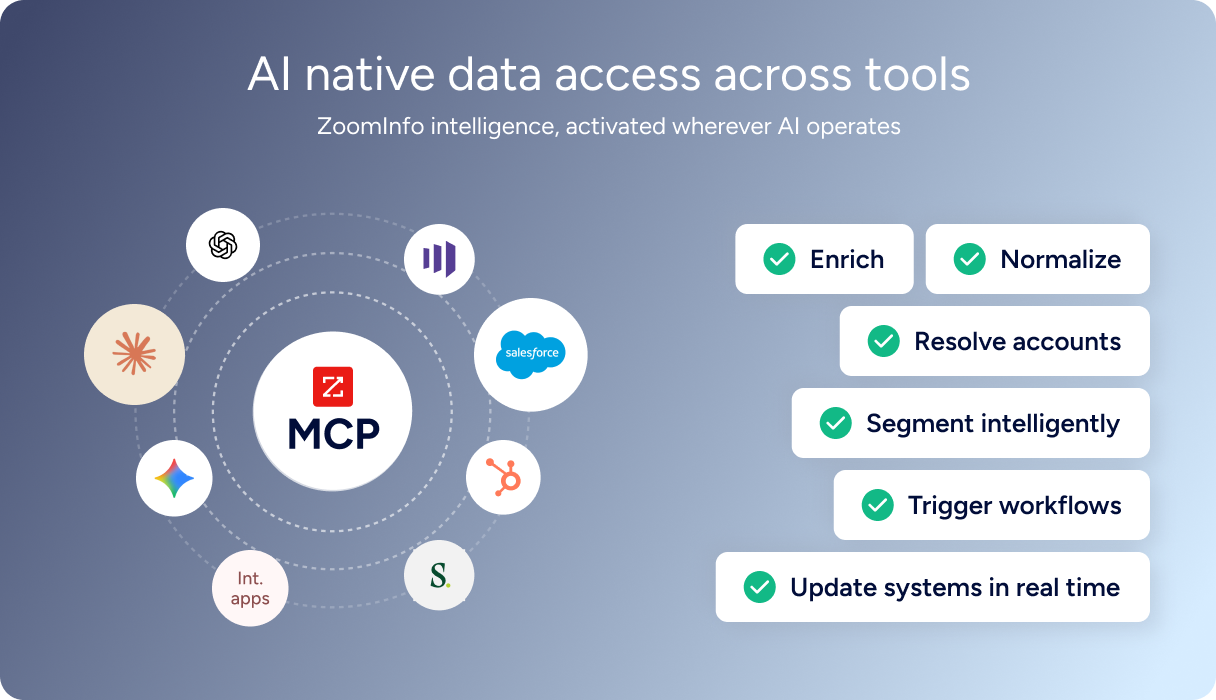
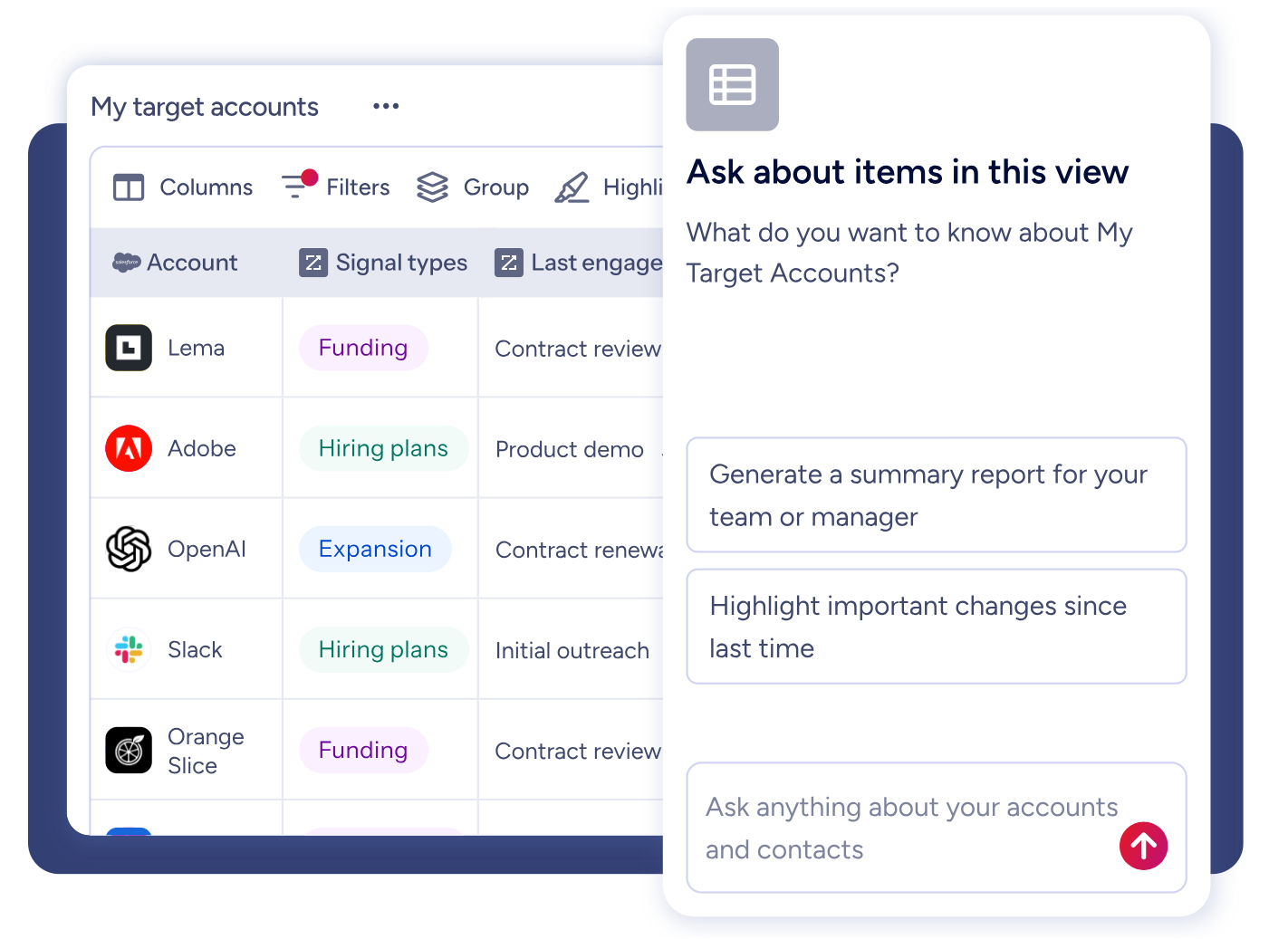
For developers building AI agents, ZoomInfo's MCP server at https://mcp.zoominfo.com/mcp exposes search, enrich, and account research as native tools for MCP-compatible assistants, currently supporting Claude and ChatGPT. A Docs MCP server lets AI development tools generate integration code against the API spec.
Source: ZoomInfo
Documentation lives at docs.zoominfo.com with an interactive API reference, OAuth recipes in five languages, and an llms.txt index for AI development tools. ZoomInfo does not publish official SDKs either, so both platforms require direct HTTP integration. For teams that do not need API-level access, the same intelligence is available through GTM Workspace for sellers and GTM Studio for marketers and RevOps.
Source: ZoomInfo
BDO Canada reported an 87% reduction in time spent updating internal data dashboards using the ZoomInfo API, with one analyst describing the integration as plug-and-play across any process. (ZoomInfo)
Final Verdict
The Salesforce API is one of the broadest CRM API surfaces available: 30+ APIs, OAuth 2.0 with five flows, event streaming via gRPC, bulk operations on millions of records, GraphQL for flexible queries, and a seasonal release cadence that has run for over two decades.
For developers building on Salesforce's platform or integrating with an existing Salesforce org, the API provides granular access to every object, field, and process in the system. Its limits are the limits of its scope (CRM data operations, not external intelligence) and its pricing model (license-dependent allocations, not flat-rate API access).
Choose the Salesforce API if your build reads, writes, queries, or reacts to records in a Salesforce org. CRM syncs, event-driven data pipelines, custom apps on the Salesforce Platform, bulk data migrations, and Agentforce AI agent workflows are all well-served. The free Developer Edition gives you 15,000 calls/day to evaluate every endpoint before committing.
Choose the ZoomInfo API if your build needs the B2B intelligence layer that CRM record access does not cover: discovering contacts who match your ICP, enriching leads with verified emails and direct dials, monitoring buyer intent signals, mapping org charts and technographics, or powering AI agents with external account research.
The search-then-enrich pattern (search is free, enrich consumes credits) and the MCP server extend the same data to any custom workflow or AI agent. Explore the ZoomInfo Enterprise API or start with the developer docs to see the endpoint surface directly.
A developer who needs both CRM data operations and external B2B intelligence should use both: Salesforce as the system of record, ZoomInfo as the intelligence layer that keeps it current and complete.
FAQ
Is the Salesforce API free?
The free Developer Edition includes 15,000 API calls per rolling 24-hour period, enough for development and testing. On paid editions, API access is bundled with user licenses rather than charged per call.
The lowest-cost paid tier with API access is the Starter Suite at $25/user/month. Enterprise Edition ($175/user/month) provides a base of 100,000 daily calls plus per-license allocations that scale with your seat count. There is no standalone API-only purchase option.
Does Salesforce have a GraphQL API?
Yes. Salesforce offers a GraphQL API that supports flexible field selection and relationship traversal on any standard or custom object. It is useful for integrations that need to fetch nested related records in a single call, reducing round trips compared to multiple REST API requests. The GraphQL API operates under the same daily API call limits as the REST API.
What is the Salesforce API rate limit?
Salesforce API limits are tied to edition and license count, not a per-second ceiling. The Developer Edition allows 15,000 calls per rolling 24-hour period. Professional and Enterprise editions start with a 100,000-call base, plus per-license allocations (1,000 to 5,000 additional calls per Salesforce license, 200 per Platform license).
Concurrent request limits apply to long-running calls: 5 concurrent for Developer Edition, 25 for production orgs. Individual REST and SOAP requests time out after 10 minutes.
Are there official Salesforce REST API SDKs?
Salesforce does not publish official language-specific client libraries for the core REST API (no official Python, Node.js, Java, or Go packages). It provides the Salesforce CLI for command-line operations, VS Code extensions for IDE development, and purpose-specific SDKs for Agentforce (Python) and mobile apps (iOS, Android).
Community-maintained wrappers such as simple-salesforce (Python) and jsforce (JavaScript) are widely used but carry no official Salesforce support.
Does the Salesforce API support webhooks?
Not in the traditional outbound HTTP POST model. Salesforce uses event-streaming protocols instead. The Pub/Sub API (gRPC/HTTP2) is the current recommendation for new integrations, supporting Platform Events and Change Data Capture with 72-hour event replay.
The legacy Streaming API (CometD) supports the same event types plus PushTopic and Generic events. External systems must subscribe to and consume event streams rather than receiving push notifications at an endpoint.
What does ZoomInfo's API add to a Salesforce build?
ZoomInfo's API adds the B2B intelligence layer that Salesforce's API does not provide.
Salesforce gives you CRUD access to the records in your org; ZoomInfo gives you the data to populate and enrich those records: search across 500M contacts and 100M companies, enrich with verified emails, direct dials, org charts, technographics, and employment history, detect buyer intent signals, and generate AI-powered account research and buying-committee recommendations.
The two APIs use different authentication models (Salesforce's org-specific OAuth vs. ZoomInfo's Okta-based OAuth with PKCE) and different pricing structures (license-bundled vs. consumption-based), but the integration pattern is straightforward: use ZoomInfo to discover and enrich, use Salesforce to store and act.
ZoomInfo's MCP server extends the same intelligence to AI-agent workflows that can then write results back to Salesforce through its REST API.
