
OnceHub, originally launched as ScheduleOnce in 2011, has grown from a booking tool into a multi-channel engagement platform serving 60,000+ professionals worldwide. It handles scheduling, lead qualification, routing, AI chatbots, and AI-powered phone agents, all under compliance credentials that few scheduling tools can match.
To write this OnceHub review, we analyzed the platform thoroughly. We believe it's the right choice if:
You operate in a regulated industry where HIPAA, FINRA, or SOC 2 compliance is non-negotiable for scheduling
You need to qualify and route inbound leads through multi-step screening before they reach a calendar
Your clients prefer phone calls and resist web-based booking forms
You manage multiple practitioners, services, or locations from a single scheduling hub
You need centralized control over booking templates across a growing team
However, OnceHub might not be the best choice if:
You need help identifying which prospects are worth scheduling with in the first place
You want to know which accounts are researching your category before sharing a booking link
You need verified contact data to reach decision-makers at target accounts
Your primary challenge is building pipeline, not managing the calendar once people arrive
In this case, you should consider pairing OnceHub with ZoomInfo: a B2B intelligence and GTM platform that handles the prospecting layer OnceHub doesn't cover. With 500M contacts, 200M+ verified business emails, and buying signals that reveal which accounts are in-market right now, ZoomInfo helps ensure the meetings on your OnceHub calendar are with qualified prospects rather than unvetted inbound traffic.
We've included a detailed look at ZoomInfo later in this review as the tool that completes the pipeline from prospecting to scheduled meeting. If you want to explore how B2B data and AI can improve the quality of every meeting you book, you can learn more about ZoomInfo here.
What is OnceHub?
Rami Goraly founded OnceHub in 2006, identifying scheduling as a problem every business needed to solve but few were solving well. The company launched publicly in 2011 as ScheduleOnce, focused on eliminating back-and-forth scheduling emails. In 2019, it rebranded to OnceHub to reflect an expanded product vision beyond appointment booking.
Today, OnceHub positions itself as an engagement platform for service-driven businesses. Its product suite spans two layers: customer-facing tools (Booking Pages, Booking Hubs, Phone Agents, Routing Forms, and Web-Based Chatbots) and an underlying engine handling scheduling logic, meeting distribution, contact management, and compliance.
The company is entirely bootstrapped with no venture capital. OnceHub frames this as a feature: "Every innovation we build is funded by and designed for you. Our roadmap serves your business needs, not exit strategies." (OnceHub About) With roughly 160 people distributed across the US, India, South Africa, Israel, and the UK, the company operates as a fully remote organization.
OnceHub's named verticals include financial advisors, coaches and therapists, academic services, and healthcare providers. These are industries where a missed meeting means a lost client and where compliance is a purchase prerequisite, not a nice-to-have.
OnceHub Pros & Cons
Pros | Cons |
|---|---|
Broad compliance stack (HIPAA, FINRA, SOC 2, PCI DSS Level 1, GDPR, FERPA) | Steep learning curve for initial setup and configuration |
AI Phone Agents extend scheduling to voice without scripting | Admin cannot reschedule appointments directly in the dashboard |
Multi-step routing forms qualify leads before they reach a calendar | Full AI chatbot and routing features require the $39-47/seat Engage tier |
Booking Hubs consolidate multiple practitioners into one entry point | Smaller public review base compared to top competitors |
Permanent free plan (1 user, 1 calendar, 1 booking link) | Cannot downgrade from a paid plan back to the free Basic tier |
Responsive customer support with personalized solutions | Phone support from OnceHub itself is limited |
Centralized template controls for brand and compliance consistency | SMS notifications require purchasing credits separately |
OnceHub Review: How It Works & Key Features
Booking Pages & Hubs: OnceHub turns scheduling links into branded, multi-service booking experiences.
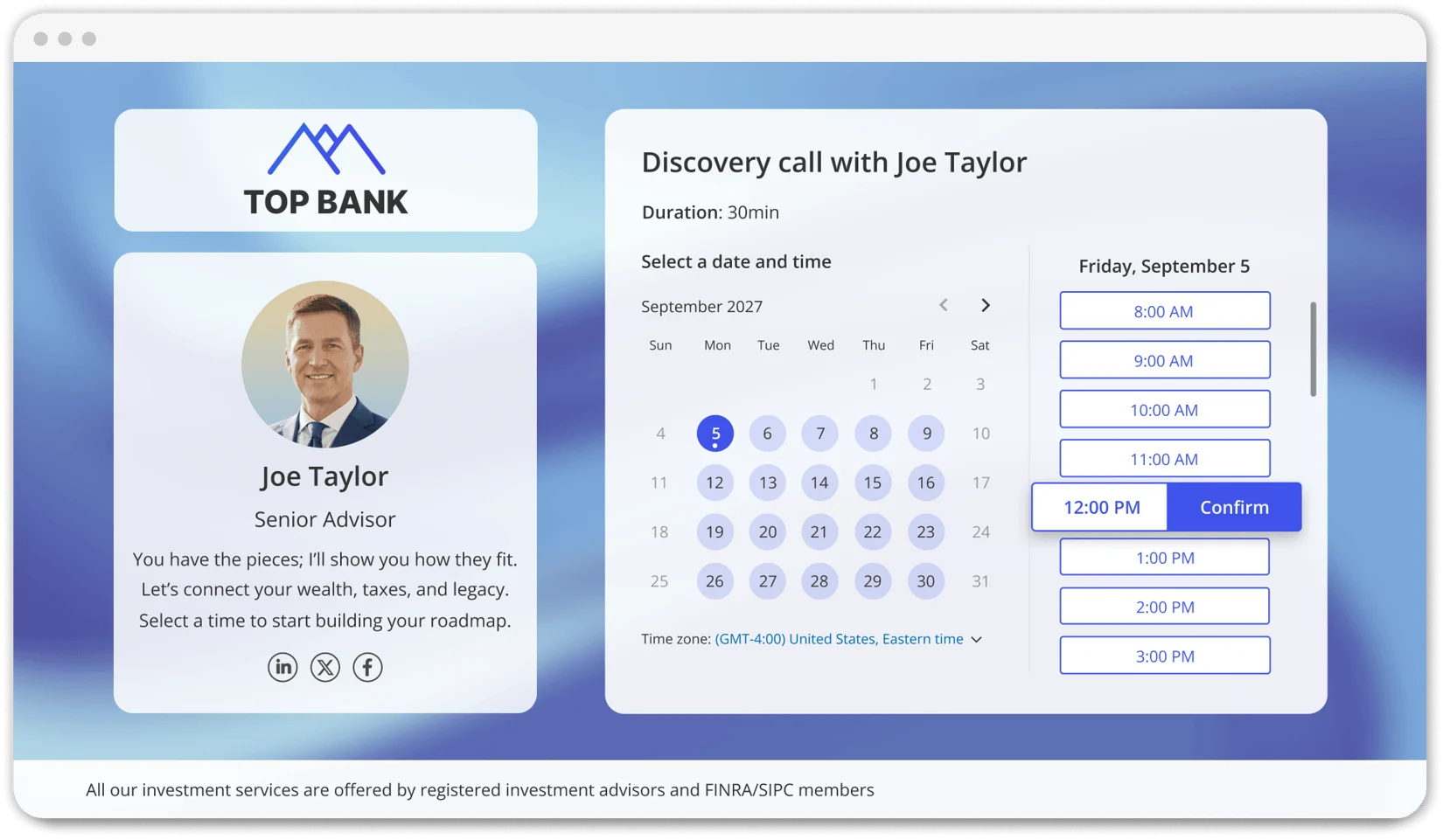
OnceHub's Booking Pages are configurable scheduling pages that display a host's real-time availability, pulled from connected calendars (Google Calendar, Microsoft 365, Exchange/Outlook, and iCloud). Guests see only open time slots, rendered in their automatically detected time zone.
Source: OnceHub
Each page can be customized through a WYSIWYG brand editor with logos, colors, imagery, messaging, and disclaimers. Booking forms collect structured intake data, and guests can upload documents or invite additional attendees. Upon confirmation, OnceHub generates video conferencing links, reserves physical rooms if configured, and sends branded confirmation emails and calendar invites. Automated reminders (email or SMS) fire on a schedule the host defines.
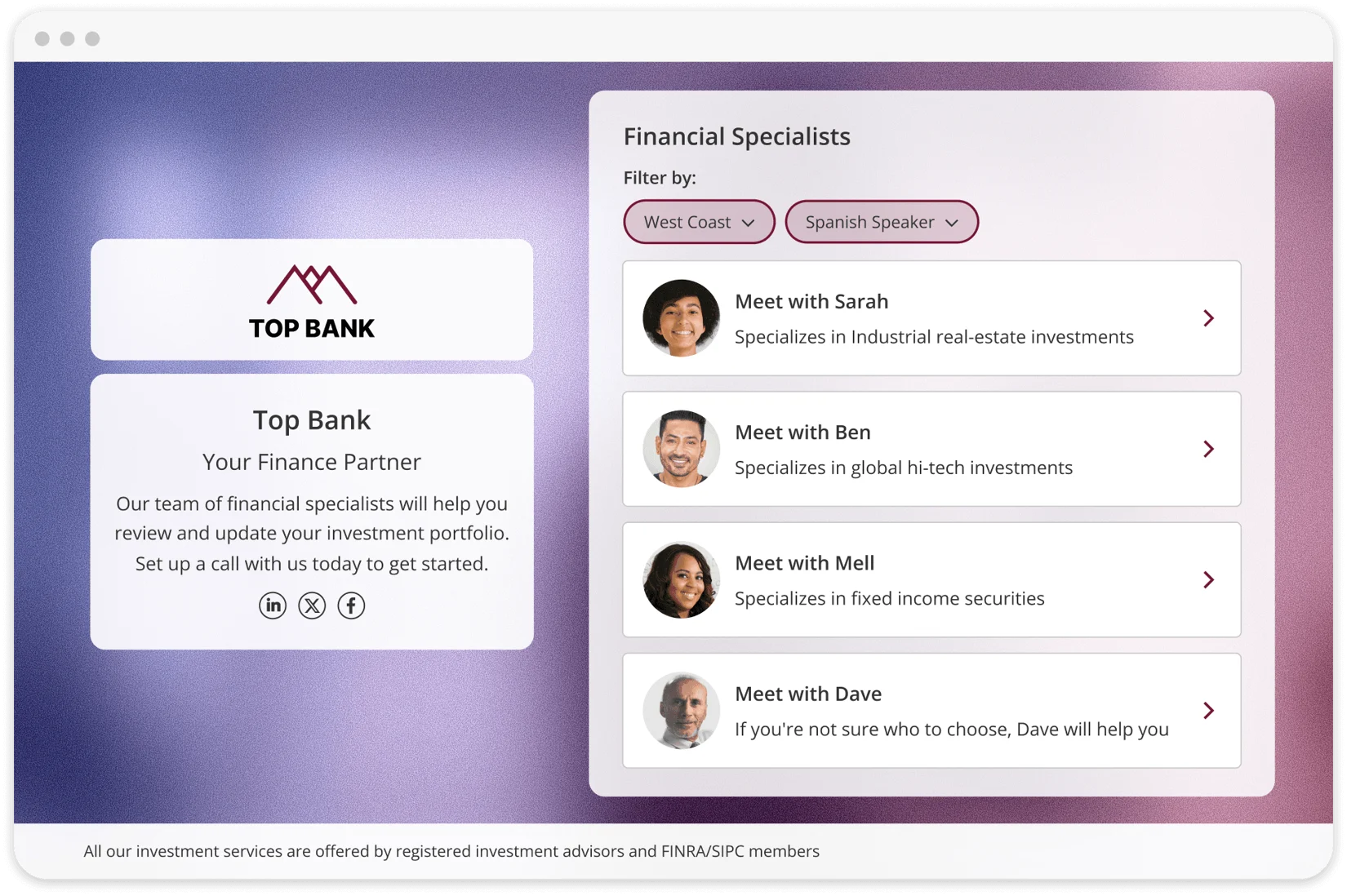
For organizations with multiple practitioners or services, Booking Hubs act as an aggregator. Administrators collect multiple Booking Calendars under one Hub URL and present them as a flat list or a multi-step decision flow using Categories. Dynamic attribute filtering narrows options based on guest input. A visitor selecting "Spanish-speaking" and "West Coast" sees only matching calendars, with no administrator intervention needed.
Source: OnceHub
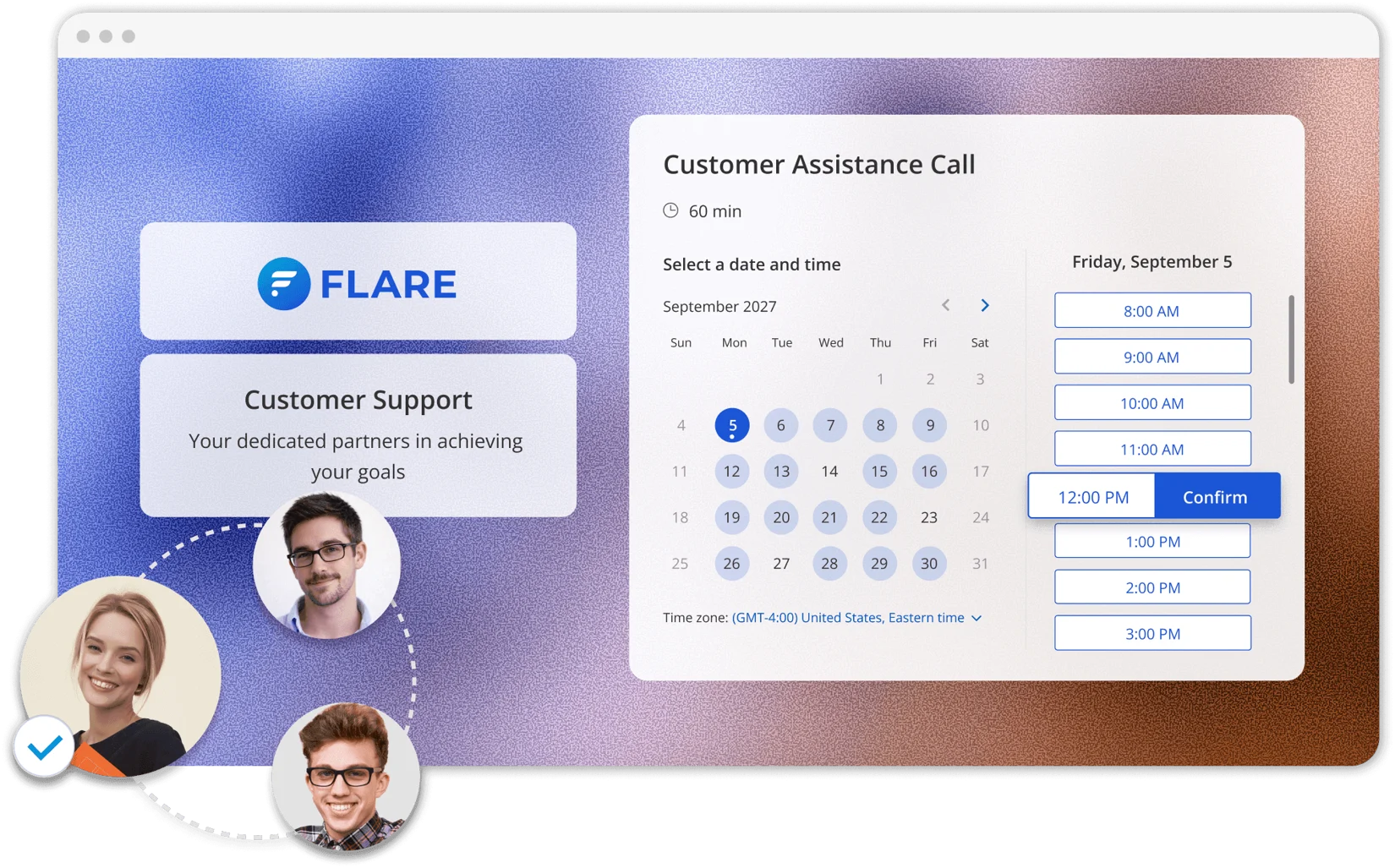
For teams, the Meeting Distribution engine offers round-robin distribution, availability pooling, and priority-based routing. Multi-host meetings are supported natively. Administrators can lock template sections (legal disclosures, branding, notification logic) using centralized governance controls, and changes to a master template cascade instantly to all linked calendars account-wide.
Source: OnceHub
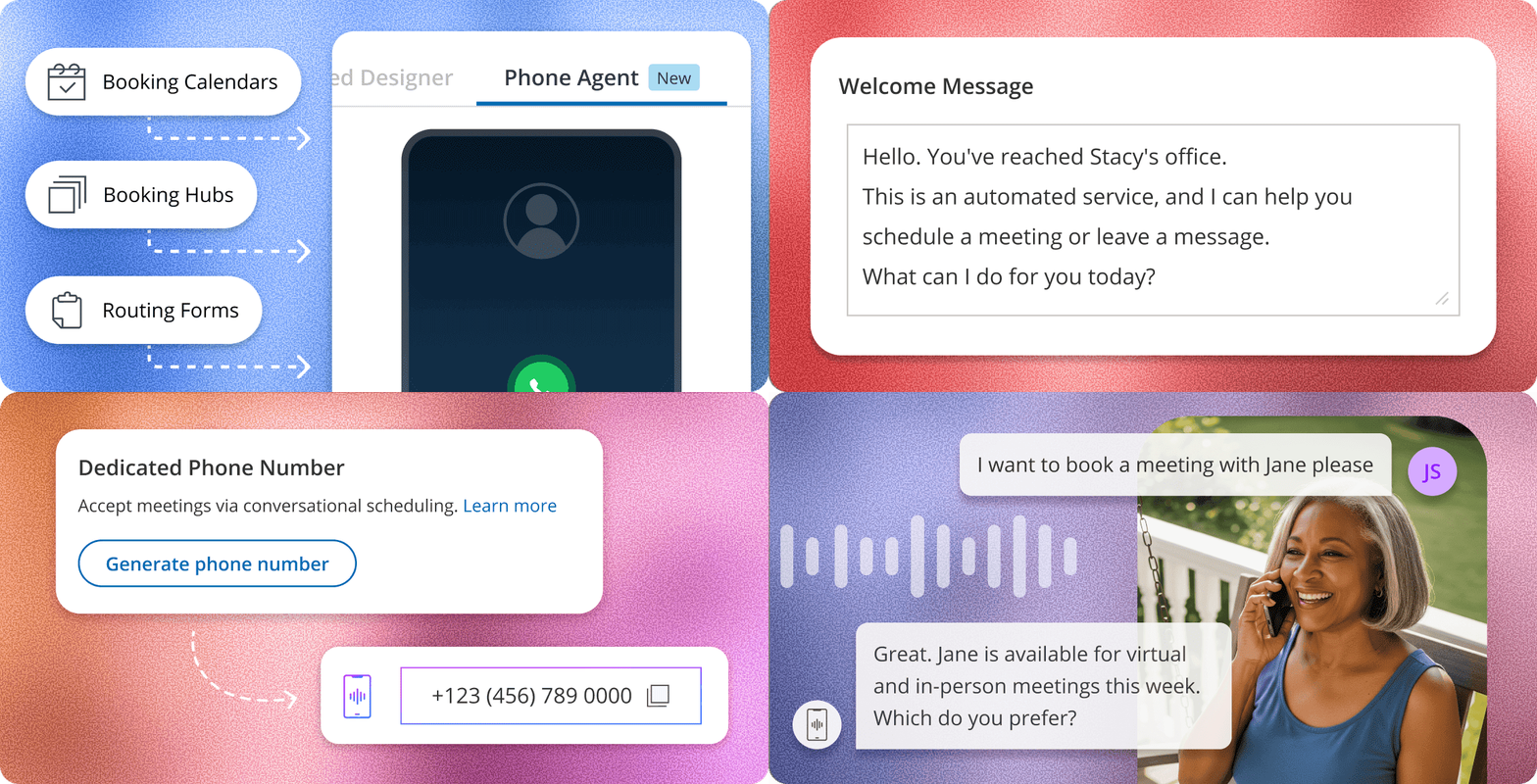
AI Phone Agents: OnceHub extends scheduling to inbound phone calls with no scripting required.
OnceHub's Phone Agents are its newest and most distinctive capability: an AI voice scheduling layer that handles inbound calls through conversation, screening, qualifying, routing, and booking callers without human involvement.
Setup follows a four-step process. The user activates the Phone Agent on an existing booking calendar or hub, customizes a greeting, generates a dedicated phone number, and deploys it via direct publication or call forwarding from an existing business line. The Phone Agent inherits all configured availability rules, meeting types, and booking form questions automatically. No separate configuration or AI training is required.
Source: OnceHub
The scheduling model is guest-centric: the caller states a preferred time and the system finds available slots, rather than reading out a rigid menu. When connected to a Booking Hub, a single phone number works as a directory for the entire business, guiding callers to the right team or service through natural conversation.
Every call produces a recording alongside an AI-generated summary highlighting booking outcomes and key caller messages. Voicemails arrive as written transcripts. For businesses with existing IVR infrastructure, Phone Agents can be embedded directly into the IVR menu, so callers selecting a scheduling option transfer to the agent automatically.
The feature addresses a real problem for healthcare providers, financial advisors, and other service businesses: phone-first clients who resist web booking. OnceHub runs the agent 24/7, so teams wake up to booked calendars from overnight calls rather than full voicemail boxes.
Routing Forms & Chatbots: OnceHub screens and qualifies visitors before they reach a calendar.
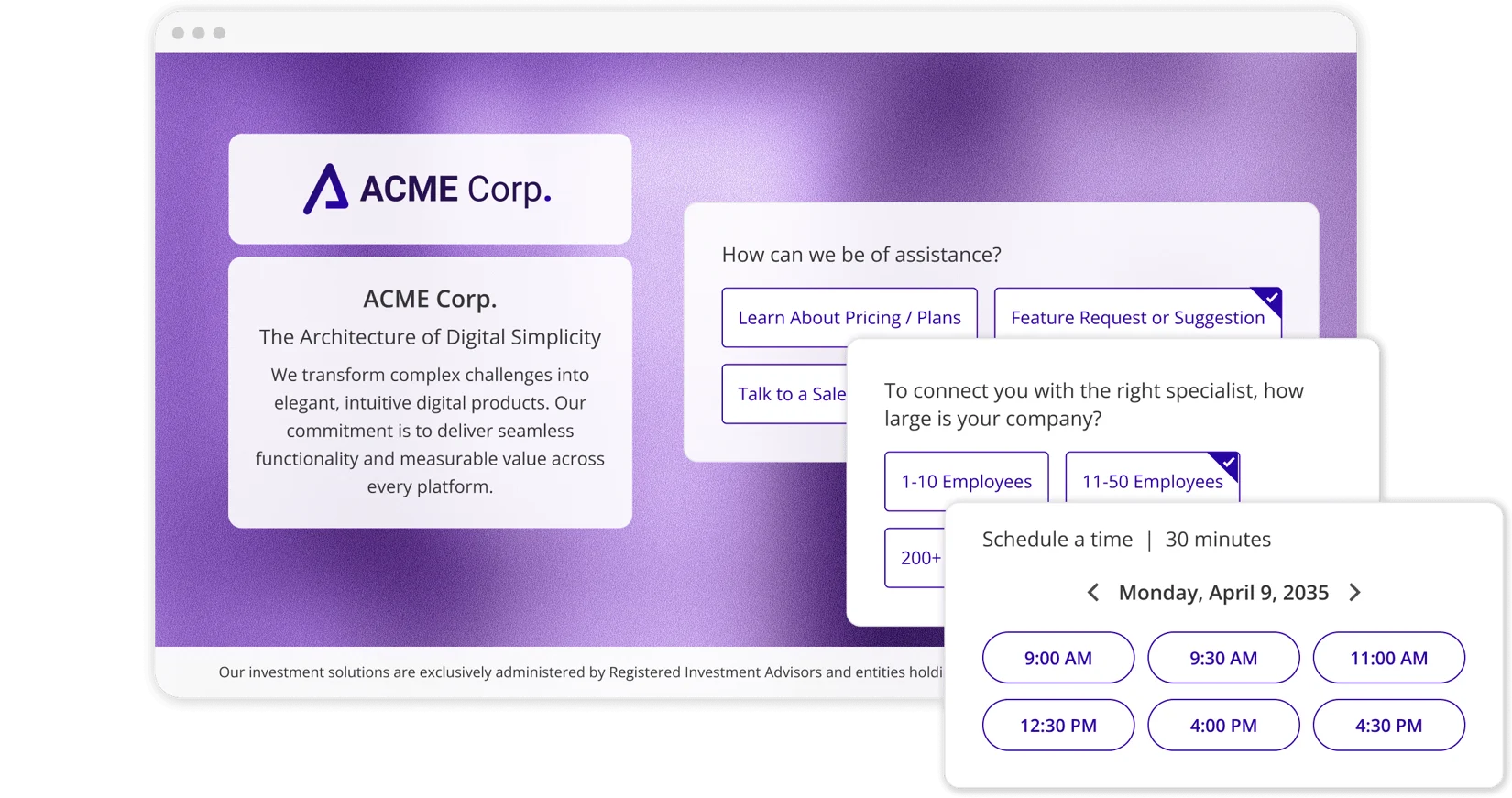
Routing Forms are OnceHub's qualification tool. They present questions one at a time in a Progressive Engagement Flow, collecting context step by step to reduce form fatigue. The system saves answers automatically as the guest types, capturing partial data even if the visitor drops off mid-form. Administrators build branching paths using a Visual Routing Map Editor, a no-code drag-and-drop environment. Rules can reference both current form answers and stored contact properties, so routing decisions draw on a returning prospect's full profile without asking redundant questions.
Source: OnceHub
The distinguishing feature is In-Form Scheduling. Visitors screen, qualify, and book a meeting without leaving the form. Most competitors treat data collection and scheduling as separate steps, adding delay and drop-off between form submission and booking.
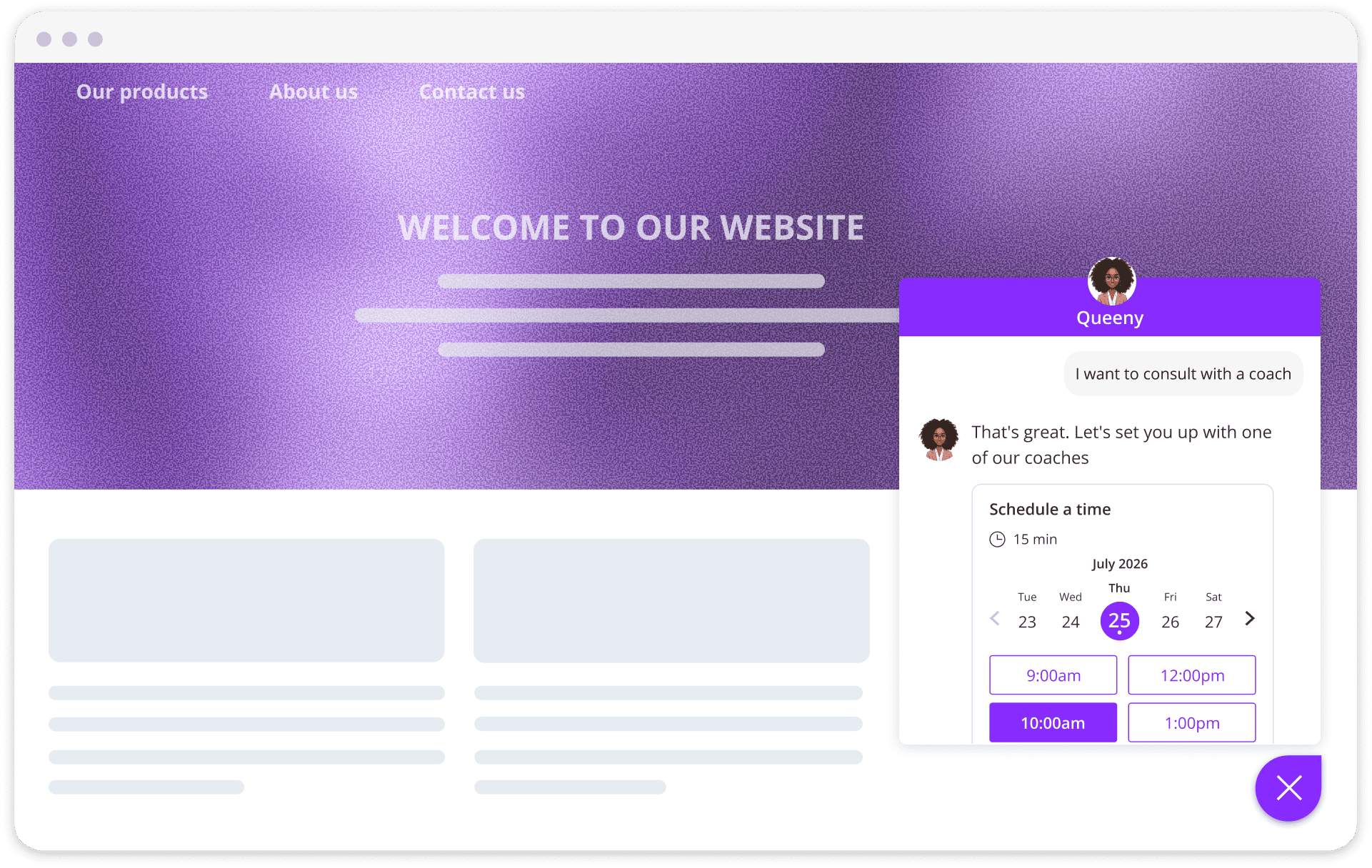
Web-Based Chatbots extend this model to conversational AI. Admins connect the chatbot to knowledge sources (websites via sitemap, web pages, text input, and uploaded PDFs) and define conversation guidelines. The chatbot provides on-brand responses 24/7, then routes visitors to the right outcome: scheduling a meeting, connecting with a live agent, or directing to a resource.
Source: OnceHub
A dual-layer routing system combines structured logic (button clicks, data values) with AI intent monitoring. Supervisors can monitor active AI conversations and take over a session instantly, inheriting the full transcript and context. This matters for teams running high-value sales or compliance-sensitive conversations.
Pricing Structure: OnceHub uses per-seat pricing across four tiers with both monthly and annual options.
OnceHub's pricing is organized into four self-serve tiers plus an optional compliance add-on and custom Enterprise pricing:
Basic (Free, permanent, 1 seat)
1 connected calendar and 1 booking link
WYSIWYG Booking Page Designer
Google, Microsoft 365, Exchange, and iCloud calendar sync
Zoom, Google Meet, Microsoft Teams, GoTo Meeting, and Webex integration
Knowledge Base support only (no live support)
Schedule ($12/seat/month, or $10/seat/month annual)
Unlimited booking links, calendars, and meetings
1 phone number with AI Phone Agent capabilities
Multi-host meetings and group sessions
CRM integrations (Salesforce, HubSpot), Stripe payments
APIs, webhooks, and 24/7 email and live chat support
Route ($23/seat/month, or $19/seat/month annual)
2 phone numbers
Unlimited routing forms and responses with in-form scheduling
Round-robin, availability, and priority-based distribution
Dynamic host selection, concurrent sessions, and room scheduling
Engage ($47/seat/month, or $39/seat/month annual)
3 phone numbers
Unlimited chatbots and conversations with AI-driven routing
Knowledge source integration and custom AI instructions
Live chat and instant meeting handoff
Security and Compliance Add-On ($6/seat/month, or $5/seat/month annual)
SSO, HIPAA BAA, corporate calendar, and guest communication compliance
Available on any paid plan; included in Enterprise
Enterprise (custom pricing, 30+ users)
Dedicated success manager, VIP support, custom agreements
Additional phone numbers cost $4/month each. SMS notifications require purchasing credits separately: 100 credits for $15, scaling to approximately $0.08/SMS at higher volumes. New accounts receive a 14-day free trial of paid features plus 25 complimentary SMS credits.
One notable restriction: once you upgrade to any paid plan, you cannot downgrade back to the free Basic tier.
Where OnceHub Falls Short
OnceHub manages the scheduling workflow well once prospects arrive, but several limitations surface for teams focused on pipeline growth. The platform is built for meeting management, not meeting generation.
Steep Learning Curve and Complex Setup. This is the most consistent criticism across review platforms. G2 reviewers (4.5 stars, 58 reviews) flag a learning curve when first setting up the software. Capterra users (4.6 stars, 135 reviews) describe the experience bluntly: "It was very confusing for my clients to configure their schedules" and "Setting everything up can be confusing." The power of multi-step routing flows, booking hubs, and chatbot configurations comes with a time investment that simpler tools avoid.
No Prospect Intelligence. OnceHub treats every inbound visitor the same. It doesn't know whether the person booking is a VP at an enterprise account or an intern doing preliminary research. The platform cannot prioritize meetings by account value, buying stage, or organizational fit. Routing forms can screen for basic criteria (company size, service type), but they can't assess whether an account is in-market or whether the contact holds purchasing authority.
Rescheduling Friction. A recurring complaint on Capterra is that administrators cannot reschedule an appointment directly inside the dashboard. Instead, they must send an email prompting the guest to take action. For high-volume environments like clinic front desks or financial advisory practices, this adds unnecessary steps to a routine task.
Reactive Engagement Model. OnceHub assumes prospects will come to you, whether through your booking page, chatbot, or phone line. It doesn't help you identify the accounts worth reaching out to, find verified contact information for decision-makers, or determine the best time to initiate outreach. For sales teams whose challenge is filling the top of the funnel rather than managing a full calendar, this gap leaves a critical part of the pipeline unaddressed.
Premium Pricing for Full Capabilities. The features that distinguish OnceHub from simpler scheduling tools (AI chatbots, routing forms with qualification logic, phone agents) are spread across the Route ($19-23/seat/month) and Engage ($39-47/seat/month) tiers. Adding the Security and Compliance add-on for HIPAA or FINRA requirements costs another $5-6/seat/month. For a 10-person team needing full capabilities with compliance, the monthly cost can exceed $500. G2 users note that the cost structure limits access to features that feel standard at mid-level plans.
These limitations reflect OnceHub's design focus: it manages and optimizes the scheduling experience, but it doesn't generate the pipeline that fills it. For teams that need both intelligence on who to meet and infrastructure to book those meetings, the gap points toward complementary tools that handle prospecting and prioritization.
The Perfect Complement to OnceHub: ZoomInfo
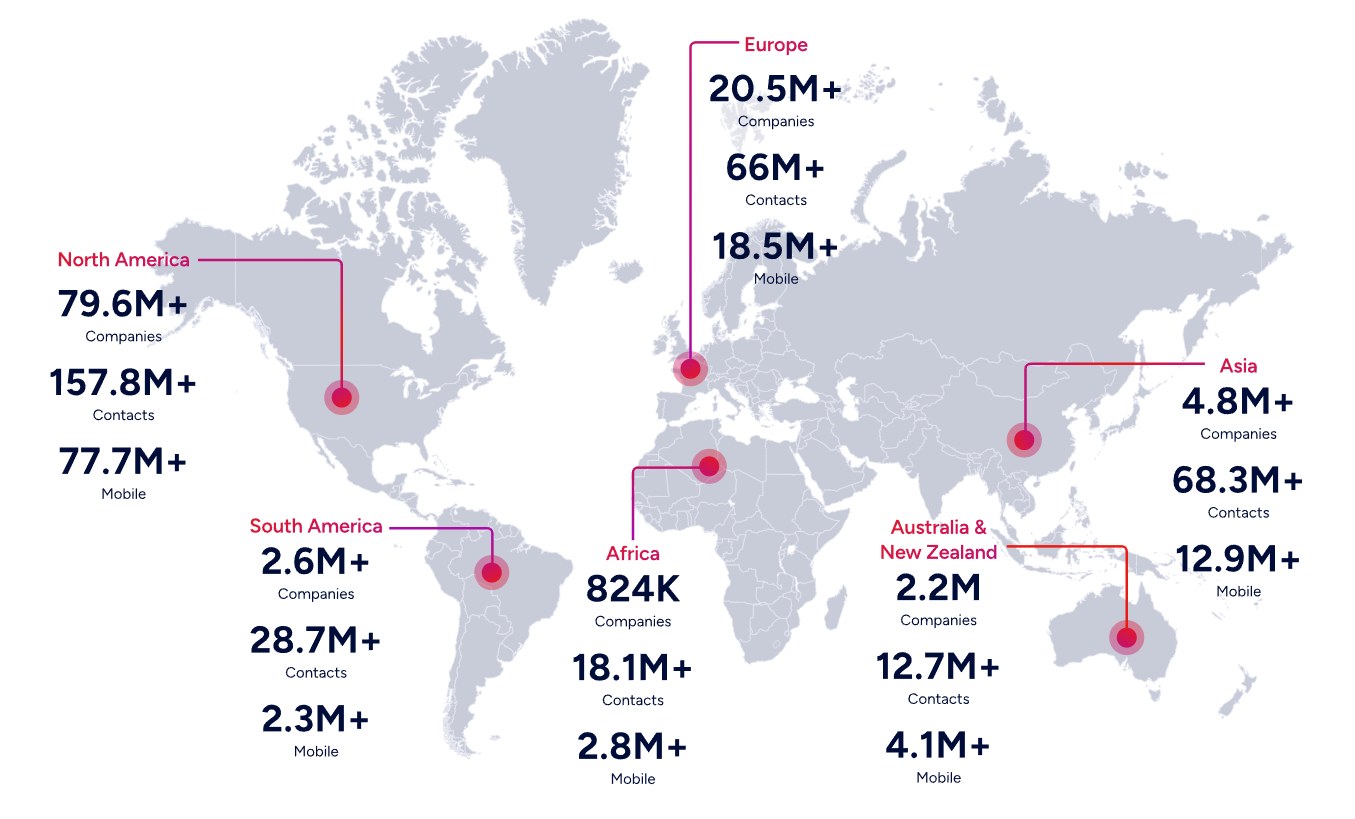
ZoomInfo is a B2B intelligence and GTM platform built on a broad data foundation: 500M contacts, 100M companies, 135M+ verified phone numbers, and 200M+ verified business emails. Where OnceHub manages what happens after a prospect decides to book, ZoomInfo handles the upstream questions: who should you be meeting with, when are they ready to talk, and what should you say to get them on the calendar?
The two platforms occupy different positions in the go-to-market workflow. OnceHub is the meeting infrastructure. ZoomInfo is the intelligence layer that fills that infrastructure with the right meetings.
B2B Data: Know Who Deserves a Meeting.
The foundation of effective scheduling isn't the booking page. It's knowing which prospects to send it to. ZoomInfo's data platform spans 500M contacts across 100M companies, verified through a multi-source pipeline backed by 300+ human researchers and achieving up to 95% accuracy on first-party data. In a Fortune 500 competitive RFP analyzing 25 million contacts across vendors, the independent consultant concluded that "no other competitor came even close."
For teams using OnceHub, this changes the pipeline math. Instead of sharing a generic booking link and hoping the right people find it, sales reps can use ZoomInfo to identify decision-makers at target accounts with 120M direct-dial phone numbers and 200M+ verified business email addresses. The outreach that leads to a booking rests on accurate contact data, so the direct dial actually rings and the email actually lands.
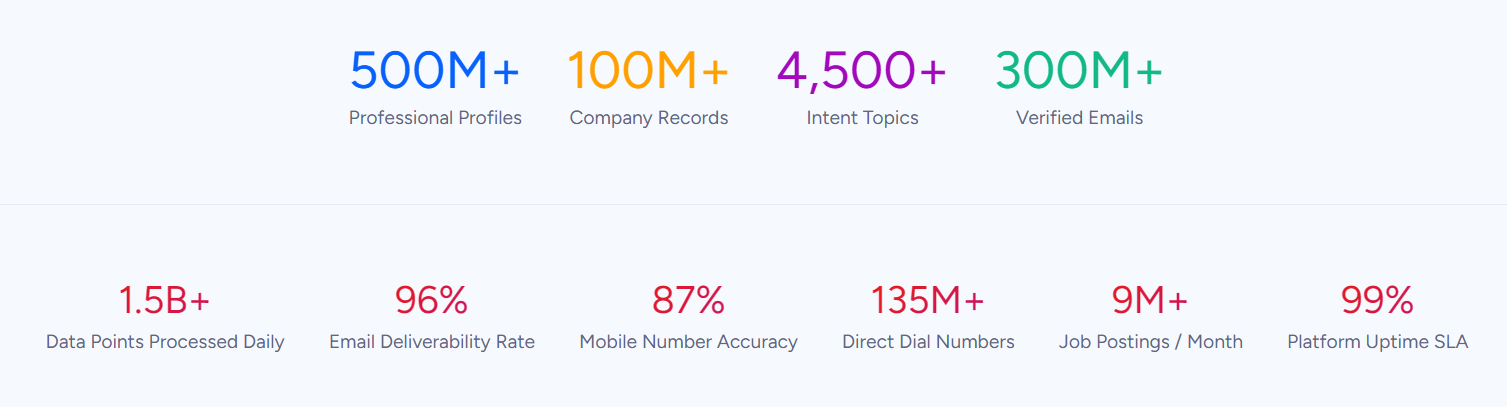
Beyond contacts, ZoomInfo provides 300+ company attributes for market segmentation, department org charts showing who reports to whom, and technographic profiles across 30,000+ technologies. This depth lets teams qualify accounts before sharing a booking link, a step that OnceHub's routing forms can only approximate with self-reported answers.
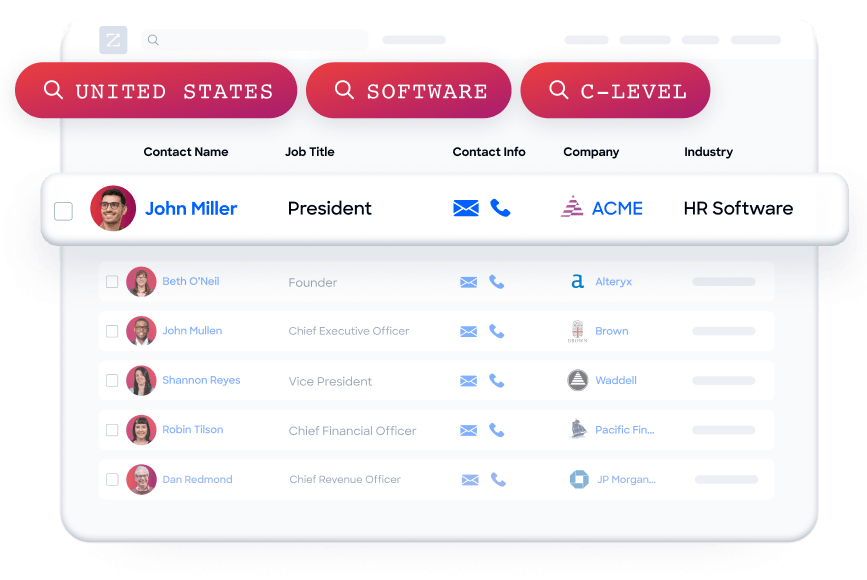
ZoomInfo gives us the information we need to execute. We don't have to go through and spend our time digging. It's already there, so we can be three steps ahead. (Vensure)
GTM Context Graph: Understand When Accounts Are Ready to Buy.
Knowing who to contact is necessary but not sufficient. Timing matters. ZoomInfo's GTM Context Graph combines its B2B data with customer CRM records, conversation transcripts, and behavioral signals into a single intelligence layer that processes 1.5B+ data points daily.
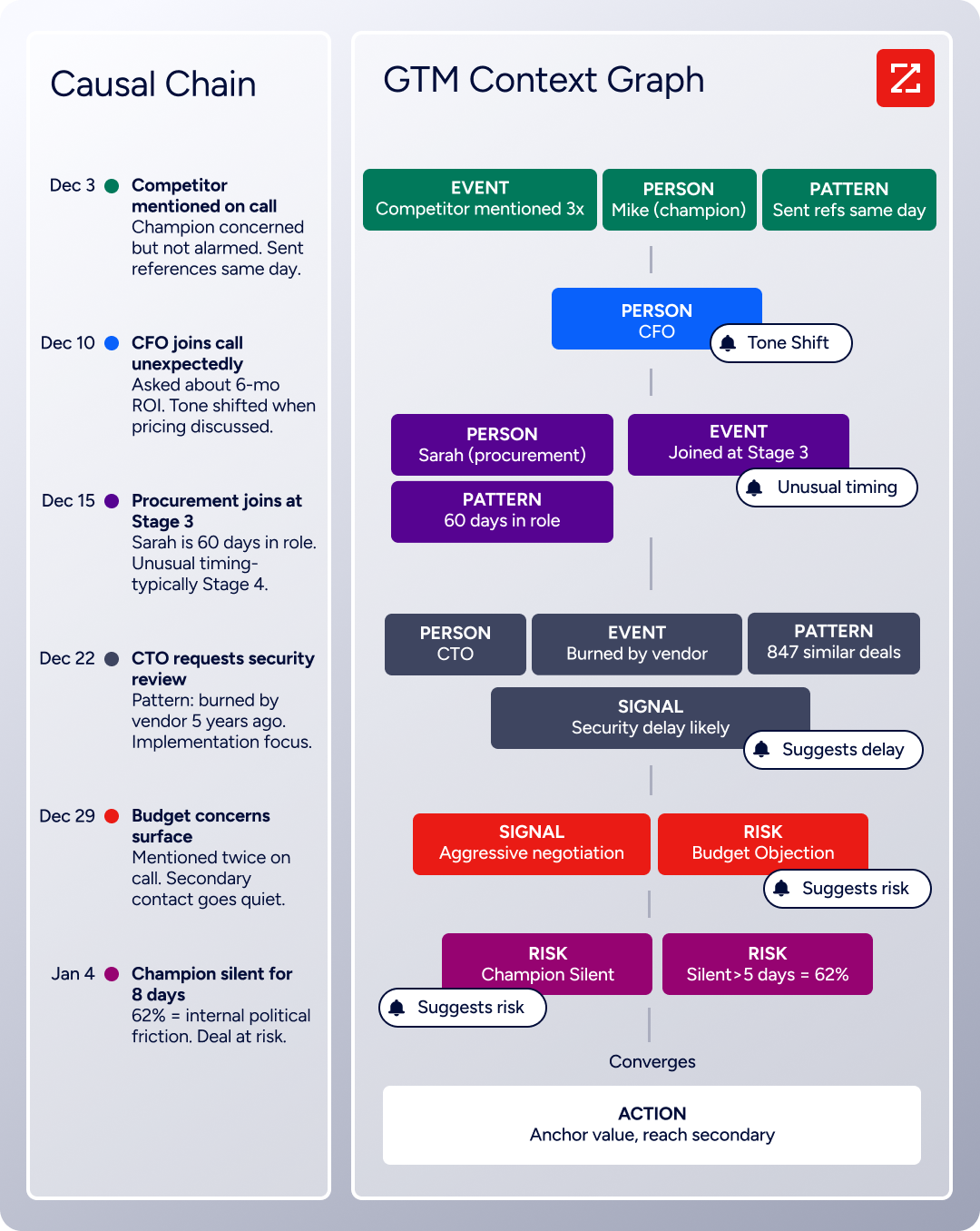
The practical impact for scheduling-focused teams: Buyer Intent data tracks signals from 210 million IP-to-Organization pairings, identifying companies researching your category. WebSights resolves anonymous website visitors to companies, so when a target account visits your pricing page, you know to share your OnceHub booking link immediately rather than waiting for them to find it themselves.
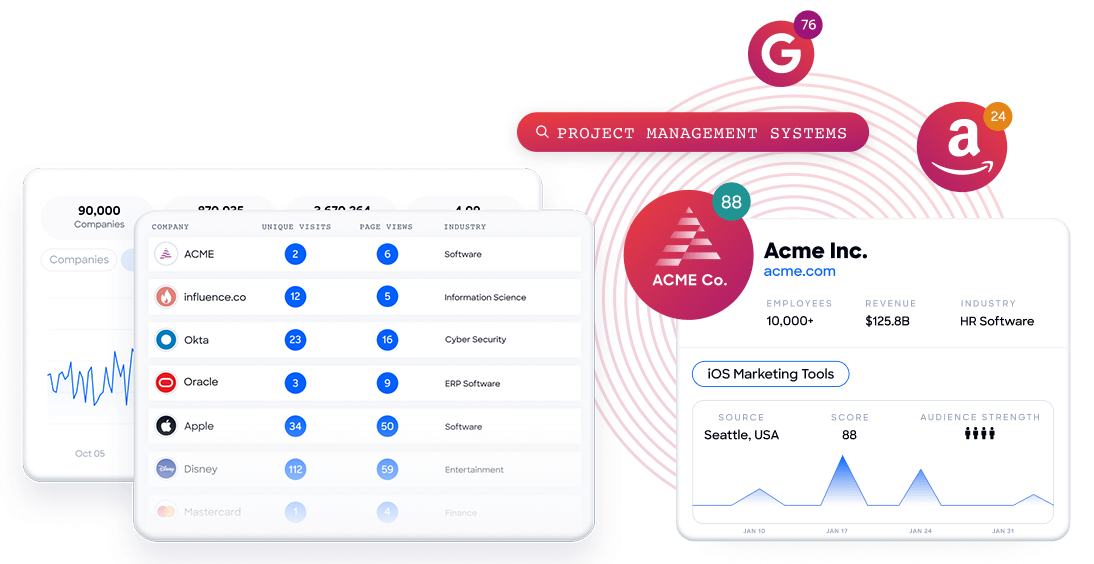
ZoomInfo's Guided Intent goes further by identifying the topics historically correlated with deal success for your specific business, not just generic keyword matches. The result is a prioritized list of accounts ready to take a meeting, not broad outreach that fills your calendar with low-value conversations.
That combination of our internal CRM data, external signals, and AI that's given all that context has helped us craft very specific account- and persona-based messages. And people have responded to them right away. (Seismic)
GTM Workspace & Access Options: From Intelligence to Scheduled Meeting.
ZoomInfo delivers its intelligence through three channels so teams can work wherever they're most productive. GTM Workspace gives sellers a single surface where prioritized accounts, AI-drafted outreach, and deal execution come together. GTM Studio gives marketers and RevOps teams a builder environment for designing and launching GTM plays. And for teams building custom workflows, APIs and MCP expose the same intelligence to any tool or AI agent.
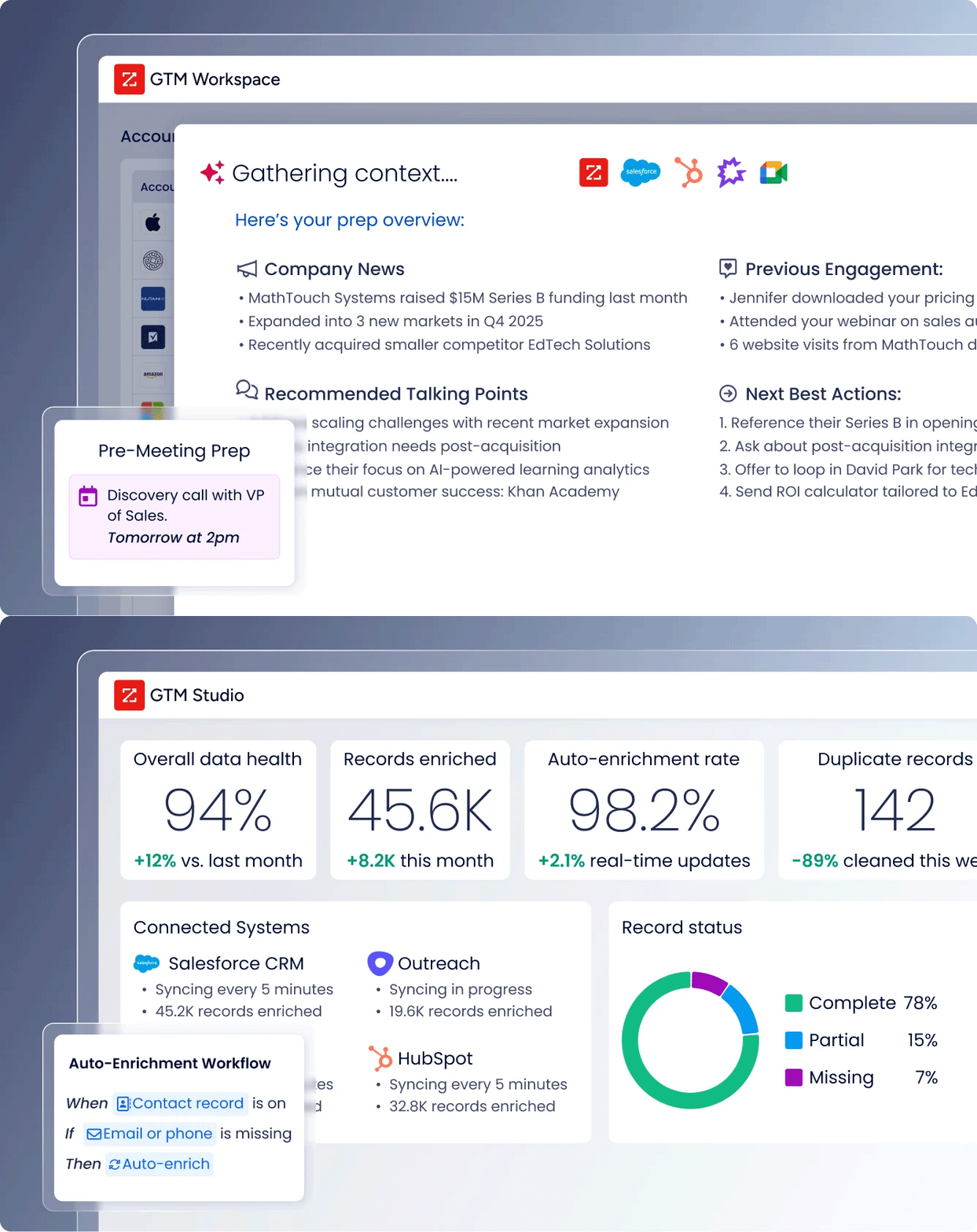
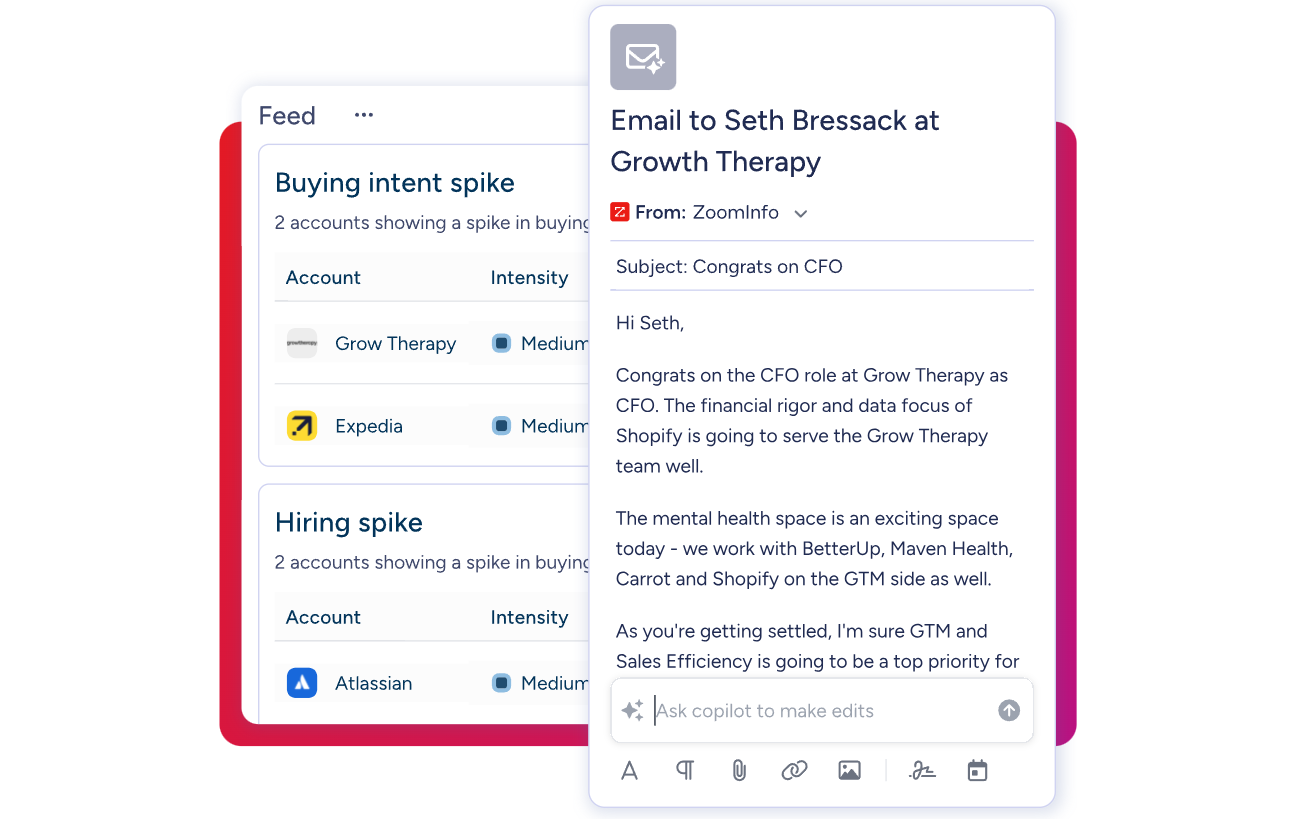
GTM Workspace is particularly relevant to the scheduling workflow. Sellers see an Action Feed with in-market buyers matched to target criteria and pre-drafted actions on every signal. When a target account shows buying intent, the rep can research the account, draft personalized outreach, and share an OnceHub booking link, all from one workspace without switching tools. Both platforms integrate with Salesforce and HubSpot, so CRM data stays synchronized between prospecting and scheduling.
ZoomInfo also offers a permanent free tier (ZoomInfo Lite) with access to its B2B database and 10 monthly export credits, enough for individuals or small teams to try the intelligence layer before committing to a paid plan.
The plug-and-play aspect of the API means I can integrate it very easily into any process and get information at a moment's notice. (BDO Canada)
OnceHub and ZoomInfo: Comparison Summary
Aspect | OnceHub | ZoomInfo |
|---|---|---|
Primary Focus | Meeting scheduling, qualification, and engagement | B2B intelligence, prospecting, and GTM execution |
Core Strength | Compliance-grade scheduling with multi-channel engagement | Prospect data and buying signals |
Workflow Position | Manages the booking once prospects are ready to schedule | Identifies and prioritizes prospects before outreach |
Data Layer | Contact data captured during booking (self-reported) | 500M contacts, 100M companies with verified data |
Lead Qualification | Routing forms and chatbot screening based on visitor input | Intent signals, company attributes, and AI-driven account scoring |
Compliance | HIPAA, FINRA, SOC 2, PCI DSS Level 1, GDPR, FERPA | ISO 27001, ISO 27701, SOC 2 Type II, TRUSTe GDPR/CCPA |
AI Capabilities | Phone Agents for voice scheduling, chatbots for web engagement | GTM Context Graph, AI-drafted outreach, AI account research |
CRM Integration | Salesforce, HubSpot, Keap | Salesforce, HubSpot, Microsoft Dynamics 365, and 120+ marketplace partners |
Free Tier | Permanent free plan (1 user, 1 calendar, 1 booking link) | ZoomInfo Lite (permanent, 10 monthly export credits) |
Paid Pricing | $10-47/seat/month (transparent, self-serve) | Custom-quoted, consumption-based pricing |
Best For | Managing and optimizing the meeting booking process | Finding the right people and timing for those meetings |
Final Verdict
OnceHub and ZoomInfo address different parts of the same problem: getting the right people into the right conversations at the right time.
OnceHub is a strong choice for service-driven businesses in regulated industries that need a compliance-grade scheduling platform with depth beyond simple booking links. Its combination of branded Booking Pages, multi-step Routing Forms, AI-powered Phone Agents, and Web-Based Chatbots creates an engagement layer that most scheduling tools can't match. Financial advisors, healthcare providers, coaches, and academic departments will find features built for their specific workflows, from HIPAA BAA coverage to multi-practitioner Booking Hubs. If your challenge is managing the scheduling experience for prospects who are already reaching out, OnceHub delivers the infrastructure to handle that at scale.
ZoomInfo is the intelligence layer that puts those scheduling capabilities to their highest use. It solves the problem OnceHub isn't designed to address: identifying which accounts to pursue, when they're ready to buy, and how to reach the right person. For sales and revenue teams, pairing ZoomInfo's prospecting intelligence with OnceHub's scheduling infrastructure means every meeting on the calendar has been sourced from verified data, timed to buying signals, and directed at a qualified decision-maker.
Get started with ZoomInfo here.
The strongest GTM workflows connect intelligence to action. ZoomInfo tells you who deserves a meeting and when to ask for one. OnceHub makes sure that meeting gets booked, confirmed, and managed without friction. Together, they close the gap between knowing your market and getting on the phone with it.
ScheduleOnce (OnceHub) FAQ
Is ScheduleOnce the same as OnceHub?
Yes. ScheduleOnce rebranded to OnceHub in 2019 to reflect the platform's expansion from a scheduling tool into a broader engagement platform. The core scheduling product is the same, but OnceHub now includes routing forms, AI chatbots, phone agents, and booking hubs under the unified brand. Existing ScheduleOnce URLs and resources have been migrated to the OnceHub domain.
Does OnceHub offer a free plan?
OnceHub provides a permanent free Basic plan with no credit card required. It includes one user, one connected calendar, and one booking link with access to the WYSIWYG Booking Page Designer and integrations with major calendar and video conferencing platforms. The free plan includes no live support, no CRM integrations, and no routing or chatbot features. New accounts also receive a 14-day free trial of paid features. Once you upgrade to any paid plan, you cannot downgrade back to the free Basic tier.
What compliance certifications does OnceHub hold?
OnceHub maintains one of the broadest compliance stacks among scheduling platforms: PCI DSS Level 1, SOC 2 Type 2, HIPAA (with BAA agreements available), GDPR, FINRA and SEC archiving, and FERPA for education. The Security and Compliance Add-On, available for $5-6 per seat per month on any paid plan, unlocks SSO, corporate calendar connection, and HIPAA BAA. Enterprise plans include the compliance add-on at no additional cost.
Can OnceHub handle phone-based scheduling?
Yes. OnceHub's AI Phone Agents answer inbound calls 24/7 and walk callers through booking conversationally, with no scripting or AI training required. The agent inherits all scheduling logic from the connected booking calendar or hub. OnceHub provisions a dedicated phone number instantly, and it can serve as a call forwarding destination on an existing business line. Phone Agents are available starting from the Schedule tier, with each plan including one to three phone numbers depending on the tier. Additional phone numbers cost $4 per month each.
How much does OnceHub cost for a team?
For a 10-person team on the Route plan with annual billing, the base cost is $190 per month. Adding the Security and Compliance Add-On for HIPAA or FINRA requirements brings the total to $240 per month. The Engage tier with full chatbot and AI capabilities would cost $390 per month for the same team, or $440 with the compliance add-on. SMS notifications are billed separately through a credit system starting at $0.15 per message and decreasing with volume.
Does OnceHub integrate with CRMs?
OnceHub integrates natively with Salesforce, HubSpot, and Keap. CRM integrations are available starting from the Schedule tier ($10-12 per seat per month) and are not included in the free plan. Additional integrations with platforms like Zoho CRM, Pipedrive, and others are available through Zapier, n8n, and Make. For teams using ZoomInfo alongside OnceHub, both platforms share Salesforce and HubSpot integrations, allowing prospect intelligence and scheduling data to stay synchronized through the CRM.
What is the difference between OnceHub's Route and Engage plans?
The Route plan adds lead qualification and distribution features: unlimited routing forms, round-robin and priority-based meeting distribution, dynamic host selection, concurrent sessions, and room scheduling. The Engage plan layers the full AI engine on top of Route: unlimited chatbots with natural language processing, knowledge source integration, custom AI instructions, AI-driven routing, and live chat with instant meeting handoffs. For teams that only need structured qualification before scheduling, Route is sufficient. Teams wanting AI-powered conversational engagement on their website need Engage.
Can OnceHub help me find new prospects?
No. OnceHub manages scheduling and engagement with people who have already found your business. It does not include prospect identification, a contact database, or buying signal detection. For finding and prioritizing new prospects, a complementary tool like ZoomInfo provides verified contact data for decision-makers, intent signals showing when accounts are researching, and AI-powered account prioritization. ZoomInfo handles the intelligence layer that determines who should be seeing your OnceHub booking page in the first place.
