
Scratchpad has built a loyal following among sales reps who dread updating Salesforce. It sits on top of Salesforce and replaces its native interface with a workspace where reps can update pipeline, take call notes, and review deals with less friction. Its AI field updates populate CRM data from call recordings, which helps explain its 4.8-star G2 rating from over 1,470 reviews.
We've analyzed Scratchpad in detail. It's a good choice if:
You run Salesforce and need reps to actually keep it updated
CRM data quality and methodology adoption (MEDDIC, MEDDPICC) are your primary concerns
You want AI to handle post-call Salesforce field updates
Your RevOps team needs CRM hygiene monitoring without engineering support
You have a desktop-first sales team of 15 or more reps
However, Scratchpad might not be the best choice if:
You're not on Salesforce (the platform doesn't support HubSpot, Dynamics, or Pipedrive)
You need B2B prospecting data, buyer intent signals, or account intelligence
Your sellers work primarily from mobile devices
You want one platform covering the full go-to-market workflow, from finding prospects to closing deals
You need marketing capabilities, multi-channel outreach, or cross-team coordination
In this case, consider ZoomInfo: an AI GTM platform that answers the questions Scratchpad cannot: who to contact, when to engage, and what to say. ZoomInfo's B2B database covers 500M contacts, 100M companies, 135M+ verified phone numbers, and 200M+ verified business emails. Its intelligence layer (the GTM Context Graph) reveals why deals move or stall, and its seller workspace (GTM Workspace) lets AI agents handle account research, outreach drafting, and CRM updates. It supports Salesforce, HubSpot, and Microsoft Dynamics.
We've included a detailed look at ZoomInfo later in this review for teams that need more than a Salesforce productivity layer. If you're ready to explore a GTM platform, you can start with ZoomInfo's free trial.
What is Scratchpad?
Source: Scratchpad
Scratchpad is a cloud-based workspace built for Salesforce sales teams. Founded in 2019 by Pouyan Salehi and Cyrus Karbassiyoon in San Mateo, California, the platform started from an observation: salespeople were keeping their working notes and deal tracking in scattered apps (Google Sheets, Evernote, Todoist) and then copying the bare minimum into Salesforce to satisfy their managers.
The result was duplicated work, incomplete CRM data, unreliable forecasts, and 1:1 meetings spent chasing data hygiene instead of coaching.
Rather than replace Salesforce, Scratchpad changes how reps interact with it. The platform provides a UI layer with spreadsheet-like views, kanban boards, and rich notes, plus AI call recording that drafts Salesforce field updates, a deal agent, and a CRM hygiene dashboard. All changes sync to Salesforce in real time, keeping it as the system of record.
Scratchpad targets two audiences: frontline sellers who want a fast daily workspace, and revenue leaders (RevOps, sales managers) who want CRM data quality and process compliance without change-management overhead.
The company has raised $49 million across three rounds, led by Craft Ventures and Accel, with David Sacks (founding COO of PayPal, founder of Yammer) joining the board at the Series A.
Scratchpad Pros & Cons
Pros | Cons |
|---|---|
- Fast Salesforce UI that reps actually use | - Salesforce-only; no HubSpot, Dynamics, or Pipedrive support |
- AI field updates save hours of manual CRM data entry | - No mobile app for on-the-go updates |
- Hygiene Monitor tracks CRM compliance with daily scoring | - Gong integration requires Team plan ($49/user/month) or higher |
- RevOps-controlled Prompt Builder for custom AI workflows | - Limited Salesforce object support beyond Opportunities |
- 4.8-star G2 rating from 1,470+ reviews | - No B2B contact data, intent signals, or prospecting capabilities |
- Works alongside Gong rather than replacing it | - No free plan or publicly documented free trial |
- Keyboard-driven Command shortcut accessible from any browser tab | - Occasional sync delays and Chrome extension conflicts reported |
Scratchpad Review: How It Works & Key Features
Interface & Workspace: Scratchpad replaces Salesforce's native interface with a workspace sellers actually use.
Scratchpad's workspace has three components: Views, Notes, and Command.
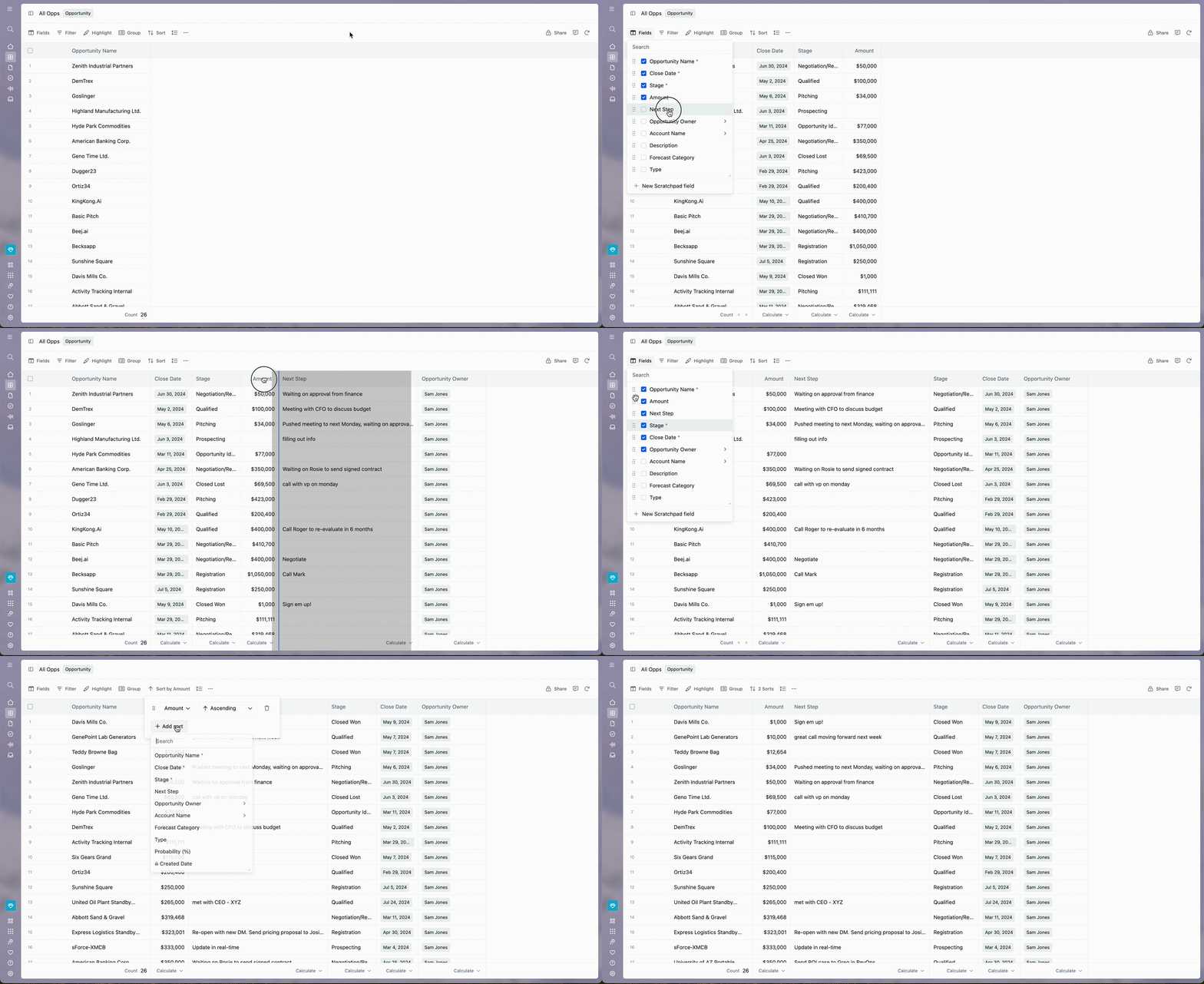
Views function as a configurable grid or kanban board that reads and writes directly to Salesforce. Reps can add fields, reorder columns, sort by multiple criteria, and apply filters with AND/OR logic. A "Current User" filter lets managers build one shared pipeline view that shows different records depending on who views it.
Source: Scratchpad
Change Highlights color-code fields that changed within a selected time window, so managers can spot deal movement during pipeline reviews. It also supports bulk updates and CSV export.
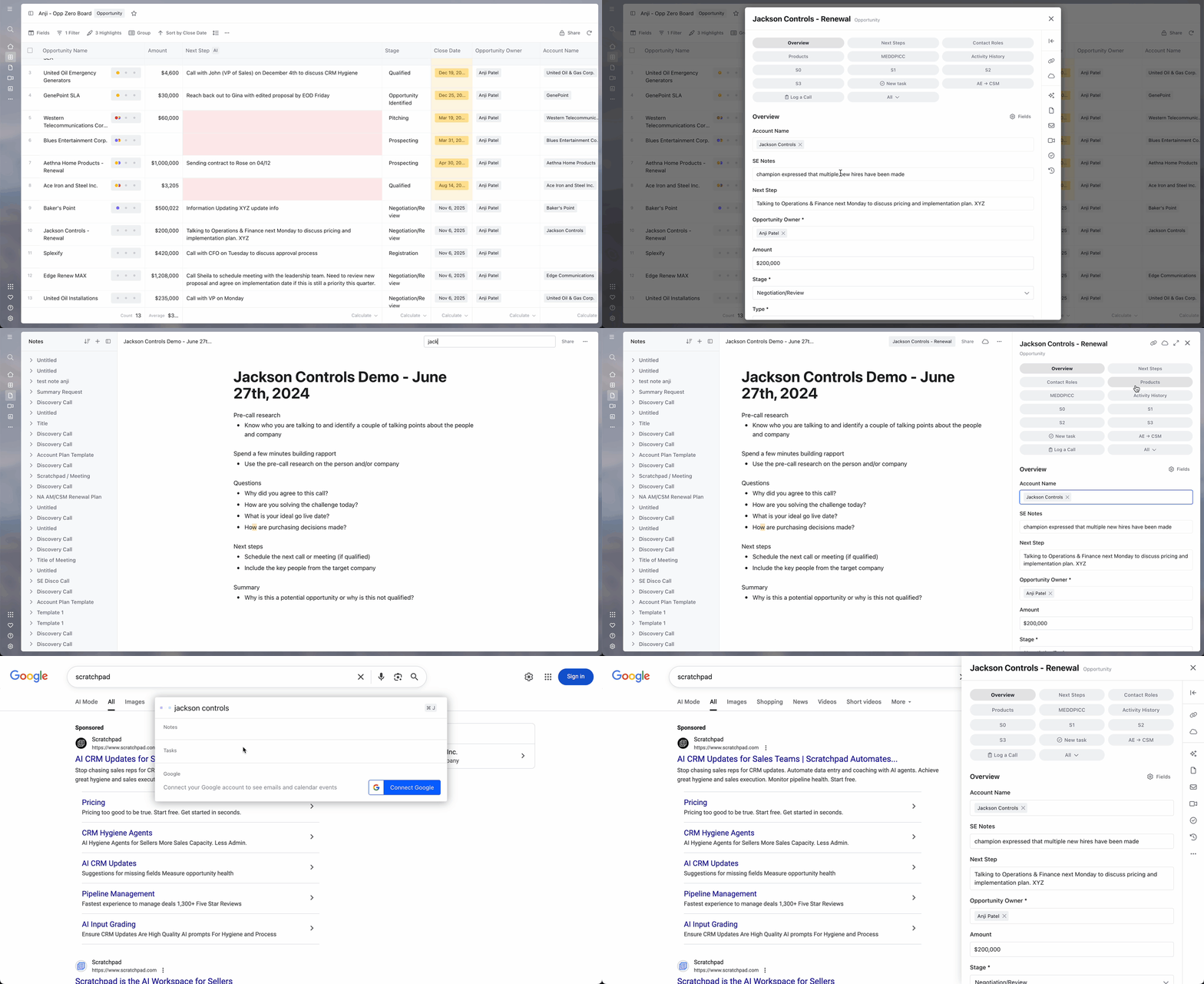
Clicking into a row opens the Expanded View, where Tiles show only the fields relevant to a specific moment: pre-call prep, stage advancement, lead conversion, or team handoff. Tile types include Overview, Lead Conversion, Creation, Related List, Methodology/Process, Stage Progression, and Team Handoff. Tiles can be personal, shared by role, or organization-wide.
Source: Scratchpad
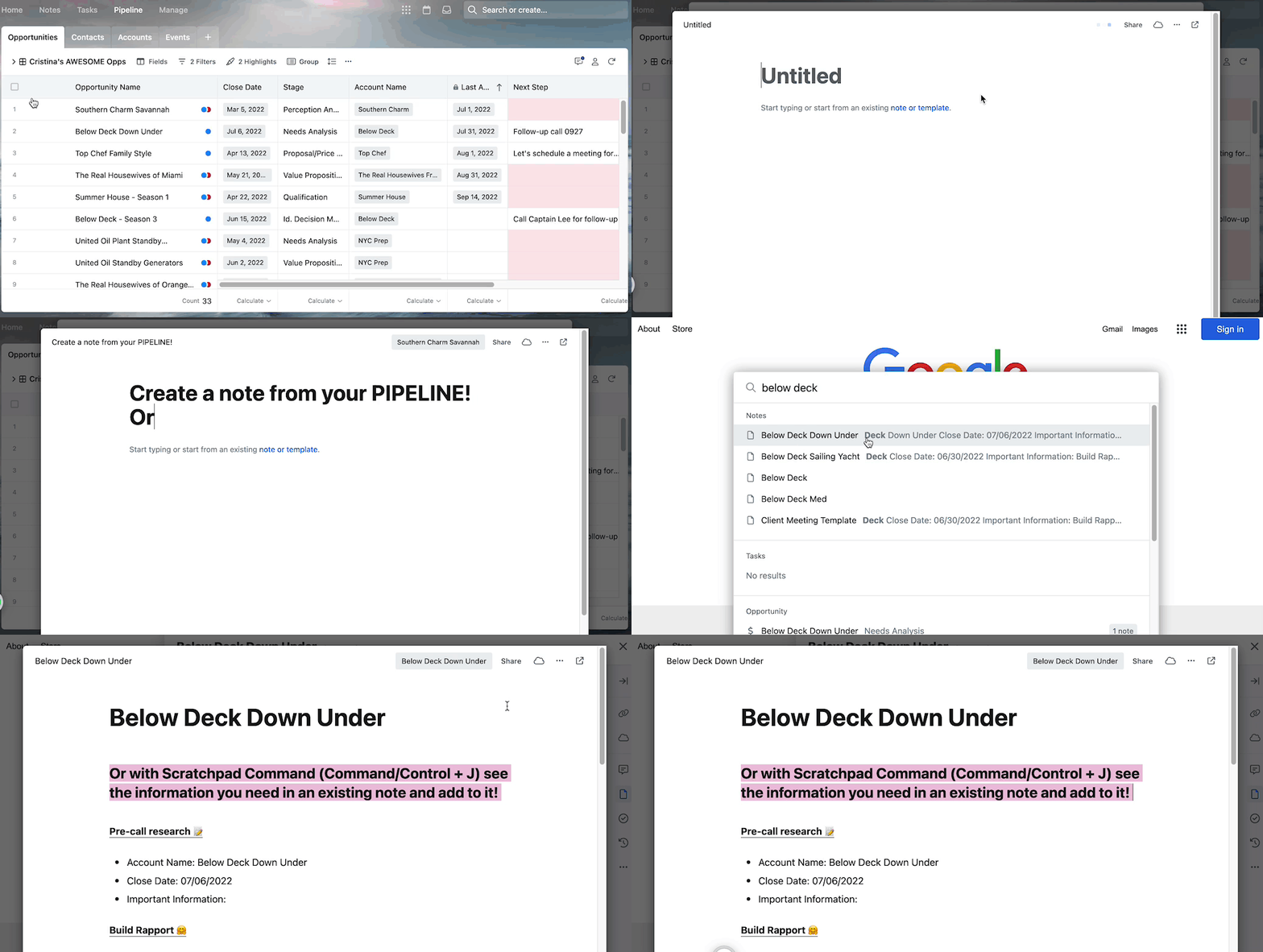
Notes use a rich-text editor with headings, lists, checkboxes, hyperlinks, and inline images. A note can link to multiple Salesforce records and sync to Salesforce through its native Notes field. Note templates (discovery calls, MEDDIC, account planning) can be personal, role-based, or organization-wide. Notes also support handwritten input via tablet and stylus.
Source: Scratchpad
Reps activate Command via CMD+J / CTRL+J from any browser tab. From Gmail, LinkedIn, Slack, or Google Calendar, they can search for any Salesforce record, edit fields inline, and create new Opportunities or Tasks without opening Salesforce.
Call Recorder & AI Field Updates: Scratchpad captures sales conversations and turns them into Salesforce data.
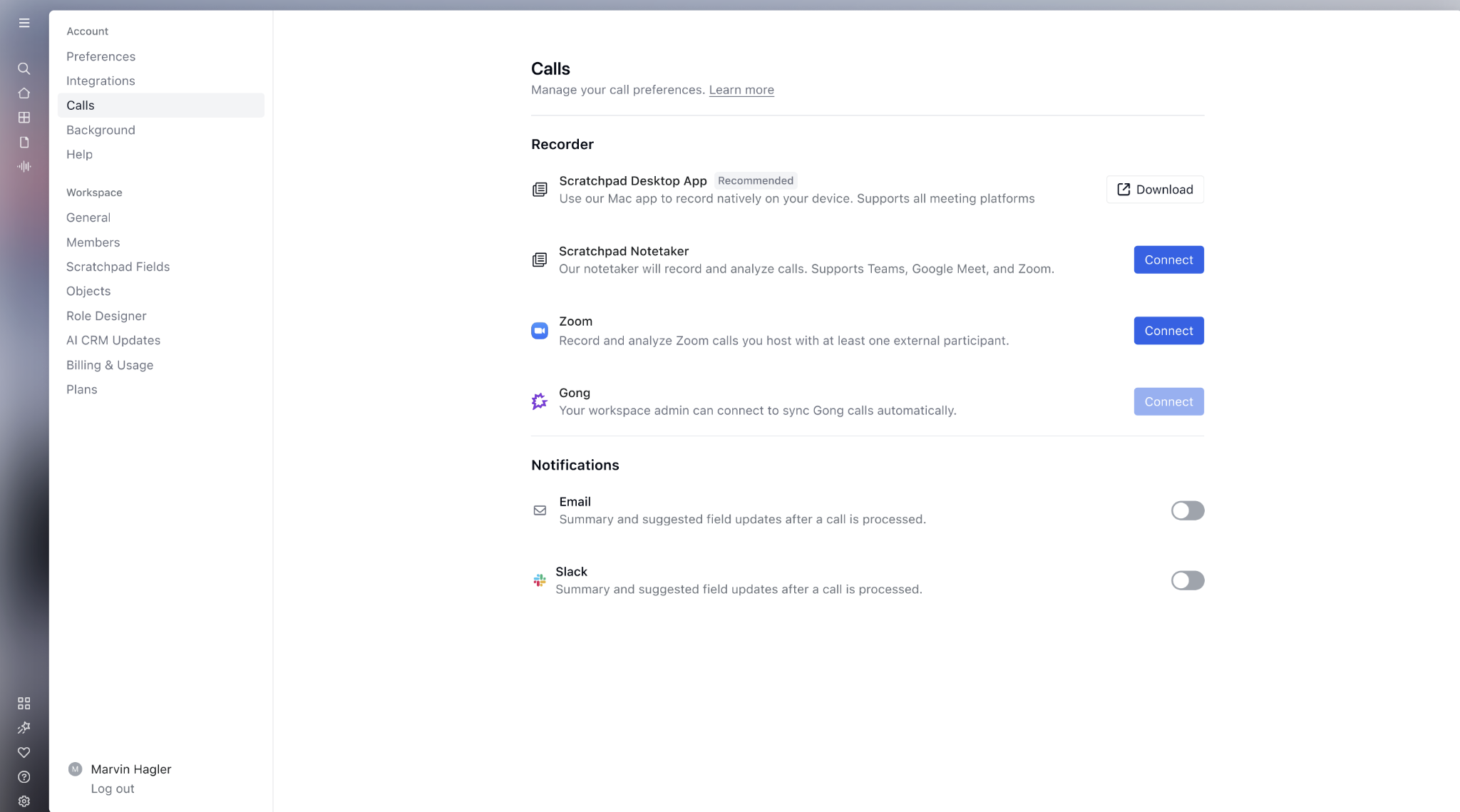
The call recording suite offers four capture methods: a Desktop Notetaker (Mac app capturing mic and system audio without a bot), a Notetaker Bot that auto-joins Zoom, Google Meet, and Teams meetings, a native Zoom cloud recording integration, and a Gong integration that syncs recorded calls into Scratchpad (available on Team and Enterprise plans).
Source: Scratchpad
After a call ends, AI prompts analyze the transcript and draft Salesforce field updates. Admins configure prompts for specific fields, defining what the AI looks for, the output format, and whether updates apply automatically or queue for rep review. Supported field types include text, date, numeric, picklist, and multi-picklist.
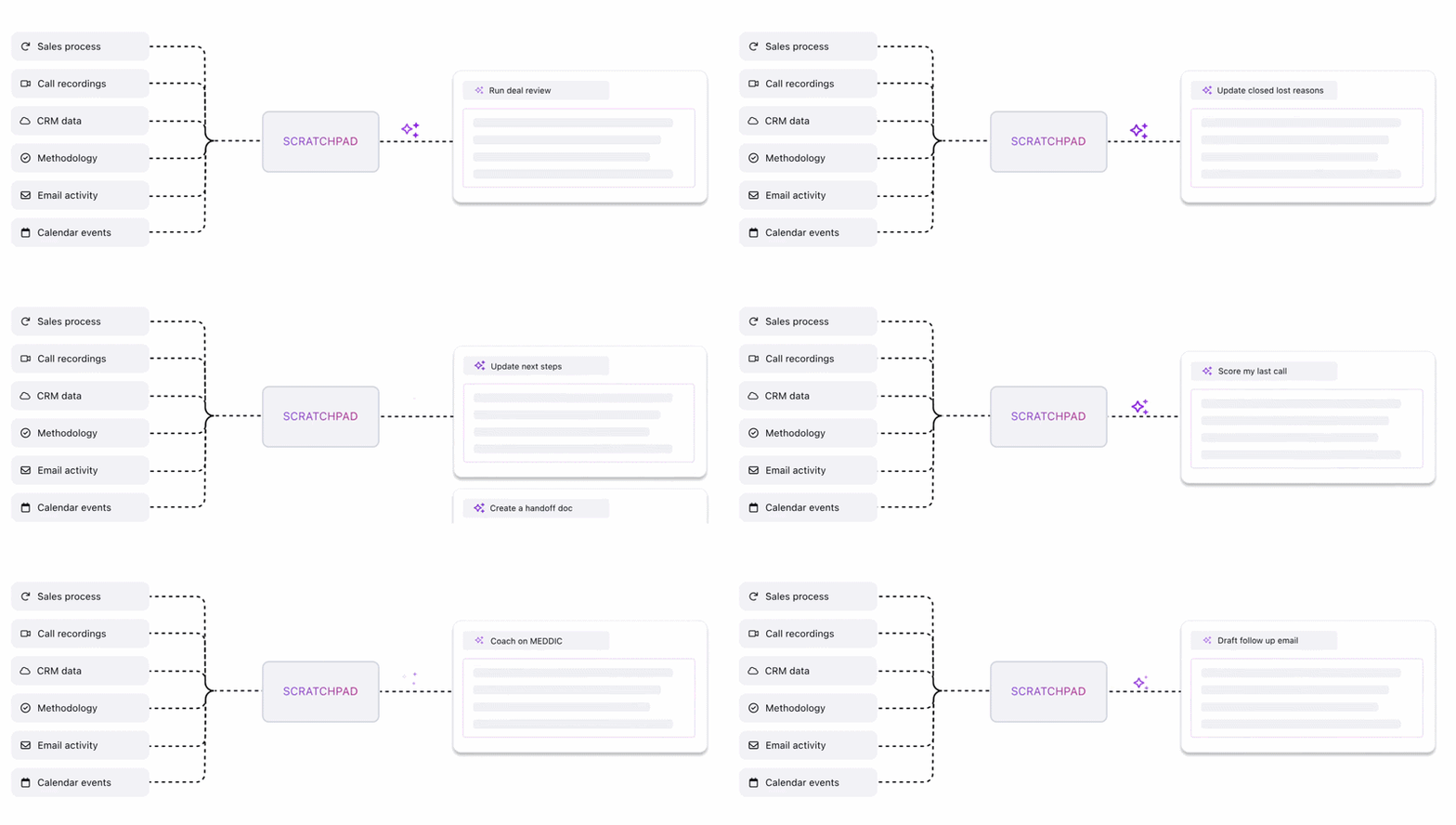
AI prompts can draw from multiple sources (calls, emails, CRM data, and notes), and suggestions appear via a sparkle icon next to any field in a Grid View, within the call review panel, or in a Suggested Updates sidebar.
An AI Backfill feature lets admins enrich historical Salesforce records by applying AI prompts to months of past call recordings. This is useful when rolling out a new methodology across an existing pipeline without asking reps to review past opportunities manually.
Deal & Account Agent: Scratchpad's Ask AI gives reps an assistant with deal context for any record.
The Deal & Account Agent, accessed via an "Ask AI" button on any Opportunity, Account, Contact, or Lead record, draws on Salesforce fields, rep notes, call transcripts, and Gmail conversations to answer questions about a deal. Reps can ask about risks, identify the economic buyer, or request a summary. Answers generate in real time.

Source: Scratchpad
Custom Prompts add structured, repeatable workflows on top of this. RevOps teams build prompts with specific output formats, scoring rubrics, and data source instructions, then deploy them across the team. Saved prompts are reusable in one click, with the most-used pinned for quick access. Use cases include:
One-click deal assessments against MEDDPICC, MEDDIC, BANT, or SPICED frameworks
Instant call coaching the moment a call ends
Post-call follow-up email drafting from actual call context
One-click executive summaries for internal stakeholders
Opportunity qualification mapping deals to strategic quadrants
Uploaded files (playbooks, contracts, mutual action plans) can be attached at the workspace, record, or conversation level to give the agent more context. Supported formats include txt, md, pdf, xlsx, docx, and pptx. Responses can be saved as notes, shared via read-only links, or used to update Salesforce fields.
Hygiene Monitor & Automations: Scratchpad turns CRM process compliance into a visible, scored metric.
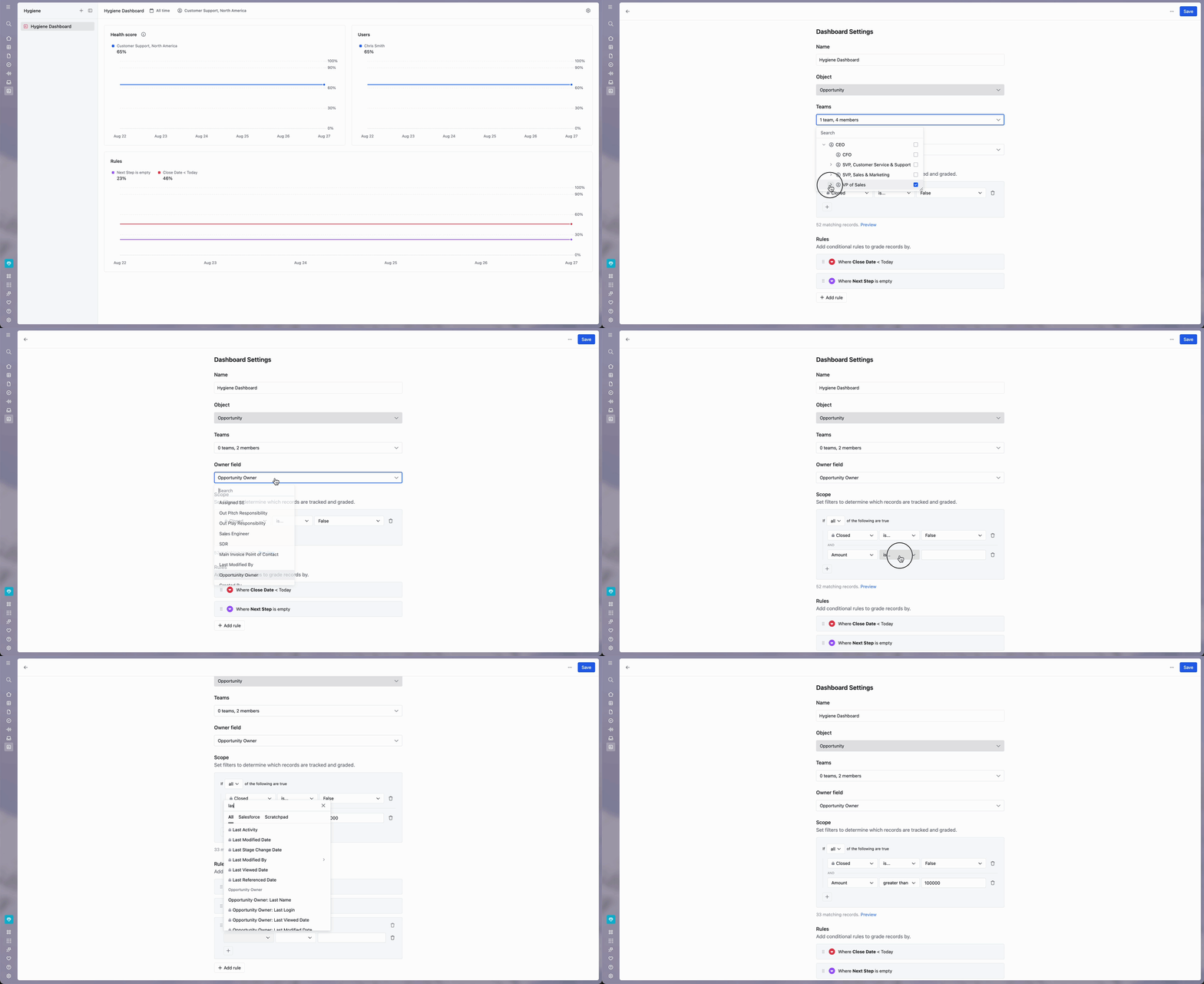
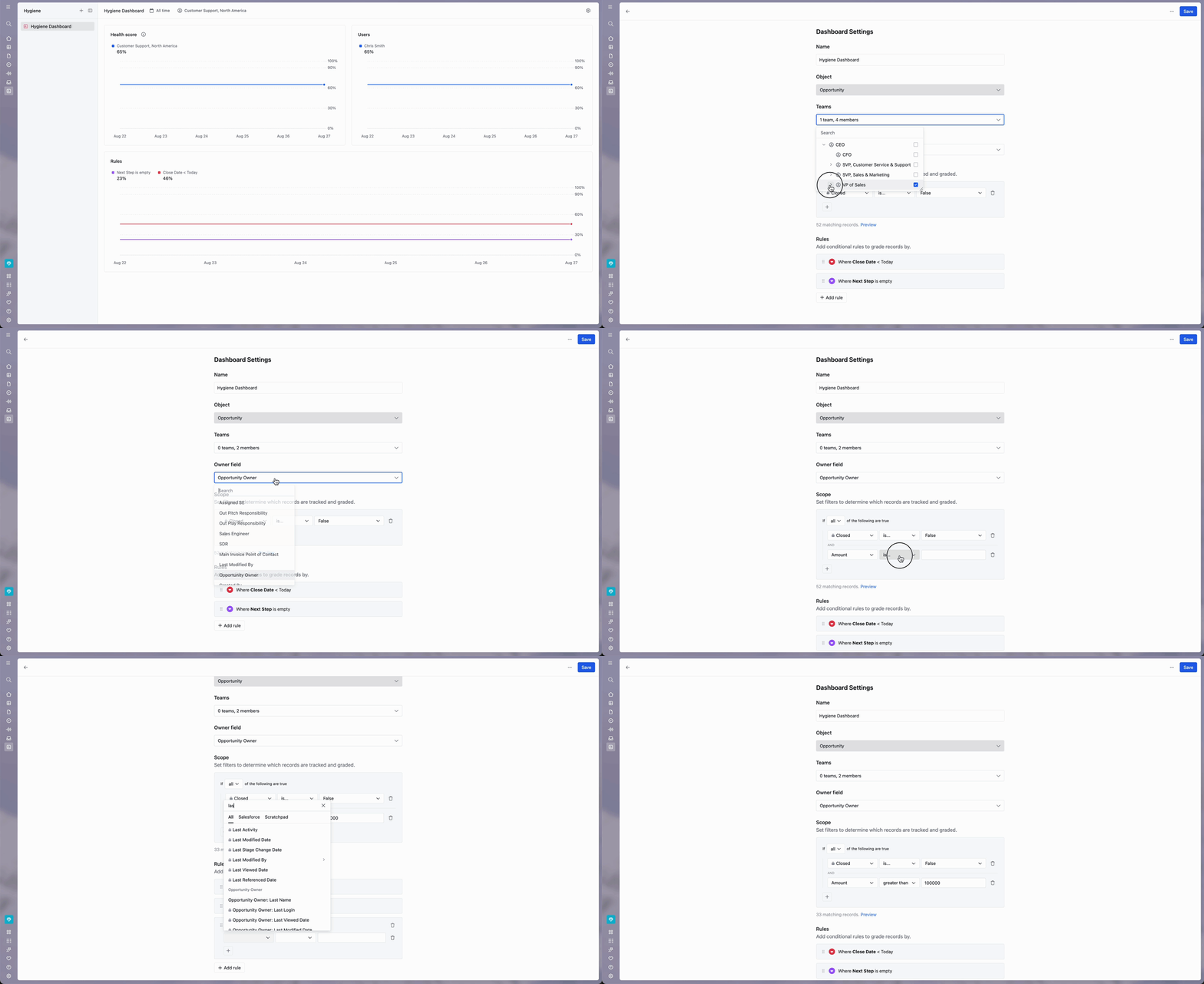
The Hygiene Monitor tracks CRM health across the sales team with daily scoring. Admins define rules (e.g., "Next Step is empty" or "Close Date is before today"), scope which records qualify, and the dashboard generates an overall health score.
Source: Scratchpad
Data snapshots run twice daily at 3AM and 7PM PST, feeding trend charts that show hygiene scores over time. A team and individual leaderboard breaks scores down by rep, adding visibility and accountability.
The Zero Board, embedded in each dashboard, surfaces only non-compliant records. As reps fix issues, records drop off automatically. An optional AI prompt layer evaluates whether field content meets a qualitative standard, not just whether a field is populated, catching shallow entries like "n/a" in a Next Steps field.
Automations complement the monitor with two trigger types: change-based (firing within about 10 minutes of a field change) and scheduled (running at configured days and times). Both support Slack delivery with Action Buttons that let reps update Salesforce fields directly from a Slack notification without opening Salesforce or Scratchpad.
Source: Scratchpad
Deal Room Automations create named Slack channels when deals meet defined criteria and route alerts to those channels. A gallery of pre-built templates covers common scenarios like upcoming close dates, missing next steps, and stale opportunities.
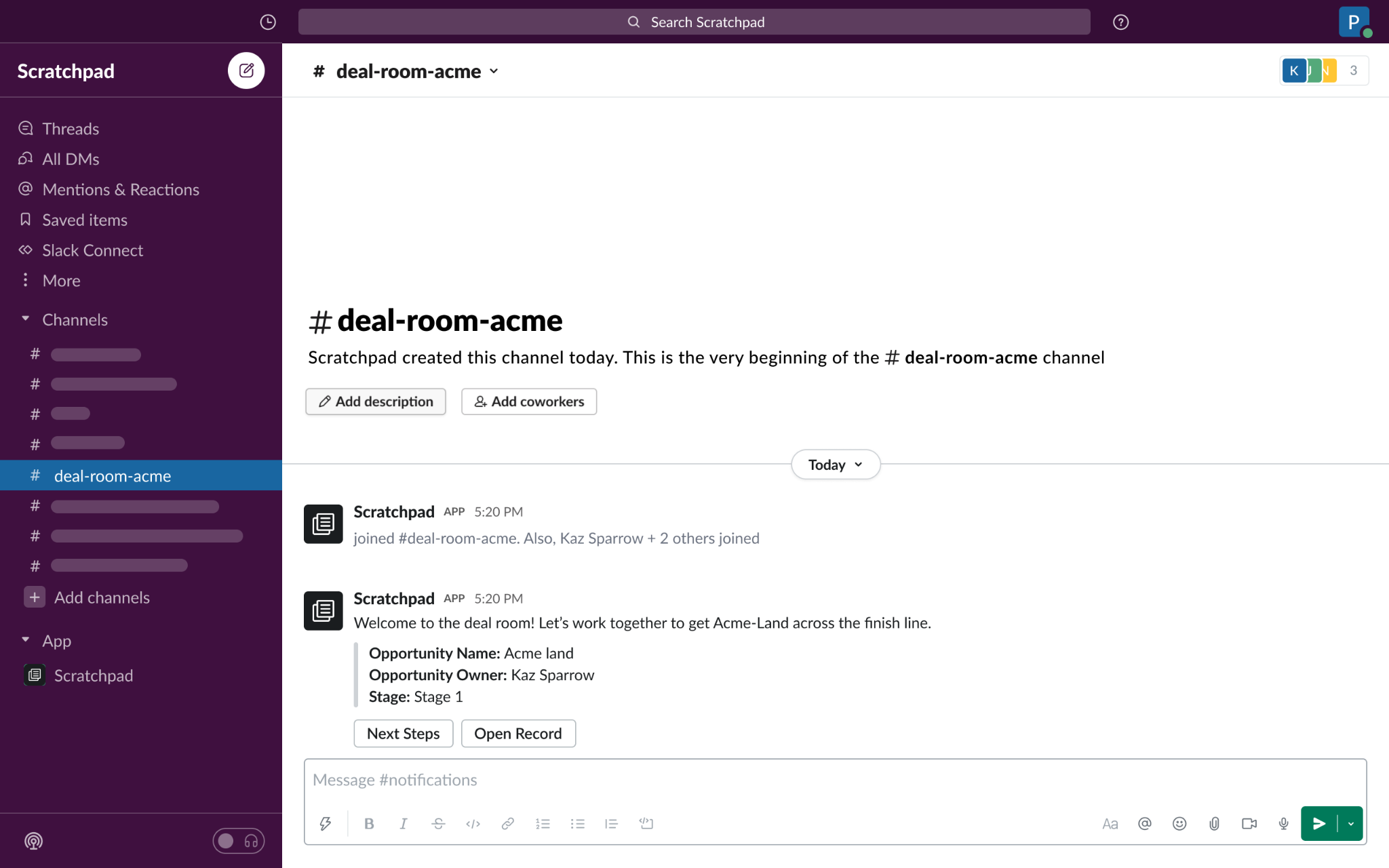
Source: Scratchpad
The Hygiene Monitor is available on all tiers, including Solo, making CRM process monitoring accessible without an enterprise contract.
Pricing: Scratchpad uses per-seat pricing with three tiers.
Scratchpad offers three pricing tiers:
Solo ($19/user/month annual, $24 monthly):
Interface & Workspace, Call Recorder & Notetaker, AI Field Updates
Deal & Account Agent, Custom Prompts, Prompt Insights
Hygiene Monitor
Integrations: Zoom, Meet, Slack, Gmail, Outlook
4,800 AI credits/user/year (400/month)
Team ($49/user/month annual, $62 monthly):
Everything in Solo
Advanced Controls (workspace-level permissions for building and deploying AI agents)
Gong integration
9,600 AI credits/user/year (800/month)
Enterprise (Custom pricing):
Everything in Team
Unlimited AI credits
Dedicated services (agent design, setup, performance tuning)
Scratchpad does not offer a free plan or a publicly documented free trial. The Solo tier's "Get Started" button initiates a paid self-serve signup. Payment obligations are non-cancellable and fees are non-refundable. Seat quantities cannot be decreased during the current term, and cancellation requires contacting them before the next billing date.
Where Scratchpad Falls Short
Scratchpad makes Salesforce faster and keeps CRM data clean, but several limitations emerge when sales teams look beyond CRM productivity. These reflect a platform built for Salesforce data quality, not full go-to-market execution.
Salesforce-Only Lock-In. Scratchpad works only with Salesforce. Companies on HubSpot, Microsoft Dynamics, Pipedrive, or any other CRM cannot use it. Organizations evaluating a CRM change, or running multiple CRMs across divisions, face a single-vendor dependency.
No Prospecting Data or Buyer Intelligence. Scratchpad helps you manage the data already in Salesforce, but it doesn't help you find new prospects, identify in-market buyers, or build targeted account lists. There's no contact database, no intent signals, no technographics, and no company intelligence. Reps still need a separate tool to know who to call and when to call them.
No Mobile App. Scratchpad is a Chrome extension and web app with no mobile support. Sellers who update CRM between meetings from their phones have no Scratchpad workflow. For field sales teams or reps who rely on their phones, this is a real gap.
Gong Integration Paywalled. The strongest AI features depend on call transcript data, and Gong integration requires the Team plan at $49/user/month or Enterprise. Teams on Solo get a limited AI experience, so the entry-level plan doesn't represent the product's full capability.
Limited Salesforce Object Coverage. Users report wanting to manage more Salesforce objects (Cases, Contacts beyond opportunity context) and note that some complex opportunity creation workflows don't work in Scratchpad. Heavily customized Salesforce configurations may require workarounds.
No Marketing, Outreach, or Cross-Team Capabilities. Scratchpad focuses on the seller and RevOps workflow. There's no multi-channel outreach, no advertising, no marketing automation, and no way for marketing teams to coordinate with sales on account strategy. Teams looking for a go-to-market platform will need several tools on top of Scratchpad.
These limitations aren't failures. They reflect Scratchpad's focus on one problem: making Salesforce usable for sales reps. But they leave a gap for teams that need their workspace to answer selling questions (who to contact, when to engage, and what to say) with intelligence beyond what's already in Salesforce.
Top Scratchpad Alternative for Full GTM Execution: ZoomInfo
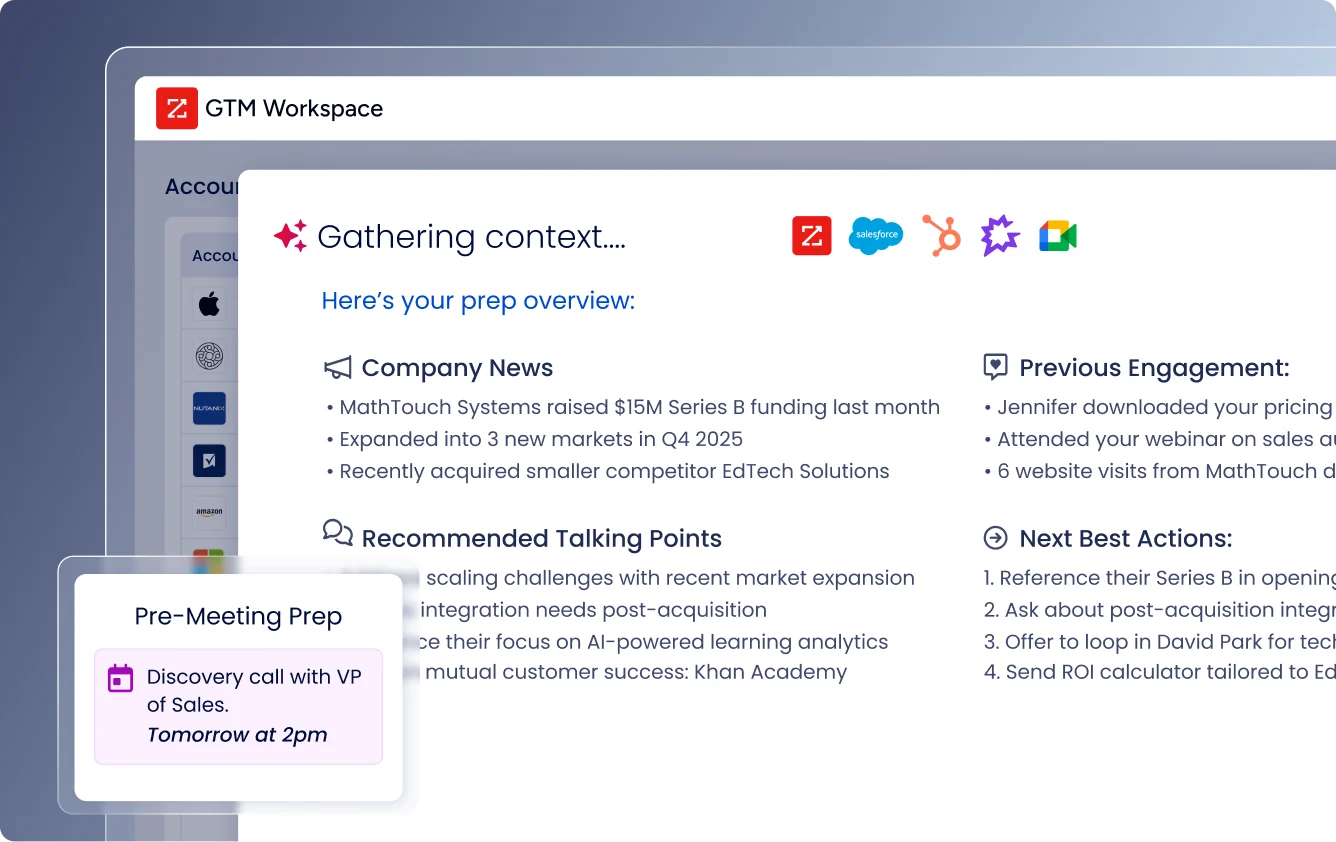
ZoomInfo fills Scratchpad's intelligence gap with a GTM platform built on three pillars: B2B data, an intelligence layer (the GTM Context Graph), and access through a seller workspace (GTM Workspace), a campaign canvas for marketers and RevOps (GTM Studio), and APIs and MCP that deliver the same intelligence into any third-party tool.
Comprehensive B2B Data: ZoomInfo provides the prospecting intelligence that Scratchpad doesn't.
Where Scratchpad works with whatever data is already in Salesforce, ZoomInfo provides the data itself. The platform covers 500M contacts, 100M companies, 135M+ verified phone numbers, 120M direct-dial phone numbers, and 200M+ verified business email addresses.
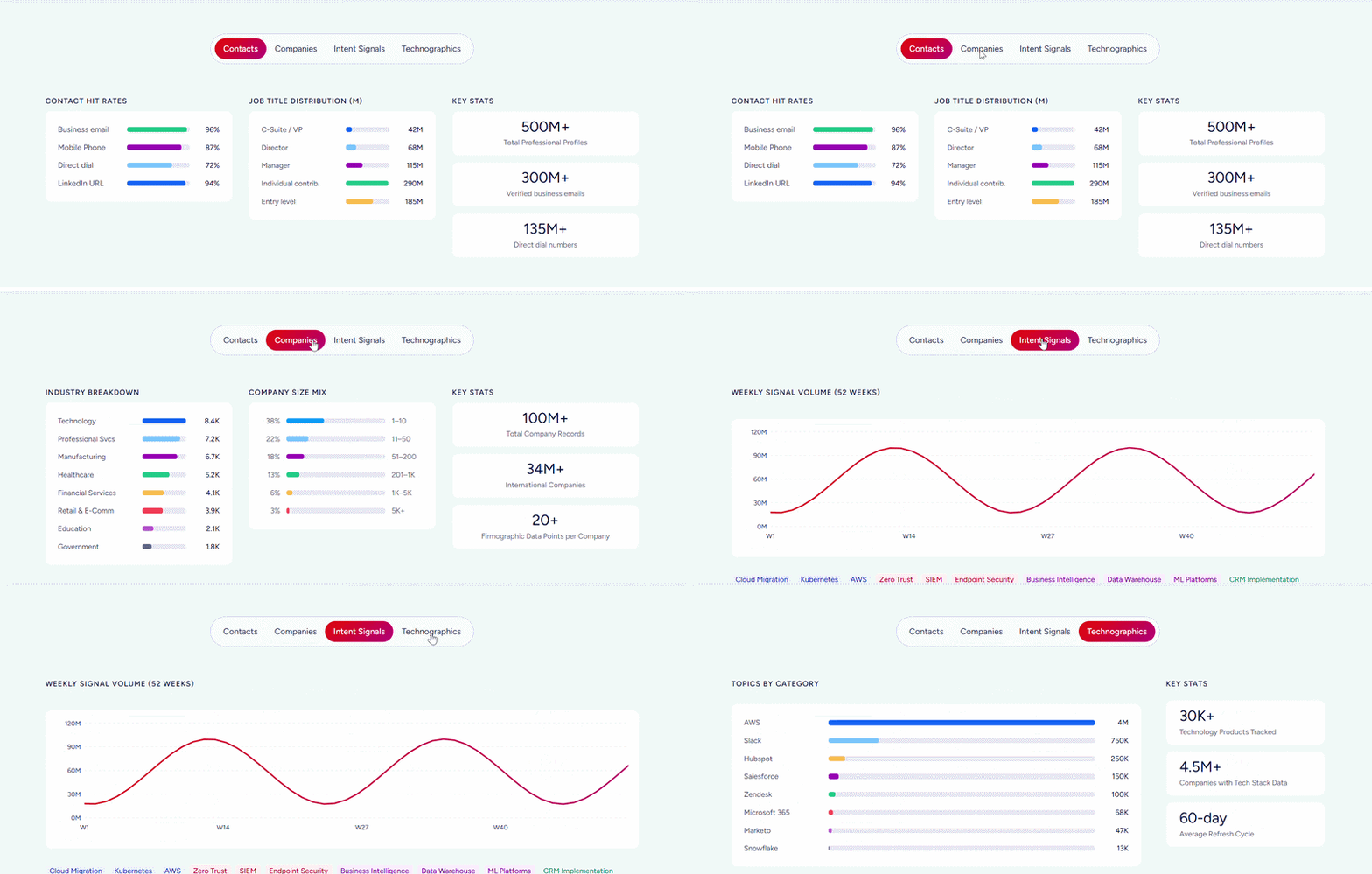
Data goes through a multi-source verification pipeline backed by 300+ human researchers and reaches up to 95% accuracy on first-party data.
Beyond contacts, ZoomInfo tracks buyer intent signals from 210 million IP-to-Organization pairings, profiles the tech stacks of 30+ million companies across 30,000+ technologies, and resolves anonymous website traffic to companies with buying team identification.
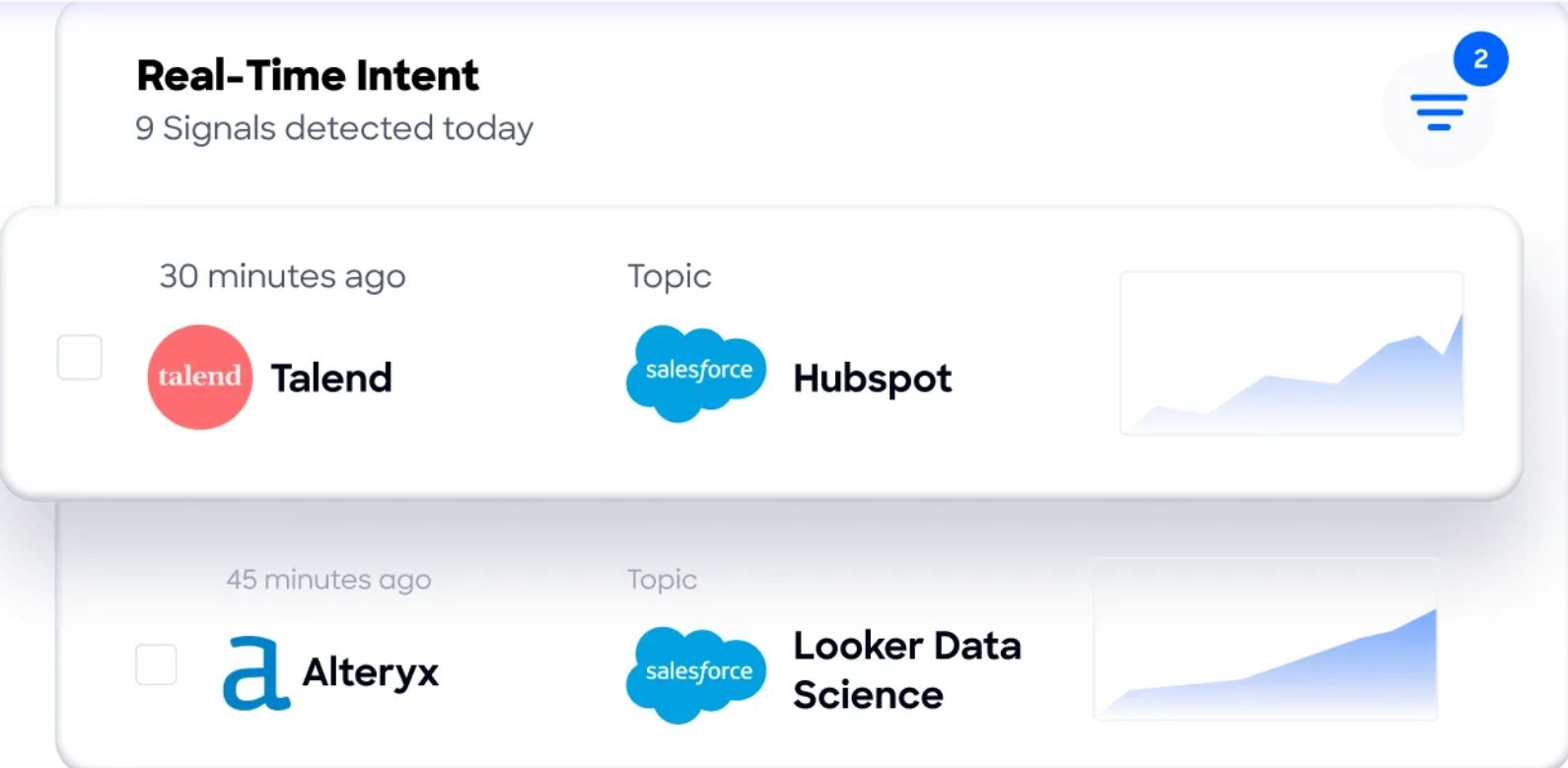
Guided Intent, a ZoomInfo exclusive, identifies topics historically correlated with deal success instead of requiring manual topic selection.
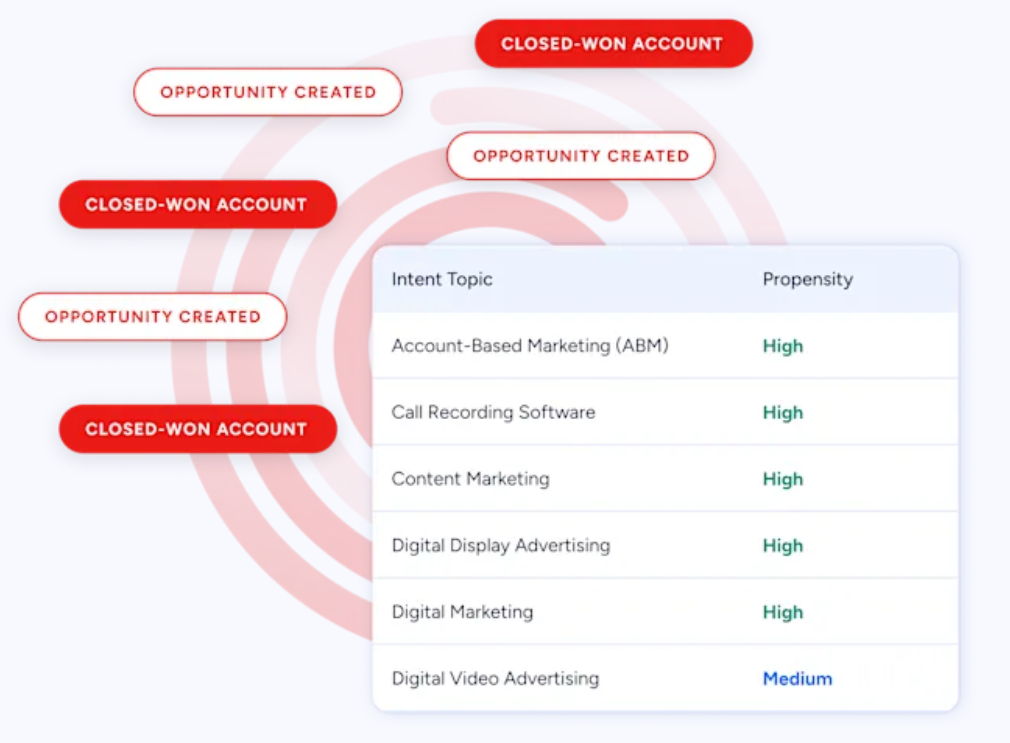
The data quality is externally validated. In a Fortune 500 competitive RFP analyzing 25 million contacts across vendors, an independent consultant concluded that "no other competitor came even close." ZoomInfo holds 133 No. 1 rankings on G2 across Sales Intelligence, Buyer Intent, Data Quality, and related categories, and was named a Forrester Wave Leader for Intent Data Providers.
For sellers, this means the direct dial actually rings and the email actually lands. For RevOps, one platform already has the contact, the company details, the org chart, and the technographics, so enrichment doesn't require stitching together multiple vendors.
"ZoomInfo gives us the information we need to execute. We don't have to go through and spend our time digging. It's already there, so we can be three steps ahead." (Vensure)
GTM Context Graph: ZoomInfo's intelligence layer captures why deals move, not just that they moved.
Scratchpad's AI reads call transcripts and drafts Salesforce field updates.
ZoomInfo's GTM Context Graph goes further: it combines your CRM records, conversation intelligence, email interactions, and behavioral signals with ZoomInfo's third-party data into an intelligence layer that processes 1.5B+ data points daily.
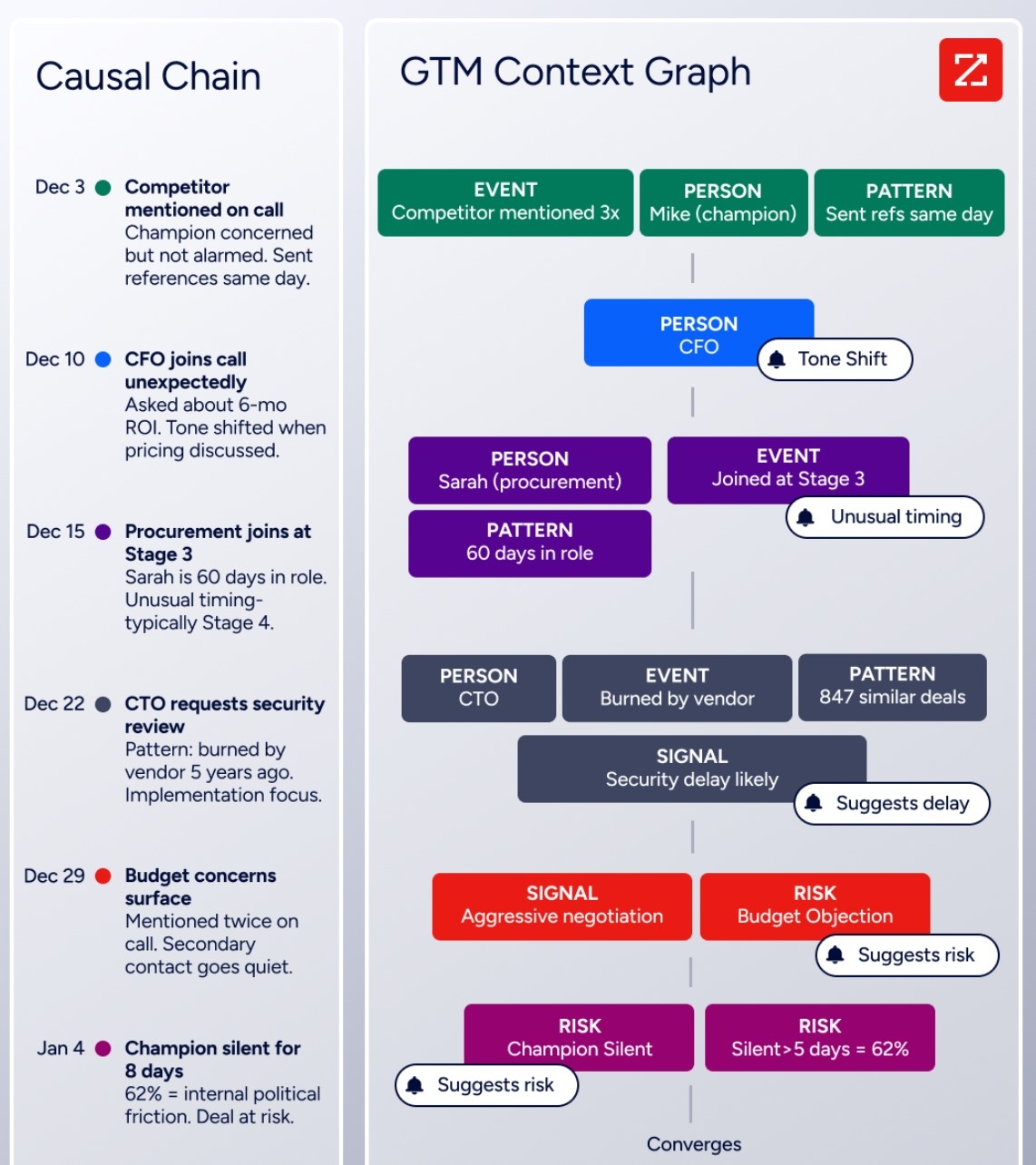
As ZoomInfo's Chief Product Officer Dominik Facher writes: "The CRM recorded the state change. It has no record of why it happened." The GTM Context Graph captures those signals: the CFO joined the last call and asked about six-month ROI (what accelerated the deal), or the VP went quiet for eight days because of an internal budget battle (what nearly killed it).
This context becomes machine-readable, powering AI that reasons about people and their relationships, actions and their outcomes, and patterns across thousands of similar deals.
This layer exists because ZoomInfo spent two decades building data unification infrastructure and acquired Chorus for its context capture and reasoning engines. Entity resolution, semantic normalization, and identity matching at scale, applied to both third-party data and a customer's own calls, emails, and CRM records, give the GTM Context Graph its depth.
"That combination of our internal CRM data, external signals, and AI that's given all that context has helped us craft very specific account- and persona-based messages. And people have responded to them right away." (Seismic)
GTM Workspace: ZoomInfo's seller workspace combines CRM productivity with buyer intelligence.
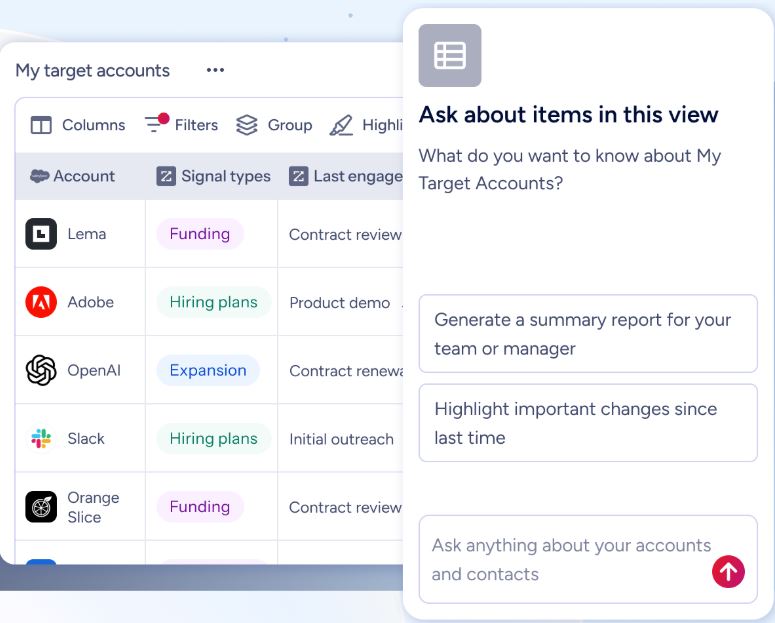
GTM Workspace is ZoomInfo's front-end for sellers. Like Scratchpad, it provides one surface for managing accounts and updating CRM. Unlike Scratchpad, it adds buyer intelligence, AI-drafted outreach, and signal-driven prioritization.
Key capabilities include:
A Book of Business view combining CRM data with buying signals
AI agents that automate account research, outreach drafting, CRM updates, and signal monitoring
An Action Feed showing in-market buyers with pre-drafted actions for each signal (G2 comparisons, funding events, executive hires)
An AI Assistant that pulls CRM history, company news, and stakeholder context into a 10-second account brief
AI-generated outreach that uses account context to produce personalized emails in seconds
GTM Workspace integrates with Salesforce, HubSpot, and Microsoft Dynamics, addressing Scratchpad's single-CRM limitation. Customer results include Seismic's sales team boosting productivity by 54% and attributing 39% of pipeline to ZoomInfo signals, Thomson Reuters increasing closed-won deals by 40%, and Databricks reaching prospects 50% faster.
"Anything that minimizes our team's need to switch contexts is beneficial. ZoomInfo offers a unified view, eliminating the need to navigate between systems." (Spekit)
Universal Access: ZoomInfo's intelligence works in any tool, not just its own.
Scratchpad is locked to Salesforce and offers no external API.
ZoomInfo delivers its intelligence three ways, all drawing from the same GTM Context Graph: GTM Workspace for sellers, GTM Studio for marketers and RevOps, and APIs and MCP that pipe the same data to any custom agent, internal tool, or partner platform.
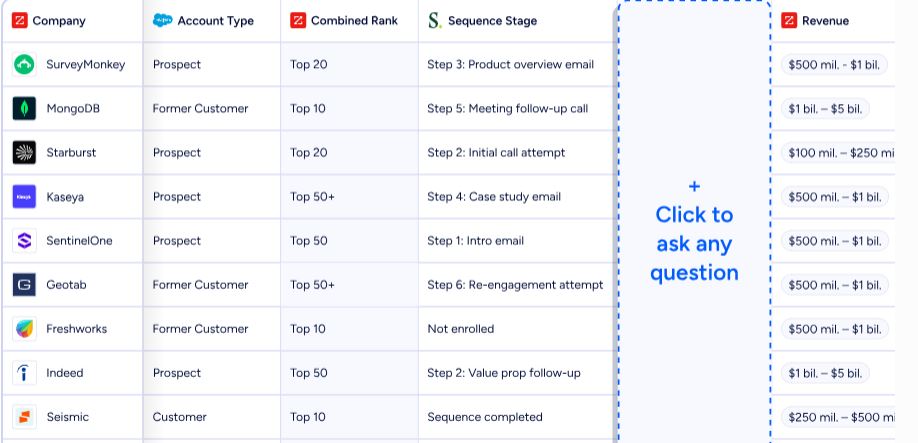
GTM Studio gives marketers and RevOps a campaign canvas where audience definition, campaign building, and pipeline measurement happen in natural language. Expansion plays that used to take three weeks now launch in 30 minutes, without engineering support. Plays run around the clock, get smarter as prospects respond, and deliver accounts into GTM Workspace for sellers to act on.
The MCP server connects ZoomInfo's data to AI models like Claude and ChatGPT as a tool, with no custom coding required.
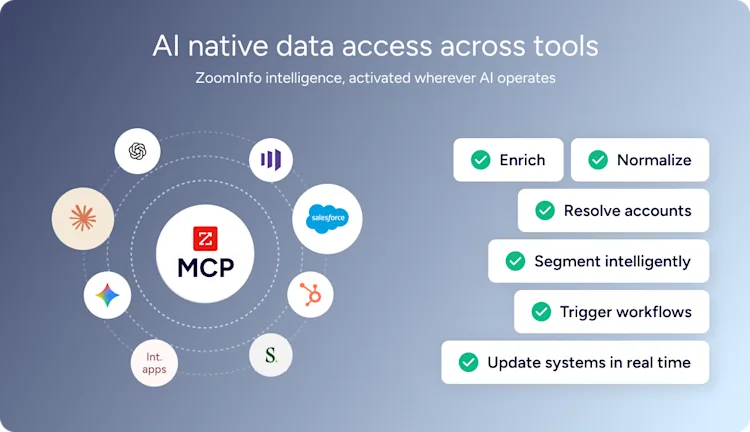
API access is included in all relevant plans, and the App Marketplace lists 120 partner integrations across CRM, marketing automation, sales engagement, and data warehouse categories.
"The plug-and-play aspect of the API means I can integrate it very easily into any process and get information at a moment's notice." (BDO Canada)
Scratchpad or ZoomInfo: Comparison Summary
Scratchpad | ZoomInfo | |
|---|---|---|
Primary focus | Salesforce productivity layer | AI GTM platform |
Target users | AEs, sales managers, RevOps on Salesforce | Sales, marketing, RevOps, GTM engineers |
B2B contact data | None (works with existing CRM data) | 500M contacts, 200M+ verified emails, 135M+ verified phones |
Buyer intent signals | None | 210M IP-to-Org pairings, Guided Intent |
CRM support | Salesforce only | Salesforce, HubSpot, Microsoft Dynamics |
AI capabilities | CRM field updates, deal agent, call coaching | Account research, outreach drafting, CRM updates, signal monitoring, GTM Context Graph |
Call recording | Built-in + Gong integration | Chorus (conversation intelligence with 14 patents) |
Marketing capabilities | None | ABM, display advertising, multi-channel orchestration |
Mobile support | None | Mobile app available |
API/MCP access | Not available | APIs and MCP for any tool or AI agent |
Free tier | No free plan or documented trial | ZoomInfo Lite (permanent free) + 7-day free trial |
Published pricing | $19-$49/user/month (Enterprise custom) | Custom consumption-based pricing |
G2 recognition | 4.8 stars, 1,470+ reviews | 133 No. 1 rankings, Gartner Customers' Choice |
Analyst recognition | G2 Leader and High Performer | Gartner MQ Leader (ABM), Forrester Wave Leader (Intent Data) |
Best for | Salesforce CRM hygiene and rep productivity | Full go-to-market intelligence and execution |
Final Verdict
The choice between Scratchpad and ZoomInfo depends on what problem you're solving and how far your solution needs to reach.
Choose Scratchpad if your primary challenge is getting sales reps to keep Salesforce updated and your RevOps team is focused on CRM data quality. Scratchpad does this well: the workspace is fast, the AI field updates save real hours, and the Hygiene Monitor gives RevOps visibility without chasing reps.
For Salesforce-only teams with an existing prospecting data source and a desktop-first workflow, Scratchpad delivers value as a CRM productivity layer.
Choose ZoomInfo if your team needs more than a CRM productivity layer. ZoomInfo answers the questions Scratchpad cannot: who to contact, when to engage, and what to say. Its data provides the contacts, intent signals, and company intelligence that feed the sales motion.
The GTM Context Graph reasons across CRM, conversations, and third-party signals to surface why deals move or stall. And access through GTM Workspace for sellers, GTM Studio for marketers and RevOps, and APIs and MCP for any tool means the intelligence reaches every team and workflow, regardless of which CRM you run.
Get started with ZoomInfo here.
Scratchpad makes maintaining CRM data easier. ZoomInfo provides the intelligence that makes that data worth maintaining.
Scratchpad FAQ
Does Scratchpad work with CRMs other than Salesforce?
No. Scratchpad works only with Salesforce and does not integrate with HubSpot, Microsoft Dynamics, Pipedrive, or any other CRM. Companies not on Salesforce cannot use it. ZoomInfo's GTM Workspace integrates with Salesforce, HubSpot, and Microsoft Dynamics.
Does Scratchpad have a free plan or free trial?
Scratchpad does not publish a free plan or a documented free trial on its pricing page or help center. The Solo tier starts at $19 per user per month (billed annually) and the entry process initiates a paid signup. ZoomInfo offers both a permanent free tier (ZoomInfo Lite, with 10 monthly export credits and access to the B2B database) and a separate 7-day free trial with no credit card required.
What does Scratchpad cost?
Solo costs $19 per user per month with annual billing ($24 monthly). Team costs $49 per user per month annually ($62 monthly) and adds Gong integration and advanced permissions. Enterprise pricing is custom. Payment obligations are non-cancellable, and seat reductions only take effect at the next billing cycle. AI usage is gated by credits: Solo gets 4,800 per user per year, Team gets 9,600, and Enterprise gets unlimited.
Does Scratchpad provide B2B contact data or prospecting tools?
No. Scratchpad works exclusively with data already in Salesforce. It does not include a contact database, buyer intent signals, technographics, or any prospecting capabilities. Reps need a separate data source to identify and reach new prospects. ZoomInfo provides 500M contacts, 200M+ verified business emails, 135M+ verified phone numbers, and intent data from 210 million IP-to-Organization pairings.
Does Scratchpad have a mobile app?
No. Scratchpad is a Chrome extension and web app with no mobile support. Sellers who need to update CRM from their phones between meetings cannot use Scratchpad for that workflow. This limits field sales teams.
How does Scratchpad's AI field update feature work?
After a sales call is recorded and transcribed, Scratchpad's AI analyzes the transcript and drafts updates for specific Salesforce fields configured by admins. Each field can be set to update automatically or queue a suggestion for rep review.
The AI can draw context from calls, emails, CRM data, and notes at once. Credits are consumed per suggestion based on context depth: one credit for the latest call only, five credits for all calls and emails. Scratchpad reports a 70%+ AI suggestion acceptance rate across its user base.
Can Scratchpad replace conversation intelligence tools like Gong?
Scratchpad includes call recording and transcription, but it complements conversation intelligence platforms rather than replacing them. Its focus is turning call content into Salesforce field updates, not conversation analytics, coaching scorecards, or competitive intelligence. Scratchpad integrates with Gong (on Team and Enterprise plans) as a complementary data source.
ZoomInfo's Chorus is a conversation intelligence product with 14 patents that captures and analyzes customer interactions for deal intelligence, coaching, and market insights.
What sales methodologies does Scratchpad support?
Scratchpad supports MEDDIC, MEDDPICC, SPICED, BANT, CoM, and custom frameworks through its AI Deal Agent and Custom Prompts. RevOps teams can build prompts that evaluate deals against any methodology, score each opportunity, and produce summaries of what has been captured and what is missing.
