
Sendspark occupies a specific niche in sales tech: AI-powered video personalization at scale. Instead of recording a separate video for every prospect, you record once and let Sendspark's AI clone your voice and swap in each recipient's name, company website, and details automatically. For sales teams tired of choosing between personalization and volume, that trade-off disappears.
To write this Sendspark review, we tested it thoroughly. It's a strong fit if:
You run structured outbound sequences and need personalized video at scale
You want AI voice cloning to say each prospect's name without re-recording
You need dynamic backgrounds that show each prospect's website behind your camera
You already use sales tools like Outreach, Salesloft, HubSpot, or Apollo
Your primary outreach channels are email and LinkedIn
However, Sendspark might not be the best choice if:
You need full video editing capabilities beyond basic trimming
You want a mobile app for on-the-go recording
You require video transcription for content repurposing
Your outreach volume exceeds the Dynamic Video Minute allocation on entry plans
You need native in-email video playback beyond Apple Mail
Even with Sendspark handling video delivery, effective outreach depends on knowing who to contact and why. Personalized video sent to the wrong prospect, at the wrong time, with no understanding of their buying signals is still wasted effort.
This is where ZoomInfo fits: an AI GTM platform that provides the intelligence upstream of your outreach. It helps your team identify the right accounts, map buying committees, and time outreach to buying signals, so every Sendspark video reaches the right person at the right moment.
Because of that, we've included a look at ZoomInfo later in this Sendspark review, as a complement for teams that want their personalized video outreach backed by prospect intelligence. To see how better data improves outreach, you can learn more about ZoomInfo here.
What is Sendspark?
Sendspark is an AI video personalization platform founded in 2019 by Bethany Stachenfeld and Brandon Escalante. The two had worked together at two earlier startups, where they discovered that personalized video messages produced strong responses but could not scale the way email automation could. They built Sendspark to close that gap.
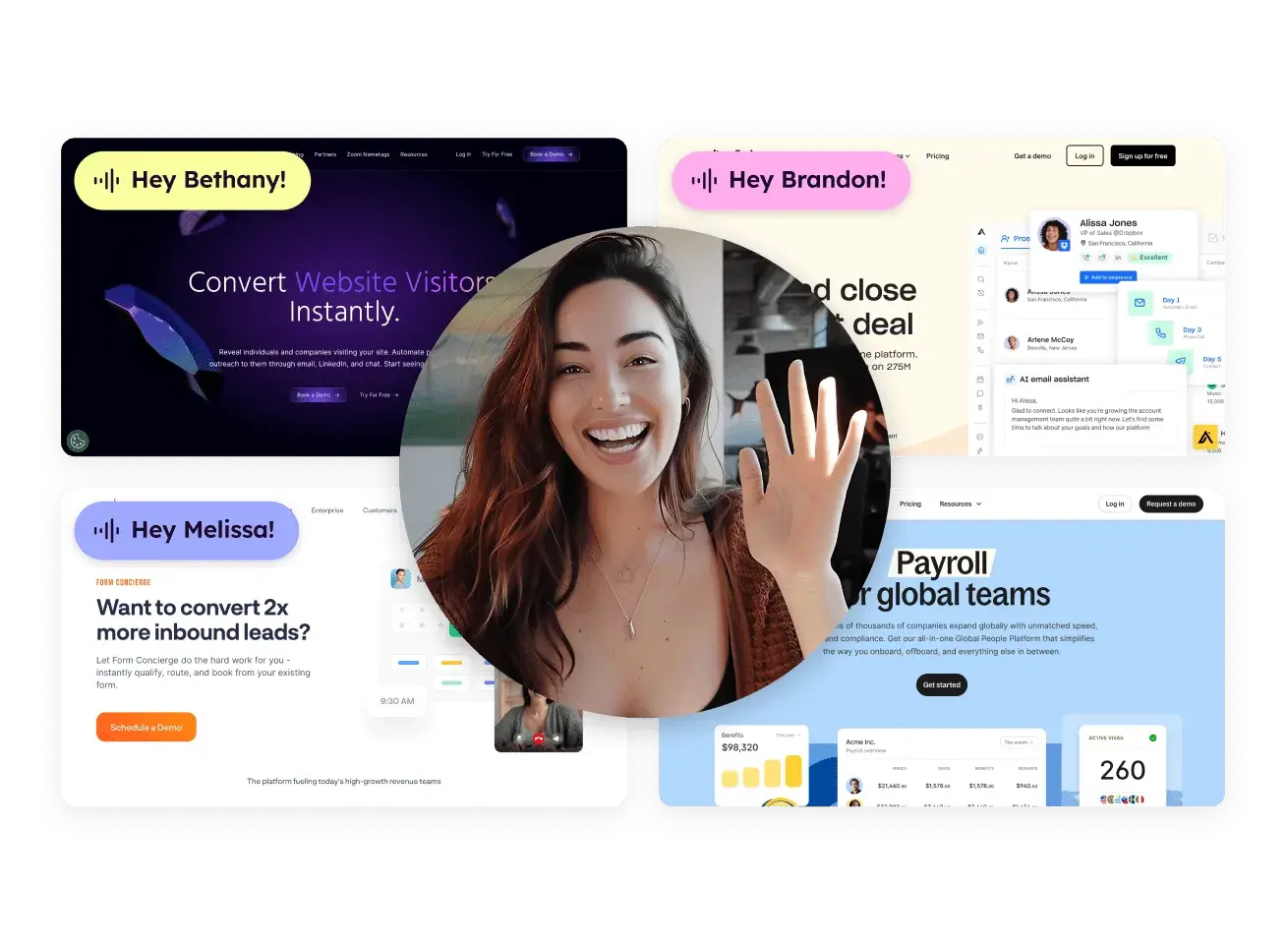
The platform's core mechanism is straightforward: a salesperson records one video, says "Hi Watermelon" as a placeholder, and Sendspark's AI clones their voice to speak each prospect's name individually. Each version also renders the prospect's company website as a dynamic background behind the sender's face, making each video look like a researched, one-to-one message.
Source: Sendspark
Sendspark distinguishes itself from screen recording tools like Loom and general video platforms like Vidyard.
As their pricing page states: "Sendspark is an AI video personalization platform, not a screen recorder. Loom and Vidyard require you to record a new video for every prospect." It categorizes itself as "AI Video Personalization" on its compare page, placing itself in the outbound sales stack alongside tools like Clay and Apollo rather than internal communication platforms.
As of 2024, Sendspark reports over 50,000 companies on the platform, with ~$3.8M ARR and 115% year-over-year growth. The company is rated 4.8/5 on G2 with 450+ reviews. Notable customers include Deel, Paddle, Udemy, Apollo, HubSpot, Indeed, Superside, and Dreamdata.
Sendspark Pros & Cons
Pros | Cons |
|---|---|
- Record once, personalize at scale with AI voice cloning | - Limited video editing (trim and stitch only, no mid-video cuts) |
- Dynamic backgrounds show each prospect's website | - No mobile app (in development) |
- 50+ integrations with major sales and CRM platforms | - No native video transcription (in progress) |
- Automated workflows with trigger-based video generation | - Entry plan limited to 100 Dynamic Video Minutes/month |
- Personalized landing pages and thumbnails per recipient | - Multiple AI variables require Growth plan or above |
- 4.8/5 G2 rating with 450+ reviews | - In-email video playback works only in Apple Mail |
- GDPR and SOC 2 Type 2 compliant | - LinkedIn videos redirect to Sendspark site instead of playing natively |
Sendspark Review: How it Works & Key Features
AI Personalized Video: Record one video; Sendspark generates thousands of individually tailored versions using AI voice cloning and dynamic backgrounds.
This is Sendspark's defining feature. The Dynamic Videos system works in a six-step pipeline:
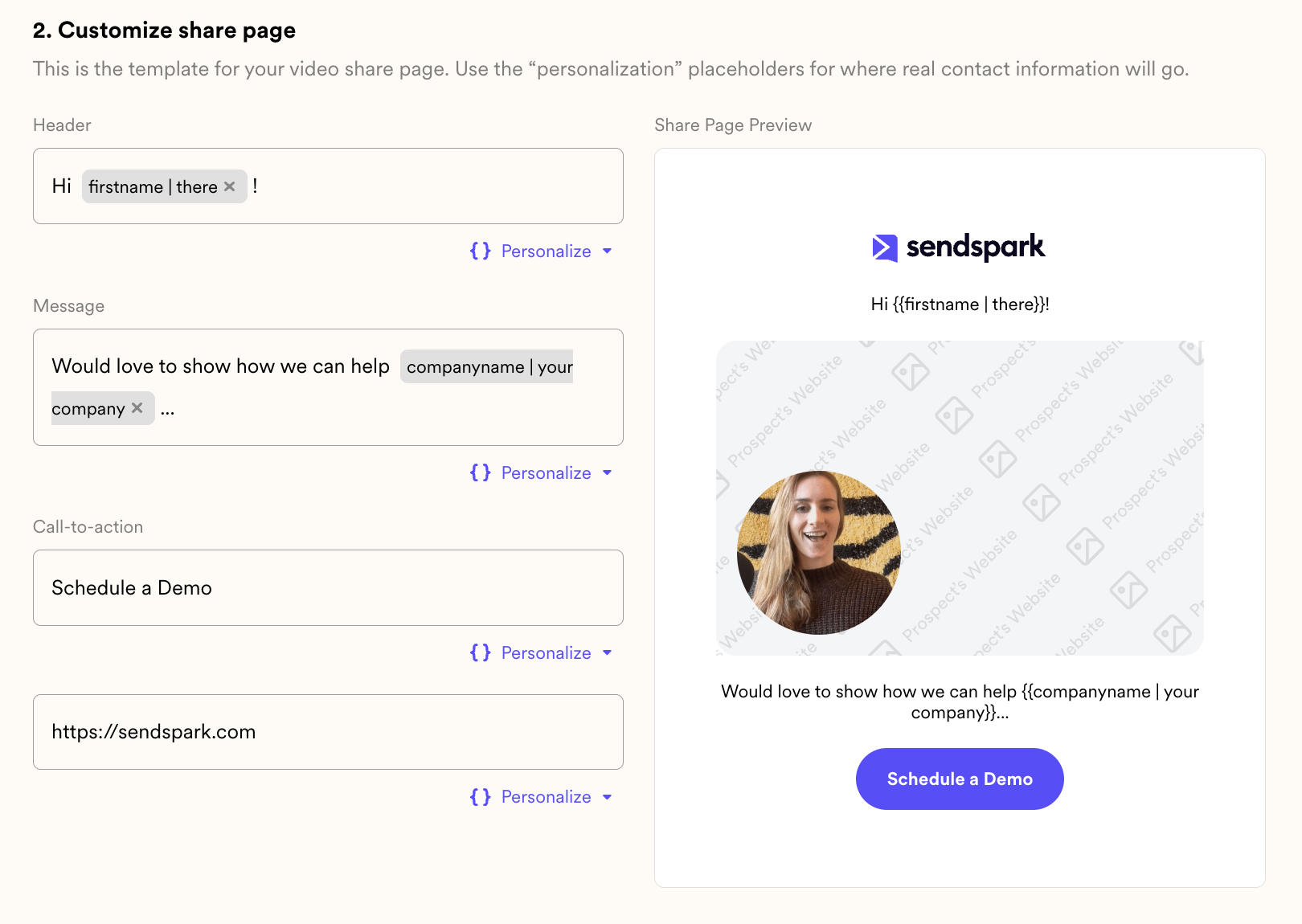
You record a single video starting with "Hi Watermelon," which serves as the voice-cloning anchor. The AI uses the audio around that word to learn how you pronounce names. You then customize the landing page template with merge tags (first name, company, job title), import your contact list via CSV, CRM, or integration, and click generate.
Sendspark processes every contact simultaneously: cloning your voice to speak each name, rendering each prospect's website as the background, and assembling the final videos.
Source: Sendspark
The voice cloning system requires a minimum 15-second source video recorded in a quiet environment. If a name sounds off, a Modify Variable button lets you regenerate the pronunciation for that specific contact. A lip cloning feature (in beta) synchronizes visible lip movements to match the AI-generated speech, adding visual authenticity to the audio.
Beyond voice, each video gets a personalized landing page with the recipient's name, company, and job title, plus a personalized thumbnail for email previews. You can also append a pre-recorded evergreen segment (product demo, case study) to the personalized intro using the Combined Videos feature, extending the pitch without consuming extra Dynamic Video Minutes on the static content.
Video Recording & Management: A Chrome extension and desktop app feed recordings directly into Sendspark's personalization pipeline.
Sendspark provides two ways to record.
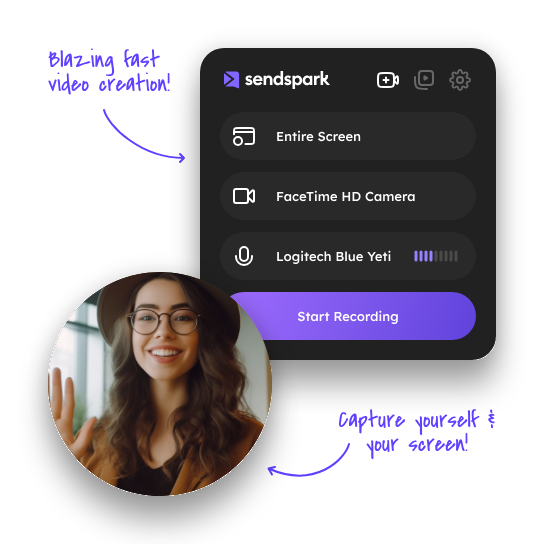
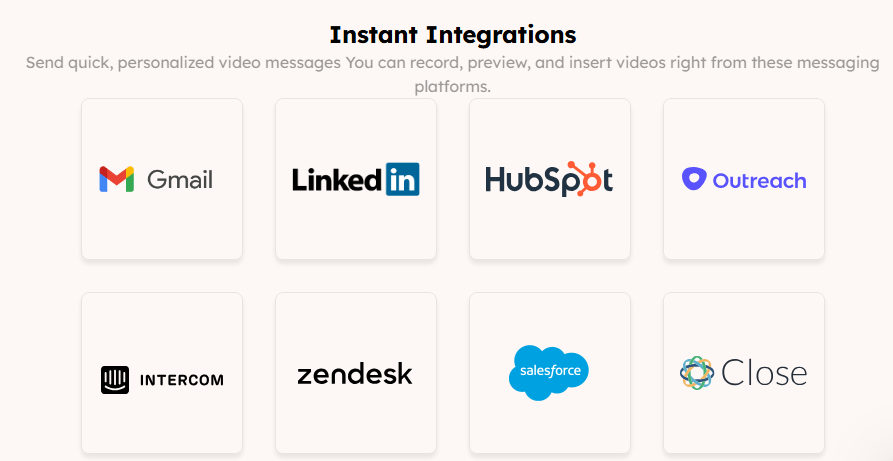
The Chrome extension handles browser-based work with three modes: face only, screen only, or both simultaneously. When screen sharing, you can choose the entire desktop, a specific application window, or a single Chrome tab. The extension also embeds "Instant Integrations" directly inside the compose windows of Gmail, LinkedIn, HubSpot, Outreach, Zendesk, Intercom, and Close CRM, so you can record, preview, and send without leaving those platforms.
The desktop application (Mac and Windows) records over any application on the system, including PowerPoint, PDFs, and non-browser software. It processes video using the computer's full capacity and supports concurrent uploads, meaning you can record multiple videos back-to-back without waiting for prior uploads to finish.
Source: Sendspark
Additional recording features include video capture at up to 1080p, AI appearance touch-up and virtual backgrounds applied at recording time, and a Scripts & Teleprompter feature that generates AI scripts from templates and displays them as a scrolling prompter during recording.
All recordings go to a shared video library. Storage scales by plan: 5,000 videos on Solo up to unlimited on Business. Videos can be shared, embedded on external websites, or fed into personalization campaigns.
What sets this apart from standalone recorders is the workflow design. A single recording becomes the input for mass-personalized campaigns. The teleprompter page shows the intended pipeline: record once with teleprompter, import contacts, generate 100+ personalized videos.
Automated Workflows: Trigger-based automations that generate and send personalized videos without manual intervention.
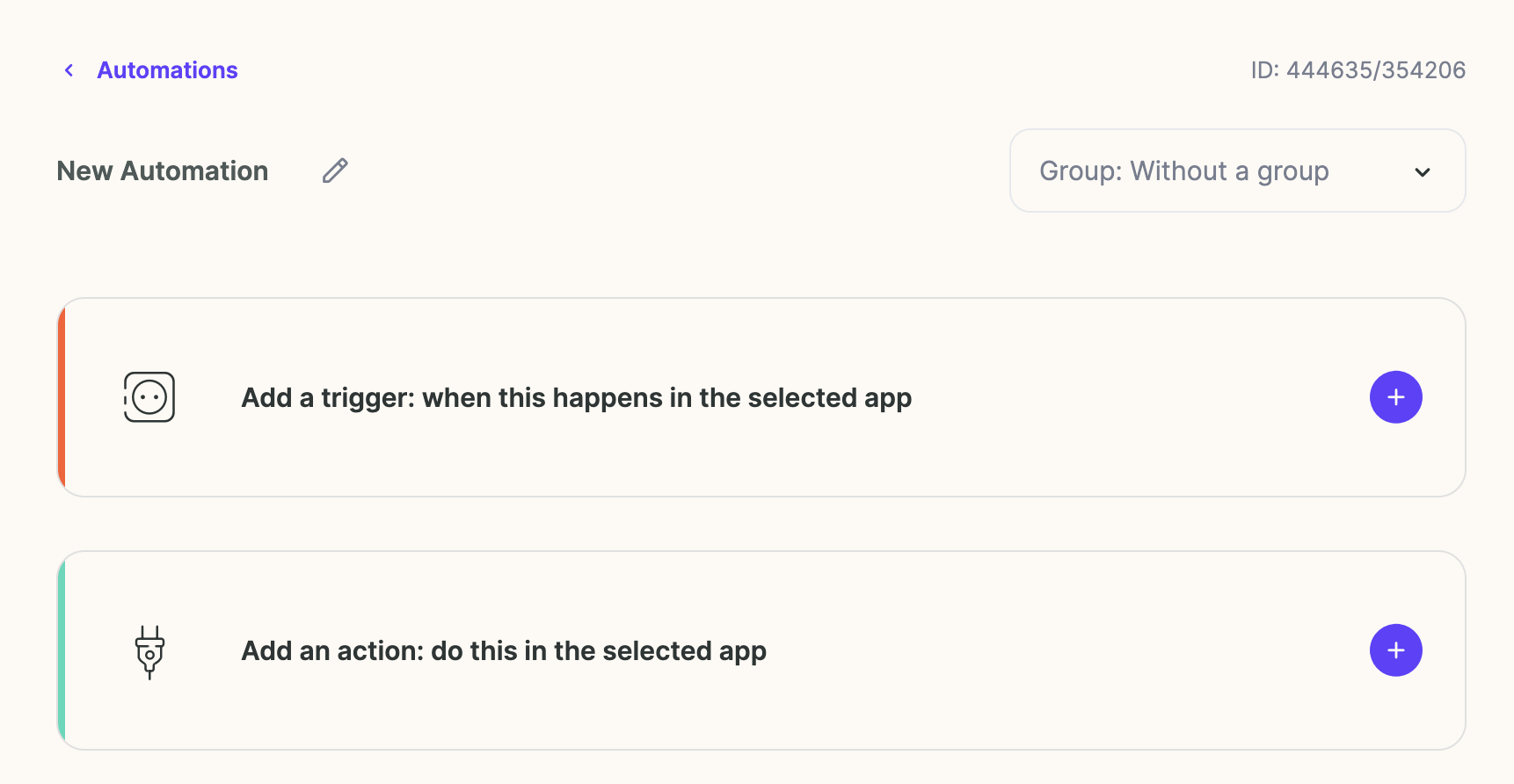
Sendspark's Automated Workflows (branded as "Agentic Workflows") remove the manual steps from video outreach. Without them, a rep has to identify the right moment, generate a video, copy the link, open their sequencer, paste, and send, for every lead. The workflow builder automates this entire chain.
The system operates on a trigger-action model.
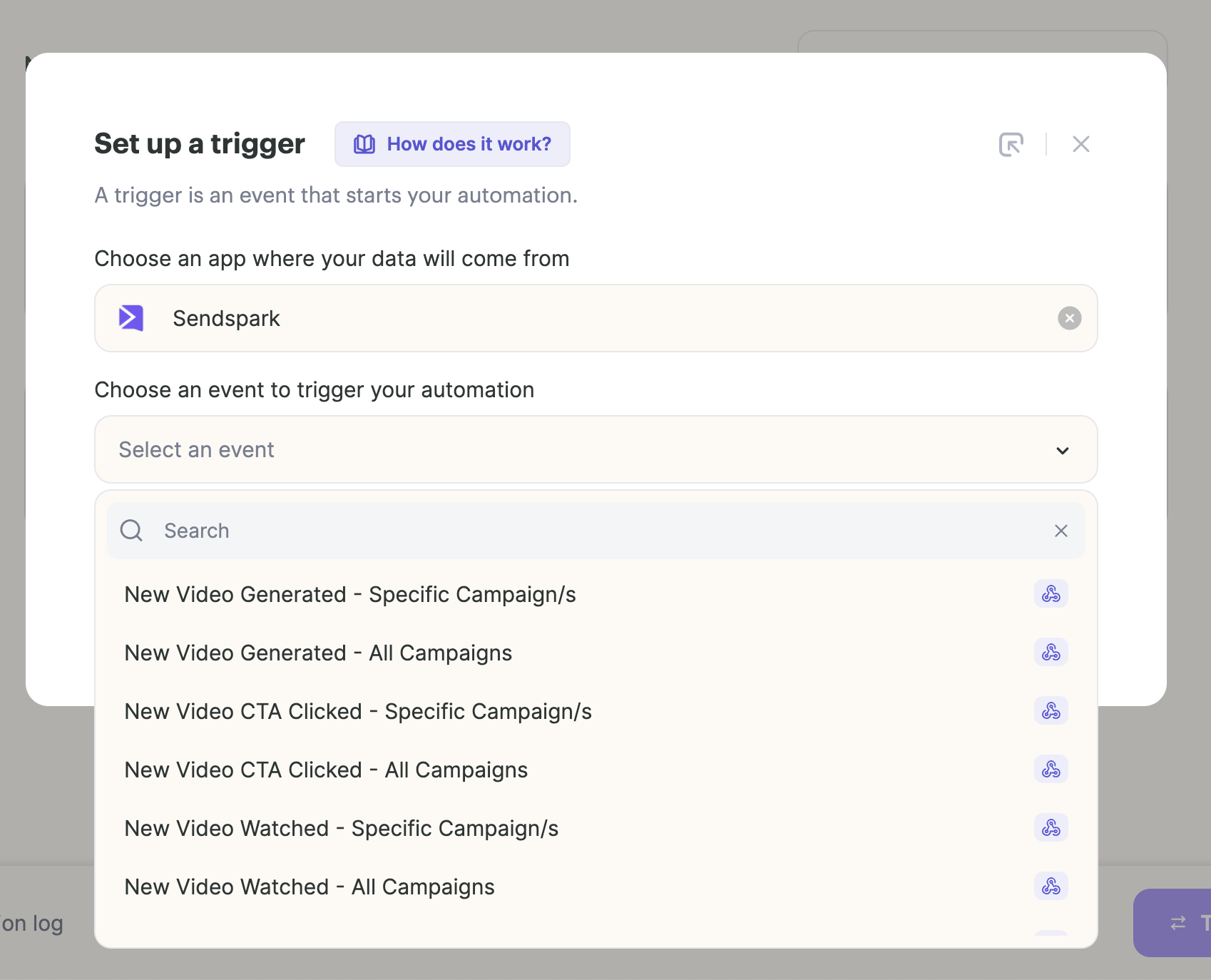
Triggers include form submissions, meeting bookings (via Calendly or HubSpot Meetings), website visits (via RB2B or Warmly), CRM property changes, email replies, or being added to a sales sequence. Once triggered, the workflow automatically generates a Dynamic Video from an existing campaign template populated with the prospect's data, then sends it through Gmail, Outlook, Instantly, or another connected platform.
Source: Sendspark
The email domain-to-background pipeline stands out: a prospect's email passes through a Data Cropping step that extracts the domain after "@" and uses it as the video background URL. A lead at john@nike.com automatically receives a video with nike.com as the background, with no manual lookup required.
The workflow builder also includes logic tools: a Router for conditional branching, Data Cropping for parsing fields, and Time Delay for pacing. Pre-built templates cover common sales workflows: sending videos in email sequences, creating videos for website visitors, welcoming new customers, confirming demo bookings, and winning back lost customers.
Sendspark can also act as a trigger. When a prospect watches a video or clicks a CTA, that event can fire a downstream workflow, enabling follow-up sequences that respond to viewer engagement in real time. This capability requires having both video hosting and automation in one system.
Source: Sendspark
Workflow tasks are metered by plan: 7,500 tasks/month on Growth, 25,000 on Team, 75,000 on Business.
Integrations: Sendspark connects with 50+ sales, CRM, and automation platforms.
Sendspark's integrations span five categories:
Instant Integrations (via Chrome Extension): Gmail, LinkedIn, HubSpot, Outreach, Zendesk, Intercom, Close CRM, and Salesforce. These embed a Sendspark icon directly in the compose window of each platform.
Sales sequencing and outreach: Apollo, Outreach, SalesLoft, Smartlead, Instantly, Lemlist, Woodpecker, Klenty, Reply.io, Mailshake, Expandi, Skylead, Amplemarket, Salesforge, and others.
CRM and tracking: Salesforce, HubSpot, Zoho, Pipedrive, Salesloft, Meta Pixel, and Google Analytics. Server-side tracking snippets fire video page views into CRM timelines as events.
Calendar (embedded booking on video landing pages): Calendly, Chili Piper, HubSpot Calendar, Mixmax, Salesloft, YouCanBook.me, and Motion.
Automation platforms: Clay, Zapier, and HubSpot Workflows.
The Clay integration stands out. It lets users map Clay enrichment fields (company name, industry, tech stack) to video placeholders and auto-generate personalized videos for every row in a Clay table.
Source: Sendspark
All integrations sync video engagement data back to the CRM automatically. All plans include basic integrations (HubSpot, Gmail, Outlook, LinkedIn). Advanced integrations (Salesforce, Outreach, SalesLoft, Apollo) and API/webhook access require Growth tier or above.
The Public API supports automated dynamic video generation with endpoints for creating campaigns, adding prospects individually or in bulk, and looking up contacts by email. Rate limits are 30 requests/minute for standard endpoints and 1 request/minute for bulk operations.
Pricing: Sendspark uses per-seat tiers with metered Dynamic Video Minutes.
Sendspark's pricing has four standard tiers, with annual billing saving up to 40%:
Solo ($49/month, $39/month annual):
1 seat included ($49/month per additional seat)
5,000 video storage
100 Dynamic Video Minutes/month
AI voice cloning with name personalization
Dynamic backgrounds, personalized thumbnails
Basic integrations (Gmail, Outlook, LinkedIn, HubSpot)
Email support
Growth ($99/month, $69/month annual):
3 seats included ($45/month per additional seat)
20,000 video storage
250 Dynamic Video Minutes/month
7,500 workflow tasks/month
Multiple AI variables (company name, industry, date, custom fields)
50+ advanced integrations, API and webhook access
Custom logo and domain branding
Team ($299/month, $199/month annual):
10 seats included ($39/month per additional seat)
100,000 video storage
1,000 Dynamic Video Minutes/month
25,000 workflow tasks/month
Guided workflow setups, dedicated onboarding
Business ($699/month, $499/month annual):
25 seats included ($29/month per additional seat)
Unlimited video storage
3,000 Dynamic Video Minutes/month
75,000 workflow tasks/month
Live Slack support, dedicated account manager, Video Boot Camp
Agency and Enterprise tiers are available at custom pricing.
One usage detail matters: the first video generated in a new campaign consumes 2x the expected minutes because the system generates both a personalized video and a fallback version. A 1-minute first campaign video costs 2 Dynamic Video Minutes. Subsequent sends in the same campaign consume minutes at the standard 1:1 rate.
Every plan starts with a 7-day free trial, no credit card required. There is no permanently free plan. Sendspark never cuts users off when they exceed their Dynamic Video Minute allocation; it charges overages at rates from $0.39/minute (Solo) to $0.19/minute (Business).
Where Sendspark Falls Short
Several limitations reflect deliberate product choices that favor the core use case over broader functionality:
Limited Video Editing. Sendspark offers trimming and stitching, but cutting from the middle of a recording is among the top-voted feature requests. Users who need polished post-production will need external tools.
No Video Transcription (Yet). Video transcription is the most-requested feature and is listed as in progress. Users who want to repurpose video content as text, whether for blog posts, training materials, or accessibility, currently need a separate tool.
Constrained In-Email and LinkedIn Playback. In-email video playback only works in Apple Mail; Gmail and Outlook recipients see a thumbnail that clicks through to a landing page. Videos shared on LinkedIn redirect to the Sendspark website rather than playing natively, adding friction to a primary outreach channel.
Dynamic Video Minutes Metering on Entry Plans. The Solo plan's 100 Dynamic Video Minutes per month may constrain high-volume campaigners. Combined with the 2x consumption on the first video in each campaign, effective allocation is tighter than the headline number suggests. Teams running multiple short campaigns will feel this more than teams running fewer, larger campaigns.
Personalization Depth Gated by Plan. On the Solo plan, only name personalization is included. Using multiple AI variables (personalizing on company name, date, industry, or custom fields in a single video) requires Growth or above. Teams that need richer personalization from the start face a higher entry price.
No Mobile App. A mobile app is listed as in progress on the public roadmap. Recording from a phone requires workarounds.
These limitations follow from a platform built for AI video personalization in sales workflows, not as a general-purpose video tool. But they highlight a broader constraint: Sendspark handles video delivery well, yet the quality of that outreach depends on the intelligence feeding it.
A personalized video sent to the wrong person, or to someone not in-market, still wastes effort. The work of identifying the right prospects, understanding their buying signals, and timing outreach sits outside Sendspark's scope.
The Intelligence Layer Behind Effective Video Outreach: ZoomInfo
ZoomInfo addresses the gap upstream of Sendspark's video personalization. Before you record a video, you need to know who to send it to, why they would care, and whether the timing is right.
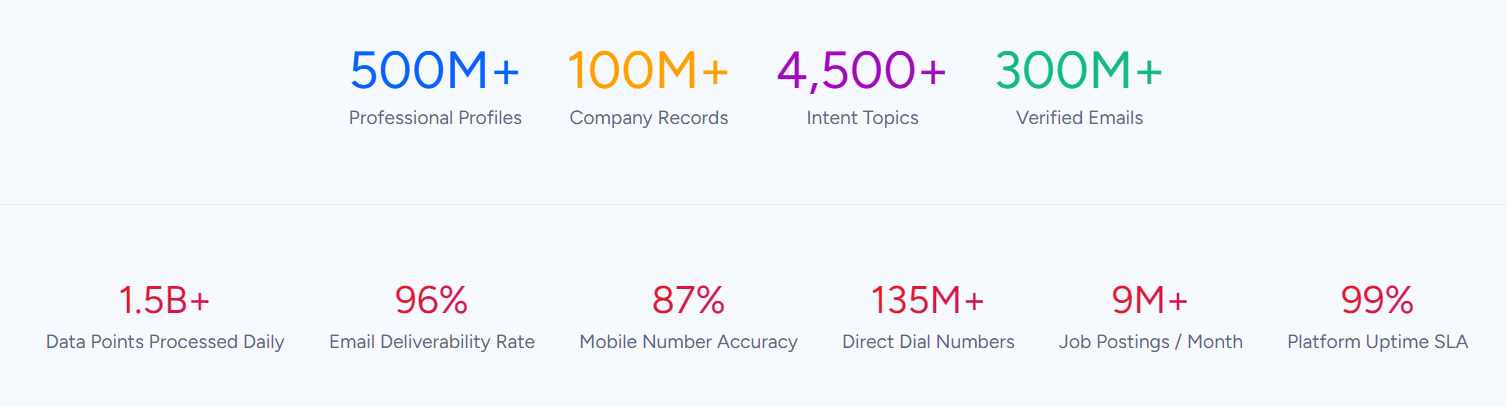
ZoomInfo is an AI GTM platform built on a B2B data foundation of 500M contacts, 100M companies, 135M+ verified phone numbers, and 200M+ verified business emails. That data, combined with your CRM records, conversation transcripts, and behavioral signals, fuels ZoomInfo's GTM Context Graph, an intelligence layer processing 1.5B+ data points daily that captures not just what happened in a deal, but why it happened and which actions to take next.
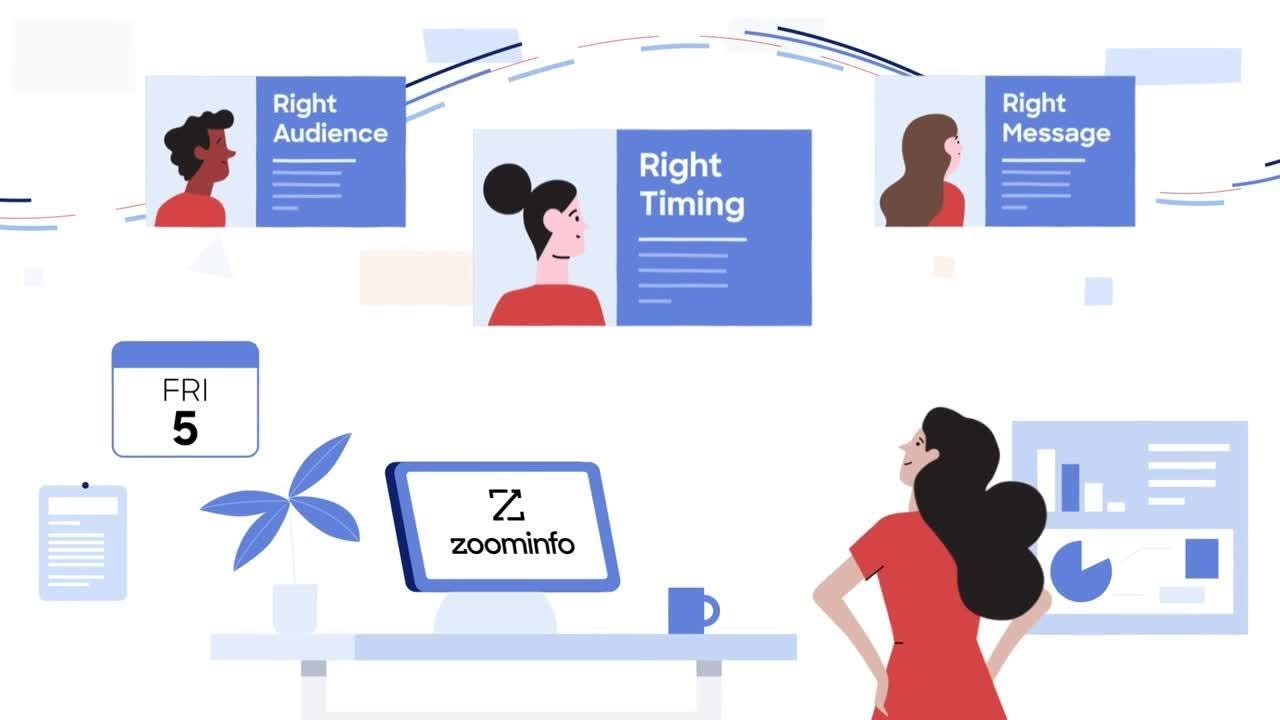
Comprehensive B2B Data: ZoomInfo provides the verified contact and company intelligence that makes personalized outreach worth sending.
Personalized video outreach fails at the foundation when the contact data is wrong. A video addressed to someone who left the company, sent to a bounced email, or targeting a prospect outside your ICP wastes both the Dynamic Video Minutes and the rep's time.
ZoomInfo's data platform covers three dimensions: identity data (who buyers are and how to reach them), company context (firmographics, org charts, technographics across 100M companies), and dynamic signals revealing when accounts are actively in-market. ZoomInfo verifies data through a multi-source pipeline backed by 300+ human researchers, achieving up to 95% accuracy on first-party data.
Source: ZoomInfo
The practical difference for a sales team using Sendspark: instead of uploading a CSV of uncertain contacts and hoping the AI-personalized videos reach real people, ZoomInfo ensures that the 120M direct-dial phone numbers and 200M+ verified business email addresses behind each send are current and accurate.
In a Fortune 500 competitive RFP analyzing 25 million contacts across vendors, an independent consultant concluded that "no other competitor came even close."
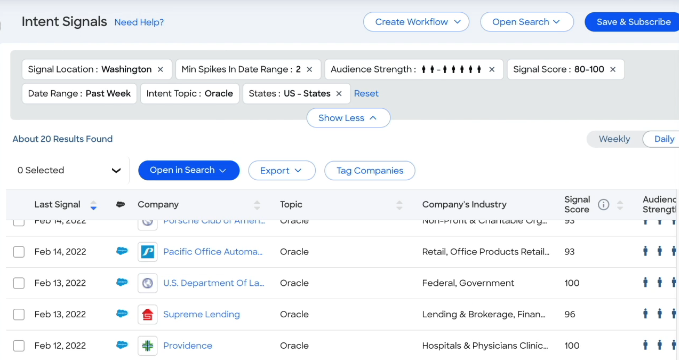
Buyer Intent data adds timing intelligence, tracking signals from 210 million IP-to-Organization pairings and 6 trillion+ keyword-to-device pairings sourced monthly. Guided Intent, exclusive to ZoomInfo, identifies topics correlated with deal success in your context rather than requiring manual topic selection.
This means a Sendspark video can be triggered not just by a workflow event, but by evidence that the prospect is researching solutions like yours.
Source: ZoomInfo
Vensure scaled prospecting with ZoomInfo's data, with their VP of Revenue Operations noting: "ZoomInfo gives us the information we need to execute. We don't have to go through and spend our time digging. It's already there, so we can be three steps ahead." (Vensure)
GTM Context Graph: ZoomInfo's intelligence layer reasons across signals to show not just who to contact, but why and when.
Sendspark's Automated Workflows can generate a personalized video the moment a trigger fires.
But not all triggers are equal. A form fill from a tire-kicker and one from an executive at an account showing buying committee activity and competitive research represent very different opportunities. Distinguishing between them requires intelligence that sits outside Sendspark's scope.
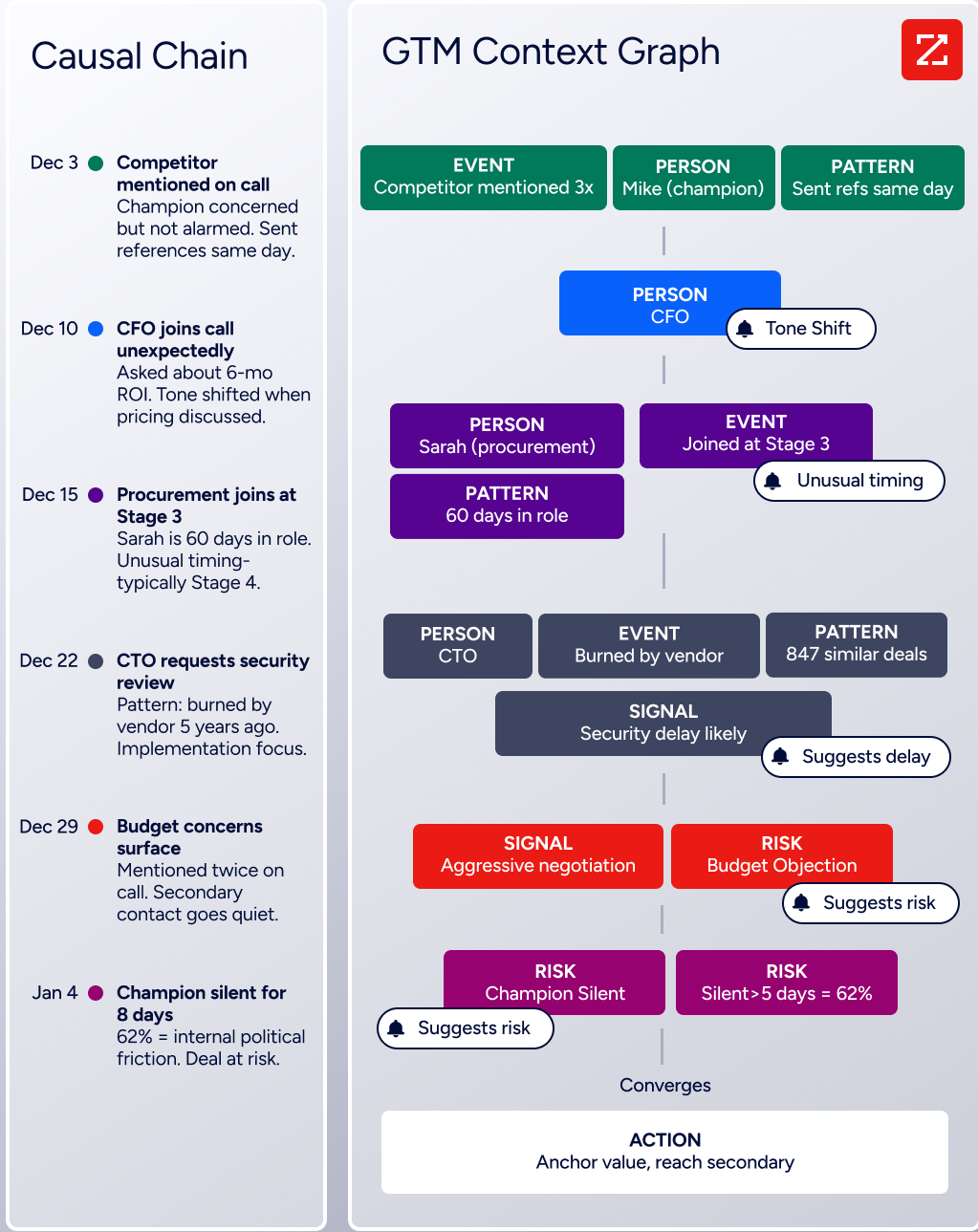
ZoomInfo's GTM Context Graph fuses ZoomInfo's third-party B2B data with a customer's CRM records, conversation intelligence from Chorus, email interactions, and behavioral signals into a single graph. A CRM records that a deal stage changed. Conversation intelligence transcribes what the VP of Finance said on the last call. Intent data logs a spike in research activity.
The GTM Context Graph connects all three to capture why the deal moved, and that intelligence informs which accounts deserve a personalized video right now versus which can wait.
Source: ZoomInfo
For teams using Sendspark, this changes the calculus. Instead of sending 500 personalized videos to a cold list, you send 50 to accounts where buying signals indicate interest, where the right stakeholders are engaged, and where the timing aligns with deal momentum. Fewer videos, better targeting, higher conversion rates.
Seismic attributed 39% of active pipeline to opportunities identified or influenced by ZoomInfo signals, with their Chief Business Officer noting: "That combination of our internal CRM data, external signals, and AI that's given all that context has helped us craft very specific account- and persona-based messages. And people have responded to them right away." (Seismic)
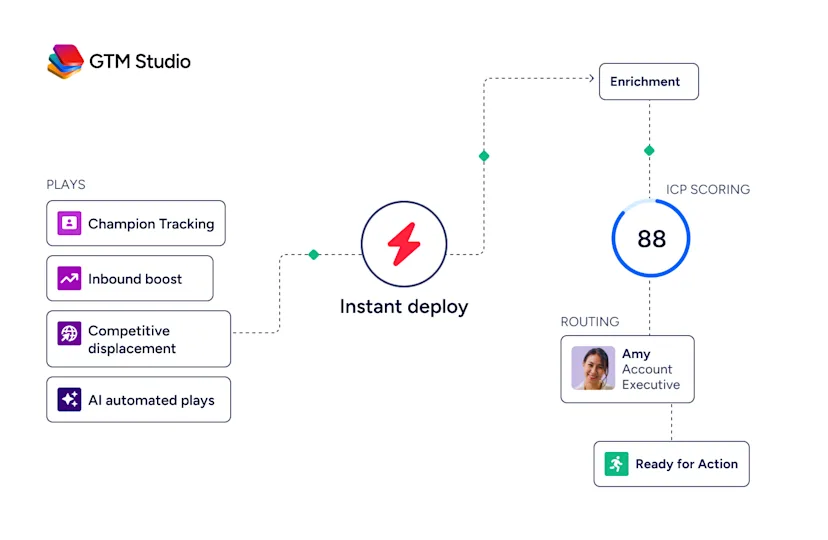
Universal Access: ZoomInfo intelligence reaches every tool through APIs, MCP, GTM Workspace, and GTM Studio.
Video outreach is one step in a larger go-to-market motion. ZoomInfo delivers intelligence through three paths. Whether a team works inside ZoomInfo's products or connects external tools, the same intelligence is available.
GTM Workspace gives sellers a workspace where prioritized accounts, AI-drafted outreach, and deal execution come together. The Action Feed streams in-market buyers matched to target criteria with pre-drafted actions on every signal. For a rep using Sendspark, Workspace identifies which accounts warrant the investment of a personalized video versus which need only a standard email sequence.
GTM Studio gives marketers, RevOps, and GTM engineers a builder for defining audiences, orchestrating campaigns, and measuring pipeline, all using natural language. An ops team can define an audience segment in GTM Studio, launch a multi-channel campaign, and route the highest-intent accounts directly to reps who then use Sendspark for personalized follow-up.
Source: ZoomInfo
For teams building custom workflows, APIs and MCP expose the same intelligence to any application or AI agent. The MCP server connects AI models directly to ZoomInfo's B2B data through natural language, with no custom coding beyond one-time configuration.
API access is included in all relevant plans, and MCP is available through partners including Anthropic Claude and Google.
BDO Canada activated ZoomInfo's data directly within their internal systems, with their Senior Marketing Intelligence Analyst noting: "The plug-and-play aspect of the API means I can integrate it very easily into any process and get information at a moment's notice," while achieving an 87% reduction in time spent on internal data dashboard updates. (BDO Canada)
Sendspark and ZoomInfo: Complementary Workflow Summary
Aspect | Sendspark | ZoomInfo |
|---|---|---|
Primary function | AI video personalization for outreach | B2B data, intelligence, and GTM execution |
Workflow position | Engagement and delivery layer | Upstream intelligence and targeting layer |
Core strength | Generating personalized video at scale from one recording | Identifying the right prospects, signals, and timing |
Data provided | Video engagement analytics (views, watch time, CTA clicks) | 500M contacts, 100M companies, intent signals, technographics |
AI capability | Voice cloning, dynamic backgrounds, lip sync | GTM Context Graph reasoning, AI-drafted outreach, account intelligence |
Integration approach | Embeds into sales sequences and CRM workflows | Feeds intelligence into any tool via API, MCP, or native products |
Pricing model | Per-seat tiers with Dynamic Video Minutes ($49-$699/month) | Custom-quoted seat-and-credit model; free tier available |
Free option | 7-day free trial, no credit card required | ZoomInfo Lite (permanent free tier) and 7-day trial |
Best for | Converting outreach into engagement through personalized video | Ensuring outreach targets the right people at the right time |
Final Verdict
Sendspark and ZoomInfo occupy different stages of the same sales workflow, and each is strongest when paired with the other.
Choose Sendspark if you need to scale personalized video outreach without recording individual videos for every prospect.
It's the right tool for sales teams running structured outbound sequences who want to differentiate their emails with AI-generated video that speaks each prospect's name in the sender's voice and displays their website as the background. The platform's integration with 50+ sales tools, automated workflow builder, and consistent case study results (200-300% more email responses, 46% more demo bookings) make it a practical addition to any outbound stack.
Add ZoomInfo if you want your personalized video outreach backed by the intelligence to send the right video to the right person at the right time.
ZoomInfo's B2B data ensures your contact lists are accurate and current, the GTM Context Graph reveals which accounts are in-market, and GTM Workspace, GTM Studio, and APIs/MCP deliver that intelligence wherever your team works. The combination means fewer wasted videos and higher conversion rates on the ones you send.
Get started with ZoomInfo here.
Effective outreach stacks combine intelligence with execution. ZoomInfo tells you who, when, and why. Sendspark delivers the message in a way that feels personal, even at scale. Together, they close the loop between knowing your prospects and reaching them.
Sendspark FAQ
Does Sendspark have a free plan?
No. Sendspark does not offer a permanently free plan. All plans start with a 7-day free trial that requires no credit card. After the trial, pricing begins at $49/month (Solo) or $39/month with annual billing. The trial auto-converts to a paid subscription unless cancelled.
For comparison, ZoomInfo offers ZoomInfo Lite, a permanent free tier with access to the B2B database, 10 monthly export credits, and website visitor identification, with no time limit or credit card required.
How does AI voice cloning work in Sendspark?
You record a single video starting with the phrase "Hi Watermelon," which the AI uses as a voice anchor to learn how you pronounce names. Sendspark then generates a separate version for each prospect, speaking their name in your cloned voice. The system requires a minimum 15-second source recording in a quiet environment.
If a name sounds off, you can regenerate the pronunciation for that specific contact. A beta lip cloning feature also synchronizes visible lip movements to match the AI-generated speech.
What are Dynamic Video Minutes?
Dynamic Video Minutes are the credits used when generating AI-personalized videos. Each minute of generated video output uses one Dynamic Video Minute.
One nuance: the first video in a new campaign consumes 2x the expected minutes because the system generates both a personalized version and a fallback version. Allocations range from 100/month on Solo to 3,000/month on Business. Sendspark never cuts users off; it charges overages at per-minute rates from $0.39 (Solo) to $0.19 (Business).
What sales tools does Sendspark integrate with?
Sendspark integrates with 50+ platforms across five categories: Instant Integrations (Gmail, LinkedIn, HubSpot, Outreach, Salesforce via Chrome Extension), sales sequencing (Apollo, SalesLoft, Smartlead, Instantly, Lemlist, and others), CRM and tracking (Salesforce, HubSpot, Zoho, Pipedrive), calendar tools (Calendly, Chili Piper), and automation platforms (Clay, Zapier, HubSpot Workflows).
Basic integrations are available on all plans; advanced integrations and API access require the Growth plan or above.
Can Sendspark videos play directly inside emails?
Only partially. In-email video playback works in Apple Mail, where videos play directly in the email body. For Gmail and Outlook, recipients see an animated GIF thumbnail that clicks through to a personalized landing page where the video plays. This is partly an industry limitation, as Gmail and Outlook do not support HTML5 video in emails.
How is Sendspark different from Loom or Vidyard?
Sendspark positions itself as an AI video personalization platform, not a screen recorder.
The core difference: Loom and Vidyard require you to record a separate video for every prospect. Sendspark lets you record once and uses AI to generate individually personalized versions at scale, with each prospect hearing their name in your voice and seeing their website as the background. Sendspark is built for outbound sales workflows rather than internal communication or general video sharing.
What results do companies report with Sendspark?
Published case studies show consistent outcomes: Qwilr reported 200-300% more email responses and 50% higher click-through rates, Textla achieved nearly 100% reply rates and 2x higher conversions, Brikl saw a 46% increase in demo bookings, Growblocks reported a 30% boost in sales conversions, and Achievers experienced nearly 2x play rates after switching from Vidyard.
Is Sendspark secure enough for enterprise use?
Sendspark is GDPR and SOC 2 Type 2 compliant. Sendspark retains voiceprint data for a maximum of three months, then deletes it. A third-party processor handles all payment data; Sendspark does not store it. Enterprise plans include SOC 2 compliance documentation and role-based permissions. Sendspark does not publicly reference additional certifications such as ISO 27001 or HIPAA.
More Sendspark breakdowns:
