

The question behind any outreach API integration is whether the surface goes deep enough to justify the dependency, or whether you will hit a wall three months in and wish you had built on something wider.
Smartlead's API is a REST surface served from https://server.smartlead.ai/api/v1, with API key authentication, published rate limits tiered by subscription plan, and an endpoint catalogue covering campaigns, leads, email accounts, sequences, webhooks, and analytics. The developer documentation is public, the API reference is interactive, and a complete llms.txt index is available for AI-assisted development tooling. For a platform that launched in 2022 and reached 100,000+ customers by bootstrapping, that is a serious API surface.
But coverage and the kind of data behind it are different questions.
Smartlead's API does one thing: programmatic control over cold email outreach. Campaigns, leads, email accounts, warmup, sequences, webhooks, and analytics are all within scope. What sits outside that scope is the layer that decides who belongs in those campaigns: contact enrichment, company attributes, org charts, technographics, buyer intent signals, and direct-dial phone numbers. The API automates sending; it does not tell you who to send to.
This is where ZoomInfo enters the picture, an AI GTM platform whose API covers search, enrichment, AI intelligence, and audience management across 500M contacts, 100M companies, 135M+ verified phone numbers, and 200M+ verified business email addresses, with OAuth 2.0 authentication, tiered rate limits up to 35 req/sec, and an MCP server for AI-agent workflows. The two APIs are layers of the same pipeline, not rivals, and the right question is whether your build needs one or both.
This review covers the Smartlead API in full technical depth first (authentication, endpoints, webhooks, SDKs, rate limits, and pricing), then reviews ZoomInfo's API as the data and intelligence layer that picks up where outreach automation stops.
Smartlead API at a Glance
Attribute | Detail |
|---|---|
API type | REST over HTTPS, JSON responses |
Authentication | API key passed as a URL query parameter |
Base URL | https://server.smartlead.ai/api/v1 |
Current version | V1 (recommended); legacy API at /api maintained for backward compatibility |
Rate limits | Tiered by plan: Standard (60 req/min, 10 req/sec burst), Pro (120 req/min, 20 req/sec burst), Enterprise (custom) |
Pricing / access | Bundled with paid plans ($39/month entry); no separate API tier or per-call charges |
SDKs | No official SDKs; Python and Node.js code examples in docs |
Webhooks | Yes, six event types with HMAC SHA256 signature verification and automatic retries |
CLI | Smartlead CLI v0.10 (launched March 2026) |
MCP Server | Yes, 116+ tools for AI-agent workflows |
Documentation | api.smartlead.ai (Mintlify-hosted, interactive reference) |
Smartlead API: What Works Well & What to Plan Around
What works well | What to plan around |
|---|---|
API included on all paid plans, no enterprise gate or per-call pricing | No official SDKs: you build and maintain the HTTP layer yourself |
Webhook payloads include HMAC SHA256 signatures for authenticity verification | API key auth only: no OAuth 2.0, no token rotation, no scoped delegated access |
Up to 25 named API keys per account with independent labels and revocation | All keys share the same rate-limit pool: Zapier automation competes with direct API calls |
Lead imports accept up to 400 records per request for efficient batching | Standard tier is limited to 60 req/min and 1,000 req/hr, which constrains high-volume pipelines |
Webhook retry logic is documented with clear backoff intervals (1m, 5m, 30m) | Outreach automation is the entire scope: no enrichment, search, intent, or company data |
MCP server with 116+ tools enables AI-agent workflows via Claude Desktop | Pagination behavior is not documented in the API reference |
Smartlead API: Authentication & Getting Started
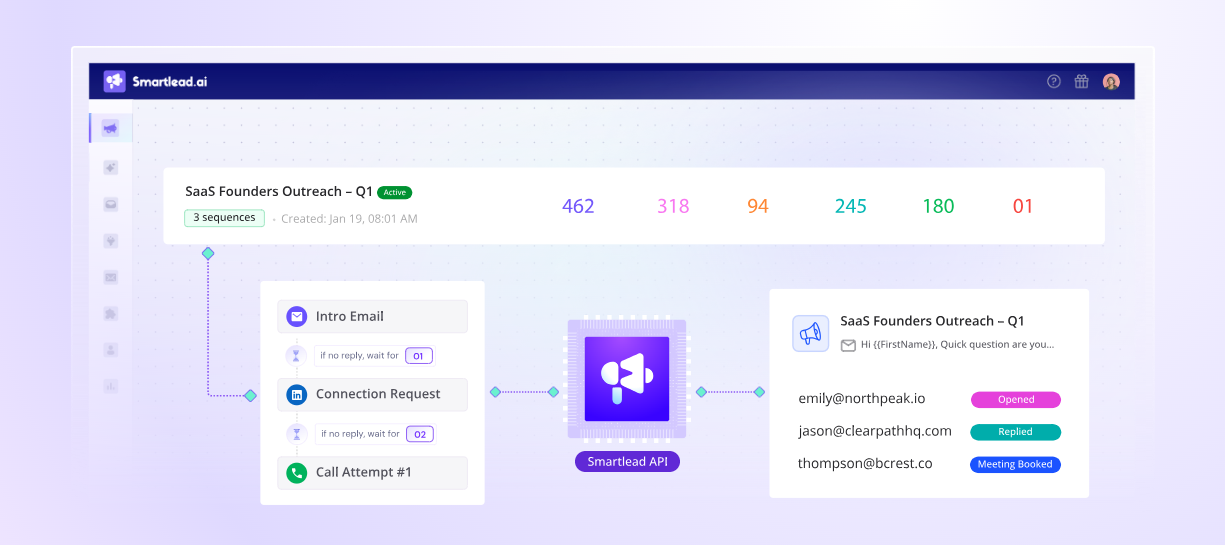
API access starts with any paid Smartlead plan. The pricing page lists plans starting at $39/month for the Base tier, with no separate developer signup, approval gate, or enterprise-only restriction. Rate limits vary by plan, but the API itself is available on signup.
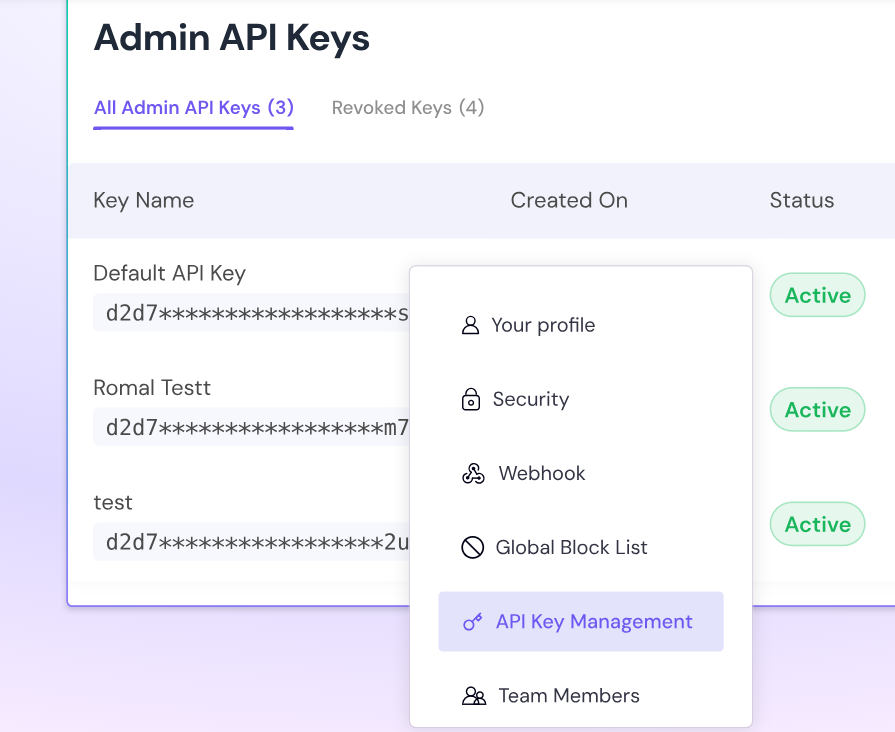
Keys are generated in the Smartlead dashboard under Settings > API Key Management. Each account supports up to 25 named API keys, independently labelled (e.g., "Zapier Integration", "Clay Sync", "Internal Scripts"), and each can be renamed, reset, or revoked without affecting the others. A key is shown only once at creation and must be stored securely.
Source: Smartlead
The recommended authentication method passes the key as a URL query parameter:
curl "https://server.smartlead.ai/api/v1/campaigns/?api_key=YOUR_API_KEY"
For POST and PATCH requests, the key can also go in the JSON request body. There is no Authorization: Bearer header mechanism, no OAuth flow, no token exchange, and no rotating credentials. The simplicity is a tradeoff: key-based auth is easy to implement and easy to leak. For teams with strict credential-rotation policies or multi-tenant integrations where each customer authenticates independently, this model is limiting.
One constraint to plan around: all API keys on an account share the same rate-limit pool. Creating multiple keys does not increase capacity. If you run a Zapier automation, a Clay sync, and a custom integration against the same account, they compete for the same request quota.
Source: Smartlead
Smartlead API: Core Endpoints & Capabilities
The V1 API is organized by resource, with endpoints following the /api/v1/{resource}/{action} pattern. All requests and responses use JSON. The API reference covers five principal resource areas plus supporting resources.
Campaigns
Full lifecycle management of cold email campaigns.
Operations: POST /campaigns/create, GET /campaigns/ (list), GET /campaigns/{id}, PATCH /campaigns/{id}/status (accepts ACTIVE, PAUSED, STOPPED), PATCH /campaigns/{id}/settings, POST /campaigns/{id}/schedule, POST /campaigns/{id}/sequences, and POST /campaigns/{id}/email-accounts (link sending accounts to a campaign). Additional operations include duplicate, delete, forward email, reply to lead in thread, send test email, and update team member assignment.
Analytics endpoints expose per-campaign performance metrics, mailbox-level statistics, top-level overview, and date-range filtering.
What you would build with this: an agency onboarding automation that creates a campaign from a template, attaches the client's sending accounts, loads a lead list, sets the schedule, and activates, all without touching the dashboard.
Leads
The leads surface handles the full lifecycle of contacts across campaigns and lists.
Operations: POST /campaigns/{id}/leads imports up to 400 leads per request with custom fields support. Other operations: get leads by campaign, get lead by email (GET /leads/by-email), update lead details, update lead category, pause/resume individual leads, mark as complete, unsubscribe (campaign-level or global), delete, and bulk export.
Supporting resources include Lead Notes, Lead Tasks, Lead Tags (create, get, add, remove), and Lead Lists (create, update, delete, import, move between lists, push to campaign), each with their own endpoint groups.
What you would build with this: a CRM sync that pushes qualified contacts into Smartlead campaigns based on deal stage changes, with custom fields carrying the CRM context through to the email template.
Email Accounts
Programmatic management of sending infrastructure.
Operations: POST /email-accounts/save (add SMTP accounts), add OAuth accounts (Gmail/Outlook), list all accounts, update settings, delete, and retrieve warmup statistics per account (GET /email-accounts/{id}/warmup-stats).
What you would build with this: an automated monitoring system that pulls warmup stats for all sending accounts daily, flags accounts with declining health scores, and pauses them before they damage campaign deliverability.
Webhooks
CRUD operations for webhook registrations: create, list, update, delete, and a dedicated retrigger endpoint to replay failed deliveries. A webhook summary endpoint provides delivery statistics.
Analytics
Campaign performance by ID, by date range, top-level aggregate analytics, mailbox-level statistics, and lead-level engagement tracking. The analytics endpoints feed reporting dashboards and BI tools without requiring dashboard access.
Smartlead API: Webhooks & Events
Smartlead supports real-time webhooks that fire HTTP POST requests to a developer-supplied HTTPS endpoint when campaign events occur.
Source: Smartlead
The supported event types cover the outreach lifecycle:
Event | Trigger |
|---|---|
EMAIL_SENT | Email successfully delivered |
EMAIL_OPENED | Tracking pixel loads |
EMAIL_CLICKED | Tracked link clicked |
EMAIL_REPLIED | Reply received |
EMAIL_BOUNCED | Delivery failure |
EMAIL_UNSUBSCRIBED | Unsubscribe link clicked |
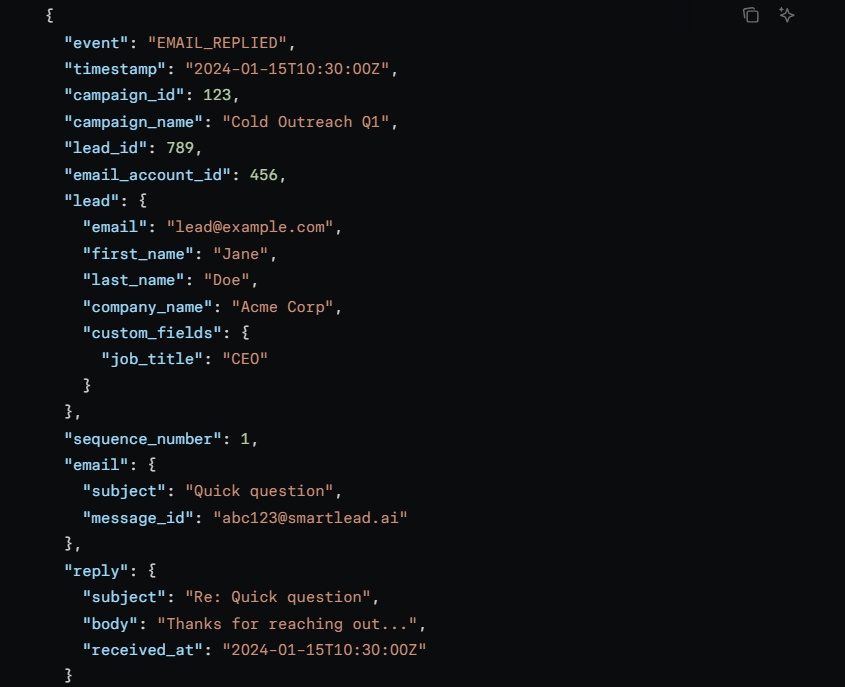
All events follow a standard JSON payload including event, timestamp, campaign_id, campaign_name, lead_id, email_account_id, lead details (email, name, company, custom fields), sequence_number, email subject/message-id, and (for replies) the reply body and receipt time.
Webhooks can be scoped at three levels: user, client, or campaign, indicated by the X-Webhook-Level response header. Each delivery includes two security headers:
X-Request-Id: a unique delivery identifier
X-Smartlead-Signature: HMAC SHA256 of the payload body using a per-webhook signing secret, formatted as sha256=<hex>
The signing mechanism lets receivers verify authenticity, a security feature that not every outreach API provides.
Retry logic: Smartlead retries failed deliveries up to three times, at 1 minute, 5 minutes, and 30 minutes after the initial failure. After three failed attempts the event is marked failed. 2xx responses stop retries; 4xx responses are treated as permanent failures (no retry); 5xx responses trigger the retry sequence. Failed deliveries can be retriggered via the Retrigger Webhooks API endpoint.
What you would build with this: a pipeline that pushes reply events to your CRM, triggers a Slack notification on bounces, and logs all engagement events to a data warehouse for campaign performance analysis, all without polling.
Smartlead API: SDKs, Docs & Rate Limits
SDKs & Libraries
Smartlead does not publish official SDKs in any language. The developer documentation at api.smartlead.ai provides code examples in Python (using the requests library) and Node.js, but these are illustrative snippets, not packaged libraries. No SDK repository, npm package, or PyPI package is referenced.
Two alternative developer tools are worth noting:
Smartlead CLI v0.10 (launched March 2026): terminal-based campaign and lead management for developers who prefer the command line.
MCP server with 116+ tools: exposes campaign data, lead lists, and deliverability metrics to MCP-compatible AI assistants like Claude Desktop. The MCP surface includes 11 diagnostic endpoints for AI-assisted campaign debugging.
The absence of official SDKs is a signal for integration planning. You own the auth layer, the request serialization, the error handling, and the rate-limit backoff logic. For a simple webhook listener, that is fine. For a production pipeline with dozens of endpoint calls, it adds engineering overhead.
Documentation & Developer Experience
The developer documentation at api.smartlead.ai is hosted on Mintlify and organized into four sections:
Get Started: Introduction, Quickstart (first API call in 5 minutes), Authentication, and FAQ
Core Concepts: Campaigns, Leads, Email Accounts, Sequences, Webhooks, each as a conceptual reference
Guides: Campaign Setup, Email Warmup, Lead Management, Webhook Integration, Error Handling, Rate Limits, and Best Practices
API Reference: Interactive endpoint-level documentation with request/response examples and inline request builders
A complete documentation index is published at api.smartlead.ai/llms.txt, listing every guide page and endpoint. Code examples appear in Python and Node.js throughout the guides.
Two things the docs lack: no downloadable OpenAPI spec or Postman collection, and no changelog or versioning notes linked from the documentation index. When the API surface changes, you discover it by testing, not by reading a diff.
Developer support is available via email and through the Smartlead Discord community server.
Rate Limits & Constraints
Smartlead enforces rate limits per API key across all endpoints combined. Campaign, lead, and analytics calls all draw from the same bucket.
Tier | Requests per minute | Requests per hour | Burst limit |
|---|---|---|---|
Standard | 60 | 1,000 | 10 req/sec |
Pro | 120 | 3,000 | 20 req/sec |
Enterprise | Custom | Custom | Custom |
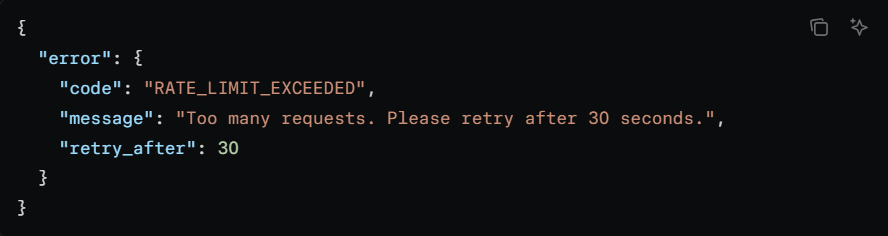
When the limit is exceeded, the API returns HTTP 429 Too Many Requests with a JSON body containing retry_after (seconds to wait) and error code RATE_LIMIT_EXCEEDED. Response headers X-RateLimit-Limit, X-RateLimit-Remaining, and X-RateLimit-Reset allow proactive monitoring.
Source: Smartlead
Three constraints worth planning around:
All API keys share the same pool. Creating multiple keys does not increase capacity. Zapier automation running alongside a direct API integration consumes from the same quota.
Lead imports are batched at 400 per request. The POST /campaigns/{id}/leads endpoint accepts up to 400 leads per call. For lists of 10,000+ leads, this requires 25+ sequential requests, each consuming rate-limit budget.
The Standard tier's 60 req/min ceiling is tight. An agency managing 20+ client campaigns with frequent lead imports, analytics pulls, and webhook management will outgrow the Standard tier's throughput. The Pro tier doubles it to 120 req/min.
The documentation recommends exponential backoff with jitter for handling 429s, using webhooks instead of polling, and batching lead imports to minimize request volume.
Smartlead API Pricing & Access Costs
Smartlead bundles API access into its standard subscription plans rather than charging per call, per credit, or per API key. There is no separate API add-on fee, no metered pricing, and no credit-pack system.
The plan tiers relevant to API usage:
Base: $39/month ($32/month annual). 6,000 emails/month, 2,000 contacts. Standard rate limits (60 req/min, 10 req/sec burst).
Pro: $94/month ($78/month annual). 90,000 emails/month, 30,000 contacts. Pro rate limits (120 req/min, 20 req/sec burst).
Smart: $174/month ($144/month annual). 150,000 emails/month, unlimited contacts. Rate-limit tier is not documented for this plan.
Prime: $379/month ($315/month annual). 500,000 emails/month, unlimited contacts, dedicated infrastructure included.
Enterprise: Custom pricing and custom rate limits via demo booking.
For a developer sizing costs: the API is free if you already pay for Smartlead. The real cost driver is the plan tier that determines your sending volume, contact limits, and rate-limit ceiling. Those limits apply equally whether you use the dashboard or the API.
The practical cost constraint for agencies is the client workspace add-on: $29 per client workspace per month, with one free workspace included on Pro and above. An agency managing 15 clients pays $406/month in workspace fees alone on top of the base plan.
Where the Smartlead API Falls Short
These are practical limits a developer should plan around, not failures. Several are scope decisions that reflect what Smartlead is (a cold email outreach platform) and what it is not.
The API automates outreach. That is all it does. There is no contact enrichment, no company search, no technographic lookup, no intent signals, no org-chart traversal, no direct-dial phone numbers. If your pipeline needs to discover who to email before emailing them, you need a second API. This is the boundary of the product, not a gap in it, but it is the single biggest constraint for developers building pipelines where prospecting and outreach happen programmatically.
No OAuth, no token rotation, no scoped delegated access. Authentication is a static API key passed as a query parameter. For multi-tenant integrations where each customer authenticates with their own Smartlead workspace, each customer must generate and share an API key manually. There is no delegated OAuth flow.
Rate limits are modest on lower tiers. The Standard tier's 60 req/min and 1,000 req/hr ceilings are tight for high-volume integrations. Agencies running automations across 20+ client workspaces on the Standard tier will hit throughput constraints. The Pro tier at 120 req/min eases this but still falls short of platforms offering 100 req/sec.
No public changelog or OpenAPI spec download. The docs are interactive and well-organized, but there is no version history, no changelog, and no downloadable OpenAPI spec. When the API surface changes, you discover it by testing.
Pagination is undocumented. The developer documentation does not describe pagination mechanics for list endpoints. The rate-limits guide recommends caching and using webhooks rather than polling, but for large result sets, the lack of documented pagination style (cursor-based, page-based, offset) forces developers to experiment.
SmartProspect data is not exposed via the API. Smartlead's 300M+ contact database (SmartProspect) is available in the dashboard, but the API does not expose search or enrichment endpoints against it. A developer cannot query SmartProspect programmatically to discover leads and then pipe them into campaigns via the same API.
Analytics lag is a known issue. G2 reviewers have documented a 30-minute-to-one-hour delay in reporting data reflecting campaign activity. If your integration depends on near-real-time analytics for automated decisions (pausing a campaign when reply rate drops), this lag creates a blind spot.
ZoomInfo API: The Data and Intelligence Layer Beyond Outreach
Smartlead's API gives you programmatic control over the outreach pipeline: campaigns, leads, sending accounts, warmup, and deliverability. ZoomInfo's API gives you the data that feeds that pipeline and the intelligence that shapes it: who these contacts are, what companies they work for, what technology they use, whether they are researching your category, and where they sit in the org chart.
The two APIs operate at different layers. A developer building a complete outbound pipeline would use ZoomInfo's API to decide who should be in the campaigns and Smartlead's API to run them.
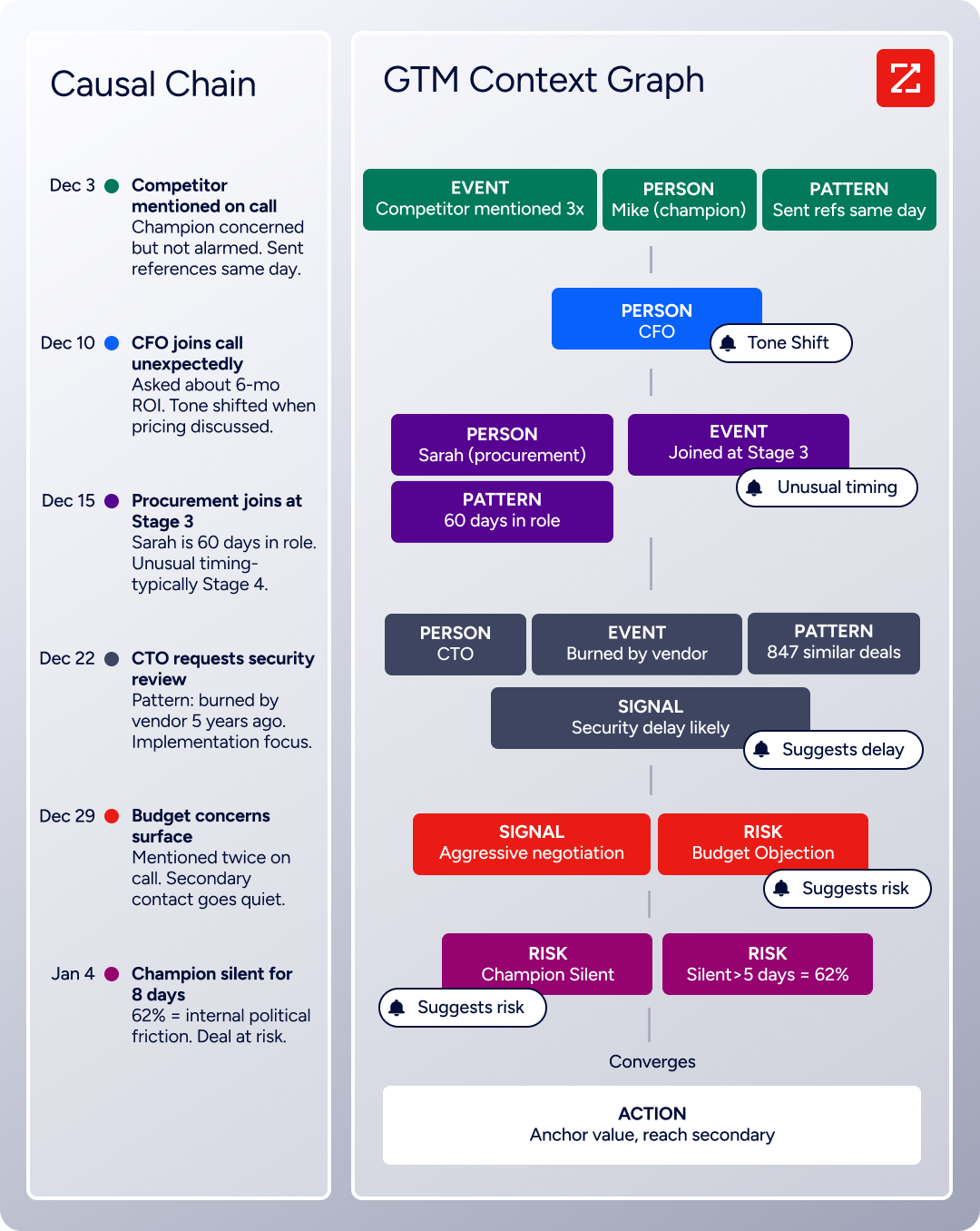
The intelligence behind that decision layer is ZoomInfo's GTM Context Graph, which processes 1.5B+ data points daily by fusing ZoomInfo's B2B data with your first-party CRM and engagement signals to reveal the full context behind your accounts.
What the API Covers
ZoomInfo's Enterprise API is a REST suite served from https://api.zoominfo.com/gtm, organized into four areas documented in the interactive API reference:
Data API (Search & Enrich): Search endpoints cover Contacts, Companies, Intent, News, and Scoops, returning matched records without consuming credits. Enrich endpoints unlock full payloads: business emails, direct dials, employment history, corporate hierarchy, org charts, technographics, and hashtag signals, up to 25 records per call. The underlying dataset spans 500M contacts, 100M companies, 135M+ verified phone numbers, and 200M+ verified business email addresses. The search-then-enrich pattern means you filter freely, then pay only for the records you commit to.
Copilot API (AI Intelligence): Account Summary returns structured account intelligence with a free-form Q&A endpoint. Find Similar Companies performs lookalike expansion. Contact Recommendations returns AI-ranked buying-committee suggestions by motion (prospecting, deal acceleration, renewals).
Marketing API: CRUD endpoints for programmatic audience management.
Platform API (Engagements, Beta): Bidirectional engagement data via the Engagements API.
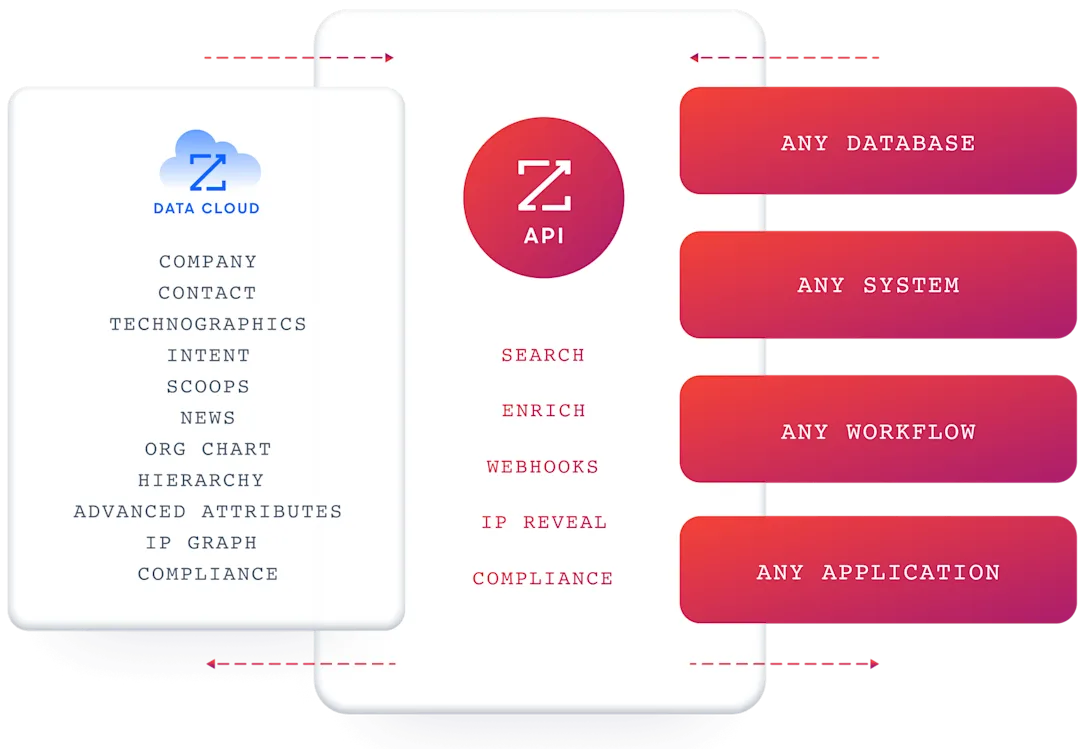
The pairing with an outreach API is direct: use ZoomInfo's search endpoints to find contacts matching your ICP (free, no credits consumed), enrich the ones worth pursuing, then push them into Smartlead's campaign endpoints via the lead import API. Verify first with ZoomInfo's data, then send with Smartlead's infrastructure.
Authentication & Access
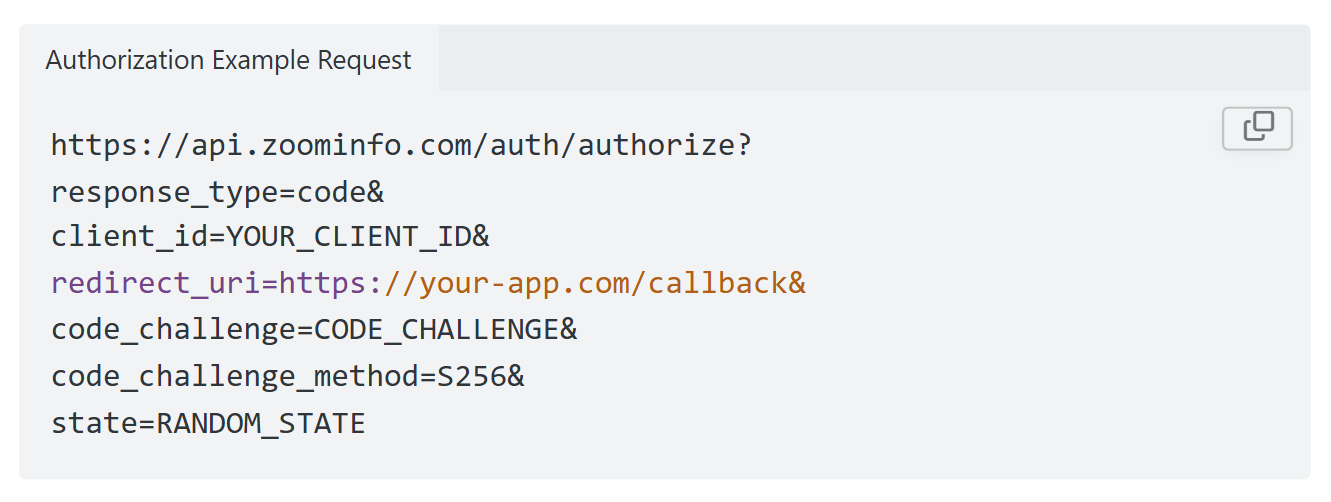
ZoomInfo uses OAuth 2.0 with PKCE via Okta, supporting three flows: Authorization Code with PKCE (web applications), Client Credentials (server-to-server), and Refresh Token. Access tokens are 24-hour Bearer tokens with rotating refresh tokens.
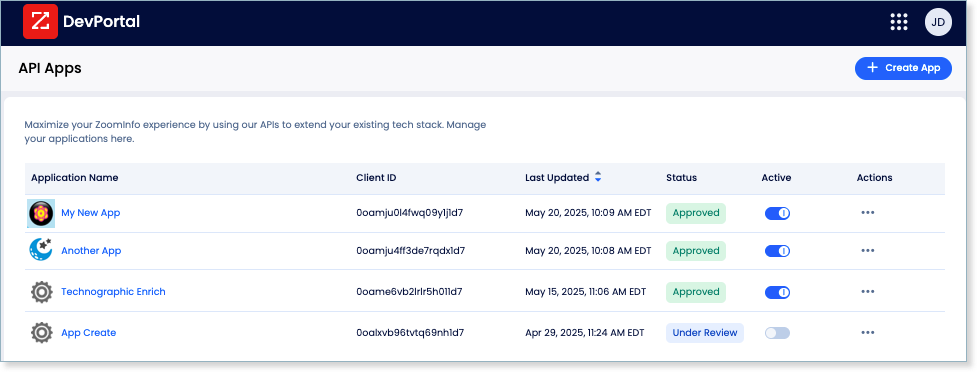
Applications are registered through the ZoomInfo Developer Portal, where teams generate credentials, define scopes, and test endpoints.
This is a different authentication model from Smartlead's static API key. OAuth 2.0 supports delegated access, credential rotation, and scoped permissions, making it the right choice for multi-tenant integrations and enterprise security requirements.
Rate Limits, Credits & Developer Experience
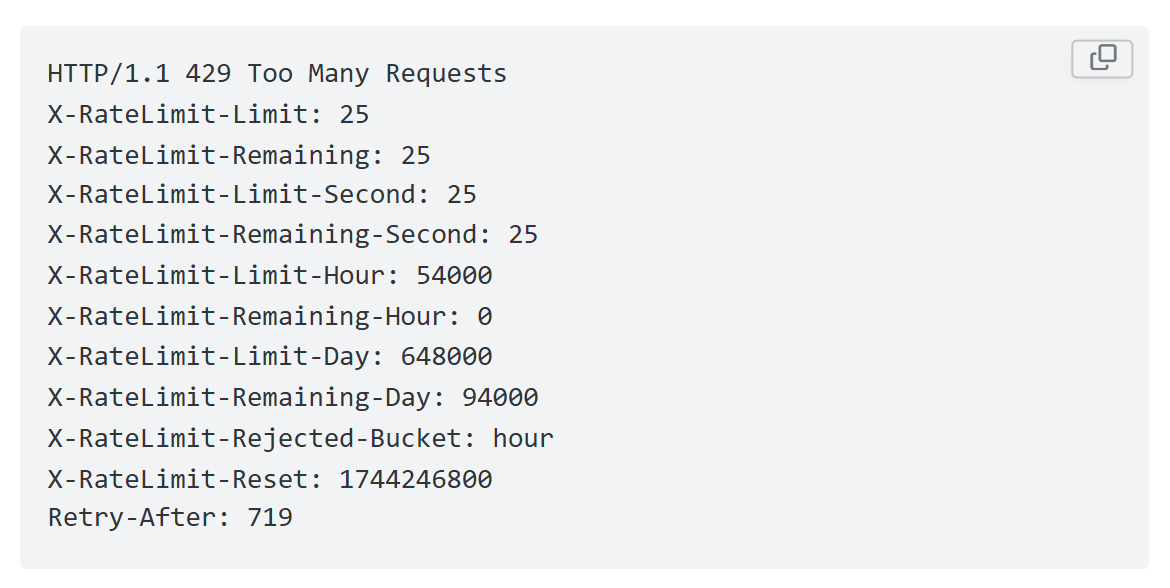
Rate limits are published by tier: Builder (5 req/sec), Standard (25 req/sec), and Scaling (35 req/sec), with per-hour and per-day sliding-window limits enforced simultaneously. Every response includes quota headers with remaining capacity, and 429 responses include a Retry-After header with exact backoff timing.
Credits follow a rolling 12-month window: a record enriched for the first time consumes one credit; re-enriching the same record within the year is free. Search and lookup operations do not consume credits.
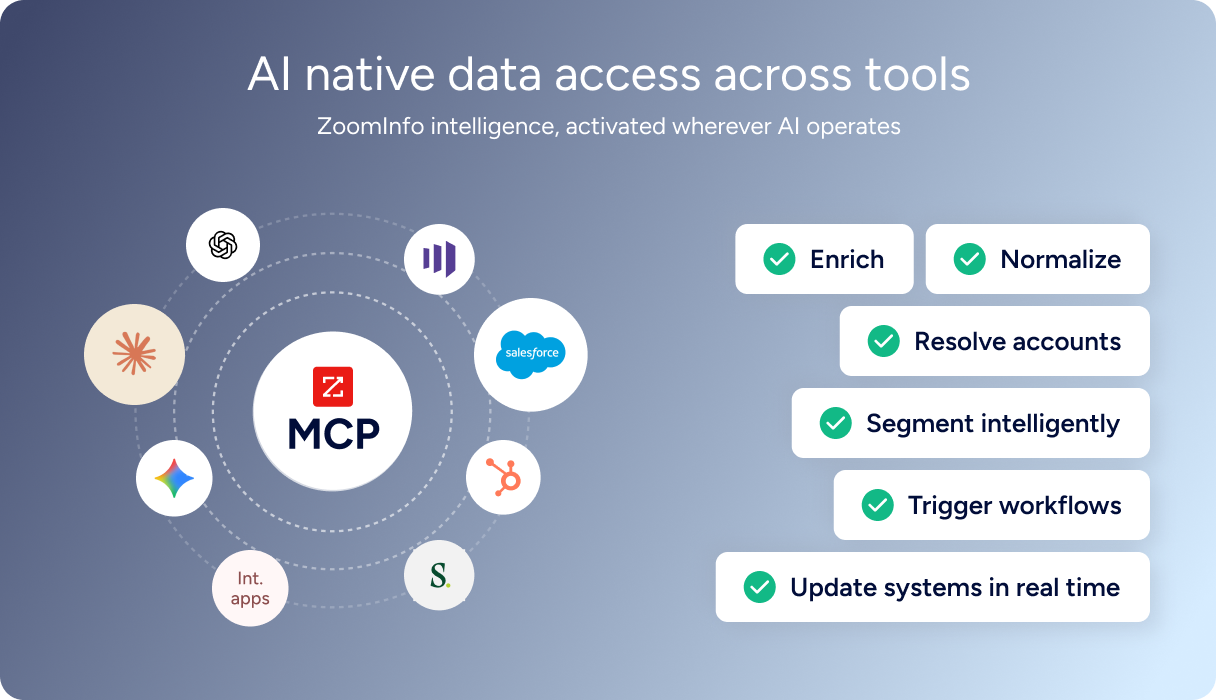
For developers building AI agents, ZoomInfo's MCP server at https://mcp.zoominfo.com/mcp exposes search, enrich, and account research as native tools for MCP-compatible assistants, currently supporting Claude and ChatGPT. Both Smartlead and ZoomInfo offer MCP servers, so a single AI agent can query ZoomInfo for prospects and manage Smartlead campaigns in one workflow.
Documentation lives at docs.zoominfo.com with an interactive API reference, OAuth recipes in five languages, and an llms.txt index for AI development tools. ZoomInfo does not publish official SDKs either, so both platforms require direct HTTP integration. ZoomInfo uses consumption-based pricing, and has extended API access across all relevant plans.
BDO Canada reported an 87% reduction in time spent updating internal data dashboards using the ZoomInfo API, with one analyst describing the integration as plug-and-play across any process. (ZoomInfo)
Final Verdict
Smartlead's API is a focused, well-documented surface that gives developers programmatic control over cold email outreach: campaigns, leads, sending accounts, warmup monitoring, sequences, and real-time webhooks with signed payloads. The Mintlify-hosted docs, the public llms.txt index, and the rate-limit documentation give a developer everything needed to evaluate and build against the API without signing a contract first. Its limits are limits of scope, not of quality.
Choose the Smartlead API alone if your integration is outreach-first: automating campaign creation, lead enrollment, email account management, warmup monitoring, and reply handling. The $39/month entry point with API access included, combined with the webhook system's HMAC signing and retry logic, makes it a capable surface for outbound pipeline automation.
Add the ZoomInfo API when the build needs to go beyond sending into who these contacts are, what companies they represent, and whether those accounts are worth pursuing. Search first, enrich second, send third: the pattern keeps enrichment credits focused on contacts that match your ICP and keeps Smartlead's sending infrastructure aimed at verified, high-intent targets. Explore the ZoomInfo Enterprise API or start with the developer docs to see the endpoint surface for yourself.
A developer who needs neither API should know that Smartlead's API does not cover data intelligence, and ZoomInfo's API does not run email campaigns. If your pipeline requires both layers, the two are complementary, not competing.
FAQ
Is the Smartlead API free?
API access is included on all paid Smartlead plans starting at $39/month for the Base tier. There are no per-call charges, no API-specific credit deductions, and no metered API pricing. The real cost driver is the plan tier that determines your rate limits (60 req/min on Standard, 120 req/min on Pro), sending volume (6,000 to 500,000 emails/month), and contact storage (2,000 to unlimited). Agencies should also factor in the $29/month per-client workspace add-on.
Does Smartlead have a GraphQL API?
No. Smartlead exposes a REST API (currently V1) that communicates over HTTPS with JSON request and response bodies. There is no GraphQL endpoint. If you need a GraphQL interface, you would need to build a wrapper layer on top of the REST API.
What is the Smartlead API rate limit?
Rate limits are tiered by subscription plan. The Standard tier allows 60 requests per minute, 1,000 per hour, with a 10 req/sec burst limit. The Pro tier doubles that to 120 requests per minute, 3,000 per hour, and a 20 req/sec burst. Enterprise plans get custom limits. All limits are enforced across all API keys on the account combined, not per key. Exceeding the limit returns a 429 response with a retry_after value and rate-limit headers for proactive monitoring.
Are there official Smartlead SDKs?
No. Smartlead does not publish official SDKs in any language. The developer documentation provides Python and Node.js code examples using native HTTP libraries, but there are no maintained SDK packages or GitHub repositories. Developers integrate directly over HTTP. Smartlead does offer a CLI tool (v0.10, launched March 2026) for terminal-based campaign management and an MCP server with 116+ tools for AI-agent workflows via Claude Desktop.
Does the Smartlead API support webhooks?
Yes. Smartlead supports real-time webhooks that fire on six event types: email sent, opened, clicked, replied, bounced, and unsubscribed. Webhooks are managed via dedicated API endpoints (create, list, update, delete, retrigger). Each delivery includes an HMAC SHA256 signature header for payload verification and a unique request ID. Failed deliveries retry automatically up to three times (at 1, 5, and 30 minutes), and a retrigger endpoint is available for replaying failed events. Webhooks can be scoped at user, client, or campaign level.
Can I use the Smartlead and ZoomInfo APIs together?
Yes, and there is a strong architectural reason to do so. ZoomInfo's API covers the intelligence layer (who to contact and why), while Smartlead's API covers the execution layer (how to reach them). A practical pipeline would use ZoomInfo's search endpoints to find contacts matching your ICP (free, no credits consumed), enrich the ones worth pursuing with verified emails and company data, then use Smartlead's lead import endpoint to push those contacts into campaigns with custom fields carrying the enrichment context. Both platforms offer MCP servers, so a single AI agent can query ZoomInfo for prospects and manage Smartlead campaigns in one workflow. The two APIs use different authentication models (API key vs. OAuth 2.0) and different pricing structures (bundled vs. consumption-based), so plan your integration layer to handle both.
