
Choosing between Userflow and Whatfix often comes down to five questions:
Are you onboarding external product users or training internal employees on enterprise software?
Do you need a tool your product team can deploy in hours, or a platform your IT organization implements over weeks?
Is transparent, predictable pricing important, or are you comfortable with custom enterprise quotes?
Does your software stack include desktop apps, VDI environments, or mobile, or is everything web-based?
Is your adoption challenge about guidance, or do you first need to identify the right accounts and users who should be adopting your product?
In short, here's what we recommend:
Userflow suits SaaS companies that want product and customer success teams to build onboarding without developers. Its no-code flow builder lets non-technical teams create interactive tours, checklists, surveys, and resource centers in hours, not weeks. The FlowAI suite, including an AI that auto-generates onboarding flows by watching product interactions, gives small teams leverage. With a G2 rating of 9.3/10 for Ease of Use and 9.8/10 for Quality of Support, Userflow gets teams productive fast. But its analytics lack a centralized dashboard, managing many flows gets messy at scale, and usage-based pricing can increase as monthly active users and AI usage grow.
Whatfix is built for enterprises managing adoption across multi-application environments. Named a Forrester Wave Leader for Digital Adoption Platforms (Q4 2024) and Gartner Customers' Choice for DAP three consecutive years, Whatfix covers web, desktop, mobile, and VDI/Citrix environments under one platform. Its Mirror product creates application simulations for risk-free training, and the ScreenSense AI engine adapts guidance when application UIs change. But this depth comes with a steep learning curve, opaque pricing, and long implementation timelines.
Both platforms solve the adoption problem once users are in your product. But for SaaS companies especially, there's a prior question: are the right accounts finding your product in the first place? The best onboarding flow won't save a deal if you're acquiring poorly-qualified users. That's a different problem, requiring a different tool.
ZoomInfo is a GTM platform built on 500M contacts, 100M companies, 135M+ verified phone numbers, and 200M+ verified business emails. Its GTM Context Graph (an intelligence layer processing 1.5B+ data points daily) combines this data with your CRM records, conversation transcripts, and behavioral signals to show the full picture of your accounts. That intelligence helps your GTM team identify which accounts are in-market, engage the right contacts, and fill your product with users likely to adopt and expand. Your team can run these plays from the GTM Workspace, build them in GTM Studio, or feed their own tools through the API and MCP. For companies investing in adoption tools like Userflow or Whatfix, ZoomInfo ensures the upstream pipeline delivers users worth onboarding.
If better-qualified users entering your product sounds like the missing piece of your adoption strategy, see how ZoomInfo works.
Userflow vs. Whatfix vs. ZoomInfo at a glance
Userflow | Whatfix | ZoomInfo | |
|---|---|---|---|
Primary focus | In-app onboarding for SaaS products | Enterprise digital adoption across applications | B2B account intelligence and GTM execution |
Target user | Product managers, CS teams at SaaS companies | L&D, HR, IT teams at large enterprises | Sales, marketing, and RevOps teams |
Deployment | JavaScript SDK (web only) | Web, desktop, mobile, VDI/Citrix | SaaS platform, API, MCP |
AI capabilities | FlowAI: auto-build flows, insights, adoption agent | ScreenSense: context engine, 3 AI agents, Mirror roleplay | GTM Context Graph: intent signals, AI-drafted outreach, account intelligence |
Setup time | Hours to first flow | Weeks to months | Deploys in weeks |
Pricing | Starts at $100/month (transparent, usage-based) | Quote-based (opaque) | Quote-based (consumption-based) |
Free option | 14-day trial | Free trial (sales-assisted) | ZoomInfo Lite (permanent free tier) + 7-day trial |
G2 support rating | 9.8/10 | 9.7/10 | Gartner Customers' Choice |
Best for | SMB/mid-market SaaS companies | Large enterprises with complex app environments | B2B companies needing account intelligence for GTM |
They solve different adoption problems for different buyers
The most important distinction between Userflow and Whatfix isn't features. It's who they're built for.
Userflow targets SaaS companies that want to onboard new users to their own product.
The buyer is typically a product manager, customer success leader, or growth team member. The goal: reduce time-to-value for customers, drive feature adoption, and cut support tickets. Userflow's customers include B2B SaaS businesses guiding end users through their products.

Source: Userflow
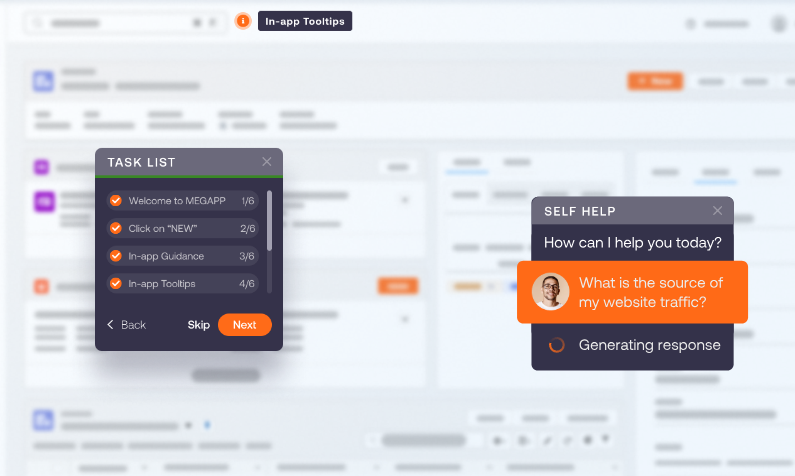
Whatfix targets large enterprises managing internal software adoption. The buyer is typically an L&D professional, HR leader, or IT owner.
The goal: get employees proficient on Salesforce, SAP, Workday, or ServiceNow faster, reduce help desk tickets, and manage change during system rollouts. Whatfix's customers include 15% of Fortune 1000 companies.
Source: Whatfix
The implications are practical. If you run a SaaS product and want to build an onboarding checklist for trial users, Userflow will have you live today. If you're rolling out a new ERP to 10,000 employees across three continents and need guidance in Citrix environments, Whatfix is the only platform in this comparison that can do it.
Setup speed and learning curve favor Userflow
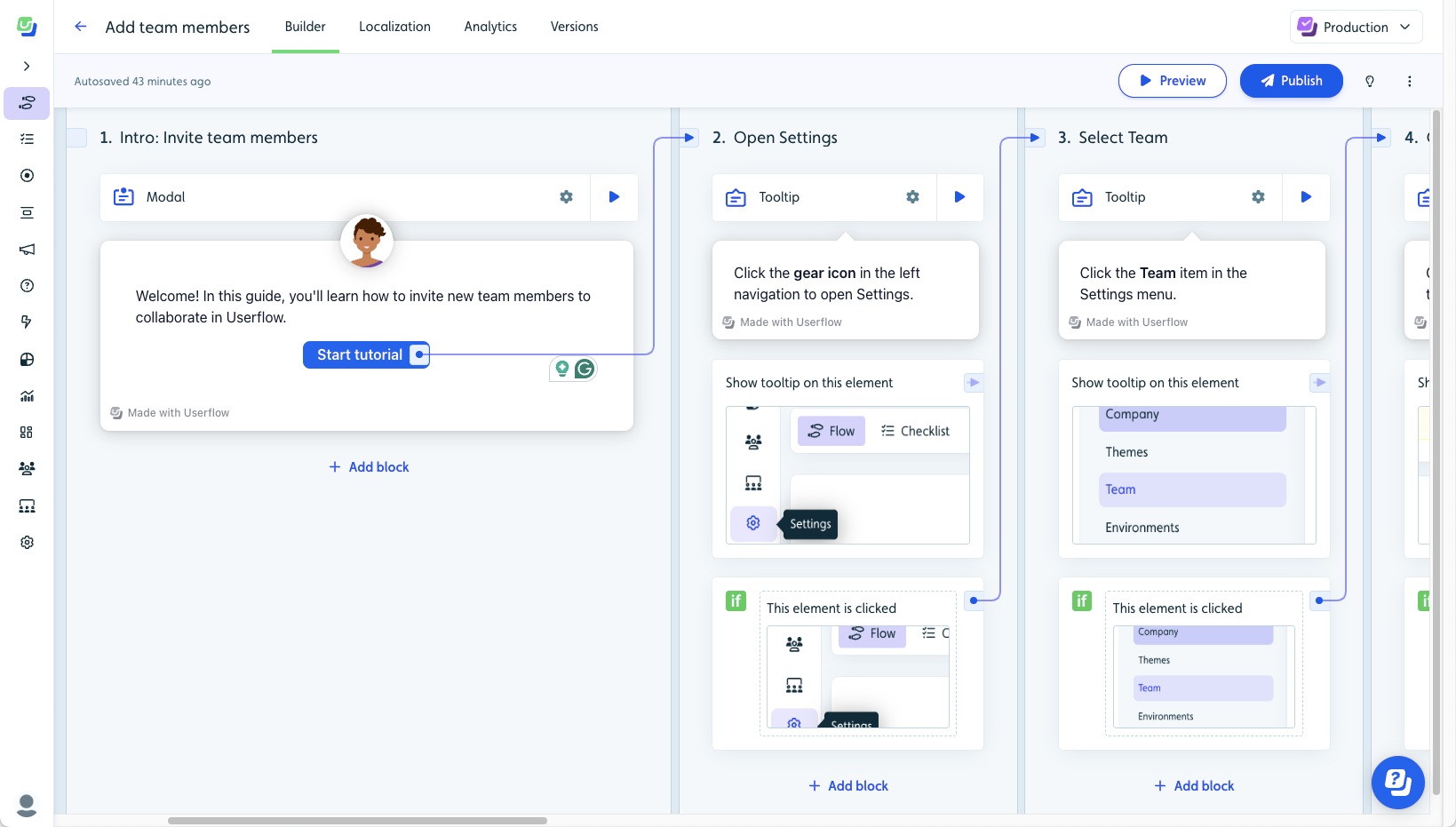
Userflow was designed to be the fastest flow builder on the market for non-technical teams. Most users report publishing their first flow within hours of installing the SDK. The initial setup requires a developer to add a JavaScript snippet and pass user attributes, but once that's done, product and CS teams work entirely within the no-code visual editor.
The Smartflow AI builder speeds this up further. A team member clicks through the product as a user would, and Smartflow constructs a flow of up to 30 steps, including contextual content and UI targeting. For teams that need to create onboarding content quickly, this saves time.
Source: Userflow
Whatfix requires more investment upfront.
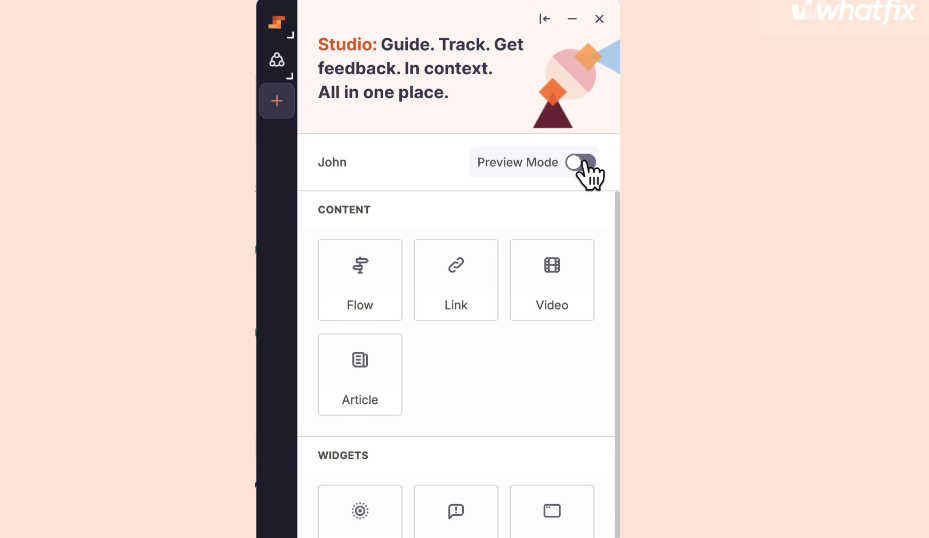
G2 reviewers and SoftwareReviews both flag that initial setup is non-trivial. Building customized flows across different applications requires planning. InfoTech scores ease of setup at 8.2 versus category leaders at 9.0. Teams author content through Whatfix Studio, a browser extension-based editor, and can access training through Whatfix University. But Whatfix implementations often involve weeks of planning, content creation, and testing before going live.
Source: Whatfix
This difference reflects design intent, not quality. Userflow optimizes for a single SaaS product with a small team. Whatfix handles dozens of enterprise applications with thousands of users. Setup complexity scales with problem scope.
AI capabilities take different directions
Both platforms have invested in AI, but with different goals.
Userflow's FlowAI suite focuses on faster content creation. Smartflow auto-builds flows from product observation. FlowAI Insights monitors engagement across in-app experiences and surfaces optimization recommendations. The FlowAI Adoption Agent, powered by GPT-4, answers product questions and recommends walkthroughs in real time. AI Translation localizes content across languages in one click.

Source: Userflow
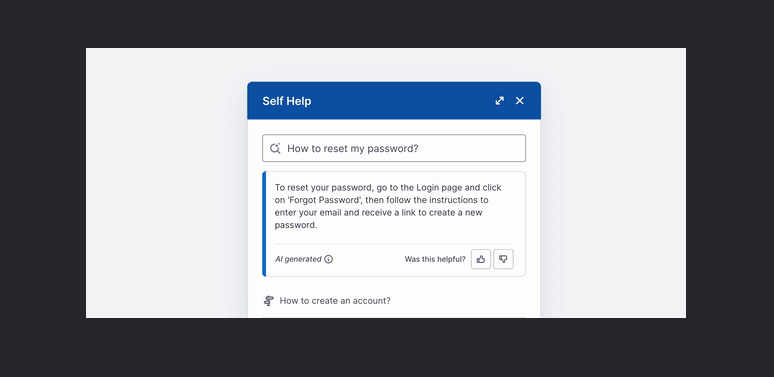
Whatfix built ScreenSense, a patented context engine trained on GUI interactions that understands what screen a user is on and whether they're stuck.
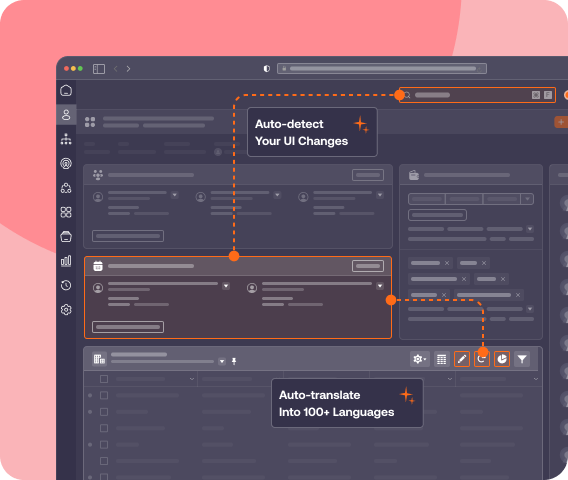
On top of ScreenSense, three AI Agents handle different jobs: the Authoring Agent generates content from natural-language prompts, the Guidance Agent delivers contextual answers in the flow of work, and the Insights Agent turns behavioral data into visual charts and recommendations. ScreenSense also adapts to UI changes, reducing manual maintenance when target applications update.
Source: Whatfix
Userflow's AI helps small teams build onboarding content faster. Whatfix's AI addresses the enterprise challenge of keeping guidance accurate across frequently-updated applications.
Some G2 reviewers still describe Userflow's AI capabilities as maturing, particularly around AI usage limits on lower-tier plans. And while ScreenSense reduces flow breakage when UIs change, SoftwareReviews reviewers still cite flow reliability as a recurring concern.
Analytics depth separates the two
Analytics is a visible gap between these platforms, and a weakness for both in different ways.
Userflow's analytics are per-content: each flow, checklist, and launcher has its own analytics tab showing completion rates, drop-off points, and step-level engagement. The most common complaint on G2 is the absence of a centralized analytics dashboard. To understand overall onboarding performance, teams must check each content item individually.
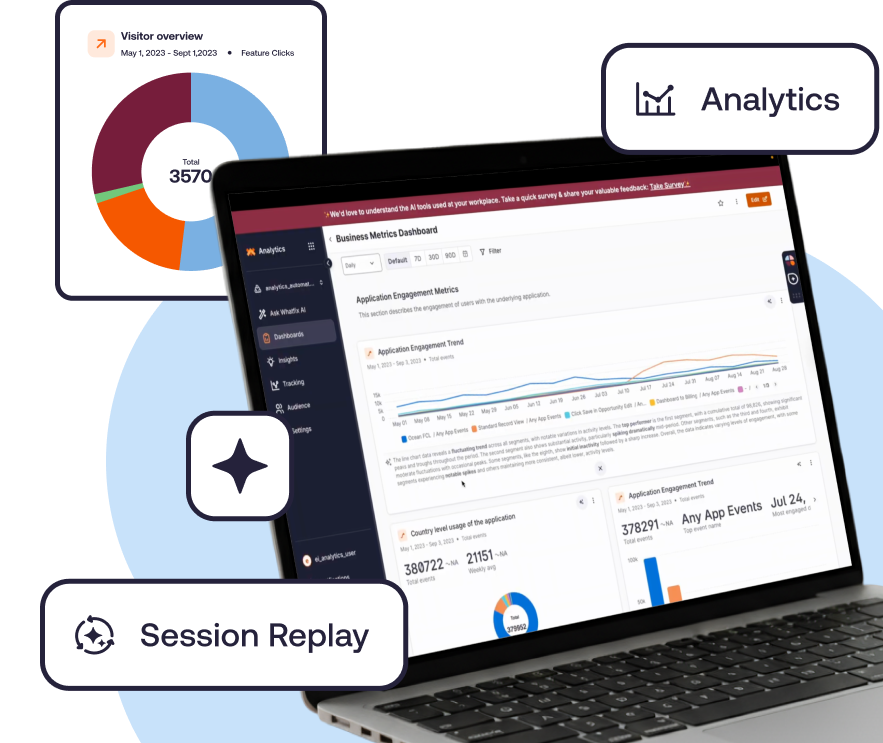
Whatfix offers more depth through its Product Analytics module: AutoCapture (logging all user interactions without engineering work), Funnels, User Journey maps, Session Replay, and Cohorts. Because analytics and the DAP are integrated, teams can spot a drop-off in a funnel and deploy targeted in-app guidance from the same platform.
Source: Whatfix
The catch: Whatfix Product Analytics is a separate paid add-on, not included in the core DAP subscription. The Standard analytics tier comes free with a DAP purchase, but Premium and Enterprise analytics cost extra. And SoftwareReviews reviewers note that even with the analytics module, depth may not satisfy teams expecting product-growth analytics on par with standalone tools.
Enterprise environment coverage is Whatfix's strongest card
If your software stack extends beyond web applications, the comparison narrows quickly.
Userflow is web-only. Its JavaScript SDK installs in web applications and works well there, but it cannot reach desktop apps, mobile apps, or virtual desktop environments.
Whatfix is one of the few DAPs with native support for desktop applications (Windows/Mac), VDI/Citrix environments, and mobile, alongside web apps. For enterprises running SAP on desktop and Salesforce on web, this multi-environment coverage under one platform often disqualifies web-only competitors.
Whatfix also includes capabilities that matter to enterprise IT: multi-level content approval workflows, staging environments, automated UI-change testing, and one-click rollback. Content created in Whatfix can be exported via Adoption Everywhere into videos, slide decks, PDFs, and articles, feeding existing LMS and knowledge base systems. The platform supports SCORM 1.2 and xAPI 1.0 for LMS interoperability.
Source: Whatfix
For enterprise buyers evaluating compliance and security: Whatfix holds SOC 2 certification and ISO 27001:2013 compliance, offers SSO and IP Whitelisting on all plans, and provides configurable data residency. Userflow is SOC 2 Type 2 certified and GDPR compliant, hosted on Google Cloud Platform.
Both meet baseline enterprise security requirements, but Whatfix offers more granular governance controls. SSO and advanced permissions are available only on Userflow's Enterprise (custom-quote) tier.
Pricing transparency is Userflow's advantage
Userflow publishes its prices. Whatfix does not.
Userflow uses two usage-based pricing models:
Adoption Studio: Starts at $500/month ($400/month billed annually) and includes 1,000 monthly active users (MAUs), unlimited seats, unlimited flows, checklists, banners, launchers, surveys, integrations, and three environments.
Adoption Agent: Starts at $100/month ($80/month billed annually) and includes 500 AI credits/month, unlimited AI Agent-triggered flows, knowledge source training, core integrations, unlimited seats, and three environments.
Whatfix's pricing is entirely quote-based. The structure combines a flat fee with per-user licenses, with separate pricing for each product (DAP, Product Analytics, Mirror) and each platform (Web, Mobile, OS).
The Standard plan limits integrations to two and content aggregation to 2,000 articles. This structure makes costs hard to predict, especially as deployments scale across applications and platforms.
For growing SaaS companies, Userflow's pricing is still straightforward to model. Adoption Studio scales with monthly active users, while Adoption Agent scales with AI credits, making costs relatively predictable as usage grows. For enterprises evaluating Whatfix, the lack of published pricing means budget planning requires sales conversations and custom quotes, which can stretch procurement timelines.
Where ZoomInfo fits in the adoption equation
Userflow and Whatfix both guide users through software after they arrive. Neither answers a connected question: who should be arriving in the first place?
For SaaS companies using Userflow, this matters directly. Your onboarding flows are only as valuable as the users entering them. A trial user who matches your ICP and is evaluating solutions will engage with your checklist. A poorly-qualified lead who stumbled onto a free trial won't finish step one.
ZoomInfo sits upstream.
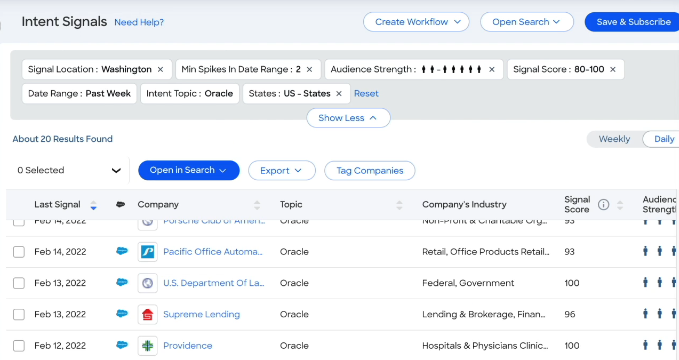
Its Buyer Intent data tracks signals from 210 million IP-to-Organization pairings, identifying companies researching solutions in your category. WebSights resolves anonymous website visitors to companies, including buying team identification and direct contact info.
Source: ZoomInfo
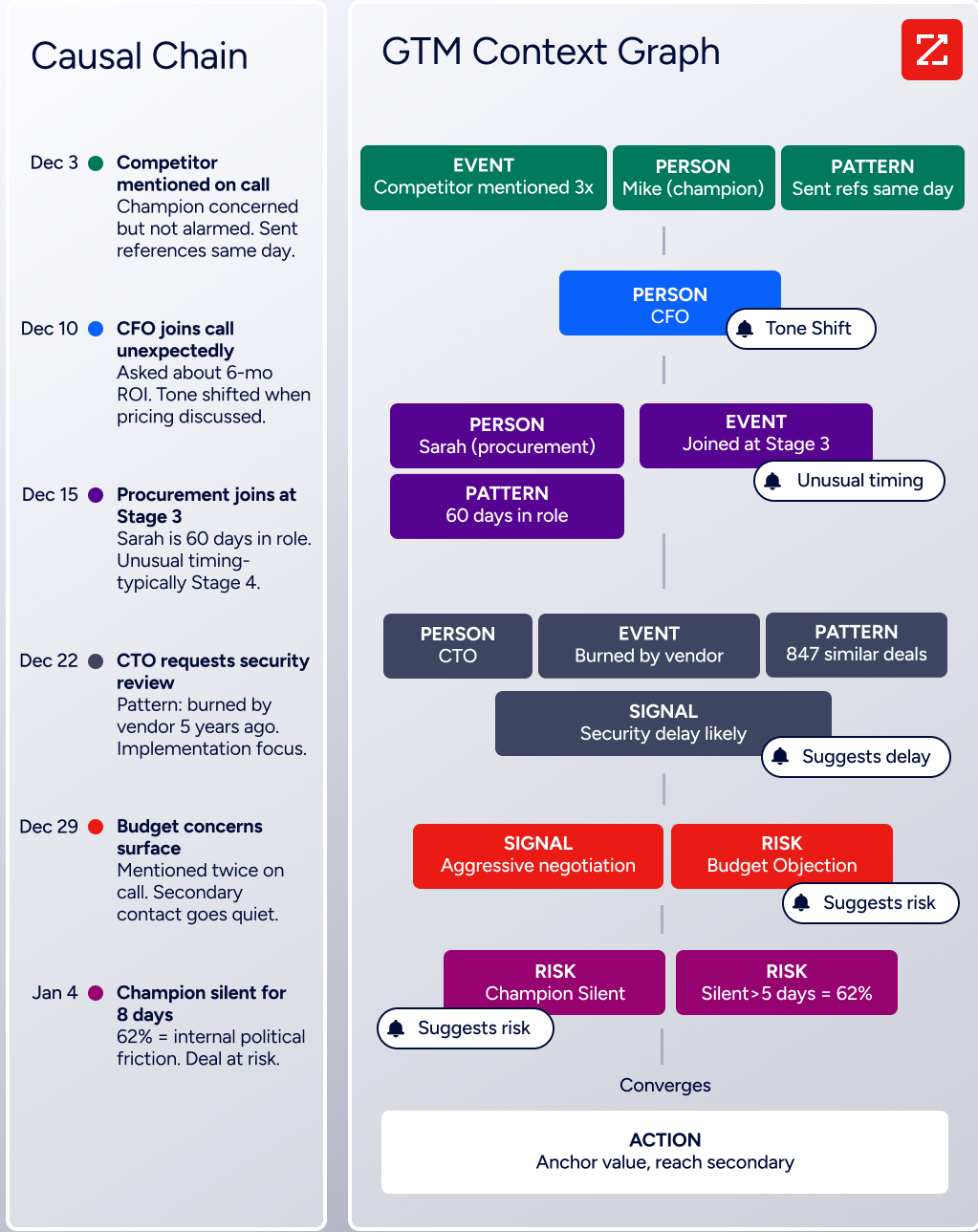
The GTM Context Graph (ZoomInfo's intelligence layer) unifies CRM data, conversation transcripts, and third-party signals to capture not just what happened in a deal, but why, giving your team the context to engage the right accounts at the right time.
The practical result: when your GTM team uses ZoomInfo to identify and engage accounts that match your ICP and show buying intent, the users entering your product arrive pre-qualified. They've been targeted because their company fits your market, their role matches your buyer persona, and their behavior signals genuine interest. Those are the users who complete onboarding, adopt features, and expand.
Source: ZoomInfo
For enterprises using Whatfix to drive internal adoption of tools like Salesforce, ZoomInfo data often flows into those same systems. Experian used Whatfix to drive Salesforce adoption, cutting onboarding from 6 hours to 40 minutes.
But the quality of data inside Salesforce determines how productive those newly-onboarded reps become. ZoomInfo enriches CRM records with 300+ company attributes, verified contact data, and intent signals, so the Salesforce environment employees learn to navigate contains accurate, useful information.
"Anything that minimizes our team's need to switch contexts is beneficial. ZoomInfo offers a unified view, eliminating the need to navigate between systems." (Spekit, Ben Perceval, RevOps Manager)
Simulation and training: Whatfix's unique capability
Whatfix offers something neither Userflow nor ZoomInfo provides: a full application simulation product.
Whatfix Mirror captures screens and actions from a live web application and creates an interactive replica that employees can practice in without touching real data. This eliminates the need to maintain separate test environments with additional licenses, provisioned accounts, and dedicated infrastructure.
Mirror also supports AI-powered Roleplay, combining simulated environments with conversational AI for scenario-based training (sales calls, customer service interactions). Assessments built on simulations track accuracy, completion rates, and time taken, measuring actual proficiency rather than quiz scores.

Source: Whatfix
For enterprises rolling out a new ERP or CRM, letting employees practice in a safe simulation before going live fills a gap that neither Userflow's in-app flows nor traditional classroom training can address.
Content creation and management at scale
Both platforms offer no-code content authoring, but the workflows differ.
Userflow's visual editor uses a point-and-click selector to attach steps to UI elements. Step types include tooltips, speech bubbles, modals, banners, and hotspots, with branching logic based on user responses. The Debugger provides real-time diagnostics when flows don't trigger as expected.
A limitation: teams with many flows report difficulty organizing content. Userflow lacks folder or project-level organization within the flow builder.
Whatfix's Studio records interactions on the live application to build Flows, tooltips, and other elements.
Its Content Lifecycle Management system includes multi-level approval workflows, staging environments, and Auto Testing that checks Flows for breakage when UIs change, with email notifications and fix recommendations. Content can span multiple applications in a single workflow, covering the full process chain. Language translation is manual on the Standard plan and automated on Premium.
For a team managing five onboarding flows in a single SaaS product, Userflow's simplicity wins. For an organization managing hundreds of workflows across Salesforce, SAP, and Workday with localization in twelve languages, Whatfix's governance tools become necessary.
Integration ecosystems reflect target markets
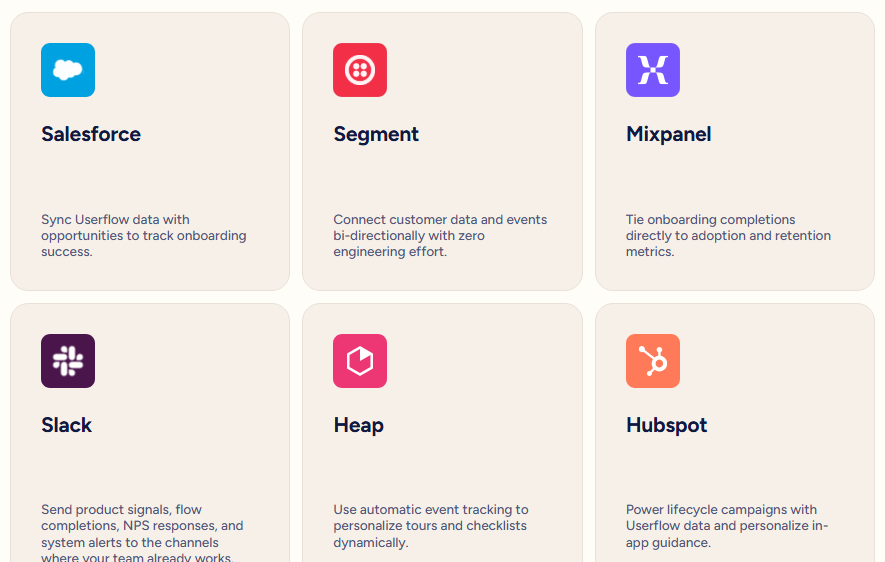
Userflow integrates with tools SaaS teams already use: Segment (bidirectional), HubSpot (near-real-time sync), Salesforce (Pro and Enterprise), and analytics platforms like Amplitude, Mixpanel, and Heap. Webhooks and a REST API handle custom integrations. The list is focused but covers the core SaaS stack.
Source: Userflow
Whatfix integrates with enterprise systems: Salesforce, SAP SuccessFactors, Oracle, Workday, ServiceNow, and SharePoint, plus analytics tools like Amplitude, Google Analytics, and FullStory.
The platform supports SCORM 1.2 and xAPI 1.0 for LMS export and connects to Confluence for knowledge management. The Standard plan limits integrations to two; Premium and Enterprise offer unlimited.
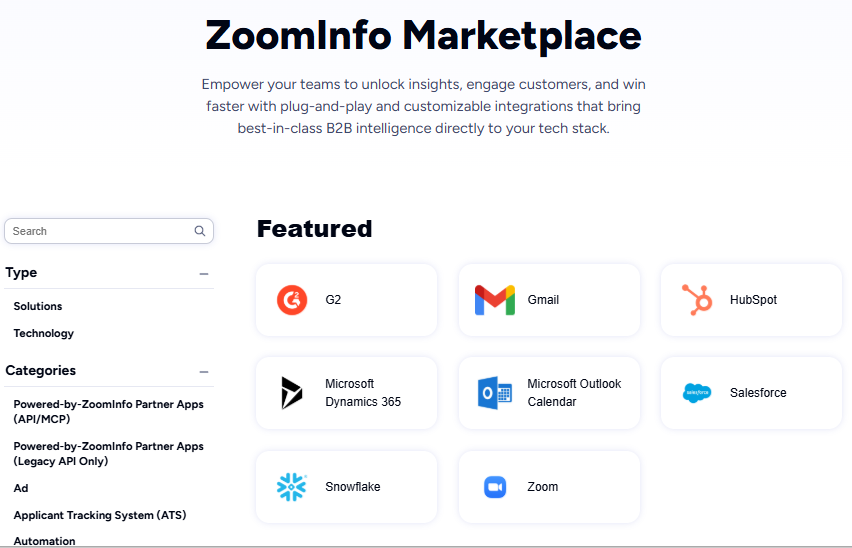
ZoomInfo's App Marketplace lists 172+ integration partners, including connectors for Salesforce, HubSpot, Microsoft Dynamics 365, cloud data platforms (Snowflake, Databricks, AWS, Google Cloud), and AI assistants via MCP.
For teams using ZoomInfo alongside one of these adoption platforms, the data flows complement each other: ZoomInfo enriches CRM records upstream, and Userflow or Whatfix guides users through the enriched experience downstream.
Source: ZoomInfo
"ZoomInfo is our one source of truth for account data, and even more so for contact data. There's no other provider in the market that provides you with that level of detail." (Smartsheet, Thor Sanderson, Senior Manager of Sales Technology Enablement)
Userflow vs. Whatfix vs. ZoomInfo: Which should you choose?
These three platforms address different stages of the software adoption lifecycle. The right choice depends on where your biggest gap is.
Choose Userflow if:
You're a SaaS company onboarding external users to your own product
Your product and CS teams need to build and iterate on flows without developers
You want transparent pricing and fast setup
Your product is web-based and your user base is under 25,000 MAUs
You value simplicity and speed over enterprise governance
Choose Whatfix if:
You're an enterprise managing employee adoption across complex applications
Your software stack includes desktop apps, VDI environments, or mobile alongside web
You need simulation-based training, multi-language support, and content lifecycle governance
You can invest in a multi-week implementation for long-term adoption gains
Analyst validation and proven enterprise outcomes matter to your procurement process
Add ZoomInfo if:
You need to ensure the right accounts and contacts enter your product before onboarding begins
Your GTM team lacks visibility into which prospects are researching solutions in your category
CRM data quality is undermining your adoption and enablement tools
You want intent signals, verified contact data, and account intelligence in one platform
You're building a GTM stack where acquisition and adoption work together
See how ZoomInfo powers better go-to-market outcomes.
"It's not just the data itself. It's more about the right data at the right time to help us reach out with the right message across that full buyer journey." (Redwood Logistics, Chelsea Kenyon, Senior Director of Digital Strategy)
Userflow and Whatfix are both strong adoption platforms. Userflow deploys faster, is easier to use, and costs less for SaaS companies guiding external users. Whatfix is deeper, broader, and built for enterprises managing change across complex application environments.
But adoption tools only work on the users who show up. For SaaS companies especially, combining ZoomInfo's upstream intelligence (identifying and engaging the right accounts) with Userflow's or Whatfix's downstream guidance (onboarding and retaining those accounts) creates a system where acquisition and adoption reinforce each other.
Userflow vs. Whatfix vs. ZoomInfo FAQ
What is the core difference between Userflow and Whatfix?
Userflow is designed for SaaS companies onboarding external product users, with a lightweight no-code builder that non-technical teams can deploy in hours. Whatfix is built for enterprises driving internal employee adoption across complex application environments (web, desktop, mobile, and VDI).
Userflow prioritizes speed and simplicity; Whatfix prioritizes breadth and governance.
Which platform is more affordable?
Userflow publishes transparent pricing. Adoption Studio starts at $500/month ($400/month billed annually) for 1,000 MAUs, while Adoption Agent starts at $100/month ($80/month billed annually) for 500 AI credits. Whatfix does not publish prices. All plans are quote-based with a flat fee plus per-user license model, and Product Analytics and Mirror are separate paid add-ons.
For SaaS companies with straightforward needs, Userflow is generally more affordable with predictable costs.
Can Userflow or Whatfix work with desktop or mobile applications?
Userflow is web-only. Whatfix supports web, desktop (Windows/Mac), mobile, and VDI/Citrix environments, making it the only option in this comparison for enterprises running non-web applications. Desktop and VDI support are available on Whatfix's Enterprise tier.
How does ZoomInfo relate to Userflow and Whatfix?
ZoomInfo is not a digital adoption platform. It's a B2B intelligence and GTM platform that sits upstream in the adoption lifecycle. ZoomInfo helps companies identify the right accounts, engage the right contacts, and enrich CRM data, ensuring that users entering your product and adoption flows are well-qualified. It complements Userflow or Whatfix rather than replacing either.
Which platform has better AI capabilities?
Both have invested in AI with different goals.
Userflow's FlowAI suite focuses on faster content creation: Smartflow auto-builds onboarding flows by watching product interactions, and FlowAI Insights surfaces engagement recommendations. Whatfix's ScreenSense is a context engine that understands application screens and user intent, with three AI Agents for authoring, guidance, and analytics. Whatfix's AI is more enterprise-oriented, addressing challenges like flow maintenance across frequently updated applications.
Which platform has better analytics?
Whatfix offers deeper analytics through its Product Analytics module (automatic interaction capture, funnels, session replay, and user journey maps). But Product Analytics is a separate paid product, not included in the base DAP subscription.
Userflow provides per-content analytics (completion rates, drop-off points) but lacks a centralized dashboard, the most frequently requested improvement in user reviews.
What kind of support do Userflow and Whatfix provide?
Userflow scores 9.8/10 for Quality of Support on G2, with users citing fast, knowledgeable responses. Whatfix scores 9.7/10 on G2 and reports a 99.5% CSAT score across 700+ customers. Named customer success managers are available on Whatfix's Premium and Enterprise tiers and Userflow's Enterprise tier. Whatfix also offers Whatfix University for self-paced training and certification.
Can I try these platforms before committing?
Userflow offers a 14-day free trial with full feature access and no credit card required. Whatfix offers a free trial through a sales-assisted request form.
ZoomInfo offers both a permanent free tier (ZoomInfo Lite, with 10 monthly export credits and access to the B2B database) and a 7-day free trial of paid features.
More Userflow and Whatfix comparisons:
