

Whatfix has spent a decade as a Digital Adoption Platform. The premise is simple: enterprise software is expensive, and organizations waste that investment when employees struggle to use it. Whatfix sits on top of applications like Salesforce, SAP, and Workday, delivering in-app guidance when users need help.
With 700+ customers across 30+ countries and recognition as a 2024 Forrester Wave Leader for Digital Adoption Platforms, Whatfix serves organizations like Experian, Mercedes-Benz, UPS, and the US Army. It holds a 99.5% customer satisfaction score and has been a Gartner Customers' Choice for three consecutive years.
To create this Whatfix review, we analyzed the platform. It fits if:
You manage software adoption across multiple enterprise applications
You need to reduce IT support tickets and speed up employee onboarding
You're undergoing digital transformation with major ERP, CRM, or HCM rollouts
You require guidance across web, desktop, mobile, and VDI environments
Compliance-driven workflow governance is a priority
However, Whatfix might not fit if:
You're an SMB or startup with a small user base and a single application
You need published pricing before committing
You want lightweight onboarding for external, customer-facing SaaS products
Your team lacks the resources for initial setup and the learning curve
You need product analytics without paying for a separate add-on
While Whatfix helps enterprise teams use their software, B2B revenue teams face a parallel challenge: even a well-adopted CRM is an empty shell if the contact records, buying signals, and account intelligence aren't there.
This is where ZoomInfo fits, a GTM platform that provides B2B data, intelligence, and execution tools that make CRM, sales engagement, and marketing automation platforms productive.
We've included a brief overview of ZoomInfo at the end of this review as a complementary platform for B2B organizations. If you want to see how better data can improve your revenue team's results, you can start with ZoomInfo Lite for free.
What is Whatfix?
Source: Whatfix
Whatfix is a Digital Adoption Platform founded in 2014 by Khadim Batti and Vara Kumar in Bengaluru, India. The two met at Huawei Technologies, where Batti managed product portfolios for Deep Packet Inspection and Business Intelligence and Kumar served as a lead architect. Whatfix didn't start as a DAP. It began as an SEO and social media engagement platform before pivoting to interactive in-app guidance.
The pivot proved prescient. Whatfix helped define the Digital Adoption Platform category alongside analysts like Gartner, and now serves 80+ Fortune 500 clients through three products: a Digital Adoption Platform for in-app guidance, Product Analytics for usage tracking and behavior analysis, and Mirror for application simulation training.
The company has raised $264.2 million in total funding, most recently a $125 million Series E led by Warburg Pincus in September 2024. Annual recurring revenue reached approximately $138.8 million with 31% year-over-year growth.
With roughly 1,100 employees and offices in San Jose, Bengaluru, Singapore, Germany, and Australia, Whatfix targets L&D professionals, HR teams, Sales Enablement leaders, and Product teams at large enterprises in banking, healthcare, insurance, pharma, education, and the public sector.
The company's guiding philosophy is "Userization", the idea that technology should adapt to the user rather than the other way around. With WalkMe acquired by SAP in 2024, Whatfix positions itself as the independent enterprise DAP for organizations not running SAP-centric stacks.
Whatfix Pros & Cons
Pros | Cons |
|---|---|
- No-code authoring for building flows without engineering | - Steep learning curve for initial setup and configuration |
- Covers web, desktop, mobile, and VDI environments | - No published pricing; all plans require a sales conversation |
- Multi-format content export (video, PDF, slides, articles) | - Flows can break when underlying application UIs change |
- ScreenSense engine for contextual guidance | - Product Analytics Premium is a separate paid add-on |
- Analyst validation (Forrester Leader, Gartner Choice) | - Standard plan limits integrations to two |
- 99.5% CSAT with responsive customer success team | - Mirror simulation product priced separately from DAP |
- Auto-translation for multilingual global deployments | - Not cost-effective for SMBs or single-application use cases |
Whatfix Review: How It Works & Key Features
Digital Adoption Platform: Whatfix overlays interactive guidance on top of enterprise applications without modifying their source code.
Whatfix's core DAP is a software layer injected into target applications as an overlay. Authors create guidance content using Whatfix Studio, a no-code browser-based editor that records interactions on the live application to build step-by-step Flows, tooltips, and other in-app elements. No developer involvement is needed for day-to-day content creation.
Source: Whatfix
The platform surfaces guidance through Smart Context, which detects where a user is within an application and shows only the relevant guidance for that location and workflow. Users don't search for help. It appears when they need it.
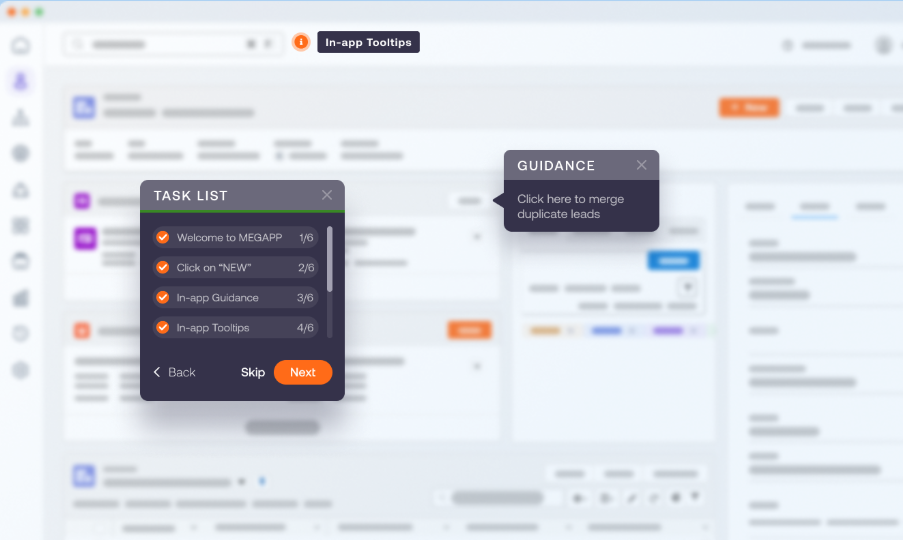
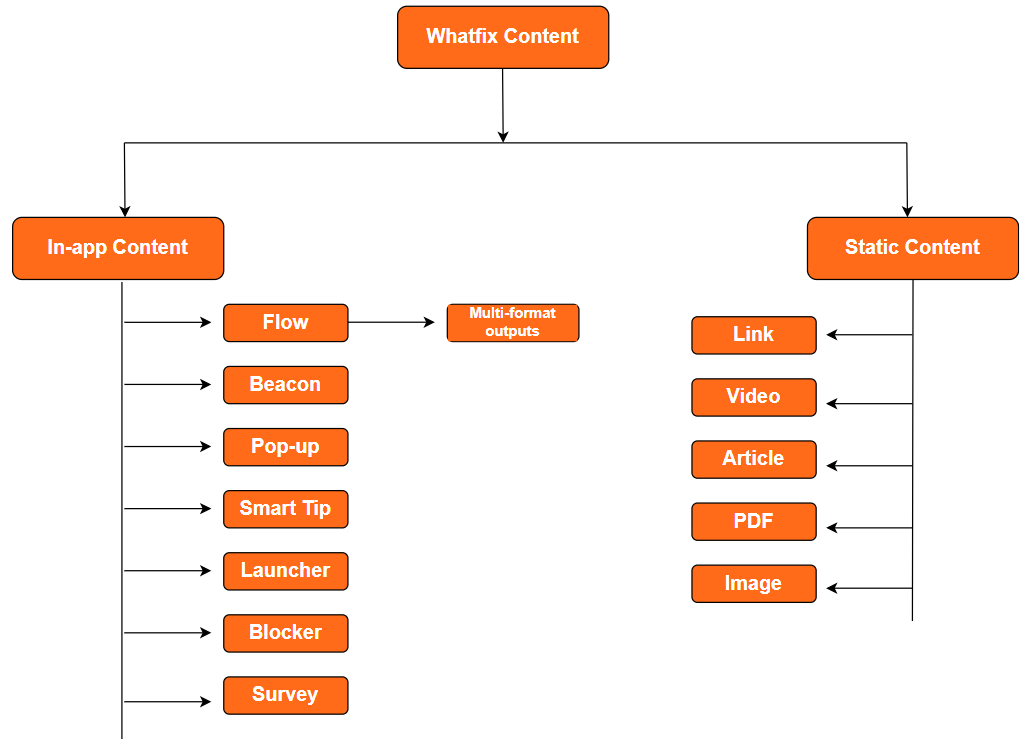
The in-app toolkit includes Flows (interactive walkthroughs with branching and automated triggers), Smart Tips (contextual tooltips on specific UI elements), Beacons (hotspot markers that draw attention to features), Task Lists (onboarding checklists), Pop-Ups (announcements and alerts), and a Self Help widget that provides a searchable support layer within the application.
The Self Help widget includes QuickRead, which generates AI summaries in response to search queries, and integrates with ticketing systems and live chat so users can escalate without leaving the app.
Whatfix can publish content as in-app guidance and export it via Adoption Everywhere into videos, slide decks, PDFs, and how-to articles. A single authoring session produces multiple formats, useful for organizations that need to feed an LMS while also delivering in-app guidance.
The platform supports web, desktop, mobile, and VDI/Citrix environments, making it one of the few DAPs that works for enterprises running mixed application types. Most DAPs target web applications only. Whatfix's desktop and VDI coverage matters for organizations running legacy or specialized software that web-only platforms can't reach. VDI and offline support are available on the Enterprise tier.
Product Analytics: Whatfix tracks usage behavior inside enterprise applications to identify where users struggle.
Whatfix Product Analytics is a separate product in the suite, designed to answer a specific question: where do employees get stuck inside enterprise software? Standard web analytics tools track page views and clicks but cannot capture the process-level detail needed to understand friction inside complex enterprise applications. Whatfix Product Analytics fills this gap.
Source: Whatfix
The product has three modules.
Track uses AutoCapture to log every user interaction (clicks, hovers, navigation) without requiring developers to write event-tracking code. Teams can also define named User Actions for specific interactions and attach User Attributes (role, department, account type) to profiles for segmentation.
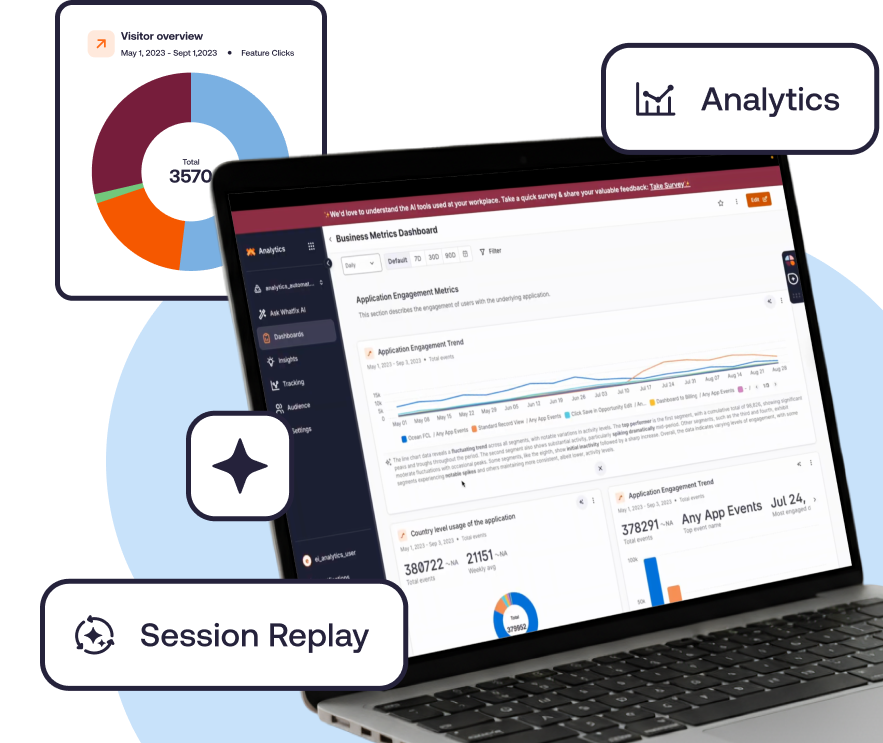
Analyze feeds captured events into Funnels (tracking step-by-step progression and drop-offs), User Journey maps (visualizing navigation paths), Cohorts (grouping users by shared behavior), Session Replay (visual playback of individual user sessions), and customizable dashboards.
Act connects insights to action, letting teams create Whatfix DAP content (Flows, Smart Tips, Self Help widgets) directly from the analytics workflow.
An AI Insights Agent accepts natural-language questions and returns behavioral data visualizations and recommendations. In-App Surveys with AI analysis of responses complete the feedback loop, blending behavioral data with user sentiment.
The Standard Product Analytics plan is included free with any DAP Web & Desktop purchase. Premium and Enterprise tiers with multi-app support and a named CSM are separately priced.
Mirror: Whatfix replicates enterprise applications as interactive sandboxes for hands-on training.
Whatfix Mirror addresses a common obstacle in enterprise software training: organizations have historically needed separate, costly test environments with additional licenses, provisioned accounts, and dedicated infrastructure just to give employees a safe place to practice.
Source: Whatfix
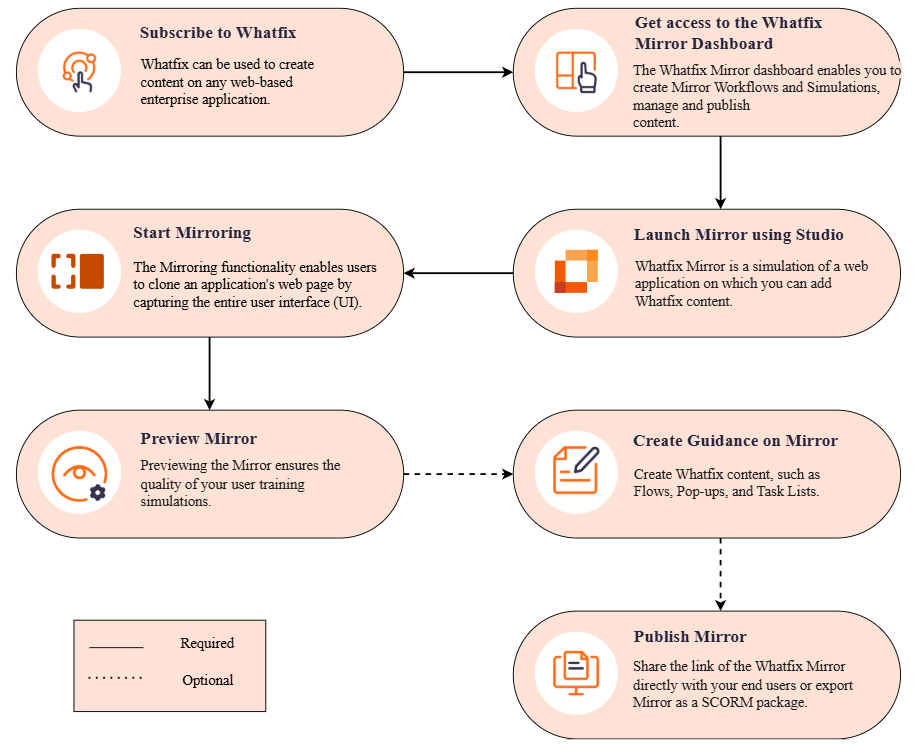
Mirror works by capturing screens and actions from a live web application and connecting them to create an interactive replica. The resulting simulation runs independently from the live system and is accessible through a shared link or LMS integration.
Employees don't need to be provisioned into the actual application. Training authors can overlay DAP guidance content (Flows, Smart Tips, walkthroughs) on top of the simulated screens, turning simulations into step-by-step training without touching the live system.
Assessments evaluate how well employees complete tasks inside the simulation, tracking accuracy, completion rates, and time taken.

Source: Whatfix
Mirror Analytics tracks simulation usage, learner engagement, and ROI metrics. Whatfix works with customers to define goals and measure metrics before and after Mirror implementation, giving L&D teams a structured method to demonstrate training ROI.
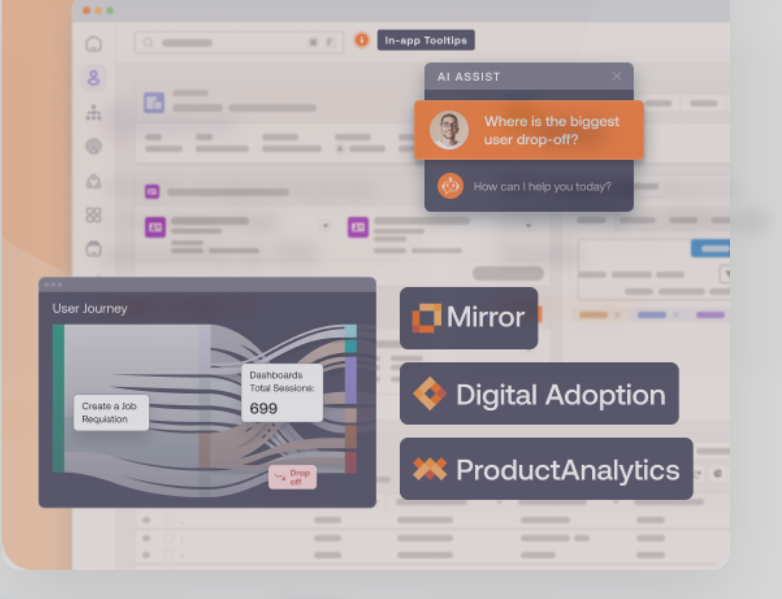
Source: Whatfix
Mirror also supports AI Roleplay, combining simulated application environments with conversational AI for scenario-based training: sales call rehearsal, customer service practice, or HR interview preparation.

Source: Whatfix
AI Capabilities: ScreenSense and three AI Agents add contextual intelligence and automated content creation.
Whatfix's AI layer is built on ScreenSense, a proprietary context-and-intent engine unveiled in February 2025.
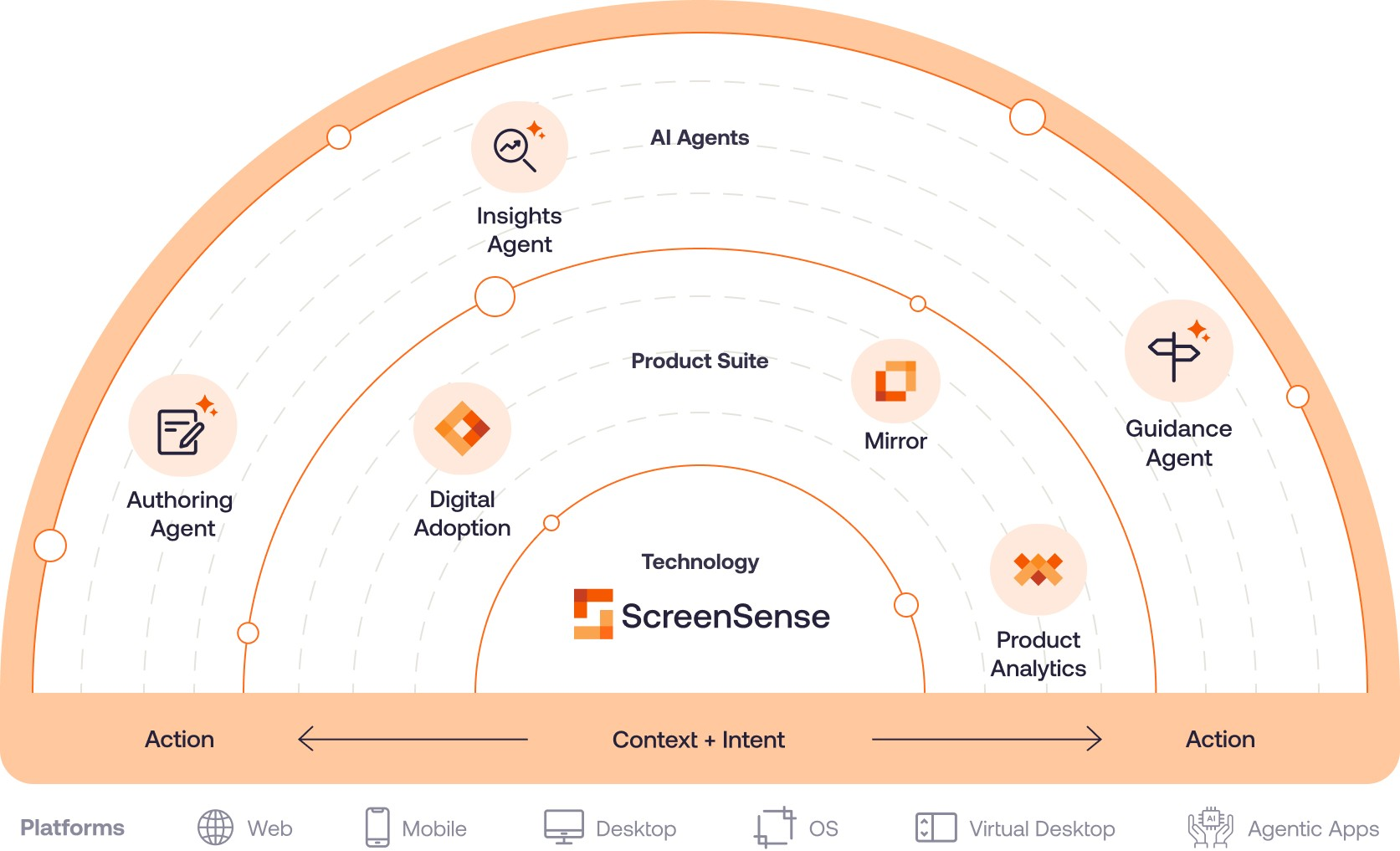
Source: LinkedIn
Built on a Computer Use model trained to understand and interact with graphical user interfaces, ScreenSense operates on three pillars: it identifies which screen a user is on (Context), interprets whether the user is stuck, exploring, or completing a task (Intent), and triggers the appropriate guidance at the right moment (Action).
When an application's UI changes, ScreenSense adapts to updates in position, language, and color, reducing the maintenance burden of keeping flows current.
Three AI Agents (launched September 2025) sit on top of ScreenSense:
The Authoring Agent generates Whatfix content from natural-language prompts. It also supports Quick Capture Flows, recording each step as an author clicks through an application once and building a complete Flow automatically.
The Guidance Agent delivers contextual AI-generated answers within the user's active workflow, summarizing documentation and guiding users step-by-step without requiring them to leave the application.
The Insights Agent accepts natural-language questions about behavioral data and generates visual charts, summaries, and recommended next steps.
Additional AI capabilities include Auto Testing+ (automated validation of Flows against UI changes), AI Visibility Rules that convert plain-language targeting descriptions into structured logic, and AI Voiceover for video exports.
Where Whatfix Falls Short
While Whatfix works well as an enterprise DAP, several limitations surface depending on your organization's size, budget, and needs. These follow naturally from a platform built for large-scale enterprise deployments.
Complex Initial Setup and Learning Curve. Reviewers on G2 and SoftwareReviews flag that getting started with Whatfix requires significant planning. Initial installation reportedly lacks sufficient guidance, and creating customized flows across different applications takes time.
SoftwareReviews scores ease of setup at 8.2 versus a category-leader score of 9.0. Organizations without dedicated L&D or IT resources to manage the implementation will find this ramp-up period delays time-to-value.
Flow Breakage When Applications Update. Guided Flows are tied to specific UI elements, and when the target application changes its interface, existing Flows can break mid-deployment. Reviewers consistently cite this as a recurring concern, and SoftwareReviews mentions "unreliability of the flows" as a theme.
Whatfix's Auto Testing+ and ScreenSense AI are designed to mitigate this, but organizations running fast-moving SaaS applications with frequent updates may find themselves in a maintenance cycle.
Pricing Opacity. All plans are quote-based with no published pricing. The per-product (DAP, Analytics, Mirror) and per-platform (Web, Mobile, OS) structure makes it difficult to estimate total cost of ownership upfront. The Standard plan caps integrations at two and content aggregation at 2,000 articles, which can force early upgrades for growing teams.
For procurement teams accustomed to self-serve pricing calculators, this opacity adds friction to the evaluation process.
Product Analytics Depth. While Standard Product Analytics is bundled free with DAP, the deeper capabilities require a paid upgrade. SoftwareReviews reviewers note that analytics "did not provide insights to a satisfactory level" for some enterprise teams, particularly those expecting analytics at parity with dedicated tools.
Organizations that need both analytics and a DAP may find themselves paying for two tiers across two products.
Enterprise-Scale Investment for Enterprise-Scale Problems. Whatfix is built for organizations with 1,000 to 100,000+ users navigating mission-critical software. For SMBs, startups, or teams with a single application, the implementation investment, platform complexity, and quote-based pricing are disproportionate.
The majority of its customer base comes from companies with $50M+ annual revenue. Lighter tools exist for simpler use cases.
These limitations reflect a platform designed for enterprise complexity, not failures of execution. But they raise a broader question for B2B organizations: is the primary productivity bottleneck for your revenue teams about software navigation, or about the quality of data and intelligence flowing through those tools? For many go-to-market teams, a well-adopted CRM with stale data still produces poor results.
Complementary Platform for B2B Revenue Teams: ZoomInfo
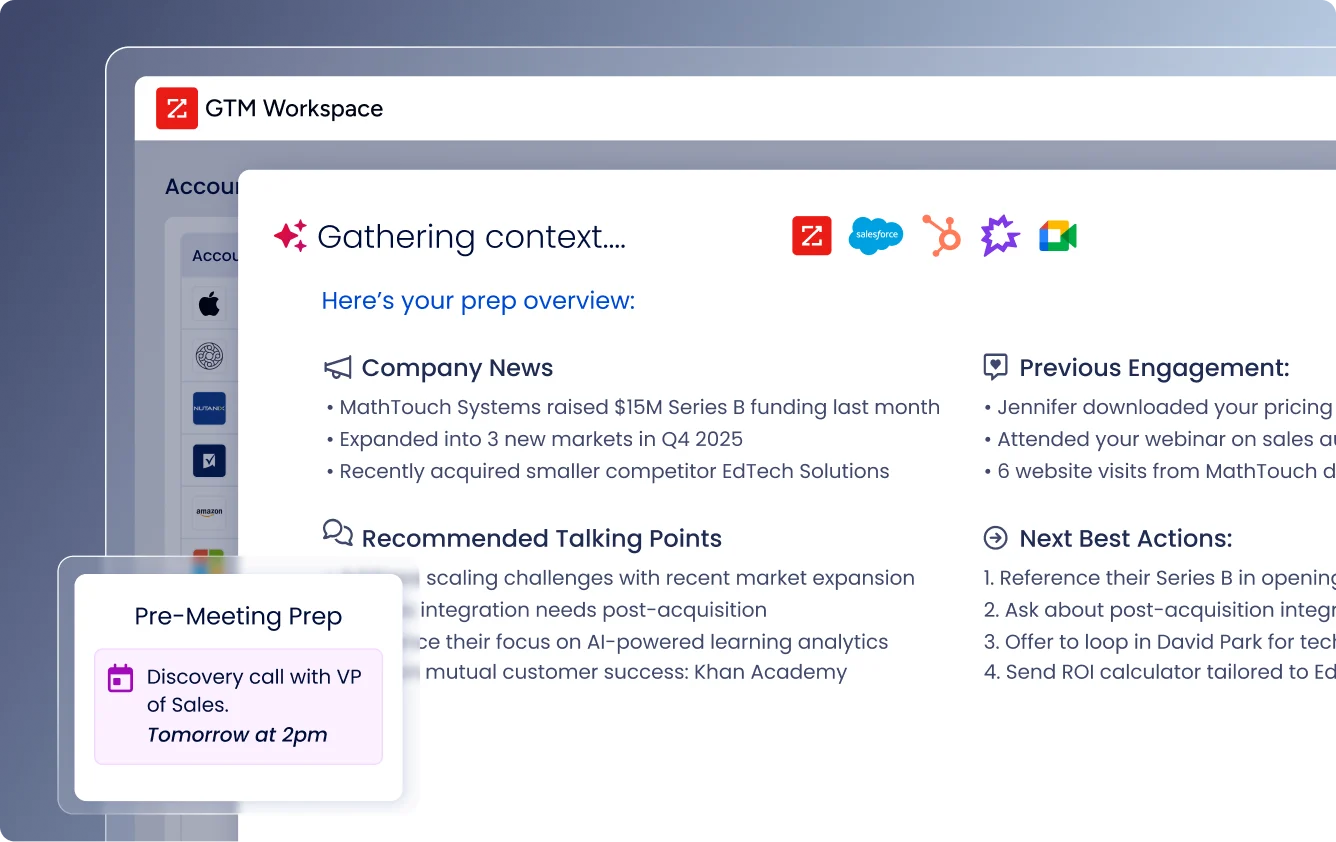
Where Whatfix addresses how enterprise teams use their software, ZoomInfo addresses what powers it. ZoomInfo is a GTM platform built on a large B2B data foundation. For organizations whose go-to-market results depend on more than tool adoption, ZoomInfo provides the data, intelligence, and execution tools that make CRM, sales engagement, and marketing automation platforms deliver results.
Comprehensive B2B Data: ZoomInfo maintains a B2B dataset covering 500 million contacts and 100 million companies.
ZoomInfo's foundation is its data layer: 500M contacts, 100M companies, 135M+ verified phone numbers, 120M direct-dial phone numbers, and 200M+ verified business email addresses.
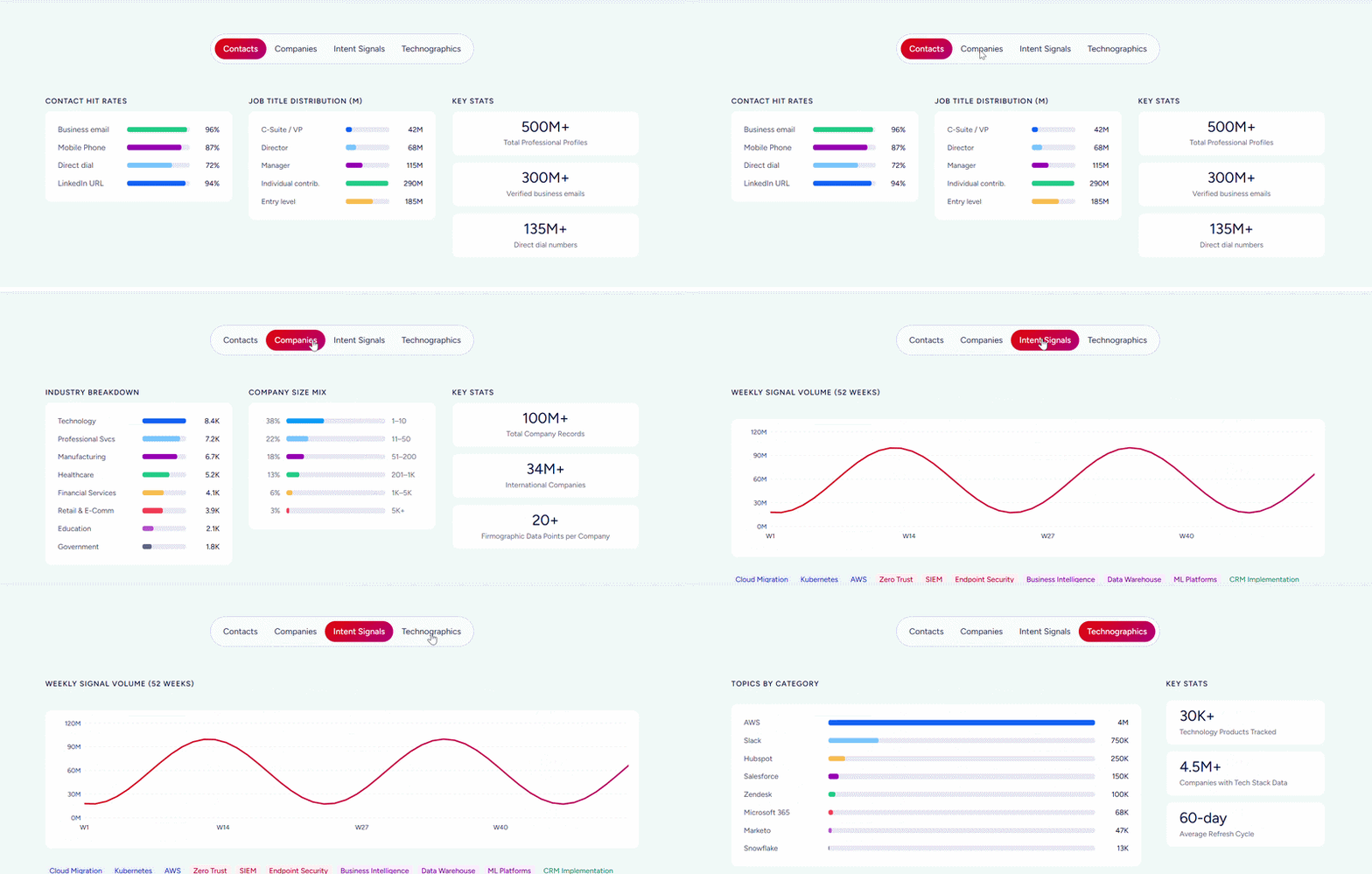
This data spans three dimensions: identity data (who buyers are and how to reach them), company context (industry classification, technographics, org charts), and dynamic signals (buying intent and behavioral data indicating when accounts are in-market).
ZoomInfo verifies data through a multi-source pipeline: automated ML scanning of 28 million site domains daily, a community of 200,000+ ZoomInfo Lite users who share data back, and an in-house Data Training Lab of 300+ human researchers.
First-party data reaches up to 95% accuracy. In a Fortune 500 competitive RFP analyzing 25 million contacts across vendors, the independent consultant concluded that "no other competitor came even close."
For revenue teams, the practical impact is direct: sales reps get phone numbers that ring and email addresses that land, RevOps teams get enrichment workflows that don't require stitching together multiple vendors, and marketers get TAM models built on continuously verified data rather than stale snapshots.
"ZoomInfo gives us the information we need to execute. It's already there, so we can be three steps ahead." (Vensure)
GTM Context Graph: ZoomInfo fuses B2B data with CRM records, conversations, and signals into a single intelligence layer.
Data becomes more valuable when it delivers context. ZoomInfo's GTM Context Graph, which processes 1.5B+ data points daily, unifies ZoomInfo's third-party intelligence with a customer's CRM records, conversation transcripts, email threads, and behavioral signals to capture not just what happened in a deal, but why it happened.
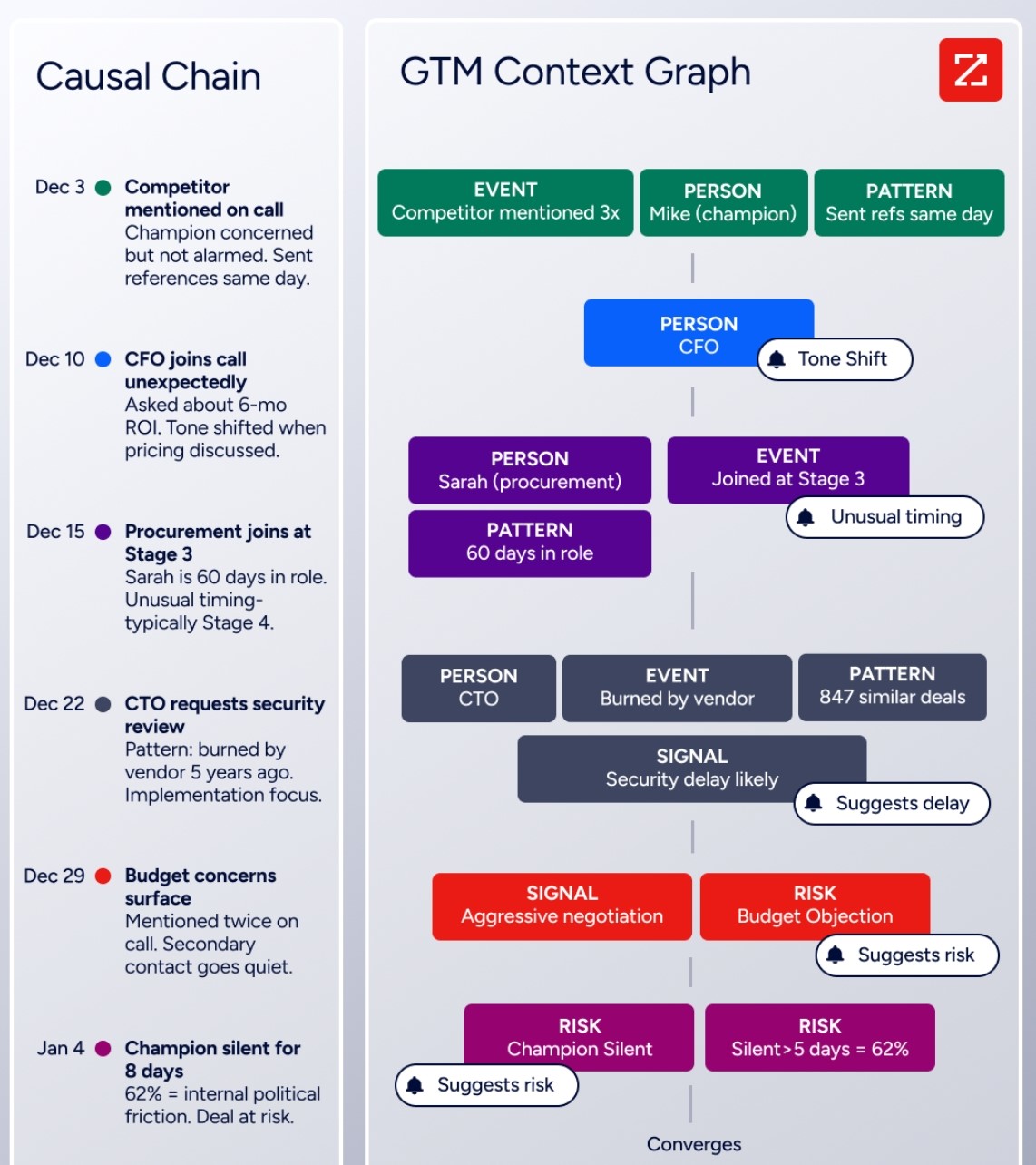
A CRM records that a deal moved to stage 4 and the close date shifted. It has no record of why. The GTM Context Graph connects the signals: the CFO joined the last call and asked about six-month ROI, which is what accelerated the deal. This intelligence flows into downstream actions, from AI-drafted outreach addressing specific stakeholder concerns to plays targeting accounts that match proven win patterns.
This is also why data quality matters: you cannot map a buying committee if half the contacts are missing, you cannot correlate intent signals to org chart movements if company data is stale, and every gap in the data foundation becomes a blind spot the intelligence layer inherits.
"That combination of our internal CRM data, external signals, and AI that's given all that context has helped us craft very specific account- and persona-based messages. And people have responded to them right away." (Seismic)
GTM Workspace: A single workspace that reduces tool fragmentation for sellers.
GTM Workspace is ZoomInfo's front-end for sales, account management, and customer success teams. It addresses a problem Whatfix also acknowledges: the average enterprise uses 23 GTM technologies, forcing sellers to context-switch constantly.
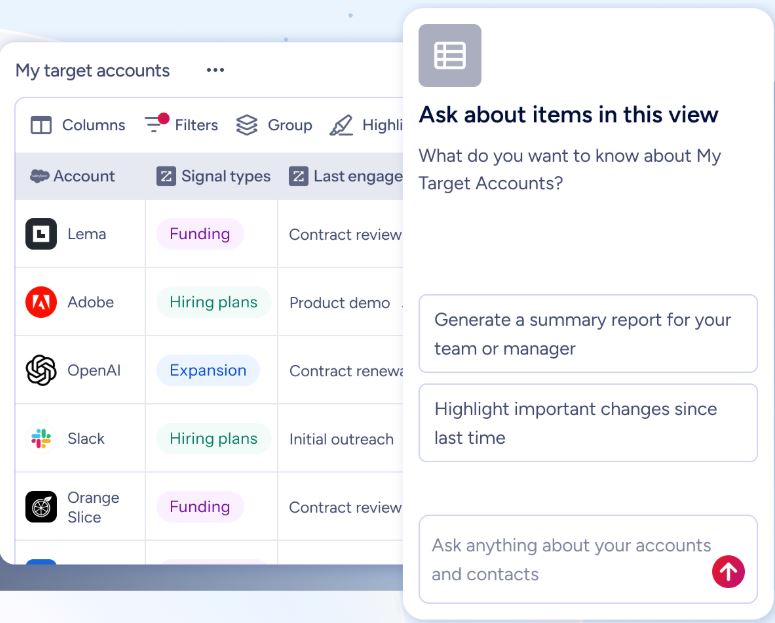
Rather than layering guidance on top of that fragmentation, GTM Workspace consolidates it into one surface where prioritized accounts, AI-drafted outreach, deal context, and CRM updates live together.
AI agents (built on Anthropic's Claude) research accounts, generate follow-ups, monitor signals, and update CRM fields.
The Action Feed delivers a live stream of in-market buyers with pre-drafted actions on every signal. One-click account briefs pull CRM history, company news, ZoomInfo signals, and stakeholder context into a summary in seconds.
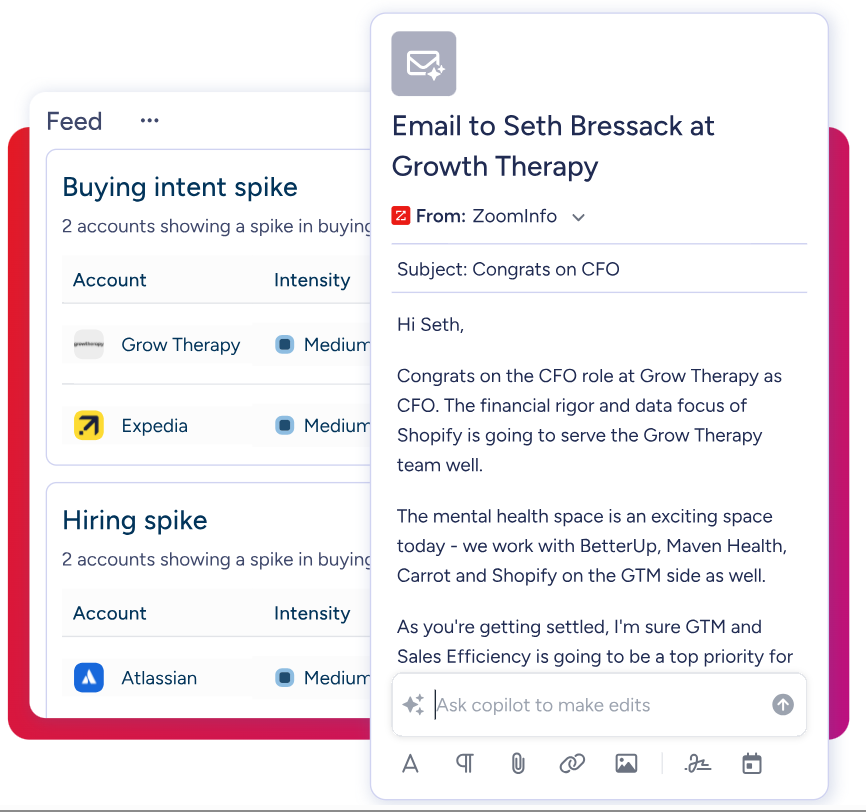
Customer results attributed to GTM Workspace include 54% productivity gains at Seismic, 50% faster prospect engagement at Databricks, and a 40% increase in closed-won deals at Thomson Reuters.
"Anything that minimizes our team's need to switch contexts is beneficial. ZoomInfo offers a unified view, eliminating the need to navigate between systems." (Spekit)
Universal Access: ZoomInfo's intelligence works in any tool via APIs and MCP.
For organizations that build beyond ZoomInfo's own products, APIs and MCP (Model Context Protocol) expose the same intelligence to any custom agent, internal tool, or partner platform. The MCP server connects AI models directly to ZoomInfo's B2B data with no custom coding, and is currently available for Claude and ChatGPT.
API access is included in all relevant plans. For marketers and RevOps teams, GTM Studio provides a canvas for audience definition, campaign orchestration, and pipeline measurement in natural language. All three access methods (API/MCP, GTM Workspace, GTM Studio) draw from one GTM Context Graph: the same data, the same intelligence, the same context, regardless of how you access it.
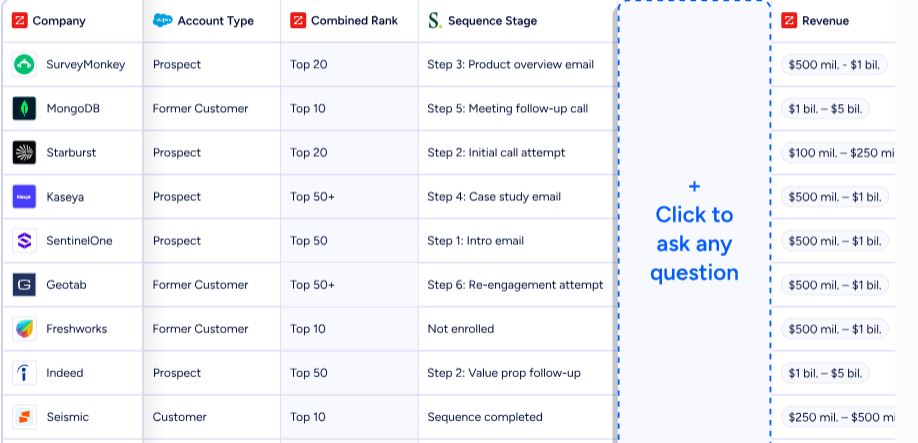
"The plug-and-play aspect of the API means I can integrate it very easily into any process and get information at a moment's notice." (BDO Canada)
Whatfix and ZoomInfo: Comparison Summary
Aspect | Whatfix | ZoomInfo |
|---|---|---|
Core Focus | Enterprise software adoption and user guidance | B2B data, intelligence, and GTM execution |
Primary Users | L&D, HR, IT, and Product teams | Sales, Marketing, and RevOps teams |
Problem Solved | Employees struggle to use enterprise software effectively | Revenue teams lack the data and signals to execute effectively |
Approach | Guidance layer on top of existing applications | GTM platform with data and intelligence |
AI Capabilities | ScreenSense + 3 Agents (authoring, guidance, insights) | GTM Context Graph + AI agents (research, outreach, signals) |
Environment Coverage | Web, desktop, mobile, VDI/Citrix | Web, mobile, API/MCP for any tool |
Analyst Recognition | Forrester Wave Leader (DAP), Gartner Customers' Choice | Gartner MQ Leader (ABM), Forrester Wave Leader (Intent Data) |
Free Tier | Sales-assisted trial (no self-serve free plan) | ZoomInfo Lite (permanent free plan, no credit card required) |
Pricing Model | Quote-based, flat fee + user licenses | Consumption-based pricing (seats + credits) |
Best For | Large enterprises driving adoption of complex software | B2B organizations improving GTM execution and revenue output |
Final Verdict
Whatfix and ZoomInfo serve different purposes in the enterprise technology stack. The choice depends on where your organization's productivity gap lives.
Choose Whatfix if your primary challenge is software adoption at scale. It is the right investment for enterprises rolling out complex applications like SAP, Workday, Salesforce, or Oracle, where employees need contextual, in-the-moment guidance to complete their work correctly.
The combination of in-app walkthroughs, simulation-based training via Mirror, and usage analytics makes Whatfix particularly valuable during digital transformation projects, ERP migrations, and compliance-driven workflow changes. With coverage spanning web, desktop, mobile, and VDI environments, it is one of the few DAPs that can address the full breadth of enterprise application types.
Choose ZoomInfo if your revenue team's bottleneck is data quality, buying signals, and execution capability rather than software navigation. For B2B organizations where the CRM is adopted but the pipeline is underperforming, ZoomInfo provides the intelligence foundation that makes every GTM tool in the stack more effective.
Its B2B data, the GTM Context Graph, and execution through GTM Workspace give sales and marketing teams the context they need to act on, not just the instructions for clicking through a tool.
Start with ZoomInfo Lite for free.
For many B2B enterprises, these platforms address two sides of the same investment: Whatfix ensures your teams can use the software, and ZoomInfo ensures the software delivers results.
Whatfix FAQ
What is Whatfix used for?
Whatfix is a Digital Adoption Platform that sits on top of enterprise applications to provide in-app guidance, interactive walkthroughs, and contextual help. Organizations use it to reduce IT support tickets, speed up employee onboarding, manage change during software rollouts, and enforce workflow compliance.
It also includes a simulation training product (Mirror) and Product Analytics for tracking usage behavior. Named customers include Experian, Mercedes-Benz, UPS, Cardinal Health, and the US Army.
How much does Whatfix cost?
Whatfix does not publish pricing. All plans are quote-based and require a sales conversation. The platform is structured into three separate products (DAP, Product Analytics, Mirror) with Standard, Premium, and Enterprise tiers for each. Pricing combines a flat fee with user license fees, which vary based on the number of employees (for internal apps) or monthly active users (for customer-facing apps). Standard plans limit integrations to two and content aggregation to 2,000 articles.
ZoomInfo uses consumption-based pricing for paid tiers but offers ZoomInfo Lite as a permanent free plan with no credit card required.
Does Whatfix offer a free trial?
Yes, Whatfix offers a free trial accessible through a request form on its website. However, the trial is sales-assisted rather than instant-access. You submit a request and work with the Whatfix team to get started. Specific trial duration, feature scope, and limitations are not publicly documented. There is no self-serve free plan.
ZoomInfo offers both a permanent free tier (ZoomInfo Lite with 10 monthly export credits and access to the B2B database) and a separate 7-day free trial with no credit card required.
What applications does Whatfix support?
Whatfix supports web applications, desktop applications (Windows and Mac), mobile apps, and VDI/Citrix environments. This environmental breadth is one of its primary differentiators, as most DAPs cover web applications only. Desktop and VDI support require the Enterprise tier. Whatfix provides application-specific overlays for major enterprise platforms including Salesforce, SAP, Workday, Oracle, Microsoft Dynamics 365, ServiceNow, and NetSuite.
Who is Whatfix best suited for?
Whatfix is designed for large enterprises with 1,000 to 100,000+ employees navigating mission-critical software. The majority of its customer base comes from companies with $50 million or more in annual revenue. It works best when there is high change velocity (ERP rollouts, CRM overhauls), multi-geography deployments requiring localization, and regulated industries where compliance matters.
It is not cost-effective for SMBs, startups, or teams with a single application and a small user base.
What AI features does Whatfix include?
Whatfix's AI is built on ScreenSense, a proprietary engine that understands application context and user behavior. Three AI Agents extend this foundation: the Authoring Agent generates in-app guidance from natural-language prompts, the Guidance Agent delivers contextual answers within the user's workflow, and the Insights Agent translates behavioral data into visual summaries and recommendations.
Additional AI features include Auto Testing (validating Flows against UI changes), AI Visibility Rules, and AI Voiceover for video exports.
Does Whatfix integrate with LMS platforms?
Yes, Whatfix is compliant with SCORM 1.2 and xAPI 1.0, enabling export of training content to any conformant LMS. Named LMS integrations include SAP Litmos, Docebo, and LearnUpon. The Adoption Everywhere feature exports content as video, slide decks, PDFs, and articles for distribution through LMS and knowledge base platforms.
Mirror simulations can also be distributed via LMS integration or shared links.
How does Whatfix compare to WalkMe?
SAP acquired WalkMe in 2024, giving it a native integration advantage for organizations running SAP-centric stacks. Whatfix positions itself as the independent enterprise DAP for organizations not centered on SAP. Both are enterprise-grade platforms, but Whatfix's independence means it can serve mixed application environments without vendor alignment concerns.
Whatfix has been named a Leader in the Forrester Wave for DAPs and a Leader in the Everest Group PEAK Matrix for six consecutive years.
Researching Whatfix? These comparisons and alternatives help you decide:
