
The question behind a "Zapier API" search is rarely simple.
Developers expect a single REST surface they can authenticate against and start calling. What Zapier exposes is a set of distinct programmatic surfaces, each aimed at a different builder: the Workflow API for partners embedding Zap creation and action execution, the Platform CLI for building native integrations in Node.js, the Zapier SDK (open beta) for coding agents that need programmatic access to the full app catalog without managing OAuth, and the MCP server for AI models calling 30,000+ actions through a single connection. That range of programmatic access, backed by 8,000+ app integrations and 3.4 million companies on the platform, is unusual in the automation space.
But connectivity and intelligence are different layers.
Zapier's APIs serve one purpose: giving your application, agent, or integration access to Zapier's automation engine and its app catalog. The Workflow API lets partners embed automation inside their own products. The SDK and MCP let developers and AI agents call authenticated actions across thousands of apps without managing OAuth for each one. None of these surfaces provide the underlying business data: there are no endpoints for contact lookup, company enrichment, intent signals, technographics, org charts, or any of the B2B intelligence a GTM pipeline needs before the automation step. Zapier orchestrates actions across apps; it does not generate, verify, or enrich the data those actions operate on.
This is where ZoomInfo, an AI GTM platform, enters the picture. Its Enterprise API covers search, enrichment, AI intelligence, and audience management across 500M contacts and 100M companies, with an MCP server for AI-agent workflows. The two APIs are layers of the same pipeline, not rivals: Zapier moves data between apps, ZoomInfo provides the B2B intelligence that determines what data to move and where.
This review covers Zapier's API surfaces in full technical depth first (authentication, endpoints, webhooks, SDKs, rate limits, and pricing), then reviews ZoomInfo's API as the intelligence layer that feeds data into whatever Zapier orchestrates.
Zapier API at a Glance
Zapier exposes multiple API surfaces rather than a single REST API. The table below covers the Workflow API, the primary structured REST surface for B2B partners, with notes on the newer surfaces.
Attribute | Detail |
|---|---|
API type | REST over HTTPS, JSON responses |
Primary surfaces | Workflow API (partner embedding), Platform CLI (integration building), SDK (open beta, programmatic app access), MCP (AI agents) |
Authentication | OAuth 2.0 (Authorization Code) for Workflow API; managed auth for SDK; account-level for MCP |
Base URL | Not publicly documented for the Workflow API |
Rate limits | Workflow API: 60 req/min by IP, 150 req/min by partner application (rate limiting docs) |
Pricing / access | Workflow API: free to build and access for partners with a publicly listed integration. End-user task costs apply on their Zapier subscription |
SDKs | Platform CLI (Node.js/TypeScript); Zapier SDK (TypeScript and Python, open beta) |
Webhooks | Yes: Webhooks by Zapier (catch hooks), instant triggers (REST hooks), Action Run Callbacks |
MCP server | Zapier MCP (beta): single endpoint for AI agents to access 30,000+ actions |
Documentation | docs.zapier.com (consolidated); llms.txt index available |
Zapier API: What Works Well & What to Plan Around
What works well | What to plan around |
|---|---|
SDK and MCP abstract OAuth for 8,000+ apps: your code never manages third-party tokens | Workflow API requires a publicly listed Zapier integration; it is not a general-purpose API |
Platform CLI is open-source with local test loop and TypeScript support | Rate limits are tight: 60 req/min by IP, 150 req/min by partner app on the Workflow API |
Multiple API surfaces for different builders (partner embedding, integration building, AI agents) | No single REST API; each surface has its own auth model, access gate, and capabilities |
Workflow API is free to build and access for partners; no per-call charges | End-user actions consume tasks from their Zapier subscription; each MCP tool call consumes two tasks |
Action Run Callbacks provide push notifications for async action completion | Workflow API pagination and response formats are sparsely documented |
llms.txt index available for AI-assisted development | No OpenAPI spec or Postman collection published for the Workflow API |
Zapier API: Authentication & Getting Started
Zapier's four API surfaces each use a different authentication model. The right entry point depends on what you are building.
Workflow API (Partner/B2B Embedding)
Access to the Workflow API starts with building a Zapier integration and getting it publicly listed in Zapier's app directory. This is a hard gate: the API is not available to end users or to applications without a listed integration. Once listed, the partner registers an OAuth 2.0 application and authenticates via the Authorization Code grant type.
The OAuth flow issues two credential types:
User Access Token: authenticates requests on behalf of a specific Zapier user (the standard path for most Workflow API calls)
App Access Token: authenticates server-to-server operations like unenrolling a user from a promotion
A third method, Client ID authentication, covers specific embedded scenarios.
OAuth scopes are space-separated and requested at token time:
Scope | Purpose |
|---|---|
profile | Read the authenticated user's profile |
zap | Read Zap workflows using your integration |
zap:write | Create or modify Zap workflows |
zap:all | Read all Zap workflows owned by the user |
zap:account:all | Read all Zaps the user can access (including shared) |
zap:runs | Read Zap run history |
action:run | Run an action on behalf of the user |
authentication | Read connected app authentications |
authentication:write | Create or update app authentications |
connection:read | Read connections |
Platform CLI (Integration Building)
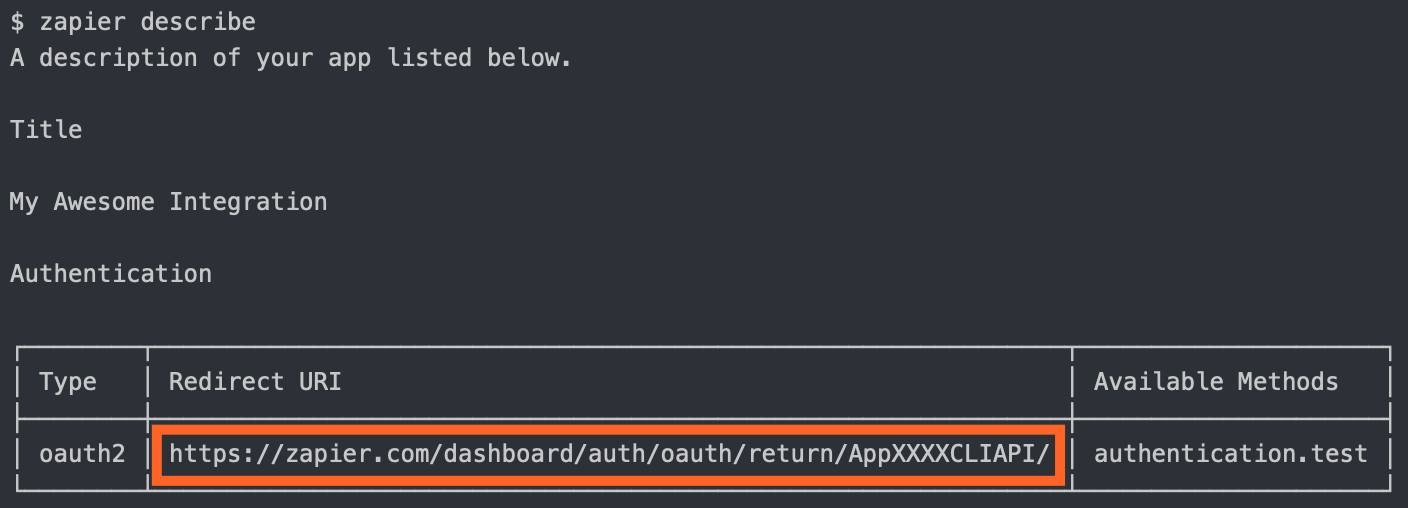
The Platform CLI is how developers build an integration so their product appears in Zapier's app directory. It is a Node.js library with TypeScript support. Authentication on the integration-definition side supports Basic, Digest, Custom, Session, OAuth1, OAuth2, and OAuth2 with PKCE. Zapier handles credential storage and token refresh for end users; the developer configures the auth scheme once and Zapier manages it in production.
Source: Zapier
Zapier SDK (Open Beta)
The Zapier SDK takes a different approach: it eliminates OAuth setup for coding agents by routing authenticated HTTP calls through Zapier's existing credential infrastructure. An agent can call any connected app's API without obtaining or managing OAuth tokens. Access is free during the open beta; Enterprise and Team accounts must opt in.
Zapier MCP
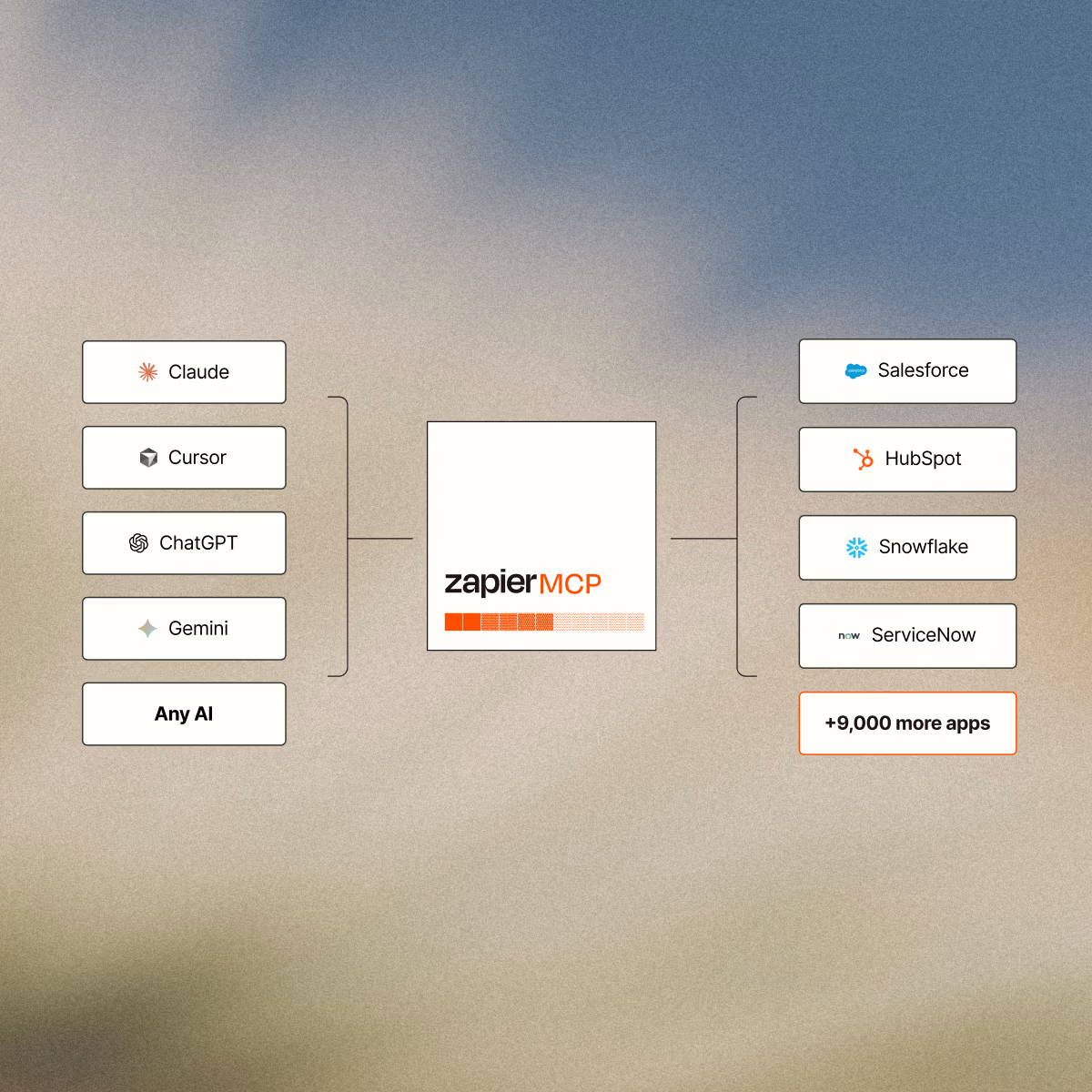
The MCP server uses Zapier's existing account authentication. A user generates an MCP endpoint at mcp.zapier.com, configures which actions the AI can invoke, and copies the server URL into their AI client. No separate API key management is required on the AI side; Zapier handles all third-party OAuth behind the scenes.
Source: Zapier
A basic authenticated Workflow API request (once you have an access token) follows standard Bearer token conventions:
curl -X GET "https://api.zapier.com/v2/zaps" \
-H "Authorization: Bearer YOUR_ACCESS_TOKEN" \
-H "Content-Type: application/json"
Zapier API: Core Endpoints & Capabilities
Zapier's API capability spans four surfaces, each with distinct endpoints and access patterns. The Workflow API provides the deepest structured REST surface; the SDK and MCP trade endpoint-level control for breadth of app access.
Workflow API: Zaps, Actions, and Embedded Automation
The Workflow API is organized around resource areas for partners embedding Zapier in their products. All endpoints return JSON.
Zaps (workflows):
List Zap workflows owned by or accessible to the authenticated user
Retrieve a single Zap (fields, actions, status)
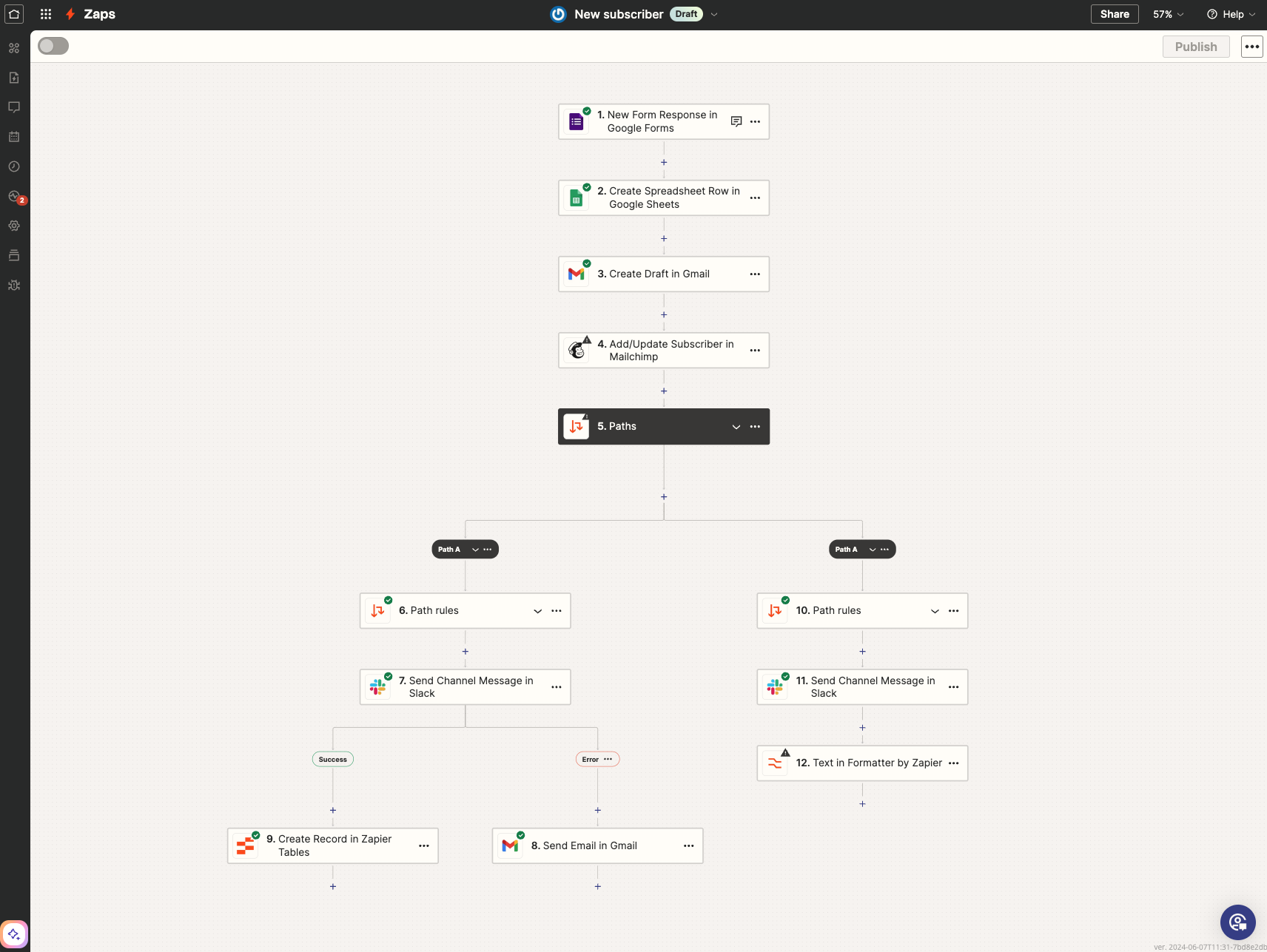
Create and modify Zaps programmatically via the Zap Creation flow: select apps, pick an action, supply field values (including hardcoded fields), test the workflow, and enable it
Source: Zapier
Filter available actions by your integration to show only relevant automations
Apps:
Retrieve apps in Zapier's directory (the full 9,000+ catalog)
Filter and search apps to power an in-product integration marketplace
Actions:
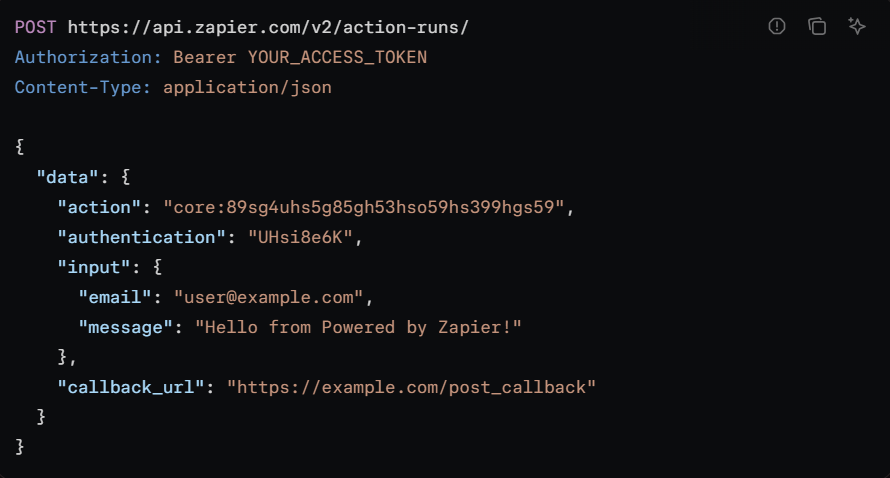
Create an Action Run: execute a Zapier action on behalf of a user in real time (e.g., add a row to Google Sheets, create a HubSpot contact)
Retrieve Action Run results: poll for the outcome of an asynchronous action
Receive Action Run Callbacks: register a callback URL for push notification on completion
Source: Zapier
Authentications (connected accounts):
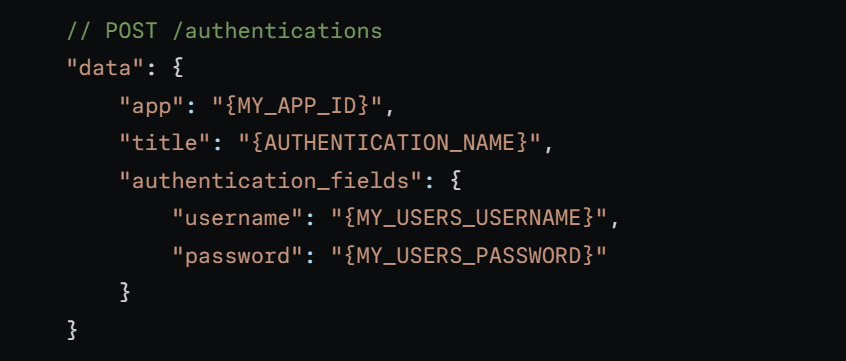
Add app authentications for users (connect a third-party account to Zapier on their behalf)
Get authentications: retrieve which third-party accounts a user has connected
Source: Zapier
Zap Templates:
Retrieve Zap templates for your integration (pre-built workflow blueprints) to embed in your product
Additional resources: account profile retrieval, integration category browsing, partner promotion management, and a Zap Guesser endpoint that takes a natural language description and suggests a Zap workflow structure.
What you would build with this: an in-product integration marketplace where your users browse available app connections, authenticate third-party accounts, and configure automations without leaving your UI.
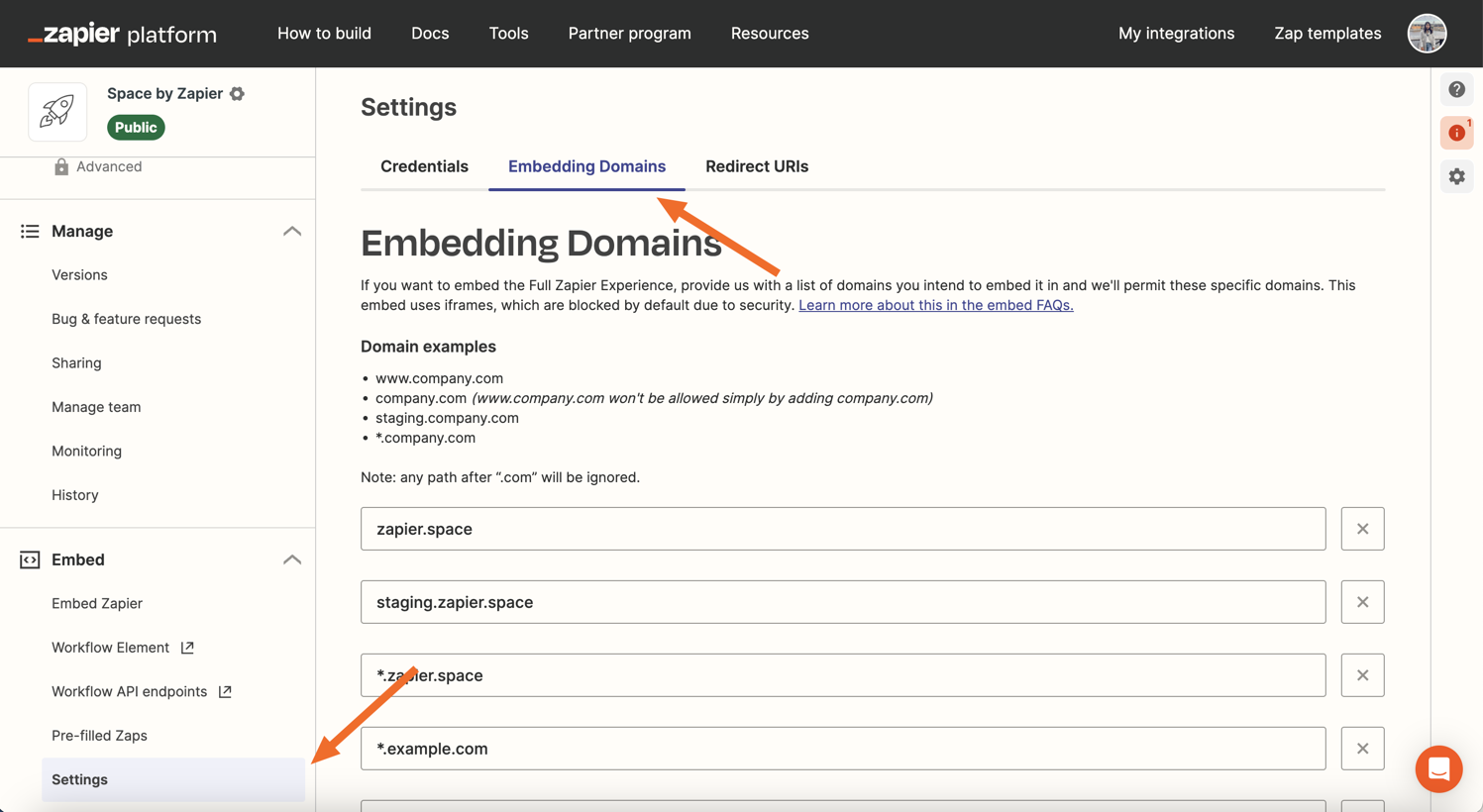
The Workflow Element is a three-line embed that surfaces this directly, and a White Label option lets enterprise partners brand the automation layer as their own.
Source: Zapier
Zapier SDK: Direct App Access for Coding Agents
The Zapier SDK (TypeScript and Python, open beta) provides a different integration path for developers building coding agents or AI products. It exposes two access modes:
Pre-built actions: the 40,000+ structured actions in Zapier's catalog, callable without managing OAuth for each app
Direct API calls: a .fetch() method for raw authenticated HTTP calls to roughly 3,600 app APIs, using Zapier's credential infrastructure to handle auth transparently
Triggers (subscribing to real-time events in code) are experimental.
What you would build with this: an AI agent that reads a Salesforce opportunity, checks a Slack channel, updates a Google Sheet, and sends an email, all through a single SDK, without registering OAuth credentials for each service.
Zapier MCP: AI Agent Actions
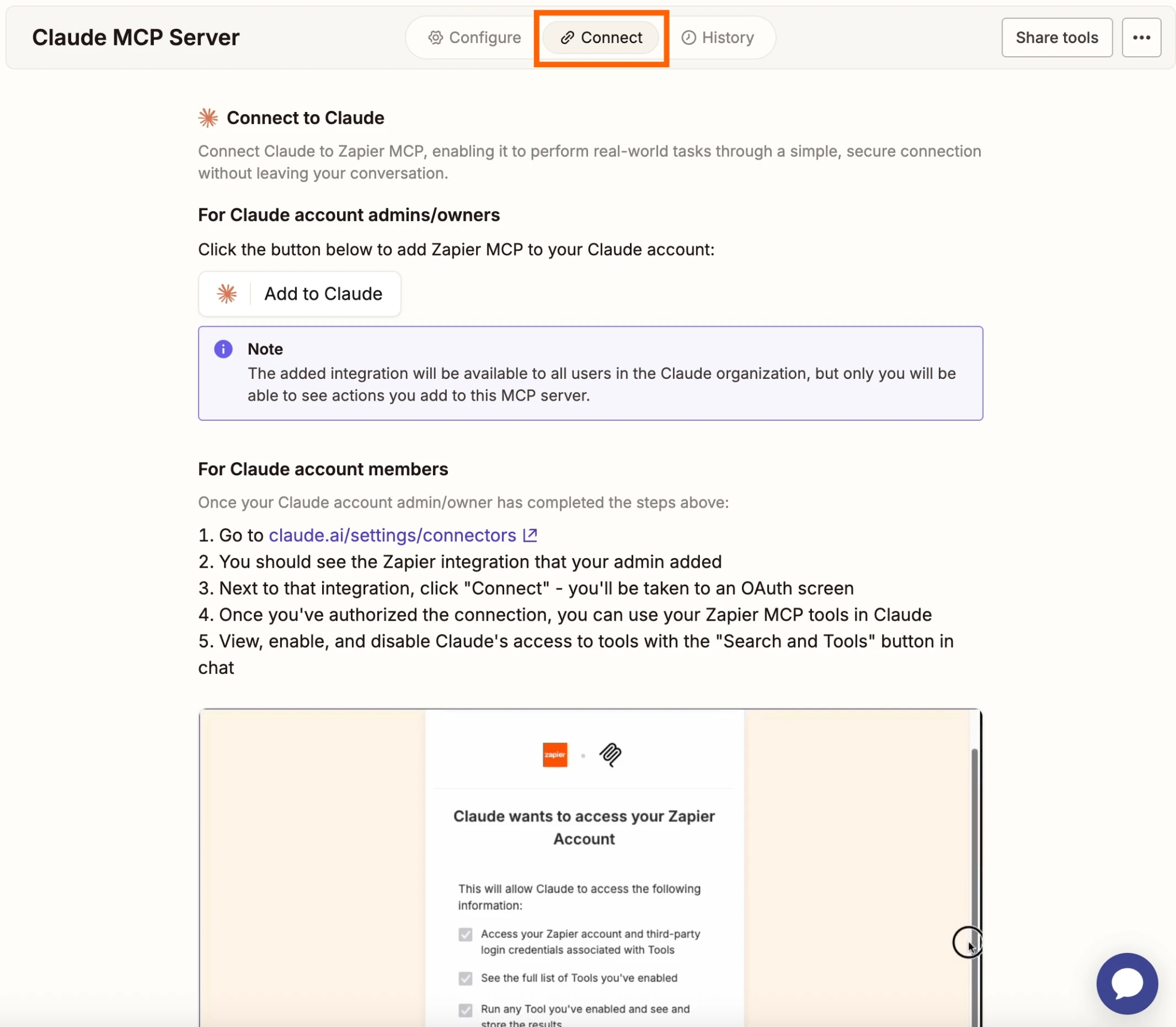
The MCP server exposes 30,000+ searches and actions across 8,000 apps through a single endpoint. AI clients (Claude, ChatGPT, Cursor, Windsurf) connect via a generated server URL and issue natural language prompts that Zapier's prompt resolution engine translates into API calls.
The MCP surface handles authentication, rate limits, and retries automatically. Users configure which actions the AI can invoke.
Source: Zapier
AI Guardrails detect PII, prompt injection attempts, toxic language, and negative sentiment within workflow calls. Each MCP tool call consumes two tasks from the user's Zapier plan quota.
What you would build with this: an AI assistant that, when a user says "add this lead to Salesforce and notify the team in Slack," executes both actions through a single MCP connection with managed auth, guardrails, and audit logging.
Platform CLI: Integration Building
The Platform CLI builds native Zapier integrations. It is a Node.js SDK (source at GitHub) with TypeScript support, a local test loop (zapier test), and deployment (zapier push). A schema reference and CLI command reference are on GitHub.
This surface is for SaaS companies that want their product in Zapier's app directory. Building an integration is free, and Zapier estimates roughly two weeks for a standard build. Once listed, the integration appears alongside 8,000+ other apps in a marketplace with millions of active users.
Zapier API: Webhooks & Events
Zapier's webhook system has three layers, each serving a different integration pattern.
Webhooks by Zapier (End-User Trigger)
Zapier includes a first-party "Webhooks by Zapier" app. Its Catch Hook trigger generates a unique webhook URL; any system that POSTs JSON or form-encoded data to that URL fires a Zap immediately. This is the path for external systems with no native Zapier integration to push data into workflows. Webhooks require a Professional plan or higher; they are not available on the Free plan.
Instant Triggers (REST Hooks) for Integration Builders
Integration builders can implement two trigger types via the Platform CLI or Visual Builder:
Polling triggers: Zapier polls your API at a set interval to check for new data, deduplicating by unique ID so each record fires only once. Poll intervals depend on plan: every 15 minutes on Free, 2 minutes on Professional, and 1 minute on Team and Enterprise.
Instant triggers (REST hooks): Your app registers a subscription endpoint with Zapier when a user enables a Zap; your system then pushes events via POST to Zapier's webhook URL in real time. This bypasses polling delays and is the preferred approach for time-sensitive events.
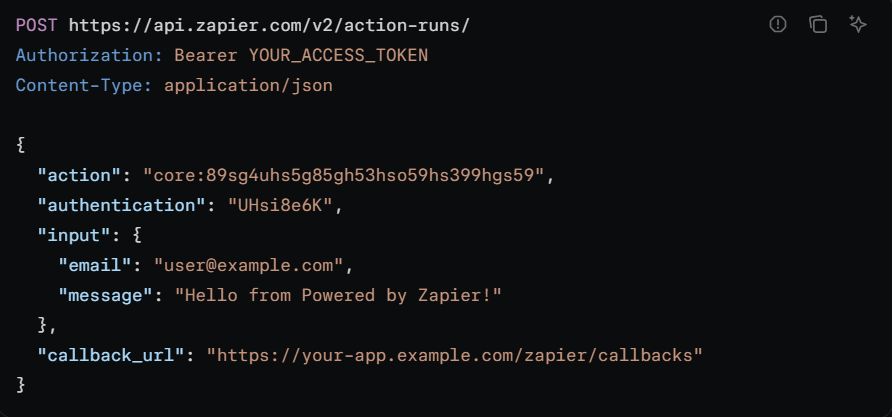
Action Run Callbacks (Workflow API)
For partners using the Workflow API, Action Run Callbacks let you register a callback URL to receive a push notification when an asynchronous action run completes, rather than polling the retrieve endpoint.
Source: Zapier
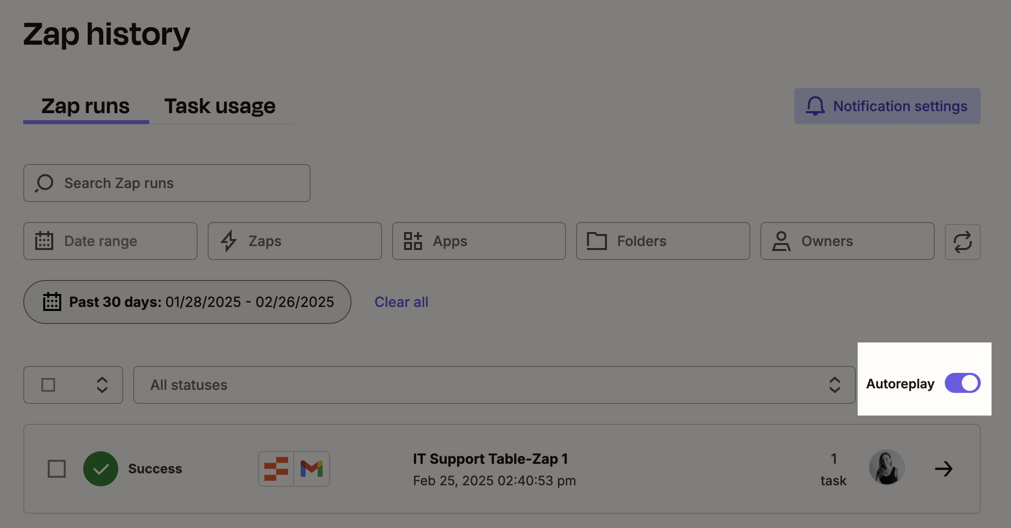
Retry behavior: For end users on Pro or higher plans, Zapier supports Autoreplay, which retries failed Zap steps on transient errors. It retries immediately, then once more if the error persists.
Two things to plan around:
Webhook support is gated behind paid plans. Free-tier users are limited to polling triggers with 15-minute intervals, which constrains real-time use cases.
Zapier does not publish delivery guarantees, payload signing, or retry policies for Action Run Callbacks. Design your receiver to be idempotent.
Source: Zapier
Zapier API: SDKs, Docs & Rate Limits
SDKs & Libraries
Zapier publishes two official SDK surfaces:
Platform CLI (Node.js / TypeScript): The Zapier Platform CLI is the official SDK for building integrations. It handles scaffolding, local testing, authentication configuration, trigger/action definitions, and deployment. TypeScript is supported natively. The source, CLI reference, and schema reference live on GitHub under zapier/zapier-platform.
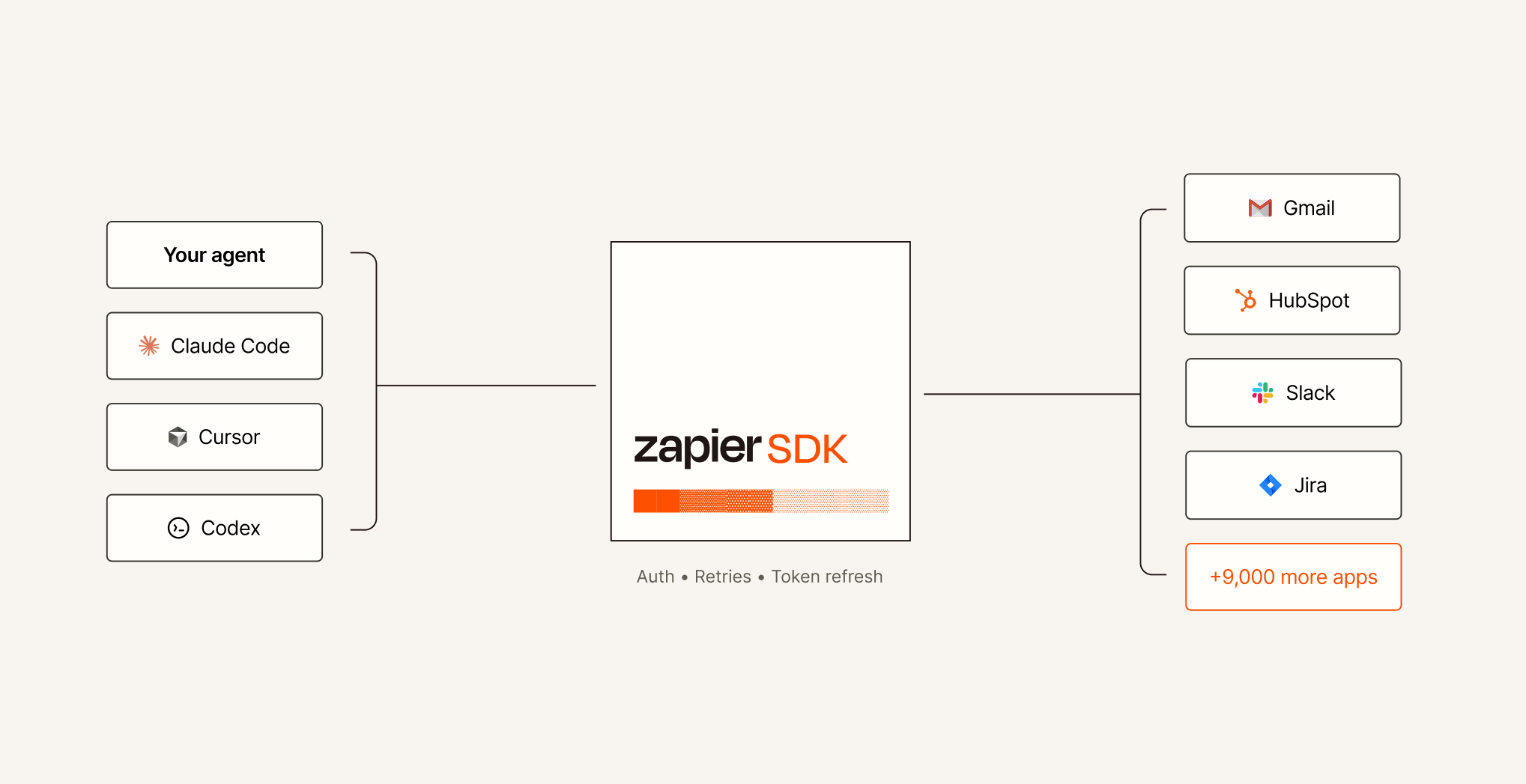
Zapier SDK (TypeScript and Python, open beta): The Zapier SDK gives coding agents and AI product builders programmatic access to any action or API call across Zapier's app catalog without OAuth setup.
Source: Zapier
The SDK supports both pre-built actions (40,000+ structured actions) and direct API calls via a .fetch() method (raw authenticated HTTP to roughly 3,600 app APIs). Plugin manifests and lifecycle rules for the MCP integration are on GitHub at zapier/zapier-mcp.
No official SDKs exist for Ruby, PHP, Java, Go, or .NET. For the Workflow API, there are no published client libraries in any language; partners integrate via direct HTTP calls.
Documentation & Developer Experience
Zapier's developer documentation is consolidated at docs.zapier.com, covering integration building (Visual Builder and Platform CLI), the Workflow API reference (Powered by Zapier), Zapier MCP, the Zapier SDK, and AI Actions.
The docs include a collapsible sidebar API reference with individual endpoint pages for Accounts, Actions, Apps, Authentications, Categories, Promotions, Zap Templates, Zaps, and Schemas. An llms.txt index is available for AI-assisted development tooling. The previous developer portal at platform.zapier.com now redirects to docs.zapier.com.
Developer support channels:
Community forum with an active developer zone
Contact form for direct support
Help Center with structured guides
App Developer Services for advanced integration needs
Two notable gaps: no published OpenAPI/Swagger spec or Postman collection for the Workflow API, and no public changelog for API changes. Platform News covers integration-side updates, but API-level version history is not tracked separately. The API version number itself does not appear in the developer documentation.
Rate Limits & Constraints
Workflow API: Two simultaneous rate limits, whichever trips first:
60 requests per minute by IP address
150 requests per minute by partner application
Hit either limit and the API returns 429 Too Many Requests with a mandatory 60-second cooldown.
These are tight limits compared to most SaaS APIs. 60 req/min by IP means one request per second, which constrains any integration that needs to batch-process users or sync large volumes of Zap configurations. Creating multiple API keys does not help; the limits apply across all requests from the same IP or application.
End-user task throughput: Limits depend on subscription tier:
Free: 100 tasks/month
Professional: starting at 750 tasks/month, scaling with tier
Team: starting at 2,000 tasks/month
Enterprise: custom annual limits
Polling interval: Ranges from 1 to 15 minutes depending on plan. Faster polling requires a paid plan.
SDK rate limiting: The documentation says Zapier "manages rate limiting" for the SDK but publishes no specific numbers.
Zap step limits: Each Zap supports up to 100 steps.
Zapier API Pricing & Access Costs
Zapier's API pricing is unusual: the API itself is free for partners, but every action it triggers consumes tasks from an end user's paid subscription.
Workflow API (partner access): Free to build and access. No per-call charge, no monthly fee. Partners access it after creating a Zapier developer account at developer.zapier.com and getting their integration publicly listed. The Powered by Zapier partner program offers co-marketing benefits alongside API access.
Zapier SDK: Free during the open beta. Post-beta pricing is not yet published.
Zapier MCP: Included in all paid plans. Each MCP tool call consumes two tasks from the user's plan quota.
End-user subscription costs (the real cost driver behind API-triggered actions):
Plan | Starting Price | Tasks/Month | Key Access |
|---|---|---|---|
Free | $0/month | 100 | No webhooks, 2-step Zaps only, 15-min polling |
Professional | 750+ | Webhooks, multi-step Zaps, 2-min polling | |
Team | 2,000+ | SSO, shared workspace, 1-min polling, up to 25 users | |
Enterprise | Custom | Custom | Advanced admin, custom data retention, dedicated support |
Annual billing saves 33% over monthly.
Overage costs: Paid plans can enable pay-per-task billing, which keeps Zaps running after the monthly allotment runs out. The overage rate is 1.25x the per-task cost of the current plan tier, capped at 3x the plan's task limit. This must be explicitly enabled; on Free plans, Zaps pause when the 100-task limit is reached.
For a developer sizing costs: the API surface costs nothing to build against. The cost sits with end users whose Zapier subscriptions fund the task consumption. If your product embeds Zapier and drives high-volume automation for customers, those customers absorb the task costs on their own Zapier plans. The risk is adoption friction: a customer running 10,000 tasks per month through your embedded integration pays Zapier directly for that throughput, and extra tasks at 1.25x can add up fast at volume.
Where the Zapier API Falls Short
These are practical limits a developer should plan around, not criticisms of the platform. Several are architectural decisions that reflect what Zapier's API is (an automation orchestration layer) and what it is not.
No general-purpose API access. The Workflow API requires a publicly listed integration. A developer who wants to call Zapier endpoints to automate their own workflows cannot do so through the Workflow API without building and listing an integration first. The SDK (open beta) loosens this gate for coding agents and AI products, but it is not yet production-stable.
No B2B intelligence data. Zapier's API surfaces move data between apps; they do not provide the data itself. There are no endpoints for contact lookup, company enrichment, intent signals, technographics, or org charts. If your build requires enrichment or intelligence alongside orchestration, you need a second API for the data layer.
Tight rate limits on the Workflow API. 60 requests per minute by IP and 150 per minute by partner application, with a mandatory 60-second cooldown on 429 responses. For partners building embedded experiences that serve many concurrent users, these ceilings require careful request management and may not support high-throughput use cases.
Task-based cost model passes to end users. Every action triggered through the API consumes tasks from the end user's Zapier subscription. At scale, overage pricing at 1.25x the plan's per-task rate can drive real costs for users running high-frequency automations. This is not a developer cost, but it directly affects adoption of your integration.
Multiple surfaces, no unified API. The Workflow API, Platform CLI, SDK, and MCP each have their own authentication model, access requirements, and capabilities. No single REST API covers everything Zapier can do programmatically. A developer may need to learn and integrate against multiple surfaces depending on the use case.
Documentation gaps on the Workflow API. Zapier does not publish an OpenAPI/Swagger spec, a Postman collection, or a public API changelog for the Workflow API. Pagination style and response field formats are not fully documented. The SDK's rate limiting behavior is acknowledged but not specified with numbers.
Polling latency on lower-tier plans. Free-plan triggers poll every 15 minutes. Even on Professional, polling runs every 2 minutes. For time-sensitive integrations where near-real-time data flow matters, instant triggers (REST hooks) must be implemented in the integration itself, which shifts the engineering burden to the developer.
ZoomInfo API: The B2B Intelligence Layer Zapier Does Not Provide
Zapier orchestrates actions across 8,000+ apps. ZoomInfo provides the intelligence that determines what those actions should operate on: who to contact, what companies to target, which accounts show buying intent, and what their technology stack looks like.
The two APIs sit at different layers of a data pipeline. A developer building a GTM automation would use ZoomInfo's API to identify and enrich accounts, then Zapier's API (or MCP, or SDK) to route that intelligence into CRM updates, outreach sequences, Slack notifications, and downstream workflows.
What the API Covers: Search, Enrichment, and AI Intelligence
ZoomInfo's Enterprise API is a REST suite served from https://api.zoominfo.com/gtm, using application/vnd.api+json (JSON:API format).
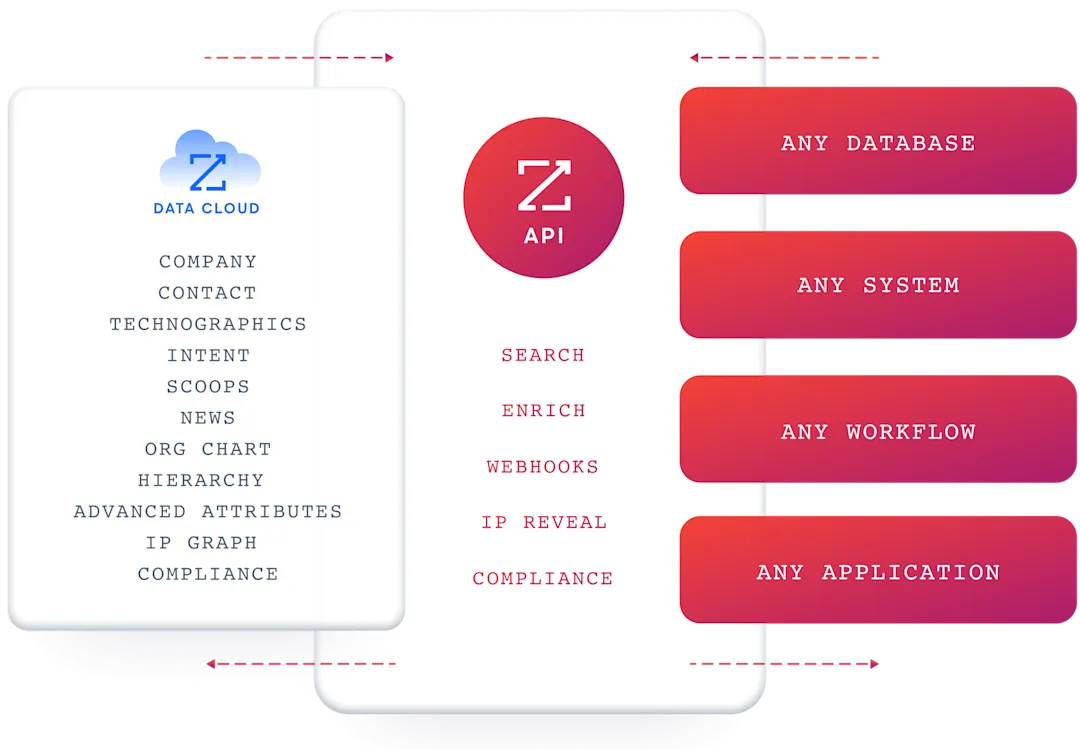
The API specification is generated from ZoomInfo's TypeSpec source, so endpoint schemas derive from a single source of truth. The interactive API reference organizes it into four areas:
Data API (Search & Enrich): Search endpoints cover Contacts, Companies, Intent, News, and Scoops, returning matched records without consuming credits. Enrich endpoints unlock the full data payload: business emails, direct dials, employment history, corporate hierarchy, org charts, technographics, and hashtag signals, up to 25 records per call.
The underlying dataset spans 500M contacts, 100M companies, 135M+ verified phone numbers, and 200M+ verified business email addresses. The two-stage pattern (search first, then enrich by ID) is the recommended workflow: search and lookup calls are free, and you spend enrichment credits only on records you commit to.
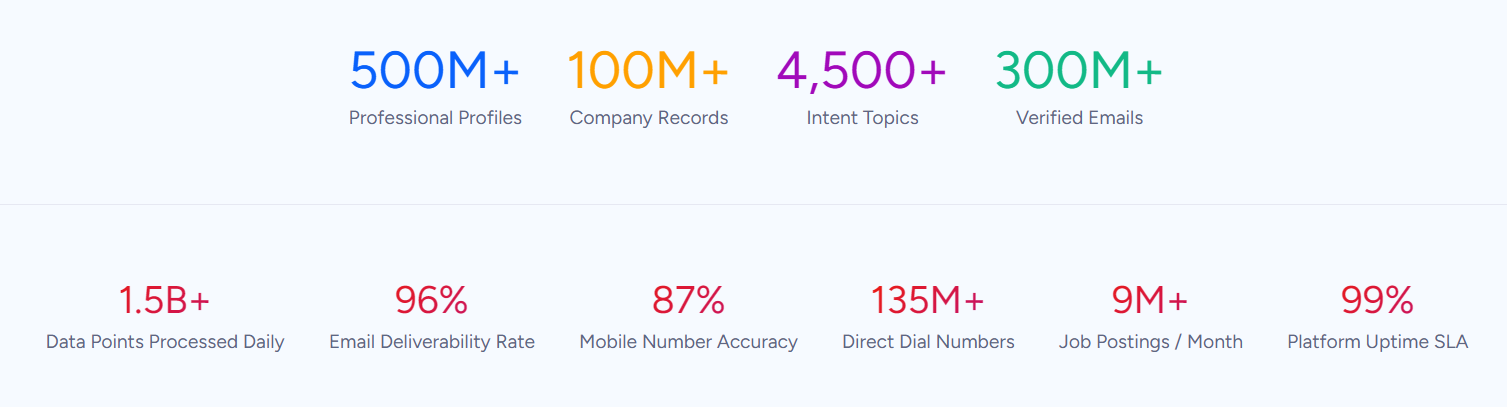
AI Intelligence API: Account Summary returns structured account intelligence with a free-form Q&A endpoint. Find Similar Companies performs lookalike expansion from a seed account. Contact Recommendations returns AI-ranked buying-committee suggestions by motion (prospecting, deal acceleration, renewals). These capabilities run on the AI engine inside GTM Workspace and require an Enterprise API subscription.
Marketing API: CRUD endpoints for programmatic audience management, letting pipeline systems refresh audiences automatically without manual export/import cycles.
Platform API (Engagements, Beta): Bidirectional engagement data via the Engagements API for upserting, reading, and deleting content interaction signals.
The pairing with a Zapier-powered pipeline is direct: use ZoomInfo's search endpoints to find contacts matching your ICP (free, no credits consumed), enrich the ones worth pursuing, then use Zapier's MCP, SDK, or Workflow API to push that enriched data into CRM records, outreach sequences, and any other downstream workflow across 8,000+ apps.
Authentication, Rate Limits & Credits
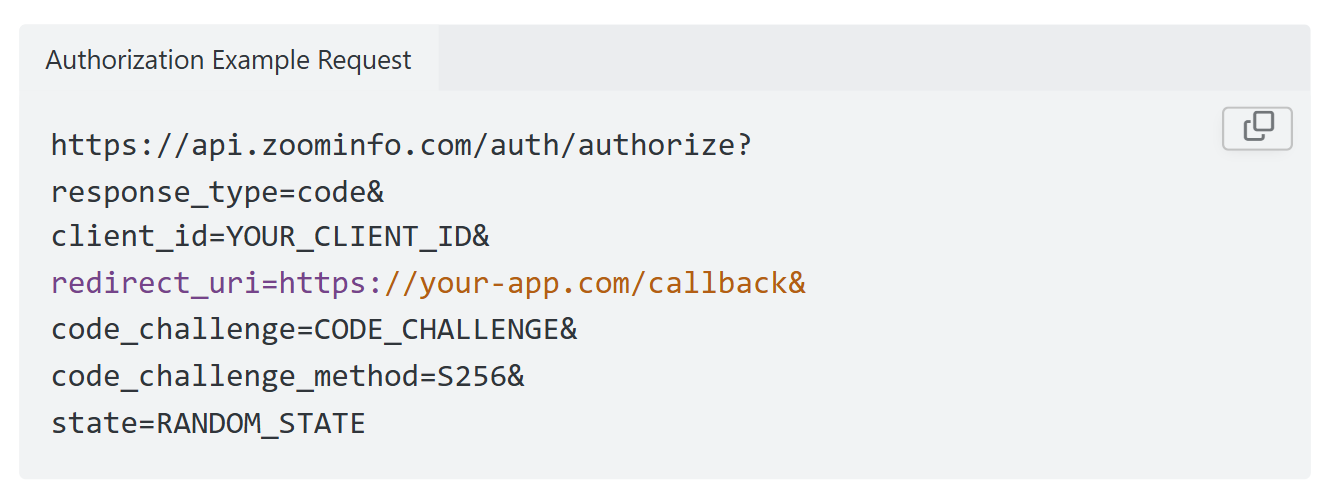
ZoomInfo uses OAuth 2.0 with PKCE via Okta, issuing 24-hour access tokens with rotating refresh tokens. Three flows are supported: Authorization Code with PKCE (web applications), Client Credentials (server-to-server), and Refresh Token.
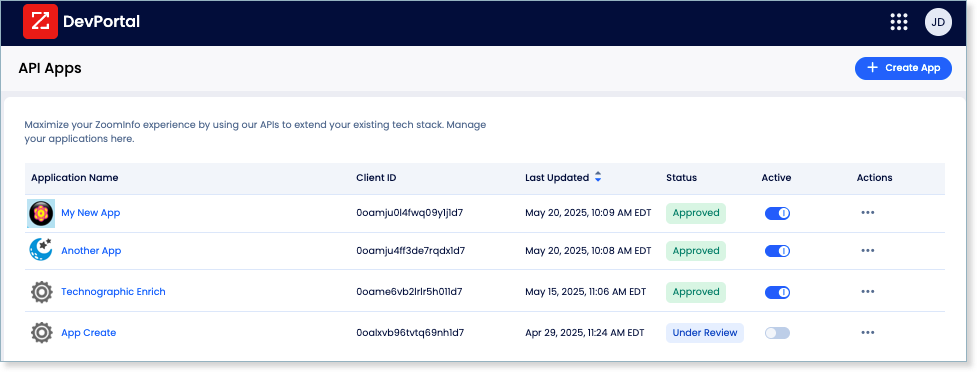
Applications are registered through the ZoomInfo Developer Portal, where teams generate credentials, define scopes, and test endpoints. Two app types exist: custom apps (auto-approved on registration) and partner apps (requires ZoomInfo review).
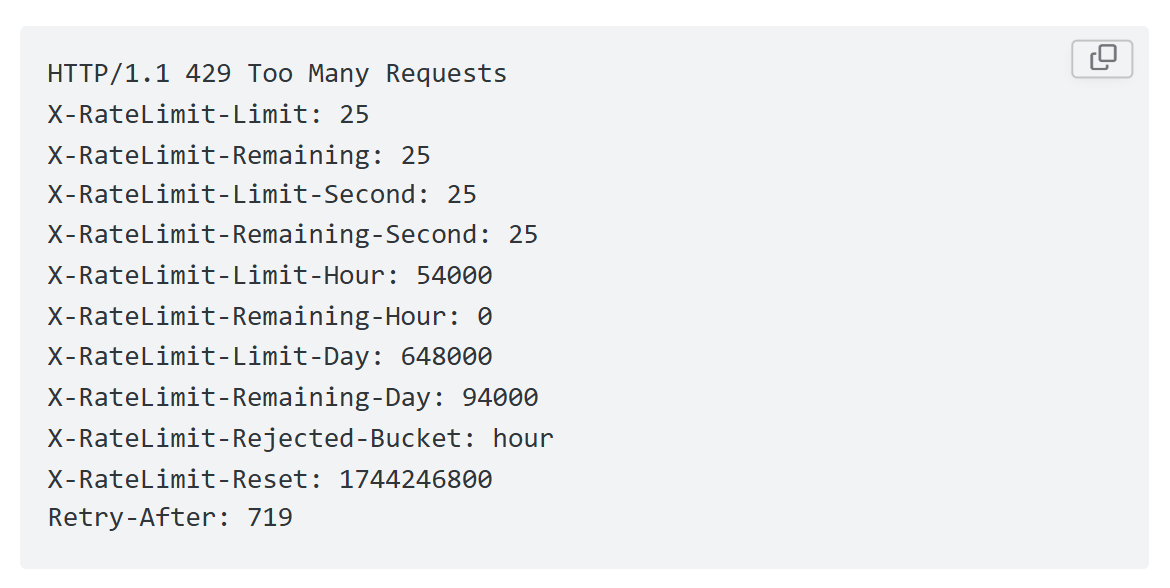
Rate limits are published by tier: Builder (5 req/sec), Standard (25 req/sec), and Scaling (35 req/sec), with per-hour and per-day sliding-window limits enforced simultaneously. All three windows (per-second, per-hour, per-day) must have remaining capacity for a request to succeed.
Every response includes quota headers with remaining capacity, and 429 responses include a Retry-After header with exact backoff timing and an X-RateLimit-Rejected-Bucket header identifying which window was exhausted.
Credits follow a rolling 12-month window: enriching a record for the first time consumes one credit; re-enriching the same record within the year is free, subject only to the per-call record limit. Search, lookup, and similarity operations are free and consume no credits.
Webhooks, MCP & Developer Experience
Webhooks are available via the Agents API, tied to ZoomInfo's Agent Teams system. Event types cover bulk enrichment jobs completing, records changing, credit usage crossing thresholds, and new GTM signals (scoops, funding events, intent spikes) becoming available. Retry behavior and throttling are configurable per event type.
For developers building AI agents, ZoomInfo's MCP server at https://mcp.zoominfo.com/mcp exposes search, enrich, and account research as native tools for MCP-compatible assistants, currently supporting Claude and ChatGPT.
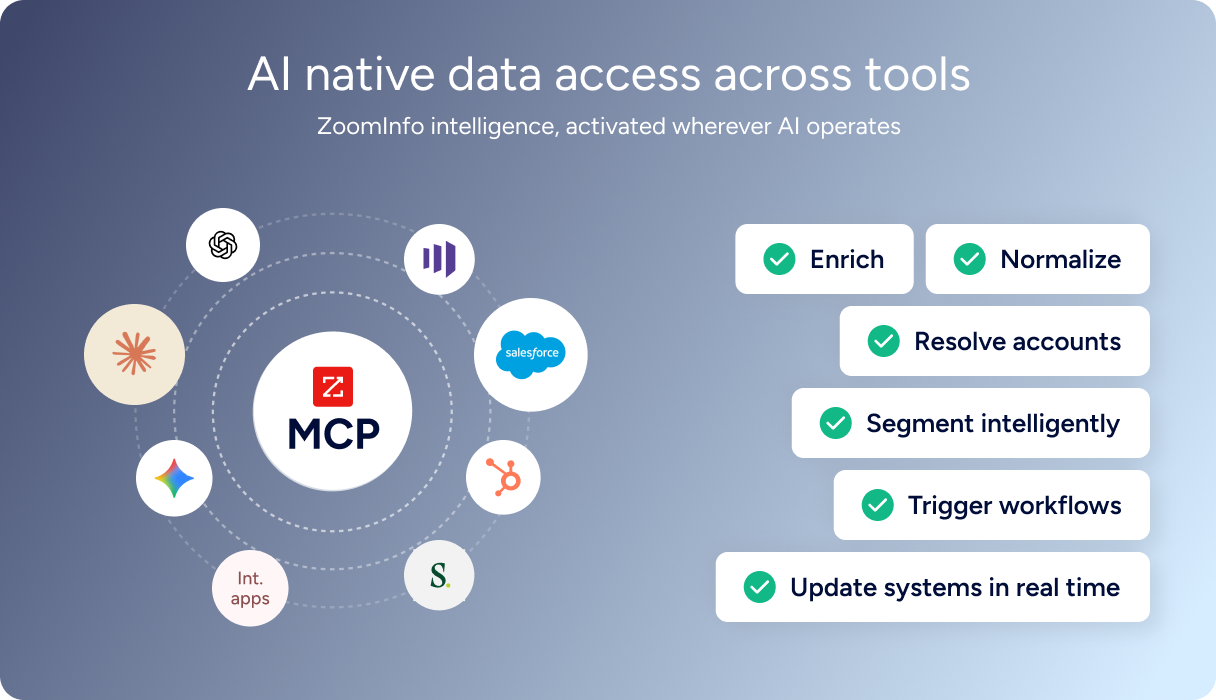
A separate Docs MCP server enables AI-assisted code generation against the ZoomInfo API spec. Both ZoomInfo's and Zapier's MCP servers can connect to the same AI client, giving an agent access to B2B intelligence and multi-app automation from a single interface.
Documentation lives at docs.zoominfo.com with an interactive API reference, OAuth recipes in five languages (Shell, Node, Ruby, PHP, Python), and an llms.txt index for AI development tools. ZoomInfo does not publish official SDKs, so integration is over HTTP. ZoomInfo has extended API access to all relevant plans; pricing follows a consumption-based model.
BDO Canada reported an 87% reduction in time spent updating internal data dashboards using the ZoomInfo API, with one analyst describing the integration as plug-and-play across any process. (ZoomInfo)
Final Verdict
Zapier's API surfaces give developers programmatic access to 8,000+ app integrations through multiple paths: the Workflow API for embedding, the SDK for coding agents, MCP for AI models, and the Platform CLI for building integrations. The Workflow API is free for partners, the SDK abstracts OAuth for thousands of apps, and the MCP server connects AI agents to 30,000+ actions through a single endpoint. The surfaces work. What they do not provide is the data intelligence that determines what to automate.
Choose the Zapier API if your build is about orchestrating actions across apps: embedding automation in your product, letting AI agents trigger multi-app workflows, or building a native integration that reaches Zapier's installed base of 3.4 million companies. The SDK and MCP server are strong for AI-agent pipelines where managed authentication across dozens of apps would otherwise be the hardest engineering problem.
Add the ZoomInfo API when the build needs B2B intelligence that determines what to automate: which accounts to target, which contacts to reach, what their technology stack looks like, and whether they are actively in-market. Enrich first, automate second: the pattern keeps your automation precise and your outreach relevant. Explore the ZoomInfo Enterprise API or start with the developer docs to see the endpoint surface directly.
A developer who needs neither API should recognize that Zapier's API does not provide data intelligence, and ZoomInfo's API does not orchestrate multi-app workflows. If your pipeline requires both layers, they are complementary infrastructure, not competing surfaces.
FAQ
Is the Zapier API free?
The Workflow API is free to build and access for partners with a publicly listed Zapier integration. No per-call charges or monthly API fees. The Zapier SDK is free during its open beta. However, every action triggered through any Zapier API surface consumes tasks from an end user's Zapier subscription, starting at $19.99/month for 750 tasks on the Professional plan. The Free plan provides 100 tasks/month but does not include webhooks or multi-step Zaps. Overage pricing on paid plans runs at 1.25x the per-task cost of the current tier.
Does Zapier have a GraphQL API?
No. Zapier exposes REST APIs that return JSON. There is no GraphQL endpoint across any of Zapier's API surfaces, including the Workflow API, Platform CLI, SDK, and MCP.
What is the Zapier API rate limit?
The Workflow API enforces two simultaneous limits: 60 requests per minute by IP address and 150 requests per minute by partner application. Hitting either triggers a 429 response with a mandatory 60-second cooldown. The SDK's rate limiting behavior is acknowledged in the docs but specific numbers are not published. Zapier manages rate limiting for MCP tool calls internally, and end-user task throughput is capped by subscription tier (100 tasks/month on Free through custom annual limits on Enterprise).
Are there official Zapier SDKs?
Yes, two. The Platform CLI is a Node.js/TypeScript SDK for building Zapier integrations (making your product appear in Zapier's app directory), maintained on GitHub under zapier/zapier-platform. The Zapier SDK (open beta, TypeScript and Python) provides programmatic access to Zapier's app catalog for coding agents and AI products. No official SDKs exist for the Workflow API itself in any language; partners make direct HTTP calls.
Does the Zapier API support webhooks?
Yes, through three mechanisms. Webhooks by Zapier provides unique catch-hook URLs that any system can POST data to for triggering Zaps (Professional plan or higher required). Integration builders can implement instant triggers (REST hooks) that push events to Zapier in real time, bypassing polling delays. The Workflow API offers Action Run Callbacks for push notification when async actions complete. The public docs do not describe delivery guarantees or payload signing for callbacks. For failed Zap steps, Autoreplay provides automatic retry on Pro plans and above.
Can I use the Zapier and ZoomInfo APIs together?
Yes, and the architecture is straightforward. Use ZoomInfo's search endpoints (free, no credits consumed) to find contacts and companies matching your target criteria, enrich the best matches with verified emails, direct dials, intent signals, and technographics, then use Zapier's MCP, SDK, or Workflow API to push that enriched data into CRM updates, outreach sequences, Slack notifications, and downstream workflows across 8,000+ apps. Both MCP servers can connect to the same AI client, giving an agent access to B2B intelligence and multi-app automation from a single interface. The two APIs use different authentication models (OAuth 2.0 with PKCE for ZoomInfo, OAuth 2.0 Authorization Code or managed auth for Zapier) and different cost structures (credit-based enrichment for ZoomInfo, task-based subscription for Zapier), so plan the integration layer to handle both.
