
Teams that run Zoho CRM and Mailchimp side by side usually discover the same problems within a quarter:
contacts exist in both systems with conflicting details, because a field updated in Zoho CRM never reached Mailchimp (or vice versa),
email campaign engagement data stays locked inside Mailchimp while the sales team works deals in Zoho CRM without knowing which leads opened, clicked, or converted,
and someone on the team is always exporting a CSV from one platform to import into the other, introducing lag and errors with every transfer.
However, the two platforms ended up coexisting (a marketing team that adopted Mailchimp before the company standardized on Zoho CRM, a growing business that needs Mailchimp's email depth alongside Zoho's sales pipeline, or separate departments choosing tools independently), the longer both run without a connection, the wider the gap between what marketing knows and what sales sees.
Connecting Zoho CRM and Mailchimp eliminates that gap.
Contacts created or updated in Zoho CRM flow into Mailchimp audiences so campaigns target the right people with current data. Email engagement (opens, clicks, bounces) flows back into Zoho CRM so sales reps can see which leads engage with marketing content and follow up accordingly. Campaign performance ties directly to CRM records so revenue attribution stops being guesswork.
A native integration exists: the Mailchimp Extension for Zoho CRM provides two-way contact and campaign synchronization from the Zoho Marketplace. Beyond that, teams can connect the two platforms through Zoho Flow (Zoho's own automation platform), third-party automation tools like Zapier, or custom API development. Each method differs in setup complexity, sync direction, data coverage, and cost.
One problem no connection method solves: the sync moves records between systems, but it does not verify whether the contact data inside them is accurate, complete, or current.
That is where ZoomInfo comes in. ZoomInfo integrates with both Zoho CRM and Mailchimp, and offers API and MCP access that can feed verified, enriched contact and company data into any system in the stack, so both platforms sync records that are accurate and complete before a campaign ever sends.
This article covers the full landscape of the Zoho CRM-Mailchimp integration: which methods are available, what data each one handles, how to set them up, the use cases that justify connecting both platforms, and the limitations to plan for. It also covers how ZoomInfo fits in as a data enrichment layer for both platforms.
Integration Overview
Source: Zoho CRM
Does a native integration exist?
Yes. The Mailchimp Extension for Zoho CRM is available through the Zoho Marketplace. Mailchimp also lists Zoho CRM as a native integration in its own directory. The extension enables two-way synchronization of contacts and campaign data between both platforms.
What data can sync?
Contacts, leads, and their associated field data (name, email, phone, company, custom fields). Mailchimp campaign metrics (opens, clicks, bounces, unsubscribes) can sync back into Zoho CRM records. Mailchimp audience lists and tags can map to Zoho CRM modules. The specific fields and objects depend on the method and configuration.
Is the sync bidirectional?
The native extension supports two-way contact synchronization. Contacts added or updated in Zoho CRM push to Mailchimp audiences, and subscriber data from Mailchimp flows back into Zoho CRM. Third-party automation tools typically handle one direction per workflow, though you can configure bidirectional sync with separate workflows.
Is it real-time or batch?
The native extension syncs on a scheduled or on-demand basis. Third-party tools like Zapier trigger within 1 to 15 minutes of an event. Zoho Flow workflows run on triggers or configurable schedules. Custom API integrations can achieve near-real-time sync through Mailchimp webhooks and Zoho CRM Notification APIs.
What are the available methods?
Native Mailchimp Extension for Zoho CRM, Zoho Flow, third-party automation (Zapier), and custom API development.
Method | Setup Difficulty | Data Flow | Real-time? | Cost |
|---|---|---|---|---|
Native Extension (Zoho Marketplace) | Low | Bidirectional | Scheduled/on-demand | Free (included with Zoho CRM) |
Zoho Flow | Medium | Configurable per flow | Near real-time or scheduled | From $0 (free tier) to $15.83/mo |
Zapier | Medium | One-way per Zap | Near real-time (1-15 min) | From $19.99/mo |
Custom API | High | Fully customizable | Real-time via webhooks | Developer time + hosting |
One distinction worth settling upfront: the native extension handles ongoing bidirectional sync of contacts and campaign data as part of daily sales and marketing workflows. Zoho Flow and Zapier handle event-triggered flows with conditional logic. Custom API development offers the most control but requires engineering resources to build and maintain.
Integration Methods
Native Mailchimp Extension for Zoho CRM
How it works: The Mailchimp Extension for Zoho CRM is a first-party connector available through the Zoho Marketplace. It connects Zoho CRM to a Mailchimp account, enabling two-way synchronization of contacts and campaign data. Mailchimp also lists Zoho CRM as a supported integration.
Source: Zoho CRM
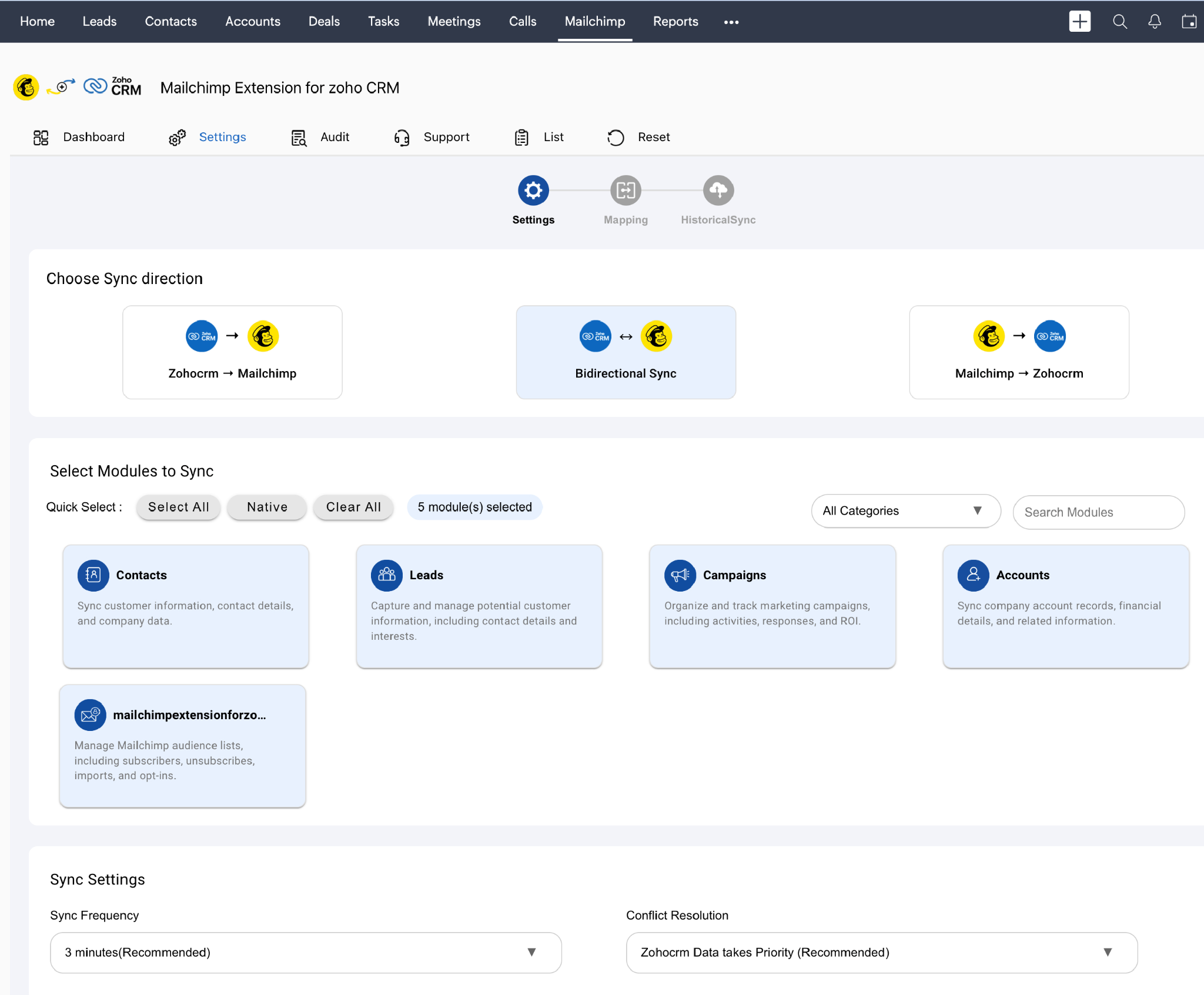
The extension maps Zoho CRM modules (Leads, Contacts) to Mailchimp audiences, syncs subscriber data, and pulls campaign engagement metrics back into CRM records.
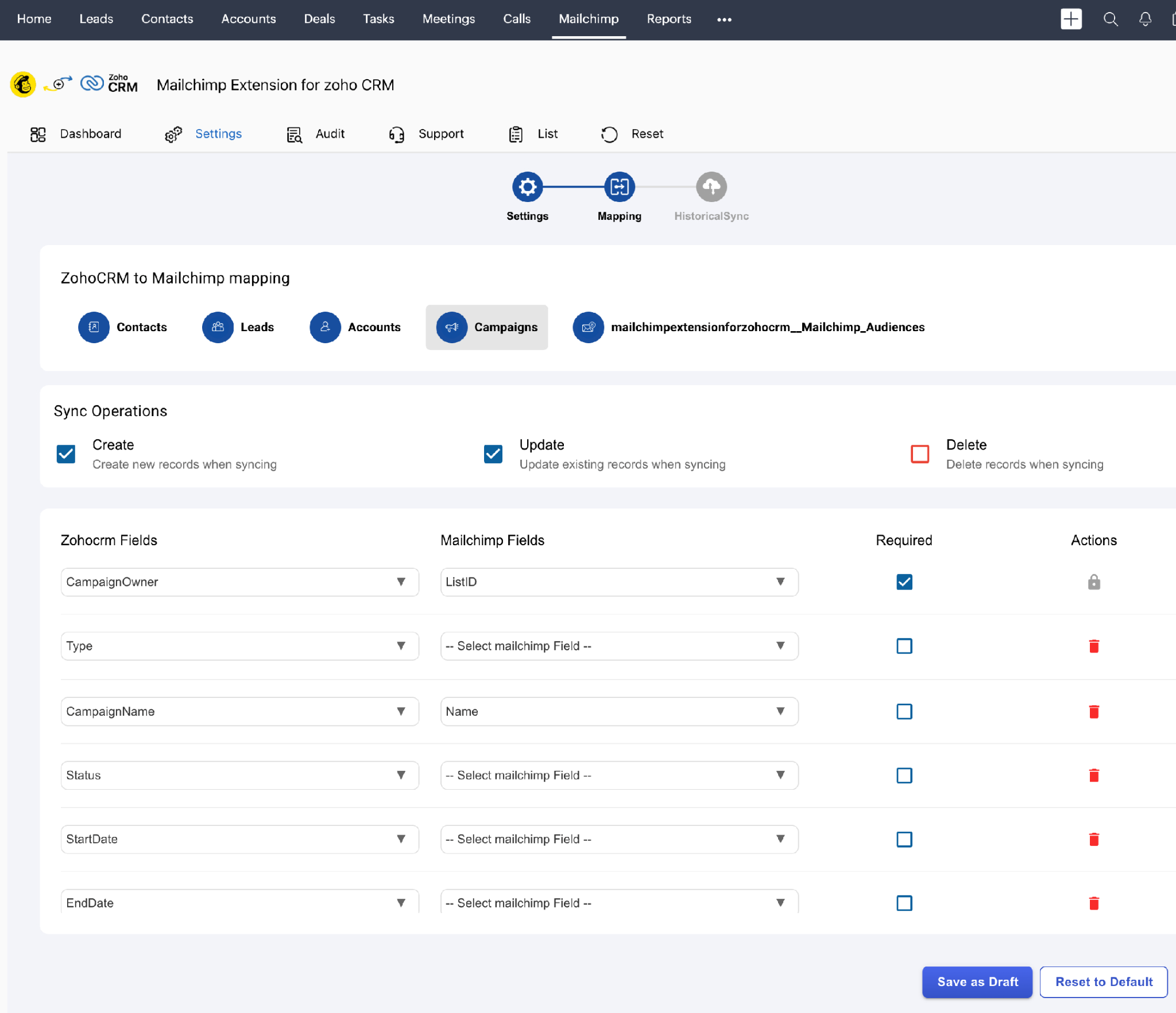
What it syncs: Contact and lead records (name, email, phone, company details, custom fields mapped during setup), Mailchimp audience membership, tags, and campaign engagement data (opens, clicks, bounces, unsubscribes). Campaign performance metrics flow back into Zoho CRM so reps can see which contacts engaged with specific email campaigns.
Fits: ongoing bidirectional sync of contacts and campaign data as part of daily sales and marketing operations.
Setup process:
In Zoho CRM, navigate to Setup > Marketplace > All and search for "Mailchimp." Install the Mailchimp Extension for Zoho CRM.
Authorize the extension to access your Zoho CRM data by granting the required permissions during installation.
Connect your Mailchimp account by entering your Mailchimp API key or authenticating via OAuth. The extension pulls in your available Mailchimp audiences.
Map Zoho CRM modules (Leads, Contacts) to Mailchimp audiences. Configure field mapping between Zoho CRM fields and Mailchimp merge fields (e.g., First Name, Last Name, Email, Company).
Set sync preferences: choose which direction data flows (Zoho to Mailchimp, Mailchimp to Zoho, or both), configure sync frequency, and define filters for which records should sync.
Run an initial sync to populate both systems, then verify that contacts appear correctly in both platforms with the expected field values.
Source: Zoho CRM
Strengths: First-party integration maintained through the Zoho Marketplace. No third-party tool to configure or pay for. Two-way sync keeps both platforms aligned without manual imports or exports. Campaign engagement data flows into CRM records, giving sales reps visibility into marketing activity.
Limitations: Sync runs on a schedule or on-demand rather than on event triggers. Complex conditional logic (e.g., syncing only contacts that meet specific criteria beyond basic filters) may require supplementing with Zoho Flow or Zapier. Custom objects and Zoho CRM modules beyond Leads and Contacts may not be fully supported.
Best for: Teams that want a no-cost connection between Zoho CRM and Mailchimp for ongoing contact synchronization and campaign visibility. Marketing and sales teams that need to close the loop between email engagement and CRM pipeline data without adding third-party tools.
Zoho Flow
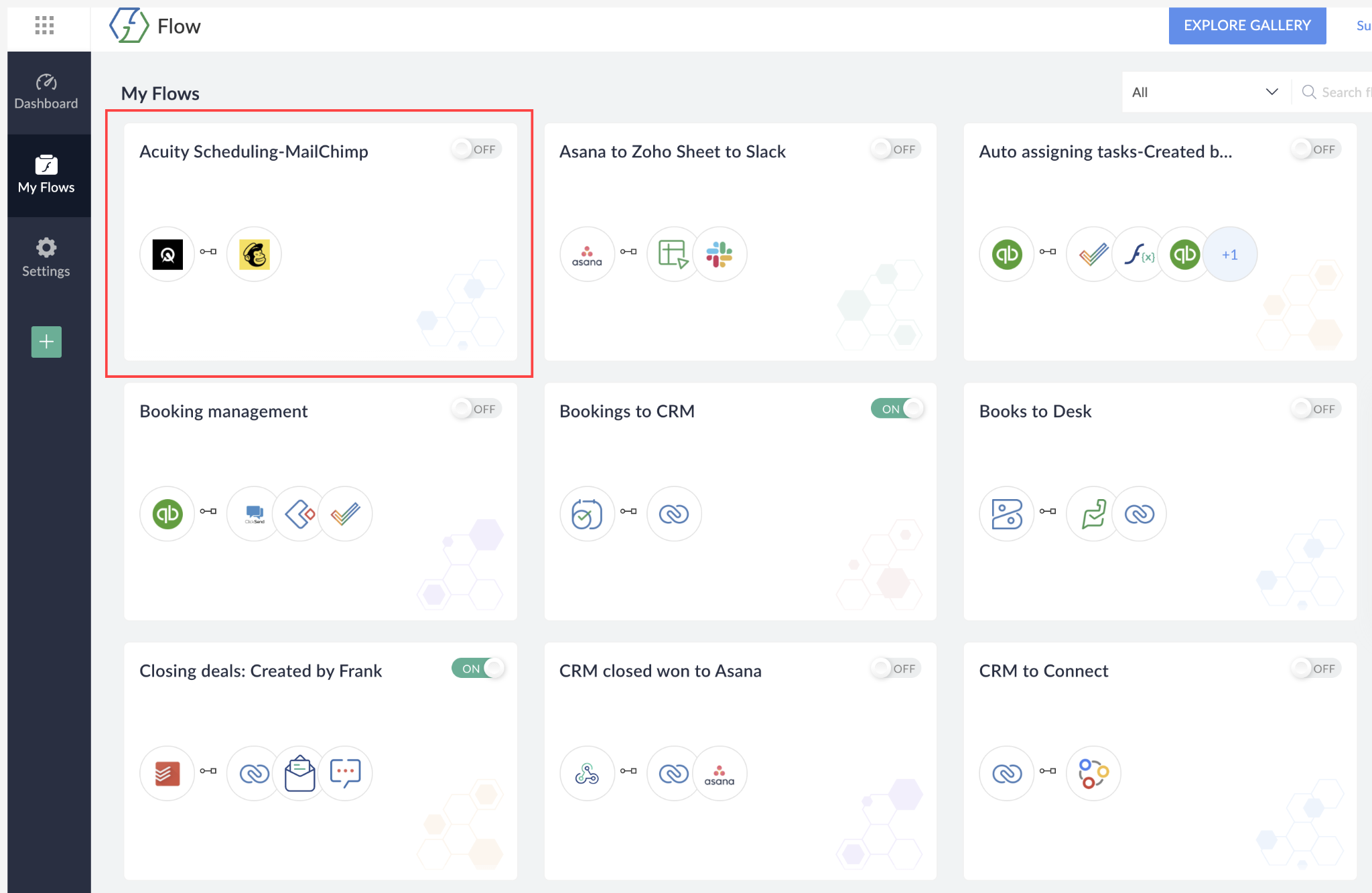
How it works: Zoho Flow is Zoho's own integration platform, built to connect Zoho apps with third-party services through automated workflows. It uses a visual flow builder where users define triggers, conditions, and actions.
Source: Zoho CRM
Because Zoho Flow is a first-party Zoho product, it has native access to Zoho CRM's data model, including custom modules, custom fields, and workflow events that third-party tools may not expose.
What it syncs: Any data accessible through both platforms' APIs. Zoho Flow can read and write to Zoho CRM modules (Leads, Contacts, Accounts, Deals, custom modules) and interact with Mailchimp's audiences, campaigns, tags, and subscriber data. This makes it more flexible than the native extension for complex use cases.
Fits: ongoing sync with conditional logic, multi-step workflows, and cross-app automation; particularly strong for teams already in the Zoho ecosystem.
Setup process:
Log into Zoho Flow (included with many Zoho plans, or available as a standalone product).
Create a new flow and select Zoho CRM as the trigger app. Choose a trigger event (e.g., "New Lead," "Updated Contact," "Deal Stage Change").
Add Mailchimp as the action app and authenticate with your Mailchimp account via OAuth or API key.
Configure the action (e.g., "Add/Update Subscriber," "Add Tag," "Send Campaign"). Map fields from Zoho CRM to Mailchimp.
Add conditional logic if needed (e.g., only sync contacts with a specific lead source, or only add subscribers who opted into marketing communications).
Test the flow with a sample record, then activate it.
Strengths: Native access to Zoho CRM data, including custom modules and fields that third-party tools may not expose. Built into the Zoho ecosystem, so teams already using Zoho products may have access at no additional cost. Supports multi-step workflows with branching logic, delays, and error handling. Can orchestrate actions across multiple Zoho apps and Mailchimp at once.
Limitations: Requires familiarity with the Zoho Flow interface, which has a steeper learning curve than the native extension's point-and-click setup. Bidirectional sync requires building separate flows for each direction. Flow execution limits vary by plan tier.
Best for: Teams already in the Zoho ecosystem that need conditional sync logic, multi-step workflows, or integration with other Zoho apps alongside the Zoho CRM-Mailchimp connection. Mid-size teams with use cases the native extension cannot handle (e.g., syncing custom module data or triggering Mailchimp actions based on deal stage changes).
Zapier
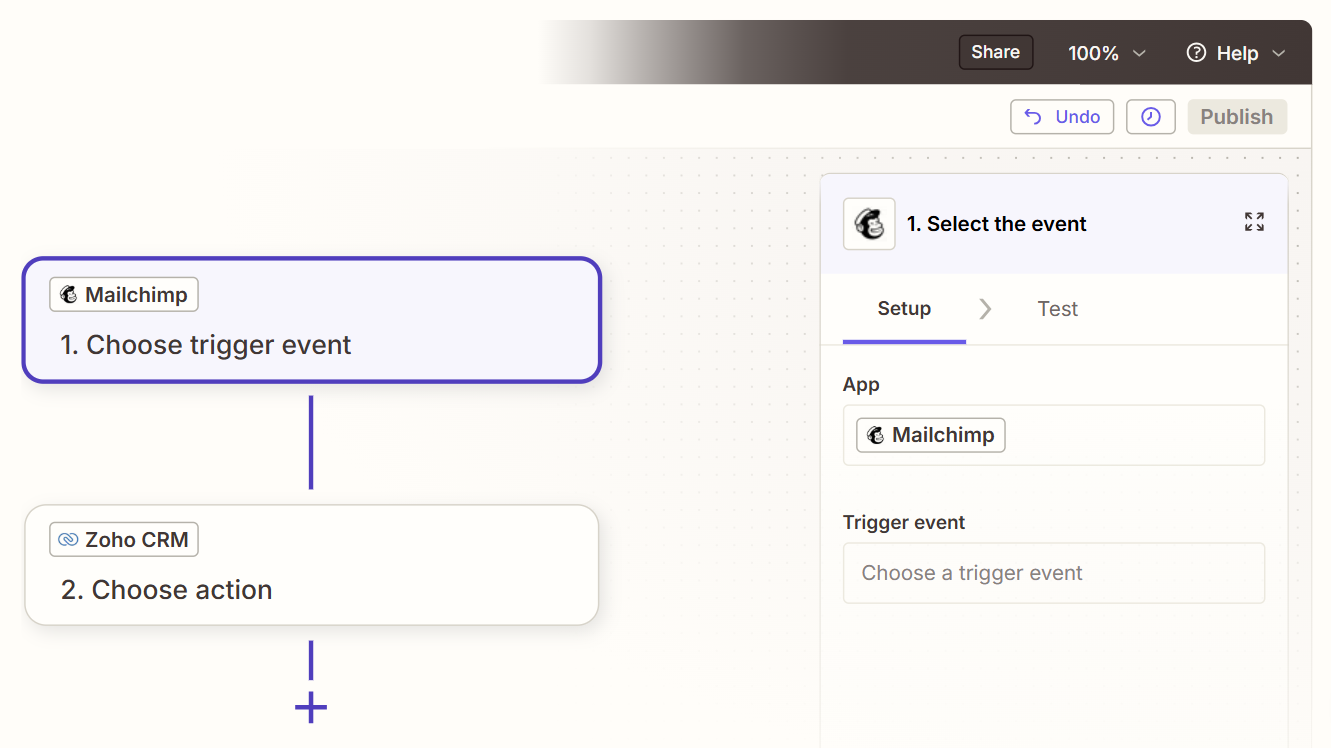
How it works: Zapier connects Zoho CRM and Mailchimp through event-driven automations called Zaps. Each Zap pairs a trigger (an event in one app) with one or more actions (what happens in the other). Both platforms are well-supported Zapier connectors, with a wide selection of trigger and action combinations covering core CRM and email marketing objects.
Source: Zapier
What it syncs: Contacts, leads, deals, and their associated field data. Zapier can push new or updated Zoho CRM records to Mailchimp as subscribers, or pull Mailchimp subscriber events (new subscriber, unsubscribe, campaign activity) back into Zoho CRM. Each object type and direction requires its own Zap. Custom fields can be mapped manually in the setup flow.
Fits: ongoing sync of specific events between the two platforms; not a bulk migration tool.
Setup process:
Create a Zapier account and connect both your Zoho CRM and Mailchimp accounts using OAuth.
Choose a trigger app (e.g., Zoho CRM) and select the trigger event (e.g., "New Lead" or "Updated Contact").
Choose the action app (Mailchimp) and select the action (e.g., "Add/Update Subscriber").
Map fields between the two platforms. Zapier displays available fields from both sides and lets you pull data from the trigger step into the action fields.
Test the Zap with a sample record to verify the field mapping produces the expected result in Mailchimp.
Turn the Zap on. For bidirectional sync, create a second Zap with the trigger and action apps reversed, and add a filter to prevent infinite loops.
Strengths: Fastest setup with no technical knowledge required. A large template library covers common Zoho CRM-Mailchimp workflows. Platform-agnostic, so teams not invested in the Zoho ecosystem can use it without learning Zoho Flow. Reliable for simple, single-object syncs.
Limitations: Each Zap handles one trigger-action pair, so syncing contacts, leads, and campaign data requires separate Zaps (each counting against the plan's task allocation). Bidirectional sync needs duplicate Zaps with loop-prevention logic. No built-in deduplication. Historical records created before the Zap was activated do not sync. Zapier charges by task count, which adds up at higher volumes.
Best for: Small teams that need a quick connection between Zoho CRM and Mailchimp for a specific use case (e.g., new leads automatically added to a Mailchimp nurture list). Teams that use tools outside the Zoho ecosystem and prefer a platform-agnostic connector.
Custom API Integration
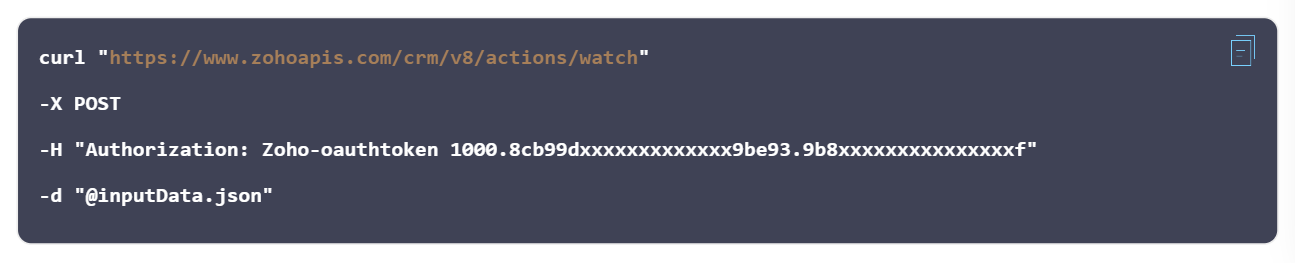
How it works: Both Zoho CRM and Mailchimp provide APIs. Zoho CRM's REST API (V8) covers all standard and custom modules, with Notification APIs for event-driven callbacks on record creation, update, and deletion.
Source: Zoho CRM
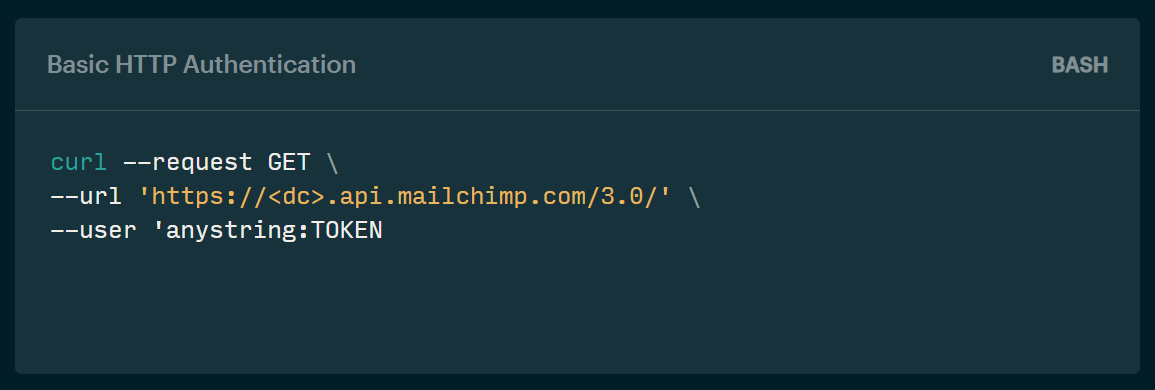
Mailchimp's Marketing API (v3.0) covers audiences, campaigns, automation flows, and reporting, with webhook support for audience data changes. A custom integration connects these APIs directly, with your own middleware handling authentication, field mapping, transformation, and error recovery.
Source: Mailchimp
What it syncs: Anything both APIs expose. This is the only method that supports complex sync scenarios like syncing custom Zoho CRM modules to Mailchimp segments, triggering Zoho CRM workflow rules based on Mailchimp campaign events, or implementing business logic that no off-the-shelf connector supports.
Fits: either one-time migration or ongoing sync; the only method with no ceiling on either.
Setup process:
Register API credentials in both platforms: generate an OAuth 2.0 access token in Zoho CRM's developer console and obtain an API key from Mailchimp.
Design the data model mapping between Zoho CRM modules and Mailchimp objects, including field-level transformations and a cross-reference table for matching record IDs.
Build the sync service: a server-side application that listens for events from both platforms (Zoho CRM Notification APIs, Mailchimp webhooks), transforms data according to the mapping, and writes changes to the other side.
Implement conflict resolution logic for bidirectional sync (timestamp-based, source-priority, or field-level rules).
Add logging, error handling, and retry logic. Zoho CRM uses a credit-based rate limiting system that scales by plan tier and user count. Mailchimp enforces a limit of 10 simultaneous connections.
Deploy, monitor, and maintain the integration over time.
Strengths: Full control over what syncs, when, and how. Near-real-time sync via event callbacks on both sides. Can implement arbitrarily complex business logic. No per-record or per-operation fees from a third-party connector.
Limitations: Requires development resources to build and maintain. You own the infrastructure, monitoring, and error recovery. API changes on either platform (Zoho CRM versions its API across V6, V7, and V8; Mailchimp maintains its Marketing API v3.0) require ongoing maintenance. The initial build takes weeks, not hours.
Best for: Teams with sync requirements that no off-the-shelf tool satisfies. Organizations with in-house development teams and a long-term commitment to running both platforms with complex data flows. Companies that need to sync custom modules, enforce business rules during sync, or integrate at a scale where third-party tool costs become prohibitive.
Key Use Cases
1. New Lead Nurture Automation
When a new lead enters Zoho CRM (via a web form, import, or manual entry), the integration adds that contact to the appropriate Mailchimp audience and tags them for a nurture sequence.
The lead receives a welcome series, educational content, or product information without manual list management. As the lead engages with emails, Mailchimp campaign data flows back into Zoho CRM so the sales rep can see open and click activity on the lead record.
Best integration method: Native extension or Zoho Flow (event-triggered, bidirectional data flow).
2. Deal-Stage-Based Campaign Targeting
Sales teams move deals through pipeline stages in Zoho CRM. When a deal reaches a specific stage (e.g., "Proposal Sent" or "Negotiation"), the integration moves the associated contact into a targeted Mailchimp audience segment for stage-appropriate content: case studies during evaluation, pricing comparisons during negotiation, or onboarding materials after close.
This keeps marketing content aligned with the sales cycle without reps manually tagging contacts.
Best integration method: Zoho Flow (conditional logic based on deal stage changes) or Zapier (trigger on deal stage update).
3. Marketing Qualified Lead Handoff
Marketing runs campaigns through Mailchimp and tracks engagement (opens, clicks, downloads). When a subscriber crosses a defined engagement threshold, the integration creates or updates a lead in Zoho CRM with the engagement data attached, assigns it to the right sales rep via Zoho CRM's assignment rules, and changes the lead status to "Marketing Qualified."
The rep sees the full engagement history without logging into Mailchimp.
Best integration method: Zoho Flow or custom API (multi-step logic with engagement scoring).
4. Customer Re-engagement from CRM Segments
Sales reps in Zoho CRM identify dormant accounts or churned customers using CRM reports and filters. The integration pushes these contacts to a dedicated Mailchimp audience segment, where a re-engagement email sequence (special offers, product updates, check-in messages) runs automatically.
When a dormant contact re-engages (opens an email, clicks a link), the activity flows back into Zoho CRM to alert the account owner.
Best integration method: Native extension or Zoho Flow (segment-based sync with engagement data return).
5. Event and Webinar Registration Tracking
Marketing promotes webinars and events through Mailchimp campaigns. When contacts register, the integration logs the registration as an activity or note on the corresponding Zoho CRM record. After the event, attendance data from Mailchimp flows back into the CRM so reps know which prospects attended and can follow up with relevant next steps.
Best integration method: Zapier or Zoho Flow (event-triggered, one-directional with metadata).
Limitations and Considerations
Data That Doesn't Sync Easily
Zoho CRM and Mailchimp model data differently. Zoho CRM organizes contacts into modules (Leads, Contacts, Accounts, Deals) with relationships between them. Mailchimp organizes subscribers into flat audience lists with tags and segments.
Mapping a Zoho CRM lead with an associated account, deal, and activity history into a Mailchimp subscriber means some relational context is lost. The subscriber in Mailchimp carries field values but not the full deal pipeline context.
Full email thread history, attachments, and Zoho CRM activity logs (calls, meetings, tasks) do not travel through the native extension or third-party connectors. Mailchimp's AI-generated content, automation flow logic, and template designs also do not sync into Zoho CRM.
Sync Conflicts
Bidirectional sync creates the risk of conflicting updates. If a marketer updates a contact's email in Mailchimp while a sales rep changes the same field in Zoho CRM, which change wins? The native extension and most third-party tools default to "last write wins," which may not produce the right answer for every field.
Without explicit conflict resolution rules, one update overwrites the other silently. Teams should designate one platform as the system of record for specific fields (e.g., Zoho CRM owns phone number and job title; Mailchimp owns email subscription preferences).
Pricing Implications
Mailchimp's contact-based pricing means every subscriber counts against the plan's contact limit. Syncing a large Zoho CRM database into Mailchimp could push the account into a higher pricing tier. Mailchimp's Free plan caps at 250 contacts; Essentials starts at $13/month for 500 contacts and scales steeply by contact count.
On the Zoho CRM side, API credits are consumed by integration calls: the Free plan allows 5,000 API credits per day, scaling to 50,000+ on paid plans with per-user additions. Mailchimp's API enforces a limit of 10 simultaneous connections. Teams running high-volume syncs should verify that both platforms' rate limits and pricing tiers accommodate the expected data flow.
Permissions and Access
Setting up the native extension requires admin access in Zoho CRM to install marketplace extensions and configure integrations. On the Mailchimp side, an account with admin or manager permissions is needed to generate API keys or authorize OAuth connections.
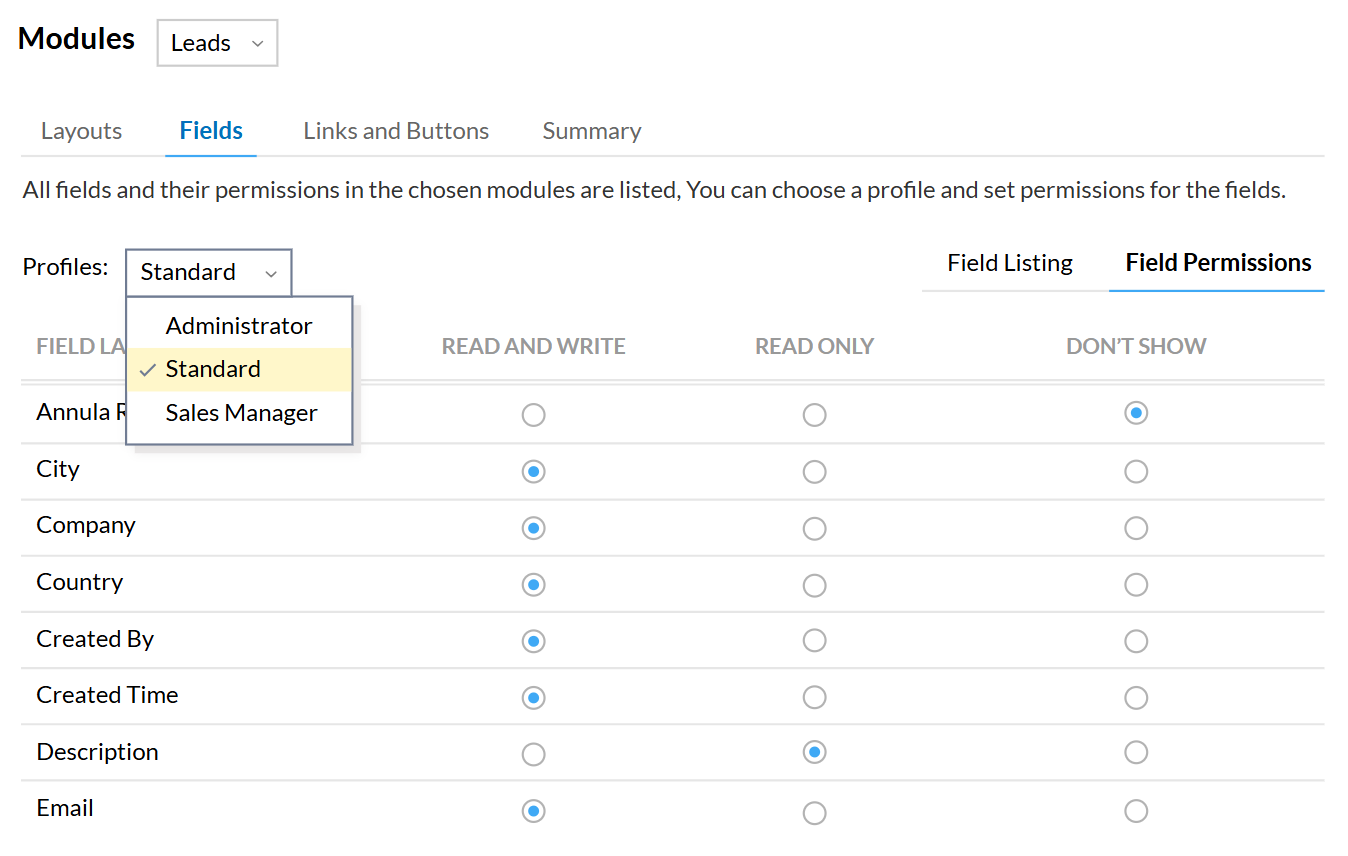
Zoho CRM's role-based access controls apply to the integration user, so the API token inherits the permissions of the user who created it. If that user's access is restricted (e.g., limited to specific modules or fields), the integration inherits those restrictions.
Source: Zoho CRM
Maintenance
Both platforms update their features and APIs independently. Zoho CRM maintains multiple API versions (V6, V7, V8) simultaneously, and new features may only appear in the latest version. Mailchimp's Marketing API v3.0 evolves with each product update.
Custom fields added to either platform after the initial setup will not sync unless the configuration is updated. Third-party tools may change pricing, deprecate connectors, or alter authentication methods. Plan for periodic reviews of the integration's health, field mappings, and data accuracy.
What No Method Fixes: The Data Itself
Every method above moves records between Zoho CRM and Mailchimp. None of them checks whether those records are accurate, complete, or current.
A contact with a dead email address in Zoho CRM syncs as a subscriber with a dead email address in Mailchimp, where it inflates the contact count (and the bill), damages sender reputation when the email bounces, and wastes a slot in the audience. A lead with a missing job title travels just as reliably as a fully enriched one. The integration ensures both systems agree; it does not ensure they are right.
Where ZoomInfo Fits In
Every method in this guide moves data between Zoho CRM and Mailchimp. None of them improves the data being moved. When the integration is live but marketing campaigns underperform because half the subscriber list has outdated job titles, bounced emails inflate the contact count, and sales reps work leads with missing phone numbers, the bottleneck is no longer the connector. Agent Teams can pick up from there, running the full play end to end: coordinated specialist agents share context, work from each account's current state, and act within the approvals and limits you set, so a re-engagement sequence or lead handoff doesn't stall once the records are clean.
That is the gap ZoomInfo closes.
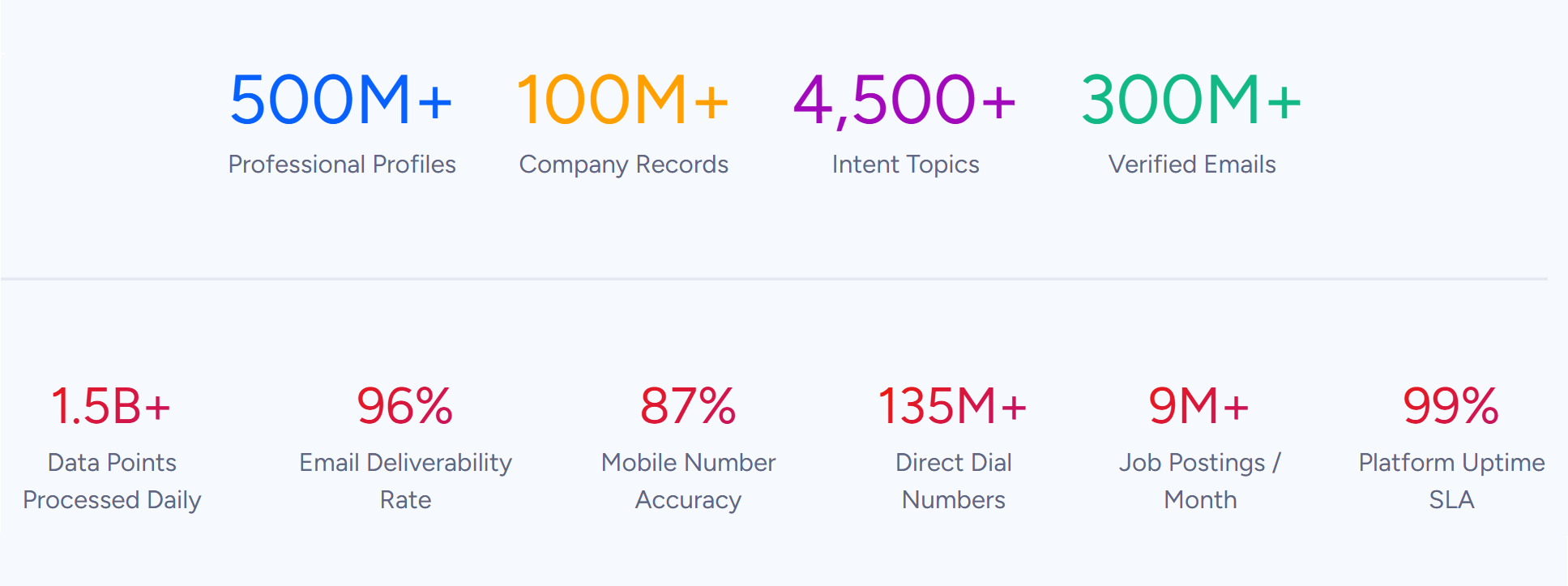
ZoomInfo is a B2B data and go-to-market platform built on 500M contacts, 100M companies, 135M+ verified phone numbers, and 200M+ verified business emails.
Source: ZoomInfo
That data is verified through a multi-source pipeline backed by 300+ human researchers, reaching up to 95% accuracy on first-party data. For teams running a Zoho CRM-Mailchimp integration, ZoomInfo addresses the data quality layer that no connector handles.
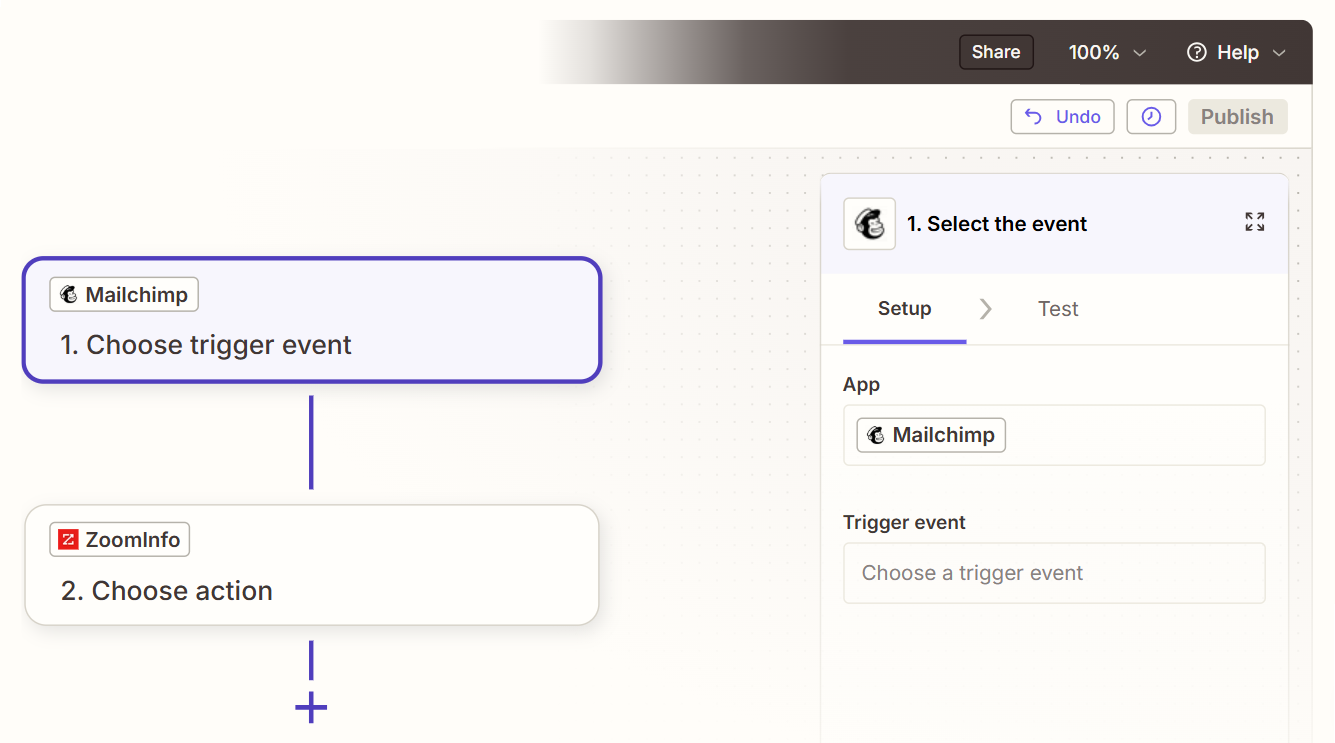
ZoomInfo integrates with Zoho CRM through its marketplace, enabling data mapping and field synchronization to keep CRM records updated with verified contact and company data. For Mailchimp, ZoomInfo connects through middleware platforms like Zapier and Workato, pushing enriched data into audiences.
Source: Zapier
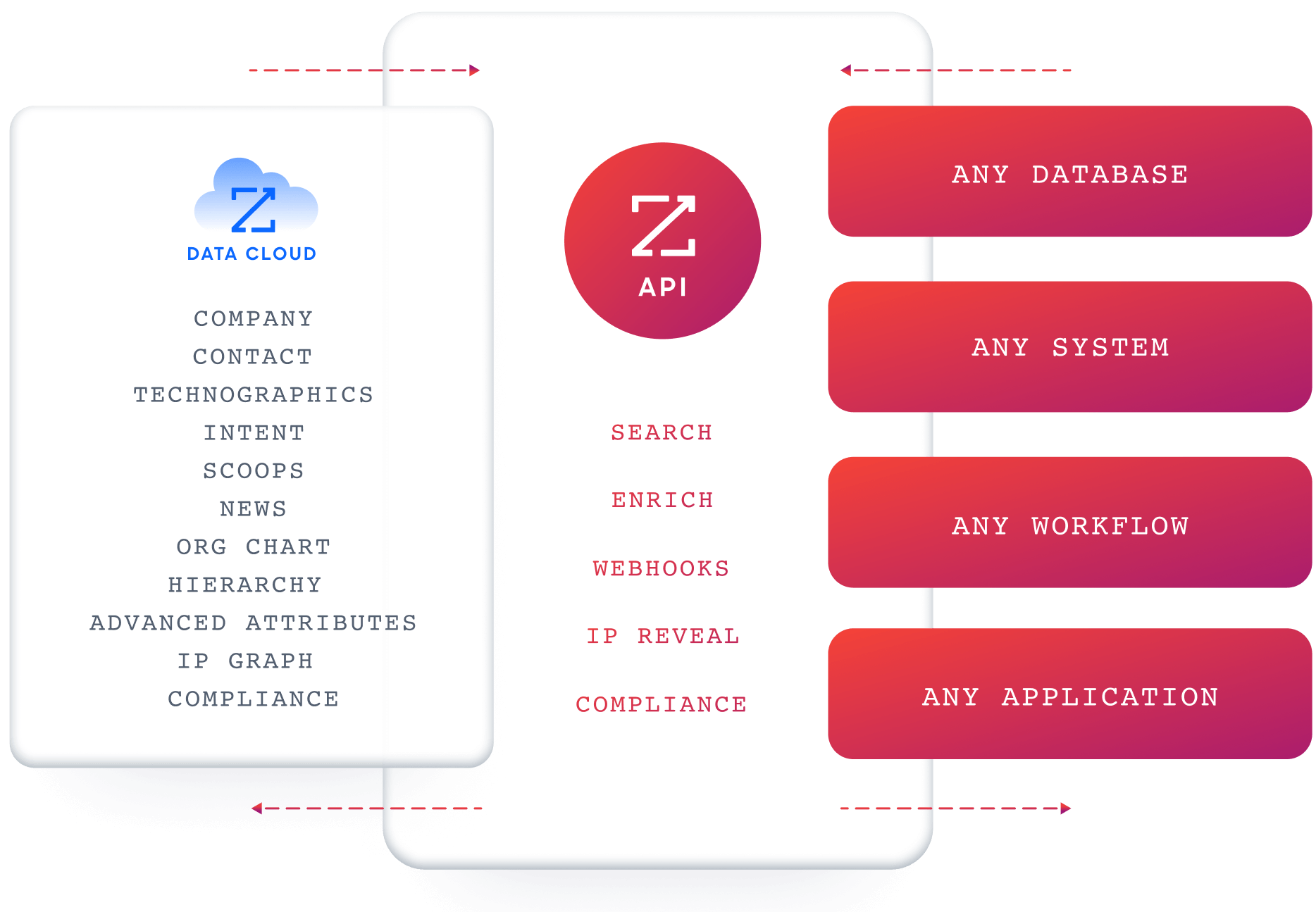
ZoomInfo's Enterprise API and MCP server can also feed verified data into any system through custom integrations or automation tools.
Source: ZoomInfo
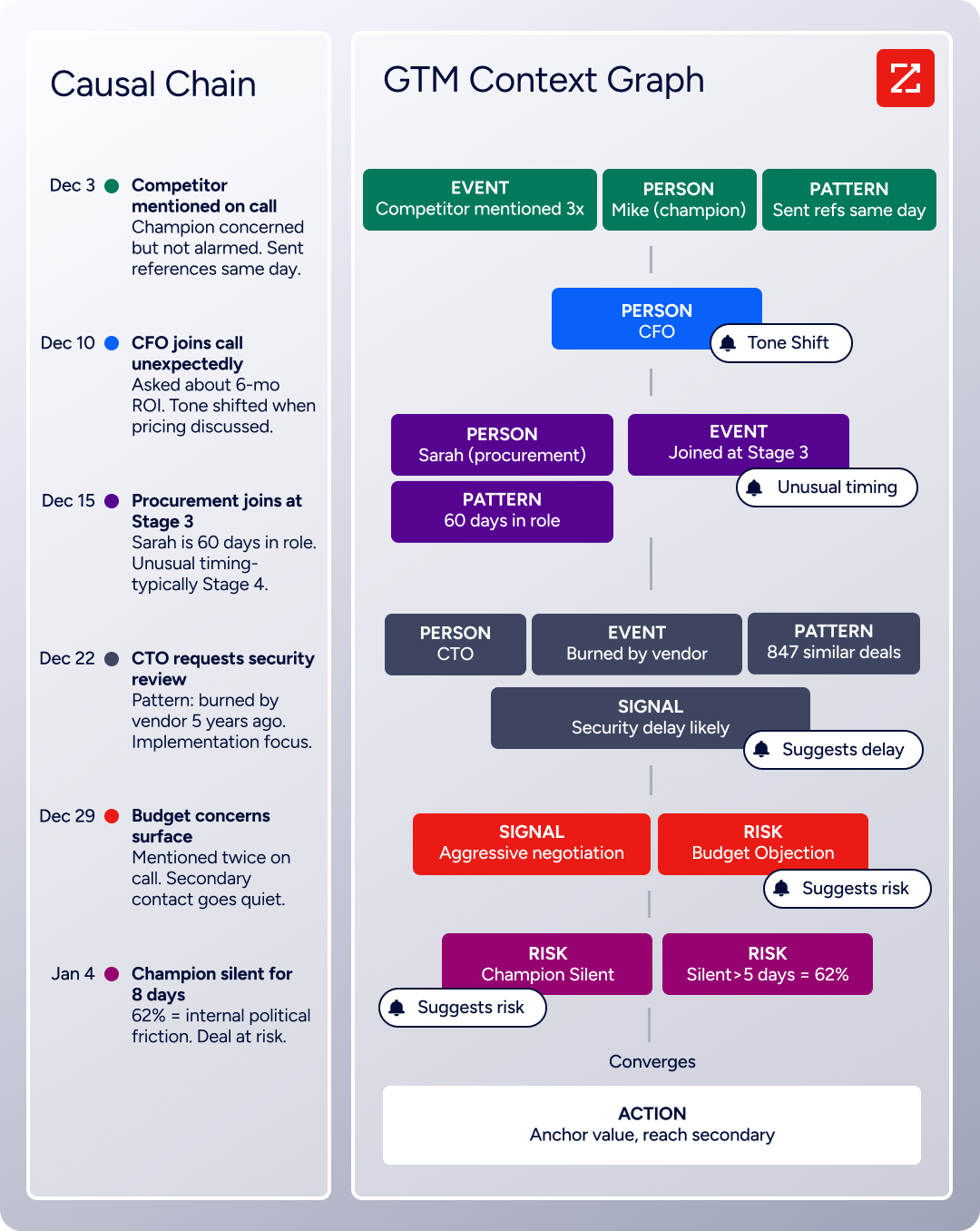
The same data feeds ZoomInfo's GTM Context Graph, which processes 1.5B + data points daily, combining ZoomInfo's B2B data with your CRM records, conversation transcripts, and behavioral signals to surface not just what happened in a deal, but why.
Source: ZoomInfo
In practice, a team running both Zoho CRM and Mailchimp can use ZoomInfo to enrich CRM records before they sync to Mailchimp. Verified emails mean campaigns reach real inboxes instead of bouncing. Accurate job titles and company details mean segmentation reflects actual buyer profiles, not stale data. With ZoomInfo Agent Teams, that same enriched data can also drive the next step: coordinated specialist agents work from each account's current state and carry out the follow-up outreach itself, inside the approvals and limits a team sets.
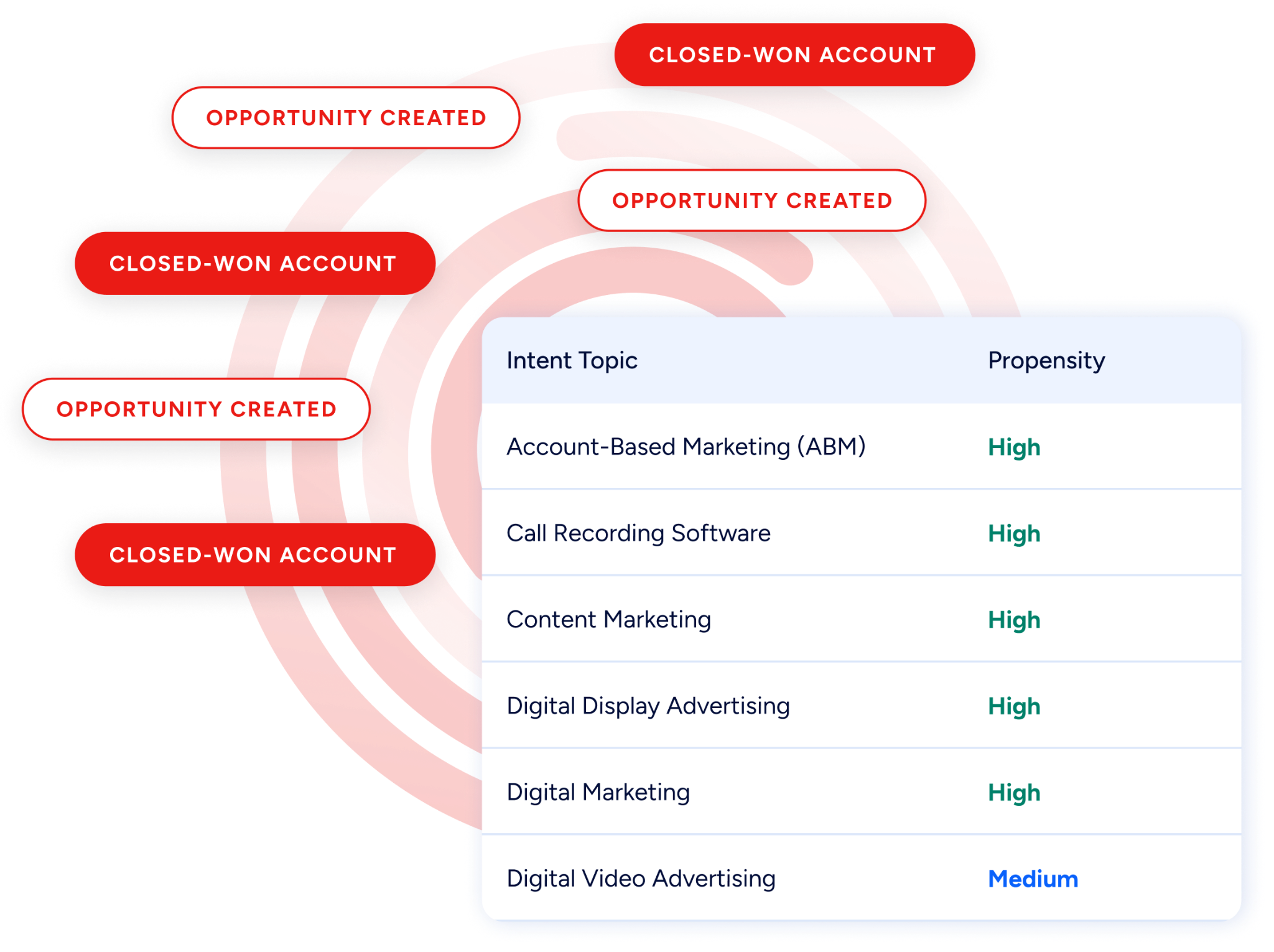
Buyer Intent data from ZoomInfo, tracking signals from 210 million IP-to-Organization pairings, can be routed into Zoho CRM to flag accounts actively researching relevant solutions, so marketing sends the right campaign at the right moment.
Source: ZoomInfo
Enriched records also make the integration itself more reliable. Fewer blank fields mean fewer mismatches during sync. Consistent formatting reduces the false positives that create duplicate subscribers in Mailchimp.
Verified emails lower bounce rates, which protects sender reputation and keeps Mailchimp deliverability high (Mailchimp reports a greater than 99% average email deliverability rate, but that rate depends on the quality of the data being sent). And intent signals help teams decide which contacts belong in active campaign audiences, rather than syncing every record indiscriminately.
Seismic's sales team attributed 39% of active pipeline to opportunities identified or influenced by ZoomInfo signals, while boosting productivity by 54% and saving 11.5 hours per week. (Seismic)
Final Verdict
A native integration between Zoho CRM and Mailchimp exists and works well for standard contact synchronization and campaign data sharing. Beyond the native connector, Zoho Flow, Zapier, and custom API development each serve different levels of complexity. For most teams, the right choice depends on how much the two platforms need to share.
Small teams that need contacts flowing between Zoho CRM and Mailchimp with campaign engagement visible in the CRM should start with the native Mailchimp Extension from the Zoho Marketplace. It is free, requires no third-party tool, and covers the most common synchronization needs out of the box.
Teams with conditional sync requirements (syncing only contacts that meet specific criteria, triggering actions based on deal stages, or orchestrating multi-step workflows) should use Zoho Flow or Zapier. Zoho Flow is the stronger choice for teams already in the Zoho ecosystem; Zapier is faster to set up for teams that prefer a platform-agnostic tool.
Organizations with complex data models, custom modules, or business logic that must be enforced during sync should invest in a custom API integration using Zoho CRM's REST API and Mailchimp's Marketing API.
Before committing to a method, clarify why both platforms coexist.
If the answer is operational (marketing lives in Mailchimp, sales lives in Zoho CRM, and both do their jobs well), invest in a connection that keeps both systems aligned and gives each team visibility into the other's activity. If the answer is transitional (the company is consolidating onto one platform), keep the sync simple and focus on data hygiene for the eventual migration.
Either way, the quality of the data flowing between both systems determines whether the integration delivers value or just replicates problems in two places.
ZoomInfo, with its Zoho CRM integration and API and MCP access for any platform including Mailchimp, is the data enrichment layer that keeps both systems accurate while the connector keeps them aligned.
FAQ
Does Zoho CRM integrate natively with Mailchimp?
Yes. The Mailchimp Extension for Zoho CRM is available through the Zoho Marketplace and enables two-way synchronization of contacts and campaign data. Mailchimp also lists Zoho CRM as a supported integration in its own directory. The extension is free to install and does not require a third-party automation tool.
Can I sync Mailchimp campaign engagement data back into Zoho CRM?
Yes. The native extension syncs campaign metrics (opens, clicks, bounces, unsubscribes) back into Zoho CRM records. This gives sales reps visibility into which leads and contacts engage with marketing emails without leaving the CRM. Zoho Flow and Zapier can also push engagement events into Zoho CRM as activities or field updates.
What happens if a contact is updated in both platforms at the same time?
Without explicit conflict resolution rules, the last write wins. If a sales rep updates a contact's phone number in Zoho CRM while a marketer updates the same contact's email in Mailchimp, both changes should survive since they affect different fields.
But if both sides update the same field (e.g., email address), the platform that syncs last overwrites the other. Teams should designate one platform as the system of record for each critical field to avoid data loss.
Can I sync historical data between Zoho CRM and Mailchimp?
The native extension can sync existing records during the initial setup. Zapier only processes records created after the Zap is activated, so historical data requires a separate initial sync (manual export/import or a custom API script). Zoho Flow can process existing records through a one-time flow, though this consumes API credits on both platforms proportional to the volume.
How does Mailchimp's contact-based pricing affect the integration?
Every contact synced from Zoho CRM into Mailchimp counts against Mailchimp's plan limit. Syncing a 10,000-contact CRM database into Mailchimp could push the account from the Essentials tier ($13/month at 500 contacts) to a significantly higher pricing band.
Teams should filter which contacts sync to Mailchimp (e.g., only contacts with marketing opt-in, only active leads) rather than syncing the entire CRM database.
What Zoho CRM plan do I need for the integration?
The native Mailchimp extension is available on all Zoho CRM plans, including the free tier. API access for custom integrations is also available on all plans, though API credit limits scale by tier: the Free plan allows 5,000 credits per day, Standard offers 50,000 base credits, and Enterprise provides 50,000 base plus 1,000 per user. Zoho Flow is included with many Zoho plans or available as a standalone product.
How does ZoomInfo improve a Zoho CRM-Mailchimp integration?
ZoomInfo solves the data quality problem that no sync tool addresses. Contact records in CRMs decay as people change jobs, phone numbers go inactive, and company details shift. ZoomInfo enriches records with verified contact data, company attributes, technographics, and intent signals.
Its Zoho CRM integration handles enrichment on the CRM side, and its API and middleware connections can feed the same verified data into Mailchimp. The result: data flowing between both systems is accurate and complete, which reduces bounced emails, improves campaign targeting, and ensures sales reps work from current information.
Can I use Zoho Flow instead of Zapier to connect Zoho CRM and Mailchimp?
Yes. Zoho Flow is Zoho's own integration platform and provides comparable trigger-action automation to Zapier.
For teams already using Zoho products, Zoho Flow offers native access to Zoho CRM's data model (including custom modules and fields), may already be included in the existing Zoho subscription, and keeps the integration within a single vendor's ecosystem. Zapier is the better choice for teams that also need to connect non-Zoho tools in the same workflow.
