

Choosing between AllClients vs. Pipedrive for your CRM often comes down to these five questions:
Are you a solo operator or small team that needs simplicity, or a growing sales org that needs pipeline visibility and automation?
Do you primarily need to stay in touch with existing contacts, or manage and close new deals?
Is your biggest challenge writing follow-up emails and staying consistent, or tracking deal stages and forecasting revenue?
Do you want a CRM that works out of the box with minimal setup, or one you can extend with hundreds of integrations?
Does your sales process depend mainly on relationship nurturing, or on structured pipeline progression?
In short, here's what we recommend:
AllClients is built for solo operators and micro-teams in relationship-driven industries (real estate, insurance, financial services) who need one system to organize contacts, automate follow-ups, and send newsletters. Its Done-For-You Newsletter lets you send professional email content in under two minutes a month, and the VIP Setup service handles your initial configuration. At $24–$96/month for the whole account (not per user), AllClients keeps costs predictable. The trade-off: limited integrations, a five-user cap, and no advanced sales analytics.
Pipedrive is built for sales teams that live in their pipeline. Its visual kanban board makes deal progression intuitive, and features like deal rotting alerts, AI email generation, and 500+ marketplace integrations give growing teams room to scale. Pipedrive serves 100,000+ companies in 179 countries and starts at $14/seat/month. However, per-seat pricing adds up for larger teams, and marketing automation requires a separate add-on.
Both platforms handle contacts and deals. But neither solves a more basic question: are you talking to the right people in the first place? The best CRM in the world can't close deals that should never have entered your pipeline.
ZoomInfo is an AI-powered GTM platform that sits upstream of your CRM, filling your pipeline with the right accounts and contacts from the start. Built on a B2B dataset of 500M contacts, 100M companies, 135M+ verified phone numbers, and 200M+ verified business email addresses, ZoomInfo's GTM Context Graph combines this data with your CRM records, conversation transcripts, and behavioral signals to show not just who your buyers are, but why deals move or stall. Sales teams reach this intelligence through GTM Workspace, marketing and RevOps teams through GTM Studio, and technical teams through APIs and MCP in any front-end. For teams that have outgrown CRM-only workflows and need to know who to target, when to engage, and what to say, ZoomInfo provides the intelligence layer that makes every CRM more effective.
If smarter prospecting and AI-powered deal intelligence sound like the missing piece in your sales process, see how ZoomInfo works.
AllClients vs. Pipedrive vs. ZoomInfo at a glance
AllClients | Pipedrive | ZoomInfo | |
|---|---|---|---|
Primary function | Contact management + email marketing | Sales pipeline management | B2B intelligence + GTM execution |
Ideal for | Solo operators, micro-teams (1–5) | SMB sales teams | Enterprise and upper mid-market revenue teams |
Pricing model | Flat fee per account | Per seat, per month | Custom-quoted, consumption-based |
Starting price | $24/month (1 user) | Free tier available (ZoomInfo Lite); paid plans custom-quoted | |
Contact database | Your contacts only | Your contacts only | 500M contacts, 100M companies + your CRM data |
Pipeline management | Advanced (visual kanban, forecasting, deal rotting) | AI-prioritized accounts via GTM Workspace | |
Email marketing | Built-in (newsletters, drip campaigns) | Add-on (Campaigns) | Multi-channel orchestration via GTM Studio |
AI capabilities | AI Writer, AI Newsletter, Writing Voice Profiles | AI email writer, AI Sales Assistant, AI reports | GTM Context Graph, AI agents, intent signals |
Integrations | Limited (Zapier, JotForm, SendGrid) | 120+ integrations + API/MCP access | |
Free trial | Available | 7-day trial + permanent Lite tier |
Two different CRM philosophies
AllClients and Pipedrive solve the same problem (managing customer relationships) with different assumptions about who's using the tool and what they need most.
AllClients assumes you're a small business owner who wears every hat. You don't have a dedicated sales team, a CRM administrator, or time to learn complex software. You need one place to store contacts, send follow-up emails, and make sure nobody falls through the cracks. The about page states it directly: "most CRMs are either too complex and expensive, or too simple and limited," and AllClients aims for the middle ground.

Source: AllClients
This philosophy shows everywhere. The Quick Start Guide structures onboarding as a week-long sequence rather than an all-at-once configuration dump. The VIP Setup service imports your contacts, customizes your email templates, and configures automation on your behalf. Even the pricing reflects it: the Elite plan caps at five users and 15,000 contacts. AllClients isn't pretending to serve growing sales organizations. It's scoped for small teams and does that job well.
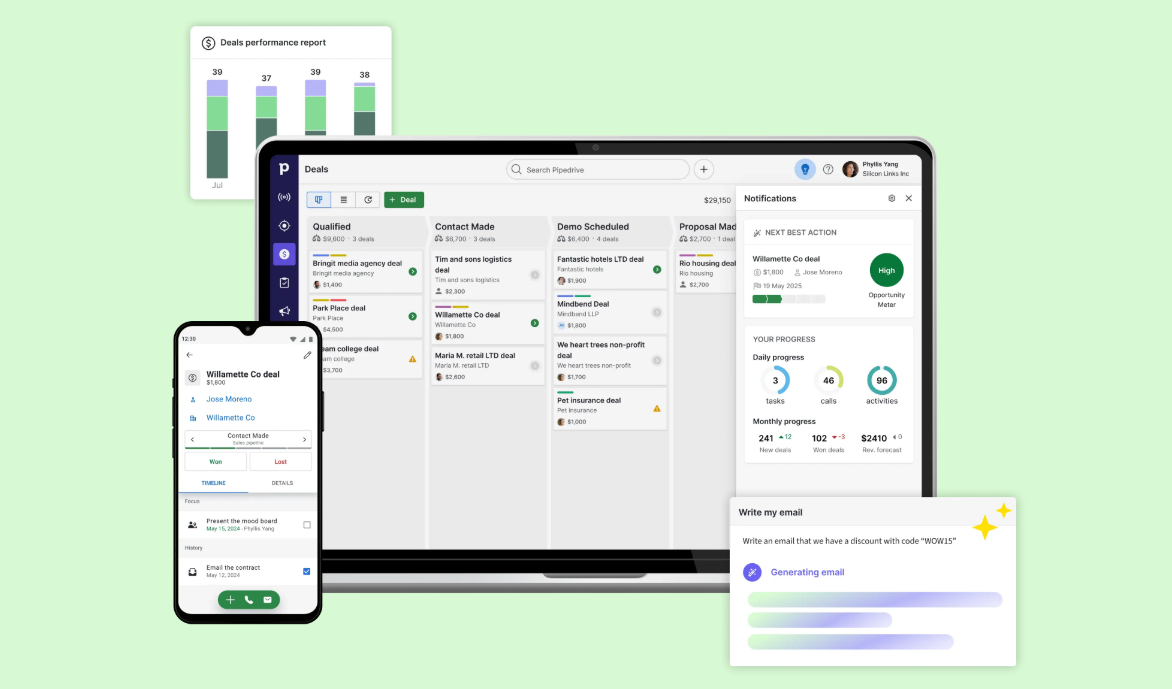
Pipedrive assumes you're a salesperson (or managing salespeople) who needs to close deals efficiently. The five co-founders were salespeople themselves, frustrated by CRMs built for managers to monitor reps rather than help reps sell. That frustration shaped the product: the visual pipeline is the first thing you see on login, every deal has activities attached to it, and idle deals get flagged with colored "rotting" cues before they go cold.
Source: Pipedrive
Where AllClients organizes contacts and automates follow-ups, Pipedrive tracks deals through stages and measures sales performance. The two products overlap in basic contact management, but their centers of gravity differ.
AllClients wins at keeping small teams in touch
For a one-person insurance agency, a real estate agent, or a financial advisor, the hardest part of CRM isn't closing deals. It's staying consistently in front of your entire book of business. AllClients is designed around this challenge.
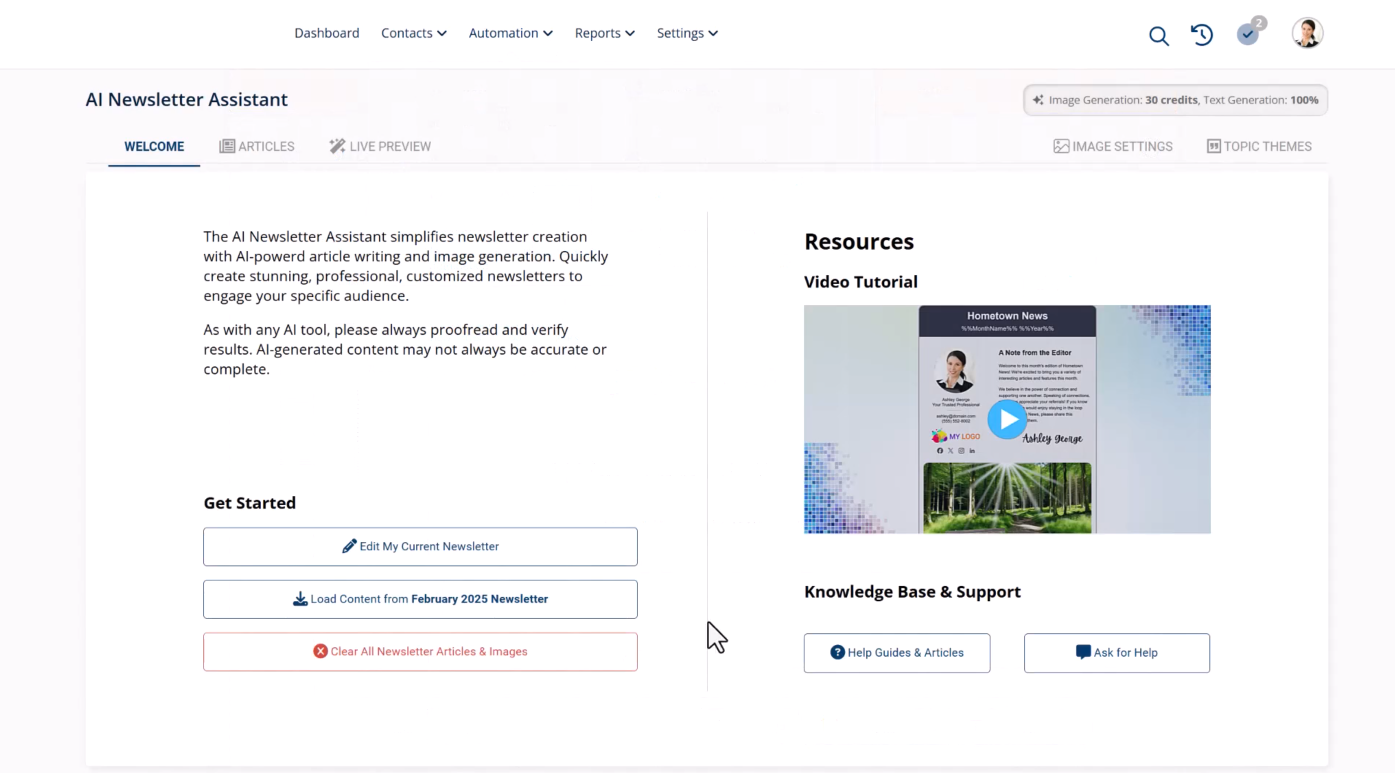
The Done-For-You Newsletter ships five pre-written, designed articles with matched images every month. You review and send in under two minutes. If you want something more personalized, the AI Newsletter Assistant generates industry-specific content you can customize in 15–30 minutes. Either way, you're sending a professional newsletter monthly without staring at a blank page.
Source: AllClients
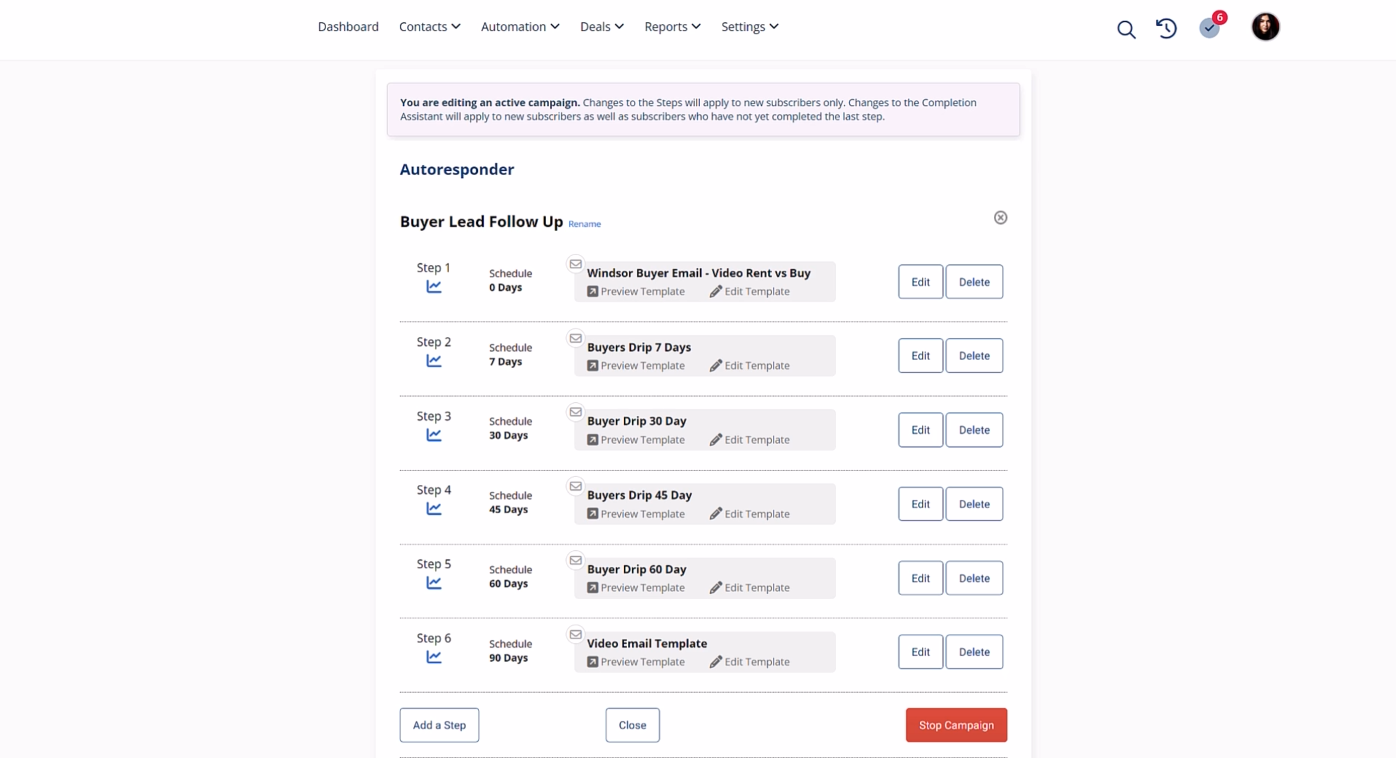
The Autoresponder system runs independently for each contact from the moment they enter a sequence. Two clients added a week apart each receive the full drip sequence on their own schedule. The Intelligent Links feature turns any email hyperlink into a trigger: when a contact clicks a link about, say, home refinancing, a workflow can automatically add a tag, start a new sequence, and create a follow-up task for you.
Source: AllClients
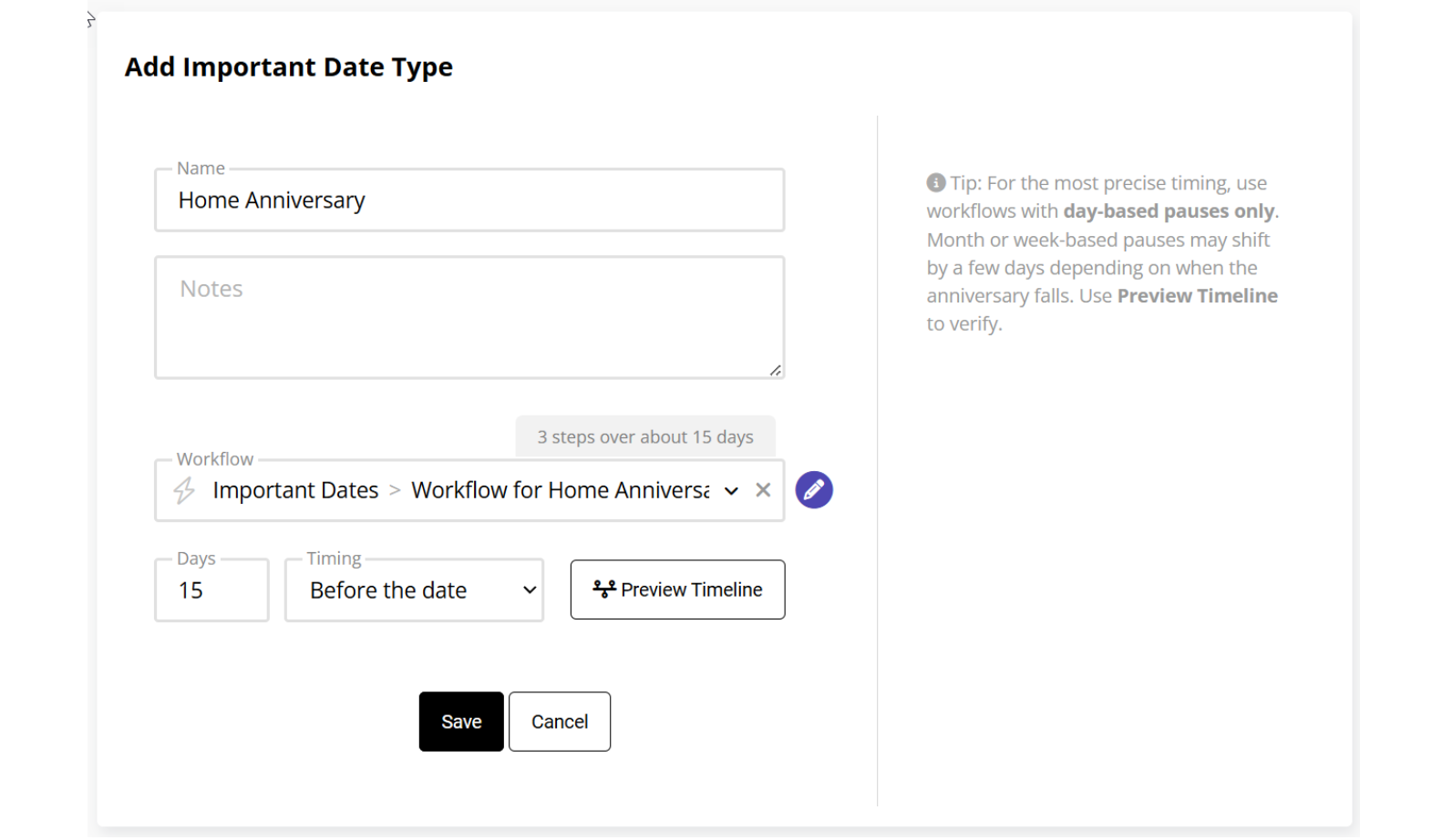
AllClients also handles relationship milestones that matter in service businesses. The Important Dates feature tracks recurring annual events (policy renewals, loan anniversaries, home purchase dates) and triggers automations when they come due. For an insurance agent managing hundreds of policies, date-driven automation is more valuable than pipeline forecasting.
Source: AllClients
The AI Writer rounds out the content creation tools. You can launch it from a contact's record or from a prior email thread, describe what you want, pick a tone, and get a draft in seconds. Writing Voice Profiles let you train the AI on your personal writing style using samples, so drafts sound like you rather than generic copy.
Pipedrive wins at managing the sales process
Pipedrive's strength is making every deal visible and every next step obvious.
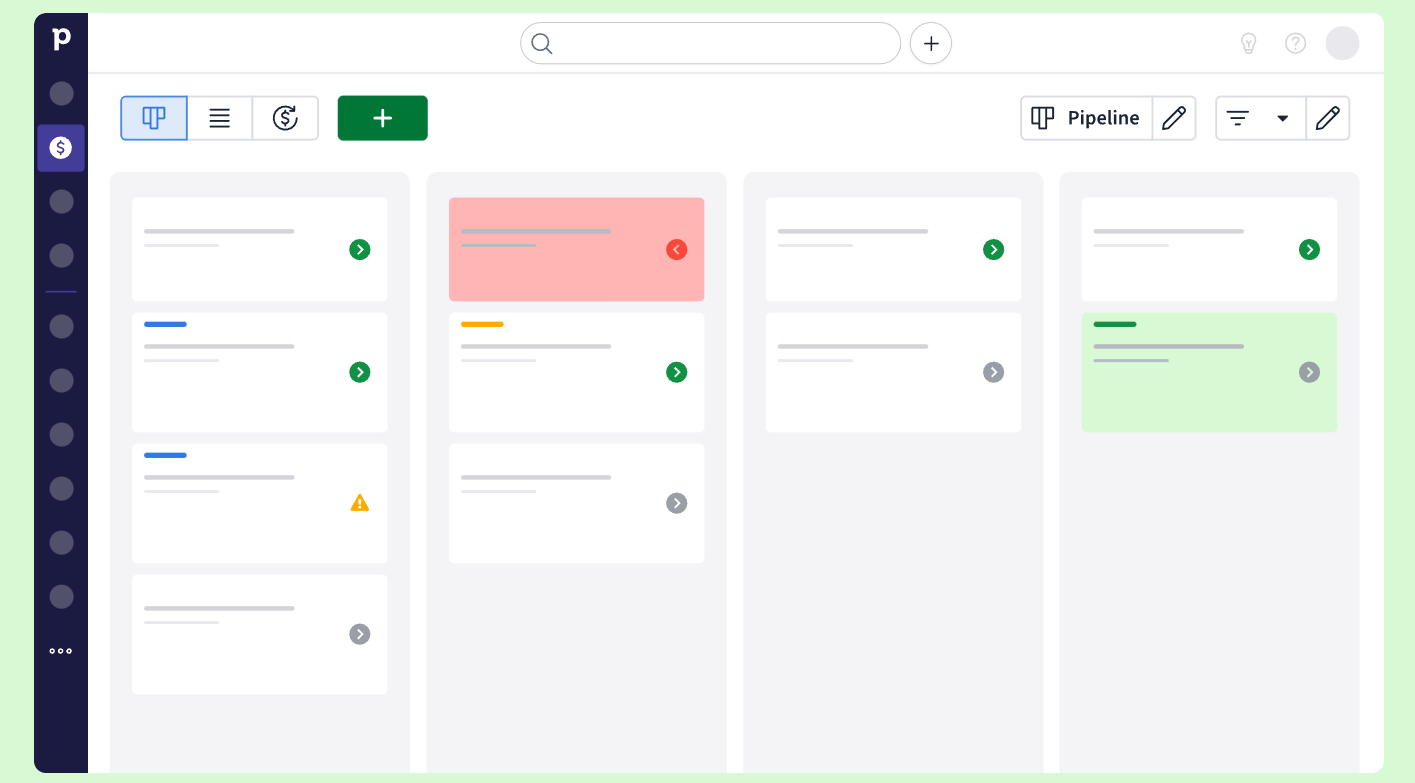
The visual pipeline shows every deal as a card on a kanban board. Drag a deal from "Proposal Sent" to "Negotiation" and its history follows. Colored cues appear when deals sit idle too long, prompting reps to re-engage before opportunities go cold. Three views (kanban, list, and forecast) let you switch between tactical deal management and revenue planning.
Source: Pipedrive
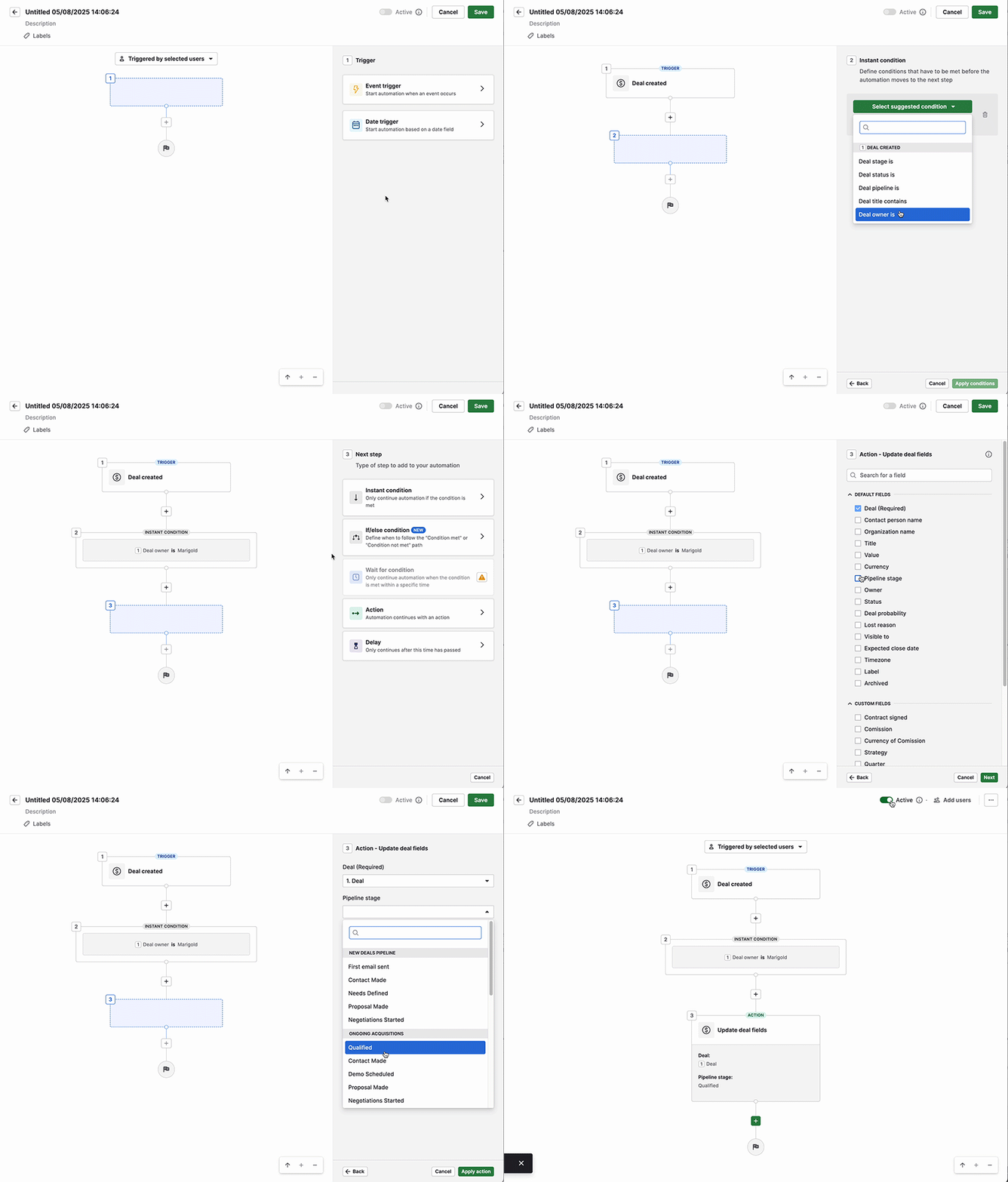
Automations handle the repetitive work. When a deal moves to a new stage, Pipedrive can send a follow-up email, create the next activity, notify a team member via Slack or Teams, or push data to Trello or Asana. The if/else branching and "wait until event" conditions provide logic depth that AllClients' workflow system doesn't match.
Source: Pipedrive
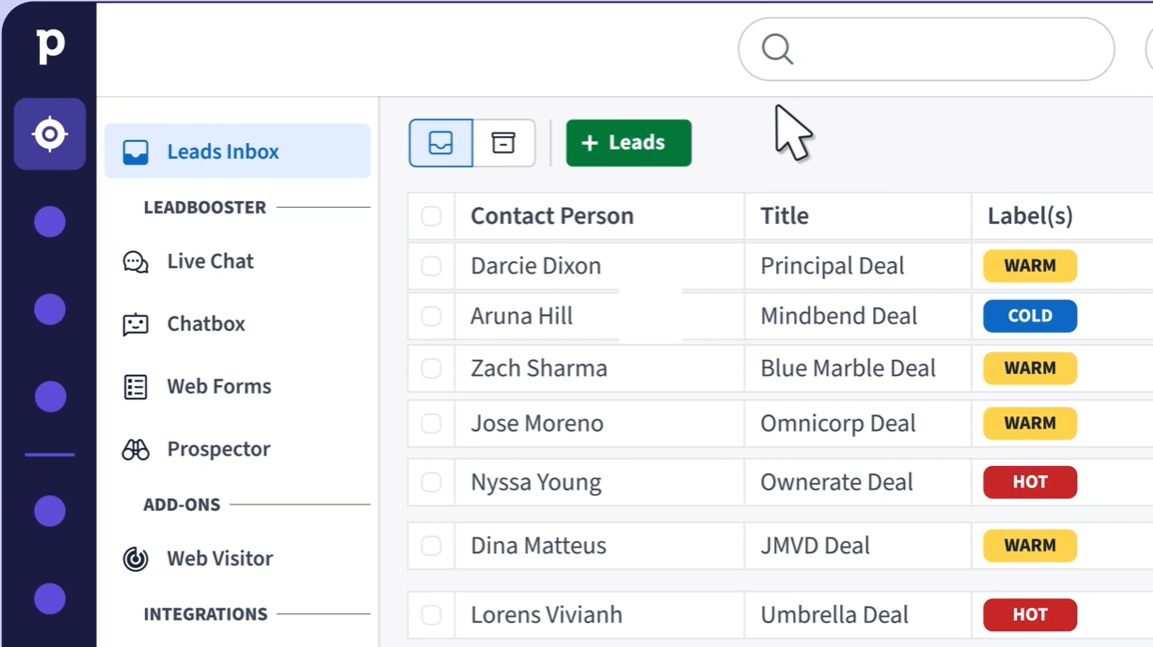
The Leads Inbox draws a line between leads and deals. Unqualified contacts sit in the inbox (with hot, warm, and cold labels) until they're ready for the pipeline. This keeps the pipeline clean and conversion metrics meaningful.
Source: Pipedrive
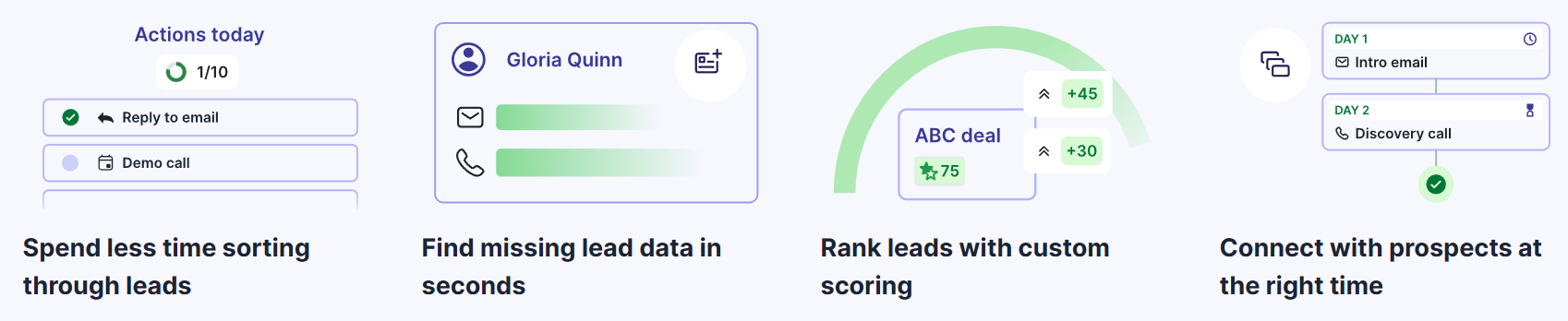
For teams that need to generate leads, the LeadBooster add-on bundles a chatbot, live chat, web forms, and a Prospector database with over 400 million profiles and 10 million companies. The newer Pulse toolkit adds data enrichment, custom lead scoring, and automated multi-step sequences that pause on engagement signals rather than running blind.
Source: Pipedrive
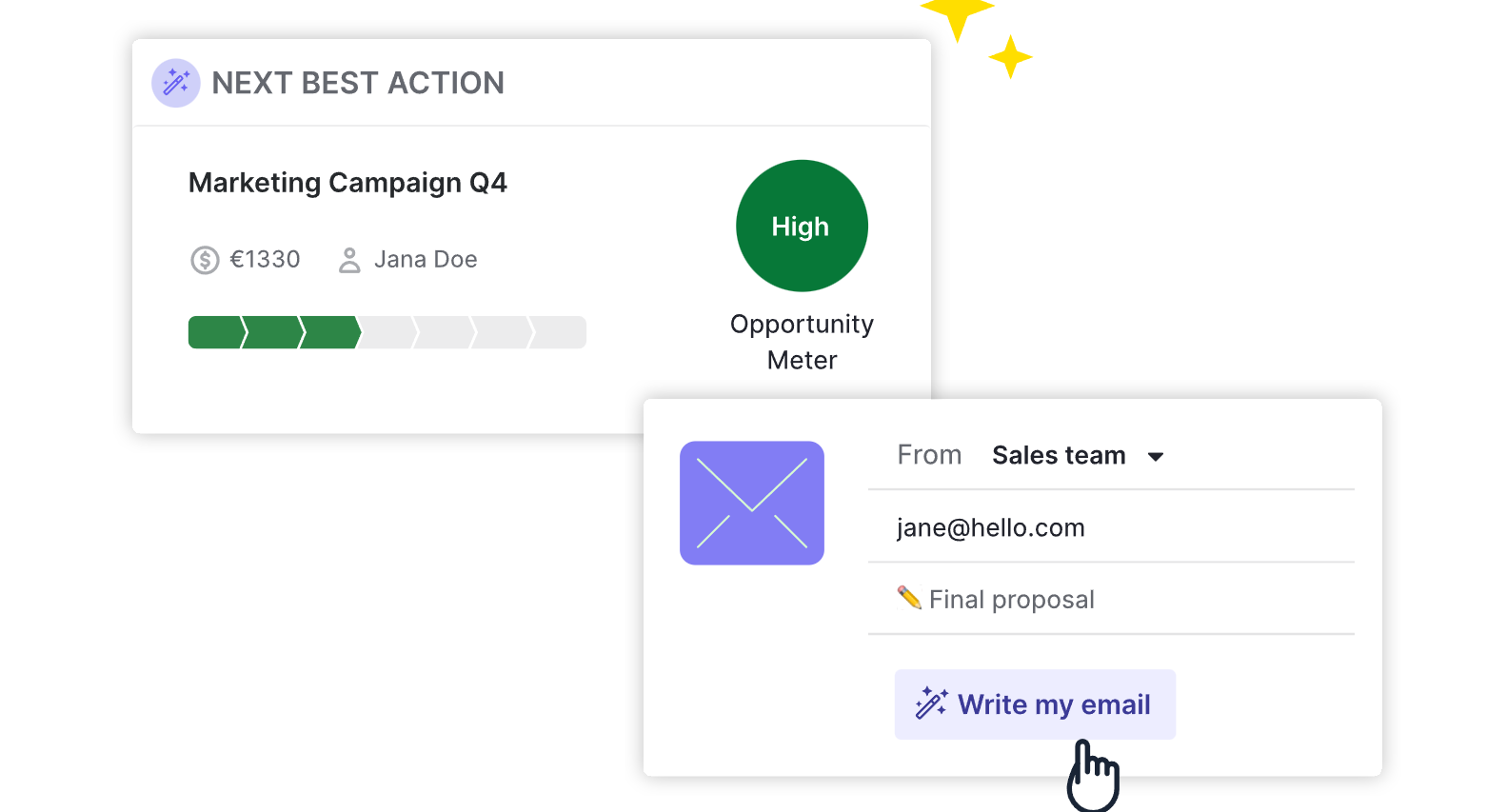
Pipedrive's AI capabilities include an email writer that generates drafts from brief prompts, email summarization that condenses threads into key themes with a readiness-to-buy score, and an AI Sales Assistant that surfaces high-priority deals and predicts next actions. You can also query your CRM data in natural language to generate pipeline analyses without configuring filters.
Source: Pipedrive
Where both platforms hit a ceiling
AllClients and Pipedrive both manage the contacts and deals you already have. Neither answers the harder question: should those contacts be in your system in the first place?
AllClients doesn't include a prospecting database. Your pipeline is only as good as the contacts you manually add or capture through landing pages. There's no way to identify which companies in your market are looking for what you sell, or to verify that the email addresses in your database are still valid.
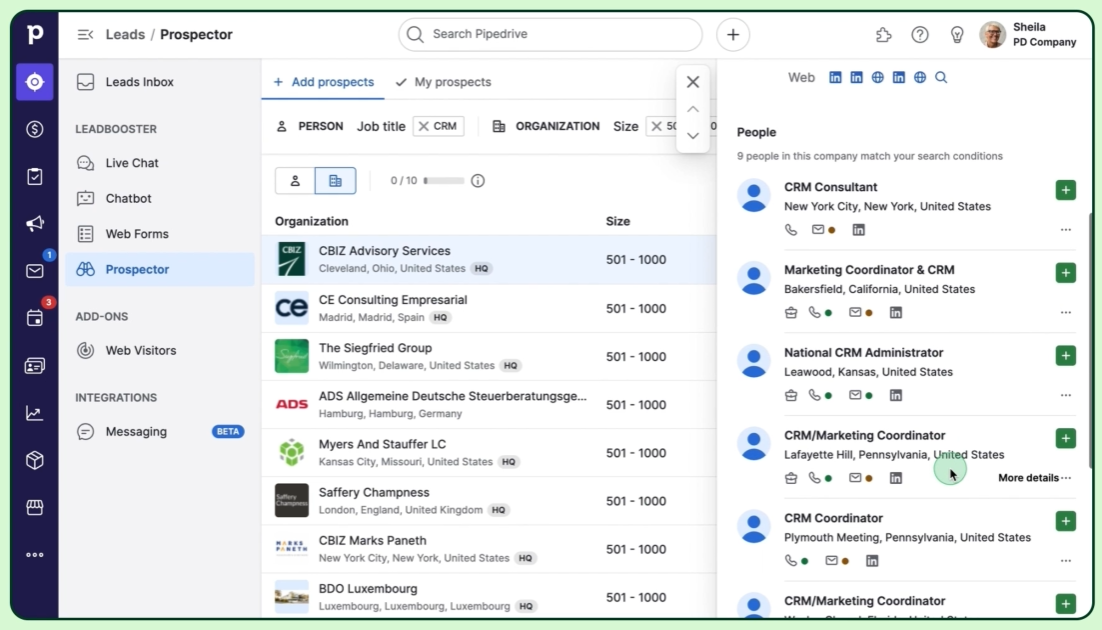
Pipedrive's LeadBooster and Prospector tools are a step up, offering access to over 400 million profiles. But this is a contact lookup tool. It doesn't tell you which accounts show buying signals right now, why deals in your pipeline are stalling, or which patterns from your closed-won deals should inform your next outreach.
Source: Pipedrive
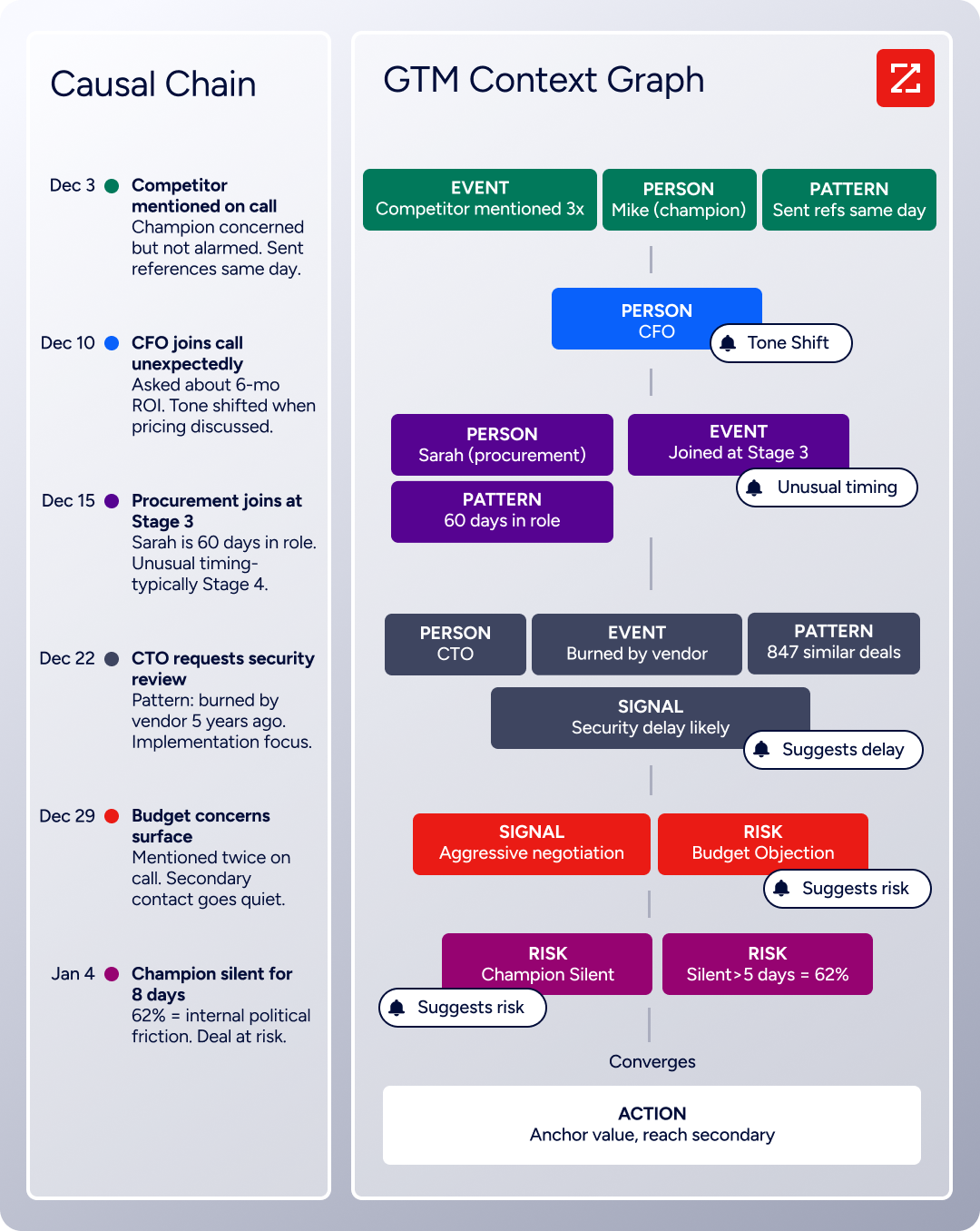
Both platforms also stop at the CRM boundary. They record that a deal moved stages, but they can't explain what moved it. Was it the CFO joining the last call? A competitor losing a key customer? A budget approval that happened quietly last week? That kind of context separates CRM data entry from sales intelligence.
ZoomInfo adds the intelligence layer CRMs can't provide
ZoomInfo operates upstream of your CRM, solving the problem that no contact management or pipeline tool can solve on its own: knowing who to sell to, when to reach out, and why a deal is moving or stuck.
The foundation is data. ZoomInfo's B2B dataset covers 500M contacts, 100M companies, 135M+ verified phone numbers, and 200M+ verified business email addresses. This isn't a static directory. A multi-source verification process backed by 300+ human researchers achieves up to 95% accuracy on first-party data. In a Fortune 500 competitive RFP analyzing 25 million contacts across vendors, an independent consultant concluded that "no other competitor came even close."
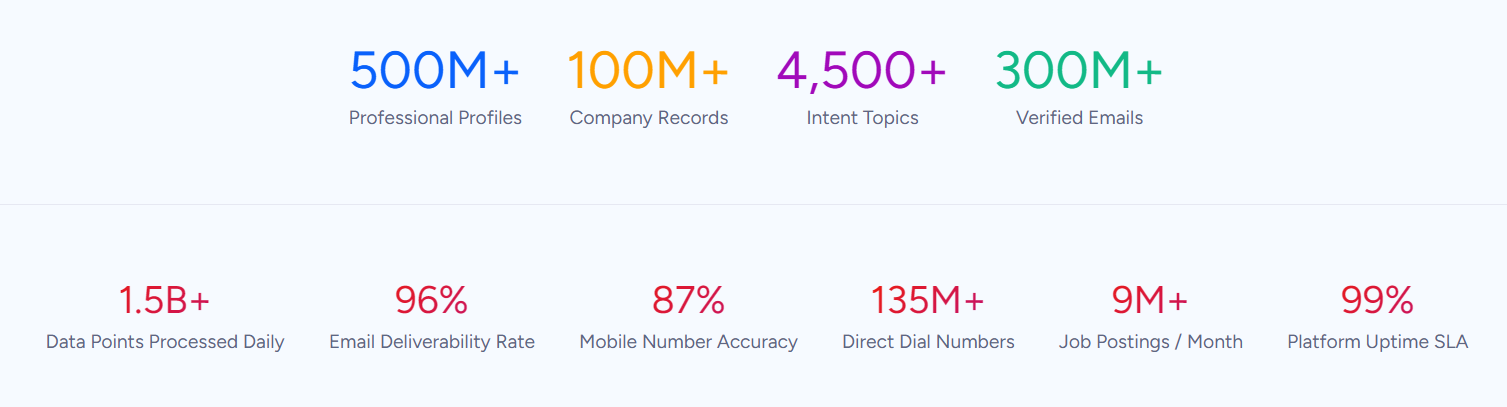
But data alone is a starting point. ZoomInfo's GTM Context Graph processes 1.5B+ data points daily, combining ZoomInfo's third-party intelligence with a customer's CRM records, conversation transcripts, and behavioral signals. The result: instead of recording that a deal moved from Stage 3 to Stage 4, the system captures that executive sponsorship entered at this stage, ROI-focused questions appeared in the call transcript, and the company is simultaneously researching a competitor and hiring three new VPs. That pattern, cross-referenced against thousands of similar deals, tells you what to do next.
Buyer Intent data tracks signals from 210 million IP-to-Organization pairings and 6 trillion+ new keyword-to-device pairings monthly. Guided Intent, exclusive to ZoomInfo, identifies topics historically correlated with deal success rather than requiring you to guess which keywords matter.
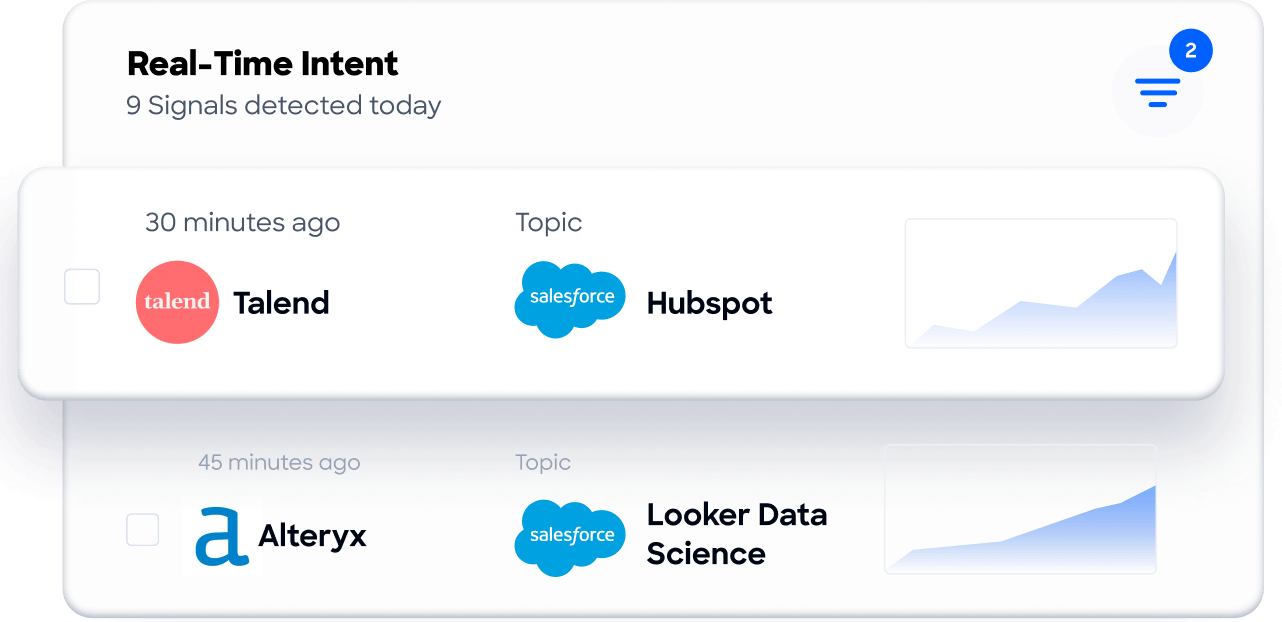
Seismic's sales team attributed 39% of active pipeline to opportunities identified or influenced by ZoomInfo signals, boosted productivity by 54%, and saved 11.5 hours per week. As Toby Carrington, Chief Business Officer, put it: "That combination of our internal CRM data, external signals, and AI that's given all that context has helped us craft very specific account- and persona-based messages. And people have responded to them right away." (Seismic)
Three ways different teams access ZoomInfo
ZoomInfo's intelligence reaches teams through three paths, all drawing from the same GTM Context Graph.
GTM Workspace is the seller's front-end. Instead of switching between your CRM, a prospecting tool, an email platform, and a research tab, sellers see AI-prioritized accounts, pre-drafted outreach, and deal execution in one place. AI agents handle account research, signal monitoring, and CRM updates. The Action Feed delivers a live stream of in-market buyers with pre-drafted actions on every signal (G2 comparisons, funding events, executive hires). Databricks reached prospects 50% faster using it. Thomson Reuters increased closed-won deals by 40%.
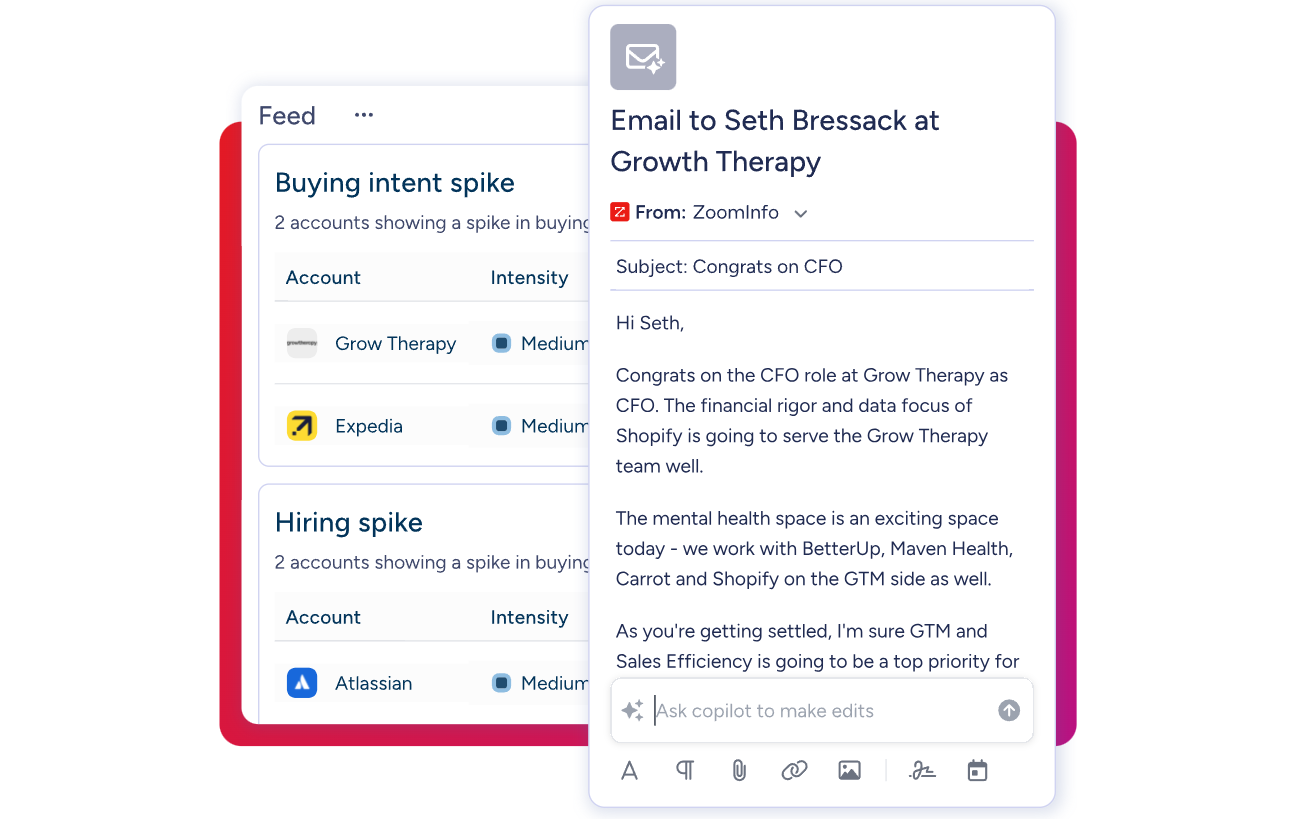
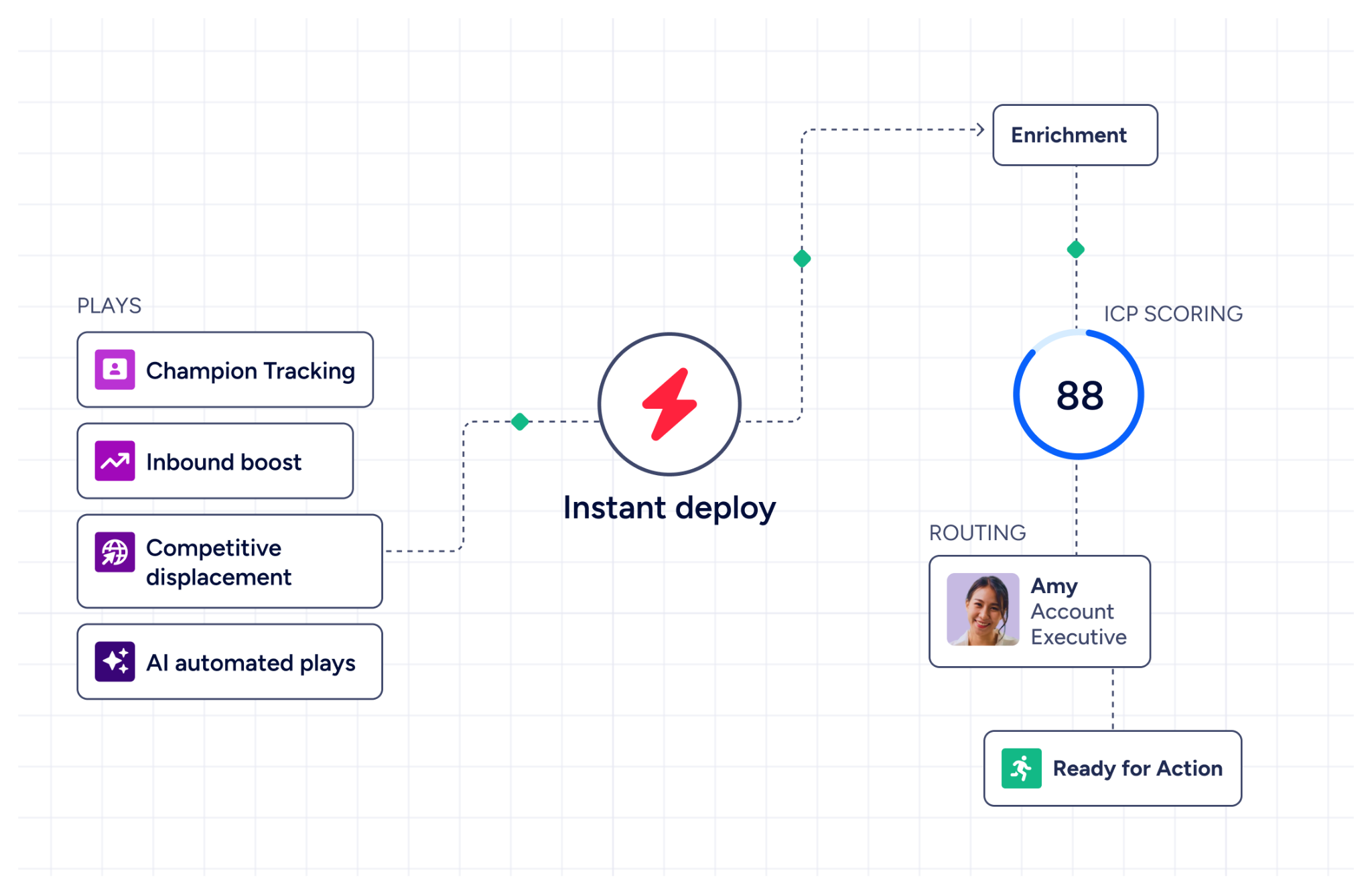
GTM Studio serves marketers, RevOps, and GTM engineers. Describe an audience in plain language, enrich it with first- and third-party data, and launch multi-channel plays (email, calls, ads, direct mail) that improve as prospects respond. Expansion plays that used to take three weeks now launch in 30 minutes. Outputs flow into GTM Workspace for seller execution.
For technical teams, APIs and MCP expose the same intelligence to any custom agent, internal tool, or partner platform. ZoomInfo's MCP server connects AI models to B2B data with no custom coding beyond one-time configuration.
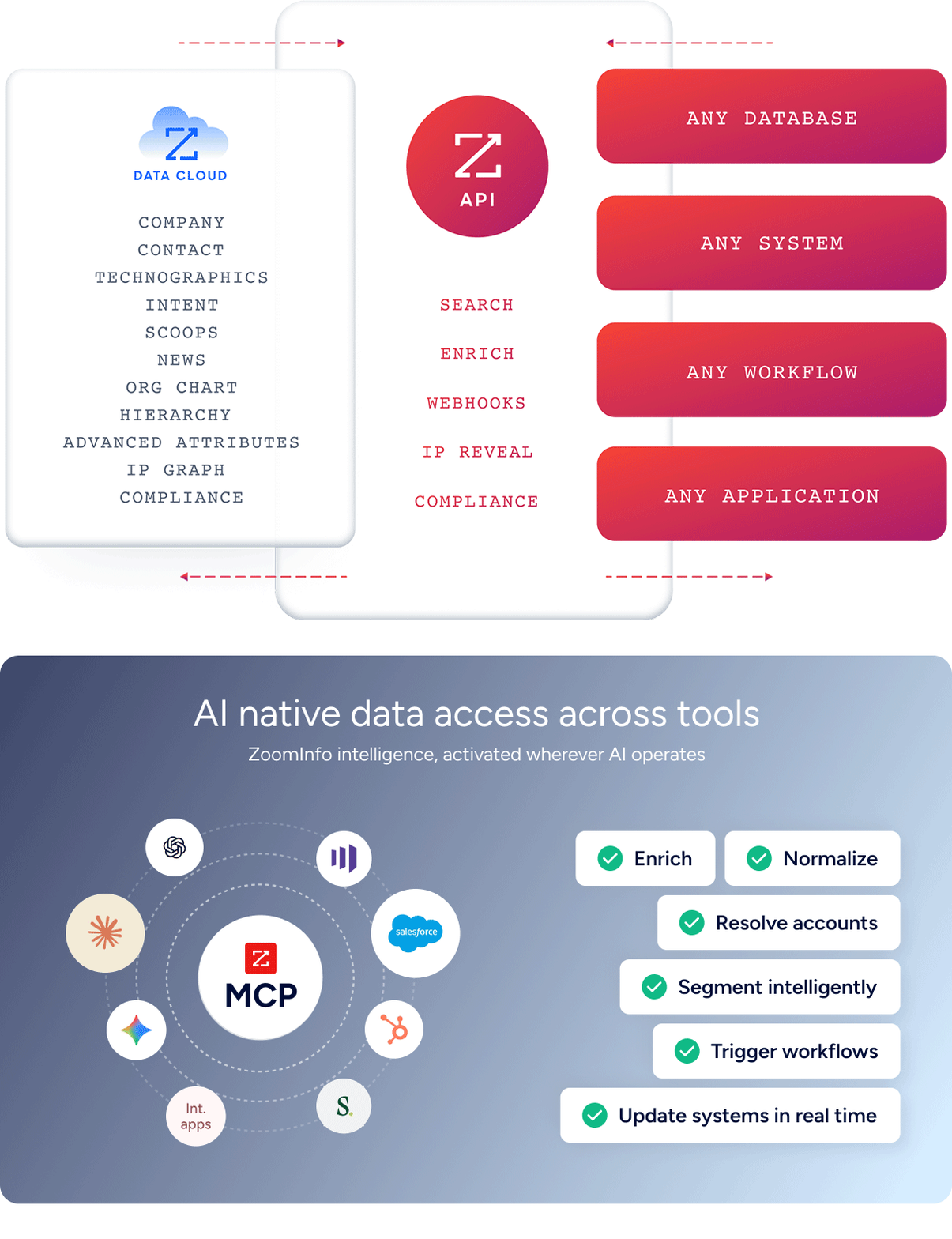
"The plug-and-play aspect of the API means I can integrate it into any process and get information at a moment's notice," said Jerry Wilson, Senior Marketing Intelligence Analyst at BDO Canada, which achieved an 87% reduction in time spent on internal data dashboard updates. (BDO Canada)
Pricing comparison
The three platforms serve different markets, and their pricing reflects it.
AllClients uses flat monthly fees per account:
Plan | Monthly (annual) | Users | Contacts | Email Credits |
|---|---|---|---|---|
Select | 1 | 1,500 | 1,500/month | |
Premium | 2 | 5,000 | 5,000/month | |
Elite | 5 | 15,000 | 10,000/month |
Add-ons include $9/month per Gmail or Outlook connection, $15/month per additional user, $20/month per 5,000 additional contacts, and $10 per 1,000 additional email credits. Annual billing saves two months (pay for 10, get 12). No setup fees, free data migration.
Pipedrive uses per-seat pricing with four tiers (Lite, Growth, Premium, Ultimate), starting at $14/seat/month. Annual billing offers up to 42% off. Most teams need at least Growth for email sync and automations. Premium includes LeadBooster, Smart Docs, and Projects. The Campaigns email marketing add-on is priced separately and scales by subscriber count.
ZoomInfo uses custom-quoted, consumption-based pricing with no publicly listed rates. ZoomInfo Lite is a permanent free tier with access to the B2B database (100M+ verified profiles), 10 monthly export credits, the ReachOut Chrome Extension, and HubSpot integration. Paid plans are custom-quoted based on seats, credit volume, and features. A 7-day free trial provides access beyond the Lite tier.
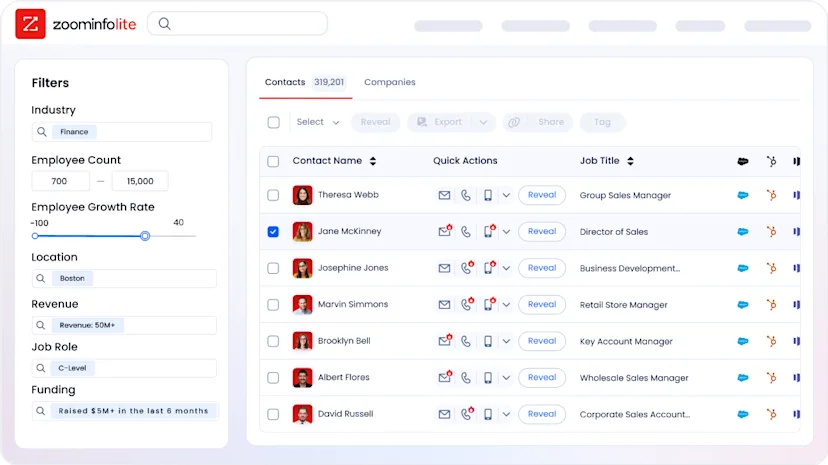
The practical comparison: a two-person team using AllClients Premium pays $48/month total. The same team on Pipedrive Growth pays roughly $28–$50/month total depending on billing cycle. ZoomInfo Lite costs nothing for basic prospecting and enrichment, though teams needing intent signals, workflows, and enterprise integrations will need a paid plan.
Integration and scalability differences
AllClients' integration catalog is its most commonly cited limitation. G2 reviewers consistently flag that the platform "needs more integrations." Gmail and Outlook sync was still in invite-only beta as of March 2026 and costs $9/month per connected account. External connections run primarily through Zapier via Workflow Triggers and a REST API. For a solo operator who lives inside AllClients, this may be fine. For anyone needing to connect their CRM to an accounting tool, scheduling app, or marketing platform, the gaps create friction.
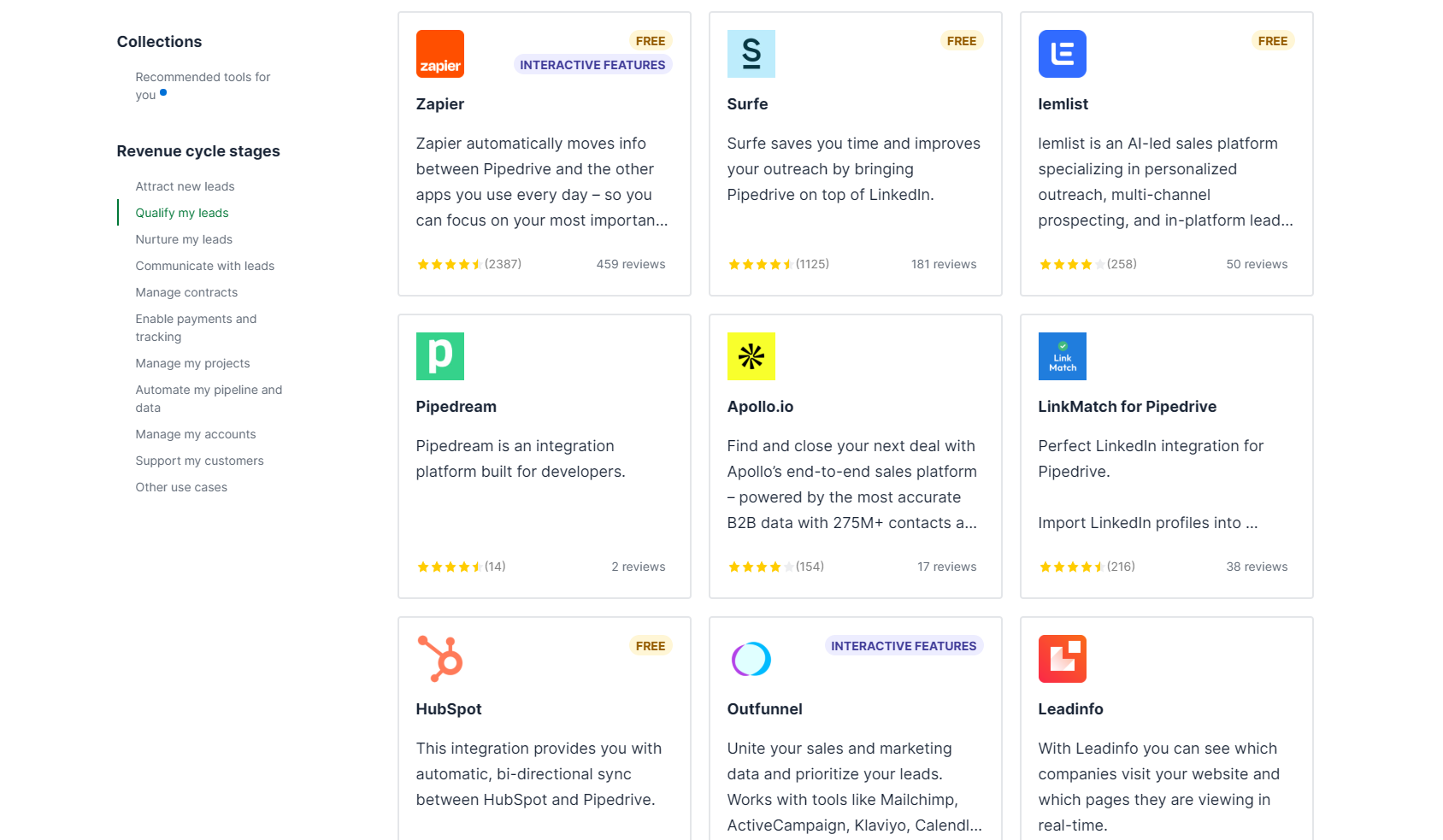
Pipedrive's 500+ marketplace integrations cover the major categories: Zapier and Make for automation, Google Meet and Microsoft Teams for calls, Mailchimp for email marketing, PandaDoc and DocuSign for signatures, QuickBooks and Xero for accounting. The open API is available on all plans, with App Extensions enabling custom UI within Pipedrive. For an SMB sales team, this ecosystem covers most needs without outgrowing the platform.
Source: Pipedrive
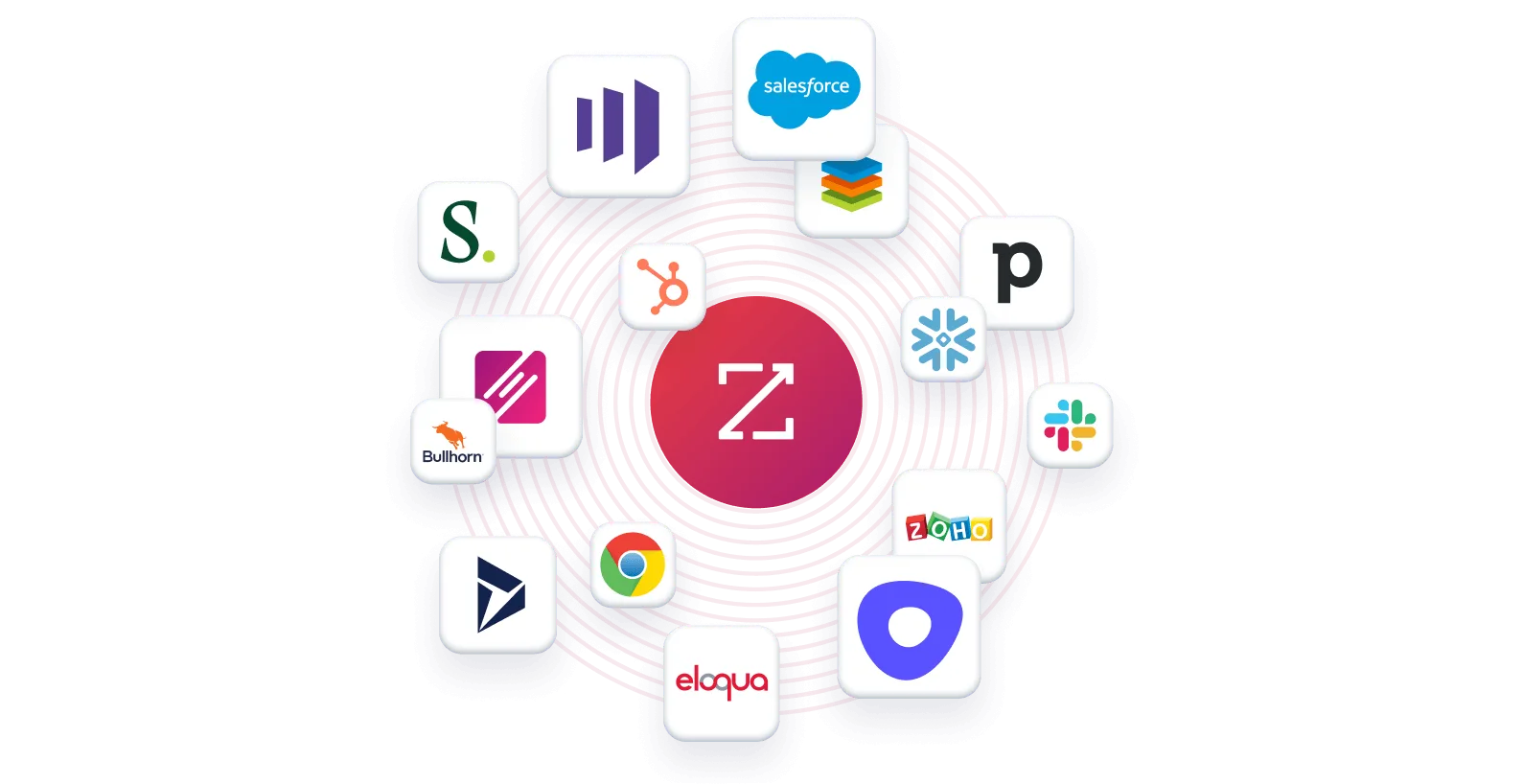
ZoomInfo's integration architecture serves a different purpose. Rather than connecting to other tools as a peer, ZoomInfo feeds intelligence into other tools as an upstream data layer. The App Marketplace lists 120+ integrations with CRM, marketing automation, sales engagement, and data warehouse platforms. Salesforce, HubSpot, Microsoft Dynamics 365, and Snowflake all connect directly. Cloud Partners enable data ingestion into AWS, Google Cloud, and Databricks. API access is included in all relevant plans, so the intelligence works everywhere, not just inside ZoomInfo's own products.
"ZoomInfo is our one source of truth for account data, and even more so for contact data. There's no other provider in the market that provides you with that level of detail," said Thor Sanderson, Senior Manager of Sales Technology Enablement at Smartsheet. (Smartsheet)
Security and compliance
For regulated industries, the security differences between these platforms matter.
AllClients offers GDPR compliance, a HIPAA compliance upgrade (paid add-on with a signed Business Associate Agreement), and configurable multi-factor authentication. Infrastructure runs on Rackspace managed cloud with HTTPS encryption. For a small healthcare practice or EU-facing business, these basics cover the essentials. Independent third-party security certifications (SOC 2, ISO 27001) are not published.
Pipedrive holds ISO/IEC 27001:2022 and ISO/IEC 27701:2019 certifications, SOC 2 Type 2 compliance, and runs on AWS with separate databases per customer. SSO via SAML 2.0, two-factor authentication, IP allowlisting, and a Security Center dashboard give IT administrators control. Pipedrive does not permit third parties to use client data to train AI models.
ZoomInfo maintains a broad certification stack: ISO 27001, ISO 27701, SOC 2 Type II, TRUSTe GDPR and CCPA certifications, all renewed annually. The company is a registered data broker in California and Vermont with a dedicated Trust Center. For enterprise buyers in regulated industries, this level of compliance infrastructure is a qualifying criterion.
AllClients vs. Pipedrive vs. ZoomInfo: Which should you choose?
The right choice depends on your team size, sales complexity, and growth trajectory.
Choose AllClients if:
You're a solo operator or team of 1–5 in a relationship-driven business
Your priority is staying in consistent contact with your existing database
You want email marketing, drip campaigns, and landing pages bundled with your CRM
You value simplicity and minimal setup over customization depth
You need HIPAA compliance at an affordable price point
Choose Pipedrive if:
Your team manages a sales pipeline with multiple deal stages
You need automations, revenue forecasting, and performance reporting
Integration with your existing tool stack (accounting, scheduling, marketing) matters
You want a platform with 500+ integrations and a mature mobile app
Per-seat pricing works for your team size and budget
Choose ZoomInfo if:
You need to know which accounts to target before they enter your pipeline
Buyer intent signals, verified contact data, and account intelligence drive your sales process
You want AI that understands why deals move, not just that they moved
Your team is ready to move from reactive CRM management to proactive GTM execution
You need the intelligence layer that makes any CRM (including Pipedrive) more effective
See how ZoomInfo's intelligence powers smarter selling.
AllClients and Pipedrive are both effective CRMs for their intended audiences. AllClients makes relationship management accessible to the smallest businesses. Pipedrive makes pipeline management intuitive for growing sales teams. But for organizations where the quality of your pipeline matters as much as how you manage it, ZoomInfo provides the data, context, and intelligence that turn CRM activity into revenue.
Vensure's Vice President of Revenue Operations, William Kenimer, summarized what ZoomInfo's data layer changes: "ZoomInfo gives us the information we need to execute. We don't have to go through and spend our time digging. It's already there, so we can be three steps ahead." (Vensure)
AllClients vs. Pipedrive vs. ZoomInfo FAQ
What is the core difference between AllClients, Pipedrive, and ZoomInfo?
AllClients is a CRM with built-in email marketing designed for solo operators and micro-teams in relationship-driven businesses. Pipedrive is a sales pipeline CRM built for SMB sales teams who need visual deal tracking, automation, and forecasting. ZoomInfo is an AI-powered GTM platform that provides the upstream intelligence layer (verified B2B data, buyer intent signals, and account context) that makes any CRM more effective by ensuring you target the right people at the right time.
Which platform is cheapest for a small team?
AllClients is the most affordable for small teams, with its Premium plan covering two users at $48/month total. Pipedrive starts at $14/seat/month, so two users cost roughly $28/month on the Lite plan (though most teams need the Growth plan for email sync and automations). ZoomInfo Lite is free with 10 monthly export credits and access to 100M+ verified profiles, though paid plans are custom-quoted for teams needing full capabilities.
Can I use ZoomInfo with AllClients or Pipedrive?
ZoomInfo integrates with Pipedrive through its marketplace and API, feeding verified contact data and buying signals into your pipeline. AllClients' integration options are more limited, though ZoomInfo data can be exported and imported via CSV or connected through Zapier. ZoomInfo's API and MCP access means its intelligence can reach virtually any system.
Which platform has the best email marketing capabilities?
AllClients has the strongest built-in email marketing for small businesses, with a Done-For-You Newsletter, AI Newsletter Assistant, autoresponder drip campaigns, and Intelligent Links that trigger workflows on clicks. Pipedrive's email marketing (Campaigns) is a separate paid add-on with a drag-and-drop builder and CRM-based segmentation. ZoomInfo approaches email differently through multi-channel orchestration in GTM Studio, where AI-generated outreach is triggered by buying signals rather than manual campaign scheduling.
Which platform is best for sales pipeline management?
Pipedrive is the clear winner for pipeline management. Its visual kanban board, deal rotting alerts, multiple pipeline views, revenue forecasting, and activity-based selling methodology are the core of the product. AllClients offers Boards and Deals tracking, but these are simpler tools designed for contact journey tracking rather than sales-stage analytics. ZoomInfo's GTM Workspace provides AI-prioritized account views and deal intelligence, but complements a CRM's pipeline rather than replacing it.
How do the AI features compare across platforms?
AllClients' AI tools focus on content creation: an AI Writer for emails and letters, an AI Newsletter Assistant, Writing Voice Profiles for personalized style, and AI image generation. Pipedrive's AI includes an email writer, email thread summarization with readiness-to-buy scoring, natural-language report generation, and an AI Sales Assistant that predicts next actions. ZoomInfo's AI operates at a different level: the GTM Context Graph combines CRM data, conversation intelligence, and third-party signals to show why deals move or stall, and AI agents in GTM Workspace automate account research, outreach drafting, and signal monitoring.
Which platform handles compliance and security best?
ZoomInfo has the broadest security certifications: ISO 27001, ISO 27701, SOC 2 Type II, and TRUSTe GDPR/CCPA validations, all renewed annually. Pipedrive holds ISO 27001, ISO 27701, and SOC 2 Type 2 certifications with AWS hosting and per-customer database separation. AllClients offers GDPR compliance and an optional HIPAA upgrade, but does not publish independent third-party security certifications.
Do any of these platforms offer a free plan?
ZoomInfo Lite is a permanent free tier with access to the B2B database, 10 monthly export credits, the Chrome extension, and HubSpot integration. AllClients advertises a free trial option but does not publish a permanent free plan. Pipedrive offers a 14-day free trial with no credit card required but has no permanent free tier.
