
If you're comparing Clay and ZoomInfo, you're deciding between two fundamentally different approaches to the same problem: how to find the right buyers, enrich your data, and act on it before your competitors do.
There are a few key questions that will help you in your evaluation:
Does your team need a flexible workflow builder, or a platform that combines data, intelligence, and execution in one place?
Do you have (or plan to hire) a technical GTM operations person to build and maintain workflows?
How important is it that the data you act on is verified by the same company that provides it?
At a high level, Clay is a flexible workflow builder that connects many outside data providers, but without any proprietary data ownership. ZoomInfo is an all-in-one AI GTM Platform built on the most comprehensive B2B dataset in the industry. It can be accessed through the dedicated GTM Workspace for sellers, GTM Studio for marketers and RevOps, or APIs and MCP in any front-end.
The core architectural difference: verified data vs. aggregated data
The most consequential decision in this evaluation is about the underlying data model: does your team need to own and verify its data foundation, or aggregate it from third parties?
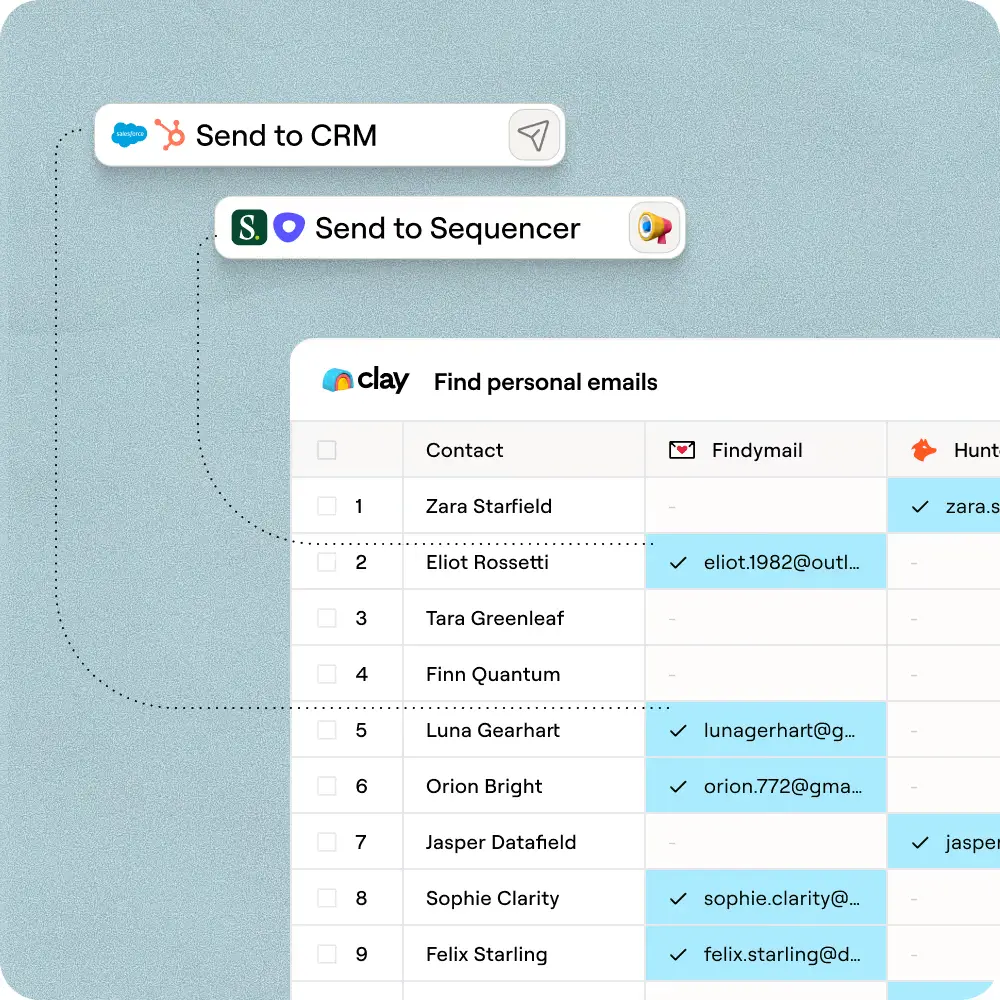
Clay is an orchestration layer. It doesn't own a contact database. Instead, it aggregates data from 200+ external providers, running a sequential waterfall that queries them in priority order and stops at the first match. That approach can surface coverage from sources a single vendor might not reach. But it comes with a structural constraint: the quality of each data point is only as good as the provider that returned it. Clay has no verification layer of its own. When providers have conflicting records, when coverage gaps emerge, or when data accuracy drops in a specific geography or industry segment, the Clay customer owns the problem. Reconciliation, deduplication, and QA are team responsibilities.
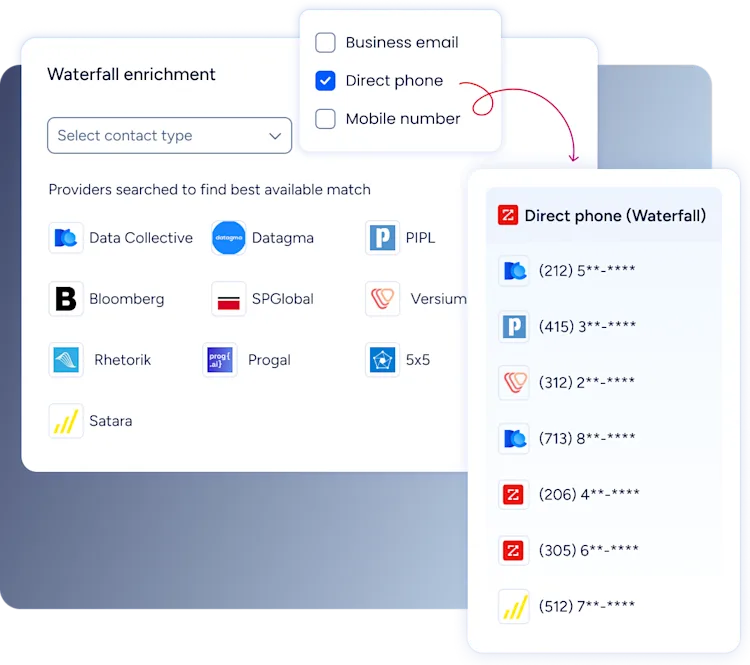
ZoomInfo starts from a different foundation. The platform maintains its own verified dataset: 500M contacts, 100M companies, 135M+ verified phone numbers, 120M direct dials, and 200M+ verified business emails. More than 300 human researchers contribute to ongoing verification, and the system processes over 1.5B data points daily. ZoomInfo also runs parallel waterfall enrichment across 25+ additional sources inside GTM Studio, but the primary foundation is proprietary and verified, not assembled from external providers on each lookup.
That structural difference shows up at scale. Teams that move from a multi-provider aggregation model to a unified verification model typically report fewer duplicate contacts, less manual QA overhead, and higher confidence acting on the data they have. Snowflake, for example, saw 2x higher conversion rates and 90% higher opportunity open rates on ZoomInfo-scored accounts, after building their account propensity model on ZoomInfo firmographic and technographic data integrated into their data warehouse.
Clay vs. ZoomInfo at a glance
Criteria | Clay | ZoomInfo |
|---|---|---|
Core approach | Aggregates 200+ third-party data providers | Verified proprietary data + built-in enrichment across 25+ additional sources |
Data scale | Depends on providers used | 500M contacts, 100M companies |
Phone numbers | Via third-party waterfalls | 135M+ verified phone numbers, including 120M direct dials |
Email addresses | Via third-party waterfalls | 200M+ verified business email addresses |
Waterfall enrichment | Sequential, user-configured across providers | Parallel enrichment across 25+ sources, returning highest-confidence match |
Data verification | Provider-dependent | ZoomInfo data processed with 1.5B+ data points daily and 300+ human researchers |
Intent data | Custom signals via enrichments and AI agents | Intent data with proprietary signals and Guided Intent |
Conversation intelligence | Via integrations | Chorus natively, plus third-party integrations |
Workflow and orchestration | Spreadsheet-style builder | GTM Studio for orchestration and plays |
Seller workspace | Not a primary product layer | GTM Workspace for sellers |
AI capabilities | Claygent and AI formulas | AI across Copilot, GTM Studio, enrichment, and workflow automation |
APIs and AI access | API and webhooks | APIs and MCP |
Pricing model | Dual-currency usage pricing (Data Credits + Actions) | Free to start with consumption credits based on usage |
Free option | Free tier | ZoomInfo Lite and free trial |
Technical overhead | High (workflow engineering required) | Low to medium (out-of-the-box plays with optional customization) |
Best fit | Teams with technical GTM ops expertise that want flexible workflow assembly | Teams that want verified data, intelligence, and execution in one platform |
Start a free trial to see how the world's most comprehensive GTM intelligence can work wherever you do.
ZoomInfo as an all-in-one AI GTM Platform
Teams that outgrow Clay often choose ZoomInfo because it combines three capabilities in one platform that most teams otherwise have to buy, integrate, and maintain separately.
The foundation is data: the most comprehensive B2B data platform in the industry, covering 500M contacts and 100M companies with verified phone numbers, email addresses, technographic data, intent signals, and firmographic company hierarchy mapped continuously by human researchers and automated systems.
Above that foundation sits the GTM Context Graph, the intelligence layer that processes over 1.5B data points daily and fuses ZoomInfo's B2B data with a customer's own CRM records, conversation intelligence from Chorus, and behavioral signals from across the buyer journey. This is the reasoning layer that makes ZoomInfo's AI different from a generic enrichment agent: it does not just find new information, it reasons across everything your team already knows about existing accounts to identify which ones to prioritize, which contacts to reach, and when to act. The GTM Context Graph is what makes ZoomInfo's account prioritization and AI-assisted workflows more durable than a waterfall that returns raw data and leaves the reasoning to the user.
The third capability is Universal Access: the same verified data and intelligence surface is available through GTM Workspace for sellers, GTM Studio for marketers, RevOps teams, and GTM engineers, or directly via APIs and MCP for developers and AI agents. Teams are not locked into one surface or one use case. The platform meets them where they work.
Where Clay genuinely excels
Clay earns its strong reputation with technical GTM operators for real reasons, and any honest evaluation should acknowledge them.
Multi-provider coverage: Clay's model can surface data from 200+ sources, including some providers not available in ZoomInfo's enrichment network. For teams with highly specific data needs in niche industries or geographies, the ability to configure which providers to query can genuinely expand coverage beyond what a single-source model provides.
Transparent pricing: Clay's tiers are fully public and self-serve. The public pricing calculator lets teams size usage before talking to sales, which is genuinely valuable for teams that need to run a budget exercise quickly.
Workflow flexibility for GTM engineers: Clay's spreadsheet-style canvas lets technical operators build custom enrichment logic, experiment with different provider combinations, or connect Clay to highly specific internal tools without waiting for a product roadmap.
Community and training: Clay University, cohort training programs, and an active GTM engineering community give technically oriented teams a pathway to build expertise and share workflows in ways that a more packaged platform does not replicate.
These are real strengths. The question is whether they apply to your team's current situation and scale.
Why teams move from Clay to ZoomInfo
When teams switch from Clay to ZoomInfo, the reason usually comes down to operational burden. Teams that start with Clay often want flexibility, but later decide they need a more unified system for data quality, usability, and execution.
They want less workflow maintenance. Clay can be powerful, but it often requires a dedicated builder to set up and maintain workflows. ZoomInfo is designed for faster adoption across sales, marketing, and operations teams.
They want more consistent data quality. Clay's enrichment depends on whichever providers are used in a workflow. ZoomInfo's model centers on comprehensive, verified B2B data managed through one platform.
They want more predictable costs. Clay's actions-and-credits structure offers flexibility, but forecasting can become difficult as usage scales. ZoomInfo is typically evaluated as a platform investment rather than a workflow-by-workflow spend exercise.
They need more native GTM coverage. ZoomInfo combines data, intent, orchestration, conversation intelligence, and activation in one system instead of requiring teams to assemble multiple tools.
They need faster time to value. Teams moving upmarket or scaling outbound often prefer software that can be deployed broadly without hiring specialized operators.
They need platform intelligence, not just data plumbing. ZoomInfo's GTM Context Graph reasons across CRM records, conversation intelligence, and behavioral signals to surface which accounts to prioritize and why. Clay does not have a comparable reasoning layer.
What's the main difference in how Clay and ZoomInfo handle data?
The biggest structural difference is the data model.
Clay acts as an orchestration layer over other providers. Its waterfall enrichment queries multiple data sources sequentially and stops when it finds a result. That can improve coverage, especially for niche use cases, but quality can vary by source, geography, and field. Plus, the first match is not always the best or most up-to-date one.
ZoomInfo starts with data it collects, verifies, and maintains, then layers intelligence and activation on top. It also supports parallel waterfall enrichment inside GTM Studio, which queries multiple providers simultaneously to return the highest-confidence result rather than just the first match found. ZoomInfo combines proprietary verification and entity resolution with additional source inputs to create a comprehensive, unified GTM data foundation.
This distinction matters in day-to-day execution. A multi-provider aggregation model can be flexible, but it can also create conflicting records, duplicate contacts, and more manual QA. A unified verification model is more opinionated, but it reduces the amount of reconciliation GTM teams must do before they act.
ZoomInfo also supports broader enrichment and automation use cases through its data and orchestration layers. The related overview on AI solutions for GTM enrichment explains how teams use AI-driven enrichment to improve data quality, routing, and activation.
Clay vs. ZoomInfo: Waterfall enrichment compared
Waterfall enrichment is one of the biggest functional differences between Clay and ZoomInfo that directly impacts data quality, cost, and operational overhead.
Factor | Clay (Sequential Waterfall) | ZoomInfo (Parallel Waterfall) |
|---|---|---|
Query method | One vendor at a time | 25+ vendors queried simultaneously |
Match logic | Stops at first match | Selects highest-confidence match |
Data quality control | Depends on vendor order | Intelligent scoring across all sources |
Setup required | Manual vendor ranking and workflow logic | Pre-built and managed inside GTM Studio |
Operational overhead | High (ongoing tuning and maintenance) | Low (no routing or vendor management) |
Cost model impact | Credits can stack across vendors and fields | Predictable platform-based enrichment |
Coverage approach | Depends on configured vendors | Starts with ZoomInfo data + fills gaps via vendors |
Why the difference between Clay and ZoomInfo waterfall enrichment matters
The distinction shows up in day-to-day execution:
Data quality: Parallel waterfall enrichment increases the likelihood of getting the best available data, not just the first match
Coverage: Multi-vendor enrichment still applies, but without manual orchestration
Efficiency: No need to build and maintain waterfall logic
Cost predictability: Avoids stacking per-field or per-lookup charges across vendors
For teams running outbound, ABM, or lifecycle campaigns at scale, this can significantly reduce both operational overhead and data inconsistency.
Beyond data: the GTM Context Graph
For teams evaluating ZoomInfo, the more important differentiation is the reasoning layer above the data, a capability Clay doesn't match.
ZoomInfo's GTM Context Graph is the intelligence layer that fuses B2B contact and company data with three additional signal sources: the customer's own CRM activity records, conversation intelligence captured from Chorus call recordings, and behavioral buying signals from across the buyer's digital journey. The result is a reasoning layer that understands account context in a way raw contact data can't support.
Where Clay's AI agent, Claygent, is designed to browse the web and extract new structured data points from external sources, the GTM Context Graph reasons across signals your team has already accumulated. It can identify which accounts in your CRM are showing the highest purchase intent right now, which contacts have gone cold despite previous engagement, which opportunities have stalled and why, and which accounts fit an ICP that historically closes fastest. That reasoning informs the AI agents in GTM Workspace and the automated plays in GTM Studio.
Customers using ZoomInfo's AI capabilities report a 46% increase in win rates and an 83% increase in average deal size, according to ZoomInfo's 2025 Customer Impact Report. For customers like Seismic, the result was a 54% productivity gain and 11.5 hours per week saved per rep.
Clay is strong for research tasks that require sourcing new information from the open web. ZoomInfo's GTM Context Graph is purpose-built for reasoning tasks that require understanding the full context of accounts you are already pursuing.
Is Clay or ZoomInfo easier to use for non-technical teams?
For highly technical GTM operators, Clay offers broad flexibility. Its spreadsheet-style interface lets users build custom enrichment logic, AI formulas, and multi-step workflows around very specific use cases.
That flexibility also creates a steeper learning curve. Clay runs official cohort training and certification programs, which reflects the amount of workflow design and operational ownership the product can require. Clay reviews feature recurring themes around complexity, maintenance burden, and support expectations. Clay holds a G2 rating of 4.6/5 from 226 reviews, reflecting strong satisfaction among the technical GTM operators who chose it knowingly.
ZoomInfo is positioned differently. Products like GTM Workspace and GTM Studio are designed so sales, marketing, and RevOps teams can work from a common system without relying on a specialist to build every process from scratch. ZoomInfo holds 142 G2 No. 1 rankings across categories including Sales Intelligence and Data Quality. For customers like Seismic, that ease of deployment at scale translated into 54% productivity gains and 11.5 hours per week saved.
What common issues do Clay users mention?
Clay's strengths are real, but so are the tradeoffs users often mention when evaluating it against more packaged platforms.
Pain point | What users experience | How ZoomInfo differs |
|---|---|---|
Learning curve | Steeper onboarding, more setup, more troubleshooting | More out-of-the-box workflows for GTM teams |
Workflow maintenance | Ongoing upkeep across vendors, APIs, and logic | Native data, workflows, and activation inside one platform |
Cost forecasting | Usage can be harder to predict as enrichments scale | More centralized platform pricing and packaging |
Support and scale | Can require more internal ops ownership or outside help | Broader enterprise support model and deployment fit |
Clay reviews feature recurring concerns around workflow complexity, pricing unpredictability, and support limitations.
What operational overhead do teams experience with Clay?
RevOps teams that have run Clay in production describe a pattern: the platform is genuinely powerful, but it requires ongoing engineering investment that does not diminish over time. Every time a provider updates its API, changes its schema, or adjusts its rate limits, someone on the team needs to respond. Credit reconciliation across multiple providers requires monitoring. Custom field mapping logic needs maintenance as CRM schemas evolve. The flexibility that makes Clay attractive at evaluation time can become a source of operational drag at scale.
ZoomInfo's unified model shifts that maintenance burden from the customer to the platform. Teams configure plays and enrichment logic in GTM Studio rather than managing external API integrations. When ZoomInfo's underlying data improves or a new enrichment source is added, teams benefit without any workflow changes.
Momentive used ZoomInfo Operations to cut speed-to-lead from 20 minutes to 60 seconds, transforming a manual research and routing process into an automated system that required no ongoing engineering overhead. Redwood Logistics saved 20-25 hours per week in operational overhead while achieving a nearly 99% reduction in cost per click and a 310% increase in click-through rate.
For RevOps teams evaluating the true cost of ownership, operational overhead is often the metric that matters most. Clay's list price can look attractive compared to ZoomInfo's platform investment, but the engineering hours required to run Clay at scale represent a real cost that rarely appears in an initial vendor evaluation.
How do Clay and ZoomInfo pricing differ?
Clay uses a dual-currency pricing model based on Actions and Data Credits.
Actions measure platform orchestration, including running enrichments, calling AI models, and exporting data, and reset monthly. Data Credits purchase the underlying data from Clay's marketplace providers.
Tiers range from:
Free (6,000 actions/year, 1,200 data credits/year)
Launch ($167/mo billed annually, from 180,000 actions/year)
Growth ($446/mo billed annually, from 480,000 actions/year)
Custom Enterprise pricing.
The appeal is self-serve access and granular control. The tradeoff is that costs can become harder to forecast when teams scale enrichment volume, add AI steps, or layer multiple providers into the same workflow.
For more detail on Clay's tier structure, see the Clay pricing breakdown comparison.
ZoomInfo is free to start with consumption credits based on usage, with ZoomInfo Lite as a permanent free tier and a free trial for testing core functionality. Waterfall enrichment comes at no additional cost for ZoomInfo customers with access to GTM Studio.
The practical pricing question is less "Which list price is lower?" and more "What operating model are you buying?"
Clay can be attractive for smaller technical teams that want to assemble workflows themselves. ZoomInfo is usually evaluated by teams that want one vendor for data, signals, and execution.
That difference becomes especially visible in enrichment workflows, where Clay's per-action and per-field credit model can compound across multiple vendors, while ZoomInfo consolidates enrichment into a more predictable platform cost structure.
How does Clay's signal model compare with ZoomInfo's intent data?
Both platforms support signal-based GTM, but they do it differently.
Clay uses a composable model. Teams can combine web research, provider enrichments, website data, job changes, and custom logic to create their own signals. That is useful when a team knows exactly what signals it wants and has the resources to maintain them.
ZoomInfo provides native intent data, website visitor identification, job and company change signals, and other buyer indicators as part of a broader GTM intelligence system. This is less about assembling the signal stack from scratch and more about operationalizing existing intelligence quickly. ZoomInfo also offers Guided Intent, which identifies topics historically correlated with deal success rather than requiring manual topic selection.
That distinction often affects time to value. Clay can support highly customized signal design. ZoomInfo is generally stronger for teams that want intent and buying signals connected directly to execution workflows, account prioritization, and campaign activation.
How do the AI capabilities differ?
Clay's AI is centered on research and workflow assistance. Claygent can browse the web and extract structured information that may not exist in a conventional database. That can be useful for niche qualification and custom research tasks.
ZoomInfo's AI operates on a different foundation because it has access to both third-party data and first-party customer data through the GTM Context Graph. ZoomInfo uses AI across prioritization, enrichment, routing, outreach assistance, and account intelligence. The AI agents in GTM Workspace reason across CRM records, conversation transcripts, intent signals, and ZoomInfo's verified B2B data. In practice, that means AI helps decide what account to work, who to contact, and what action to take next.
Customers using ZoomInfo's AI capabilities report a 46% increase in win rates and an 83% increase in average deal size. For customers like Seismic, ZoomInfo's AI becomes a productivity multiplier, resulting in 54% productivity gains.
The practical difference comes down to execution. Clay is often stronger at open-ended research tasks where the information does not yet exist in a database. ZoomInfo is often stronger when AI needs to operate across verified data, account context, and revenue workflows inside one platform, reasoning from what you already know rather than discovering what you do not.
How do integrations, APIs, and MCP compare?
Clay is designed to sit on top of many external tools and providers, so integrations are central to its value. That makes it flexible, but it also means the customer often owns more of the integration logic and maintenance burden.
ZoomInfo supports multiple access models as well. Teams can work directly in GTM Workspace or GTM Studio, use APIs for programmatic access, or connect AI systems through MCP for enrichment via LLMs. This supports both out-of-the-box usage and custom deployment inside a broader stack.
Both platforms now offer MCP servers. Clay's MCP server is available at clay.com/mcp. ZoomInfo's MCP delivers verified contact data, GTM Context Graph signals, and intent data to any AI agent. The difference is in what intelligence the MCP exposes: Clay's MCP surfaces Clay workflow data; ZoomInfo's MCP brings verified B2B data and account intelligence to whatever AI agent your team is building on.
For buyers comparing the two, the key question is whether you want a workflow layer that assumes you will assemble the stack yourself, or a data and intelligence layer that powers any workflow, whether through its own products or through third-party tools via API and MCP.
Should your team choose Clay or ZoomInfo?
Choose Clay if:
You have a dedicated GTM ops or technical owner who wants to build custom workflows
You value provider flexibility and want to experiment with different enrichment combinations
Your use cases depend on custom web research and niche data gathering that requires sourcing new information from the open web
You are comfortable managing workflow maintenance and usage-based cost controls
You are comfortable investing time in learning the platform through Clay University and training programs
You prefer transparent, self-serve pricing with a visible cost structure
Choose ZoomInfo if:
You care about data coverage and quality and want access to the most comprehensive dataset in the industry: 500M contacts, 100M companies, 135M+ verified phone numbers, and 200M+ verified business emails
You want verified data, native signals, and GTM execution tools in one platform
You need a system that sales, marketing, and RevOps can all use without heavy technical dependency
You care about pricing predictability, enterprise readiness, and time to value
You want native intent, conversation intelligence, workflow orchestration, and AI-enabled prioritization that reasons across what your team already knows about accounts
You need broader compliance coverage and a single vendor relationship for data governance
You are evaluating total cost of ownership, including engineering overhead and operational maintenance
The real question is whether you want to assemble the stack yourself or run it on one verified foundation. Request a demo to see the difference.
Frequently asked questions
What's the main difference between Clay and ZoomInfo?
Clay is a workflow orchestration layer that aggregates data from 200+ external providers via sequential waterfall enrichment. ZoomInfo is an all-in-one AI GTM Platform with verified proprietary data (500M contacts, 200M+ verified emails), the GTM Context Graph intelligence layer, and multiple access surfaces for sellers, marketers, RevOps, and developers. The core architectural debate is orchestration vs. unified platform.
How is ZoomInfo's waterfall enrichment different from Clay's?
Clay uses sequential waterfall enrichment: it queries vendors one at a time in priority order and stops at the first match. ZoomInfo uses parallel waterfall enrichment inside GTM Studio: it queries 25+ vendors simultaneously and returns the highest-confidence result via intelligent scoring across all sources. The practical impact is better data quality, less manual workflow configuration, and more predictable enrichment behavior at scale.
Can you replace ZoomInfo with a Clay-based waterfall?
Not as a full replacement. Clay's waterfall enrichment aggregates results from 200+ third-party providers, but it doesn't own or verify the underlying data. Replacing ZoomInfo with Clay means trading a verified-data foundation for an aggregation layer whose quality depends on whichever provider returned the first match. Teams that try this typically report higher QA overhead, less predictable data quality, and lower confidence in the records they act on. Some teams do run both: ZoomInfo as the primary data and intelligence foundation, Clay as a supplemental orchestration layer for specialized enrichment tasks.
Does ZoomInfo have a comparable GTM engineer workflow to Clay?
GTM Studio is ZoomInfo's answer for RevOps teams and GTM engineers who want to build orchestration plays, enrichment workflows, and audience automation without managing external API integrations. Teams configure plays on top of ZoomInfo's verified data and GTM Context Graph signals. Clay offers more open-ended customization across any provider combination, but requires more ongoing maintenance. Teams that need maximum provider flexibility and are comfortable with the engineering overhead often prefer Clay's model. Teams that want the same orchestration capabilities on top of verified data and a unified intelligence layer typically prefer GTM Studio.
Which platform is easier for non-technical teams?
ZoomInfo is generally easier for non-technical sales, marketing, and RevOps teams. GTM Workspace and GTM Studio are designed for broad team adoption without requiring a technical specialist to build every workflow. Clay is more flexible but typically requires dedicated workflow engineering for setup, configuration, and ongoing maintenance. Clay's own training programs and university reflect the amount of operational ownership the platform requires.
How do I move leads from Sales Navigator to Clay to HubSpot?
Clay connects to LinkedIn exports and can receive leads from Sales Navigator via CSV import or third-party connectors, enrich them through its waterfall providers, then push records to HubSpot through its native integration. The workflow requires configuring each step manually: the export, the enrichment waterfall, and the CRM write-back, with separate credit models at each stage. ZoomInfo's native LinkedIn Sales Navigator integration and direct HubSpot sync offer a more direct path: enriched, verified contact data flows into HubSpot without building or maintaining a multi-step orchestration chain.
Can teams use Clay and ZoomInfo together?
Yes. Some teams use Clay as a workflow orchestration layer for specialized enrichment tasks while using ZoomInfo as their primary data foundation and GTM execution platform. That approach can work for specific use cases but involves managing two products, two credit systems, two operational models, and higher total cost of ownership. Teams that consolidate onto ZoomInfo typically report reduced operational overhead alongside improved data consistency.
