

Choosing between Dynamics 365 and Pipedrive for your CRM often comes down to five questions:
Do you need a CRM that also handles finance, supply chain, and service operations, or one that focuses on closing deals?
Is your team already invested in the Microsoft ecosystem (Outlook, Teams, SharePoint), or do you value platform independence?
Are you willing to spend six figures on implementation, or do you need something your reps can start using this week?
Do you need enterprise customization and compliance controls, or would that complexity slow your team down?
Is the quality of your prospect data and pipeline intelligence as important as the CRM that houses it?
In short, here's what we recommend:
Dynamics 365 is the choice for organizations that need CRM and ERP under one roof. Its Sales module tracks leads, opportunities, and accounts with native connections to Outlook, Teams, and Power BI, while modules for Finance, Supply Chain, Customer Service, and Field Service extend it across the business. Microsoft has been a Gartner Magic Quadrant Leader for Sales Force Automation Platforms for fifteen consecutive years. The trade-off: implementations commonly cost $250,000 to $2 million, licensing is complex, and reviewers on G2 and Capterra consistently flag a steep learning curve.
Pipedrive is built for small and mid-sized sales teams that want a visual, pipeline-first CRM without the overhead. Its kanban board shows every deal's position and health at a glance, reps can start working within hours of signing up, and pricing starts at $14/seat/month. Pipedrive serves 100,000+ companies in 179 countries and earned recognition as the Easiest to Use CRM from The Ascent by The Motley Fool. The limitation: it is a sales tool, not a business platform. There is no native ERP, no customer service module, and no back-office functionality.
Both platforms manage pipeline and contacts. But the quality of the data flowing into either CRM determines whether your reps chase real opportunities or work dead leads. Neither Dynamics 365 nor Pipedrive solves the data problem on its own. That's a different job.
ZoomInfo is an AI GTM platform that gives your sales reps the context they need before every call: why the deal is moving, who's championing it, and what's likely to happen next. Marketers can describe audiences in plain language and launch plays against accounts that match proven win patterns. Leaders can see deal risk before it shows up in CRM stage fields.
That depth comes from the GTM Context Graph, an intelligence layer built on a B2B dataset (500M contacts, 100M companies, 135M+ verified phone numbers, and 200M+ verified business email addresses) unified with your CRM records, conversation transcripts, and behavioral signals.
Your team accesses it through GTM Workspace for sellers, GTM Studio for marketers and RevOps, or APIs and MCP in any front-end. ZoomInfo integrates with both Dynamics 365 and Pipedrive, making it a force multiplier for whichever CRM you choose.
If you want your CRM to run on live intelligence instead of stale records, see how ZoomInfo works with your stack.
Dynamics 365 vs. Pipedrive vs. ZoomInfo at a glance
Dynamics 365 Sales | Pipedrive | ZoomInfo | |
|---|---|---|---|
Primary role | Enterprise CRM + ERP suite | SMB sales pipeline CRM | AI GTM platform |
Implementation time | Months (typically 4-6+) | Hours to days | |
AI capabilities | Copilot + autonomous Sales Agents | AI Sales Assistant, AI email writer, AI reports | GTM Context Graph, AI account research, outreach, and signal detection |
ERP/back-office | Full (Finance, SCM, HR, Commerce) | None | Not applicable (data and intelligence layer) |
Integrations | Native Microsoft ecosystem; Power Platform | 500+ marketplace apps; open API | 120+ integrations; APIs and MCP for any tool |
Free option | 30-day trial | 14-day trial (no credit card) | ZoomInfo Lite (permanent free tier) |
Starting price | $65/user/month (Sales Professional) | $14/seat/month (Lite, annual) | Custom-quoted; free Lite tier available |
Best for | Microsoft-stack enterprises needing unified CRM/ERP | Small and mid-sized sales teams focused on closing deals | Revenue teams that need accurate prospect data, buying signals, and pipeline intelligence |
Two fundamentally different CRM philosophies
Dynamics 365 and Pipedrive were built for different buyers solving different problems.
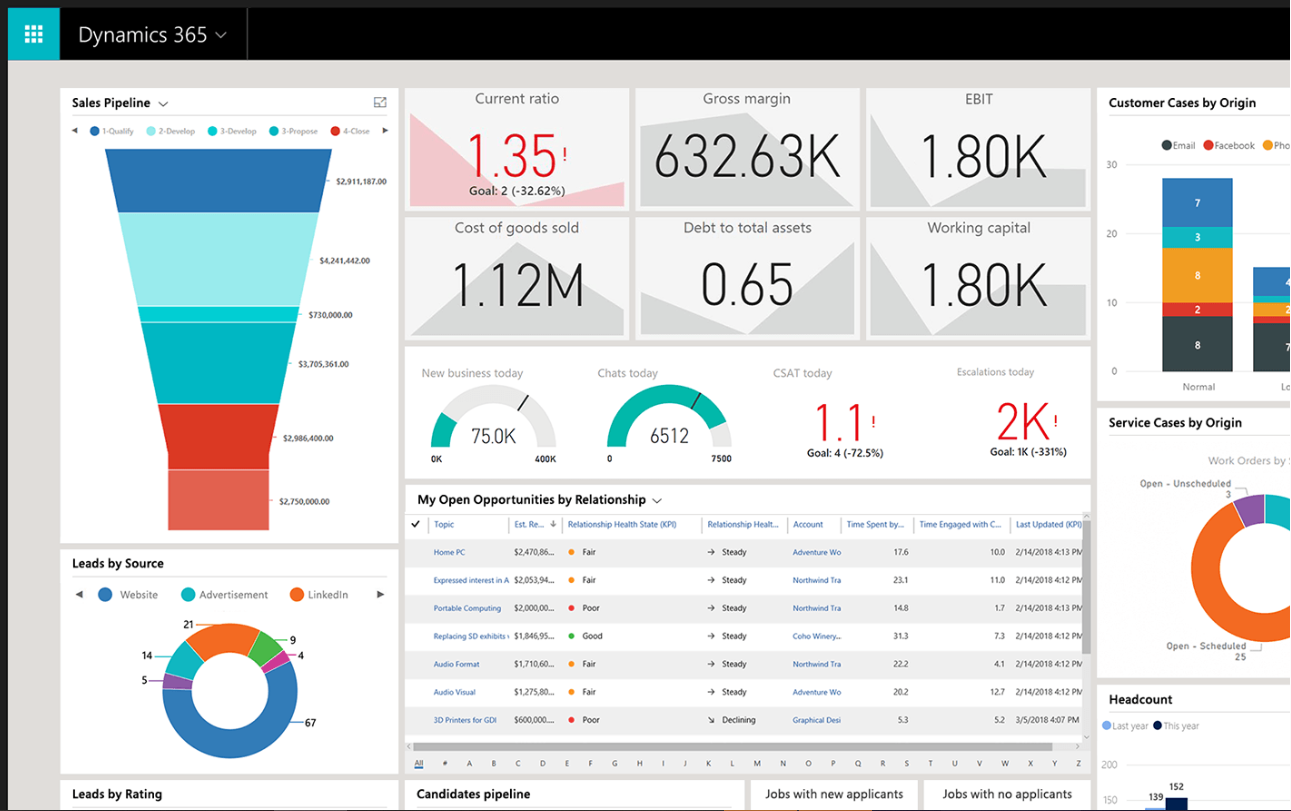
Dynamics 365 grew from Microsoft's 2001-2002 acquisitions of Great Plains and Navision, consolidated under the Dynamics brand in 2006, and relaunched as a cloud-native suite in November 2016. Its architecture reflects that lineage: eleven applications across five business domains (Sales, Service, Finance, Supply Chain, and SMB), all sharing a common data layer called Microsoft Dataverse.
Source: Dynamics 365
When Microsoft says "unified CRM and ERP," they mean a single vendor for front-office sales and back-office operations.
This breadth has real advantages for the right buyer. A manufacturer tracking a deal in Sales can see inventory levels from Supply Chain Management, open service cases, and financial history from the Finance module, all in one record.
An organization running Microsoft 365, Azure, and Teams gets native integration no competing CRM can match: CRM data surfaces inside Teams calls, Copilot drafts emails from Outlook context, and Power BI dashboards pull from the same Dataverse layer.
Pipedrive came from the opposite direction. Five co-founders in an Estonian garage in 2010 built what they wished existed: a CRM designed for the salesperson, not the sales manager.
Source: Pipedrive
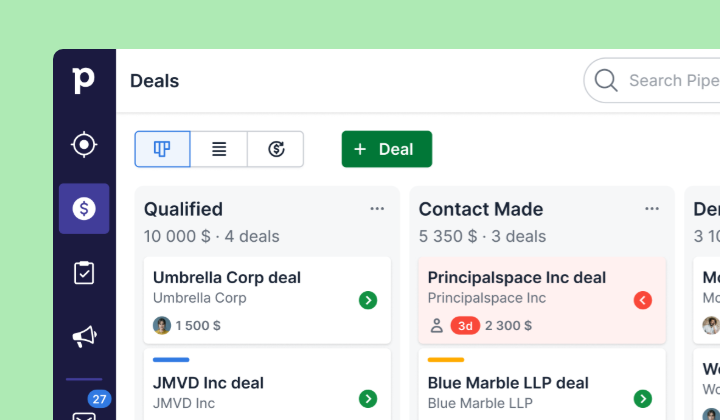
The product centers on a visual kanban pipeline where every deal's stage, value, and next action are visible at a glance. No ERP modules. No finance tools. No supply chain features. Pipedrive does one job: help reps manage deals and close them faster.
The question isn't which CRM is better. It's whether your business needs a platform that runs the company or a tool that helps your sales team sell.
The implementation gap is measured in months and dollars
Getting started with Pipedrive takes hours. A rep signs up for the 14-day free trial, creates custom pipeline stages, imports contacts from a spreadsheet, and starts tracking deals. No consultant needed. No project plan. The product assumes you know your sales process and just need a tool to run it.
Getting started with Dynamics 365 is a different undertaking. Organizations commonly spend $250,000 to $2 million on implementation, and 60% of implementations exceed initial budgets by 20-40%. Software licensing accounts for only 15-20% of total cost; the rest goes to consulting, customization, data migration, and training.
Most deployments require a Microsoft implementation partner, and the typical Sales and Finance rollout takes four to six months or longer.
This cost structure makes sense for a 500-person manufacturer unifying CRM, ERP, and service operations. It doesn't make sense for a 15-person sales team that needs pipeline visibility.
Pipedrive does offer onboarding support at higher spend levels: customers spending over $1,000/month get a dedicated Customer Success Manager with customized onboarding and live training. But even at that scale, the investment is a fraction of what a Dynamics 365 deployment requires.
User experience: simplicity vs. depth
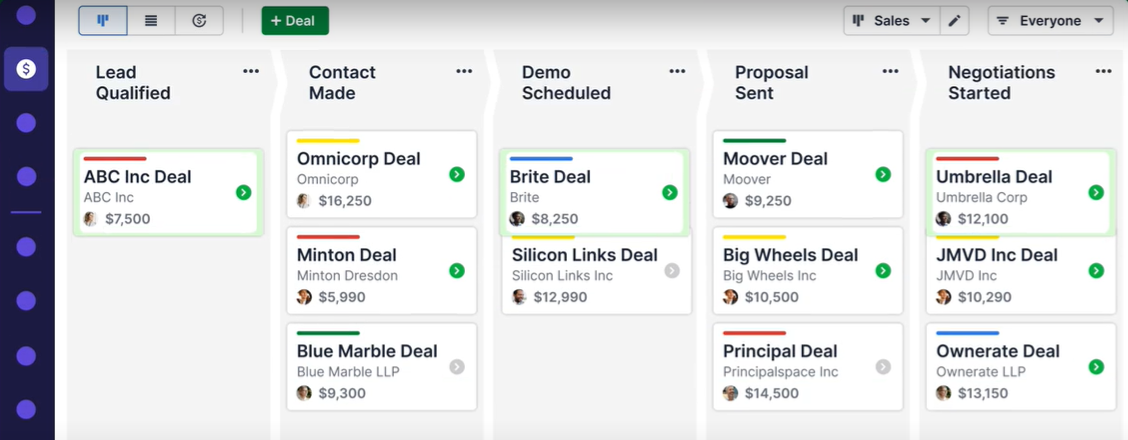
Pipedrive's interface was designed for salespeople who don't want to think about their CRM. The pipeline view is a drag-and-drop kanban board. Colored cues flag deals going cold. Every deal card shows its next scheduled activity, so reps always know what to do next. Pipedrive won Best CRM Solution at the SAMMY Awards and carries a 4.5/5 rating on Capterra.
Source: Pipedrive
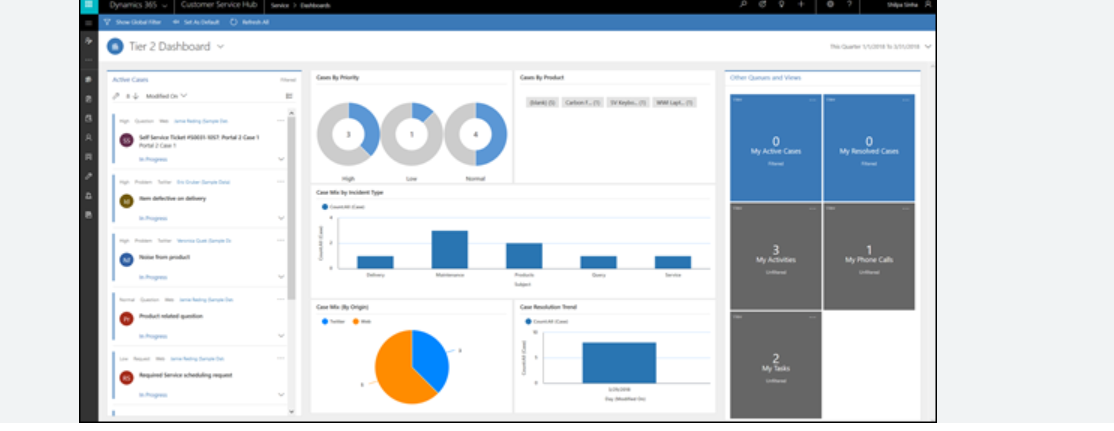
Dynamics 365 Sales uses the Microsoft Fluent 2 design system with a consistent navigation model across all modules. That consistency helps once learned, but the learning takes time.
Source: Dynamics 365
Reviewers on G2 and Capterra describe a steep onboarding curve, complex navigation between modules, and an interface that feels heavy next to CRM-focused competitors. Data entry and workflow configuration are slow, especially for teams without dedicated admins.
Mobile experiences reflect the same split.
Pipedrive's iOS and Android apps support offline activity scheduling, in-app calling with automatic logging, a "Nearby" feature showing geographically close clients, and a business card scanner.
Dynamics 365 offers dedicated mobile apps for Sales and Field Service, providing access to customer records and pipeline data.
The pattern holds: Pipedrive optimizes for speed and daily usability. Dynamics 365 optimizes for configurability and organizational depth.
Sales features compared: AI, automation, and pipeline management
Both platforms have invested in AI and automation, but their approaches reflect their different audiences.
Dynamics 365 has made AI its organizing principle. The Sales Qualification Agent researches leads, evaluates fit against a target profile, generates outreach emails, and in its autonomous mode sends those emails, handles follow-up responses, and hands off only high-potential leads to sellers.
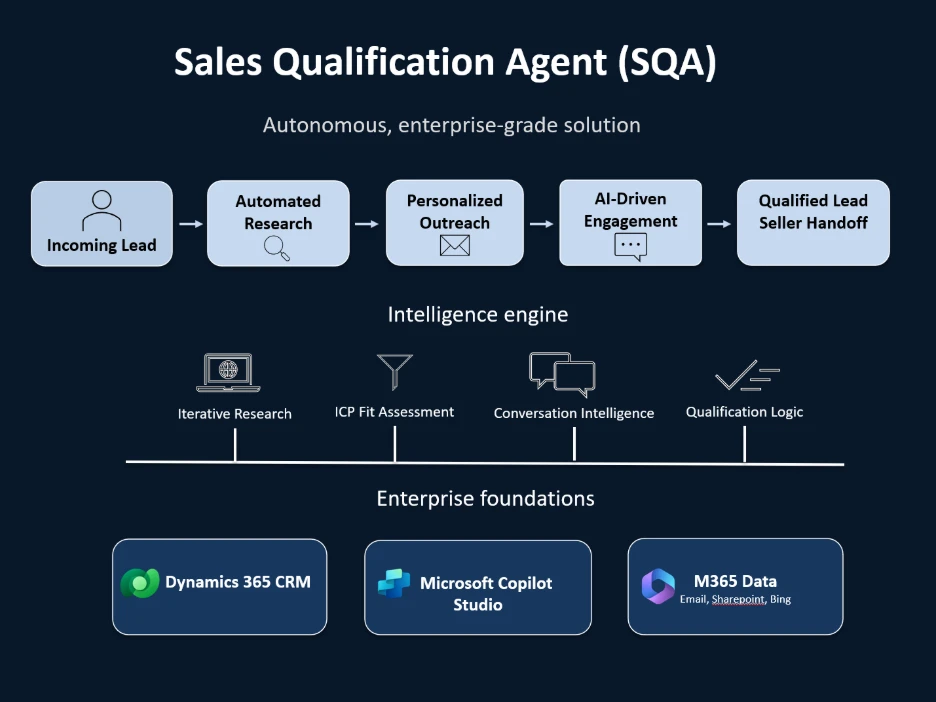
Source: Dynamics 365
Copilot provides natural-language chat for record summarization, meeting prep, email drafts, and call analysis.
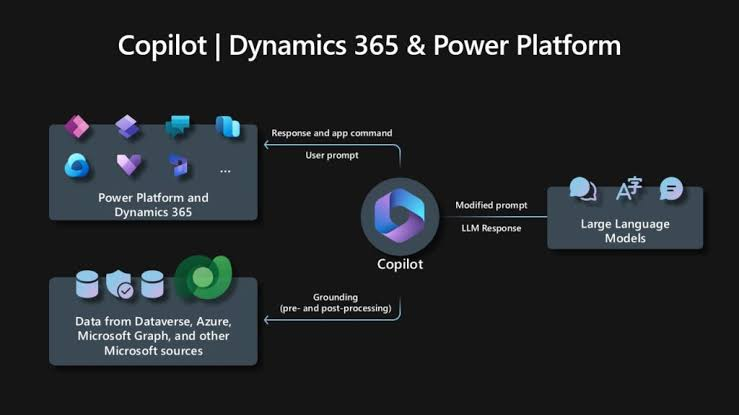
Source: Dynamics 365
Conversation intelligence analyzes Teams and phone recordings to detect customer sentiment and suggest follow-ups.
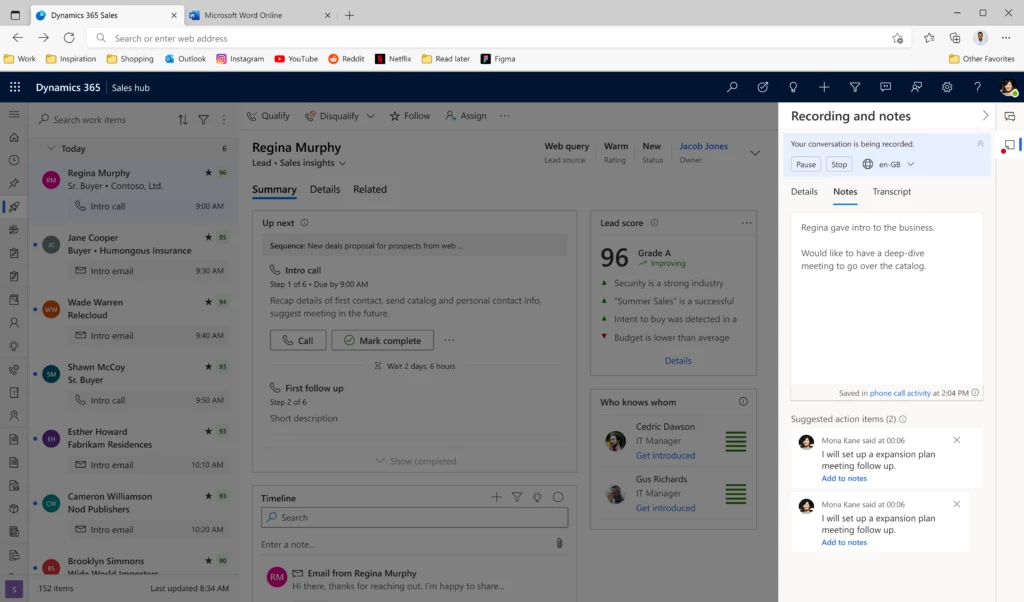
Source: Dynamics 365
Predictive scoring ranks leads and opportunities by likelihood to convert.
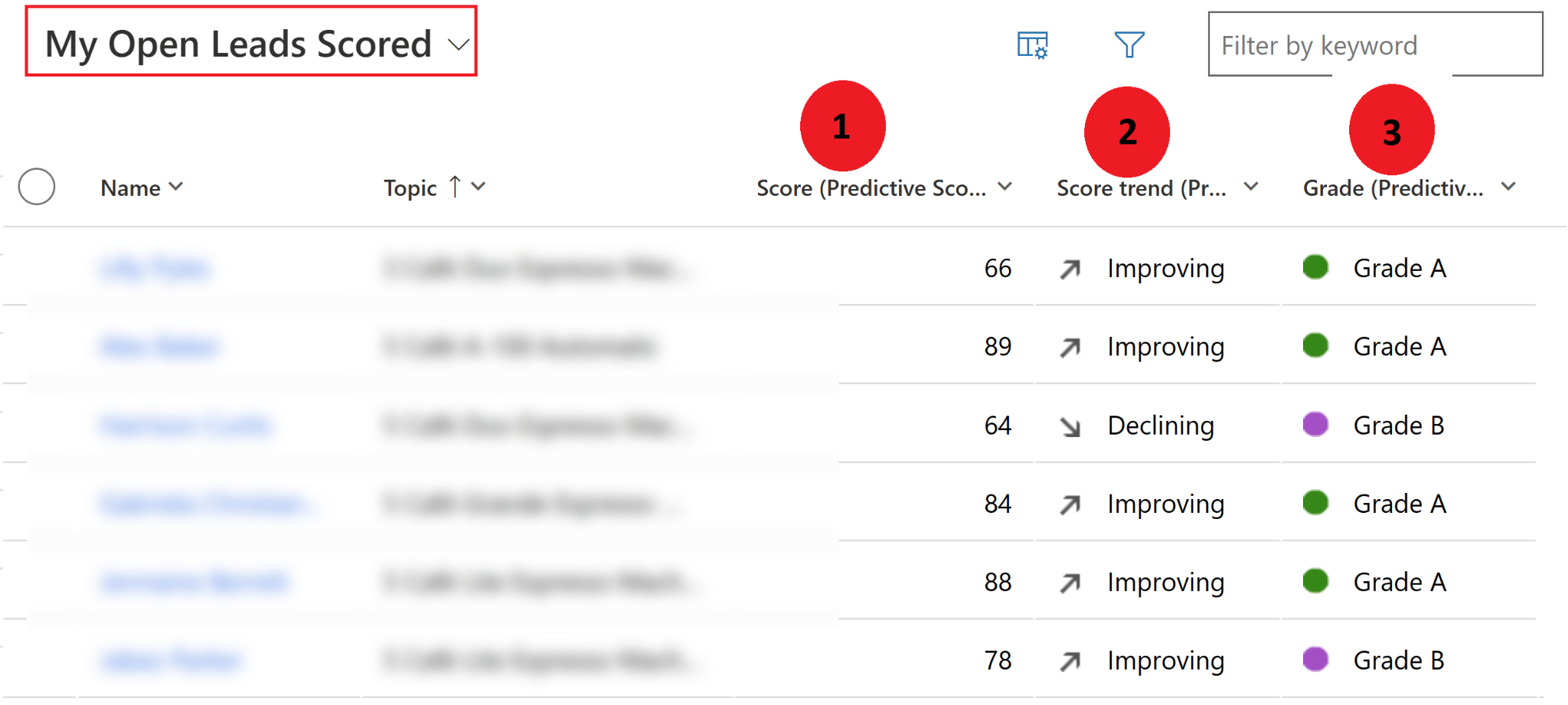
Source: Dynamics 365
These capabilities come at a price. The full AI feature set requires Sales Enterprise at $105/user/month or Sales Premium at $150/user/month. Sales Professional at $65/user/month has no Copilot access. Running AI agents also requires Copilot Credits, which come from either a Sales Premium allocation (1,000 credits/user/month) or an additional Azure subscription.
Pipedrive takes a lighter approach. The AI Sales Assistant surfaces win probability predictions, deal activity reminders, and progress updates.

Source: Pipedrive
An AI email writer generates drafts from prompts with configurable tone and length.

Source: Pipedrive
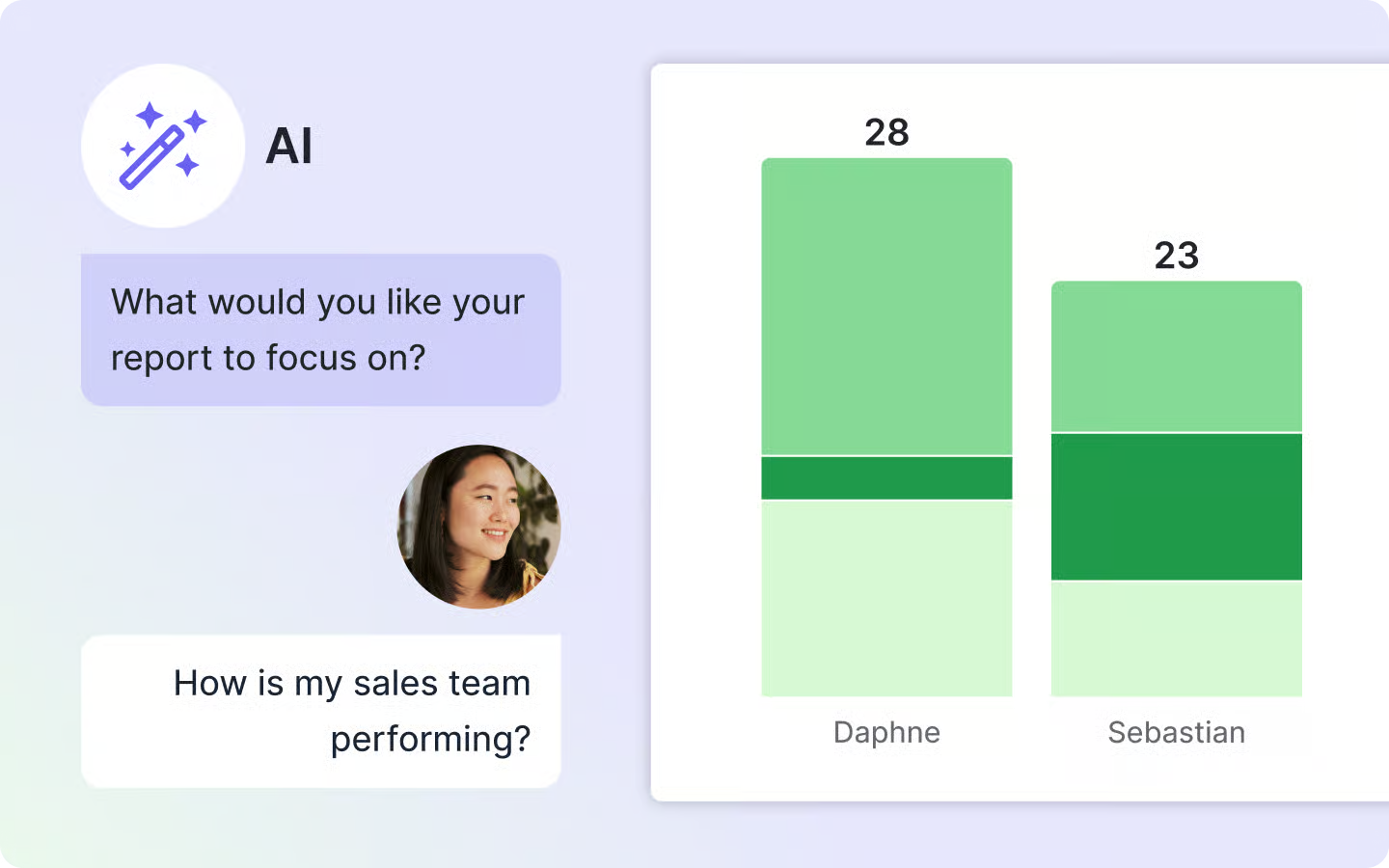
AI-generated reports let managers type natural-language requests to produce pipeline analyses. These features are available across plans, powered by OpenAI, and Pipedrive does not permit third parties to use client data to train AI models.
Source: Pipedrive
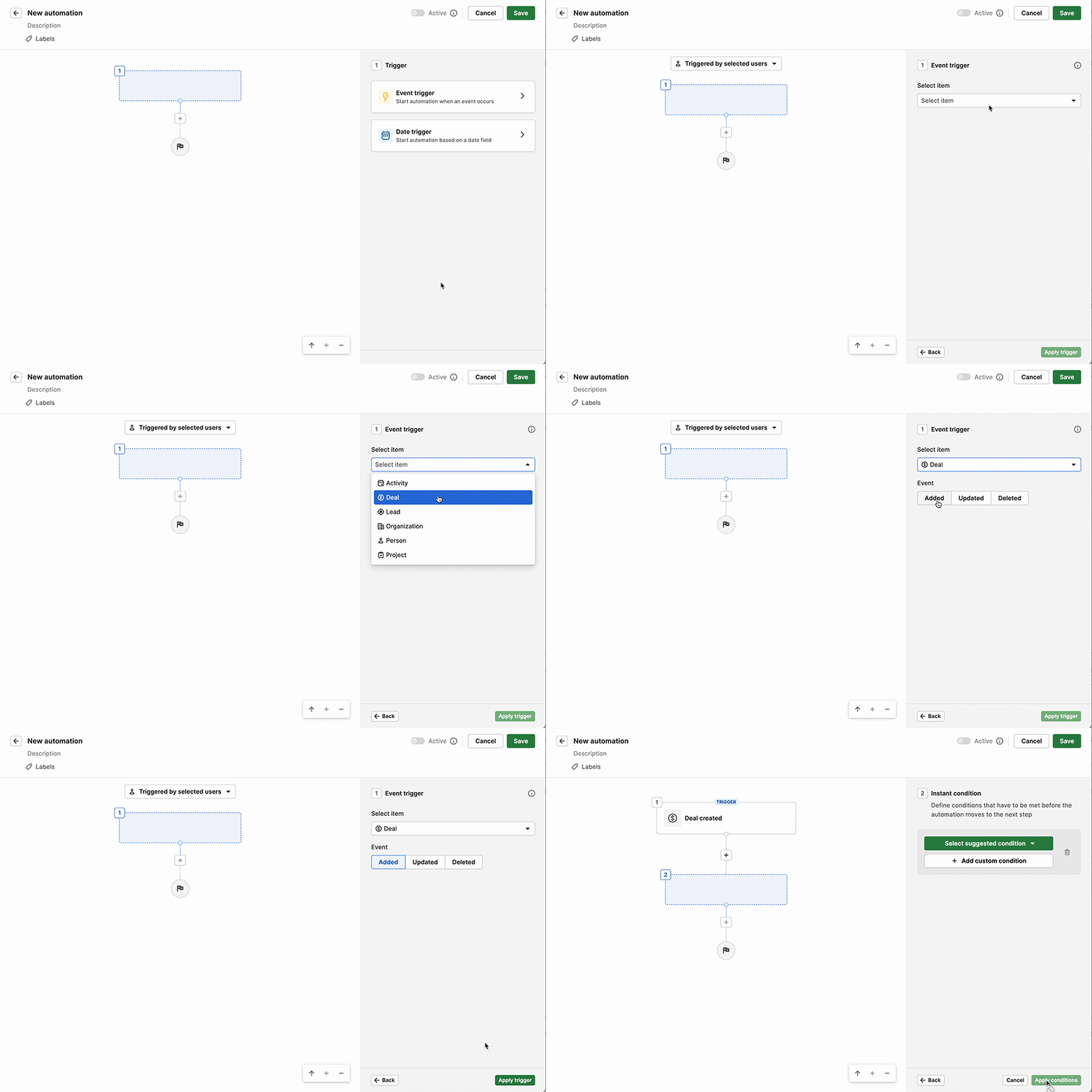
On automation, Pipedrive's workflow engine supports trigger-action rules with if/else branching, delay steps, "wait until event" conditions, and native Slack, Teams, Trello, and Asana notifications. Available from the Growth plan up.
Source: Pipedrive
Dynamics 365 relies on Power Automate with over 1,000 prebuilt flows and broad logic capabilities, though the learning curve is steeper and Power Automate is a separate product within the Microsoft ecosystem.
For pipeline management specifically, Pipedrive's deal rotting alerts, multiple custom pipelines, and activity-based selling keep the focus on what reps need to do next. Dynamics 365 offers configurable sales process stages, relationship health scoring, and "who knows whom" warm introduction mapping, but surfaces these through a more complex interface that requires more setup.
Where both CRMs hit a wall: the data problem
Neither Dynamics 365 nor Pipedrive solves the fundamental challenge that limits every CRM: the quality of the data inside it.
A CRM is only as useful as the contacts, company details, and signals it contains. If half the phone numbers in your pipeline are outdated, if you can't tell which accounts are researching your category, or if your reps spend hours researching prospects before every call, your CRM is a filing cabinet, not a revenue tool.
Dynamics 365 addresses this partly through its Microsoft ecosystem. LinkedIn Sales Navigator integration (available on the Microsoft Relationship Sales tier) surfaces profile data and job change alerts inside CRM records. But LinkedIn data covers professional networking information, not the verified direct dials, buyer intent signals, or technographic profiles that outbound teams need.
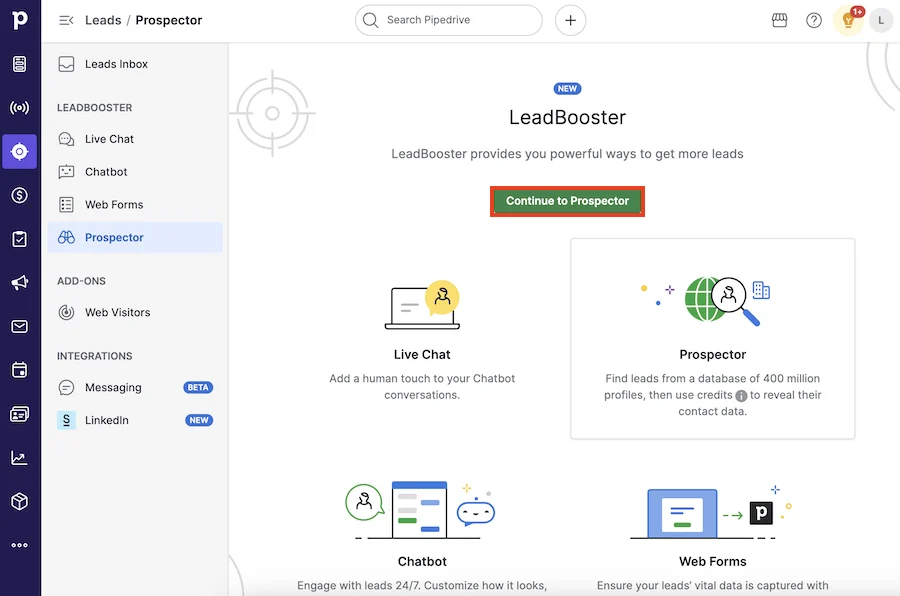
Pipedrive's Prospector tool offers a database of over 400 million profiles and 10 million companies with a credit-based reveal system.
Source: Pipedrive
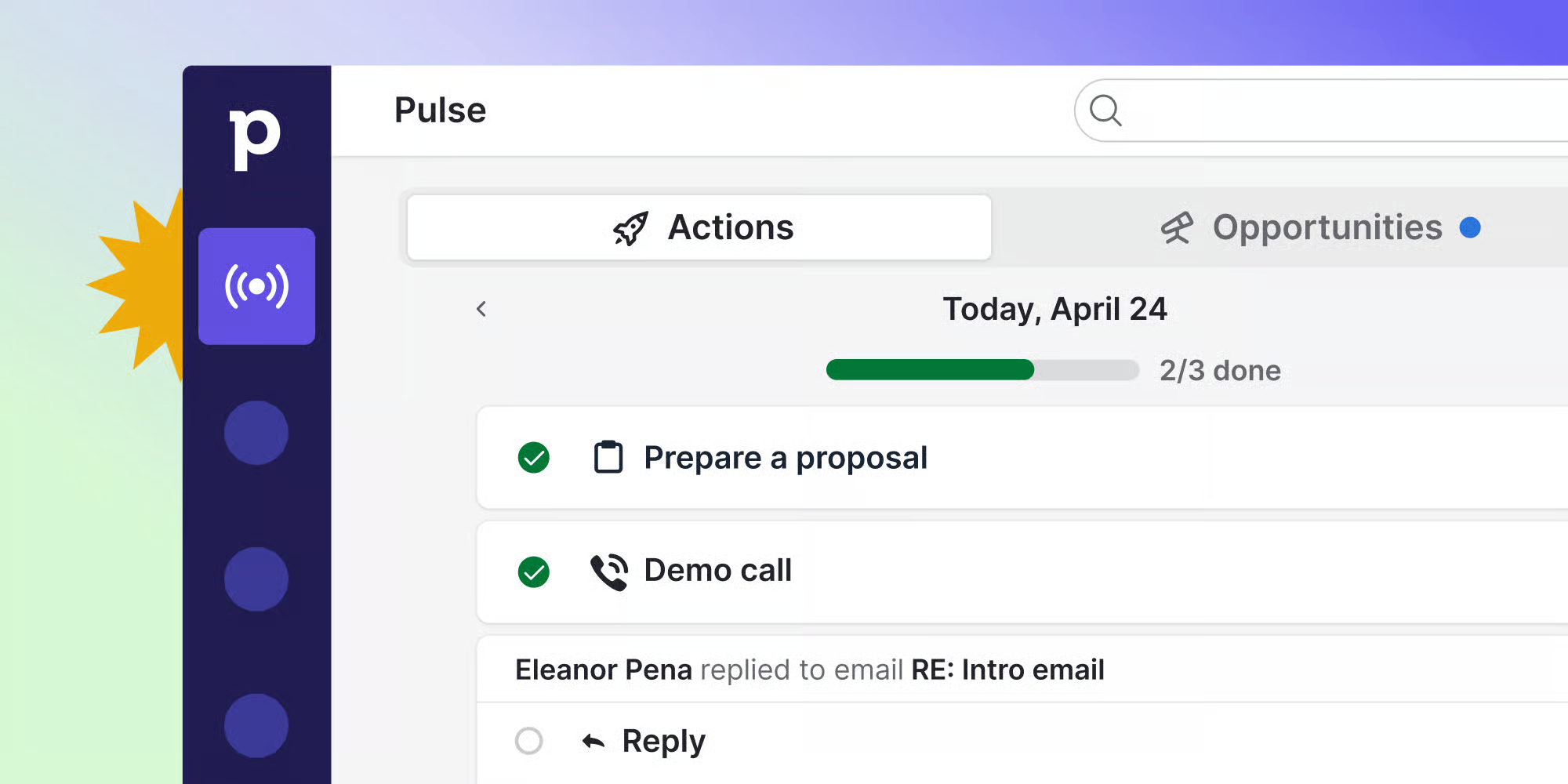
The Pulse prospecting toolkit adds data enrichment, custom lead scoring, and automated sequences. These are useful additions, but they're supplementary features on top of a CRM, not a platform designed for intelligence.
Source: Pipedrive
ZoomInfo exists to solve this problem. Its data covers 500M contacts, 100M companies, 135M+ verified phone numbers, and 200M+ verified business email addresses, plus 120M direct-dial phone numbers, verified by 300+ human researchers and reaching up to 95% accuracy on first-party data.
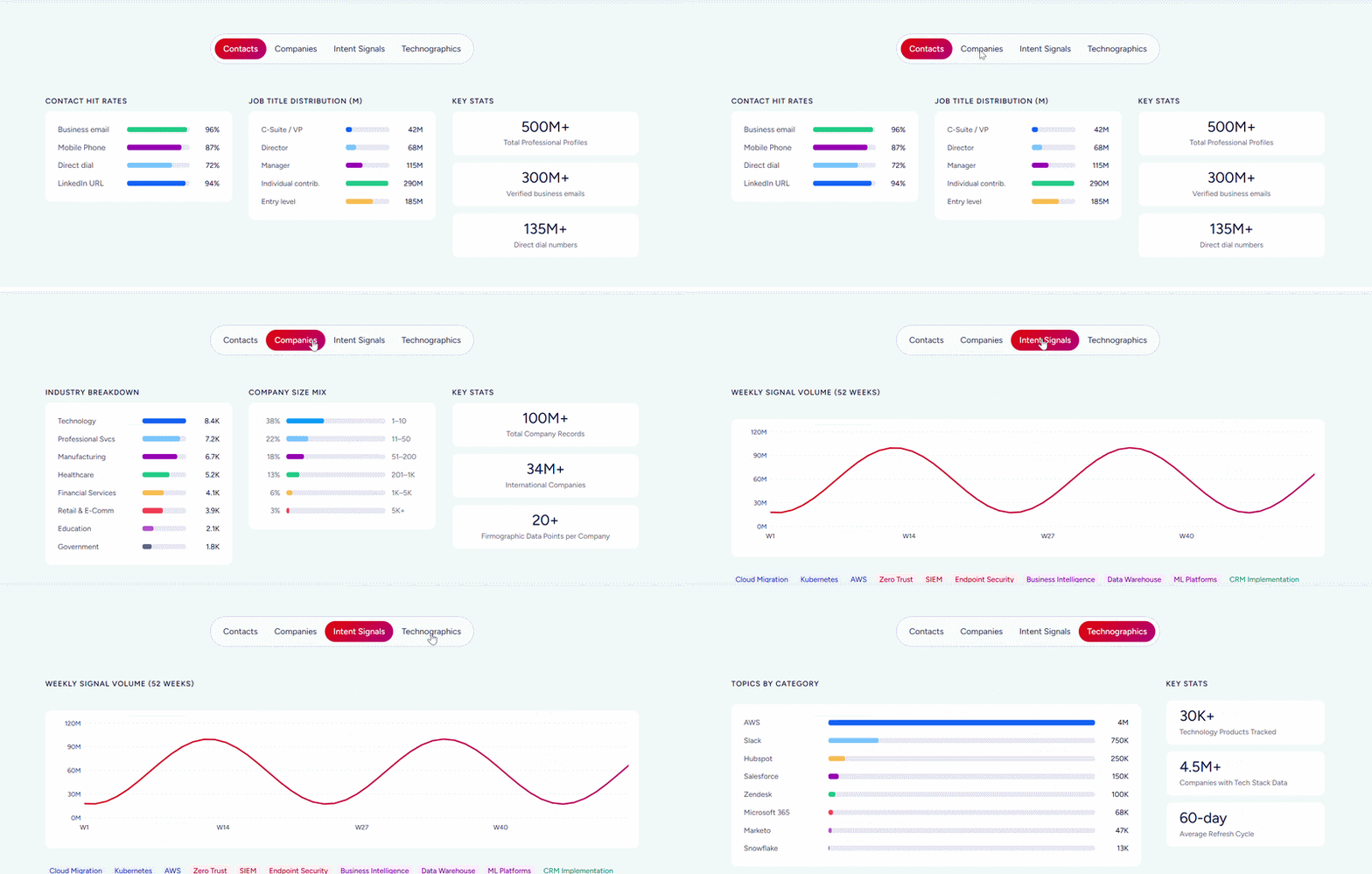
In a Fortune 500 competitive RFP analyzing 25 million contacts across vendors, the independent consultant concluded that "no other competitor came even close."
That data becomes actionable through the GTM Context Graph, which processes 1.5B+ data points daily. It fuses ZoomInfo's third-party intelligence with a customer's CRM records, conversation transcripts, and behavioral signals, then reasons across all of it. A CRM records that a deal moved to Stage 3.
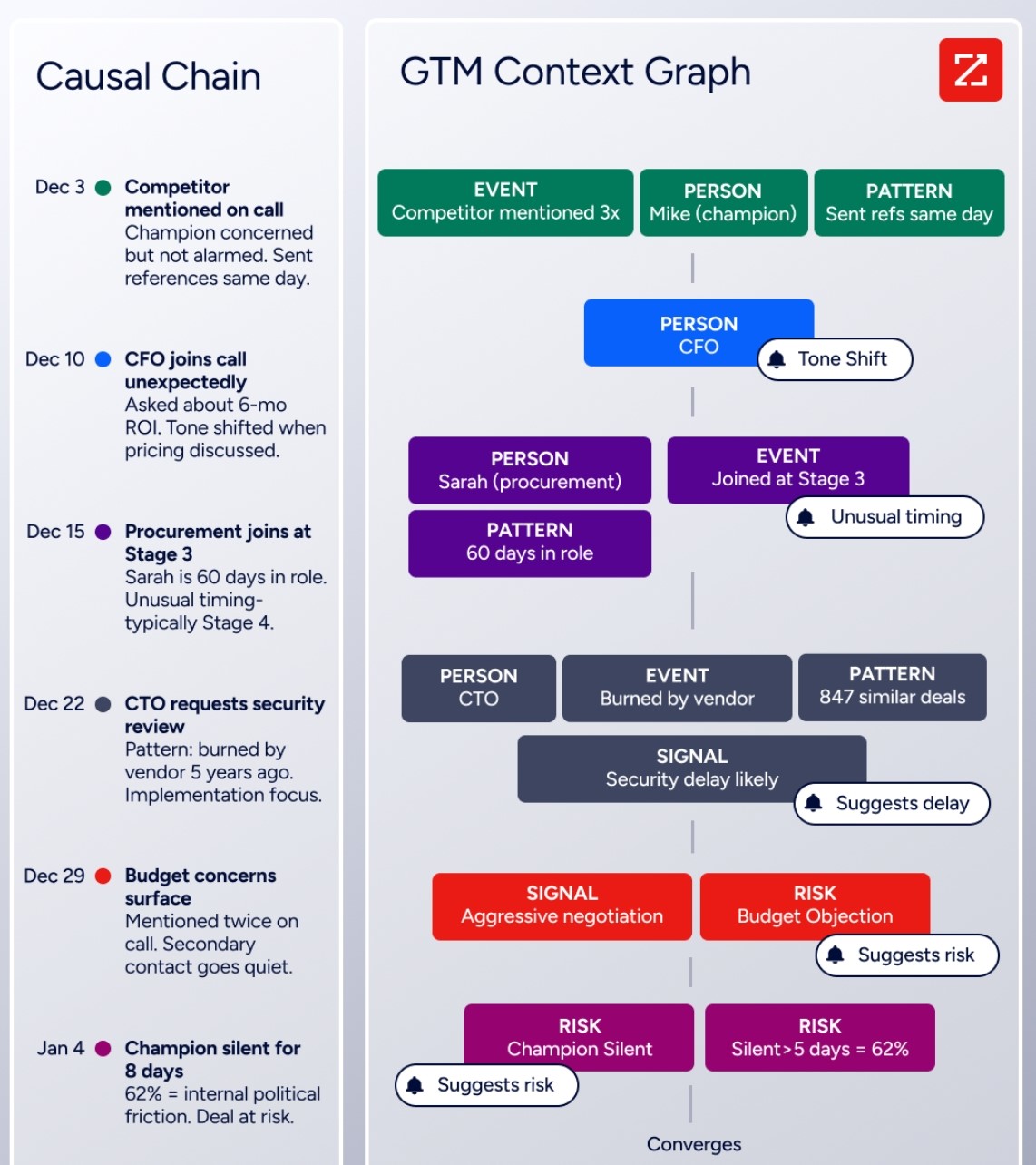
The GTM Context Graph captures why: the CFO joined the last call and asked about six-month ROI, while third-party signals show the company is hiring three new VPs and researching your competitor.
ZoomInfo integrates with both Dynamics 365 and Pipedrive via the marketplace. For teams building custom workflows, API access is included in all relevant plans, and the MCP server lets any AI agent consume ZoomInfo data natively.
Seismic's sales team attributed 39% of active pipeline to opportunities identified or influenced by ZoomInfo signals, reporting 54% productivity gains and 11.5 hours saved per week per seller. (Seismic case study)
Pricing: what you actually pay
Sticker prices tell one story. Total cost of ownership tells another.
Dynamics 365 Sales lists four tiers:
Plan | Price |
|---|---|
Sales Professional | |
Sales Enterprise | |
Sales Premium | |
Microsoft Relationship Sales | Contact sales |
Sales Professional covers core pipeline management but lacks Copilot, advanced SFA, and extensive customization. Most teams need at least Sales Enterprise for the AI features, conversation intelligence, and automation that make the platform worth the investment.
Beyond licensing, implementation costs ($250K-$2M), ongoing partner support, and Copilot Credit requirements for AI agents push the real annual spend for a mid-sized organization into six figures or more.
For organizations also using Finance ($210/user/month), Supply Chain Management ($210/user/month), or other modules, Dynamics 365 becomes a large enterprise software commitment.
Pipedrive uses four tiers with annual billing:
Lite, starting at $14/month, covers pipelines, deal management, Pulse, custom fields, API access, and mobile apps, but no email sync or automations. Growth adds email sync, automations, sequences, and live chat support. Premium includes Smart Docs, LeadBooster, AI email features, and phone support. Ultimate offers email and phone data enrichment, fortified account security, and a sandbox testing account. Add-ons like Campaigns (email marketing) and Web Visitors carry separate charges.
The pricing gap is stark. A 20-person sales team on Pipedrive Growth might spend $5,000-8,000 annually. The same team on Dynamics 365 Sales Enterprise would spend $25,200 in licensing alone, before implementation and support.
ZoomInfo uses consumption-based pricing with no published dollar amounts for paid tiers. Costs scale with seats, credit volume, features, and contract length. The ZoomInfo Lite tier is free permanently, with access to the B2B database, 10 monthly export credits, search filters, the Chrome extension, and HubSpot integration.
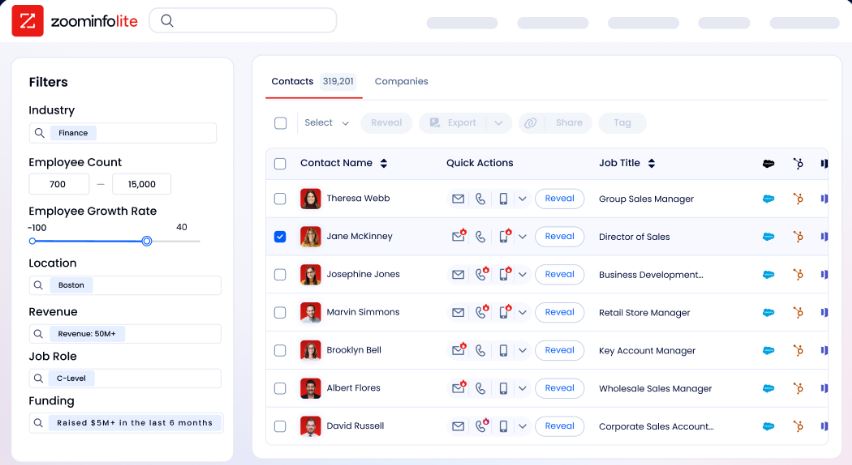
Paid plans add mobile numbers, full intent signals, advanced automation, Chorus, and enterprise CRM integrations.
Beyond CRM: the scope question
This is where the comparison splits most sharply.
Dynamics 365 extends far beyond sales. Customer Service ($50-195/user/month) handles cases, routing, and omnichannel support. Contact Center ($95-110/user/month) adds voice IVR, digital self-service, and supervisor tools.
Field Service ($105/user/month) manages work orders, technician scheduling, and IoT-connected equipment. Finance ($210/user/month) runs general ledger, AP/AR, and multi-entity consolidation. Supply Chain Management ($210/user/month) covers demand planning, procurement, manufacturing, and warehouse operations. Business Central ($80/user/month) serves SMBs needing all-in-one ERP.
For an organization that needs three or more of these modules, the shared Dataverse data layer makes a strong case. A service agent resolving a case can see the customer's open deals, financial history, and field service appointments in one place.
Pipedrive stays in its lane. After the sale, it offers a Projects add-on for basic project management and a Campaigns add-on for email marketing. But there is no customer service module, no financial management, no field service. Organizations needing those capabilities will add separate tools.
ZoomInfo plays a different role. It doesn't replace either CRM. It enriches whatever CRM you use with the data and intelligence that drive pipeline. GTM Workspace gives sellers a view of their book of business with AI-drafted outreach and signal-triggered actions.
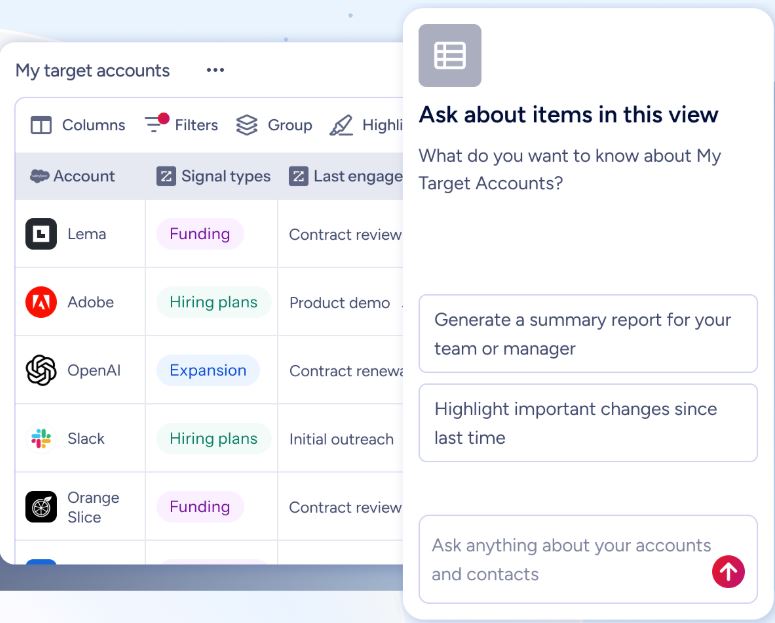
GTM Studio gives marketers and RevOps teams a canvas to design, enrich, and launch GTM plays. The
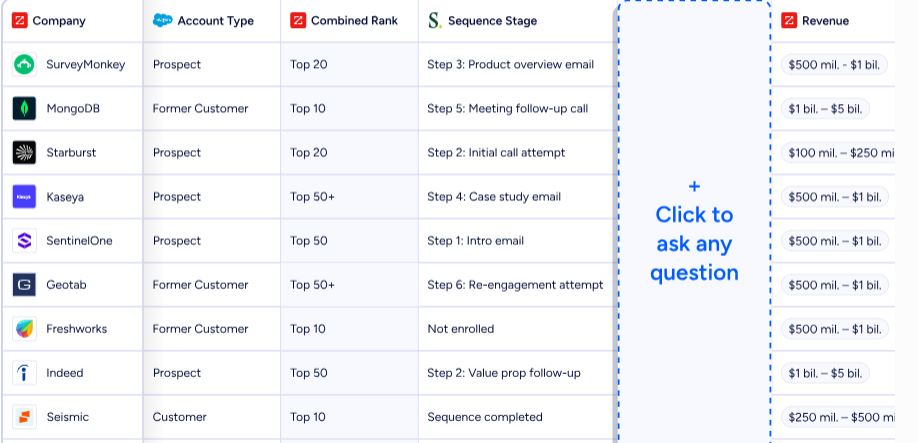
Enterprise API and MCP server expose the same intelligence to any custom application or AI agent. All three draw from the same GTM Context Graph, so where you work never limits the intelligence available.
Smartsheet's Senior Manager of Sales Technology Enablement called ZoomInfo "our one source of truth for account data, and even more so for contact data. There's no other provider in the market that provides you with that level of detail." (Smartsheet case study)
Integration ecosystems reflect each platform's world
Dynamics 365 lives inside the Microsoft ecosystem. Integration with Teams, Outlook, Excel, SharePoint, Power BI, and Power Automate is native. Reps access CRM data inside Teams meetings, Copilot drafts emails from Outlook, and Power BI dashboards pull from Dataverse without custom connectors. The Microsoft commercial marketplace hosts thousands of ISV extensions.
The weakness is outside that ecosystem. G2 reviewers note that connecting Dynamics 365 to third-party ERPs, marketing platforms, or legacy systems can require middleware or custom development. If your stack runs on Google Workspace and AWS, you lose most of what differentiates Dynamics 365.
Pipedrive takes a platform-agnostic approach. The Marketplace has 500+ integrations including Zapier, Make, Google Meet, Microsoft Teams, Mailchimp, PandaDoc, DocuSign, QuickBooks, Xero, Slack, and JustCall. A free open API is available on all plans, with API v2 adding improved endpoints and webhooks. Companies with at least one app installed win 1.5x more deals on average.
ZoomInfo integrates across both worlds. The ZoomInfo App Marketplace lists 120+ integrations spanning CRM (Salesforce, HubSpot, Dynamics 365), marketing automation (Marketo, Eloqua), sales engagement (Outreach, Salesloft), data warehouses (Snowflake, Databricks), and communications tools.
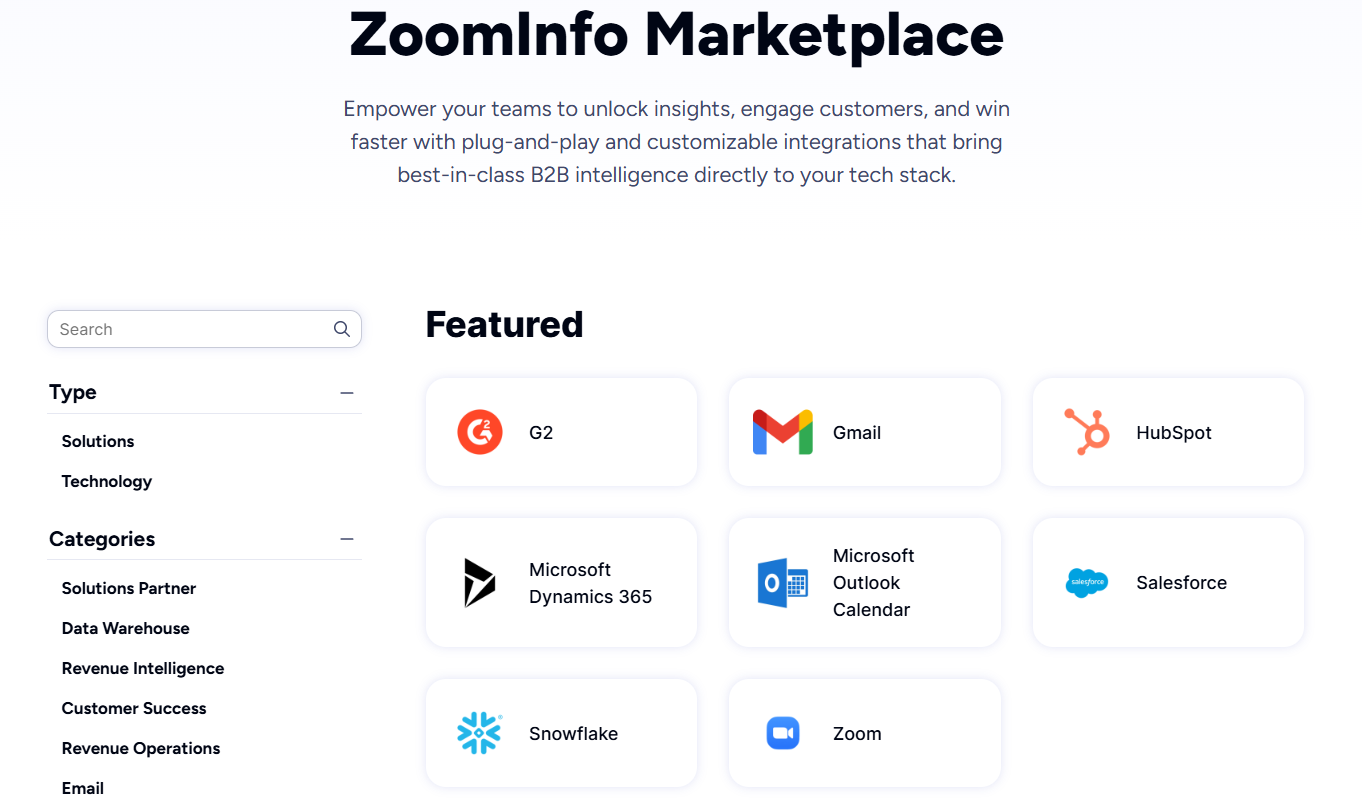
Cloud Partners enables data ingestion into AWS, Google Cloud, Snowflake, and Databricks. The API and MCP layer lets ZoomInfo's intelligence power any tool in any stack.
BDO Canada's Senior Marketing Intelligence Analyst reported an 87% reduction in time spent updating internal data dashboards, thanks to ZoomInfo's API. "The plug-and-play aspect of the API means I can integrate it very easily into any process and get information at a moment's notice." (BDO Canada case study)
Security and compliance comparison
All three platforms invest in enterprise security, but the depth varies.
Dynamics 365 benefits from Microsoft's compliance portfolio: ISO 27001, ISO 27017, ISO 27018, SOC 1/2/3, HIPAA/HITECH, FedRAMP, PCI-DSS, GDPR, and more than 90 compliance offerings. Customer Lockbox requires explicit approval before Microsoft engineers access customer data. Customer-managed encryption keys let organizations control encryption with their own Azure Key Vault.
For regulated industries (financial services, healthcare, government), this is a clear differentiator.
Pipedrive holds ISO/IEC 27001:2022, ISO/IEC 27701:2019, SOC 2 Type 2, and SOC 3 certifications, along with GDPR, EU-US Data Privacy Framework, and DORA compliance. Data is hosted on AWS with separate databases per customer, daily backups going back three months, and SSO via SAML 2.0 on all plans. For an SMB CRM, this is solid.
ZoomInfo maintains ISO 27001, ISO 27701, SOC 2 Type II, TRUSTe GDPR and CCPA certifications, all renewed annually. ZoomInfo is a registered data broker in California and Vermont, with a dedicated Trust Center. For enterprise buyers evaluating data providers, these certifications are baseline requirements.
Dynamics 365 vs. Pipedrive vs. ZoomInfo: Which should you choose?
The right choice depends on the problem you're solving.
Choose Dynamics 365 if:
Your business needs CRM, ERP, and service operations under one platform
You're already in the Microsoft ecosystem (Microsoft 365, Azure, Teams)
You have the budget and timeline for a multi-month implementation with partner support
Enterprise compliance requirements (HIPAA, FedRAMP, data residency) are non-negotiable
You need autonomous AI agents for lead qualification and deal management
Choose Pipedrive if:
Your main need is a visual, easy-to-use sales pipeline CRM
You're a small or mid-sized team that wants to start closing deals this week, not next quarter
Budget matters and you want core CRM features at $14-100/seat/month
Your sales process is straightforward and doesn't require ERP or service integration
You value pipeline clarity and simplicity over enterprise configurability
Add ZoomInfo to either if:
You need accurate, verified prospect data instead of stale CRM records
Knowing which accounts are actively in-market would change how your team prioritizes
Your reps spend too much time researching prospects and not enough time selling
You want AI that understands the context behind your deals, not just the stage labels
You need the same intelligence across your CRM, your engagement tools, and your custom workflows
See ZoomInfo in action with a free trial, or start with ZoomInfo Lite at no cost.
Dynamics 365 and Pipedrive are both effective CRMs for their audiences. Dynamics 365 fits organizations that need a unified business platform anchored in the Microsoft ecosystem. Pipedrive fits sales teams that want to spend their time selling, not configuring software.
But whichever CRM you choose, the intelligence flowing into it determines whether your pipeline reflects reality or guesswork. ZoomInfo provides that intelligence, making either CRM measurably more effective.
Dynamics 365 vs. Pipedrive vs. ZoomInfo FAQ
What is the core difference between Dynamics 365, Pipedrive, and ZoomInfo?
Dynamics 365 is Microsoft's enterprise suite combining CRM and ERP applications across sales, service, finance, supply chain, and more, all sharing a common data layer. Pipedrive is a sales-focused CRM built for small and mid-sized teams, centered on a visual pipeline and fast setup.
ZoomInfo is an AI GTM platform that provides the B2B data and intelligence layer (500M contacts, 100M companies, buyer intent signals, and conversation intelligence) that feeds into whichever CRM a company uses.
Which platform is cheapest for a small sales team?
Pipedrive is far more affordable, starting at $14/seat/month with core pipeline features on all plans. Dynamics 365 Sales Professional starts at $65/user/month, and most teams need at least the $105/user/month Enterprise tier for AI and advanced features. Beyond licensing, Dynamics 365 implementations commonly cost $250,000 to $2 million, while Pipedrive requires no implementation investment.
ZoomInfo offers a permanent free tier (ZoomInfo Lite) for basic data access, with paid plans custom-quoted based on usage.
Can ZoomInfo replace Dynamics 365 or Pipedrive?
No. ZoomInfo is not a CRM and does not replace either platform. It complements both by providing verified B2B contact data, company intelligence, buyer intent signals, and AI-powered account insights that flow into your CRM. ZoomInfo integrates with Dynamics 365 and Pipedrive, enriching the data inside each system.
Which platform has better AI capabilities?
Each platform applies AI differently. Dynamics 365 offers autonomous Sales Agents that research, qualify, and engage leads without human intervention, plus Copilot for email drafting, call summarization, and record queries. Pipedrive provides an AI Sales Assistant for deal recommendations, AI email writing and summarization, and AI-generated reports via natural language.
ZoomInfo's GTM Context Graph processes 1.5B+ data points daily to reveal why deals move or stall, powering AI-generated outreach, account research, and buying signal detection across its GTM Workspace.
Does Dynamics 365 work for small businesses?
Yes, through Business Central ($80/user/month for Essentials), a cloud ERP for small and midsize businesses covering finance, sales, service, and operations. But Business Central must be purchased through a Microsoft partner and is an ERP, not a sales CRM. For teams that only need pipeline management, Pipedrive is simpler and cheaper.
How do the platforms handle email and communication tracking?
Pipedrive includes email sync, templates, open/click tracking, group email, scheduling, and an AI email writer in its Sales Inbox, starting from the Growth plan. Dynamics 365 integrates natively with Outlook and Teams, with Copilot drafting emails and conversation intelligence analyzing call recordings (Enterprise tier and above).
ZoomInfo's GTM Workspace generates AI-drafted outreach from full account context, and Chorus captures and analyzes customer calls, meetings, and emails to surface deal intelligence.
Which CRM is better for international teams?
Both platforms support global operations but differently. Dynamics 365 offers multi-currency, multi-entity, and multi-language capabilities, with financial compliance across 57 countries and localization for many more. Pipedrive supports 22 languages natively (compared to HubSpot's 12) and serves companies in 179 countries, but lacks ERP or financial compliance features.
ZoomInfo covers global B2B data with 34M+ company profiles outside North America and 200M+ professional profiles outside NA, providing international data coverage regardless of CRM.
What happens if I outgrow Pipedrive?
Pipedrive is designed for SMBs and offers no native ERP, customer service, or back-office modules. Organizations that outgrow it typically migrate to Dynamics 365, Salesforce, or HubSpot. ZoomInfo's data and intelligence layer transfers across CRMs, so switching platforms doesn't mean rebuilding your data infrastructure.
