
What does CRM software actually cost? A breakdown by company size
The cost of CRM software varies more than most buyers expect, and the gap between the license fee and the total bill is where budgets break down. According to ZoomInfo analysis, companies will roll out more than 42,000 new CRM systems this year, spending an estimated $4.6 billion doing so. That figure captures a familiar scenario: a 50-rep sales team decides its data is stale and its CRM no longer fits, spends two months selecting a vendor, six months on implementation, and walks away with a $25,000 invoice. The average cost of CRM software depends heavily on company size, implementation complexity, and the hidden costs that never appear in the vendor's pricing page.
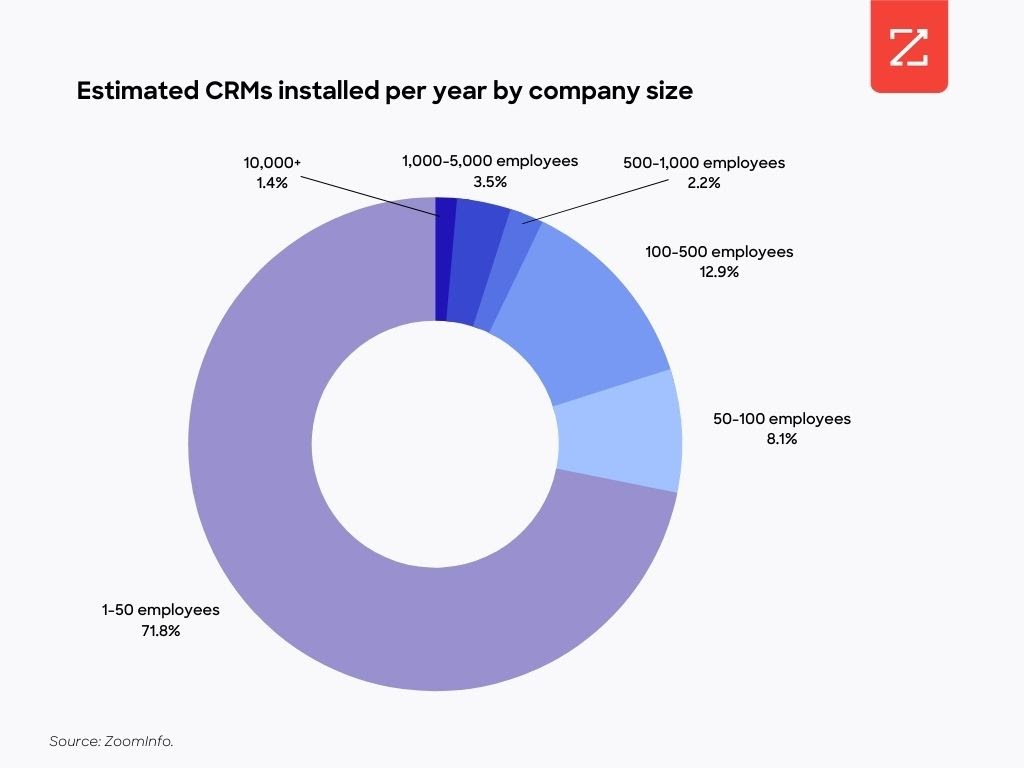
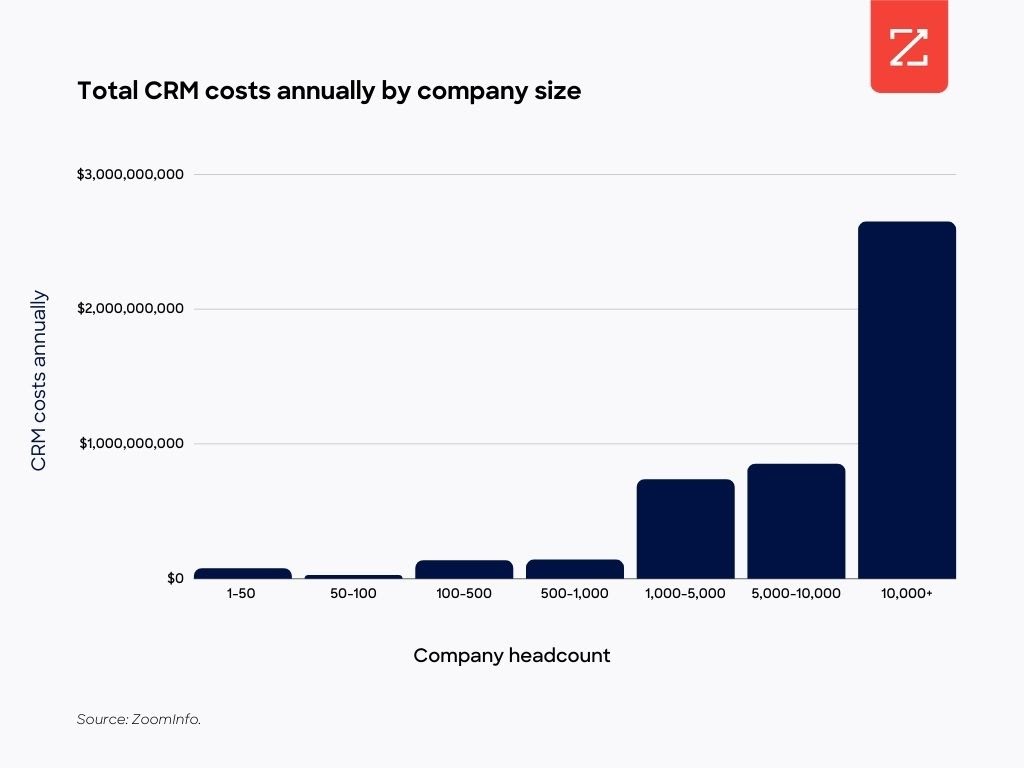
Size is the single strongest predictor of CRM implementation cost. Small firms with fewer than 100 employees account for the majority of annual CRM projects (more than 33,000 of them), with an average implementation cost of $3,000. Companies with more than 1,000 employees face a dramatically different reality: the average cost reaches $174,000. For the largest enterprises, those with more than 10,000 employees, the average climbs to $450,000. The ZoomInfo white paper on CRM implementation provides the underlying analysis for these figures.
The size premium exists because large implementations are structurally more complex: voluminous data migration, more record cleaning, and heavier employee training compared to smaller projects. A mid-market company (100–1,000 employees) sits between these poles, with costs that vary by vendor and scope.
Company Size | Avg. Implementation Cost | Annual CRM Installations (est.) | Key Cost Drivers |
|---|---|---|---|
Small (<100 employees) | $3,000 | 33,000+ | Basic setup, minimal migration |
Mid-Market (100–1,000 employees) | Varies by vendor and scope | Included in 42,000+ total | Data migration, integration, training |
Enterprise (1,000+ employees) | $174,000 | Included in 42,000+ total | Data migration, record cleaning, training |
Large Enterprise (10,000+ employees) | $450,000 | Included in 42,000+ total | Complex migration, customization, change management |
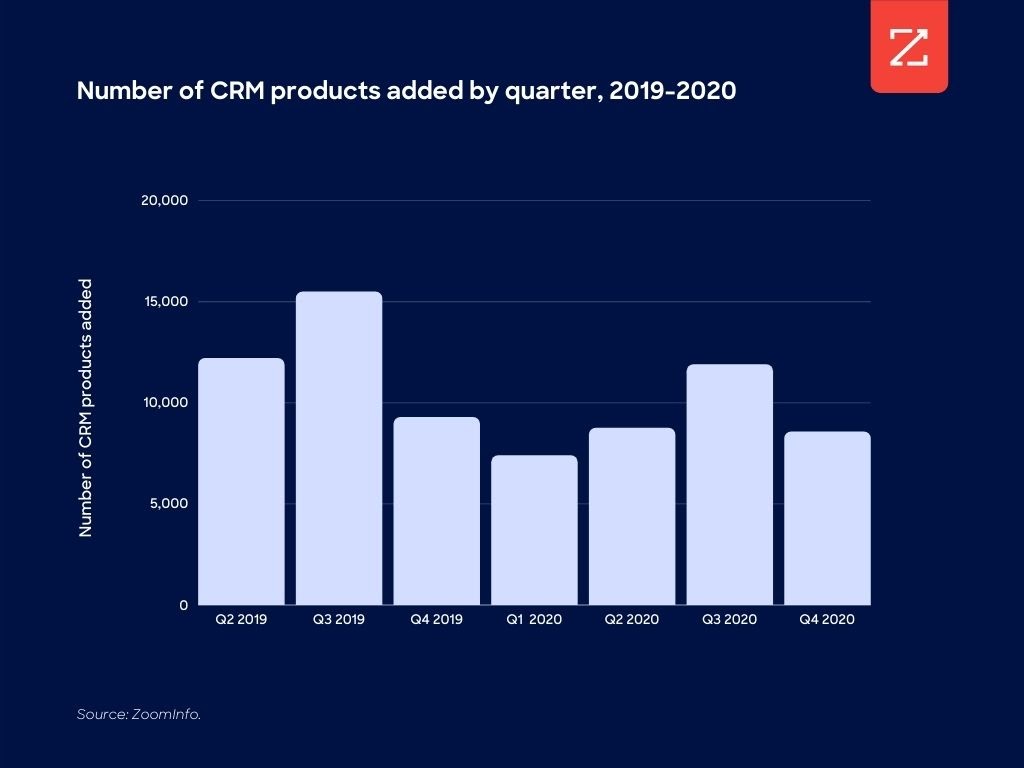
On average, slightly more than 10,000 CRM implementations occur per quarter, based on two years of CRM activity captured in ZoomInfo's platform. These figures account for both first-time CRM installations and organizations switching vendors.
Hidden CRM costs that blow up your budget
A CRM investment is not transactional, the license fee is only the beginning. Most buyers anchor on the per-user monthly price and underestimate the full cost of ownership by a significant margin. The categories below are where budgets routinely overrun.
Implementation and setup fees: Professional services for configuration, workflow setup, and system integration. Typically ranges from 20–50% of the first-year license cost depending on complexity.
Data migration and cleaning: Moving records from a legacy system requires deduplication, field normalization, and validation. Large implementations include voluminous data migration and more record cleaning compared to smaller projects, a cost that scales nonlinearly with database size.
Employee training and change management: User adoption is the most commonly underestimated line item. Budget for initial training plus ongoing enablement as the team turns over.
API and integration fees: Connecting the CRM to your marketing automation platform, data enrichment stack, and other tools often requires paid API tiers or third-party middleware. Each integration has its own contract and failure mode.
Storage overage charges: Many CRM plans impose storage caps. As contact and activity data accumulates, storage overages become a recurring line item.
Premium support tiers: Standard support is typically email-only with multi-day SLAs. Phone support, dedicated CSMs, and faster response times sit behind premium support packages.
Annual renewal fees: Renewal pricing typically matches the initial license cost. Negotiate multi-year terms upfront if you have budget certainty, vendors are more flexible before you sign than at renewal.
Additional user licenses at MSRP: Seats added mid-contract are typically billed at full list price unless you pre-negotiated a block rate. For fast-growing teams, this can make the effective per-seat cost significantly higher than the original quote.
Lower-tier CRM plans often impose usage limits on emails sent, workflows triggered, or API calls made, costs that only surface after a team scales past the plan's thresholds. The crm implementation cost calculation that matters is not the launch-day invoice; it is the 24-month total across all of these categories.
CRM implementation costs: what to budget beyond the license
On average, slightly more than 10,000 CRM implementations occur per quarter, according to ZoomInfo's CRM research. That volume reflects both first-time deployments and vendor switches, and both carry implementation costs that dwarf the license fee for any company above the small-business tier.
Enterprise CRM implementations (100+ users) can cost between $180,000 and $420,000 in total, a figure that dramatically exceeds what most buyers expect when they see per-user monthly pricing. For the largest organizations, the average reaches $450,000. These figures include data migration, training, customization, and integration, not just the software license.
Salesforce holds approximately 19.5% CRM market share, according to Gartner analysis. IDC estimated that Salesforce's ecosystem would be six times the size of Salesforce itself by 2024, a figure that illustrates how much of the total CRM spend flows to implementation partners, consultants, and system integrators rather than to the software vendor directly.
A worked example: 25-user mid-market company
Consider a 25-user sales team evaluating a mid-tier CRM at $75/user/month:
Annual license cost: $22,500
Implementation and configuration: $15,000–$25,000 (professional services)
Data migration and cleaning: $5,000–$10,000
Training (initial + ongoing): $3,000–$6,000
Integration with MAP and enrichment stack: $5,000–$8,000
Estimated first-year total: $50,500–$71,500
The license represents roughly 30–45% of the first-year cost of CRM implementation. The rest is the invisible infrastructure that makes the system usable. For a 25-person team, that gap is manageable. For a 500-person enterprise, it compounds into a multi-million-dollar commitment.
CRM pricing models explained: per-user, per-contact, and flat-rate
Understanding how CRM vendors structure pricing is as important as comparing list prices. The same feature set can cost dramatically different amounts depending on which model applies to your team's profile.
Per-user (per-seat) pricing is the most common model. You pay a fixed monthly fee for each user who accesses the system. The appeal is predictability: you know exactly what each additional rep costs. The risk is that costs scale linearly with headcount, which makes this model expensive for large or fast-growing teams. Sales, customer success, and marketing users all count as seats, so the "per-user" line item multiplies quickly across departments.
Per-contact pricing charges based on the size of your database rather than the number of users. This model benefits small teams with large prospect lists, a 5-person team with 50,000 contacts pays the same regardless of how many reps access the system. The risk is the reverse: teams with large databases face escalating costs as their contact count grows, and many vendors charge for both active and inactive records.
Flat-rate pricing is rare but predictable. A fixed monthly fee covers unlimited users and contacts up to a defined threshold. This model works well for teams with stable headcount and contact volume, but overage charges can be steep once you cross the threshold.
A worked example: 10-user team with 10,000 contacts
Pricing Model | Monthly Cost (est.) | Best For | Risk |
|---|---|---|---|
Per-user at $80/seat | $800/month | Small teams, predictable headcount | Expensive as team grows |
Per-contact at $0.005/record | $50/month | Large databases, small teams | Scales with list growth |
Flat-rate at $500/month | $500/month | Stable teams, defined scope | Overage charges at scale |
Billing cycle impact on CRM license cost
Annual billing typically saves 15–25% compared to monthly plans. For a 25-user team paying $80/user/month, switching from monthly to annual billing saves $3,600–$6,000 per year, worth the commitment for stable teams, but monthly billing preserves flexibility for growth-stage companies still scaling headcount.
Advanced enterprise plans often shift to a set monthly price for a fixed user block (typically 5–10 users), with additional users charged at a flat per-seat rate. This block-pricing pattern makes the effective per-seat cost lower at scale but harder to model during procurement.
How to calculate CRM ROI and total cost of ownership
The sticker price is only one input. To justify CRM spend to finance or a CFO, you need a TCO model and an ROI argument.
TCO components:
License (annual)
Implementation and setup
Training (initial and ongoing)
Support tier
Integration and middleware
Annual renewal
Add-on modules and storage
ROI inputs:
Deal velocity improvement (faster time-to-close)
Rep productivity gain (hours saved on manual data entry)
Churn reduction (better account visibility)
Speed-to-lead improvement (faster inbound response)
A simple ROI formula:
(Revenue uplift from improved conversion rates) minus (Total CRM cost over 3 years) divided by (Total CRM cost over 3 years) = ROI%
For example: a 25-rep team that closes $2M in annual revenue improves close rates by 10% after CRM implementation, generating $200,000 in incremental revenue per year. Over three years, that is $600,000 in revenue uplift. If the three-year TCO is $180,000, the ROI is ($600K minus $180K) divided by $180K = 233%.
The average CRM cost calculation changes significantly when you factor in avoided costs. A meaningful share of CRM replacement decisions trace back to data quality frustration rather than genuine software inadequacy, which raises a different question: is a new system actually the right solution? That argument is developed in the next section.
When data remediation is cheaper than a new CRM
Most of the frustration encountered by sales and marketing teams has little to do with the functionality of the CRM and everything to do with the state of the data driving the workflows, processes, and motions, according to ZoomInfo, an all-in-one AI GTM Platform. The ZoomInfo white paper identifies four types of bad CRM data that drive most replacement decisions:
Incomplete records
Outdated or incorrect data
Information from multiple sources that is not integrated well
Data that cannot be parsed into actions
According to Salesforce research, 91% of CRM data is incomplete, a structural problem that a new system alone cannot fix. Switching vendors relocates the data problem; it does not solve it.
Contact data decays continuously: people change jobs, companies restructure, and new accounts enter the market every day. Most CRM systems only update records when a rep manually edits them or a batch import runs, which means the gap between what your system says and what is actually true widens between every enrichment cycle. ZoomInfo's answer starts at that foundation. With 500M contacts, 100M companies, and 135M+ verified phone numbers, the platform continuously verifies CRM records so they do not decay between implementations. The multi-source verification process, backed by 300+ human researchers, maintains up to 95% accuracy on first-party data, which means the records your routing rules, scoring models, and territory assignments depend on stay current without manual intervention.
The GTM Context Graph processes 1.5B+ data points daily, fusing CRM records, conversation signals, and behavioral data to reveal why accounts behave as they do, not just what changed. This intelligence layer is what turns a system of record into a system of insight. When a contact changes roles, an account enters a new buying stage, or a territory shifts, the Context Graph surfaces those signals in the workflows where your team is already working. That is a fundamentally different capability than batch enrichment: it is reasoning across layers, not just updating fields.
For RevOps teams, the access layer matters as much as the data. GTM Studio is ZoomInfo's codeless interface for marketers, RevOps professionals, and GTM engineers, the product that lets your team build enrichment workflows, launch plays, and route leads without engineering tickets. The two-week change management cycle for territory updates and ABM segments becomes an afternoon. Marketing can build and launch a new ABM segment without writing a SOQL query or waiting for sandbox testing.
Momentive's routing problem illustrates what fixing the data infrastructure, rather than replacing the system, actually delivers: speed-to-lead dropped from 20 minutes to 60 seconds once the enrichment sequence was corrected. The CRM did not change. The data infrastructure did.
If even 10% of CRM implementations were driven primarily by data quality concerns, addressing those concerns through continuous enrichment could reduce industry-wide implementation spend by an estimated $460 million annually.
See how ZoomInfo's data and intelligence platform can replace your next CRM overhaul.
Free CRM options and when they make sense
The data-remediation case above applies to teams that already have a CRM worth saving. For teams that are still evaluating whether to commit to a paid system at all, free tiers are worth understanding on their own terms.
Several CRM platforms offer permanently free tiers, but free rarely means no cost. For solo operators, very early-stage startups, or teams validating CRM value before committing budget, a free tier can be the right starting point. For most growing businesses, the hidden costs of free CRM accumulate faster than the license savings.
Platform | Free Tier | Key Limitation | Best For |
|---|---|---|---|
HubSpot CRM | Free, unlimited users | Limited automation; basic reporting only | Early-stage teams needing contact management |
Zoho CRM Free | Up to 3 users | Limited integrations; no advanced workflows | Solo operators or very small teams |
Salesforce Free Suite | Limited features | No custom objects; restricted API access | Teams evaluating Salesforce before committing |
The hidden costs of free CRM are real. Manual data entry labor replaces the automation that paid tiers provide. Enrichment integrations that keep contact data current are typically locked behind paid plans, so free-tier CRM data decays faster. And when the team outgrows the free tier, the migration to a paid plan carries its own implementation cost, often equivalent to what a small business would have paid for a paid tier from the start.
Free CRM makes sense for crm software cost for small business scenarios where the team is under five people, the sales motion is simple, and the primary need is contact storage rather than workflow automation. Most growing businesses outgrow free tiers within 12–18 months.
How to reduce CRM costs without replacing your system
The core argument from ZoomInfo's CRM research is that stale data, not inadequate software, drives most CRM replacement decisions. Before committing to a $50,000–$450,000 implementation, work through this five-step framework.
Audit your CRM data completeness. Identify the percentage of records with missing firmographics, stale contacts, or duplicate accounts. If more than 20–30% of your records have incomplete industry, employee count, or contact data, you have a data problem, not a software problem. A new CRM will inherit the same gaps on day one.
Implement continuous enrichment. Replace batch data imports with real-time enrichment from a verified source. Batch imports create a freshness ceiling: your data is accurate on import day and degrades from there. Continuous enrichment keeps records current as contacts change roles, companies restructure, and new accounts enter your ICP.
Consolidate enrichment vendors. Multi-vendor enrichment stitching creates brittle infrastructure. Managing three separate enrichment vendors with different API contracts, different data formats, and different failure modes means the whole pipeline breaks when one vendor has an outage, and you are the one debugging it. A single waterfall enrichment source reduces API maintenance debt and gives you a unified audit trail.
Automate lead routing and scoring. Speed-to-lead degradation is a routing problem, not a CRM problem. When enrichment runs after routing, leads go to the wrong rep regardless of which CRM you use. Fix the enrichment-before-routing sequence first. Momentive cut speed-to-lead from 20 minutes to 60 seconds by fixing the enrichment sequence, not replacing their CRM.
Enable marketing and sales self-service without engineering tickets. Use GTM Studio to let marketing and sales launch plays without engineering tickets. Every territory change, new ABM segment, or scoring model update that requires a two-week engineering cycle makes CRM customization feel expensive, because it is. Removing that dependency changes the cost calculus entirely.
The pattern across all five steps is the same: the CRM is the system of record, but the data and the routing logic are the engine. Fixing the engine is faster, cheaper, and less disruptive than replacing the system.
CRM cost by industry: what drives price differences
Industry context shapes CRM total cost of ownership in ways that per-user pricing tables do not capture. Four verticals account for most of the variation.
Healthcare and life sciences: HIPAA compliance modules, audit logging, and data residency requirements add meaningful cost to base CRM pricing. Expect a 20–40% premium over a comparable non-regulated deployment. BAA (Business Associate Agreement) requirements also limit which vendors are eligible, reducing negotiating leverage.
Financial services: SOC 2 and regulatory audit trail requirements drive adoption of premium support tiers and enterprise-grade data governance modules. The compliance layer is not optional, it is a procurement requirement. This typically pushes financial services buyers toward enterprise plans regardless of team size.
B2B SaaS: Generally the lightest compliance burden of the four verticals. The primary cost drivers are integration depth (CRM plus marketing automation platform plus data enrichment stack) and API call volume. SaaS companies tend to build more custom integrations and run higher API volumes than other verticals, which drives costs up through overage charges and middleware fees rather than compliance modules.
Manufacturing and distribution: Territory complexity and account hierarchy management drive customization costs. When multiple regional entities share a parent domain, or when legal entity hierarchies differ from go-to-market hierarchies, the CRM configuration work required to model those relationships accurately adds significant professional services cost. This is a data architecture problem as much as a software problem.
Frequently asked questions
How much does CRM software cost for a small business?
Small businesses with fewer than 100 employees face average CRM implementation costs of approximately $3,000, according to ZoomInfo's CRM cost analysis. Subscription costs vary widely, free tiers exist from providers like HubSpot and Zoho but come with user and feature limits. Budget an additional 20–30% for training and data migration. Total first-year cost for a 10-person team typically ranges from $3,000 to $15,000 depending on vendor and feature tier. The crm software cost for small business calculation changes significantly once you include migration and training alongside the license.
What is the average cost of a CRM implementation for enterprise companies?
Enterprise CRM implementations (100+ users) typically cost between $180,000 and $420,000 in total, a figure that far exceeds the per-user monthly license cost most buyers see first. Large enterprise companies (10,000+ employees) average $450,000 per implementation, according to ZoomInfo analysis. These figures include data migration, training, customization, and integration, not just the software license. The crm implementation cost and average crm cost gap between license and total spend is widest at the enterprise tier.
What causes CRM data to go stale?
CRM data decays because contacts change jobs, companies restructure, and new accounts enter the market continuously, but most CRM systems only update records when a rep manually edits them or a batch import runs. According to Salesforce research, 91% of CRM data is incomplete. The four most common failure modes, per the ZoomInfo white paper on CRM data quality: incomplete records, outdated or incorrect data, information from multiple sources that is not integrated, and data that cannot be parsed into actions. Addressing these requires continuous enrichment, not a new system.
Can data enrichment replace a CRM migration?
In many cases, yes. Most CRM replacement decisions are driven by data quality frustration rather than genuine software inadequacy. Continuous enrichment, automatically updating records with verified firmographic, contact, and behavioral data, can restore CRM accuracy without the $25,000–$450,000 cost of a full migration. The key is addressing enrichment before routing: when enrichment runs after lead routing, leads go to the wrong rep regardless of which CRM you use. Momentive cut speed-to-lead from 20 minutes to 60 seconds by fixing the enrichment sequence, not replacing their CRM. The cost of crm implementation is avoidable in more cases than most buyers realize.
Is there a 100% free CRM?
Yes, HubSpot CRM, Zoho CRM Free, and Salesforce Free Suite all offer permanently free tiers. However, free plans typically cap users (Zoho: 3 users), limit automation, and restrict integrations. The hidden cost of free CRM is manual data entry labor and the eventual migration cost when the team outgrows the plan. Free CRM makes sense for solo operators and very early-stage teams; most growing businesses outgrow free tiers within 12–18 months.
What are the most common types of bad CRM data?
The four most common types of bad CRM data, per ZoomInfo white paper research: (1) incomplete records, missing firmographics, job titles, or contact details; (2) outdated or incorrect data, contacts who have changed roles or companies; (3) information from multiple sources that is not integrated, duplicate records with conflicting data; (4) data that cannot be parsed into actions, unstructured notes or non-standard field formats that break routing and scoring rules. The crm implementation cost of addressing these problems reactively (through a full system replacement) is far higher than addressing them proactively through continuous enrichment.