
Emailable has earned its reputation as a focused email verification tool, serving over 300,000 businesses across 185 countries. The platform does one thing well: it checks whether the email addresses on your list are real, deliverable, and safe to send to. With a 99% deliverability guarantee backed by credit refunds, it gives email marketers confidence before they hit Send.
To write this Emailable review, we analyzed the platform in depth. We believe it's the right choice if:
You need fast, accurate bulk email list cleaning before campaigns
You want real-time email validation on signup forms without backend development
You're a developer looking for a well-documented verification API
You value simple credit-based pricing with no long-term contracts
Your primary concern is reducing bounces and protecting sender reputation
However, Emailable might not be the best choice if:
You need to find new email addresses, not just verify existing ones
You want buyer intent signals, company intelligence, or sales prospecting tools
You need automated, scheduled list re-verification without manual uploads
You require enrichment beyond basic metadata (name, gender, SMTP provider)
You want one platform for both data acquisition and data hygiene
In this case, consider ZoomInfo: a B2B data and GTM platform that goes well beyond email verification. Built on 500M contacts, 100M companies, and 200M+ verified business email addresses, ZoomInfo doesn't just verify whether an email works. It tells you who to contact, when to reach out, and what to say.
Through the GTM Context Graph, ZoomInfo combines its verified data with your CRM records, conversation intelligence, and behavioral signals to surface context behind every account and deal.
We've included a detailed look at ZoomInfo later in this Emailable review, as the broader platform for teams that need verified contact data as part of a complete go-to-market workflow. If you're ready to explore what that looks like, you can start with ZoomInfo's free trial here.
What is Emailable?
Emailable is a cloud-based email verification platform founded in 2017 in New York as Blaze Verify.
CEO Sean Heilweil built the product after finding existing list-cleaning tools lacking while running other internet businesses. Blaze Verify was the first email verification service to offer both pay-per-email and subscription pricing, lowering the barrier for businesses that couldn't justify large upfront credit purchases.
The company grew through acquisition. Cache Ventures acquired TheChecker in January 2021, merged the two services, and rebranded as Emailable in March 2021. More acquisitions followed: DataValidation in July 2021, UK-based Email Checker in April 2022, plus Verify Email and Trumail at undisclosed dates.
Source: Emailable
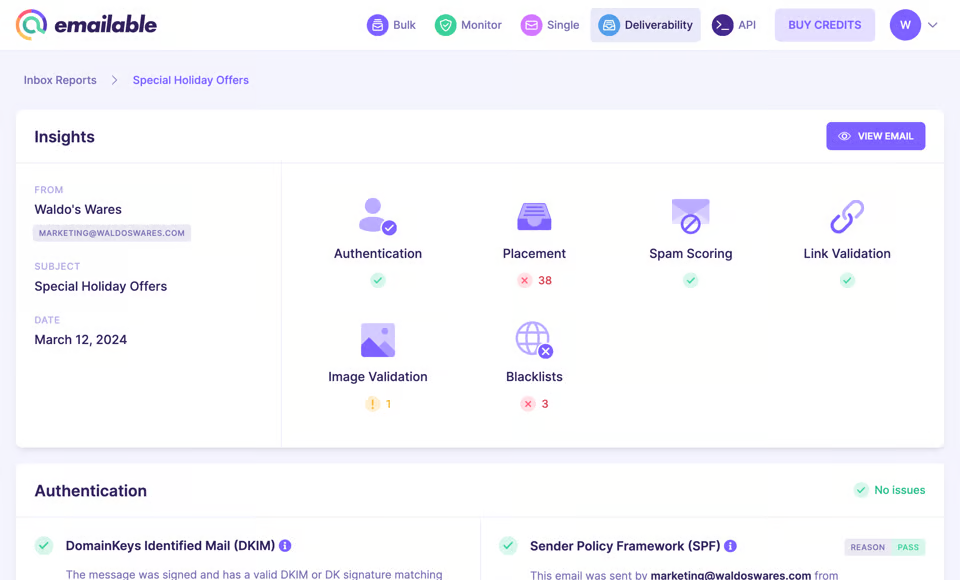
Today, Emailable reports 300,000+ business customers and 15 billion+ emails verified. The platform covers four verification modes (bulk, single, API, and widget), plus a Deliverability Center for inbox placement monitoring and blacklist surveillance. It holds SOC 2 Type II certification and is GDPR compliant.
Emailable Pros & Cons
Pros | Cons |
|---|---|
- 99% deliverability guarantee with credit refunds | - No automatic or scheduled list re-verification |
- Fast: 30,000+ emails verified per minute | - Catch-all domain handling can flag valid B2B addresses |
- No emails sent during verification (SMTP handshake only) | - No API webhooks for single-address verification |
- 250 free credits at signup, no credit card required | - Widget breaks inside modal/pop-up forms |
- SOC 2 Type II certified, GDPR and CCPA compliant | - Minimum purchase of 5,000 credits |
- 50+ native integrations plus Zapier and Make | - Limited HubSpot integration depth |
- Clean, task-oriented dashboard | - No email finding or B2B contact enrichment |
Emailable Review: How it Works & Key Features
Bulk Email List Verification: Emailable processes large lists quickly with a four-stage workflow.
Bulk verification is Emailable's core product. The workflow moves through four stages: Import, Verify, Analyze, and Export.
Users drag and drop a file (CSV, XLSX, or TXT), and the system auto-detects the email column while preserving all other data. Verification begins immediately.
The engine validates syntax, checks domain and MX records, then performs SMTP-level mailbox confirmation without sending a test email. Built-in anti-greylisting technology retries deferred addresses automatically rather than leaving them as unknowns.
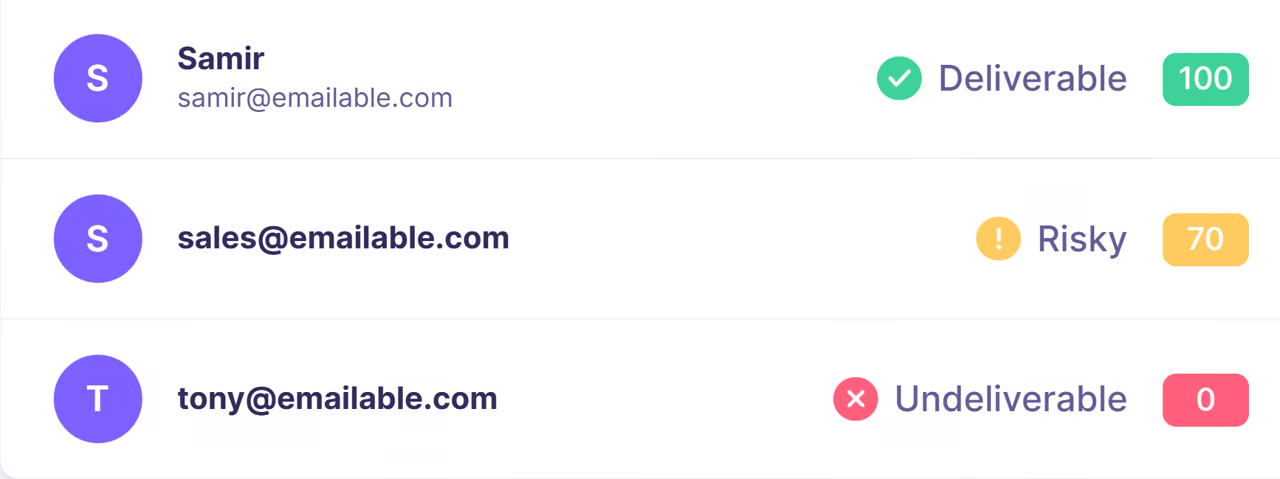
Each address receives one of four states (Deliverable, Risky, Undeliverable, or Unknown) and an Email Quality Score from 0 to 100. The system also tags addresses with attributes: free provider, role-based, disposable, accept-all domain, plus-tag addressing, mailbox full, no-reply, and secure email gateway.
Source: Emailable
On export, three preset filters (Maximum Deliverability, Maximum Reach, Only Bad Emails) cover common use cases. Users can also build custom exports by state, attribute, reason, and domain. Results can push directly back to a connected ESP through one of 50+ native integrations.
Processing speed stands out: 30,000+ emails per minute, completing a 100,000-address job in under three minutes.
Real-Time Widget: Emailable catches bad addresses at the point of signup.
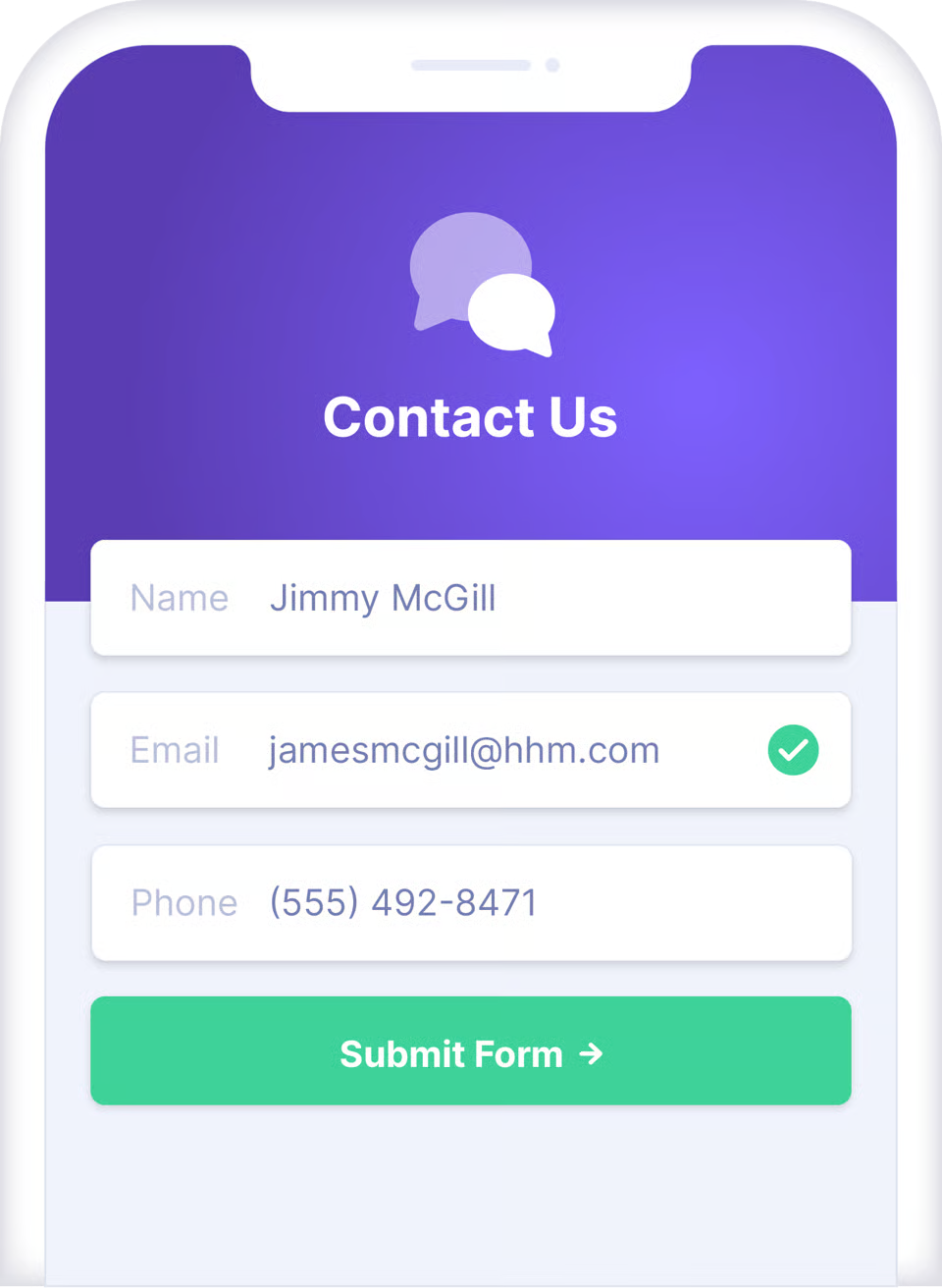
The Widget is a JavaScript embed that validates email addresses as users type into any HTML form. Installation requires a single script tag with a Public API key, no backend changes.
Source: Emailable
When a user finishes typing, the Widget sends the address to Emailable's API after a configurable delay (default: 1,000 ms). If the address is undeliverable or disposable, the form blocks submission and displays an inline error.
Developers can configure which email types to allow or reject: free providers, role-based addresses (info@, support@), and disposable domains each have independent toggle controls.
A useful touch is the "Did you mean?" correction, which catches common domain typos like "gmial.com" and suggests the fix before the user walks away. For developers, a verified event listener exposes the full verification payload for custom logic.
Public API keys are rate-limited to 10 unique verifications per day per IP address, adequate for standard signup flows but worth noting for high-traffic pages.
One limitation: the Widget does not work inside modal or lightbox pop-ups, a common pattern for lead magnet forms.
API: A developer-friendly interface for embedding verification into any workflow.
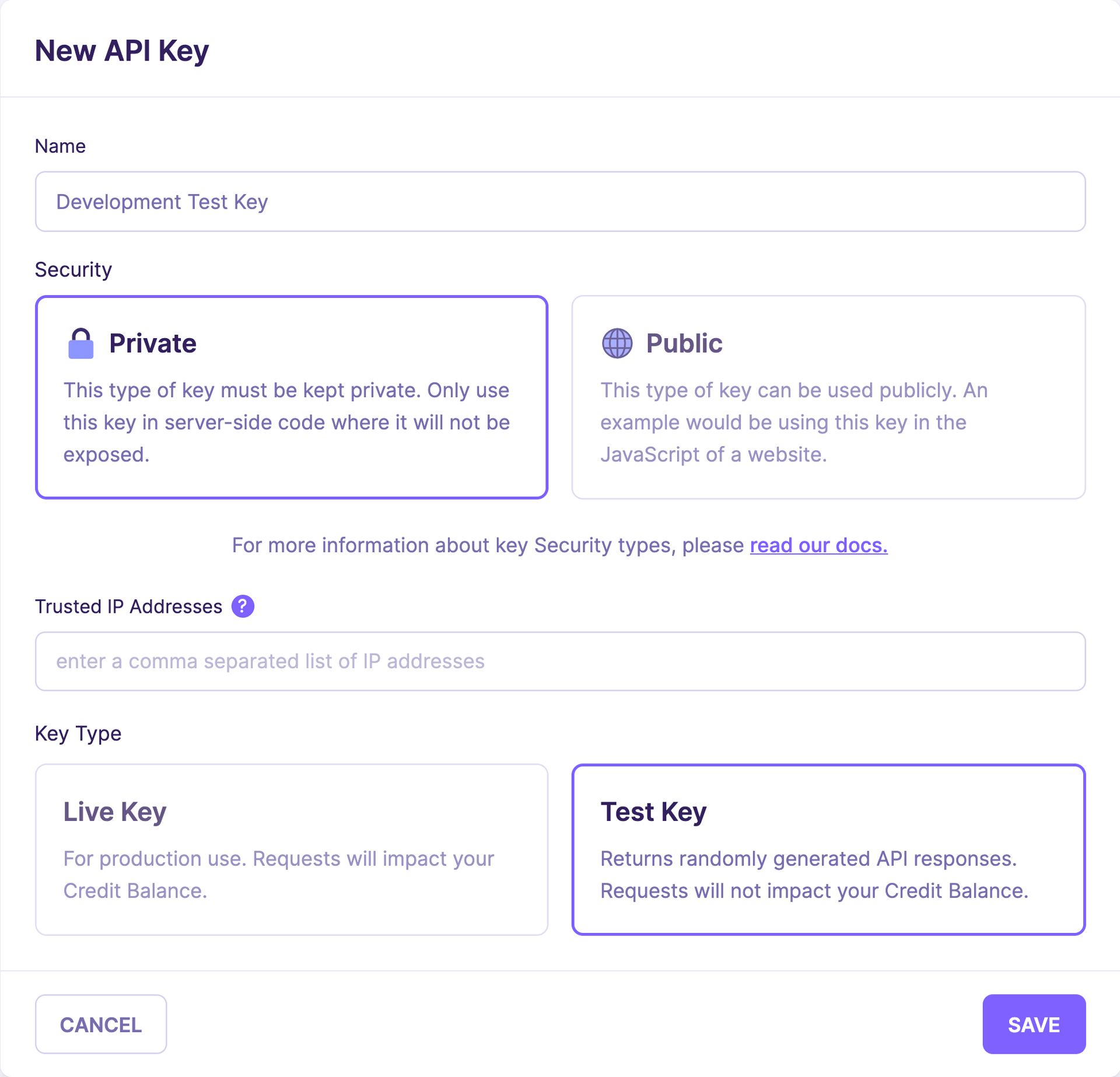
Emailable's REST API runs from https://api.emailable.com/v1/ with JSON responses throughout. It supports three operations: single-email verification (GET /v1/verify), asynchronous batch verification (POST /v1/batch), and account info retrieval (GET /v1/account).
Source: Emailable
Single verification returns results in seconds, including the state, score, attribute flags, typo suggestions (did_you_mean), inferred name and gender, and SMTP provider. For batch jobs, a callback URL parameter triggers an HTTP POST of results when processing completes. If the receiving endpoint returns anything other than HTTP 200, Emailable retries hourly for up to 3 days.
Authentication uses API keys passed as a URL parameter or Bearer token. Two key types exist: private keys (server-side, optionally IP-restricted) and public keys (client-side, domain-restricted, rate-limited). Both support a test mode with a test_ prefix, returning simulated results without consuming credits.
Official SDKs cover Ruby, Node.js, and Python. Rate limits are 25 requests per second for single verification and 5 per second for batch submissions, with standard headers exposing remaining quota.
The API documentation includes a "Copy for LLM" button and "View as Markdown" link on each page, a useful nod to teams using AI-assisted development workflows.
One gap: there are no server-side webhooks for single-address verification. Developers must poll for results rather than receive push notifications, adding complexity for real-time validation pipelines.
Deliverability Center: Inbox placement testing and blacklist monitoring in the same dashboard.
The Deliverability Center extends Emailable beyond list hygiene into sender reputation management through two tools.
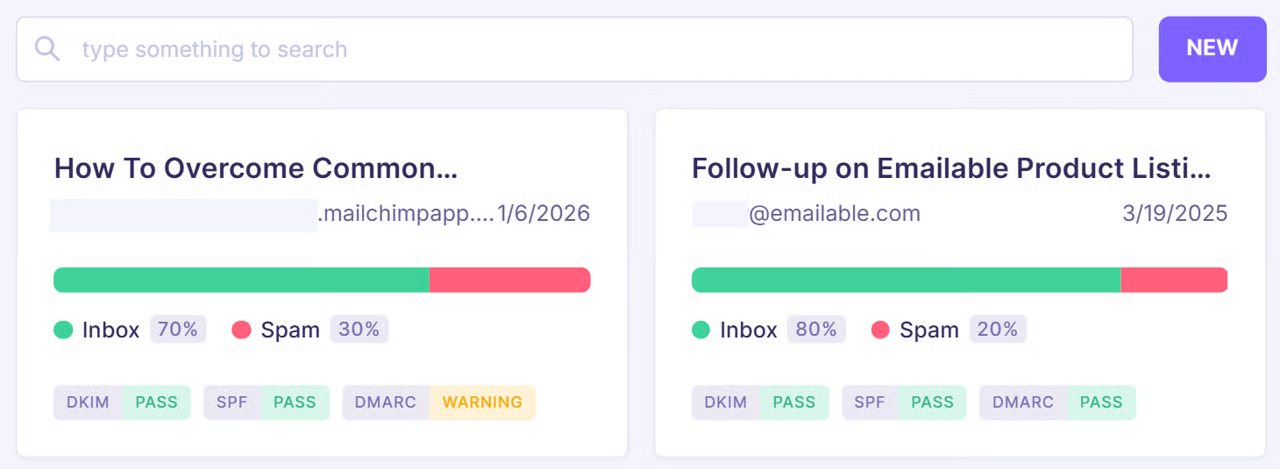
Inbox Reports use a seed list approach. Users download a set of test addresses from Emailable, add them to their ESP, and send a campaign. Within minutes, the dashboard shows exactly where emails landed across major providers.
The report breaks down inbox vs. spam placement by provider, with Gmail results including tab-level detail and Outlook results showing SCL, BCL, and PCL scores. Authentication panels surface SPF, DKIM, and DMARC misconfigurations, while SpamAssassin scoring shows which rules triggered and why. Reports can be shared via public URL without requiring an Emailable login.
Source: Emailable
Blacklist Monitors run continuous checks against 120+ real-time blacklists. Email alerts fire on listing and delisting events, and a Delist button forwards users directly to the relevant registry. The monitors cost 5 credits per check; Inbox Reports cost 100 credits per report.
Both tools draw from the same credit balance as verification, keeping billing simple. DMARC Monitoring is listed as "Coming Soon" on the product page.
Pricing: Credit-based with no feature gating.
Emailable runs on a credit-based model: one credit equals one email verification.
Every feature (bulk uploads, the single verifier, the API, the Widget, Inbox Reports at 100 credits, and Blacklist Monitor checks at 5 credits) draws from the same pool. There are no seat licenses, no feature tiers, and no long-term contracts.
New accounts receive 250 free credits at signup with no credit card required. Credits never expire. The minimum purchase is 5,000 credits. Credits come as either a one-time pay-as-you-go purchase or a recurring subscription at a 15% discount, with unused credits rolling over.
Credits spent on addresses that return "Unknown" are automatically refunded. Duplicates within a batch are not charged.
Enterprise customers get custom API rate limits, multi-user access with role-based permissions, SSO, custom data retention, a 99.99% uptime SLA, and dedicated support.
Payment options include Visa, Mastercard, AmEx, Discover, PayPal, Apple Pay, Google Pay, and bank transfers. Emailable states "no hidden costs": no setup fees, no overage charges, no per-seat fees.
Where Emailable Falls Short
Emailable verifies email addresses well. But several limitations surface for teams whose needs extend beyond list cleaning.
No Automatic Re-Verification. Email lists decay at roughly 3% per month. Yet Emailable offers no scheduled re-verification or automated hygiene for new contacts entering a CRM. Users must manually re-upload lists or build custom API workflows to keep lists clean. For a platform built to reduce manual work, this is a notable gap.
Catch-All Domain Challenges. Capterra reviewers note that legitimate B2B emails from double opt-in sources sometimes get flagged as risky due to catch-all server detection. This is a category-wide issue, but it hits harder on B2B-heavy lists where corporate mail servers commonly accept all addresses. Teams may end up suppressing valid contacts.
Verification Only, Not Discovery. Emailable tells you whether an existing email address works. It does not find new contacts, provide company intelligence, surface buyer intent, or map organizational hierarchies. Teams that need both verified data and new prospect data must pair Emailable with a separate tool, adding cost, integration overhead, and workflow fragmentation.
No Scheduled or Continuous Hygiene. The platform operates on a batch-and-check model. There is no way to set up ongoing monitoring of a list or automatically verify new contacts as they enter a connected system, short of building custom API integrations.
Widget Limitations. The real-time validation widget breaks inside modal and lightbox pop-ups, which are among the most common lead capture patterns. Teams using pop-up opt-in forms will need an API-based alternative.
Thin Enrichment Layer. Emailable's enrichment is metadata-level: SMTP provider, inferred name, gender, and MX records. It does not provide company attributes, technographic profiles, organizational charts, or behavioral signals. Teams that want context about the person behind the email address need a dedicated data platform.
These limitations reflect Emailable's focus: it's a verification tool, not a data platform. But for teams whose email hygiene needs are inseparable from prospecting, enrichment, and go-to-market execution, those boundaries matter.
Top Emailable Alternative for Broader Go-to-Market Needs: ZoomInfo
ZoomInfo addresses Emailable's scope limitations by offering email verification as one component of a larger intelligence and execution platform.
Where Emailable answers "Is this email address real?", ZoomInfo answers that question and follows it with "Who should you be emailing, and why now?"
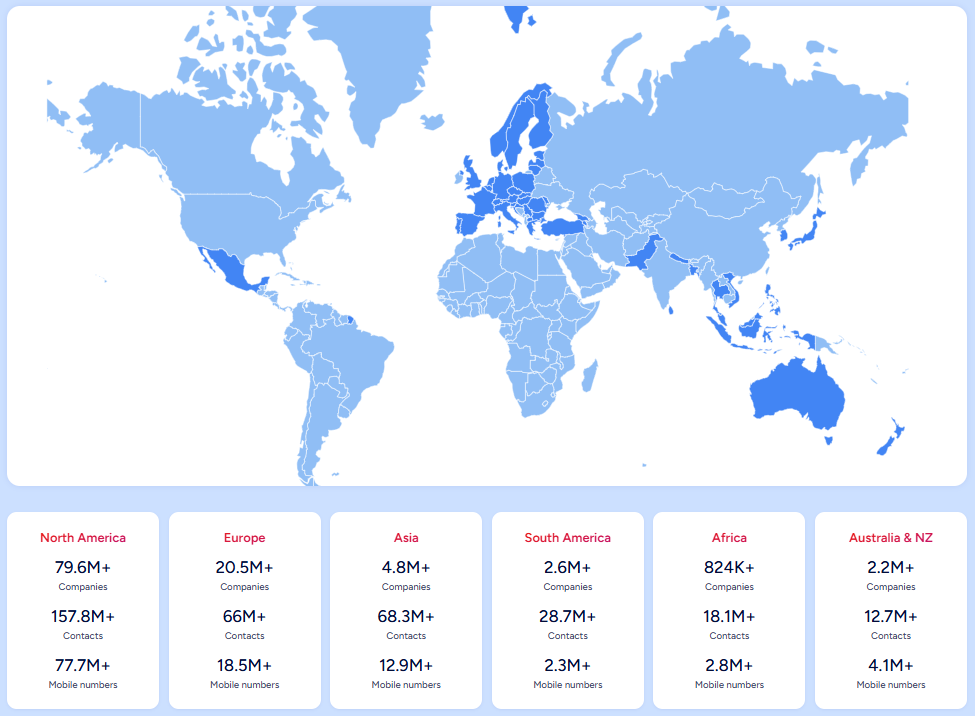
ZoomInfo is a B2B data and GTM platform built on 500M contacts, 100M companies, 135M+ verified phone numbers, and 200M+ verified business email addresses. That data is verified through a multi-source pipeline backed by 300+ human researchers, reaching up to 95% accuracy on first-party data.
Source: ZoomInfo
In a Fortune 500 competitive RFP analyzing 25 million contacts across vendors, the independent consultant concluded that "no other competitor came even close."
ZoomInfo acquired NeverBounce in 2018, integrating email verification directly into its data quality layer. But the platform's value extends well beyond hygiene.
Comprehensive B2B Data: ZoomInfo provides the contacts, not just the verification.
Emailable verifies addresses you already have. ZoomInfo provides the addresses in the first place, then verifies them.
The platform's Contact & Company Search gives access to 300+ company attributes for market segmentation, along with 120M direct-dial phone numbers and 200M+ verified business email addresses.
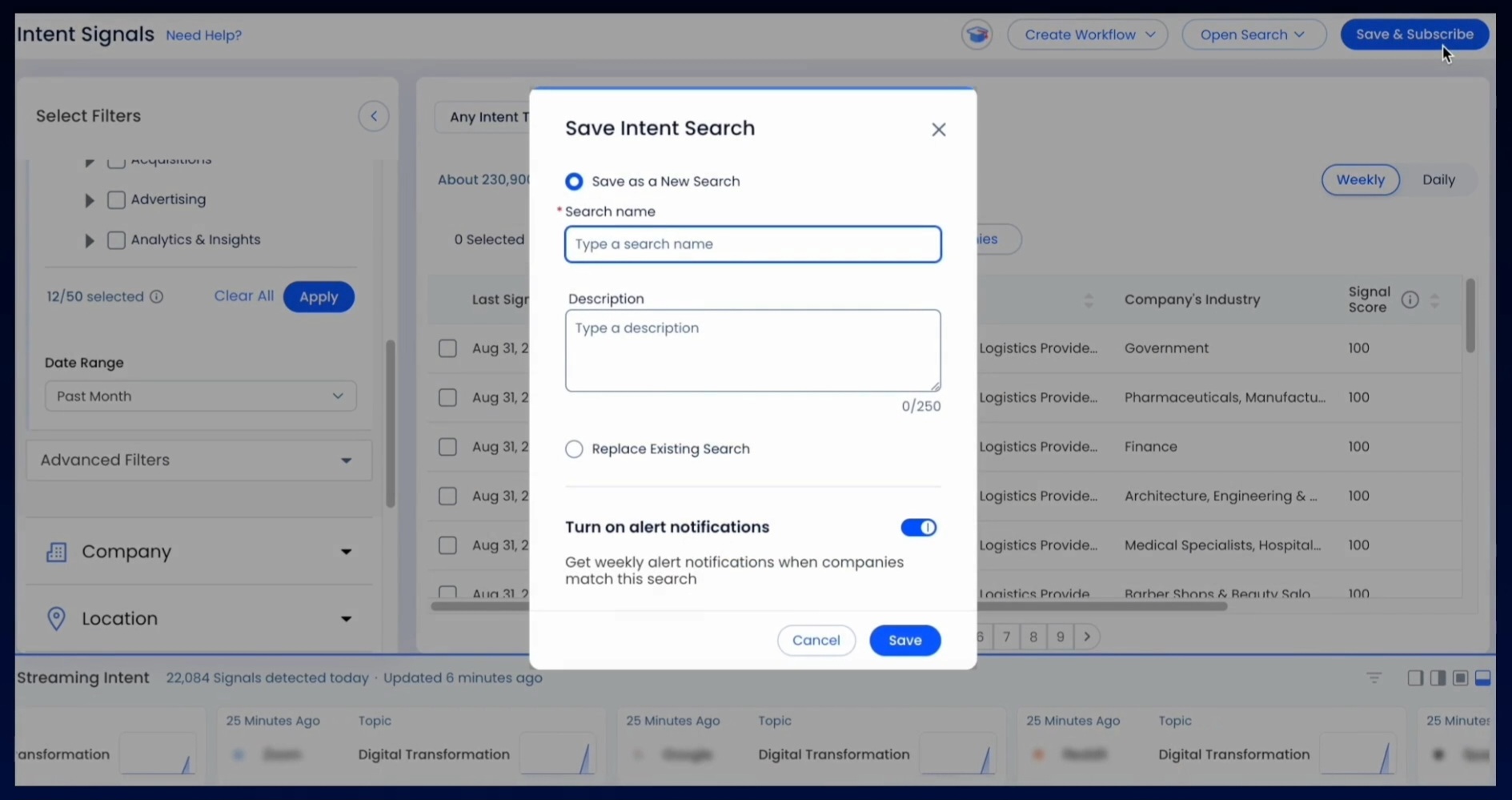
Department org charts show decision-makers with their direct dials and verified emails. Contact tracking sends alerts when prospects change jobs. Saved searches with automated alerts keep pipelines fresh.
The data spans three dimensions: identity data (who buyers are and how to reach them), company context (technographics, org charts, and 300+ attributes across 100M companies), and dynamic signals (buyer intent, funding rounds, hiring patterns, competitive mentions) that reveal when accounts are actively in-market.
Buyer Intent tracks signals from 210 million IP-to-Organization pairings and 6 trillion+ new keyword-to-device pairings monthly. Guided Intent, exclusive to ZoomInfo, identifies topics historically correlated with deal success rather than requiring manual topic selection.
Source: ZoomInfo
For teams that verify existing lists through Emailable, switch to a separate tool to find new prospects, then switch again to check intent signals, ZoomInfo consolidates that entire workflow.
"ZoomInfo gives us the information we need to execute. We don't have to go through and spend our time digging. It's already there, so we can be three steps ahead." (Vensure)
GTM Context Graph: Intelligence that goes beyond clean data.
Clean data is necessary. It isn't sufficient. The GTM Context Graph turns ZoomInfo's verified data into working intelligence.
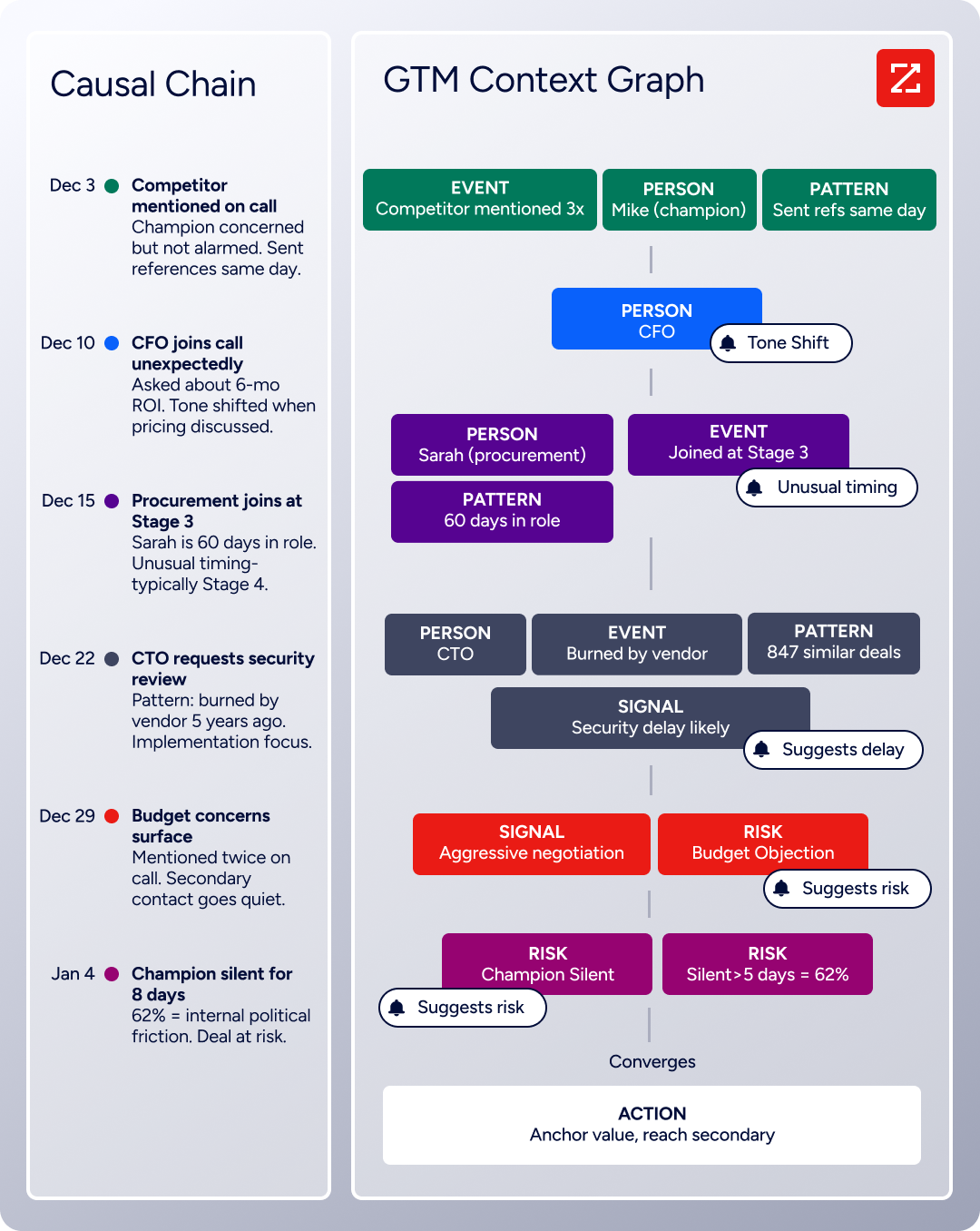
Processing 1.5B+ data points daily, the GTM Context Graph combines ZoomInfo's third-party B2B data with a customer's own CRM records, conversation transcripts, email interactions, and behavioral signals. The result is an intelligence layer that captures not just what happened in a deal, but why it happened.
A CRM records that a deal moved from Stage 3 to Stage 4. Conversation intelligence captures that the CFO joined the last call and asked about six-month ROI. Intent data shows the company is researching your competitor.
The GTM Context Graph connects those signals to patterns across thousands of similar deals and surfaces what they mean: this deal is accelerating because executive sponsorship entered at the right moment.
That reasoning flows into every downstream action. Follow-up emails address the specific concern the CFO raised. Targeting plays focus on accounts whose signal patterns match your actual wins. Forecasts weight deals by buying evidence rather than stage labels.
Emailable can tell you the CFO's email address is valid. ZoomInfo can tell you the CFO just joined a call, asked the question that signals deal acceleration, and suggest the best way to follow up.
"That combination of our internal CRM data, external signals, and AI that's given all that context has helped us craft very specific account- and persona-based messages. And people have responded to them right away." (Seismic)
Universal Access: Use the intelligence anywhere.
ZoomInfo delivers its data and intelligence through three channels, so no team is locked into a single interface.
GTM Workspace gives sellers a single screen where prioritized accounts, AI-drafted outreach, and deal execution converge. AI agents handle account research, generate follow-ups, monitor signals, and update CRM fields, all drawing from the GTM Context Graph.
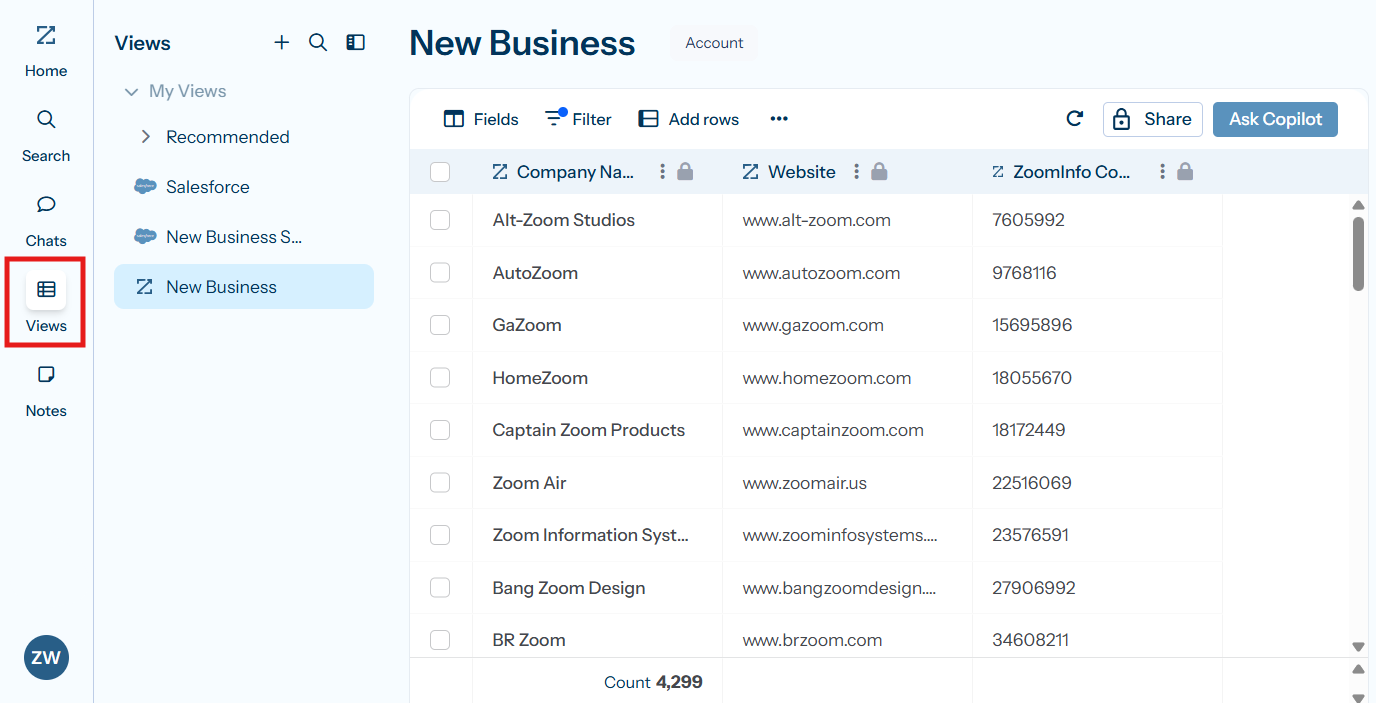
Source: ZoomInfo
Seismic's sales team attributed 39% of active pipeline to opportunities identified or influenced by ZoomInfo signals and reported 54% productivity gains.
GTM Studio gives marketers, RevOps, and GTM engineers an AI-powered orchestration canvas. Teams describe audiences in natural language, enrich with first- and third-party data, define triggers, and launch multi-channel plays without engineering support. Expansion plays that used to take 3 weeks now launch in 30 minutes. Building on that orchestration, ZoomInfo Agent Teams run complete GTM plays end to end: coordinated specialist agents share context, work from each account's current state, and act within the approvals and limits you set. They run in GTM Studio and headless through GTM.AI.
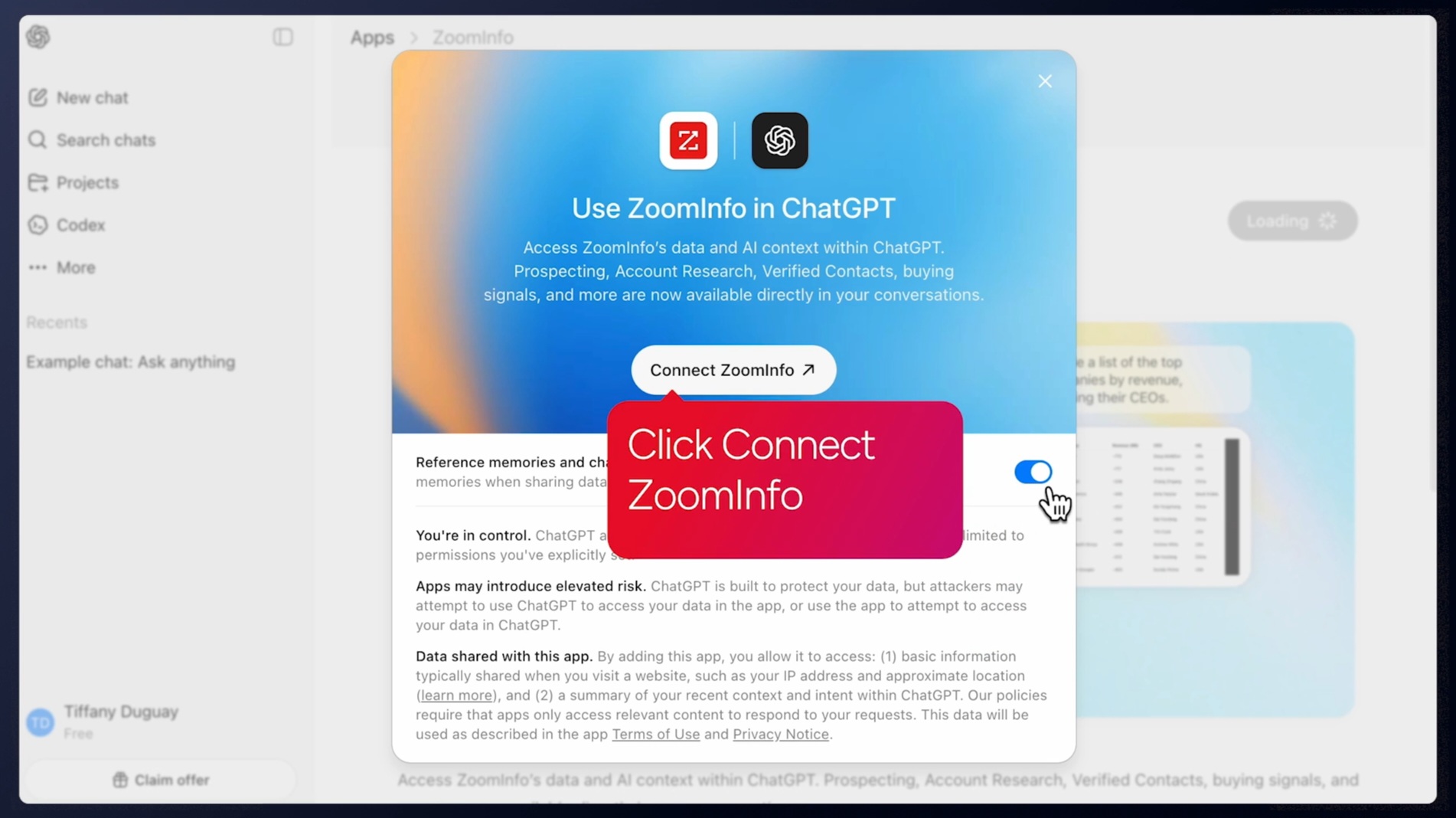
APIs and MCP expose the same intelligence to any custom agent, internal tool, or partner platform. The MCP server connects AI models directly to ZoomInfo's data as a native tool, currently supporting Claude and ChatGPT. BDO Canada reported an 87% reduction in dashboard update time using ZoomInfo's API.
Source: ZoomInfo
All three channels draw from one GTM Context Graph: the same data, the same intelligence, the same continuously learning model. The choice of where to work never limits the intelligence available.
Data Operations: Built-in enrichment and hygiene at scale.
ZoomInfo Operations automates the data quality work that Emailable addresses, and extends it.
Automated deduplication, verification, and multi-vendor enrichment from approximately 60 vendors via a codeless interface keep CRM data clean. Perimeter protection blocks bad data at entry, preventing the list decay that forces periodic bulk cleaning.
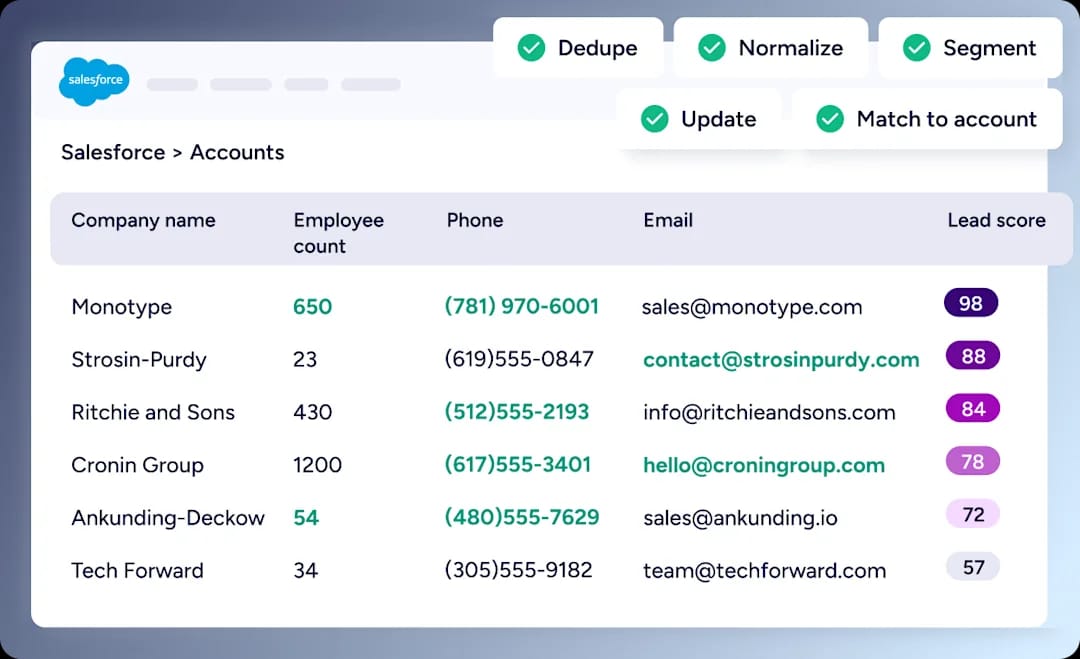
Source: ZoomInfo
Lead routing via round-robin, territory rules, and lead-to-account matching using company hierarchies ensures verified contacts reach the right rep. Momentive cut speed-to-lead from 20 minutes to 60 seconds using these capabilities.
Where Emailable requires manual re-uploads to maintain list hygiene, ZoomInfo's operations layer runs continuously, enriching, deduplicating, and routing data so the system stays current without intervention.
Pricing: Custom-quoted, consumption-based.
ZoomInfo uses a consumption-based pricing model with no publicly listed prices.
Costs scale around seats (user access), credits (export volume), and features selected. Sales, Marketing, and Operations products each have tiered plans (Professional, Advanced, Enterprise) with increasing capabilities at each level.
ZoomInfo Lite provides a permanent free tier (no credit card, no time limit) with access to the B2B database, 10 monthly export credits, individual and company search, the Chrome extension, and WebSights Lite for website visitor identification. A separate 7-day free trial provides access to core paid features.
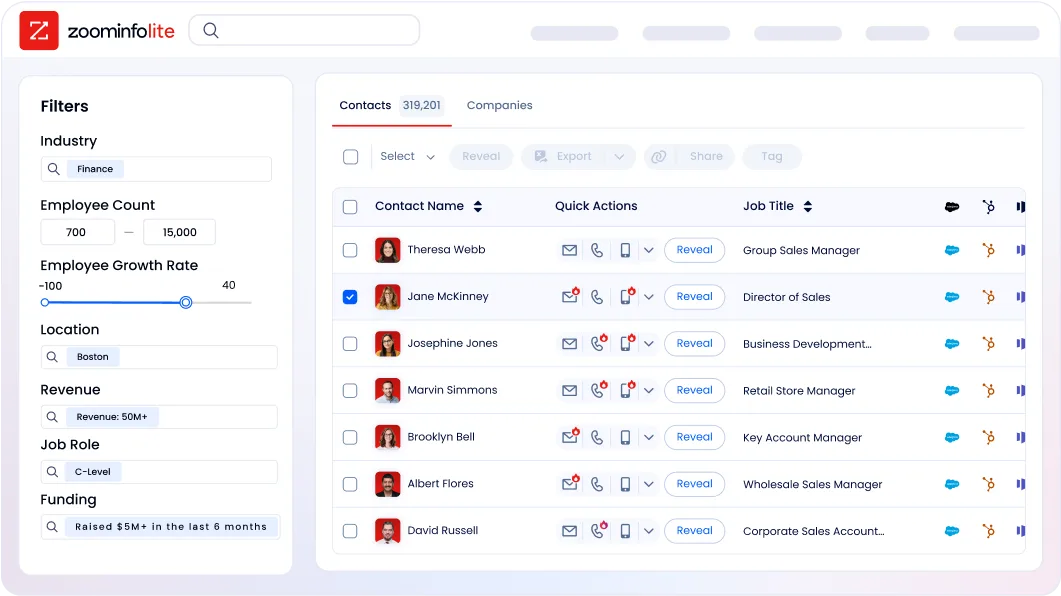
ZoomInfo is priced for teams that treat data as infrastructure, not a one-off expense. The ROI case rests on documented outcomes: Snowflake saw 200% higher conversion rates on top-scoring accounts; Thomson Reuters increased closed-won deals by 40%.
Emailable or ZoomInfo: Comparison Summary
Emailable | ZoomInfo | |
|---|---|---|
Primary focus | Email verification and list hygiene | B2B data and GTM platform |
Email verification | Core product with 99% guarantee | Built-in via NeverBounce acquisition |
Contact database | None (verify only) | 500M contacts, 200M+ verified emails |
Company intelligence | None | 100M companies with 300+ attributes, technographics, org charts |
Buyer intent signals | None | 210M IP-to-Org pairings, Guided Intent |
AI capabilities | None | GTM Context Graph, AI agents, AI-drafted outreach |
Integrations | 50+ native, plus Zapier and Make | 120+ marketplace partners, API, MCP |
Free entry point | 250 credits, no credit card | ZoomInfo Lite (permanent free tier) + 7-day trial |
Pricing model | Credit-based, transparent | Consumption-based, custom-quoted |
Security | SOC 2 Type II, GDPR, CCPA | ISO 27001, ISO 27701, SOC 2 Type II, GDPR, CCPA |
Best for | Teams needing focused email list cleaning | Teams needing verified data plus intelligence and execution |
Final Verdict
The choice between Emailable and ZoomInfo depends on whether your need stops at email verification or extends into the broader go-to-market workflow.
Choose Emailable if your primary need is cleaning and verifying existing email lists before campaigns. The platform delivers fast, accurate verification with a clear guarantee, simple credit-based pricing, and enough integrations to fit most marketing stacks. For email marketers, agencies managing client lists, and developers building signup validation, Emailable handles the hygiene job efficiently and affordably.
Choose ZoomInfo if email verification is just one piece of what your team needs. ZoomInfo provides the verified contacts themselves, along with the company intelligence, buyer intent signals, conversation analysis, and AI-powered execution tools that turn clean data into pipeline. With Agent Teams, coordinated specialist agents carry that context through complete go-to-market plays, working from each account's current state and acting within the approvals and limits you set.
For sales teams, marketing organizations, and RevOps leaders who need one platform for finding, understanding, and engaging buyers, ZoomInfo replaces the patchwork of point solutions with a single intelligence layer that works across every tool and workflow.
Get started with ZoomInfo here.
The fundamental difference is scope. Emailable ensures your emails reach real inboxes. ZoomInfo ensures they reach the right people, at the right time, with the right message.
Emailable FAQ
Is Emailable accurate?
Emailable backs its accuracy with a formal guarantee: 99% deliverability on non-Microsoft addresses and 97% on Microsoft-hosted addresses (Office 365, Outlook, Hotmail).
The guarantee covers lists of 1,000+ emails sent within 24 hours of verification, with a full credit refund for qualifying bounces. The platform runs SMTP-level mailbox confirmation without sending test emails, which avoids triggering spam filters during verification.
How fast is Emailable's bulk verification?
Emailable processes over 30,000 emails per minute, completing a 100,000-address list in under three minutes. This speed holds for standard accounts; enterprise customers can request custom rate limits for higher throughput. Results appear in real time while verification runs, and users can begin exporting before the full list finishes processing.
Does Emailable have a free plan?
Emailable offers 250 free credits at signup with no credit card required, but this is a one-time starter allowance rather than an ongoing free plan. Credits never expire. After the initial 250, the minimum purchase is 5,000 credits.
ZoomInfo offers a permanent free tier called ZoomInfo Lite with 10 monthly export credits and access to its B2B database, along with a separate 7-day free trial of paid features.
Can Emailable find new email addresses?
No. Emailable verifies whether existing email addresses are deliverable. It does not discover or find new contacts. Teams that need both email finding and verification must pair Emailable with a separate prospecting tool.
ZoomInfo combines both functions: its database contains 200M+ verified business email addresses searchable by title, company, industry, and 300+ other attributes, with verification built into the data pipeline.
Does Emailable offer automatic list re-verification?
No. Emailable does not support scheduled re-verification or automatic hygiene for new contacts entering a CRM. Users must manually re-upload lists or build custom API workflows to maintain list freshness over time. This is one of the most commonly requested features in user reviews on G2 and Capterra.
What integrations does Emailable support?
Emailable offers 50+ native integrations including ActiveCampaign, Mailchimp, HubSpot, Salesforce, Klaviyo, Brevo, and SendGrid. Additional connections are available through Zapier and Make.
Users can import lists from a connected ESP, verify them, and push results back without file downloads. Some integrations have depth limitations; HubSpot users report issues with custom fields and workflow automation.
How does Emailable handle catch-all email addresses?
Catch-all (accept-all) mail servers accept messages to any address at the domain, making it impossible to confirm individual mailboxes with certainty. Emailable flags these addresses as "Risky" rather than "Deliverable."
For B2B lists where corporate mail servers commonly use catch-all configurations, this can result in legitimate double-opt-in contacts being suppressed unnecessarily. Users can configure export filters to include or exclude these addresses based on their risk tolerance.
What security certifications does Emailable hold?
Emailable holds SOC 2 Type II certification (independently audited), with ISO 27001 certified data centers.
The platform is GDPR and CCPA compliant, with a Trust Center at trust.emailable.com consolidating certifications, a Data Processing Agreement, and sub-processor disclosures. Data retention is user-configurable with a maximum of 30 days, after which all data is permanently auto-deleted. SSO is available via Google, Microsoft, GitHub, LinkedIn, and OpenID Connect.
Related breakdowns to help you choose:
