
Fathom has become one of the most popular AI meeting assistants on the market, used by over 290,000 companies and holding a perfect 5.0 rating across 3,000+ G2 reviews. It records, transcribes, and summarizes your meetings across Zoom, Google Meet, and Microsoft Teams, then extracts action items and delivers everything to your inbox within seconds of a call ending.
But Fathom only captures what happens on the call.
On its own, Fathom cannot push meeting outcomes into your CRM, route action items to your project management tool, alert your team in Slack when a competitor is mentioned, or connect meeting data to the rest of your go-to-market stack. The insights stay inside Fathom unless the right integrations carry them into the tools where your team works.
The right integrations close those gaps. They turn Fathom's AI summaries into CRM records, project tasks, knowledge base entries, and team notifications, so meeting data flows into action without manual copying, forwarding, or logging.
This guide covers the strongest integration for each of the jobs Fathom users most commonly need done:
Enrich your CRM contacts with verified B2B data and buyer intent signals to add intelligence Fathom's transcripts cannot capture
Sync meeting summaries and deal insights directly into HubSpot records without manual CRM logging
Attach call notes to Salesforce Contacts, Accounts, and Opportunities automatically after every meeting
Deliver real-time meeting highlights and AI summaries to your team's Slack channels
Convert meeting action items into tracked project tasks in Asana with recording timestamp links
Connect Fathom's meeting output to 9,000+ apps through no-code workflow automation
Build a searchable meeting knowledge base with structured database organization in Notion
Each section walks through how the integration connects with Fathom, what data flows between the platforms, pricing, and who benefits most.
Best Fathom Integrations at a Glance | |
|---|---|
Best Fathom Integration for B2B Data Enrichment and Go-to-Market Intelligence. Adds the data layer Fathom's transcripts cannot capture: verified contact information, buyer intent signals, and company intelligence from the largest B2B database, giving your team the context to act on what meetings reveal. | |
Best Fathom Integration for Eliminating Post-Call CRM Data Entry. Syncs AI-generated meeting summaries, action items, and deal insights into HubSpot contact, company, and deal records through a native first-party integration with over 19,000 marketplace installs. | |
Best Fathom Integration for Enterprise Sales CRM Logging. Attaches Fathom's AI-generated call notes to matched Salesforce Contacts, Accounts, and open Opportunities after every meeting, with field-level property sync and Deal View linking every conversation to its Opportunity record. | |
Best Fathom Integration for Real-Time Meeting Intelligence Delivery. Surfaces meeting highlights during live calls, posts AI summaries when recordings finish processing, and pushes keyword-triggered alerts into channels so your team acts on call insights without waiting for a debrief. | |
Best Fathom Integration for Converting Meeting Action Items into Tracked Project Tasks. Turns Fathom's AI-detected action items into Asana tasks with recording timestamp links, so assignees can jump to the exact moment in the call where the work was discussed. | |
Best Fathom Integration for No-Code Workflow Automation Across Your Tool Stack. Routes meeting recordings, AI summaries, transcripts, action items, and highlights to over 9,000 connected apps through five separate trigger events, extending Fathom's reach to every tool in your stack. | |
Best Fathom Integration for Building a Searchable Meeting Knowledge Base. Archives AI meeting summaries and full transcripts into structured Notion databases with filterable metadata properties, turning every recorded conversation into a searchable, organized knowledge asset. |
What Is Fathom?
Source: Fathom
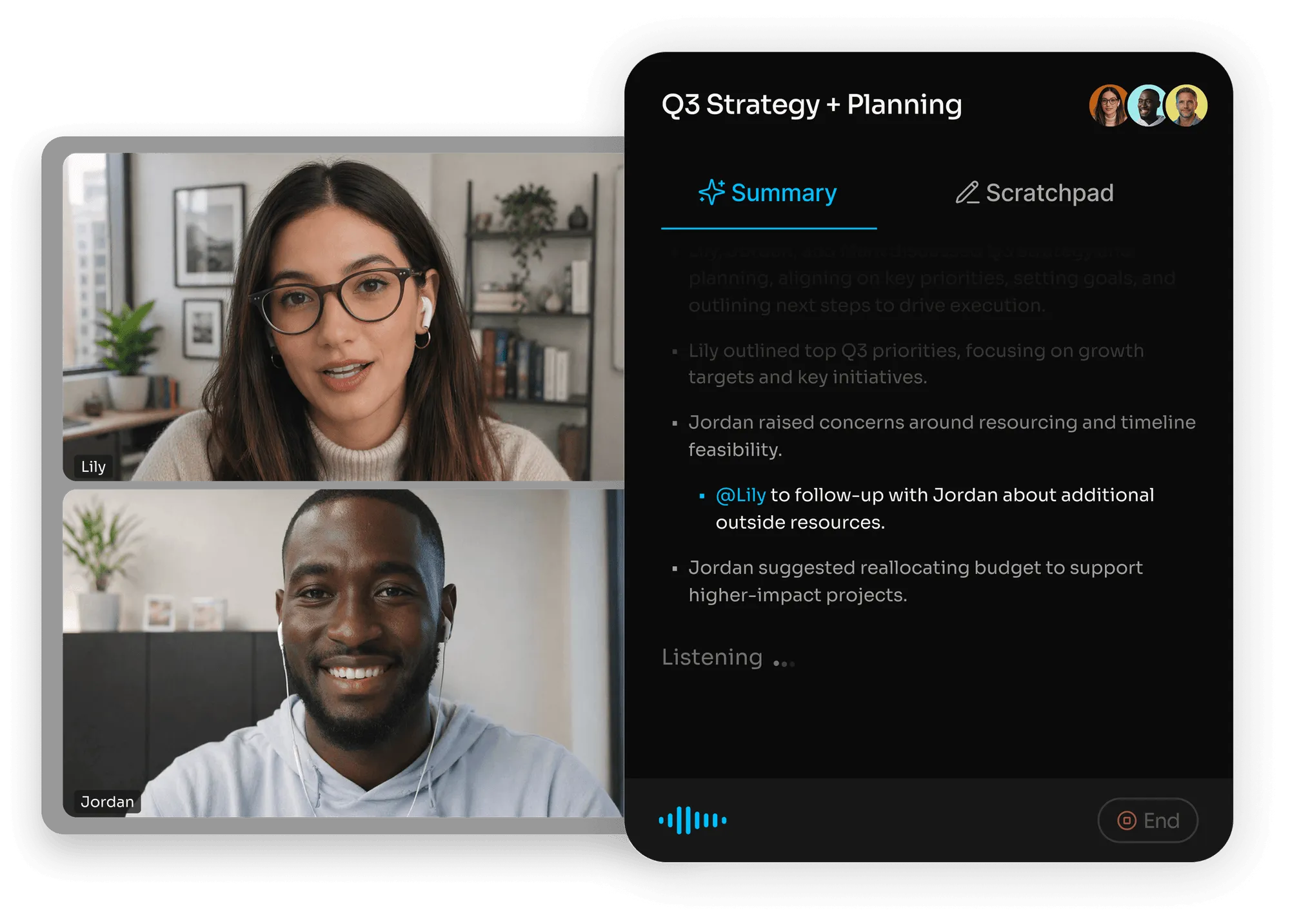
Fathom is an AI meeting assistant that records, transcribes, and summarizes meetings across Zoom, Google Meet, and Microsoft Teams. The platform delivers AI summaries within seconds of a call ending, extracts action items with assignee detection, and provides searchable transcripts that handle multiple speakers and accents.
Fathom positions itself as more than a transcription tool. G2 named it the No. 1 Highest Satisfaction product of 2024 out of more than 100,000 products, and it is the most-installed AI app on both the Zoom and HubSpot marketplaces. Users report saving 6+ hours per week and moving 3x faster from insight to next steps.
Fathom's integration ecosystem spans CRM, collaboration, project management, and workflow automation tools.
The platform offers native integrations with HubSpot, Salesforce, Slack, and Asana, along with a Zapier connector that extends its reach to thousands of additional apps.
Fathom also provides a public API with TypeScript and Python SDKs, webhooks for event-driven automation, and an MCP server for AI assistant connectivity.
On the AI assistant side, Fathom connects with ChatGPT and Claude via MCP. The free plan includes unlimited recordings, transcriptions, and API access, while paid tiers unlock CRM field sync, team collaboration, coaching scorecards, and unlimited automation integrations.
Source: Fathom
The integration categories available to Fathom users include:
CRM: HubSpot, Salesforce, plus additional CRMs via Zapier
Team communication: Slack for real-time highlights, summaries, and keyword alerts
Project management: Asana for native action item sync, plus ClickUp and Jira via Zapier
Workflow automation: Zapier, Make, and n8n for routing meeting data to thousands of apps
Knowledge management: Notion, Google Drive, and Confluence via middleware
AI assistants: ChatGPT and Claude via MCP server
Video conferencing: Zoom, Google Meet, Microsoft Teams
With that ecosystem as context, here are the seven integrations we selected as the best options for extending Fathom's capabilities across the categories that matter most to meeting-driven teams.
1. ZoomInfo: Best Fathom Integration for B2B Data Enrichment and Go-to-Market Intelligence
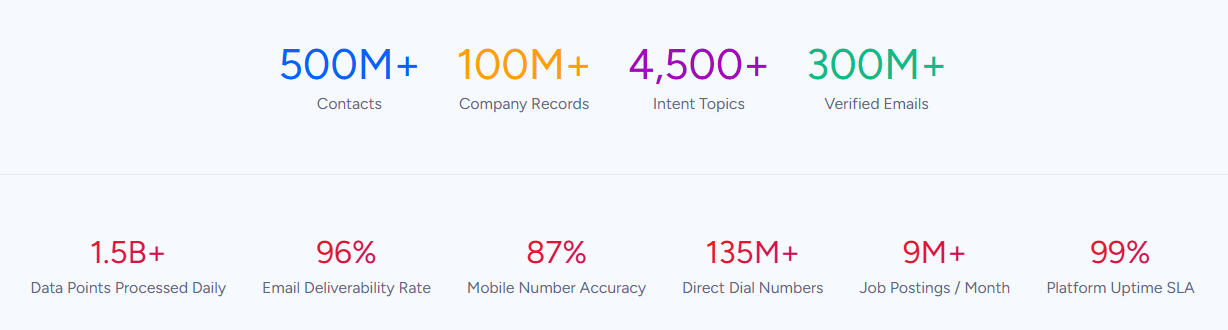
ZoomInfo is an all-in-one go-to-market platform built on the largest B2B data foundation in the industry: 500M contacts, 100M companies, 135M+ verified phone numbers, and 200M+ verified business email addresses.
While ZoomInfo and Fathom do not share a native direct integration, they serve complementary roles in any go-to-market workflow: Fathom captures what happens on the call, and ZoomInfo provides the verified data and buying signals that give your team the context to act on what those calls reveal.
For teams that rely on Fathom for meeting intelligence, ZoomInfo fills the gaps that conversation data alone cannot close:
Verified contact information (direct dials, business emails) so reps can reach the right people before and after meetings, not just the attendees who happened to be in the room
Buyer intent signals that reveal which accounts are actively researching your category, so your team prioritizes follow-ups from Fathom calls based on real buying behavior
Company intelligence (company attributes, technographics, org charts) that provides pre-call context Fathom's transcripts cannot generate
CRM enrichment that keeps the same records Fathom syncs meeting notes to accurate and complete
How ZoomInfo Complements Fathom in Your GTM Stack
Fathom captures every word spoken on a call.
ZoomInfo captures everything that happens before the call starts and after it ends: which accounts are researching your category, who the decision-makers are, how to reach them, and what their company's technology stack looks like.
The two platforms connect through a shared workflow rather than a direct API integration. Both sync data into the same CRM systems (HubSpot, Salesforce), and both support Zapier for workflow automation, so meeting intelligence from Fathom and contact intelligence from ZoomInfo converge on the same records.
A Fathom call summary lands on a HubSpot deal record; ZoomInfo's enrichment ensures that record already has verified contact data, company context, and intent signals attached to it.
Pre-Call Intelligence: Walk into Every Meeting with Full Account Context
Fathom's AI summaries tell you what happened on the last call.
ZoomInfo tells you what's happening at the account right now.
Before a meeting, ZoomInfo's Contact & Company Search surfaces the full buying committee: names, titles, direct dials, verified emails, and department structure, drawn from 300+ company attributes.
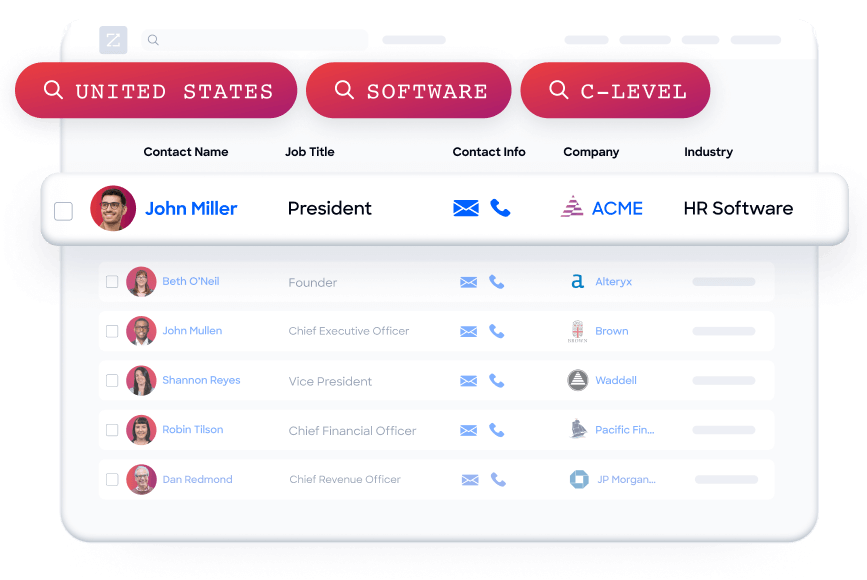
A rep preparing for a renewal call can see not just who will be in the room, but who else at the account influences the deal, what technologies the company runs, and whether the account shows intent signals for a competitor.
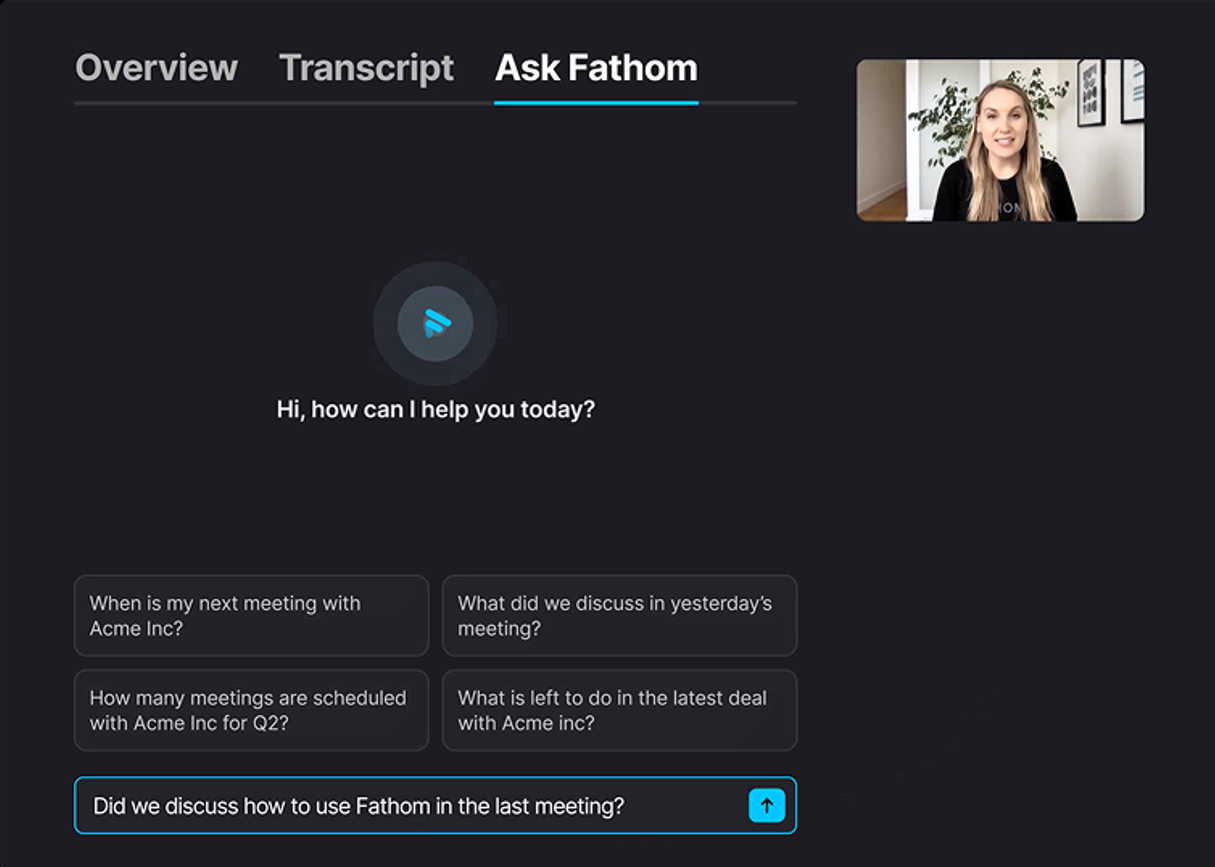
ZoomInfo in action: A customer success manager has a quarterly business review with a SaaS client next week. Fathom's Ask Fathom feature surfaces that the client mentioned budget concerns in three of the last five calls.
ZoomInfo's intent data shows the same account has been researching "contract negotiation software" for two weeks, and the org chart reveals a new VP of Finance who joined last quarter. The CS manager walks into the QBR knowing the real risk: a new finance leader evaluating whether to consolidate vendors, not just a routine budget conversation.
Buyer Intent Data: Prioritize Follow-Ups Based on Real Buying Signals
Fathom tells you what a prospect said on a call.
ZoomInfo's Buyer Intent tells you what their entire company is doing when they're not talking to you.
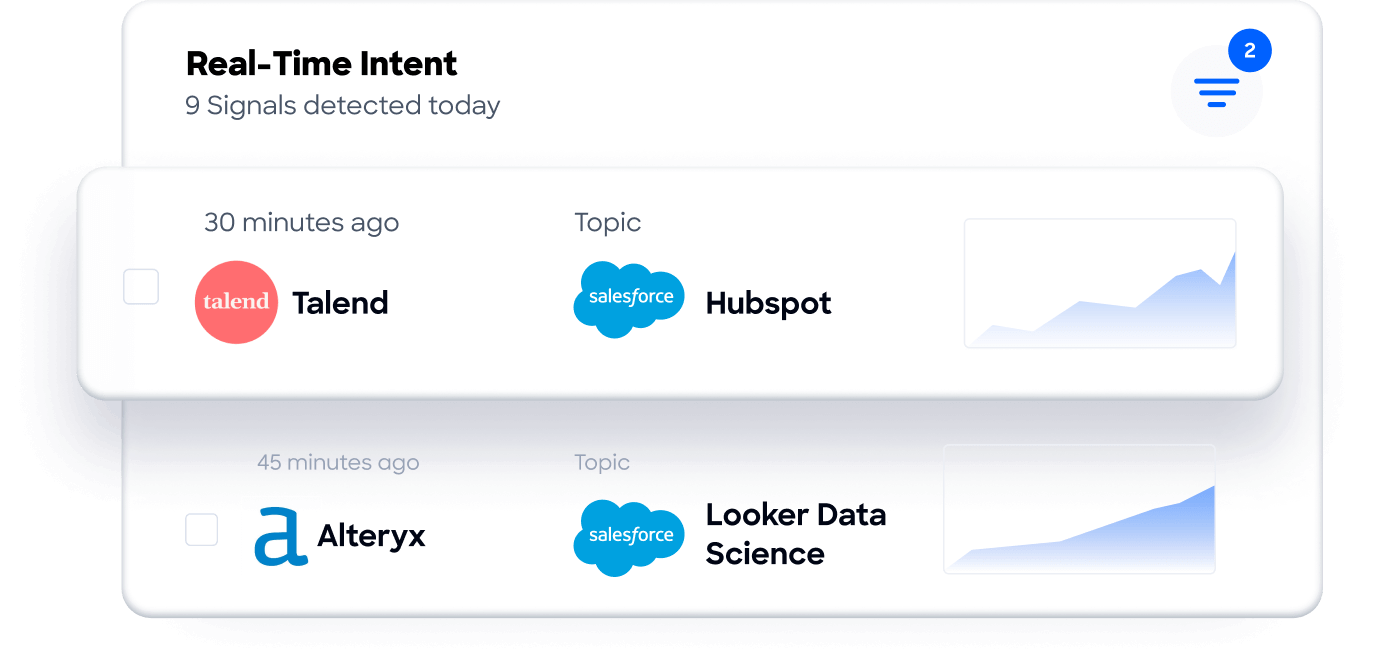
ZoomInfo tracks signals from 210 million IP-to-Organization pairings and 6 trillion+ keyword-to-device pairings monthly, revealing which companies are actively researching topics relevant to your product.
Guided Intent, exclusive to ZoomInfo, identifies the research topics historically correlated with deal success in your business, so signals are calibrated to your actual win patterns rather than generic keyword thresholds.
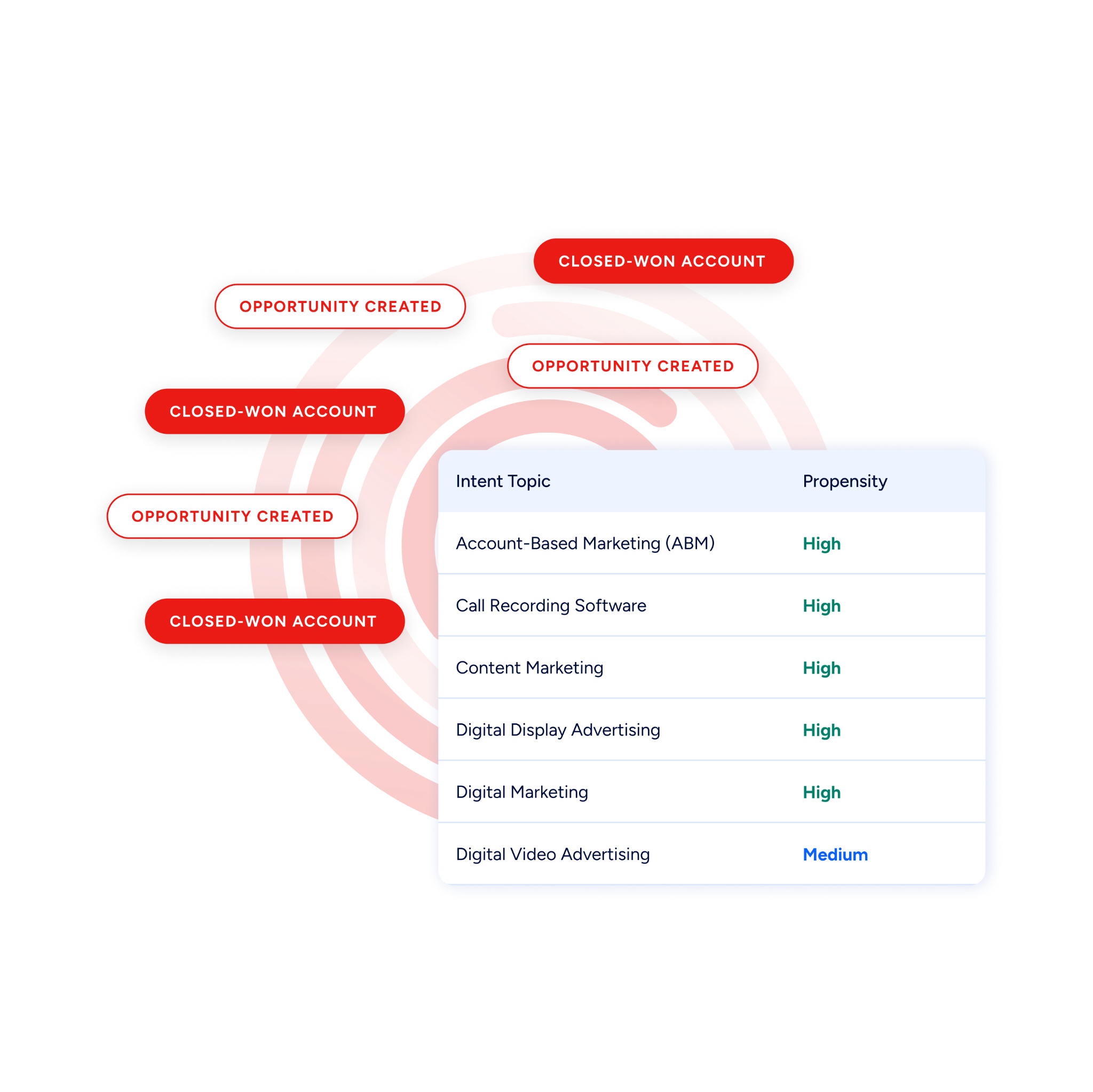
For Fathom users, this means the follow-up strategy after a call can draw on buying signals that transcripts alone cannot capture. A discovery call that felt lukewarm might be attached to an account aggressively researching your category: intent data changes the priority.
Contact Data Enrichment: Keep Your CRM Records Accurate
Fathom syncs meeting summaries to CRM records.
ZoomInfo ensures those records have the right contact data in the first place.
When a new contact enters HubSpot or Salesforce, ZoomInfo automatically appends the verified business email, direct dial, title, department, and seniority, plus company attributes and technographic data covering 30,000+ technologies.
The enrichment runs continuously through a verification pipeline backed by 300+ human researchers, reaching up to 95% accuracy on first-party data.
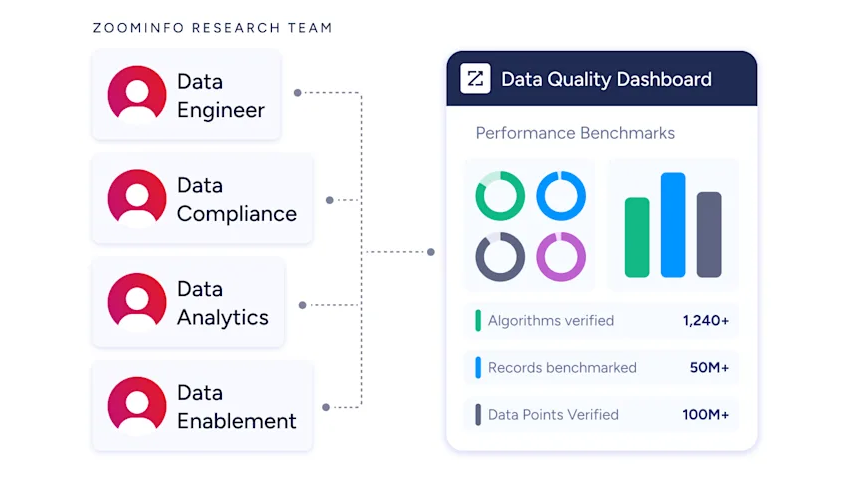
In a Fortune 500 competitive RFP analyzing 25 million contacts across vendors, the independent consultant concluded that "no other competitor came even close."
This matters for Fathom's CRM integrations specifically: Fathom matches meeting attendees to CRM records by email address. If a CRM contact has a stale or missing email, the match fails and the meeting summary doesn't attach.
ZoomInfo's continuous enrichment keeps those email records current, improving the match rate for every Fathom call that syncs downstream.
Universal Access Across Your Stack
ZoomInfo's intelligence is accessible through multiple surfaces. APIs and MCP deliver ZoomInfo's data into any tool or AI agent. GTM Workspace gives sellers a single surface where prioritized accounts, AI-drafted outreach, and deal execution converge.
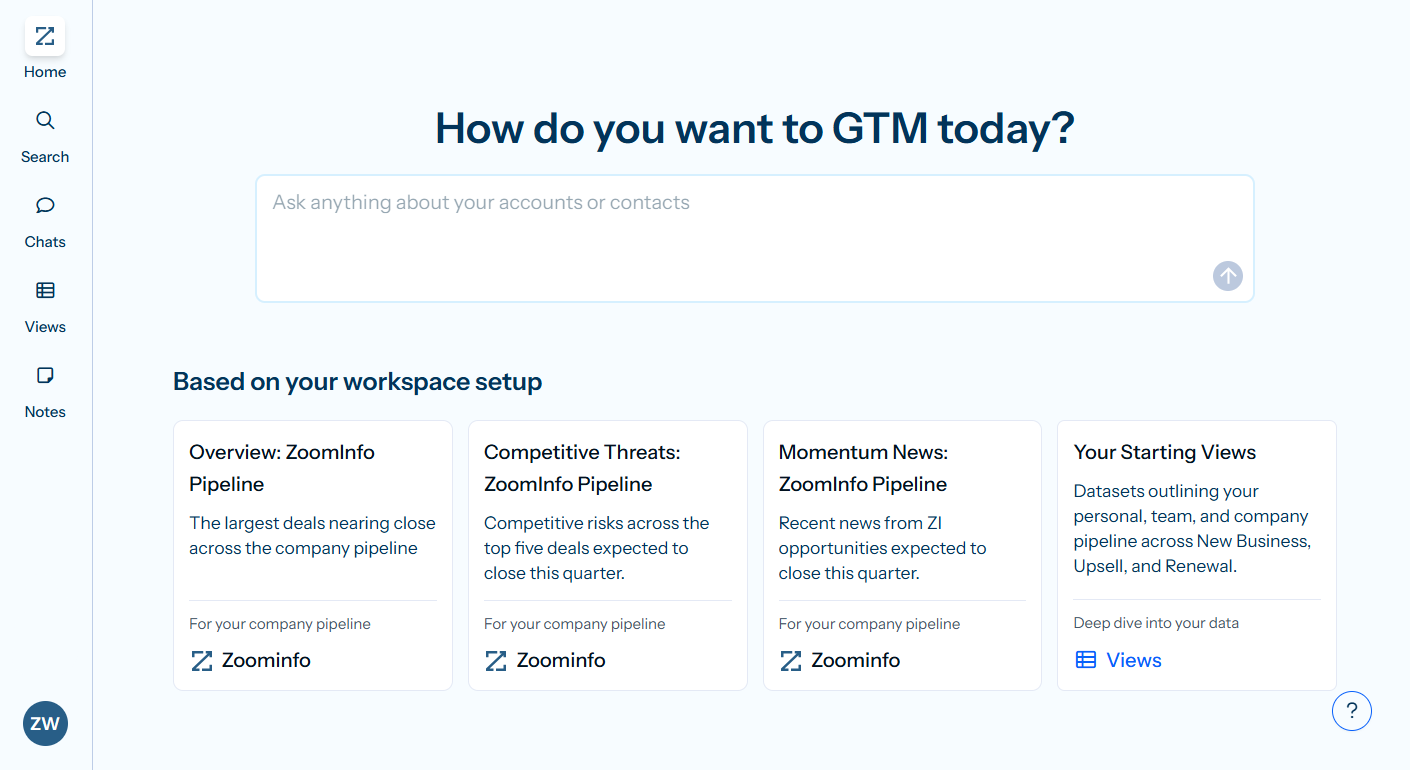
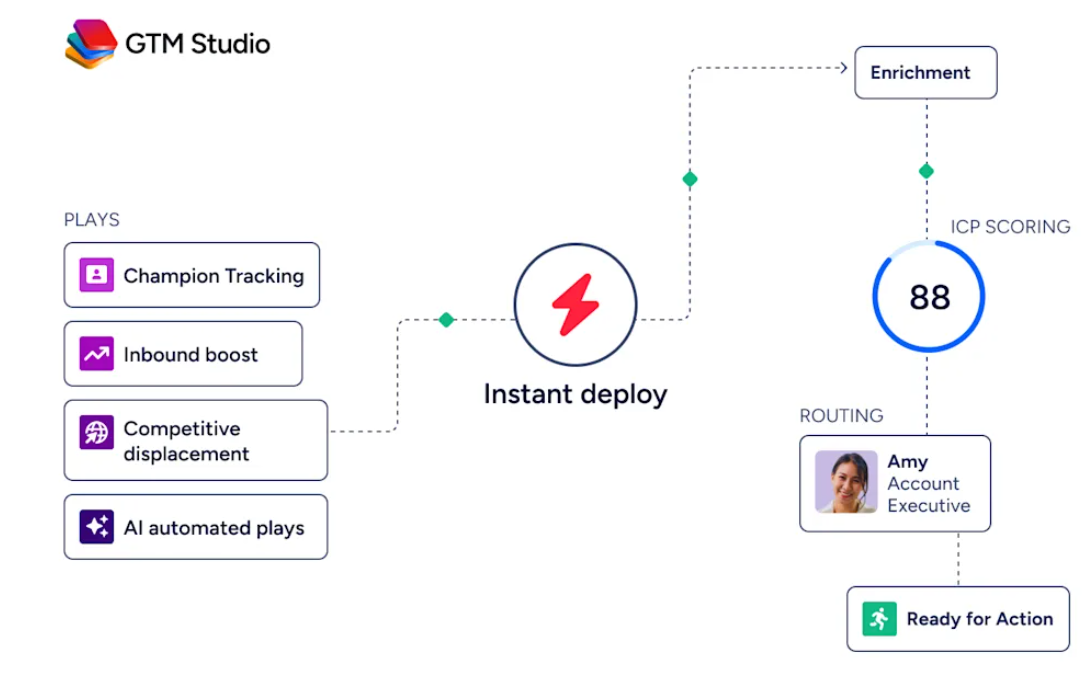
GTM Studio gives marketers and RevOps teams a builder for audience definition, campaign orchestration, and pipeline measurement.
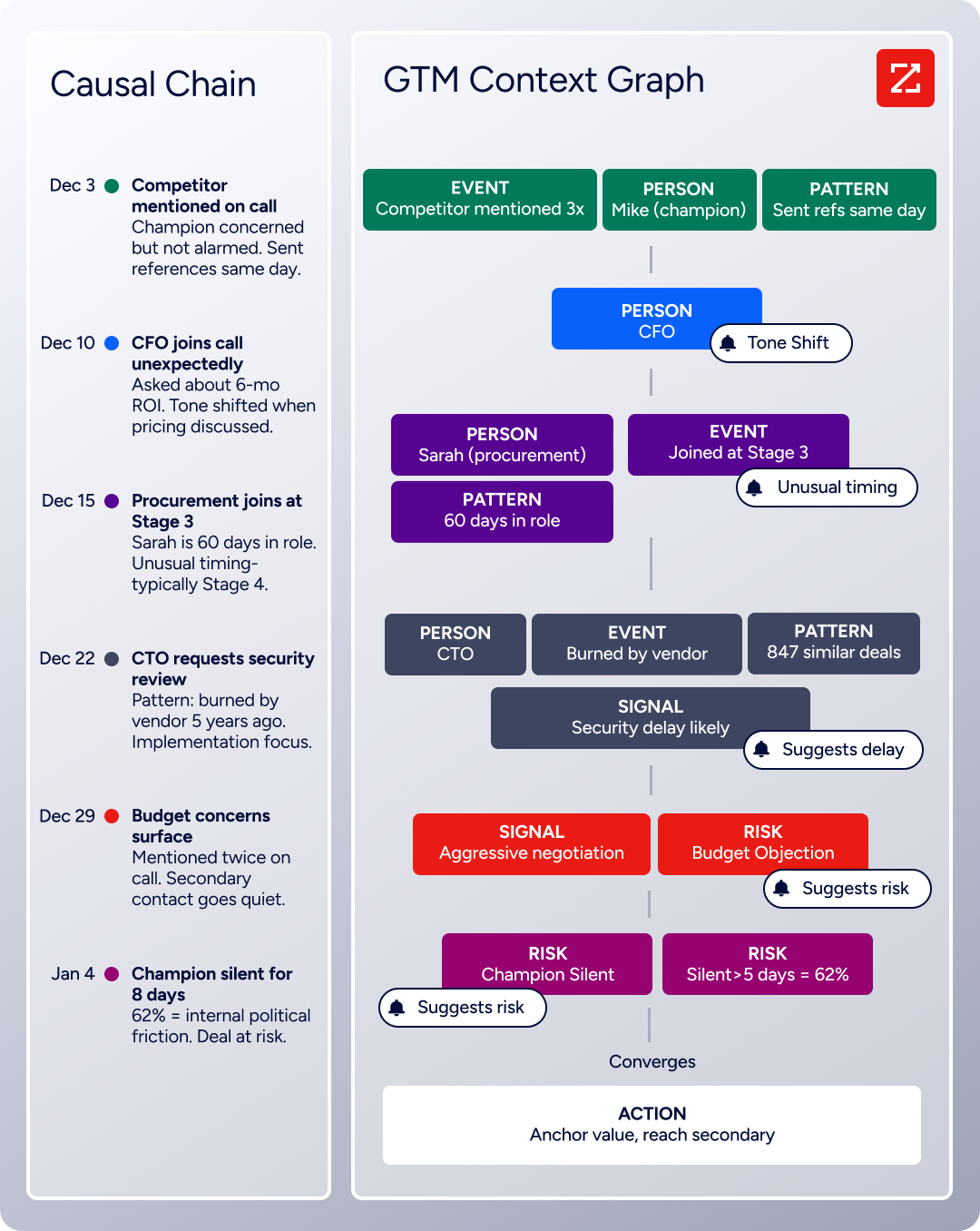
The GTM Context Graph, which processes 1.5B+ data points daily, fuses ZoomInfo's B2B data with CRM records, conversation intelligence, and behavioral signals into a single intelligence layer.
Seismic's sales team attributed 39% of active pipeline to opportunities identified or influenced by ZoomInfo signals, reporting 54% productivity gains and saving 11.5 hours per week per seller. (Seismic Case Study)
ZoomInfo Pricing
ZoomInfo uses a consumption-based pricing model with custom quotes based on usage, users, credit volume, and features.
It is organized into Sales, Marketing, and standalone product lines, each in Professional, Advanced, and Enterprise tiers. Advanced adds intent signals and website visitor tracking; Enterprise adds AI-generated account summaries, custom intent topics, and advanced workflows.
ZoomInfo Lite is a permanent free tier (no credit card, no time limit) with 10 monthly export credits, searches, the Chrome extension, and CRM integrations.
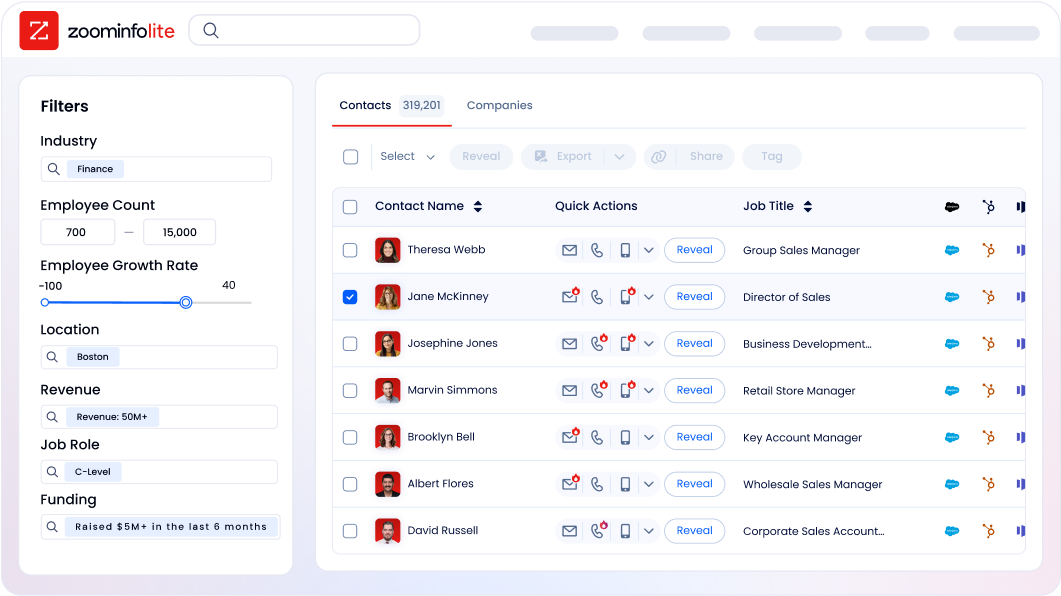
A separate 7-day free trial covers paid features including intent data and AI capabilities.
Who Should Use ZoomInfo Alongside Fathom?
Sales teams that need pre-call intelligence beyond what Fathom's meeting history provides: ZoomInfo surfaces the buying committee, company context, and intent signals before the call happens, so reps walk in prepared rather than discovering context mid-conversation
Revenue operations teams that need CRM records enriched with verified contact data: ZoomInfo keeps the same records Fathom syncs to accurate and complete, improving match rates for Fathom's CRM integrations
Teams running account-based motions that need to prioritize which Fathom follow-ups to act on first, based on real buying signals rather than gut feel from the last call
2. HubSpot: Best Fathom Integration for Eliminating Post-Call CRM Data Entry
Source: HubSpot
HubSpot is a CRM and go-to-market platform that integrates with Fathom to sync AI-generated meeting summaries, action items, and deal insights into deal records, contact timelines, and company records. The integration eliminates the manual CRM logging that follows every sales and customer success call.
Key integration capabilities include:
Automatic post-meeting sync of Fathom summaries and action items to matched HubSpot Contacts, Companies, and open Deals
Field-level property mapping that writes structured meeting outcomes into specific HubSpot contact and deal fields (Business plan)
Activity timeline events with direct links back to the full Fathom recording and AI summary
HubSpot workflow automation triggered by data that lands in HubSpot properties from synced Fathom meetings
How HubSpot Integrates with Fathom
Source: HubSpot
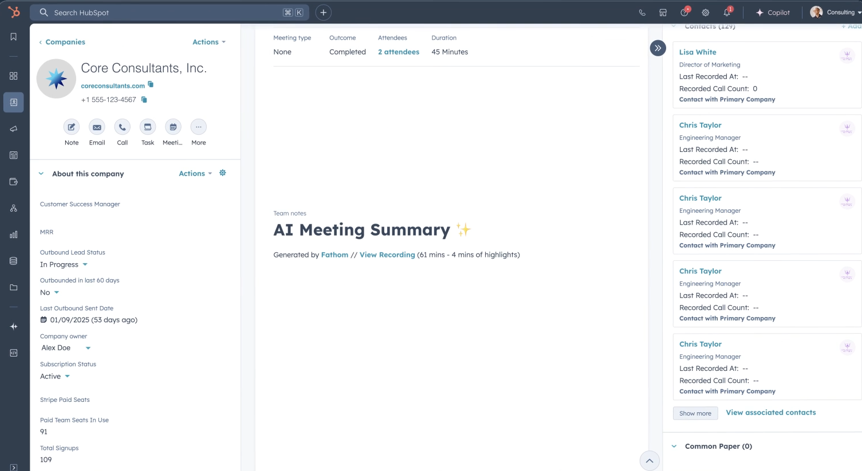
The Fathom-HubSpot integration is a native, first-party connection. When a Fathom meeting ends and the AI finishes processing the transcript, the integration matches meeting attendees against existing HubSpot Contact and Company records by comparing email addresses on the calendar invite.
Fathom is the most-installed AI app on the HubSpot Marketplace, with over 19,000 installs and a 4.7-star rating. HubSpot named Fathom one of its Essential Apps for Sales 2024 and its 2025 Most Used App.
Two functional modes exist depending on the Fathom plan:
Basic CRM sync (Free and Premium plans, up to 3 users per domain): Fathom attaches the AI summary and action items as an activity note on the matched HubSpot Contact, Company, and Deal records.
Field-level sync (Business plan, unlimited users per domain): Fathom writes structured sections of the summary (next steps, discussed topics, outcome notes) into designated HubSpot contact or deal properties, making meeting outcomes available for list views, deal-stage filters, segmentation, and reporting dashboards.
1. Native Post-Meeting Sync to Contacts, Companies, and Deals.
The foundation of the integration is the automatic post-meeting push that fires as soon as Fathom finishes processing a recorded call. If a meeting has multiple attendees who map to different HubSpot contacts, Fathom attaches the summary to each matched record independently.
The sync covers three HubSpot objects simultaneously: the Contact record for each attendee matched in HubSpot, the parent Company record, and any open Deal associated with those contacts.
For teams whose reps handle 4 to 8 external calls per day, this eliminates 15 to 30 minutes of post-call CRM logging per rep per day.
2. Field-Level Property Mapping for Structured Data Capture.
On the Business plan, specific structured sections of the Fathom summary can map to named HubSpot contact or deal properties. A deal property called "Last Call Outcome" that reads "Prospect requested pricing comparison; decision by end of quarter" is more useful as a workflow trigger than a timeline note with the same information.
Teams running HubSpot-based sequences or playbooks can use field-level sync data to determine which next step to trigger, which segment a contact falls into, or how to prioritize deals in a forecast dashboard.
3. Activity Timeline Events with Recording Links.
Every meeting synced from Fathom creates a timeline event on the matched HubSpot Contact and Deal records showing the meeting date, time, and a direct link back to the full Fathom recording and AI summary.
Any team member reviewing a deal in HubSpot can click through to the actual meeting recording or transcript without needing a Fathom login or knowing which call to look for.
4. HubSpot Workflow Triggers from Synced Meeting Data.
Because Fathom data lands inside actual HubSpot contact and deal properties (on the Business plan), it becomes available as enrollment criteria and triggers for HubSpot's automated workflows.
If Fathom writes "Agreed to trial" into a "Call Outcome" deal property, a HubSpot workflow can move that deal to a "Trial Started" stage and trigger a trial onboarding sequence without the rep touching the CRM.
HubSpot Pricing
HubSpot uses a per-seat, per-hub subscription model with a permanently free CRM tier:
Free CRM: $0, up to 2 users. Basic contact, company, and deal management. Sufficient for Fathom's basic CRM sync.
Sales Hub Starter: Starts at $9/seat/month (annual). Adds email tracking, sequences, and meeting scheduling.
Sales Hub Professional: $90/seat/month (annual), plus a $1,500 one-time onboarding fee. Unlocks advanced workflows, custom reporting, and deal scoring. The tier where Fathom's field-level sync delivers the most value.
Sales Hub Enterprise: $150/seat/month (annual only), plus a $3,500 one-time onboarding fee. Custom objects, predictive lead scoring, and advanced permissions.
On the Fathom side, the native integration is available on all plan tiers. Field-level sync and unlimited CRM users require Fathom's Business plan at $25/user/month (annual).
Who Should Use the HubSpot Integration?
Sales or CS teams that run deal management through HubSpot and currently copy call notes manually into contact or deal records after every meeting: the native sync eliminates that step entirely
Teams that want post-call HubSpot workflows (deal stage changes, follow-up task creation, sequence enrollment) to fire automatically based on what was discussed in a Fathom meeting
Organizations managing high-volume pipelines where post-call CRM hygiene is a consistent bottleneck: meeting data flows into HubSpot within seconds of a call ending, not hours or days later
3. Salesforce: Best Fathom Integration for Enterprise Sales CRM Logging
Source: Fathom
Salesforce is the world's #1 CRM that integrates with Fathom to attach AI-generated call notes to the matched Contact, Account, and Opportunity records in Salesforce, eliminating the manual logging step that separates every customer call from the CRM system of record.
Key integration capabilities include:
Native auto-sync of Fathom summaries as activity notes to Salesforce Contacts, Accounts, and open Opportunities after every meeting
Field-level property sync that writes structured meeting sections into designated Salesforce fields (Business plan)
Deal View aggregating all Fathom calls linked to a Salesforce Opportunity in a single interface with AI summaries and key people identification
Configurable sync modes: automatic (instant post-call push) or manual (rep reviews before push)
How Salesforce Integrates with Fathom
The Fathom-Salesforce integration is native, connecting via the Salesforce API. Once connected through OAuth, the integration operates automatically after every meeting Fathom records. This is a native first-party connector.
1. Native Auto-Sync to Contacts, Accounts, and Opportunities.
When a Fathom-recorded meeting ends, Fathom identifies which Salesforce records to attach the call summary to by matching each attendee's email address against existing Salesforce Contact records.
The AI-generated summary automatically attaches as an activity note to the matched Contact, to the Account that Contact belongs to, and to any open Opportunity associated with that Account. One structural note: the integration does not connect to Salesforce Leads, only to Contacts, Accounts, and Opportunities.
2. Field-Level Property Sync for Structured Reporting.
Business plan subscribers unlock field-level property sync, which writes specific sections of a Fathom summary into designated Salesforce fields rather than only into activity notes.
Next steps can write to a custom field on the Opportunity, objections can populate a dedicated field, and deal context sections can push to any field a Salesforce admin has configured. Those fields then appear in Salesforce list views, reports, dashboards, and pipeline views.
3. Deal View with Salesforce Opportunity Links.
Deal View is Fathom's Business plan feature that aggregates all calls linked to a specific Salesforce Opportunity into a single interface. A manager preparing for a pipeline review can scan AI summaries from all calls in a deal, identify where momentum has stalled, and jump to the Salesforce Opportunity.

Source: Fathom
Ask Fathom is available within Deal View, so a manager can ask a natural-language question across every recorded conversation in the deal.
4. Sync Control and Configuration Options.
Each user chooses between automatic sync (the summary writes to Salesforce the moment a call ends) or manual sync (the rep reviews and approves before pushing). Both modes are available on the same team without requiring a global policy.
Salesforce Pricing
Salesforce operates a tiered per-user, per-month pricing model billed annually. The API access required for the Fathom integration must be enabled at the org level by a Salesforce admin.
Enterprise Edition: $175/user/month, billed annually. Includes API access, workflow automation, and AI for sales.
Unlimited Edition: $350/user/month, billed annually. Full AI suite, conversation intelligence, and Premier Success bundled.
On the Fathom side, the Business plan ($25/user/month billed annually) is required to unlock field-level property sync and Deal View.
Who Should Use the Salesforce Integration?
Enterprise sales teams running Salesforce as the CRM system of record that currently rely on reps to manually log call notes: the native auto-sync eliminates that step and removes the inconsistency that manual logging introduces across a team
Revenue operations teams that need meeting outcomes queryable through Salesforce reports and pipeline dashboards rather than sitting in unstructured notes: field-level sync on the Business plan makes this possible
Teams managing complex, multi-call deals that want a unified deal-level view of every conversation linked back to the Salesforce Opportunity
4. Slack: Best Fathom Integration for Real-Time Meeting Intelligence Delivery
Source: YouTube
Slack is a team communication platform that integrates with Fathom to distribute meeting intelligence (highlights, AI summaries, and keyword-triggered alerts) into the channels where your team already works, closing the gap between what happened on a call and what the rest of your organization knows about it.
Key integration capabilities include:
Real-time highlight clips delivered to Slack channels during live calls, so stakeholders catch critical moments as they happen
Post-meeting AI summary auto-posting to configured channels when a recording finishes processing
AI Search subscription alerts that push Slack notifications whenever new Fathom recordings match tracked keywords or competitor names
Native setup inside Fathom's Settings panel with no third-party automation tool required
How Slack Integrates with Fathom
The Slack integration is native to Fathom, connecting inside Fathom's Settings panel with no Zapier account or third-party connector required.
Channel selection and notification preferences are configured per user, so individual team members can route their own call highlights to the right team or project channel. This is a native first-party integration.
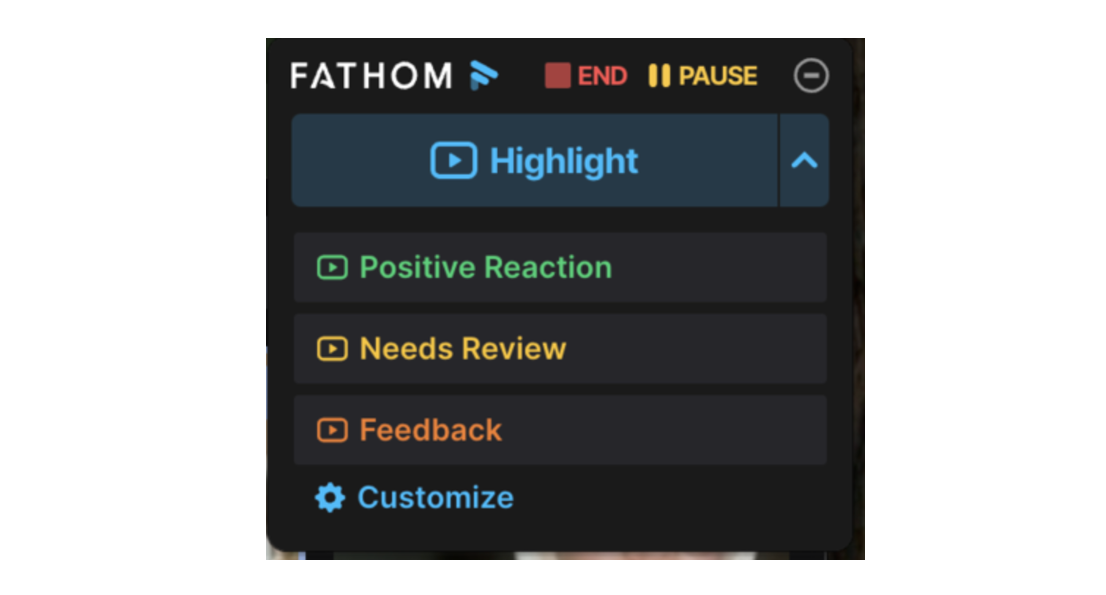
1. Real-Time Highlight Delivery During Live Calls.
When a Fathom user clicks the highlight button during a live recording, Fathom retroactively captures that segment and posts the clip to the configured Slack channel.
Source: Fathom
A sales manager monitoring a channel during deal cycles can watch clips surface from calls they're not attending: a pricing objection, a competitive mention, a buying signal, all within seconds of occurring on the call.
2. Post-Meeting AI Summary Auto-Post.
When a Fathom recording finishes processing (typically within about 30 seconds of a call ending), Fathom can automatically post the full AI-generated summary to a configured Slack channel. The summary includes the meeting recap, extracted action items, and a link back to the full recording.
For recurring meeting types, the channel accumulates consistent structured output after every session: a manager can scroll the #cs-team channel and see every customer call summary from the past month.
3. AI Search Keyword Tracker Alerts.
Fathom's AI Search feature lets users configure keyword subscriptions that monitor all new recordings for specific terms. When new recordings match, Fathom pushes a real-time Slack notification into a public channel.
A competitive intelligence channel receives alerts every time a new call mentions a competitor name. A product channel monitors for "API integration" or "missing feature." No one needs to manually review recordings or run reports: Fathom monitors every new call and triggers the Slack notification on match.
4. Native Setup Without Third-Party Automation.
The core Slack capabilities (highlights, summaries, AI Search alerts) all flow through Fathom's native integration with no intermediate automation layer to maintain or debug.
Slack Pricing
Slack uses per-seat pricing:
Free: $0/user/month. Incoming webhooks supported (sufficient to receive Fathom output). 90-day message history.
Pro: $7.25/user/month (annual). Unlimited message history, unlimited app integrations.
Business+: $15/user/month (annual). SAML SSO, custom retention policies, priority support.
Enterprise+: Custom pricing. Multi-workspace management, DLP, legal holds.
The Fathom-Slack integration functions on all Slack tiers. On the Fathom side, full unlimited automation integration access requires the Team plan at $15/user/month (annual).
Who Should Use the Slack Integration?
Teams with stakeholders who need visibility into call outcomes without attending every meeting or receiving manually written recaps from the host
Organizations that want a passive competitive or market intelligence feed by tracking keyword mentions across all team recordings and having matches surface automatically in a dedicated Slack channel
Teams running recurring calls (sales, customer success, onboarding) where a structured AI summary landing in Slack after each call replaces the manual follow-up message the host currently writes
5. Asana: Best Fathom Integration for Converting Meeting Action Items into Tracked Project Tasks
Source: Asana
Asana is a work and project management platform that integrates with Fathom to convert AI-detected action items from meetings into structured tasks inside Asana projects, complete with a direct link to the exact recording timestamp where each task was spoken.
Key integration capabilities include:
Native, first-party sync of Fathom action items to a designated Asana project as individual tasks
Per-task recording timestamp links that let assignees jump to the exact moment in the call where the action item originated
Both manual (one-click Sync to Asana button) and fully automatic post-meeting sync modes
Available on all Fathom plan tiers at no additional cost
How Asana Integrates with Fathom
Source: Asana
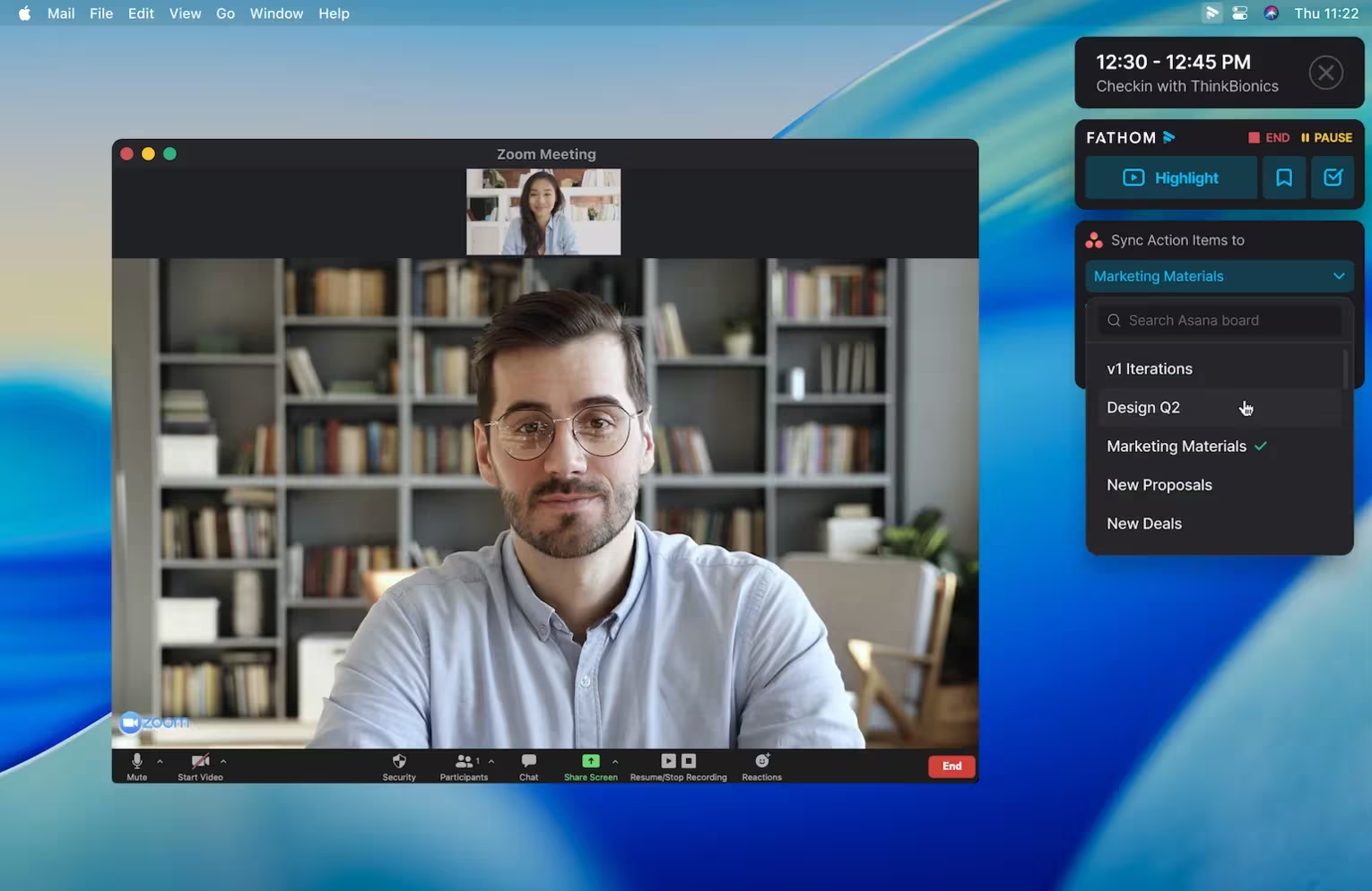
The Fathom-Asana integration is a native, first-party connection. Setup happens entirely within Fathom: navigate to Settings, open the Task Manager section, select Asana as your task destination, and choose which Asana project should receive the synced tasks.
No Asana-side configuration or developer involvement is required. This is a native first-party connector.
1. Native Action Item Sync with Recording Timestamp Links.
When Fathom finishes processing a meeting, it identifies action items from the transcript and creates a corresponding task in the designated Asana project. Each Asana task includes a direct link to the exact moment in the Fathom recording where that action item was spoken.
The assignee can click through from the Asana task and hear the surrounding conversation, catching nuance that the text description alone doesn't capture.
For paid Asana users, this timestamp link appears as a dedicated custom field column in the project view; free Asana users receive the same link in the task description.
2. Manual vs. Automatic Sync Modes.
In manual mode, a Sync to Asana button appears in Fathom's action items panel after a meeting ends, letting the recording owner selectively push tasks on a call-by-call basis. In automatic mode, every meeting triggers a sync after processing completes.
Manual mode keeps the Asana project clean when meetings don't warrant task tracking; automatic mode ensures nothing slips through for teams that run the same meeting cadence repeatedly.
3. Cross-Platform Compatibility.
The integration is available without additional cost on all Fathom plan tiers, including the free plan. On the Asana side, the integration works with both free and paid accounts.
Paid Asana users see the recording timestamp link and meeting title as dedicated custom field columns in the project view; free Asana users receive the same content in the task description.
One scope constraint: only the recording owner's action items sync to Asana. If a meeting involves four participants and Fathom identifies action items assigned to three of them, only the items belonging to the person who recorded the meeting transfer. Each synced task is assigned in Asana to the recording owner.
Asana Pricing
Asana uses a per-seat pricing model:
Personal (Free): Up to 2 users. Unlimited tasks and projects. No custom fields (recording link appears in task description).
Starter: $10.99/user/month (annual). Custom fields, unlimited automations, timeline view. Recording timestamp link appears as a structured column.
Advanced: $24.99/user/month (annual). Goals, Portfolios, Workload, advanced integrations with Salesforce and Tableau.
Enterprise: Contact sales. SAML SSO, HIPAA compliance, advanced admin controls.
For most teams, the Starter plan ($10.99/user/month annually) is the practical entry point: it unlocks custom fields that give the recording timestamp link a structured column in the project view.
Who Should Use the Asana Integration?
Teams that run recurring project meetings (kickoffs, weekly syncs, cross-functional reviews) where action items need to be tracked in a shared project management system rather than buried in meeting notes
Organizations that want assignees to access the original recording context for any task without asking the meeting organizer to clarify what was meant
Teams looking to avoid Zapier dependencies for basic post-meeting task creation: Asana is the only major project management platform with a native first-party Fathom integration
6. Zapier: Best Fathom Integration for No-Code Workflow Automation Across Your Tool Stack
Source: Zapier
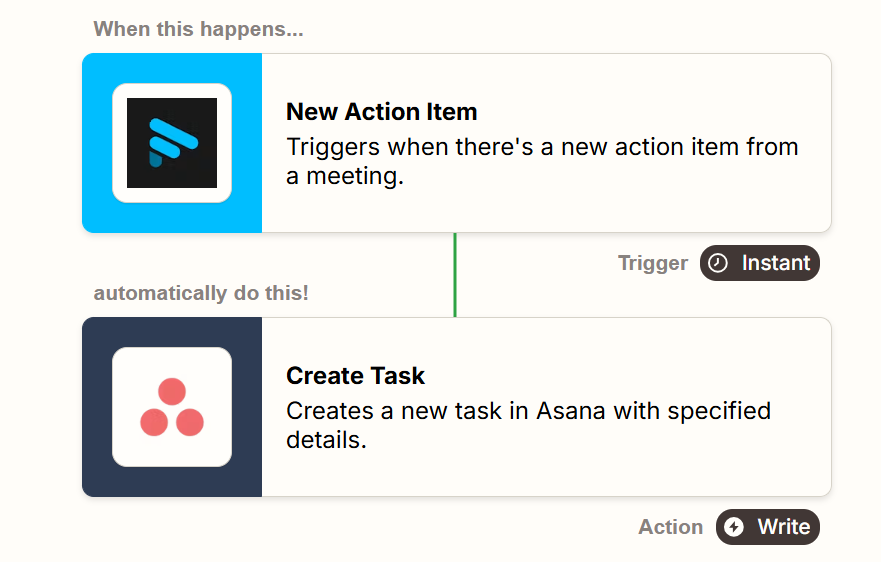
Zapier is a no-code workflow automation platform that integrates with Fathom to route meeting recordings, AI summaries, transcripts, action items, and highlights to over 9,000 connected apps when a meeting ends. It extends Fathom's reach to every tool in your stack that lacks a native Fathom connector.
Key integration capabilities include:
Five separate trigger events (New Recording, New AI Summary, New Action Item, New Transcript, New Highlights), each powering independent downstream workflows
Retroactive trigger processing that backfills recent past recordings into newly configured Zaps
Pre-built Zap templates for Google Drive archival, ClickUp and Jira ticket creation, and CRM field updates
Available on all Fathom plan tiers as of September 2025
How Zapier Integrates with Fathom
Source: Fathom
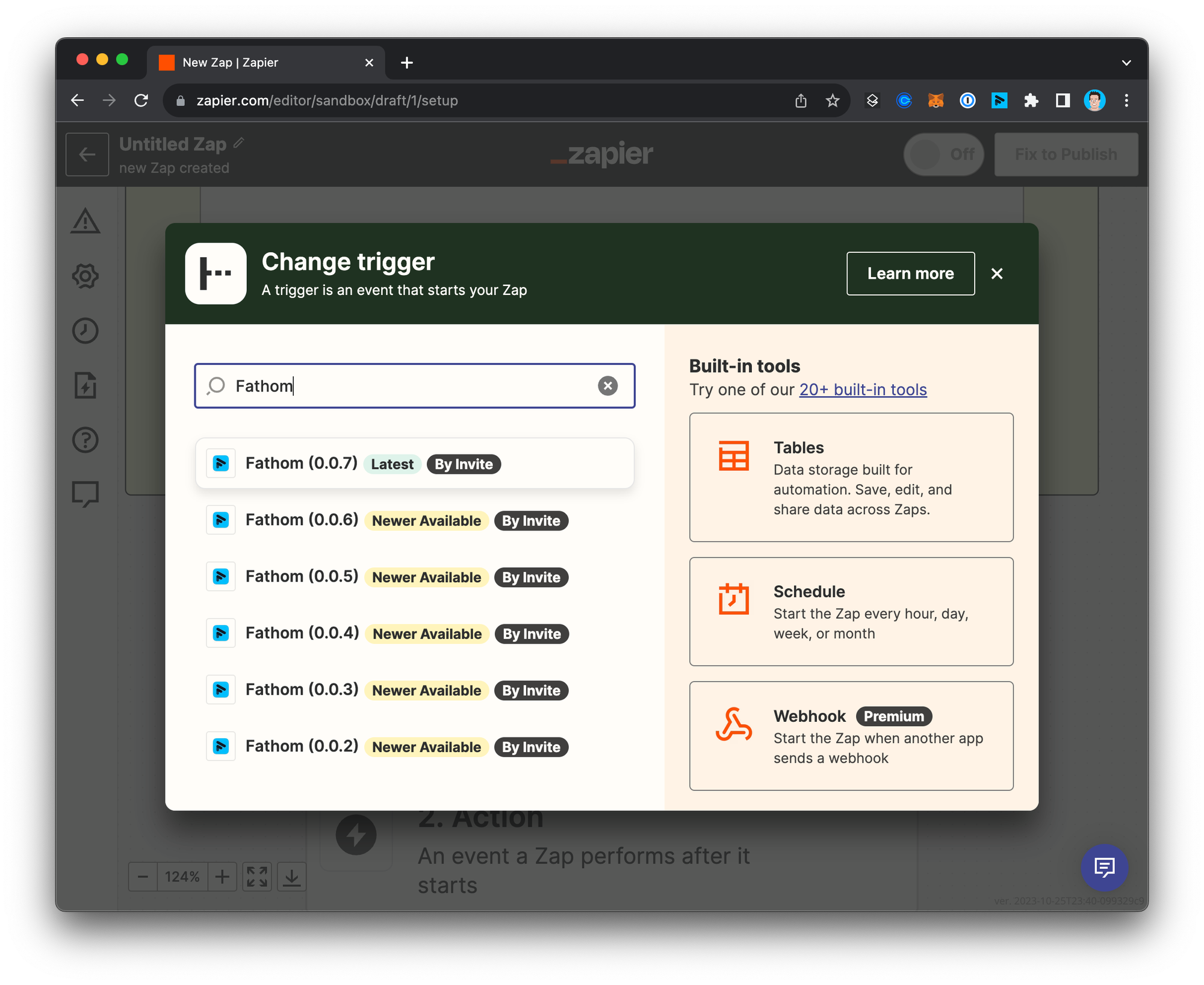
The Fathom-Zapier integration is a native connection configured through Fathom's integrations settings page, where users authenticate their Zapier account directly. Once connected, Fathom appears in Zapier's app directory as a trigger source. This is a native marketplace connector.
1. Five Distinct Trigger Events for Granular Routing.
Unlike integrations that fire a single "meeting completed" event, Fathom's Zapier integration exposes five separate triggers. The New Transcript trigger can route full recordings to organized Google Drive folders, while a separate Zap on New Action Item sends only extracted tasks to ClickUp or Jira.
A third Zap on New Highlights can push only bookmarked moments to a Slack channel. Different pieces of meeting output go to different tools through separate workflows firing in parallel.
2. Retroactive Processing of Existing Recordings.
When a new Zap is first turned on, Zapier can process a set of recent past recordings rather than waiting for the next live meeting. Teams adopting the integration mid-quarter can backfill historical meeting data into newly configured downstream systems. Zapier's deduplication engine ensures each recording only fires the Zap once.
3. Pre-Built Zap Templates for Common Workflows.
Fathom's presence in Zapier's template library provides pre-built workflow blueprints: sending summaries to Google Drive, creating ClickUp or Jira tasks from action items, logging meeting metadata to Google Sheets, and routing summary sections to CRM fields in tools outside Fathom's native integrations.
The CRM update use case is particularly valuable: many teams operate on CRMs (Pipedrive, Attio, Monday CRM, Close) that Fathom doesn't natively sync with, and a Zapier workflow extends Fathom's post-meeting data routing to those platforms.
4. Team Recording Scope and Plan Access.
Individual contributors on any Fathom plan can automate their own post-meeting outputs. Zaps that trigger on other team members' recordings require Fathom's Team plan ($15/user/month billed annually) or Business plan.
Zapier Pricing
Zapier uses task-based pricing where each action step counts as one task:
Free: 100 tasks/month, 2-step Zaps only, single user.
Professional: Starts at $19.99/month (annual) for 750 tasks. Multi-step Zaps, conditional logic, and Paths.
Team: Starts at $69/month (annual) for 2,000 tasks. Up to 25 users, shared workspace, SAML SSO.
Enterprise: Custom pricing. Unlimited users, SCIM provisioning, advanced admin controls.
Teams running high-frequency automations should model expected task consumption: a 3-step Zap firing on every call across a 10-rep team burns tasks quickly. Zapier's pay-per-task billing allows overages at 1.25x the plan's per-task cost.
Who Should Use the Zapier Integration?
Teams using project management tools (ClickUp, Jira, Linear, Monday.com) that aren't in Fathom's native integration list and want action items from calls to automatically create tasks
Organizations that need Fathom meeting summaries to route into CRMs beyond HubSpot and Salesforce, including Pipedrive, Attio, or Close, without custom development
Teams that want different pieces of meeting output (transcript, summary, action items, highlights) to flow to different destinations simultaneously rather than one place
7. Notion: Best Fathom Integration for Building a Searchable Meeting Knowledge Base
Source: Zapier
Notion is a workspace and knowledge management platform that integrates with Fathom to archive AI meeting summaries and full transcripts into structured Notion databases, turning every recorded conversation into a searchable, organized knowledge asset.
Key integration capabilities include:
Automated push of Fathom AI summaries to Notion database pages via Zapier or Make workflows
Full speaker-attributed transcript archival, making every spoken word searchable through Notion's native search
Structured database organization with meeting metadata (title, date, attendees) as filterable Notion properties
Pre-built Zapier templates and Make modules that reduce setup to about 10 to 15 minutes
How Notion Integrates with Fathom
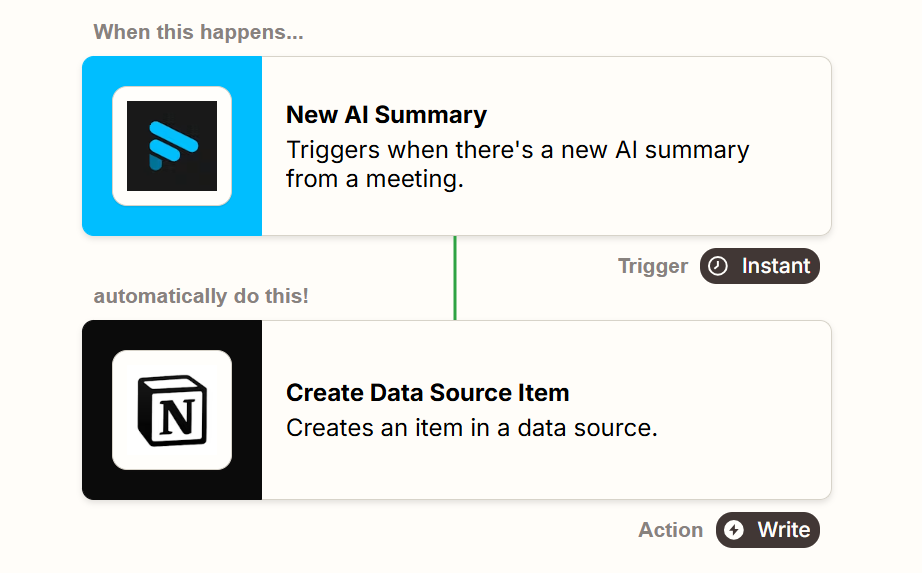
The Fathom-Notion connection is not a native direct integration. It requires a third-party automation platform: either Zapier or Make.
Fathom exposes triggers that fire when a new AI summary or transcript is ready, and each trigger connects to a Notion action that creates a new page in a designated database. The connection uses Zapier's or Make's native Fathom and Notion modules.
1. Automated AI Summary Archival to Notion Databases.
When a Fathom AI summary is generated, a Zapier or Make workflow catches that trigger and creates a new page inside a designated Notion database.
The workflow maps structured metadata from Fathom into Notion database properties: the meeting title, date, and attendee names populate distinct property fields rather than dropping into the page body as unstructured text.
Every Fathom summary becomes a filterable, sortable database item. Because Fathom offers 17 pre-built summary templates (Sales, Customer Success, One-on-One, Project Update, and more), the summary content arriving in Notion is already structured to the meeting type.
2. Full Transcript Storage for Complete Searchability.
A second workflow pushes the complete speaker-attributed transcript to the same Notion page as the summary. Over time, the team's Notion workspace accumulates a queryable record of every recorded conversation.
Fathom's Ask Fathom lets users query across their meeting library within Fathom; the Notion archive extends full-text searchability to the broader team, including members who don't hold Fathom seats, since Notion's sharing controls allow flexible guest access.
3. Organized by Project, Client, or Team Using Notion Views.
Because each summary arrives as a structured Notion database item with metadata properties, teams can build filtered views that group and surface calls across any relevant dimension. An account manager can filter by attendee email domain.
A product team can sort by date showing all calls tagged with a "Product Feedback" label. Notion's database views (Table, Board, Timeline, Calendar, Gallery) all draw from the same underlying meeting data.
Notion Pricing
Notion uses a per-seat pricing model:
Free: $0/user/month. Unlimited pages and blocks. Basic connections only; may not support Zapier/Make premium connections.
Plus: $10/user/month (about $8/month billed annually). Supports Zapier and Make connections. Minimum recommended tier for the Fathom-Notion workflow.
Business: $20/user/month (about $16/month billed annually). Notion AI bundled, Enterprise Search in beta, SAML SSO. Recommended for teams building a meeting knowledge base with AI search.
Enterprise: Custom pricing. SCIM provisioning, audit log, zero LLM data retention.
On the Fathom side, the Team plan ($15/user/month billed annually) is recommended for team-wide recording automation. The middleware layer (Zapier or Make) carries its own subscription cost.
Who Should Use the Notion Integration?
Teams that need a shared, searchable archive of past conversations accessible to members who don't hold Fathom seats: Notion's sharing controls make meeting content browsable without a Fathom login
Organizations that manage multiple client accounts or projects and want to filter meeting history by account, initiative, or team without manually organizing notes into folders
Teams already using Notion as their primary knowledge management workspace, making it the natural destination for meeting archives rather than a separate silo
Final Verdict
The best Fathom integrations carry meeting intelligence into the tools where your team works:
ZoomInfo: verified B2B data, buyer intent signals, and company intelligence that add the data layer Fathom's transcripts cannot capture; the highest-impact complement to Fathom if your pipeline depends on knowing more than what happens on the call
HubSpot: native post-call CRM sync that eliminates manual logging, with field-level property mapping and workflow triggers on the Business plan
Salesforce: enterprise CRM logging with auto-sync to Contacts, Accounts, and Opportunities, plus Deal View linking every conversation to its Opportunity record
Slack: real-time highlight delivery during live calls, instant AI summary posting, and keyword-triggered alerts that keep your team informed without attending every meeting
Asana: native action item sync that turns meeting tasks into tracked Asana work items with recording timestamp links for full context
Zapier: no-code reach into 9,000+ apps for teams that need meeting output routed to tools Fathom doesn't connect to natively
Notion: structured meeting archival that builds a searchable knowledge base accessible to the entire organization
These integrations compound: you might run HubSpot for CRM sync, Slack for real-time notifications, Asana for task tracking, and Zapier for routing to your remaining tools simultaneously, each extending the value of the others.
If your team's meeting-driven workflow depends on data quality beyond what conversations capture, start with the intelligence layer. ZoomInfo's free Lite tier includes CRM integrations and 10 monthly export credits, so you can see what verified B2B data and buyer intent signals do for your pipeline before committing to a subscription.
Frequently Asked Questions
How many integrations does Fathom support?
Fathom offers native integrations with HubSpot, Salesforce, Slack, Asana, Zoom, Google Meet, and Microsoft Teams. Through its Zapier connector, Fathom extends to over 9,000 additional apps, and Make and n8n provide alternative automation pathways.
Fathom also provides a public REST API with TypeScript and Python SDKs, webhooks for event-driven automation, and an MCP server for AI assistant connectivity with ChatGPT and Claude.
Do Fathom integrations work on the free plan?
Many integrations work on Fathom's free plan, including basic CRM sync with HubSpot and Salesforce (up to 3 users per domain), the Asana action item sync, Zapier automation (with limited use), and full API access.
Team collaboration features, unlimited automation integrations, and CRM field-level sync require paid plans. The Team plan ($15/user/month annual) unlocks unlimited automations and team recording access; the Business plan ($25/user/month annual) adds field-level CRM sync, Deal View, and coaching scorecards.
Can I connect Fathom to CRMs other than HubSpot and Salesforce?
Yes. While HubSpot and Salesforce have native first-party integrations, Fathom's Zapier connector extends CRM sync to virtually any CRM that supports Zapier, including Pipedrive, Attio, Monday CRM, Close, and Copper.
The Zapier integration exposes five separate trigger events (New Recording, New AI Summary, New Action Item, New Transcript, New Highlights), so teams can route specific meeting data to specific CRM fields through no-code workflows.
How does Fathom match meeting data to CRM records?
Fathom matches meeting attendees to CRM records by comparing email addresses on the calendar invite against existing Contact records in HubSpot or Salesforce. When a match is found, meeting summaries automatically attach to the matched Contact, Company/Account, and any associated open Deals/Opportunities.
The attendee must be on the calendar invite for the match to fire, and in Salesforce, the integration connects to Contacts only (not Leads).
Does Fathom support real-time notifications during calls?
Yes, through the Slack integration. When a user clicks Fathom's highlight button during a live call, Fathom retroactively captures that segment and posts the clip to the configured Slack channel.
This lets stakeholders observe critical moments (pricing objections, competitive mentions, buying signals) as they happen rather than waiting for a post-call debrief. AI Search keyword subscriptions can also push real-time Slack notifications whenever new recordings match tracked terms.
Can Fathom automatically create project tasks from meetings?
Fathom's native Asana integration converts AI-detected action items into Asana tasks with recording timestamp links, available on all Fathom plan tiers. For other project management tools (ClickUp, Jira, Linear, Monday.com), the Zapier integration routes action items as task-creation triggers.
Each Asana task includes a direct link to the exact moment in the recording where the action item was spoken, giving assignees full conversational context.
Is Fathom secure enough for enterprise use?
Fathom holds SOC 2 Type II certification, GDPR compliance, and HIPAA compliance with a blanket Business Associate Agreement. None of Fathom's AI sub-processors (Anthropic, OpenAI, Google) are contractually permitted to use customer data for training.
The platform supports SSO via SAML 2.0, SCIM provisioning through Okta, and custom data retention policies on the Business plan. All data is stored in the United States, with EU/UK users able to request Data Processing Agreements.
What is the best way to add B2B intelligence to your Fathom workflow?
Fathom captures what happens on calls, but it cannot verify contact data, detect which accounts are in-market, or surface company intelligence before the conversation starts.
ZoomInfo fills that gap by enriching the same CRM records Fathom syncs to with verified emails, direct dials, company attributes, technographic profiles, and buyer intent signals from a database covering 500 million contacts and 100 million companies.
The enrichment runs continuously through a verification pipeline backed by 300+ human researchers, and intent data identifies accounts actively researching topics relevant to your product. For teams where meeting follow-ups compete for attention, ZoomInfo's signals help prioritize which accounts to act on first based on real buying behavior, not just the last conversation.
