
The question a developer asks about any new API is not whether it exists, but whether there is enough surface to justify the integration work.
Granola's API is a read-only REST surface, launched in February 2026, that gives programmatic access to a workspace's meeting notes, transcripts, and AI-generated summaries. The developer docs are public, the endpoints are named, and the rate limits are published. For a platform that bills itself as an AI meeting notepad, shipping an API signals intent to become infrastructure, not just a desktop app.
But intent and API maturity are different things.
Granola's API does one thing: let you read meeting notes and transcripts out of Granola workspaces. If your build needs to pull structured meeting data into a knowledge base, a CRM, or a custom AI workflow, the API is scoped for that job. If you need to write data back into Granola, subscribe to real-time events when new meetings are captured, or access B2B intelligence beyond what was said in a meeting (contact enrichment, company data, intent signals, org charts), that is a different layer of the stack.
This is where ZoomInfo enters the picture. As a GTM platform, ZoomInfo offers an Enterprise API, a REST suite covering search, enrichment, AI intelligence, and audience management across 500M contacts and 100M companies, with an MCP server for AI-agent workflows. Where Granola's API surfaces what was discussed, ZoomInfo's API surfaces who discussed it, what companies they represent, and whether those accounts are worth pursuing.
This review covers the Granola API in technical depth first (authentication, endpoints, rate limits, and pricing), then reviews ZoomInfo's API as the intelligence layer that picks up where meeting context stops.
Granola API at a Glance
Attribute | Detail |
|---|---|
API type | REST over HTTPS, JSON responses |
Authentication | Bearer token (API key prefixed with grn_) |
Base URL | https://public-api.granola.ai |
Current version | v1.2.0 (May 2026) |
Rate limits | 25-request burst / 5 requests per second sustained (300 requests/minute) |
SDKs | None; cURL examples only |
Webhooks | Not supported |
Documentation | docs.granola.ai/introduction (Mintlify-hosted) |
Pricing / access | Included on Business ($14/user/month) and Enterprise ($35/user/month) plans; not available on the free tier |
Granola API: What Works Well & What to Plan Around
What works well | What to plan around |
|---|---|
Public docs with no login wall and inline cURL examples | Read-only: no create, update, or delete operations |
Clean endpoint design with typed ID patterns and cursor pagination | Three endpoints total; the entire surface is list notes, get note, and list folders |
Transcript includes timestamps and speaker source labels | No webhooks or event streaming; polling is the only option for new data |
Summary available in both plain text and markdown formats | No official SDKs in any language |
Enterprise admins can scope API key access (personal vs. public notes) | Pagination capped at 30 items per page |
Calendar event metadata and attendee data included in note responses | Notes without a completed AI summary are excluded from all responses |
Granola API: Authentication & Getting Started
API access is available to any workspace member on a Business or Enterprise plan. There is no separate developer signup, no approval gate, and no enterprise-only restriction beyond the plan tier. The free (Basic) plan does not include API access.
Keys are created inside the Granola desktop app at Settings > Connectors > API keys. During creation, the user selects one or more access scopes:
Personal notes: notes the user owns, notes shared with them, and notes in private folders shared with them
Public notes: notes visible to everyone in the workspace and notes in the Team Space
On Enterprise plans, workspace admins can also control permitted API scopes via Settings > Workspace > General > API access for members. Keys can be edited after creation to change scopes or revoked permanently.
Authentication is straightforward. Every request includes an Authorization: Bearer <token> header, where the token is a Granola API key prefixed with grn_:
curl "https://public-api.granola.ai/v1/notes?page_size=5" \
-H "Authorization: Bearer grn_YOUR_API_KEY"
There is no OAuth flow, no token exchange, and no rotating credentials. The simplicity is a tradeoff: Bearer token auth is easy to implement but offers no delegated access model. If you are building a multi-tenant integration where each customer authenticates with their own Granola workspace, each customer must generate and share an API key manually.
One constraint worth noting: the MCP connector uses browser-based OAuth rather than API keys, and Granola recommends it for AI assistant integrations (Claude, ChatGPT, Cursor, and others). If your integration target is an MCP-compatible tool, the MCP route bypasses the API entirely.
Granola API: Core Endpoints & Capabilities
The API is read-only and organized around two resources: notes and folders. As of v1.2.0, the entire endpoint surface consists of three GET operations.
Notes
The notes surface gives you access to meeting data: summaries, transcripts, attendees, and calendar metadata.
List Notes: GET /v1/notes
Returns a paginated list of accessible meeting notes. Query parameters support filtering by time range (created_before, created_after, updated_after in ISO 8601), by folder (folder_id, validated against the pattern ^fol_[a-zA-Z0-9]{14}$), and pagination via cursor and page_size (default 10, max 30).
The response shape:
{
"notes": [...],
"hasMore": true,
"cursor": "next_page_cursor_string"
}
Each note in the list includes id, object, title, owner (name and email), created_at, and updated_at. Full content requires a separate Get Note call.

Source: Granola API
Get Note: GET /v1/notes/{note_id}
Retrieves a single note by ID (pattern: ^not_[a-zA-Z0-9]{14}$). The full response includes:
title, owner, created_at, updated_at, web_url
calendar_event: event title, invitees, organizer, start and end times
attendees: name and email array
folder_membership: folder hierarchy
summary_text and summary_markdown: the AI-generated meeting summary in plain text and markdown
transcript: array of segments with speaker source, text, and timestamps (must be requested via the include query parameter)

Source: Granola API
The transcript format differs by platform. On macOS, the transcript is a continuous exchange without named speaker labels. On iPhone, speaker identification labels speakers as Speaker A, Speaker B, and so on, which carries through to the API response. The API documentation includes example response shapes for both.
What you would build with this: a nightly sync that pulls completed meeting notes into a team knowledge base, a CRM pipeline that extracts action items and attendee data from sales call summaries, or an AI agent that queries recent meetings to prepare briefings.
Folders
List Folders: GET /v1/folders
Added in v1.1.0 (April 2026). Returns a paginated, alphabetically sorted list of accessible folders. Each folder includes id, object, name, and parent_folder_id for hierarchy navigation. The primary use case is discovering folder_id values for filtering the List Notes endpoint.
What the API Does Not Cover
The read-only scope is a deliberate design decision, but it defines a clear boundary for what you can build:
No create, update, or delete operations on notes, folders, or any other resource
No search or full-text query endpoint; filtering is limited to date ranges and folder IDs
No access to in-progress or unsummarized notes; the API returns only notes with a completed AI summary and transcript
No user management, workspace configuration, or template operations
No integration-management endpoints (CRM sync, Slack distribution, or MCP configuration)
Granola API: SDKs, Docs & Rate Limits
SDKs & Libraries
Granola does not publish official SDKs in any language. The API reference provides raw cURL examples only. No JavaScript, Python, or other language-specific packages appear in the documentation. Developers integrate directly over HTTP.
For a three-endpoint, read-only API, the absence of SDKs is not a serious barrier. The request/response shapes are simple enough that a wrapper adds little beyond convenience. But it signals where the API is in its lifecycle: four months old and still expanding.
Documentation & Developer Experience
The API documentation lives at docs.granola.ai/introduction, built on Mintlify. The reference section is compact: one overview page, three endpoint pages, and a changelog.
Each endpoint page includes the full request/response schema, all query parameters with types and validation patterns (regex patterns for note and folder IDs like ^not_[a-zA-Z0-9]{14}$), and inline cURL examples with sample response bodies.
The introduction page includes a quick-start walkthrough showing how to list recent notes, paginate using a cursor, and fetch a specific note with a transcript.
The changelog tracks three versions with dates and changes:
v1.0.0 (February 2026): initial release
v1.1.0 (April 2026): folder support added
v1.2.0 (May 2026): expanded access scope controls
What the docs lack: no OpenAPI/Swagger spec download, no Postman collection, no sandbox environment, and no interactive "Try It" explorer. For a developer evaluating the API, this means you need an active Granola account with a Business or Enterprise plan to test anything. There is no way to explore the API without committing to a paid plan first.
Rate Limits & Constraints
Rate limits are published clearly:
Metric | Value |
|---|---|
Burst capacity | 25 requests |
Time window | 5 seconds |
Sustained rate | 5 requests/second (300 requests/minute) |
Exceeding the limit returns 429 Too Many Requests. Two additional constraints shape what you can build:
Pagination ceiling: Both List Notes and List Folders cap at 30 items per page. For workspaces with thousands of meetings, initial data loads require many sequential paginated requests.
No unsummarized notes: The API excludes notes that have not completed AI processing. If your pipeline depends on capturing meeting data right after a call ends, there is a delay between the meeting and the note appearing in the API.
The 5 req/sec sustained rate is modest but adequate for a read-only meeting notes API. A nightly sync pulling 500 notes would take under three minutes with cursor pagination. Polling for new notes works but wastes requests without webhooks to signal when new data is available.
Granola API Pricing & Access Costs
Granola bundles API access into its paid subscription plans rather than charging per call or per record. The pricing page breaks down simply:
Basic (free): No API access
Business ($14/user/month): API access included
Enterprise (from $35/user/month): API access included, plus admin controls over which API scopes members can use
There are no per-call charges, no credit system, no overage fees, and no usage-based API pricing. Annual billing is not currently available; all plans bill monthly. Cancellation is allowed at any time with no penalty; the subscription remains active through the end of the current billing cycle.
For a developer sizing costs: a team of 10 on the Business plan pays $140/month total, and every member can create API keys. The Enterprise plan at $35/user/month ($350/month for 10 users) adds SSO, SCIM, admin-controlled API scopes, and org-wide model training opt-out. The jump from $14 to $35 per user (a 150% increase) buys enterprise governance features, not additional API capacity.
Where the Granola API Falls Short
These are the practical limits a developer should plan around. Several reflect where Granola's API is in its lifecycle (four months old, three endpoints) and what the platform is (a meeting notepad, not a data infrastructure layer).
The API is read-only.
There are no create, update, or delete operations. You can pull meeting data out of Granola, but you cannot push data in, create notes programmatically, update existing notes, manage folders, or trigger any action. For builds that need bidirectional sync (writing CRM data back into meeting notes, for example), the API does not support the write side.
No webhooks or event streaming.
There is no mechanism to receive push notifications when new notes are created or updated. Detecting new meetings requires polling the List Notes endpoint with an updated_after filter, which wastes requests and introduces latency between the meeting ending and your pipeline seeing the data.
Three endpoints is a narrow surface.
The entire API consists of list notes, get notes, and list folders. There are no endpoints for users, workspaces, templates, integrations, or transcripts independent of notes. Developers building anything beyond "pull notes into another system" will hit the boundary quickly.
No search or query capability.
Filtering is limited to date ranges and folder IDs. There is no full-text search, no keyword matching, no attendee-based filtering, and no way to query notes by meeting platform, topic, or any content attribute. Finding specific meeting data requires pulling all notes within a time range and filtering client-side.
Meeting context only, no B2B intelligence.
The API returns what was said in meetings. It does not return who the attendees are beyond name and email, what companies they represent, what those companies look like (revenue, headcount, tech stack), or whether those accounts are worth pursuing.
For a developer building a pipeline that needs to act on meeting data (prioritize follow-ups, enrich contacts, route leads), the gap between "meeting happened" and "here is what to do about it" is significant.
No official SDKs, no OpenAPI spec, no sandbox.
Developers work with raw HTTP and cURL examples. There is no downloadable spec to generate client code, no interactive explorer, and no way to test the API without a paid Granola account.
ZoomInfo API: The Intelligence Layer Beyond Meeting Context
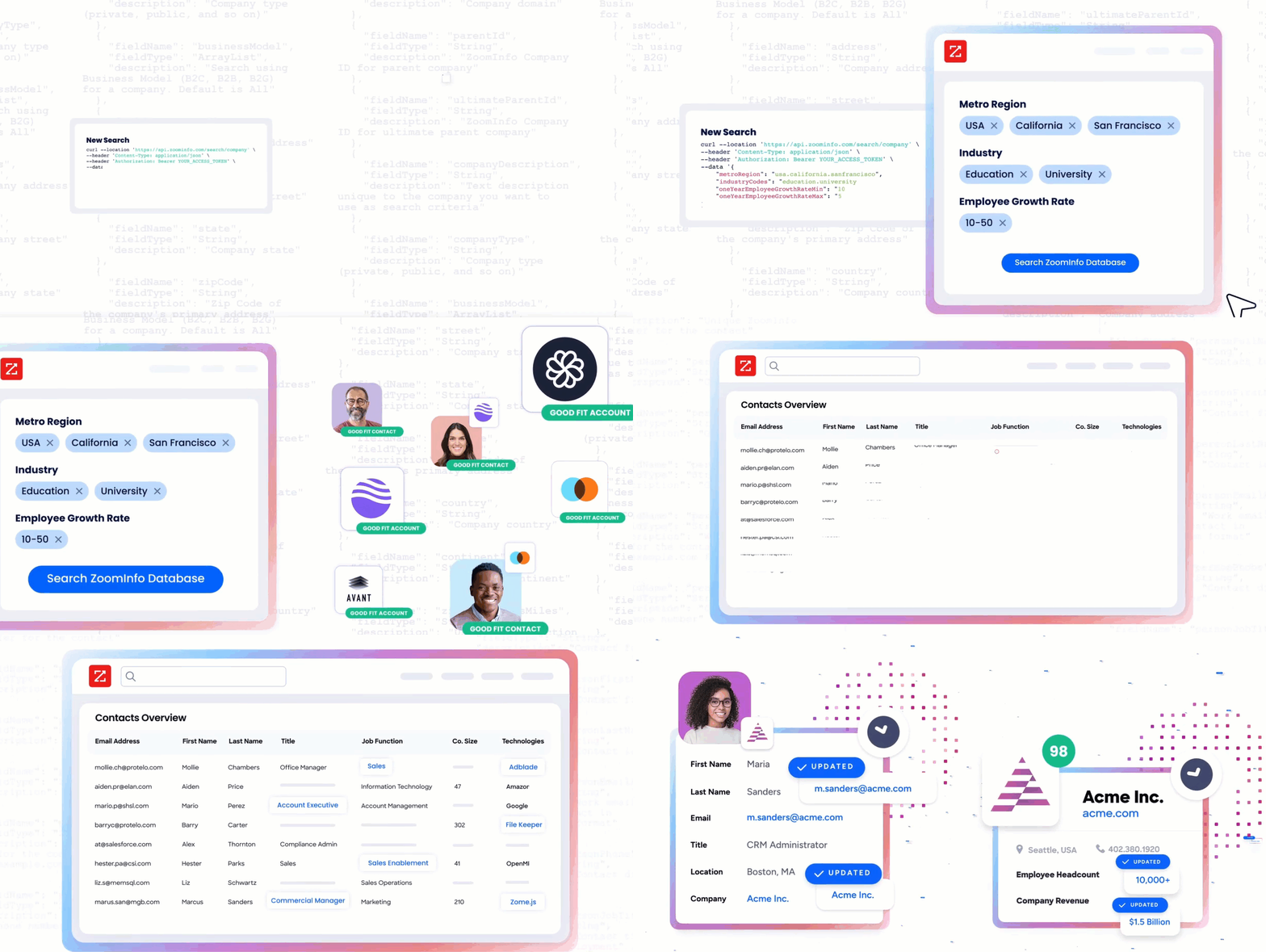
Granola's API tells you what was discussed in a meeting. ZoomInfo's API tells you who was in that meeting, what company they work for, what that company's technology stack looks like, whether the account shows buying intent, and where the attendees sit in the org chart.
The two APIs operate at different layers of a data pipeline. A developer building a meeting-to-action workflow would use Granola's API to extract conversation data and ZoomInfo's API to enrich it with the B2B intelligence that drives what happens next. That intelligence comes from ZoomInfo's GTM Context Graph, which processes 1.5B+ data points daily by combining ZoomInfo's B2B data with your first-party signals.
Source: ZoomInfo
What the API Covers
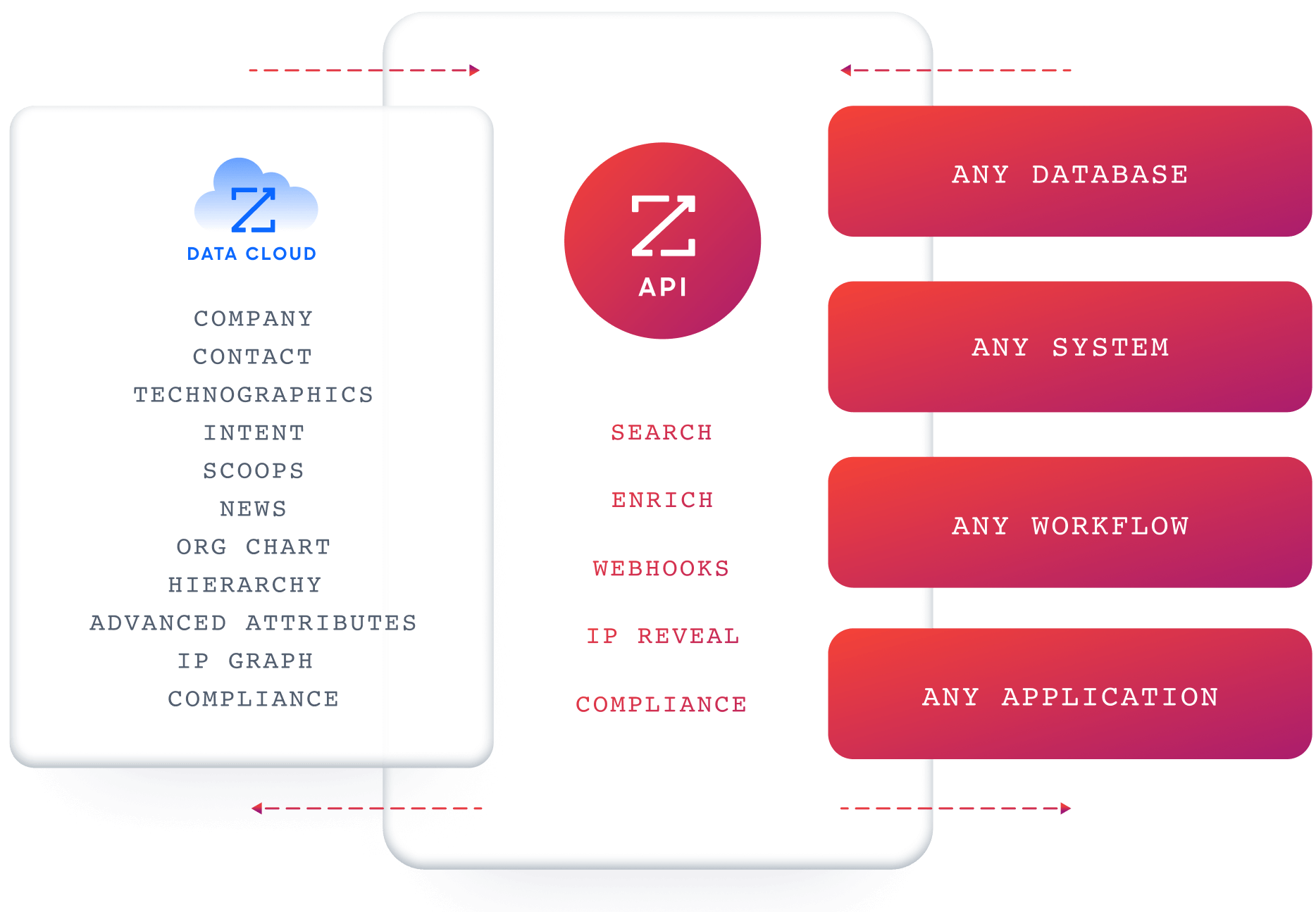
ZoomInfo's Enterprise API is a REST suite served from https://api.zoominfo.com/gtm, organized into four areas documented in the interactive API reference:
Data API (Search & Enrich): Search endpoints cover Contacts, Companies, Intent, News, and Scoops, returning matched records without consuming credits. Enrich endpoints unlock full payloads: business emails, direct dials, employment history, corporate hierarchy, org charts, technographics, and hashtag signals, accepting up to 25 records per call. The underlying dataset spans 500M contacts, 100M companies, 135M+ verified phone numbers, and 200M+ verified business email addresses.
Copilot API (AI Intelligence): Account Summary returns structured account intelligence with a free-form Q&A endpoint. Find Similar Companies performs lookalike expansion. Contact Recommendations returns AI-ranked buying-committee suggestions by motion (prospecting, deal acceleration, renewals).
Marketing API: CRUD endpoints for programmatic audience management.
Platform API (Engagements, Beta): Bidirectional engagement data via the Engagements API.
Source: ZoomInfo
The pairing with a meeting notes API is direct: pull attendee emails from Granola's note response, use ZoomInfo's search endpoints to identify the contacts, enrich them with company data and intent signals, then route the meeting follow-up based on account intelligence rather than a summary alone.
Authentication & Access
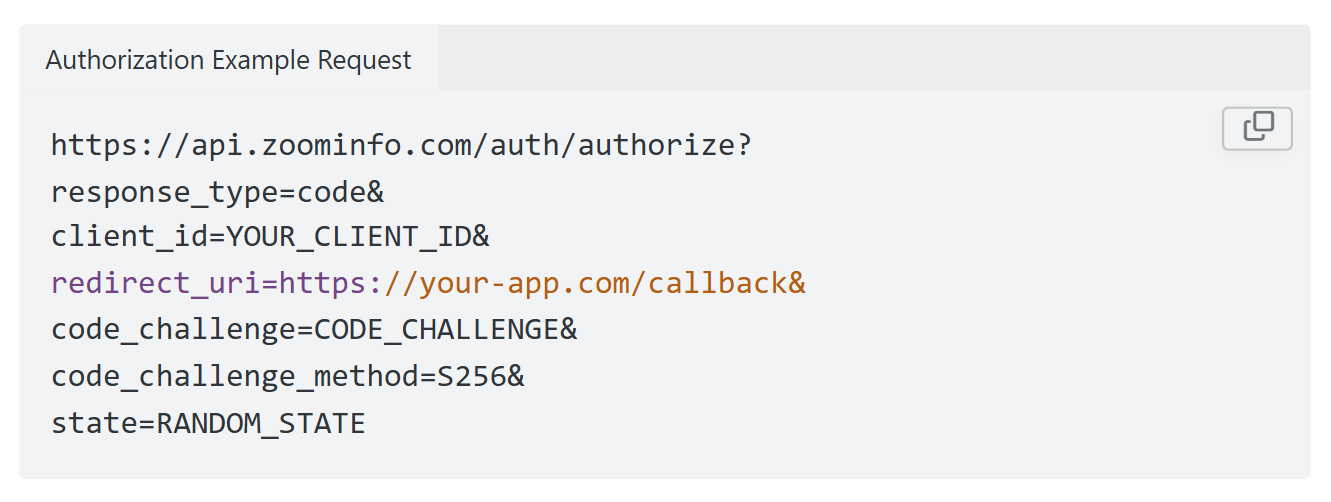
ZoomInfo uses OAuth 2.0 with PKCE via Okta, supporting three flows: Authorization Code with PKCE (web applications), Client Credentials (server-to-server), and Refresh Token. Access tokens are 24-hour Bearer tokens with rotating refresh tokens. Applications are registered through the ZoomInfo Developer Portal, where teams generate credentials, define scopes, and test endpoints.
This is a different authentication model from Granola's static API key. OAuth 2.0 supports delegated access, credential rotation, and scoped permissions, making it a better fit for multi-tenant integrations and enterprise security requirements.
Source: ZoomInfo
Rate Limits, Credits & Developer Experience
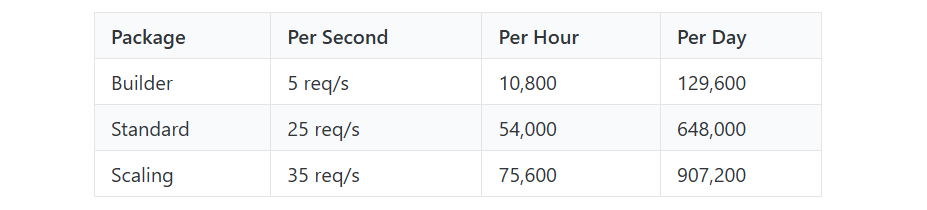
Rate limits are published by tier: Builder (5 req/sec), Standard (25 req/sec), and Scaling (35 req/sec), with per-hour and per-day sliding-window limits enforced simultaneously. Every response includes quota headers with remaining capacity, and 429 responses include a Retry-After header with exact backoff timing.
Source: ZoomInfo
Credits follow a rolling 12-month window: enriching a record for the first time consumes one credit; re-enriching the same record within the year is free. Search and lookup operations do not consume credits.
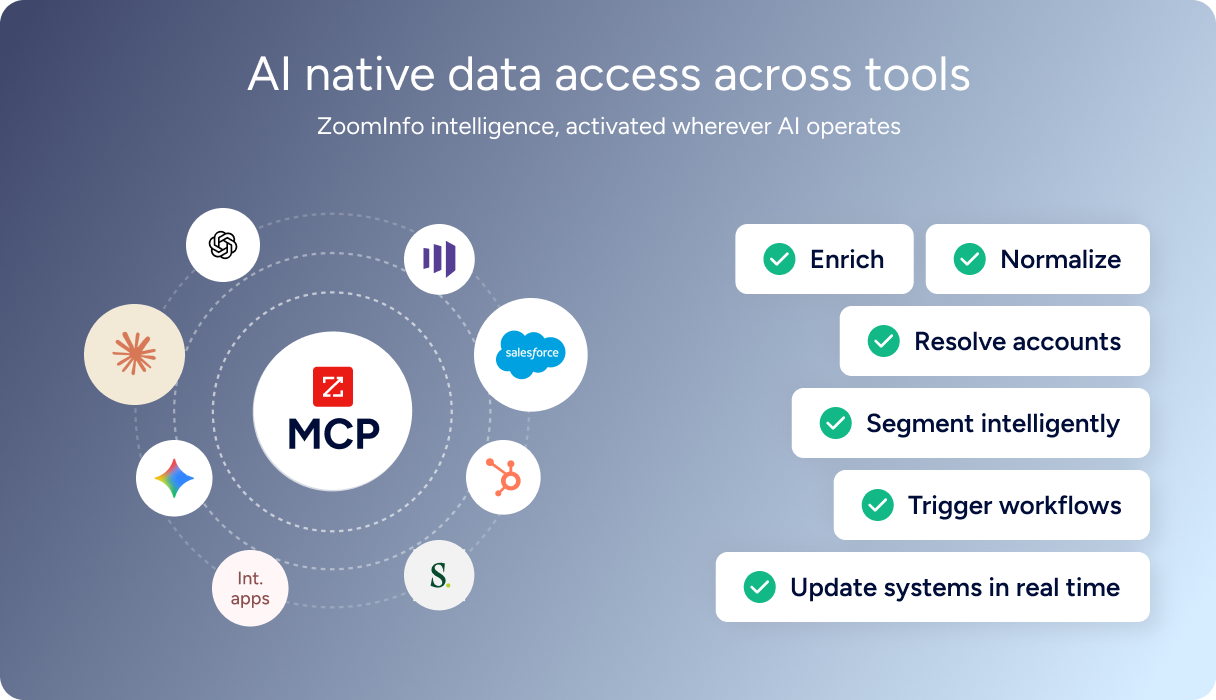
For developers building AI agents, ZoomInfo's MCP server at https://mcp.zoominfo.com/mcp exposes search, enrich, and account research as native tools for MCP-compatible assistants, currently supporting Claude and ChatGPT. Documentation lives at docs.zoominfo.com with an interactive API reference, OAuth recipes in five languages, and an llms.txt index for AI development tools.
Source: ZoomInfo
Neither platform publishes official SDKs, so both require direct HTTP integration. ZoomInfo uses consumption-based pricing and has added API access to all relevant plans.
BDO Canada reported an 87% reduction in time spent updating internal data dashboards using the ZoomInfo API, with one analyst describing the integration as plug-and-play across any process. (ZoomInfo)
Final Verdict
Granola's API is early-stage and tightly scoped. It does one job: let you read meeting notes, transcripts, and summaries out of Granola workspaces programmatically. The docs are clear, the endpoint design is clean, and the rate limits are published.
For a developer whose build starts and ends with extracting structured meeting data, it works today, with the understanding that three read-only endpoints define the current ceiling.
Choose the Granola API if you need to pull meeting notes and transcripts into a knowledge base, CRM, or custom AI workflow, and your build is about consuming meeting data, not acting on it. The $14/user/month Business plan includes API access with no per-call charges, making cost predictable.
Choose the ZoomInfo API if your build needs the intelligence layer downstream of meeting context: identifying who was in the meeting, enriching attendees with company data and org charts, detecting buying intent, and routing follow-ups based on account intelligence rather than conversation summaries alone. The search-then-enrich pattern (search is free, enrich consumes credits) and the Copilot API's AI intelligence endpoints cover the data and reasoning that a meeting notes API does not.
Explore the ZoomInfo Enterprise API or start with the developer docs to see the endpoint surface directly.
A developer who needs both meeting intelligence and B2B intelligence in the same pipeline should plan for both: Granola as the context capture layer, ZoomInfo as the enrichment and intelligence layer.
FAQ
Is the Granola API free?
No. API access requires a paid Granola plan. The Basic (free) tier does not include API access. The Business plan at $14/user/month is the entry point, with no per-call charges or credit system on top of the subscription. Enterprise starts at $35/user/month and adds admin controls over API key scopes.
Does Granola have a GraphQL API?
No. Granola exposes a REST API (currently at v1.2.0) over HTTPS with JSON responses. There is no GraphQL endpoint. If you need a GraphQL interface for meeting data, you would need to build a wrapper on top of the REST API.
What is the Granola API rate limit?
The published limits are a 25-request burst capacity with a sustained rate of 5 requests per second (300 requests per minute) over a 5-second window. Exceeding the limit returns a 429 response. Pagination is capped at 30 items per page for both the List Notes and List Folders endpoints.
Are there official Granola SDKs?
No. Granola does not publish official SDKs in any language. The API documentation provides raw cURL examples only. There are no maintained SDK packages, no GitHub repositories, and no community library links. Developers integrate directly over HTTP. For AI assistant integrations, the MCP connector (which uses browser-based OAuth) is the recommended alternative to the REST API.
Does the Granola API support webhooks?
No. The Granola API is read-only and pull-based. There is no webhook, event-streaming, or push-notification mechanism. Detecting new or updated meeting notes requires polling the List Notes endpoint with an updated_after filter. This is a real gap for event-driven architectures.
Can I use the Granola and ZoomInfo APIs together?
Yes, and there is a practical reason to do so. Granola's API returns structured meeting data including attendee names and emails, AI-generated summaries, and timestamped transcripts. ZoomInfo's API takes those attendee identifiers and enriches them with B2B intelligence: company data, org charts, direct-dial phone numbers, technographics, and buying intent signals.
The workflow is sequential: pull meeting notes from Granola, extract attendee emails, search and enrich those contacts via ZoomInfo, then route follow-ups based on account intelligence. ZoomInfo's MCP server extends the same data to AI-agent workflows, so an agent that reads Granola meeting context via MCP can query ZoomInfo for account intelligence in the same conversation.
The two APIs use different authentication models (static Bearer token vs. OAuth 2.0) and different pricing structures (subscription-bundled vs. credit-based), so plan the integration layer accordingly.
Other tools worth evaluating side by side:
